Vauxhall Grandland X (2023 year). Manual in english - page 3
 

  Index      Manuals     Vauxhall Grandland X (2023 year). Manual in english


Search            copyright infringement  


Content      ..     1      2      3      4      ..


Vauxhall Grandland X (2023 year). Manual in english - page 3


70

Instruments and controls

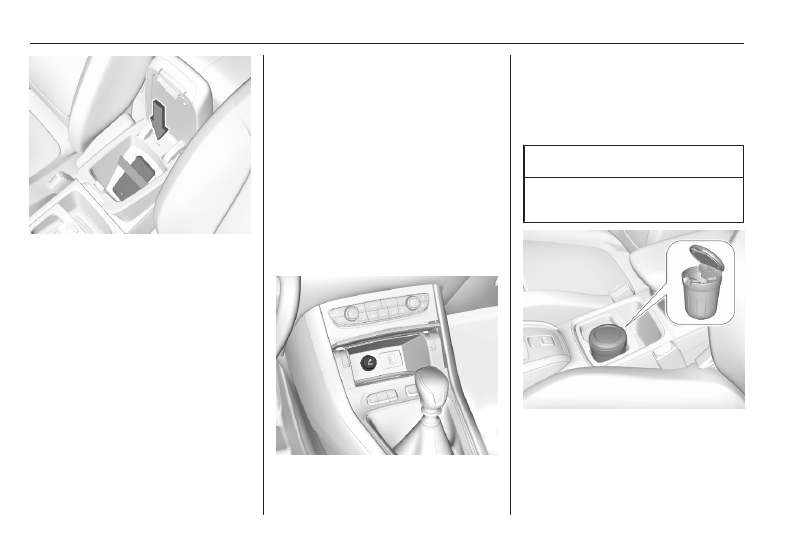
To charge a device, the ignition must

be switched on.
To charge a mobile device:

1. Remove all objects from the

charging device.

2. Place the mobile device with the

display facing upwards on the

charging device in the storage.

Use the elastic band to secure the

mobile device.

Charging status is indicated in the

LED: illuminates green, when mobile

device is charging.
PMA or Qi compatible mobile devices

can be charged inductively.

On some mobile devices, a back

cover with an integrated coil or a

jacket may be required to use

inductive charging.
Protective cover for the mobile device

could have impact on the inductive

charging.
In the event that the mobile device is

not charging properly, rotate it 180°

and place it on the charging device

again.

Cigarette lighter

The cigarette lighter is located behind

the storage cover. Press cover to

open.

Press in cigarette lighter. It switches

off automatically once the element is

glowing. Pull out cigarette lighter.

Ashtrays

Caution

To be used only for ash and not for

combustible rubbish.

A portable ashtray can be placed in

the cupholders.
Instruments and controls

71

Warning lights, gauges

and indicators

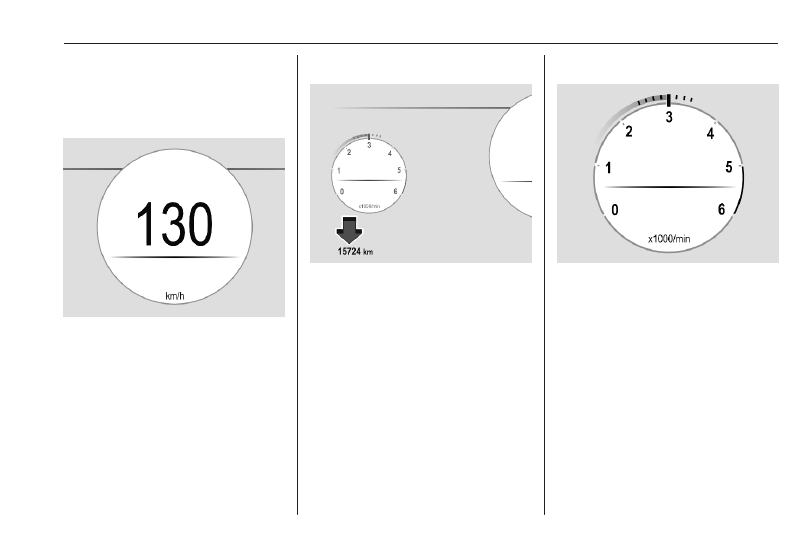
Speedometer

Indicates vehicle speed.

Odometer

The total recorded distance is

displayed in miles.

Tachometer

Displays the engine speed.
Drive in a low engine speed range for

each gear as much as possible.
A red marker indicates the beginning

of the warning zone of excessive

revolutions. For Diesel engines, the

warning zone starts at 5000

revolutions per minute. For petrol

engines, the warning zone starts at

7000 revolutions per minute.

72

Instruments and controls

Caution

If the needle is in the red warning

zone, the maximum permitted

engine speed is exceeded. Engine

at risk.

Fuel gauge

Control indicator 

r

 illuminates if the

fuel level is low.
Never run the fuel tank dry.
The top-up quantity may be less than

the specified fuel tank capacity, due

to the remaining fuel in the tank.

Battery gauge

The battery gauge displays the high

voltage battery state of charge.

Power indicator gauge

The power indicator gauge informs

about the current energy situation of

the vehicle.
Charge : Battery is being charged

with energy resulting from

braking or deceleration of

the vehicle

Eco

: An optimum in energy is

accessible in all driving

modes

Power : Vehicle is driven in a

dynamic driving style with

focus on performance

Instruments and controls

73

Engine coolant temperature

gauge

Displays the coolant temperature.
grey marking /

90

: normal operating

temperature

red marking

: temperature too

high

Control indicator 

o

 illuminates if

coolant temperature is too high.

Switch off engine immediately.

Caution

If engine coolant temperature is

too high, stop vehicle, switch off

engine. Danger to engine. Check

coolant level.

Engine oil level monitor

The state of the engine oil level is

displayed in the Driver Information

Centre for a few seconds following

the service information after switching

on the ignition.
A proper state of engine oil level is

indicated by a message.
If engine oil level is low, 

I

 flashes

and a message is indicated,

accompanied by the 

C

 indicator.

Confirm engine oil level by using the

dipstick and top up engine oil

respectively.
Engine oil 

3

 266.

A fault of measurement is indicated

by a message. Check engine oil level

manually by using the dipstick.

Service display

The service system informs when to

change the engine oil and filter or a

vehicle service is required. Based on

driving conditions, the interval at

which an engine oil and filter change

is required can vary considerably.
Service information 

3

 298.

If service is required within the next

1800 miles, the remaining distance or

time duration is indicated for several

seconds. Simultaneously 

C

illuminates permanently as reminder.
If service is required in less than

600 miles, 

C

 flashes and then

illuminates permanently. Remaining

distance or time duration is indicated

for several seconds.
Overdued service is indicated by a

message in the Driver Information

Centre which indicates the overdued

distance. 

C

 flashes and then

illuminates permanently until service

is executed.

Reset of service interval

After each service, the service

indicator must be reset to ensure

proper functionality. It is

recommended to seek the assistance

of a workshop.
If service is executed by yourself,

operate as following:

● switch off ignition

74

Instruments and controls

● press and hold SET / CLR
● switch on ignition, the distance

indication begins a countdown

● when the display indicates =0,

release SET / CLR

The symbol 

C

 disappears.

Retrieving service information

The status of the service information

can be retrieved at any time via the

Info Display. Press Check in the

vehicle settings menu. The service

information is displayed for a few

seconds.
Info Display 

3

 85.

Service information 

3

 298.

Control indicators

The control indicators described are

not present in all vehicles. The

description applies to all instrument

versions. Depending on the

equipment, the position of the control

indicators may vary. When the

ignition is switched on, most control

indicators will illuminate briefly as a

functionality test.
The control indicator colours mean:
red

: danger, important reminder

yellow : warning, information, fault

green : confirmation of activation

blue

: confirmation of activation

white : confirmation of activation

grey

: system paused, at least one

system limitation has been

detected

Control indicators are located in the

Driver Information Centre.
Driver Information Centre 

3

 84.

Overview

The numbers in the overview table

indicate what to do, when a control

indicator illuminates or flashes.

1 : only for information

2 : information and warning

3 : seek the assistance of a

workshop

4 : stop engine and seek the

assistance of a workshop

5 : have the cause of the fault

remedied immediately by a

workshop

6 : stop vehicle, do not continue the

journey and seek the assistance

of a workshop

O

1 Turn lights 

3

 76

X

2 Seat belt reminder

3

 76

v

5 Airbag and belt

tensioners 

3

 76

V

1 Airbag deactivation

3

 77

p

4 Charging system

3

 77

Z

5 Malfunction indicator

light 

3

 77

Instruments and controls

75

C

5 Service vehicle soon

3

 78

STOP 6 Stop engine 

3

 78

J

4 System check 

3

 78

READY 1 Hybrid system active

3

 78

i

5 Hybrid system fault

3

 78

R

6 Brake and clutch

system 

3

 78

m

,

o

1 /

2 /

5

Electric parking brake

3

 78, automatic

operation of electric

parking brake off

3

 79

E

5 Electric parking brake

fault 

3

 79

1

1 Parking assist 

3

 80

u

2 Antilock brake system

(ABS) 

3

 79

R

Gear shifting 

3

 79

)

1 Lane departure

warning 

3

 79

L

2 Lane keep assist

3

 79

O

2 Advanced lane keep

assist 

3

 80

b

2 /

5

Electronic Stability

Control and Traction

Control system 

3

 80

9

2 Electronic Stability

Control and Traction

Control system off

3

 80

W


o

4 Engine coolant temper‐

ature high 

3

 80

!

1 Preheating 

3

 81

%

2 /

3

Exhaust filter 

3

 81

Y

AdBlue 

3

 81

w

2 /

3

Deflation detection

system 

3

 81

I

4 Engine oil pressure

3

 81

Y

2 Low fuel 

3

 82

j

2 Charging cable

connected 

3

 82

M

2 Reduced engine power

3

 82

a

6 High voltage battery

temperature high

3

 82

D

1 Autostop 

3

 82

8

1 Exterior light 

3

 82

9

1 Low beam 

3

 82

C

1 High beam 

3

 82

f

1 High beam assist

3

 83

>

1 Front fog lights 

3

 83

ø

1 Rear fog light 

3

 83

<

1 Rain sensor 

3

 83

K

3 Pedestrian safety alert

fault 

3

 83

76

Instruments and controls

B

1 Side blind spot alert

3

 83

Ø

2 /

3

Active emergency

braking 

3

 83

4

2 /

3

Traffic sign assistant

3

 83

h

2 Door open 

3

 84

Turn lights

O

 illuminates or flashes green.

Illuminates briefly

The parking lights are switched on.

Flashes

Turn lights or the hazard warning

flashers are activated.
Rapid flashing: failure of a turn light or

associated fuse, failure of turn light on

trailer.
Bulb replacement 

3

 273.

Turn lights 

3

 99.

Seat belt reminder

Seat belt reminder on all seats

X

 illuminates or flashes red in the

Driver Information Centre together

with the indication in the overhead

console for each seat belt.

● When the ignition is switched on,

X

 in the Driver Information

Centre and the symbol for the

respective seat in the overhead

console comes on, if the seat belt

of any occupied seat has not

been fastened.

● After driving off, 

X

 in the Driver

Information Centre and the

symbol for the respective seat in

the overhead console flashes for

a certain time together with a

chime. After a certain time of

driving 

X

 illuminates constantly

until the seat belt of the

respective seat has been

fastened or if any passenger has

unfastened the seat belt.

Seat belts 

3

 36.

Airbag and belt tensioners

v

 illuminates red.

When the ignition is switched on, the

control indicator illuminates for

approx. four seconds.
If it does not illuminate, does not

extinguish after four seconds or

illuminates whilst driving, there is a

fault in the airbag system. Seek the

assistance of a workshop. The

Instruments and controls

77

airbags and belt pretensioners may

fail to trigger in the event of an

accident.
Deployment of the belt pretensioners

or airbags is indicated by continuous

illumination of 

v

.

9

Warning

Have the cause of the fault

remedied immediately by a

workshop.

Belt pretensioners 

3

 36.

Airbag system 

3

 39.

Airbag deactivation

Ó

ON illuminates yellow.

The front passenger airbag is

activated.

*

OFF illuminates yellow.

The front passenger airbag is

deactivated.
Airbag deactivation 

3

 44.

Charging system

p

 illuminates red.

Illuminates when the ignition is

switched on and extinguishes shortly

after the engine starts.

Illuminates when the engine is

running

Stop, switch off engine. Vehicle

battery is not charging. Engine

cooling may be interrupted. The

brake servo unit may cease to be

effective. Seek the assistance of a

workshop.

Malfunction indicator light

Z

 illuminates or flashes yellow.

Illuminates when the ignition is

switched on and extinguishes shortly

after the engine starts.

Illuminates when the engine is

running

Fault in the emission control system.

The permitted emission limits may be

exceeded. Seek the assistance of a

workshop immediately.

78

Instruments and controls

Flashes when the engine is

running

Fault that could lead to catalytic

converter damage. Ease up on the

accelerator until the flashing stops.

Seek the assistance of a workshop

immediately.

Service vehicle soon

C

 illuminates yellow.

Illuminates briefly when the ignition is

switched on.
May illuminate together with other

control indicators and a

corresponding message in the Driver

Information Centre.
Seek the assistance of a workshop

immediately.

Stop engine

STOP illuminates red.
Illuminates briefly when the ignition is

switched on.

Illuminates together with other control

indicators, accompanied by a warning

chime and a corresponding message

in the Driver Information Centre.
Stop engine immediately and seek

the assistance of a workshop.

System check

J

 illuminates yellow or red.

Illuminates yellow

A minor engine fault has been

detected.

Illuminates red

A major engine fault has been

detected.
Stop engine as soon as possible and

seek the assistance of a workshop.

Hybrid system active

READY illuminates green. The hybrid

system ist active.

Hybrid system fault

i

 illuminates red.

The hybrid system has a fault.
Switch off ignition and seek the

assistance of a workshop.

Brake and clutch system

R

 illuminates red.

The brake and clutch fluid level is too

low.

9

Warning

Stop. Do not continue your

journey. Consult a workshop.

Brake fluid 

3

 268.

Electric parking brake

m

 illuminates or flashes red.

Illuminates

Electric parking brake is applied

3

 196.

Flashes

Electric parking brake is not applied

automatically. The application or the

release are faulty.

Instruments and controls

79

9

Warning

Have the cause of the fault

remedied immediately by a

workshop.

o

 illuminates yellow.

Illuminates

Automatic operation is deactivated or

faulty. Activate automatic operation

again or have the cause remedied by

a workshop in the event of a fault.
Automatic operation 

3

 196.

Electric parking brake fault

E

 illuminates yellow.

Illuminates

Electric parking brake has a fault

3

 196.

9

Warning

Have the cause of the fault

remedied immediately by a

workshop.

Automatic operation of

electric parking brake off

o

 illuminates yellow.

Illuminates

Automatic operation is deactivated or

faulty. In the event of a fault, 

o

illuminates together with other control

indicators or it is accompanied by a

corresponding message in the Driver

Information Centre.
Activate automatic operation again or

have the cause remedied by a

workshop in the event of a fault.
Automatic operation 

3

 196.

Antilock brake system

(ABS)

u

 illuminates yellow.

Illuminates for a few seconds after the

ignition is switched on. The system is

ready for operation when the control

indicator extinguishes.
If the control indicator does not

extinguish after a few seconds, or if it

illuminates while driving, there is a

fault in the ABS. The brake system

remains operational but without ABS

regulation.
Antilock brake system 

3

 195.

Gear shifting

R

 with the number of a higher gear is

indicated, when upshifting is

recommended for fuel saving

reasons.

Lane departure warning

)

 illuminates green or flashes yellow.

Illuminates green

System is switched on and ready to

operate.

Flashes yellow

System recognises an unintended

lane change.
Lane departure warning 

3

 236.

Lane keep assist

a

 illuminates or flashes yellow.

80

Instruments and controls

Illuminates yellow

Together with 

C

 when a fault has

been detected.

Flashes yellow

The system performs a correction.
Lane keep assist 

3

 237.

Advanced lane keep assist

O

 illuminates grey, green or yellow.

Illuminates grey

The system is paused. At least one

system limitation has been detected.

Illuminates green

The system is active and ready to

operate.

Illuminates yellow

The system has a fault.
Advanced lane keep assist 

3

 239.

Parking assist

1

 flashes yellow as soon as an

obstacle gets closer to the vehicle.
Parking assist 

3

 219

Electronic Stability Control

and Traction Control system

b

 illuminates or flashes yellow.

Illuminates

A fault in the system is present.

Continued driving is possible. Driving

stability, however, may deteriorate

depending on road surface

conditions.
Have the cause of the fault remedied

by a workshop.

Flashes

The system is actively engaged.

Engine output may be reduced and

the vehicle may be braked

automatically to a small degree.
Electronic Stability Control and

Traction Control system 

3

 199.

Selective ride control 

3

 200.

Electronic Stability Control

and Traction Control system

off

9

 illuminates yellow. The system has

been deactivated.
Electronic Stability Control and

Traction Control system 

3

 199.

Selective ride control 

3

 200.

Engine coolant temperature

o

 illuminates red.

Illuminates when the engine is

running

Stop, switch off engine.

Caution

Coolant temperature too high.

Check coolant level immediately

3

 267.

If there is sufficient coolant, consult a

workshop.

Instruments and controls

81

Preheating

!

 illuminates yellow.

Preheating of diesel engine is

activated. Only activates when

outside temperature is low. Start the

engine when control indicator

extinguishes.
Starting the engine 

3

 172.

Exhaust filter

%

 or 

C

 illuminates yellow.

The exhaust filter requires cleaning.
Continue driving until the control

indicator extinguishes.

Illuminates temporarily

Start of saturation of the exhaust filter.

Start cleaning process as soon as

possible by driving at a vehicle speed

of at least 40 mph.

Illuminates constantly

Indication of a low additive level. Seek

the assistance of a workshop.
Exhaust filter 

3

 177.

AdBlue

Y

 flashes or illuminates yellow.

Illuminates yellow

The remaining driving range is

between 370 miles and 1500 miles.

Flashes yellow

The remaining driving range is

between 0 and 370 miles.
AdBlue level is low. Refill AdBlue

soon to avoid prevention of the

engine start.
AdBlue 

3

 178.

Deflation detection system

w

 illuminates or flashes yellow.

Illuminates

Tyre pressure loss in one or more

wheels. Stop immediately and check

tyre pressure.

Flashes

Fault in system. Consult a workshop.
Deflation detection system 

3

 280.

Engine oil pressure

I

 illuminates red.

Illuminates when the ignition is

switched on and extinguishes shortly

after the engine starts.

Illuminates when the engine is

running

Caution

Engine lubrication may be

interrupted. This may result in

damage to the engine and / or

locking of the drive wheels.

1. Select neutral gear.
2. Move out of the flow of traffic as

quickly as possible without

impeding other vehicles.

3. Switch off ignition.

82

Instruments and controls

9

Warning

When the engine is off,

considerably more force is needed

to brake and steer. During an

Autostop the brake servo unit will

still be operational.
Do not remove key until vehicle is

stationary, otherwise the steering

wheel lock could, depending on

version, engage unexpectedly.

Keep engine turned off and let the

vehicle be towed to a workshop.

Low fuel

o

 illuminates yellow.

Level in fuel tank is too low.
Refuelling 

3

 253.

Bleeding the diesel fuel system

3

 272.

Charge cord connected

j

 illuminates red.

The vehicle plug of the charge cord is

still connected to the charge port. The

vehicle cannot be started.
Disconnect the vehicle plug from the

charge port and close the charge port

door.
Charging 

3

 245.

Reduced engine power

M

 illuminates yellow.

The charging level of the high voltage

battery is low. Only reduced engine

power is available.

High voltage battery

temperature high

a

 illuminates red.

Illuminates briefly when the ignition is

switched on.
Illuminates together with other control

indicators, accompanied by a warning

chime and a corresponding message

in the Driver Information Centre.
Stop engine immediately and

evacuate the vehicle.

Autostop

D

 illuminates or flashes green.

Illuminates green

Engine is in an Autostop.

Flashes green

Autostop is temporarily unavailable,

or Autostop mode is invoked

automatically.
Stop-start system 

3

 174.

Exterior light

8

 illuminates green.

The exterior lights are on 

3

 93.

Low beam

9

 illuminates green.

Illuminates when low beam is on.

High beam

C

 illuminates blue.

Illuminates when high beam is on,

during headlight flash 

3

 94.

Instruments and controls

83

High beam assist

f

 illuminates green.

The high beam assist is activated

3

 94.

LED headlights

C

 illuminates and a warning

message is displayed in the Driver

Information Centre.
Seek the assistance of a workshop.

Front fog lights

>

 illuminates green.

The front fog lights are on 

3

 99.

Rear fog light

r

 illuminates yellow.

The rear fog light is on 

3

 99.

Rain sensor

<

 illuminates green.

Illuminates when rain sensor position

on wiper lever is selected.
Windscreen wiper and washer 

3

 65.

Night vision

B

 illuminates green or red.

If the conditions are met to display the

image provided by the night vision

camera and to trigger alerts, 

B

illuminates green.
If some operation conditions are not

met and only the image provided by

the night vision camera is available,

B

 illuminates orange.

B

 illuminates accompanied by an

additional message to indicate a

malfunction of the system.

Pedestrian safety alert fault

K

 illuminates yellow.

The pedestrian safety alert is not

working.

Side blind spot alert

B

 illuminates green.

The system is active 

3

 226.

Active emergency braking

m

 illuminates or flashes yellow.

Illuminates

The system has been deactivated or

a fault has been detected.
Additionally, a warning message is

displayed in the Driver Information

Centre.
Check the reason of the deactivation

3

 215 and in case of a system fault,

seek the assistance of a workshop.

Notice

m

 also illuminates if the seat belts

of the front passengers are not

fastened. In this case, active

emergency braking is deactivated.

Flashes

The system is actively engaged.
Depending on the situation, the

vehicle may automatically brake

moderately or hard.
Forward collision alert 

3

 213.

Front pedestrian protection 

3

 219.

Traffic sign assistant

4

 illuminates for a few seconds or

permanently.

84

Instruments and controls

Illuminates for a few seconds

If the vehicle exceeds the speed limit

provided by the traffic sign assistant,

the speed limit displayed in the Driver

Information Centre flashes and an

audible signal is given. If flashing and

audible signal are deactivated, 

4

illuminates for a few seconds.

Illuminates permanently

If the traffic sign assistant has a

failure, 

4

 illuminates permanently.

Consult a workshop.
Traffic sign assistant 

3

 234.

Door open

h

 illuminates red.

A door or the tailgate is open.

Displays

Driver Information Centre

In addition to warning lights, gauges

and indicators, the following

information is available:

● overall and trip odometer
● digital speed indication
● trip / fuel information menu
● gear shift indication
● service information
● vehicle and warning messages
● driver assistance messages
● pop-up messages
● AdBlue information
● powerflow
● range autonomy

Selecting menus and functions

The menus and functions can be

selected via the buttons on the

indicator lever.

Turn the adjuster wheel to select a

page in the trip / fuel information

menu.
Press SET / CLR to confirm or reset

a function.
Vehicle and service messages are

popped up in the Driver Information

Centre if required. Scroll messages

by turning the adjuster wheel.

Confirm messages by pressing

SET / CLR.

Instruments and controls

85

Vehicle messages 

3

 88.

Personalised view

Personalised views can be selected

by turning the adjuster wheel.
The personalised views can be

adjusted in the settings menu in the

Info Display.

Choose the content, e.g. the

navigation map or current trip

information, and confirm the settings.

Powerflow

This page displays the current energy

flow a PHEV and an MHEV. The

components will be highlighted when

they are active.
Different colours show which engine

is used and whether energy is

regenerated.

● green: electric engine operating
● orange: combustion engine

operating

● blue: regenerating energy

For PHEV, the energy flow can also

be shown in the Info Display.
Info Display 

3

 85.

Propulsion types 

3

 4.

Info Display

The illustrations show different

variants of the infotainment system.

86

Instruments and controls

The Info Display can indicate:

● time 

3

 68

● outside temperature 

3

 67

● date 

3

 68

● Infotainment system, see

description in the Infotainment

system section

● indication of rear view camera

3

 232

● indication of panoramic view

system 

3

 229

● indication of parking assist

instructions 

3

 219

● navigation, see description in the

Infotainment system section

● vehicle and system messages

3

 88

● settings for vehicle

personalisation 

3

 89

● indication of the current

powerflow within the hybrid

system

● indication of the average fuel and

power consumption

● settings for programmable

charging 

3

 247

● settings for eSave function

Selecting menus and settings

There are three options to operate the

display:

● via buttons next to the display
● by touching the touchscreen with

the finger

● via speech recognition

Button and touch operation

Press 

)

 to switch on the display.

Press 

:

 to select system settings

(units, language, time and date).
Press 

_

 to select vehicle settings or

driving functions.
Touch required menu display icon or

a function with the finger.
Confirm a required function or

selection by touching.
Touch 

3

 or 

&

 on the display to exit

a menu without changing a setting.
For further information, see

Infotainment system section.

Speech recognition

Description 

3

 133.

Powerflow

This menu displays the current

energy flow of a PHEV. The

components will be highlighted when

they are active.

1. Press 

m

.

2. Select Flow.

Different colours show which engine

is used and whether energy is

regenerated.

Instruments and controls

87

● green: electric engine operating
● orange: combustion engine

operating

● blue: regenerating energy

Propulsion types 

3

 4.

Average consumption

This menu displays the average

power and fuel consumption during

the current trip. The current trip is

subdivided into time steps. For each

time step, the average consumption

is displayed. The time steps can be

modified.

1. Press 

m

.

2. Select Statistics.
3. Press + and - to modify the time

steps.

Power consumption

The consumption of electrial power is

displayed in kWh/100 miles.

● The green bars show the electric

energy comsumed from the

battery.

● The blue bars show the electric

energy generated from the

braking and deceleration phases

of the vehicle. This energy is

partially used to recharge the

battery.

Fuel consumption

The orange bars show the average

fuel consumption in litre per 100

miles.

eSave function

This function allows to provide electric

energy of the high voltage battery for

a later use, e.g. for driving in areas

restricted to electric vehicles. It is

possible to reserve the complete

electric energy of the battery or a part

of it.

Notice

If the energy requested exceeds the

energy of the high voltage battery,

the combustion engine charges the

battery. This results in a loss of

performance and a higher fuel

consumption.

The function can be activated in the

Info Display.

1. Press 

m

.

2. Select eSave.

88

Instruments and controls

3. Select the distance for which

electric is to be reserved or

reserve the whole capacity of the

high voltage battery.

4. Press ON.

5. To use the reserved electric

energy change to electric mode.

The setting of this function is not

stored when the ignition is switched

off.

Smartphone app

With the myVauxhall smartphone

app, some vehicle functions can be

operated / displayed.

To operate these functions, download

the app from Apple App Store or

Google Play Store.

Vehicle messages

Messages are indicated in the Driver

Information Centre, in some cases

together with a warning chime.

Press SET / CLR to confirm a

message.

Vehicle and service messages

The vehicle messages are displayed

as text. Follow the instructions given

in the messages.

Instruments and controls

89

Messages in the Info Display

Some important messages may

appear additionally in the

Info Display. Some messages only

pop-up for a few seconds.

Warning chimes

The warning chime regarding not

fastened seat belts has priority over

any other warning chime.
Whenever a warning chime sounds,

pay attention to the messages

displayed and the warning lights in

the Driver Information Centre.

When starting the engine or whilst

driving

A warning chime will sound in

situations such as

● a seat belt is not fastened
● a door or the tailgate is not fully

closed

● a certain speed is exceeded with

parking brake applied

● cruise control deactivates

automatically

If several warnings appear at the

same time, only one warning chime

will sound

When the vehicle is parked and /

or the driver's door is opened

● With exterior lights on.

During an Autostop

● If the driver's door is opened.
● If any condition for a restart of the

engine is not fulfilled.

Vehicle personalisation

The vehicle's behaviour can be

personalised by changing the settings

in the Info Display.
Some functions are only displayed or

active when the engine is running.

Multimedia

Touch 

_

 to display the vehicle

personalisation menu.
Parking, lighting, comfort and safety

settings are adjustable.

90

Instruments and controls

Multimedia Navi Pro

Touch 

_

 to display the vehicle

personalisation menu.
Parking, lighting, comfort and safety

settings are adjustable.

Telematics services

Emergency call

Notice

In order to be available and

operational, the system requires

functioning vehicle electrics, mobile

service and GPS or GLONASS

satellite link. Depending on

equipment, a backup battery is

used.
Notice

The service is only available for

markets where it is legally required.

Furthermore, it depends on the

availability of the emergency centres

and the infrastructure in the country.

Status LED in the overhead

console

Illuminates green and red and

extinguishes after a short time, when

the ignition is switched on: the system

works properly.
Illuminates red: fault in the system.

Contact a workshop.
Flashes red: backup battery needs

replacement. Contact a workshop.

Emergency call

The emergency call function will

establish a connection to the nearest

public safety answering point (PSAP).

A minimum set of data including

vehicle and location information will

be sent to the PSAP.
In case of an emergency, press the

red SOS button in the overhead

console for more than two seconds.

The LED flashes green to confirm that

a connection to the nearest PSAP is

being established. The LED

illuminates steadily as long as the call

is active.
Pressing the SOS button immediately

a second time will terminate the call.

The LED switches off.

Automatic crash notification

In case of an accident with airbag

deployment and without damage of

needed hardware, an automatic

emergency call is established and an

automatic crash notification will be

transmitted to the next PSAP.

Instruments and controls

91

Vauxhall Connect

Vauxhall Connect comprises multiple

connected services accessible via

app, online or within the vehicle.

Notice

Full functionality of

Vauxhall Connect  is subject to

registration and proper activation.

Connected services may include live

navigation such as online traffic

information and vehicle status and

information such as maintenance

alerts.
Services accessible within the vehicle

also include emergency call and

breakdown call. These functions are

automatically activated. Terms and

conditions apply.
Emergency call 

3

 90.

Breakdown call

Pressing the 

.

 button in the

overhead console for more than two

seconds connects to a roadside

assistance service provider.

For information about coverage and

scope of services of the roadside

assistance, please refer to the

information provided by the Vauxhall

Retailer with the order form.

Privacy settings

Privacy settings of Vauxhall Connect

can be configured. This will impact

the set of data being sent, e.g., in

case a breakdown call is triggered.

The emergency call function and the

traffic sign assistant will not be

impacted.
Depending on version, the privacy

settings can be changed by

simultaneously pressing 

.

 and

SOS in the overhead console or via

the system settings menu in the Info

Display.

ERA GLONASS

ERA GLONASS is a manually or

automatically actuated emergency

service. Emergency centres provide

assistance and information during an

emergency.

In case of an accident with an impact

of appropriate severity, an

emergency call is placed

automatically, regardless of airbag

activation. An immediate connection

with an advisor will be established

who will check whether help is

needed.

9

Danger

The service is only available for

markets where it is legally required

and activated. Furthermore, the

manual and the automatic

emergency call function depend

on the availability of the

emergency centres and the

infrastructure in the country.

Notice

In order to be available and

operational, the system requires

functioning vehicle electrics, mobile

service and GLONASS satellite link.

Depending on equipment, a backup

battery is used.

92

Instruments and controls

Control buttons

SOS button

In an emergency situation press and

hold SOS button for more than 2

seconds.The green LED and the

voice message will confirm that the

call has been sent to the emergency

centre.
The green LED illuminates when the

service connection is established. It

will go out when the connection is

complete.
A minimum set of data is transferred

to the emergency centre, including

such data as car location, car model,

vehicle identification number. The

operator will contact you and, if

necessary, send rescue workers from

the relevant support services.

To cancel the call, press the SOS

button again. The green LED goes

out. The voice message confirms the

cancellation.

Status LED

The system provides feedback via

voice messages and an LED.
Green

: The system is activated. A

connection to an operator

is on duty.

Red

: The system is booting up

after switching on ignition,

the LED goes out after

three seconds. If the LED

stays red, a malfunction

has been detected in the

system. An emergency

call may not work. Contact

a workshop immediately.

Red

flashing

: The internal backup

battery is defective.

Contact a workshop

immediately.

Seek the assistance of a workshop if

the LED does not illuminate after

switching on the ignition.

Lighting

93

Lighting

Exterior lighting ............................ 93

Light switch ................................ 93

Automatic light control ............... 94

High beam ................................. 94

High beam assist ....................... 94

Headlight flash ........................... 95

Headlight range adjustment ...... 95

Headlights when driving

abroad ...................................... 96

Daytime running lights ............... 96

Matrix-LED headlights ............... 96

Hazard warning flashers ............ 98

Turn lights .................................. 99

Front fog lights ........................... 99

Rear fog light ............................. 99

Parking lights ........................... 100

Reversing lights ....................... 100

Misted light covers ................... 100

Interior lighting ........................... 100

Instrument panel illumination

control ..................................... 100

Interior lights ............................ 101

Reading lights .......................... 101

Sunvisor lights ......................... 101

Lighting features ........................ 102

Centre console lighting ............ 102

Entry lighting ............................ 102

Exit lighting .............................. 102

Battery discharge protection .... 102

Exterior lighting

Light switch

Turn light switch:
AUTO : automatic light control

switches automatically

between daytime running

light and headlight

8

: sidelights

9

: headlights

Control indicator 

8


3

 82.

94

Lighting

Tail lights

Tail lights are illuminated together

with low / high beam, daytime running

lights and sidelights.

Automatic light control

If the automatic light control function

is switched on and the engine is

running, the system switches

between daytime running lights and

headlights automatically depending

on the external lighting conditions and

information given by the wiper

system.

Make sure the sensor is not blocked

3

 25.

Daytime running light 

3

 96.

Automatic headlight activation

During poor lighting conditions the

headlights are switched on.
Additionally, headlights are switched

on if the windscreen wipers have

been activated for several wipes.

Tunnel detection

When a tunnel is entered, headlights

are switched on immediately.

High beam

Push to switch from low to high beam.
Pull to deactivate high beam.
High beam assist 

3

 94.

High beam assist

Once activated, the high beam assist

switches high beam automatically on

and off depending on vehicle speed

and detected objects by the camera

in the windscreen. This provides the

best light distribution to the driver in

each situation while avoiding dazzling

other road users.
In the following cases, high beam is

deactivated:

● driving in urban areas
● snowy or foggy weather

conditions

● rear fog light switched on

If no restrictions are detected, the

system switches back to high beam.
Glare-free high beam for Matrix-LED

headlights 

3

 96.

Lighting

95

Activation

High beam assist is activated in the

Info Display and by switching on the

automatic light control.
Automatic light control 

3

 94.

Info Display 

3

 85.

High beam is switched on

automatically in dark surroundings at

a speed above 15 mph. High beam is

switched off at a speed below 9 mph,

but the high beam assist remains

active.
The green control indicator 

f

illuminates continuously when the

high beam assist is activated, the blue

7

 illuminates when high beam is on.

Control indicator 

f


3

 83, 

7


3

 82.

Deactivation

Deactivate the high beam assist by

switching off the automatic light

control or deactivating the feature in

the Info Display.
If the indicator lever is pushed while

being in high beam mode, the high

beam assist is temporarily

deactivated.

Headlight flash

Pull to activate the headlight flash.
Pull to deactivate the high beam.

Headlight range adjustment

To adapt headlight range to the

vehicle load to prevent dazzling, turn

thumb wheel 

?

 to required position.

MHEV and ICE vehicle

0 : front seats occupied

1 : all seats occupied

2 : driver's seat occupied and load

compartment laden

PHEV

0 : seats occupied

1 : load compartment laden
Matrix-LED headlights are adjusted

automatically.

96

Lighting

Headlights when driving

abroad

No matrix-LED headlights

When driving in countries where

traffic drives on the opposite side of

the road, the headlights do not have

to be adjusted.
Matrix-LED headlights

When driving in countries where

traffic drives on the opposite side of

the road, the headlights have to be

adjusted.

1. With the engine switched off, pull

the indicator lever and hold.

2. Start the engine.
3. Hold the indicator lever for

another five seconds.

4. Release the indicator lever.

After the setting has been changed,

an animation is displayed in the Driver

Information Centre to indicate the

change of the light distribution.
If the headlights are adjusted, a

message is displayed in the Driver

Information Centre each time the

engine is started.

The adjustment of the headlights is

kept until it is reversed by the driver.

To reverse the adjustment, repeat the

steps described above.

Daytime running lights

Daytime running lights increase

visibility of the vehicle during daylight.
They are switched on automatically

when the engine is running and the

light switch is set to AUTO.
The system switches between

daytime running lights and low beam

automatically, depending on the

lighting conditions.

Matrix-LED headlights

The Matrix-LED headlight system

contains a variety of particular LEDs

in each headlight which enables the

control of the adaptive forward

lighting functions.
Light distribution and intensity of light

are variably triggered depending on

the lighting conditions, road type and

driving situation. The vehicle adapts

the headlights automatically to the

situation to enable optimal light

performance for the driver.
The adaptive forward lighting and the

Matrix-LED headlights functions can

be deactivated or activated in the Info

Display and by switching off or on the

automatic light control.
Info Display 

3

 85.

The following functions are available

if the adaptive forward lighting is

activated in the Info Display and the

light switch is in AUTO or 

9

.

Town light

Activated automatically at a speed up

to approx. 31 mph. The beam has a

broad shape to avoid glaring

oncoming traffic.

Lighting

97

Country light

Activated automatically at a speed

above 30 mph when driving in rural

areas. The illumination of the current

lane and the side of the road is

adapted. Oncoming and preceding

vehicles are not dazzled.

Adverse weather light

If bad weather conditions are

detected, low beam is dimmed to

avoid dazzling the oncoming traffic.

Cornering light

Activated at a speed of up to approx.

25 mph when turning off. Depending

on the steering wheel angle and the

turn lights, a particular LED light

function is triggered which illuminates

the direction of travel.

Curve light

Particular LEDs, based on steering

angle and speed, are additionally

triggered to improve lighting in

curves. This function is activated at a

speed up to approx. 43 mph.

Reverse parking function

To assist driver's orientation when

parking, cornering lights and

reversing light illuminate when

headlights are activated and reverse

gear is engaged. Cornering light and

reversing light remain illuminated for

a short time after disengaging the

reverse gear, or when accelerating to

a speed above approx. 6 mph.

Glare-free high beam

9

Warning

The glare-free high beam function

may dazzle other road users when

the vehicle is driven in countries

where traffic moves on the

opposite side of the road. E.g.

when the vehicle was designed for

left hand drive traffic and it is

driven in a country with right hand

drive traffic.
Switch off glare-free high beam

function whenever you are driving

in countries mentioned above!

98

Lighting

This feature allows high to function as

main driving light in dark

surroundings.

Each LED on right or left side is

triggered or faded out particularly

according to the traffic situation. This

gives the best light distribution

without dazzling other road users.
Glare-free high beam is switched on

automatically at a speed above

28 mph. It is switched off at a speed

below 22 mph, but the system

remains active.

Motorway mode

Activated automatically at a speed

above 65 mph. Illumination is

adapted to the higher speed driven on

motorways. If there is no oncoming

traffic, the visibility on the side of the

vehicle is increased. When following

vehicles ahead or passing, dazzling

for these vehicles is reduced.

Fault in LED headlight system

When the system detects a failure in

the matrix-LED headlight system, it

selects a preset position to avoid

dazzling of oncoming traffic. A

warning is displayed in the Driver

Information Centre.
After reconnecting the vehicle

battery, the system needs a

recalibration by driving a short

distance.

Hazard warning flashers

Operated by pressing 

¨

.

When braking in an emergency, the

hazard warning flashers are switched

on automatically depending on the

force of deceleration. They are

switched off automatically the first

time you accelerate.

Lighting

99

Turn lights

up

: right turn lights

down : left turn lights
A resistance point can be felt when

moving the indicator lever.
Constant flashing is activated when

the indicator lever is being moved

beyond the resistance point. It is

deactivated when the steering wheel

is moved in the opposite direction or

indicator lever is manually moved

back to its neutral position.
After 20 seconds the volume of the

audible signal will increase if the

speed is above 50 mph.

Activate temporary flashing by

holding the indicator lever just before

the resistance point. Turn lights will

flash until indicator lever is being

released.
To activate three flashes, tap the

indicator lever briefly without passing

the resistance point.

Front fog lights

Operated by pressing 

>

.

Light switch in position AUTO:

switching on front fog lights will switch

headlights on automatically.

Rear fog light

Operated by pressing 

r

.

Light switch in position AUTO:

switching on rear fog light will switch

headlights on automatically.
Light switch in position 

8

: rear fog

light can only be switched on with

front fog lights.
The vehicle rear fog light is

deactivated when towing a trailer or a

plug is connected with the socket,

e.g. when a bicycle carrier is used.

100

Lighting

Parking lights

When the vehicle is parked, the

parking lights on one side can be

activated:

1. Switch off ignition.
2. Move the lever all the way up

(right parking lights) or down (left

parking lights).

Confirmed by a signal and the

corresponding turn lights control

indicator.

Reversing lights

The reversing light comes on when

the ignition is on and reverse gear is

selected.

Misted light covers

The inside of the light housing may

mist up briefly in poor, wet and cold

weather conditions, in heavy rain or

after washing. The mist disappears

quickly by itself. To help, switch on the

headlights.

Interior lighting

Instrument panel

illumination control

Brightness of the following lights can

be adjusted when the exterior lights

are on:

● instrument panel illumination
● Info Display
● illuminated switches and

operation elements

Turn thumb wheel 

A

 and hold until

the desired brightness is obtained.

Lighting

101

Interior lights

During entry and exit of the vehicle,

the front and rear courtesy lights

automatically switch on and then off

after a delay.

Notice

In the event of an accident with

airbag deployment the courtesy

lights are turned on automatically.

Front courtesy light

w

: automatic switching on

and off

press 

u

: on

press 

v

: off

Rear courtesy lights

Illuminate in conjunction with the front

courtesy light.

Reading lights

Operated by pressing 

s

 and 

t

 in the

courtesy lights.

Illustration shows rear courtesy lights.

Sunvisor lights

Illuminates when the cover is opened.


Content      ..     1      2      3      4      ..