Cummins Onan. Energy Command 30. Manual - part 1


  Index      Engines     Cummins Onan. Energy Command 30 - service manual 2007 year


Search                


Content   ..  1  2  3   ..


Cummins Onan. Energy Command 30. Manual - part 1


Page 1 

Operation and Installation Manual 


PN 018-01049 Rev 1.6c 


Energy Command 30 


General 

The Energy Command 30 (EC-30) is an Automatic 
Generator Starting (AGS) System that provides both 
automatic and manual control of Onan Diesel, Gasoline, 
and Liquid Propane (LP) engine driven AC generators 
(referred to in this manual as a genset).  EC-30 also 
provides critical system information such as the battery 
state-of-charge, key operational information such as 
quiet time, genset service and fault messages. EC-30 
automatically starts the genset when the battery 
becomes discharged or when there is a run request 
from an external device such as a Heating Ventilating 
and Air Conditioning (HVAC) system.  When the battery 
is charged, or the HVAC system no longer requires 
power, the genset is automatically turned off. 
 
This system is only for use with Onan Recreational 
Vehicle genset (Quiet Diesel gensets, and 
Gasoline/LP gensets). 
 
For personal safety and to avoid equipment 
damage; 

•  Thoroughly read and understand this 

Operation and Installation Manual before 
using or installing.  

•  The EC-30 should be installed by qualified 

persons following wiring and installation 
details provided in this Operation and 
Installation Manual 

•  If these instructions conflict with the genset 

manuals, the genset manuals should take 
precedence.   

•  Keep these instructions with the genset 

manuals. 


AGS Safety Precautions 

Exposure to carbon monoxide, moving parts, and 
electricity hazards is possible due to unexpected 
automatic starting.  

!!WARNING!! 


CARBON MONOXIDE is deadly! MOVING 
PARTS and ELECTRICITY can cause severe 
personal injury or death. To reduce exposure 
to these hazards, always disable AGS before: 

  •  Sleeping in vehicle, unless vehicle has a 

working CARBON MONOXIDE detector 

  • Parking vehicle in garage or confined 

space 

   •  Parking vehicle for storage 

 • Servicing 

genset 

 • Servicing 

batteries 

  •  Servicing electrical appliances 

 • Fueling 

vehicle. 

Before storing or servicing, disable AGS by 
disconnecting battery or genset remote harness.


Page 2 


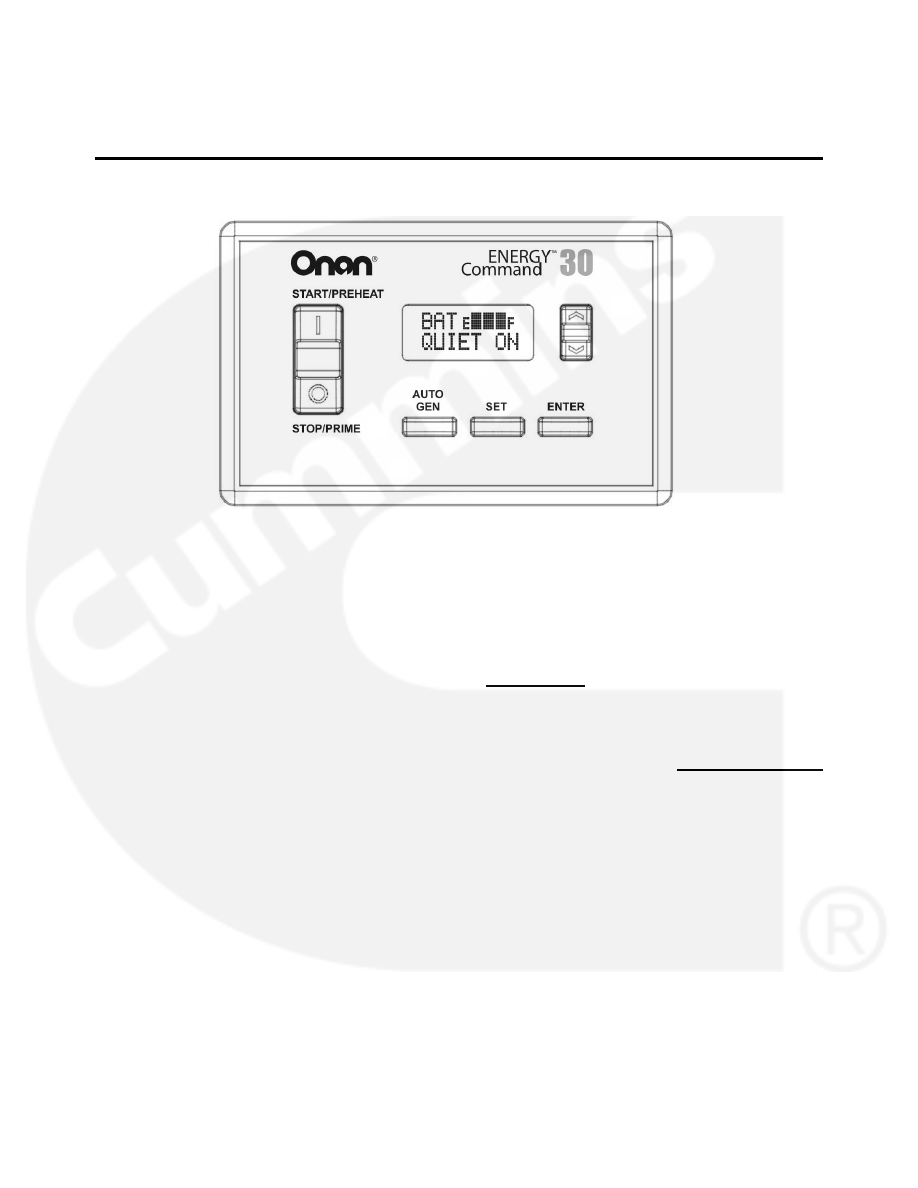
OPERATION PANEL QUICK REFERENCE 


UP/DOWN: This key is 
used to scroll through 
display choices and 
change values that can 
be SET.

ENTER:  This key is used to 
store values that have been 
changed, and to respond to 
display commands. 

SET:  This key is used to 
display and change 
settable values, such as: 
Local Time, Quiet Time 
Start and End (QT Start 
and QT End). 

START/STOP:  Works exactly like the 
genset switch.  If the genset switch has a 
run light and flashes diagnostics, the EC-
30 run light will also be on when the 
genset is running,  flash during preheat, 
and flash genset fault messages. 

AUTO GEN:  This key selects genset operating Mode: 

MANUAL  - Operator start/stop.  No automatic. 
AUTO ON  - Automatic start/stop available. 
QUIET ON - Automatic start/stop not available during quiet time,  
 

Note:  AUTO ON requires two keystrokes.  First press AUTO GEN when 
in 

MANUAL 

mode; 


                    …is displayed.  Next press 

ENTER for AUTO ON mode.  

 
Do not select AUTO ON mode before reading and understanding this 
Instruction Sheet and without following its Safety Precautions! 
 

Note: When operating Mode is not being displayed, pressing the AUTO GEN key will 
take the display to its default: Local Time and Generator Mode.  


ENTER  

for auto 


Page 3 


Operation of the Energy Command 30 

Overview


This section describes how to use the Energy 
Command 30 (EC-30).  The Quick Start page 
defines key locations and Figures 1, 2, and 3 are 
the display screen flow charts. 
 

Manual Genset Operation 

STOP/START Switch 

The Energy Command 30 (EC-30) START/STOP 
switch is used to manually start and stop the 
genset.  This switch functions exactly like the 
stop/start switch located on the genset.  When 
any genset or remote start/stop switch is 
operated the EC-30 genset operating Mode is 
changed to MANUAL.
  
 
The EC-30 START/STOP switch has a red 
backlight to indicate the genset is running.  If the 
genset is equipped with diagnostics the EC-30 will 
also flash fault messages.  It will also decode the 
flashing fault message and display a text fault 
message. 
 
The genset may be started using the 
START/STOP switch even if there is no power to 
the EC-30.  Once the genset is running the EC-30 
display will turn on.  
 

Default Display


Local Time and genset operating Mode is the 
default display.  The genset operating Mode is 
shown on the bottom line.  If genset Mode is not 
shown, the EC-30 returns to the default display 
after 10 minutes. To save power, the backlight is 
also dimmed after 10 minutes.  Touch any key to 
turn the backlight on. 
 

Using the Keys


UP/DOWN Key 

UP/DOWN key is used to navigate through the 
display menu and to change values or parameters 
that can be set by the user. If the UP/DOWN key 
is held the display will scroll through the menu.   
 

SET Key 

SET is used to select values that can be changed 
by the user. Examples include: Local Time, start of 
Quiet Time, and end of Quiet Time.  Pressing the 
SET Key will cause the value to flash (if it can be 
changed). The UP/DOWN key is used to change 

the value.    Press ENTER to store the new value.  
Also see Setting Local Time.


ENTER Key 

ENTER is used to store a value that has been 
changed.  It is also used to ENTER the SETUP & 
INFO DISPLAYS.  The ENTER key may also be 
required to exit a screen or to acknowledge an 
action.  
 

Automatic Genset Operation 

Safety Features


The EC-30 has safety features to help prevent 
automatic operation when it may be unsafe.  
Each time the vehicle is moved, the genset 
operating mode is changed to Manual.  Only if 
the vehicle is in a safe location, then use the 
AUTO GEN key to select AGS AUTO ON mode.  
 
!WARNING!    
DO NOT RUN THE GENSET OR USE THE EC-
30 AUTO ON OR QUIET ON MODES WHEN THE 
RV IS INDOORS OR IN A CONFINED SPACE.  
ASPHYXIATION OR CARBON MONOXIDE 
POISONING HAZARDS EXIST WHEREVER 
GENSET EXHAUST GASSES CAN 
ACCUMULATE.


This genset/control is not a life support system. 
It can stop without warning. Children, persons 
with physical or mental limitations, and pets 
could suffer personal injury or death. A 
personal attendant, redundant power or alarm 
system must be used if genset operation is 
critical. 

 
The EC-30 safety feature requires an electrical 
safety signal input.  Check with RV manufacture 
as to which safety signal is used.  Three different 
types can be used:   

•  Ignition: Input is connected to the vehicle 

ignition system (motor homes or van 
conversions). 

•  Brake: Brake light for all trailer, 5

th

 wheel, 

and pickup camper installations, or air 
brake on diesel motor homes.  

•  Park: The park signal/neutral 

(transmission) from motorized motor 
homes or van conversions. 


Page 4 


When the safety input signal changes from off to 
on (or on to off), EC-30 stops the genset and 
changes the genset operating Mode to MANUAL. 
This prevents unexpected automatic starting 
indoors or in confined spaces.  Verify the vehicle is 
in a safe location, and then use the AUTO GEN 
key to select AGS AUTO ON mode.  
 
Note also that the EC-30 AUTO ON Mode 
requires a confirming keystroke (first AUTO 
GEN, then ENTER to confirm).  This reduces 
risk of unintended AUTO ON operation. 
 
RV’s can use the AUTO ON or QUIET ON mode 
while traveling if the operator re-activates AUTO 
ON mode.  However each time it is signaled by the 
safety input, the genset will be stopped and the 
Mode will change to MANUAL.  If automatic 
operation is desired, press the AUTO GEN key 
after parking. 
 

Safety Signal Verification 

The EC-30 maintains a record of the last change 
of the Safety Input signal.  If the EC-30 does not 
see the Safety Input change in 30 days, it will 
prompt the user to re-verify the Safety Input by 
activating the safety signal.  (i.e. switching the 
ignition, changing transmission position, or 
operating the parking or  trailer brake.)   
 
If the Safety Input signal has not been turned on or 
off for 25 days the display will flash the “SAFETY 
OFF & ON” screen.  Turn the Safety Input signal 
off and on, or on and off, to reset the 30 day timer.  
If the Safety Input is not verified by day 30 AUTO 
GEN is disable. The next time AUTO GEN key is 
pressed, the user is prompted to verify Safety 
Input signal. 
 

Verify the Safety Input  

The safety input must be verified before automatic 
operation is allowed.  The first time the AUTO 
GEN key is pressed (after power is applied) the 
EC-30 requests: 


Where SAFETY = IGNITION, PARK, or BRAKE.  
Turn on or off the appropriate signal:  

•  Ignition: Input is connected to the vehicle 

ignition system (motor homes or van 
conversions). 

•  Brake: Brake light for all trailer, 5

th

 wheel, 

and pickup camper installations, or air 
brake on diesel motor homes.  

•  Park: The park signal/neutral 

(transmission) from motorized motor 
homes or van conversions. 

If the safety input is functional, the display will say: 


Only press the ENTER key if the genset is in a 

safe location for automatic operation. 


AUTO GEN Key 

AUTO GEN is used to select the MANUAL, AUTO 
ON, or QUIET ON genset operating Mode.  If the 
Mode is not displayed, pressing AUTO GEN 
immediately exits to Local Time and genset Mode. 
 
In MANUAL the genset may only be operated by 
using a START/STOP switch. 
 
In AUTO ON the genset will start based on HVAC run 
requests and low battery regardless of time of day. 
 
In QUIET ON Mode the genset will not 
automatically start during Quiet Time.  Prior to 
Quiet Time the battery state-of-charge is checked, 
and if needed, the genset is started to charge the 
batteries before Quiet Time begins. 
 
Note: Use of the automatic modes is not allowed if the 
house battery voltage is below 9 volts. 
 

Setting Local Time 

To set the local time simply press the SET key and 
use the UP/DOWN key to change the time.  Note 
that the display flashes and the hour digit is 
underlined.  Set the hour value, wait about four 
seconds for the underline to move to the right, set 
the tens digit, and then wait again to set the 
minutes digit, press ENTER.   
 

Setting Quiet Time (QT) Start & End 

The Local Time is used to prohibit automatically 
starting the genset during Quiet Time.  The QUIET 
ON mode prohibits the genset from automatically 
starting between the start and end of Quiet Time.  
To change these times use the UP/DOWN key to 
navigate to the QT START or QT END display.  
The current setting is shown.  Press SET to 
change the setting. Use the UP/DOWN key to 
change the value and press ENTER to store the 
new time. 

SAFETY 

OFF & ON 

ENTER  

for auto 


Content   ..  1  2  3   ..