Military reference books and manuals (2009-2023, Volume 8) - page 49
62
2.
Cultural. The matrix in Table D-1-2, TCS Collection Planner: Cultural Considerations, allows collectors to
63
pinpoint most of the cultural elements they need to consider prior to surveying the population. The first
64
two considerations help identify which groups need to be engaged and when it is appropriate to do so. All
65
of these elements combined will give SOPs to collectors, allowing for a standardized, seamless survey
66
process.
67
a. Considerations 3-5 tell you how you need to engage locals and what different elements you need to
68
consider how to be respectful and avoid causing a “diplomatic incident”.
69
b. Considerations 6-7 help you engage the locals by putting yourself at their level both during
70
engagements and when planning for them.
71
3.
Survey. Units need to operationalize the survey process, using Table D-1-3, TCS Collection Planner: TCS
72
Considerations. If this is not done properly, it becomes everyone's task. And when it's everyone's task, it's
73
no one's task and the collection process collapses. So this is simple, it's the 5Ws and the H of the plan.
74
a. ASK: Who will you give the Tactical Conflict Survey, illustrated in Table D-1-4? Identify targeted
75
population segments: number, occupation, gender, tribe.
76
b. ASK: How many people? Sets goal for the number of DSF conversations, 2-3 DSF interviews per
77
patrol? This depends on the population of the area. The goal is to survey 0.1% of the population per
78
month in areas with 20,000+ inhabitants. In smaller areas, you want to probe a minimum of 20
79
people per month in order for your data to be relevant.
80
c. ASK: How often will you survey them? (overhead). You want to have the monthly 0.1% or 20+ every
81
month. Make sure you do not send all of your patrols to collect on the same day as you risk alienating
82
people. Instead, trickle your collection over the span of the month. You want to make sure to target
83
the same segments, not the same people, every month in roughly equivalent numbers.
84
d. ASK: Who will conduct the surveys? (overhead). People who are:
(1) Mature
(2) Good interpersonal skills
(3) Culturally aware
(4) Skillful in use of interpreter
(5) Name sub-units from their organization (CA,
MISO, ETTs/PMTs, etc.)
85
86
D-1-4
87
Table D-1-1. TCS Collection Planner: Operational Considerations
Relevance for
Operational Considerations
Factors
Collectors
1.
How are govt officials and security
forces viewed?
(Collectors will be associated with
govt)
2.
What is the security situation for
locals?
(Affects willingness to speak with
collectors)
3.
Infrastructure?
(Affects patrol time and the
location of the population)
88
D-1-5
89
Table D-1-2. TCS Collection Planner: Cultural Considerations
Cultural Considerations
Factors
Relevance for Collectors
1.
What are the major groups and
where are they located?
(Segmentation)
2.
Daily and seasonal routines?
(Identify appropriate times and
places to speak with locals)
3.
Cultural prohibitions?
(Don’t offend locals)
4.
Cultural obligations?
(How do locals interact with
themselves and outsiders)
5.
Societal Hierarchy?
(Whom should you engage first and
how will you identify them)
6.
Common courtesies and greetings
(Appropriate greetings suggest you
understand and value the local
culture)
7.
Time Orientation?
(Affects patrol time and
appointments)
90
D-1-6
91
Table D-1-3. TCS Collection Planner: TCS Considerations
Survey Considerations
1.
Whom will you engage?
(Hint: Identify and segment the major
groups)
2.
Survey Parameters
(How many people do you want to
survey and how frequently?)
3.
Choosing Collectors
(Who will conduct the surveys?)
92
D-1-7

93
Table D-1-4. Tactical Conflict Survey
Critical Information - Complete ALL Parts
Date
Location (Grid)
Subject Name
Province / State
Male
Subject Gender
District / County
Female
Occupation
Village / Neighborhood
Ethnicity/Tribe
Population
“Fighting age”
Age (Check 1)
Interviewer Name & Unit
Old (gray hair)
Question 1: Has the number of people in the village changed in the last year? (Check 1)
Increased
Decreased
No Change
Don’t
No Comment
(Go to 1a)
(Go to 1a)
Know
Question 1a: Reason for change in population?
Question 2: What is the most important problem facing the village?
Response to WHY
Question 3: Who do you believe can solve your problems?
Response to WHY
Question 4: What should be done first to help the village? (1 Answer Only)
Response to WHY
94
D-1-8

95
D.1.5 Sources of Instability Matrix
96
Acknowledged problems in a community are not necessarily underlying sources of instability. Effective stability
97
programming relies on careful assessment of potential SOIs against the Stability Criteria:
98
1. Does the potential instability factor increase support for Anti-Government Elements?
99
2. Does the potential instability factor decrease support for the government?
100
3. Does the potential instability factor undermine the normal functioning of society?
101
The SOI Analysis tool, illustrated in Figure D-1-4, Sources of Instability Analysis Matrix, takes factors of instability
102
identified during SA and applies the 3 Stability Criteria. Not all priority grievances are destabilizing.
103
104
Figure D-1-4. Sources of Instability Analysis Matrix
105
D.1.6 Tactical Stability Matrix
106
The TSM, illustrated in Figure D-1-5, Tactical Stability Matrix (Analysis and Design), is used during the design phase
107
to identify potential activities addressing the objective and systemic causes, as well as to identify output indicators
108
and data sources to monitor those activities.
D-1-9

109
D.1.6.1 Design Components of the Tactical Stability Matrix:
110
Source of Instability - Brief description of the problem or issue, often just a couple of words, as identified
111
through analysis of available operational, cultural, tribal, and local perception data on an area.
112
Cause (Perception) - The perceived cause of a source of instability (i.e. priority grievances commonly
113
cited by the local population).
114
Cause (Systemic) - The root causes of the problem that relate to the perceived causes. To identify
115
systemic causes, ask yourself what circumstances led to community perceptions? What circumstances
116
allow the problem to continue? What conditions prevent the problem from being fixed?
117
Objective - A statement of the conditions that will diminish the identified SOI. Often it is simply the
118
opposite of the source of instability and its associated conditions. Keep in mind the 3 Stability Criteria
119
when developing the objective statement.
120
Impact Indicators - lso called “Measures of Effect,” impact indicators measure the effectiveness of your
121
activities against the predetermined objective and systemic causes. To identify impact indicators, ask:
122
How will I know if the objective has been achieved?
123
Example: If “police abuse” is the source of instability, impact indicators might include:
124
o Increased popular support for the police
125
o Population provides more actionable intelligence to the police
126
o Police presence in previously no-go areas
127
128
Figure D-1-5. Tactical Stability Matrix (Analysis and Design)
129
D.1.6.2 Analysis Components of the Tactical Stability Matrix:
130
Impact Data Sources - Methods to obtain the information identified in your impact indicators.
131
Activities - Things you do to mitigate systemic causes of instability and achieve identified objectives.
132
Output Indicators - lso called “Measures of Performance,” output indicators determine whether an
133
activity has been completed. To identify output indicators, ask yourself: How can I confirm that the
134
proposed activity is progressing as planned or has been completed?
o # of projects completed
o # of police trained
D-1-10
o # of road miles completed
o # of dollars spent
135
Example: If “police training” were an activity, an output indicator would be the # of police trained.
136
Output Data Sources - Methods to obtain the information identified in your output indicators.
137
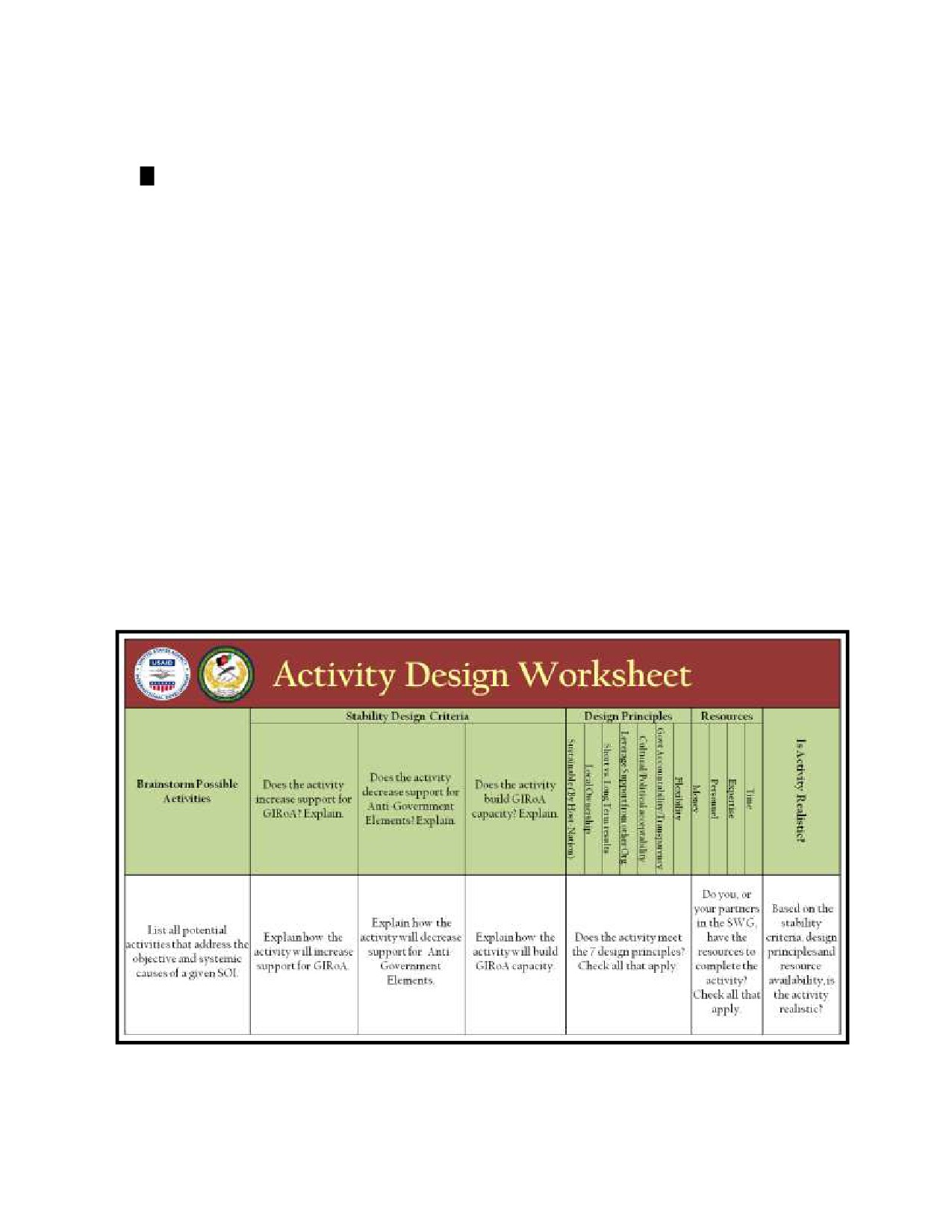
D.1.7 Activity Design Worksheet
138
The Activity Design Worksheet, illustrated in Figure D-1-6, Activity Design Worksheet, is a tool to assist with
139
filtering activities against the stability criteria, design principles and resource availability. It should be used while
140
completing the TSM.
141
1. Stability Criteria: “Does the activity͙”
142
a. Increase support for GIRoA?
143
b. Decrease support for Anti-Government Elements (AGEs)?
144
c. Increase institutional and societal capacity and capability?
145
2. Design Principles: “Is the activity͙”
a. Sustainable by the local government and/or
b. Promoting local ownership putting local
local institutions?
institutions in the lead?
c. Fostering long-term vs. short-term results?
d. Leveraging support from other organizations?
e. Politically and culturally appropriate?
f. Strengthening accountability and transparency?
g. Flexible?
146
3. Resource vailability: “Do you have the required͙”
a. Money?
b. Personnel?
c. Expertise?
d. Time?
147
148
Figure D-1-6. Activity Design Worksheet
D-1-11

149
D.1.8 Synchronization Matrix
150
When designing and implementing activities, it is critical to coordinate with other actors working in the same
151
district. The Synchronization Matrix, illustrated in Figure D-1-7, Synchronization Matrix, helps actors in a Stability
152
Working Group with the following:
Plan a logical sequence for activities
Coordinate along multiple lines of operation
Address multiple causes of instability
Maximize impact and minimize effort/cost
153
154
Figure D-1-7. Synchronization Matrix
155
D.1.9 Monitoring and Evaluation Matrix
156
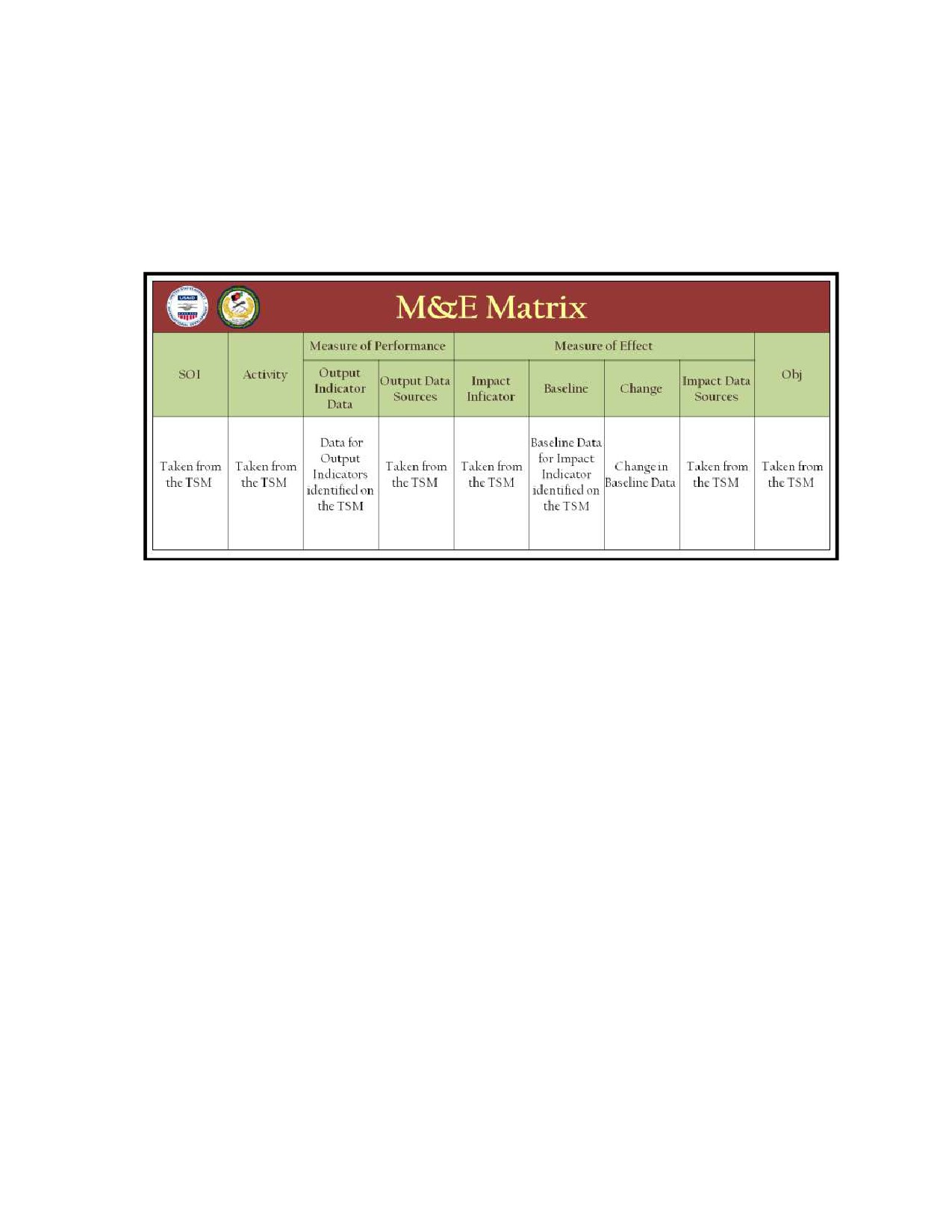
The M&E Matrix, illustrated in Figure D-1-8, M&E Matrix, is a program management and reporting tool that
157
measures activity output and impact. It tracks progress against a baseline to assess the impact activities are having.
158
The M&E Matrix focuses on the first two levels of M&E.
159
1. Level 1, activity output, focuses on:
160
a. Have your activities been completed?
161
b. Are your activities being implemented successfully?
162
c. Are there external factors affecting the implementation of your activities?
163
d. Are your indicators measuring the appropriate outputs? If not, should you identify new indicators?
164
e. Are your data sources providing the correct indicator data? If not, do you need new data sources?
165
2. Level 2, impact, focuses on:
166
a. Are you seeing the intended impact/change in your environment?
D-1-12
167
b. Does this change represent progress towards the objective and a diminishment of a root cause?
168
c. How are external factors influencing and/or causing the changes you are observing?
169
d. Are the activities contributing to the expected impact and the overall objective?
170
e. Are your indicators measuring the impact appropriately? If not, consider adopting new indicators.
171
f.
Are your sources providing the correct indicators? If not, consider adopting new sources and/or
172
means to collect.
173
174
Figure D-1-8. Monitoring & Evaluation Matrix
175
D.1.10 Overall Stability Index
176
Measuring the change in overall stability is a key component of the DSF process, and the third level of M&E. By
177
measuring a common basket of stability-focused indicators, illustrated in Figure D-1-9, it is possible to track the
178
change in stability for a given district. Seven recommended overall stability indicators are listed below; however,
179
they can be modified as needed for adaptation to a specific operating environment. The overall stability indicators
180
are not linked to activities. When aggregated, they can provide a measurement of overall changes in stability over
181
time for a given district. The seven indicators were selected to provide a picture of what life is like in a district and
182
how it is changing for the local population.
1. District Government Recognition
2. Local-on-local violence
3. Economic activity
4. Host nation security force presence
5. Population freedom of movement
6. Local perceptions of their government
7. Local perceptions of security conditions
D-1-13

183
184
Figure D-1-9. Overall Stability Index
185
For further information on DSF, DSF materials, or questions contact the USAID Office of Military affairs:
186
187
188
189
DSF POC: USAID Office of Military Affairs
190
Mick Crnkovich, mcrnkovich@usaid.gov
191
Eric Kotouc, ekotouc@usaid.gov
192
info: DSF@usaid.gov
193
D-1-14
1
ANNEX E RELIEF IN PLACE/TRANSITION OF AUTHORITY CHECKLIST
2
E.0 Relief in Place/Transfer of Authority
3
Relief in place (RIP)/transfer of authority (TOA)-An operation, by direction of higher authority, where all or part of
4
a unit is replaced in an area by the incoming unit. The mission and the assigned area of operations of the outgoing
5
elements are transferred to the incoming unit. The incoming unit continues operations as ordered.
6
Transferring an operation or task to other forces or organizations requires detailed, coordinated, and
7
synchronized planning.
8
The incoming element should initiate in-person coordination to assume the mission from the outgoing
9
unit, agency, or the country team.
10
When conducting the RIP/TOA, it is critical to review all existing civil data and all relevant area of
11
operations (AO) information prior to the transfer of authority.
12
The incoming unit should receive a copy of all civil information files and databases used by the outgoing
13
unit or agency.
14
Planners should identify the following items:
15
Define the desired end state; for example, continuity of current operations or modification of current
16
operations to some other format.
17
Identify the organizational structure required to perform the operation or task.
18
Identify and match components within the incoming organization that are the same or similar in nature to
19
components within the unit being replaced.
20
Identify equipment and facilities required to perform the operation or task, and who will provide them.
21
Prepare the appropriate property-control documentation if transferring equipment or facilities.
22
Create timelines that provide enough overlap between the outgoing and incoming organizations.
23
Determine the criteria that will dictate when the incoming organization will assume control of the activity
24
or task; for example, a target date, task standard, or level of understanding.
25
Orient the incoming organization to the area, including an introduction to all the influential persons of
26
both military and civilian organizations remaining in the area.
27
Orient the incoming organization to the operation or task. Include exchanging procedures, routine and
28
recurring events, and other information critical to the conduct of the activity or task in the orientation.
29
Demonstrate the activity or task, if possible.
30
Supervise the incoming organization in performing the operation or task. The outgoing organization
31
retains control of the operation or task during this process, providing critiques and guidance, as needed.
32
Identification of interdependency and interoperability between organizations.
33
Contingency plans that address threats to continuity of operations, countermeasures to mitigate those
34
threats, and preparedness for, response to, and recovery from those threats that succeed in disrupting
35
operations.
36
Learn as much as possible about the people you encounter in the area and their activities.
37
During outbound transition, ensure RIP activities completely transfer civil information to successor unit or
38
agency.
E-1
39
E.1 Outgoing Unit Relief in Place Checklist
Item:
Scale:
Description:
Outgoing unit establishes plan for RIP Outgoing unit will ensure continuity of current operations
1
Yes/No
Outgoing unit provides updates to current operations
Outgoing unit articulates mission requirements identifies the organizational structure required
2
Yes/No
to perform the activity or task
Outgoing unit matches components within the incoming organization that are the same or
3
Yes/No
similar in nature to components within the unit being replaced
Outgoing unit ensures continuity of civil engagement issues. Enables incoming organization to
4
Yes/No
conduct continuous civil engagements from home station
5
Yes/No
Ensure continuity of civil engagement
6
Yes/No
Ensure incoming unit is aware of all previous commitments
7
Yes/No
Ensure incoming unit is aware of previous understanding of cooperative relationships
Ensures transfer of detailed civil information architecture, minimally a political, military,
8
Yes/No
economic, social, infrastructure, and information (PMESII) and areas, structures, capabilities,
organizations, people, and events (ASCOPE) framework
9
Yes/No
Ensure transfer of detailed District Stability Framework (DSF) information
10
Yes/No
Outgoing unit provides incoming organization with weekly situational updates
11
Yes/No
Outgoing unit provides information requested by the incoming organization
Outgoing unit identifies equipment and facilities required to perform activities and tasks with
12
Yes/No
incoming unit
13
Yes/No
Outgoing unit identifies who will provide equipment for incoming unit
14
Yes/No
Outgoing unit identifies who will provide facilities for incoming unit
Outgoing unit prepares appropriate property-control paperwork for transferring equipment to
15
Yes/No
the incoming unit
Outgoing unit prepares the appropriate property-control paperwork for facilities between
16
Yes/No
organizations to the incoming unit
Outgoing unit creates timelines that provide sufficient overlap between the outgoing and
17
Yes/No
incoming organizations.
Outgoing unit determines criteria that will dictate when the incoming organization will assume
18
Yes/No
control of the activity or task; for example, a target date, task standard, or level of
understanding.
19
Yes/No
Outgoing unit orients the incoming organization to the area
E-2
Outgoing unit introduces incoming organization to all host nation (HN) key personnel and
20
Yes/No
elements within the district
Outgoing unit introduces incoming unit to all United States (US) and partnering organizations
21
Yes/No
and units within the district
Outgoing unit introduces incoming organization to all non-HN civilian organizations within the
22
Yes/No
district
23
Yes/No
Outgoing unit introduces incoming organization to all interpreters
24
Yes/No
Outgoing Unit orients the incoming organization to activities and tasks
25
Yes/No
Outgoing unit exchanges procedures with incoming organization
26
Yes/No
Outgoing unit exchanges Battle Rhythm with incoming organization
27
Yes/No
Outgoing unit exchanges routine and recurring events with incoming organization
Outgoing unit orients incoming organization to the commander’s emergency response program
28
Yes/No
(CERP) process review
Outgoing unit orients incoming organization to development projects managed by the outgoing
29
Yes/No
unit
30
Yes/No
Outgoing unit provides contract information for completed and ongoing projects
31
Yes/No
Outgoing unit provides project historical and projected timelines
32
Yes/No
Outgoing unit provides project nomination methodology and focus
33
Yes/No
Outgoing unit project site visits with incoming organization
34
Yes/No
Outgoing unit ensures prior higher level guidance in relationship to development projects
Outgoing unit exchanges village, village cluster, tribal and district critical information to conduct
35
Yes/No
specific activities or tasks with incoming organization
36
Yes/No
Outgoing unit ensures historical context of decision making
37
Yes/No
Outgoing unit demonstrates the activity or task
38
Yes/No
Outgoing unit supervises the incoming organization in performing the activity or task
39
Yes/No
Outgoing unit provides critiques to incoming organization
40
Yes/No
Outgoing unit provides guidance to incoming organization
41
Yes/No
Outgoing unit transfers the activity or task to the incoming unit according to the plan
42
Yes/No
Outgoing unit redeploys
43
Yes/No
Outgoing unit prepares an after action review (AAR) and gives to incoming unit.
40
41
E-3
42
E.2 Incoming Unit Relief in Place Checklist
Item:
Scale:
Description:
1
Yes/No
Unit receives deployment orders
2
Yes/No
Unit understands deployment order
Unit understands theater directives, operations orders (OPORD), fragmentary orders (FRAGO),
3
Yes/No
warning orders (WARNO), force protection, standard operating procedures (SOP), tactics,
techniques, and procedures (TTP) and contingency plans
4
Yes/No
Unit receives basic operating environment-specific operational education
5
Yes/No
Unit understands theater directives
6
Yes/No
Unit understands Tactical Driving Directive
7
Yes/No
Unit understands Rules of Engagement (ROE) Directive
8
Yes/No
Unit understands Night Operations Directive
9
Yes/No
Unit understands host nation (HN) government priorities
10
Yes/No
Unit contacted Area of Responsibility (AOR) unit leadership
11
Yes/No
Unit received list of key military, civilian, and local national (LN) players and contact information
12
Yes/No
Unit conducted required unit training based on OPORD
13
Yes/No
Unit conducted area specific cultural awareness training
14
Yes/No
Unit conducted area specific language training
15
Yes/No
Unit identified minimum of two potential level 0/+1 language proficient individuals
16
Yes/No
Understand the Area of Operations
Unit received populated civil information architecture or political, military, economic, social,
17
Yes/No
infrastructure, and information (PMESII) / areas, structures, capabilities, organizations, people,
and events (ASCOPE) data
Unit understands the concept of analyzing human terrain using civil information architecture or
18
Yes/No
PMESII / ASCOPE crosswalk
19
Yes/No
Unit understands the location and importance of population centers
Unit understands how a structure’s location, function, and capabilities can support or hinder
20
Yes/No
operations
21
Yes/No
Unit knows the ability of local authorities to provide key services
Unit incorporates sanitation, water, electric, academic, transportation, medical, security, and
22
Yes/No
other considerations (SWEAT-MSO) categorical system in area of operations (AO)
23
Yes/No
Unit knows the sewer, sanitation, and facilities
E-4
24
Yes/No
Unit knows water distribution system
25
Yes/No
Unit understands electrical capabilities
26
Yes/No
Unit knows local academic capabilities
27
Yes/No
Unit is aware of transportation issues
28
Yes/No
Units knows local medical capabilities
29
Yes/No
Unit understands local security capabilities
30
Yes/No
Unit understands other relevant local capabilities
31
Yes/No
Unit identifies what cultural, religious, and social groups or institutions are in their AO
32
Yes/No
Unit knows religious organizations
33
Yes/No
Unit knows political parties
34
Yes/No
Unit knows local multinational corporations
35
Yes/No
Unit knows local partnering International Government Organizations (IGO)
36
Yes/No
Unit knows local partnering Non Government Organizations (NGO)
37
Yes/No
Unit knows local labor unions and their agenda
38
Yes/No
Unit knows local community organizations
39
Yes/No
Unit knows local criminal organizations
40
Yes/No
Unit knows other organizations with influence
41
Yes/No
Unit knows the agenda of the groups and institutions
42
Yes/No
Unit knows the key people who they will encounter in their AO
43
Yes/No
Unit knows local tribal leaders and their influence
44
Yes/No
Unit knows local religious leaders and their influence
45
Yes/No
Unit knows professionals living in their AO
46
Yes/No
Unit understands the impact of displaced persons returning to their homes
47
Yes/No
Unit knows local civil society leaders and understand how they can assist them
48
Yes/No
Unit knows government officials in their role in the AO
49
Yes/No
Unit understands the movement routes of nomads and how they affect the stability of the AO
50
Yes/No
Units knows significant events and the operational impacts
51
Yes/No
Unit knows dates of elections and locations of polling booths
52
Yes/No
Unit knows date and relevance of HN holidays and celebrations
53
Yes/No
Unit knows relevance of the regional holidays and celebrations
E-5
54
Yes/No
Unit knows operational significance of cultural/religious holidays and celebrations
56
Yes/No
Unit knows harvest seasons and impact on population
57
Yes/No
Unit is aware of weddings / funerals in the AO and the effects on mission
58
Yes/No
Unit knows dates and locations of political events
59
Yes/No
Units understands how people gain and share power and influence
60
Yes/No
Units understand how communities protect themselves
61
Yes/No
Unit knows location of friendly units
62
Yes/No
Unit knows location of HN military units
63
Yes/No
Unit knows location of HN and local police elements
64
Yes/No
Unit understands the concept of the Village Stability Program and where it is being utilized
65
Yes/No
Unit understands how people generate and distribute wealth
66
Yes/No
Unit knows employment and unemployment rate
67
Yes/No
Unit knows type of economic development is available
68
Yes/No
Unit understands social networks in AO
69
Yes/No
Unit knows what education system is in place
70
Yes/No
Unit knows level of health systems available in AO
71
Yes/No
Unit understands what type of rule of law is accepted in the AO for settling disputes
72
Yes/No
State Law-founded on the Constitution, issued by HN government
73
Yes/No
Cultural Law, based on the local or regional religious or cultural norms
74
Yes/No
Community System-a compilation of tribal codes, religions norms, and customs
75
Yes/No
Unit understands what the community needs to function
76
Yes/No
Unit knows how the people communicate
77
Yes/No
Unit knows what type of media is available to the population
78
Yes/No
Unit knows what type newspapers are printed
79
Yes/No
Units knows what type radio broadcasts are utilized
80
Yes/No
Unit knows what television programs are available
81
Yes/No
Unit understands how populace spreads information through word of mouth
82
Yes/No
Unit identifies how insurgent propaganda is distributed to populace
83
Yes/No
Unit understands Focus District Development and Key Terrain District importance
84
Yes/No
Unit has identified security problems
E-6
85
Yes/No
Unit understands how to use a Tactical Stability Matrix
86
Yes/No
Unit has received current Tactical Stability Matrix
87
Yes/No
Unit has received latest District Stability Framework (DSF) data
88
Yes/No
Unit has identified sources of instability
89
Yes/No
Unit has identified district and local government leadership
90
Yes/No
Unit has identified level of active/ passive support to central government
91
Yes/No
Unit understands local judicial system
92
Yes/No
Unit understands local insurgent and criminal activities
93
Yes/No
Unit has identified malign actors
94
Yes/No
Reconstruction and Development
Unit has identified and reviewed district research and development (R&D) projects (proposed
95
Yes/No
and ongoing)
97
Yes/No
Unit has reviewed local contractor status
98
Yes/No
Unit has identified civil-military integrated partners
100
Yes/No
Unit identified civilian casualties incidents
101
Yes/No
Unit identified regional language for pre-deployment language training
Unit has received DSF Assessments for AOR from the United States Agency for International
102
Yes/No
Development (USAID)
103
Yes/No
Understand the Execution of the Operation
104
Yes/No
Unit understands higher concept of operation
105
Yes/No
Understands civilian casualties procedures and how to avoid inflicting them
106
Yes/No
Understands personnel recovery operations
107
Yes/No
Understands role in supporting local governance
108
Yes/No
Know how to track ongoing and future development programs
109
Yes/No
Knows HN capacity and capability
110
Yes/No
Knows and tracks district activities to include weddings, holidays, harvests
111
Yes/No
Initiated relationship with HN partners
112
Yes/No
Know all NGOs, IGOs, and contractors in the AO.
113
Yes/No
Understands the Battle Rhythm
114
Yes/No
Has C2 established throughout the district including both coalition forces (CF) and HN partners.
E-7
Understand Joint Operational Area (JOA) non-secure internet protocol router network
115
Yes/No
(NIPRNET)
116
Yes/No
Understand JOA secret internet protocol router network (SIPRNET)
117
Yes/No
Understand SIPRNET procedures and requirements
118
Yes/No
Understand CENTRIX network procedures and requirements
120
Yes/No
Understand SharePoint
121
Yes/No
Understand Coalition Information Systems as required in local AOR
122
Yes/No
Understand HN Telecommunications Networks
123
Yes/No
Understand video-tele conference (VTC)
124
Yes/No
Understand Commercial Email systems
125
Yes/No
Relevant theatre operational procedures incorporated
126
Yes/No
Liaisons established at all levels within the AO
127
Yes/No
Unit understands intelligence, surveillance, and reconnaissance (ISR) capabilities
128
Yes/No
Unit understands ISR procedures
129
Yes/No
Unit understands JOA MEDEVAC procedures
130
Yes/No
Unit understands how to conduct Decentralized Operations
43
E-8
1
GLOSSARY
2
PART I - ABBREVIATIONS AND ACRONYMS
AAR
after action review
AFB
air force base
AFI
air force instruction
AGE
anti government elements
AIMS
action-centered, incremental, measurable, and scheduled
AO
area of operations
AOR
area of responsibility
APAN
all partners access network
ASCOPE
areas, structures, capabilities, organizations, people, and events
AT
antiterrorism
BCT
brigade combat team
BN
battalion
C2
command and control
C3/5
Deputy Chief of Staff for Combined Operations and Plans
C4I
command, control, communications, computers, and intelligence
C7
Deputy Chief of Staff for Combined Engineer Operations
C9
Deputy Chief of Staff for Combined Civil-Military Operations
CA
civil affairs
CAO
civil affairs operations
CAPT
civil affairs planning team
CARVER
criticality, accessibility, recuperability, vulnerability, effect, and recognizability
CASUM
civil affairs summary
CAT
civil affairs team
CBT
computer based training
CCA
common cause analysis
CCIR
commander's critical information requirements
CCRP
command and control research program
CD
compact disk
CDC
community development council
CDP
commander's dissemination policy
CENTRIX
Combined Enterprise Regional Information Exchange System
CERP
commander's emergency response program
CETI
Coordinator for Economic Transition in Iraq
CF
coalition forces
CIDNE
Combined Information Data Network Exchange
CIM
civil information management
CJ2
Deputy Chief of Staff for Combined Joint Intelligence
CJ5
Deputy Chief of Staff for Combined Joint Plans
CJ6
Deputy Chief of Staff for Combined Joint Signal
GL-1
CJ9
Deputy Chief of Staff for Combined Joint Civil-Military Operations
CJCSI
Chairman of the Joint Chiefs of Staff
CLT
civil liaison team
CMA
common modes analysis
CMO
civil-military operations
CMOC
civil-military operations center
CMSE
civil-military support element
CND
computer network defense
COA
course of action
COG
center of gravity
COI
COI
COIN
counterinsurgency
CONOP
concept of the operation
CONUS
continental United States
COP
common operational picture
DCG
deputy commanding general
DDMS
Department of Defense Discovery Metadata Specification
DIV
division
DoD
Department of Defense
DODD
Department of Defense Directive
DODI
Department of Defense Instruction
DoS
Department of State
DOT&E
Director of Test and Evaluation
DOTMLPF
doctrine, organization, training, material, leadership, personnel, and facilities
DSF
District Stability Framework
D-SRSG
Deputy Special Representative of the Secretary General
DTG
date-time group
DVD
digital video disc
EO
executive order
EOM
end of mission
ETT
embedded training team
FDO
foreign disclosure officer
FOUO
for official use only
FRAGO
fragmentary order
FSC
functional specialty cell
FUOPS
future operations
G3
Deputy Chief of Staff, Operations
G9
Deputy Chief of Staff, Civil-Military Operations
GCCS
global command and control system
GEOINT
geospatial intelligence
GIG
global information grid
GIRoA
Government of the Islamic Republic of Afghanistan
GIS
geographic information system
GL-2
GPE
geospatial intelligence preparation of the environment
GPF
general purpose forces
GPS
global positioning system
GRD
Gulf Region Division
HA
humanitarian assistance
HA/DR
humanitarian assistance/disaster relief
HDR
humanitarian and disaster relief
HN
host nation
HQ
headquarters
HTAT
human terrain analysis team
HTRAC
Hard Target Research and Analysis Center
IA
information assurance
IAU
Information Analysis Unit
IAW
in accordance with
ICAF
interagency conflict assessment framework
ID
identification
IDN
initial distribution number
IDP
internally displaced person
IFO
Integrated Financial Operations
IGO
intergovernmental organization
IMO
information management officer
IMP
information management plan
INFOSEC
information security
IO
international organization
IPI
indigenous populations and institutions
IR
information requirement
IRMS
Iraq Reconstruction Management System
ISAF
International Security Assistance Force
ISR
intelligence, surveillance, and reconnaissance
IT
information technology
ITAO
Iraq Transition Assistance Office
IW
irregular warfare
J3
Joint Operations Director
J33
Joint Operations Directorate Current Operations Director
J5
Joint Plans Director
J6
Joint Signal Director
J7
Joint Engineering Director
J7/9
Joint Engineering Directorate Civil-Military Operations Liaison
J7/9 JIC
Joint Engineering Directorate Civil-Military Operations Liaison Joint Information Center
J8
Joint Force Structure, Resource, and Assessment Director
J9
Joint Civil-Military Operations Director
JAG
judge advocacy general
JDSWG
Joint Data Sharing Working Group
GL-3
JFC
joint force commander
JIMB
joint information management board
JIPOE
joint intelligence preparation of the operational environment
AO
joint operations area
JOPES
joint operations and execution system
JOPP
joint operation planning process
JP
joint publication
JPO
Joint Programs Office
JT
joint test
JT&E
joint test and evaluation
JTF
joint task force
KLE
key leader engagement
KM
knowledge management
KMO
knowledge management officer
LN
local national
LOO
line of operation
LTOV
latest time of value
M&E
monitoring and evaluation
MCAST
Maritime Civil Affairs Security and Training
MCCDC
Marine Corps Combat Development Center
MEDCAP
medical civil action program
MEDVEAC
medical evacuation
METT-T
mission, enemy, terrain and weather, time, troops and support available
MGRS
military grid referencing system
MIL
military
MILSTRIP
military standard requisition and issue procedure
MISO
military information support operations
MNC-I
Multinational Corps-Iraq
MND
multinational division
MNF-I
Multinational Force-Iraq
MNSTC-I
Multinational Security Transition Command-Iraq
MOE
measure of effectiveness
MOP
measure of performance
MOS
military occupational specialty
MP
military police
MS
Microsoft
MSHARPP
mission, symbolism, history, accessibility, recognizability, population, and proximity
MTT
mobile training team
NAI
named area of interest
NAVSOP
Navy Standard Operating Procedure
NCO
noncommissioned officer
NECC
Navy Expeditionary Combat Command
NGO
nongovernmental organization
GL-4
NIPRNET
Non-secure internet protocol router network
NWDC
Navy Warfare Development Command
OPA
Office of Provincial Affairs
OPORD
operations order
OPR
offices of primary responsibility
OPSEC
operations security
OPSUM
operations summary
OSD
Office of the Secretary of Defense
PACE
primary, alternate, contingency, and emergency
PAO
public affairs officer
PCI/PCC
pre-combat inspections/pre-combat checks
PCN
publication control number
PDF
portable document format
PMESII
political, military, economic, social, infrastructure, and information
PMT
project management team
POC
point of contact
POI
program of instruction
POLAD
political advisor
PP&O
plans, policies, and operations
PRT
provincial reconstruction team
PVO
private volunteer organization
QA/QC
quality assure/quality check
R&D
research and development
RFI
request for information
RFS
request for support
RIP/TOA
relief in place/transfer of authority
ROE
rules of engagement
S-3
Operations Staff Officer
S9
Civil-Military Operations Staff Officer
SA
situational awareness
SALT
size, activity, location, and time
SALUTE
size, activity, location, unit, time, and equipment
SCI
sensitive compartmented information
SIGACTS
significant actions
SIPRNET
secure internet protocol router network
SITREP
situation report
SJA
staff judge advocate
SMART
specific, measurable, achievable, relevant, time-bound
SME
subject matter expert
strengths, opportunities, weaknesses, how does mission support commander's intent,
SO WHAT
assumptions, and threats
SOF
special operations forces
SOI
source of instability
GL-5
SOP
standard operating procedure
SSTRO
stability, security, transition, and reconstruction operations
STAR
situation, task, action, and result
STD
standard
SWEAT-MSO
sanitation, water, electric, academic, transportation, medical, security, and other considerations
SWG
stability working group
SWOT
strengths, weaknesses, opportunities, and threats
TCS
tactical conflict survey
TiGR
Tactical Ground Reporting
TLP
troop leading procedures
TO&E
table of organization and equipment
TP
talking points
TRADOC
Training and Doctrine Command
TSM
tactical stability matrix
TTP
tactics, techniques, and procedures
UN
United Nations
UNAMI
United Nations Assistance Mission for Iraq
UNCT
United Nations country team
URL
uniform resource locator
US
United States
USA
United States Army
USACAPOC
United States Civil Affairs and Psychological Operations Command
USACE
United States Army Corps of Engineers
USAF
United States Air Force
USAFRICOM
United States Africa Command
USAID
United States Agency for International Development
USASOC
United States Army Special Operations Command
USEMB
United States Embassy
USG
United States Government
USJFCOM
United States Joint Forces Command
USMC
United States Marine Corps
USN
United States Navy
USPACOM
United States Pacific Command
USSOCOM
United States Special Operations Command
USSOUTHCOM
United States Southern Command
VETCAP
veterinary civil action program
VTC
video-tele conference
WARNO
warning order
WFP
World Food Program
WG
working group
WHO
World Health Organization
3
GL-6
1
GLOSSARY
2
PART II - TERMS AND DEFINITIONS
3
accessible. A data asset is accessible when a human, system, or application may retrieve the data within the asset.
4
Data assets may be made accessible by using shared storage space or web services that expose the business or
5
mission process that generates data in readily consumable forms. (Department of Defense Directive 8320.02)
6
analysis. The process of breaking a complex topic into its constituent elements to study the nature, function, or
7
meaning of the parts and their relations.
8
analytical framework. Technical architecture that provides requirements of skills, tools, and techniques for
9
analyzing a particular area, such as governance, economics, or culture, by combining previous analyses with
10
analysis and research techniques, organization techniques, and specific examples of previous successful analytical
11
results. Analytical frameworks are composed of five components: tools and techniques; solution patterns;
12
information architecture; research techniques and skills; and methods for grouping complex information.
13
architecture. A framework or structure that portrays relationships among all the elements of the subject force,
14
system, or activity. (Joint Publication 3-05)
15
civil engagement is dialogue or cultural exchange with one or more individuals. It is a participatory interaction,
16
such as key leader engagement, mass engagement, and surveys between the collecting unit and the people and
17
organizations being engaged.
18
civil information. Information developed from data collected to develop the civil considerations of mission,
19
enemy, terrain, troops available, and time (METT-T), specifically areas, structures, capabilities, organization,
20
people, and events ( SCOPE), within the commander’s operational environment that can be fused or processed to
21
increase Department of Defense / interagency / intergovernmental organization / nongovernmental organization /
22
indigenous population and institution situational awareness, situational understanding, or situational dominance.
23
(Joint Publication 3-57)
24
civil information management. The process whereby civil information is collected, entered into a central
25
information system, and internally fused with the supported element, higher headquarters, other United States
26
Government and Department of Defense agencies, intergovernmental organizations, and nongovernmental
27
organizations to ensure the timely availability of information for analysis and the widest possible dissemination of
28
raw and analyzed civil information to military and nonmilitary partners throughout the area of operations. The
29
steps associated with civil information management are: planning, collection, consolidations, analysis, production,
30
and sharing.
31
civil-military operations. The activities of a commander that establish, maintain, influence, or exploit relations
32
between military forces, governmental and nongovernmental civilian organizations and authorities, and the civilian
33
populace in a friendly, neutral, or hostile operational area in order to facilitate military operations, to consolidate
34
and achieve operational US objectives. Civil-military operations may include performance by military forces of
35
activities and functions normally the responsibility of the local, regional, or national government. These activities
36
may occur prior to, during, or subsequent to other military actions. They may also occur, if directed, in the absence
GL-7
37
of other military operations. Civil-military operations may be performed by designated civil affairs, by other
38
military forces, or by a combination of civil affairs and other forces. Also called CMO. (Joint Publication 3-57)
39
civil reconnaissance is planned collection of focused information by direct observation and evaluation of the
40
operating environment.
41
codification. The joint civil information management coordinator technique that focuses on connecting people
42
with content through technical networks, developing added value that supports organizing, applying, and
43
transferring knowledge.
44
collation. Storing and meta-tagging related data to organize and standardize it into relevant groups for
45
identification or further processing.
46
collection. The literal gathering of relevant data. Includes detailed biographical data on key leaders, relative
47
loyalties of various groups, and the detailed mapping of group dynamics to assist analysts in understanding civil
48
relationships.
49
collection management. The conversion of information requirements to collection requirements; establishing
50
priorities; tasking or coordinating with appropriate entities, organizations, or agencies that can provide or collect
51
the information; monitoring results and re-tasking as required. Through proper collection management, a
52
collection plan is formed and modified as appropriate. (Joint Publication 2-0)
53
collection plan. A continuous activity that coordinates and integrates the efforts of all collection units and agencies
54
by matching information requirements with appropriate collection capabilities and transforms information
55
requirements into tasks and requests for information. Collection planning synchronizes the timing of collection
56
with the operational scheme of maneuver and with other civil-military operations. (Joint Publication 2-0)
57
commander’s critical information requirement͘ An information requirement identified by the commander as
58
being critical to facilitating timely decision making. The two key elements are friendly force information
59
requirements and priority intelligence requirements. (Joint Publication 3-0)
60
common operational picture. A single identical display of relevant information shared by more than one
61
command. A common operational picture facilitates collaborative planning and assists all echelons to achieve
62
situational awareness. (Joint Publication 1-02)
63
COI. A collaborative group of users who must exchange information in pursuit of their shared goals, interests,
64
missions, or business processes and who therefore must have shared vocabulary for the information they
65
exchange. Also called COI. (Department of Defense Directive 8320.02)
66
consolidation. Bring together into a single whole or system; combination of the collation and processing steps.
67
Part of the civil information management process.
68
content management. How digital and non-digital content is managed throughout the joint civil information
69
management process. It has two components that must be synchronized: monitoring the information environment
70
and coordinating information organization and access. Effective content management provides users with
71
immediate and secure access to knowledge products.
GL-8
72
critical capability. A means that is considered a crucial enabler for a center of gravity to function as such and is
73
essential to the accomplishment of the specified or assumed objective(s).
74
critical requirement. An essential condition, resource, and means for a critical capability to be fully operational.
75
critical vulnerability. An aspect of a critical requirement which is deficient or vulnerable to direct or indirect attack
76
that will create decisive or significant effects.
77
data. Observations, cue detection, recognition of civil situational elements, facts and current status identified by a
78
sensor or collector (human, mechanical, or electronic) from the environment or communicated and processed
79
between nodes in any system.
80
database. Information that is normally structured and indexed for user access and review. Databases may exist in
81
the form of physical files (folders, documents, etc.) or formatted automated data processing system data files.
82
(Joint Publication 2-0)
83
data owner: Data owners are the organizations, elements, or individuals responsible for managing information on
84
behalf of the supported unit, nongovernmental organization (NGO), intergovernmental organization (IGO), private
85
volunteer organization (PVO), indigenous populations or institution, host nation, and so forth. Data owners control
86
and are responsible for the disposition and use of their information.
87
direct collection. An aspect of the Collection step of the civil information management process. Refers to first-
88
hand data collection through the daily interaction between US forces and the myriad of civilians in the supported
89
commander’s area of operations, and the capture of these contacts and data points. The primary direct collection
90
methods are civil reconnaissance, key leader engagement, and project management.
91
directed collection tasking. A requirement for personnel to collect specified information using any means
92
available/needed.
93
echelon appropriate analysis. Analysis of direct subordinate reports and operational pictures to support the
94
commander with a relevant, actionable common operating picture. Lower command echelons emphasize concrete
95
tactical data and variables, whereas higher command echelons, such as the joint task force, emphasize analytical
96
operational or strategic information and relationships.
97
effect. 1. The physical or behavioral state of a system that results from an action, a set of actions, or another
98
effect. 2. The result, outcome, or consequence of an action. 3. A change to a condition, behavior, or degree of
99
freedom. (Joint Publication 3-0)
100
effects-based planning. Planning to achieve a desired indirect effect on COGs, which cannot be directly changed or
101
influenced, by exerting influence on related nodes and links through the synergistic and cumulative application of
102
military and nonmilitary capabilities..
103
evolutionary life cycle. Describes the posting, dissemination, and archiving of knowledge. A typical life cycle is:
104
placing knowledge so people can find it, disseminating it to those who need it, archiving it for future reference,
105
and destroying or removing obsolete knowledge products.
GL-9
106
granularity: Level of detail available for analysis. Granularity is the extent to which a system is broken down into
107
small parts, either the system itself or its description or observation. It is the extent to which a larger entity is
108
subdivided.
109
indicator. A variable with characteristics of quality, quantity and time used to measure, directly or indirectly,
110
changes in a system, and to assess progress made toward related objectives. It also provides a basis for planning.
111
indigenous populations and institutions. A generic term used to describe the civilian construct of an area of
112
operations to include its population (legal citizens, legal and illegal immigrants, and all categories of dislocated
113
civilians), governmental, tribal, commercial, and private organizations and entities. Also called IPI.
114
indirect effect. The delayed or displaced second, third, and higher-order consequences of actions created through
115
intermediate events or mechanisms. The outcomes may be physical or behavioral in nature. Indirect effects may
116
be difficult to recognize because subtle changes in system behavior are difficult to perceive. Indirect effects have
117
real benefits, but are difficult to assess and measure. (Joint Publication 3-60)
118
information. Facts, data, or instructions in any medium or form. The meaning that a human assigns to data by
119
means of the known conventions used in their representation. (Joint Publication 3-13.1)
120
information architecture. A model depicting complex systems of facts, data, institutions, instructions and the
121
interrelationships among its components. Information architecture is a technical architecture that focuses on key
122
nodes and links in the operating environment, and requires three components:
123
People: Personnel who execute a process, including leaders providing resources and training. Also,
124
persons identified as nodes and centers of gravity in the operating environment.
125
Process: A course of action intended to achieve a result; procedure. Also, functions of systems, such as
126
economics or governance, which can be identified as links or nodes in the operating environment.
127
Technology: Tools, machines and materiel used to enhance or support executing processes. Also,
128
equipment, infrastructure and other means used to execute processes at individual, local, regional,
129
national or higher levels that can be identified as links or nodes in the operating environment.
130
information assurance. Measures that protect and defend information and information systems by ensuring their
131
availability, integrity, authentication, confidentiality, and nonrepudiation. This includes providing for restoration of
132
information systems by incorporating protection, detection, and reaction capabilities. Also called IA. (Joint
133
Publication 3-13)
134
information management. The function of managing an organization’s information resources by the handling of
135
knowledge acquired by one or many different individuals and organizations in a way that optimizes access by all
136
who have a share in that knowledge or a right to that knowledge. (Joint Publication 3-0)
137
information overload. The confusion caused by the presence of too much information.
138
information requirements. Those items of information regarding the adversary and other relevant aspects of the
139
operational environment that need to be collected and processed in order to meet the intelligence requirements
140
of a commander. (Joint Publication 2-0)
GL-10
141
information system. The entire infrastructure, organization, personnel, and components for the collection,
142
processing, storage, transmission, display, dissemination, and disposition of information. Also called IS. (Joint
143
Publication 3-13)
144
information search. Collecting data and information from the internet, printed media, or other civilian or military
145
sources. This collection type is indirect collection and may be used for data mining.
146
interagency. United States Government agencies and departments, including the Department of Defense. (Joint
147
Publication 3-08)
148
joint civil information management coordinator. Army civil information management cells, Navy civil information
149
management coordinators, Marines task organized to conduct civil information management, and all other service
150
members tasked with equivalent responsibilities in support of range of military operations. Joint civil information
151
management coordinators are information managers whose primary duty is to leverage the people, process, and
152
technology executing joint civil information management to ensure civil data is aggregated up the chain of
153
command.
154
knowledge. Information analyzed to provide meaning and value. In joint civil information management it is
155
information evaluated for operational implications. Knowledge is applied to support decision making.
156
Explicit knowledge is documented rules, limits, and precise meanings that can be stored and organized by
157
digital (computer files) or non-digital (paper) media. It is easily collected, stored, and disseminated using
158
information systems. Examples of explicit knowledge are field manuals, standard operating procedures,
159
training materials, and operation orders.
160
Tacit knowledge is gained through study, experience, and human interaction acquired from experience,
161
training, and networks of acquaintances. It resides in the mind. Examples are intuition or being able to
162
understand and focus on critical factors in a complex situation.
163
knowledge transfer. Movement of knowledge from one person or group to another. It includes knowledge from
164
internal and external sources. Effective knowledge transfer strengthens the entire organization more than by
165
moving files and data.
166
link. The behavioral, physical, or functional relationship between nodes.
167
line of operations. 1. A logical line that connects actions on nodes and decisive points related in time and purpose
168
with an objective(s). 2. A physical line that defines the interior or exterior orientation of the force in relation to the
169
enemy or that connects actions on nodes and decisive points related in time and space to an objective(s). Also
170
called LOO. (Joint Publication 5-0)
171
measure of effectiveness. A criterion used to assess changes in system behavior, capability, or operational
172
environment that is tied to measuring the attainment of an end state, achievement of an objective, or creation of
173
an effect. Also called MOE. (Joint Publication 5-0)
174
measure of performance. A criterion used to assess friendly actions, which is tied to measuring task
175
accomplishment. Also called MOP. (Joint Publication 5-0)
GL-11
176
meta-tags. Generally defined as “data about data.” They are discussed in the Department of Defense Discovery
177
Metadata Specification. In joint civil information management, meta-tags are “information about objects” that is
178
relevant to identifying and organizing those objects to support requirements. Objects include documents, images,
179
and other data. Examples of meta-tags are: author, date-time group produced, version number, image resolution,
180
file type, location stored, group name, etc.
181
operating environment. A composite of the conditions, circumstances, and influences that affect the employment
182
of capabilities and bear on the decisions of the commander. [Joint Publication 3-0]
183
operational level of war. The level of war at which campaigns and major operations are planned, conducted, and
184
sustained to achieve strategic objectives within theaters or other operational areas. Activities at this level link
185
tactics and strategy by establishing operational objectives needed to achieve the strategic objectives, sequencing
186
events to achieve the operational objectives, initiating actions, and applying resources to bring about and sustain
187
these events. (Joint Publication 1-02)
188
personalization. is the strategy of developing social networks (informal, teams, and communities) to link people
189
with knowledge, sharing knowledge through interaction.
190
populate. Incorporation of civil information to the civil layer of a common operating picture to support
191
organizational requirements.
192
procedure. Fixed, step-by-step sequence of activities or course of action (with definite start and end points) that
193
must be followed in the same order to correctly perform a task.
194
processing. Reducing and converting collated data into formats required by the joint force commander. Processing
195
reduces data by removing obsolete, irrelevant, inaccurate, or incomplete data. It collapses overlapping and similar
196
data according to meta-tags and analytic requirements. This is done before converting the data into the formats
197
used for situational assessment and sensemaking.
198
production. The packaging of civil information into easily disseminated forms and structures. Part of the civil
199
information management process.
200
primary source. A source that has direct access to the information and conveys the information directly and
201
completely.
202
push. The active dissemination of civil information to stakeholders with an explicit or implied requirement for it.
203
pull. The direct electronic access to databases, files, or other repositories by military organizations at all levels; and
204
providing stakeholders similar access to civil information.
205
qualitative. Descriptions or distinctions based on qualities, and distinguishing attribute(s) that define the apparent
206
nature of something, to determine identity or value based on characteristics. Qualitative analysis indicates relative
207
size or magnitude, such as larger, smaller, or equal to another, without specifying the size of any difference. As
208
opposed to quantitative.
209
quantitative. A measurement based on quantity or number to determine the amount of some element or
210
compound in numerical values. As opposed to qualitative.
GL-12
211
reachback. The process of obtaining products, services, applications, forces, equipment and/or material from
212
organizations that are not forward deployed. (Joint Publication 3-30)
213
relevant information. Information that is important to commanders and staffs in the exercise of command and
214
control. Information management places relevant information into one of four categories:
215
Specified requirements are those commanders specifically identify. Commander’s critical information
216
requirements, priority information requirements, and friendly force information requirements are
217
specified requirements.
218
Implied requirements are important pieces of information that commanders need but have not requested.
219
Effective staffs develop implied requirements and recommend them for specified requirements. These
220
often become priority information requirements or friendly force information requirements.
221
Gaps are elements of information commanders need to achieve situational understanding but do not
222
have. Ideally, analysis identifies gaps and translates them into specified requirements. Intelligence,
223
surveillance, and reconnaissance focuses on collecting and processing information to fill gaps.
224
Distracters include information commanders do not need to know but continue to receive. Distracters
225
contribute to information overload.
226
repository. A central place where civil information and knowledge products are collected, kept, and maintained in
227
an organized way, usually in computer storage. A repository may be just the aggregation of data itself into some
228
accessible place of storage or it may also imply some ability to search and selectively extract data.
229
secondary source. A source that conveys information through various types of filters; uses intermediary sources;
230
summarizes, paraphrases, or excerpts information; or translates from the vernacular.
231
sharing. The act of making civil information or knowledge products available to other organizations, either within
232
or outside the government. Sharing may be active (i.e., pushing) or passive (i.e., a data repository that users can
233
search). Sharing may also be accomplished by placing civil information on a common operating picture for
234
reference as needed.
235
situational awareness. Immediate knowledge of the actions and intentions of multinational partners, civilian
236
agencies, adjacent commands, higher headquarters, HN authorities, and nongovernmental organizations.
237
situational understanding. Knowledge of friendly capabilities and adversary capabilities, intentions, and likely
238
courses of action enables commanders to focus joint efforts where they best and most directly contribute to
239
achieving objectives. It should be the basis for all decision making. (Joint Publication 1)
240
stakeholders. Supported military, or non-military entities partnering with them, that have information, IRs or
241
interest about the civil populace or environment in the joint operating area. This community includes:
242
Primary stakeholders: Those affected, either positively (beneficiaries) or negatively, by the operation,
243
usually the host nation and its indigenous populations and institutions.
244
Secondary stakeholders: Intermediaries during the operation, such as NGOs, United States government
245
agencies and other participating non-host nation agencies and organizations.
GL-13
246
stovepiping. Metaphor describing an isolated vertical conduit. In joint civil information management it is raw
247
information presented without context. This may occur due to the specialized nature or security requirements of a
248
subject area or collection technology.
249
strategic level of war. The level of war at which a nation, often as a member of a group of nations, determines
250
national or multinational (alliance or coalition) strategic security objectives and guidance, and develops and uses
251
national resources to achieve these objectives. Activities at this level establish national and multinational military
252
objectives; sequence initiatives; define limits and assess risks for the use of military and other instruments of
253
national power; develop global plans or theater war plans to achieve those objectives; and provide military forces
254
and other capabilities in accordance with strategic plans. (Joint Publication 3-0)
255
system. A functionally, physically, and/or behaviorally related group of regularly interacting or interdependent
256
elements; that group of elements forming a unified whole. (Joint Publication 1-02)
257
tactical level of war. The level of war at which battles and engagements are planned and executed to achieve
258
military objectives assigned to tactical units or task forces. Activities at this level focus on the ordered arrangement
259
and maneuver of combat elements in relation to each other and to the enemy to achieve combat objectives. (Joint
260
Publication 3-0)
261
taxonomy. A system of describing, categorizing, and naming data, and placing it in categories to allow retrieval by
262
users. It is the structure or framework that organizes knowledge into meaningful groups while establishing sensible
263
relationships between them. The most common methods of arranging the data are by subject or format. An
264
example is a table of contents.
265
technical architecture. A minimal set of rules governing the arrangement, interaction, and interdependence of the
266
parts or elements whose purpose is to ensure that a conformant system satisfies a specified set of requirements.
267
(Joint Publication 1-02)
268
understandable. Capable of being comprehended in terms of subject, specific content, relationships, sources,
269
methods, quality, spatial and temporal dimensions, and other factors. (Department of Defense Directive 8320.02)
270
understanding. Information that has been synthesized and judged to comprehend the inner relationships and
271
significance of the subject. It is the highest level of information. Decision makers gain understanding through
272
synthesis and the application of judgment to information about a specific situation. Situational understanding
273
allows the JFC to anticipate future events and be better prepared to make decisions.
274
visible. Able to be seen, detected, or distinguished and to some extent characterized by humans and/or
275
information technology systems, applications, or other processes. (Department of Defense Directive 8320.02)
GL-14
Best Practices
For Seizing Electronic Evidence
v.3
A Pocket Guide for First Responders
U.S. Department of
Homeland Security
United States
Secret Service
BEST PRACTICES FOR SEIZING
ELECTRONIC EVIDENCE
This third edition of the Best Practices for Seizing Electronic Evidence was updated
as a project of the United States Secret Service and participating law enforcement
agencies. A working group of various law enforcement agencies was convened to
identify common issues encountered in today's electronic crime scenes.
Representatives from the following agencies designed and developed this manual:
Alabama District Attorney's Association - Office of Prosecution Services
Los Angeles Police Department
Los Angeles County Sheriff's Department
Medford Police Department, Massachusetts
Presque Isle Police Department, Maine
Rockland County Sheriff's Department, New York
Ventura County District Attorney's Office, California
United States Secret Service
For additional copies, please contact the local office of the United States Secret Service.
The committee wishes to thank those departments and agencies who provided their
personnel and resources in support of the publication of this guide. This guide has
also been endorsed by the International Association of Chiefs of Police.
OFFICER SAFETY
The safety of the officer is paramount in the investigation of any crime. Today,
virtually every crime has an electronic component in terms of computers and
electronic technology being used to facilitate the crime. Computers used in crimes
may contain a host of evidence related to the crime being investigated, whether it is
a conventional crime or a terrorist act. In light of this, law enforcement officers and
investigators should not become complacent with individuals or their environment
simply because the crime may involve a computer.
During the investigation of electronic crimes or the seizure of computers and
electronic items, be aware that as in any other crime, unexpected changes to a
subject's involvement in a case may occur resulting in unexpected individual and
environmental threats to an officer's safety.
Utilizing proper procedures and tactics will ensure your personal safety as well as
the safety of others at the electronic crime scene.
GOLDEN RULES
There are general principles to follow when responding to any crime scene
in which computers and electronic technology may be involved. Several of
those principles are as follows:
Officer safety - secure the scene and make it safe.
If you reasonably believe that the computer is involved in the crime
you are investigating, take immediate steps to preserve the evidence.
Do you have a legal basis to seize this computer (plain view, search
warrant, consent, etc.)?
Do not access any computer files. If the computer is off, leave it off.
If it is on, do not start searching through the computer.
If the computer is on, go to the appropriate sections in this guide on
how to properly shut down the computer and prepare it for
transportation as evidence.
If you reasonably believe that the computer is destroying evidence,
immediately shut down the computer by pulling the power cord from
the back of the computer.
If a camera is available, and the computer is on, take pictures of the
computer screen. If the computer is off, take pictures of the
computer, the location of the computer and any electronic media
attached.
Do special legal considerations apply (doctor, attorney, clergy,
psychiatrist, newspapers, publishers, etc)?
GOLDEN RULES

EVIDENCE PRESERVATION
Stand-Alone Home
Personal Computer
For proper evidence preservation,
follow these procedures in order.
•
If networked (attached to router
and modem), see instructions on
next page.
•
Do not use computer or attempt to
search for evidence.
•
Photograph computer front and back as well as cords and connected devices, as
found. Photograph surrounding area prior to moving any evidence.
•
If computer is “off”, do not turn “on”.
•
If computer is “on” and something is displayed on the monitor, photograph the
screen.
•
If computer is “on” and the screen is
blank, move mouse or press space bar
(this will display the active image on the
screen). After image appears,
photograph the screen.
•
Unplug power cord from back of tower.
•
If the laptop does not shutdown
when the power cord is removed, locate and remove
the battery pack. The battery is commonly placed on
the bottom, and there is usually a button or switch that
allows for the removal of the battery. Once the battery
is removed, do not return it to or store it in the laptop. Removing the
battery will prevent accidental start-up of the laptop.
•
Diagram and label cords to later identify connected devices.
•
Disconnect all cords and devices from tower.
•
Package components and transport / store components as fragile cargo.
•
Seize additional storage media (see storage media section).
•
Keep all media, including tower, away from magnets, radio transmitters and other
potentially damaging elements.
•
Collect instruction manuals, documentation and notes.
•
Document all steps involved in the seizure of a computer and components.
•
See section on important investigative questions.
Networked Home
Personal Computer
For proper evidence
preservation, follow these
procedures in order.
•
Unplug power to router or
modem.
•
Do not use computer or attempt
to search for evidence.
•
Photograph computer front and
back as well as cords and
connected devices, as found.
Photograph surrounding area prior to moving any evidence.
•
If computer is “off”, do not turn “on”.
•
If computer is “on” and something is displayed on the monitor, photograph the
screen.
•
If computer is “on” and the screen is blank, move mouse or press space bar
(this will display the active image on the screen). After image appears,
photograph the screen.
•
Unplug power cord from back of tower.
•
Diagram and label cords to later identify
connected devices.
•
Disconnect all cords and devices from
tower.
•
Package components (including
router and modem) and transport /
store components as fragile cargo.
•
Seize additional storage media (see storage media
section).
•
Keep all media, including tower, away from magnets, radio
transmitters and other potentially damaging elements.
•
Collect instruction manuals, documentation and notes.
•
Document all steps involved in the seizure of a computer and components.
•
See section on important investigative questions.
EVIDENCE PRESERVATION

EVIDENCE PRESERVATION
Network Server /
Business Network
• Consult a computer specialist for further
assistance
• Secure the scene and do not let anyone
touch except personnel trained to handle
network systems.
• Pulling the plug could:
- Severely damage the system
- Disrupt legitimate business
- Create officer and department
liability
Storage Media
Storage media is used to store
data from electronic devices.
These items may vary in
memory quantity.
• Collect instruction manuals,
documentation and notes.
• Document all steps involved in
seizure of storage media.
• Keep away from magnets, radio
transmitters and other
potentially damaging devices.

PDA, Cell Phone &
Digital Camera
Personal digital assistants, cell
phones and digital cameras may
store data directly to internal
memory or may contain removable
media. The following section details
the proper seizure and preservation
of these devices and associated
removable media.
•
If the device is “off”, do not turn “on”.
•
With PDAs or cell phones, if device
is on, leave on. Powering down
device could enable password, thus
preventing access to evidence.
•
Photograph device and screen
display (if available).
•
Label and collect all cables (to
include power supply) and
transport with device.
•
Keep device charged.
•
If device cannot be kept charged,
analysis by a specialist must be
completed prior to battery
discharge or data may be lost.
•
Seize additional storage media
(memory sticks, compact flash, etc).
•
Document all steps involved in
seizure of device and components.
EVIDENCE PRESERVATION
PURPOSE
PURPOSE
In today's society, people utilize various electronic media and computers in
numerous aspects of their lives. Criminals also use a host of electronic media and
computers in facilitation of their unlawful activities. Modern and current technology
permits suspects to commit crimes internationally and remotely, obtain intelligence
and conduct counter-intelligence with near anonymity. Instant communication and
electronic mail provides a venue for communication between suspects as well as
victims.
As such, computers and other electronic media can be used to commit crimes,
store evidence of crimes and provide information on suspects and victims.
This field guide is designed to assist the patrol officer, detective and investigator in
recognizing how computers and electronic devices may be used as an instrument
of a crime or as a storage device for evidence in a host of federal and state crimes.
It will also assist these individuals in properly securing evidence and transporting it
for examination at a later time by a digital evidence forensic examiner.
We recommend that the patrol officer, detective and investigator consult and seek
assistance from their agency's resources or other agencies that seize electronic
media. This may include your local District Attorney, State Prosecutor or Assistant
United States Attorney.
AUTHORITY FOR SEIZING EVIDENCE
This guide assumes that the patrol patrol officer, detective or investigator is
legally present at a crime scene or other location and has the legal authority to
seize the computer, hardware, software or electronic media.
If you have a reason to believe that you are not legally present at the location or
the individual (suspect or victim) does not have the legal ability to grant consent
then immediately contact the appropriate legal counsel in your jurisdiction.
PLAIN VIEW
The plain view exception to the warrant requirement only gives the legal authority
to SEIZE a computer, hardware, software and electronic media, but does NOT
give the legal authority to conduct a SEARCH of this same listed electronic
media.
CONSENT
When obtaining consent, be certain that your document has language specific to
both the seizure and the future forensic examination of the computer hardware,
software, electronic media and data by a trained computer forensic examiner or
analyst.
If your department or agency has a consent form relevant to computer or
electronic media and its analysis by a computer forensic examiner, it should be
used. If you do not have a form and are drafting a consent form, consult with
your District Attorney, State Prosecutor or Assistant United States Attorney for
advice regarding proper language and documentation.
SEARCH WARRANT
Search warrants allow for the search and seizure of electronic evidence as
predefined under the warrant. This method is the most preferred and is
consistently met with the least resistance both at the scene and in a court of law.
Search warrants for electronic storage devices typically focus on two primary
sources of information:
Electronic Storage Device Search Warrant
• Search and seizure of hardware, software, documentation, user notes and
storage media.
AUTHORITY
AUTHORITY
• Examination / search and seizure of data.
Service Provider Search Warrants
• Service records, billing records, subscriber information, etc.
• Obtain identification information for further investigative purpose.
Special Issues
Role of the computer
• The search warrant should state the computer's role in the crime and why it will
contain evidence.
Nexus
• Establish why you expect to find electronic evidence at the search location.
Specify evidence sought
• Specifically describe the evidence you have probable cause to search for and
any evidence of ownership of the computer.
Boiler plate language
• Adapt all search language to the specific facts of your case. Avoid using boiler
plate language.
Non-Disclosure
• May be necessary to protect the integrity of the investigation, to protect
informants or to prevent the disclosure of trade secrets / intellectual property.
Special Master
• Special legal considerations involving doctors, attorneys, spouses, publishers,
clergy, etc.
The following is a general reference guideline for consent forms pertaining to
computers and electronic media. Consult your District Attorney or Assistant
U.S. Attorney regarding consent language applicable to your jurisdiction.
CONSENT TO SEARCH ELECTRONIC MEDIA
I, __________________, hereby authorize __________________, who has
identified himself / herself as a law enforcement officer, and any other person(s),
including but not limited to a computer forensic examiner, he / she may designate to
assist him / her, to remove, take possession of and / or conduct a complete search
of the following: computer systems, electronic data storage devices, computer data
storage diskettes, CD-ROMs, or any other electronic equipment capable of storing,
retrieving, processing and / or accessing data.
The aforementioned equipment will be subject to data duplication / imaging and a
forensic analysis for any data pertinent to the incident / criminal investigation.
I give this consent to search freely and voluntarily without fear, threat, coercion or
promises of any kind and with full knowledge of my constitutional right to refuse to
give my consent for the removal and / or search of the aforementioned equipment /
data, which I hereby waive. I am also aware that if I wish to exercise this right of
refusal at any time during the seizure and or search of the equipment / data, it will
be respected.
This consent to search is given by me this ________ day of, __________________
20__________, at ____________ am / pm.
Location items taken from: ____________________________________________
Consenter Signature: ________________________________________________
Witness Signature: __________________________________________________
Witness Signature: __________________________________________________
AUTHORITY

HOME NETWORKING ELEMENTS
Home Networking Basic Elements
Wireless
Workstations
Wired
Workstations
Internet
Wireless
Modem
Router
Access Point
As seen in this picture, a home network is often comprised of a modem, router and
desktop or laptop computers.
The typical purpose of a home network is to allow multiple computers to share a
single internet connection, such as DSL, cable or dial-up. A home network also
permits multiple users to share information with other computers on the network.
When confronting a home network, you should disable the network's connection to
the internet as soon as practical. This is accomplished by disconnecting the power
source from the modem and / or router.
In many instances home networks are connected via wireless routers or access
points, which can be easily hidden.
Increasingly, many home networks also serve as small offices or businesses.
When confronting these types of home networks, you should contact a computer
specialist and have him or her present or readily available to provide assistance
with seizing the computer and digital evidence.
The following is a list of crimes which may involve the use of a computer or
other electronic media. Listed below are the crimes and potential evidence
which may be recovered from various types of electronic evidence.
Computer Fraud Investigations:
• Account data from online auctions
• Credit card data
• Accounting software and files
• Databases
• Address books
• Digital camera software
• Calendar
• E-mail, notes and letters
• Chat Logs
• Financial and asset records
• Customer information
Child Abuse and Pornography Investigations:
• Chat logs
• Images
• Digital camera software
• Internet activity logs
• E-mails, notes and letters
• Movie files
• Games
• User created directory and file names
• Graphic editing and viewing software
which classify images
Network Intrusion Investigations:
• Address books
• Internet protocol address & usernames
• Configuration files
• Internet relay chat logs
• E-mails, notes and letters
• Source code
• Executable programs
• Text files and documents with
• Internet activity logs
usernames and passwords
Homicide Investigations:
• Address books
• Telephone records
• E-mails, notes and letters
• Diaries
• Financial asset records
• Maps
• Internet activity logs
• Photos of victim / suspect
• Legal documents and wills
• Trophy photos
• Medical records
CRIMES AND DIGITAL EVIDENCE
CRIMES AND DIGITAL EVIDENCE
Domestic Violence Investigations:
• Address books
• Financial asset records
• Diaries
• Telephone records
• E-mails, notes and letters
Financial Fraud and Counterfeiting Investigations:
• Address books
• Financial asset records
• Calendar
• Images of signatures
• Currency images
• Internet activity logs
• Check and money order images
• On-line banking software
• Customer information
• Counterfeit currency images
• Databases
• Bank logs
• E-mails, notes and letters
• Credit card numbers
• False identification
E-Mail Threats, Harassment and Stalking Investigations:
• Address books
• Internet activity logs
• Diaries
• Legal documents
• E-mails, notes and letters
• Telephone records
• Financial asset records
• Victim backg5round research
• Images
• Maps to victim locations
Narcotics Investigations:
• Address books
• False ID
• Calendar
• Financial asset records
• Databases
• Internet activity logs
• Drug recipes
• Prescription form images
• E-mails, notes and letters
Software Piracy Investigations:
• Chat logs
• Software serial numbers
• E-mails, notes and letters
• Software cracking utilities
• Image files of software certificates
• User created directories and file names
• Internet activity logs
which classify copyrighted software
Telecommunication Fraud Investigations:
• Cloning software
• E-mails, notes and letters
• Customer database records
• Financial asset records
• Electronic serial numbers
• Internet activity logs
• Mobile identification numbers
Identity Theft Investigations:
•
Hardware and Software Tools
• Internet Activity Related to ID Theft:
- Backdrops
- E-mail and newsgroup postings
- Credit card reader / writer
- Deleted documents
- Digital camera software
- On-line orders
- Scanner software
- On-line trading information
- Internet activity logs
•
Identification Templates
- Birth certificates
• Negotiable Instruments
- Check cashing cards
- Business checks
- Digital photo images
- Cashier’s checks
- Driver’s licenses
- Credit card numbers
- Electronic signatures
- Counterfeit court documents
- Counterfeit vehicle registrations
- Counterfeit gift certificates
- Counterfeit insurance documents
- Counterfeit loan documents
- Social security cards
- Counterfeit sales receipts
- Money orders
- Personal checks
CRIMES AND DIGITAL EVIDENCE
INVESTIGATIVE QUESTIONS
INVESTIGATIVE QUESTIONS
PURPOSE: This section is to provide assistance to the patrol officer, detective or
investigator in identifying particular types of electronic crimes as well as providing
general questions which should be asked during the initial phases of the
investigation.
In conjunction with these investigative questions, the following information
should be provided / documented to assist in the forensic examination of the
electronic media:
• Case Summary - investigative reports, witness statements
• Internet Protocol (IP) Addresses - if available
• Key Word List - names, locations, identities
• Nicknames - all nicknames used by victim or suspect
• Passwords - all passwords used by victim or suspect
• Points of Contact - name of investigator making request
• Supporting Documents - consent form, search warrant
• Type of Crime - provide specific information
General Investigative Questions that may be asked regarding a crime
involving computers and electronic evidence are as follows:
• When and where was the computer obtained? Was it new or used?
• Who has access to the computer hardware and software?
• Where is the computer's electronic media (compact disks, floppy disks, thumb
drives, etc) stored?
• Whose fingerprints might be found on the electronic media?
• If other people have access to the computer, hardware or software can they access
everything on the computer or only certain files, folders or programs?
• How many people use the computer? Who are they?
• What is the level of computer experience of each computer user?
• What times of the day do the individual users have access to the computer?
• What are the user names on the computers?
• What programs are used by each computer user?
• Does the computer require a user name and password? What are they?
• Is there any software that requires a username or password?
• How does the computer have access to the internet (DSL, Cable, Dial-Up, LAN,
etc)?
• Does the victim or suspect have an e-mail account? Who is the service provider
(Yahoo, AOL, Gmail, Hotmail, etc)?
• If e-mails are involved in the case, ask the victim and suspect for their e-mail
addresses.
• Which e-mail client (program) does the suspect or victim use?
• Does the victim or suspect remotely access their computer (can they get into their
computer when away from the office or home)?
• Do any of the users use on-line or remote storage?
• Have any programs been used to “clean” the computer?
• Does the computer contain encryption software or hard drive wiping utilities?
• Is the computer always on?
Electronic Crime Specific Questions target specific offenses and
are as follows:
Identity Theft / Financial Crimes:
Victim Questions:
• Are you aware of any unusual activity on any of your accounts?
• What accounts have been compromised?
• Have you provided any personal information to any organization or individual?
• For what purpose was that information provided?
• Have you recently completed any credit applications or loan documents?
• Do you maintain any of your personal information on your computer?
• Have any bills or other financial statements not regularly arrived via mail?
• Have you checked your credit reports?
Suspect / Target Questions:
• Where is your computer software (CDs, floppy disks, etc)?
• Does the computer contain any software for making checks or other financial
documents?
• Does the computer contain any software to manipulate photographs?
• Does the computer contain any scanned or manipulated identification?
• Was the computer used in doing any on-line purchases?
INVESTIGATIVE QUESTIONS
INVESTIGATIVE QUESTIONS
Internet Crimes Against Children (ICAC):
Victim Questions:
• Has the victim been on-line in any chat rooms?
• Does the victim use the internet, e-mail or chat from any other computers? If so,
at what locations?
• Did the victim provide any information to anyone on line regarding their true
name, age and location?
• What is the victim's e-mail address or on-line chat room name?
• Who is on the victim's “buddy list” in chat rooms?
• Does the victim save / archive chat room logs?
• What type of chat / e-mail client does the victim use?
• What were the specific sexual acts observed in the images or the electronic
communications?
• Has the victim received any pictures or gifts from the suspect?
Suspect / Target Questions:
• Where are all of the suspect's computers?
• Does the suspect remotely store data (external hard drive, on-line storage, etc)?
• What is the suspect's on-line identity or chat room name?
• Has the suspect electronically communicated with any person?
• How does the suspect communicate with other persons? (chat, e-mails, etc.)
• Has the suspect viewed any child pornography using the computer? If so, how
did the suspect obtain the child pornography?
• Did the suspect send child pornography to any other person in the suspect's state
or in another state?
• Did the suspect realize that they were viewing images of children as opposed to
computer generated images of children?
Intrusions / Hacking: (Network Questions)
Home Networks
• Can you physically trace all of the network cables back to their respective
computers?
• Can each computer be associated to an individual user?
• Is the network connected to the internet?
• How is the network connected to the internet (DSL, Cable, Dial-up, etc)?
• Where is the DSL / cable modem located? Is it currently connected?
• Who is the internet service provider (ISP)?
• Is there more than one computer that can connect to the internet?
• Is there any wireless networking in place?
Business Networks
• Who first observed the illegal activity?
• Obtain the type of illegal activity and contact information for all witnesses.
• Identify the network administrator and obtain contact information. (The network
administrator should not be contacted by the first responder.)
• Are any employees / former employees considered to be a suspect?
• Is there a printed diagram of the network available?
• Are computer logs being maintained?
• Can the computer logs be immediately secured for further investigation?
• Have any other law enforcement agencies been contacted?
Crimes Involving E-Mails
Victim Questions:
• Identify victim e-mail addresses and internet service provider (ISP) information.
• Identify all usernames and e-mail accounts used by the victim.
• Obtain any printed copies of e-mails that the victim has received. Do not turn on
the computer to print e-mails.
Suspect / Target Questions:
• Identify suspect e-mail addresses and internet service provider (ISP) information.
• Identify all usernames and e-mail accounts used by the suspect.
• Obtain all passwords and associated software / usernames used by the suspect.
Instant Messaging / Internet Relay Chat (IRC) Crimes
Victim Questions:
• Ask if the victim had logging or archiving activated during chat sessions.
• Identify the victim's online screen name and e-mail addresses.
• Obtain copies of any material the victim has already printed.
• What type of software / chat client is used by the victim?
Suspect/Target Questions:
• Identify the suspect's online screen name and e-mail addresses.
• Obtain all passwords and associated software / usernames used by the suspect.
INVESTIGATIVE QUESTIONS
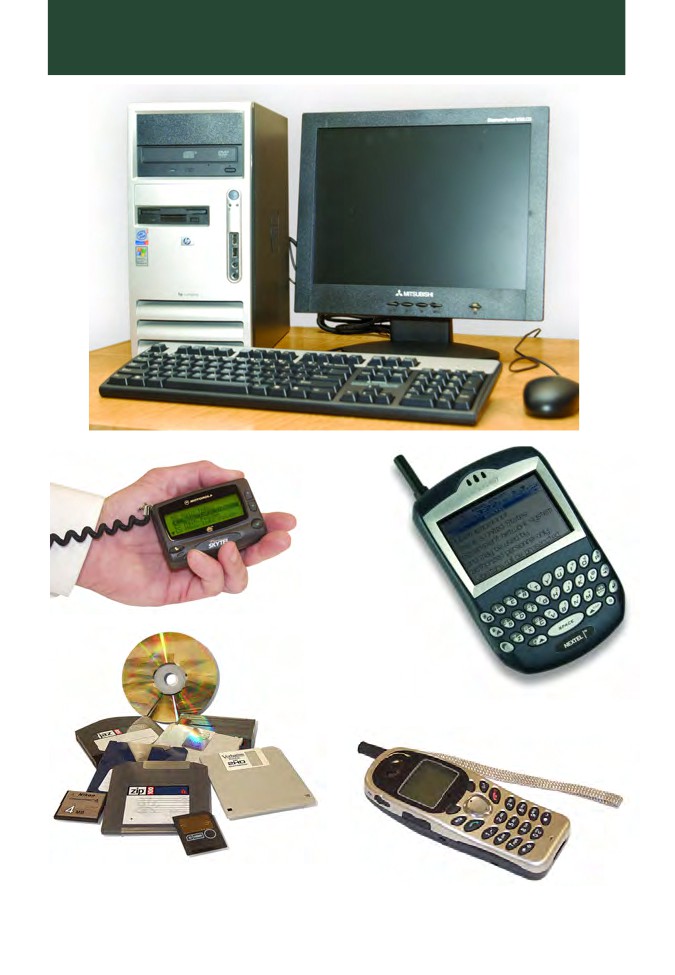
GALLERY
Computer
Tower
Pager
Blackberry
Cell Phone
Storage Media
(CDs, DVDs, Floppy Disks,
Zip Disks and Flash Cards)

Desktop / Server Hard Drive
Laptop Hard Drive
Wireless Router
iPod
Thumb Drives
GALLERY
GLOSSARY
Glossary and Explanation of Terms
BACKUP: A copy of information off a computer.
BOOT: To load the first piece of software to start a computer.
BYTE: A unit of data generally consisting of 8 bits.
KILOBYTE (KB): A Kilobyte is 1024 bytes.
MEGABYTE (MB): A Megabyte is 1024 Kilobytes.
GIGABYTE (GB): A Gigabyte is 1024 Megabytes.
CD-R: Compact disk to which data can be written to but not erased.
CD-RW: Compact disk to which data can be written and erased.
CPU: Central processing unit. It is the "brain" that performs all arithmetic, logic
and control functions.
DDOS: Distributed denial of service. An assault on a network that floods it with so
many additional requests that regular traffic is slowed or completely interrupted.
DONGLE: A device that attaches to a computer to control access to a particular
application. Dongles provide one of the most effective means of copyright
protection.
DVD: Digital versatile disc or digital video disc. Similar in appearance to a
compact disk, but can store larger amounts of data (typically a minimum of 4.7GB
of data).
ENCRYPTION: The process of scrambling or encoding information in an effort to
guarantee that only the intended recipient can read the information.
FIREWALL: A firewall allows or blocks traffic into and out of a private network or
the user's computer. A firewall is a method for keeping computers secure from
intruders.
HARD DISK: The hard disk is usually inside the PC. It stores information in the
same way as floppy disks but can hold far more data. Popular types of hard disks
are IDE, SCSI and SATA.
HARDWARE: The physical parts of a computer that can be picked up.
ISP: Internet service provider. A company that sells access to the Internet via
telephone or cable line to your home or office.
MEMORY: The electronic holding place for instructions and data that a computer's
microprocessor can reach quickly.
MODEM: A device that connects a computer to a data transmission line.
MONITOR: A device on which the computer displays information.
OPERATING SYSTEM: This software is usually loaded into the computer memory
upon switching the machine on. It is a prerequisite for the operation of any other
software.
PERSONAL ORGANIZER or PERSONAL DIGITAL ASSISTANT (PDA): These
are pocket-sized machines usually containing phone and address lists, diaries and
other information.
PIRATE SOFTWARE: Software that has been illegally copied.
RAM: Random access memory. The computer's short-term memory that is lost
when the computer is turned off.
REMOVABLE MEDIA: Floppy disks, CDs, DVDs, cartridges and tapes that store
data and can be easily removed.
REMOVABLE MEDIA CARDS: Small data storage media which are more
commonly found in other digital devices such as cameras, PDAs and music
players.
ROUTER: A network device that forwards packets from one network to another.
USB STORAGE DEVICES: Small storage devices accessed using a computer's
USB ports. They store large volumes of data files. They are easily removed,
transported and concealed. They are about the size of a car key or highlighter pen.
WARDRIVING: Driving around an area with a laptop and a wireless network
adapter in order to locate unsecured wireless networks.
WIRELESS NETWORK CARD: An expansion card present in a computer that
allows a cordless connection between that computer and other devices on a
computer network. The card communicates by radio signals to other devices
present on the network.
ZIP DRIVE / DISK: A 3.5-inch removable disk drive. The drive is bundled with
software that can catalogue disks and lock files for security.
GLOSSARY
Online Identity Theft Guide
PREVENTION
• Never give out any of the following information to unknown sources:
Date / Place of Birth
Social Security Number
Credit Card Number
Mother's Maiden Name
Address
Phone Number
• Review credit reports at least once a year.
• Ensure secure online transactions by locating the closed lock icon at the bottom
right side of your web browser before disclosing personal information.
• Unless absolutely necessary, do not store any financial information on a
computer.
• Prior to discarding a computer, destroy all information contained on the hard
drive. A wiping utility is necessary, as formatting will not safely destroy data.
• Use strong passwords and do not allow programs to save passwords.
• Use virus protection software and firewalls to prevent the loss of personal
information from your computer or the introduction of malware.
RESPONSE
• Contact bank or credit card issuer to report fraud.
• Place a fraud alert with the following credit agencies:
Equifax - 800-525-6285
Experian - 888-397-3742
TransUnion - 800-680-7289
• File an identity theft complaint with your local police department and the Federal
Trade Commission (FTC) at 877-382-4357.
UNCLASSIFIED //FOR OFFICIAL USE ONLY //LAW ENFORCEMENT SENSITIVE
Washington Regional
Threat and Analysis Center
Washington, D.C.
wrtac@dc.gov
202-481-3007
202-563-2768 (Fax)
Washington DC Threat Level
Officer Safety
&
Criminal Intelligence
Issues
VOLUME: 3, ISSUE: 21
EFFECTIVE DATE: 30 November 2009
DISTRIBUTION: This document is provided for your information and use. It is intended for law enforcement officers, security
personnel, antiterrorism officers and intelligence personnel. Further dissemination should be limited to a minimum, consistent with
the purpose of supporting effective law enforcement and security of installation personnel, equipment and facilities. This document
shall not be furnished to the media or any other agencies outside of law enforcement. It contains information that may be exempt from
public release under the Freedom of Information Act (5 USC 552).
UNCLASSIFIED //FOR OFFICIAL USE ONLY //LAW ENFORCEMENT SENSITIVE1
UNCLASSIFIED //FOR OFFICIAL USE ONLY //LAW ENFORCEMENT SENSITIVE
OFFICER SAFETY AWARENESS
SPRING ASSISTED TITANIUM SCREWDRIVER: This Officer
Safety Item is a spring-assisted titanium screwdriver. While it appears to
be a pen when carried in a pocket, it has a button that releases and locks
the shaft in place. When engaged, this item could quickly become a
dangerous stabbing weapon. The overall length is 6-inches with a
3.312-inchshaft. Law Enforcement and Security Professionals should be
mindful of concealed weapons such as these. We are entering the season
where bulky clothing will likely be worn by suspects. Always maintain
positive control of a suspect’s hands during a search or security
inspection. Airport and transportation security screeners should also be
mindful of items that appear to be pens or other common items.
Source: NYPD / Peel Regional Police - Daily Open Source Briefing Notes, 17 November 2009
**************************************************************************************************
CLUB / KNIFE: On Wednesday, November 4, 2009, a police officer in the 62 Precinct,
recovered the below “police type” club knife from a perpetrator within the confines of the 62
Precinct. Officers should be aware that covert knives are commonly utilized on the street and
are readily available via numerous sources, including the internet.
Source: MTA - NY Police Department, Daily Intelligence Briefing, 18 November 2009 / NYPD - Transit Bureau, Transit
District 23
2
UNCLASSIFIED //FOR OFFICIAL USE ONLY //LAW ENFORCEMENT SENSITIVE
UNCLASSIFIED //FOR OFFICIAL USE ONLY //LAW ENFORCEMENT SENSITIVE
WHAT OFFICERS NEED TO KNOW ABOUT SUICIDE BOMBERS: Speaking at the
IACP annual conference, Walter Purdy (former marine and current Vice President of the
Terrorism Research Center) clicked through slides of photos he had taken while visiting the
sites of some of the most horrific terrorist attacks in the Middle East. After providing a history
of suicide terrorism dating back to ancient times, Purdy described various methods of
recruitment and some of the technology employed in suicide bomb attacks. He also revealed the
most potent prevention method against suicide bombers: catching the intelligence gatherers.
The bomb carriers often are carefully recruited by coercion, psychological manipulation, and
appeals to disillusioned or disenfranchised young people. Those recruited or coerced into
attacks are determined to die. They expect no escape and the reward of a rich afterlife.
Once an attack is underway there is no strategy for repelling the terrorists other than killing
them. A consistent characteristic of these attacks is the intelligence gathering effort that
precedes them. Each case study described by Purdy was a case of exploited vulnerabilities
discovered by patient gathering of information by operatives.
While intrigue, sophistication, and technology may be used to plan many aspects of a suicide
attack, planners rely significantly on eye witness intelligence gathering to formulate their plans.
Police agencies have spent time training for responses to suicide bombers, school shooters, and
active threats but there has been little emphasis on watching for precursors to these attacks;
recruitment of bombers and surveillance of targets. Purdy described in detail case after case of
how operatives had watched locations for days gathering intelligence such as delivery times,
staffing levels, traffic patterns, and other routines to discover vulnerabilities. In successful
attacks, no one had challenged suspicious behavior of persons standing hour after hour
watching potential targets.
In one case a female operative had been approached by three separate police officers over a
course of days asking her out while she was conducting surveillance on a restaurant later hit by
a suicide bomber. The operative noticed that a security officer failed to search a musician’s
guitar case upon entering the restaurant. Soon after, a bomber carried out an attack using an
explosive in a guitar case he brought into the restaurant.
Noting the recent case in Colorado where a suspect was found to have made several trips to a
beauty supply wholesale store purchasing unusual quantities of chemical used for bomb
making, Purdy related that he was able to purchase multiple batteries, wire, and other bomb
material at a New York City hardware store without raising suspicion, even though he was
deliberately obvious about it. The message was clear: patrol officers and citizens reporting
suspicious behavior are key to preventing the inevitable proliferation of suicide attacks on
American soil.
UNCLASSIFIED //FOR OFFICIAL USE ONLY //LAW ENFORCEMENT SENSITIVE3