Military reference books and manuals (2009-2023, Volume 7) - page 1
FOR OFFICIAL USE ONLY
1
ATTP 2-91.5
2
Publication Date (Date Pending)
3
Document and Media Exploitation Tactics,
4
Techniques, and Procedures
5
(Final Draft—Not for Implementation)
6
The material in this manual is under development. It is NOT approved doctrine and CANNOT be used for
7
reference or citation.
8
DISTRIBUTION RESTRICTION: Distribution Authorized to U.S. Government Agencies ONLY because it
9
requires protection in accordance with AR 380-5, against unauthorized disclosure and as specified by DCS G-3
10
message DTG 091913ZMAR04. This determination was made on 08 April 2010. Contractor and other requests
11
must be referred to ATTN: ATZS-CDI-D, U.S. Army Intelligence Center of Excellence, Fort Huachuca, AZ 85613-
12
7017, or via email at: ATZS-FDC-D@conus.army.mil.
13
DESTRUCTION NOTICE—Destroy by any method that prevents disclosure of contents or reconstruction of the
14
document in accordance with AR 380-5, Chapter 6, Section V.
15
Headquarters Department of the Army
FOR OFFICIAL USE ONLY
ATTP 2-19.5
Army Tactics, Techniques, and Procedures
Headquarters
Department of the Army
No. 2-91.5
Washington, DC, (Date Pending)
17
Document and Media Exploitation Tactics,
18
Techniques, and Procedures
19
(Final Draft—Not for Implementation)
20
Contents
21
Page
22
PREFACE
iv
23
Chapter 1
OVERVIEW
1-1
24
Introduction
1-1
25
Document and Media Exploitation
1-1
26
Document and Media Exploitation Categories
1-1
27
Types of Captured Materials
1-1
28
Document and Media Exploitation Process
1-3
29
Document and Media Exploitation Team Organization and Responsibilities
1-4
30
Value of Document and Media Exploitation Operations
1-4
31
Chapter 2
INITIAL COLLECTION PHASE
2-1
32
Introduction
2-1
33
Initial Collection
2-1
34
Initial Collection Planning
2-1
35
Collect
2-4
36
Screen
2-11
37
Extract and Report Time Sensitive Information
2-12
38
Tag
2-14
39
Inventory and Group
2-16
40
Evacuate
2-20
41
Chapter 3
PROCESSING PHASE
3-1
42
Introduction
3-1
Distribution
Restriction: Distribution authorized to U.S. Government agencies only because it requires
protection in accordance with AR 380-5 or as specified by DCS G-3 Message DTG 091913Z MAR04. This
determination was made on 08 April 2010. Contractor and other requests must be referred to ATTN: ATZS-CDI-D,
U.S. Army Intelligence Center, Fort Huachuca, AZ 85613-7017, or via email at ATZS-FDC-D@conus.army.mil.
DESTRUCTION NOTICE—Destroy by any method that will prevent disclosure of contents or reconstruction of
the document in accordance with AR 380-5.
i
FOR OFFICIAL USE ONLY
Contents (Final Draft—Not for Implementation)
43
Inventory and Log
3-1
44
Screen and Categorize Captured Material
3-6
45
Recover
3-9
46
Digitize
3-9
47
Transcribe
3-10
48
Translate
3-10
49
Review
3-14
50
Chapter 4
ANALYSIS AND PRODUCTION PHASE
4-1
51
Introduction
4-1
52
Identify and Extract Reportable Information
4-1
53
Evaluate Source Reliability and Information Accuracy
4-3
54
Analyze Information
4-5
55
Assess Reporting
4-10
56
Update Databases
4-10
57
Chapter 5
REPORTING AND DISSEMINATION PHASE
5-1
58
Introduction
5-1
59
Report Information
5-1
60
Assess Reporting
5-4
61
Disseminate Reporting
5-4
62
Upload to the National Harmony Database
5-5
63
Evacuate for Further Processing, Exploitation, or Disposition
5-5
64
Chapter 6
THE NATIONAL HARMONY DATABASE
6-1
65
Introduction
6-1
66
Leveraging the National Harmony Database
6-3
67
Creating Harmony Records
6-6
68
Harmony Tools
6-8
69
Appendix A
HANDLING AND PROCESSING OF SPECIFIC LIMITING CRITERIA
70
INFORMATION
A-1
71
Appendix B
SWORN STATEMENT
B-1
72
GLOSSARY
Glossary-1
73
REFERENCES
References-1
74
INDEX
Index-1
75
76
Figures
77
Figure 1-1. DOMEX process
1-4
78
Figure 2-1. Initial collection phase tasks
2-2
79
Figure 2-2. Example of a site sketch
2-4
80
Figure 2-3. Example of marking a room or zone with slash across number
2-5
81
Figure 2-4. Photo of captured material
2-6
82
Figure 2-5. Identify and label network cables
2-8
83
Figure 2-6. Spot report in SALUTE format
2-13
ii
ATTP 2-19.5
Publication Date (Date Pending)
FOR OFFICIAL USE ONLY
Contents (Final Draft—Not for Implementation)
84
Figure
2-7. Capture tag, DA Form 2745
2-15
85
Figure
2-8. Evidence property tag, DA form 4002
2-16
86
Figure
2-9. Evidence/property custody document DA form 4137
2-19
87
Figure
2-10. Sample captured document tag
2-23
88
Figure
2-11. Sample captured document log
2-24
89
Figure
3-1. Processing phase tasks
3-1
90
Figure
3-2. Sample batch identification number
3-4
91
Figure
3-3. Workflow batch information sheet sample
3-5
92
Figure
3-4. Sample of a valid Harmony number
3-8
93
Figure
3-5. Example translation report
3-13
94
Figure
4-1. Analysis and production tasks
4-1
95
Figure
4-2. Sample DOMEX spot report
4-3
96
Figure
4-3. Example—DOMEX exploitation activities
4-6
97
Figure
4-4. Example—DOCEX and the intelligence disciplines’ action
4-7
98
Figure
4-5. Example—MEDEX and the intelligence disciplines’ action
4-8
99
Figure
4-6. Example—CELLEX and the intelligence disciplines’ action
4-9
100
Figure
4-7. Example—intelligence tasks
4-9
101
Figure
5-1. Reporting and dissemination phase tasks
5-1
102
Figure
5-2. Sample batch report
5-2
103
Figure
6-1. Harmony web page
6-2
104
Figure
6-2. Harmony search tool web page
6-3
105
Figure
6-3. Personal search agent taxonomies
6-5
106
Figure
6-4. Building customer defined queries
6-6
107
Figure
6-5. Harmony number format
6-7
108
Figure
6-6. Example of a DHDS CT
6-8
109
Figure
6-7. Harmony tools
6-9
110
Figure B-1. DA Form 2823 example
B-2
111
112
Tables
113
Table 1-1. Examples of captured enemy documents
1-2
114
Table 1-2. Examples of captured enemy materiel
1-3
115
Table 3-1. Categories of captured material
3-7
116
Table 4-1. Source reliability ratings
4-4
117
Table 4-2. Information accuracy ratings
4-4
118
Table 4-3. Source reliability ratings rule set
4-4
119
Table 4-4. Information accuracy ratings rule set
4-4
120
Publication Date (Date Pending)
ATTP 2-19.5
iii
FOR OFFICIAL USE ONLY
(Final Draft—Not for Implementation)
121
Preface
122
This publication provides Tactics, Techniques, and Procedures (TTP) required for Army personnel when conducting
123
Document and Media Exploitation (DOMEX) operations. The document is designed to serve as a reference for
124
multiple personnel at varying echelons. The ATTP provides specific information for Army personnel operating as
125
part of a DOMEX or other exploitation team for the collection, processing, and reporting of DOMEX activities. The
126
manual serves as a reference for staff planners and intelligence personnel at battalion and brigade combat teams.
127
Additionally, the manual provides an understanding of DOMEX activities, procedures, organizations, products, and
128
databases at joint task force, U.S. Army, and the Department of Defense.
129
This manual is consistent with the guidelines of the U.S. Army Training and Doctrine Command (TRADOC)
130
doctrine reengineering initiative.
131
The purpose of this Army TTP publication is to fill an existing doctrinal gap encompassing the TTP on how
132
personnel, at the tactical and operational levels, conduct DOMEX operations, collection, and analysis. This TTP
133
compliments doctrinal guidance provided in training circular (TC) 2-91.8, Document and Media Exploitation. This
134
publication applies to the Active Army, Army National Guard, Army Reserve, unless otherwise stated.
135
For the purposes of this manual, the term captured materials includes captured enemy documents and captured
136
enemy materiel.
137
The U.S. Army Training and Doctrine Command (TRADOC) is the proponent for this publication. The preparing
138
agency is the U.S. Army Intelligence Center of Excellence (USAICoE), Fort Huachuca, AZ. Send written comments
139
and recommendations on DA Form 2028 (Recommended Changes to Publications and Blank Forms) directly to
140
Commander, ATZS-DCF-D, USAICoE, 550 Cibeque Street, Fort Huachuca, AZ 85613-7017. Send comments and
141
recommendations by e-mail to ATZS-DCF-D@conus.army.mil. Follow the DA Form 2028 format or submit an
142
electronic DA Form 2028.
143
Publication Date (Date Pending)
ATTP 2-91.5
iv
FOR OFFICIAL USE ONLY
(Final Draft—Not for Implementation)
144
Chapter 1
145
Overview
146
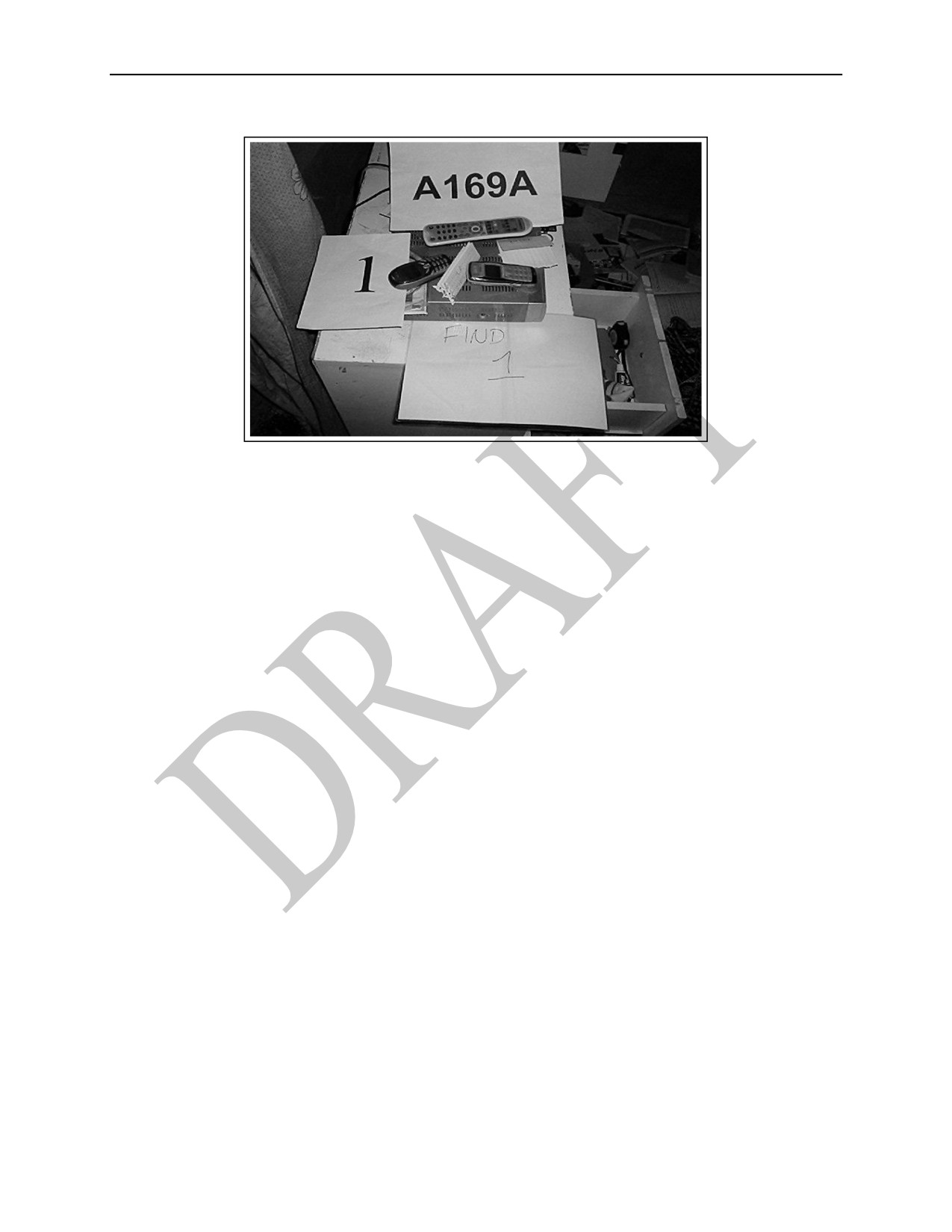
INTRODUCTION
147
1-1. As the Army refines how it coordinates and processes information derived from captured materials there
148
exists a critical need to identify new tactics, techniques, and procedures (TTP). The tools and technology used
149
to extract and analyze information from captured materials will continue to develop and broaden the spectrum
150
of how and what can be gleaned from captured material. The utilization of the document and media exploitation
151
(DOMEX) TTP will help U.S. forces gain and maintain the advantage over the enemy.
152
DOCUMENT AND MEDIA EXPLOITATION
153
1-2. DOMEX is the processing, translation, analysis, and dissemination of collected hardcopy documents and
154
electronic media that are under the U.S. Government’s physical control and are not publicly available (training
155
circular [TC] 2-91.8).
156
1-3. DOMEX includes the collection and exploitation of captured equipment, documents, and media to
157
generate actionable intelligence. DOMEX provides leaders at all echelons with intelligence about enemy forces;
158
their plans and intentions; and their TTP. It does this through the rapid and accurate extraction, exploitation, and
159
analysis of acquired documents, cell phones, computers, digital storage devices, video and audio tapes, and
160
other media and material. DOMEX is a critical part of target exploitation, especially as it relates to actions on
161
the objective during site exploitation activities.
162
1-4. Through DOMEX, information is systematically extracted from all captured materials in response to the
163
commanders’ critical information requirements (CCIR). DOMEX activities—
164
z
Maximize the value of intelligence gained from captured materials.
165
z
Provide commanders with timely and relevant intelligence to effectively enhance awareness of the
166
enemies’ capabilities, operational structures, and intents.
167
z
Provide timely and accurate intelligence support to the commander throughout the full spectrum of
168
operations.
169
z
Assist in criminal prosecution and legal processes by maintaining chain of custody procedures and
170
preserving the evidentiary value of captured materials.
171
DOCUMENT AND MEDIA EXPLOITATION CATEGORIES
172
1-5. DOMEX is divided into the following categories—
173
z
Document exploitation (DOCEX) is the exploitation of information from documents to include
174
printed manual, letters, diaries, notes, etc.
175
z
Media exploitation (MEDEX) is the extraction and exploitation of digital and analog intelligence
176
data using forensically sound techniques and equipment from captured material.
177
z
Cell phone exploitation
(CELLEX) is the exploitation of cell phone files such as phone and
178
subscriber identity module
(SIM) card models, phone records, short message service
(SMS)
179
messages, and pictures.
180
TYPES OF CAPTURED MATERIALS
181
1-6. To assist in their exploitation and evacuation, captured materials are divided into—
182
z
Captured enemy document (CED).
Publication Date (Date Pending)
ATTP 2-91.5
1-1
FOR OFFICIAL USE ONLY

Chapter 1 (Final Draft—Not for Implementation)
183
z
Captured enemy material (CEM).
184
1-7. Captured materials are documents, items of equipment, or materiel in the possession of enemy forces that
185
subsequently end up in the hands of friendly forces, regardless of origin, including U.S. or multinational
186
documents or materiel once in enemy hands. Of the two types of captured materials DOCEX, MEDEX, and
187
CELLEX will more likely fall into CED.
188
CAPTURED ENEMY DOCUMENTS
189
1-8. A CED is any piece of recorded information—written, printed, engraved, and photographic matter—
190
relative to the enemy and to weather and terrain data (see table 1-1). CED includes—
191
z
Printed materials—books, newspapers, pamphlets, operation orders (OPORDs), and identity cards.
192
z
Handwritten materials—letters, diaries, and notes.
193
z
Electronically recorded media—computer files, tape recordings, video, sound or voice recordings,
194
and digital media. Digital media usually refers to electronic media that works on digital codes.
195
z
Storage devices on communications equipment—cell phones, answering machines, and radios.
196
z
Information engraved or stamped on a weapon or weapon system (qualifies as a document since that
197
information can be exploited).
198
Table 1-1. Examples of captured enemy documents
Identify documents
Passports.
Military, police, or
Coalition issued ID
Driver’s licenses.
civil ID cards.
cards.
Identification (ID)
Residence cards.
Voter registration
cards.
Employee ID cards.
cards.
Nationality or
Union affiliation
Food ration cards.
citizenship cards.
cards.
Personal documents
Letters and notes.
Diaries.
Photographs.
Official documents
Overlays.
Codes.
Informal documents
Field orders.
Field manuals.
such as hand-drawn
sketches, diagrams,
Maps.
Reports.
and drawings.
Data contained on these types of memory devices
Zip and Jaz disks.
Compact flash
Multimedia cards.
Memory sticks.
cards.
Smart media cards.
Digital camera
Extreme digital
Readers and
memory
picture cards.
adaptors.
devices.
Secure digital
Video game
Wristwatches that
memory cards.
consoles and
store data.
Personal computer
cartridges.
memory cards.
Data contained on magnetic or digital storage devices
Compact disks.
Digital cameras.
8-track tapes.
Digital video (DV)
Audio tapes.
8-mm tapes.
disks.
Video home
Hi-8 tapes.
Floppy disks (3.5
systems.
Mini-DV tapes.
and 5.25).
Beta video tapes.
Magnetic tapes.
1-2
ATTP 2-91.5
Publication Date (Date Pending)
FOR OFFICIAL USE ONLY
Overview (Final Draft—Not for Implementation)
199
CAPTURED ENEMY MATERIAL
200
1-9. CEM includes foreign warfighting equipment and associated equipment (see table 1-2)—for example—
201
z
Weapons.
202
z
Weapons systems.
203
z
Weapon components such as improvised explosive devices (IEDs).
204
1-10. CEM also include all types of foreign and nonforeign equipment—
205
z
Found on a detainee of on the battlefield that may have a military application.
206
z
Identified on the collection requirements list within annex B (Intelligence) of the OPORD.
207
z
That is unidentified, appears modified, or is otherwise out of the ordinary or unexpected.
208
Table 1-2. Examples of captured enemy materiel
Unidentified and modified warfighting equipment and associated materiel
Vehicles.
Self-propelled weapons.
Components of equipment,
Weapons.
Radios.
explosive materiel, and
technology applications
Aircraft.
Unidentified and modified
associated with improvised
Artillery.
military or personal property
explosive devices.
or gear.
Note. This includes any related spares, repair parts, and support equipment.
Computer hardware equipment
Central processing units.
Mainframe computers.
Printers.
Desktop computers.
Servers.
Scanners (sheet-fed, flatbed,
Laptop computers.
Personal digital assistants.
film).
Computer drives (external and internal)
External magnetic hard
Zip drives.
Magnetic tape drives.
drives.
Micro drives.
Floppy drives.
External digital hard drives.
Tape drives.
Flash drives.
Jaz drives.
Key drives.
Peripherals and network devices
Data cables and wires.
Hubs.
Routers.
Docking stations.
Power cradles and chargers.
Spare batteries.
Communications materiel
Radios.
High-power cordless phones.
Pagers.
Antennae systems.
Satellite phones.
Standard cordless phones.
Cellular phones.
Fax machines.
Digital answering machines.
Subscriber identity module
Global Positioning System
Caller identification boxes.
cards.
receivers.
Video recorders.
209
1-11. For more information on CED and CEM refer to TC 2-91.8.
210
DOCUMENT AND MEDIA EXPLOITATION PROCESS
211
1-12. DOMEX plays a major role in facilitating the commander’s ability to discern and recognize the enemy’s
212
intent and patterns in operations. The historical accountability of captured material is essential to fully
213
comprehend, discover and translate information and intelligence within documents and various forms of media
214
and cellular devices.
215
1-13. The DOMEX process (as depicted in figure 1-1) is organized into four phases necessary to perform and
216
improve accuracy in accountability, information extraction, and evacuation of captured materials. The four
217
phases of the DOMEX process are—
218
z
Initial collection
Publication Date (Date Pending)
ATTP 2-91.5
1-3
FOR OFFICIAL USE ONLY

Chapter 1 (Final Draft—Not for Implementation)
219
z
Processing
220
z
Analysis and production
221
z
Reporting and dissemination
222
Figure 1-1. DOMEX process
223
1-14. Figure 1-1 identifies each phase of the DOMEX process as well as the tasks that are completed during
224
each phase. Conducting these tasks facilitates continuous accountability, information extraction, analysis, and
225
evacuation of captured material. One of the most important aspects of DOMEX is that it helps to answer the
226
CCIR, specifically the priority information requirements (PIR) and the information derived from DOMEX can
227
lead to thorough preparation and planning of future operations.
228
DOCUMENT AND MEDIA EXPLOITATION TEAM ORGANIZATION
229
AND RESPONSIBILITIES
230
1-15. DOMEX teams are task-organized based on theater and national intelligence requirements, tactical and
231
operational force structures, threat environments, and assigned missions and roles. The corps or joint document
232
exploitation center (JDEC) can organize DOMEX teams from its organic assets to meet immediate requirements
233
of echelons without DOMEX support. These teams may be attached to maneuver elements and can deploy
234
forward or support sustainment area units as required.
235
1-16. At lower echelons (brigade and below) DOMEX teams become involved in the DOMEX process in the
236
earliest phases
(Initial Collection and Processing) while DOMEX teams at division and above are more
237
involved during the latter phases (Analysis and Production and Reporting and Dissemination). DOMEX teams
238
have ideally received specialized DOMEX training. However, the overwhelming volume of DOMEX-related
239
captured materials acquired during recent military operations, and their potential for providing information of
240
immediate tactical value, have created the need for ad hoc exploitation teams to fulfill a variety of DOMEX
241
tasks at brigade and lower echelons.
242
1-17. DOMEX teams may be involved in conducting all four phases in the DOMEX process at lower echelons.
243
However, there are other individuals (Soldiers on patrol) and teams (such as site exploitation teams or raid
244
support teams [RST]) that also conduct the initial collection and processing phases in the DOMEX process.
245
Once captured materials are collected and processed the DOMEX teams will complete the final phases of
246
Analysis and Reporting and Dissemination.
247
VALUE OF DOCUMENT AND MEDIA EXPLOITATION OPERATIONS
248
1-18. Efficient and timely DOMEX operations provide intelligence analysts with leads and/or details of enemy
249
organizations, capabilities, and intentions ultimately increasing the commanders’ situational awareness.
1-4
ATTP 2-91.5
Publication Date (Date Pending)
FOR OFFICIAL USE ONLY
Overview (Final Draft—Not for Implementation)
250
DOMEX is of great importance to various intelligence specialties in full spectrum operations. DOMEX may
251
provide the human intelligence (HUMINT) collector information that will help in conducting interrogations or
252
developing certain approaches to use when interrogating detainees. DOMEX may also provide information that
253
leads to the capture and apprehension or conviction of those who produce improvised explosive devices. The
254
intelligence produced from DOMEX may also close gaps in intelligence associated with how and who the
255
enemy is talking to via various means of communications.
256
1-19. DOMEX operations are conducted to:
257
z
Deprive the enemy of their resources.
258
z
Protect potential targets.
259
z
Gain intelligence.
260
z
Gather forensic evidence.
261
1-18. Commanders recognize that as a force multiplier DOMEX teams must be pushed down to the tactical
262
level in order to enable the rapid exploitation and evacuation of the captured material for follow-on operations.
263
DOMEX teams accelerate the timely feedback by higher-echelon analytical fusion centers for ground tactical
264
commanders.
Publication Date (Date Pending)
ATTP 2-91.5
1-5
FOR OFFICIAL USE ONLY
(Final Draft—Not for Implementation)
265
Chapter 2
266
Initial Collection Phase
267
INTRODUCTION
268
2-1. U.S. forces collect and conduct initial screening during the initial collection phase. Proper collection and
269
handling procedures are vital to successful document and media exploitation (DOMEX) operations; they
270
z
Ensure that source-associated documents are available during detainee screenings, interrogations, and
271
debriefing operations;
272
z
Facilitate the efficient and effective processing, analysis, and reporting of DOMEX-derived
273
information
274
z
Ensure the proper safeguarding of intelligence and evidentiary value of documents and media;
275
z
Enable forensic experts to conduct exploitation of digital media in its unaltered form
276
z
Provide the legal protections of detainee property under the Geneva Conventions.
277
Poor collection practices can inhibit or prevent the effective exploitation of the captured enemy documents
278
(CEDs) and/or captured enemy materiel (CEM).
279
INITIAL COLLECTION
280
2-2.
―Collectors‖ refer to personnel or elements that conduct the collect task during the initial collection
281
phase. Collectors may be members of the capturing unit, site exploitation team, DOMEX team, human
282
intelligence
(HUMINT) collection team, raid support team (RST), weapons intelligence team (WIT), or
283
battalion intelligence staff. Regardless of how U.S. and multinational forces initially obtain captured materials,
284
the collector is responsible for ensuring proper collections procedures are followed.
285
2-3. Tactical operations, such as raids and cordon and search operations, often result in substantial yields of
286
captured materials. Soldiers and leaders must understand the importance of the collecting team’s initial
287
collection, handling, and exploitation of captured materials and their relationship to the overall success of the
288
DOMEX process. Proper team collection, handling and exploitation—
289
z
Feed the intelligence and operations processes.
290
z
May quickly answer commander’s critical information requirements (CCIR).
291
z
Lead to follow-on tactical operations.
292
z
Assist in the prosecution of criminals.
293
2-4. Collaboration between collectors and DOMEX personnel is critical to exploitation success. Following the
294
capture of a site or location it must be cleared to ensure safe entry. Other agencies or teams may be needed such
295
as Explosive Ordinance Detachment (EOD) teams to clear the site of explosive devices or material that may
296
have been booby trapped.
297
INITIAL COLLECTION PLANNING
298
2-5. Commanders and staffs use the military decisionmaking process (MDMP) for planning, and small unit
299
leaders use troop leading procedures to plan and prepare for exploitation operations. These processes provide
300
universally understood and commonly used procedures as described in field manual (FM) 5-0. ATTP 3-90.15
301
provides information of planning and conducting site exploitation operations.
302
2-6. During initial collection planning the S-2 and staff conducts an analysis of the CCIR and subsequent
303
priority intelligence requirements (PIR). The role, scope, and phases of DOMEX activities are delineated and
304
included in the intelligence annex and pre-mission briefings.
Publication Date (Date Pending)
ATTP 2-91.5
2-1
FOR OFFICIAL USE ONLY

Chapter 2 (Final Draft—Not for Implementation)
305
2-7. As when preparing for any mission or operations thorough planning is crucial. Battalion staffs plan for
306
the DOMEX operations of their subordinate units. They provide intelligence below the battalion level by task-
307
organizing intelligence personnel or they train company or platoon personnel in specific handling, screening,
308
and inventorying techniques. The staff considers the commanders intent, and specifically the purpose of the
309
operation.
310
2-8. The DOMEX team must also conduct planning in preparation for operations. The team leader must
311
ensure all team members are familiar with the DOMEX process beginning with the tasks of the initial collection
312
phase identified below in figure 2-1.
313
Figure 2-1. Initial collection phase tasks
314
PLANNING CONSIDERATIONS
315
2-9.
Prior to beginning the initial collection phase the DOMEX team leader should (list not all inclusive):
316
z
Conduct a detailed mission analysis.
317
z
Review all relevant related information such as—
318
Target packet for target site.
319
Current intelligence requirements.
320
Intelligence summary of the target.
321
z
Review intelligence requirements. (This will be based on the current unit intelligence, surveillance,
322
and reconnaissance
[ISR] plan and mission, enemy, terrain and weather, troops and support
323
available-time available and civil considerations [METT-TC]. It is important to prioritize collections
324
efforts prior to arriving on scene in order to collect the most important captured material first if
325
possible).
326
z
Develop a timeline for conducting the search and collection of captured material.
327
z
Identify required/available number of personnel.
328
z
Identify required equipment and/or supplies.
329
z
Conduct risk assessments. Consider—
330
Structural considerations (engineering faults, structural integrity).
331
Hazardous materials (such as explosives, chemical and radiological materials and devices or
332
toxic industrial chemicals and materials).
333
Biohazards (such as toxins, decaying bodies, or diseases endemic to the site).
334
Insurgents, criminals, or local populace.
335
z
Review appropriate unit standing operating procedures (SOP).
336
z
Understand proper search procedures (person, vehicle or facility).
337
z
Identify types of captured material likely to be found.
338
z
Understand proper handling procedures
339
z
Understand the relevance of the site to materials collected
340
z
Identify potential hazards
341
2-10. The team leader should ensure all team members are trained and prepared for the task. Each team
342
member should review and understand all relevant SOPs and procedures identified above. Additionally, the
343
team should prepare for the mission by organizing and gathering required equipment, supplies, and forms.
344
2-11. Needed items will vary depending on the specific mission but the following items are typically required
345
for collection:
2-2
ATTP 2-91.5
Publication Date (Date Pending)
FOR OFFICIAL USE ONLY
Initial Collection Phase (Final Draft—Not for Implementation)
346
z
Zip lock bags (assorted sizes).
347
z
Paper bags.
348
z
Paper envelopes (assorted sizes).
349
z
Large volume packaging material (mail bags, duffle bags, waterproof bags).
350
z
Log book.
351
z
Digital camera with spare memory card (ensure camera equipment is set to the correct date and time).
352
z
Video camera.
353
z
Biometric automated toolsets (BAT).
354
z
Handheld interagency identity detection equipment (HIIDE).
355
z
Electrical tape (2 colors minimum).
356
z
Digital or tape voice recorder.
357
z
Sketching materials.
358
z
Safety goggles.
359
z
Chalk.
360
z
Chem-lights.
361
z
Latex or rubber gloves.
362
z
Flashlights
363
z
Spare batteries.
364
2-12. The following forms are needed and teams should have them on hand and/or ready to print—
365
z
Capture Tags DD 2745.
366
z
Evidence/Property Tag DA Form 4002.
367
z
Evidence/Property Custody Form DA 4137.
368
z
Sworn Statement DA 2823.
369
GENERAL HANDLING PROCEDURES
370
2-13. The proper handling of material is critically important. In handling captured materials, personnel involved
371
in all phases of the DOMEX process must take every precaution to preserve the evidentiary value of original
372
materials. Captured materials may potentially carry the fingerprints of individuals being charged in criminal
373
proceedings.
374
2-14. Captured materials should not be handled before their actual collection. Trained collectors use extreme
375
caution when collecting, handling, and protecting forensic evidence. However, collections occurring in high-
376
threat environments may require the fast pick up and bagging of evidence by untrained personnel, consequently,
377
without the prerequisite protection of forensic evidence.
378
2-15. Because the actual collection of captured materials is key to the DOMEX process, when trained collectors
379
are not present, untrained personnel must exercise the utmost care in their collection of evidence, thus not
380
destroying forensic materials.
381
2-16. Before handling captured material, consider additional evidence that may be obtained from the material
382
and follow the appropriate handling procedures. For example, when collecting a compact disk (CD) consider
383
not only the information written to the CD, but also possible finger prints on the CD. Be mindful to collect
384
associated media, cables, cradles, and power adapters.
385
2-17. Captured material that may constitute evidence in legal proceedings against persons or groups suspected
386
of significant crimes must be safeguarded or secured separately from other captured material when practicable.
387
Tags identifying such captured material should be marked ―CRIMINAL EVIDENCE.‖ This captured material
388
should be reported as soon as possible by the capturing unit to the military police (MP) or other personnel
389
specially trained and authorized to handle evidence in order to establish the chain of custody/evidence.
390
Note. Always wear gloves when handling captured material.
Publication Date (Date Pending)
ATTP 2-91.5
2-3
FOR OFFICIAL USE ONLY

Chapter 2 (Final Draft—Not for Implementation)
391
COLLECT
392
2-18. The collection of captured materials is the U.S. and multinational forces’ initial acquisition of threat
393
documents and materiel. Proper collection and handling procedures are vital to the DOMEX process.
394
SITE CONSIDERATIONS
395
2-19. Carefully recording the site prior to handling CEM or CED is imperative to accurately document and
396
record information regarding where and how captured material was found. Recording the site is part of the
397
collection process and should be done in accordance with unit SOP, the information provided below are
398
example methods.
399
2-20. Information derived from the placement of items and how they were arranged will help in forming
400
valuable information that may not be recognized at first. Photographing material as it was found at the site
401
provides a graphic record of the captured materials’ possible relationships to other items that support the
402
DOMEX process. Collectors must annotate or otherwise include the captured materials’ tag with a digital
403
photograph or sketch to ensure their accountability and traceability. The following steps will help in collecting
404
and recording the site:
405
z
Sketch the site. (See figure 2-2 for an example of a site sketch.)
406
Draw sketch in a two dimensional, bird’s eye view.
407
Emplace a directional arrow that depicts the direction of north.
408
Write in the items found in each room that were captured.
409
Label where detainees were captured or found.
410
Write in address or geocoordinates of the site location.
411
Name of collector, unit identifier, and date time group should be identified on the sketch.
412
Figure 2-2. Example of a site sketch
2-4
ATTP 2-91.5
Publication Date (Date Pending)
FOR OFFICIAL USE ONLY
Initial Collection Phase (Final Draft—Not for Implementation)
413
z
Mark the rooms.
414
Label rooms and areas by ―Zone 1,2,3…‖ in accordance to site sketch
415
Remember to identify windows - If a person is found in a room with a window and a phone was
416
found outside that room make sure to make note. People often throw incriminating materials out of
417
their location if possible.
418
After rooms have been searched or captured materials removed place a slash across the number
419
to identify to other personnel rooms have been searched. See figure 2-3.
420
Figure 2-3. Example of marking a room or zone with slash across number
421
z
Photograph and video record the site.
422
From all corners of rooms take photos making sure to capture all features and material to be
423
collected.
424
Move to the center of the room and facing out at each of the four corners of the room take
425
additional photos.
426
Ensure that room/zone marking, for example: 1,2,3, is visible when taking a photo of the room.
427
This will be matched to the site sketch and should be documented in the photo log that is created
428
simultaneously which is explained in the inventory and group task.
429
Photograph documents, and any material too large or dangerous to remove from the site such as
430
large equipment, ordnance, and hazardous materials (notify appropriate personnel for ordnance and
431
hazardous materials).
432
Various portions of the site exterior should be photographed such as:
433
rooftops,
434
entrance and exits
435
locations of areas containing captured material.
436
Photograph intentionally hidden items.
437
Photograph intentionally damaged items.
438
Photograph items that, once packaged, may lose significance of their original positioning.
439
Photograph items that cannot be removed (i.e. graffiti).
440
Photograph items that meet collection requirements.
441
Photograph serial numbers on high value items or items of interest.
442
Photograph items unique to the area.
443
Photograph items that relay new enemy TTPs.
444
Ensure one batch photo is taken with all markings indicating that it is captured material
445
Ensure one sanitized batch photo is taken with no markings present.
446
2-21. Figure 2-4 is an example of a batch photo taken with markings indicating that it is captured material. If
447
detainees are captured a sanitized photograph of each batch of captured material will assist in their release by
448
identifying their personal belongings.
Publication Date (Date Pending)
ATTP 2-91.5
2-5
FOR OFFICIAL USE ONLY
Chapter 2 (Final Draft—Not for Implementation)
449
Figure 2-4. Photo of captured material
450
COLLECT CAPTURED ENEMY DOCUMENTS
451
2-22. CED can be invaluable to the tactical mission table 1-1 identifies examples of CED. CED can indicate
452
possible cache locations, rallying points, future intentions, and other information vital to the tactical
453
commander.
454
Special CED Handling Considerations
455
2-23. When handling CED always strive to prevent damage or further damage to all captured material. There
456
are unique handling and safeguarding procedures for paper documents, digital devices, and networked devices.
457
Paper Documents
458
2-24. Special care must be taken when handling paper documents, the quality of evidence and printed
459
information can easily be degraded by water or inadvertent rough handling. For example, wet or damp
460
documents, when placed in plastic, can transfer ink to the plastic lining resulting in damage to the document. An
461
already difficult to read document could become completely illegible, possibly resulting in a loss of intelligence
462
value.
463
z
Keep paper documents separate from one another. Do not mix documents from one room or site with
464
another.
465
z
Place documents in paper/cardboard containers first and then in zip-lock plastic bags, trash bags, or
466
water proof containers.
467
Digital Devices
468
2-25. When handling digital devices, personnel involved in all phases of the DOMEX process must take every
469
precaution to preserve the evidentiary value of the original devices. Digital devices may potentially carry the
470
fingerprints of individuals being charged in criminal proceedings. It is therefore necessary, when possible, for
471
handlers at every location to wear appropriate latex gloves to preserve evidence, which may be extracted
472
through fingerprint analysis or other biometric means.
473
2-26. All digital media should be captured in spite of its apparent functional state. Damaged, broken, or
474
disabled digital media can often be exploited from internal components by expert technical analysts. Intentional
475
damage is an indicator that the device may contain important data. Intentional damage to digital devices may
2-6
ATTP 2-91.5
Publication Date (Date Pending)
FOR OFFICIAL USE ONLY
Initial Collection Phase (Final Draft—Not for Implementation)
476
have occurred in an attempt to deny information and should be noted by exploitation or collection team
477
personnel. Photograph damaged equipment in the condition in which it is found before collecting.
478
2-27. Portable digital devices include handheld computing devices such as portable digital assistants, cellular
479
phones, media storage such as MP3s. If they are discovered with the power on then leave them on. If the device
480
is off, leave them off. If the device is on, the team should make every effort to keep the device charged until it
481
can be turned over to specialized personnel or teams who can exploit and maintain the device properly. The
482
purpose of this is so the computer memory is not altered for evidence purposes. When handling portable digital
483
devices:
484
z
Do not answer a phone if it rings.
485
z
If the phone is turned off, leave it off. If it is on, leave it on.
486
z
Do not play with the phone (i.e. extend and retract the antenna on a satellite phone).
487
z
Collect all associated peripherals cables, keyboard, etc.
488
z
Do not attempt to view or play any captured digital media (except as noted in para 2-28). Attempts at
489
exploring the contents of systems by untrained non-media exploitation personnel may inadvertently
490
overwrite deleted file information, save over hidden unallocated space, or initiate ―wipe clean‖
491
programs.
492
2-28. Collectors should annotate all actions taken with digital devices. This information is critical for media
493
exploitation technicians as well as the intelligence staff that will conduct the debriefing. Concerning computers,
494
collectors—
495
z
Jiggle the mouse if the screen is blank, and either photograph or write down what appears on the
496
screen.
497
z
Record any applications that are open. Maximize, record, and photograph any minimized programs.
498
Minimize again before photographing the next screen.
499
z
Do not save anything. Accidentally saving something could save over something hidden in
500
unallocated space. In Microsoft operating systems, when a file is deleted, only the reference to the
501
file is removed (unless deletion software is used); that data in the file remains on the disk and is
502
considered unallocated space. Data will be lost to media exploitation technicians if a file is saved
503
over the deleted file.
504
z
Do not use normal shut down procedures. To shut down digital devices, pull the power cord from the
505
wall or remove the battery from the device.
506
z
Terminate network connection by pulling network cables.
507
z
Collect all peripherals cables, keyboards, etc.
508
2-29. Digital media frequently has intelligence value and can be extremely time consuming to exploit; therefore
509
it is rarely exploited at the tactical level. The extraction of fragile digital information from seized
510
computer/digital devices requires dedicated computer forensic equipment, software, and the expertise of media
511
exploitation technicians.
512
Networked Devices
513
2-30. If digital devices are networked, the recorder must annotate the network topology. Mapping the topology
514
allows media exploitation technicians to recreate the network. Annotating network topology can be
515
accomplished quickly utilizing colored tape or markers so each cable can later be identified by color. This
516
procedure is only required for network cables; all other cables should simply be disconnected. Disconnect
517
computers from the network so that another individual can’t remotely access the device and delete potentially
518
important information. See figure 2-5 for graphic on how to label network connection cables.
519
2-31. Preferred methods to identify the network topology include:
520
z
Wrap a strip of color tape around the ends of each cable.
521
z
Photograph the setup so the technicians can note where each cable goes.
Publication Date (Date Pending)
ATTP 2-91.5
2-7
FOR OFFICIAL USE ONLY

Chapter 2 (Final Draft—Not for Implementation)
522
Figure 2-5. Identify and label network cables
523
Note. It is important to be aware of wireless connections and activity in the area that captured
524
material is being collected. Data or digital evidence on some devices such as mobile or smart phones
525
can be overwritten or deleted while the device remains activated. Turn off all wireless interfaces to
526
include Bluetooth and WIFI connection the DOMEX element may have on their person or in
527
surrounding area.
528
COLLECTING CAPTURED MATERIAL ASSOCIATED WITH A DETAINEE
529
2-32. Capturing units remove all documents or material, except for one official primary identification
530
document, from detainees to safeguard them from alteration or destruction. The capturing unit evacuates these
531
captured materials with, but not on the detainees. Following interrogation, the HUMINT collector or DOMEX
532
team, per unit SOP, in accordance with applicable rules and regulations, decides which personal documents or
533
materiel to return to the detainees.
534
2-33. Secure and search the detainees employing the search, silence, segregate, speed, safeguard, and tag (5Ss +
535
T) method and secure all documents, media, and materials in the area of capture.
536
2-34. Detainees may retain protective military equipment such as helmets; protective masks; body armor;
537
identification cards and tags; and insignias of grade, service, and nationality—only after the items have been
538
searched for any hidden documents or materiel. For further information captured material associated with a
539
detainee see Article 17, Part III, Section I, Geneva Conventions, FM 2-22.3, and JP 3-63.
540
2-35. The following list of the 5Ss+T method outlines important considerations when collecting captured
541
material associated with the detainee.
2-8
ATTP 2-91.5
Publication Date (Date Pending)
FOR OFFICIAL USE ONLY
Initial Collection Phase (Final Draft—Not for Implementation)
542
z
Search - Search captives for weapons and ammunition, items of intelligence value, and other
543
inappropriate items.
544
Note. Conduct same-gender searches when possible. If mixed-gender searches are necessary for
545
speed or security, conduct them in a respectful manner and avoid any action that could be interpreted
546
as sexual molestation or assault. To prevent allegations of sexual misconduct, the on-site supervisor
547
carefully controls Soldiers who perform mixed-gender searches.
548
z
Segregate - Segregate captives by rank, gender, nationality, and status.
549
z
Silence - Do not allow captives to speak or allow anyone to speak to them. Speak to captives only to
550
give orders.
551
z
Speed - Remove captives from the battlefield as quickly as possible.
552
z
Safeguard - Safeguard captives according to the Geneva Conventions and the U.S. policy. Provide
553
medical care as needed.
554
z
Tag - Tag captives with a DD Form 2745 Enemy Prisoner of War Capture Tag or a field-expedient
555
capture tag that includes the following information:
556
Date of capture.
557
Location of capture (grid coordinates).
558
Capturing unit.
559
Special circumstances of capture (how the person was captured, if they resisted, if they gave up,
560
and so forth).
561
Note. The capturing unit must complete a capture tag, failure to do so hinders further processing and
562
disposition.
563
2-36. Along with following the 5Ss+T method, other steps should also be considered when collecting and
564
documenting captured material with detainees. Take evidentiary close up photographs of captured material and
565
detainees—
566
z
Photograph captured materials/evidence as found.
567
z
Photograph the detainee together with captured material.
568
z
Proximity (establishes relation between individual and the captured material).
569
z
Photograph detainee with their identification visible.
570
2-37. Documents associated with human sources are normally exploited, at least initially, during the tactical
571
interrogation or debriefing of the detainee. HUMINT collectors typically use these documents during planning
572
and preparation for interrogation of the detainee. If a duplication capability exists in the operational area,
573
collectors should make copies of all personal documents which may contain intelligence information.
574
2-38. Thoroughly check items, such as wallets or notepads, for inconspicuous pockets that may contain contact
575
information. Contact information such as phone numbers, e-mail addresses, web addresses, and physical
576
addresses are typically found in —
577
z
Address books.
578
z
Daily planners.
579
z
Receipts.
580
z
Wallets.
581
z
Notebooks.
582
z
Business cards.
583
z
Loose scraps of paper.
Publication Date (Date Pending)
ATTP 2-91.5
2-9
FOR OFFICIAL USE ONLY
Chapter 2 (Final Draft—Not for Implementation)
584
Safeguard Original Captured Material With Detainees
585
2-39. The capturing unit or team, is responsible for properly safeguarding captured material that accompanies
586
detainees. The objective is to ensure the captured material can be used as evidence or help investigators or
587
interrogators question the detainees about items that were in their possession.
588
2-40. Responsibilities and procedures must clearly be established by unit SOP regarding the handling of
589
detainee captured material. These items will be returned if the detainee’s statement vindicates them of a crime
590
or criminal act and are not a threat to friendly forces.
591
Pocket Litter
592
2-41. Pocket litter normally refers to the personal property discovered in the possession of a detainee. Although
593
scraps of paper and notes may seem insignificant at the time of capture, this type of personal property can be
594
extremely useful during screening and HUMINT operations. The may provide insight into what motivates an
595
individual to cooperate. Pocket litter may also contain contact information that is vital in conducting tactical
596
follow-on operations.
597
2-42. Inventory - The integrity of personal property must be maintained at all times. When items (such as a
598
phone) from a detainee’s pocket litter are separated, for either additional exploitation by a technical expert, or
599
preparation for interrogation operations, the document handler must ensure that a correlation can be made to the
600
correct detainee and the remainder of the personal property. It is critical that analysts and HUMINT collectors
601
are able to discern which items were actually captured on a person; failure to establish links between personal
602
property and detainees may result in the premature release of detainees.
603
2-43. Handle Appropriately - The capturing unit and each subsequent handler of captured materials must
604
ensure that material is not damaged, defaced, or that its intelligence or evidentiary potential is not degraded in
605
any way. Do not mark, alter, or deface original captured documents.
606
2-44. Evacuate with the Detainee - Personal property may receive the same batch number as the rest of the
607
material it was captured with, but must remain segregated from the rest of the batch. Personal property will
608
generally accompany the detainee to whom it belongs.
609
CAPTURED ENEMY MATERIAL (CEM) AND HAZARDOUS MATERIALS
610
2-45. Before inventorying captured materials, personnel involved in their handling must ascertain whether
611
hazardous materials are rendered safe; personnel safety is the first priority. In the event that munitions or other
612
hazardous materials, such as chemical, biological, radiological, nuclear, and high-yield explosives (CBRNE),
613
are discovered during the inventory of captured materials, evacuate the area immediately and summon the
614
appropriate authorities.
615
2-46. The EOD unit can initially assess and neutralize found munitions. These munitions may include single
616
munitions, captured enemy ammunition sites, and items recovered during military operations (patrols, raids,
617
maneuvers). For safe handling procedures, consult trained professionals such as the EOD unit, support battalion
618
ammunition specialists, a CBRNE representative, or another appropriate activity in accordance with the unit’s
619
SOP.
620
2-47. When handling hazardous material considerations include—
621
z
If hazardous materials, such as chemical, biological, radioactive, nuclear substance are discovered
622
during the inventory of captured material, take immediate action to reduce the possibility of personal
623
injury by evacuating the area and summoning the appropriate authorities such as EOD, CBRNE, or
624
WIT.
625
z
Always make sure that hazardous material, weapons, weapons making material, and ammo are
626
rendered safe by EOD.
627
z
If materials are determined to be unsafe and identified for destruction, photograph and document the
628
condition of the captured materials before items are destroyed.
2-10
ATTP 2-91.5
Publication Date (Date Pending)
FOR OFFICIAL USE ONLY
Initial Collection Phase (Final Draft—Not for Implementation)
629
Military Weapons and Equipment
630
2-48. Weapons and ammunition discovered during a raid or site exploitation operation must first be cleared and
631
then properly stored as hazardous materials. Some items that must never be packaged together include weapons
632
and ammunition, as well as explosives and blasting caps.
633
2-49. Separate all weapons, ammunition, and weapon-making materials. Never package materials together that
634
could possibly result in an explosion, misfire, or similar incident. All weapons and ammunition must be
635
inventoried and photographed. Record weapons serial numbers and ammunition by type and quantity. If
636
weapons, ammunition, and weapon-making materials are altered by the capturing unit, site exploitation team, or
637
EOD, ensure a record of the alteration is included in the mission summary. The following information should be
638
extracted and reported from military weapons and equipment:
639
z
Serial numbers.
640
z
Nomenclature.
641
z
Condition.
642
z
Alterations.
643
Improvised Explosive Devices
644
2-50. An improvised explosive device is a device placed or fabricated in an improvised manner incorporating
645
destructive, lethal, noxious, pyrotechnic, or incendiary chemicals and designed to destroy, incapacitate, harass,
646
or distract. It may incorporate military stores, but is normally devised from nonmilitary components. (joint
647
publication [JP] 3-07.2). Many of the materials that can be used as components in an IED are often not
648
dangerous on their own. However, the discovery of a combination of various materials used to make IEDs often
649
indicates the possibility that IED-assembly activities may be occurring.
650
2-51. IED and suspected IED components must be photographed and inventoried much like other captured
651
materials. Possible IED component materials may include:
652
z
Car alarms.
653
z
Doorbells.
654
z
Cell phones.
655
z
Two-way radios.
656
z
Batteries.
657
z
Electronic components.
658
z
Wires.
659
z
Wiring harnesses.
660
z
Timers.
661
z
Phones.
662
Note. The Weapons Intelligence Team (WIT) is frequently interested in IED components as well as
663
weapon modifications employed by the enemy. All identified IED-making equipment should be
664
reported to the nearest WIT for further analysis.
665
SCREEN
666
2-52. Hasty screening and assessment is conducted primarily to identify and extract information of immediate
667
tactical value. For effective screening:
668
z
Be familiar with intelligence indicators associated with the CCIR.
669
z
Prepare a list of characteristics captured material is likely to have in common with indicators
670
associated with the CCIR. This will serve as a guide to follow when reviewing documents and
671
material andl increase probability that the screening will identify relevant captured material.
672
2-53. Actions conducted during screening operations—
Publication Date (Date Pending)
ATTP 2-91.5
2-11
FOR OFFICIAL USE ONLY
Chapter 2 (Final Draft—Not for Implementation)
673
z
Based on the CCIR, review each item and determine if item is indicated as a priority for collection.
674
z
Assign a category to the item. See chapter 3 for categorizing captured material.
675
z
Prioritize each item for translation or exploitation. For example if an information requirement states
676
that digital thumb drives are being used to send encrypted messages to adversaries, then any captured
677
material found in a search that appears to be a digital thumb drive would be something a collector
678
would single out and make a priority for exploitation.
679
z
Identify items that may need special handling due to classification, fragile state of material, value of
680
materiel, etc.
681
2-54. When identified, time-sensitive information is reported using the unit SOP directed immediate
682
precedence report format. Copies of all reports will accompany the captured material through the evacuation
683
process. Included with this information is-
684
z
Date of hasty screening.
685
z
Place of the hasty screening.
686
z
Rank and name of the screener.
687
z
Rank and name of the supporting linguist.
688
z
Rank and name of the individual supervising the screening effort.
689
Important Note. Under no circumstances will efforts be made to review or exploit magnetic media at
690
the field site. These items will be carefully safeguarded from damage until they can be evacuated to
691
appropriate technical experts such as media exploitation personnel.
692
Media exploitation personnel may be found at the brigade level as part of the task- organized
693
DOMEX teams. Media exploitation personnel are also found at facilities such the JDEC and the
694
Combined Media Processing Center (CMPC).
695
EXTRACT AND REPORT TIME SENSITIVE INFORMATION
696
2-55. Extracting and reporting time-sensitive information occurs at each unit or activity that acquires captured
697
material. At the tactical level this task occurs during the hasty screening of captured material.
698
2-56. During the screening process if an item or document provides perishable and actionable intelligence then
699
composing a spot report is imperative. Spot reports are used at each echelon to ensure the timely reporting of
700
time-sensitive information. For example, a DOMEX team learns that the enemy plans to launch an attack within
701
a few hours based on captured material translated. This information needs to be reported immediately. The spot
702
report is the appropriate report format to use in disseminating this critical information.
703
2-57. Spot reportable documents - Once reported on site, the S-2 section should ask for these items first in
704
order to quickly exploit potential actionable information. Additionally, the S-2 must be notified of spot reported
705
documents to ensure that duplicate reporting does not occur.
706
2-58. Although the precise format for a spot report is in accordance with unit SOPs, the standard spot report is
707
in the size, activity, location, unit, time, and equipment (SALUTE) format. Figure 2-6 depicts the format and
708
provides instruction for completing a spot report.
2-12
ATTP 2-91.5
Publication Date (Date Pending)
FOR OFFICIAL USE ONLY
Initial Collection Phase (Final Draft—Not for Implementation)
709
Figure 2-6. Spot report in SALUTE format
710
2-59. To prevent redundant reporting, each team, activity, or echelon receiving captured materials is
711
responsible for ascertaining whether the time-sensitive information was previously reported disseminating a
712
spot report. A copy of each spot report is forwarded with the original captured material as it is evacuated
713
through intelligence channels.
714
Publication Date (Date Pending)
ATTP 2-91.5
2-13
FOR OFFICIAL USE ONLY
Chapter 2 (Final Draft—Not for Implementation)
715
TAG
716
2-60. Proper tagging of captured materials is the initiation of the chain of custody and accountability and must
717
be performed as soon as possible after capture and continued throughout the DOMEX process. Failure to
718
properly identify or handle captured materials can result in the loss of intelligence or degrade the evidentiary
719
value of information.
720
2-61. DD Form 2745 (See figure 2-7) is the preferred form used to fill out information ranging from date of
721
capture of an enemy prisoner of war, description of weapons, special equipment, and documents. DD 2745 tags
722
are extremely durable and easily attach to materials and bags with metal wires or twist ties. Review unit SOPs
723
and ensure compliance with proper tagging procedures. The most frequently referrenced item on the DD 2745 is
724
the serial number. It is used to establish the chain of custody which simplifies transfer of captured materials to
725
other echelons. Minimum requirements for filling out capture tag are:
726
z
Date-time group (DTG) the item was captured.
727
z
Serial number.
728
z
Place the item was captured. Six to eight digit grid coordinates and a description.
729
z
Identity of the source, if applicable.
730
z
Summary of the circumstances of captured material.
731
z
Identity of capturing unit.
732
2-62. DA Form 4002, Evidence Property Tag, (see figure 2-8) may also be used to tag captured materials. This
733
self-adhesive form can be attached directly to captured materials or to packaging materials/bags of captured
734
materials. Use caution when attaching the form so that the items are not damaged. Do not mark directly on the
735
items. Evidence property tags may correspond with the serial numbers annotated on DD Form 2745 Capture
736
Tag, to establish a connection between items. The DA Form 4002 is used to facilitate tracking evidence.
737
2-63. When tagging captured material and detainees ensure that:
738
z
Tags are securely attached to the item itself and to the shipping container.
739
z
Weather-resistant tags are used and if they are not available use material (for example, rations
740
packing) on which pertinent capture data can be recorded.
741
2-64. There are two procedures for marking and tagging captured material. The procedure used depends on
742
whether or not the captured item is associated with a captured person.
743
z
Captured material with detainees: Secure tag onto the captured person and any associated captured
744
material with the three-part EPW tag (DD Form 2745).
745
z
Captured material not associated with a detainee: Secure tag to the piece of equipment and associated
746
document with part C of the EPW capture tag.
2-14
ATTP 2-91.5
Publication Date (Date Pending)
FOR OFFICIAL USE ONLY
Initial Collection Phase (Final Draft—Not for Implementation)
747
Figure 2-7. Capture tag, DA Form 2745
Publication Date (Date Pending)
ATTP 2-91.5
2-15
FOR OFFICIAL USE ONLY
Chapter 2 (Final Draft—Not for Implementation)
748
Figure 2-8. Evidence property tag, DA form 4002
749
INVENTORY AND GROUP
750
2-65. Inventories take place when needed throughout the DOMEX process to ensure proper control and
751
tracking of captured material. The invetory task is specifically conducted before evacuation in the initial
752
collection phase and after receipt in the processing phase.
753
2-66. Conducting a thorough inventory is essential in accountability and monitoring the movement and
754
transport of captured material from one location to another. Compromise or loss of captured material can
755
degrade the value of captured material and can undermine exploitation efforts.
756
2-67. DA Form 4137 is the most effective method for inventorying captured materials. It is widely used and
757
recognized; it provides flexibility for describing captured materials while documenting the entire chain of
758
custody. When receiving captured materials from a team always ask for DA Form 4137 Evidence/Custody. If
759
one is not provided complete the form at the first opportunity.
760
2-68. A single DA Form 4137 should account for all captured materials for a particular mission, location, or
761
individual. A separate DA Form 4137 should be filled out for detainees and their pocket litter. For example, if
762
three individuals are detained in a search of a residence that also yielded the contents of a desk that are not
2-16
ATTP 2-91.5
Publication Date (Date Pending)
FOR OFFICIAL USE ONLY
Initial Collection Phase (Final Draft—Not for Implementation)
763
attributed to a specific detainee, then there should be four DA Form 4137 documents created. Each detainee’s
764
pocket litter is attributed directly to them and the contents of the desk is attributed to the capturing unit.
765
COMPLETE DA FORM 4137 PROPERTY/EVIDENCE CUSTODY DOCUMENT
766
2-69. DA Form 4137 should be labeled with a unique name that identifies the batch of documents, typically the
767
mission or target name or number. Assigning appropriate batch identification names and numbers will ensure
768
that captured material and associated products are linked together when uploaded into the National Harmony
769
Database. See figure 2-9 for DA Form 4137. Steps in filling out the DA Form 4137 are as follows—
770
z
Annotate the capture tag (DD 2745) serial number or Batch ID number in the block labeled
771
―MPR/CID Sequence Number.‖
772
z
Leave the block labeled ―CRD Report / CID ROI Number‖ blank
773
z
Annotate your unit or organization in the ―Receiving Activity‖ block.
774
z
Annotate you unit/organization’s location in the ―Location‖ block (for example ―FOB Speicher‖
775
―FOB Salerno,‖ etc,).
776
z
Enter name, grade, and title (if known) of the person who the materials were received from. In the
777
case of detainee pocket litter this would be the name and/or identification number of the detainee.
778
For items that are found in common areas or are not attributed to a specific detainee use the name of
779
the Site Exploitation Team leader or the individual who turned over the captured materials.
780
Check the ―Owner‖ box if the detainees owns the property that you confiscated during the
781
search.
782
Check the ―Other‖ block if ownership is unknown (for example, site exploitation team finds
783
items during a search of a common area that are not attributed to an individual).
784
z
Enter the address of the person from whom you received the items in the ―Address‖ block, if known.
785
This may be the FOB of the site exploitation team.
786
z
Annotate the location where the items were confiscated or found.
787
Provide enough information to document the location where chain of custody is initiated. A
788
description, for example, might read: ―Two-story house next to Exxon station on MSR Tampa IVO
789
Baghdad‖ or ―Destination Holding Area Alpha, ― or Al-Awael Internet Café, Shaqlawa, Iraq
790
MF33702/29222.
791
Describe where the item was found on the person, such as ―Removed from the left front pants
792
pocket.‖
793
z
Enter the reason for the confiscation in the ―Reason Obtained‖ block (for example, ―HVT Raid‖ or
794
―Cordon and Search‖).
795
z
Record the date-time-group of confiscated/impounded or found (for example, ―151541APR07.‖). If
796
several items are confiscated, indicate the time span when they were collected
(for example,
797
―151541-1630APR07.‖). The earlier time notes when the first item was taken and the later time notes
798
when the last item was taken.
799
z
Enter item number. List items consecutively.
800
z
Enter quantity of like items (for example, 6 CDs, etc.).
801
z
Describe each item in the ―Description of Articles‖ block. The description of each item should meet
802
the simple requirement that another individual who understands English can comprehend what they
803
are signing for. Use as many Evidence/Custody Documents as necessary to encompass all captured
804
materials. Ensure to record the number of pages required (for example, page 1-3).
805
z
Describe each item in basic terms by what is observed.
806
z
Always state noun first followed by a description.
807
z
Do not group unlike items together.
Publication Date (Date Pending)
ATTP 2-91.5
2-17
FOR OFFICIAL USE ONLY
Chapter 2 (Final Draft—Not for Implementation)
808
Good Examples of Descriptions
809
ID card, Iraqi, Mohammad Ishmel, in Arabic
810
Book, green binder, gold Arabic writing
811
Tape, VHS, Sony
812
Watch, gold in color, Roman numerals on face
813
Phone, mobile, Nokia, red, serial number NM78THY338
814
CDs, Arabic writing
815
Hard drive, external, Lacie, 1TB, serial number L8933RT
816
Poor Examples of Descriptions
817
Book
818
A bunch of CDs
819
Cell phone
820
Paper
821
Some money
822
Pictures
823
Hard drive, CDs, papers, pictures, thumb drives
824
z
List the color, size, and shape. Never estimate the value of collected articles or attempt to determine
825
the type of metal, stone, or other valuable characteristic associated with the item. For example, rather
826
than describing a metal item as ―gold,‖ describe it as ―gold-colored metal.‖
827
z
If serial numbers can be identified without dismantling or altering the materials, then they should be
828
recorded. It is not necessary to record the serial numbers of devices, such as mobile phones that
829
require the battery to be removed to access the serial number. In cases where unknown items are
830
encountered a basic description is sufficient.
831
z
Place continuous slashes (///) from the left border of the block to the right border of the block to
832
indicate the end of the list.
833
2-70. Complete the ―Chain of Custody‖ portion of the form to transfer items from the detained person to the
834
person receiving custody of the items.
835
z
Item No. If all items are being transferred then identify all items listed in the ―Description of
836
Articles‖ block. For example, write ―1 thru 3‖ in the ―Item Number‖ column if there are three items
837
listed in the ―Description of Articles‖ block and all items are being transferred. If only specific items
838
are to be transferred, then list only those items (for example ―Item 1, 3, 7 and 10‖)
839
z
Enter date of custody transfer in the ―Date‖ Column
840
z
Fill in the ―Released By‖ column (enter name and grade or title of the person taking custody).
841
z
Enter reason for the custody transfer in the ―Purpose of Change of Custody‖ column (for example
842
―released for exploitation‖ ―Detainee released,‖ ―Detainee Transferred to….,‖ ―Detainee transferred
843
to local authorities‖).
2-18
ATTP 2-91.5
Publication Date (Date Pending)
FOR OFFICIAL USE ONLY
Initial Collection Phase (Final Draft—Not for Implementation)
844
Figure 2-9. Evidence/property custody document DA form 4137
Publication Date (Date Pending)
ATTP 2-91.5
2-19
FOR OFFICIAL USE ONLY
Chapter 2 (Final Draft—Not for Implementation)
845
GROUP
846
2-71. Group captured materials based on their association with specific detainees or location of capture. In
847
other words, group together all captured materials associated with a specific detainee and group separately from
848
captured materials associated with a different detainee. The same applies to large volumes of captured materials
849
at a site—group based on their location of capture or group based on the room of capture at a certain location.
850
Units gathering captured materials from multiple locations in one day should inventory and group them
851
according to the location of capture.
852
2-72. Creating a photo log will help organize and track photos as to where they were taken and the relevancy of
853
the groups in which they are placed.
854
z
First, take a photograph of the zone/room labeling along with the items or detainee or both.
855
z
When the photograph is downloaded the pictured zone/room labeling will automatically be listed
856
first and therefore associate all of the following photos as having been captured within that zone or
857
room.
858
z
Placeholders between photos can also be applied to separate and distinguish room or zone. To create
859
a placeholder; write description of area or place (such as zone or room 8, living area) on piece of
860
paper or 3x5 index card. Take a photo of the placeholder. Then take the series of photos following
861
the photo of the placeholder that gives a description of photos that follow the placeholder. Continue
862
to divide and segregate areas that you’re photographing for easier organization and grouping.
863
2-73. If a DOMEX team does not have ample time to package and separate captured material for transport at
864
one location then utilize either mail bags, laundry bags, or other containers to gather materials for each room.
865
Follows steps below:
866
z
Check to make sure there are no hazardous materials, chemicals, toxins, weapons, or ammunition in
867
group of captured material. See Evacuate task below for further guidance.
868
z
Label room or zone number on mail bags, laundry bags, containers with permanent marker.
869
z
Gather captured materials from room or zone and place in bag.
870
z
Make sure fragile items are packed securely to prevent damage.
871
z
Evacuate captured materials to processing site.
872
GENERAL PRIORITIZATION OF CAPTURED MATERIAL
873
2-74. Prioritization of material is determined by the commender, CCIR, and mission. Priority for captured
874
materials can vary based on mission. Ensure current and relevant priorities are known and understood.
875
2-75. For example in Operation Iraqi Freedom and Operation Enduring Freedom the following items were
876
determined to be of the most value:
877
z
Digital devices.
878
z
Communications equipment.
879
z
Contact information (names/addresses/phone numbers)
880
z
Identification documents
881
z
All other documents, including photos, weapons, etc.
882
Note. This generalized prioritization list of captured materials does not supersede CCIR or the
883
commander’s guidance.
884
EVACUATE
885
2-76. Captured material evacuation is the transfer of captured material and related reports to activities or
886
facilities for further processing, exploitation, or final disposition. At the tactical level this task is typically
887
accomplished by gathering all captured material and reporting to the initial detainee collection point (IDCP) or
2-20
ATTP 2-91.5
Publication Date (Date Pending)
FOR OFFICIAL USE ONLY
Initial Collection Phase (Final Draft—Not for Implementation)
888
battalion intelligence staff for debriefing and handover of captured material. The initial evacuation of detainees
889
is the responsibility of the capturing unit.
890
2-77. The information derived from screening captured materials will determine the proper channels necessary
891
for exploitation and examination. The information to be gleaned from captured materials is particularly time-
892
sensitive. It is critical that the materials be sent to the team most capable of completing its exploitation. Once
893
materials are inventoried, the intelligence staff evacuates the documents with a hardcopy of the document
894
transmittal form in accordance with the document category, unit SOP, and reporting instructions.
895
PACKAGING CAPTURED MATERIALS
896
2-78. Proper packaging will help preserve captured materials for future exploitation and/or evidence. Package
897
captured materials in a manner that prevents them from being damaged. Plastic garbage bags, ziploc bags, and
898
waterproof containers are recommended packaging material. Paper documents should be placed in paper
899
envelopes or wrappers. They should not have direct contact with plastic.
900
2-79. Evidence property bags used by civilian law enforcement are ideal for use in collection operations since
901
they contain ample space to list details of the circumstances of capture. The tamper-proof seal on the plastic
902
evidence bags make them especially useful for packaging detainee associated documents. These bags may be
903
expensive and are not recommended for large scale collection of captured materials.
904
2-80. Note that wet items that are placed in evidence bags will deteriorate, mold, and/or spoil (blood). If non-
905
breathable plastic bags are utilized to collect wet items, the items need to be removed as soon as practicable and
906
completely dried before packaging for evacuation.
907
2-81. Remember to mark the container containing documents for identification. Do not mark the documents
908
themselves. Marking directly on documents can destroy evidentiary material and/or cause cross contamination.
909
PACKAGING DIGITAL DEVICES FOR STORAGE OR TRANSPORT
910
2-82. If available always use original packaging or boxes. The container should be placed into an evidence bag,
911
sealed to restrict access, and the labeling procedures completed for the exhibit. Note the following when
912
packaging digital devices:
913
z
Computer equipment should be packaged in heavy cardboard boxes, preferably the original
914
containers, if possible, with fitted padding. Use large plastic bubble wrap or foam rubber pads as
915
packing. Do not use loose Styrofoam (packing peanuts) or excelsior (wood shaving) packaging
916
materiel because it may lodge inside computers and components and/or create static charges that can
917
cause data loss or damage to circuit boards. Disks, cartridges, tapes and hard drives should be packed
918
to avoid any movement during transport.
919
z
Keep away from magnets or magnetic fields such as radios or large speakers.
920
z
To prevent accidental operation in transit, a phone or digital device should be packaged in a rigid
921
container, secured with support ties.
922
z
Use bubble wrap, cardboard, foam, or other protective materials when packing and transporting
923
materials.
924
z
Avoid magnetic fields when transporting magnetic devices.
925
z
Do not use Styrofoam peanuts or excelsior when packing magnetic devices (static electricity).
926
z
If possible avoid storing devices near radio antennae on HMMWVs, Bradleys, and Strykers to help
927
avoid compromising sensitive magnetic data stored on device
928
NEXT ECHELON INTELLIGENCE/DETENTION FACILITY
929
2-83. Captured materials need to be transferred to the next higher echelon as soon as possible for exploitation.
930
Ensure the following are accomplished prior to evacuation—
931
z
Screen captured materials for hazards or risks posed to personnel or facilities.
Publication Date (Date Pending)
ATTP 2-91.5
2-21
FOR OFFICIAL USE ONLY
Chapter 2 (Final Draft—Not for Implementation)
932
z
Screen captured materials for applicability to the CCIR before transfer. (Do not rely on higher
933
echelons to exploit the materials for applicability to subordinate CCIR.)
934
z
Complete Part B of DD Form 2745.
935
z
Document captured materials on DA Form 4137.
936
z
Maintain segregation of captured materials already established by capturing unit.
937
z
Group all items from the capture site into one storage room or location.
938
z
Collect all photographs, sketches, reports and notes created.
939
z
Collect other photos and products created by capturing unit.
940
z
Fill out Captured Document Tag (see figure 2-10 for a sample of a Captured Document Tag.)
941
z
Fill out Captured Documents Logs for accountability (see figure 2-11 for Sample of Captured
942
Document Log).
943
2-84. Follow the unit SOP when filling out the captured document log, ensure that the following items are
944
recorded (at a minimum):
945
z
Fill in the unit name at the top of the form.
946
z
Identify where materials will be kept.
947
z
Write in the date and time received.
948
z
If there is a transmittal slip that is coupled with material such as an evidence property tag number,
949
record the number.
950
z
Record who received the material
951
z
Record the date and time of capture.
952
z
Record the capturing unit name or identifier
953
z
Record the screening classification of captured material.
954
z
Describe the items captured.
955
z
Identify the destination of items for further exploitation and storage.
956
z
Identify in the report types that may be associated with captured material, such as a spot report.
957
z
Transport captured material to collection site for processing and screening.
2-22
ATTP 2-91.5
Publication Date (Date Pending)
FOR OFFICIAL USE ONLY
Initial Collection Phase (Final Draft—Not for Implementation)
958
Figure 2-10. Sample captured document tag
Publication Date (Date Pending)
ATTP 2-91.5
2-23
FOR OFFICIAL USE ONLY

Chapter 2 (Final Draft—Not for Implementation)
959
Figure 2-11. Sample captured document log
960
2-24
ATTP 2-91.5
Publication Date (Date Pending)
FOR OFFICIAL USE ONLY
(Final Draft—Not for Implementation)
961
Chapter 3
962
Processing Phase
963
INTRODUCTION
964
3-1. Upon the receipt of captured materials the document and media exploitation
(DOMEX) mission
965
transitions to the processing phase. Prior to engaging in tasks of the processing phase a debriefing of the
966
capturing unit should be conducted in order to understand the nature of how the material was attained. Details
967
such as who, what, where, why and how the material were collected should be documented. The tasks involved
968
in the processing phase are identified in figure 3-1.
969
Figure 3-1. Processing phase tasks
970
INVENTORY AND LOG
971
3-2. There are steps that must be taken to ensure captured material is properly received, accounted for, and
972
brought under control. The following actions ensure collected material is controlled—
973
z
Conduct thorough debrief of capturing unit.
974
z
Complete captured document logs.
975
z
Segregate captured material.
976
z
Initiate trace actions.
977
z
Assemble and photograph material into batches.
978
z
Identify Batch name.
979
z
Assign unique batch identification (ID) number.
980
z
Batch report.
981
z
Workflow batch information sheet.
982
z
Securing and storage of captured material.
983
z
Establish local custody procedures
984
CONDUCT DEBRIEFING OF CAPTURING UNIT
985
3-3. After receipt of the captured material conduct a thorough debriefing of the unit or team members to
986
ensure details of the mission and materials being received are completely understand. The following
987
information should be obtained:
988
z
Details regarding circumstances of capture.
989
z
Detainee pocket litter.
990
z
Location of communications equipment and/or digital devises.
991
z
Status of spot reports.
992
z
Mission logs, sketches, and/or video.
Publication Date (Date Pending)
ATTP 2-91.5
3-1
FOR OFFICIAL USE ONLY
Chapter 3 (Final Draft—Not for Implementation)
993
COMPLETE CAPTURED DOCUMENT LOG
994
3-4. The receiving team inventories all incoming captured documents and establishes a document log. Proper
995
inventory procedures will ensure strict accountability of all captured materials and preserve their evidentiary
996
value. All captured documents must have completed captured document tags. The format for a captured
997
document log is in accordance with unit standing operating procedures (SOP). The Captured Document Log
998
should contain at least the following information—
999
z
A sequential file number to identify the order of entry.
1000
z
Date and time of receipt of the captured material.
1001
z
Identification of individual that received the captured material.
1002
z
Document serial number from the document tag.
1003
z
Complete designation of the unit that forwarded the captured material.
1004
z
Date, time, and location of capture (as listed on the document tag).
1005
z
Identification of the capturing unit (as listed on the document tag).
1006
z
Description of the captured material including the original language; number of pages; type of
1007
document such as a map, computer disk, letter, or photograph; and the enemy’s identification number
1008
for the captured material, if available.
1009
z
Captured material category (after screening).
1010
z
Remarks including action taken based on the type of document and any other information can assist
1011
the unit in identifying the captured material.
1012
z
Include remarks or any other information that can assist the unit in identifying the captured material
1013
including processing codes. These processing codes are set up by the unit’s SOP to denote all actions
1014
taken with the document while at the team, including intelligence reports, translations, reproductions,
1015
or return of the captured material to the detainee from whom it was taken.
1016
SEGREGATE CAPTURED MATERIAL
1017
3-5. Captured materials arrive in a variety of states, ranging from completely intermingled in a worst-case
1018
scenario, to already having been inventoried, segregated, and sub-segregated by location of capture or
1019
association with a specific detainee. Assemble all captured materials into batches for exploitation and
1020
accountability.
1021
3-6. Keep captured materials separated by category and batch to ensure the integrity of their intelligence
1022
potential and evidentiary value, to facilitate screening at each echelon, and to assist in the interviewing of
1023
detainees.
1024
3-7. Group items collected from a site as a batch. This assists in preventing the compromise of site
1025
exploitation where items are collected as part of a criminal investigation.
1026
INITIATE TRACE ACTIONS
1027
3-8. Compare the captured materials to the Capture Tag and Property/Custody Document DA Form 4137 to
1028
ensure all items are accounted for. If there are missing captured materials, missing tags, and/or information
1029
missing from the captured materials tags initiate trace actions.
1030
3-9. The site can complete this corrective action swiftly if the collecting team or capturing unit correctly—
1031
z
Completed part C (Document/Special Equipment Weapons Card) DD Form 2745.
1032
z
Completed spot reports.
1033
z
Captured appropriate digital images.
1034
3-10. If necessary, the trace action continues to the capturing unit and other elements that handled the materials.
1035
If a captured materials tag is unavailable from elements that have previously handled or transported the
1036
materials, or if the missing information and documents are unrecoverable, then the processing site completes the
3-2
ATTP 2-91.5
Publication Date (Date Pending)
FOR OFFICIAL USE ONLY
Processing Phase (Final Draft—Not for Implementation)
1037
captured materials tag using available information and annotates the captured materials in the captured materials
1038
log. Attempts to obtain missing captured materials are critical because of the information they might contain.
1039
3-11. When a batch of captured materials is received without a transmittal sheet proceed with the following:
1040
z
Contact the forwarding unit and obtain a list of the captured materials serial numbers, if available.
1041
z
As the receiving element, record all trace actions.
1042
3-12. The DOMEX team or processing site uses the captured materials tags, transmittal sheets, and results of
1043
the inventory to create and maintain a log of all captured materials. The log is a record of what the unit knows
1044
about the captured materials. In addition to information about the materials, the log also records all actions
1045
taken of the captured materials at the site, including intelligence reports, transcripts, translations, reproductions,
1046
and final disposition of the captured materials.
1047
ASSEMBLE AND PHOTOGRAPH MATERIAL INTO BATCHES
1048
3-13. A batch describes a quantity or group of captured materials found from one site or operation. Each batch
1049
of incoming captured material is photographed in the condition it arrives to assist in identifying each batch. Two
1050
series of photographs should be taken—
1051
z
One photo is taken with the batch name, all items in the batch and associated identification markings
1052
and/or tags (such as figure figure 2-4).
1053
z
One sanitized photo will be taken with items in the batch, but no identifcation markings or tags.
1054
3-14. Compromising batch integrity will undermine screening/interrogation, and prosecution efforts as well as
1055
prevent captured materials from being returned to their owners should they be released.
1056
3-15. Batches should already be identified by a name but this is not the same as the batch identification number
1057
which is used to upload and store information pertaining to the captured material in the National Harmony
1058
database.
1059
IDENTIFY BATCH NAME
1060
3-16. In order to process captured materials within a given batch, a unique batch name must be established
1061
during captured materials screening and disseminated to all teams that have a role in the custody and
1062
exploitation process or who are consumers of the products produced by the brigade or above DOMEX team.
1063
The batch identifying criteria are then referenced when tracking captured materials. Batch naming conventions
1064
should facilitate identifying property belonging to specific individuals or designating property within the batch
1065
discovered in specific locations.
1066
3-17. Batch naming conventions are in accordance with unit SOPs. Regardless of the unit, within a batch name,
1067
the following should be incorporated:
1068
z
Date of capture.
1069
z
Mission or target name.
1070
z
Detainee number, if applicable.
1071
z
Location of capture.
1072
3-18. The National Harmony Database requires the input of a batch name to display the batch circumstances of
1073
capture. If a batch name has not been assigned, the batch circumstances of capture will not be available to the
1074
intelligence community.
1075
ASSIGN UNIQUE BATCH IDENTIFICATION NUMBER
1076
3-19. Every batch of captured materials must have a unique identifier as a way to identify them during future
1077
processing and analysis. The batch ID number will apply to all documents within the batch. Local SOP dictates
1078
how the batch ID number is assigned. Coordinate with higher echelons for assistance in developing batch ID
1079
numbering conventions.
Publication Date (Date Pending)
ATTP 2-91.5
3-3
FOR OFFICIAL USE ONLY

Chapter 3 (Final Draft—Not for Implementation)
1080
3-20. National Harmony database batch number sequence begins with the first letter identifying the collection
1081
station. The second letter is the location designator. The first digit identifies the year, followed by the Julian
1082
date. Last set of numbers after the dash is the batch serial number. See figure 3-2 for sample batch ID number
1083
sequence and description.
1084
3-21. A sample batch identification number should include at a minimum identification of the collection
1085
station, the year of capture, Julian date of capture, and batch serial number (unique sequential number beginning
1086
with 01)—for example, batch identification number—MZ7155-212:
1087
z
MZ—DOMEX (collection station).
1088
z
7—2007 (year).
1089
z
155—Julian date (4 June).
1090
z
212—212th batch received by this collection station.
1091
Figure 3-2. Sample batch identification number
1092
BATCH REPORT
1093
3-22. The batch report is one method of disseminating an analytical summary of captured materials—related to
1094
a particular batch—to the tactical commander to capitalize on information related to follow-on operations. The
1095
precise format for a batch report is in accordance with the unit’s SOP. The batch report should contain at a
1096
minimum—
1097
z
Harmony number.
1098
z
Batch name.
1099
z
Total batch contents.
1100
z
Exploitation instructions.
1101
z
DOMEX technician name and rank.
1102
z
Descriptive title of captured material.
1103
z
Type of captured material.
1104
z
U.S. classification (if applicable).
1105
z
Primary language.
1106
z
Date of exploitation.
1107
z
Capture date.
1108
z
Capture location.
1109
z
Capturing unit.
1110
z
Circumstances of capture.
1111
z
Nonexploited captured materials in the batch not containing priority intelligence requirement-
1112
reportable information.
1113
z
Report summary (description of the contents of each captured material in the batch).
1114
WORKFLOW BATCH INFORMATION SHEET
1115
3-23. The workflow batch information sheet—
3-4
ATTP 2-91.5
Publication Date (Date Pending)
FOR OFFICIAL USE ONLY
Processing Phase (Final Draft—Not for Implementation)
1116
z
Is a template used to create a National Harmony Database record.
1117
z
Can also be used to assist in the debriefing of the capturing unit.
1118
z
Should be archived and filed locally.
1119
z
Is created when groups or batches of captured enemy documents (CEDs) are in the processing phase
1120
to facilitate the process and to aid in the creation of National Harmony Database records.
1121
z
Once completed, it uses the Julian date to keep track of capturing units, detainees, equipment, and
1122
any documents that may be needed to assist in the briefing and debriefing of the capturing units. See
1123
Figure 3-3 below for example of a workflow batch information sheet.
1124
Figure 3-3. Workflow batch information sheet sample
1125
SECURING AND STORAGE OF CAPTURED MATERIALS
1126
3-24. The security of captured materials must be implemented until evacuation to the next echelon or returned
1127
to the owner. Storage facilities should have access limited to those individuals who are the unit designated agent
1128
for custody of captured materials. Considerations include—
1129
z
Storage space should be capable of being locked.
1130
z
Shield from weather and environmental conditions.
1131
3-25. Storage Center: Storage areas must be provided for non-hazardous captured materials, hazardous (non-
1132
explosive), and explosive captured materials. Explosive captured material will be stored in an ammunition
1133
holding area (AHA). Design and operation of the AHA must be in accordance with applicable regulations and
1134
publications (DOD 6055.9-STD).
Publication Date (Date Pending)
ATTP 2-91.5
3-5
FOR OFFICIAL USE ONLY
Chapter 3 (Final Draft—Not for Implementation)
1135
3-26. AHAs have specific limits set for net explosive weight (NEW) and the type of explosives that can be
1136
stored. (See DA PAM 385-64.) DA PAM 385-64 also provides guidance regarding the compatibility for storage
1137
of various classes and types of explosives. Storing hazardous captured material may involve various chemicals,
1138
batteries, or other hazardous material.
1139
3-27. The Code of Federal Regulations, Title 49 Parts 100 to 185 can be used as a guideline to determine if an
1140
item is hazardous, and what precautions must be taken to safely handle possible hazards. Measures must be
1141
taken to protect all captured material from adverse environmental conditions.
1142
3-28. All personnel involved are responsible for ensuring that the transportation and storage of captured
1143
material is carried out in a safe and prudent manner. Anyone that becomes aware of an unsafe condition will
1144
immediately notify team leads and commander of issues concerning safety.
1145
ESTABLISH LOCAL CUSTODY PROCEDURES
1146
3-29. Have a sign out ledger for analysis/screening/interrogation operations. This sign out roster or property
1147
ledger will assist in the accountability process without filling up all the spaces in the ―Chain of Custody‖ section
1148
of the DA Form 4137.
1149
3-30. The captured material sign-out ledger has no precise format and is dictated by unit SOP. The sign-out
1150
ledger should include as a minimum—
1151
z
Harmony numbers assigned to captured materials, if applicable.
1152
z
Serial numbers of the captured materials, if applicable.
1153
z
Name, rank, and unit of assignment of individual releasing property.
1154
z
Name, rank, and unit of assignment of individual accepting documents.
1155
z
Date and time the captured materials are signed out.
1156
3-31. All products generated during the exploitation process should be archived in a manner that allows them to
1157
be easily accessed. Archived products may include captured material inventories, digital photographs of
1158
captured material, spreadsheets containing contact information, batch reports, and Part B (capturing unit record)
1159
of DD Form 2745.
1160
Military Police Accountability Procedures
1161
3-32. When DOMEX teams or DOMEX processing sites are co-located with detainee holding or detention
1162
facilities, military police
(MP) personnel maintain administrative control (ADCON) of detainees and their
1163
possessions. In such cases, DOMEX teams or DOMEX processing sites must:
1164
z
Coordinate with MPs to temporarily sign out source-associated captured material for digitization.
1165
z
Once digitized, DOMEX personnel return original captured material and related products and uses
1166
the copies for processing and exploitation.
1167
3-33. MPs also maintain a detainee information database that can be used to track detainees and their associated
1168
captured materials. The detainee reporting system (DRS) used during in-processing at internment facilities
1169
records data for detainee processing and tracking and is intended to interact with the biometrics automated
1170
toolset (BAT) system to avoid duplication of effort.
1171
SCREEN AND CATEGORIZE CAPTURED MATERIAL
1172
3-34. Screening captured materials is the rapid but systematic evaluation of CEDs or CEM to determine which
1173
contain priority information. Screening captured materials is a key task in the DOMEX process workflow;
1174
essentially, it is the hub for determining the exploitation priority and procedures for CEDs and CEM.
1175
3-35. Screening involves—
1176
z
Categorizing all captured materials into groups- Documents and materiel items are divided into
1177
categories to prioritize their evacuation and the extraction of information from them for intelligence
1178
purposes.
3-6
ATTP 2-91.5
Publication Date (Date Pending)
FOR OFFICIAL USE ONLY
Processing Phase (Final Draft—Not for Implementation)
1179
z
Prioritizing captured materials for translation and exploitation.
1180
z
Employing linguists or translators for foreign language translation of captured material.
1181
z
DOMEX team or DOMEX processing site conducts a systematic evaluation of the documents and
1182
the document tags to identify reportable information and determine the priority of processing.
1183
z
Identifying captured materials requiring special handling and immediate evacuation to specialized
1184
units as follows:
1185
Criminal evidence - Send to the Staff Judge Advocate or Criminal Investigative Division
1186
Specific limiting criteria (SLC) captured materials - Send immediately to Counterintelligence
1187
(CI) team. (See appendix A for more information on handling SLC.)
1188
Technical intelligence (TECHINT) captured materials - Captured material exploitation center
1189
(CMEC)
1190
CEDs - DOMEX team or processing site.
1191
Signals intelligence (SIGINT) captured materials - SIGINT unit
1192
Detainee/captured materials - Detainee holding or detention facility
1193
3-36. Screening captured materials requires senior, experienced individuals who are—
1194
z
Well-versed in the target language and collection requirements.
1195
z
Capable of identifying time-sensitive information of national intelligence significance.
1196
z
Capable of making rapid decisions based on minimal information.
1197
3-37. Screening positions are normally filled by all-source analysts accompanied by linguists with the requisite
1198
language capabilities. At higher echelons where time and resources are more readily available, screening can be
1199
accomplished by most military intelligence (MI) professionals whose experience and training enable them to
1200
identify pieces of information that contribute to the entire intelligence picture. The number of screeners required
1201
depends on the captured material flow, which may range from only a few per day at lower echelons, to
1202
thousands a day at a theater-level activity.
1203
3-38. During screening, the DOMEX team or processing site conducts a systematic evaluation of the captured
1204
materials and their tags to identify reportable information and determine the priority of processing. This
1205
screening may change the preliminary captured materials category that was assigned during the initial
1206
evaluation of the captured materials since the requirements may be different at each echelon. The DOMEX
1207
team or processing site also reports any unreported time-sensitive information in a spot report.
1208
3-39. Captured materials can be screened using a qualified linguist or language translation tool with keyword
1209
identification capability. Screening of captured materials does not require the full translation of a CED or CEM,
1210
but it does require sufficient translation to determine the significance of the captured materials. A non-linguist
1211
may be able to conduct a preliminary screening, based on a CED’s format or CEM configurations, and the
1212
circumstances of capture, such as the location where the captured materials were found.
1213
CATEGORIZE CAPTURED MATERIAL
1214
3-40. During the screening process handlers categorize documents into one of four categories (table 3-1) which
1215
serve to—
1216
z
Prioritize processing, exploitation, reporting and dissemination.
1217
z
Dictate handling procedures.
1218
z
Identify evacuation channels.
1219
z
Further identify reportable information.
1220
3-41. As personnel screen each document and materiel item, they assign or reassign one of the four categories
1221
described below in table 3-1.
Table 3-1. Categories of captured material
Category A
Contain information relevant to unit collection requirements (see Annex B of OPORD).
Publication Date (Date Pending)
ATTP 2-91.5
3-7
FOR OFFICIAL USE ONLY
Chapter 3 (Final Draft—Not for Implementation)
May be time sensitive.
Must be reported via spot report.
Items may be of interest to another command, collection agency, or other agencies such as TECHINT, Air
Force, Navy, Psychological Operations (PSYOP), or Cryptography.
Handled as SECRET.
Category B
Contain information of intelligence interest.
Screened and exploited by lowest echelon and evacuates them through intelligence channels.
May contain spot reportable information.
Category C
No intelligence interest
Require special administrative accountability (such as currency, works of art, and narcotics).
May include documents that cannot be exploited due to lack of language resources.
Evacuate to higher echelons.
Category D
No intelligence value.
Only theater or higher can designate category D.
1222
3-42. Once a document is identified as Category A ensure that material is handled as SECRET. It must be
1223
properly stored based on the SECRET classification.
1224
3-43. Valid Harmony numbers should be assigned to CAT A and/or B captured materials as soon as possible
1225
after the screening process is complete.
1226
ASSIGN HARMONY NUMBERS
1227
3-44. Coordinate with joint document exploitation center (JDEC) or cryptologic direct support team (CDSE) to
1228
establish naming convention to prevent assigning numbers that are not compatible with the Harmony database.
1229
An example of assigning number would be to give a ―parent‖ number to a given thumb drive. A child number
1230
as depicted in the Figure 3-4 would be the numbers assigned to individual files on that drive. The naming
1231
convention is established in accordance with unit SOP.
1232
Figure 3-4. Sample of a valid Harmony number
1233
SECURITY REQUIREMENTS FOR SECRET CAPTURED MATERIALS
1234
3-45. Access to classified captured materials must be limited to personnel with knowledge of and access to the
1235
particular SECRET captured materials. Therefore, security requirements include—
1236
z
Ensuring personnel handling the captured materials have the appropriate security level.
1237
z
Ensuring personnel handling the captured materials do not pose a security risk to the United States.
1238
This is particularly important when dealing with non-U.S. translators. (At higher echelons, dealing
1239
with non-U.S. translators normally requires a designated CI team to conduct recurring personnel
1240
security evaluations.)
3-8
ATTP 2-91.5
Publication Date (Date Pending)
FOR OFFICIAL USE ONLY
Processing Phase (Final Draft—Not for Implementation)
1241
z
Ensuring the captured materials are marked in accordance with Army regulation (AR) 380-5 and
1242
proper security measures are in place to prevent the compromise of information.
1243
GROUPING AND SEGREGATING CAPTURED MATERIALS
1244
3-46. During screening, captured materials are grouped according to their assigned screening category. The
1245
DOMEX team or processing site personnel must ensure captured materials are not separated from their
1246
associated groups. These large groupings can be broken down into smaller groups or batches. Each of these
1247
smaller groupings may consist of captured materials—
1248
z
Captured by the same unit.
1249
z
Captured in the same location.
1250
z
Captured on the same day at the same time.
1251
z
Received at the DOMEX team at the same time.
1252
RECOVER
1253
3-47. If resources and time are available, exploitation teams may conduct limited recovering of documents.
1254
Recovering documents includes—
1255
z
Cleaning soiled documents (return to former state).
1256
z
If the document is still wet be careful as to not rip or tear document.
1257
z
Allow document to dry before handling due to ink running or smudging.
1258
z
Lightly brush away dirt to expose legible writing.
1259
z
Reassembling document fragments (assemble fragments to original state).
1260
If document is ripped or pieces are not arranged as to show complete document, assemble pieces
1261
in order to read or decipher text or graphics.
1262
After the pieces have been arranged and the document becomes readable the next step is to take
1263
a photograph of the documents. If possible use transparent tape to piece the document together.
1264
If document cannot be assembled properly, collect fragments and store in envelope or pouch for
1265
other trained personnel to assemble later.
1266
3-48. Sometimes patterns of encryption are detected on document or electronic media that seem to be codes
1267
that only a skilled professional could decode. It is imperative that if one suspects a particular document may
1268
have a coded message in it then the document needs to be forwarded to the appropriate agencies or teams for
1269
further evaluation.
1270
z
Captured materials that are believed to contain codes should be immediately forwarded to agencies
1271
with the resources to decipher codes.
1272
z
Forward suspected codes for technical exploitation as soon as possible.
1273
z
Codes can vary from the obvious to the undetectable without specialized training.
1274
Note. Under no circumstances will efforts be made to review or exploit magnetic media at a field
1275
site. This action should only be performed by personnel specifically trained in document recovery to
1276
avoid damage to the material, loss of intelligence information or corruption of potential evidence.
1277
These items must be carefully safeguarded from damage until they can be evacuated to appropriate
1278
technical experts such as media exploitation personnel.
1279
DIGITIZE
1280
3-49. The DOMEX team or processing site personnel scan or photograph the captured materials to create a
1281
digital record that they can then use for processing and analysis. Digitization also allows personnel to use
1282
machine foreign language translation (MFLT) tools to search for keywords, names, and phrases. The DOMEX
1283
team or processing site personnel must annotate or otherwise include all the information from the captured
1284
materials tag with the digitized captured material to ensure accountability and traceability. Digitization enables
Publication Date (Date Pending)
ATTP 2-91.5
3-9
FOR OFFICIAL USE ONLY
Chapter 3 (Final Draft—Not for Implementation)
1285
the ingestion of the captured materials into the National Harmony Database where other personnel, such as
1286
those in the Army Reserve Language Support Program or at the Army Reserve Intelligence Support Center, can
1287
transcribe and translate the CEDs.
1288
z
Using a flatbed or portable scanner, scan textual or image based documents.
1289
z
Digitally photograph captured material.
1290
z
Annotate or include information on capture tag with the digitized scan or photograph of captured
1291
material.
1292
z
Upload images in the National Harmony Database for dissemination.
1293
TRANSCRIBE
1294
3-50. The DOMEX team or processing site personnel transcribe audio and video recordings into text format. A
1295
transcript is a verbatim, native language rendering of the information in the audio or video recording. For
1296
processing of non-English recordings, transcription is extremely important. The transcriber uses native font or
1297
transliteration to represent the spoken language in the recording. The transcript, particularly of video files,
1298
includes descriptions of the activity, setting, and conditions that the transcriber hears in the audio and observes
1299
in the video. To ensure consistency and quality, the processing team applies a standard process to translate
1300
spoken and written information into English, such as the use of transliteration guides. Once completed,
1301
language-qualified analysts or other specialists use the transcript to produce intelligence and to update technical
1302
information. If required, the DOMEX team or processing site personnel translate the transcript into English for
1303
non-language qualified analysts and other users.
1304
3-51. During transcription, use linguists to provide an extract or a full translation of the original audio or video
1305
recording. The linguist uses online dictionaries, gazetteers, and working aids to improve the transcript. Once
1306
completed the linguist stores or forwards the transcript to a quality control linguist.
1307
TRANSLATE
1308
3-52. During combat, a tremendous amount of enemy material is captured. After captured material has been
1309
screened the next task is to translate it. In order for anyone to understand the benefit of the document, the
1310
translation must be recorded in a written format. A translation report (figure 2-7) is a written statement of the
1311
information gained from a particular document. The purpose of the translation report is to disseminate
1312
intelligence information to interested persons or agencies. See translation report instructions below for
1313
information on filling out a Translation Report.
1314
3-53. When translating documents—
1315
z
Take extra care with identifying the proper names of organizations, units, agencies. This will ensure
1316
that there is no confusion and help clarify or connect important details when it comes to piecing
1317
information together or when analysis is being performed.
1318
z
Use the exact name in the original language to avoid confusion.
1319
z
Unless the name is widely used in English, the full version of the name in the original language
1320
should be given in the parenthesis after it is first mentioned.
1321
z
Abbreviations are unnecessary and will confuse the reader.
1322
z
Translator should never guess the meaning of a word would be.
1323
z
The original document is to be protected from damage and no markings may be placed on it.
1324
z
A copyof the translation report is attached to a copy of the original document and immediately
1325
evacuated to the supported command’s intelligence officer. The origianl translation report, original
1326
document and its capture tag are returned to the appropriate custodian.
1327
TRANSLATION FORMATS
1328
3-54. When CEDs and/or transcripts are selected for exploitation, linguists translate into one of the four
1329
recognized translation formats:
3-10
ATTP 2-91.5
Publication Date (Date Pending)
FOR OFFICIAL USE ONLY
Processing Phase (Final Draft—Not for Implementation)
1330
z
Full translation.
1331
z
Extract translation.
1332
z
Summary translation.
1333
z
Gist.
1334
Full Translation
1335
3-55. The translation of an entire document and/or transcript is a full translation. This translation format
1336
requires intensive time and manpower, especially for lengthy or highly technical CEDs. Normally, only a
1337
DOMEX processing site at theater or national level is adequately resourced to enable full translations, which are
1338
relevant only when the value of, technical complexity, or political sensitivity of the CEDs require a full
1339
translation.
1340
z
Collect the all pages of document.
1341
z
Translate every page of document into English translation.
1342
Extract Translation
1343
3-56. An extract translation is a precise translation of a specified portion of a CED and/or transcript. Analysts
1344
request only what they need. Rarely does an entire document contain valuable information. Often
1345
correspondence contains only one or two paragraphs of intelligence information that answers the collection
1346
requirements. Extract translations are frequently conducted before full translations to assess the value of a
1347
CED’s parts before resources are committed to its full translation.
1348
z
Collect or highlight the portion of the document or material that needs to be translated.
1349
z
Translate that portion of the document into English translation.
1350
Summary Translation
1351
3-57. A summary translation entails reading the entire CED and/or transcript. The linguist then summarizes the
1352
main points of information instead of rendering an extract or full translation. Therefore, a summary translation
1353
may be performed as part of the document screening process.
1354
3-58. A summary translation is normally in writing, but a linguist may orally present the translated information,
1355
especially at the tactical level. A summary translation requires a translator with extensive analytical abilities.
1356
The translator must balance the need for complete exploitation of the CED against time available in combat
1357
operations.
1358
3-59. Translators with limited working knowledge in their translating languages may use a summary
1359
translation. For instance, a Russian linguist may be unable to accurately deliver a full translation of a Bulgarian-
1360
language document; however, the linguist may almost certainly render a usable summary of its content.
1361
Gist
1362
3-60. A gist is the function of deriving abstracts or general meanings from a CED and/or transcript, without
1363
offering a verbatim or precise translation. In other words, the gist of a document is not a formal translation;
1364
rather, it is a rough outline of the document’s meaning or topic. At the tactical level, a gist helps to evaluate a
1365
document’s intelligence potential and identify it for further exploitation.
1366
TRANSLATION REPORT INSTRUCTIONS
1367
3-61. Although the exact format for a translation report is a matter of unit SOP, in order to provide a unified
1368
product for consumers, translation formats should be relatively consistent. This following describes the
1369
instructions for a sample translation report (see figure 3-5)—
1370
z
Each translation should prominently display the Harmony number in bold, uppercase.
Publication Date (Date Pending)
ATTP 2-91.5
3-11
FOR OFFICIAL USE ONLY
Chapter 3 (Final Draft—Not for Implementation)
1371
z
Title - One line directly below the Harmony number, place the title of the translation on the left side
1372
of the page. Do not add additional information about a detainee in the title. The title should only
1373
describe the text of the document. Translators may place notes inside the title.
1374
z
Translation Type - Indicate type of translation - gist, summary, extract, or full. Identify the
1375
translation type in bold font with the first letter of each word capitalized. This immediately follows
1376
the title and is not followed by a colon.
1377
z
Batch Number, Date of Issue (DOI), Date of Translation (DOT), and Pages - The Batch Number,
1378
DOI, DOT, and Pages follow the translation type. The date entries for DOI and DOT will appear in
1379
YYYYMMDD format. Represent unknown parts of an incomplete date with an X. If there is no date,
1380
insert the word Unknown. Translators may insert comments into dates if part of the date is illegible.
1381
Users may write page numbers with a zero in front of the number of pages. Treat each side of each
1382
sheet as one page.
1383
z
Translator’s Notes - Translator’s notes are located two lines below the number of pages in bold
1384
italic 9 or 12 point font. The body of the text must include the number of pages in the translation.
1385
Translator comments
(TCs)/analyst comments
(ACs) will usually indicate the description, the
1386
context, or the legibility of words or phrases cited.
1387
z
Beginning of Translation
- Center BEGINNING OF TRANSLATION one line below the
1388
Translator’s Notes with dashes
(----) on both sides. The pages for the .pdf/source document
1389
immediately follow the beginning of translation and may contain from a single page to two pages of
1390
a translation (in the case of short 2-sided documents like ID cards only).
1391
z
Body of Translation - The body of the translation should reflect the original document. Place all
1392
dates within the document in YYYYMMDD format. Important information may be bolded,
1393
underlined, or italicized. Place any photographs attached to identification documents and portions of
1394
scanned documents inside the body of the translation. To identify a new page in the document, insert
1395
and center PAGE BREAK IN SOURCE DOCUMENT, with dashes on both sides, and follow it with
1396
the appropriate page number. If a photograph does not contain text, it does not require a translation.
1397
However, information (such as street names, billboards, Arabic numbers, and license plates) in the
1398
photograph may require a translation. Explain the photograph in the individual Harmony record.
1399
z
End of Translation - Center END OF SOURCE DOCUMENT, with dashes on both sides of the
1400
text, two lines below the last text in the translation. Directly below END OF SOURCE
1401
DOCUMENT, center END OF TRANSLATION, enclosed in parentheses, with equal signs on both
1402
sides.
3-12
ATTP 2-91.5
Publication Date (Date Pending)
FOR OFFICIAL USE ONLY

Processing Phase (Final Draft—Not for Implementation)
1403
Figure 3-5. Example translation report
1404
3-62. The DOMEX team or processing site personnel translate CEDs and/or transcripts into English-language
1405
text format, if able. As an integral part of the DOMEX processing phase, the translation of information from the
1406
target language to English requires linguists who are qualified in both the target language and English. They
1407
must possess target knowledge commensurate with the target population of the information and have the
1408
appropriate clearance level. These skills and knowledge are important because a translation, unlike a transcript,
1409
is normally not a simple word-for-word interpretation but an approximation of the literal and implied meaning
1410
of the spoken or written language. To ensure consistency and quality, linguists use online dictionaries,
1411
gazetteers, and working aids to improve the translation.
1412
3-63. At lower echelons, translators require a more general knowledge; the same translator may perform all
1413
functions—translate CEDs and/or transcripts, extract the pertinent information, and report that information. At
Publication Date (Date Pending)
ATTP 2-91.5
3-13
FOR OFFICIAL USE ONLY
Chapter 3 (Final Draft—Not for Implementation)
1414
higher echelons, translators require a more specific knowledge; therefore, they often perform these functions
1415
separately. Higher echelon activities, such as the theater document repository, group their translation efforts by
1416
subject area. For example, all medical-related captured materials are grouped and translated together.
1417
3-64. All-source analysts use translations accomplished by qualified linguists with the requisite language
1418
capability. At higher echelons, where more in-depth and precise translations are required, translations require
1419
the availability of full time linguists—military or civilian. Military linguists at these echelons typically oversee
1420
translation operations and civilian linguists may have varying degrees of access in participating and contributing
1421
to the translation efforts.
1422
3-65. It is important for consumers to acknowledge that translations are not CEDs; rather, they are subjective
1423
documents that are only as reliable as their translators. To be reliable, a translation requires input from
1424
consultants on technical matters, operational matters, and technical language issues, as well as from social,
1425
cultural, and historical experts.
1426
MACHINE FOREIGN LANGUAGE TRANSLATION TOOLS
1427
3-66. MFLT is defined as the use of computers and computer software to screen and translate from one natural
1428
language to another. MFLT is an emerging capability that is currently being used in Iraq and Afghanistan by
1429
Army units in support of command and control, movement and maneuver, intelligence, protection, and
1430
sustainment. MFLT systems provide a translation capability using a machine instead of, or in addition to, a
1431
human linguist. When employed appropriately MFLT can mitigate some linguistic shortfalls and, in a limited
1432
capacity, expand the number of languages supported within the DOD. MFLT tools or systems can also enable
1433
non-linguists by aiding in the rapid translation of foreign language materials. While MFLT is primarily focused
1434
on low-level linguistic tasks, it is capable of supporting rapidly deploying forces, special operations forces, and
1435
first responders when linguistic support is unavailable.
1436
REVIEW
1437
3-67. Technically proficient linguists review each transcription and translation to ensure consistency with
1438
reporting standards and for quality control of the translation. A U.S. Government linguist should review all
1439
information that a non-U.S. linguist processes. Exceptions include operations involving long-term coalitions
1440
and U.S. contractors with the requisite skills and the command’s confidence. Each transcript and translation
1441
should undergo two levels of review—quality control and quality assurance.
1442
3-68. Steps for reviewing are as follows:
1443
z
Evaluate Reports. Screen each report for timeliness, completeness, and relevance to the command’s
1444
collection requirements.
1445
z
Integrate. Confirm or deny information collected by a single discipline by comparing and evaluating
1446
information ascertained from captured materials.
1447
z
Provide Feedback. Provide feedback to the processing teams on what to sustain or adjust in their
1448
processing, analysis, and reporting.
1449
QUALITY CONTROL
1450
3-69. A quality control linguist reviews a transcript or translation report for accuracy and to ensure it clearly
1451
expresses the meaning of the original document. The quality control linguist follows the steps to include—
1452
z
Ensures the report is complete, free of bias, and in accordance with reporting standards.
1453
z
Returns the report to the DOMEX team or processing site personnel for corrections or personally
1454
adds missed content.
1455
z
Corrects minor translation errors.
1456
z
Fixes minor format errors. Upon the completion of the quality control review, the translation report is
1457
available for analysis and a quality assurance linguist then reviews the transcript or translation report.
3-14
ATTP 2-91.5
Publication Date (Date Pending)
FOR OFFICIAL USE ONLY
Processing Phase (Final Draft—Not for Implementation)
1458
QUALITY ASSURANCE
1459
3-70. A quality assurance linguist reviews a transcript or translation report to ensure it contains all required
1460
information and the translation reads naturally in English. Once reviewed:
1461
z
The quality assurance linguist saves the completed transcript or translation report to the local
1462
database.
1463
z
If authorized, a quality assurance linguist disseminates the report to external databases such as the
1464
World Basic Information Library or to the National Harmony Database.
1465
z
For more information concerning the use of the National Harmony Database refer to chapter 6.
Publication Date (Date Pending)
ATTP 2-91.5
3-15
FOR OFFICIAL USE ONLY

(Final Draft—Not for Implementation)
1466
Chapter 4
1467
Analysis and Production Phase
1468
INTRODUCTION
1469
4-1. In the analysis and production phase document and media exploitation (DOMEX) teams analyze potential
1470
information and intelligence from captured material to satisfy the commander’s requirements. During this phase
1471
DOMEX and intelligence personnel identify potentially valuable information for further scrutiny and analysis.
1472
Should the analysis yield suitable information, intelligence products are produced and disseminated. In this
1473
phase, intelligence and information is processed and formatted into a variety of products to articulate the
1474
meaning of captured material and the value of intelligence collected.
1475
4-2. Analysis of captured material can occur at several different stages of the process. The individual Soldier
1476
at the point of capture, during the screening process, and when examined at battalion and above all serve as an
1477
opportunity for exploitation and analysis. Each echelon has unique requirements and therefore may exercise
1478
different analytical techniques. The exploited material may also result in production of tailored reports and
1479
intelligence production.
1480
4-3. The Analysis and Production phase follows the tasks listed in figure 4-1.
1481
Figure 4-1. Analysis and production tasks
1482
IDENTIFY AND EXTRACT REPORTABLE INFORMATION
1483
4-4. The battalion and or brigade S-2 identifies specific information requirements for the anticipated types of
1484
documents, media, or cellular information the site exploitation team or Soldiers may encounter during the
1485
collection process.
1486
4-5. During the screening process potential documents and media are identified for further scrutiny. Each
1487
echelon above battalion has additional capabilities and time to exploit captured material. The focus of the
1488
analysis of captured material is on actionable intelligence.
1489
4-6. A quick assessment of a document (conducted during the screening and categorizing tasks of the
1490
processing phase of the DOMEX process) identifies reportable information, such as immediate threats, and
1491
extracts information of immediate tactical value. Documents are assessed regarding their relevance based on:
1492
z
Commander’s critical information requirements (CCIRs).
1493
z
Priority intelligence requirements (PIR)
1494
z
Specific information requirement (SIR)
1495
z
Sensitivity
1496
z
Credibility
1497
z
The unit’s mission and the commander’s intent
1498
4-7. Information that may be derived from captured material during an assessment includes but is not limited
1499
to—
1500
z
Composition (hierarchy, type of unit).
Publication Date (Date Pending)
ATTP 2-91.5
4-1
FOR OFFICIAL USE ONLY
Chapter 4 (Final Draft—Not for Implementation)
1501
z
Disposition (location—past, current, anticipated).
1502
z
Tactics (intent, propaganda, modus operandi).
1503
z
Training and unit history (individual, unit, source of training).
1504
z
Logistics (food, transportation, fuel).
1505
z
Operational effectiveness (strength, goals, morale, equipment).
1506
z
Electronic technical data/communications (emitter types, frequencies, Internet use).
1507
z
Intelligence (surveillance, countersurveillance).
1508
z
Recruitment (local, national, regional, use of coercion).
1509
z
Support (financial, media, sources).
1510
z
Reach (databases, assets, connectivity, and architecture).
1511
z
National agencies (loyalties, leadership, capabilities).
1512
z
Law enforcement agencies (relationship with military, loyalties, capabilities).
1513
z
International agencies and nongovernmental organizations (loyalties, agenda, leadership).
1514
z
Personality (key leaders, education level, idiosyncrasies).
1515
z
Other threats (natural diseases, biohazards, radiological, chemical hazards).
1516
4-8. The detailed review may require the services of a translator and/or interpreter. It is advisable to ensure
1517
the translator and/or interpreter is familiar with the intelligence requirements and terminology associated with
1518
the topical matter.
1519
4-9. The S-2, based upon in-put from the screening process, determines if any of the captured material
1520
contains information which has potential intelligence value to—
1521
z
The unit’s on-going operation. The S-2 may issue a spot report and/or the DOMEX team may issue
1522
a DOMEX spot report.
1523
z
Higher or adjacent unit’s operations. The S-2 may issue a spot report and/or the DOMEX team may
1524
issue a DOMEX spot report.
1525
z
Specific limiting criteria (SLC) information. The S-2 in accordance with unit’s SOP to ensure the
1526
material is evacuated to the appropriate team for examination and exploitation. (See appendix A for
1527
more information on handling SLC.)
1528
DOMEX SPOT REPORT
1529
4-10. DOMEX spot report can be completed only when the unit finds that captured material answers all or part
1530
of a PIR (See figure 4-2 for DOMEX spot report). If the DOMEX team develops important information during
1531
the exploitation of captured material, they must determine immediately all essential aspects and ensure the
1532
information is reported at once before the exploitation process is continued. The DOMEX spot report is an
1533
analytical summary related to captured material. The DOMEX spot report is a correlation of related and
1534
associated information and the inclusion of deductions made during analysis of the information. The DOMEX
1535
spot report provides a platform for recording and disseminating relevant supporting information related to
1536
captured material, such as details surrounding the circumstances of capture, photographs taken by the collector.
1537
4-11. A complete and comprehensive DOMEX spot report can add tremendous amount of value to ongoing
1538
intelligence efforts. There is no current standardized format that has been agreed upon by organizations
1539
conducting DOMEX and therefore reliance on local standing operating procedures (SOP) and or theater specific
1540
guidance should adequately satisfy the end user or consumer of the information. Creating an all inclusive
1541
DOMEX spot report of items found at same location or a group of people having various items in their
1542
possession will help analysts understand the context of the capture rather than writing separate reports for all
1543
items found or a group of people who had various items in their possession.
1544
4-2
ATTP 2-91.5
Publication Date (Date Pending)
FOR OFFICIAL USE ONLY
Analysis and Production Phase (Final Draft—Not for Implementation)
DOCUMENT EXPLOITATION / SPOT REPORT
Translator:
(insert full
name)
Analyst: (insert name, phone and email contact info)
Date of Report:
(insert
date)
Detainee (s):
Harmony Number(s):
(detainee name and number)
MNFV-2005-000085
Capture Information
Capturing unit, capture location/DTG, circumstances of capture.
Batch #
(insert batch number here)
Batch Contents
Captured Materials from Objective XXXX
SPOT SUMMARY
Analyst: (Name of analyst writing report):
Upon initial screening of this batch the following documents have been identified for exploitation:
1)
List all documents identified for exploitation.
2) List all documents by number.
3)
Indicate type of information identified.
4) Pay particular attention to circumstances of capture to help determine information of value.
RECAP any information that relates to the circumstances of capture in a short paragraph here. In the event
the batch contains Nothing Significant To Report (NSTR) then state NSTR.
All documents exploited will be batched and scanned into the National Harmony Database. A GIST
translation report will be generated and distributed accordingly.
1545
Figure 4-2. Sample DOMEX spot report
1546
EVALUATE SOURCE RELIABILITY AND INFORMATION ACCURACY
1547
4-12. The captured items selected for further scrutiny should be evaluated for source reliability and information
1548
accuracy prior to producing an analytical assessment. The following provides a brief overview of an evaluation
1549
process.
1550
4-13. Analysts evaluate the reliability of a source and the accuracy of the information. This evaluation may
1551
occur within the DOMEX team or by the S-2. The procedures of the evaluation consist of two separate and
1552
distinct parts:
1553
z
Source reliability.
1554
z
Information accuracy.
Publication Date (Date Pending)
ATTP 2-91.5
4-3
FOR OFFICIAL USE ONLY
Chapter 4 (Final Draft—Not for Implementation)
1555
4-14. The purpose of such a system is to convey the usability of the information to support intelligence and
1556
operational decisions and actions. The system is dependent on the analyst’s experience and the completeness
1557
and accuracy of the unit’s database and access.
1558
4-15. Many units adapt the human intelligence (HUMINT) system for assessing reliability and accuracy. The
1559
HUMINT system was not designed for the various components of DOMEX. It requires a judgment call as there
1560
is no quantifiable standard. Tables 4-1 and 4-2 list the HUMINT source reliability and information accuracy
1561
ratings.
Table 4-1. Source reliability ratings
No doubt of authenticity, trustworthiness, or competency; has a history of complete
A
Reliable
reliability.
Minor doubt about authenticity, trustworthiness, or competency; has a history of valid
B
Usually reliable
information most of the time.
Doubt of authenticity, trustworthiness, or competency but has provided valid information in
C
Fairly reliable
the past.
Not usually
Significant doubt about authenticity, trustworthiness, or competency but has provided valid
D
reliable
information in the past.
E
Unreliable
Lacking authenticity, trustworthiness, or competency; history of invalid information.
F
Cannot be judged
No basis exists for evaluating the reliability of the source.
Table 4-2. Information accuracy ratings
Confirmed by other independent sources; logical in itself; consistent with other
1
Confirmed
information on the subject.
2
Probably true
Not confirmed; logical in itself; consistent with other information on the subject.
Not confirmed; reasonably logical in itself; agrees with some other information on the
3
Possibly true
subject.
4
Doubtfully true
Not confirmed; possible but not logical; no other information on the subject.
5
Improbable
Not confirmed; not logical in itself; contradicted by other information on the subject.
6
Cannot be judged
No basis exists for evaluating the validity of the information.
1562
4-16. The key to using this type of system is establishing a rule set. Using table 4-1 above an ―A‖ rating,
1563
Reliable means,
―No doubt of authenticity, trustworthiness, or competency; has a history of complete
1564
reliability.‖ Applying these criteria means that unless you have a complete history of reliability, one cannot
1565
have an ―A‖ rating. What is the basis for knowing that a unit has a complete history? What if it is determined
1566
that the Source was reliable 99% of the time? To have meaning the system must have some type of standard. It
1567
may be beneficial for units to establish a simple rule set such as depicted in table 4-3.
Table 4-3. Source reliability ratings rule set
A
Reliable
95-100 % of the time the Source has proven to be reliable.
B
Usually reliable
85-94 % of the time the Source has proven to be reliable.
C
Fairly reliable
75-84 % of the time the Source has proven to be reliable.
D
Not usually reliable
65- 74 % of the time the Source has proven to be reliable.
E
Unreliable
64% or less of the time the Source has proven to be reliable.
F
Cannot be judged
No basis exists for evaluating the reliability of the source.
1568
4-17. Table 4-4 provides an example of an information accuracy rating rule set.
Table 4-4. Information accuracy ratings rule set
Confirmed by other four independent sources; logical in itself; consistent with other
1
Confirmed
information on the subject.
Confirmed by three independent sources; logical in itself; consistent with other information
2
Probably true
on the subject.
Confirmed by two independent sources; reasonably logical in itself; agrees with some other
3
Possibly true
information on the subject.
4
Doubtfully true
Single source confirmation; possible but not logical; no other information on the subject.
5
Improbable
Not confirmed; not logical in itself; contradicted by other information on the subject.
6
Cannot be judged
No basis exists for evaluating the validity of the information.
4-4
ATTP 2-91.5
Publication Date (Date Pending)
FOR OFFICIAL USE ONLY
Analysis and Production Phase (Final Draft—Not for Implementation)
1569
4-18. The unit may consider the development and use of a separate system for each of the three basic
1570
components of DOMEX—
1571
z
Document exploitation (DOCEX).
1572
z
Media exploitation (MEDEX).
1573
z
Cell phone exploitation (CELLEX).
1574
4-19. Whatever system is used, it is imperative that the supported commander and staff understand the system
1575
used to avoid misunderstanding of the reliability for actionable intelligence assessments.
1576
4-20. Source and information ratings are separate. The Source could be a very reliable but the information was
1577
not confirmed. The decision to act upon intelligence lies with the commander and the risk the unit is willing to
1578
undertake. The possible actionable intelligence provided by a DOMEX operation should always be validated
1579
with other sources, information, and intelligence.
1580
4-21. If a document is extracted from an enemy computer, then the computer may be the source and the
1581
analytical process may form the questions:
1582
z
Who had access to the computer?
1583
z
Did high- and low-level fighters have computer access?
1584
z
If a low-level fighter created the document; did that fighter have access that supports the
1585
information?
1586
4-22. Determining source reliability can be easy or difficult; regardless, as new information becomes available,
1587
continuous analysis and re-evaluation is necessary. Captured material used by the enemy may be a very reliable.
1588
However, falsified documents have been used as a means of deception. While those cases are not the norm,
1589
analysts must be aware. Normal policy dictates non-reliance on single-source information; therefore, preventing
1590
deceptions of this type are effective.
1591
4-23. The source and information evaluation may be changed as it moves to higher echelons and additional
1592
intelligence is made available for evaluations.
1593
ANALYZE INFORMATION
1594
4-24. The battalion S-2 (sometimes supported by a DOMEX team) verifies the captured material’s possibilities,
1595
source and information evaluation, conducts a detailed review, and prepares an Analytical Summary as part of
1596
the Batch Report. The initial analysis compares the unit’s requirements against the content of the captured
1597
material. The DOMEX team may prepare a DOMEX spot report or the capturing unit and or the battalion S-2
1598
can prepare a spot report.
1599
4-25. DOMEX team analysts evaluate processed information that meets the reporting criteria. Analysts must
1600
readily identify activity, indications and warnings, and other pieces of information that could contribute to
1601
answering requirements. If the analysts have the time, target knowledge, and situational awareness, then they
1602
can use analysis techniques and procedures to reach conclusions about the meaning of the information. TC 2-
1603
33.4 provides information regarding analytical techniques and procedures.
1604
4-26. The DOMEX team focus on analysis—in terms of DOMEX—typically means comparing screening
1605
forms and gist, summary, partial, and full translations against collection requirements to identify information of
1606
intelligence value. Analysis includes factoring in:
1607
z
The current situation;
1608
z
Collection requirements;
1609
z
Past, present, and future operations;
1610
z
Any information that may help focus the requirements.
1611
4-27. The S-2 analysts focus on identifying actionable intelligence in accordance with the unit’s mission.
1612
4-28. The following examples illustrate how the information and intelligence from captured enemy material is
1613
integrated into products, analysis, and intelligence databases. The list is not all inclusive but does demonstrate
1614
the range of opportunities.
Publication Date (Date Pending)
ATTP 2-91.5
4-5
FOR OFFICIAL USE ONLY
Chapter 4 (Final Draft—Not for Implementation)
1615
Analyze Information Example
1616
A site exploitation team collected, tagged, inventoried, safeguarded, and evacuated captured
1617
material appropriately. Evacuated detainees were sent to the Detainee Holding Area for
1618
interrogation by the brigade combat team’s HUMINT team. Captured materials were processed
1619
throughout the initial phases of the DOMEX process. The examples below reflect possible analysis
1620
and productions actions: The exploitation team conducts its initial examination. The following
1621
provides an illustration of three possible captured items
(one from each primary DOMEX
1622
component).
1623
DOCEX: Notebook indexed with numbers and symbols.
1624
MEDEX: 2x laptops.
1625
CELLEX: 15x cell phones with 30x SIM cards.
1626
Each exploitation component conducts its exploitation of the captured items (see figure 4-3).
1627
DOMEX
Captured Material
Exploitation
DOMEX Exploitation Team Action
Team
Notebook indexed with
Translate the notebook.
DOCEX
numbers and symbols
Check the document for fingerprints and DNA.
Conduct computer forensics on the laptop.
Determine operating system, software, file structure, MAC
addresses, associated IP addresses, system information, type
of encryption, devices associated with the laptop, identify
favorites, temp files, internet connect and activity, and content
2x laptops
MEDEX
of hidden files and deleted files.
Provide a translated index of the files.
Provide to the all-source analyst to determine which files
required immediate translation.
Check for fingerprints and DNA.
Conduct a scan of each Cell Phone.
15x Cell Phones with
Document call list, calendar events, contact list, pictures, cell
CELLEX
30x SIM cards
phone features, SMS messages, SIM card provider, service
provider, modifications to Cell Phone, and SIM card usage.
Figure 4-3. Example—DOMEX exploitation activities
1628
1629
4-6
ATTP 2-91.5
Publication Date (Date Pending)
FOR OFFICIAL USE ONLY
Analysis and Production Phase (Final Draft—Not for Implementation)
1630
1631
Analyze Information Example (continued)
1632
The analysts from the intelligence disciplines conduct reviews and analysis of the results of the
1633
captured items. Additionally, individual intelligence disciplines may cross cue the intelligence to
1634
another discipline. The following figures
(4-4 through
4-6) illustrate actions taken by the
1635
intelligence disciplines in regards to the DOMEX exploitation. Each discipline updates their
1636
respective databases once data has met ingestion criteria. The list provided is only a few of the
1637
possible actions.
1638
Captured Document—Notebook indexed with numbers and symbols
DOCEX team actions—
Translate the notebook.
Check the document for fingerprints and DNA.
All-Source Intelligence
HUMINT
CI
The translation of the
Determine if the fingerprints
Review the notebook to
notebook did not make any
and DNA on the notebook are
determine if it follows any of
sense. It appears to be some
associated with any of the
the patterns used by other
type of code or cipher.
detainees.
detainees or FISS, ITO,
hostile sources.
Coordinate with HUMINT, CI,
Review the notebook to
OSINT, and SIGINT to gain
determine if it follows any of
Recommend designating the
their in-put.
the patterns used by other
notebook as SLC and send to
detainees or foreign
the CJTF CICA for review.
intelligence services.
Use information as an aid in
the interrogations.
SIGINT
IMINT
GEOINT
Review the notebook to
No specific actions.
No specific actions.
determine if it is a
communications related code.
Recommend sending the
notebook to the CST.
TECHINT
OSINT
MASINT
No specific actions.
Review the notebook for
No specific actions.
patterns and or sequences.
Conduct queries to determine
if the patterns follow any
publicly available coding
systems.
Figure 4-4. Example—DOCEX and the intelligence disciplines’ action
Captured Material—2x Laptop Computers
MEDEX team actions—
Conduct computer forensics on the laptop.
Determine operating system, software, file structure, MAC addresses, associated IP addresses,
system information, type of encryption, devices associated with the laptop, identify favorites, temp files,
internet connect and activity, and content of hidden files and deleted files.
Provide a translated index of the files.
Provide to the all-source analyst to determine which files required immediate translation.
Check for fingerprints and DNA.
All-Source Intelligence
HUMINT
CI
Based on the translated index
Determine which of the
Determine which of the
determine which files require
detainees fingerprints and or
detainees fingerprints and or
an immediate translation.
DNA are associated with the
DNA are associated with the
laptops.
laptops.
Search for key words, names,
IP addresses, and phone
Determine and identify
Determine and identify CI
Publication Date (Date Pending)
ATTP 2-91.5
4-7
FOR OFFICIAL USE ONLY
Chapter 4 (Final Draft—Not for Implementation)
numbers to determine any
HUMINT related tradecraft.
related tradecraft.
connections to standing
Search against names, phone
Search against names, phone
targets, locations, and groups.
numbers, and locations to
numbers, and locations to
determine the presence of
determine the presence of
enemy activity.
enemy activity.
Determine ownership. Use
Conduct a Cyber based CI
information as an aid in the
investigation on the IP
interrogations.
addresses, websites, and
favorites identified.
Determine if VOIP was used
on the laptops. Recover the
called and received phone
numbers.
SIGINT
IMINT
GEOINT
Search previous reporting and
No specific actions.
No specific actions.
SIGINT databases for any
names, locations, and
activities identified in the
forensics of the laptops.
TECHINT
OSINT
MASINT
Conduct additional technical
Search OSINT databases
Identify signature data for the
evaluations on the laptop.
and Web Sites for any
laptops.
Determine operating system,
names, locations, and
activities identified in the
software, files structure, MAC
forensics of the laptops.
addresses, associated IP
addresses, system
information, type of
encryption, devices associated
with the laptop, identify
favorites, temp files, internet
connect and activity, and
content of hidden files and
deleted files.
Check for fingerprints and
DNA.
Figure 4-5. Example—MEDEX and the intelligence disciplines’ action
Captured Document—15 x Cell Phones with 30 x SIM Cards.
CELLEX team actions—
Conduct a scan of each Cell Phone.
Document call list, calendar events, contact list, pictures, cell phone features, SMS messages, SIM
card provider, service provider, modifications to Cell Phone, and SIM card usage.
All-Source Intelligence
HUMINT
CI
Add numbers of interest and
Conduct query on phone
Conduct query on phone
names to the Link Diagrams
numbers and names on
numbers and names on
and Association Matrices for
contact list and call list to
contact list and call list to
situational understanding and
determine if any of the
determine if any of the
possible targeting.
numbers and or names are of
numbers and or names are of
interest.
interest.
Use information as an aid in
the interrogations.
SIGINT
IMINT
GEOINT
Conduct query on names on
Review photos on cell phone
Review photos on cell phone
the contact and call lists to
to determine locations and
to determine locations and
determine if any of the
activities
activities.
contacts are of interest.
TECHINT
OSINT
MASINT
If cell phone has any
Conduct query on phone
Search any collaborated photo
4-8
ATTP 2-91.5
Publication Date (Date Pending)
FOR OFFICIAL USE ONLY

Analysis and Production Phase (Final Draft—Not for Implementation)
modifications, determine what
numbers and names on
location with various MASINT
the modifications were for.
contact list and call list to
products to determine
determine if any of the
baseline signature data or for
numbers and or names are of
the foundation for change
interest.
detection.
Search any collaborated
photo location with various
social networking sites to
determine any additional
activity.
Figure 4-6. Example—CELLEX and the intelligence disciplines’ action
1639
Analyze Information Example (continued)
1640
The actions by each of the disciplines within their respective areas also feed into collective
1641
intelligence tasks such as targeting, intelligence, surveillance, and reconnaissance
(ISR)
1642
synchronization, indications and warning (I&W), and intelligence preparation of the battlefield (IPB).
1643
The following example provides an illustration of a portion of those activities as it relates to the
1644
example in figure 4-7.
1645
Captured
Targeting
ISR
I&W
IPB
material
Synchronization
Notebook
indexed
with
numbers
and
symbols
Update cyber
2 x laptops
based IPB
products
Determine of
If a new target folder
Establish an
Update cyber
any of the
is developed, ensure
indicator to
based IPB to
names identified
multi-INT collection
account for the
account for
in the call or
requirements are
early
phone numbers
contact lists are
developed to account
identification of
and the
associated with
for the new collection
actions by
connectivity to
standing
requirements.
individuals for
the ISP and
targeting
which the target
selected cell
15 x cell
packages.
folder was
tower
phones
If the names are
developed.
associations.
with 30 x
present, update
SIM cards
targeting
packages.
If names are not
present
determine if
there is data
sufficiency to
develop a new
target package.
Figure 4-7. Example—intelligence tasks
1646
4-29. Should the detail review yield usable information the S-2 decides the means by which to convey the
1647
information. This may include:
1648
z
Issuing a spot report
1649
z
Conducting an intelligence briefing to the commander and staff
1650
z
Updating the common operational picture (COP)
Publication Date (Date Pending)
ATTP 2-91.5
4-9
FOR OFFICIAL USE ONLY
Chapter 4 (Final Draft—Not for Implementation)
1651
z
Updating the unit’s databases
1652
z
Re-directing intelligence collection
1653
z
Develop targeting information/folder
1654
z
Develop an Analytical Summary as part of the Batch Report or as a stand-alone document.
1655
ASSESS REPORTING
1656
4-30. The DOMEX team or processing site personnel continuously assess reporting to ensure DOMEX related
1657
products
(such as analytical summaries, batch reports, spot reports) are satisfying the commander’s
1658
requirements. The team compares their reporting and products to:
1659
z
The commander’s requirements.
1660
z
Determine potential to support on-going and or future operations.
1661
z
Provide in-put to update intelligence, surveillance, and reconnaissance (ISR) synchronization and
1662
integration operations.
1663
z
Support targeting.
1664
z
Support situational understanding.
1665
4-31. The DOMEX team screens DOMEX related reports to ensure:
1666
z
Timeliness, completeness, and accuracy.
1667
z
Relevance to the command’s collection requirements.
1668
z
Confirmation or denial of information collected from captured material.
1669
z
Feedback is supportive and useful.
1670
UPDATE DATABASES
1671
4-32. After the analysis of captured material batches, the theater and continental U.S. (CONUS) National
1672
Harmony Database is updated with any new information. Other databases containing standardized captured
1673
material files are updated, as well.
1674
4-33. Information and intelligence once analyzed and verified is used to update the various database teams.
1675
Updating databases, while tedious is critical. Failing to update databases means information retrieval is
1676
hindered or rendered impossible. Databases support many complex analytical functions and requirements,
1677
including—
1678
z
Mission deconfliction.
1679
z
Requests for information.
1680
z
Summary reports and assessment preparation.
1681
z
Threat and friendly situation tracking.
1682
z
Analysis and requirements management.
1683
z
Targeting.
1684
4-34. Each organization has their respective criteria and procedures for in-putting and updating databases. The
1685
manager’s of the databases decide who has access and with what privileges. The S-2s must plan as part of their
1686
intelligence survey and generate intelligence knowledge plans how they will update their databases and what
1687
databases they will use to support their respective operations.
1688
4-10
ATTP 2-91.5
Publication Date (Date Pending)
FOR OFFICIAL USE ONLY
(Final Draft—Not for Implementation)
1689
Chapter 5
1690
Reporting and Dissemination Phase
1691
INTRODUCTION
1692
5-1. Information collected from captured material is normally reported in accordance with the unit’s standing
1693
operating procedures (SOP) and reporting guidance. Reporting involves placing extracted information into a
1694
coherent, properly formatted report to facilitate the commander’s situational understating. At brigade and above,
1695
reporting and disseminating information collected from captured materials requires analysts to perform the tasks
1696
listed in figure 5-1.
1697
Figure 5-1. Reporting and dissemination phase tasks
1698
REPORT INFORMATION
1699
5-2. Document and media exploitation (DOMEX) teams and/or intelligence staffs are responsible for reporting
1700
information derived from captured materials in a manner that ensures the information reaches, not only the next
1701
higher echelon, but also any tactical commander affected by the information.
1702
5-3. DOMEX teams and/or intelligence staffs are responsible for pushing information back down to the lowest
1703
echelons.
1704
5-4. Intelligence reports are typically forwarded electronically or as otherwise directed by unit SOPs and
1705
operational instructions. Normally an electronic or hardcopy file of each report is—
1706
z
Maintained at the unit of origin.
1707
z
Submitted through intelligence reporting channels.
1708
z
Forwarded with evacuated documents to the next unit who receives the document to prevent
1709
redundant reporting.
1710
Note. When a collector includes intelligence derived from captured materials in an intelligence
1711
report, the report must reference all identification letters and numbers including the Harmony
1712
numbers of the captured material concerned to avoid false confirmation.
1713
5-5. Reporting through reporting formats other than those identified below is discouraged—
1714
z
Spot report (standardized report) (see chapter 2.)
1715
z
Translation report (see chapter 3).
1716
z
DOMEX spot report (see chapter 4)
1717
z
Intelligence information report
(IIR) or tactical report—specialized intelligence reports.
(Army
1718
signals intelligence [SIGINT] units exploiting captured materials may use specialized reports as
1719
specified in the U.S. SIGINT directives.)
1720
z
Batch report.
1721
z
Analytical summary.
Publication Date (Date Pending)
ATTP 2-91.5
5-1
FOR OFFICIAL USE ONLY
Chapter 5 (Final Draft—Not for Implementation)
1722
INTELLIGENCE INFORMATION REPORT
1723
5-6. The intelligence information report (IIR) is a widely recognized report format. At higher echelons, or as
1724
time allows, intelligence information is reported using an IIR, which is typically generated at a DOMEX
1725
facility, such as a joint document exploitation center (JDEC) or joint interrogation and debriefing center (JIDC),
1726
and staffed with report writers. Writing IIRs at the tactical level is not usually feasible since IIRs can be time-
1727
consuming and often require extensive editing and coordination with the reports officer.
1728
BATCH REPORT
1729
5-7. A batch report is normally prepared at brigade and above, in accordance with unit SOPs, once a batch of
1730
captured materials has been exploited. A batch report can be prepared in conjunction with the Batch Flow
1731
Worksheet to ensure continuity of details and accuracy of information. The name of the batch is usually
1732
determined by the capturing unit per operation name or site name given at time of collection. Batch reports
1733
should be prepared in a manner that effectively communicates the relevance of the captured item. For example,
1734
DOMEX teams or processing site personnel must appropriately label photographs or sketches that require
1735
explanation or emphasis.
1736
5-8. Tactical units should receive their DOMEX feedback, such as a batch report, within a reasonable amount
1737
of time in accordance with unit SOPs. Tactical units requiring additional feedback on materiel captured in their
1738
area of operations (AO) initiate requests for information through their intelligence staff. The intelligence staff
1739
should be in possession of captured material serial numbers and batch names to assist in locating this
1740
information.
1741
5-9. A detailed batch report containing a copy of the translation should accompany the original document; a
1742
copy of the translation should accompany any copies of the original document and, as required, the intelligence
1743
reports. Figure 5-2 is an example of a batch report with instruction for completing the blocks and sections
1744
included.
1745
5-10. A batch report should also include appropriate classification and downgrading instructions in accordance
1746
with Army regulation (AR) 380-5.
1747
DOCUMENT EXPLOITATION / FULL REPORT
Translator: (insert full name)
Analyst:
(insert name, phone and email
contact info)
Date of Report: (insert date)
Report Number
Detainee (s):
Harmony Number(s):
(detainee name and number)
MNFV-2005-000085
Capture Information
Capturing unit, capture location/DTG, circumstances of capture.
Batch #
(insert batch number here)
Batch Contents
Captured Materials from Objective XXXX
EXECUTIVE SUMMARY
Analyst: (Name of analyst writing analytical summary)
The initial executive analytic summary paragraph should be written here, addressing the basic interrogatives
(who, what, when where, why, how). Highlight any information which will assist the tactical unit in further
exploiting the source of the information. For example ―This document contains AIF evidence, including a list
of names of Iraqi Police to be eliminated‖ or ―This document contains evidence that the bank receipts found in
this batch are paid to Abu Daddy, who is known to be a cell leader‖).
1748
Figure 5-2. Sample batch report
1749
5-2
ATTP 2-91.5
Publication Date (Date Pending)
FOR OFFICIAL USE ONLY
Reporting and Dissemination Phase (Final Draft—Not for Implementation)
MNFV-2005-000085 - The analyst includes specific details about what the National Harmony Database
records contain. Answer the basic interrogatives and highlight any exploitable information. In the event the
batch contains Nothing Significant to Report (NSTR) then state NSTR.
MEDEX (all devices delivered to MEDEX facility)
Includes number of each type of equipment, nomenclature, and the like.
CURRENCY
Includes total amount of each currency and denominations.
PHONEBOOKS
This information would be included in an appendix. Items in this category would include address books, daily
planners, scraps of paper with contact information, and the like. The appendix would include Harmony
numbers of each item and phone numbers and associated personalities.
IDENTIFICATION CARDS
Includes Harmony number, and translation of each card.
WEAPONS/AMMO
Entire weapons cache inventory catalogued as Harmony number:
Includes total number of each item, nomenclature, and serial number.
MISCELLANEOUS
This section includes banners, pictures of graffiti, and photographs of detainees, along with Harmony
numbers, types and descriptions of documents, translations, and analyst comments.
—End of Report—
1750
Figure 5-2. Sample batch report (continued)
1751
ANALYTICAL SUMMARY
1752
5-11. Tactical commanders, analysts, interrogators, and capturing and adjacent units often require an analytical
1753
summary of captured materials related to a particular group of captured materials. The intelligence staff is
1754
responsible for disseminating the analytical summary via the batch report. There is no specific team required to
1755
compose a batch report and upload it into the National Harmony Database, however, more than likely DOMEX
1756
teams will be requested to provide analytical summary reports. The format for an analytical summary is in
1757
accordance with unit SOPs. The summary must be disseminated quickly to capitalize on information related to
1758
follow-on operations.
1759
REPORTING GUIDELINES
1760
5-12. DOMEX personnel should consider the following guidelines when preparing, submitting, and using
1761
intelligence reports.
1762
Timely Information
1763
5-13. DOMEX personnel must remember that timely reporting, especially of enemy activity, is critical. They
1764
must report accurate information as quickly as possible and not delay reports for the sole purpose of assuring
1765
the correct format.
1766
Relevant Information
1767
5-14. Reports should contain only relevant information—information that supports decision making and the
1768
execution of operations. Limiting reports to essential information reduces the amount of time and effort
1769
subordinates must spend on collecting, organizing, and transmitting reports. Also, DOMEX personnel should
1770
send only the parts or lines of a report that contain new information or changes, as in radio communications
1771
when brevity reduces transmission time and avoids overloading radio nets.
Publication Date (Date Pending)
ATTP 2-91.5
5-3
FOR OFFICIAL USE ONLY
Chapter 5 (Final Draft—Not for Implementation)
1772
Complete Information
1773
5-15. Most reports have prescribed formats to ensure completeness of transmitted information. Unit SOPs
1774
should outline the format for each report. They should also explain how personnel can use each report and under
1775
what conditions to submit it.
1776
ASSESS REPORTING
1777
5-16. As mentioned in chapter 4, the task of assessing reporting is a continuous process. The DOMEX team or
1778
processing site personnel continues to assess reporting in the reporting and dissemination phase of DOMEX
1779
process to ensure reporting is satisfying the specific information requirements (SIRs) as they change. Ideally,
1780
the team’s efforts enable it to anticipate requirements and deliver information to the tactical commander in time
1781
to influence decisions and actions. As new information becomes available—
1782
z
The accuracy of the information can change to more or less accurate.
1783
z
Additional recipients of the information may be identified based on changing battlefield situations.
1784
z
Analysts can receive feedback or make adjustments in their analysis.
1785
DISSEMINATE REPORTING
1786
5-17. Dissemination need not be limited to standard reporting. Depending upon the tactical situation, available
1787
resources, and the commander’s critical information requirements (CCIRs), critical pieces of information are
1788
passed quickly to those who can use them—specifically combatant commanders. The intelligence staff must be
1789
prepared to use any form of communication to disseminate vital information. Again, intelligence staffs are
1790
responsible for reporting and disseminating information derived from captured materials in a manner that
1791
ensures the information reaches not only the next higher echelon, but also any tactical commander affected by
1792
the information.
1793
CURRENT METHODOLOGY
1794
5-18. The DOMEX team or processing site personnel evacuate the original document, a copy, a transcript, or a
1795
combination of these documents to joint, interagency, and multinational organizations. At the tactical level, the
1796
DOMEX support team at brigade or processing site personnel send the majority of their documents to the
1797
division or corps DOMEX team or the joint document exploitation center
(JDEC)—the central theater
1798
processing point that ensures the dissemination of information to the intelligence community. At operational
1799
levels, DOMEX teams also send processed documents and media to the JDEC.
1800
5-19. For transcripts and translations, DOMEX teams use a free-flow message, a format in translation software
1801
tool, or a translation format specified in annex B of the operation order (OPORD). The DOMEX team or
1802
processing site personnel process and upload digital forms of all original documents and processed information
1803
to the National Harmony Database, thereby making it available to the entire intelligence community, as well as
1804
to brigade and lower echelons.
1805
WEB-BASED REPORTING
1806
5-20. Web-based reporting is an effective technique for posting reports and transcripts, audio and video files,
1807
and technical data for multiple users within and outside the AO. Through various Web sites, such as Harmony,
1808
Media Exploitation, and Detainee Tracker, the DOMEX team provides units with the status of captured
1809
materials as well as links to associated reporting. The DOMEX team can also provide collection team personnel
1810
with access to online databases including target databases that help them detect, identify, and locate their
1811
targets.
5-4
ATTP 2-91.5
Publication Date (Date Pending)
FOR OFFICIAL USE ONLY
Reporting and Dissemination Phase (Final Draft—Not for Implementation)
1812
Receiving Feedback
1813
5-21. Posting via Web sites and reporting via batch reports ensure that maneuver teams receive time-sensitive
1814
information in a timely manner. However, these methods require maneuver units to search for feedback (pull)
1815
rather than receive the information as disseminated from higher echelons (push).
1816
5-22. While dissemination is dictated by unit SOPs and other guidelines, the most effective means for the
1817
lowest echelons to receive feedback on captured materials, relative to their AO, is for the intelligence staff or
1818
battalion and/or brigade level DOMEX teams to track the location, status, and products associated with those
1819
captured materials.
1820
5-23. Tracking may be readily accomplished using batch names and numbers, Harmony numbers, or the
1821
detainee tracking system—a database listing detainees and such information as their names, dates of birth, and
1822
items captured on the detainees.
1823
UPLOAD TO THE NATIONAL HARMONY DATABASE
1824
5-24. Once completed, all reports must be uploaded to the National Harmony Database and any other relevant
1825
databases. This ensures all authorized users have access to the information. Databases allow users to retrieve
1826
reports to share information, search for information regarding a certain topic or area, and research historical
1827
data. The National Harmony Database contains all reports generated from captured materials thus allowing for
1828
easy access to any updates on reports. See chapter 6 for more information.
1829
EVACUATE FOR FURTHER PROCESSING, EXPLOITATION, OR
1830
DISPOSITION
1831
5-25. Captured materials are processed for information at each team having contact with the documents. Once
1832
each team has exploited the captured materials, the materials are evacuated to the next higher echelon. JDEC is
1833
the final collection point for all documents collected in a joint operations theater. (See TC 2-91.8.) DOMEX
1834
repositories are established warehouses that—
1835
z
Receive captured materials for centralized archival accountability.
1836
z
Establish a centralized point for permanent storage.
1837
z
Provide transportation to other repositories in theater or higher echelons for final disposition of
1838
captured materials, as applicable.
1839
5-26. Warehousing procedures for captured materials differ according to command, unit SOPs, and other
1840
guidelines. Warehousing procedures may include the reception, screening, category evaluation (as applicable),
1841
tagging, inventorying, digitization, and uploading of captured materials to the Harmony database suite and final
1842
storage.
1843
5-27. The Harmony database suite forwards electronic captured materials to the translation teams for data entry,
1844
gist translations, (rough outline of a text’s meaning) and quality control in the Harmony database suite, as
1845
needed, before final upload to the National Harmony Database.
1846
Publication Date (Date Pending)
ATTP 2-91.5
5-5
FOR OFFICIAL USE ONLY
(Final Draft—Not for Implementation)
1847
Chapter 6
1848
The National Harmony Database
1849
INTRODUCTION
1850
6-1. The National Harmony Database (see figure 6-1) is an important tool used in the scanning, processing
1851
and cataloging of captured material. The functions and value National Harmony Database provides is as
1852
follows:
1853
z
National Repository for foreign documents / media and translations.
1854
z
Rapid and broad dissemination of document and media exploitation (DOMEX) data worldwide.
1855
z
Flexible, modular, field-deployable tool suite.
1856
z
Integration of tools to facilitate effective community operations.
1857
6-2. National Harmony Database stores not only data on documents but also other types of media to include
1858
streaming video. Other types of media include photos, sketches, maps, audio, and other records. A collector can
1859
upload the photos or attachments into the Harmony batch reports. This will then be accessible to other collectors
1860
who have a need to review documents pertaining to captured materials.
1861
6-3. After foreign documents or captured material have been screened the next task is to have someone
1862
translate the documents into English. A translator will translate the document or captured materials into English.
1863
This translation along with a scanned copy of the original document is then uploaded as an attachment in the
1864
Harmony database. This can then be viewed by interested collectors or analysts who see value in the translation
1865
or attachments based on their search criteria for particular information.
Publication Date (Date Pending)
ATTP 2-91.5
6-1
FOR OFFICIAL USE ONLY
Chapter 6 (Final Draft—Not for Implementation)
1866
Figure 6-1. Harmony web page
1867
6-4. Harmony database searching capabilities include-
1868
z
Finding documents related to a specific military or technical subject.
1869
z
Finding documents related to a specific military operation/raid.
1870
z
Finding information on detainees.
1871
z
Finding documents related to foreign equipment or weapons.
1872
z
Finding documents related to foreign tactics or training doctrine.
1873
z
Finding documents containing information on personalities and organizations with their associated
1874
location and contact information.
1875
z
Identifying specific types of documents.
1876
z
Finding documents related to a specific country, author, or organization.
1877
z
Determining whether a specific document has been or is being translated by one of the participating
1878
organizations.
1879
z
Determining the status of submitted document translation requests.
6-2
ATTP 2-91.5
Publication Date (Date Pending)
FOR OFFICIAL USE ONLY

The National Harmony Database (Final Draft—Not for Implementation)
1880
Figure 6-2. Harmony search tool web page
1881
LEVERAGING THE NATIONAL HARMONY DATABASE
1882
6-5. Dedicated DOMEX personnel may receive the documents from a variety of sources either directly from
1883
the capturing unit or indirectly from other sources that have taken custody of materials from the capturing unit.
1884
6-6. The National Harmony database allows users to search for documents and products with a Search
1885
Assistant: The Search Assistant offers several means by which to search. These include:
1886
z
Simple.
1887
z
Verity query language (VQL) query.
1888
z
Complex search.
1889
z
Categories.
1890
z
Similar document.
1891
z
Recommend document.
1892
z
Search string for metadata fields-original document and full text.
1893
z
Search string for metadata fields-translation tracking.
1894
PERSONAL SEARCH AGENT (PSA)
1895
6-7. The Personal Search Agent (PSA) is Harmony's profiling and notification capability. The PSA allows
1896
registered users to establish personal search profiles that will run against the Harmony database on a daily basis
1897
and notify you of any new documents that are acquired in an area of your interest.
Publication Date (Date Pending)
ATTP 2-91.5
6-3
FOR OFFICIAL USE ONLY
Chapter 6 (Final Draft—Not for Implementation)
1898
6-8. PSA accounts are comprised of one or more "Search Agents" that are essentially queries to be run to find
1899
document records in your areas of interest. You maintain your PSA profile by managing these search agents
1900
within your account. You have the capability to create, edit, delete, enable and disable your search agents. This
1901
interface also allows you to run a specified agent and to test your profile.
1902
6-9. The PSA allows you to develop a search agent, test it, and save. The PSA also allows you to establish the
1903
frequency you wish to have updates on the results of your daily queries.
1904
6-10. Harmony PSA’s provide the user three options:
1905
z
Select from a list of predefined taxonomies support by queries developed by Harmony.
1906
z
Select from the list of predefined taxonomies and modify them by adding ―and‖ or ―or‖ statements.
1907
z
Build your own query (Customer Defined Query) that will run on a daily basis.
1908
CREATE SEARCH AGENT USING TAXONOMIES
1909
6-11. Search Agents can also be created from predefined queries such as Taxonomies and saved within users'
1910
PSA. (See figure 6-3). Select one or more of the Taxonomy values as specified in the Advanced Search /
1911
Taxonomies section.
1912
6-12. After selecting the desired Taxonomy value(s), click on the Search button to run the query. Review the
1913
results; make whatever query modifications are necessary. Any Harmony query may be saved as a Search Agent
1914
and in this way you can customize your PSA results. When search results are displayed, simply select Save As
1915
Agent to initiate the PSA process for that query.
6-4
ATTP 2-91.5
Publication Date (Date Pending)
FOR OFFICIAL USE ONLY
The National Harmony Database (Final Draft—Not for Implementation)
1916
Figure 6-3. Personal search agent taxonomies
1917
CUSTOMER DEFINED QUERIES
1918
6-13. The user has the option of developing a customer defined query. Using pull down menus and key words
1919
the user can define a specific query. (See figure 6-4).
1920
6-14. A useful technique is to build a series of customer defined queries keyed to commander’s critical
1921
information requirements (CCIR) or priority intelligence requirements (PIR). The Harmony PSA will run the
1922
query and email you with any documents which meet your criteria. The link sent to the user provides sufficient
1923
data for the user to determine if further investigation of the document is warranted. An important factor to
1924
consider is that the PSA conducts the query against the entire database not just documents added from your
1925
Theater of Operation.
Publication Date (Date Pending)
ATTP 2-91.5
6-5
FOR OFFICIAL USE ONLY

Chapter 6 (Final Draft—Not for Implementation)
1926
Figure 6-4. Building customer defined queries
1927
CREATING HARMONY RECORDS
1928
6-15. Harmony records, as with any repository of retrievable information, are only as good as the data
1929
contained therein. It is critical that data be as accurate, pointed, and as informative as possible, and that the data
1930
has value for the viewer.
1931
6-16. The following information identifies the required fields, and the other, non-required fields which provide
1932
critical information that will allow a viewer to assess the data for their specific requirements.
1933
THE COMPOSITION OF HARMONY RECORDS
1934
6-17. Harmony records will contain the following minimum required fields—
1935
z
Harmony number.
1936
z
Document classification.
1937
z
Document title.
1938
z
Primary language.
6-6
ATTP 2-91.5
Publication Date (Date Pending)
FOR OFFICIAL USE ONLY

The National Harmony Database (Final Draft—Not for Implementation)
1939
6-18. Non-required fields include—
1940
z
Document remarks.
1941
z
Dates.
1942
z
Batch data.
1943
z
Document format and document type.
1944
z
Related documents numbers.
1945
z
Country of information and country of publication.
1946
z
Copies.
1947
z
Total number of pages and number of pages included.
1948
6-19. Indexing—
1949
z
Personalities.
1950
z
Organizations/facilities.
1951
z
Keywords.
1952
Harmony Numbers
1953
6-1. Valid Harmony numbers should be assigned to category A and B captured materials as soon as the
1954
screening process is complete. The Harmony number is the report number for a DOMEX or media exploitation
1955
report. It may apply to all the captured materials in a batch or to an entire stack of compact disks (CDs) and/or
1956
digital video disks (DVDs) deemed as reportable. The Harmony number comprises three parts—unit identifier
1957
prefix, the year, and a sequential report number. Figure 6-5 illustrates an example of the Harmony number
1958
format.
1959
Figure 6-5. Harmony number format
1960
6-2. Determining valid Harmony numbers requires close coordination with higher echelons. To prevent
1961
assigning numbers that are not compatible with the National Harmony Database, coordinate with the corps
1962
DOMEX support team or joint document exploitation center (JDEC) to establish the appropriate naming
1963
convention.
1964
6-3. The values contained in the combinations of alpha and numeric characters must not convey information
1965
that would make the Harmony number classified; the Harmony number must be unclassified.
1966
Document Classification
1967
6-4. The overall classification of the information associated with the document may be higher than the
1968
classification of the document itself. Foreign classifications are sometimes mistakenly placed in the document
1969
classification field. The National Harmony Database is controlled access program coordination office (CAPCO)
1970
compliant and follows CAPCO classifications guidelines. All documents uploaded to the National Harmony
1971
Database contain as a minimum the unclassified caveat of ―For Official Use Only‖ (FOUO).
Publication Date (Date Pending)
ATTP 2-91.5
6-7
FOR OFFICIAL USE ONLY
Chapter 6 (Final Draft—Not for Implementation)
1972
Document Title
1973
6-5. A descriptive title is crucial to the subsequent location and retrieval of each Harmony record. The title is
1974
the first indicator of what the record contains. Any search returns a list of hits that contains three of the four
1975
required fields. One of those fields is the document title. The types of titles include—
1976
z
Original language title only; if it is in English.
1977
z
Translated title.
1978
z
Descriptive title.
1979
z
A combination of original language title and translated title is also acceptable. For example-
1980
English Title: RPS-6 Mobile Radio-technical Reconnaissance Station, Logbook, Part 1 (U)
1981
Original Title: Prodvizhanaya Stantisya Reaioteckhichescoy Razedki RPS-6 Formjulyar, Chast’
1982
(U)
1983
6-6. Titles should not be generic, and they should not be a repeat of the information included in the remarks
1984
field. An inappropriate title would include-
1985
z
Official memo.
1986
z
List of names.
1987
z
Logbook.
1988
6-7. An appropriate title ensures that the analyst using Harmony does not have to guess about the contents of
1989
the document after reading the title. Descriptive titles would include-
1990
z
Official Letter from the Iraqi State Department Granting Permission for Two Syrian Citizens to Visit
1991
Iraq.
1992
z
List of Ba’ath Party Members whom Received Land in 2002.
1993
z
Logbook of Ba’ath Party Meetings in 1999 and List of Contributions for that Year.
1994
HARMONY TOOLS
1995
6-8. Deployable Harmony DOCEX Suite (DHDS) is an intelligence gathering and management tool designed
1996
to rapidly extract useful information from any type of written communication. DHDS requires server and
1997
network administrator. DHDS-Collection Tool (DHDS-CT) is the portable version that requires a laptop and a
1998
scanner. See Figure 6-6 for an example of what the DHDS-CT may look like.
1999
Figure 6-6. Example of a DHDS CT
2000
6-9. There are five basic Harmony tools (see figure 6-7 for chart of Harmony Tools) used to support the
2001
DOMEX community—
6-8
ATTP 2-91.5
Publication Date (Date Pending)
FOR OFFICIAL USE ONLY
The National Harmony Database (Final Draft—Not for Implementation)
2002
z
Deployable Harmony DOMEX Suite (DHDS).
2003
z
DHDS-Collection Tool (-CT).
2004
z
DHDS-Template (-T)
2005
z
Theater Exploitation Database (TED).
2006
z
Dirty-to-Clean (D2C) conversion tool.
2007
Figure 6-7. Harmony tools
2008
Publication Date (Date Pending)
ATTP 2-91.5
6-9
FOR OFFICIAL USE ONLY
(Final Draft—Not for Implementation)
2009
Appendix A
2010
Handling and Processing of Specific Limiting Criteria
2011
Information
2012
INTRODUCTION
2013
A-1. Specific Limiting Criteria (SLC) is material of a cryptologic, counter-terrorist, or counterintelligence (CI)
2014
nature that could endanger ongoing operations, sensitive sources or methods if compromised. Each document
2015
and media exploitation (DOMEX) processing site will establish procedures to ensure that captured enemy
2016
materials containing SLC are removed as soon as possible from exploitation process and turned over to the SLC
2017
custodian or nearest CI team for processing. Maintain segregation; if evidence is not properly segregated, it can
2018
lead to cross contamination of physical evidence and biometric information, which further degrades the
2019
materials value. Conversely, the processing site will ensure that any non-SLC data is reintroduced into the
2020
exploitation process in a timely manner.
2021
SPECIFIC LIMITING CRITERIA TRAINING
2022
A-2. The actual SLC criteria are classified. Processing sites will provide regular SLC training for category
2023
(CAT) II linguists and general guidance to new CAT I linguists to ensure they stop working on a document and
2024
alert their supervisors if they come across such materiel. The S3 will schedule this training and maintain
2025
training records of which linguists have attended SLC training sessions.
2026
A-3. During screening, screeners should notify their supervisors if the following type(s) of information is
2027
discovered:
2028
z
Information on Australian, British, Canadian, U.S. nationals, and other allied or coalition personnel.
2029
z
Iraqi Intelligence Service (IIS) directed operations, sources, collaborators, and agents (please note
2030
code names and numbers), personnel, and leadership.
2031
z
General Military Intelligence Directorate (GMID) directed operations, sources, collaborators, and
2032
agents (please note code names and numbers), personnel (attaches), and leadership.
2033
z
Targeting of U.S. interests by IIS.
2034
HANDLING SPECIFIC LIMITING CRITERIA INFORMATION DURING
2035
SCREENING
2036
DOCUMENTS
2037
A-4. Ideally, CAT II linguists and analysts identify and remove any documents containing SLC information
2038
during screening. If the SLC is contained within a larger, single document, the entire document is removed so
2039
the SLC data can be analyzed in proper context. Documents containing SLC are placed in a file folder and given
2040
a Harmony number by screeners.
2041
DIGITAL MEDIA
2042
A-5. Files containing SLC will be moved to an SLC folder for review. Those files determined to have SLC
2043
will go through the digital media conversion process, be copied to compact disk (CD), and turned over to the
2044
SLC custodian for further review. Those files that are subsequently determined to not contain SLC will go
2045
through the digital media conversion process, be copied to CD, and imported into the DOMEX Suite workflow
2046
for exploitation.
Publication Date (Date Pending)
ATTP 2-91.5
A-1
FOR OFFICIAL USE ONLY
//////////////////////////