DB2 Server for VSE. Operations Guide / Handbooks (2004-2007) - page 19
Chapter 10. ISQL Commands
This chapter contains syntax diagrams, semantic descriptions, rules, and situations
where you would use ISQL or operator commands. The commands are organized
alphabetically.
105
BACKOUT
BACKOUT
BACKOUT is an ISQL command that is meaningful only while you are using the
INPUT command with AUTOCOMMIT on. It nullifies all changes made since the
last SAVE command. If no SAVE command has been issued, all changes are
nullified since the start of the INPUT command.
With AUTOCOMMIT off, BACKOUT has no effect. You must enter a ROLLBACK
statement to nullify all input data. This also nullifies all changes made during the
current logical unit of work. You must end the INPUT command (by using the
END command) before issuing the ROLLBACK statement.
106
Interactive SQL Guide and Reference
BACKWARD
BACKWARD
rows_integer
MAX
This ISQL display command displays the rows above or before those currently
being displayed.
rows_integer
is a number that indicates the number of rows backward that you want to
move the display.
MAX
moves the display to the beginning of the query result.
If neither rows_integer nor MAX is specified, the display moves backward half a
display.
Moving backward through the query result is limited: you can go backward to a
limit of one full display from the last FORWARD command, or you can return to
the beginning of the query result by issuing BACKWARD MAX.
Scrolling backward a half display at a time can be done by pressing PF7 (or PF19).
Because you can reset your PF keys, you can assign the BACKWARD function to
any PF key. The default function key is PF7 (or PF19).
Note: You cannot receive a prompt response when you enter a BACKWARD MAX
command, because the query must be reexecuted to move the display back
to the first display.
Chapter 10. ISQL Commands
107

CANCEL
CANCEL
CANCEL is an ISQL command that you can use to cancel a command, an SQL
statement, or logical unit of work in progress. CANCEL can be typed anytime you
are entering data, commands, or statements.
DB2 Server for VSE
Canceling a command or statement also causes a ROLLBACK to be
processed.
DB2 Server for VM
Canceling a command or statement also causes a ROLLBACK RELEASE to be
processed. If you have previously issued an explicit CONNECT command,
you must reconnect to the database manager.
If AUTOCOMMIT is on and the previous statement was an SQL INSERT,
UPDATE, or DELETE statement that affected more than one row, all changes made
by the previous statement are rolled back.
If AUTOCOMMIT is off, all work since the last COMMIT, or since the beginning of
the logical unit of work performed by the following, is rolled back:
v SQL statements
v ISQL commands that cause changes to table data, stored SQL statements, or
routines.
DB2 Server for VSE
Except for long-running SQL statements, to start a cancel operation, type:
cancel
DB2 Server for VM
To start a cancel operation, type:
cancel
When canceling a command with AUTOCOMMIT off, you are prompted to verify
if a CANCEL should be performed. If you type NO, the CANCEL processing is not
performed. If you answer YES, all changes made to the data since the last
COMMIT, or since the start of the logical unit of work if there was no COMMIT,
are rolled back.
108
Interactive SQL Guide and Reference
When you cancel an ISQL INPUT command with AUTOCOMMIT on, all changes
since the last SAVE command, or since the start of the INPUT command if there
was no SAVE command, are rolled back.
DB2 Server for VSE
Long-running SQL statements are those for which message ARI7044I is issued
to tell you that the terminal is free. These statements are cancelled by
pressing CLEAR and typing the CANCEL command prefixed by the ISQL
transaction identifier, ISQL. (If your location has redefined the ISQL
transaction identifier, prefix the CANCEL command with the transaction
identifier that your location has defined.)
The command looks like:
isql cancel
When canceling long-running SQL statements, a ROLLBACK is always
performed.
Chapter 10. ISQL Commands
109
CHANGE
CHAnge
/ replaced_string
/
replacing_string
/
CHANGE is an ISQL command that modifies the current SQL statement in the
SQL command buffer and displays the results. If data in the SELECT or FROM
clauses of a SELECT statement is changed, associated formatting information for
that statement is erased. However, if the changed information is contained in the
WHERE, GROUP BY, ORDER BY, or HAVING clauses, associated formatting
information for the statement is saved.
/
is any non-blank character that identifies the beginning and end of a string.
The slash is a good choice unless you are changing data that contains a slash.
This character must be separated from the command name by at least one
blank and must not occur in either string.
replaced_string
is the characters to be replaced in the current SQL statement. The string can
contain DBCS characters.
replacing_string
is the characters to replace the first occurrence of the characters in
replaced_string. If replacing_string is omitted, the first occurrence of
replaced_string is deleted. The string can contain DBCS characters.
Example
If the current SQL statement is:
select * from activity
and you type the following ISQL CHANGE command:
change /*/actno/
the result in the SQL command buffer is:
select actno from activity
110
Interactive SQL Guide and Reference
COLUMN
1
COLumn
position_in_select_list
COLUMN is an ISQL display command that displays the query result to be
formatted so that it begins with the specified column at the left edge of the display.
blank
causes column 1, or the first displayable column if column 1 is being excluded,
to be displayed at the left edge of the display.
position_in_select_list
is the number of the specified column.
The number refers to the columns provided by the SELECT statement, not
those currently displayed. You must choose a number that represents the
desired column’s position in the SELECT clause of the SELECT statement that
provided the query result.
If the value of position_in_select_list represents a column being excluded, the
display starts at the next column to the right that is not being excluded. If
there are no more displayable columns to the right, a blank display is the
result.
Specifying a value greater than the number of columns in the query result
displays the last column or a blank display if the last column is being
excluded.
Chapter 10. ISQL Commands
111
COUNTER
COUNTER
2
name
COUNTER is an operator command that is used primarily to monitor system
activity. It is not allowed during a logical unit of work. Before typing COUNTER,
you must end any logical unit of work that is in progress.
The SHOW command can only be used when the target application server is a
local application server. It cannot be used when the application server is a remote
application server.
* specifies that all counters are to be displayed.
name
is the name of the counters to be specified. Valid names are:
BEGINLUW
DBSSCALL
LDIRBUFF
PAGEREAD
CHKPOINT
DEADLCK
LOCKLMT
PAGWRITE
DASDIO
DIRREAD
LOGREAD
RDSCALL
DASDREAD
DIRWRITE
LOGWRITE
ROLLBACK
DASDWRIT
ESCALATE
LPAGBUFF
WAITLOCK
For an explanation of these counters, see the DB2 Server for VSE & VM
Operation manual.
The COUNTER command results in one or more displays. To proceed to the next
display, press CLEAR. It is not possible to move backward. You must first type the
END command, and then retype the COUNTER command. To exit from the
COUNTER command, type END. The COUNTER command is not available on a
non-DB2 Server for VSE & VM application server or if you are using DRDA
protocol.
Note: If the national language of the application server differs from the national
language that the user set for the ISQL session, the messages generated by
this operator command are issued in the national language of the
application server.
112
Interactive SQL Guide and Reference
DISPLAY
DISPLAY
DISPLAY is an ISQL display command that can only be used in a routine. When
encountered, DISPLAY causes its associated SELECT statement results to be
displayed at your display terminal.
Any ISQL display commands placed in the routine after the associated SELECT
statement and before the DISPLAY command affect the display at the terminal. You
can, in addition, format the display or print the query result by typing ISQL
display commands from the keyboard after the query result is displayed, or from
the routine after the display is ended and before the END statement that is
associated with the SELECT statement whose results are being displayed. To end
the display of the query result initiated by the DISPLAY command and to return to
the routine, type the ISQL END command from the keyboard.
Example
In the following routine, you select all the rows from the DEPARTMENT table,
specify the format commands to be performed on the rows, and display the
formatted results on the display terminal. You must type end to end the display.
select * from department
format separator ' | '
format ttitle 'departments'
display
end
To get the same result as the above routine, you can type these lines in a routine:
select * from department
display
end
to see the DEPARTMENT table. Next, type these commands from the keyboard:
format separator ' | '
format ttitle 'departments'
and you see the DEPARTMENT table with column separators and a title just like
the first example.
Chapter 10. ISQL Commands
113
END
END
END is an ISQL command that ends the display of a query result, an operator
command, a SELECT statement in a routine, or an ISQL INPUT command. Query
results, operator commands, or the INPUT command can also be ended by
pressing the PF3 key (or PF15 key). Because you can reset your PF keys, you can
assign the END function to any PF key. The default function key is PF3 (or PF15).
114
Interactive SQL Guide and Reference

ERASE
ERASE
2
stored_statement_name
ERASE is an ISQL command that erases one or more stored SQL statements.
stored_statement_name
is the name of the stored SQL statement.
Chapter 10. ISQL Commands
115
EXIT
EXIT
EXIT is an ISQL command that ends the current ISQL session. If AUTOCOMMIT is
on, the session ends immediately. If AUTOCOMMIT is off, you are prompted for a
response so that the current logical unit of work can be committed or rolled back
before you exit the session.
116
Interactive SQL Guide and Reference
FORMAT
FORMAT
2
BTITLE
TTITLE
string
ERASE
COLumn column_id
DPLACes integer
NAME string
WIDTH integer
OFF
ZEROs
ON
EXCLude
column_id
ALL BUT
2
(
column_id
)
GROUP
column_id
SUBTotal
EXCEPT
TOTal
2
(
column_id
)
ERASE
INCLude
column_id
ONLY
2
(
column_id
)
NULL string
ON
OFF
ON
OUTLINE
OFF
2
SEParator
BLANKs
integer
string
20
VARChar
integer
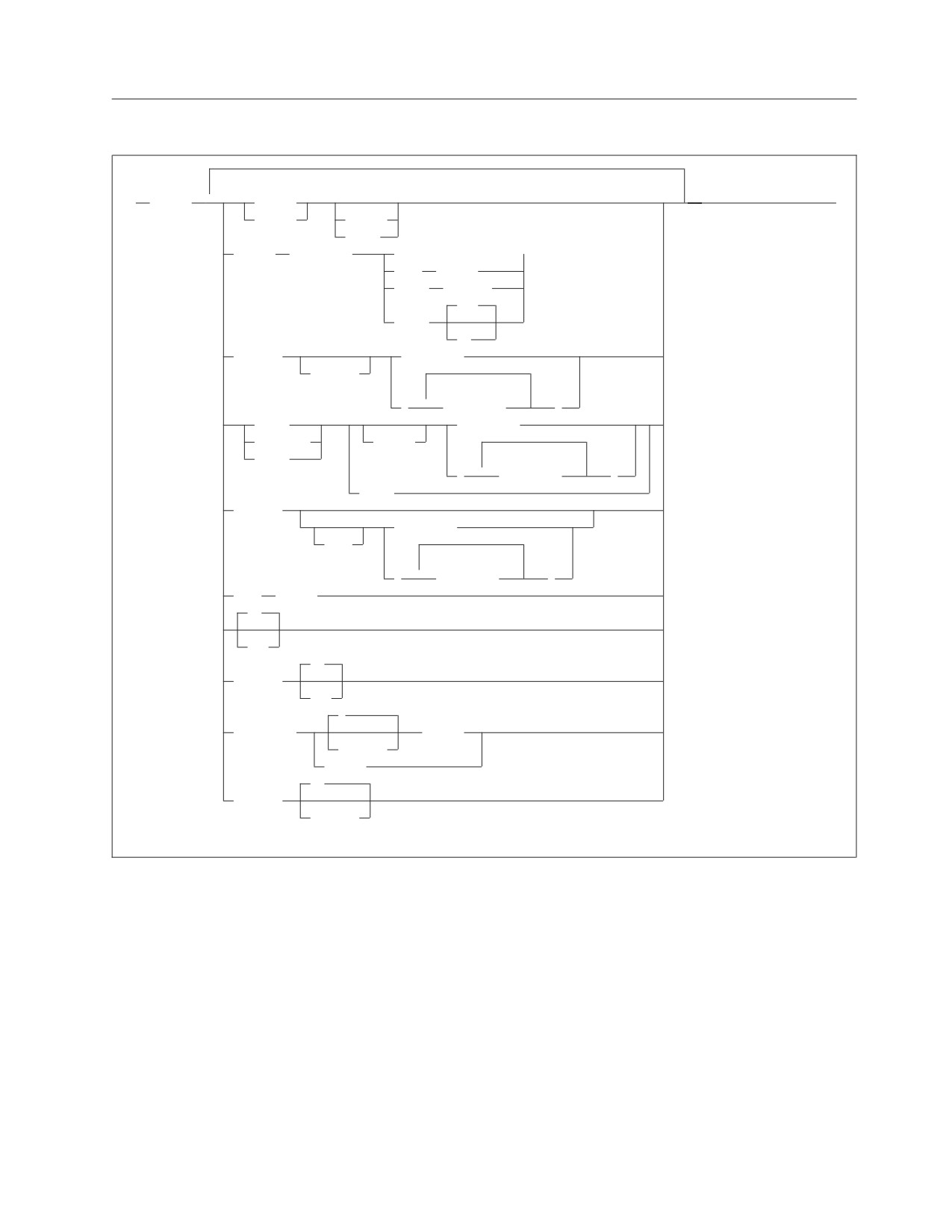
FORMAT is an ISQL display command that controls the format of the query result
currently being displayed. Modifications made to the display format by a FORMAT
command are reflected on the current display and the printed output obtained
from any subsequent PRINT command.
You can perform formatting only on the first 45 columns of a query result.
Any formatting command containing the keywords EXCLUDE, GROUP,
INCLUDE, ON/OFF, OUTLINE, SUBTOTAL, or TOTAL, causes the query to be
reexecuted.
Note: You can use DBCS characters in strings or column lists.
Chapter 10. ISQL Commands
117
BTITle
specifies the bottom title to be printed on reports. This bottom title is centered
on the bottom line of the report. Unless specified, no bottom title is printed.
string
is the characters to use for the bottom title on a subsequent PRINT
command.
The maximum length of the bottom title is that which fits on a line of the
page (up to a maximum of 100 characters). If the bottom title exceeds the
maximum, only those characters that fit on the line are printed.
Enclose the title in single quotation marks if it contains any blanks, but do
not include any single quotation marks in the title itself.
ERASE
causes the current bottom title to be deleted, resulting in no bottom title.
If FORMAT BTITLE is issued without either ERASE or a character string, the
current bottom title is displayed if it does not contain DBCS data. If the title
does contain DBCS data, message ARI7970I is issued.
TTITle
specifies the top title to be printed on reports. This top title is centered on the
top line of the report between the date and page number. If no top title is
specified, the first 100 characters of the SELECT statement are used for the top
title on printed reports.
string
is the characters to use for the top title on a subsequent PRINT command.
The maximum length of the top title is that which fits on the top line
between the date and page number (to a maximum of 100 characters). If
the top title exceeds the maximum, only those characters that fit between
the date and page number are printed.
Enclose the title in single quotation marks if it contains any blanks, but do
not include any single quotation marks in the title itself.
ERASE
causes the current top title to be deleted and the default to be used. The
default TTITLE is the first 100 characters of the SELECT statement.
If FORMAT TTITLE is issued without ERASE or a character string, the current
top title is displayed if it does not contain DBCS data. If the title does contain
DBCS data, message ARI7970I is issued.
COLumn
provides display formatting for a particular column.
column_id
specifies the column to be formatted.
If a number n is specified, it identifies the column to be formatted as the
nth column of the query result. The number refers to the position of the
columns provided by the SELECT statement, not those currently displayed.
Therefore, you must choose a number that represents the position of the
desired column in the SELECT clause of the SELECT statement that
provided the query result.
118
Interactive SQL Guide and Reference
If a number is not specified, column_id refers to the current column
heading of the column to be formatted. Enclose the name in single
quotation marks if it either contains a blank or refers to a column with a
solely numeric heading.
If the column_id represents a column being excluded, the formatting
specified is performed on the excluded column although you cannot see
the formatting until the column is included.
The following keywords describe how the current display is to be
formatted for the column specified by column_id:
DPLACes
specifies the number of decimal places (integer) to be displayed for a
numeric field. Rounding is not performed. The DPLACes must be less
than the column width.
NAME
specifies a column heading to be used for the display.
string
is the actual column heading to be displayed.
A maximum of 30 characters can be used for the column heading. All
characters except single quotation marks are valid. Enclose the column
heading in single quotation marks if it contains a blank, but do not
include any single quotation marks in the column heading itself.
WIDth
specifies the display length attribute (integer) of the column.
integer
For character type columns, the leftmost integer characters are
displayed.
For numeric type columns, the leftmost integer significant digits
counting the sign and decimal marker, if any, are displayed. The
sign character for a positive number is a blank.
For VARCHAR type columns, characters up to the current setting
of VARCHAR (using a SET or FORMAT command) are displayed.
For GRAPHIC type columns, integer represents the number of
DBCS characters. Two bytes are reserved for the SO/SI characters.
ZEROs
specifies whether leading zeros for numeric columns are displayed
(ON) or not (OFF).
EXCLude
specifies columns to be excluded (omitted) from the display. When SQL
processes a FORMAT command containing this keyword, it reexecutes the
query and repositions the display to the top of the query result.
ALL BUT
indicates that all columns except those specified are excluded. For example:
format exclude all but (1 job 4)
includes the JOB column, and columns 1 and 4, but excludes all other
columns.
Chapter 10. ISQL Commands
119
column_id
specifies the column to be formatted.
If a number is specified, it identifies the column to be formatted as the nth
column of the query result. The number refers to the position of the
columns provided by the SELECT statement, not those currently being
displayed. Therefore, you must choose a number that represents the
position of the desired column in the SELECT clause of the SELECT
statement that provided the query result.
If a number is not specified, column_id refers to the current column
heading of the column to be formatted. Enclose the name in single
quotation marks if it contains a blank or refers to a column with a solely
numeric heading.
When more than one column is specified, separate the column_ids with a
blank and enclose them in parentheses.
For example, the command:
format exclude (3 5)
causes the third and fifth column of the original position in the query
result to be excluded from the display. The command:
format exclude job
prevents the JOB column from being displayed during the current query
result. If JOB is selected two or more times, only the first occurrence of the
JOB column is excluded.
GROUP
specifies the columns to outline (when outlining is on) and the columns to use
for determining when subtotals are taken. Subtotals are taken whenever the
values change in the columns specified. When SQL processes a FORMAT
command containing this keyword, it reexecutes the query and repositions the
display to the top of the query result.
SUBTotal
specifies the columns in which subtotals are to be calculated. Subtotals are
taken whenever the values change in the columns being grouped. A (final)
total is also provided for the columns unless otherwise specified by a FORMAT
TOTAL command. When SQL processes a FORMAT command containing this
keyword, it reexecutes the query and repositions the display to the top of the
query result.
TOTal
specifies the columns in which (final) totals are to be calculated. If not
specified, totals are provided for all columns being subtotaled. When SQL
processes a FORMAT command containing this keyword, it reexecutes the
query and repositions the display to the top of the query result.
EXCEPT
specifies the columns to be grouped or totalled or subtotaled except those
specified by column_id.
column_id
is the name or position of each column in the query result to be grouped
for outlining, subtotals, or totals.
120
Interactive SQL Guide and Reference
When used with the SUBTOTAL and TOTAL keywords, column_id
specifies the columns on which subtotals or totals are to be calculated.
If a number is specified, it identifies the column to be formatted as the nth
column of the query result. The number refers to the position of the
columns provided by the SELECT statement, not those currently displayed.
Therefore, you must choose a number that represents the position of the
desired column in the SELECT clause of the SELECT statement that
provided the query result.
If a number is not specified, column_id refers to the current column
heading of the column to be formatted. Enclose the name in single
quotation marks if it contains a blank or refers to a column with a solely
numeric heading.
When specifying more than one column, separate the column_ids with a
blank and enclose them in parentheses.
If the column represents one that you are excluding, ISQL groups the
columns using that excluded column, although you do not see the
excluded column.
Subtotals or totals are calculated on the excluded column. You cannot see
the subtotals or totals until the column is included. When arithmetic errors
occur, the value of the column in error is calculated as zero.
The usual use of GROUP is to first order the rows of the columns that you
want grouped. Use an ORDER BY clause in the SELECT statement issued
to obtain the query result. The left to right ordering of the columns
themselves depends on the order in which they appear in the SELECT
clause of the SELECT statement.
Rows containing arithmetic errors from an outer select are displayed
together at the end of the list, followed by rows containing NULL values.
Rows containing arithmetic errors are displayed as asterisks (*).
ERASE
deletes all the previous specifications of GROUP for the current query
result. When used with SUBTOTAL, ERASE suspends subtotals. When
used with TOTAL, ERASE suspends totals.
INCLude
reverses the effect of a previous FORMAT EXCLUDE command. When SQL
processes a FORMAT command containing this keyword, it reexecutes the
query and repositions the display to the top of the query result.
ONLY
indicates that only those columns specified are displayed; all others are
excluded.
Note: Do not use ONLY for a column name with an INCLUDE keyword.
In this case, use its column number.
column_id
specifies the column to be formatted.
If a number n is specified, it identifies the column to be formatted as the
nth column of the query result. The number refers to the position of the
Chapter 10. ISQL Commands
121
columns provided by the SELECT statement, not those currently being
displayed. You must choose a number that represents the position of the
desired column in the SELECT clause of the SELECT statement that
provided the query result.
If a number is not specified, column_id refers to the current column
heading of the column to be formatted. Enclose the name in single
quotation marks if it contains a blank, or if it refers to a column with a
solely numeric heading.
When more than one column is specified, separate the column IDs with a
blank and enclose them in parentheses.
When arithmetic errors occur, the value of the column in error is calculated
as zero.
The columns that are not mentioned in the INCLUDE command, and that
are not currently being excluded, continue to participate in the display. If
INCLUDE is issued by itself and with no options, all excluded columns are
restored.
NULL
specifies the characters to display for null fields.
string
specifies the actual characters to display (up to a maximum of 20). If
blanks are included, you must enclose the string in single quotation marks,
but do not use single quotation marks in the string itself.
For example, the following command,
format null empty
causes the word EMPTY to be displayed for all null fields.
A question mark (?) is displayed for null values unless otherwise specified
with a FORMAT or SET command.
ON
OFF
controls the status of outlining, subtotals, and totals on query results. When
SQL processes a FORMAT command containing this keyword, it reexecutes the
query and repositions the display to the top of the query result. Until OFF is
specified, outlining, subtotals, and totals are active.
ON
permits outlining, subtotals, and totals. The ON status stays in effect for
the current query result until you type FORMAT OFF.
OFF
suspends outlining, subtotals, and totals.
OUTLINE
controls the outline report format for columns specified with FORMAT
GROUP. When SQL processes a FORMAT command containing this keyword,
it reexecutes the query and repositions the display to the top of the query
result.
122
Interactive SQL Guide and Reference
If OUTLINE is not specified, outlining is performed whenever GROUP is
specified unless you type FORMAT OFF.
ON
specifies that successive duplicate values in grouped columns are repeated
only when they are the first line at the top of the display or at the
beginning of each page on printed reports. If the first line is a subtotal line
or a blank line between groups, successive duplicate values are not
displayed or printed at the beginning of the next group.
OFF
specifies that successive duplicate values in grouped columns are to be
displayed wherever they occur.
SEParator integer BLANKs
specifies the number of spaces (integer) to be displayed between columns. The
maximum number of blanks that can be specified is 254. Unless otherwise
specified with a FORMAT or SET command, the separation between columns
consists of two blanks.
SEParator string
specifies the characters to be displayed between columns. If blanks are
included, the string must be enclosed in single quotation marks, but do not
include any single quotation marks in the separator itself.
For example, if you want a vertical line between the columns, you type:
format separator ' | '
which places a blank, a vertical bar, and a blank between all columns. The
maximum number of characters that can be used for a separator is 254.
VARChar
specifies the display width of variable length columns.
integer
is the length desired up to 254. Unless otherwise specified with a SET
command, ISQL displays only the first 20 characters of a variable-length
column.
The SET command value for VARCHAR columns can be overridden for a
particular query by specifying the desired value with this keyword on the
FORMAT command.
When you type a FORMAT VARCHAR, the SELECT statement is reissued and
you are returned to the beginning of the query result.
Example
The following FORMAT commands used during a query exclude the first column,
change the name of the PRSTAFF column heading to ESTMEAN, display all
projected mean staff numbers in this column with three decimal places, and
display leading zeros:
format exclude 1
format column prstaff name estmean
format column estmean dplaces 3
format column estmean zeros on
Chapter 10. ISQL Commands
123
Note: If you rename a column heading, further FORMAT commands that refer to
that column by name must use the new name. When referring to the column
by a number, you must specify its original position in the SELECT clause of
the SELECT statement.
You can specify more than one keyword in a FORMAT command. For example, the
FORMAT commands described above can be expressed with a single command:
format exclude 1 column prstaff name estmean dplaces 3 zeros on
By using more than one keyword in a single FORMAT command, you can reduce
the amount of data you must type and improve the performance of ISQL.
124
Interactive SQL Guide and Reference
FORWARD
FORWARD
rows_integer
MAX
FORWARD is an ISQL display command that lets you move your display forward
through a query result.
rows_integer
is the number of rows you want to move forward.
MAX
causes the last display of the query result to be displayed along with an
indication of the number of rows in the query result and the Query Cost
Estimate (QCE) message. For query results that contain many rows, a
FORWARD MAX command can take a long time.
If nothing is specified, the display moves forward one-half of a display.
Scroll forward through the query result one-half of a display at a time by typing
FORWARD. (You can also press PF8 or PF20.) Because you can reset your PF keys,
you can assign the FORWARD function to another PF key.
You can activate FORWARD by pressing ENTER if it is the first display command
to be issued for a query result. The display moves forward one entire display each
time you press ENTER.
Chapter 10. ISQL Commands
125
HELP
HELP
CONTENTs
topic_name
This ISQL command retrieves online HELP information. This online HELP
information is for ISQL users who need quick reference information at their display
for:
SQL statements
ISQL commands
Messages, codes, and SQLSTATEs.
Note: The online HELP information is not serviced by the IBM Support Center.
The information is extracted from this book, and from the DB2 Server for
VSE Messages and Codes and DB2 Server for VM Messages and Codes manuals.
Use the readers’ comment form in the back of these books to express
concerns and comments on this information.
You can view this information in the language of your choice if your site chose to
install different language versions of the online HELP information. See the SET
command later in this chapter for more information on setting the language of
your choice.
Online HELP information is stored as a table. After you retrieve a topic, you can
use any of the ISQL display commands, or PF keys that provide display
commands, to assist in viewing the text. You can also type SQL statements or ISQL
commands at this time. You can format retrieved topics with the ISQL FORMAT
command and print them with the ISQL PRINT command. A top title is provided
for printed topics.
CONTENTs
displays the available online topics and the correct names to use in retrieving
specific topics.
topic_name
is the name of the topic to be retrieved. It can be one or more words and can
be placed within quotation marks. Most topic_names are either a statement
name (such as SELECT or INSERT), a message number (such as ARI7399I or
ARI7307A), a message code (such as -205 or 100), or an SQLSTATE (such as
SQLSTATE 01512). For example, to retrieve online HELP information for the
UPDATE statement, type:
help update
If the HELP command is issued with no parameters, a description of how to use
the HELP command is returned along with a list of the available topics. The HELP
command without additional parameters can be invoked by pressing PF1 (or
PF13). Because you can reset your PF keys, you can assign the HELP function to
any PF key. The default function key is PF1 (or PF13).
You can type SQL statements while the online HELP information is displayed.
126
Interactive SQL Guide and Reference
HOLD
HOLD sql_statement
HOLD is an ISQL command that prevents an SQL statement from being processed
when it is typed. The SQL statement is placed in the SQL command buffer and
remains there until it is replaced with another SQL statement. You can check the
SQL statement for typing errors before it is processed by a START command. You
can also type an SQL statement containing placeholders and substitute values for
the placeholders when the statement is started using a START command.
sql_statement
is the SQL statement to be held. (ISQL commands cannot be held).
The following example illustrates the use of a HOLD command to place an SQL
statement in the command buffer without executing it:
hold select * from employee
The HOLD command can also be invoked by pressing PF9 (or PF21) prior to,
during, or after typing. By pressing PF9 instead of ENTER, the SQL statement
typed is placed in the SQL command buffer without being processed. The HOLD
PF key does not store the command in the SQL command buffer; you must press
ENTER after pressing HOLD PF. The default key for the HOLD function is PF9 (or
PF21).
Chapter 10. ISQL Commands
127
IGNORE
IGNORE
IGNORE is an ISQL command that nullifies a command, statement, or data that is
being typed on multiple input lines. Type it at the start of the input area.
The following example shows how the IGNORE command can be used to correct a
table-naming error:
select projno,actno,acstaff -
from emp_act -
ignore
select projno,actno,acstaff -
from proj_act -
where projno = 'MA2100'
128
Interactive SQL Guide and Reference
INPUT
INPut
table_name
view_name
,
(
2
column_name
)
INPUT is an ISQL command that enables you to insert several rows of data into a
table or view.
INPUT is issued to identify the table, view, or column(s) where the data is
inserted.
table_name
view_name
is the name of the table or view in which data is to be inserted. A view_name
can only be used if it applies to a single table. The names can contain DBCS
characters.
column_name
is one or more column names, separated by commas, into which data is to be
inserted. The order in which the column names are specified determines the
order in which the data must be typed. All columns of the new row that are
not listed receive a null value, and unlisted columns must have been defined
to accept null values or an error occurs. This is because the INPUT command
is essentially inserting a new row of data, and null values are inserted into any
columns not specified. Omitting the column_name is the same as naming all
the columns of the table in their created order. The names can contain DBCS
characters.
Successful execution of the INPUT command causes the column names and their
data types to be displayed in the order in which the data must be typed. Data can
then be typed one row at a time. Press the ENTER key after each row is typed.
When typing data:
v Use commas to separate each data item of a row.
v Enclose the data item in single quotation marks if it is a CHAR, VARCHAR,
DATE, TIME, or TIMESTAMP data type.
v Do not enclose the keyword NULL, or any of the special registers, such as
CURRENT SERVER, in single quotation marks.
v If your data includes a single quotation mark, type two single quotation marks.
When you type:
'julie's book shop'
JULIE'S BOOK SHOP is inserted into the table.
v If you are typing graphic data, you type:
G'so...si'
where so stands for shift-out character, si stands for shift-in character, and ... is
graphic data (a DBCS character string).
Note: You can use N' as a synonym for G'
Chapter 10. ISQL Commands
129
v If you are typing hexadecimal data, you type X'F140F2'.
v If all the data for a single row does not fit in the input area, type the
continuation character. Press ENTER to continue.
v Be sure to include a space before the continuation character, if required, because
the continuation character does not provide one.
v When null values are allowed, you can type NULL to insert a null value for the
data-item value.
After you press ENTER for a row of data, the data is moved to the output area of
the display and the input area is cleared so that another row of data can be typed.
When all the data has been typed, type the END command to signify the end of
input data.
With AUTOCOMMIT on, the data you type is not committed to the table until the
INPUT command is ended by the END command or the END PF key (usually
PF3). You can use the ISQL SAVE command to commit data in the table prior to
typing an END command.
The SAVE command stores all data typed since the previous SAVE command or, if
one had not been typed, since the start of the INPUT command. It has the same
effect as the END command but lets you continue to type data.
In addition to storing data prior to ending an INPUT command, you can also
prevent the storing of data typed since the last SAVE command or since the start
of the INPUT command if no SAVE has been issued. You type the ISQL BACKOUT
command instead of more data.
If AUTOCOMMIT is off, the data you type on an INPUT command is not
committed to the table until you type a COMMIT command after ending the
INPUT command. With AUTOCOMMIT off, the SAVE and BACKOUT commands
have no effect.
Example
The following illustrates how you can fill the ACTIVITY table by using the INPUT
command:
input activity
160,'ADMDB','Adm databases'
100,'TEACH','Teach classes'
end
130
Interactive SQL Guide and Reference
Interactive Select
interactive-select-statement
fullselect
,
WITH
RR
ASC
CS
ORDER BY
2
column_name
UR
integer
DESC
fullselect:
2
subselect
(fullselect)
UNION
subselect
UNION ALL
(fullselect)
subselect:
ALL
SELECT
DISTINCT
,
2
expression
table_name.*
view_name.*
correlation_name.*
,
2
FROM
table_name
view_name
correlation_name
WHERE search_condition
,
HAVING search_condition
2
GROUP BY
column_name
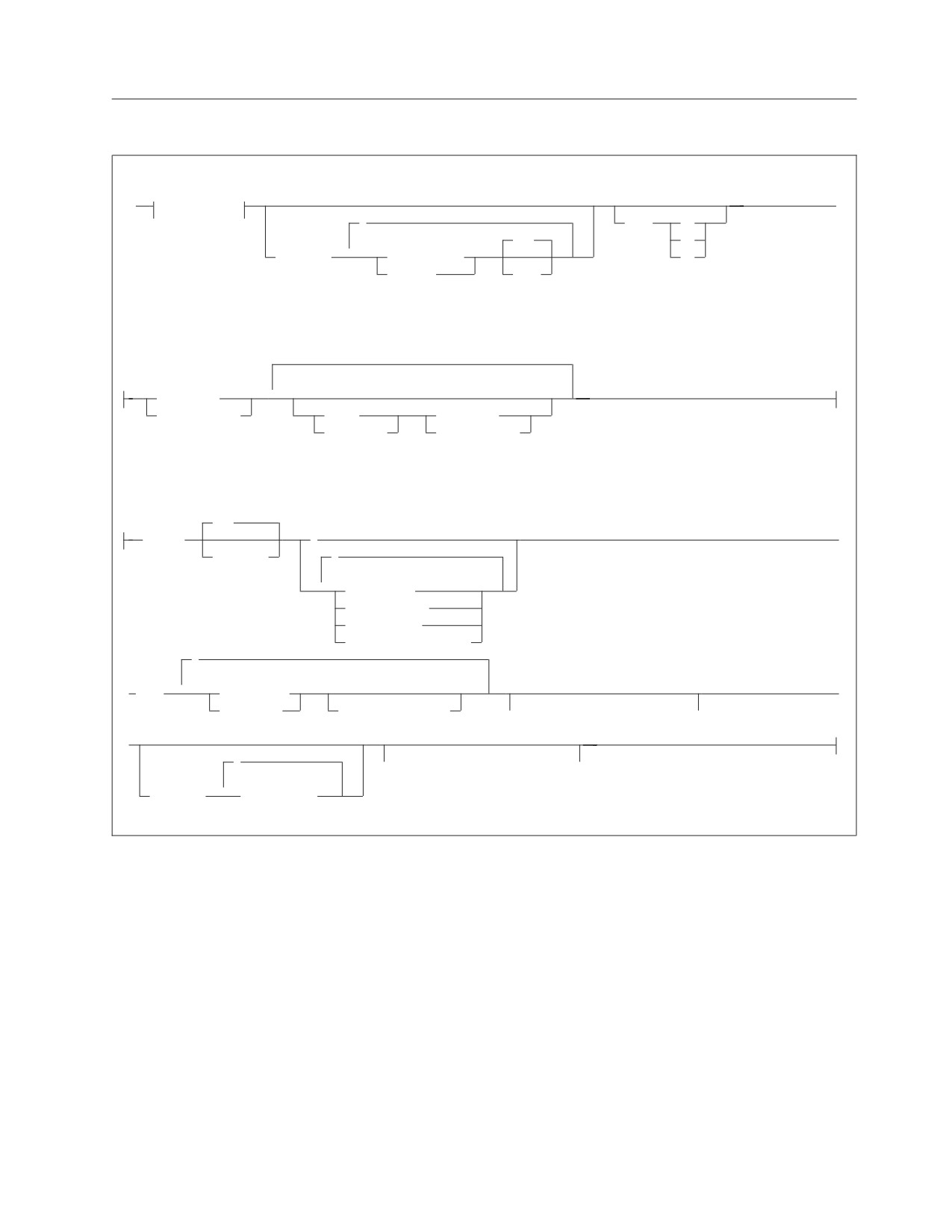
The interactive-select statement retrieves data from a table or view. The data
retrieved can only be viewed; you cannot change it. For more information about
the terminology used in this diagram, refer to the DB2 Server for VSE & VM SQL
Reference manual.
If a SELECT statement contains a placeholder in the WHERE, GROUP BY, ORDER
BY, or HAVING clauses, FORMAT information is saved until the next SELECT
statement is entered. Formatting information is saved permanently if the SELECT
statement is stored. However, if the SELECT or FROM clauses contain placeholders
or parameters, FORMAT information is not saved. In addition, FORMAT
information is not saved if you change any data in the SELECT or FROM clauses
by using the CHANGE command.
When you enter a SELECT statement from a terminal, the row length of the
information you can see at one time is limited by the terminal screen size.
Chapter 10. ISQL Commands
131
The number of bytes per row includes the bytes used as column separators.
UNION
combines two or more queries into a single query by merging the rows
returned by each query. Duplicate rows are eliminated.
ALL
combines the results of two or more queries without eliminating the
duplicate rows.
ALL
specifies that duplicate values are to be selected. If ALL is specified when you
select all department numbers from the PROJECT table, each and every
department number listed in the department number column is selected. This
is the default.
DISTINCT
specifies that duplicate values are not to be selected. DISTINCT can be used
only once for each SELECT statement. You can use it to eliminate duplicates
from the SELECT result:
select distinct deptno from project
You can also use it to eliminate duplicates from a column function:
select count (distinct deptno) from project
If you specify DISTINCT, the maximum number of columns you can put in the
expression list is 16. In addition, the length of the encoded key derived from the
expression list must not exceed 255 characters. That is, the sum of the lengths of
the columns in the expression list, plus approximately 25% of the lengths of
those columns that are of varying-length character type, must not exceed 255
EBCDIC or 127 DBCS characters.
* indicates that the data in all the columns is to be selected.
Note: If the table contains more than 45 columns, only the first 45 columns
will be displayed. To see the other columns in the table, you can create a
view. A view may contain no more than 140 columns. If more columns
are needed, you can create additional views.
expression
is a definition of the data desired. An expression may be a column name, a
constant, a character expression, a special register, a column function, a scalar
function, an arithmetic expression, or a labeled duration.
You can specify a list of expressions, separating each with a comma, and the
items are retrieved in the same left-to-right order as they appear in the list. The
value of USER is interpreted as a CHAR(8) string whose value is the user ID of
the user currently connected. The maximum number of columns that you can
specify in the list is 45.
You can use the following operators to connect numeric data types:
+
(plus, add)
−
(minus, subtract)
(times, multiply)
/
(divided by)
If you use these operators for numeric data types, see the DB2 Server for VSE &
VM SQL Reference manual for information about data conversion.
132
Interactive SQL Guide and Reference
You can use the concatenation operator, CONCAT, to join two or more
compatible operands to form a string. An operand may be a column, a name, a
constant, or an expression.
An operand can be the result of an expression. For example, if the USER
special register is used, it is treated as CHAR(8). If the CURRENT DATE,
CURRENT TIME, CURRENT TIMESTAMP, or CURRENT TIMEZONE special
registers are used, the values are treated as the character representation of the
value in the format defined by the system. A datetime value can be
concatenated with a character string because the datetime data types are
compatible with character data types.
When varying-length operands are concatenated, only the actual length of the
operand is concatenated.
The result of the expression is the concatenation of the operand expressions.
The resulting data type is null if either operand is nullable. The resulting data
type is character if both operands are CHARACTER. If both operands are
GRAPHIC, the result data type is GRAPHIC. If both operands are fixed length,
the resulting data type is fixed length. If either operand is varying length, the
resulting data type is a varying length string. The associated defined length is
the sum of the defined lengths not exceeding 254 bytes.
In the following example, the employee number and the first name of the
employee are concatenated with a hyphen between them:
select empno concat '-' concat
firstnme from employee
If a column function is used in an expression, all expressions in the list must
contain a column function unless grouping is being performed. An example is:
select min(edlevel),avg(bonus) from employee
table_name.*
view_name.*
correlation_name.*
identifies the table or view to which the column belongs. The asterisk (*) can
be replaced with a column name. These prefixes are especially useful for
differentiating columns that have the same name, but that belong to different
tables or views. The correlation_name can be used to simplify a query, or to join
a table to itself. See “correlation_name” below for more information.
FROM table_name
FROM view_name
identifies the table or view from which data is to be selected.
table_name
view_name
is the name of the table or view.
You can further qualify the table or view by specifying the owner of the
table or view. You must separate the owner’s name from the table name or
view name with a period. The owner’s name is unnecessary for tables or
views that you own. You must have the SELECT privilege or DBA
authority to select information from tables or views owned by other users.
Chapter 10. ISQL Commands
133
correlation_name
is the name you define as an alternative name for the table or view to be
selected. It can be any string up to 18 characters long, and must begin with a
letter.
WHERE search_condition
is one or more conditions to apply in selecting data.
GROUP BY column_name
A query can have the column functions SUM, AVG, MAX, MIN, and COUNT
applied to groups of rows that have matching values in a column. Rows can
also be grouped by matching values in more than one column. The definition
of the groups is specified with a GROUP BY clause.
column_name
is the name of one or more columns, separated by commas, to be used
when forming a group.
For example, the maximum, minimum, and average activity staff for each project
in the PROJ_ACT table could be selected by the following query:
select projno,max(acstaff),min(acstaff),avg(acstaff) -
from proj_act -
group by projno
When a query uses the grouping feature, it returns only one result row for
each group. Therefore, the items selected by such a query must be properties
of the groups, not properties of individual rows. The expression list may contain
columns that are also in the GROUP BY clause together with column functions
on any columns. It may not contain any non-grouped column without a
column function. If the column function COUNT(*) is used, it evaluates to the
number of rows in the group.
If any rows have a null value in a grouped column, ISQL groups the null
values in those columns together. The null values returned may be due either
to unknown column values or to arithmetic exception errors.
A grouping query may have a standard WHERE clause that serves as a filter,
keeping only those rows which satisfy the search_condition. The WHERE clause
filters out the non-qualifying rows before the groups are formed and the
column functions are computed.
The following example query finds the average and minimum activity staff for
each project, considering only activities whose starting date is 1 January 1982:
select projno,avg(acstaff),min(acstaff) -
from proj_act -
where acstdate = '1982-01-01' -
group by projno
HAVING search_condition
is one or more conditions that apply to groups. ISQL returns a result only for
those groups that satisfy the condition. The HAVING clause may contain one
or more group-qualifying conditions connected by ANDs and ORs. Each
group-qualifying condition compares some property of the group, such as
AVG(ACSTAFF), with another group property or with a constant.
The following example query lists the maximum and minimum activity staff
for various projects in the PROJ_ACT table, considering only projects that have
more than three activities:
134
Interactive SQL Guide and Reference
select projno,max(acstaff),min(acstaff) -
from proj_act -
group by projno -
having count(*) > 3
One of the functions in a HAVING clause may specify DISTINCT (for example,
COUNT(DISTINCT PROJNO)). However, DISTINCT may be used only once in
a query. It may not be used in both the expression list and the HAVING clause.
It is possible, though unusual, for a query to contain a HAVING clause but no
GROUP BY clause. In this case, the entire table is treated as one group. If the
HAVING condition is true for the table as a whole, the selected result, which
must consist entirely of column functions, is returned.
ORDER BY
orders, or sorts, the rows to be retrieved by the column(s) specified. A
maximum of 16 columns may be specified in the ORDER BY clause.
column_name
refers to a column name in the expression list. For example, to order a
query primarily by the values in the ACTNO column and secondarily by
the values in the PROJNO column, you would type:
select actno,projno,acstdate,acendate -
from proj_act -
order by actno,projno
integer
refers to the items in the expression list. For example, to order a query
primarily by the first item and secondarily by the third item of the list, you
would type:
select projno,acstdate,acendate,acstaff -
from proj_act -
order by 1,3
These items may be columns or more complex expressions such as
BONUS+COMM.
ASC
DESC
indicates the order in which results are returned: either ascending (ASC) or
descending (DESC). The default is ASC. For example, to indicate ascending
order on item 3 and descending order on item 5, you could type:
order by 3,5 desc
because ASC is the default.
In contrast, to indicate descending order on item 3 and item 5, you would
type:
order by 3 desc,5 desc
Blanks sort first in ascending order, last in descending order, and are
ignored if the data type is VARCHAR or VARGRAPHIC.
Chapter 10. ISQL Commands
135
ISQLTRACE
ISQLTrace
DUMP
DISPLAY
integer
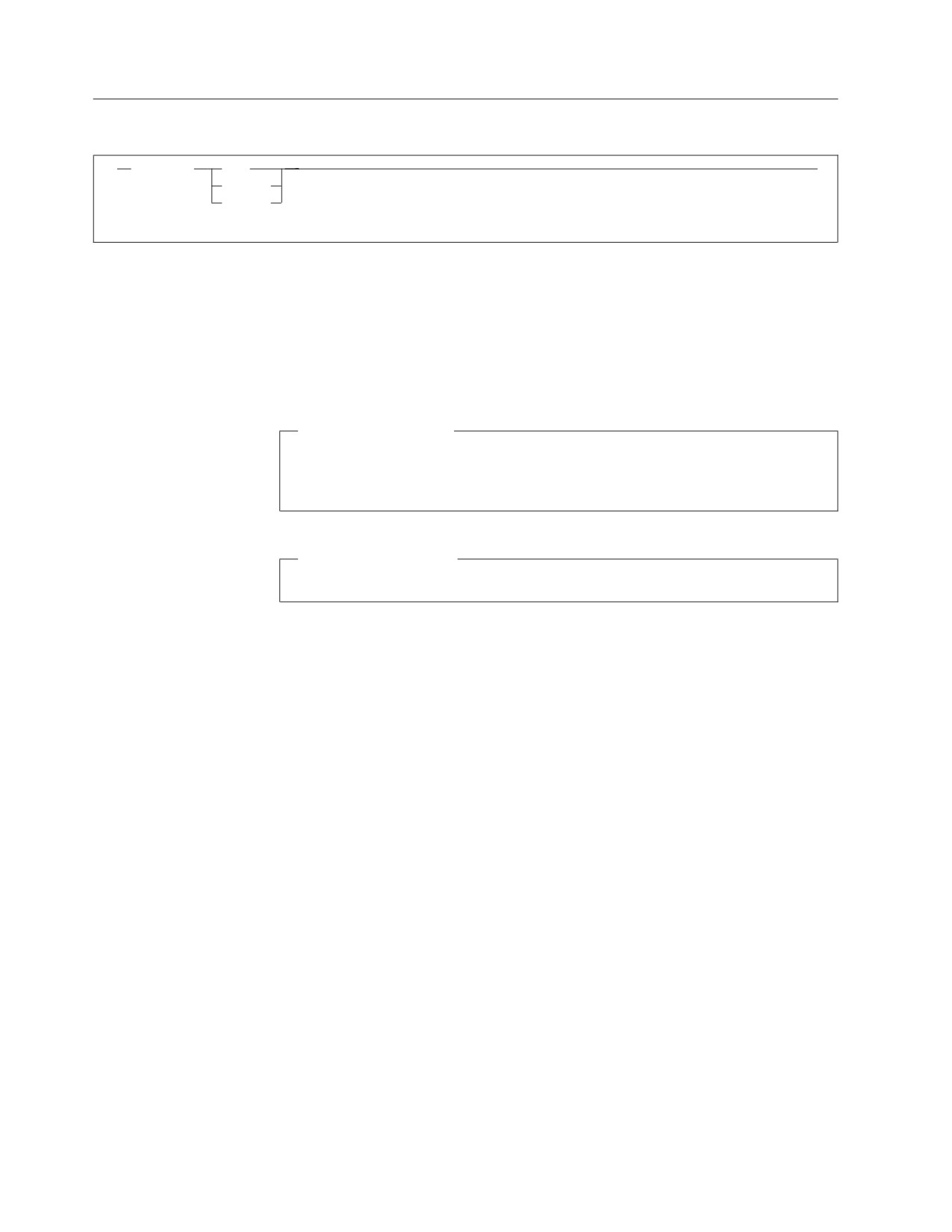
The ISQLTRACE command traces activity within ISQL. This ISQL command traces
calls to and returns from other ISQL modules, SQL return codes, and ISQL
messages. Trace information is saved in storage for dump debugging.
DUMP
specifies that the trace information is to be printed. ISQL creates an
unformatted storage dump hardcopy of the trace table.
DB2 Server for VM
ISQL uses the CP DUMP command to dump to the lowest priority virtual
printer defined.
DB2 Server for VSE
ISQL issues a CICS dump to the CICS dump data set.
You must run a job to print the dump data set.
DISPLAY
specifies that the formatted trace table is to be displayed on the display. If
more than 50 entries or more than the specified integer number of entries have
been made in the trace table, the entries wrap. The more recent entries are
written over the earlier entries. As a result, only the last 50 entries or integer
number of entries in the table are displayed. The entries are displayed in
reverse order of the order that they were put into the trace table.
integer
changes the size of the trace table. Replace integer with the number of trace
entries that are to be contained in the trace table. integer must be a number
from 50 to 1000.
136
Interactive SQL Guide and Reference
LEFT
1
LEFT
integer
LEFT is an ISQL display command that causes the display to start integer columns
to the left, counting from the leftmost column on the display and as long as no
columns are being excluded. The number refers to the columns provided by the
SELECT statement, not those currently displayed. You must use the order of the
columns specified in the SELECT clause of the SELECT statement that provided
the query result to determine the value to specify for integer. If the value of integer
represents a column being excluded, the display starts at the next displayable
column to the right of the excluded column.
Specifying a value greater than the number of columns remaining to the left, starts
the display at column 1 or at the first displayable column if column 1 is excluded.
If no number is specified, the display moves one column to the left. No change in
the display occurs if that column is excluded.
Chapter 10. ISQL Commands
137

LIST
LIST
SQL
2
stored-statement-name
SET
2
AUTOCommit
CASE
(1)
CLAss
CONTInue
(1)
COPies
COSTest
DECimal
ISOLation
LANGuage
NULL
PAGEsize
(1)
PRINTRoute
RUNMode
SEParator
VARChar
Notes:
1
The parameters CLAss, COPies, and PRINTRoute are not applicable to VM.
LIST is an ISQL command that lists information about stored SQL statements or
the settings of operational characteristics set by the SET command.
SQL
lists stored SQL statement(s) on the display. See “STORE” on page 161 for more
information.
stored_statement_name
is the name of the stored SQL statement to be listed. The entire statement
stored with the specified name is displayed.
* specifies that all your stored SQL statements are to be listed. The name of
each statement and its first 50 characters are displayed.
SET
lists the current operational characteristics in effect for the specified function of
the SET command. For example, if you type:
list set continue
the current continuation character is displayed. Valid functions are any of those
functions performed by the SET command.
If * is specified, the current operational characteristics in effect for all SET
command functions are listed. For a description of the SET characteristics, see
“SET” on page 149. for more information.
138
Interactive SQL Guide and Reference
Examples
The LIST command can be used with more than one keyword option in a single
command. For example, if you want to display more than one operational
characteristic, you can type:
list set page case null
If you want to display more than one stored SQL statement, you can type:
list sql myquery query1
Stored SQL statements and operational characteristics may not be listed at the
same time.
Chapter 10. ISQL Commands
139
PRINT
PRInt
2
?
CLAss
character
1
COPies
integer
TERMid termid
DESTid wkstat
SYStem
TOUSER
userid
DB2 Server for VSE
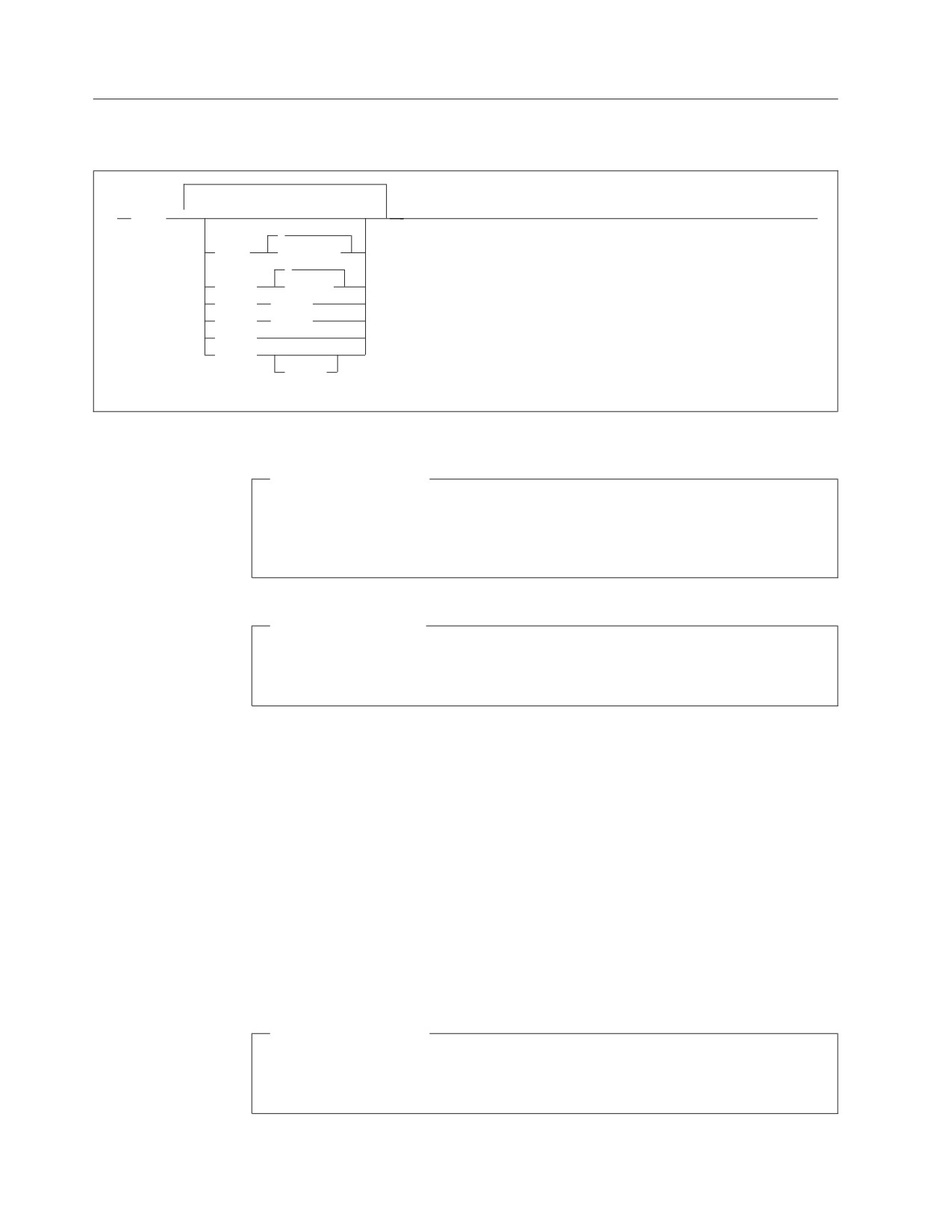
PRINT is an ISQL display command that requests printed copies of a query
result by sending it to the system printer, POWER remote printer, or
CICS/VSE terminal.
DB2 Server for VM
PRINT is an ISQL display command that requests printed copies of a query
result by sending it to the system printer.
The data that is printed is based on the query result obtained by the SELECT
statement.
All the rows of the query result, as modified by FORMAT commands, are printed
regardless of the position of your display of the result. A query result that is longer
than what can be viewed on one display, can be printed with one PRINT
command. The printed report starts with the column and the character position
within the column that is at the left edge of the display when the PRINT command
is typed. The number of characters of each row that is printed depends on the
setting of the PAGESIZE WIDTH value specified by the SET command. You receive
a message if the width of the row of data exceeds the WIDTH setting.
The output class to use can be obtained from the people responsible for data
processing at your location.
DB2 Server for VSE
Note: CLASS and COPIES cannot be specified for a CICS/VSE terminal
printer.
140
Interactive SQL Guide and Reference
DB2 Server for VM
Note: You must use the CP TAG and CP SPOOL commands to direct printed
output.
CLAss
specifies the output class.
character
is the output class desired. For DB2 Server for VSE, the output class can be
a letter (A to Z).
For DB2 Server for VM, the CLASS value can be an integer (0 to 9) or a
letter (A to Z). The default is class A.
? (DB2 Server for VSE only)
specifies that the default printer class of the system is to be used.
For DB2 Server for VSE, if CLASS is not included in the PRINT command
at all, the current class set by the SET command is used. If no class has
been set by a SET command, the default printer class for the system is
used.
For DB2 Server for VM, there is no SET command for CLASS. You can set
the CLASS value by a CP SPOOL command.
COPies
specifies the number of copies.
integer
is the number of copies desired. For DB2 Server for VSE, you can request
up to 99 copies. For DB2 Server for VM, you can specify a COPIES value
from 1 to 255.
If this keyword is not specified, one copy is the default unless otherwise
determined by a SET command (in DB2 Server for VSE).
DB2 Server for VM
You can also use the CP SPOOL command to specify the number of
copies. The value for copies that is specified on the CP SPOOL
command remains in effect until another value is specified by another
CP SPOOL command.
Note: If you specify the number of copies on the PRINT command
after you specified it using a CP SPOOL command, the PRINT
command quantity is used for that print operation. All
following PRINT commands use the quantity specified by the
CP SPOOL command, unless you specify it using the COPIES
keyword.
Because you can reset your PF keys, you can assign the PRINT
function to any PF key. The default function key is PF4 or PF16.
Chapter 10. ISQL Commands
141
TERMid (DB2 Server for VSE only)
specifies that printed output is to be directed to the designated CICS/VSE
terminal.
termid
is the terminal identifier of the CICS/VSE terminal that you want. termid
must be from one to four alphanumeric characters.
DESTid (DB2 Server for VSE only)
specifies that the printed output is to be directed to the designated POWER
remote workstation.
wkstat
is the ID of the desired remote workstation. wkstat can be any number
from 0 to 250. When wkstat is 0, the printed output is to be directed to the
system printer.
SYStem (DB2 Server for VSE only)
specifies that the printed output is to be directed to the system printer.
TOUSER (DB2 Server for VSE only)
specifies that the printed output is to be directed to a user identified by userid.
userid
is the VSE POWER user identifier of the user to whom the output is being
spooled. An identifier cannot be longer than 8 alphanumeric characters.
If you enter the PRINT TOUSER command without specifying a userid,
ISQL spools the output to the ISQL user ID used at time of log on.
The PRINT TOUSER nnn command has the same effect as the PRINT
DESTid nnn command, where nnn is the ID of the remote workstation to
which you want to direct your printed output. This ID can be any number
from 1 to 250.
DB2 Server for VSE
Any TERM, DEST, or SYS indication on the PRINT command applies for that
particular PRINT operation only.
The PRINT command can be started by pressing PF4.
Each printed page is numbered and dated at the top. A title is automatically
provided at the top of each printed page. This title consists of the first 100
characters of the SELECT statement issued unless you specified your own title
with an ISQL FORMAT command.
You can specify more than one keyword option on a single PRINT command. For
example, the following command specifies both the class and number of copies:
print copies 3 class a
142
Interactive SQL Guide and Reference
DB2 Server for VM
If there is an error in the command, all valid changes are made until the
mistake is determined. For example, in the following command, you type a $
sign instead of the letter a:
print copies 3 class $
The command sets the number of print copies to 3. However, the class
remains at the default class A, because $ is an incorrect output class. This
output class error does not change the number of copies to the original value.
Neither does the number of copies or the class change from their current
settings if the following command is issued:
print class $ copies 3
The output class value is again incorrect, so processing stops when this error
is detected.
Chapter 10. ISQL Commands
143
RECALL
RECALL
stored_statement_name
PREVIOUS
RECALL is an ISQL command that retrieves a stored SQL statement. The stored
statement is inserted into the SQL command buffer and is shown in your display.
You must enter the START command before the statement is started.
stored_statement_name
is the name of the stored SQL statement to be recalled.
PREVIOUS
specifies that the previous SQL statement (the one typed prior to the current
SQL statement) is to be recalled. The current SQL statement is then saved with
the name PREVIOUS.
Entering RECALL with no name specified, or pressing the appropriate PF key,
displays the statement currently contained in the SQL command buffer. The
RECALL command can be invoked by pressing PF5. You can assign the RECALL
function to any PF key; the default is PF5 or PF17.
144
Interactive SQL Guide and Reference