DB2 Server for VSE & VM Application Programming (Version 7 Release 5) - page 5
SQL statements are stored with the package when you preprocess the program.
The system uses them to automatically bind the program again. It does this
dynamically (that is, while it is running). If the rebinding works, a new package is
created and stored in the database and the system then continues execution of the
program. If the rebinding does not work, an error code is returned to the program
in the SQLCA, and the program stops running.
A successful rebinding has no negative effect on your program except for a slight
delay in processing your first SQL statement. To minimize this delay, you can use
the DBSU REBIND PACKAGE command to rebind the invalid package after it has
been invalidated, but before it is executed. See the DB2 Server for VSE & VM
Database Services Utility manual for information on this command.
Running by Mode
Using Multiple User Mode
The job control for multiple user mode executes the application program; the
application server must already be initialized. The application program
communicates with the application server, which resides in a separate partition,
through the DB2 Server for VSE linkage module (ARIPRDID or ARIRRTED). The
linkage module is given control for each SQL statement in the application program.
You can invoke the application with standard job control statements or CICS/VSE
procedures. It is recommended that you specify SIZE=AUTO. (Specify SIZE=750K
for PL/I programs.) Figure 34 shows job control for invoking programs in multiple
user mode:
// JOB USER PROGRAM
// EXEC PGM=MYPROG,SIZE=AUTO
/*
/&
Figure 34. Invoking a User Program in Multiple User Mode
Using Single User Mode
The job control for single user mode invokes the application server and passes to
the system the name of the application to be run. The system then loads and
invokes the application program. Once the single user mode application receives
control, it accesses the application server in the same way as multiple user mode
applications. The system supports the VSE register save conventions. See the DB2
Server for VSE System Administration manual for more about single user mode
execution using the VSE register save conventions.
The DB2 Server for VSE & VM Operation manual lists all the initialization
parameters you can specify when you start the system in single user mode. A
system programmer can also determine the best initialization parameters for your
installation and pass them on to you.
Figure 35 on page 184 shows job control for invoking programs in single user
mode. The SIZE=AUTO specification is required. (Specify SIZE-AUTO, 750K for
PL/I programs.)
Chapter 5. Preprocessing and Running a DB2 Server for VSE Program
183
// JOB SINGLE
// EXEC PGM=ARISQLDS,SIZE=AUTO,PARM=’SYSMODE=S,PROGNAME=name’
/*
/&
Figure 35. Invoking a User Program in Multiple User Mode
If your program or the system abnormally ends, you may receive a mini-dump
(depending on what initialization parameters were specified when the system was
started). Mini-dumps are described in the DB2 Server for VSE System Administration
manual.
Running under CICS/VSE Support
DB2 Server for VSE-CICS/VSE support must be initialized before applications can
be run as CICS/VSE transactions. Usually the CICS/VSE support is initialized
when the system is started. Once the support is started, you can use normal
CICS/VSE procedures to invoke transactions that use the system. See the DB2
Server for VSE System Administration manual for more information on starting and
stopping CICS/VSE support.
Accessing Other DB2 Family Application Servers
If your VSE/ESA has been initialized as a VSE/ESA guest system under VM, your
(multiple user mode) VSE application can access a DB2 Server for VM application
server. Therefore, if the application was designed to run in single user mode it
must be converted to multiple user mode. This conversion can be accomplished by
modifying the job control language (JCL). See the DB2 Server for VSE System
Administration manual for more information on VSE Guest Sharing.
Your online CICS/VSE application can also use the DRDA protocol to access other
DB2 Family application servers, including DB2 Server for VM, DB2 Universal
Database Server for OS/390, or DB2 Universal Database (UDB). Before doing this,
the DRDA requester code must be installed on your VSE system. Also each DB2
Family server to be accessed must be defined to the DB2 Server for VSE online
resource adapter as a remote application server. See the DB2 Server for VSE System
Administration manual for more details on defining remote application servers.
Installing Applications that Access the Database Manager
Installing a Batch Application
Installing a batch application involves running the application through a DB2
Server for VSE preprocessor. The preprocessor output must be compiled (or
assembled), and the object decks must be link-edited. Refer to Figure 36 on page
185 for generic JCL for these tasks.
184
Application Programming
//
MYPROG program name
//
DLBL IJSYSPH,’PREPROCESSOR.OUTPUT’,0
*-- PREPROCESSOR output
//
EXTENT SYSPCH,
*--
ASSGN SYSPCH,
*-- SYSPCH assignment
//
LIBDEF
*-- Library definitions
//
ASSGN SYSxxx,...
*-- Preprocessor workfiles
//
DLBL SQLGLOB,
,DISP=(OLD,KEEP)
*-- SQLGLOB parm file
//
DLBL SQLBIND,
,DISP=(OLD,KEEP)
*-- BIND output file
//
DLBL BINDWKF,
*-- BIND work file
//
EXEC ARIPRPx,SIZE=AUTO,PARM=’USERID=SQLDBA/SQLDBAPW,PREPNAME=MYPROG,*
KEEP,
’
*-- Invoke DB2 for VSE PREPROCESSOR
MYPROG input here if SYSRDR and SYSIPT assigned to same device
/*
CLOSE SYSPCH,00D
*-- Close SYSPCH
//
DLBL IJSYSIN,’PREPROCESSOR.OUTPUT’,0
*-- Input File
//
EXTENT SYSIPT,
*--
ASSGN SYSIPT,
*--
//
OPTION CATAL
*--
ACTION MAP
*--
PHASE MYPROG,*
*--
//
EXEC compiler
*-- Compile
INCLUDE ARIPRDID
*-- DB2 for VSE Resource
Adapter stub
INCLUDE
*-- Include runtime routines
//
EXEC LNKEDT
*-- Link Edit
CLOSE SYSIPT,00C
*-- Reset SYSIPT
/*
/&
Notes:
1. JCL must be changed to specify the correct DASD extents, Device address, Compiler references & Library
definitions
2. Replace ARIPRPx with the preprocessor name
3. See Table 14 on page 158 for a list of preprocessor work files
4. See “Link-Editing and Loading the Program” on page 180 for a complete list of modules to be included.
Figure 36. Creating an Object Deck and Phase for a Batch Program (Multiple User Mode)
Installing an Online CICS/VSE Application
Two steps are required to install an online application:
1. You must run the application through a DB2 Server for VSE preprocessor. If the
application uses the EXEC CICS interface, it must also be run through the
CICS/VSE translator. The CICS/VSE translator output must be compiled (or
assembled), and the object decks must be link-edited.
2. CICS/VSE must be made aware of the application. You must define the
CICS/VSE transaction identifier to be used to activate the application, and
define the phase associated with the transaction identifier. Refer to Figure 37 on
page 186 for generic JCL for these tasks.
Chapter 5. Preprocessing and Running a DB2 Server for VSE Program
185
//
MYPROG program name
//
DLBL IJSYSPH,’PREPROCESSOR.OUTPUT’,0
*-- PREPROCESSOR output
//
EXTENT SYSPCH,
*--
ASSGN SYSPCH,...
*-- SYSPCH assignment
//
LIBDEF
*-- Library definitions
//
ASSGN SYSxxx,...
*-- Preprocessor workfiles
//
DLBL SQLGLOB,
,DISP=(OLD,KEEP)
*-- SQLGLOB parm file
//
DLBL SQLBIND,
,DISP=(OLD,KEEP)
*-- BIND output file
//
DLBL BINDWKF,
*-- BIND work file
//
EXEC ARIPRPx,SIZE=AUTO,PARM=’USERID=SQLDBA/SQLDBAPW,PREPNAME=MYPROG,*
KEEP,
’
*-- Invoke DB2 for VSE PREPROCESSOR
MYPROG input here if SYSRDR and SYSIPT assigned to same device
/*
CLOSE SYSPCH,00D
*-- Close SYSPCH
For ASSEMBLER only, convert to 80 byte input format for
CICS Translator, dropping the stacker select prefix added
to SYSPCH above. See notes for details
//
DLBL IJSYSIN,’PREPROCESSOR.OUTPUT’,0
*--} For ASSEMBLER replace
//
EXTENT SYSIPT,
*--} with statements in the
ASSGN SYSIPT,...
*--} notes section
//
DLBL IJSYSPH,’TRANSLATOR.OUTPUT’,0
*-- CICS Translator output
//
EXTENT SYSPCH,
*--
ASSGN SYSPCH,...
*--
//
EXEC DFHExP1$,SIZE=400K
*-- CICS Translator
CLOSE SYSIPT,00C
*--
CLOSE SYSPCH,00D
*--
//
DLBL IJSYSIN,’TRANSLATOR.OUTPUT’,0
*-- CICS Translator output
//
EXTENT SYSIPT,
*--
(input to the compiler)
ASSGN SYSIPT,...
*--
//
OPTION CATAL
*--
ACTION MAP
*--
PHASE MYPROG,*
*--
INCLUDE DFHxxxx
*-- CICS host language module
//
EXEC compiler
*-- Compile
INCLUDE ARIRRTED
*-- DB2 for VSE Resource
Adapter stub
INCLUDE
*-- Include runtime routines
//
EXEC LNKEDT
*-- Link Edit
CLOSE SYSIPT,00C
*-- Reset SYSIPT
/*
/&
Figure 37. Creating an Object Deck and Phase for an Online Program (Multiple User Mode) (Part
1
of
2)
186
Application Programming
Notes:
1. JCL must be changed to specify the correct DASD extents, Device address, Compiler/Translator references and
Library definitions
2. Replace ARIPRPx with the preprocessor name
3. Replace DFHExP1$ with the CICS Host Language Translator
4. See Table 14 on page 158 for a list of preprocessor work files
5. See “Link-Editing and Loading the Program” on page 180 for a complete list of modules to be included
6. For assembler and C, the following statements are to replace the three statements identified in the JCL:
// DLBL UIN,’PREPROCESSOR.OUTPUT’,0
*-- Output from DB2 for VSE Preprocessor
// EXTENT SYS004,
// ASSGN SYS004,...
// DLBL UOUT,’OBJMAINT.OUTPUT’,0
*-- Output from strip operation
// EXTENT SYS005,
// ASSGN SYS005,..
// EXEC OBJMAINT
./ LIST PARM=JOB
./ BLOCK BLKSIZE=80
./ COPY
/*
// DLBL IJSYSIN,’OBJMAINT.OUTPUT’,0
*-- Input to Translator
// EXTENT SYSIPT,
// ASSGN SYSIPT,..
Figure 37. Creating an Object Deck and Phase for an Online Program (Multiple User Mode) (Part 2 of 2)
Distributing Packages across Like and Unlike Systems
To run your application program on another DB2 Server for VSE & VM database
manager, you can simply distribute its load module and the DB2 Server for VSE &
VM package. (You do not have to distribute the source code and then preprocess
and compile it on the other system). Reload the package to all application servers
that your package accesses, and send the load module to all DB2 Server for VSE &
VM application requesters that your program accesses. You can unload the package
to be distributed from the application server into a file, and subsequently reload
the file into the new application server. Only the owner of the package or the
database administrator can unload or reload the package.
If the package is distributed among application servers that are at different release
levels of the system, a run-time error occurs if the package uses a feature that is
not available on the application server on which the package was reloaded. To
ensure that the load module and the package that you are distributing are meant
to be used together, use the preprocessor parameter CTOKEN to place the same
consistency token in both the load module and the package. Refer to
“Preprocessing the Program” on page 156. If the two tokens do not match, the
application server stops the program from running. For information on distributing
packages on both like and unlike systems, refer to the DB2 Server for VSE & VM
Database Services Utility manual.
|
If your Batch/VSE or CICS/VSE application is to run at other DB2 Family
|
application servers, do the following:
|
v When you preprocess your application, specify the BIND option so that a bind
|
file is created.
|
v If CICS/VSE, CICS translate, compile, and linkedit the preprocessor source
|
output to create a VSE phase.
|
v If Batch, compile, and linkedit the preprocessor source output to create a VSE
|
phase.
Chapter 5. Preprocessing and Running a DB2 Server for VSE Program
187
|
v Use the CBND transaction or Batch Binder to generate a package at each DB2
|
application server at which the application is to be run. CBND uses the bind file
|
created in the preprocessor step above.
|
For more information on CBND, see “Creating a Package Using CBND and Batch
|
Binding.”
|
Creating a Package Using CBND and Batch Binding
|
Binding is the process of creating packages against local or remote application
|
server. Binding can be performed through online binder (CICS transaction CBND)
|
or Batch Binder (program ARIPBIN). Both CBND or Batch Binder require that
|
preprocessing creates the bindfile successfully. The same bindfile can be used as
|
input for CBND or ARIPBIN. The output of preprocessing with ″BIND″ option is
|
termed as bind-record (bindfile) in VSE. The bind-record (bindfile) contains prep
|
parameters and modified SQL statements for each preprocessed program. In VSE,
|
one bind-record (bindfile) per program is written to the KSDS VSAM bindfile as a
|
series of records. The bind-records for multiple programs can be written to the
|
VSAM bindfile, unlike VM that creates one CMS bindfile for each program. CBND
|
or Batch Binder takes specific bind-record(bindfile) as input from the VSAM
|
bindfile for the package creation.
|
Note: In VSE, the terms bindfile and bind-record are same. These tems are used
|
interchangeably. VSAM bindfile refers to a VSAM KSDS dataset that stores
|
bind-record (bindfile) for each preprocessed program as a sequence of
|
records.
|
CBND -Online Binding
|
If a bind-record (bind file) file is generated after preprocessing, it can be used to
|
create a package in a remote or local application server. This enables the CICS
|
online application program to access a remote DRDA server. To convert the SQL
|
statements in a bind file into a package, use the CBND CICS transaction. CBND
|
can be used to bind all applications whose bind file was generated by the
|
preprocessor to a remote or local server. To create a package locally, for a Fortran
|
application, you still need to run the batch preprocessor. Executing the
|
preprocessor with the BIND option and executing CBND are complementary. The
|
preprocessor creates and stores the bind file in a master or private VSAM file and
|
CBND reads the bind file back into an application server.
|
If using the CBND command, you must be either the owner of the program whose
|
bind file you are binding to a remote server or a database administrator.
|
A second level transaction, CB2D, is required for CBND to complete the bind
|
process. The CB2D transaction is invoked internally by CBND through an EXEC
|
CICS START command. One or more CB2D transactions can be started by one
|
CBND transaction based on the number of application servers specified in the
|
CBND DBLIST input parameter. Each CB2D is responsible for connecting to a
|
target database and creating a package. This transaction needs to be defined
|
during installation to fully enable the CBND function.
|
The CBND transaction has 13 parameters:
|
188
Application Programming
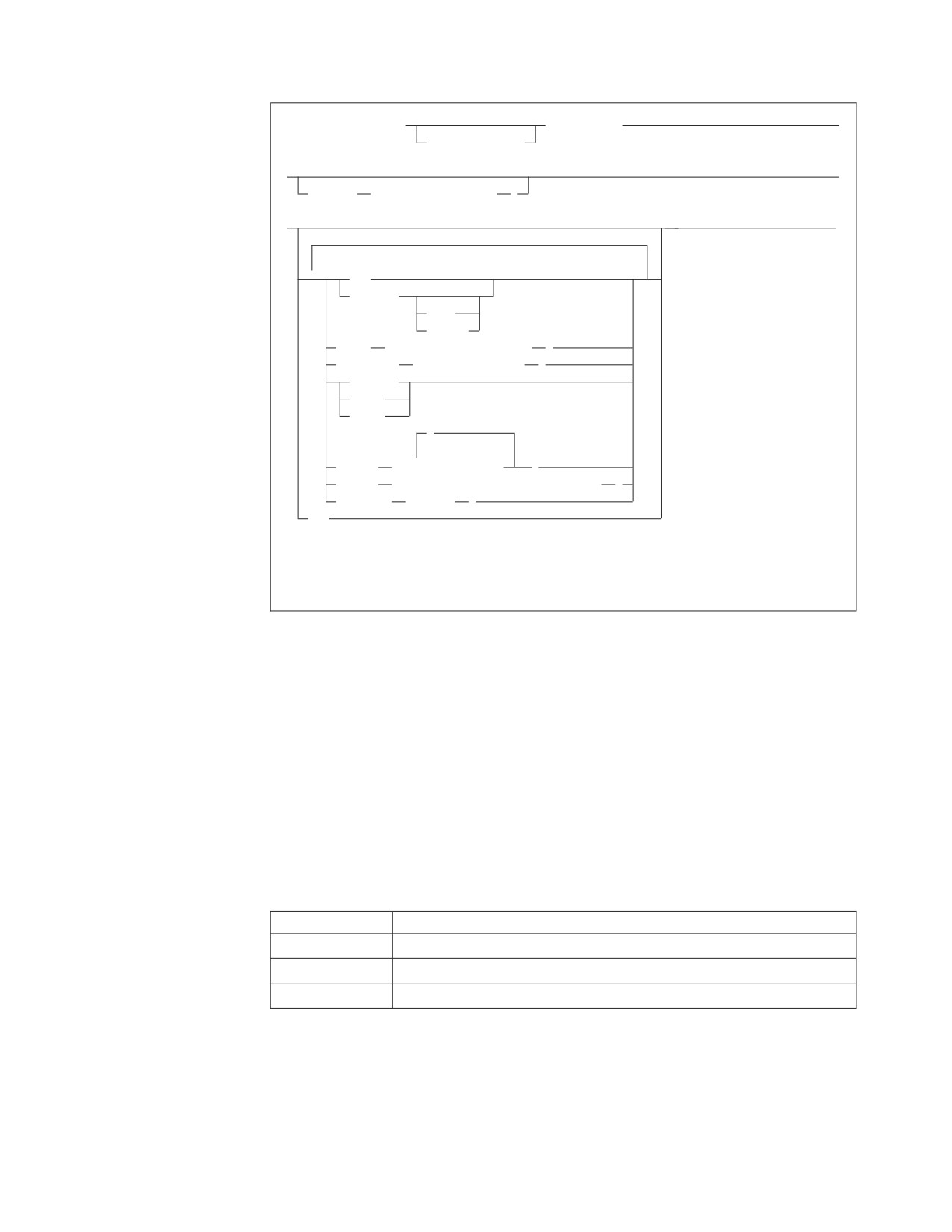
|
►► CBND PACKAGE(
package_id)
►
|
collection_id.
|
►
►
|
INfile
( private_file_id
)
|
►
►◄
|
▼
NEW
REPLACE
KEEP
REVOKE
OWner
( authorization_name
)
QUALifier
( collection_id
)
NOCHECK
CHECK
ERROR
,
DBList
(
▼
server_name
)
USERid
( authorization_name/password
)
MSGQueue
( name
)
QRY
|
|
Note: For any options not specified on the CBND transaction, the default option will be
|
the option specified when the package was preprocessed, unless otherwise noted.
|
|
|
Batch Binder
|
If a bind-record (bind file) is generated after processing, it can be used to create a
|
package in a remote or local application server. Batch Binder can be used to bind
|
all applications whose bind-record (bind file) was generated by the preprocessor, to
|
a remote or local server. Executing the preprocessor with the BIND option and
|
executing Batch Binder are complementary. Batch Binder cannot be used to create
|
the packages for FORTRAN.
|
Batch Binder can be invoked by calling batch binding phase ARIPBIN through jcl
|
to perform binding. Batch Binder jcl must use same DLBL statement for SQLBIND
|
that was used at the time of preprocessing the program. Binder does not require
|
bind Work file. Batch binder takes 11 parameter through param parameters.
|
Table 17. Data Sets Required by All Preprocessors
|
Data Set
Used For
|
SYSLST
Print (report) output is written here
|
SQLGLOB
CHARNAME and DBCS options are obtained from this VSAM file
|
SQLBIND
SQLBIND points to VSAM bindfile
|
|
Chapter 5. Preprocessing and Running a DB2 Server for VSE Program
189
|
// JOB BATCH BINDER
|
// LIBDEF *,SEARCH=(STSPVT.DEVELOP,STSPVT.DB2750)
|
// ASSGN SYSIPT,SYSRDR
|
// DLBL VSEUCAT,’VSEMCH.USER.CATALOG’,,VSAM
|
// DLBL SQLGLOB,’V750.DB2750.GLOB.FILE’,,VSAM,CAT=V750CAT,
X
|
DISP=(OLD,KEEP)
|
// DLBL SQLBIND,’V750.DB2750.BIND.FILE’,,VSAM,CAT=V750CAT,
X
|
DISP=(OLD,KEEP)
|
// EXEC PGM=ARIPBIN,SIZE=AUTO,PARM=’bindparms’
|
|
/*
|
/&
|
|
|
Figure 38. Invoking the DB2 Server for VSE Binder (Part 1 of 2)
|
|
Notes:
1. JCL must be changed to specify the correct libdef and library.
2. Parameters of ’bindparms’ are discussed in ″Binding Parameters″ below.
3. A typical invocation of ARIPBIN phase with bind parameters:
// EXEC ARIPBIN,SIZE=AUTO,PARM=’PACKAGE(COLID.PACK),DB(DBNAME),
X
USERID(USER1/PASSWD1),OWNER(OWNER1),NEW’
|
Figure 38. Invoking the DB2 Server for VSE Binder (Part 2 of 2)
|
Refer to DB2 Server for VSE Program Directory for more information on coding
|
LIBDEF statements.
|
Binding Parameters (BindParms)
|
Binding parameters mentioned below are common to CBND and Batch Binder
|
unless otherwise stated.
|
Table 18. Binding Parameters
|
Parameter
Description
|
PACKAGE (positional
This parameter identifies the package to be created and the
|
parameter 1)
associated bind file. The associated bind file must be created by the
|
DB2 Server for VSE preprocessor and its contents must not be
|
changed in any way. collection_id.package_id is the name by which
|
the database manager identifies the package to be created and the
|
associated bind file. The collection_id portion is optional, and fully
|
qualifies the package_id and any unqualified objects referenced
|
within the package.
|
If the collection_id is not specified, and the user_id is, the
|
collection_id defaults to the user_id. If neither is specified, the
|
collection_id defaults to the connected authorization-id.
|
You must be the owner of the bind file that you want to bind. To
|
bind another user’s bind file, you must have DBA authority.
190
Application Programming

|
Table 18. Binding Parameters (continued)
|
Parameter
Description
|
REPLACE
This parameter is specified if an existing package is to be replaced
|
by the bind. If the package does not exist, a new package is created
|
without an error or warning message.
|
KEEP causes the existing grants of RUN privilege to remain in
|
effect when the package is bound. However, if the owner of the
|
package is not entitled to grant all privileges embodied in the
|
package, all existing grants of the RUN privilege are revoked. The
|
KEEP and REVOKE parameters apply if the package has
|
previously been created and the owner of the package has granted
|
the RUN privilege on the resulting package to other users. The
|
KEEP and REVOKE parameters are allowed only with REPLACE.
|
If the REVOKE parameter is specified, all existing grants of the
|
RUN privilege are revoked. The KEEP and REVOKE parameters
|
are allowed only with REPLACE.
|
NEW
The NEW parameter is specified if the package to be created does
|
not exist and is to be created. If the package with the same name
|
and owner already exists in the remote application server, binding
|
fails.
|
OWner
This parameter specifies the authorization_name of the owner of the
|
package being created. The OWner parameter is to be used when
|
you are binding against a remote application server. However, if
|
you specify this parameter when binding against a local DB2
|
Server for VSE & VM application server, the authorization_name
|
must be the same as the application server authorization ID.
|
QUALifier
This parameter specifies the default collection_id within the package
|
to resolve unqualified object names in static SQL statements.
|
The QUALifier parameter is meant to be used when you are
|
binding against a remote application server. If you specify this
|
parameter when binding against a DB2 Server for VSE & VM
|
application server, the collection_id must be the same as the
|
application server authorization ID.
|
NOCHECK
This parameter is specified if you want the application server to
|
check all SQL statements for validity and perform package
|
functions. It will generate a package if no statement-parsing error
|
was found; If you specify the NOCHECK parameter, it overrides
|
the ERROR parameter in the bind file
|
CHECK
This parameter is specified if you want the application server to
|
check all SQL statements for validity and generates error messages
|
if necessary, but does not generate a package; If you specify
|
CHECK parameter, it overrides NOCHECK or ERROR parameter
|
in the bind file.
Chapter 5. Preprocessing and Running a DB2 Server for VSE Program
191
|
Table 18. Binding Parameters (continued)
|
Parameter
Description
|
ERROR
This parameter specifies how statement parsing errors are
|
tolerated. If the ERROR option is specified, then syntactic or
|
semantic errors detected at the application server side will not stop
|
the creation of the package. If the ERROR option is not specified in
|
both binding and the bind file, the application server will not
|
create the package when those errors occur.
|
With the ERROR option, a syntactic error will cause the DB2 for
|
VSE & VM database to generate an Error Section in the package.
|
At run-time, invocation of this statement will yield SQLCODE -525
|
With the ERROR option, the creation of a package fails only if
|
there was a DRDA protocol error, or a severe error detected on the
|
AS side.
|
QRY
This parameter causes binder (online/batch) to display the
|
preprocessor options stored in the header of the bind file. No
|
package functions will be performed if QRY is specified.
|
For CBND only:
|
The preprocessor options will be displayed at the terminal where
|
CBND was invoked. MSGQueue is ignored if QRY is specified.
|
An example of displayed output of binding with QRY option is as
|
follows:
|
ARI5418I - THE BIND OPTIONS CURRENTLY IN EFFECT FOR
|
- PACKAGE SQLDBA.MYPROG ARE:
|
- NOCHECK
|
- KEEP
|
- BLOCK
|
- ISQL(CS)
|
- EXPLAIN(NO)
|
- APPLICATION SERVER DEFAULT DATE
|
- APPLICATION SERVER DEFAULT TIME
|
- NOEXIST
|
- REPLACE
|
- APOST
|
- CTOKEN(NO)
|
- CCSIDS(500)
|
- CCSIDM(0)
|
- CCSIDG(0)
|
- APPLICATION SERVER DEFAULT CHARSUB
|
- DEFAULT PACKAGE LABEL
192
Application Programming
|
Table 18. Binding Parameters (continued)
|
Parameter
Description
|
INfile
This parameter identifies the 7-character VSAM file name that
|
stores the bind-records (bindfiles) created by the preprocessor. This
|
file is used as DLBL filename which identifies the VSAM bindfile
|
used for input. If this parameter is omitted, the bind-record
|
(bindfile) is assumed to reside in the master VSAM file named
|
SQLBIND. If your bind-record (bindfile) resides in a private VSAM
|
file, you will then specify the 7-character private file name.
|
SQLBIND is also used as the DLBL label which identifies the
|
bindfile used for input. DLBL label name must be SQLBIND
|
irrespective of usage of private VSAM file or default VSAM file.
|
For CBND only:
|
VSAM bindfile must be defined to CICS through FCT or RDO
|
(CICS/ESA R410). Default SQLBIND is defined to CICS during
|
installation. If using private VSAM bindfile, you must make sure
|
that this VSAM file is properly defined to CICS.
|
DBname
This parameter applies to Batch Binder only. This parameter
|
specifies the name of the target application server. If this parameter
|
is omitted, the bind file is bound to the default application server.
|
DBList
This parameter applies to CBND only. This parameter specifies a
|
list of application servers on which the bind file will be bound.
|
If this parameter is omitted, the bind file is bound to the default
|
application server. For more information on establishing a default
|
application server, see the DB2 Server for VSE & VM Database
|
Administration manual.
|
USERid
This parameter specifies the userid and password that CBND or
|
Batch Binder will use to execute a CONNECT statement to gain
|
access to each application server where the package will be
|
created. This parameter cannot be omitted for Batch Binder.
|
If this parameter is omitted, CBND will connect implicitly to the
|
application server where the package will be created. That is, the
|
online resource adapter will establish the userid for this particular
|
CBND transaction. For more information on how the userid is
|
established in the case of an implicit connect, see the DB2 Server for
|
VSE & VM Database Administration manual.
|
MSGQueue
This parameter applies to CBND only. This parameter specifies the
|
name of the temporary storage queue to be used to store the bind
|
error or warning message (if any). If this parameter is omitted, no
|
error or warning message will be stored, CBND will just display a
|
summary report of the bind process on the terminal where CBND
|
was invoked. The summary report contains the bind options used
|
for the bind process, host variables, declarations, and the result of
|
the bind. The user can browse the message queue specified using
|
CEBR when CBND completes. This queue is kept in main storage
|
and is not recoverable. It stays until it is purged by CEBR or if
|
CICS is recycled. The user must determine when they should
|
delete queues that are no longer needed to prevent possible short
|
on temporary storage situations.
|
|
The preprocessor requires the job control statement DLBL SQLGLOB. In addition,
|
when you want the preprocessor to generate a bind file, job control statements
|
DLBL SQLBIND and DLBL BINDWKF are required. These DLBL statements must
Chapter 5. Preprocessing and Running a DB2 Server for VSE Program
193
|
be provided in either the preprocess job control or the system standard label area.
|
The DLBL SQLBIND indicates the VSAM file into which the preprocessor should
|
place the output bind file. The BINDWKF indicates the work file into which the
|
preprocessor should use when performing VSAM I/O against the bind file. The
|
DLBL SQLGLOB contains the CHARNAME and DBCS options which are
|
necessary for bind file creation. See Figure 39. As mentioned earlier, you can
|
suppress SQLBIND output through CHECK and NOBIND parameters of the
|
preprocessor.
|
|
// DLBL
SQLBIND,’DB2.BIND.MASTER’,,VSAM,CAT=catalog,DISP=(OLD,KEEP)
|
// DLBL
BINDWKF,’DB2.BIND.WORKF’,,VSAM,CAT=catalog
|
// DLBL
SQLGLOB,’DB2.SQLGLOB.MASTER’,,VSAM,CAT=catalog,DISP=(OLD,KEEP)
|
|
|
Figure 39. DLBL Statements for SQLBIND and SQLGLOB VSAM file
|
|
A user can choose to store the bind file generated by the preprocessor in a master
|
DB2 Server for VSE VSAM bind file, or in a private VSAM bind file.
|
If a user chose to have his application program’s bind file stored in the master DB2
|
Server for VSE VSAM bind file, the user should specify the recommended VSAM
|
dataset name “DB2.BIND.MASTER” on the DLBL SQLBIND job control statement.
|
This master VSAM bind file is defined to the system when DB2 Server for VSE
|
Version 7 Release 1 was installed. Therefore, the user does not need to define or set
|
up the file. However, if a different cluster name was used to define the master
|
VSAM file, the user should then specify the corresponding dataset name used.
|
If a user chose to have the application program’s bind file stored in a private
|
VSAM bind file, the user must specify the name of the private VSAM bind file on
|
the DLBL SQLBIND job control. The user must first define the private VSAM bind
|
file, using the same VSAM characteristics as the master VSAM bind file. For more
|
information on how to define the VSAM cluster for the private bind file, see the
|
DB2 Server for VSE Program Directory.
194
Application Programming
Chapter 6. Testing and Debugging
Doing Your Own Testing
196
Using the WHENEVER Statement
200
Checking Warnings and Errors at Preprocessor
Determining the Scope of the WHENEVER
Time
196
Statement
201
Testing SQL Statements
197
Examining the SQLCA
202
Using the Automatic Error-Handling Facilities . . 197
Handling Errors in a Select-List
212
Using the SQLCA
199
Handling Arithmetic Errors
212
Using the SQLERRM Field
200
Handling Numeric Conversion Errors
213
Using the SQLWARN Field
200
Handling CCSID Conversion Errors
214
Examining Errors
200
195
Doing Your Own Testing
Checking Warnings and Errors at Preprocessor Time
If errors or warnings are detected during preprocessing, the preprocessor inserts
messages into the modified source code and preprocessor listing files to indicate
that a problem was encountered. A return code is also issued indicating the
severity of the problem.
Messages associated with warning conditions are inserted into the files in comment
form so that the compilation of the modified source code is not inhibited. A return
code of 4 is issued and, if no problems of greater severity are found, package
processing occurs. All warnings should be investigated, because they may indicate
a situation that must be corrected before the program is executed. For example, if
you use the NOEXIST preprocessor option and a table is not found at
preprocessing time, the database manager issues a warning because it assumes that
the table will be created before the program is executed. If the program is executed
and the table is not found, the successful execution of the program is inhibited and
an error results.
DB2 Server for VM
Messages associated with error conditions are treated differently if the
preprocessor option ERROR is specified.
When you are preprocessing without the ERROR option, messages are
inserted in the files in uncommented form so that the compilation process is
inhibited. A return code of 8 or greater is issued, and no package processing
occurs.
When preprocessing with the ERROR option, most statement-parsing errors
are tolerated. Messages associated with these errors are inserted into the files
in commented form, and the return code is downgraded to a warning:
detection of these errors does not inhibit package processing. However, some
statement-parsing errors, such as errors with host identifiers and all errors
that could jeopardize the integrity of the package, are too severe to be
ignored. Such errors are treated as outlined for preprocessing without the
ERROR option.
Because the ERROR option allows preprocessing to complete successfully
even though errors have been detected, ensure that each statement is
preprocessed successfully on the application server on which the statement
will be executed. Check the preprocessor listing associated with the binding
application server.
DB2 Server for VSE
When you are preprocessing, messages associated with error conditions are
inserted in the files in uncommented form so that the compilation process is
inhibited. A return code of 8 or greater is issued, and no package processing
occurs.
To check for error and warning conditions:
196
Application Programming
1. Scan the modified source code or preprocessor listing file for error and warning
message. Error message numbers are formatted as ARInnnnE, and warning
message numbers as ARInnnnW or ARInnnnI.
Messages generated during preprocessor initialization and termination are
stored in the listing file, not in the modified source code. A listing file
containing these messages is produced regardless of whether the NOPRint
preprocessor parameter is specified.
2. Look up the message numbers, SQLCODES and SQLSTATES issued by the
system in the DB2 Server for VM Messages and Codes or the DB2 Server for VSE
Messages and Codes manual.
3. If the error was detected by a non-DB2 Server for VM application server or
non-DB2 Server for VSE application server, look up the SQLCODE and
SQLSTATE explanations in the Messages and Codes manual associated with the
database management system that detected the problem.
4. Use ISQL HELP for online information about messages and SQLCODEs issued
by the database manager. To obtain limited online help information for
SQLSTATEs, type HELP SQLSTATE from ISQL.
Testing SQL Statements
Several facilities are available to help you test SQL statements:
v Interactive facilities such as ISQL or QMF can be used for testing statements;
however, the range of statements that can be tested with these facilities is
limited. For example, you cannot test the following:
- Statements that use host language delimiters, host variables, cursors, or
statement names.
- Dynamic or extended dynamic SQL statements.
For other static SQL statements, however, these facilities are fast and easy to use,
and you can do data definitions, authorizations, and data control tasks. For
information on ISQL, see the DB2 Server for VSE & VM Interactive SQL Guide and
Reference manual.
v The DBS Utility can be used for testing the same range of SQL statements that
can be tested using ISQL or QMF. In addition, it lets you use file input and
output, which makes submitting and reviewing test conditions easier, and lets
you set up and restore test databases with DBS Utility data load and unload
commands. For information on the DBS Utility, see the DB2 Server for VSE & VM
Database Services Utility manual.
v DB2 Server RXSQL can be used for testing statements with host variables,
statement names, and cursors. You can test dynamic and extended dynamic SQL
statements. DB2 Server RXSQL can be used to prototype application programs.
For information on DB2 Server RXSQL, see the DB2 REXX SQL for VM/ESA
Installation and Reference manual.
Using the Automatic Error-Handling Facilities
Every SQL application program must provide for error handling, by declaring an
SQL Communications Area (or alternatively, just the SQLCODE variable, as
described later in this section). This area receives messages that the database
manager sends to the program. By testing certain fields of this area, you can test
for certain conditions during the program’s execution.
Error handling helps protect the integrity of the database when a program fails.
For example, consider the two-step operation needed to transfer $500 from one
account to another in a bank:
Chapter 6. Testing and Debugging
197
1. Subtract $500 from account A
2. Add $500 to account B.
If the system or your program fails after the first statement is executed, some
customer has just “lost” $500. This type of incomplete update is said to leave the
database in an inconsistent state.
To avoid creating an inconsistent state, use a logical unit of work (LUW). An LUW
is a group of related SQL statements, possibly with intervening host language
code, that you want treated as a unit. The two steps in the previous example
would make up a single LUW. SQL requests within an LUW can be made against
a remote application server; such an LUW is called a remote unit of work.
LUWs prevent inconsistencies caused by system errors or SQL statement errors.
For system errors, the system automatically restores all changes made during the
LUW where it encountered the error. This rollback of the LUW is identified by a
negative SQLCODE and a W in the SQLWARN6. When a non-severe SQL error
occurs, the system restores all changes made by the statement in error. This
statement rollback is identified by a negative SQL code and a blank in
SQLWARN6. For work done in the LUW before execution of the statement in error,
do the following:
v Declare an SQL Communications Area (or just the SQLCODE variable)
v Code an SQL WHENEVER statement
v Code the actions to be taken if an error occurs.
To declare the SQL Communications Area (SQLCA), code this statement in your
program:
INCLUDE SQLCA
When you preprocess your program, the system inserts host language variable
declarations in place of the INCLUDE SQLCA statement, and SQL communicates
with your program using this group of variables. The system uses the variables for
warning flags, error codes, and diagnostic information. All these variables are
discussed in the DB2 Server for VSE & VM SQL Reference manual.
The system returns a return code in SQLCODE after executing each SQL statement.
When a statement is executed successfully, SQLCODE is set to 0 (SQLSTATE is
'00000'). The system indicates error conditions by returning a negative SQLCODE.
A positive SQLCODE indicates normal or warning conditions experienced while
executing the statement.
The system also returns a return code in SQLSTATE after executing each SQL
statement. SQLSTATE provides common return codes for IBM’s relational database
products. SQLSTATE values comply with the SQL92 standard. For a discussion of
return codes in SQLSTATE, refer to the DB2 Server for VSE & VM SQL Reference
manual.
The system supports a stand-alone SQLCODE. If you request this support, you
must not include the SQLCA definition in your program. You must, however,
provide the integer variable SQLCODE (SQLCOD in Fortran). Refer to “Parameters
for SQLPREP EXEC for Single and Multiple User Modes” on page 118 or “Defining
the Preprocessing Parameters” on page 160 for information on the preprocessor
parameters that provide NOSQLCA support.
The following WHENEVER statement specifies a system action that is to occur
when an SQL error (that is, a negative SQLCODE) is returned:
198
Application Programming
WHENEVER SQLERROR GO TO ERRCHK
That is, whenever an SQL error (SQLERROR) occurs, program control is
transferred to code which follows a specific label, such as ERRCHK. This code
should include logic to analyze the error indicators in the SQLCA. Depending on
how ERRCHK is defined, action may be taken to execute the next sequential
program instruction, to carry out some special functions, or, as in most cases, to
roll back the current LUW and end the program.
Using the SQLCA
As mentioned previously, the database manager returns a return code in the
SQLCA after almost every SQL statement. The only statements that do not return
SQLCODEs are SQL declarative statements, which are not executed; therefore, no
SQLCODE can be returned. (Never test for an SQLCODE after a declarative
statement.) The following are examples of declarative statements:
v BEGIN DECLARE SECTION
v END DECLARE SECTION
v WHENEVER
v INCLUDE SQLCA
v INCLUDE SQLDA.
When a nondeclarative statement is in error, the system reverses any changes to
the database caused by that statement. For any previous work done in the LUW,
you have to tell the system what action to take.
Table 19 shows a representation of the SQLCA structure with host-language
independent data type descriptions. (Refer to the appendixes for the SQLCA data
types of a particular programming language.)
Table 19. SQLCA Structure (in Pseudocode)
SQLCA -- a structure composed of:
SQLCAID -- character string of length 8
SQLCABC -- 31-bit binary integer
SQLCODE -- 31-bit binary integer
SQLERRM -- varying character string of maximum length
70
SQLERRP -- character string of length 8
SQLERRD -- an array composed of:
SQLERRD(1) -- 31-bit binary integer
SQLERRD(2) -- 31-bit binary integer
SQLERRD(3) -- 31-bit binary integer
SQLERRD(4) -- 31-bit binary integer
SQLERRD(5) -- 31-bit binary integer
SQLERRD(6) -- 31-bit binary integer
SQLWARN -- a sub-structure composed of:
SQLWARN0 -- single character
SQLWARN1 -- single character
SQLWARN2 -- single character
SQLWARN3 -- single character
SQLWARN4 -- single character
SQLWARN5 -- single character
SQLWARN6 -- single character
SQLWARN7 -- single character
SQLWARN8 -- single character
SQLWARN9 -- single character
SQLWARNA -- single character
SQLSTATE - character string of length 5
Chapter 6. Testing and Debugging
199
The DB2 Server for VSE & VM SQL Reference manual explains the structure of the
SQLCA, and describes each field in detail. Some tips about SQLERRM and
SQLWARN fields are provided below.
Using the SQLERRM Field
|
The message texts associated with particular SQLCODEs (which can be found in
|
the DB2 Server for VM Messages and Codes or the DB2 Server for VSE Messages and
|
Codes manual) or retrieved with a call to ARIGMSG (refer to “Examining the
|
SQLCA” on page 202 for more information), often include variables which are
|
returned in the SQLERRM field of the SQLCA. In some situations, the format of
|
the last variable in the SQLERRM field is 'FOnn', which specifies the format
|
number of the SQLCODE message text. The 'FO' is an abbreviation for format, and
|
'nn' represents the number that identifies the version of the message text that
|
applies. If there is more than one variable returned through SQLERRM, the
|
variables are separated by X'FF'.
The first two bytes of SQLERRM (which is varying-length) contain the total length
of the string.
See “Handling Numeric Conversion Errors” on page 213 for the values of this field
when a numeric conversion occurs in an outer select and “Handling Errors in a
Select-List” on page 212 for the values when an error occurs while evaluating
expressions in an outer select.
Using the SQLWARN Field
This field contains characters that warn of various conditions encountered during
the processing of your statement. Alternatively, specific warnings may be indicated
by positive values in the SQLCA field, SQLCODE. For example, a warning
indicator is set when the system ignores null values in computing an average.
When the system encounters a particular condition, it sets the corresponding
warning character to a designated value, such as W, N, or Z. When the system
encounters two different warning conditions and must set the warning character to
either W or N, the system randomly chooses one value. If the system encounters
three different warning conditions and must set the value of the warning character
to W, N, or Z, the system sets the value of the warning character to W or N, but
not Z. The warning character Z is, therefore, overridden by W or N. One or more
warning characters may be set to W regardless of the code returned in SQLCODE.
The meanings of the warning characters are listed in the DB2 Server for VSE & VM
SQL Reference manual.
Because there is only one return code structure in each program, you should copy
out of the structure any information that you wish to save before the next SQL
statement is executed. Of particular note are the SQLCODE and the warning
indicators (SQLWARN).
Examining Errors
Using the WHENEVER Statement
The WHENEVER statement is a nonexecutable statement that assists you in
reacting to unusual conditions, based on data returned in the SQLCA.
The following three conditions can be addressed with WHENEVER statements:
SQLERROR Occurs when SQLCODE is negative.
200
Application Programming
SQLWARNING
Occurs when SQLCODE is positive but not 100, or when
SQLCODE is zero and SQLWARN0 is W.
NOT FOUND Occurs when SQLCODE is 100 (SQLSTATE is '02000').
Each SQL statement is within the scope of one WHENEVER statement for each of
the three conditions. A WHENEVER statement for an already specified condition
can be overridden at any time by coding another WHENEVER statement for the
same conditions.
One of three actions can be taken for a WHENEVER statement:
GOTO or GO TO
Transfers control to a specified location.
STOP
Terminates the program. The STOP action cannot
be used with the NOT FOUND condition.
CONTINUE
Executes the next sequential instruction.
If a WHENEVER statement is not coded for a condition, it is processed as if the
condition were CONTINUE.
For a full discussion of the WHENEVER statement, see the DB2 Server for VSE &
VM SQL Reference manual.
Determining the Scope of the WHENEVER Statement
The scope of a WHENEVER statement is determined by its position in the source
program listing, not by its place in the logic flow. (This is because WHENEVER is
a declarative statement.) For example:
DO WHILE (X > Y)
EXEC SQL CREATE INDEX I1 ON EMP_ACT (ACTNO)
(host language code)
EXEC SQL DELETE FROM EMP_ACT
WHERE EMPN = '000220'
EXEC SQL WHENEVER SQLERROR STOP
First WHENEVER
(host language code)
EXEC SQL SELECT EMPNO, PROJNO, ACTNO INTO :EMPNUM.
(host language code)
EXEC SQL WHENEVER SQLERROR CONTINUE
Second WHENEVER
END-DO
EXEC SQL DROP INDEX I1
In the pseudocode program fragment above, the scope of the first WHENEVER is
only the SELECT INTO statement. The second WHENEVER applies to the DROP
INDEX statement (and to all SQL statements that follow it until another
WHENEVER is encountered). The CREATE INDEX and DELETE statements are
not covered by a WHENEVER (there is no preceding WHENEVER); therefore, the
default CONTINUE action applies for WHENEVER conditions.
Chapter 6. Testing and Debugging
201
Examining the SQLCA
The SQLCA structure can be examined using the WHENEVER statement. You can
test for both general (SQLCODE < 0 | SQLWARN0 <> blank) and specific
(SQLCODE = -911 | SQLWARN6 = ’W’) warning or error conditions. To do this,
use a WHENEVER statement with a GOTO somewhere in the source program
before the SQL statements for which you want to directly examine the SQLCA.
For example, Figure 40 shows pseudocode for an error handling routine:
EXEC SQL WHENEVER SQLERROR GOTO ERRCHK
ERRCHK: * Prevent further errors from branching here
EXEC SQL WHENEVER SQLERROR CONTINUE
* Handle severe errors first
IF SQLWARN0 = ’S’
DISPLAY(’A SEVERE ERROR HAS OCCURRED.’)
DISPLAY(’SQLCODE = ’ SQLCODE)
STOP
END-IF
* Describe the error
DISPLAY(’AN ERROR HAS OCCURRED.’)
DISPLAY(’SQLCODE =’ SQLCODE)
EXEC SQL ROLLBACK WORK
* Check for errors
IF SQLCODE < 0
DISPLAY(’ROLLBACK WORK FAILED. SQLCODE = ’)
DISPLAY(SQLCODE)
* Recovery from error is complete.
ELSE
DISPLAY(’ROLLBACK WORK SUCCEEDED.’)
END-IF
Figure 40. Pseudocode Error-Handling Routine
When an error occurs, control is passed to the ERRCHK label. Then, in order to
prevent a program loop in this routine, a WHENEVER SQLERROR CONTINUE
statement is issued. (It is safe to do this because WHENEVER statements never
return an SQLCODE.) Next, the severity of the error is determined. If a severe
error occurs, the execution of any SQL statements on this application server (except
a CONNECT statement) terminates the application abnormally. The pseudocode
example reports the error and ends.
If the error is not severe, the pseudocode example displays an informational
message giving the SQLCODE, and an attempt is made to undo any changes. The
pseudocode example determines whether the ROLLBACK successfully completed,
by checking the SQLCODE after the ROLLBACK statement.
202
Application Programming

After a severe error, only a CONNECT statement is permitted. If the application
program reconnects to the application server in which the severe error occurred,
two possibilities exist. If the application server has been restarted or has otherwise
recovered, the application may continue; otherwise, another severe error will result.
If your application program is accessing multiple application servers, you can enter
a CONNECT statement to switch to another application server and continue
|
processing.
|
Retrieving the Text Message for an SQLCODE using SQLCA: If an SQL error
|
occurs, the error message can be retrieved through a call to ARIGMSG for both
|
VSE and VM. The pseudo formats of these calls in each of the languages are:
|
CALL ARIGMSG,(PSQLCA, PMESSAGE, PBYTESALLOCATED, PRC, IDSPSQLCA, PLANGUAGE), VL
|
/* Assembly Language */
|
ARIGMSG(PSQLCA, PMESSAGE, PBYTESALLOCATED, PRC, IDSPSQLCA, PLANGUAGE)
|
/* C
*/
|
CALL ’ARIGMSG’ USING PSQLCA, PMESSAGE, PBYTESALLOCATED, PRC, IDSPSQLCA, PLANGUAGE.
|
/* COBOL
*/
|
CALL ARIGMSG(PSQLCA, PMESSAGE, PBYTESALLOCATED, PRC, IDSPSQLCA, PLANGUAGE)
|
/* Fortran
*/
|
CALL ARIGMSG(PSQLCA, PMESSAGE, PBYTESALLOCATED, PRC, IDSPSQLCA, PLANGUAGE);
|
/* PL/I
*/
|
Descriptions of the various parameters are given in Table 20.
|
Table 20. SQLCA Parameter Description
|
Parameter Name
Description
|
PSQLCA
A pointer to the SQLCA structure.
|
PMESSAGE
A pointer to a fixed length character array to store
|
the error message. The returned text is formatted as
|
one continuous string. The SQLCODE, SQLSTATE,
|
SQLERRD(1), and SQLERRD(2) fields of SQLCA are
|
automatically appended to the returned text. Memory
|
for PMESSAGE must be allocated within the
|
application program and must be large enough to
|
store the entire text and SQLCA fields. The appended
|
SQLCA will require 58 bytes.
|
PBYTESALLOCATED
A pointer to an integer (4 bytes) used both as an
|
input and output parameter. On input, it specifies the
|
number bytes allocated for PMESSAGE by the
|
application program. On output, it returns the
|
number of those bytes that were actually used to
|
store the returned text and SQLCA fields.
|
PRC
A pointer to an integer (4 bytes) return code
|
specifying whether any errors occurred in retrieving
|
the text.
Chapter 6. Testing and Debugging
203
|
Table 20. SQLCA Parameter Description (continued)
|
Parameter Name
Description
|
IDSPSQLCA
An integer specifying whether the entire SQLCA will
|
be appended to the end of the returned message. The
|
append will occur if the flag is 1. The format of the
|
appended string will be:
|
SQLCODE = sqlcode. SQLSTATE = sqlstate. SQLERRD
|
= sqlerrd(0), sqlerrd(1), sqlerrd(2), sqlerrd(3), sqlerrd(4),
|
sqlerrd(5).
|
SQLWARN = sqlwarn0, sqlwarn1, sqlwarn2, sqlwarn3,
|
sqlwarn4, sqlwarn5, sqlwarn6, sqlwarn7, sqlwarn8,
|
sqlwarn9, sqlwarnA.
|
The string will be 111 bytes long. If a severe error
|
occurred in retrieving the message, the API will
|
override the user’s specification and output all the
|
SQLCA fields.
|
PLANGUAGE
A pointer to a fixed length character array specifying
|
the language identifier of the message repository.
|
Supported language identifiers, LANGID, are
|
AMENG, UCENG, FRANC, GER, and KANJI. The
|
LANGID may consist of both upper and lower case
|
letters. Only the first five (or first three if using GER)
|
characters of the LANGID will be processed to
|
determine the specified language. Therefore
|
″AMeng″, ″UCENGword″, or ″GERcat in the hat″ will
|
be interpreted as AMENG, UCENG, and GER
|
respectively. The default language may be used by
|
specifying a LANGID starting with one or more
|
blank spaces such as ″ ″ or ″ ″ or ″ GER ″.
|
Note: DB2 for VSE Batch does not support switching
|
to another language. Therefore the default is used
|
regardless of the LANGID specification.
|
|
Descriptions of the various return codes stored in RC are given in Table 21.
|
Table 21. ARIGMSG Return Codes
|
Return Codes
Description
|
0
The message was returned successfully.
|
+1
The memory allocated to store either the text or appended
|
SQLCA fields was insufficient causing the message to be
|
truncated.
|
-1
One or more parameters are invalid (such as pointer to
|
SQLCA was null, etc).
|
-2
The specified language ID is invalid or is not enabled.
|
-3
The message repository could not be accessed.
|
-4
The SQLCODE number is out of range (invalid).
|
-5
The message for the SQLCODE could not be found in the
|
repository
|
204
Application Programming
|
Note: For return codes -1, -2, and -3 the message buffer will be empty. For codes -4
|
and-5 the buffer will contain all the SQLCA fields. If a truncation error (code
|
1) occurs in addition to another error (either code -4 or -5), the API will
|
generate the truncation error code.
|
A pseudocode program demonstrating the use of ARIGMSG is shown in Figure 41
|
on page 206:
|
Chapter 6. Testing and Debugging
205
|
EXEC SQL INCLUDE SQLCA
|
|
|
MAIN PROGRAM
|
|
EXEC SQL SELECT MAX(NCOLS) INTO :MAX_NCOLS FROM SYSTEM.NEWCATALOG;
|
*If there was an error
|
IF SQLCODE <> 0 THEN
|
*Declare
1) character arrays to store the returned text and the language
ID
|
* 2) integers to store the number of bytes allocated
|
* and the return code from ARIGMSG
|
DECLARE SMESSAGESTRING AS CHARACTER(400)
|
DECLARE SLANGUAGESTRING AS CHARACTER(5)
|
DECLARE INUMBEROFBYTES, IRETURNCODE AS INTEGER
|
*SMESSAGESTRING may store up to 400 bytes
|
INUMBEROFBYTES = 400;
|
*Find the addresses of the variables declared above
|
DECLARE PSQLCA, PMESSAGE, PBYTESALLOCATED, PRC, PLANGUAGE AS POINTER
|
PSQLCA = ADDRESSOF(SQLCA)
|
PMESSAGE = ADDRESSOF(SMESSAGESTRING)
|
PBYTESALLOCATED = ADDRESSOF(INUMBEROFBYTES)
|
PRC = ADDRESSOF(IRETURNCODE)
|
PLANGUAGE = ADDRESSOF(SLANGUAGESTRING)
|
*Specify the language ID
|
SLANGUAGESTRING = "Ameng"
|
|
*Now retrieve the error message and set the IDSPSQLCA flag to 0
|
*(so that not all the SQLCA fields are appended).
|
CALL ARIGMSG(PSQLCA, PMESSAGE, PBYTESALLOCATED, PRC, 0 , PLANGUAGE);
|
*If there was a severe error in the retrieval
|
IF IRETURNCODE < 0 THEN
|
IF IRETURNCODE = -1 THEN
|
* If one or more of the six parameters was invalid
|
*(such as the pointer PLANGUAGE was null)
|
ELSEIF IRETURNCODE = -2 THEN
|
* If the specified language ID is invalid (such as "Canadianese")
|
ELSEIF IRETURNCODE = -3 THEN
|
*If the message repository could not be accessed
|
ELSE
|
* If the message still could not be retrieved then output the entire
SQLCA.
|
* INUMBEROFBYTES now stores the length (in bytes)
|
* of the returned text and SQLCA
|
IF IRETURNCODE= -4 THEN
|
* If the SQLCODE was out of range (invalid)
|
CALL DISPLAYMESSAGE( SMESSAGESTRING, INUMBEROFBYTES)
|
ELSE
|
* If the message for the SQLCODE could not be retrieved from the repository
|
CALL DISPLAYMESSAGE( SMESSAGESTRING, INUMBEROFBYTES)
|
END IF
|
END IF
|
*If the message was retrieved successfully or with minor errors
|
*(such as having the message truncated)
|
ELSE
|
*Print the error message
|
CALL DISPLAYMESSAGE( SMESSAGESTRING, INUMBEROFBYTES)
|
END IF
|
END IF
|
|
|
Figure 41. Pseudocode to Display the SQL Error Message
|
|
Sample outputs of the pseudocode program in Figure 41 are:
|
1. The message was successfully retrieved:
|
|
SYSTEM.NEWCATALOG was not found in the system catalog.
|
SQLCODE =
-204. SQLSTATE = 42704. SQLERRD = -100,
0.
206
Application Programming
|
2.
The message was truncated:
|
|
SYSTEM.NEWCATALOG was not found in the system.
|
3.
The message was not retrieved because it could not be found in the repository:
|
|
SQLCODE =
-204. SQLSTATE = 42704. SQLERRD = -100,
0,
0,
0,
0,
0.
|
SQLWARN =
,
,
,
,
,
,
,
,
,
,
|
|
DB2 Server for VSE
|
Notes:
|
1.
For assembler you must INCLUDE modules ARIPRDID and ARIGMSGD
|
before the link-edit step.
|
2.
For C you must:
|
v Within the program itself, append the end-of-string character ″\0″ to
|
end of the returned text before displaying it on the screen.
|
v Include the statement
|
#pragma linkage (ARIGMSG,OS);
|
to indicate that System/390 linkage is used in the call to ARIGMSG.
|
v INCLUDE modules ARIPRDID and ARIGMSGD before the link-edit
|
step.
|
3.
For COBOL you must INCLUDE modules ARIPRDID, ARIPADR4, and
|
ARIGMSGD before the link-edit step. If the program was preprocessed
|
prior to SQL/DS Version 2 Release 2, use ARIPADR instead of ARIPADR4.
|
4.
For Fortran you must INCLUDE modules ARIPRDID, ARIPEIFA,
|
ARIGMSGD, and ARIPSTR before the link-edit step.
|
5.
For PL/I you must:
|
v Declare ARIGMSG as an external entry point to indicate that
|
System/390 linkage is used in the call to ARIGMSG:
|
DCL ARIGMSG ENTRY EXTERNAL OPTIONS(ASM,RETCODE);
|
v INCLUDE modules ARIPRDID and ARIGMSGD before the link-edit
|
step.
|
|
Chapter 6. Testing and Debugging
207
|
|
DB2 Server for VM
|
Notes:
|
1.
For assembler language, load modules ARIRVSTC and ARIGMSGC, as
|
follows:
|
|
LOAD program_name ARIRVSTC ARIGMSGC
|
2.
For C, you must:
|
v Within the program itself, append the end-of-string character ″\0″ to
|
end of the returned text before displaying it on the screen.
|
v Include the statement:
|
#pragma linkage (ARIGMSG,OS);
|
to indicate that System/390 linkage is used in the call to ARIGMSG.
|
v Load modules ARIRVSTC and ARIGMSGC:
|
LOAD program_name ARIRVSTC ARIGMSGC (RESET CEESTART
|
3.
For COBOL, load modules ARIRVSTC, ARIPADR (or ARIPADR4), and
|
ARIGMSGC:
|
LOAD program_name ARIRVSTC ARIPADR (or ARIPADR4) ARIGMSGC
|
4.
For Fortran, load modules ARIRVSTC, ARIPEIFA, ARIPSTR, and
|
ARIGMSGC:
|
LOAD program_name ARIRVSTC ARIPEIFA ARIPSTR ARIGMSGC
|
5.
For PL/I, you must:
|
v Declare ARIGMSG as an external entry point, to indicate that
|
System/390 linkage is used in the call to ARIGMSG:
|
DCL ARIGMSG ENTRY EXTERNAL OPTIONS(ASM,RETCODE);
|
v Load modules ARIRVSTC and ARIGMSGC:
|
LOAD program_name ARIRVSTC ARIGMSGC (RESET CEESTART
|
|
|
Using TEXT Files to Get SQLCA Field Information: When an SQL error occurs,
you can examine the SQLCA in order to determine the problem. To reduce the
time taken to do so, you can issue a call from the application to either a DB2
Server for VSE module, a DB2 Server for VM TEXT file ARISSMF (for Fortran
programs), or a TEXT file ARISSMA (for all other programs). The pseudo formats
of these calls in each of the languages are:
CALL ARISSMA,(SQLCA,S1,S2,S3,S4,S5),VL
/* Assembly Language */
ARISSMA(SQLCA,S1,S2,S3,S4,S5)
/* ’C’
*/
CALL ’ARISSMA’ USING SQLCA S1 S2 S3 S4 S5.
/* COBOL
*/
CALL ARISSMF(SQLCA,SQLERP,S1,S2,S3,S4,S5)
/* Fortran
*/
CALL ARISSMA(SQLCA,S1,S2,S3,S4,S5);
/* PL/I
*/
In this example, S1, S2, S3, S4, and S5 are character strings declared within the
program and according to the rules of the specific language. Each string will
contain information on specific SQLCA fields, after the call to ARISSMA/ARISSMF.
Table 22 shows the parameter name for the strings, their SQL name, their lengths,
and the corresponding SQLCA fields.
Table 22. SQLCA Error Information Strings
Parameter Name
SQL Name
Length
SQLCA Field
S1
SQLCSTR1
13
SQLCODE
208
Application Programming

Table 22. SQLCA Error Information Strings (continued)
Parameter Name
SQL Name
Length
SQLCA Field
S2
SQLCSTR2
13
SQLERRD1
S3
SQLCSTR3
13
SQLERRD2
S4
SQLCSTR4
12
SQLERRP (part 1)
S5
SQLCSTR5
14
SQLERRP (part 2)
DB2 Server for VSE
Notes:
1.
For assembler you must INCLUDE modules ARIPRDID and ARISSMA
before the link-edit step.
2.
For C you must:
v Declare the strings 1 character longer than that shown in the table. Also,
within the program itself, you must append the end-of-string character
“\0” to the last position within each of the character strings before
displaying them on the screen.
v Include the statement
#pragma linkage (ARISSMA,OS);
to indicate that System/390 linkage is used in the call to ARISSMA.
v INCLUDE modules ARIPRDID and ARISSMA before the link-edit step.
3.
For COBOL you must INCLUDE modules ARIPRDID, ARIPADR4, and
ARISSMA before the link-edit step. If the program was preprocessed prior
to SQL/DS Version 2 Release 2, use ARIPADR instead of ARIPADR4.
4.
For Fortran you must INCLUDE modules ARIPRDID, ARIPEIFA,
ARISSMF, and ARIPSTR before the link-edit step.
5.
For PL/I you must:
v Declare ARISSMA as an external entry point to indicate that
System/390 linkage is used in the call to ARISSMA:
DCL ARISSMA ENTRY EXTERNAL OPTIONS(ASM,RETCODE);
v INCLUDE modules ARIPRDID and ARISSMA before the link-edit step.
Chapter 6. Testing and Debugging
209
DB2 Server for VM
Notes:
1.
For assembler language, load modules ARIRVSTC and ARISSMA, as
follows:
LOAD program_name ARIRVSTC ARISSMA
2.
For C, you must:
v Declare the strings one character longer than that shown in the table.
Also, within the program itself, you must append the end-of-string
character “\0” to the last position within each of the character strings
before displaying them on the screen.
v Include the statement:
#pragma linkage (ARISSMA,OS);
to indicate that System/390 linkage is used in the call to ARISSMA.
v Load modules ARIRVSTC and ARISSMA:
LOAD program_name ARIRVSTC ARISSMA (RESET CEESTART
3.
For COBOL, load modules ARIRVSTC, ARIPADR (or ARIPADR4), and
ARISSMA:
LOAD program_name ARIRVSTC ARIPADR (or ARIPADR4) ARISSMA
4.
For Fortran, load modules ARIRVSTC, ARIPEIFA, ARIPSTR, and
ARISSMF:
LOAD program_name ARIRVSTC ARIPEIFA ARIPSTR ARISSMF
5.
For PL/I, you must:
v Declare ARISSMA as an external entry point, to indicate that
System/390 linkage is used in the call to ARISSMA:
DCL ARISSMA ENTRY EXTERNAL OPTIONS(ASM,RETCODE);
v Load modules ARIRVSTC and ARISSMA:
LOAD program_name ARIRVSTC ARISSMA (RESET CEESTART
ARISSMA/ARISSMF returns information in the strings to your program. This
information can be displayed or can be written to a file. The format in which the
information is returned is shown below.
SQLCSTR1
PRCS/nnnnnnnn; where n is the decimal representation of the
absolute value of the SQLCODE, right-justified, and padded with
0’s for a total length of 8 digits.
SQLCSTR2
PRCS/nnnnnnnn; where n is the decimal representation of the
absolute value of the SQLERRD1, right-justified and padded with
0’s for a total length of 8 digits.
SQLCSTR3
PRCS/nnnnnnnn; where n is the decimal representation of the
absolute value of the SQLERRD2, right-justified and padded with
0’s for a total length of 8 digits.
SQLCSTR4
FLDS/SQLERRP. This value is always returned in the string.
SQLCSTR5
VALU/Caaaaaaaa; where a is left-justified, padded by blanks, and is
the module name provided in field SQLERRP.
Suppose the SQLCA fields have the following values when the error occurred:
210
Application Programming
SQLCODE = -901
SQLERRD1 = -160
SQLERRD2 = -33
SQLERRP = ARIXOEX
then the values of the strings will be:
SQLCSTR1
==> PRCS/00000901
SQLCSTR2
==> PRCS/00000160
SQLCSTR3
==> PRCS/00000033
SQLCSTR4
==> FLDS/SQLERRP
SQLCSTR5
==> VALU/CARIXOEX
These values may be displayed as shown in the pseudocode in Figure
42:
EXEC SQL WHENEVER SQLERROR GOTO ERROR
ERROR:
* Display string information
CALL ARISSMA
DISPLAY(’SQLCSTR1 =’SQLCSTR1)
DISPLAY(’SQLCSTR2 =’SQLCSTR2)
DISPLAY(’SQLCSTR3 =’SQLCSTR3)
DISPLAY(’SQLCSTR4 =’SQLCSTR4)
DISPLAY(’SQLCSTR5 =’SQLCSTR5)
Figure 42. Pseudocode to Display Error Information
DB2 Server for VSE
Another reason an application might want to process the SQLERROR
condition is for graceful cleanup and termination. An example of this is a
CICS/VSE conversational transaction. Rather than abnormally terminating on
SQLERROR, a conversational transaction might do the following:
v Issue a CICS/VSE SYNCPOINT ROLLBACK or SQL ROLLBACK. This
backs out uncommitted changes to CICS/VSE and DB2 Server for VSE
recoverable resources.
v Issue an error message to the terminal user. Such a message typically
informs the user of the state of affairs and identifies the user’s options for
proceeding with the transaction.
The ISQL transaction handles SQLERROR in a similar manner. That is, rather
than terminating the ISQL session, the user is given an error message and
allowed to proceed.
Chapter 6. Testing and Debugging
211
DB2 Server for VM
The processing of the SQLERROR condition not only allows an application to
terminate normally, but also permits easy recovery from errors. An example
of this is the ISQL application. Rather than terminating the ISQL session, the
user is given an error message and allowed to proceed. In fact, the
application could give the user the opportunity to indicate whether backout is
necessary. ISQL does this when you omit the WHERE clause in an UPDATE
or DELETE statement by checking SQLWARN4. That way, you have the
chance to confirm that all the rows in the table are to be deleted or updated.
Additional code could be added to the pseudocode example to check for this
situation.
Handling Errors in a Select-List
The database manager tolerates the occurrence of certain errors resulting from the
execution of expressions occurring in a select_list of an outer select statement.
Handling Arithmetic Errors
The arithmetic errors that can be tolerated are listed in Table 23.
Table 23. Tolerated Arithmetic Errors
Arithmetic Errors That Will Be Tolerated
v DECIMAL
- Divide Exception
- Decimal Overflow
v FLOAT
- Divide Exception
- Exponent Overflow
v INTEGER, SMALLINT
- Divide Exception
- Fixed Point Overflow
Note: FLOAT can be either single-precision or double-precision float. Refer to
“Assigning Data Types When the Column Is Created” on page 44 for more
information on floating-point data types.
Errors in date and time arithmetic are not tolerated. For example,
DATE(’9999-12-31’) + 1 DAY
results in a negative SQLCODE because the result would be an invalid date.
In the next example however, if the value of C2 is zero, the arithmetic error would
be tolerated.
DATE(’1999-12-31’) + C1/C2 DAYS
The expression in the outer select_list may be by itself, or it can be an argument in
a scalar or column function other than the column functions AVG and SUM.
If the errors occur on an outer select_list, and every output host variable that is
associated with the expression that is in error has an associated output indicator
variable, the system does the following:
v The output indicator variable for each arithmetic expression in error is set to -2.
212
Application Programming
v A positive warning SQLCODE is placed in the SQLCA.
v SQLWARN0 in the SQLCA remains unaffected.
v The value of the associated host variable is undefined.
v Execution of the statement continues, such that all expressions and values not
having arithmetic errors are returned.
v If the statement is a FETCH, the cursor remains open.
However, if the errors do not occur on the outer select_list, or if there are arithmetic
errors on the select_list and not every output host variable that is associated with
the expression in error has an associated output indicator variable, the system
takes the following actions:
v A negative error SQLCODE -802 (SQLSTATE '22003') is returned in the SQLCA.
v The values of the host variables and any supplied indicator variables in the
select_list are undefined.
v Execution of the statement is halted.
v If the statement is a FETCH, the cursor will remain open.
In either case, the SQLERRM of the SQLCA error message will identify the first
expression in error in the outer select_list. The following are returned in the error
message:
v The exception type
v The arithmetic operation being performed at the time of the error
v The data type of the select_list items being manipulated
v The ordinal position of the expression in error.
Depending on when the error is detected, some parts of the error message will be
blank.
Handling Numeric Conversion Errors
The numeric conversion errors that can be tolerated are listed in Table 24.
Table 24. Tolerated Numeric Conversion Errors
v FLOAT to
- DECIMAL
- INTEGER
- SMALLINT
v DECIMAL to
- DECIMAL
- FLOAT
- INTEGER
- SMALLINT
v INTEGER to
- DECIMAL
- SMALLINT
v SMALLINT to
- DECIMAL
Note: FLOAT can be either single-precision or double-precision float. Refer to
“Assigning Data Types When the Column Is Created” on page 44 for more
information on floating-point data types.
If an error occurs while converting numeric values into the data type of the host
variables, and output indicator variables are provided with host variables, for
which numeric conversion errors occurred, the system does the following:
Chapter 6. Testing and Debugging
213
v The output indicator variable for each host variable for which a numeric
conversion error occurred is set to -2.
v If no other warning SQLCODE is contained in the SQLCA, then a positive
warning SQLCODE is placed in the SQLCA and the error message tokens in
SQLERRM will identify the first conversion error.
v SQLWARN0 in the SQLCA is unaffected.
v The values of the associated host variables are undefined.
v Execution of the statement continues such that all values not in error are
returned to your program.
v If the statement is a FETCH then the cursor will remain open.
If output indicator variables are not provided for host variables for which numeric
conversion errors occurred, the system does the following:
v A negative error SQLCODE is placed in the SQLCA
v The SQLCA error message tokens identify the first conversion error
v The values of the host variables and indicators are undefined
v Execution of the statement is halted
v If the statement is a FETCH then the cursor will remain open.
In either case, the SQLERRM of the SQLCA will identify the first expression in
error, and the following will be returned in the error message:
1. The data type of the value being moved into the host variable
2. The ordinal position of the expression in error
3. The data type of the host variable.
Handling CCSID Conversion Errors
The database manager tolerates CCSID conversion errors in which a character or
characters have been mapped to the defined error byte.
If this occurred during CCSID conversion of data to be returned to the user, and
output indicator variables are provided with host variables, the system does the
following:
v For each host variable for which the CCSID conversion error byte mapping has
occurred, the output indicator is set to -2.
v If no other warning SQLCODE is in the SQLCA, a positive warning SQLCODE
is placed there, and the error message tokens in SQLERRM will identify the first
conversion error.
v SQLWARN0 in the SQLCA is unaffected.
v The values of the associated host variables are undefined.
v Execution of the statement continues and returns all correct values to your
program.
v For a FETCH statement, the cursor remains open.
If output indicator variables are not provided for host variables for which CCSID
conversion errors occurred, the database manager does the following:
v A negative SQLCODE is placed in the SQLCA.
v The SQLCA error message tokens identify the first conversion error.
v The values of the host variables, and any indicators, are undefined.
v Execution of the statement is halted.
v For a FETCH statement, the cursor remains open.
214
Application Programming
Chapter 7. Using Dynamic Statements
Dynamically Defining SQL Statements
216
Analyzing the Elements of SQLVAR
224
Comparing Non-Query Statements to Query
Allocating Storage for the Result of the
Statements
216
Select-Statement
225
Using Non-Query Statements
216
Retrieving the Query Result
226
Executing Non-Parameterized Statements . . . 216
Executing a Parameterized SELECT Statement
227
Executing Parameterized Statements
218
Generating an Additional SELECT Statement
227
Using Query Statements
220
Executing a Parameterized Non-Query Statement
230
Executing a Non-Parameterized Select-Statement 220
Generating a SELECT Statement
230
Using the PREPARE and DESCRIBE
Using an Alternative to a Scanning Routine . . . 231
Statements
220
Ensuring Data Type Equivalence in a Dynamically
Declaring the SQL Descriptor Area (SQLDA)
220
Defined Query
232
Processing a Run-Time Query Using the
Summarizing the Fields of the SQLDA
234
SQLDA
221
Using the SQLN Field
236
Allocating Storage for the SQLDA Using the
Using the SQLD Field in the SQLDA
236
SQLVAR Array
222
Using the PREPARE Statement
237
Initializing the SQLN Field of the SQLDA
222
SQL Functions Not Supported in Dynamic
Inserting Values in the SQLDA
222
Statements
238
215
Dynamically Defining SQL Statements
Previous chapters have described how to code various SQL statements directly into
a program and have the database manager preprocess them. For some kinds of
applications, however, it is desirable to execute SQL statements that are not known
until the program is actually running. An example would be a program to support
an interactive user who wishes to type queries and receive results at a terminal. In
this case, you cannot embed the SQL statements in the program and have the DB2
Server for VSE & VM preprocessor recognize them, because the program reads the
statements from a terminal when it is running. To support applications such as
this, the system provides facilities for executing SQL statements that are specified
at run time.
For a detailed description of each of these statements, see the DB2 Server for VSE &
VM SQL Reference manual. The following SQL statements define dynamic
statements.
v PREPARE - prepares a single statement for execution
v DESCRIBE - obtains information about columns in the select_list of a prepared
select-statement
v EXECUTE - executes a non-select-statement in a package
v EXECUTE IMMEDIATE - prepares a single statement and immediately executes
it
v DECLARE CURSOR - in connection with OPEN, FETCH, PUT, and CLOSE,
executes a SELECT or an INSERT statement
v OPEN (cursor)
v FETCH (cursor)
v PUT (cursor)
v CLOSE (cursor).
Comparing Non-Query Statements to Query Statements
The SQL statements that you can dynamically define and execute fall into one of
two categories: non-query SQL statements (such as ALTER, CREATE, DELETE,
INSERT, and UPDATE) and query statements (such as SELECT). General usage
techniques for both categories are discussed below; specific statement syntax is
shown in the following sections.
Using Non-Query Statements
Executing Non-Parameterized Statements
The simplest SQL statements to execute dynamically are those that do not return
any result other than values in the SQLCA. No output host variables are used. This
is the case with all data definition and data control statements, and with all data
manipulation statements except SELECT.
Suppose an inventory control program is designed around the following table:
CREATE TABLE INVENTORY
(PARTNO
SMALLINT
NOT NULL,
DESCRIPTION
VARCHAR(24)
,
QONHAND
INTEGER
)
The program reads SQL DELETE statements similar to these from a terminal:
216
Application Programming

DELETE FROM INVENTORY WHERE PARTNO =221
DELETE FROM INVENTORY WHERE PARTNO =315
DELETE FROM INVENTORY WHERE PARTNO =807
After reading a statement, the program immediately executes it.
SQL statements must be prepared before they can be executed. Because the SQL
statements are read at run time, they have not been prepared. An SQL statement
called EXECUTE IMMEDIATE causes an SQL statement to be prepared and
executed—all at run time. Here is a pseudocode solution to the above problem:
EXEC SQL BEGIN DECLARE SECTION
DECLARE DSTRING VARYING CHARACTER (80)
EXEC SQL END DECLARE SECTION
READ DSTRING FROM TERMINAL
EXEC SQL EXECUTE IMMEDIATE :DSTRING
A DELETE statement is read into a host variable called DSTRING. DSTRING is
then used as a parameter in the EXECUTE IMMEDIATE statement, causing the
DELETE statement to be immediately prepared and executed.
A host variable can be used as a parameter for the EXECUTE IMMEDIATE
statement. The table below shows how the host variable must be declared in the
different languages:
Table 25. Declaring of Host Variables
Fixed-
Length
Varying-Length
Language
Variable
Variable
String Constant
Assembler
X
C
X
COBOL
X
X
Fortran
X
X
PL/I
X
X
X
The Fixed-Length Variable refers to CHAR host variables, Varying-Length Variable
refers to VARCHAR host variables, and String Constant refers to quoted character
string constants. The following is an example of a String Constant dynamic
statement:
EXECUTE IMMEDIATE ’DELETE FROM INVENTORY WHERE PARTNO=201’
The SQL statement submitted to EXECUTE IMMEDIATE must not contain host
language delimiters or SQL delimited identifiers. That is, the statement must be in
basic form. Avoid using either delimited identifiers or strings of DBCS characters
in statements specified in string constants.
Note: The preferred method is to use a host variable rather than the string
constant.
The EXECUTE IMMEDIATE statement itself, however, must have appropriate
delimiters. For example, in COBOL all SQL statements must be preceded by EXEC
SQL, and followed by the END-EXEC keyword as follows:
Chapter 7. Using Dynamic Statements
217
EXEC SQL EXECUTE IMMEDIATE
’DELETE FROM INVENTORY WHERE PARTNO = 201’
END-EXEC.
If the host language you are using permits it, you can concatenate a constant to a
variable. For example, PL/I uses two vertical bars (||) as the concatenation
symbol:
EXEC SQL EXECUTE IMMEDIATE ’DELETE FROM INVENTORY WHERE’ || PREDS;
Note: The concatenation symbol used here is not the same as the concatenation
operator discussed in Chapter 3, “Coding the Body of a Program,” on page
23.
The “EXEC SQL” and the semicolon (;) are the host language delimiters for PL/I.
At run time, the variable PREDS should contain a character string representing one
or more predicates that complete the DELETE statement. The variable PREDS must
not be used as a host variable, since it is being concatenated to the constant string.
Executing Parameterized Statements
In the example above, note that the DELETE statements that were dynamically
executed contained no host variables. That is, they were executed only once, with a
single value for PARTNO. Suppose that you wanted to execute the DELETE
statement repeatedly with different values, without having to key in the entire
statement each time. Consider how it might be done if you coded the DELETE
statement directly in a program:
READ PART FROM SYSIPT
DO WHILE (PART ¬= 0)
EXEC SQL DELETE FROM INVENTORY WHERE PARTNO = :PART
READ PART FROM SYSIPT
END-DO
The loop is repeated until a PART of 0 is read.
Now, suppose that you wish to read both the DELETE statement and the part
numbers from a terminal for dynamic execution. When this is done, the DELETE
statement itself should not contain host variables; rather, it should contain question
marks (?) to indicate where the value is to be substituted:
DELETE FROM INVENTORY WHERE PARTNO = ?
This type of statement is called a parameterized SQL statement (a parameter is an
input host variable). Thus far, none of the dynamic statements contained any
parameter markers, and they could be executed using EXECUTE IMMEDIATE.
Parameterized SQL statements require a slightly more complex facility called
PREPARE and EXECUTE. This facility can be thought of as an EXECUTE
IMMEDIATE performed in two steps. The first step (PREPARE) causes the
parameterized statement to be prepared, and gives it a name of your choosing.
(This name should not be declared as a host variable.) The second step (EXECUTE)
causes the statement to be executed using values that you supply for the
parameters. After a statement is prepared, it can be executed many times. Here is
the pseudocode:
218
Application Programming
DO
READ DSTRING FROM TERMINAL
Preprocess the DELETE
DO WHILE (DSTRING
= ")
statement and call it
EXEC SQL PREPARE S1 FROM :DSTRING
S1.
READ PART FROM TERMINAL
DO WHILE ( PART
= 0)
EXEC SQL EXECUTE S1 USING :PART
READ PART FROM TERMINAL
END-DO
Execute S1 (the DELETE
READ DSTRING FROM TERMINAL
statement) repeatedly
END-DO
using different values
for PARTNO.
END-DO
You must not execute a dynamically defined statement after ending the logical unit
of work in which the statement was prepared. If you do, an error is issued.
In routines similar to the above example, the number of parameters and their data
types must be known, because the host variables that provide input data are
declared when the program is being written.
Naturally, this greatly limits the number of different SQL statements that you can
read in. In the above example, the only SQL statements that can be executed are
those containing a single parameter. This single parameter is defined as a 15-bit
integer in the program, and must be used as such. For example, the pseudocode
above can also process the statements below. (At the terminal, the user types in a
statement followed by values for the parameter markers.)
INSERT INTO INVENTORY (PARTNO) VALUES(?)
For each value you provide for “?”, the INSERT statement is executed, and a new
row is inserted into INVENTORY. The value you provide is placed in the PARTNO
column. The other columns of the table are given the null value (provided they are
nullable).
UPDATE INVENTORY SET DESCRIPTION = ’GEAR’ WHERE PARTNO = ?
For each value you provide for “?”, the UPDATE statement is executed, and the
DESCRIPTION column of the INVENTORY table is set to ’GEAR’.
UPDATE INVENTORY SET QONHAND = 0 WHERE PARTNO = ?
For each value you provide for “?”, the UPDATE statement is executed, and the
QONHAND column in the INVENTORY table is set to 0.
Obviously there are some applications for this kind of dynamic statement
processing, but they are quite specialized. Suppose new parts are added to the
inventory. Each part is a different kind of gear, and none of the parts are yet in the
warehouse. The input stream for the pseudocode above would be as follows:
INSERT INTO INVENTORY (PARTNO) VALUES (?)
301
302
303
304
0
UPDATE INVENTORY SET DESCRIPTION = ’GEAR’ WHERE PARTNO
= ?
301
302
303
304
Chapter 7. Using Dynamic Statements
219
0
UPDATE INVENTORY SET QONHAND = 0 WHERE PARTNO = ?
301
302
303
304
0
Using Query Statements
Executing a Non-Parameterized Select-Statement
Using the PREPARE and DESCRIBE Statements
A somewhat more complex facility is needed for executing a dynamically defined
select-statement. Usually, a select-statement returns the result of a query into one or
more host variables. When the query is read from a terminal at run time, however,
you cannot know in advance how many and what type of variables to allocate to
receive the result. The database manager therefore provides a special statement
called DESCRIBE by which a program can obtain a description of the data types of
a query result. After using the DESCRIBE statement, the program can dynamically
allocate storage areas of the correct size and type to receive the result of the query.
If DESCRIBE is used on a prepared SQL statement that was not a SELECT, the
system indicates this by returning a zero in the variable SQLD of the SQL
descriptor area.
When handling a run-time query, the program first uses the PREPARE statement
which (as in the previous section) preprocesses the SQL statement. The PREPARE
step also associates a statement-name with the query. The DESCRIBE statement is
then used to obtain a description of the answer set. On the basis of this
description, the program dynamically allocates a storage area suitable to hold one
row of the result. The program then reads the query result by associating the name
of the statement with a cursor and by using cursor manipulation statements
(OPEN, FETCH, and CLOSE).
SELECT INTO statements cannot be executed dynamically.
Declaring the SQL Descriptor Area (SQLDA)
Dynamically defined queries center around a structure called the SQL Descriptor
Area (SQLDA). The SQLDA is usually a based structure; that is, storage for it is
allocated dynamically at run time. Figure 43 on page 221 is a representation of the
SQLDA structure with host-language-independent data type descriptions. Each
host language has different considerations for the SQLDA structure; you should
read the section on dynamic statements in the appropriate appendix before you
attempt to code a program that uses the SQLDA. In addition, see “Summarizing
the Fields of the SQLDA” on page 234 for information about the fields of the
SQLDA.
220
Application Programming
SQLDA -- a based structure composed of:
SQLDAID -- character string of length 8
SQLDABC -- 31-bit binary integer
SQLN
-- 15-bit binary integer
SQLD
-- 15-bit binary integer
SQLVAR
-- an array composed of:
SQLTYPE -- 15-bit binary integer
SQLLEN
-- 15-bit binary integer
SQLPRCSN -- 1-byte (used for DECIMAL)
SQLSCALE -- 1-byte (used for DECIMAL)
SQLDATA -- 31-bit binary integer (pointer)
SQLIND
-- 31-bit binary integer (pointer)
SQLNAME -- varying-length character string
of up to 30 characters
Figure 43. SQLDA Structure (in Pseudocode)
Note: The SQLLEN field can be divided into two subfields. The subfields are used
only when working with DECIMAL values. Such usage is described in the
following section.
To include the declaration of the descriptor area in an assembler, C, or PL/I
program, specify:
INCLUDE SQLDA
The INCLUDE SQLDA statement must not be placed in the SQL declare section.
As with the SQLCA, you can code this structure directly instead of using the
INCLUDE SQLDA statement. If you choose to declare the structure directly, you
can specify any name for it. For example, you can call it SPACE1 or DAREA
instead of SQLDA.
Processing a Run-Time Query Using the SQLDA
To process a run-time query, you must declare the SQLDA structure. Below is an
illustration showing the SQLDA structure as a box; similar illustrations are used in
following examples. Remember that SQLDA is a based structure (or, in assembler,
a DSECT); no storage has actually been allocated yet.
SQLDAID
SQLDABC
SQLN
SQLD
SQLVAR
(1) SQLTYPE
(1)
(2)
SQLDATA
(2) SQLLEN
11 is the length
SQLIND
11
of the character
string in SQLNAME.
SQLNAME
SQLNAME is a 30-byte
area immediately
following 11.
The meanings of the various fields are described as they are used. A summary of
the meanings of the fields of the SQLDA is presented later for quick reference.
If a select-statement is assigned to the variable QSTRING, it can be read in from
SYSIPT (DB2 Server for VSE) a terminal (DB2 Server for VM) or assigned within
the program itself. In this example, the following select-statement is read in from the
terminal:
SELECT DESCRIPTION, QONHAND FROM INVENTORY WHERE PARTNO = 221
Chapter 7. Using Dynamic Statements
221
This select-statement has no INTO clause. When it is read in, it is assigned to the
host variable QSTRING, which is then preprocessed by the PREPARE statement:
READ QSTRING FROM TERMINAL
EXEC SQL PREPARE S1 FROM :QSTRING
Allocating Storage for the SQLDA Using the SQLVAR Array
Now you can allocate storage for the SQLDA. The techniques for acquiring storage
are language dependent; refer to the appropriate compiler or assembler manual.
Note: The usage of the SQLDA depends on the USING clause option of the
DESCRIBE statement (discussed later in this chapter). In this section, it is
assumed that the NAMES option of the USING clause has been specified.
The amount of storage you need to allocate depends upon how many
elements you want to have in the SQLVAR array. Each select_list item must
have a corresponding SQLVAR array element. Therefore, the number of
select_list items determines how many SQLVAR array elements you should
allocate. However, because select-statements are specified at run time, it is
not possible to know how many select_list items there will be. Consequently,
you must guess.
Suppose, in this example, that no more than three items are ever expected in
the select_list. This means that the SQLVAR array should have a dimension
of three, because each item in a select_list must have a corresponding entry
in SQLVAR.
Initializing the SQLN Field of the SQLDA
Having allocated an SQLDA of what you hope will be adequate size, you must
now initialize the SQLDA field called SQLN. SQLN is set to the number of
SQLVAR array elements you have allocated (that is, SQLN is the dimension of the
SQLVAR array). In this example, you must set SQLN to 3. Here’s the pseudocode
for what was done so far:
Allocate an SQLDA of size 3
SQLN = 3
Inserting Values in the SQLDA
Having allocated storage, you can now DESCRIBE the statement. (Make sure that
SQLN is set before the DESCRIBE.)
DESCRIBE S1 INTO SQLDA
When the DESCRIBE is executed, the system places values in the SQLDA. These
values provide information about the select_list.
Figure 44 on page 223 shows the contents of the SQLDA after the DESCRIBE is
executed for the example select-statement. The third SQLVAR element is not shown
because it was not used.
222
Application Programming
Eye-catcher
S Q L D A
SQLN and SQLD
148
3
2
449
24
500(2)
X ' 01 ' (1)
11
D E
SQLVAR
Element 1
S C R I P T I O
N
497
4
7
Q O N H A N
SQLVAR
Element 2
D
Note:
1. The hexadecimal value
X ' 01 ' is in byte 1.
Bytes 2, 3, and 4 are
undefined.
2. Bytes 1 and 2
contain X ' 000 '. The
value 500 is in bytes
3 and 4.
Figure 44. Contents of SQLDA after Executing the DESCRIBE
The SQLDAID and SQLDABC fields are initialized by the system when a
DESCRIBE statement is executed (you can ignore these for now).
If you do not allocate a large enough SQLDA structure, SQLD will be set to the
number of required SQLVAR elements after the DESCRIBE. Suppose, for example,
that the select-statement contained four select_list expressions instead of two. The
SQLDA was allocated with an SQLVAR dimension of three. The system cannot
describe the entire select_list because there is not enough storage. In this case,
SQLD is set to the actual number of select_list expressions; the rest of the structure
is ignored. Thus, after a DESCRIBE it is a good practice to check SQLN. If SQLN is
less than SQLD, you need to allocate a larger SQLDA based on the value in SQLD:
EXEC SQL DESCRIBE S1 INTO SQLDA
IF (SQLN < SQLD)
Allocate a larger SQLDA using the value of SQLD.
Reset SQLN to the larger value.
EXEC SQL DESCRIBE S1 INTO SQLDA
END-IF
For the example select-statement, however, the SQLDA was of adequate size.
SQLVAR has a dimension of three, and there are only two select_list expressions.
SQLN remains set to 3, and SQLD is set to 2.
Chapter 7. Using Dynamic Statements
223
If you use DESCRIBE on a non-select-statement, SQLD is set to 0. If your program
is designed to process both query and non-query statements, you can describe each
statement (after it is prepared) to determine whether it is a query. This example
routine is designed to process only query statements, so no test is provided.
Analyzing the Elements of SQLVAR
Your program must now analyze the elements of SQLVAR. Remember that each
element describes a single select_list expression. Consider again the select-statement
that is being processed:
SELECT DESCRIPTION, QONHAND FROM INVENTORY WHERE PARTNO = 221
The first item in the select_list is DESCRIPTION. As illustrated in the beginning of
this section, each SQLVAR element contains the fields SQLTYPE, SQLLEN,
SQLDATA, SQLIND, and SQLNAME. The system returns a code in SQLTYPE that
describes the data type of the expression and tells you whether nulls are
applicable. For a detailed explanation on how to interpret the codes returned in
SQLTYPE, refer to the DB2 Server for VSE & VM SQL Reference manual.
For example, SQLTYPE is set to 449 in the first SQLVAR element. This indicates
that DESCRIPTION is a VARCHAR column and that nulls are permitted in the
column.
The system sets SQLLEN to the length of the column. For character strings,
SQLLEN is set to the maximum number of bytes of the string. For graphic strings,
SQLLEN is set to the maximum number of double-byte characters in the string.
For decimal data, the precision and scale are returned in the first and second bytes,
respectively. (Recall that the SQLLEN field has two sub-fields called SQLPRCSN
and SQLSCALE for this purpose.) For other data types, SQLLEN is set as follows:
SMALLINT
-- SQLLEN = 2
INTEGER
-- SQLLEN = 4
Single precision float
-- SQLLEN = 4
Double precision float
-- SQLLEN = 8
DATE
-- SQLLEN = 10 or LOCAL
TIME
-- SQLLEN =
8 or LOCAL
TIMESTAMP
-- SQLLEN = 26
Note: For DATE, TIME, and TIMESTAMP, see “Using Datetime Data Types” on
page 46.
Because the data type of DESCRIPTION is VARCHAR, SQLLEN is set equal to the
maximum length of the character string. For DESCRIPTION, that length is 24.
When the select-statement is later executed, a storage area large enough to hold a
VARCHAR(24) string will be needed. In addition, because nulls are permitted in
DESCRIPTION, a storage area for a null indicator variable would also be needed.
For character and graphic string columns, the system puts the CCSID attribute of
the column in bytes 3 and 4 of the SQLDATA field. In Figure 44 on page 223,
DESCRIPTION is a character column; therefore, the CCSID of DESCRIPTION is
stored in the SQLDATA field of element 1. The example shows a CCSID of 500,
which means that the data stored in the column is stored in CCSID 500 format.
For character string columns, the database manager stores an indicator in byte 1 of
the SQLIND field. The indicator is set according to the subtype associated with the
column. In Figure 44 on page 223, the indicator for DESCRIPTION is set to X'01',
which means that DESCRIPTION has a subtype of SBCS. Columns with a subtype
of SBCS can contain single-byte character set characters only. For DB2 Server for
VM, byte 1 is not set when DRDA protocol is in use.
224
Application Programming
The last field in an SQLVAR element is a varying-length character string called
SQLNAME. The first two bytes of SQLNAME contain the length of the character
data. The character data itself is usually the name of the field used in the select_list
expression (DESCRIPTION in the above example). The exceptions to this are
select_list items that are unnamed, such as functions (for example, SUM(SALARY))
and expressions (A+B-C). These exceptions are described in greater detail under
“Summarizing the Fields of the SQLDA” on page 234.
The second SQLVAR element in the above example contains the information for
the QONHAND select_list item. The 497 code in SQLTYPE indicates that
QONHAND is an INTEGER column that permits nulls. For an INTEGER data
type, SQLLEN is set to 4. SQLNAME contains the character string QONHAND,
and has the length byte set to 7.
Allocating Storage for the Result of the Select-Statement
After analyzing the result of the DESCRIBE, you can allocate storage for variables
that will contain the result of the select-statement. For DESCRIPTION, a varying
character field of length 24 must be allocated; for QONHAND, a binary integer of
31 bits (plus sign) must be allocated. Both QONHAND and DESCRIPTION permit
nulls, so you must allocate two additional halfwords to function as indicator
variables.
After the storage is allocated, you must change the SQLDA. For each element of
the SQLVAR array, do the following:
v Set SQLDATA to the address of the area in which the results will be placed.
v Set SQLIND to the address of the area in which the indicator information will be
placed.
v If the data type of the area in which the results will be stored is character or
graphic and you want to override the CCSID of the data area with, for example,
the CCSID of the column, you must do the following:
- For DB2 Server for VM, if you are using the SQLDS protocol, change the 6th
position of the SQLDAID field to '+'. For example, set the SQLDAID field to
'SQLDA+ '.
- For DB2 Server for VSE, change the 6th position of the SQLDAID field to '+'.
For example, set the SQLDAID field to 'SQLDA+ '.
- Set the length of the SQLNAME field to 8. (The length here is not the
SQLLEN field, but is the length associated with the SQLNAME field. For
example, in the SQLDA defined for C, the field referred to is sqlname.length.)
- Initialize bytes 1 and 2 of the SQLNAME field to 0
- Put the CCSID override value in bytes 3 and 4 of the SQLNAME field.
Note: When no override is present, the CCSID of the data area defaults to the
application requester’s default.
In the following example, the SQLDA is updated to contain the appropriate
addresses. Because a CCSID override is not required, the SQLNAME field is not
modified. Here is what the structure now looks like:
Chapter 7. Using Dynamic Statements
225
S Q L D A
148
3
2
Main Variable:
449
24
Varying Character (24)
11
D E
Indicator:
S C
Halfword
N
Main Variable:
Binary Integer Fullword
497
4
Indicator:
7
Q O N H
Halfword
D
This is the pseudocode for what was done so far:
EXEC SQL INCLUDE SQLDA
READ QSTRING FROM TERMINAL
EXEC SQL PREPARE S1 FROM :QSTRING
Allocate an SQLDA of size 3.
SQLN = 3
EXEC SQL DESCRIBE S1 INTO SQLDA
IF (SQLN < SQLD)
Allocate a larger SQLDA using the value of SQLD.
Reset SQLN to the larger value.
EXEC SQL DESCRIBE S1 INTO SQLDA
END-IF
Analyze the results of the DESCRIBE.
Allocate storage to hold select_list results.
Set SQLDATA and SQLIND for each select_list item.
Retrieving the Query Result
Now comes the easy part: retrieving the query result. Dynamically defined queries,
as noted earlier, must not have an INTO clause. Thus, all dynamically defined
queries must use a cursor. Special forms of the DECLARE, OPEN, and FETCH
statements are used for dynamically defined queries.
The DECLARE CURSOR statement for the example query is as follows:
DECLARE C1 CURSOR FOR S1
The only difference is that the name of the prepared select-statement (S1) is used
instead of the select-statement.
The actual retrieval of result rows is as follows:
EXEC SQL OPEN C1
EXEC SQL FETCH C1 USING DESCRIPTOR SQLDA
DO WHILE (SQLCODE = 0)
DISPLAY (results pointed to by SQLDATA and SQLIND
for all pertinent SQLVAR elements)
226
Application Programming
EXEC SQL FETCH C1 USING DESCRIPTOR SQLDA
END-DO
DISPLAY (’END OF LIST’)
EXEC SQL CLOSE C1
The cursor is opened, and the result table is evaluated. (Note that there are no
input host variables needed for the example query. Methods of providing input
host variables are discussed later.) The query result rows are then returned using a
FETCH statement (which does not have output host variables in this example).
This statement returns results into the data areas referenced in the descriptor called
SQLDA. The same SQLDA that was set up by DESCRIBE is now being used for
the output of the select-statement.
The next section describes a more general routine in which you can process queries
that have parameters in the WHERE clause. You should not read that section until
you have coded some of the simpler dynamic queries discussed thus far.
Executing a Parameterized SELECT Statement
In the example above, the query that was dynamically executed had no parameters
(input host variables) in the WHERE clause:
SELECT DESCRIPTION, QONHAND FROM INVENTORY WHERE PARTNO = 221
Suppose you wanted to execute the same query a number of times using different
values for PARTNO. A parameterized SQL statement is needed:
SELECT DESCRIPTION, QONHAND FROM INVENTORY WHERE PARTNO = ?
Generating an Additional SELECT Statement
In previous parameterized SQL statements, the number of parameters and their
data types had to be known. What if they are unknown? The DESCRIBE statement,
at first glance, is not feasible because it describes only select_lists. With some
additional programming, however, you can use the DESCRIBE statement to obtain
information about the parameter markers (?). Specifically, the code must scan the
FROM and WHERE clauses to determine the table and column with which the
parameter marker (?) is associated. The code can then construct a select-statement
using those column names in the select_list. For the parameterized statement above,
the following query can be generated:
SELECT PARTNO FROM INVENTORY
The query (assigned to WSTRING below) can then be preprocessed and described:
Allocate an SQLDA of size 3.
SQLN = 3
EXEC SQL PREPARE S2 FROM :WSTRING
EXEC SQL DESCRIBE S2 INTO SQLDA
Here is what the SQLDA looks like after the fabricated select-statement is described.
Only the first element of SQLVAR is shown because the others are not used:
Chapter 7. Using Dynamic Statements
227
Eye-catcher
S Q L D A
SQLN and SQLD
148
3
1
500
2
(SQLDATA)
(SQLIND)
6
P A
SQLVAR
Element 1
R T N O
An analysis of the SQLDA shows that there is only one parameter marker (?), and
that parameter is associated with PARTNO. The SQLTYPE value (500) indicates
that PARTNO contains integer halfwords. Thus, you need to allocate a binary
integer halfword for the parameter marker (?) variable. SQLDATA must then be set
to point to this area.
Previously, the SQLDA was used in a FETCH statement, and query results were
returned into the storage areas pointed to by SQLDATA and SQLIND. In other
words, the SQLDA was used for output. Now, the SQLDA is going to be used to
provide input values for the WHERE clause by an OPEN statement. When the
SQLDA is being used for input, you must assign values to the dynamically
allocated storage areas pointed to by SQLDATA. If the SQLTYPE value returned by
DESCRIBE indicates that the field permits nulls, you must either supply an
indicator variable pointed to by SQLIND, or reset SQLTYPE to indicate that nulls
are not permitted. If indicator variables are not required, you should reset
SQLTYPE. For example, if the SQLTYPE returned by DESCRIBE is 501, you should
set it to 500 before using the SQLDA to provide input. After the storage for the
parameter markers is allocated, you should read in values and assign them to
those areas. Here is the completed SQLDA (assuming 221 is read in for the
parameter marker (?)):
Eye-catcher
S Q L D A
SQLN and SQLD
148
3
1
500
2
Value for "?":
(SQLIND)
6
P A
221
SQLVAR
Element 1
R T N O
After an SQLDA is set up in this fashion, it can be referred to in an OPEN
statement that contains a USING clause. For example, a previously declared cursor
called C1 is opened using SQLDA:
OPEN C1 USING DESCRIPTOR SQLDA
Because SQLDA currently has 221 in the field pointed to by SQLDATA, C1 is
evaluated using that value.
Figure 45 on page 229 shows the pseudocode for the complete example. Two
SQLDA-like structures are used. One is called SQLDA, and is the usual structure;
the other (declared directly) is called SQLDA1. The fields of SQLDA1 are suffixed
228
Application Programming
with a “1”; for example, SQLDATA1 and SQLN1. An asterisk in position
1
of the
pseudocode denotes a comment.
EXEC SQL INCLUDE SQLDA
Directly declare SQLDA1.
* Read in a parameterized query.
READ QSTRING FROM TERMINAL
* PREPARE and DESCRIBE the query; set up the output SQLDA.
EXEC SQL PREPARE S1 FROM :QSTRING
Allocate an SQLDA of size 3.
SQLN = 3
EXEC SQL DESCRIBE S1 INTO SQLDA
IF (SQLN < SQLD)
Allocate a larger SQLDA using the value of SQLD.
Reset SQLN to the larger value.
EXEC SQL DESCRIBE S1 INTO SQLDA
END-IF
Analyze the results of the DESCRIBE.
Allocate storage to hold select list results.
Set SQLDATA and SQLIND for each select_list item.
* Declare a cursor.
EXEC SQL DECLARE C1 CURSOR FOR S1
* Fabricate a query so PREPARE and DESCRIBE can be used to
* set up the input SQLDA1.
Scan the FROM clause and the WHERE clause of QSTRING for
parameter markers (?) and generate an appropriate
query in WSTRING.
Allocate an SQLDA1 of size 1 (1 was obtained from the scan).
SQLN1 = 1
EXEC SQL PREPARE S2 FROM :WSTRING
EXEC SQL DESCRIBE S2 INTO SQLDA1
Analyze the results of the DESCRIBE.
Reset SQLTYPE1 to reflect that there is no indicator variable.
Allocate storage to hold the input values (the parameter marker
(?)
values).
Set SQLDATA1 for each parameter marker (?) value.
* Read in input parameters and retrieve the query results using
* cursor C1. Note that the pseudocode reads in only one parameter
* marker (?). Your actual code must provide for the possibility
* that more than one parameter marker (?) might be provided.
*
Figure 45. Parameterized Query Statement (Part 1 of 2)
Chapter 7. Using Dynamic Statements
229
READ PARM FROM TERMINAL
DO WHILE (PARM ¬= 0)
Assign PARM to area pointed to by SQLDATA1.
EXEC SQL OPEN C1 USING DESCRIPTOR SQLDA1
EXEC SQL FETCH C1 USING DESCRIPTOR SQLDA
DO WHILE (SQLCODE = 0)
DISPLAY (results pointed to by SQLDATA and SQLIND)
EXEC SQL FETCH C1 USING DESCRIPTOR SQLDA
END-DO
EXEC SQL CLOSE C1
DISPLAY (’ENTER ANOTHER VALUE OR 0’)
READ PARM FROM TERMINAL
END-DO
DISPLAY (’END OF QUERY’)
Figure 45. Parameterized Query Statement (Part 2 of 2)
Executing a Parameterized Non-Query Statement
“Executing Parameterized Statements” on page 218, introduces parameterized
statements, however, it is necessary to know the number of parameter markers (?)
and their data types before run time. The preceding section shows how you can
analyze a parameterized query so that a select-statement can be generated and
subsequently described. The same principle can be used for parameterized
non-query statements.
Generating a SELECT Statement
For example, suppose this DELETE statement is read from the terminal and
assigned to DSTRING:
DELETE FROM QUOTATIONS WHERE PARTNO = ? AND SUPPNO = ?
Suppose also that the number of parameter markers (?) and their corresponding
data types are unknown before run time. The same routine that you coded to scan
the FROM and WHERE clauses of select-statements can be used to scan the above
DELETE statement. Then, a SELECT statement containing the relevant columns can
be constructed:
SELECT PARTNO, SUPPNO FROM QUOTATIONS
This select-statement is then prepared and described as in the previous section. The
setup of the SQLDA is also identical: once the SQLDA is analyzed, space to hold
the parameter marker values is allocated, and these values are read in and
assigned to these locations. The SQLDA will be used for input to the WHERE
clause of the SQL statement; no indicator variables are allowed. Because the
statement is a non-query statement, the SQLDA is pointed to in the EXECUTE
statement. Figure 46 on page 231 illustrates the pseudocode for a parameterized
non-query statement.
230
Application Programming
EXEC SQL INCLUDE SQLDA
READ DSTRING FROM TERMINAL
Scan the FROM clause and the WHERE clause of DSTRING for
parameter markers (?) and generate an appropriate query
in WSTRING.
Allocate an SQLDA of size 2 (2 was obtained from the scan).
SQLN = 2
EXEC SQL PREPARE S2 FROM :WSTRING
EXEC SQL DESCRIBE S2 INTO SQLDA
Analyze the results of the DESCRIBE.
Reset SQLTYPE to reflect that there is no indicator variable.
Allocate storage to hold the input values (the parameter marker
(?)
values).
Set SQLDATA for each parameter marker (?) value.
EXEC SQL PREPARE S1 FROM :DSTRING
Read parameter marker (?) values from the terminal.
* A zero parameter value terminates the DO loop.
DO WHILE (parameters ¬= 0)
Assign the values to the storage allocated for
input variables.
EXEC SQL EXECUTE S1 USING DESCRIPTOR SQLDA
Prompt user for more values.
Read parameter marker (?) values from the terminal.
END-DO
Figure 46. Parameterized Non-Query Statement
You may need a more complex scanning routine, depending on how many
different non-query statements you wish to process. For example, the above
routine would have to be modified if you wanted to process INSERT statements. In
that case, you would have to scan for the table and column names.
Note: Indicator variables are permitted when you are providing input to the
INSERT statement with EXECUTE.
Using an Alternative to a Scanning Routine
In the previous sections on parameterized statements (both query and non-query),
you must rely on a scanning routine to generate a query. Once the query is
generated, DESCRIBE obtains information about the columns and expressions
associated with a parameter marker.
If you have not coded a scanning routine that generates a query, there is a simple
alternative: have the user describe the parameter markers for you, and fill in the
SQLDA yourself. There is no rule that says you must use a DESCRIBE to fill in the
SQLDA. When using the SQLDA for input or output, it does not matter what fills
it in, as long as the needed values are there.
When you use the SQLDA for input (which is always the case for parameter
markers), not all fields have to be filled in. Specifically, SQLDAID and SQLDABC
need not be filled in. Thus, if you choose this method, you will need to ask the
user for the following:
1. How many parameter markers (?) are there?
Chapter 7. Using Dynamic Statements
231
2. What are the data types and lengths of these parameters?
In addition, if the routine is to handle both query and non-query statements, you
may want to ask the user what category of statement it is. (Alternatively, you can
write code to look for the SELECT keyword.)
The code that interrogates the user and sets up the SQLDA would take the place of
the scanning routine and DESCRIBE in the previous sections:
With a Scanning Routine:
READ DSTRING FROM TERMINAL
Scan the FROM and WHERE clauses of DSTRING for parameter markers
(?)
and generate an appropriate query in WSTRING.
Allocate an SQLDA of size 2 (2 was obtained from the scan).
SQLN = 2
EXEC SQL PREPARE S2 FROM :WSTRING
EXEC SQL DESCRIBE S2 INTO SQLDA
Analyze the results of the DESCRIBE.
Reset SQLTYPE to reflect that there is no indicator variable.
Allocate storage to hold the input values
(the parameter marker (?) values).
Set SQLDATA for each parameter marker (?) value.
Without a Scanning Routine:
READ DSTRING FROM TERMINAL
Interrogate user for number of parameter markers (?).
Allocate an SQLDA of that size.
Set SQLN and SQLD to the number of parameter markers (?).
For each parameter marker (?):
Interrogate user for data types, lengths, and
indicators.
Set SQLTYPE and SQLLEN.
Allocate storage to hold the input values
(the parameter marker (?) values).
Set SQLDATA and SQLIND (if applicable) for each
parameter marker (?).
The statement can then be processed in the usual manner.
Ensuring Data Type Equivalence in a Dynamically Defined Query
In previous uses of the SQLDA for input or output, SQLTYPE always described the
data type of the storage area pointed to by SQLDATA. In the following example,
the type code 500 (originally obtained with a DESCRIBE of the select-statement)
describes the data type of the main variable.
232
Application Programming