DB2 Server for VSE & VM Application Programming (Version 7 Release 5) - page 1
Contents
About This Manual
vii
Assigning Data Types When the Column Is
Audience and Purpose of This Book
vii
Created
44
Organization of This Book
viii
Using Long Strings
45
Related Publications
ix
Using Datetime Data Types
46
Syntax Notation Conventions
ix
Using Character Subtypes and CCSIDs
46
SQL Reserved Words
xii
Converting Data
48
Conventions for Representing DBCS Characters . . xiii
Truncating Data
49
Components of the Relational Database
Using a Double-Byte Character Set (DBCS) . . .
51
Management System
xiv
Using Expressions
52
Using Arithmetic Operators
52
Using Special Registers
53
Summary of Changes
xvii
Concatenating Character and Graphic Strings . .
54
Summary of Changes for DB2 Version 7 Release 5
xvii
Using Host Variables
55
|
Enhancements, New Functions, and New
Using Host Structures
55
|
Capabilities
. xvii
Using Constants
56
Using Indicator Variables
59
Chapter 1. Getting Started
1
Using Views
61
What is the DB2 Server for VSE & VM Product? . . 2
Creating a View
62
What is SQL?
3
Querying Tables through a View
63
Embedding SQL Statements in Host Language
Using Views to Manipulate Data
64
Programs
4
Dropping a View
65
Writing a Program
4
Joining Tables
66
Joining Tables Using the Database Manager
66
Chapter 2. Designing a Program
7
Performing a Simple Join Query
66
Defining the Main Parts of a Program
8
Joining Another User’s Tables
67
Creating the Prolog
8
Analyzing How a Join Works
67
Creating the Body
12
Using VARCHAR and VARGRAPHIC within Join
Creating the Epilog
15
Conditions
68
Using Logical Units of Work
18
Using Nulls within Join Conditions
68
Defining the Logical Unit of Work
18
Joining a Table to Itself Using a Correlation
Beginning a Logical Unit of Work
18
Name
68
Considering the CICS/VSE Logical Unit of Work
Imposing Limits on Join Queries
70
(DB2 Server for VSE Only)
18
Using SELECT * In a Join
71
Ending a Logical Unit of Work
19
Grouping the Rows of a Table
71
Summary
20
Using VARCHAR and VARGRAPHIC within
Using Host-Dependent Sample Applications . . . 21
Groups
72
Using Nulls within Groups
72
Chapter 3. Coding the Body of a
Using Select-Lists in Grouped Queries . .
72
Using a WHERE Clause with a GROUP BY
Program
23
Clause
72
Defining Static SQL Statements
25
Using the HAVING Clause
73
Naming Conventions
25
Combining Joins
73
Coding SQL Statements to Retrieve and Manipulate
Illustrating Grouping with an Exercise . .
74
Data
26
Nesting Queries
76
Retrieving Data
26
Using the IN Predicate with a Subquery . .
79
Defining an SQL Query
26
Considering Other Subquery Issues
80
Retrieving or Inserting Multiple Rows
33
Executing Subqueries Repeatedly: Correlation . .
80
Retrieving Single Rows
38
Writing a Correlated Subquery
81
Constructing Search Conditions
39
How the Database Manager Does Correlation . .
82
Performing Arithmetic Operations
39
Illustrating a Correlated Subquery
83
Using Null Values
41
Using a Subquery to Test for the Existence of a
Using the Predicates of a Search Condition . . . 41
Row
88
Using Functions
43
Table Designation Rule for Correlated Subqueries
88
Using Column Functions
43
Combining Queries into a Single Query: UNION
89
Using Scalar Functions
44
SQL Comments within Static SQL Statements . . .
92
Using Data Types
44
Using Stored Procedures
92
iii
Writing Stored Procedures
94
User IDs for Remote CICS/VSE Transactions
156
Returning Information from the SQLCA
95
Using Batch for Remote CICS/VSE Transactions
156
Language Environment (LE) Considerations .
96
Preprocessing the Program
156
Preparing to Run a Stored Procedure
96
Preprocessing by Mode
158
Calling Stored Procedures
96
Defining the Preprocessing Parameters
160
Authorization
97
Using the Preprocessor Option Member . .
170
AUTHIDs
97
Using the Flagger at Preprocessor Time
170
Stored Procedure Parameters
98
Using the CICS/VSE Translator
171
Datatype Compatibility
99
Improving Performance Using Preprocessing
Conventions for Passing Stored Procedure
Parameters
172
Parameters
99
Using the INCLUDE Statement
179
Coding Examples
101
Compiling the Program
180
Special Considerations for C
101
Link-Editing and Loading the Program
180
Special Considerations for PL/I
101
Link-Editing the Program with Supplementary
Result Sets
101
Information
180
Using the DESCRIBE PROCEDURE SQL
Running the Program
182
Statement
105
Using a Consistency Token
182
Using the DESCRIBE CURSOR SQL Statement
106
Loading the Package and Rebinding
182
Running by Mode
183
Chapter 4. Preprocessing and
Running under CICS/VSE Support
184
Accessing Other DB2 Family Application
Running a DB2 Server for VM
Servers
184
Program
111
Installing Applications that Access the Database
Defining the Steps to Execute the Program . .
112
Manager
184
Comparing Single User Mode to Multiple User
Installing a Batch Application
184
Mode
112
Installing an Online CICS/VSE Application .
185
Using 31-Bit Addressing
112
Distributing Packages across Like and Unlike
Initializing the User Machine
113
Systems
187
Using VM Implicit Connect
113
|
Creating a Package Using CBND and Batch
Preprocessing the Program
114
|
Binding
188
Using the SQLPREP EXEC Procedure
114
Preprocessing with an Unlike Application Server
132
Chapter 6. Testing and Debugging
195
Using the Preprocessor Option File
132
Doing Your Own Testing
196
Using the Flagger at Preprocessor Time
133
Checking Warnings and Errors at Preprocessor
Improving Performance Using Preprocessing
Time
196
Parameters
134
Testing SQL Statements
197
Using the INCLUDE Statement
141
Using the Automatic Error-Handling Facilities .
197
Compiling the Program
142
Using the SQLCA
199
Link-Editing and Loading the Program
142
Examining Errors
200
Link-Editing the Program with DB2 Server for
Handling Errors in a Select-List
212
VM TEXT Files
143
Handling Arithmetic Errors
212
Including the TEXT File in the Link-Editing . .
143
Handling Numeric Conversion Errors
213
Creating a Load Module Using the CMS
Handling CCSID Conversion Errors
214
GENMOD Command
144
Running the Program
144
Using a Consistency Token
144
Chapter 7. Using Dynamic Statements
215
Loading the Package and Rebinding
145
Dynamically Defining SQL Statements
216
Using Multiple User Mode
145
Comparing Non-Query Statements to Query
Using Single User Mode
146
Statements
216
Specifying User Parameters in Single User Mode
147
Using Non-Query Statements
216
Distributing Packages across Like and Unlike
Executing Non-Parameterized Statements . .
216
Systems
147
Executing Parameterized Statements
218
|
Binding to Create Package
148
Using Query Statements
220
Executing a Non-Parameterized Select-Statement 220
Executing a Parameterized SELECT Statement
227
Chapter 5. Preprocessing and
Executing a Parameterized Non-Query Statement
230
Running a DB2 Server for VSE
Generating a SELECT Statement
230
Program
153
Using an Alternative to a Scanning Routine . . . 231
Defining the Steps to Execute the Program . .
154
Ensuring Data Type Equivalence in a Dynamically
Using 31-Bit Addressing
154
Defined Query
232
How DB2 Establishes User IDs for CICS/VSE
Summarizing the Fields of the SQLDA
234
Transactions
155
iv Application Programming
Using the SQLN Field
236
Switching Application Servers
302
Using the SQLD Field in the SQLDA
236
Identifying Switching Options
302
Using the PREPARE Statement
237
Comparing Switching to Other Methods (DB2
SQL Functions Not Supported in Dynamic
Server for VM)
302
Statements
238
How to Switch Servers (DB2 Server for VSE)
303
Accessing a New Application Server
304
Chapter 8. Using Extended Dynamic
Illustrating Sample Code
305
Preprocessing the Program on Multiple
Statements
239
Application Servers
306
Contents
239
Condition Handling with LE/VSE (DB2 Server for
Using Extended Dynamic Statements to
VSE)
307
Maintain Packages
240
Illustrating the Use of Extended Dynamic
Appendix A. Using SQL in Assembler
Statements
244
Grouping Extended Dynamic Statements in an
Language
309
LUW
250
Using ARIS6ASD, an Assembler Language Sample
Mapping Extended Dynamic Statements to
Program (DB2 Server for VSE Only)
310
Static and Dynamic Statements
253
Using ARIS6ASC, an Assembler Language Sample
SQL Functions Not Supported in Extended
Program (DB2 Server for VM Only)
310
Dynamic Statements
254
Acquiring the SQLDSECT Area
310
Imposing Usage Restrictions on the SQLDSECT
Chapter 9. Maintaining Objects Used
Area
312
Rules for Using SQL Statements in Assembler
by a Program
255
Language
314
Managing Dbspaces
256
Identifying Rules for Case
314
Defining Dbspaces
256
Declaring Host Variables
314
Modifying the Size of Dbspaces
259
Embedding SQL Statements
316
Automatically Locking Dbspaces
260
Using the INCLUDE Statement
316
Overriding Automatic Locking
260
Using Host Variables in SQL Statements . . . 317
Deleting the Contents of Dbspaces
261
Using DBCS Characters in Assembler Language
317
Other Data Definition Statements
262
Handling SQL Errors
317
Using Tables, Indexes, Statistics, Synonyms,
Using Dynamic SQL Statements in Assembler
Comments, and Labels
262
Language
318
Using Stored Procedures and PSERVERS .
265
Defining DB2 Server for VSE & VM Data Types for
Assembler Language
319
Chapter 10. Assigning Authority and
Using Reentrant Assembler Language Programs
320
Privileges
269
Using Stored Procedures
326
Defining User Access to the Database
270
Defining Authority Types for the Database
270
Appendix B. Using SQL in C
331
Granting Authority to Users
270
A C Sample Program
332
Revoking Authority from Users
271
Rules for Using SQL in C
332
Defining Privileges
271
Placing and Continuing SQL Statements . . . 332
Defining Privileges on Tables and Views .
272
Delimiting SQL Statements
333
Defining Privileges on Packages
273
Identifying Rules for Case
333
Identifying Rules for Character Constants . . . 333
Chapter 11. Special Topics
277
Using the INCLUDE Statement
333
Using Datetime Values with Durations
278
Using the CONNECT Statement (DB2 Server for
Using Durations
278
VSE)
334
Resolving Peculiarities of Date Arithmetic .
278
Using the C Compiler Preprocessor
334
Using Field Procedures
281
Declaring Host Variables
334
Assigning Field Procedures to Columns .
283
Using Host Variables in SQL Statements . . . 339
Understanding Field Procedure Rules . .
283
Using the Pointer Type Attribute
339
Using CMS Work Units (DB2 Server for VM) .
286
Using Host Variables as Function Parameters
341
Using Work Units in Application Programs
287
Using C Variables in SQL: Data Conversion
How Locking Works with CMS Work Units
289
Considerations
342
Environmental Considerations
289
Using C NUL-Terminated Strings and
Ensuring Data Integrity
289
Truncation
342
Ensuring Entity Integrity
290
Calculating Dates
342
Using Unique Constraints
290
Using Trigraphs
343
When Creating a View
290
Using DBCS Characters in C
343
Ensuring Referential Integrity
290
Considering Preprocessor-Generated Statements
343
Contents v
Handling SQL Errors
346
Restrictions When Using the Fortran Preprocessor
379
Using Dynamic SQL Statements in C
347
Defining DB2 Server for VSE & VM Data Types for
Defining DB2 Server for VSE & VM Data Types for
Fortran
380
C
348
Using Reentrant C Programs
350
Appendix E. Using SQL in PL/I
383
Using Stored Procedures
350
Using PL/I Sample Programs
384
Rules for Using SQL in PL/I
384
Appendix C. Using SQL in COBOL
353
Placing and Continuing SQL Statements . . . 384
A Sample COBOL Program
354
Delimiting SQL Statements
384
Rules for Using SQL in COBOL
354
Using the INCLUDE Statement
385
Placing and Continuing SQL Statements . . . 354
Declaring Static External Variables
385
Delimiting SQL Statements
355
Identifying Rules for Case
385
Identifying Rules for Case
355
Declaring Host Variables
385
Declaring Host Variables
356
Using Host Variables in SQL Statements . . . 388
Using Host Variables in SQL Statements . . . 359
Using PL/I Variables in SQL: Data Conversion
Using Long VARCHAR Host Variables (DB2
Considerations
388
Server for VSE)
359
Using DBCS Characters in PL/I
388
Using Preprocessor Options
359
Using SQL Statements in PL/I Subroutines . . 389
Handling SQL Errors
363
Coding the SIZE Parameter in VSE JCL (DB2
Using Dynamic SQL Statements in COBOL . . 364
Server for VSE)
390
Defining DB2 Server for VSE & VM Data Types
Handling SQL Errors
390
for COBOL
366
Handling Program Interrupts
390
Using Reentrant COBOL Programs
368
Using Dynamic SQL Statements in PL/I
391
Using the DYNAM Compiler Option
369
Defining DB2 Server for VSE & VM Data Types for
Using Stored Procedures
369
PL/I
393
Using Stored Procedures
394
Appendix D. Using SQL in Fortran
371
A Fortran Sample Program
372
Appendix F. Decision Tables to Grant
Rules for Using SQL in Fortran
372
Privileges on Packages
397
Placing and Continuing SQL Statements . . . 372
How to Use the Decision Tables
398
Placing Data Statements
373
Decision Tables
399
Using Fortran Common Areas (DB2 Server for
VSE)
373
Notices
407
Identifying Rules for Case
373
Programming Interface Information
409
Declaring Host Variables
373
Trademarks
409
Embedding SQL Statements
375
Using Host Variables in SQL Statements . . . 375
Bibliography
411
Using Variable Length Character Strings . . . 375
Using DBCS Characters in Fortran
376
Using the INCLUDE Statement
377
Index
415
Using Fortran Variables in SQL: Data
Conversion Considerations
377
Contacting IBM
427
Handling SQL Errors
377
Product information
427
Handling Program Interrupts
378
Using Dynamic SQL Statements in Fortran . . . 378
vi Application Programming
About This Manual
This preface:
v Identifies the book’s audience and purpose
v Describes the book’s organization
v Lists related publications
v Explains how to read the syntax diagrams
v Presents the conventions for describing MIXED data values.
Audience and Purpose of This Book
This book is for application programmers writing programs in assembler language,
C, COBOL,12 Fortran, or PL/I. Throughout the book, the term host languages will
often be used to refer to any or all of these particular languages.
This book assumes that you can write programs in one of these host languages for
a Virtual Storage Extended/Enterprise Systems Architecture (VSE/ESA) operating
system, or a Virtual Machine/Enterprise Systems Architecture (VM/ESA)
environment. You may also find it useful to know how to use CICS® and ICCF (or
equivalent products) for a VSE/ESA system, and the conversational monitor
system (CMS) for VM/ESA system.
The purpose of the book is to explain how to write application programs that use
the Structured Query Language (SQL) to access data stored in DATABASE 2
Server for Virtual Machine/Enterprise Systems Architecture (DB2 Server for VM)
and in DATABASE 2 Server for Virtual Storage Extended/Enterprise Systems
Architecture (DB2 Server for VSE) tables. To achieve its purpose, the book:
v Introduces basic concepts
v Provides in-depth discussion of complex areas
v Offers tips of what to do and what not to do
v Focuses more on the Data Manipulation Language of SQL than on the Data
Definition Language or the Data Control Language. (The details of the latter two
components of SQL are of greater interest to the database administrator than to
the application programmer.)
v Describes the host language interfaces and the preprocessor process
v Supplements the material with examples
v Acts as a reference pointer to the appropriate chapters of the DB2 Server for VSE
& VM SQL Reference manual for details on such technical facts as naming
conventions, rules, and syntax.
The REXX Interface to the DB2 Server for VM product (DB2 Server RXSQL) is a
separately priced feature of this product. For information on this interface, see the
DB2 REXX SQL for VM/ESA Installation and Reference manual.
Programmers writing in APL2 should refer to the APL2 Programming: Using
Structured Query Language manual.
1. Throughout this book, COBOL is used to represent either OS/VS COBOL, VS COBOL II, IBM COBOL for MVS and VM, or IBM
COBOL for VSE; except where noted otherwise.
2. Throughout this book, CICS/VSE is used to represent either CICS/VSE or CICS/TS in VSE; except where noted otherwise.
vii
Organization of This Book
The following information provides a brief description of each chapter and
appendix in the book.
This preface identifies the audience, the purpose, and the use of the book.
Summary of Changes describes the new features of DB2 Server for VSE & VM
Version 7 Release 5.
Chapter 1, “Getting Started,” on page 1 provides an overview of the application
server, the SQL language that accesses the application server, and the host
application languages that embed the SQL language.
Chapter 2, “Designing a Program,” on page 7 describes the basic framework for
designing a DB2 Server for VSE & VM application based on its three main parts:
the prolog, body, and epilog.
Chapter 3, “Coding the Body of a Program,” on page 23 describes the coding
entered in the program body to retrieve and manipulate DB2 Server for VSE & VM
data. Data retrieval is described in terms of tables, associated views, and the
various means of accessing and selecting table data. Data manipulation focuses on
inserting, updating, and deleting data.
Chapter 4, “Preprocessing and Running a DB2 Server for VM Program,” on page
111 and Chapter 5, “Preprocessing and Running a DB2 Server for VSE Program,”
on page 153 provide information on the steps you take to preprocess and run an
application program. These steps include initial preparation of the system, as well
as preprocessing, compiling, link-editing, loading, and running the program.
Chapter 6, “Testing and Debugging,” on page 195 shows you how to test a new
program, process program errors, and monitor program execution.
Chapter 7, “Using Dynamic Statements,” on page 215 describes how to
dynamically process SQL statements that are specified at run time.
Chapter 8, “Using Extended Dynamic Statements,” on page 239 explains how
extended dynamic SQL statements can be used to create and maintain packages of
SQL statements. The SQL statements that create and maintain the packages are
available only in an application written in the assembler language.
Chapter 9, “Maintaining Objects Used by a Program,” on page 255 discusses the
management of DB2 Server for VSE & VM objects. First it describes the database
space (dbspace); then it discusses the data objects used to manage the data itself,
including tables, indexes, synonyms, comments, and labels.
Chapter 10, “Assigning Authority and Privileges,” on page 269 explains the
techniques used to control user access to, and user manipulation of, the data. A
section on user access discusses granting and revoking database authority, while a
section on privileges describes assigning of user privileges for tables, views and
packages.
Chapter 11, “Special Topics,” on page 277 covers various special topics, such as
ensuring data integrity, that supplement the material in the preceding chapters.
viii Application Programming
Appendixes A through E describe information specific to each application host
language.
Appendix F contains decision tables used by the system to grant privileges on
packages.
The Bibliography lists the full titles and order numbers of related publications. It is
followed by the Index.
Related Publications
v DB2 Server for VSE & VM Overivew
v DB2 Server for VSE & VM Interactive SQL Guide and Reference
v DB2 Server for VSE & VM Database Services Utility
v DB2 Server for VSE & VM Quick Reference
v DB2 Server for VSE & VM SQL Reference
v DB2 Server for VSE Messages and Codes
v DB2 Server for VM Messages and Codes.
You will need to consult the DB2 Server for VSE & VM SQL Reference manual
extensively for technical details and the sample tables while working with this
book. The sample tables are used for many of the examples in this book.
Syntax Notation Conventions
Throughout this manual, syntax is described using the structure defined below.
v Read the syntax diagrams from left to right and from top to bottom, following
the path of the line.
The ►►─── symbol indicates the beginning of a statement or command.
The ───► symbol indicates that the statement syntax is continued on the next
line.
The ►─── symbol indicates that a statement is continued from the previous line.
The ───►◄ symbol indicates the end of a statement.
Diagrams of syntactical units that are not complete statements start with the
►─── symbol and end with the ───► symbol.
v Some SQL statements, Interactive SQL (ISQL) commands, or database services
utility (DBS Utility) commands can stand alone. For example:
►► SAVE
►◄
Others must be followed by one or more keywords or variables. For example:
►► SET AUTOCOMMIT OFF
►◄
v Keywords may have parameters associated with them which represent
user-supplied names or values. These names or values can be specified as either
constants or as user-defined variables called host_variables (host_variables can only
be used in programs).
About This Manual ix

►► DROP SYNONYM synonym
►◄
v Keywords appear in either uppercase (for example, SAVE) or mixed case (for
example, CHARacter). All uppercase characters in keywords must be present;
you can omit those in lowercase.
v Parameters appear in lowercase and in italics (for example, synonym).
v If such symbols as punctuation marks, parentheses, or arithmetic operators are
shown, you must use them as indicated by the syntax diagram.
v All items (parameters and keywords) must be separated by one or more blanks.
v Required items appear on the same horizontal line (the main path). For example,
the parameter integer is a required item in the following command:
►► SHOW DBSPACE integer
►◄
This command might appear as:
SHOW DBSPACE 1
v Optional items appear below the main path. For example:
►► CREATE
INDEX
►◄
UNIQUE
This statement could appear as either:
CREATE INDEX
or
CREATE UNIQUE INDEX
v If you can choose from two or more items, they appear vertically in a stack.
If you must choose one of the items, one item appears on the main path. For
example:
►► SHOW LOCK DBSPACE
ALL
►◄
integer
Here, the command could be either:
SHOW LOCK DBSPACE ALL
or
SHOW LOCK DBSPACE 1
If choosing one of the items is optional, the entire stack appears below the main
path. For example:
x Application Programming
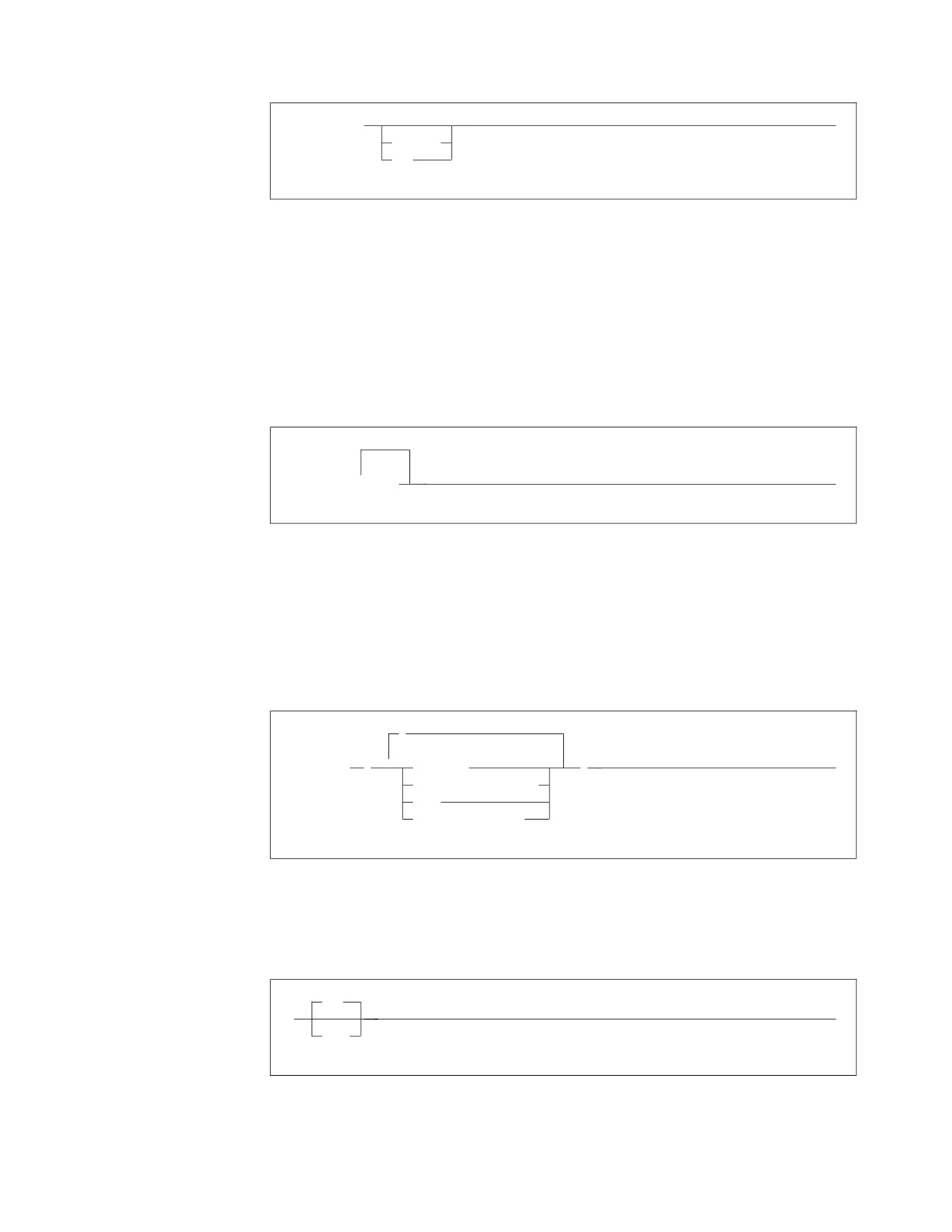
►► BACKWARD
►◄
integer
MAX
Here, the command could be:
BACKWARD
or
BACKWARD 2
or
BACKWARD MAX
v The repeat symbol indicates that an item can be repeated. For example:
▼
►► ERASE
name
►◄
This statement could appear as:
ERASE NAME1
or
ERASE NAME1 NAME2
A repeat symbol above a stack indicates that you can make more than one
choice from the stacked items, or repeat a choice. For example:
,
►► VALUES
(
▼
constant
)
►◄
host_variable_list
NULL
special_register
v If an item is above the main line, it represents a default, which means that it will
be used if no other item is specified. In the following example, the ASC keyword
appears above the line in a stack with DESC. If neither of these values is
specified, the command would be processed with option ASC.
ASC
►►
►◄
DESC
About This Manual xi
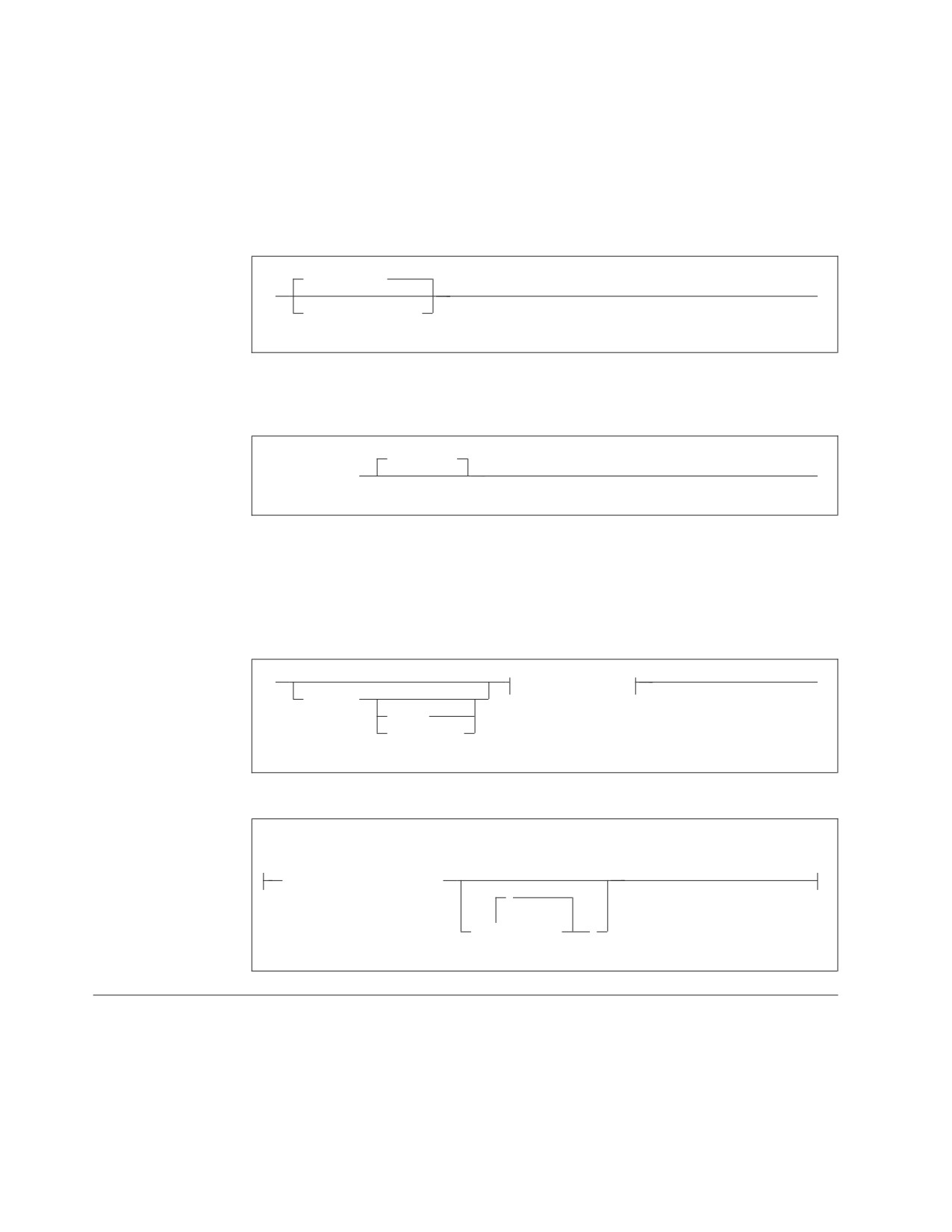
v When an optional keyword is followed on the same path by an optional default
parameter, the default parameter is assumed if the keyword is not entered.
However, if this keyword is entered, one of its associated optional parameters
must also be specified.
In the following example, if you enter the optional keyword PCTFREE =, you
also have to specify one of its associated optional parameters. If you do not
enter PCTFREE =, the database manager will set it to the default value of 10.
PCTFREE = 10
►►
►◄
PCTFREE = integer
v Words that are only used for readability and have no effect on the execution of
the statement are shown as a single uppercase default. For example:
PRIVILEGES
►► REVOKE ALL
►◄
Here, specifying either REVOKE ALL or REVOKE ALL PRIVILEGES means the
same thing.
v Sometimes a single parameter represents a fragment of syntax that is expanded
below. In the following example, fieldproc_block is such a fragment and it is
expanded following the syntax diagram containing it.
►►
fieldproc_block
►◄
NOT NULL
UNIQUE
PRIMARY KEY
fieldproc_block:
FIELDPROC program_name
,
▼
(
constant
)
SQL Reserved Words
The following words are reserved in the SQL language. They cannot be used in
SQL statements except for their defined meaning in the SQL syntax or as host
variables, preceded by a colon.
In particular, they cannot be used as names for tables, indexes, columns, views, or
dbspaces unless they are enclosed in double quotation marks (").
xii Application Programming
ACQUIRE
GRANT
RESOURCE
ADD
GRAPHIC
REVOKE
ALL
GROUP
ROLLBACK
ALTER
ROW
AND
HAVING
RUN
ANY
AS
IDENTIFIED
SCHEDULE
ASC
IN
SELECT
AVG
INDEX
SET
INSERT
SHARE
BETWEEN
INTO
SOME
BY
IS
STATISTICS
STORPOOL
CALL
LIKE
SUM
CHAR
LOCK
SYNONYM
CHARACTER
LONG
COLUMN
TABLE
COMMENT
MAX
TO
COMMIT
MIN
CONCAT
MODE
UNION
CONNECT
UNIQUE
COUNT
NAMED
UPDATE
CREATE
NHEADER
USER
CURRENT
NOT
NULL
VALUES
DBA
VIEW
DBSPACE
OF
DELETE
ON
WHERE
DESC
OPTION
WITH
DISTINCT
OR
WORK
DOUBLE
ORDER
DROP
PACKAGE
EXCLUSIVE
PAGE
EXECUTE
PAGES
EXISTS
PCTFREE
EXPLAIN
PCTINDEX
PRIVATE
FIELDPROC
PRIVILEGES
FOR
PROGRAM
FROM
PUBLIC
Conventions for Representing DBCS Characters
When MIXED data values are shown in examples then the following conventions
are used:
Convention Meaning
<
Represents the DBCS delimiter character X '0E'.
>
Represents the DBCS delimiter character X '0F'.
x
Represents an SBCS character (x can be any lowercase letter).
▌XX▐
Represents a DBCS character (▌XX▐ can be any double-byte
uppercase letter).
About This Manual xiii
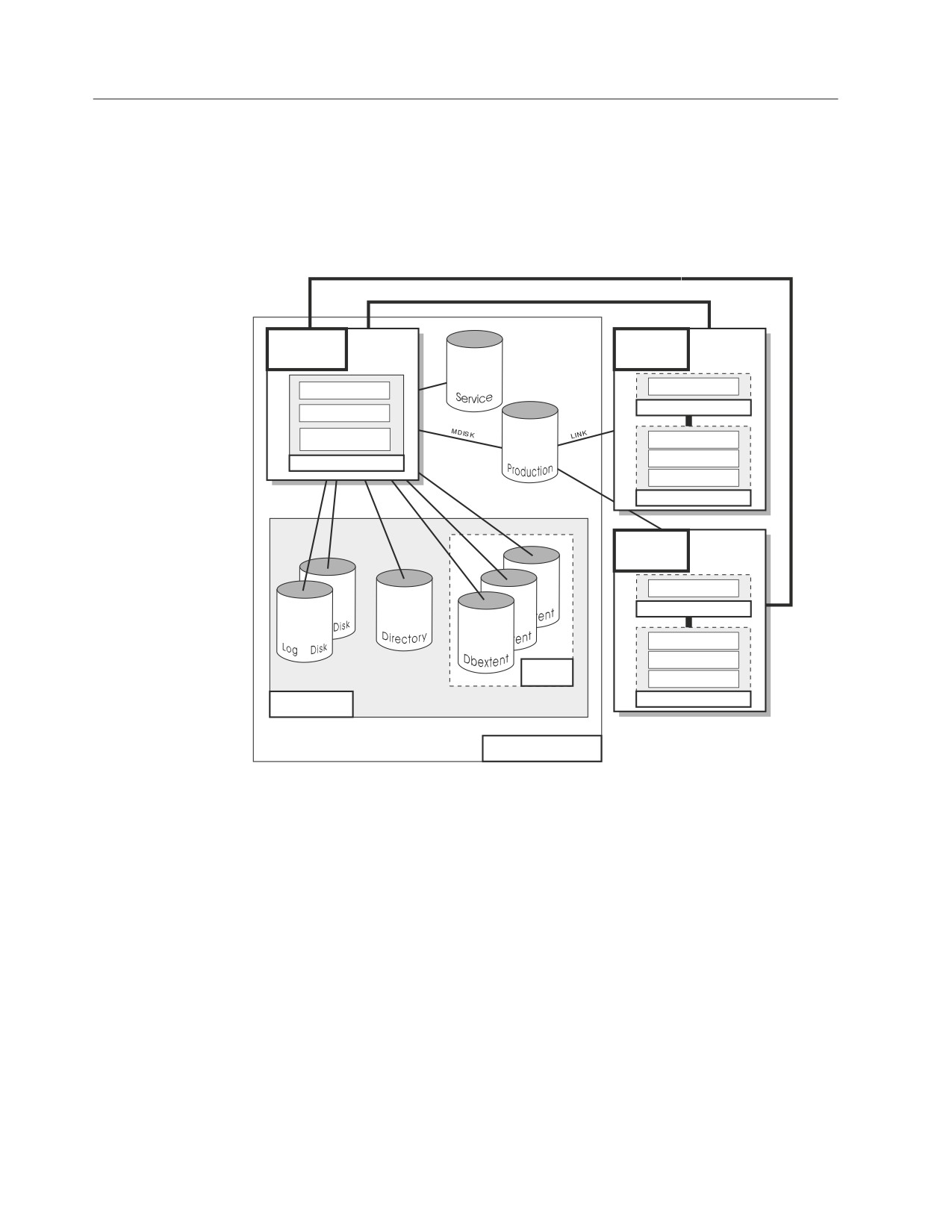
Components of the Relational Database Management System
Figure 1 depicts a typical configuration with one database and two users.
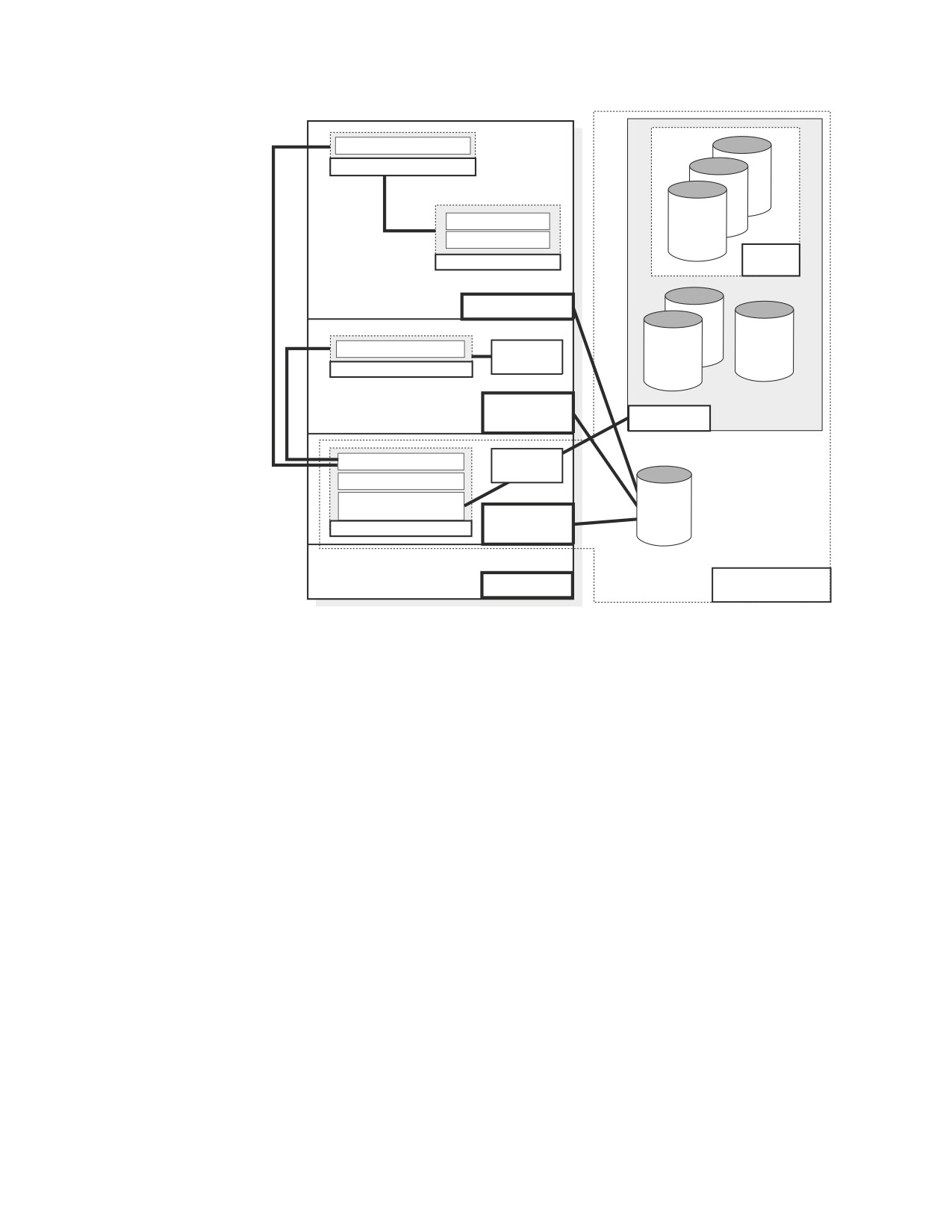
Figure 2 on page xv depicts a typical configuration with one database, one batch
partition user, and a CICS® partition with several interactive users.
Communication Link
(IUCV, APPC/VM or TCP/IP)
Database
User
Machine
Machine
Resource Adapter
Data System Control
Application Requester
Relational Data System
Database Storage
Interactive SQL
Subsystem
Preprocessors
Database Manager
DBS Utility
Applications
User
Machine
Resource Adapter
Application Requester
Interactive SQL
Preprocessors
Storage
Pool
DBS Utility
Applications
Database
Application Server
Figure 1. Basic Components of the RDBMS in VM/ESA
xiv Application Programming
Online Resource Adapter
Application Requester
ent
Interactive SQL
ent
CICS Application
Dbextent
Storage
Applications
Pool
CICS Partition
Batch Resource Adapter
Application
Program
Directory
Application Requester
Log
VSE Batch
Partition
Database
Data System Control
VSAM
Relational Data System
Database Storage
DB2
Subsystem
Database
for VSE
Database Manager
Partition
Library
VSE
Application Server
Figure 2. Basic Components of the RDBMS in VSE/ESA
The database is composed of :
v A collection of data contained in one or more storage pools, each of which in turn
is composed of one or more database extents (dbextents). A dbextent is a VM
minidisk or a VSE VSAM cluster.
v A directory that identifies data locations in the storage pools. There is only one
directory per database.
v A log that contains a record of operations performed on the database. A database
can have either one or two logs.
The database manager is the program that provides access to the data in the
database. In VM it is loaded into the database virtual machine from the production
disk. In VSE it is loaded into the database partition from the DB2 Server for VSE
library.
The application server is the facility that responds to requests for information from
and updates to the database. It is composed of the database and the database
manager.
The application requester is the facility that transforms a request from an
application into a form suitable for communication with an application server.
About This Manual xv
Summary of Changes
|
This is a summary of the technical changes to the DB2 Server for VSE & VM
|
database management system for this edition of the book. Several manuals are
|
affected by some or all of the changes discussed here. For your convenience, the
|
changes made in this edition are identified in the text by a vertical bar (|) in the
|
left margin. This edition may also include minor corrections and editorial changes
|
that are not identified.
This summary does not list incompatibilities between releases of the DB2 Server
for VSE & VM product; see either the DB2 Server for VSE & VM SQL Reference, DB2
Server for VM System Administration, or the DB2 Server for VSE System
Administration manuals for a discussion of incompatibilities.
Summary of Changes for DB2 Version 7 Release 5
Version 7 Release 5 of the DB2 Server for VSE & VM database management
system is intended to run on the Z/VM Version 5 Release 2 or later environment
and on the Z/VSE(®) Version 3 Release 1 or later environment.
|
Enhancements, New Functions, and New Capabilities
|
The following have been added to DB2 Version 7 Release 5:
|
Explain Option on DBSU REBIND PACKAGE Command
|
This new functionality allows the EXPLAIN(YES/NO) option on REBIND
|
PACKAGE command. If EXPLAIN(YES) is issued, then all four update tables
|
(structure, plan, cost, reference) will be updated. If EXPLAIN(NO) is issued, then
|
none of the four update tables will be updated.
|
For more information, see the following DB2 Server for VSE & VM documentation:
|
v DB2 Server for VSE & VM Database Services Utility
|
v DB2 Server for VSE & VM Performance Tuning Handbook
|
v DB2 Server for VSE & VM Quick Reference
|
v DB2 Server for VSE & VM SQL Reference
|
For Fetch only
|
This new functionality accepts the ″FOR FETCH ONLY″ clause after a cursor select
|
statement. It causes a cursor to become read-only (no UPDATEs or DELETEs are
|
permitted using this cursor). If a read-only cursor is referenced in an UPDATE or
|
DELETE statement, SQLCODE -510 will be issued and the statement is not
|
processed. In addition, under the SBLOCK preprocessor option, ″FOR FETCH
|
ONLY″ forces blocking to be used on the read-only cursor regardless of whether
|
there is a COMMIT. If there is no ″FOR FETCH ONLY″ clause, under SBLOCK,
|
blocking would only be done if a COMMIT was absent.
|
For more information, see the following DB2 Server for VSE & VM documentation:
|
v DB2 Server for VM Messages and Codes
|
v DB2 Server for VSE & VM Application Programming
|
v DB2 Server for VSE & VM Performance Tuning Handbook
|
v DB2 Server for VSE & VM Quick Reference
xvii
|
v DB2 Server for VSE & VM SQL Reference
|
Application Message Formatter
|
This functionality provides an Application Programming Interface (API) that
|
retrieves the descriptive text for an SQLCODE, given an SQLCA input parameter.
|
The API will be available for Assembly, COBOL, C, PL/I and FORTRAN.
|
In DB2 for VM and DB2 for VSE Online, the user may specify the language of the
|
returned text. The languages supported by DB2 for VSE/VM are American English
|
(AMENG), uppercase English (UCENG), German (GER), French (FRANC) and
|
Japanese (KANJI). VSE Batch does not support switching to another language.
|
Therefore the default will be used regardless of the user’s specification. The values
|
of SQLCODE, SQLSTATE, SQLERRD1 and SQLERRD2 will be automatically
|
appended to the returned text. The user may also specify to have the entire
|
SQLCA included. If the SQLCODE could not be found in the repository, the entire
|
SQLCA will be returned in the buffer.
|
If the SQLCA was set by another product (such as DB2 UBD), the descriptive text
|
is retrieved if the SQLCODE exists in the DB2 for VM/VSE repositories. However,
|
the token substitutions may not be correct.
|
For more information, see DB2 Server for VSE & VM Application Programming.
|
Convert buffer read/write to compiler macro
|
The DRDA code has over 100 small modules. Each call to an external module has a
|
certain amount of overhead associated with it. Certain modules are called very
|
frequently and this can add up to a significant amount of time. This functionality
|
improves the performance by converting few modules to macros or internal
|
procedures, to reduce this overhead.
|
Modify Build Tree Creation
|
This functionality modifies Build Tree creation used by DRDA parsing and
|
generation. It is built in such a way that every code point that is used to search
|
through the tree must be converted to a different format before the search can be
|
done. If modified build tree was created with the converted point, then the code
|
point would not have to be converted every time the tree must be searched. This
|
improves the performance of the DRDA code path length with the minimal search.
|
Split code point search routines
|
When parsing a data stream within each parser action routine, a binary search is
|
done to find the specific code point. Some action specific routines are quite large,
|
so the binary search can be long. Splitting and spreading the code point evenly
|
among other modules would reduce the overheads and improves the performance
|
of the DRDA code path length.
|
DRDA Multi-Row Insert
|
Multi Row insert is a means of caching homogenous insert statements and sending
|
them as a block to the server for processing. This reduces the overhead of sending
|
a large number of singular inserts and receiving as many responses.
|
Buffering of homogenous inserts eliminates the need to send an SQL statement to
|
the DB2 server every time an insert is made, thereby improving performance over
|
DRDA.
|
For more information, see the following DB2 Server for VSE & VM documentation:
|
v DB2 Server for VSE & VM Application Programming
xviii
Application Programming
|
v DB2 Server for VSE & VM Database Administration
|
v DB2 Server for VM System Administration
|
v DB2 Server for VSE & VM Performance Tuning Handbook
|
v DB2 Server for VSE & VM Quick Reference
|
v DB2 Server for VSE & VM SQL Reference
|
Connection Pooling for DRDA TCP/IP in Online Resource
|
Adapter
|
Connection pooling is a technique that allows multiple users to share a cached set
|
of pre-established connections that provide access to a database. Establishing a
|
connection between a user and a server takes a sizeable time. Users who have
|
validated their entry to a database once need not establish a connection every time
|
a request is submitted. Instead, they can use a pre-established connection from a
|
pool of such connections and get their results much faster.
|
From the user’s point of view, there is a considerable improvement in response
|
time after this line item is implemented.
|
For more information, see the following documentation on DB2 Server for VSE &
|
VM:
|
v DB2 Server for VSE System Administration
|
v DB2 Server for VSE & VM Application Programming
|
v DB2 Server for VSE & VM Operation
|
v DB2 Server for VSE & VM Performance Tuning Handbook
|
IBM DB2 Server for VSE, Client Edition
|
This feature allows the customer the flexibility to install and use only the client
|
(run-time support) component of DB2 Server for VSE without the requirement to
|
buy and install the server component during the installation process of DB2 server
|
for VSE product. The client-only installation enables customers to reduce the total
|
cost of ownership when they have their databases residing on a non-local platform
|
(like VM, z/OS, LUW) and have a large number of their DB2 applications on VSE
|
(like ISQL on CICS, DBSU on VSE, other online/batch applications on VSE).
|
For more information, see the following DB2 Server for VSE & VM documentation:
|
v DB2 Server for VSE System Administration
|
v DB2 Server for VSE Program Directory
|
IBM DB2 Server for VM, Client Edition
|
This feature allows the customer the flexibility to install and use only the client
|
(run-time support) component of DB2 Server for VM without the requirement to
|
buy and install the server component during the installation process of DB2 server
|
for VM product. The client-only installation enables our customers to reduce the
|
total cost of ownership when they have their databases residing on a non-local
|
platform (like VM, z/OS, LUW) and have a large number of their DB2 applications
|
on VM (like ISQL, DBSU, other user applications on VM).
|
For more information, see the following DB2 Server for VSE & VM documentation:
|
v DB2 Server for VM System Administration
|
v DB2 Server for VM Program Directory
Summary of Changes xix
|
Handling Commit Responses from DB2 UDB Stored Procedures
|
This feature will allow DB2 Resource Manager on VSE/VM to accept and process
|
results of a stored procedure running in a UDB server with a COMMIT statement
|
in the stored procedure.
|
Currently, DB2 for VM/VSE client does not handle responses from ’COMMIT’
|
statements coded in DB2 UDB stored procedures. Implementation of this feature
|
will enable handling responses of COMMIT statements in DB2 UDB stored
|
procedures and thus allow users to have COMMIT statements in their stored
|
procedures, while using DB2 for VM/VSE client.
|
COMMIT statements, however, are not allowed in stored procedures on the DB2
|
Server for VM/VSE.
|
For more information, see DB2 Server for VSE & VM Application Programming.
|
Make on-line programs AMODE 31 RMODE ANY
|
This feature converts DB2 server for VSE online program which presently operate
|
under 24 bit addressing mode from AMODE 24, to AMODE 31 RMODE ANY.
|
Presently, all the online programs are loaded below 16M line. Implementation of
|
this line item ensures that all the online program will be loaded above the 16M
|
line, which results in more virtual storage below the line, which can be utilized by
|
other applications.
|
For more information, see the following DB2 Server for VSE & VM documentation:
|
v DB2 Server for VSE System Administration
|
v DB2 Server for VSE Program Directory
|
Provide BIND File Support in VM and in VSE Batch Environments
|
This feature provides the facility of binding packages across servers. The process of
|
binding is achieved by dividing the program preparation method into two steps.
|
The first step does the precompilation of the embedded SQL programs with the
|
prep parameter ’BIND’. Invocation of VSE/VM preprocessor creates a ’bindfile’.
|
The bindfile can be bound against any DB2 server using VSE/VM binder. During
|
this process, the access path is generated, SQL statements are verified,
|
authorization checks are performed, and package on the target server is created.
|
This line item eliminates the need of re-prepping the source code or porting of
|
packages across DB2 servers.
|
For more information, see the following DB2 Server for VSE & VM documentation:
|
v DB2 REXX SQL for VM/ESA Installation and Reference
|
v DB2 Server for VM Messages and Codes
|
v DB2 Server for VSE & VM Application Programming
|
v DB2 Server for VSE & VM Database Administration
|
v DB2 Server for VM Program Directory
|
v DB2 Server for VSE Program Directory
|
Convert TCP/IP LE/C interface to EZASMI API
|
The feature of converting TCP/IP LE/C interface to EZASMI API intends to
|
replace the current LE/C interface and implement the EZA Assembler Interface
|
(EZASMI)to enhance performance in DB2 Client/Server for VSE over DRDA.
|
Currently, either LE/C interface or CSI Assembler Interface is used for TCP/IP
|
functions. The EZASMI interface makes the code all Assembler.
xx Application Programming
|
For more information, see DB2 Server for VSE Program Directory
Summary of Changes xxi
Chapter 1. Getting Started
What is the DB2 Server for VSE & VM Product? . . 2
Using DB2 Server RXSQL (DB2 Server for VM
What is SQL?
3
Only)
4
Embedding SQL Statements in Host Language
Writing a Program
4
Programs
4
1

What is the DB2 Server for VSE & VM Product?
The DB2 Server for VSE & VM product is a database management system that uses
the relational data model. You can think of a relational data model as a collection
of ordinary two-dimensional tables, where each table has a specific number of
columns, unordered rows, and a specific item of data at the intersection of every
column and row. You access data by performing operations on tables. All you need
to know are the names of tables and of the columns that contain the desired data.
The sample tables in Appendix G of the DB2 Server for VSE & VM SQL Reference
manual are used in examples throughout this manual. In Table 1, the
DEPARTMENT table has columns DEPTNO, DEPTNAME, MGRNO, and
ADMRDEPT.
Table 1. DEPARTMENT Table Contents
DEPTNO
DEPTNAME
MGRNO
ADMRDEPT
A00
SPIFFY COMPUTER SERVICE
000010
A00
DIV.
B01
PLANNING
000020
A00
C01
INFORMATION CENTER
000030
A00
D01
DEVELOPMENT CENTER
?
A00
D11
MANUFACTURING SYSTEMS
000060
D01
D21
ADMINISTRATION SYSTEMS
000070
D01
E01
SUPPORT SERVICES
000050
A00
E11
OPERATIONS
000090
E01
E21
SOFTWARE SUPPORT
000100
E01
Suppose, for example, you want a list of all the different departments
(DEPTNAME) in your company. You could get this information simply by
knowing the name of the table DEPARTMENT and of the column DEPTNAME
that the data is in, and coding this in an appropriate SQL statement.
2
Application Programming
DB2 Server for VSE
You can use the database management system under any supported Virtual
Storage Extended (VSE) operating system. Application programs running
under VSE can be:
v Online programs operating in CICS partitions, controlled by the Customer
Information Control System/Virtual Storage Extended (CICS/VSE) or the
Customer Information Control system/Transaction Server (CICS/TS)
v Batch programs operating in interactive partitions controlled by the IBM
Interactive Communications and Control Facility (ICCF).
v Pure batch programs.
Under the VSE operating system, you can write batch or online programs to
access one or more DB2 Server for VSE application servers, or application
servers using VSE Guest Sharing. In addition, you can write batch or online
programs to access one or more DB2 family application servers using DRDA
Remote Unit of Work (RUOW). The application server is the facility that
receives and processes requests to access data.
Access to multiple application servers is not available for CICS application
programs; however, CICS programs running in different CICS partitions can
access different application servers.
DB2 Server for VM
You can use the DB2 Server for VM database management system under any
supported Virtual Machine (VM) operating system. Application programs
running under VM can be:
v Online programs that operate in virtual machines and are controlled by the
conversational monitor system (CMS).
v Noninteractive programs that operate in virtual machines in VM.
You can also write distributed applications that can access multiple
application servers, as well as application servers other than DB2 Server for
VSE & VM such as DB2 for MVS. The DB2 Server for VM application server
is the facility that receives and processes requests to access data.
For a discussion of terms and concepts, such as application server, that are
used throughout this manual, refer to the DB2 Server for VSE & VM Overview,
the DB2 Server for VSE & VM SQL Reference, and the DRDA: Every Manager's
Guide manuals.
What is SQL?
DB2 Server for VSE & VM data is handled by the Structured Query Language
(SQL), which contains statements that retrieve, delete, insert, and update tables in a
DB2 Server for VSE & VM database. You can embed these statements in
application programs written in any of the following host languages: assembler
language, C, COBOL, Fortran, PL/I, or REXX (for DB2 Server for VM).
Chapter 1. Getting Started
3
These SQL statements do all data handling, thereby decreasing the data handling
done by the programs themselves. Programs that access DB2 Server for VSE & VM
data can also access data from other sources, such DL/I databases (for VSE) and
CMS files (for VM).
Embedding SQL Statements in Host Language Programs
Programs that use the DB2 Server for VSE & VM database management system are
host programs because they act as hosts for SQL. How you embed SQL statements
varies for each of the supported host languages.
The core of SQL is the same for each host language. For this reason, the SQL
statements are presented throughout this book in basic form unless otherwise noted:
that is, without any of the language-dependent delimiters.
In this book, examples that have combinations of SQL statements and host
language statements are shown in a language-independent form called pseudocode.
Pseudocode shows program logic but must be recoded in a specific programming
language before it can be used. When SQL statements are shown in pseudocode
examples, they are preceded by the words EXEC SQL to help you distinguish them
from the pseudocode. When shown by themselves, they are not preceded by these
words.
To use SQL statements in a programming language, you must be familiar with the
rules for embedding them in that language. These rules are discussed in Appendix
section of this manual (one for each language).
You should browse through the appropriate appendix before you continue reading,
and refer to it as needed when you are ready to code your first DB2 Server for
VSE & VM application. You can also refer to Chapter 6 of the DB2 Server for VSE &
VM SQL Reference manual for information on SQL statements.
Using DB2 Server RXSQL (DB2 Server for VM Only)
The REXX Interface Installation (DB2 Server RXSQL) extends the support of the
database manager to include REXX as a host language. SQL statements are
supported in DB2 Server RXSQL by DB2 Server RXSQL requests that are imbedded
in REXX programs. Because REXX is an interpretive language, DB2 Server RXSQL
requests do not need to be preprocessed or compiled before they are run. You can
compile REXX programs, but this has no effect on the DB2 Server RXSQL requests.
You can use DB2 Server RXSQL to:
v Make prototypes and test application programs
v Write application programs for production environment
v Write interpretive as well as compiled code.
For a discussion of application programming using REXX, refer to the DB2 REXX
SQL for VM/ESA Installation and Reference manual.
Writing a Program
Writing a program that accesses DB2 Server for VSE & VM data consists of the
following steps: Designing the program entails determining what tasks the
program must perform, and then creating a plan for the program to perform these
tasks. The structure of the program should be based on its three main parts:
prolog, body, and epilog. Coding the program entails using SQL statements and
tools to manipulate DB2 Server for VSE & VM data. The operations on the data
4
Application Programming
must conform to the design of the program. Preparing the program for execution
entails preprocessing, compiling, link-editing, and loading it. Testing and
debugging the program entails:
v Executing the program using test data
v Checking the results
v Identifying errors created in the previous steps
v Correcting the errors.
Releasing the program entails putting it into production (that is, making it
available to its intended users). In this step, you control who will be allowed to
run the program and to work with the data that it accesses.
Chapter 1. Getting Started
5
Chapter 2. Designing a Program
Defining the Main Parts of a Program
8
Creating the Epilog
15
Creating the Prolog
8
Ending the Program
15
Declaring Variables That Interact with the
Using Logical Units of Work
18
Database Manager
8
Defining the Logical Unit of Work
18
Handling Errors with the SQL
Beginning a Logical Unit of Work
18
Communications Area
11
Considering the CICS/VSE Logical Unit of Work
Using Additional Nonexecutable Statements
12
(DB2 Server for VSE Only)
18
Creating the Body
12
Ending a Logical Unit of Work
19
Connecting to the Application Server
12
Using the COMMIT Statement
19
Defining Objects
14
Using the ROLLBACK Statement
19
Manipulating Objects
14
Summary
20
Controlling Application Server Resources . . 14
Using Host-Dependent Sample Applications . . . 21
Granting Authorities and Privileges
14
7
Defining the Main Parts of a Program
A DB2 Server for VSE & VM application program contains three main parts: the
prolog, the body, and the epilog. Certain SQL statements must appear at the
beginning and end of the program to handle the transition from the host language
to the embedded SQL statements.
The prolog is at the beginning of every program and must contain:
v SQL statements that provide for error handling by setting up the SQL
communications area or by declaring an SQLCODE variable.
v Declarations of all variables that the database manager uses to interact with the
host program.
The body contains the SQL statements that will enable you to access and manage
data. Among the statements included in this section are:
v The CONNECT statement, which establishes a connection to an application
server
v Data manipulation statements (for example, the select-statement)
v Data definition statements (for example, the CREATE statement)
v Data control statements (for example, the GRANT statement).
The epilog is at the end of the application program, and contains SQL statements
that:
v Save (commit) or do not use (rollback) changes made to data.
v Release the program’s connection to the application server.
Creating the Prolog
Declaring Variables That Interact with the Database Manager
All host program variables that interact with the database manager must be
declared in an SQL declare section. A program may contain multiple SQL declare
sections. An SQL declare section is a group of host program variable declarations
that are preceded by the SQL statement BEGIN DECLARE SECTION and followed by
the SQL statement END DECLARE SECTION. Host program variables declared in an
SQL declare section are host variables and can be used in host-variable references
in SQL statements.
The attributes of each host variable depend on how the variable is used in the SQL
statement. For example, variables that receive data from or store data in DB2
Server for VSE & VM tables must have data type and length attributes compatible
with the column being accessed. To determine the data type for each variable, you
must be familiar with DB2 Server for VSE & VM data types, shown in Table 6 on
page 44. Each column of every table is assigned a data type when the table is
created.
Relating Host Variables to an SQL Statement: Host variables can be used to
receive data from the database manager or to transfer data from the host program
to the database manager. Host variables that receive data from the database
manager are output host variables. Host variables that transfer data from the host
program to the database manager are input host variables.
Consider the following SELECT INTO statement:
8
Application Programming
SELECT HIREDATE, EDLEVEL
INTO :HDATE, :LVL
FROM EMPLOYEE
WHERE EMPNO = :IDNO
It contains two output host variables, HDATE and LVL, and one input host
variable, IDNO. The database manager uses the data stored in the host variable
IDNO to determine the EMPNO of the row that is retrieved from the EMPLOYEE
table If a row that meets the search criteria is found, HDATE and LVL receive the
data stored in the columns HIREDATE and EDLEVEL respectively. This statement
illustrates an interaction between the host program and the database manager
using columns of the EMPLOYEE table.
Each column of a table is assigned a data type and each data type can be related to
a host language data type. For example, the INTEGER data type is a 31-bit binary
integer. This is equivalent to the following data description entries in each of the
host languages, respectively:
COBOL:
01
variable-name PICTURE S9(9) COMPUTATIONAL.
Assembler:
variable-name DS
F
C:
long variable-name;
Fortran
INTEGER variable-name
PL/I:
DCL variable-name BINARY FIXED(31);
All the host language equivalents for a particular DB2 Server for VSE & VM data
type are listed at the end of each host language appendix.
After you determine which column a host variable interacts with, you need to find
out what DB2 Server for VSE & VM data type that column has. Do this by
querying the DB2 Server for VSE & VM catalog, which is a set of tables containing
information about all tables created in the database. This catalog is described in the
DB2 Server for VSE & VM SQL Reference manual.
After you have determined the data types, you can refer to the conversion charts at
the end of the host language appendixes, and code the appropriate declarations.
Table 2 shows the declarations in each host language.
Chapter 2. Designing a Program
9
Table 2. Examples of Declarations and Embedded SQL Statements
Assembler
Col. 1
Col. 16
Col.
72
|
|
|
EXEC SQL BEGIN DECLARE SECTION
HDATE DS CL10
LVL
DS H
IDNO
DS CL6
EXEC SQL END DECLARE SECTION
EXEC SQL INCLUDE SQLCA
EXEC SQL WHENEVER SQLERROR GOTO ERRCHK
EXEC SQL SELECT HIREDATE, EDLEVEL
INTO :HDATE, :LVL
FROM EMPLOYEE
WHERE EMPNO = :IDNO
ERRCHK
C
EXEC SQL BEGIN DECLARE SECTION;
char HDATE[11];
short LVL;
char IDNO[7];
EXEC SQL END DECLARE SECTION;
EXEC SQL INCLUDE SQLCA;
EXEC SQL WHENEVER SQLERROR GOTO ERRCHK;
EXEC SQL SELECT HIREDATE, EDLEVEL
INTO :HDATE, :LVL
FROM EMPLOYEE
WHERE EMPNO = :IDNO;
ERRCHK: errout();
COBOL
Cols. 8
12
|
|
DATA DIVISION.
FILE SECTION.
WORKING-STORAGE SECTION.
EXEC SQL BEGIN DECLARE SECTION END-EXEC.
01
HDATE
PICTURE X(10).
01
LVL
PICTURE S9(4) COMPUTATIONAL.
01
IDNO
PICTURE X(6).
EXEC SQL END DECLARE SECTION END-EXEC.
EXEC SQL INCLUDE SQLCA END-EXEC.
PROCEDURE DIVISION.
EXEC SQL WHENEVER SQLERROR GOTO ERRCHK END-EXEC.
EXEC SQL SELECT HIREDATE, EDLEVEL
INTO :HDATE, :LVL
FROM EMPLOYEE
WHERE EMPNO = :IDNO END-EXEC.
ERRCHK.
10
Application Programming

Table 2. Examples of Declarations and Embedded SQL Statements (continued)
Fortran
Col. 7
|
EXEC SQL BEGIN DECLARE SECTION
CHARACTER*10
HDATE
INTEGER*2
LVL
CHARACTER*6
IDNO
EXEC SQL END DECLARE SECTION
EXEC SQL INCLUDE SQLCA
EXEC SQL WHENEVER SQLERROR GOTO 4000
EXEC SQL SELECT HIREDATE, EDLEVEL
INTO :HDATE, :LVL
FROM EMPLOYEE
WHERE EMPNO = :IDNO
4000 CONTINUE
PL/I
Col. 2
|
EXEC SQL BEGIN DECLARE SECTION;
DCL HDATE CHARACTER(10);
DCL LVL BINARY FIXED(15);
DCL IDNO CHARACTER(6);
EXEC SQL END DECLARE SECTION;
EXEC SQL INCLUDE SQLCA;
EXEC SQL WHENEVER SQLERROR GOTO ERRCHK;
EXEC SQL SELECT HIREDATE, EDLEVEL
INTO :HDATE, :LVL
FROM EMPLOYEE
WHERE EMPNO = :IDNO;
ERRCHK:
Table 2
also shows the BEGIN and END DECLARE SECTION statements for DB2
Server for VSE. Observe how the delimiters for SQL statements differ for each
language. For the exact rules of placement, continuation, and delimiting of these
statements, see the appendixes of this book.
Handling Errors with the SQL Communications Area
The SQL Communications Area (SQLCA) is discussed in detail in “Using the
Automatic Error-Handling Facilities” on page 197. This section presents an
overview. To declare the SQLCA, code this statement in your program:
INCLUDE SQLCA
When you preprocess your program, the database manager inserts host language
variable declarations in place of the INCLUDE SQLCA statement. The system
communicates with your program using the variables for warning flags, error
codes, and diagnostic information.
The system returns a return code in SQLCODE after executing each SQL statement.
The SQLCODE is an integer value that summarizes the execution of the statement.
Refer to the DB2 Server for VSE & VM SQL Reference manual for a detailed
description of the SQLCODE field. Refer to the DB2 Server for VM Messages and
Codes or the DB2 Server for VSE Messages and Codes manuals for information about
specific SQLCODEs.
Chapter 2. Designing a Program
11
A return code is also returned in SQLSTATE after each SQL statement is executed.
SQLSTATE is a character field that provides common error codes across IBM’s
relational database products. SQLSTATE values comply with the SQL92 standard.
For a discussion of SQLSTATE, refer to the DB2 Server for VSE & VM SQL Reference
manual. For more information about specific SQLSTATEs, refer to the DB2 Server
for VM Messages and Codes or the DB2 Server for VSE Messages and Codes manuals.
When a statement is executed successfully, SQLCODE is set to 0 (SQLSTATE is
'00000'). A negative SQLCODE indicates an error condition. Positive SQLCODES
indicate that a statement has executed successfully but a warning code may be
issued which means that you must verify whether the SQL statement was executed
without unexpected results.
The system supports the use of a stand-alone SQLCODE. If you request this
support, do not include the SQLCA definition in your program. However, you
must provide the integer variable SQLCODE (SQLCOD in Fortran). For a detailed
discussion, see “Using the Automatic Error-Handling Facilities” on page 197.
If you want the system to control error checking after each SQL statement, use the
WHENEVER statement. The following WHENEVER statement indicates to the
system what to do when it encounters a negative SQLCODE:
WHENEVER SQLERROR GO TO errchk
That is, whenever an SQL error (SQLERROR) occurs, program control is
transferred to code that follows a specific label, such as ERRCHK. This code
should include logic to analyze the error indicators in the SQLCA. Depending
upon the ERRCHK definition, action may be taken to execute the next sequential
program instruction, to perform some special functions, or, as in most situations, to
roll back the current logical unit of work (LUW) and terminate the program. See
“Using Logical Units of Work” on page 18 for more information on LUWs.
Using Additional Nonexecutable Statements
Generally, other nonexecutable SQL statements are also part of the prolog. These are
discussed later in this manual, and in the DB2 Server for VSE & VM SQL Reference
manual. Examples of other nonexecutable statements are:
v INCLUDE text_file_name
v INCLUDE SQLDA
Creating the Body
Connecting to the Application Server
Your program must establish a connection to the application server before it can
run any executable SQL statements. This connection identifies the authorization ID
of the user who is running the program, and the name of the application server on
which the program will be run.
12
Application Programming
DB2 Server for VM
The program can establish the connection in two ways:
v Issue the CONNECT statement to explicitly request the connection.
You can then specify the authorization ID and the name of the target
application server. See the DB2 Server for VSE & VM SQL Reference manual
for a detailed discussion of the CONNECT statement. Not all forms of the
CONNECT statement are available when you are using DRDA protocol.
v Allow the application requester to connect implicitly, using the VM logon
ID established by the SQLINIT command.
DB2 Server for VSE
VSE non-interactive (batch) and ICCF application programs must establish the
connection by explicitly issuing the CONNECT statement. You can enter the
authorization ID and the name of the target application server. See the DB2
Server for VSE & VM SQL Reference manual for a detailed discussion of the
CONNECT statement.
The CONNECT statement must be the first SQL statement executed in the
batch application. If you release the connection in any logical unit of work
other than the last one, issue a new CONNECT statement to reestablish the
connection. If the first SQL statement is a CONNECT statement without the
TO clause, the default application server is connected. For more information
about the defaults that determine which application server is accessed, refer
to the DB2 Server for VSE System Administration manual. CICS online
applications can establish the connection in two ways:
v Issue the CONNECT statement to explicitly request the connection. You can
then specify the authorization ID and the name of the target application
server. See the DB2 Server for VSE & VM SQL Reference manual for a
detailed discussion of the CONNECT statement.
v Allow the application to connect implicitly, allowing the user ID and
password checking to be performed by the interactive system.
Unless the TO parameter is specified by a CICS application on a CONNECT
statement, the CICS application will first establish connections to the default
application server. On subsequent CONNECTs performed by that application,
if the TO parameter is not specified then the connection to the previously
connected server will be maintained. For more information about the defaults
that determine which application server is accessed, refer to the DB2 Server for
VSE System Administration manual.
The authorization ID established by the connection must have been granted both
the privilege to execute the program’s package and CONNECT authority for the
target application server. For DB2 Server for VM, the package has authority to
perform the actions specified in the statements in the program if the owner of the
package has the authority. For DB2 Server for VSE, the package has the authority
to access database resources specified in the SQL statements in the program if the
owner of the package has the authority.
Chapter 2. Designing a Program
13
DB2 Server for VSE
After the connection has been established, your program can issue SQL
statements that manipulate data, define and maintain database objects, and
begin control operations, such as, granting user authority, and committing
changes to the database. See the DB2 Server for VSE & VM SQL Reference
manual for a more detailed discussion of the CONNECT statement.
Defining Objects
The following are some of the statements that you can use to create and drop
database objects such as tables, indexes, and synonyms. (These statements are
discussed in Chapter 9, “Maintaining Objects Used by a Program,” on page 255.)
v CREATE TABLE
v DROP TABLE
v ALTER TABLE
v CREATE INDEX
v DROP INDEX
v CREATE VIEW
v DROP VIEW
v CREATE SYNONYM
v DROP SYNONYM
v CREATE PROCEDURE
v ALTER PROCEDURE
v DROP PROCEDURE
v CREATE PSERVER
v ALTER PSERVER
v DROP PSERVER
Manipulating Objects
The following are some of the statements that you can use to manipulate database
objects:
v SELECT
v INSERT
v UPDATE
v DELETE
These statements are discussed in detail in Chapter 3, “Coding the Body of a
Program,” on page 23.
Note: Refer to the DB2 Server for VSE & VM SQL Reference manual for a
description of select-statements.
Controlling Application Server Resources
The following are some of the statements that you can use to manage logical units
of work, dbspaces, and locks:
v CONNECT
v ACQUIRE DBSPACE
v DROP DBSPACE
v ALTER DBSPACE
v UPDATE STATISTICS
Granting Authorities and Privileges
There are two statements to use to assign and withdraw privileges on objects or
authorities to user IDs:
v GRANT
14
Application Programming
v REVOKE
They are discussed in detail in Chapter 10, “Assigning Authority and Privileges,”
on page 269.
Creating the Epilog
Ending the Program
The application epilog is the logical end of your DB2 Server for VSE & VM
application program. To properly end your program:
1. End the current logical unit of work (if one is in progress) by explicitly issuing
either a COMMIT statement if you want the changes to be committed (saved in
the database), or a ROLLBACK statement if you do not want them to be saved.
2. Release your connection to the application server.
DB2 Server for VSE
The two tasks are accomplished differently for VSE batch or ICCF
applications, and for CICS transactions.
Chapter 2. Designing a Program
15
DB2 Server for VM
Although an implicit COMMIT or ROLLBACK statement is automatic for any
application that accesses an application server, you should still issue an
explicit COMMIT or ROLLBACK statement. For DB2 Server for VM
application programs that are not executed through an EXEC, implicit
COMMIT or ROLLBACK processing occurs when the application program is
completed. For those that are executed through an EXEC, this processing does
not occur until the EXEC is completed. To sever the connection and cause the
COMMIT or ROLLBACK to take effect from an EXEC, the SQLRMEND EXEC
must be invoked. See “Invoking Applications in CMS SUBSET” on page 288
for limitations on the use of SQLRMEND, and the DB2 Server for VSE & VM
Database Administration manual for more information on this EXEC.
When an implicit COMMIT or ROLLBACK is invoked, the logical unit of
work will be committed if the termination was normal, or rolled back if the
termination was abnormal. An application is terminated normally when it
returns to CMS or, in single virtual machine mode, to the DB2 Server for VM
calling routine. Any other kind of termination, such as HX, CMS abend,
program check, or any user machine termination, is abnormal.
In the VM environment, user-written interactive SQL applications are
provided with an inherent facility to cancel an SQL statement without
terminating the running application. This cancellation facility is invoked with
the SQLHX immediate command established by the DB2 application
requester. The only special processing ability required of the application is
that it be sensitive to the -914 SQLCODE (SQLSTATE '57014'). If the user ID
and password were established with an explicit SQL CONNECT, you must
reissue the CONNECT statement. If you do not, the user ID password and
application server revert to the value established by the implicit CONNECT.
The application can modify the basic cancel facility by defining additional
names for the DB2 Server for VM-defined SQLHX command or by requesting
the system to remove the SQLHX command and the exit it invokes. Use the
ARIRCAN macro to do these modifications. For more details on the
ARIRCAN macro interface (RMXC) and the SQLHX command, see the DB2
Server for VM System Administration manual.
For more information on CMS, consult the VM/ESA: CMS Command Reference
or the VM/ESA: CMS User’s Guide manuals.
Ending the Program for VSE Batch or ICCF Applications (DB2 Server for VSE
Only): You can enter either
COMMIT RELEASE
to end the current logical unit of work and commit the changes to the database, or
ROLLBACK RELEASE
to end the current logical unit of work and restore the changes made to the
database. The RELEASE keyword is optional; it releases your connection to the
application server. You should always explicitly end your logical unit of work;
however, you should release the connection only when ending the last logical unit
of work (if your program has more than one) or when changing your authorization
ID or the connected application server. If you release the connection in any logical
16
Application Programming
unit of work other than the last logical unit of work, enter a new CONNECT
statement to reestablish the connection. You should not release and reestablish the
connection unnecessarily because this may degrade the performance of your
program. Begin subsequent logical units of work with an explicit CONNECT
statement if the previous logical unit of work was terminated using the RELEASE
option.
If you do not code a RELEASE as described above, the system issues one implicitly
for you upon task/program termination. Not coding the RELEASE when ending
the last logical unit of work is inefficient, however; DB2 Server for VSE resources
are held until the application terminates even though you may not be using them.
Note: If you forget to end your logical unit of work, the system interrogates a VSE
flag to determine whether the program connection (to the application server)
terminated normally or abnormally. If the program terminated normally, the
system issues a COMMIT statement on behalf of the program. If the
program terminated abnormally, the system issues a ROLLBACK statement.
Once again, to avoid confusion, always explicitly end your logical units of work.
Ending the Program for CICS/VSE Transactions (DB2 Server for VSE Only):
You can enter
COMMIT
to end the current logical unit of work and commit the changes to the database, or
ROLLBACK
to end the current logical unit of work and restore the changes made to the
database. You do not have to explicitly release your connection to the application
server (although you can, if you wish). DB2 Server for VSE online support
automatically releases the connection for use by other CICS/VSE transactions
when the current logical unit of work is committed or rolled back.
If your transaction contains more than one logical unit of work, however, it is not
necessary to re-CONNECT to the application server every time you want to start a
logical unit of work. When the connection to the database manager is implicitly
dropped, DB2 Server for VSE online support remembers the user ID, password,
and server-name established in the transaction’s original CONNECT. The next time
a logical unit of work is begun in that same transaction, online support implicitly
issues a CONNECT for you. The re-connection is transparent to the transaction.
You do not have to explicitly issue a COMMIT if that is how you want to end the
logical unit of work. A normal transaction termination causes a COMMIT
statement to be issued on behalf of the transaction.
A CICS/VSE syncpoint or syncpoint rollback also causes the system to issue a
COMMIT or ROLLBACK on behalf of the transaction. Conversely, a DB2 Server for
VSE COMMIT or ROLLBACK statement causes a CICS/VSE syncpoint to be taken.
If your application is using multiple resources, however, you should issue the
SYNCPOINT statement or SYNCPOINT ROLLBACK statement instead of the DB2
Server for VSE COMMIT statement or ROLLBACK statement. Internally,
SYNCPOINT statements are always more efficient than the corresponding SQL
statements.
Under the CICS/VSE system, an interactive transaction can establish a user exit
that will get control at points where an SQL program might be canceled. Control is
Chapter 2. Designing a Program
17
transferred when the online resource manager is about to wait either for an SQL
statement to complete3 or for a cross partition link to become available. The user
exit can be used to cause the current SQL statement to be canceled. The cancel will
cause a -914 SQLCODE (SQLSTATE '57014') to be returned to the transaction and a
ROLLBACK to be performed on the logical unit of work. A macro (ARIRCAN) is
available to establish the user exit. (The ARIRCAN macro can also be used to set
user data for the CIRD transaction.) For more details on the ARIRCAN macro
interface and the coding of the exit, see CANCEL Exit in the DB2 Server for VSE &
VM Diagnosis Guide and Reference manual.
Using Logical Units of Work
Defining the Logical Unit of Work
A logical unit of work (LUW) is a sequence of SQL statements (possibly with
intervening host language code) that the database manager treats as a whole.
The system ensures the consistency of data at the LUW level, by ensuring that
either all operations within an LUW are completed, or none are completed.
Suppose, for example, that money is to be deducted from one account and added
to another. If both these updates are placed in a single LUW, and if a system
failure occurs while they are in progress, then when the system is restarted, the
data is automatically restored to the state it was in before the LUW began. If a
program error occurs, all changes made by the statement in error are restored.
Work done in the LUW prior to execution of the statement in error is not undone,
unless you specifically roll it back. To determine whether the LUW terminated
automatically, you should check the value of SQLWARN6 in the SQLCA. See
“Using the Automatic Error-Handling Facilities” on page 197 for more information.
Beginning a Logical Unit of Work
An LUW is begun implicitly with the first executable SQL statement and is ended
by either a COMMIT or a ROLLBACK statement, or when the program ends.
The following are examples of statements that do not start a logical unit of work:
BEGIN DECLARE SECTION
INCLUDE SQLCA
END DECLARE SECTION
INCLUDE SQLDA
WHENEVER
An executable SQL statement always occurs within an LUW. If such a statement is
encountered after you end an LUW, it automatically starts another.
Considering the CICS/VSE Logical Unit of Work (DB2 Server
for VSE Only)
For logical unit of work processing to function as described in this manual, ALL
CICS/VSE INSTALLATIONS MUST DO THE FOLLOWING:
1. The CICS System Initialization Table (DFHSIT) must be generated with
DBP=YES.
If this is not done, the CICS/VSE system attempts to commit all changes,
regardless of whether a rollback was intended. (Alternatively, DBP=xx can be
specified if a suffixed version of the CICS/VSE Dynamic Backout Program is
being used.)
3. This exit is not available when a transaction is using the DRDA protocol to access remote application servers.
18
Application Programming
2. In addition, each online application that has access to the application server
must have Dynamic Transaction Backout set to YES. You can do this by
specifying DTB=YES in the resource definition online (RDO) facility (or
DFHCSDUP).
Your installation can specify DTB=YES on the initial DFHCSDUP statement, or
DTB=YES on each entry DFHCSDUP statement for applications having access
to the database manager.
Note: DTB=NO is not supported in RDO. All transactions defined in the macro
with DTB=NO are handled in RDO as if DTB=YES had been specified.
For more information, see the CICS/VSE Resource Definition (Online)
manual.
For more information, refer to the CICS/VSE System Programming Reference or the
CICS Transaction Server for VSE/ESA V1R1.0 Resource Definition Guide manuals.
Ending a Logical Unit of Work
When you end an LUW, you can use either the COMMIT statement to save its
changes, or the ROLLBACK statement to ensure that these changes are not saved.
Using the COMMIT Statement
This statement ends the current LUW, and commits any changes made during it.
Changes should be committed as soon as application requirements permit. In
particular, programs should be written so that uncommitted changes are not held
over a terminal read request, which can result in locks and other resources being
held for a long time.
Each application program must explicitly end its LUW before terminating. If you
do not end it explicitly, the system automatically commits (upon successful
termination of the program) all changes made by the program during its pending
LUW unless one of the following conditions occurs:
v A log full condition is encountered.
v Some other system condition occurs that causes database manager processing to
end.
v Control is not returned to CMS (DB2 Server for VM only). For a discussion of
this subject, see the section on the SQLRMEND EXEC in the DB2 Server for VSE
& VM Database Administration manual.
See “Creating the Epilog” on page 15 and “Using the Automatic Error-Handling
Facilities” on page 197 for more information about program termination.
Note: The COMMIT statement has no effect on the contents of host variables.
Using the ROLLBACK Statement
This statement ends the current LUW, and restores the data to the state it was in
prior to the LUW beginning.
Note: The ROLLBACK statement has no effect on the contents of host variables.
Under some circumstances, the system automatically backs out of an LUW. Refer
to “Automatically Locking Dbspaces” on page 260 for more information.
Chapter 2. Designing a Program
19
Note: If you use a ROLLBACK statement in a routine that was entered because of
an error or warning and you use the SQL WHENEVER statement, specify
WHENEVER SQLERROR CONTINUE and WHENEVER SQLWARNING
CONTINUE before the ROLLBACK. This avoids a program loop if the
ROLLBACK fails with an error or warning.
The ROLLBACK statement should not be issued if a severe error occurs (indicated
by an S in the SQLWARN0 field of the SQLCA). The only statement that can be
issued after a severe error is a CONNECT statement.
Summary
Figure 3 on page 20 summarizes the general framework for a DB2 Server for VSE
& VM application in pseudocode format. This framework works for VSE batch or
ICCF applications, and for CICS/VSE transactions. This framework must, of
course, be tailored to suit your own program.
Start Program
EXEC SQL BEGIN DECLARE SECTION
DECLARE USERID FIXED CHARACTER (8)
DECLARE PW FIXED CHARACTER (8)
Application
Prolog
(other host variable declarations)
EXEC SQL END DECLARE SECTION
EXEC SQL INCLUDE SQLCA
EXEC SQL WHENEVER SQLERROR GOTO ERRCHK
READ FROM SYSIPT USERID, PW
EXEC SQL CONNECT . . .
Application
EXEC SQL SELECT . . .
Body (SQL
EXEC SQL INSERT . . .
statements)
EXEC SQL DELETE . . .
EXEC SQL UPDATE
EXEC SQL COMMIT RELEASE
ERRCHK
Application
Epilog
End Program
Figure 3. Pseudocode Framework for Coding Programs
20
Application Programming

Using Host-Dependent Sample Applications
Some host-dependent sample application programs and the DB2 Server for VSE
JCL streams the DB2 Server for VM EXECs that can be used to preprocess,
compile, link or edit, and run them are shipped with this product. These programs
manipulate data in the tables by using embedded SQL statements and printing the
results. You may want to model your initial programs from these sample
applications. See Table 3 for DB2 Server for VM information on these samples.
Table 4 for DB2 Server for VSE information on these samples.
Table 3. Sample Application Programs - DB2 Server for VM
Language
Program Name
EXEC
Appendix
Assembler
ARIS6ASC
SQLASMC
A
C
ARIS6CC
SQLC
B
COBOL
ARIS6CBC
SQLCBLC
C
Fortran
ARIS6FTC
SQLFTN
D
PL/I
ARIS6PLC
SQLPLI
E
Table 4. Sample Application Programs - DB2 Server for VSE
Language
Program Name
JCL (Z type member)
Appendix
Assembler
ARIS6ASD
ARIS6ASD
A
C
ARIS6CD
ARIS6CD
B
COBOL
ARIS6CBD
ARIS6CBD
C
COBOL II
ARIS6CBD
ARIS6C2D
C
Fortran
ARIS6FTD
ARIS6FTD
D
PL/I
ARIS6PLD
ARIS6PLD
E
DB2 Server for VM
As an example, to preprocess, compile, link edit, and run the sample COBOL
program from a DB2 Server for VM user machine enter:
SQLCBLC
DB2 Server for VSE
Generalized job control to invoke the VSE programs is shown in Figure 4 on
page 22.
The sample programs and job control were written for the compiler levels
stated in the prolog of the sample programs. If you want to run the sample
applications on a different level compiler, refer to the appropriate compiler
manual.
Each of the above applications assumes that the user SQLDBA has a
password of SQLDBAPW. If the samples are run with a userid other than
SQLDBA, or if the password has been changed, the parameters in the
generalized JCL must also be changed. Along with these changes, the host
variables used by the CONNECT statement in the sample programs must also
be modified to reflect a new user ID or password.
Chapter 2. Designing a Program
21
The DB2 Server for VM sample programs and EXECs were written for the
compiler levels stated in the prolog of these programs. If you wish to run them on
a different level compiler, refer to the appropriate compiler manual.
******************************************************************
** GENERALIZED JCL TO PREPROCESS, COMPILE, LINKEDIT AND
**
** EXECUTE THE SAMPLE PROGRAMS ON VSE SYSTEMS.
**
******************************************************************
//
JOB ARISSAMP PREPROCESS SAMPLE PROGRAM
//
EXEC PROC=ARIS75PL
*-- DB2 for VSE Library ID PROC
//
DLBL SQLGLOB,
,DISP=(OLD,KEEP)
*-- SQLGLOB Parameter file
//
ASSGN SYS089,SYSPCH
*-- Save SYSPCH assignment
//
DLBL IJSYSPH,’PREPROCESSOR.OUTPUT’,0
*-- PREPROCESSOR output//10
//
EXTENT SYSPCH,
*--
ASSGN SYSPCH,...
*-- Assign to disk
//
EXEC PGM=ARIPRPx,SIZE=AUTO,PARM=’USERID=SQLDBA/SQLDBAPW,
PREPNAME=ARIS6xxx’
*-- Invoke DB2 for VSE PREPROCESSOR
READ MEMBER ARIS6xxx.A
*-- sample program name
/*
CLOSE SYSPCH,SYS089
*-- Close & Assign SYSPCH
//
DLBL IJSYSIN,’PREPROCESSOR.OUTPUT’,0
*-- Input File
//
EXTENT SYSIPT,
*-- Same as SYSPCH in
ASSGN SYSIPT,...
*-- preprocess step
//
OPTION CATAL
*-- Link Edit (catalog)
PHASE ARIS6xxx,*
*-- Name of executable phase
//
EXEC compiler
*-- Compile
INCLUDE ARIPRDID
*-- DB2 for VSE Batch Resource
Adapter stub
INCLUDE
*-- Include runtime routines
ENTRY ARIS6xxx
*--
//
EXEC LNKEDT
*-- Link Edit
CLOSE SYSIPT,SYSRDR
*-- Reset SYSIPT
//
ASSGN
*-- Program assignments
//
EXEC PGM=ARIS6xxx,SIZE=(
)
*-- Execute Phase
data input to sample program
*-- Input data
/*
/&
DB2 Server for VSE
Notes:
1. JCL must be changed to specify the correct device address, DASD extents, compiler references.
2. Replace ARIPRPx with the preprocessor name.
See “Preprocessing the Program” on page 156 for a list of the preprocessor names.
3. Replace ARIS6xxx with sample program name.
4. See “Preprocessing by Mode” on page 158 for a list of preprocessor work files.
5. See “Link-Editing and Loading the Program” on page 180 for a complete list of modules to be included.
6. The SQLGLOB DLBL statement must be added in the JCL if it has not been added to the system
standard label subarea.
Figure 4. Generalized Execution JCL for Sample Programs (Multiple User Mode) - DB2 Server for VSE
22
Application Programming
Chapter 3. Coding the Body of a Program
Defining Static SQL Statements
25
Using Character Constants
57
Naming Conventions
25
Using Graphic Constants
58
Coding SQL Statements to Retrieve and Manipulate
Using Date and Time Constants
59
Data
26
Using Indicator Variables
59
Retrieving Data
26
Notes Common to Both Input and Output
Defining an SQL Query
26
Indicator Variables
60
Using the SELECT Clause
28
Notes on Input Indicator Variables . .
60
Using the FROM Clause
30
Notes on Output Indicator Variables . .
61
Using the WHERE Clause
30
Using Views
61
Using the GROUP BY Clause
30
Creating a View
62
Using the HAVING Clause
31
Querying Tables through a View
63
Using the ORDER BY Clause
31
Using Views to Manipulate Data
64
Using the FOR UPDATE OF Clause . .
32
Dropping a View
65
Using the WITH Clause
33
Joining Tables
66
Retrieving or Inserting Multiple Rows . .
33
Joining Tables Using the Database Manager
66
Using the Cursor with a Select-Statement
33
Performing a Simple Join Query
66
Declaring a Cursor
33
Joining Another User’s Tables
67
Using a Cursor in an Application Program .
34
Analyzing How a Join Works
67
Manipulating the Cursor
34
Using VARCHAR and VARGRAPHIC within Join
Illustrating the Use of the Query Cursor .
38
Conditions
68
Retrieving Single Rows
38
Using Nulls within Join Conditions
68
Constructing Search Conditions
39
Joining a Table to Itself Using a Correlation
Performing Arithmetic Operations
39
Name
68
Using Null Values
41
Rules for Table Designation
70
Using the Predicates of a Search Condition .
41
Imposing Limits on Join Queries
70
Evaluating Predicates
42
Using SELECT * In a Join
71
Using Additional Types of Predicates . .
43
Grouping the Rows of a Table
71
Using Functions
43
Using VARCHAR and VARGRAPHIC within
Using Column Functions
43
Groups
72
Using Scalar Functions
44
Using Nulls within Groups
72
Using Data Types
44
Using Select-Lists in Grouped Queries . .
72
Assigning Data Types When the Column Is
Using a WHERE Clause with a GROUP BY
Created
44
Clause
72
Using Long Strings
45
Using the HAVING Clause
73
Defining Long Strings
45
Combining Joins
73
Performing Operations on Long Strings .
46
Illustrating Grouping with an Exercise . .
74
Programming Tip
46
Nesting Queries
76
Using Datetime Data Types
46
Using the IN Predicate with a Subquery . .
79
Using Character Subtypes and CCSIDs . .
46
Considering Other Subquery Issues
80
Determining Default Subtypes and CCSIDs.
47
Executing Subqueries Repeatedly: Correlation . .
80
Assigning Subtypes and CCSIDs When a
Writing a Correlated Subquery
81
Column Is Created
48
How the Database Manager Does Correlation . .
82
Assigning Subtypes and CCSIDs to Data in a
Illustrating a Correlated Subquery
83
Program
48
Using a Subquery to Test for the Existence of a
Converting Data
48
Row
88
Summarizing Data Conversion
49
Table Designation Rule for Correlated Subqueries
88
Truncating Data
49
Combining Queries into a Single Query: UNION
89
Using a Double-Byte Character Set (DBCS) . .
51
String Columns
91
Using Expressions
52
Numeric Columns
91
Using Arithmetic Operators
52
Datetime/Timestamp Columns
92
Using Special Registers
53
SQL Comments within Static SQL Statements . . .
92
Concatenating Character and Graphic Strings .
54
Using Stored Procedures
92
Using Host Variables
55
Writing Stored Procedures
94
Using Host Structures
55
Returning Information from the SQLCA
95
Using Constants
56
Language Environment (LE) Considerations . .
96
Using Numeric Constants
56
Preparing to Run a Stored Procedure
96
23
Calling Stored Procedures
96
Special Considerations for C
101
Authorization
97
Special Considerations for PL/I
101
AUTHIDs
97
Result Sets
101
Stored Procedure Parameters
98
Coding Client Programs to Process Results
Datatype Compatibility
99
Sets
102
Conventions for Passing Stored Procedure
Result Set Processing
103
Parameters
99
Using the DESCRIBE PROCEDURE SQL
The GENERAL Linkage Convention
99
Statement
105
The GENERAL WITH NULLS Linkage
Using the DESCRIBE CURSOR SQL Statement
106
Convention
100
Coding Summary to Process Result Sets . . 107
Coding Examples
101
24
Application Programming
Defining Static SQL Statements
This chapter describes how to code SQL statements directly into a program for
subsequent preprocessing. These statements which are known before running the
program are called static SQL statements. Those that are not known until the
program is actually run, and have to be built dynamically at run time from input
by the user, are called dynamic and extended dynamic SQL statements. Refer to
Chapter 7, “Using Dynamic Statements,” on page 215 for a detailed description of
dynamic statements and, Chapter 8, “Using Extended Dynamic Statements,” on
page 239 for a detailed description of extended dynamic statements.
Naming Conventions
The following is a list of the identifiers that must conform in general to specific
naming rules:
v Authorization names
v Column names
v Constraint names
v Correlation names
v Cursor names
v Dbspace names
v Descriptor names
v Host variable names
v Index names
v Package names
v Passwords
v Procedure names
v Server names
v Statement names
v Synonyms
v Table names
v View names.
For a description of the naming rules, refer to the DB2 Server for VSE & VM SQL
Reference manual.
You can access a data object (table, view, dbspace, or package) owned by someone
else if you know the owner’s authorization-name and have the appropriate DB2
Server for VSE & VM privileges. You need to qualify references to the object by
prefixing its name with the owner’s authorization-name followed by a period. For
example, to access the table called EMPLOYEE which is owned by SMITH, enter
SMITH.EMPLOYEE.
When you specify the owner along with an object name, you have fully qualified the
object and uniquely identified the table. For example, you cannot have two
SMITH.EMPLOYEE tables at the same time.
To avoid confusion and errors, use fully qualified object names. This is especially
true if you are coding programs that will be preprocessed by another user.
Chapter 3. Coding the Body of a Program
25

Coding SQL Statements to Retrieve and Manipulate Data
The DB2 Server for VSE & VM product provides application programmers with
statements for retrieving and manipulating data; the coding task consists of
embedding these statements into the host language code. This chapter shows how
to code statements that will retrieve and manipulate data for one or more rows of
data in DB2 Server for VSE & VM tables. (It does not go into the details of the
different host languages. For exact rules of placement, continuation, and delimiting
SQL statements, see the host language appendixes.)
Retrieving Data
One of the most common tasks of an SQL application programmer is to retrieve
data. This is done using the select-statement, which is a form of query that searches
for rows of tables in the database that meet specified search conditions. If such
rows exist, the data is retrieved and put into specified variables in the host
program, where it can be used for whatever it was designed to do.
After you have written a select-statement, you code the SQL statements that define
how information will be passed to your application.
You can think of the result of a select-statement as being a table having rows and
columns, much like a table in the database. If only one row is returned, you can
deliver the results directly into host variables specified by the SELECT INTO
statement. For example, the following statement will deliver the salary of the
employee with the last name of 'HAAS' into the host variable EMPSAL:
SELECT SALARY
INTO :EMPSAL
FROM EMPLOYEE
WHERE LASTNAME=’HAAS’
If more than one row is returned, you must use a cursor to fetch them one at a
time. A cursor is a named control structure used by an application program to
point to a specific row within an ordered set of rows.
Writing select-statements, defining cursors, and using the SELECT INTO statement
are discussed in the next few sections. For a detailed definition of queries, refer to
the DB2 Server for VSE & VM SQL Reference manual.
Defining an SQL Query
This section discusses the three forms of a query: the subselect, the fullselect, and the
select-statement.
Figure 5 shows the most basic form, the subselect query.
►►
select-clause
from-clause
►
where-clause
group-by-clause
►
►◄
having-clause
Figure 5. Format of the Subselect
The subselect query retrieves the columns specified in the SELECT clause from the
tables specified in the FROM clause, applies whatever restrictions the optional
clauses; (WHERE, GROUP BY, and HAVING) might put on the scope of the rows
26
Application Programming
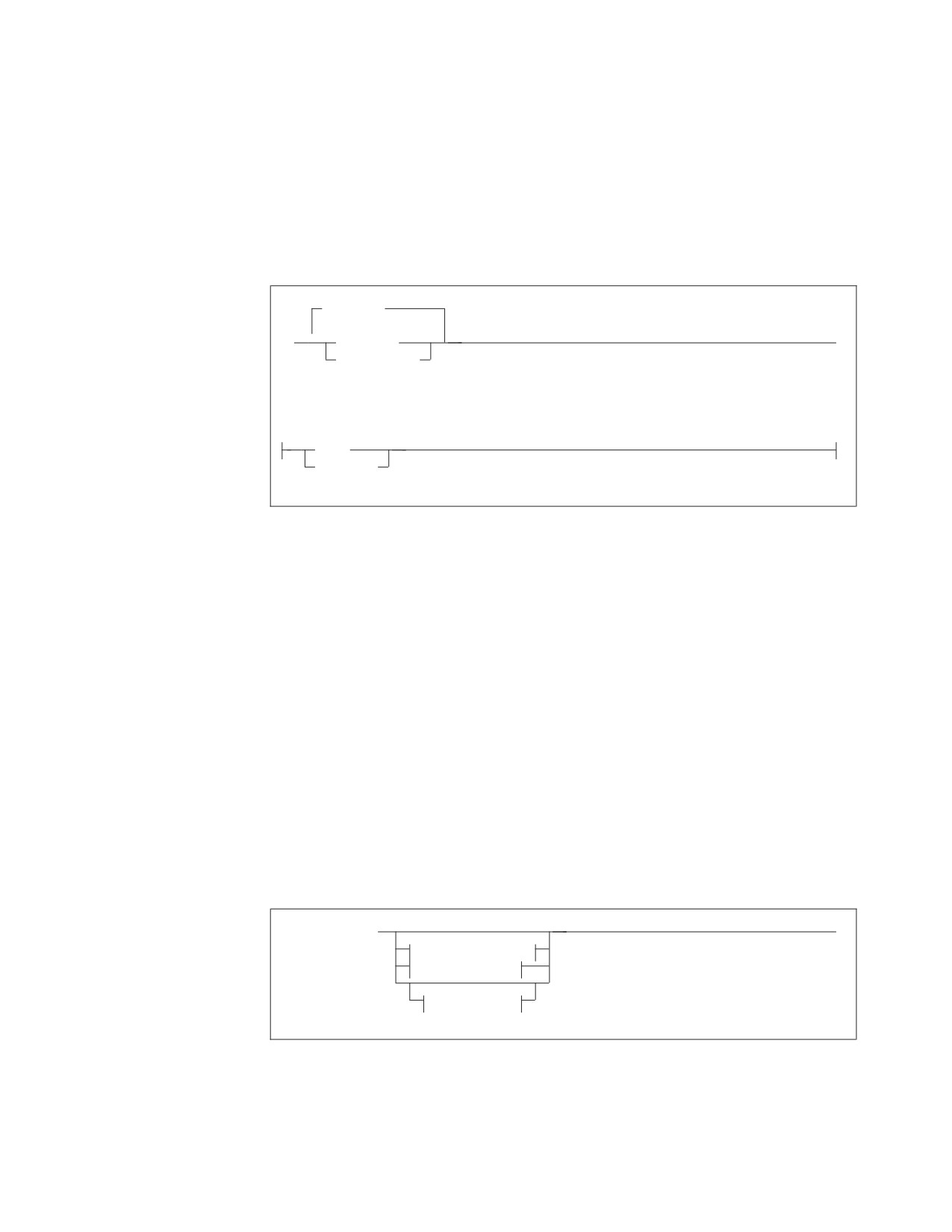
selected; and presents the results in a result table, which will be called R. The rows
of R are unordered. Only the SELECT clause and the FROM clause are mandatory.
An example of a subselect query is:
SELECT EMPNO, LASTNAME
FROM EMPLOYEE
WHERE WORKDEPT = ’E11’
Figure 6 shows the fullselect query.
| union |
►►
▼
subselect
►◄
(fullselect)
union:
UNION
UNION ALL
Figure 6. Format of the Fullselect
The fullselect query is a merge of two result tables (R1 and R2) from two subselects
into one final result table (R). The merging is done by the UNION operator. The
rows of R are unordered. (For a description of the UNION operation, see
“Combining Queries into a Single Query: UNION” on page 89.)
An example of a fullselect is:
SELECT EMPNO, WORKDEPT, ’EDUCATION’
FROM EMPLOYEE
WHERE EDLEVEL > 16
UNION ALL
SELECT RESPEMP, DEPTNO, ’STAFFING’
FROM PROJECT
WHERE PRSTAFF > 5
By using the literal 'EDUCATION' in the first subselect and 'STAFFING' in the
second, you will be able to tell from R which row was included as a result of
which criterion (or query).
Figure 7 shows the select-statement.
►► fullselect
►◄
order-by-clause
update-clause
with-clause
Figure 7. Format of the Select-statement
The select-statement can optionally put the rows of R from the fullselect in order by
the values of the columns identified in the ORDER BY clause. Alternatively, the
select-statement can allow the rows of R to be subsequently updated in the
Chapter 3. Coding the Body of a Program
27

application program, under the restriction that this only be done to those columns
listed in the update-clause (FOR UPDATE OF). (This explanation excludes
consideration of the preprocessor NOFOR support, which is discussed in the next
chapter.) Also, the with-clause may be used to select which isolation level that is to
be used by the query. This overrides any other isolation level specification.
An example of a select-statement is:
SELECT EMPNO, FIRSTNME, LASTNAME, HIREDATE
FROM EMPLOYEE
ORDER BY HIREDATE, LASTNAME
Note: In this example, the UNION operator and some of the optional clauses in
the fullselect are not used.
The distinction among these three forms of query is often quite subtle and
academic. It can be useful, however, when other SQL statements specify the form
of query that is allowed as part of the statement. For example, CREATE VIEW and
INSERT are two statements that use the subselect. This tells you that you cannot
incorporate UNION or ORDER BY in the query component of those statements.
Using the SELECT Clause
ALL
►► SELECT
►◄
DISTINCT
,
▼
expression
table_name.*
view_name.*
correlation_name.*
Figure 8. Format of the SELECT clause
This clause is the first part of a subselect query. It consists of the keyword SELECT
followed by a select-list, which usually consists of one or more expressions.
(Expressions are discussed later in this chapter.)
The following are examples of select-lists that can occur in queries to the sample
tables:
SELECT EMPNO, FIRSTNME, LASTNAME
SELECT EMPNO, BONUS + COMM
SELECT SALARY * 1.10
SELECT 250
SELECT HIREDATE + 1 YEAR
If you specify DISTINCT immediately after SELECT, the system eliminates
duplicates from the query-result. (You can use DISTINCT only once in any query.)
For example, the following SELECT clause returns the set of different departments:
28
Application Programming

SELECT DISTINCT WORKDEPT
WORKDEPT
A00
DB manager returns
A00
only one of these
C01
D11
Similarly, the following SELECT clause returns the set of different departments and
jobs:
SELECT DISTINCT WORKDEPT, JOB
WORKDEPT
JOB
E21
MANAGER
E21
FILEREP
DB manager
E21
FILEREP
returns only
E21
FILEREP
one of these
ALL indicates that duplicates are not to be eliminated. This is the default.
SQL provides a special shorthand notation for selecting all the columns of a table:
SELECT *
For example, the following statement returns the entire row from the
DEPARTMENT table for manager number 000010:
SELECT *
INTO :DEPART, :NAME, :MGR, :EMPDEPT
FROM DEPARTMENT WHERE MGRNO = ’000010’
As a good programming practice, however, you should explicitly specify every
column you want to be returned by your query. This will avoid programming
errors when, for example, a new column is added to a table but your program is
using SELECT * and making no provision to store the extra column value.
If you specify a constant as a select-list expression, that constant occurs in every
row returned by the query. For example, the following figure shows a query that
returns a constant:
SELECT 'NAME IS', LASTNAME
EXPRESSION 1
LASTNAME
FROM EMPLOYEE
WHERE EMPNO='000140'
NAME IS
NICHOLLS
An alphabetic constant, such as 'NAME IS', is always enclosed within single
quotation marks (') when used in an SQL statement. A numeric constant should
not be enclosed this way.
Chapter 3. Coding the Body of a Program
29

Using the FROM Clause
,
►► FROM
▼
table_name
►◄
view_name
correlation_name
Figure 9. Format of the FROM Clause
This clause specifies the name of the table from which you want to retrieve data. If
you are authorized, you can access a table that is owned by someone else, by
adding the name of the owner before the table_name with a period. For example, to
specify the table EMPLOYEE owned by user SMITH:
FROM SMITH.EMPLOYEE
Because any number of users can define a table with the same name, you should
always use fully qualified table names. This avoids confusion if you are writing a
program that someone else will preprocess.
As Figure 9 indicates, multiple table names are possible, and some or all of these
names can have corresponding correlation names. These aspects of the FROM
clause are discussed later in this chapter.
Using the WHERE Clause
►► WHERE search_condition
►◄
Figure 10. Format of the WHERE Clause
This clause specifies your search conditions. If you do not include it, all the rows
of the table will be used to calculate the expressions in the select-list. Here are some
examples of WHERE clauses:
WHERE SALARY > 30000
WHERE EMPNO = :X
WHERE SALARY < :R1 AND EDLEVEL = :Y
Search conditions are discussed in “Constructing Search Conditions” on page 39.
Using the GROUP BY Clause
,
▼
►► GROUP BY
column_name
►◄
Figure 11. Format of the GROUP BY Clause
This clause lets you group rows with matching values in one or more columns.
Here is an example of the use of the GROUP BY clause:
30
Application Programming
SELECT WORKDEPT, SUM(SALARY)
FROM EMPLOYEE
GROUP BY WORKDEPT
For more information, see “Grouping the Rows of a Table” on page 71.
Using the HAVING Clause
►► HAVING search_condition
►◄
Figure 12. Format of the HAVING Clause
This clause specifies the conditions that must be satisfied by the group. Here is an
example:
SELECT WORKDEPT, SUM(SALARY)
FROM EMPLOYEE
GROUP BY WORKDEPT HAVING WORKDEPT <> ’A00’
For more information, see “Grouping the Rows of a Table” on page 71.
Using the ORDER BY Clause
,
ASC
▼
►► ORDER BY
column_name
►◄
integer
DESC
Figure 13. Format of the ORDER BY Clause
This clause delivers the rows of the result table in the order specified. You can
indicate order by specifying a list of column names or integers that refer to
select-list items. For example, ORDER BY 3,5 denotes ordering primarily by the
third item and secondarily by the fifth item in the select-list. By using integers in
the ORDER BY clause, you can order the query result by a selected expression that
is not a simple column name.
The following query returns results ordered by the expression SALARY + COMM:
SELECT EMPNO, SALARY+COMM
FROM EMPLOYEE
WHERE WORKDEPT=’D11’
ORDER BY 2
You cannot specify ordering by a column that is not in the select-list. For example,
the following statement would fail because FIRSTNME is not in the select-list:
SELECT SALARY, LASTNAME
FROM EMPLOYEE
ORDER BY FIRSTNAME
Incorrect
The optional word ASC indicates ascending order, and is the default. DESC
indicates descending order. ORDER BY 2,5 DESC indicates ascending order on
item 2 and descending order on item 5. Character data is ordered alphabetically,
numeric data algebraically, and datetime data chronologically. Null values are
Chapter 3. Coding the Body of a Program
31
sorted first in descending order, and last in ascending order. If you do not specify
an ORDER BY clause, rows will be delivered in an order determined by the
system.
By default, string data is sorted based on the System/390® collating sequence.
However, the collating sequence required for certain alphabets is different from the
default System/390 collating sequence. Users expect that sorted data will match
the order that is culturally correct for them, and that searches on data will return
the result that is correct for the sorting sequence of their language. They are at ease
with only one sort order, the one used in their dictionaries, telephone directories,
book indexes, and so on.
A way to accommodate special sorting requirements is to use Field Procedures.
Field Procedures can be used to encode data being inserted into a column. The
encoding effectively alters the collating sequence for the data in the column,
enabling the special sorting requirements to be met by the System/390 collating
sequence. For more information, see “Using Field Procedures” on page 281.
Trailing blanks in variable string (VARCHAR and VARGRAPHIC) columns do not
affect the relative order of rows delivered by the ORDER BY clause. Because the
system does not use the trailing blanks when it compares VARCHAR or
VARGRAPHIC rows, two columns that differ only by their number of trailing
blanks may not maintain their relative positions.
Using the FOR UPDATE OF Clause
,
▼
►► FOR UPDATE OF
column_name
►◄
Figure 14. Format of the UPDATE clause
This clause is optional for static SQL if NOFOR support is specified at preprocessor
time.
The update-clause (FOR UPDATE OF) tells the system that you might want to
update some columns of the result table. To update with a cursor, use the WHERE
CURRENT OF clause in an UPDATE statement. (See “Manipulating the Cursor” on
page 34.) You can update only those columns that you list in the update-clause. A
column can be in the update-clause without being in the select-list; therefore, you can
update columns that are not explicitly retrieved by the cursor. The update-clause is
not required for deletion of the current row of a cursor. Deletion with a cursor is
done using the WHERE CURRENT OF clause in a DELETE statement. For an
explanation of the DELETE statement, see the DB2 Server for VSE & VM SQL
Reference manual.
Note: If you do not want to be bound by the above restriction on which columns
can be updated, you simply invoke NOFOR support at preprocessor time
and omit the update-clause. In this situation, the preprocessor will assist you
by issuing warning or error messages if your program tries to update
columns that are not in the current database. If the conditions identified by
the warning messages are not corrected, unexpected error messages can
subsequently occur at program run time.
32
Application Programming
//////////////////////////////////////////