ISO 32000-1 Document management — Portable document format — Part 1: PDF 1.7 - page 15
Annex E) to avoid conflicts between different applications marking the same content stream. In addition to the
tag operand, the DP and BDC operators shall specify a property list containing further information associated
with the marked content. Property lists are discussed further in 14.6.2, “Property Lists.”
Marked-content operators may appear only between graphics objects in the content stream. They may not
occur within a graphics object or between a graphics state operator and its operands. Marked-content
sequences may be nested one within another, but each sequence shall be entirely contained within a single
content stream.
NOTE 3
A marked-content sequence may not cross page boundaries.
NOTE 4
The Contents entry of a page object (see 7.7.3.3, “Page Objects”), which may be either a single stream or an
array of streams, is considered a single stream with respect to marked-content sequences.
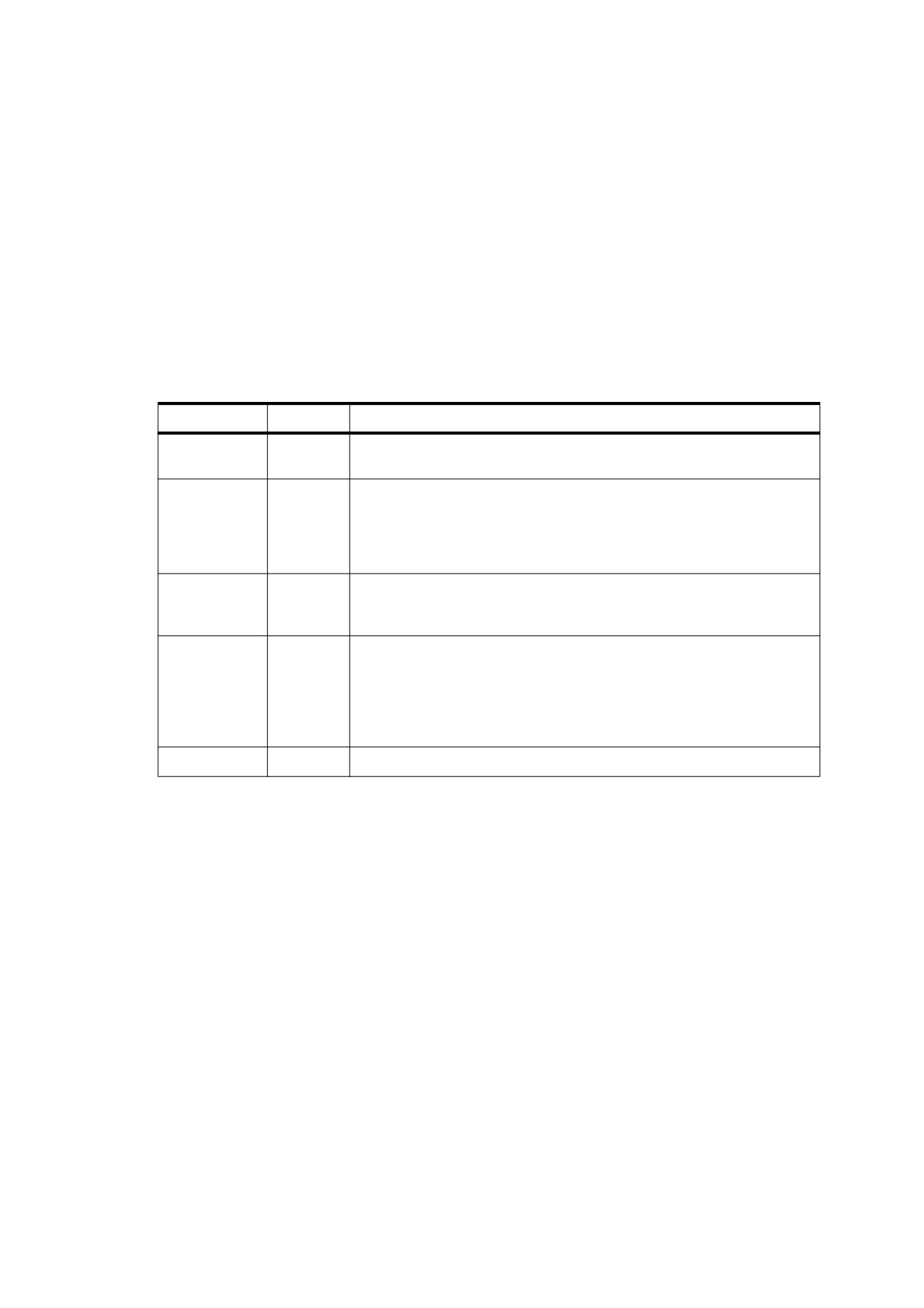
Table 320 - Marked-content operators
Operands
Operator
Description
tag
MP
Designate a marked-content point. tag shall be a name object indicating
the role or significance of the point.
tag properties
DP
Designate a marked-content point with an associated property list. tag
shall be a name object indicating the role or significance of the point.
properties shall be either an inline dictionary containing the property list or
a name object associated with it in the Properties subdictionary of the
current resource dictionary (see 14.6.2, “Property Lists”).
tag
BMC
Begin a marked-content sequence terminated by a balancing EMC
operator. tag shall be a name object indicating the role or significance of
the sequence.
tag properties
BDC
Begin a marked-content sequence with an associated property list,
terminated by a balancing EMC operator. tag shall be a name object
indicating the role or significance of the sequence. properties shall be
either an inline dictionary containing the property list or a name object
associated with it in the Properties subdictionary of the current resource
dictionary (see 14.6.2, “Property Lists”).
—
EMC
End a marked-content sequence begun by a BMC or BDC operator.
When the marked-content operators BMC, BDC, and EMC are combined with the text object operators BT and
ET (see 9.4, “Text Objects”), each pair of matching operators (BMC… EMC, BDC… EMC, or BT… ET) shall be
properly (separately) nested. Therefore, the sequences
BMC
BT
BT
BMC
…
and
…
ET
EMC
EMC
ET
are valid, but
BMC
BT
BT
BMC
…
and
…
EMC
ET
BT
EMC
are not valid.
553
14.6.2
Property Lists
The marked-content operators DP and BDC associate a property list with a marked-content element within a
content stream. The property list is a dictionary containing private information meaningful to the conforming
writer creating the marked content. Conforming products should use the dictionary entries in a consistent way;
the values associated with a given key should always be of the same type (or small set of types).
If all of the values in a property list dictionary are direct objects, the dictionary may be written inline in the
content stream as a direct object. If any of the values are indirect references to objects outside the content
stream, the property list dictionary shall be defined as a named resource in the Properties subdictionary of the
current resource dictionary (see 7.8.3, “Resource Dictionaries”) and referenced by name as the properties
operand of the DP or BDC operator.
14.6.3
Marked Content and Clipping
Some PDF path and text objects are defined purely for their effect on the current clipping path, without the
objects actually being painted on the page. This occurs when a path object is defined using the operator
sequence W n or W* n (see 8.5.4, “Clipping Path Operators”) or when a text object is painted in text rendering
mode 7 (see 9.3.6, “Text Rendering Mode”). Such clipped, unpainted path or text objects are called clipping
objects. When a clipping object falls within a marked-content sequence, it shall not be considered part of the
sequence unless the entire sequence consists only of clipping objects. In Example 1, for instance, the marked-
content sequence tagged Clip includes the text string ( Clip me ) but not the rectangular path that defines the
clipping boundary.
EXAMPLE 1
/Clip BMC
100 100 10 10 re W n
% Clipping path
( Clip me ) Tj
% Object to be clipped
EMC
Only when a marked-content sequence consists entirely of clipping objects shall the clipping objects be
considered part of the sequence. In this case, the sequence is known as a marked clipping sequence. Such
sequences may be nested. In Example 2, for instance, multiple lines of text are used to clip a subsequent
graphics object (in this case, a filled path). Each line of text shall be bracketed within a separate marked
clipping sequence, tagged Pgf. The entire series shall be bracketed in turn by an outer marked clipping
sequence, tagged Clip.
NOTE
The marked-content sequence tagged ClippedText is not a marked clipping sequence, since it contains a filled
rectangular path that is not a clipping object. The clipping objects belonging to the Clip and Pgf sequences are
therefore not considered part of the ClippedText sequence.
EXAMPLE 2
/ClippedText BMC
/Clip
<<… >>
BDC
BT
7 Tr
% Begin text clip mode
/Pgf BMC
( Line 1 ) Tj
EMC
/Pgf BMC
( Line ) '
(
2 ) Tj
EMC
ET
% Set current text clip
EMC
100 100 10 10 re f
% Filled path
EMC
The precise rules governing marked clipping sequences shall be as follows:
•
A clipping object shall be a path object ended by the operator sequence W n or W* n or a text object
painted in text rendering mode 7.
554
•
An invisible graphics object shall be a path object ended by the operator n only (with no preceding W or
W*) or a text object painted in text rendering mode 3.
•
A visible graphics object shall be a path object ended by any operator other than n, a text object painted in
any text rendering mode other than 3 or 7, or any XObject invoked by the Do operator.
•
An empty marked-content element shall be a marked-content point or a marked-content sequence that
encloses no graphics objects.
•
A marked clipping sequence shall be a marked-content sequence that contains at least one clipping object
and no visible graphics objects.
•
Clipping objects and marked clipping sequences shall be considered part of an enclosing marked-content
sequence only if it is a marked clipping sequence.
•
Invisible graphics objects and empty marked-content elements shall always be considered part of an
enclosing marked-content sequence, regardless of whether it is a marked clipping sequence.
•
The q (save) and Q (restore) operators may not occur within a marked clipping sequence.
Example 3 illustrates the application of these rules. Marked-content sequence S4 is a marked clipping
sequence because it contains a clipping object (clipping path 2) and no visible graphics objects. Clipping path 2
is therefore considered part of sequence S4. Marked-content sequences S1, S2, and S3 are not marked
clipping sequences, since they each include at least one visible graphics object. Thus, clipping paths 1 and 2
are not part of any of these three sequences.
EXAMPLE 3
/S1 BMC
/S2 BMC
/S3 BMC
0 0 m
100 100 l
0 100 l W n
% Clipping path 1
0 0 m
200 200 l
0 100 l f
% Filled path
EMC
/S4 BMC
0 0 m
300 300 l
0 100 l W n
% Clipping path 2
EMC
EMC
100 100 10 10 re f
% Filled path
EMC
In Example 4 marked-content sequence S1 is a marked clipping sequence because the only graphics object it
contains is a clipping path. Thus, the empty marked-content sequence S3 and the marked-content point P1 are
both part of sequence S2, and S2, S3, and P1 are all part of sequence S1.
EXAMPLE 4
/S1 BMC
… Clipping path…
/S2 BMC
/S3 BMC
EMC
/P1 DP
EMC
EMC
555
In Example 5 marked-content sequences S1 and S4 are marked clipping sequences because the only object
they contain is a clipping path. Hence the clipping path is part of sequences S1 and S4; S3 is part of S2; and
S2, S3, and S4 are all part of S1.
EXAMPLE 5
/S1 BMC
/S2 BMC
/S3 BMC
EMC
EMC
/S4 BMC
… Clipping path…
EMC
EMC
14.7
Logical Structure
14.7.1
General
PDF’s logical structure facilities (PDF 1.3) shall provide a mechanism for incorporating structural information
about a document’s content into a PDF file. Such information may include the organization of the document into
chapters and sections or the identification of special elements such as figures, tables, and footnotes. The
logical structure facilities shall be extensible, allowing conforming writers to choose what structural information
to include and how to represent it, while enabling conforming readers to navigate a file without knowing the
producer’s structural conventions.
PDF logical structure shares basic features with standard document markup languages such as HTML, SGML,
and XML. A document’s logical structure shall be expressed as a hierarchy of structure elements, each
represented by a dictionary object. Like their counterparts in other markup languages, PDF structure elements
may have content and attributes. In PDF, rendered document content takes over the role occupied by text in
HTML, SGML, and XML.
A PDF document’s logical structure shall be stored separately from its visible content, with pointers from each
to the other. This separation allows the ordering and nesting of logical elements to be entirely independent of
the order and location of graphics objects on the document’s pages.
The Markings entry in the document catalogue (see 7.7.2, “Document Catalog”) shall specify a mark
information dictionary, whose entries are shown in Table 321. It provides additional information relevant to
specialized uses of structured PDF documents.
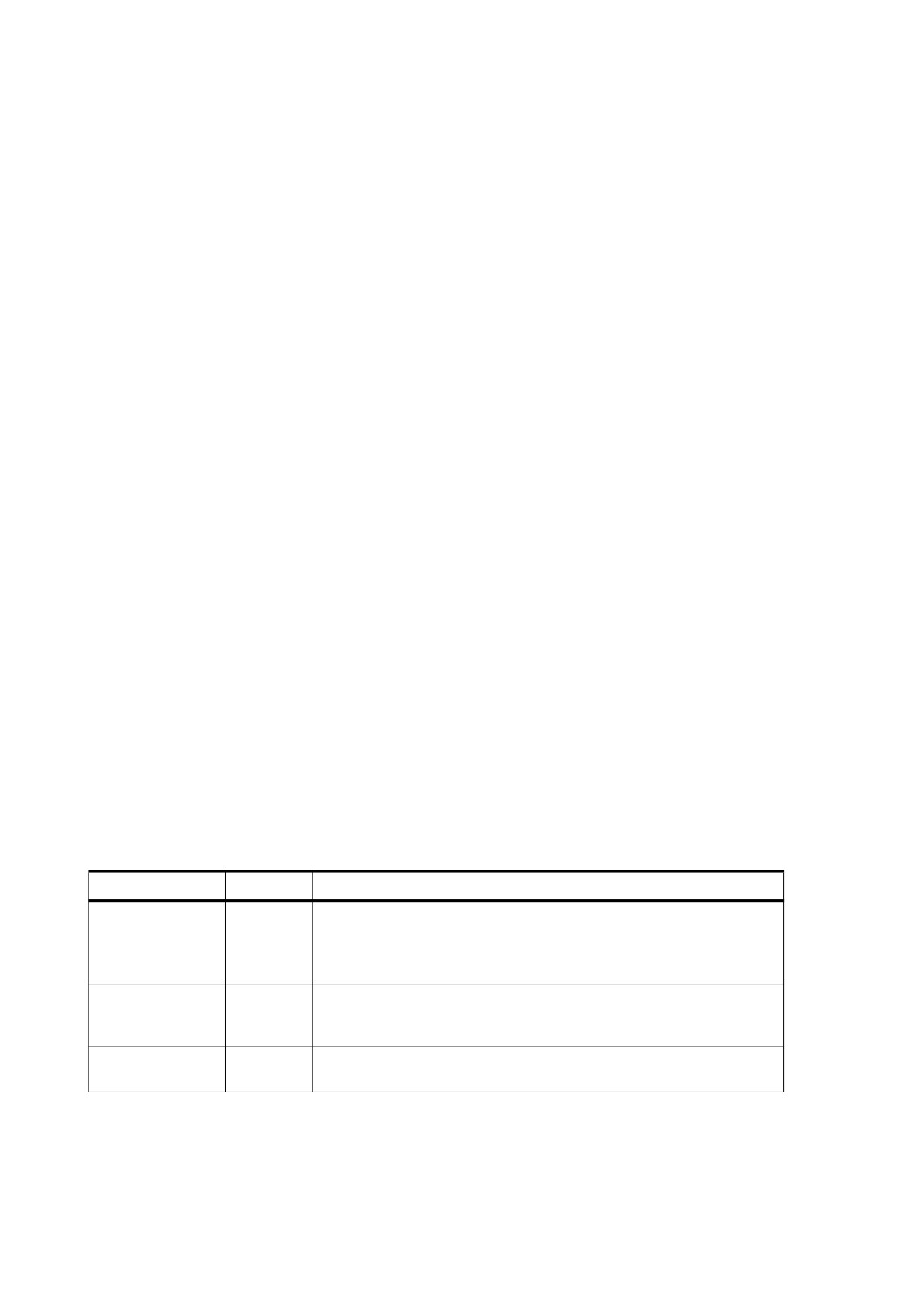
Table 321 - Entries in the mark information dictionary
Key
Type
Value
Marked
boolean
(Optional) A flag indicating whether the document conforms to Tagged
PDF conventions (see 14.8, “Tagged PDF”). Default value: false.
If Suspects is true, the document may not completely conform to Tagged
PDF conventions.
UserProperties
boolean
(Optional; PDF 1.6) A flag indicating the presence of structure elements
that contain user properties attributes (see 14.7.5.4, “User Properties”).
Default value: false.
Suspects
boolean
(Optional; PDF 1.6) A flag indicating the presence of tag suspects (see
14.8.2.3, “Page Content Order”). Default value: false.
556
14.7.2
Structure Hierarchy
The logical structure of a document shall be described by a hierarchy of objects called the structure hierarchy
or structure tree. At the root of the hierarchy shall be a dictionary object called the structure tree root, located by
means of the StructTreeRoot entry in the document catalogue (see 7.7.2, “Document Catalog”). Table 322
shows the entries in the structure tree root dictionary. The K entry shall specify the immediate children of the
structure tree root, which shall be structure elements.
Structure elements shall be represented by a dictionary, whose entries are shown in Table 323. The K entry
shall specify the children of the structure element, which may be zero or more items of the following kinds:
•
Other structure elements
•
References to content items, which are either marked-content sequences (see 14.6, “Marked Content”) or
complete PDF objects such as XObjects and annotations. These content items represent the graphical
content, if any, associated with a structure element. Content items are discussed in detail in 14.7.4,
“Structure Content.”
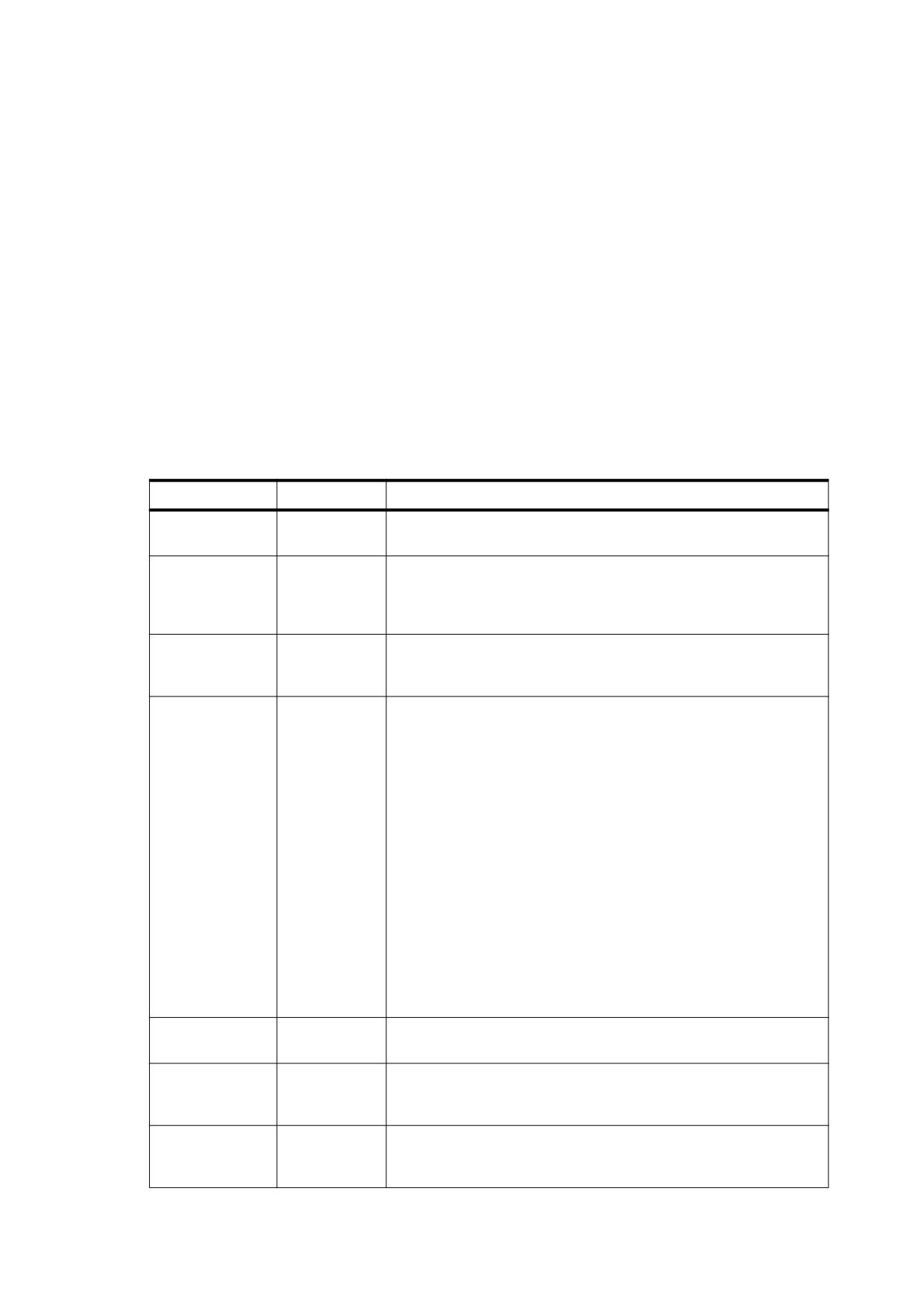
Table 322 - Entries in the structure tree root
Key
Type
Value
Type
name
(Required) The type of PDF object that this dictionary describes;
shall be StructTreeRoot for a structure tree root.
K
dictionary
(Optional) The immediate child or children of the structure tree root in
or array
the structure hierarchy. The value may be either a dictionary
representing a single structure element or an array of such
dictionaries.
IDTree
name tree
(Required if any structure elements have element identifiers) A name
tree that maps element identifiers (see Table 323) to the structure
elements they denote.
ParentTree
number tree
(Required if any structure element contains content items) A number
tree
(see
7.9.7,
“Number Trees”) used in finding the structure
elements to which content items belong. Each integer key in the
number tree shall correspond to a single page of the document or to
an individual object (such as an annotation or an XObject) that is a
content item in its own right. The integer key shall be the value of the
StructParent or StructParents entry in that object (see 14.7.4.4,
“Finding Structure Elements from Content Items”). The form of the
associated value shall depend on the nature of the object:
For an object that is a content item in its own right, the value shall be
an indirect reference to the object’s parent element (the structure
element that contains it as a content item).
For a page object or content stream containing marked-content
sequences that are content items, the value shall be an array of
references to the parent elements of those marked-content
sequences.
See 14.7.4.4, “Finding Structure Elements from Content Items” for
further discussion.
ParentTreeNext
integer
(Optional) An integer greater than any key in the parent tree, shall be
Key
used as a key for the next entry added to the tree.
RoleMap
dictionary
(Optional) A dictionary that shall map the names of structure types
used in the document to their approximate equivalents in the set of
standard structure types (see 14.8.4, “Standard Structure Types”).
ClassMap
dictionary
(Optional) A dictionary that shall map name objects designating
attribute classes to the corresponding attribute objects or arrays of
attribute objects (see 14.7.5.2, “Attribute Classes”).
557
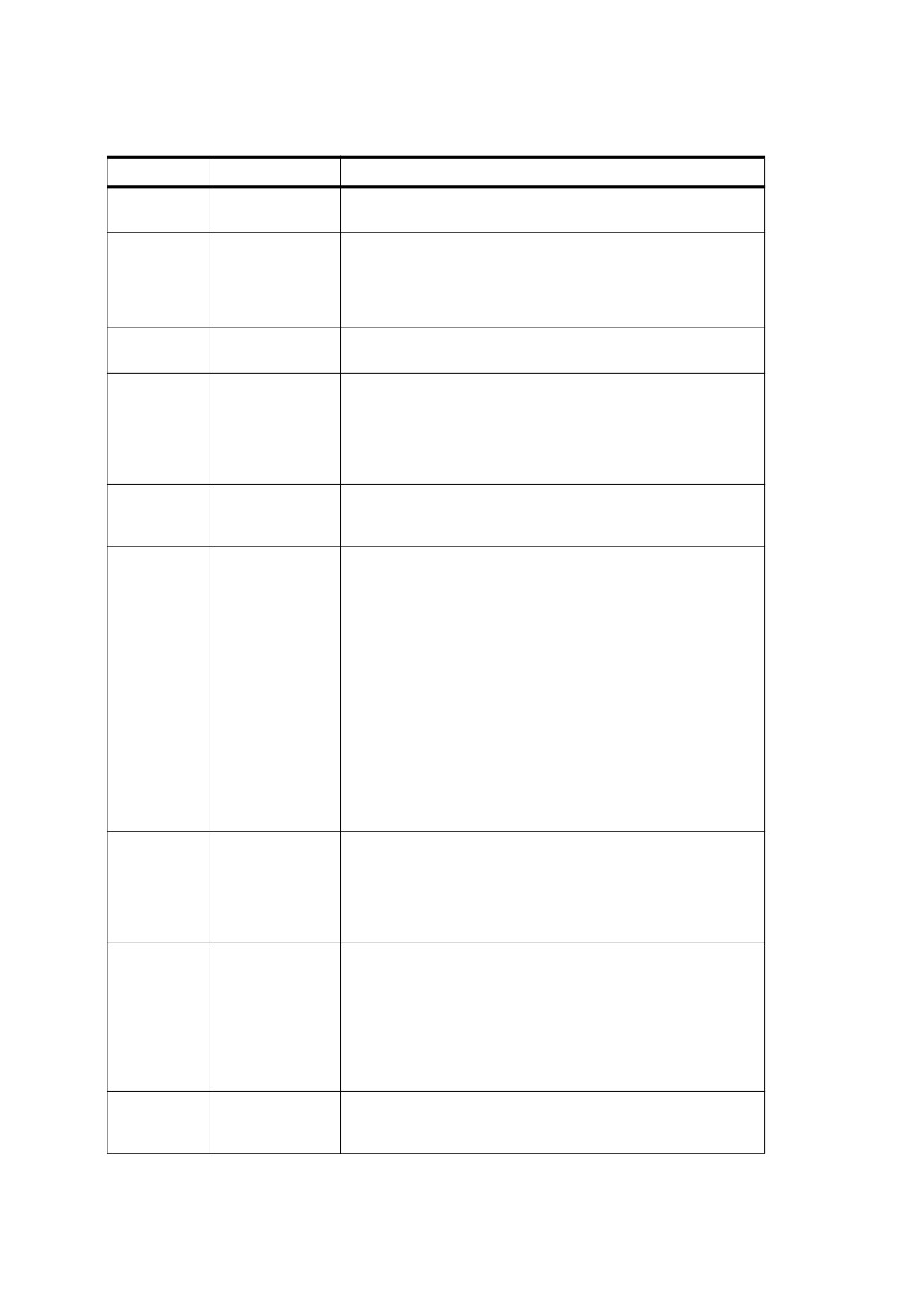
Table 323 - Entries in a structure element dictionary
Key
Type
Value
Type
name
(Optional) The type of PDF object that this dictionary describes; if
present, shall be StructElem for a structure element.
S
name
(Required) The structure type, a name object identifying the
nature of the structure element and its role within the document,
such as a chapter, paragraph, or footnote (see 14.7.3, “Structure
Types”). Names of structure types shall conform to the guidelines
described in Annex E.
P
dictionary
(Required; shall be an indirect reference) The structure element
that is the immediate parent of this one in the structure hierarchy.
ID
byte string
(Optional) The element identifier, a byte string designating this
structure element. The string shall be unique among all elements
in the document’s structure hierarchy. The IDTree entry in the
structure tree root (see Table 322) defines the correspondence
between element identifiers and the structure elements they
denote.
Pg
dictionary
(Optional; shall be an indirect reference) A page object
representing a page on which some or all of the content items
designated by the K entry shall be rendered.
K
(various)
(Optional) The children of this structure element. The value of this
entry may be one of the following objects or an array consisting of
one or more of the following objects:
•
A structure element dictionary denoting another structure
element
•
An integer marked-content identifier denoting a marked-
content sequence
•
A marked-content reference dictionary denoting a marked-
content sequence
•
An object reference dictionary denoting a PDF object
Each of these objects other than the first
(structure element
dictionary) shall be considered to be a content item; see 14.7.4,
“Structure Content” for further discussion of each of these forms of
representation.
If the value of K is a dictionary containing no Type entry, it shall be
assumed to be a structure element dictionary.
A
(various)
(Optional) A single attribute object or array of attribute objects
associated with this structure element. Each attribute object shall
be either a dictionary or a stream. If the value of this entry is an
array, each attribute object in the array may be followed by an
integer representing its revision number (see 14.7.5, “Structure
Attributes,” and 14.7.5.3, “Attribute Revision Numbers”).
C
name or array
(Optional) An attribute class name or array of class names
associated with this structure element. If the value of this entry is
an array, each class name in the array may be followed by an
integer representing its revision number (see 14.7.5.2, “Attribute
Classes,” and 14.7.5.3, “Attribute Revision Numbers”).
If both the A and C entries are present and a given attribute is
specified by both, the one specified by the A entry shall take
precedence.
R
integer
(Optional) The current revision number of this structure element
(see 14.7.5.3, “Attribute Revision Numbers”). The value shall be a
non-negative integer. Default value: 0.
558
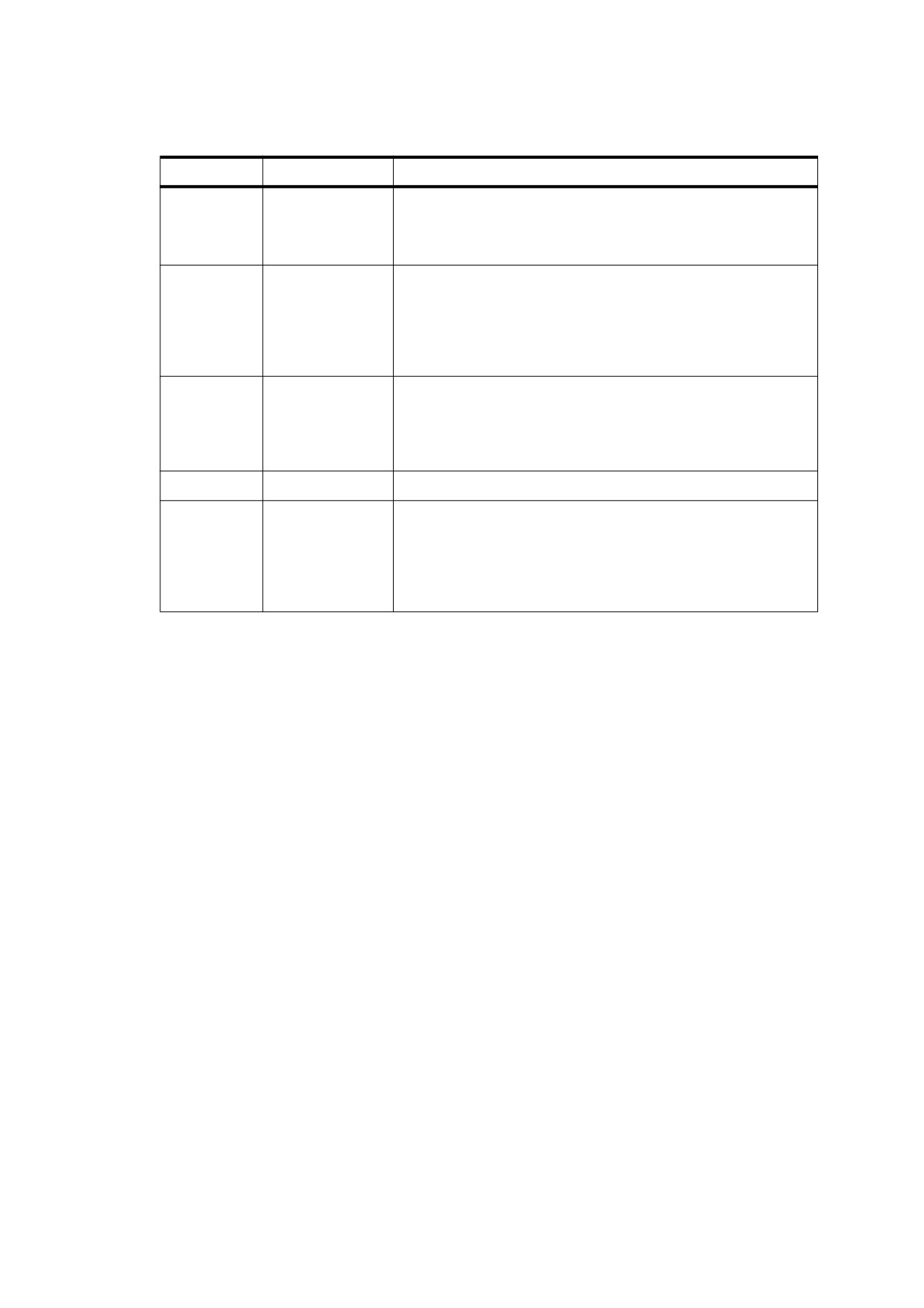
Table 323 - Entries in a structure element dictionary (continued)
Key
Type
Value
T
text string
(Optional) The title of the structure element, a text string
representing it in human-readable form. The title should
characterize the specific structure element, such as Chapter 1,
rather than merely a generic element type, such as Chapter.
Lang
text string
(Optional; PDF 1.4) A language identifier specifying the natural
language for all text in the structure element except where
overridden by language specifications for nested structure
elements or marked content
(see
14.9.2,
“Natural Language
Specification”). If this entry is absent, the language
(if any)
specified in the document catalogue applies.
Alt
text string
(Optional) An alternate description of the structure element and its
children in human-readable form, which is useful when extracting
the document’s contents in support of accessibility to users with
disabilities or for other purposes
(see
14.9.3,
“Alternate
Descriptions”).
E
text string
(Optional; PDF 1.5) The expanded form of an abbreviation.
ActualText
text string
(Optional; PDF 1.4) Text that is an exact replacement for the
structure element and its children. This replacement text (which
should apply to as small a piece of content as possible) is useful
when extracting the document’s contents in support of
accessibility to users with disabilities or for other purposes (see
14.9.4, “Replacement Text”).
14.7.3
Structure Types
Every structure element shall have a structure type, a name object that identifies the nature of the structure
element and its role within the document (such as a chapter, paragraph, or footnote). To facilitate the
interchange of content among conforming products, PDF defines a set of standard structure types; see 14.8.4,
“Standard Structure Types.” Conforming products are not required to adopt them, however, and may use any
names for their structure types.
Where names other than the standard ones are used, a role map may be provided in the structure tree root,
mapping the structure types used in the document to their nearest equivalents in the standard set.
NOTE 1
A structure type named Section used in the document might be mapped to the standard type Sect. The
equivalence need not be exact; the role map merely indicates an approximate analogy between types,
allowing conforming products to share nonstandard structure elements in a reasonable way.
NOTE 2
The same structure type may occur as both a key and a value in the role map, and circular chains of
association are explicitly permitted. Therefore, a single role map may define a bidirectional mapping. A
conforming reader using the role map should follow the chain of associations until it either finds a structure
type it recognizes or returns to one it has already encountered.
NOTE 3
In PDF versions earlier than 1.5, standard element types were never remapped. Beginning with PDF 1.5, an
element name shall always be mapped to its corresponding name in the role map, if there is one, even if the
original name is one of the standard types. This shall be done to allow the element, for example, to represent a
tag with the same name as a standard role, even though its use differs from the standard role.
559
14.7.4
Structure Content
14.7.4.1
General
Any structure element may have associated graphical content, consisting of one or more content items.
Content items shall be graphical objects that exist in the document independently of the structure tree but are
associated with structure elements as described in the following sub-clauses. Content items are of two kinds:
•
Marked-content sequences within content streams (see 14.7.4.2, “Marked-Content Sequences as Content
Items”)
•
Complete PDF objects such as annotations and XObjects (see 14.7.4.3, “PDF Objects as Content Items”)
The K entry in a structure element dictionary (see Table 323) shall specify the children of the structure element,
which may include any number of content items, as well as child structure elements that may in turn have
content items of their own.
Content items shall be leaf nodes of the structure tree; that is, they may not have other content items nested
within them for purposes of logical structure. The hierarchical relationship among structure elements shall be
represented entirely by the K entries of the structure element dictionaries, not by nesting of the associated
content items. Therefore, the following restrictions shall apply:
•
A marked-content sequence delimiting a structure content item may not have another marked-content
sequence for a content item nested within it though non-structural marked content shall be allowed.
•
A structure content item shall not invoke (with the Do operator) an XObject that is itself a structure content
item.
14.7.4.2
Marked-Content Sequences as Content Items
A sequence of graphics operators in a content stream may be specified as a content item of a structure
element in the following way:
•
The operators shall be bracketed as a marked-content sequence between BDC and EMC operators (see
14.6, “Marked Content”). Although the tag associated with a marked-content sequence is not directly
related to the document’s logical structure, it should be the same as the structure type of the associated
structure element.
•
The marked-content sequence shall have a property list (see 14.6.2, “Property Lists”) containing an MCID
entry, which i shall be an integer marked-content identifier that uniquely identifies the marked-content
sequence within its content stream, as shown in the following example:
EXAMPLE 1
2 0 obj
% Page object
<< /Type /Page
/Contents 3 0 R
% Content stream
…
>>
endobj
3 0 obj
% Page's content stream
<< /Length … >>
stream
…
/P << /MCID 0 >>
% Start of marked-content sequence
BDC
…
( Here is some text ) Tj
…
EMC
% End of marked-content sequence
…
560
endstream
endobj
NOTE
This example and the following examples omit required StructParents entries in the objects used as content
items (see 14.7.4.4, “Finding Structure Elements from Content Items”).
A structure element dictionary may include one or more marked-content sequences as content items by
referring to them in its K entry (see Table 323). This reference may have two forms:
•
A dictionary object called a marked-content reference. Table 324 shows the contents of this type of
dictionary, which shall specify the marked-content identifier, as well other information identifying the stream
in which the sequence is contained. Example 2 illustrates the use of a marked-content reference to the
marked-content sequence shown in Example 3.
•
An integer that specifies the marked-content identifier. This may be done in the common case where the
marked-content sequence is contained in the content stream of the page that is specified in the Pg entry of
the structure element dictionary. Example 3 shows a structure element that has three children: a marked-
content sequence specified by a marked-content identifier, as well as two other structure elements.
EXAMPLE 2
1 0 obj
% Structure element
<< /Type /StructElem
/S /P
% Structure type
/P …
% Parent in structure hierarchy
/K << /Type /MCR
/Pg 2 0 R
% Page containing marked-content sequence
/MCID 0
% Marked-content identifier
>>
>>
endobj
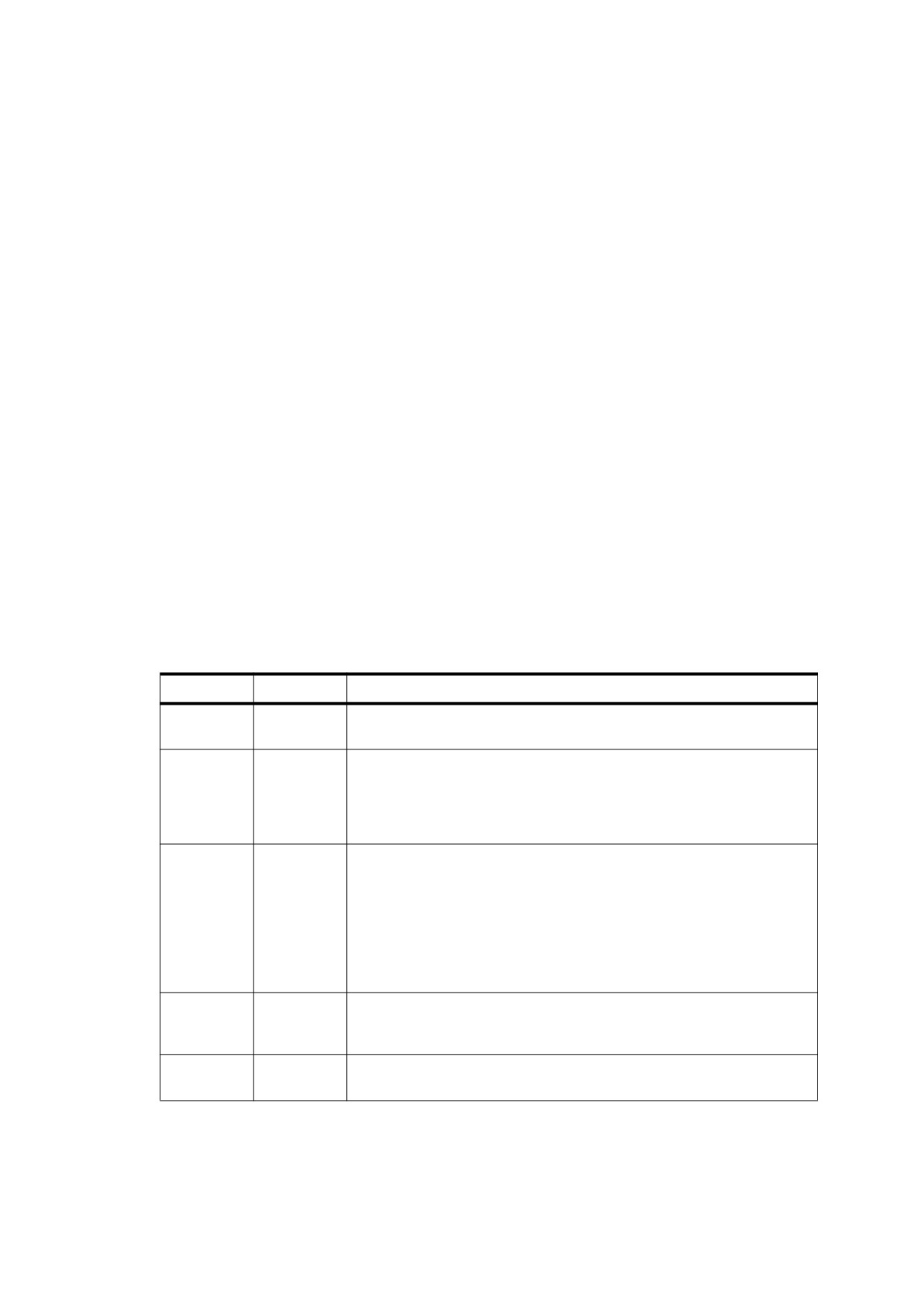
Table 324 - Entries in a marked-content reference dictionary
Key
Type
Value
Type
name
(Required) The type of PDF object that this dictionary describes; shall be
MCR for a marked-content reference.
Pg
dictionary
(Optional; shall be an indirect reference) The page object representing
the page on which the graphics objects in the marked-content sequence
shall be rendered. This entry overrides any Pg entry in the structure
element containing the marked-content reference; it shall be required if
the structure element has no such entry.
Stm
stream
(Optional; shall be an indirect reference) The content stream containing
the marked-content sequence. This entry should be present only if the
marked-content sequence resides in a content stream other than the
content stream for the page (see 8.10, “Form XObjects” and 12.5.5,
“Appearance Streams”).
If this entry is absent, the marked-content sequence shall be contained in
the content stream of the page identified by Pg (either in the marked-
content reference dictionary or in the parent structure element).
StmOwn
(any)
(Optional; shall be an indirect reference) The PDF object owning the
stream identified by Stems annotation to which an appearance stream
belongs.
MCID
integer
(Required) The marked-content identifier of the marked-content
sequence within its content stream.
EXAMPLE 3
1 0 obj
% Containing structure element
<< /Type /StructElem
/S /MixedContainer
% Structure type
/P …
% Parent in structure hierarchy
561
/Pg 2 0 R
% Page containing marked-content sequence
/K [
4 0 R
% Three children: a structure element
0
% a marked-content identifier
5 0 R
% another structure element
]
>>
endobj
2 0 obj
% Page object
<< /Type /Page
/Contents 3 0 R
% Content stream
…
>>
endobj
3 0 obj
% Page's content stream
<< /Length … >>
stream
…
/P << /MCID 0 >>
% Start of marked-content sequence
BDC
( Here is some text ) Tj
…
EMC
% End of marked-content sequence
…
endstream
endobj
Content streams other than page contents may also contain marked content sequences that are content items
of structure elements. The content of form XObjects may be incorporated into structure elements in one of the
following ways:
•
A Do operator that paints a form XObject may be part of a marked-content sequence that shall be
associated with a structure element (see Example 4). In this case, the entire form XObject shall be
considered to be part of the structure element’s content, as if it were inserted into the marked-content
sequence at the point of the Do operator. The form XObject shall not in turn contain any marked-content
sequences associated with this or other structure elements.
•
The content stream of a form XObject may contain one or more marked-content sequences that shall be
associated with structure elements (see Example 5). The form XObject may have arbitrary substructure,
containing any number of marked-content sequences associated with logical structure elements. However,
any Do operator that paints the form XObject should not be part of a logical structure content item.
A form XObject that is painted with multiple invocations of the Do operator may be incorporated into the
document’s logical structure only by the first method, with each invocation of Do individually associated with a
structure element.
EXAMPLE 4
1 0 obj
% Structure element
<< /Type /StructElem
/S /P
% Structure type
/P …
% Parent in structure hierarchy
/Pg 2 0 R
% Page containing marked-content sequence
/K 0
% Marked-content identifier
>>
endobj
2 0 obj
% Page object
<< /Type /Page
/Resources
<< /XObject << /Fm4 4 0 R >>
% Resource dictionary
>>
% containing form XObject
/Contents 3 0 R
% Content stream
…
>>
562
endobj
3 0 obj
% Page's content stream
<< /Length … >>
stream
…
/P << /MCID 0 >>
% Start of marked-content sequence
BDC
/Fm4 Do
% Paint form XObject
EMC
% End of marked-content sequence
…
endstream
endobj
4 0 obj
% Form XObject
<< /Type /XObject
/Subtype /Form
/Length …
>>
stream
…
( Here is some text ) Tj
…
endstream
endobj
EXAMPLE 5
1 0 obj
% Structure element
<< /Type /StructElem
/S /P
% Structure type
/P …
% Parent in structure hierarchy
/K
<< /Type /MCR
/Pg 2 0 R
% Page containing marked-content sequence
/Stm 4 0 R
% Stream containing marked-content sequence
/MCID 0
% Marked-content identifier
>>
>>
endobj
2 0 obj
% Page object
<< /Type /Page
/Resources
<< /XObject << /Fm4 4 0 R >>
% Resource dictionary
>>
% containing form XObject
/Contents 3 0 R
% Content stream
…
>>
endobj
3 0 obj
% Page's content stream
<< /Length … >>
stream
…
/Fm4 Do
% Paint form XObject
…
endstream
endobj
4 0 obj
% Form XObject
<< /Type /XObject
/Subtype /Form
/Length …
>>
stream
…
/P << /MCID 0 >>
% Start of marked-content sequence
BDC
563
…
( Here is some text ) Tj
…
EMC
% End of marked-content sequence
…
endstream
endobj
14.7.4.3
PDF Objects as Content Items
When a structure element’s content includes an entire PDF object, such as an XObject or an annotation, that is
associated with a page but not directly included in the page’s content stream, the object shall be identified in
the structure element’s K entry by an object reference dictionary (see Table 325).
NOTE 1
This form of reference is used only for entire objects. If the referenced content forms only part of the object’s
content stream, it is instead handled as a marked-content sequence, as described in the preceding sub-
clause.
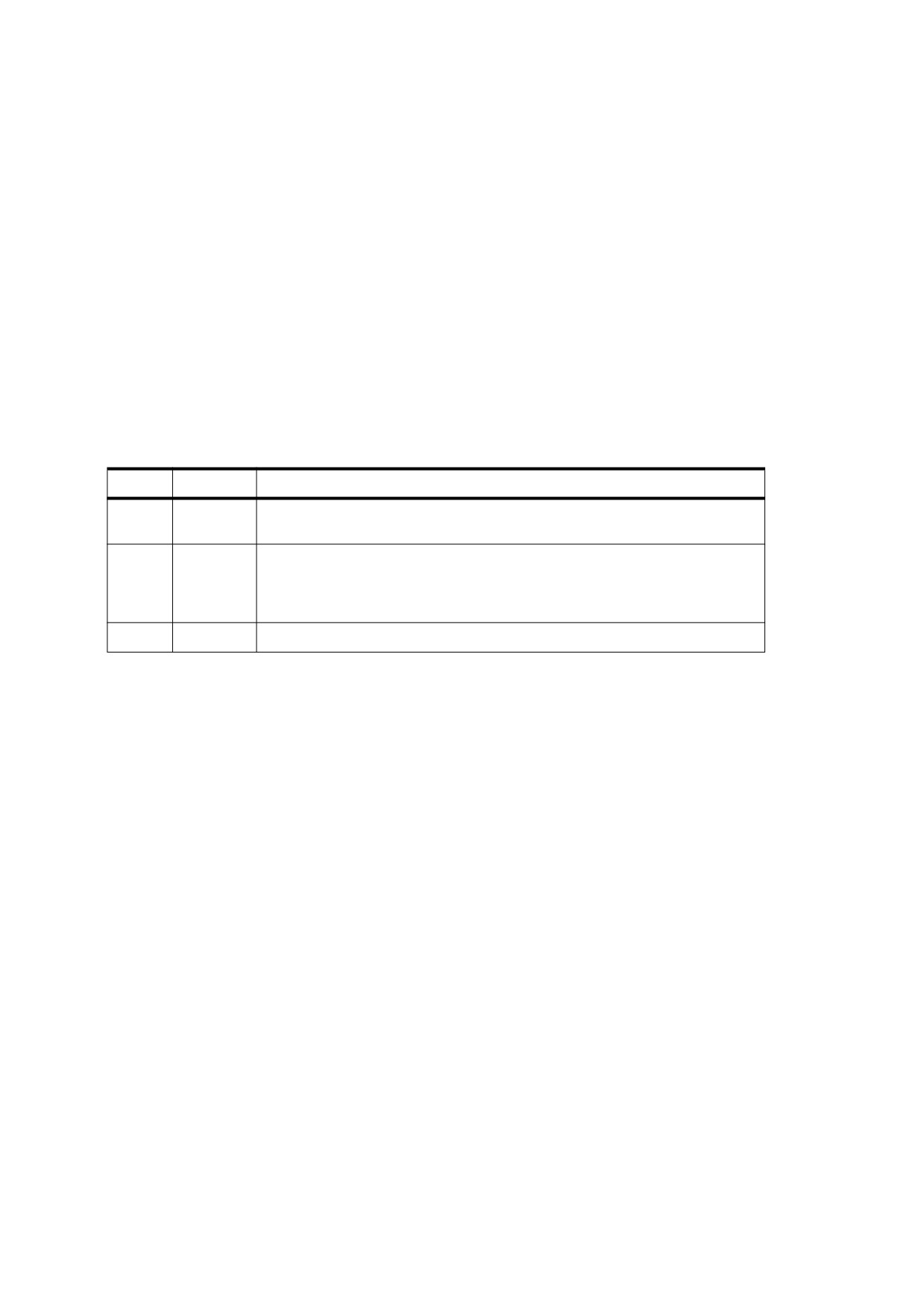
Table 325 - Entries in an object reference dictionary
Key
Type
Value
Type
name
(Required) The type of PDF object that this dictionary describes; shall be OBJR
for an object reference.
Pg
dictionary
(Optional; shall be an indirect reference) The page object of the page on which
the object shall be rendered. This entry overrides any Pg entry in the structure
element containing the object reference; it shall be used if the structure element
has no such entry.
Obj
(any)
(Required; shall be an indirect reference) The referenced object.
NOTE 2
If the referenced object is rendered on multiple pages, each rendering requires a separate object reference.
However, if it is rendered multiple times on the same page, just a single object reference suffices to identify all
of them. (If it is important to distinguish between multiple renditions of the same XObject on the same page,
they should be accessed by means of marked-content sequences enclosing particular invocations of the Do
operator rather than through object references.)
14.7.4.4
Finding Structure Elements from Content Items
Because a stream may not contain object references, there is no way for content items that are marked-content
sequences to refer directly back to their parent structure elements (the ones to which they belong as content
items). Instead, a different mechanism, the structural parent tree, shall be provided for this purpose. For
consistency, content items that are entire PDF objects, such as XObjects, also shall use the parent tree to refer
to their parent structure elements.
The parent tree is a number tree (see 7.9.7, “Number Trees”), accessed from the ParentTree entry in a
document’s structure tree root (Table 322). The tree shall contain an entry for each object that is a content item
of at least one structure element and for each content stream containing at least one marked-content sequence
that is a content item. The key for each entry shall be an integer given as the value of the StructParent or
StructParents entry in the object (see Table 326). The values of these entries shall be as follows:
•
For an object identified as a content item by means of an object reference (see 14.7.4.3, “PDF Objects as
Content Items”), the value shall be an indirect reference to the parent structure element.
•
For a content stream containing marked-content sequences that are content items, the value shall be an
array of indirect references to the sequences’ parent structure elements. The array element corresponding
to each sequence shall be found by using the sequence’s marked-content identifier as a zero-based index
into the array.
564
NOTE
Because marked-content identifiers serve as indices into an array in the structural parent tree, their assigned
values should be as small as possible to conserve space in the array.
The ParentTreeNextKey entry in the structure tree root shall hold an integer value greater than any that is
currently in use as a key in the structural parent tree. Whenever a new entry is added to the parent tree, the
current value of ParentTreeNextKey shall be used as its key. The value shall be then incremented to prepare
for the next new entry to be added.
To locate the relevant parent tree entry, each object or content stream that is represented in the tree shall
contain a special dictionary entry, StructParent or StructParents (see Table 326). Depending on the type of
content item, this entry may appear in the page object of a page containing marked-content sequences, in the
stream dictionary of a form or image XObject, in an annotation dictionary, or in any other type of object
dictionary that is included as a content item in a structure element. Its value shall be the integer key under
which the entry corresponding to the object shall be found in the structural parent tree.
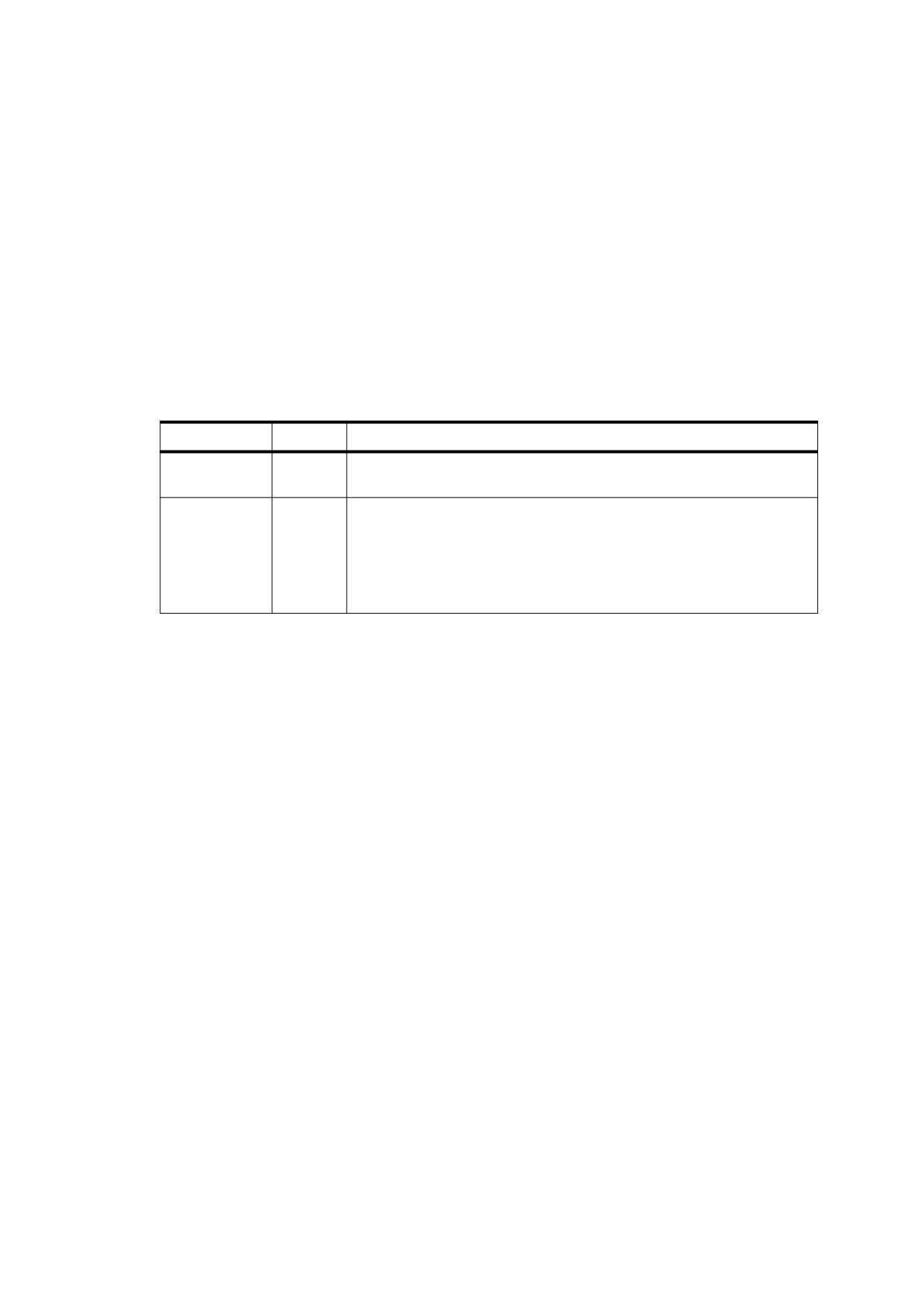
Table 326 - Additional dictionary entries for structure element access
Key
Type
Value
StructParent
integer
(Required for all objects that are structural content items; PDF 1.3) The
integer key of this object’s entry in the structural parent tree.
StructParents
integer
(Required for all content streams containing marked-content sequences
that are structural content items; PDF 1.3) The integer key of this object’s
entry in the structural parent tree.
At most one of these two entries shall be present in a given object. An
object may be either a content item in its entirety or a container for
marked-content sequences that are content items, but not both.
For a content item identified by an object reference, the parent structure element may be found by using the
value of the StructParent entry in the item’s object dictionary as a retrieval key in the structural parent tree
(found in the ParentTree entry of the structure tree root). The corresponding value in the parent tree shall be a
reference to the parent structure element (see Example 1).
EXAMPLE 1
1 0 obj
% Parent structure element
<< /Type /StructElem
…
/K
<< /Type /OBJR
% Object reference
/Pg 2 0 R
% Page containing form XObject
/Obj 4 0 R
% Reference to form XObject
>>
>>
endobj
2 0 obj
% Page object
<< /Type /Page
/Resources
<< /XObject << /Fm4 4 0 R >>
% Resource dictionary
>>
% containing form XObject
/Contents 3 0 R
% Content stream
…
>>
endobj
3 0 obj
% Page's content stream
<< /Length … >>
stream
…
/Fm4 Do
% Paint form XObject
…
endstream
endobj
565
4 0 obj
% Form XObject
<< /Type /XObject
/Subtype /Form
/Length …
/StructParent 6
% Parent tree key
>>
stream
…
endstream
endobj
100 0 obj
% Parent tree (accessed from structure tree root)
<< /Nums [ 0 101 0 R
1 102 0 R
…
6 1 0 R
% Entry for page object 2; points back
…
% to parent structure element
]
>>
endobj
For a content item that is a marked-content sequence, the retrieval method is similar but slightly more
complicated. Because a marked-content sequence is not an object in its own right, its parent tree key shall be
found in the StructParents entry of the page object or other content stream in which the sequence resides.
The value retrieved from the parent tree shall not be a reference to the parent structure element itself but to an
array of such references—one for each marked-content sequence contained within that content stream. The
parent structure element for the given sequence shall be found by using the sequence’s marked-content
identifier as an index into this array (see Example 2).
EXAMPLE 2
1 0 obj
% Parent structure element
<< /Type /StructElem
…
/Pg 2 0 R
% Page containing marked-content sequence
/K 0
% Marked-content identifier
>>
endobj
2 0 obj
% Page object
<< /Type /Page
/Contents 3 0 R
% Content stream
/StructParents 6
% Parent tree key
…
>>
endobj
3 0 obj
% Page's content stream
<< /Length … >>
stream
…
/P << /MCID 0 >>
% Start of marked-content sequence
BDC
( Here is some text ) TJ
…
EMC
% End of marked-content sequence
…
endstream
endobj
100 0 obj
% Parent tree (accessed from structure tree root)
<< /Nums [ 0 101 0 R
1 102 0 R
…
566
6 [ 1 0 R ]
% Entry for page object 2; array element at index 0
…
% points back to parent structure element
]
>>
endobj
14.7.5
Structure Attributes
14.7.5.1
General
A conforming product that processes logical structure may attach additional information, called attributes, to
any structure element. The attribute information shall be held in one or more attribute objects associated with
the structure element. An attribute object shall be a dictionary or stream that includes an O entry (see
Table 327) identifying the conforming product that owns the attribute information. Other entries shall represent
the attributes: the keys shall be attribute names, and values shall be the corresponding attribute values. To
facilitate the interchange of content among conforming products, PDF defines a set of standard structure
attributes identified by specific standard owners; see 14.8.5, “Standard Structure Attributes.” In addition, (PDF
1.6) attributes may be used to represent user properties (see 14.7.5.4, “User Properties”).
Table 327 - Entry common to all attribute object dictionaries
Key
Type
Value
O
name
(Required) The name of the conforming product owning the attribute data. The
name shall conform to the guidelines described in Annex E.
Any conforming product may attach attributes to any structure element, even one created by another
conforming product. Multiple conforming products may attach attributes to the same structure element. The A
entry in the structure element dictionary (see Table 323) shall hold either a single attribute object or an array of
such objects, together with revision numbers for coordinating attributes created by different conforming
products (see 14.7.5.3, “Attribute Revision Numbers”). A conforming product creating or destroying the second
attribute object for a structure element shall be responsible for converting the value of the A entry from a single
object to an array or vice versa, as well as for maintaining the integrity of the revision numbers. No inherent
order shall be defined for the attribute objects in an A array, but new objects should be added at the end of the
array so that the first array element is the one belonging to the conforming product that originally created the
structure element.
14.7.5.2
Attribute Classes
If many structure elements share the same set of attribute values, they may be defined as an attribute class
sharing the identical attribute object. Structure elements shall refer to the class by name. The association
between class names and attribute objects shall be defined by a dictionary called the class map, that shall be
kept in the ClassMap entry of the structure tree root (see Table 322). Each key in the class map shall be a
name object denoting the name of a class. The corresponding value shall be an attribute object or an array of
such objects.
NOTE
PDF attribute classes are unrelated to the concept of a class in object-oriented programming languages such
as Java and C++. Attribute classes are strictly a mechanism for storing attribute information in a more compact
form; they have no inheritance properties like those of true object-oriented classes.
The C entry in a structure element dictionary (see Table 323) shall contain a class name or an array of class
names (typically accompanied by revision numbers as well; see 14.7.5.3, “Attribute Revision Numbers”). For
each class named in the C entry, the corresponding attribute object or objects shall be considered to be
attached to the given structure element, along with those identified in the element’s A entry. If both the A and C
entries are present and a given attribute is specified by both, the one specified by the A entry shall take
precedence.
567
14.7.5.3
Attribute Revision Numbers
When a conforming product modifies a structure element or its contents, the change may affect the validity of
attribute information attached to that structure element by other conforming products. A system of revision
numbers shall allow conforming products to detect such changes and update their own attribute information
accordingly, as described in this sub-clause.
A structure element shall have a revision number, that shall be stored in the R entry in the structure element
dictionary (see Table 323) or default to 0 if no R entry is present. Initially, the revision number shall be 0. When
a conforming product modifies the structure element or any of its content items, it may signal the change by
incrementing the revision number.
NOTE 1
The revision number is unrelated to the generation number associated with an indirect object (see 7.3.10,
“Indirect Objects”).
NOTE 2
If their is no R entry and the revision number is to be incremented from the default value of 0 to 1, an R entry
must be created in the structure element dictionary in order to record the 1.
Each attribute object attached to a structure element shall have an associated revision number. The revision
number shall be stored in the array that associates the attribute object with the structure element or if not stored
in the array that associates the attribute object with the structure element shall default to 0.
•
Each attribute object in a structure element’s A array shall be represented by a single or a pair of array
elements, the first or only element shall contain the attribute object itself and the second (when present)
shall contain the integer revision number associated with it in this structure element.
•
The structure element’s C array shall contain a single or a pair of elements for each attribute class, the first
or only shall contain the class name and the second (when present) shall contain the associated revision
number.
The revision numbers are optional in both the A and C arrays. An attribute object or class name that is not
followed by an integer array element shall have a revision number of 0 and is represented by a single entry in
the array.
NOTE 3
The revision number is not stored directly in the attribute object because a single attribute object may be
associated with more than one structure element (whose revision numbers may differ). Since an attribute
object reference is distinct from an integer, that distinction is used to determine whether the attribute object is
represented in the array by a single or a pair of entries.
NOTE 4
When an attribute object is created or modified, its revision number is set to the current value of the structure
element’s R entry. By comparing the attribute object’s revision number with that of the structure element, an
application can determine whether the contents of the attribute object are still current or whether they have
been outdated by more recent changes in the underlying structure element.
Changes in an attribute object shall not change the revision number of the associated structure element, which
shall change only when the structure element itself or any of its content items is modified.
Occasionally, a conforming product may make extensive changes to a structure element that are likely to
invalidate all previous attribute information associated with it. In this case, instead of incrementing the structure
element’s revision number, the conforming product may choose to delete all unknown attribute objects from its
A and C arrays. These two actions shall be mutually exclusive: the conforming product should either increment
the structure element’s revision number or remove its attribute objects, but not both.
NOTE 5
Any conforming product creating attribute objects needs to be prepared for the possibility that they can be
deleted at any time by another conforming product.
14.7.5.4
User Properties
Most structure attributes (see 14.8.5, “Standard Structure Attributes”) specify information that is reflected in the
element’s appearance; for example, BackgroundColor or BorderStyle.
568
Some conforming writers, such as CAD applications, may use objects that have a standardized appearance,
each of which contains non-graphical information that distinguishes the objects from one another. For example,
several transistors might have the same appearance but different attributes such as type and part number.
User properties (PDF 1.6) may be used to contain such information. Any graphical object that corresponds to a
structure element may have associated user properties, specified by means of an attribute object dictionary
that shall have a value of UserProperties for the O entry (see Table 328).
Table 328 - Additional entries in an attribute object dictionary for user properties
Key
Type
Value
O
name
(Required) The attribute owner. Shall be UserProperties.
P
array
(Required) An array of dictionaries, each of which represents a user property (see
Table 329).
The P entry shall be an array specifying the user properties. Each element in the array shall be a user property
dictionary representing an individual property (see Table 329). The order of the array elements shall specify
attributes in order of importance.
Table 329 - Entries in a user property dictionary
Key
Type
Value
N
text
(Required) The name of the user property.
V
any
(Required) The value of the user property.
While the value of this entry shall be any type of PDF object, conforming writers
should use only text string, number, and boolean values. Conforming readers
should display text, number and boolean values to users but need not display
values of other types; however, they should not treat other values as errors.
F
text
(Optional) A formatted representation of the value of V, that shall be used for
string
special formatting; for example “($123.45)” for the number -123.45. If this entry is
absent, conforming readers should use a default format.
H
boolean
(Optional) If true, the attribute shall be hidden; that is, it shall not be shown in any
user interface element that presents the attributes of an object. Default value:
false.
PDF documents that contain user properties shall provide a UserProperties entry with a value of true in the
document’s mark information dictionary (see Table 321). This entry allows conforming readers to quickly
determine whether it is necessary to search the structure tree for elements containing user properties.
EXAMPLE
The following example shows a structure element containing user properties called Part Name, Part
Number, Supplier, and Price.
100 0 obj
<< /Type /StructElem
/S /Figure
% Structure type
/P 50 0 R
% Parent in structure tree
/A << /O /UserProperties
% Attribute object
/P [
% Array of user properties
<< /N (Part Name) /V (Framostat) >>
<< /N (Part Number) /V 11603 >>
<< /N (Supplier) /V (Just Framostats) /H true >>
% Hidden attribute
<< /N (Price) /V -37.99 /F ($37.99) >>
% Formatted value
]
>>
>>
endobj
569
14.7.6
Example of Logical Structure
The next Example shows portions of a PDF file with a simple document structure. The structure tree root
(object 300) contains elements with structure types Chap (object 301) and Para (object 304). The Chap
element, titled Chapter 1, contains elements with types Head1 (object 302) and Para (object 303).
These elements are mapped to the standard structure types specified in Tagged PDF (see 14.8.4, “Standard
Structure Types”) by means of the role map specified in the structure tree root. Objects 302 through 304 have
attached attributes (see 14.7.5, “Structure Attributes,” and 14.8.5, “Standard Structure Attributes”).
The example also illustrates the structure of a parent tree (object 400) that maps content items back to their
parent structure elements and an ID tree (object 403) that maps element identifiers to the structure elements
they denote.
EXAMPLE
1 0 obj
% Document catalog
<< /Type /Catalog
/Pages 100 0 R
% Page tree
/StructTreeRoot 300 0 R
% Structure tree root
>>
endobj
100 0 obj
% Page tree
<< /Type /Pages
/Kids
[
101 1 R
% First page object
102 0 R
% Second page object
]
/Count 2
% Page count
>>
endobj
101 1 obj
% First page object
<< /Type /Page
/Parent 100 0 R
% Parent is the page tree
/Resources
<< /Font
<< /F1 6 0 R
% Font resources
/F12 7 0 R
>>
/ProcSet [ /PDF /Text ]
% Procedure sets
>>
/MediaBox [ 0 0 612 792 ]
% Media box
/Contents 201 0 R
% Content stream
/StructParents 0
% Parent tree key
>>
endobj
201 0 obj
% Content stream for first page
<< /Length … >>
stream
1 1 1 rg
0 0 612 792 re f
BT
% Start of text object
/Head1 << /MCID 0 >>
% Start of marked-content sequence 0
BDC
0 0 0 rg
/F1 1 Tf
30 0 0 30 18 732 Tm
( This is a first level heading . Hello world : ) Tj
1.1333 TL
T*
( goodbye universe . ) Tj
EMC
% End of marked-content sequence 0
/Para << /MCID 1 >>
% Start of marked-content sequence 1
570
BDC
/F12 1 Tf
14 0 0 14 18 660.8 Tm
( This is the first paragraph, which spans pages . It has four fairly short and \
concise sentences . This is the next to last ) Tj
EMC
% End of marked-content sequence 1
ET
% End of text object
endstream
endobj
102 0 obj
% Second page object
<< /Type /Page
/Parent 100 0 R
% Parent is the page tree
/Resources
<< /Font
<<
/F1 6 0 R
% Font resources
/F12 7 0 R
>>
/ProcSet [ /PDF /Text ]
% Procedure sets
>>
/MediaBox [ 0 0 612 792 ]
% Media box
/Contents 202 0 R
% Content stream
/StructParents 1
% Parent tree key
>>
endobj
202 0 obj
% Content stream for second page
<< /Length … >>
stream
1 1 1 rg
0 0 612 792 re f
BT
% Start of text object
/Para << /MCID 0 >>
% Start of marked-content sequence 0
BDC
0 0 0 rg
/F12 1 Tf
14 0 0 14 18 732 Tm
( sentence . This is the very last sentence of the first paragraph . ) Tj
EMC
% End of marked-content sequence 0
/Para << /MCID 1 >>
% Start of marked-content sequence 1
BDC
/F12 1 Tf
14 0 0 14 18 570.8 Tm
( This is the second paragraph . It has four fairly short and concise sentences . \ This is the next
to last ) Tj
EMC
% End of marked-content sequence 1
/Para << /MCID 2 >>
% Start of marked-content sequence 2
BDC
1.1429 TL
T*
( sentence . This is the very last sentence of the second paragraph . ) Tj
EMC
% End of marked-content sequence 2
ET
% End of text object
endstream
endobj
300 0 obj
% Structure tree root
<< /Type /StructTreeRoot
/K [
301 0 R
% Two children: a chapter
304 0 R
% and a paragraph
]
571
/RoleMap
<< /Chap /Sect
% Mapping to standard structure types
/Head1 /H
/Para /P
>>
/ClassMap
<< /Normal 305 0 R >>
% Class map containing one attribute class
/ParentTree 400 0 R
% Number tree for parent elements
/ParentTreeNextKey 2
% Next key to use in parent tree
/IDTree 403 0 R
% Name tree for element identifiers
>>
endobj
301 0 obj
% Structure element for a chapter
<< /Type /StructElem
/S /Chap
/ID
( Chap1 )
% Element identifier
/T ( Chapter 1 )
% Human-readable title
/P 300 0 R
% Parent is the structure tree root
/K [
302 0 R
% Two children: a section head
303 0 R
% and a paragraph
]
>>
endobj
302 0 obj
% Structure element for a section head
<< /Type /StructElem
/S /Head1
/ID
( Sec1.1 )
% Element identifier
/T ( Section 1.1 )
% Human-readable title
/P 301 0 R
% Parent is the chapter
/Pg 101 1 R
% Page containing content items
/A << /O /Layout
% Attribute owned by Layout
/SpaceAfter 25
/SpaceBefore 0
/TextIndent 12.5
>>
/K 0
% Marked-content sequence 0
>>
endobj
303 0 obj
% Structure element for a paragraph
<< /Type /StructElem
/S /Para
/ID
( Para1 )
% Element identifier
/P 301 0 R
% Parent is the chapter
/Pg 101 1 R
% Page containing first content item
/C /Normal
% Class containing this element’s attributes
/K [
1
% Marked-content sequence 1
<< /Type /MCR
% Marked-content reference to 2nd item
/Pg 102 0 R
% Page containing second item
/MCID 0
% Marked-content sequence 0
>>
]
>>
endobj
304 0 obj
% Structure element for another paragraph
<< /Type /StructElem
/S /Para
/ID
( Para2 )
% Element identifier
/P 300 0 R
% Parent is the structure tree root
/Pg 102 0 R
% Page containing content items
/C /Normal
% Class containing this element’s attributes
/A
<< /O /Layout
/TextAlign
/Justify
% Overrides attribute provided by classmap
572
>>
/K [ 1 2 ]
% Marked-content sequences 1 and 2
>>
endobj
305 0 obj
% Attribute class
<< /O /Layout
% Owned by Layout
/EndIndent 0
/StartIndent 0
/WritingMode /LrTb
/TextAlign /Start
>>
endobj
400 0 obj
% Parent tree
<< /Nums [
0 401 0 R
% Parent elements for first page
1 402 0 R
% Parent elements for second page
]
>>
endobj
401 0 obj
% Array of parent elements for first page
[
302 0 R
% Parent of marked-content sequence 0
303 0 R
% Parent of marked-content sequence 1
]
endobj
402 0 obj
% Array of parent elements for second page
[
303 0 R
% Parent of marked-content sequence 0
304 0 R
% Parent of marked-content sequence 1
304 0 R
% Parent of marked-content sequence 2
]
endobj
403 0 obj
% ID tree root node
<< /Kids [ 404 0 R ] >>
% Reference to leaf node
endobj
404 0 obj
% ID tree leaf node
<< /Limits
[
( Chap1 )
( Sec1.3 ) ]
% Least and greatest keys in tree
/Names
[
( Chap1 ) 301 0 R
% Mapping from element identifiers
( Sec1.1 ) 302 0 R
% to structure elements
( Sec1.2 ) 303 0 R
( Sec1.3 ) 304 0 R
]
>>
endobj
14.8
Tagged PDF
14.8.1
General
Tagged PDF (PDF 1.4) is a stylized use of PDF that builds on the logical structure framework described in 14.7,
“Logical Structure.” It defines a set of standard structure types and attributes that allow page content (text,
graphics, and images) to be extracted and reused for other purposes. A tagged PDF document is one that
conforms to the rules described in this sub-clause. A conforming writer is not required to produce tagged PDF
documents; however, if it does, it shall conform to these rules.
NOTE 1
It is intended for use by tools that perform the following types of operations:
•
Simple extraction of text and graphics for pasting into other applications
573
•
Automatic reflow of text and associated graphics to fit a page of a different size than was assumed for the
original layout
•
Processing text for such purposes as searching, indexing, and spell-checking
•
Conversion to other common file formats (such as HTML, XML, and RTF) with document structure and
basic styling information preserved
•
Making content accessible to users with visual impairments (see 14.9, “Accessibility Support”)
A tagged PDF document shall conform to the following rules:
•
Page content (14.8.2,
“Tagged PDF and Page Content”). Tagged PDF defines a set of rules for
representing text in the page content so that characters, words, and text order can be determined reliably.
All text shall be represented in a form that can be converted to Unicode. Word breaks shall be represented
explicitly. Actual content shall be distinguished from artifacts of layout and pagination. Content shall be
given in an order related to its appearance on the page, as determined by the conforming writer.
•
A basic layout model (14.8.3, “Basic Layout Model”). A set of rules for describing the arrangement of
structure elements on the page.
•
Structure types (14.8.4, “Standard Structure Types”). A set of standard structure types define the meaning
of structure elements, such as paragraphs, headings, articles, and tables.
•
Structure attributes (14.8.5, “Standard Structure Attributes”). Standard structure attributes preserve styling
information used by the conforming writer in laying out content on the page.
A Tagged PDF document shall also contain a mark information dictionary (see Table 321) with a value of true
for the Marked entry.
NOTE 2
The types and attributes defined for Tagged PDF are intended to provide a set of standard fallback roles and
minimum guaranteed attributes to enable conforming readers to perform operations such as those mentioned
previously. Conforming writers are free to define additional structure types as long as they also provide a role
mapping to the nearest equivalent standard types, as described in 14.7.3, “Structure Types.” Likewise,
conforming writers can define additional structure attributes using any of the available extension mechanisms.
14.8.2
Tagged PDF and Page Content
14.8.2.1
General
Like all PDF documents, a Tagged PDF document consists of a sequence of self-contained pages, each of
which shall be described by one or more page content streams (including any subsidiary streams such as form
XObjects and annotation appearances). Tagged PDF defines some further rules for organizing and marking
content streams so that additional information can be derived from them:
•
Distinguishing between the author’s original content and artifacts of the layout process (see 14.8.2.2, “Real
Content and Artifacts”).
•
Specifying a content order to guide the layout process if the conforming reader reflows the page content
(see 14.8.2.3, “Page Content Order”).
•
Representing text in a form from which a Unicode representation and information about font characteristics
can be unambiguously derived (see 14.8.2.4, “Extraction of Character Properties”).
•
Representing word breaks unambiguously (see 14.8.2.5, “Identifying Word Breaks”).
•
Marking text with information for making it accessible to users with visual impairments
(see 14.9,
“Accessibility Support”).
574

14.8.2.2
Real Content and Artifacts
14.8.2.2.1
General
The graphics objects in a document can be divided into two classes:
•
The real content of a document comprises objects representing material originally introduced by the
document’s author.
•
Artifacts are graphics objects that are not part of the author’s original content but rather are generated by
the conforming writer in the course of pagination, layout, or other strictly mechanical processes.
NOTE
Artifacts may also be used to describe areas of the document where the author uses a graphical background,
with the goal of enhancing the visual experience. In such a case, the background is not required for
understanding the content.
The document’s logical structure encompasses all graphics objects making up the real content and describes
how those objects relate to one another. It does not include graphics objects that are mere artifacts of the
layout and production process.
A document’s real content includes not only the page content stream and subsidiary form XObjects but also
associated annotations that meet all of the following conditions:
•
The annotation has an appearance stream (see 12.5.5, “Appearance Streams”) containing a normal (N)
appearance.
•
The annotation’s Hidden flag (see 12.5.3, “Annotation Flags”) is not set.
•
The annotation is included in the document’s logical structure (see 14.7, “Logical Structure”).
14.8.2.2.2
Specification of Artifacts
An artifact shall be explicitly distinguished from real content by enclosing it in a marked-content sequence with
the tag Artifact:
/Artifact
/Artifact propertyList
BMC
BDC
…
or
…
EMC
EMC
The first form shall be used to identify a generic artifact; the second shall be used for those that have an
associated property list. Table 330 shows the properties that can be included in such a property list.
NOTE 1
To aid in text reflow, artifacts should be defined with property lists whenever possible. Artifacts lacking a
specified bounding box are likely to be discarded during reflow.
Table 330 - Property list entries for artifacts
Key
Type
Value
Type
name
(Optional) The type of artifact that this property list describes; if present,
shall be one of the names Pagination, Layout, Page, or (PDF 1.7)
Background.
BBox
rectangle
(Optional; required for background artifacts) An array of four numbers in
default user space units giving the coordinates of the left, bottom, right,
and top edges, respectively, of the artifact’s bounding box (the rectangle
that completely encloses its visible extent).
575
Table 330 - Property list entries for artifacts (continued)
Key
Type
Value
Attached
array
(Optional; pagination and full-page background artifacts only) An array of
name objects containing one to four of the names Top, Bottom, Left, and
Right, specifying the edges of the page, if any, to which the artifact is
logically attached. Page edges shall be defined by the page’s crop box
(see 14.11.2, “Page Boundaries”). The ordering of names within the array
is immaterial. Including both Left and Right or both Top and Bottom
indicates a full-width or full-height artifact, respectively.
Use of this entry for background artifacts shall be limited to full-page
artifacts. Background artifacts that are not full-page take their dimensions
from their parent structural element.
Subtype
name
(Optional; PDF 1.7) The subtype of the artifact. This entry should appear
only when the Type entry has a value of Pagination. Standard values are
Header, Footer, and
Watermark. Additional values may be specified for this entry, provided
they comply with the naming conventions described in Annex E.
The following types of artifacts can be specified by the Type entry:
•
Pagination artifacts. Ancillary page features such as running heads and folios (page numbers).
•
Layout artifacts. Purely cosmetic typographical or design elements such as footnote rules or background
screens.
•
Page artifacts. Production aids extraneous to the document itself, such as cut marks and colour bars.
•
Background artifacts. Images, patterns or coloured blocks that either run the entire length and/or width of
the page or the entire dimensions of a structural element. Background artifacts typically serve as a
background for content shown either on top of or placed adjacent to that background.
A background artifact can further be classified as visual content that serves to enhance the user experience,
that lies under the actual content, and that is not required except to retain visual fidelity.
NOTE 2
Examples of this include a coloured background, pattern, blend, or image that resides under main body text. In
the case of white text on a black background, the black background is absolutely necessary to be able to read
the white text; however, the background itself is merely there to enhance the visual experience. However, a
draft or other identifying watermark is classified as a pagination artifact because it does not serve to enhance
the experience; rather, it serves as a running artifact typically used on every page in the document. As a further
example, a Figure differs from a background artifact in that removal of the graphics objects from a Figure
would detract from the overall contextual understanding of the Figure as an entity.
•
Tagged conforming readers may have their own ideas about what page content to consider relevant. A
text-to-speech engine, for instance, probably should not speak running heads or page numbers when the
page is turned. In general, conforming readers can do any of the following:
•
Disregard elements of page content (for example, specific types of artifacts) that are not of interest
•
Treat some page elements as terminals that are not to be examined further (for example, to treat an
illustration as a unit for reflow purposes)
•
Replace an element with alternate text (see 14.9.3, “Alternate Descriptions”)
NOTE 3
Depending on their goals, different conforming readers can make different decisions in this regard. The
purpose of Tagged PDF is not to prescribe what the conforming reader should do, but to provide sufficient
declarative and descriptive information to allow it to make appropriate choices about how to process the
content.
To support conforming readers in providing accessibility to users with disabilities, Tagged PDF documents
should use the natural language specification
(Lang), alternate description
(Alt), replacement text
(ActualText), and abbreviation expansion text (E) facilities described in 14.9, “Accessibility Support.”
576
14.8.2.2.3
Incidental Artifacts
In addition to objects that are explicitly marked as artifacts and excluded from the document’s logical structure,
the running text of a page may contain other elements and relationships that are not logically part of the
document’s real content, but merely incidental results of the process of laying out that content into a document.
They may include the following elements:
•
Hyphenation. Among the artifacts introduced by text layout is the hyphen marking the incidental division of
a word at the end of a line. In Tagged PDF, such an incidental word division shall be represented by a soft
hyphen character, which the Unicode mapping algorithm (see “Unicode Mapping in Tagged PDF” in
14.8.2.4, “Extraction of Character Properties”) translates to the Unicode value U+00AD. (This character is
distinct from an ordinary hard hyphen, whose Unicode value is U+002D.) The producer of a Tagged PDF
document shall distinguish explicitly between soft and hard hyphens so that the consumer does not have
to guess which type a given character represents.
NOTE 1
In some languages, the situation is more complicated: there may be multiple hyphen characters, and
hyphenation may change the spelling of words. See the Example in 14.9.4, “Replacement Text.”
•
Text discontinuities. The running text of a page, as expressed in page content order (see 14.8.2.3, “Page
Content Order”), may contain places where the normal progression of text suffers a discontinuity.
Conforming readers may recognize such discontinuities by examining the document’s logical structure.
NOTE 2
For example, the page may contain the beginnings of two separate articles (see 12.4.3, “Articles”), each of
which is continued onto a later page of the document. The last words of the first article appearing on the page
should not be run together with the first words of the second article.
•
Hidden page elements. For a variety of reasons, elements of a document’s logical content may be invisible
on the page: they may be clipped, their colour may match the background, or they may be obscured by
other, overlapping objects. For the purposes of Tagged PDF, page content shall be considered to include
all text and illustrations in their entirety, regardless of whether they are visible when the document is
displayed or printed.
NOTE 3
For example, formerly invisible elements may become visible when a page is reflowed, or a text-to-speech
engine may choose to speak text that is not visible to a sighted reader.
14.8.2.3
Page Content Order
14.8.2.3.1
General
When dealing with material on a page-by-page basis, some Tagged PDF conforming readers may choose to
process elements in page content order, determined by the sequencing of graphics objects within a page’s
content stream and of characters within a text object, rather than in the logical structure order defined by a
depth-first traversal of the page’s logical structure hierarchy. The two orderings are logically distinct and may or
may not coincide. In particular, any artifacts the page may contain shall be included in the page content order
but not in the logical structure order, since they are not considered part of the document’s logical structure. The
conforming writer is responsible for establishing both an appropriate page content order for each page and an
appropriate logical structure hierarchy for the entire document.
Because the primary requirement for page content order is to enable reflow to maintain elements in proper
reading sequence, it should normally (for Western writing systems) proceed from top to bottom (and, in a
multiple-column layout, from column to column), with artifacts in their correct relative places. In general, all
parts of an article that appear on a given page should be kept together, even if the article flows to scattered
locations on the page. Illustrations or footnotes may be interspersed with the text of the associated article or
may appear at the end of its content (or, in the case of footnotes, at the end of the entire page’s logical content).
In some situations, conforming writer may be unable to determine correct page content order for part of a
document’s contents. In such cases, tag suspects (PDF 1.6) can be used. The conforming writer shall identify
suspect content by using marked content (see 14.6, “Marked Content”) with a tag of TagSuspect, as shown in
next Example. The marked content shall have a properties dictionary with an entry whose name is TagSuspect
577
and whose value is Ordering, which indicates that the ordering of the enclosed marked content does not meet
Tagged PDF specifications.
NOTE
This can occur, for example, if content was extracted from another application, or if there are ambiguities or
missing information in text output.
EXAMPLE
/TagSuspect <</TagSuspect /Ordering>>
BDC
% Problem page contents
EMC
Documents containing tag suspects shall contain a Suspects entry with a value of true in the mark information
dictionary (see Table 321).
14.8.2.3.2
Sequencing of Annotations
Annotations associated with a page are not interleaved within the page’s content stream but shall be placed in
the Annots array in its page object (see 7.7.3.3, “Page Objects”). Consequently, the correct position of an
annotation in the page content order is not readily apparent but shall be determined from the document’s logical
structure.
Both page content (marked-content sequences) and annotations may be treated as content items that are
referenced from structure elements (see 14.7.4, “Structure Content”). Structure elements of type Annot (PDF
1.5), Link, or Form (see 14.8.4.4, “Inline-Level Structure Elements,” and 14.8.4.5, “Illustration Elements”)
explicitly specify the association between a marked-content sequence and a corresponding annotation. In other
cases, if the structure element corresponding to an annotation immediately precedes or follows (in the logical
structure order) a structure element corresponding to a marked-content sequence, the annotation is considered
to precede or follow the marked-content sequence, respectively, in the page content order.
NOTE
If necessary, a conforming writer may introduce an empty marked-content sequence solely to serve as a
structure element for the purpose of positioning adjacent annotations in the page content order.
14.8.2.3.3
Reverse-Order Show Strings
NOTE 1
In writing systems that are read from right to left (such as Arabic or Hebrew), one might expect that the glyphs
in a font would have their origins at the lower right and their widths (rightward horizontal displacements)
specified as negative. For various technical and historical reasons, however, many such fonts follow the same
conventions as those designed for Western writing systems, with glyph origins at the lower left and positive
widths, as shown in Figure 39. Consequently, showing text in such right-to-left writing systems requires either
positioning each glyph individually (which is tedious and costly) or representing text with show strings (see 9.2,
“Organization and Use of Fonts”) whose character codes are given in reverse order. When the latter method is
used, the character codes’ correct page content order is the reverse of their order within the show string.
The marked-content tag ReversedChars informs the conforming reader that show strings within a marked-
content sequence contain characters in the reverse of page content order. If the sequence encompasses
multiple show strings, only the individual characters within each string shall be reversed; the strings themselves
shall be in natural reading order.
EXAMPLE
The sequence
/ReversedChars
BMC
( olleH ) Tj
−200 0 Td
( .dlrow ) Tj
EMC
represents the text
Hello world .
578
The show strings may have a SPACE (U+0020) character at the beginning or end to indicate a word break (see
14.8.2.5, “Identifying Word Breaks”) but shall not contain interior SPACEs.
NOTE 2
This limitation is not serious, since a SPACE provides an opportunity to realign the typography without visible
effect, and it serves the valuable purpose of limiting the scope of reversals for word-processing conforming
readers.
14.8.2.4
Extraction of Character Properties
14.8.2.4.1
General
Tagged PDF enables character codes to be unambiguously converted to Unicode values representing the
information content of the text. There are several methods for doing this; a Tagged PDF document shall
conform to at least one of them (see “Unicode Mapping in Tagged PDF” in 14.8.2.4, “Extraction of Character
Properties”). In addition, Tagged PDF enables some characteristics of the associated fonts to be deduced (see
“Font Characteristics” in 14.8.2.4, “Extraction of Character Properties”).
NOTE
These Unicode values and font characteristics can then be used for such operations as cut-and-paste editing,
searching, text-to-speech conversion, and exporting to other applications or file formats.
14.8.2.4.2
Unicode Mapping in Tagged PDF
Tagged PDF requires that every character code in a document can be mapped to a corresponding Unicode
value.
NOTE 1
Unicode defines scalar values for most of the characters used in the world’s languages and writing systems, as
well as providing a private use area for application-specific characters. Information about Unicode can be
found in the Unicode Standard, by the Unicode Consortium (see the Bibliography).
The methods for mapping a character code to a Unicode value are described in 9.10.2, “Mapping Character
Codes to Unicode Values.” A conforming writer shall ensure that the PDF file contains enough information to
map all character codes to Unicode by one of the methods described there.
NOTE 2
An Alt, ActualText, or E entry specified in a structure element dictionary or a marked-content property list (see
14.9.3, “Alternate Descriptions,” 14.9.4, “Replacement Text,” and 14.9.5, “Expansion of Abbreviations and
Acronyms”) may affect the character stream that some conforming readers actually use. For example, some
conforming readers may choose to use the Alt or ActualText value and ignore all text and other content
associated with the structure element and its descendants.
NOTE 3
Some uses of Tagged PDF require characters that may not be available in all fonts, such as the soft hyphen
(see 14.8.2.2.3, “Incidental Artifacts”). Such characters may be represented either by adding them to the font’s
encoding or CMap and using ToUnicode to map them to appropriate Unicode values, or by using an
ActualText entry in the associated structure element to provide substitute characters.
14.8.2.4.3
Font Characteristics
In addition to a Unicode value, each character code in a content stream has an associated set of font
characteristics. These characteristics are not specified explicitly in the PDF file. Instead, the conforming reader
derives the characteristics from the font descriptor for the font that is set in the text state at the time the
character is shown.
NOTE
These characteristics are useful when exporting text to another application or file format that has a limited
repertoire of available fonts.
Table 331 lists a common set of font characteristics corresponding to those used in CSS and XSL; the W3C
document Extensible Stylesheet Language (XSL) 1.0 provides more information (see the Bibliography). Each
of the characteristics shall be derived from information available in the font descriptor’s Flags entry (see 9.8.2,
“Font Descriptor Flags”).
579
Table 331 - Derivation of font characteristics
Characteristic
Type
Derivation
Serifed
boolean
The value of the Serif flag in the font descriptor’s Flags entry
Proportional
boolean
The complement of the FixedPitch flag in the font descriptor’s Flags
entry
Italic
boolean
The value of the Italic flag in the font descriptor’s Flags entry
Smallcap
boolean
The value of the SmallCap flag in the font descriptor’s Flags entry
The characteristics shown in the table apply only to character codes contained in show strings within content
streams. They do not exist for alternate description text (Alt), replacement text (ActualText), or abbreviation
expansion text (E).
For the standard 14 Type 1 fonts, the font descriptor may be missing; the well-known values for those fonts
shall be used.
Tagged PDF in PDF 1.5 defines a wider set of font characteristics, which provide information needed when
converting PDF to other files formats such as RTF, HTML, XML, and OEB, and also improve accessibility and
reflow of tables. Table 332 lists these font selector attributes and shows how their values shall be derived.
If the FontFamily, FontWeight and FontStretch fields are not present in the font descriptor, these values shall be
derived from the font name in a manner of the conforming reader’s choosing.
Table 332 - Font selector attributes
Attribute
Description
FontFamily
A string specifying the preferred font family name. Derived from the FontFamily
entry in the font descriptor (see Table 122).
GenericFontFamily
A general font classification, used if FontFamily is not found. Derived from the
font descriptor’s Flags entry as follows:
Serif
Chosen if the Serif flag is set and the FixedPitch and Script flags
are not set
SansSerif Chosen if the FixedPitch, Script and Serif flags are all not set
Cursive
Chosen if the Script flag is set and the FixedPitch flag is not set
Monospace Chosen if the FixedPitch flag is set
NOTE
The values Decorative and Symbol cannot be derived
FontSize
The size of the font: a positive number specifying the height of the typeface in
points. Derived from the a, b, c, and d fields of the current text matrix.
FontStretch
The stretch value of the font. Derived from FontStretch in the font descriptor
(see Table 122).
FontStyle
The italicization value of the font. It shall be Italic if the Italic flag is set in the
Flags field of the font descriptor; otherwise, it shall be Normal.
FontVariant
The small-caps value of the font. It shall be SmallCaps if the SmallCap flag is set
in the Flags field of the font descriptor; otherwise, it shall be Normal.
FontWeight
The weight (thickness) value of the font. Derived from FontWeight in the font
descriptor (see Table 122).
The ForceBold flag and the StemV field should not be used to set this attribute.
580
14.8.2.5
Identifying Word Breaks
NOTE 1
A document’s text stream defines not only the characters in a page’s text but also the words. Unlike a
character, the notion of a word is not precisely defined but depends on the purpose for which the text is being
processed. A reflow tool needs to determine where it can break the running text into lines; a text-to-speech
engine needs to identify the words to be vocalized; spelling checkers and other applications all have their own
ideas of what constitutes a word. It is not important for a Tagged PDF document to identify the words within the
text stream according to a single, unambiguous definition that satisfies all of these clients. What is important is
that there be enough information available for each client to make that determination for itself.
A conforming reader of a Tagged PDF document may find words by sequentially examining the Unicode
character stream, perhaps augmented by replacement text specified with ActualText
(see
14.9.4,
“Replacement Text”). For this purpose the spacing characters that would be present to separate words in a
pure text representation shall be present in the Tagged PDF representation of the text.
NOTE 2
The conforming reader does not need to guess about word breaks based on information such as glyph
positioning on the page, font changes, or glyph sizes.
NOTE 3
The identification of what constitutes a word is unrelated to how the text happens to be grouped into show
strings. The division into show strings has no semantic significance. In particular, a SPACE (U+0020) or other
word-breaking character is still needed even if a word break happens to fall at the end of a show string.
NOTE 4
Some conforming readers may identify words by simply separating them at every SPACE character. Others
may be slightly more sophisticated and treat punctuation marks such as hyphens or em dashes as word
separators as well. Still others may identify possible line-break opportunities by using an algorithm similar to
the one in Unicode Standard Annex #29, Text Boundaries, available from the Unicode Consortium (see the
Bibliography).
14.8.3
Basic Layout Model
The basic layout model begins with the notion of a reference area. This is a rectangular region used as a frame
or guide in which to place the document’s content. Some of the standard structure attributes, such as
StartIndent and EndIndent (see 14.8.5.4.3, “Layout Attributes for BLSEs”), shall be measured from the
boundaries of the reference area. Reference areas are not specified explicitly but are inferred from context.
Those of interest are generally the column area or areas in a general text layout, the outer bounding box of a
table and those of its component cells, and the bounding box of an illustration or other floating element.
NOTE 1
Tagged PDF’s standard structure types and attributes shall be interpreted in the context of a basic layout
model that describes the arrangement of structure elements on the page. This model is designed to capture
the general intent of the document’s underlying structure and does not necessarily correspond to the one
actually used for page layout by the application creating the document. (The PDF content stream specifies the
exact appearance.) The goal is to provide sufficient information for conforming readers to make their own
layout decisions while preserving the authoring application’s intent as closely as their own layout models allow.
NOTE 2
The Tagged PDF layout model resembles the ones used in markup languages such as HTML, CSS, XSL, and
RTF, but does not correspond exactly to any of them. The model is deliberately defined loosely to allow
reasonable latitude in the interpretation of structure elements and attributes when converting to other
document formats. Some degree of variation in the resulting layout from one format to another is to be
expected.
The standard structure types are divided into four main categories according to the roles they play in page
layout:
•
Grouping elements
(see
14.8.4.2,
“Grouping Elements”) group other elements into sequences or
hierarchies but hold no content directly and have no direct effect on layout.
•
Block-level structure elements (BLSEs) (see 14.8.4.3, “Block-Level Structure Elements”) describe the
overall layout of content on the page, proceeding in the block-progression direction.
•
Inline-level structure elements (ILSEs) (see 14.8.4.4, “Inline-Level Structure Elements”) describe the layout
of content within a BLSE, proceeding in the inline-progression direction.
581
•
Illustration elements (see 14.8.4.5, “Illustration Elements”) are compact sequences of content, in page
content order, that are considered to be unitary objects with respect to page layout. An illustration can be
treated as either a BLSE or an ILSE.
The meaning of the terms block-progression direction and inline-progression direction depends on the writing
system in use, as specified by the standard attribute WritingMode
(see
14.8.5.4.2,
“General Layout
Attributes”). In Western writing systems, the block direction is from top to bottom and the inline direction is from
left to right. Other writing systems use different directions for laying out content.
Because the progression directions can vary depending on the writing system, edges of areas and directions
on the page are identified by terms that are neutral with respect to the progression order rather than by familiar
terms such as up, down, left, and right. Block layout proceeds from before to after, inline from start to end.
Thus, for example, in Western writing systems, the before and after edges of a reference area are at the top
and bottom, respectively, and the start and end edges are at the left and right. Another term, shift direction (the
direction of shift for a superscript), refers to the direction opposite that for block progression—that is, from after
to before (in Western writing systems, from bottom to top).
BLSEs shall be stacked within a reference area in block-progression order. In general, the first BLSE shall be
placed against the before edge of the reference area. Subsequent BLSEs shall be stacked against preceding
ones, progressing toward the after edge, until no more BLSEs fit in the reference area. If the overflowing BLSE
allows itself to be split—such as a paragraph that can be split between lines of text—a portion of it may be
included in the current reference area and the remainder carried over to a subsequent reference area (either
elsewhere on the same page or on another page of the document). Once the amount of content that fits in a
reference area is determined, the placements of the individual BLSEs may be adjusted to bias the placement
toward the before edge, the middle, or the after edge of the reference area, or the spacing within or between
BLSEs may be adjusted to fill the full extent of the reference area.
BLSEs may be nested, with child BLSEs stacked within a parent BLSE in the same manner as BLSEs within a
reference area. Except in a few instances noted (the BlockAlign and InlineAlign elements), such nesting of
BLSEs does not result in the nesting of reference areas; a single reference area prevails for all levels of nested
BLSEs.
Within a BLSE, child ILSEs shall be packed into lines. Direct content items—those that are immediate children
of a BLSE rather than contained within a child ILSE—shall be implicitly treated as ILSEs for packing purposes.
Each line shall be treated as a synthesized BLSE and shall be stacked within the parent BLSE. Lines may be
intermingled with other BLSEs within the parent area. This line-building process is analogous to the stacking of
BLSEs within a reference area, except that it proceeds in the inline-progression rather than the block-
progression direction: a line shall be packed with ILSEs beginning at the start edge of the containing BLSE and
continuing until the end edge shall be reached and the line is full. The overflowing ILSE may allow itself to be
broken at linguistically determined or explicitly marked break points (such as hyphenation points within a word),
and the remaining fragment shall be carried over to the next line.
Certain values of an element’s Placement attribute remove the element from the normal stacking or packing
process and allow it instead to float to a specified edge of the enclosing reference area or parent BLSE; see
“General Layout Attributes” in 14.8.5.4, “Layout Attributes,” for further discussion.
Two enclosing rectangles shall be associated with each BLSE and ILSE (including direct content items that are
treated implicitly as ILSEs):
•
The content rectangle shall be derived from the shape of the enclosed content and defines the bounds
used for the layout of any included child elements.
•
The allocation rectangle includes any additional borders or spacing surrounding the element, affecting how
it shall be positioned with respect to adjacent elements and the enclosing content rectangle or reference
area.
The definitions of these rectangles shall be determined by layout attributes associated with the structure
element; see 14.8.5.4.5, “Content and Allocation Rectangles” for further discussion.
582

14.8.4
Standard Structure Types
14.8.4.1
General
Tagged PDF’s standard structure types characterize the role of a content element within the document and, in
conjunction with the standard structure attributes (described in 14.8.5, “Standard Structure Attributes”), how
that content is laid out on the page. As discussed in 14.7.3, “Structure Types,” the structure type of a logical
structure element shall be specified by the S entry in its structure element dictionary. To be considered a
standard structure type, this value shall be either:
•
One of the standard structure type names described in 14.8.4.2, “Grouping Elements.”
•
An arbitrary name that shall be mapped to one of the standard names by the document’s role map (see
14.7.3, “Structure Types”), possibly through multiple levels of mapping.
NOTE 1
Beginning with PDF 1.5, an element name is always mapped to its corresponding name in the role map, if
there is one, even if the original name is one of the standard types. This is done to allow the element, for
example, to represent a tag with the same name as a standard role, even though its use differs from the
standard role.
Ordinarily, structure elements having standard structure types shall be processed the same way whether the
type is expressed directly or is determined indirectly from the role map. However, some conforming readers
may ascribe additional semantics to nonstandard structure types, even though the role map associates them
with standard ones.
NOTE 2
For instance, the actual values of the S entries may be used when exporting to a tagged representation such
as XML, and the corresponding role-mapped values shall be used when converting to presentation formats
such as HTML or RTF, or for purposes such as reflow or accessibility to users with disabilities.
NOTE 3
Most of the standard element types are designed primarily for laying out text; the terminology reflects this
usage. However, a layout may in fact include any type of content, such as path or image objects.
The content items associated with a structure element shall be laid out on the page as if they were blocks of
text (for a BLSE) or characters within a line of text (for an ILSE).
14.8.4.2
Grouping Elements
Grouping elements shall be used solely to group other structure elements; they are not directly associated with
content items. Table 333 describes the standard structure types for elements in this category. H.8, “Structured
Elements That Describe Hierarchical Lists” provides an example of nested table of content items.
In a tagged PDF document, the structure tree shall contain a single top-level element; that is, the structure tree
root (identified by the StructTreeRoot entry in the document catalogue) shall have only one child in its K (kids)
array. If the PDF file contains a complete document, the structure type Document should be used for this top-
level element in the logical structure hierarchy. If the file contains a well-formed document fragment, one of the
structure types Part, Art, Sect, or Div may be used instead.
Table 333 - Standard structure types for grouping elements
Structure type
Description
Document
(Document) A complete document. This is the root element of any structure tree
containing multiple parts or multiple articles.
Part
(Part) A large-scale division of a document. This type of element is appropriate for
grouping articles or sections.
Art
(Article) A relatively self-contained body of text constituting a single narrative or
exposition. Articles should be disjoint; that is, they should not contain other articles as
constituent elements.
583
Table 333 - Standard structure types for grouping elements (continued)
Structure type
Description
Sect
(Section) A container for grouping related content elements.
NOTE 1
For example, a section might contain a heading, several introductory
paragraphs, and two or more other sections nested within it as
subsections.
Div
(Division) A generic block-level element or group of elements.
BlockQuote
(Block quotation) A portion of text consisting of one or more paragraphs attributed to
someone other than the author of the surrounding text.
Caption
(Caption) A brief portion of text describing a table or figure.
TOC
(Table of contents) A list made up of table of contents item entries (structure type
TOCI) and/or other nested table of contents entries (TOC).
A TOC entry that includes only TOCI entries represents a flat hierarchy. A TOC entry
that includes other nested TOC entries (and possibly TOCI entries) represents a
more complex hierarchy. Ideally, the hierarchy of a top level TOC entry reflects the
structure of the main body of the document.
NOTE 2
Lists of figures and tables, as well as bibliographies, can be treated as
tables of contents for purposes of the standard structure types.
TOCI
(Table of contents item) An individual member of a table of contents. This entry’s
children may be any of the following structure types:
Lbl
A label
(see
“List Elements” in
14.8.4.3,
“Block-Level Structure
Elements”)
Reference
A reference to the title and the page number (see
“Inline-Level
Structure Elements” in 14.8.4.4, “Inline-Level Structure Elements”)
NonStruct
Non-structure elements for wrapping a leader artifact (see “Grouping
Elements” in 14.8.4.2, “Grouping Elements”).
P
Descriptive text (see “Paragraphlike Elements” 14.8.4.3, “Block-Level
Structure Elements”)
TOC
Table of content elements for hierarchical tables of content, as
described for the TOC entry
Index
(Index) A sequence of entries containing identifying text accompanied by reference
elements (structure type Reference; see 14.8.4.4, “Inline-Level Structure Elements”)
that point out occurrences of the specified text in the main body of a document.
NonStruct
(Nonstructural element) A grouping element having no inherent structural
significance; it serves solely for grouping purposes. This type of element differs from
a division (structure type Div) in that it shall not be interpreted or exported to other
document formats; however, its descendants shall be processed normally.
Private
(Private element) A grouping element containing private content belonging to the
application producing it. The structural significance of this type of element is
unspecified and shall be determined entirely by the conforming writer. Neither the
Private element nor any of its descendants shall be interpreted or exported to other
document formats.
14.8.4.3
Block-Level Structure Elements
14.8.4.3.1
General
A block-level structure element (BLSE) is any region of text or other content that is laid out in the block-
progression direction, such as a paragraph, heading, list item, or footnote. A structure element is a BLSE if its
structure type (after role mapping, if any) is one of those listed in Table 334. All other standard structure types
shall be treated as ILSEs, with the following exceptions:
584
•
TR (Table row), TH (Table header), TD (Table data), THead (Table head), TBody (Table body), and TFoot
(Table footer), which shall be used to group elements within a table and shall be considered neither BLSEs
nor ILSEs
•
Elements with a Placement attribute (see “General Layout Attributes” in 14.8.5.4, “Layout Attributes”)
other than the default value of Inline
Table 334 - Block-level structure elements
Category
Structure types
Paragraphlike elements
P
H1
H4
H
H2
H5
H3
H6
List elements
L
Lbl
LI
LBody
Table element
Table
In many cases, a BLSE may appear as one compact, contiguous piece of page content; in other cases, it may
be discontiguous.
NOTE
Examples of the latter include a BLSE that extends across a page boundary or is interrupted in the page
content order by another, nested BLSE or a directly included footnote. When necessary, Tagged conforming
readers can recognize such fragmented BLSEs from the logical structure and use this information to
reassemble them and properly lay them out.
14.8.4.3.2
Paragraphlike Elements
Table 335 describes structure types for paragraphlike elements that consist of running text and other content
laid out in the form of conventional paragraphs (as opposed to more specialized layouts such as lists and
tables).
Table 335 - Standard structure types for paragraphlike elements
Structure Type
Description
H
(Heading) A label for a subdivision of a document’s content. It should be the first
child of the division that it heads.
H1-H6
Headings with specific levels, for use in conforming writers that cannot
hierarchically nest their sections and thus cannot determine the level of a heading
from its level of nesting.
P
(Paragraph) A low-level division of text.
14.8.4.3.3
List Elements
Table 336 describes structure types for organizing the content of lists. H.8, “Structured Elements That Describe
Hierarchical Lists” provides an example of nested list entries.
Table 336 - Standard structure types for list elements
Structure Type
Description
L
(List) A sequence of items of like meaning and importance. Its immediate children
should be an optional caption (structure type Caption; see 14.8.4.2, “Grouping
Elements”) followed by one or more list items (structure type LI).
LI
(List item) An individual member of a list. Its children may be one or more labels,
list bodies, or both (structure types Lbl or LBody).
585
Table 336 - Standard structure types for list elements (continued)
Structure Type
Description
Lbl
(Label) A name or number that distinguishes a given item from others in the same
list or other group of like items.
NOTE
In a dictionary list, for example, it contains the term being defined; in a
bulleted or numbered list, it contains the bullet character or the
number of the list item and associated punctuation.
LBody
(List body) The descriptive content of a list item. In a dictionary list, for example, it
contains the definition of the term. It may either contain the content directly or have
other BLSEs, perhaps including nested lists, as children.
14.8.4.3.4
Table Elements
The structure types described in Table 337 shall be used for organizing the content of tables.
NOTE 1
Strictly speaking, the Table element is a BLSE; the others in this table are neither BLSEs or ILSEs.
Table 337 - Standard structure types for table elements
Structure Type
Description
Table
(Table) A two-dimensional layout of rectangular data cells, possibly having a
complex substructure. It contains either one or more table rows (structure type TR)
as children; or an optional table head (structure type THead) followed by one or
more table body elements (structure type TBody) and an optional table footer
(structure type TFoot). In addition, a table may have a caption (structure type
Caption; see 14.8.4.2, “Grouping Elements”) as its first or last child.
TR
(Table row) A row of headings or data in a table. It may contain table header cells
and table data cells (structure types TH and TD).
TH
(Table header cell) A table cell containing header text describing one or more rows
or columns of the table.
TD
(Table data cell) A table cell containing data that is part of the table’s content.
THead
(Table header row group; PDF 1.5) A group of rows that constitute the header of a
table. If the table is split across multiple pages, these rows may be redrawn at the
top of each table fragment (although there is only one THead element).
TBody
(Table body row group; PDF 1.5) A group of rows that constitute the main body
portion of a table. If the table is split across multiple pages, the body area may be
broken apart on a row boundary. A table may have multiple TBody elements to
allow for the drawing of a border or background for a set of rows.
TFoot
(Table footer row group; PDF 1.5) A group of rows that constitute the footer of a
table. If the table is split across multiple pages, these rows may be redrawn at the
bottom of each table fragment (although there is only one TFoot element.)
NOTE 2
The association of headers with rows and columns of data is typically determined heuristically by applications.
Such heuristics may fail for complex tables; the standard attributes for tables shown in Table 348 can be used
to make the association explicit.
14.8.4.3.5
Usage Guidelines for Block-Level Structure
Because different conforming readers use PDF’s logical structure facilities in different ways, Tagged PDF does
not enforce any strict rules regarding the order and nesting of elements using the standard structure types.
Furthermore, each export format has its own conventions for logical structure. However, adhering to certain
general guidelines helps to achieve the most consistent and predictable interpretation among different Tagged
PDF consumers.
586
As described under 14.8.4.2, “Grouping Elements,” a Tagged PDF document may have one or more levels of
grouping elements, such as Document, Part, Art (Article), Sect (Section), and Div (Division). The descendants
of these should be BLSEs, such as H (Heading), P (Paragraph), and L (List), that hold the actual content. Their
descendants, in turn, should be either content items or ILSEs that further describe the content.
NOTE 1
As noted earlier, elements with structure types that would ordinarily be treated as ILSEs may have a
Placement attribute (see “General Layout Attributes” in 14.8.5.4, “Layout Attributes”) that causes them to be
treated as BLSEs instead. Such elements may be included as BLSEs in the same manner as headings and
paragraphs.
The block-level structure may follow one of two principal paradigms:
•
Strongly structured. The grouping elements nest to as many levels as necessary to reflect the organization
of the material into articles, sections, subsections, and so on. At each level, the children of the grouping
element should consist of a heading (H), one or more paragraphs (P) for content at that level, and perhaps
one or more additional grouping elements for nested subsections.
•
Weakly structured. The document is relatively flat, having perhaps only one or two levels of grouping
elements, with all the headings, paragraphs, and other BLSEs as their immediate children. In this case, the
organization of the material is not reflected in the logical structure; however, it may be expressed by the
use of headings with specific levels (H1-H6).
NOTE 2
The strongly structured paradigm is used by some rich document models based on XML. The weakly
structured paradigm is typical of documents represented in HTML.
Lists and tables should be organized using the specific structure types described under “List Elements” in
14.8.4.3, “Block-Level Structure Elements,” and “Table Elements” in 14.8.4.3, “Block-Level Structure Elements”.
Likewise, tables of contents and indexes should be structured as described for the TOC and Index structure
types under “Grouping Elements” in 14.8.4.2, “Grouping Elements.”
14.8.4.4
Inline-Level Structure Elements
14.8.4.4.1
General
An inline-level structure element (ILSE) contains a portion of text or other content having specific styling
characteristics or playing a specific role in the document. Within a paragraph or other block defined by a
containing BLSE, consecutive ILSEs—possibly intermixed with other content items that are direct children of
the parent BLSE—are laid out consecutively in the inline-progression direction (left to right in Western writing
systems). The resulting content may be broken into multiple lines, which in turn shall be stacked in the block-
progression direction. An ILSE may in turn contain a BLSE, which shall be treated as a unitary item of layout in
the inline direction. Table 338 lists the standard structure types for ILSEs.
587
Table 338 - Standard structure types for inline-level structure elements
Structure Type
Description
Span
(Span) A generic inline portion of text having no particular inherent characteristics.
It can be used, for example, to delimit a range of text with a given set of styling
attributes.
NOTE 1
Not all inline style changes need to be identified as a span. Text colour
and font changes (including modifiers such as bold, italic, and small
caps) need not be so marked, since these can be derived from the
PDF content (see “Font Characteristics” in 14.8.2.4, “Extraction of
Character Properties”). However, it is necessary to use a span to
apply explicit layout attributes such as LineHeight, BaselineShift, or
TextDecorationType (see “Layout Attributes for ILSEs” in 14.8.5.4,
“Layout Attributes”).
NOTE 2
Marked-content sequences having the tag Span are also used to
carry certain accessibility properties (Alt, ActualText, Lang, and E;
see 14.9, “Accessibility Support”). Such sequences lack an MCID
property and are not associated with any structure element. This use
of the Span marked-content tag is distinct from its use as a structure
type.
Quote
(Quotation) An inline portion of text attributed to someone other than the author of
the surrounding text.
The quoted text should be contained inline within a single paragraph. This differs
from the block-level element BlockQuote (see 14.8.4.2, “Grouping Elements”),
which consists of one or more complete paragraphs (or other elements presented
as if they were complete paragraphs).
Note
(Note) An item of explanatory text, such as a footnote or an endnote, that is
referred to from within the body of the document. It may have a label (structure type
Lbl; see “List Elements” in 14.8.4.3, “Block-Level Structure Elements”) as a child.
The note may be included as a child of the structure element in the body text that
refers to it, or it may be included elsewhere (such as in an endnotes section) and
accessed by means of a reference (structure type Reference).
Tagged PDF does not prescribe the placement of footnotes in the page content
order. They may be either inline or at the end of the page, at the discretion of the
conforming writer.
Reference
(Reference) A citation to content elsewhere in the document.
BibEntry
(Bibliography entry) A reference identifying the external source of some cited
content. It may contain a label (structure type Lbl; see “List Elements” in 14.8.4.3,
“Block-Level Structure Elements”) as a child.
Although a bibliography entry is likely to include component parts identifying the
cited content’s author, work, publisher, and so forth, no standard structure types
are defined at this level of detail.
Code
(Code) A fragment of computer program text.
Link
(Link) An association between a portion of the ILSE’s content and a corresponding
link annotation or annotations (see 12.5.6.5, “Link Annotations”). Its children should
be one or more content items or child ILSEs and one or more object references
(see 14.7.4.3, “PDF Objects as Content Items”) identifying the associated link
annotations. See “Link Elements” in 14.8.4.3, “Block-Level Structure Elements,” for
further discussion.
Annot
(Annotation; PDF 1.5) An association between a portion of the ILSE’s content and
a corresponding PDF annotation (see 12.5, “Annotations”). Annot shall be used for
all PDF annotations except link annotations (see the Link element) and widget
annotations (see the Form element in Table 340). See “Annotation Elements”
14.8.4.4, “Inline-Level Structure Elements,” for further discussion.
588
Table 338 - Standard structure types for inline-level structure elements (continued)
Structure Type
Description
Ruby
(Ruby; PDF 1.5) A side-note (annotation) written in a smaller text size and placed
adjacent to the base text to which it refers. A Ruby element may also contain the
RB, RT, and RP elements. See “Ruby and Warichu Elements” in14.8.4.4, “Inline-
Level Structure Elements,” for more details.
Warichu
(Warichu; PDF 1.5) A comment or annotation in a smaller text size and formatted
onto two smaller lines within the height of the containing text line and placed
following (inline) the base text to which it refers. A Warichu element may also
contain the WT and WP elements. See “Ruby and Warichu Elements” in14.8.4.4,
“Inline-Level Structure Elements,” for more details.
14.8.4.4.2
Link Elements
NOTE 1
Link annotations (like all PDF annotations) are associated with a geometric region of the page rather than with
a particular object in its content stream. Any connection between the link and the content is based solely on
visual appearance rather than on an explicitly specified association. For this reason, link annotations alone are
not useful to users with visual impairments or to applications needing to determine which content can be
activated to invoke a hypertext link.
Tagged PDF link elements (structure type Link) use PDF’s logical structure facilities to establish the association
between content items and link annotations, providing functionality comparable to HTML hypertext links. The
following items may be children of a link element:
•
One or more content items or other ILSEs (except other links)
•
Object references (see 14.7.4.3, “PDF Objects as Content Items”) to one or more link annotations
associated with the content
When a Link structure element describes a span of text to be associated with a link annotation and that span
wraps from the end of one line to the beginning of another, the Link structure element shall include a single
object reference that associates the span with the associated link annotation. Further, the link annotation shall
use the QuadPoint entry to denote the active areas on the page.
EXAMPLE 1
The Link structure element references a link annotation that includes a QuadPoint entry that boxes the
strings “with a” and “link”. That is, the QuadPoint entry contains 16 numbers: the first 8 numbers describe
a quadrilateral for “with a”, and the next 8 describe a quadrilateral for “link.”
Here is some text with a
link ins ide.
NOTE 2
Beginning with PDF 1.7, use of the Link structure element to enclose multiple link annotations is deprecated.
EXAMPLE 2
Consider the following fragment of HTML code, which produces a line of text containing a hypertext link:
< html >
< body >
< p >
Here is some text < a href = http : / / www. adobe . com >with a link< /a > inside .
< /body >
< /html >
This code sample shows an equivalent fragment of PDF using a link element, whose text it displays in
blue and underlined.
/P << /MCID 0 >>
% Marked-content sequence 0 (paragraph)
BDC
% Begin marked-content sequence
589
BT
% Begin text object
/T1_0 1 Tf
% Set text font and size
14 0 0 14 10.000 753.976 Tm
% Set text matrix
0.0 0.0 0.0 rg
% Set nonstroking colour to black
( Here is some text ) Tj
% Show text preceding link
ET
% End text object
EMC
% End marked-content sequence
/Link
<< /MCID 1 >>
% Marked-content sequence 1 (link)
BDC
% Begin marked-content sequence
0.7 w
% Set line width
[ ]
0 d
% Solid dash pattern
111.094 751.8587 m
% Move to beginning of underline
174.486 751.8587 l
% Draw underline
0.0 0.0 1.0 RG
% Set stroking colour to blue
S
% Stroke underline
BT
% Begin text object
14 0 0 14 111.094 753.976 Tm
% Set text matrix
0.0 0.0 1.0 rg
% Set nonstroking colour to blue
( with a link ) Tj
% Show text of link
ET
% End text object
EMC
% End marked-content sequence
/P << /MCID 2 >>
% Marked-content sequence 2 (paragraph)
BDC
% Begin marked-content sequence
BT
% Begin text object
14 0 0 14 174.486 753.976 Tm
% Set text matrix
0.0 0.0 0.0 rg
% Set nonstroking colour to black
( inside . ) Tj
% Show text following link
ET
% End text object
EMC
% End marked-content sequence
EXAMPLE 3
This example shows an excerpt from the associated logical structure hierarchy.
501 0 obj
% Structure element for paragraph
<< /Type /StructElem
/S /P
/K [
0
% Three children: marked-content sequence 0
502 0 R
% Link
2
% Marked-content sequence 2
]
>>
endobj
502 0 obj
% Structure element for link
<< /Type /StructElem
/S /Link
/K [
1
% Two children: marked-content sequence 1
503 0 R
% Object reference to link annotation
]
>>
endobj
503 0 obj
% Object reference to link annotation
<< /Type /OBJR
/Obj 600 0 R
% Link annotation (not shown)
>>
endobj
590
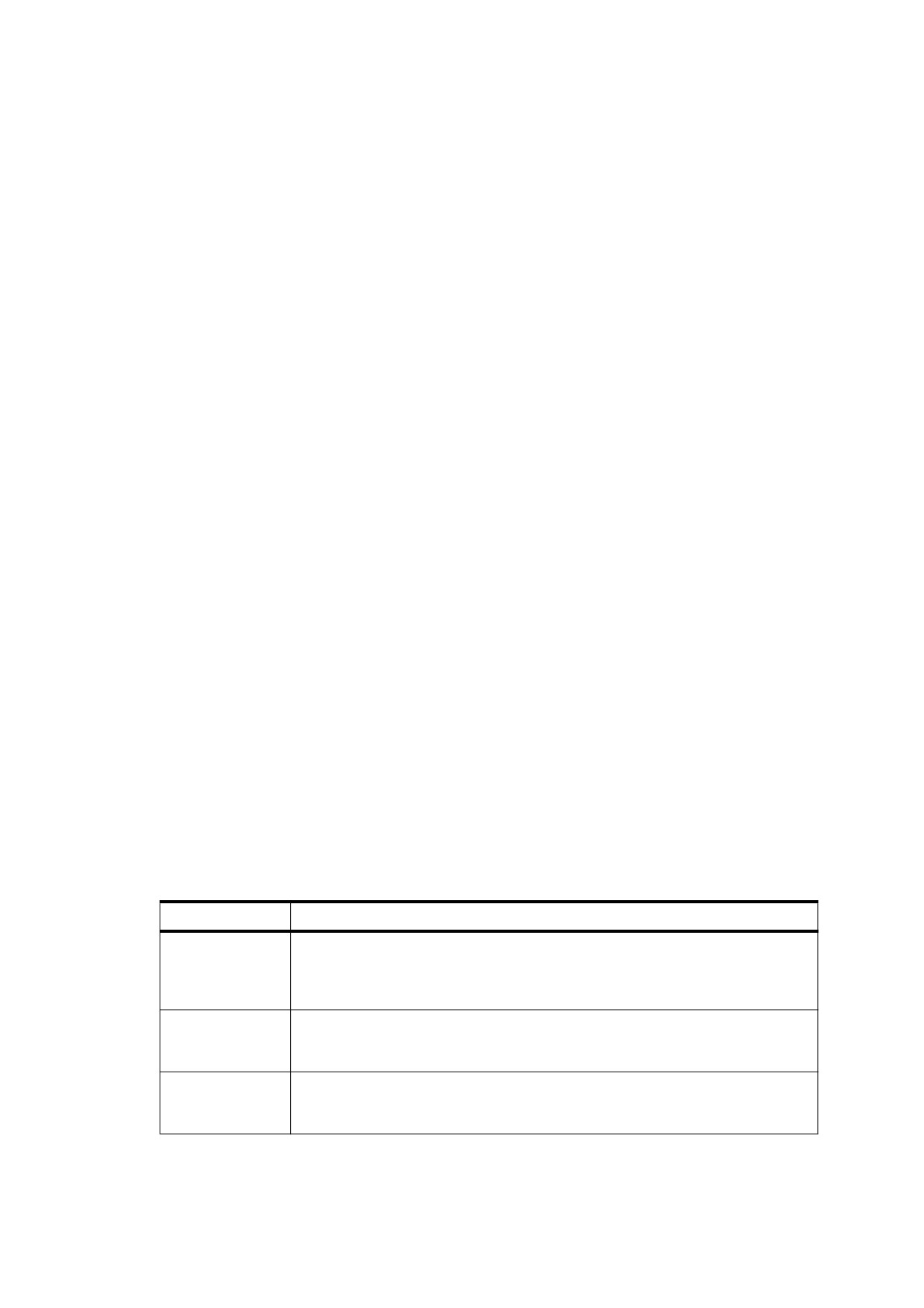
14.8.4.4.3
Annotation Elements
Tagged PDF annotation elements (structure type Annot; PDF 1.5) use PDF’s logical structure facilities to
establish the association between content items and PDF annotations. Annotation elements shall be used for
all types of annotations other than links (see “Link Elements” in 14.8.4.3, “Block-Level Structure Elements”) and
forms (see Table 340).
The following items may be children of an annotation element:
•
Object references (see 14.7.4.3, “PDF Objects as Content Items”) to one or more annotation dictionaries
•
Optionally, one or more content items (such as marked-content sequences) or other ILSEs (except other
annotations) associated with the annotations
If an Annot element has no children other than object references, its rendering shall be defined by the
appearance of the referenced annotations, and its text content shall be treated as if it were a Span element. It
may have an optional BBox attribute; if supplied, this attribute overrides the rectangle specified by the
annotation dictionary’s Rect entry.
If the Annot element has children that are content items, those children represent the displayed form of the
annotation, and the appearance of the associated annotation may also be applied (for example, with a
Highlight annotation).
There may be multiple children that are object references to different annotations, subject to the constraint that
the annotations shall be the same except for their Rect entry. This is much the same as is done for the Link
element; it allows an annotation to be associated with discontiguous pieces of content, such as line-wrapped
text.
14.8.4.4.4
Ruby and Warichu Elements
Ruby text is a side note, written in a smaller text size and placed adjacent to the base text to which it refers. It is
used in Japanese and Chinese to describe the pronunciation of unusual words or to describe such items as
abbreviations and logos.
Warichu text is a comment or annotation, written in a smaller text size and formatted onto two smaller lines
within the height of the containing text line and placed following (inline) the base text to which it refers. It is used
in Japanese for descriptive comments and for ruby annotation text that is too long to be aesthetically formatted
as a ruby.
Table 339 - Standard structure types for Ruby and Warichu elements (PDF 1.5)
Structure Type
Description
Ruby
(Ruby) The wrapper around the entire ruby assembly. It shall contain one RB
element followed by either an RT element or a three-element group consisting of
RP, RT, and RP. Ruby elements and their content elements shall not break across
multiple lines.
RB
(Ruby base text) The full-size text to which the ruby annotation is applied. RB may
contain text, other inline elements, or a mixture of both. It may have the RubyAlign
attribute.
RT
(Ruby annotation text) The smaller-size text that shall be placed adjacent to the
ruby base text. It may contain text, other inline elements, or a mixture of both. It
may have the RubyAlign and RubyPosition attributes.
591
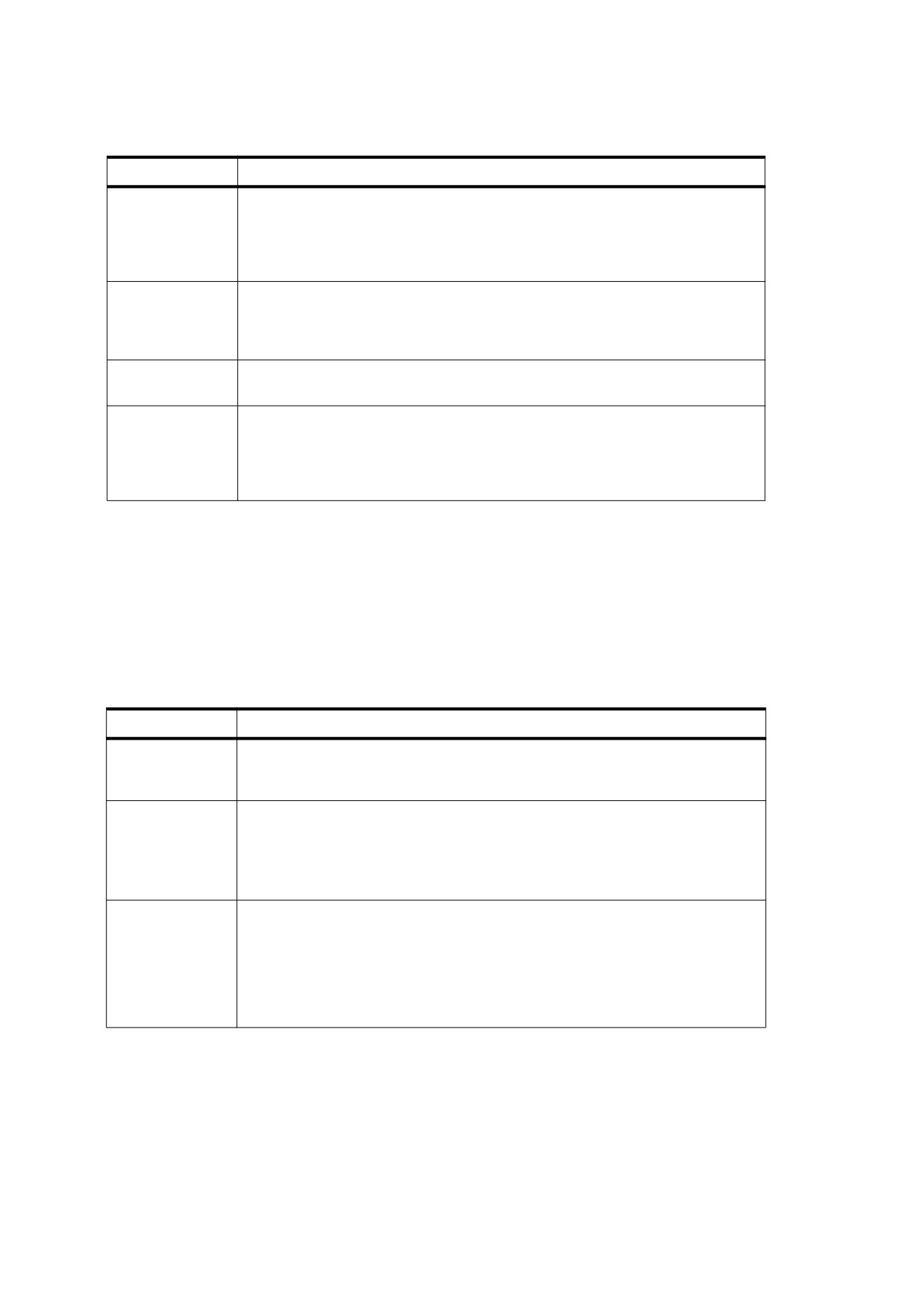
Table 339 - Standard structure types for Ruby and Warichu elements (PDF 1.5) (continued)
Structure Type
Description
RP
(Ruby punctuation) Punctuation surrounding the ruby annotation text. It is used
only when a ruby annotation cannot be properly formatted in a ruby style and
instead is formatted as a normal comment, or when it is formatted as a warichu. It
contains text
(usually a single LEFT or RIGHT PARENTHESIS or similar
bracketing character).
Warichu
(Warichu) The wrapper around the entire warichu assembly. It may contain a three-
element group consisting of WP, WT, and WP. Warichu elements (and their content
elements) may wrap across multiple lines, according to the warichu breaking rules
described in the Japanese Industrial Standard (JIS) X 4051-1995.
WT
(Warichu text) The smaller-size text of a warichu comment that is formatted into
two lines and placed between surrounding WP elements.
WP
(Warichu punctuation) The punctuation that surrounds the WT text. It contains text
(usually a single LEFT or RIGHT PARENTHESIS or similar bracketing character).
According to JIS X 4051-1995, the parentheses surrounding a warichu may be
converted to a SPACE (nominally 1/4 EM in width) at the discretion of the
formatter.
14.8.4.5
Illustration Elements
Tagged PDF defines an illustration element as any structure element whose structure type (after role mapping,
if any) is one of those listed in Table 340. The illustration’s content shall consist of one or more complete
graphics objects. It shall not appear between the BT and ET operators delimiting a text object (see 9.4, “Text
Objects”). It may include clipping only in the form of a contained marked clipping sequence, as defined in
14.6.3, “Marked Content and Clipping.” In Tagged PDF, all such marked clipping sequences shall carry the
marked-content tag Clip.
Table 340 - Standard structure types for illustration elements
Structure Type
Description
Figure
(Figure) An item of graphical content. Its placement may be specified with the
Placement layout attribute (see “General Layout Attributes” in 14.8.5.4, “Layout
Attributes”).
Formula
(Formula) A mathematical formula.
This structure type is useful only for identifying an entire content element as a
formula. No standard structure types are defined for identifying individual
components within the formula. From a formatting standpoint, the formula shall be
treated similarly to a figure (structure type Figure).
Form
(Form) A widget annotation representing an interactive form field
(see
12.7,
“Interactive Forms”). If the element contains a Role attribute, it may contain content
items that represent the value of the (non-interactive) form field. If the element
omits a Role attribute (see Table 348), it shall have only one child: an object
reference (see 14.7.4.3, “PDF Objects as Content Items”) identifying the widget
annotation. The annotations’ appearance stream
(see
12.5.5,
“Appearance
Streams”) shall describe the appearance of the form element.
An illustration may have logical substructure, including other illustrations. For purposes of reflow, however, it
shall be moved (and perhaps resized) as a unit, without examining its internal contents. To be useful for reflow,
it shall have a BBox attribute. It may also have Placement, Width, Height, and BaselineShift attributes (see
14.8.5.4, “Layout Attributes”).
592