ISO 32000-1 Document management — Portable document format — Part 1: PDF 1.7 - page 3

Table 28 - Entries in the catalog dictionary
Key
Type
Value
Type
name
(Required) The type of PDF object that this dictionary describes;
shall be Catalog for the catalog dictionary.
Version
name
(Optional; PDF 1.4) The version of the PDF specification to which
the document conforms (for example, 1.4) if later than the version
specified in the file’s header (see 7.5.2, "File Header"). If the
header specifies a later version, or if this entry is absent, the
document shall conform to the version specified in the header.
This entry enables a conforming writer to update the version using
an incremental update; see 7.5.6, "Incremental Updates."
The value of this entry shall be a name object, not a number, and
therefore shall be preceded by a SOLIDUS (2Fh) character (/)
when written in the PDF file (for example, /1.4).
Extensions
dictionary
(Optional; ISO
32000) An extensions dictionary containing
developer prefix identification and version numbers for developer
extensions that occur in this document.
7.12,
“Extensions
Dictionary”, describes this dictionary and how it shall be used.
Pages
dictionary
(Required; shall be an indirect reference) The page tree node that
shall be the root of the document’s page tree (see 7.7.3, "Page
Tree").
PageLabels
number tree
(Optional; PDF 1.3) A number tree (see 7.9.7, "Number Trees")
defining the page labelling for the document. The keys in this tree
shall be page indices; the corresponding values shall be page
label dictionaries (see 12.4.2, "Page Labels"). Each page index
shall denote the first page in a labelling range to which the
specified page label dictionary applies. The tree shall include a
value for page index 0.
Names
dictionary
(Optional; PDF 1.2) The document’s name dictionary (see 7.7.4,
"Name Dictionary").
Dests
dictionary
(Optional; PDF 1.1; shall be an indirect reference) A dictionary of
names and corresponding destinations (see 12.3.2.3, "Named
Destinations").
ViewerPreferences
dictionary
(Optional; PDF 1.2) A viewer preferences dictionary (see 12.2,
"Viewer Preferences") specifying the way the document shall be
displayed on the screen. If this entry is absent, conforming
readers shall use their own current user preference settings.
PageLayout
name
(Optional) A name object specifying the page layout shall be used
when the document is opened:
SinglePage
Display one page at a time
OneColumn
Display the pages in one column
TwoColumnLeft Display the pages in two columns, with odd-
numbered pages on the left
TwoColumnRight Display the pages in two columns, with odd-
numbered pages on the right
TwoPageLeft
(PDF 1.5) Display the pages two at a time,
with odd-numbered pages on the left
TwoPageRight
(PDF 1.5) Display the pages two at a time,
with odd-numbered pages on the right
Default value: SinglePage.
73

Table 28 - Entries in the catalog dictionary (continued)
Key
Type
Value
PageMode
name
(Optional) A name object specifying how the document shall be
displayed when opened:
UseNone
Neither document outline nor thumbnail
images visible
UseOutlines
Document outline visible
UseThumbs
Thumbnail images visible
FullScreen
Full-screen mode, with no menu bar, window
controls, or any other window visible
UseOC
(PDF 1.5) Optional content group panel visible
UseAttachments (PDF 1.6) Attachments panel visible
Default value: UseNone.
Outlines
dictionary
(Optional; shall be an indirect reference) The outline dictionary
that shall be the root of the document’s outline hierarchy (see
12.3.3, "Document Outline").
Threads
array
(Optional; PDF 1.1; shall be an indirect reference) An array of
thread dictionaries that shall represent the document’s article
threads (see 12.4.3, "Articles").
OpenAction
array or
(Optional; PDF 1.1) A value specifying a destination that shall be
dictionary
displayed or an action that shall be performed when the document
is opened. The value shall be either an array defining a
destination (see 12.3.2, "Destinations") or an action dictionary
representing an action (12.6, "Actions"). If this entry is absent, the
document shall be opened to the top of the first page at the default
magnification factor.
AA
dictionary
(Optional; PDF 1.4) An additional-actions dictionary defining the
actions that shall be taken in response to various trigger events
affecting the document as a whole (see 12.6.3, "Trigger Events").
URI
dictionary
(Optional; PDF 1.1) A URI dictionary containing document-level
information for URI
(uniform resource identifier) actions
(see
12.6.4.7, "URI Actions").
AcroForm
dictionary
(Optional; PDF 1.2) The document’s interactive form (AcroForm)
dictionary (see 12.7.2, "Interactive Form Dictionary").
Metadata
stream
(Optional; PDF 1.4; shall be an indirect reference) A metadata
stream that shall contain metadata for the document (see 14.3.2,
"Metadata Streams").
StructTreeRoot
dictionary
(Optional; PDF 1.3) The document’s structure tree root dictionary
(see 14.7.2, "Structure Hierarchy").
MarkInfo
dictionary
(Optional; PDF 1.4) A mark information dictionary that shall
contain information about the document’s usage of Tagged PDF
conventions (see 14.7, "Logical Structure").
Lang
text string
(Optional; PDF 1.4) A language identifier that shall specify the
natural language for all text in the document except where
overridden by language specifications for structure elements or
marked content (see 14.9.2, "Natural Language Specification"). If
this entry is absent, the language shall be considered unknown.
SpiderInfo
dictionary
(Optional; PDF 1.3) A Web Capture information dictionary that
shall contain state information used by any Web Capture
extension (see 14.10.2, "Web Capture Information Dictionary").
74

Table 28 - Entries in the catalog dictionary (continued)
Key
Type
Value
OutputIntents
array
(Optional; PDF 1.4) An array of output intent dictionaries that shall
specify the colour characteristics of output devices on which the
document might be rendered (see 14.11.5, "Output Intents").
PieceInfo
dictionary
(Optional; PDF 1.4) A page-piece dictionary associated with the
document (see 14.5, "Page-Piece Dictionaries").
OCProperties
dictionary
(Optional; PDF 1.5; required if a document contains optional
content) The document’s optional content properties dictionary
(see 8.11.4, "Configuring Optional Content").
Perms
dictionary
(Optional; PDF 1.5) A permissions dictionary that shall specify
user access permissions for the document. 12.8.4, "Permissions",
describes this dictionary and how it shall be used.
Legal
dictionary
(Optional; PDF 1.5) A dictionary that shall contain attestations
regarding the content of a PDF document, as it relates to the
legality of digital signatures
(see
12.8.5, "Legal Content
Attestations").
Requirements
array
(Optional; PDF 1.7) An array of requirement dictionaries that shall
represent requirements for the document.
12.10, "Document
Requirements", describes this dictionary and how it shall be used.
Collection
dictionary
(Optional; PDF 1.7) A collection dictionary that a conforming
reader shall use to enhance the presentation of file attachments
stored in the PDF document. (see 12.3.5, "Collections").
NeedsRendering
boolean
(Optional; PDF 1.7) A flag used to expedite the display of PDF
documents containing XFA forms. It specifies whether the
document shall be regenerated when the document is first
opened.
See the XML Forms Architecture
(XFA) Specification
(Bibliography).
Default value: false.
EXAMPLE
The following shows a sample catalog object.
1 0 obj
<< /Type /Catalog
/Pages 2 0 R
/PageMode /UseOutlines
/Outlines 3 0 R
>>
endobj
7.7.3
Page Tree
7.7.3.1
General
The pages of a document are accessed through a structure known as the page tree, which defines the ordering
of pages in the document. Using the tree structure, conforming readers using only limited memory, can quickly
open a document containing thousands of pages. The tree contains nodes of two types—intermediate nodes,
called page tree nodes, and leaf nodes, called page objects—whose form is described in the subsequent sub-
clauses. Conforming products shall be prepared to handle any form of tree structure built of such nodes.
NOTE
The simplest structure can consist of a single page tree node that references all of the document’s page
objects directly. However, to optimize application performance, a conforming writer can construct trees of a
particular form, known as balanced trees. Further information on this form of tree can be found in Data
Structures and Algorithms, by Aho, Hopcroft, and Ullman (see the Bibliography).
75

7.7.3.2
Page Tree Nodes
Table 29 shows the entries in a page tree node that shall always be present (Required).
Table 29 - Required entries in a page tree node
Key
Type
Value
Type
name
(Required) The type of PDF object that this dictionary describes; shall be
Pages for a page tree node.
Parent
dictionary
(Required except in root node; prohibited in the root node; shall be an
indirect reference) The page tree node that is the immediate parent of this
one.
Kids
array
(Required) An array of indirect references to the immediate children of this
node. The children shall only be page objects or other page tree nodes.
Count
integer
(Required) The number of leaf nodes (page objects) that are descendants of
this node within the page tree.
NOTE
The structure of the page tree is not necessarily related to the logical structure of the document; that is, page
tree nodes do not represent chapters, sections, and so forth. Other data structures are defined for this
purpose; see 14.7, "Logical Structure".
Conforming products shall not be required to preserve the existing structure of the page tree.
EXAMPLE
The following illustrates the page tree for a document with three pages. See 7.7.3.3, "Page Objects," for
the contents of the individual page objects, and H.5, "Page Tree Example", for a more extended example
showing the page tree for a longer document.
2 0 obj
<< /Type /Pages
/Kids
[ 4 0 R
10 0 R
24 0 R
]
/Count 3
>>
endobj
4 0 obj
<< /Type /Page
… Additional entries describing the attributes of this page…
>>
endobj
10 0 obj
<< /Type /Page
… Additional entries describing the attributes of this page…
>>
endobj
24 0 obj
<< /Type /Page
… Additional entries describing the attributes of this page…
>>
endobj
In addition to the entries shown in Table 29, a page tree node may contain further entries defining inherited
attributes for the page objects that are its descendants (see 7.7.3.4, "Inheritance of Page Attributes").
76

7.7.3.3
Page Objects
The leaves of the page tree are page objects, each of which is a dictionary specifying the attributes of a single
page of the document. Table 30 shows the contents of this dictionary. The table also identifies which attributes
a page may inherit from its ancestor nodes in the page tree, as described under 7.7.3.4, "Inheritance of Page
Attributes." Attributes that are not explicitly identified in the table as inheritable shall not be inherited.
Table 30 - Entries in a page object
Key
Type
Value
Type
name
(Required) The type of PDF object that this dictionary describes;
shall be Page for a page object.
Parent
dictionary
(Required; shall be an indirect reference) The page tree node that
is the immediate parent of this page object.
LastModified
date
(Required if PieceInfo is present; optional otherwise; PDF 1.3) The
date and time (see 7.9.4, "Dates") when the page’s contents were
most recently modified. If a page-piece dictionary (PieceInfo) is
present, the modification date shall be used to ascertain which of
the application data dictionaries that it contains correspond to the
current content of the page (see 14.5, "Page-Piece Dictionaries").
Resources
dictionary
(Required; inheritable) A dictionary containing any resources
required by the page (see 7.8.3, "Resource Dictionaries"). If the
page requires no resources, the value of this entry shall be an
empty dictionary. Omitting the entry entirely indicates that the
resources shall be inherited from an ancestor node in the page tree.
MediaBox
rectangle
(Required; inheritable) A rectangle
(see
7.9.5, "Rectangles"),
expressed in default user space units, that shall define the
boundaries of the physical medium on which the page shall be
displayed or printed (see 14.11.2, "Page Boundaries").
CropBox
rectangle
(Optional; inheritable) A rectangle, expressed in default user space
units, that shall define the visible region of default user space.
When the page is displayed or printed, its contents shall be clipped
(cropped) to this rectangle and then shall be imposed on the output
medium in some implementation-defined manner (see 14.11.2,
"Page Boundaries"). Default value: the value of MediaBox.
BleedBox
rectangle
(Optional; PDF 1.3) A rectangle, expressed in default user space
units, that shall define the region to which the contents of the page
shall be clipped when output in a production environment (see
14.11.2, "Page Boundaries"). Default value: the value of CropBox.
TrimBox
rectangle
(Optional; PDF 1.3) A rectangle, expressed in default user space
units, that shall define the intended dimensions of the finished page
after trimming (see 14.11.2, "Page Boundaries"). Default value: the
value of CropBox.
ArtBox
rectangle
(Optional; PDF 1.3) A rectangle, expressed in default user space
units, that shall define the extent of the page’s meaningful content
(including potential white space) as intended by the page’s creator
(see
14.11.2, "Page Boundaries"). Default value: the value of
CropBox.
BoxColorInfo
dictionary
(Optional; PDF 1.4) A box colour information dictionary that shall
specify the colours and other visual characteristics that should be
used in displaying guidelines on the screen for the various page
boundaries (see 14.11.2.2, "Display of Page Boundaries"). If this
entry is absent, the application shall use its own current default
settings.
77

Table 30 - Entries in a page object (continued)
Key
Type
Value
Contents
stream or array
(Optional) A content stream (see 7.8.2, "Content Streams") that
shall describe the contents of this page. If this entry is absent, the
page shall be empty.
The value shall be either a single stream or an array of streams. If
the value is an array, the effect shall be as if all of the streams in the
array were concatenated, in order, to form a single stream.
Conforming writers can create image objects and other resources
as they occur, even though they interrupt the content stream. The
division between streams may occur only at the boundaries
between lexical tokens (see 7.2, "Lexical Conventions") but shall be
unrelated to the page’s logical content or organization. Applications
that consume or produce PDF files need not preserve the existing
structure of the Contents array. Conforming writers shall not create
a Contents array containing no elements.
Rotate
integer
(Optional; inheritable) The number of degrees by which the page
shall be rotated clockwise when displayed or printed. The value
shall be a multiple of 90. Default value: 0.
Group
dictionary
(Optional; PDF 1.4) A group attributes dictionary that shall specify
the attributes of the page’s page group for use in the transparent
imaging model
(see
11.4.7, "Page Group" and
11.6.6,
"Transparency Group XObjects").
Thumb
stream
(Optional) A stream object that shall define the page’s thumbnail
image (see 12.3.4, "Thumbnail Images").
B
array
(Optional; PDF 1.1; recommended if the page contains article
beads) An array that shall contain indirect references to all article
beads appearing on the page (see 12.4.3, "Articles"). The beads
shall be listed in the array in natural reading order.
NOTE
The information in this entry can be created or
recreated from the information obtained from the
Threads key in the Catalog.
Dur
number
(Optional; PDF 1.1) The page’s display duration (also called its
advance timing): the maximum length of time, in seconds, that the
page shall be displayed during presentations before the viewer
application shall automatically advance to the next page
(see
12.4.4, "Presentations"). By default, the viewer shall not advance
automatically.
Trans
dictionary
(Optional; PDF 1.1) A transition dictionary describing the transition
effect that shall be used when displaying the page during
presentations (see 12.4.4, "Presentations").
Annots
array
(Optional) An array of annotation dictionaries that shall contain
indirect references to all annotations associated with the page (see
12.5, "Annotations").
AA
dictionary
(Optional; PDF 1.2) An additional-actions dictionary that shall
define actions to be performed when the page is opened or closed
(see 12.6.3, "Trigger Events").
(PDF 1.3) additional-actions dictionaries are not inheritable.
Metadata
stream
(Optional; PDF 1.4) A metadata stream that shall contain metadata
for the page (see 14.3.2, "Metadata Streams").
PieceInfo
dictionary
(Optional; PDF 1.3) A page-piece dictionary associated with the
page (see 14.5, "Page-Piece Dictionaries").
78

Table 30 - Entries in a page object (continued)
Key
Type
Value
StructParents
integer
(Required if the page contains structural content items; PDF 1.3)
The integer key of the page’s entry in the structural parent tree (see
14.7.4.4, "Finding Structure Elements from Content Items").
ID
byte string
(Optional; PDF 1.3; indirect reference preferred) The digital
identifier of the page’s parent Web Capture content set
(see
14.10.6, "Object Attributes Related to Web Capture").
PZ
number
(Optional; PDF 1.3) The page’s preferred zoom (magnification)
factor: the factor by which it shall be scaled to achieve the natural
display magnification (see 14.10.6, "Object Attributes Related to
Web Capture").
SeparationInfo
dictionary
(Optional; PDF 1.3) A separation dictionary that shall contain
information needed to generate colour separations for the page
(see 14.11.4, "Separation Dictionaries").
Tabs
name
(Optional; PDF 1.5) A name specifying the tab order that shall be
used for annotations on the page. The possible values shall be R
(row order), C (column order), and S (structure order). See 12.5,
"Annotations" for details.
TemplateInstantiated
name
(Required if this page was created from a named page object; PDF
1.5) The name of the originating page object (see 12.7.6, "Named
Pages").
PresSteps
dictionary
(Optional; PDF
1.5) A navigation node dictionary that shall
represent the first node on the page (see 12.4.4.2, "Sub-page
Navigation").
UserUnit
number
(Optional; PDF 1.6) A positive number that shall give the size of
default user space units, in multiples of 1 ⁄ 72 inch. The range of
supported values shall be implementation-dependent.
Default value: 1.0 (user space unit is 1 ⁄ 72 inch).
VP
dictionary
(Optional; PDF
1.6) An array of viewport dictionaries
(see
Table 260) that shall specify rectangular regions of the page.
EXAMPLE
The following shows the definition of a page object with a thumbnail image and two annotations. The
media box specifies that the page is to be printed on letter-size paper. In addition, the resource dictionary
is specified as a direct object and shows that the page makes use of three fonts named F3, F5, and F7.
3 0 obj
<< /Type /Page
/Parent 4 0 R
/MediaBox [ 0 0 612 792 ]
/Resources <<
/Font
<< /F3 7 0 R
/F5 9 0 R
/F7 11 0 R
>>
/ProcSet [ /PDF ]
>>
/Contents 12 0 R
/Thumb 14 0 R
/Annots
[
23 0 R
24 0 R
]
>>
endobj
79
7.7.3.4
Inheritance of Page Attributes
Some of the page attributes shown in Table 30 are designated as inheritable. If such an attribute is omitted from
a page object, its value shall be inherited from an ancestor node in the page tree. If the attribute is a required
one, a value shall be supplied in an ancestor node. If the attribute is optional and no inherited value is specified,
the default value shall be used.
An attribute can thus be defined once for a whole set of pages by specifying it in an intermediate page tree
node and arranging the pages that share the attribute as descendants of that node.
EXAMPLE
A document may specify the same media box for all of its pages by including a MediaBox entry in the root
node of the page tree. If necessary, an individual page object may override this inherited value with a
MediaBox entry of its own.
In a document conforming to the Linearized PDF organization (see Annex F), all page attributes shall be
specified explicitly as entries in the page dictionaries to which they apply; they shall not be inherited from an
ancestor node.
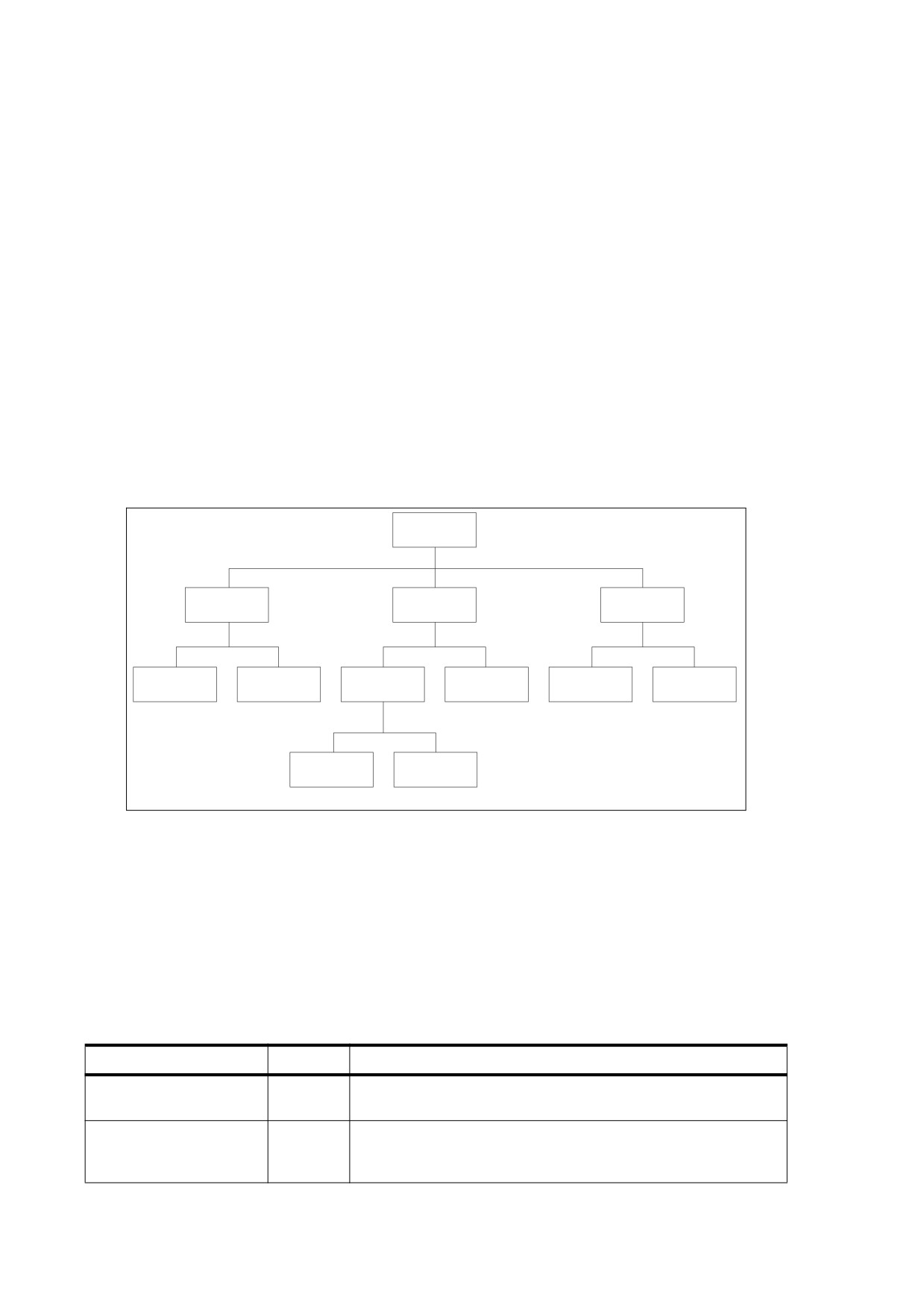
Figure 6 illustrates the inheritance of attributes. In the page tree shown, pages 1, 2, and 4 are rotated clockwise
by 90 degrees, page 3 by 270 degrees, page 6 by 180 degrees, and pages 5 and 7 not at all (0 degrees).
Pages
Pages
Pages
Pages
/Rotate 90
/Rotate 180
Page
Page
Pages
Page
Page
Page
/Rotate 0
Page 1
Page 2
Page 5
Page 6
Page 7
Page
Page
/Rotate 270
/Rotate 90
Page 3
Page 4
Figure 6 - Inheritance of attributes
7.7.4
Name Dictionary
Some categories of objects in a PDF file can be referred to by name rather than by object reference. The
correspondence between names and objects is established by the document’s name dictionary (PDF 1.2),
located by means of the Names entry in the document’s catalog (see 7.7.2, "Document Catalog"). Each entry in
this dictionary designates the root of a name tree (see 7.9.6, "Name Trees") defining names for a particular
category of objects. Table 31 shows the contents of the name dictionary.
Table 31 - Entries in the name dictionary
Key
Type
Value
Dests
name tree
(Optional; PDF 1.2) A name tree mapping name strings to
destinations (see 12.3.2.3, "Named Destinations").
AP
name tree
(Optional; PDF 1.3) A name tree mapping name strings to
annotation appearance streams
(see
12.5.5, "Appearance
Streams").
80

Table 31 - Entries in the name dictionary (continued)
Key
Type
Value
JavaScript
name tree
(Optional; PDF 1.3) A name tree mapping name strings to
document-level JavaScript actions
(see
12.6.4.16, "JavaScript
Actions").
Pages
name tree
(Optional; PDF 1.3) A name tree mapping name strings to visible
pages for use in interactive forms (see 12.7.6, "Named Pages").
Templates
name tree
(Optional; PDF 1.3) A name tree mapping name strings to invisible
(template) pages for use in interactive forms (see 12.7.6, "Named
Pages").
IDS
name tree
(Optional; PDF 1.3) A name tree mapping digital identifiers to Web
Capture content sets (see 14.10.4, "Content Sets").
URLS
name tree
(Optional; PDF 1.3) A name tree mapping uniform resource locators
(URLs) to Web Capture content sets (see 14.10.4, "Content Sets").
EmbeddedFiles
name tree
(Optional; PDF 1.4) A name tree mapping name strings to file
specifications for embedded file streams (see 7.11.4, "Embedded
File Streams").
AlternatePresentations
name tree
(Optional; PDF 1.4) A name tree mapping name strings to alternate
presentations (see 13.5, "Alternate Presentations").
Renditions
name tree
(Optional; PDF 1.5) A name tree mapping name strings (which shall
have Unicode encoding) to rendition objects
(see
13.2.3,
"Renditions").
7.8
Content Streams and Resources
7.8.1
General
Content streams are the primary means for describing the appearance of pages and other graphical elements.
A content stream depends on information contained in an associated resource dictionary; in combination, these
two objects form a self-contained entity. This sub-clause describes these objects.
7.8.2
Content Streams
A content stream is a PDF stream object whose data consists of a sequence of instructions describing the
graphical elements to be painted on a page. The instructions shall be represented in the form of PDF objects,
using the same object syntax as in the rest of the PDF document. However, whereas the document as a whole
is a static, random-access data structure, the objects in the content stream shall be interpreted and acted upon
sequentially.
Each page of a document shall be represented by one or more content streams. Content streams shall also be
used to package sequences of instructions as self-contained graphical elements, such as forms (see 8.10,
"Form XObjects"), patterns (8.7, "Patterns"), certain fonts (9.6.5, "Type 3 Fonts"), and annotation appearances
(12.5.5, "Appearance Streams").
A content stream, after decoding with any specified filters, shall be interpreted according to the PDF syntax
rules described in 7.2, "Lexical Conventions." It consists of PDF objects denoting operands and operators. The
operands needed by an operator shall precede it in the stream. See EXAMPLE 4 in 7.4, "Filters," for an
example of a content stream.
An operand is a direct object belonging to any of the basic PDF data types except a stream. Dictionaries shall
be permitted as operands only by certain specific operators. Indirect objects and object references shall not be
permitted at all.
81

An operator is a PDF keyword specifying some action that shall be performed, such as painting a graphical
shape on the page. An operator keyword shall be distinguished from a name object by the absence of an initial
SOLIDUS character (2Fh) (/ ). Operators shall be meaningful only inside a content stream.
NOTE 1
This postfix notation, in which an operator is preceded by its operands, is superficially the same as in the
PostScript language. However, PDF has no concept of an operand stack as PostScript has.
In PDF, all of the operands needed by an operator shall immediately precede that operator. Operators do not
return results, and operands shall not be left over when an operator finishes execution.
NOTE 2
Most operators have to do with painting graphical elements on the page or with specifying parameters that
affect subsequent painting operations. The individual operators are described in the clauses devoted to their
functions:
Clause 8, "Graphics" describes operators that paint general graphics, such as filled areas, strokes, and
sampled images, and that specify device-independent graphical parameters, such as colour.
Clause 9, "Text" describes operators that paint text using character glyphs defined in fonts.
Clause 10, "Rendering" describes operators that specify device-dependent rendering parameters.
Clause 14, "Document Interchange" describes the marked-content operators that associate higher-level logical
information with objects in the content stream. These operators do not affect the rendered appearance of the
content; they specify information useful to applications that use PDF for document interchange.
Ordinarily, when a conforming reader encounters an operator in a content stream that it does not recognize, an
error shall occur. A pair of compatibility operators, BX and EX (PDF 1.1), shall modify this behaviour (see
Table 32). These operators shall occur in pairs and may be nested. They bracket a compatibility section, a
portion of a content stream within which unrecognized operators shall be ignored without error. This
mechanism enables a conforming writer to use operators defined in later versions of PDF without sacrificing
compatibility with older applications. It should be used only in cases where ignoring such newer operators is the
appropriate thing to do. The BX and EX operators are not themselves part of any graphics object (see 8.2,
"Graphics Objects") or of the graphics state (8.4, "Graphics State").
Table 32 - Compatibility operators
Operands
Operator
Description
—
BX
(PDF 1.1) Begin a compatibility section. Unrecognized operators (along with
their operands) shall be ignored without error until the balancing EX operator
is encountered.
—
EX
(PDF 1.1) End a compatibility section begun by a balancing BX operator.
Ignore any unrecognized operands and operators from previous matching
BX onward.
7.8.3
Resource Dictionaries
As stated above, the operands supplied to operators in a content stream shall only be direct objects; indirect
objects and object references shall not be permitted. In some cases, an operator shall refer to a PDF object
that is defined outside the content stream, such as a font dictionary or a stream containing image data. This
shall be accomplished by defining such objects as named resources and referring to them by name from within
the content stream.
Named resources shall be meaningful only in the context of a content stream. The scope of a resource name
shall be local to a particular content stream and shall be unrelated to externally known identifiers for objects
such as fonts. References from one object outside of content streams to another outside of content streams
shall be made by means of indirect object references rather than named resources.
82

A content stream’s named resources shall be defined by a resource dictionary, which shall enumerate the
named resources needed by the operators in the content stream and the names by which they can be referred
to.
EXAMPLE 1
If a text operator appearing within the content stream needs a certain font, the content stream’s resource
dictionary can associate the name F42 with the corresponding font dictionary. The text operator can use
this name to refer to the font.
A resource dictionary shall be associated with a content stream in one of the following ways:
•
For a content stream that is the value of a page’s Contents entry (or is an element of an array that is the
value of that entry), the resource dictionary shall be designated by the page dictionary’s Resources or is
inherited, as described under 7.7.3.4, "Inheritance of Page Attributes," from some ancestor node of the
page object.
•
For other content streams, a conforming writer shall include a Resources entry in the stream's dictionary
specifying the resource dictionary which contains all the resources used by that content stream. This shall
apply to content streams that define form XObjects, patterns, Type 3 fonts, and annotation.
•
PDF files written obeying earlier versions of PDF may have omitted the Resources entry in all form
XObjects and Type 3 fonts used on a page. All resources that are referenced from those forms and fonts
shall be inherited from the resource dictionary of the page on which they are used. This construct is
obsolete and should not be used by conforming writers.
In the context of a given content stream, the term current resource dictionary refers to the resource dictionary
associated with the stream in one of the ways described above.
Each key in a resource dictionary shall be the name of a resource type, as shown in Table 33. The
corresponding values shall be as follows:
•
For resource type ProcSet, the value shall be an array of procedure set names
•
For all other resource types, the value shall be a subdictionary. Each key in the subdictionary shall be the
name of a specific resource, and the corresponding value shall be a PDF object associated with the name.
Table 33 - Entries in a resource dictionary
Key
Type
Value
ExtGState
dictionary
(Optional) A dictionary that maps resource names to graphics state
parameter dictionaries
(see
8.4.5, "Graphics State Parameter
Dictionaries").
ColorSpace
dictionary
(Optional) A dictionary that maps each resource name to either the
name of a device-dependent colour space or an array describing a
colour space (see 8.6, "Colour Spaces").
Pattern
dictionary
(Optional) A dictionary that maps resource names to pattern objects
(see 8.7, "Patterns").
Shading
dictionary
(Optional; PDF 1.3) A dictionary that maps resource names to shading
dictionaries (see 8.7.4.3, "Shading Dictionaries").
XObject
dictionary
(Optional) A dictionary that maps resource names to external objects
(see 8.8, "External Objects").
Font
dictionary
(Optional) A dictionary that maps resource names to font dictionaries
(see clause 9, "Text").
ProcSet
array
(Optional) An array of predefined procedure set names (see 14.2,
"Procedure Sets").
83

Table 33 - Entries in a resource dictionary (continued)
Key
Type
Value
Properties
dictionary
(Optional; PDF 1.2) A dictionary that maps resource names to property
list dictionaries for marked content (see 14.6.2, "Property Lists").
EXAMPLE 2
The following shows a resource dictionary containing procedure sets, fonts, and external objects. The
procedure sets are specified by an array, as described in 14.2, "Procedure Sets". The fonts are specified
with a subdictionary associating the names F5, F6, F7, and F8 with objects 6, 8, 10, and 12, respectively.
Likewise, the XObject subdictionary associates the names Im1 and Im2 with objects 13 and 15,
respectively.
<</ProcSet [ /PDF /ImageB ]
/Font
<< /F5 6 0 R
/F6 8 0 R
/F7 10 0 R
/F8 12 0 R
>>
/XObject
<< /Im1 13 0 R
/Im2 15 0 R
>>
>>
7.9
Common Data Structures
7.9.1
General
As mentioned at the beginning of this clause, there are some general-purpose data structures that are built
from the basic object types described in 7.3, "Objects," and are used in many places throughout PDF. This sub-
clause describes data structures for text strings, dates, rectangles, name trees, and number trees. More
complex data structures are described in 7.10, "Functions," and 7.11, "File Specifications."
All of these data structures are meaningful only as part of the document hierarchy; they may not appear within
content streams. In particular, the special conventions for interpreting the values of string objects apply only to
strings outside content streams. An entirely different convention is used within content streams for using strings
to select sequences of glyphs to be painted on the page (see clause 9, "Text"). Table 34 summarizes the basic
and higher-level data types that are used throughout this standard to describe the values of dictionary entries
and other PDF data values.
Table 34 - PDF data types
Type
Description
Sub-Clause
ASCII string
Bytes containing ASCII characters
7.9.2
7.9.2.4
array
Array object
7.3.6
boolean
Boolean value
7.3.2
byte string
A series of bytes that shall represent
7.9.2
characters or other binary data. If such
a type represents characters, the
encoding shall be determined by the
context.
date
Date (ASCII string)
7.9.4
dictionary
Dictionary object
7.3.7
file specification
File specification (string or dictionary)
7.11
84

Table 34 - PDF data types (continued)
Type
Description
Sub-Clause
function
Function (dictionary or stream)
7.10
integer
Integer number
name
Name object
7.3.5
name tree
Name tree (dictionary)
7.9.6
null
Null object
7.3.9
number
Number (integer or real)
number tree
Number tree (dictionary)
7.9.7
PDFDocEncoded string
Bytes containing a string that shall be
7.9.2
encoded using PDFDocEncoding
rectangle
Rectangle (array)
7.9.5
stream
Stream object
7.3.8
string
Any string that is not a text string.
7.9.2
Beginning with PDF 1.7, this type is
further qualified as the types:
PDFDocEncoded string, ASCII string,
and byte string.
text string
Bytes that represent characters that
7.9.2.2
shall be encoded using either
7.9.2
PDFDocEncoding or UTF-16BE with a
leading byte-order marker (as defined
in “Text String Type” on page 86.)
text stream
Text stream
7.9.3
7.9.2
String Object Types
7.9.2.1
General
PDF supports one fundamental string object (see 7.3.4, "String Objects"). The string object shall be further
qualified as a text string, a PDFDocEncoded string, ASCII string, or byte string. The further qualification reflects
the encoding used to represent the characters or glyphs described by the string.
Table 35 summarizes the string object types that represent data encoded using specific conventions.
Table 35 - String Object Types
Type
Description
text string
Shall be used for human-readable text, such as text
annotations, bookmark names, article names, and
document information. These strings shall be encoded
using either PDFDocEncoding or UTF-16BE with a
leading byte-order marker.
This type is described in 7.9.2.2, "Text String Type."
PDFDocEncoded string
Shall be used for characters and glyphs that are
represented in a single byte, using PDFDocEncoding.
This type is described in 7.9.2.3, "PDFDocEncoded String
Type."
85
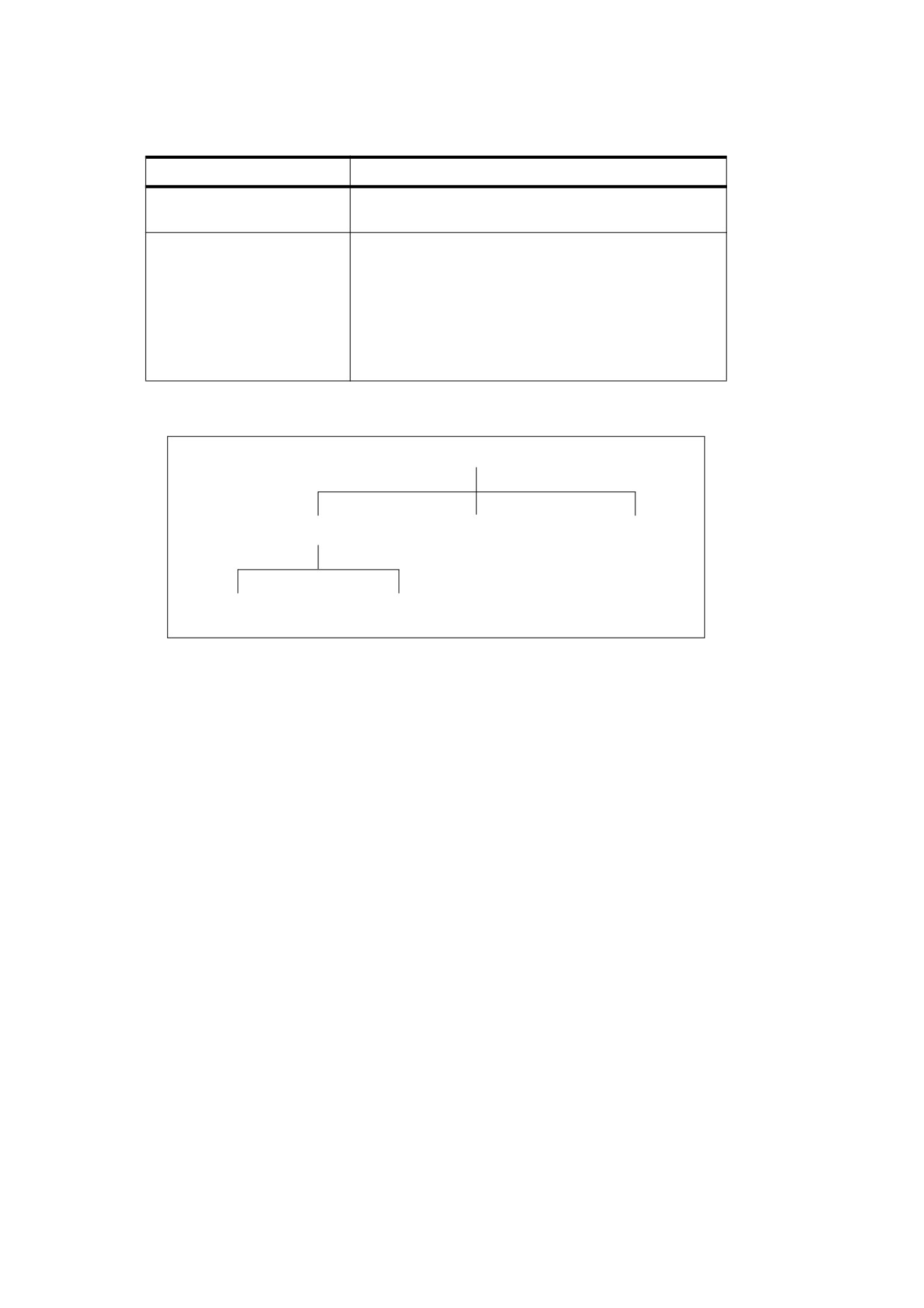
Table 35 - String Object Types (continued)
Type
Description
ASCII string
Shall be used for characters that are represented in a
single byte using ASCII encoding.
byte string
Shall be used for binary data represented as a series of
bytes, where each byte can be any value representable in
8 bits. The string may represent characters but the
encoding is not known. The bytes of the string need not
represent characters. This type shall be used for data
such as MD5 hash values, signature certificates, and Web
Capture identification values.
This type is described in 7.9.2.4, "Byte String Type."
The string types described in Table 35 specify increasingly specific encoding schemes, as shown in Figure 7.
string types
text string
ASCII string
byte string
PDFDocEncoded
UTF-16BE encoded string with
string
a leading byte order marker
Figure 7 - Relationship between string types
7.9.2.2
Text String Type
The text string type shall be used for character strings that contain information intended to be human-readable,
such as text annotations, bookmark names, article names, document information, and so forth.
NOTE 1
Text string type is a subtype of string type and represents data encoded using specific conventions.
The text string type shall be used for character strings that shall be encoded in either PDFDocEncoding or the
UTF-16BE Unicode character encoding scheme. PDFDocEncoding can encode all of the ISO Latin 1
character set and is documented in Annex D. UTF-16BE can encode all Unicode characters. UTF-16BE and
Unicode character encoding are described in the Unicode Standard by the Unicode Consortium (see the
Bibliography).
NOTE 2
PDFDocEncoding does not support all Unicode characters whereas UTF-16BE does.
For text strings encoded in Unicode, the first two bytes shall be 254 followed by 255. These two bytes represent
the Unicode byte order marker, U+FEFF, indicating that the string is encoded in the UTF-16BE (big-endian)
encoding scheme specified in the Unicode standard.
NOTE 3
This mechanism precludes beginning a string using PDFDocEncoding with the two characters thorn
ydieresis, which is unlikely to be a meaningful beginning of a word or phrase.
Conforming readers that process PDF files containing Unicode text strings shall be prepared to handle
supplementary characters; that is, characters requiring more than two bytes to represent.
An escape sequence may appear anywhere in a Unicode text string to indicate the language in which
subsequent text shall be written.
86
NOTE 4
This is useful when the language cannot be determined from the character codes used in the text.
The escape sequence shall consist of the following elements, in order:
a) The Unicode value U+001B (that is, the byte sequence 0 followed by 27).
b) A 2- byte ISO 639 language code.
EXAMPLE
en for English or ja for Japanese encoded as ASCII characters.
c)
(Optional) A 2-byte ISO 3166 country code.
EXAMPLE
US for the United States or JP for Japan.
d) The Unicode value U+001B.
NOTE 5
The complete list of codes defined by ISO 639 and ISO 3166 can be obtained from the International
Organization for Standardization (see the Bibliography).
7.9.2.3
PDFDocEncoded String Type
A PDFDocEncoded string is a character string in which the characters shall be represented in a single byte
using PDFDocEncoding.
NOTE
PDFDocEncoding does not support all Unicode characters whereas UTF-16BE does.
7.9.2.4
Byte String Type
The byte string type shall be used for binary data that shall be represented as a series of bytes, where each
byte may be any value representable in 8 bits. Byte string type is a subtype of string type.
NOTE
The string may represent characters but the encoding is not known. The bytes of the string may not represent
characters.
7.9.3
Text Streams
A text stream (PDF 1.5) shall be a PDF stream object (7.3.8, "Stream Objects") whose unencoded bytes shall
meet the same requirements as a text string (7.9.2.2, "Text String Type") with respect to encoding, byte order,
and lead bytes.
7.9.4
Dates
Date values used in a PDF shall conform to a standard date format, which closely follows that of the
international standard ASN.1 (Abstract Syntax Notation One), defined in ISO/IEC 8824. A date shall be a text
string of the form
( D : YYYYMMDDHHmmSSOHH' mm )
where:
YYYY shall be the year
MM shall be the month (01-12)
DD shall be the day (01-31)
HH shall be the hour (00-23)
87
mm shall be the minute (00-59)
SS shall be the second (00-59)
O shall be the relationship of local time to Universal Time (UT), and shall be denoted by one of the
characters PLUS SIGN (U+002B) (+), HYPHEN-MINUS (U+002D) (-), or LATIN CAPITAL LETTER Z
(U+005A) (Z) (see below)
HH followed by APOSTROPHE (U+0027) (') shall be the absolute value of the offset from UT in hours
(00-23)
mm shall be the absolute value of the offset from UT in minutes (00-59)
The prefix D: shall be present, the year field (YYYY) shall be present and all other fields may be present but
only if all of their preceding fields are also present. The APOSTROPHE following the hour offset field (HH) shall
only be present if the HH field is present. The minute offset field
(mm) shall only be present if the
APOSTROPHE following the hour offset field (HH) is present. The default values for MM and DD shall be both
01; all other numerical fields shall default to zero values. A PLUS SIGN as the value of the O field signifies that
local time is later than UT, a HYPHEN-MINUS signifies that local time is earlier than UT, and the LATIN
CAPITAL LETTER Z signifies that local time is equal to UT. If no UT information is specified, the relationship of
the specified time to UT shall be considered to be GMT. Regardless of whether the time zone is specified, the
rest of the date shall be specified in local time.
EXAMPLE
For example, December 23, 1998, at 7:52 PM, U.S. Pacific Standard Time, is represented by the string
D : 199812231952 - 08' 00
7.9.5
Rectangles
Rectangles are used to describe locations on a page and bounding boxes for a variety of objects. A rectangle
shall be written as an array of four numbers giving the coordinates of a pair of diagonally opposite corners.
NOTE
Although rectangles are conventionally specified by their lower-left and upper-right corners, it is acceptable to
specify any two diagonally opposite corners. Applications that process PDF should be prepared to normalize
such rectangles in situations where specific corners are required.
Typically, the array takes the form
[llx lly urx ury ]
specifying the lower-left x, lower-left y, upper-right x, and upper-right y coordinates of the rectangle, in that
order. The other two corners of the rectangle are then assumed to have coordinates (llx, ury) and (urx, lly).
7.9.6
Name Trees
A name tree serves a similar purpose to a dictionary—associating keys and values—but by different means. A
name tree differs from a dictionary in the following important ways:
•
Unlike the keys in a dictionary, which are name objects, those in a name tree are strings.
•
The keys are ordered.
•
The values associated with the keys may be objects of any type. Stream objects shall be specified by
indirect object references (7.3.8, "Stream Objects"). The dictionary, array, and string objects should be
specified by indirect object references, and other PDF objects (nulls, numbers, booleans, and names)
should be specified as direct objects.
•
The data structure can represent an arbitrarily large collection of key-value pairs, which can be looked up
efficiently without requiring the entire data structure to be read from the PDF file. (In contrast, a dictionary
can be subject to an implementation limit on the number of entries it can contain.)
88

A name tree shall be constructed of nodes, each of which shall be a dictionary object. Table 36 shows the
entries in a node dictionary. The nodes shall be of three kinds, depending on the specific entries they contain.
The tree shall always have exactly one root node, which shall contain a single entry: either Kids or Names but
not both. If the root node has a Names entry, it shall be the only node in the tree. If it has a Kids entry, each of
the remaining nodes shall be either an intermediate node, that shall contain a Limits entry and a Kids entry, or
a leaf node, that shall contain a Limits entry and a Names entry.
Table 36 - Entries in a name tree node dictionary
Key
Type
Value
Kids
array
(Root and intermediate nodes only; required in intermediate nodes; present in the
root node if and only if Names is not present) Shall be an array of indirect
references to the immediate children of this node. The children may be
intermediate or leaf nodes.
Names
array
(Root and leaf nodes only; required in leaf nodes; present in the root node if and
only if Kids is not present) Shall be an array of the form
[key1 value1 key2 value2 … keyn valuen]
where each keyi shall be a string and the corresponding valuei shall be the object
associated with that key. The keys shall be sorted in lexical order, as described
below.
Limits
array
(Intermediate and leaf nodes only; required) Shall be an array of two strings, that
shall specify the (lexically) least and greatest keys included in the Names array of
a leaf node or in the Names arrays of any leaf nodes that are descendants of an
intermediate node.
The Kids entries in the root and intermediate nodes define the tree’s structure by identifying the immediate
children of each node. The Names entries in the leaf (or root) nodes shall contain the tree’s keys and their
associated values, arranged in key-value pairs and shall be sorted lexically in ascending order by key. Shorter
keys shall appear before longer ones beginning with the same byte sequence. Any encoding of the keys may
be used as long as it is self-consistent; keys shall be compared for equality on a simple byte-by-byte basis.
The keys contained within the various nodes’ Names entries shall not overlap; each Names entry shall contain
a single contiguous range of all the keys in the tree. In a leaf node, the Limits entry shall specify the least and
greatest keys contained within the node’s Names entry. In an intermediate node, it shall specify the least and
greatest keys contained within the Names entries of any of that node’s descendants. The value associated with
a given key can thus be found by walking the tree in order, searching for the leaf node whose Names entry
contains that key.
EXAMPLE 1
The following is an abbreviated outline, showing object numbers and nodes, of a name tree that maps the
names of all the chemical elements, from actinium to zirconium, to their atomic numbers.
Example of a name tree
1: Root node
2: Intermediate node: Actinium to Gold
5: Leaf node: Actinium = 25, … , Astatine = 31
25: Integer: 89
…
31: Integer: 85
…
11: Leaf node: Gadolinium = 56, … , Gold = 59
56: Integer: 64
…
59: Integer: 79
3: Intermediate node: Hafnium to Protactinium
12: Leaf node: Hafnium = 60, … , Hydrogen = 65
60: Integer: 72
…
65: Integer: 1
…
89
19: Leaf node: Palladium = 92, … , Protactinium = 100
92: Integer: 46
…
100:Integer: 91
4: Intermediate node: Radium to Zirconium
20: Leaf node: Radium = 101, … , Ruthenium = 107
101:Integer: 89
…
107:Integer: 85
…
24: Leaf node: Xenon = 129, … , Zirconium = 133
129:Integer: 54
…
133:Integer: 40
EXAMPLE 2
The following shows the representation of this tree in a PDF file
1 0 obj
<<
/Kids
[
2 0 R
% Root node
3 0 R
4 0 R
]
>>
endobj
2 0 obj
<< /Limits [ ( Actinium ) ( Gold ) ]
% Intermediate node
/Kids
[
5 0 R
6 0 R
7 0 R
8 0 R
9 0 R
10 0 R
11 0 R
]
>>
endobj
3 0 obj
<< /Limits [ ( Hafnium ) ( Protactinium ) ]
% Intermediate node
/Kids
[
12 0 R
13 0 R
14 0 R
15 0 R
16 0 R
17 0 R
18 0 R
19 0 R
]
>>
endobj
4 0 obj
<< /Limits [ ( Radium ) ( Zirconium ) ]
% Intermediate node
/Kids
[
20 0 R
21 0 R
22 0 R
23 0 R
24 0 R
]
>>
endobj
5 0 obj
<< /Limits [ ( Actinium ) ( Astatine ) ]
% Leaf node
/Names [
( Actinium )
25 0 R
90

( Aluminum ) 26 0 R
( Americium ) 27 0 R
( Antimony ) 28 0 R
( Argon ) 29 0 R
( Arsenic )
30 0 R
( Astatine )
31 0 R
]
>>
endobj
…
24 0 obj
<< /Limits [ ( Xenon ) ( Zirconium ) ]
% Leaf node
/Names [
( Xenon ) 129 0 R
( Ytterbium )
130 0 R
( Yttrium )
131 0 R
( Zinc )
132 0 R
( Zirconium ) 133 0 R
]
>>
endobj
25 0 obj
89
% Atomic number (Actinium)
endobj
…
133 0 obj
40
% Atomic number (Zirconium)
endobj
7.9.7
Number Trees
A number tree is similar to a name tree (see 7.9.6, "Name Trees"), except that its keys shall be integers instead
of strings and shall be sorted in ascending numerical order. The entries in the leaf (or root) nodes containing
the key-value pairs shall be named Nums instead of Names as in a name tree. Table 37 shows the entries in a
number tree’s node dictionaries.
Table 37 - Entries in a number tree node dictionary
Key
Type
Value
Kids
array
(Root and intermediate nodes only; required in intermediate nodes; present in the
root node if and only if Nums is not present) Shall be an array of indirect
references to the immediate children of this node. The children may be
intermediate or leaf nodes.
Nums
array
(Root and leaf nodes only; shall be required in leaf nodes; present in the root
node if and only if Kids is not present) Shall be an array of the form
[key1 value1 key2 value2 … keyn valuen]
where each keyi is an integer and the corresponding valuei shall be the object
associated with that key. The keys shall be sorted in numerical order,
analogously to the arrangement of keys in a name tree as described in 7.9.6,
"Name Trees."
Limits
array
(Shall be present in Intermediate and leaf nodes only) Shall be an array of two
integers, that shall specify the (numerically) least and greatest keys included in
the Nums array of a leaf node or in the Nums arrays of any leaf nodes that are
descendants of an intermediate node.
91
7.10
Functions
7.10.1
General
PDF is not a programming language, and a PDF file is not a program. However, PDF provides several types of
function objects (PDF 1.2) that represent parameterized classes of functions, including mathematical formulas
and sampled representations with arbitrary resolution.
NOTE 1
Functions may be used in various ways in PDF, including device-dependent rasterization information for high-
quality printing (halftone spot functions and transfer functions), colour transform functions for certain colour
spaces, and specification of colours as a function of position for smooth shadings.
Functions in PDF represent static, self-contained numerical transformations.
NOTE 2
A function to add two numbers has two input values and one output value:
f(x0
,
x1
)
=
x0
+
x1
Similarly, a function that computes the arithmetic and geometric mean of two numbers can be viewed as a
function of two input values and two output values:
x0
+
x1
f(x0
,
x1
)
=
----------------
,
x0
×
x1
2
In general, a function can take any number (m) of input values and produce any number (n) of output values:
f(x0
,
…,xm-1
)
=
y0
,
…,yn-1
In PDF functions, all the input values and all the output values shall be numbers, and functions shall have no
side effects.
Each function definition includes a domain, the set of legal values for the input. Some types of functions also
define a range, the set of legal values for the output. Input values passed to the function shall be clipped to the
domain, and output values produced by the function shall be clipped to the range.
EXAMPLE
Suppose the following function is defined with a domain of [-1 1 ]. If the function is called with the input
value 6, that value is replaced with the nearest value in the defined domain, 1, before the function is
evaluated; the resulting output value is therefore 3.
f(x)
= x+2
Similarly, if the following function is defined with a range of [ 0
100 ], and if the input values -6 and 4 are
passed to the function (and are within its domain), then the output value produced by the function, -14, is
replaced with 0, the nearest value in the defined range.
f(x0
,
x1
)
=
3
×
x0
+
x1
A function object may be a dictionary or a stream, depending on the type of function. The term function
dictionary is used generically in this sub-clause to refer to either a dictionary object or the dictionary portion of a
stream object. A function dictionary specifies the function’s representation, the set of attributes that
parameterize that representation, and the additional data needed by that representation. Four types of
functions are available, as indicated by the dictionary’s FunctionType entry:
•
(PDF 1.2) A sampled function (type 0) uses a table of sample values to define the function. Various
techniques are used to interpolate values between the sample values; see 7.10.2, "Type 0 (Sampled)
Functions."
92

•
(PDF 1.3) An exponential interpolation function (type 2) defines a set of coefficients for an exponential
function; see 7.10.3, "Type 2 (Exponential Interpolation) Functions."
•
(PDF 1.3) A stitching function (type 3) is a combination of other functions, partitioned across a domain; see
7.10.4, "Type 3 (Stitching) Functions."
•
(PDF 1.3) A PostScript calculator function (type 4) uses operators from the PostScript language
to
describe an arithmetic expression; see 7.10.5, "Type 4 (PostScript Calculator) Functions."
All function dictionaries shall share the entries listed in Table 38.
Table 38 - Entries common to all function dictionaries
Key
Type
Value
FunctionType
integer
(Required) The function type:
0
Sampled function
2
Exponential interpolation function
3
Stitching function
4
PostScript calculator function
Domain
array
(Required) An array of 2 × m numbers, where m shall be the number
of input values. For each i from 0 to m − 1, Domain2i shall be less than
or equal to Domain2i+1 , and the ith input value, xi , shall lie in the
interval Domain2i ≤ xi ≤ Domain2i+1 . Input values outside the declared
domain shall be clipped to the nearest boundary value.
Range
array
(Required for type 0 and type 4 functions, optional otherwise; see
below) An array of 2 × n numbers, where n shall be the number of
output values. For each j from 0 to n − 1, Range2j shall be less than or
equal to Range2j+1 , and the jth output value, yj , shall lie in the interval
Range2j ≤ yj ≤ Range2j+1. Output values outside the declared range
shall be clipped to the nearest boundary value. If this entry is absent,
no clipping shall be done.
In addition, each type of function dictionary shall include entries appropriate to the particular function type. The
number of output values can usually be inferred from other attributes of the function; if not (as is always the
case for type 0 and type 4 functions), the Range entry is required. The dimensionality of the function implied by
the Domain and Range entries shall be consistent with that implied by other attributes of the function.
7.10.2
Type 0 (Sampled) Functions
Type 0 functions use a sequence of sample values (contained in a stream) to provide an approximation for
functions whose domains and ranges are bounded. The samples are organized as an m-dimensional table in
which each entry has n components.
NOTE 1
Sampled functions are highly general and offer reasonably accurate representations of arbitrary analytic
functions at low expense. For example, a 1-input sinusoidal function can be represented over the range
[0
180 ] with an average error of only 1 percent, using just ten samples and linear interpolation. Two-input
functions require significantly more samples but usually not a prohibitive number if the function does not have
high frequency variations.
There shall be no dimensionality limit of a sampled function except for possible implementation limits.
NOTE 2
The number of samples required to represent functions with high dimensionality multiplies rapidly unless the
sampling resolution is very low. Also, the process of multilinear interpolation becomes computationally
intensive if the number of inputs m is greater than 2. The multidimensional spline interpolation is even more
computationally intensive.
In addition to the entries in Table 38, a type 0 function dictionary includes those shown in Table 39.
93

The Domain, Encode, and Size entries determine how the function’s input variable values are mapped into the
sample table. For example, if Size is [ 21 31 ], the default Encode array shall be [ 0 20 0 30 ], which maps the
entire domain into the full set of sample table entries. Other values of Encode may be used.
To explain the relationship between Domain, Encode, Size, Decode, and Range, we use the following
notation:
y
=
Interpolate(x, xmin, xmax, ymin, ymax
)
⎛
ymax – ymin⎞
=
ymin
+
⎜(
x xmin
)
× ---------------------------
⎟
⎝
x
⎠
max – xmin
For a given value of x, Interpolate calculates the y value on the line defined by the two points (xmin , ymin ) and
(xmax , ymax).
Table 39 - Additional entries specific to a type 0 function dictionary
Key
Type
Value
Size
array
(Required) An array of m positive integers that shall specify the
number of samples in each input dimension of the sample table.
BitsPerSample
integer
(Required) The number of bits that shall represent each sample. (If the
function has multiple output values, each one shall occupy
BitsPerSample bits.) Valid values shall be 1, 2, 4, 8, 12, 16, 24, and
32.
Order
integer
(Optional) The order of interpolation between samples. Valid values
shall be 1 and 3, specifying linear and cubic spline interpolation,
respectively. Default value: 1.
Encode
array
(Optional) An array of 2 × m numbers specifying the linear mapping of
input values into the domain of the function’s sample table. Default
value: [ 0
(Size0 − 1) 0 (Size1 − 1) … ].
Decode
array
(Optional) An array of 2 × n numbers specifying the linear mapping of
sample values into the range appropriate for the function’s output
values. Default value: same as the value of Range.
other stream
(various)
(Optional) Other attributes of the stream that shall provide the sample
attributes
values, as appropriate (see Table 5).
When a sampled function is called, each input value xi , for 0
£ i < m, shall be clipped to the domain:
xi′
=
min(max(xi, Domain
), Domain
)
2i
2i + 1
That value shall be encoded:
ei
=
Interpolate(xi′, Domain2i, Domain2i+1
,
Encode2i, Encode2i+1
)
That value shall be clipped to the size of the sample table in that dimension:
ei′
=
min(max(ei, 0), Sizei
-
1
)
The encoded input values shall be real numbers, not restricted to integers. Interpolation shall be used to
determine output values from the nearest surrounding values in the sample table. Each output value rj , for
0
£ j < n, shall then be decoded:
94
rj′
=
Interpolate(rj
,
0, 2BitsPerSample
-
1
,
Decode2j, Decode2j+1
)
Finally, each decoded value shall be clipped to the range:
yj
=
min(max(rj′, Range
), Range
)
2j
2j+1
Sample data shall be represented as a stream of bytes. The bytes shall constitute a continuous bit stream, with
the high-order bit of each byte first. Each sample value shall be represented as a sequence of BitsPerSample
bits. Successive values shall be adjacent in the bit stream; there shall be no padding at byte boundaries.
For a function with multidimensional input (more than one input variable), the sample values in the first
dimension vary fastest, and the values in the last dimension vary slowest.
EXAMPLE 1
For a function f (a, b, c), where a, b, and c vary from 0 to 9 in steps of 1, the sample values would appear
in this order: f (0, 0, 0), f (1, 0, 0), … , f (9, 0, 0), f (0, 1, 0), f (1, 1, 0), … , f (9, 1, 0), f (0, 2, 0), f (1, 2, 0), … ,
f (9, 9, 0), f (0, 0, 1), f (1, 0, 1), and so on.
For a function with multidimensional output (more than one output value), the values shall be stored in the
same order as Range.
The stream data shall be long enough to contain the entire sample array, as indicated by Size, Range, and
BitsPerSample; see 7.3.8.2, "Stream Extent."
Example 2 illustrates a sampled function with 4-bit samples in an array containing 21 columns and 31 rows
(651 values). The function takes two arguments, x and y, in the domain [-1.0 1.0 ], and returns one value, z, in
that same range. The x argument shall be linearly transformed by the encoding to the domain [ 0 20 ] and the y
argument to the domain [ 0 30 ]. Using bilinear interpolation between sample points, the function computes a
value for z, which (because BitsPerSample is 4) will be in the range [ 0 15 ], and the decoding transforms z to
a number in the range [ -1.0 1.0 ] for the result. The sample array shall be stored in a string of 326 bytes,
calculated as follows (rounded up):
326 bytes = 31 rows ¥ 21 samples / row ¥ 4 bits / sample ³ 8 bits / byte
The first byte contains the sample for the point (-1.0, -1.0) in the high-order 4 bits and the sample for the point
(-0.9, -1.0) in the low-order 4 bits.
EXAMPLE 2
14 0 obj
<< /FunctionType 0
/Domain [-1.0 1.0
-1.0
1.0 ]
/Size
[21
31 ]
/Encode [ 0 20
0 30 ]
/BitsPerSample 4
/Range [ -1.0 1.0 ]
/Decode [ -1.0 1.0 ]
/Length …
/Filter
…
>>
stream
… 651 sample values…
endstream
endobj
NOTE 3
The Decode entry can be used creatively to increase the accuracy of encoded samples corresponding to
certain values in the range.
EXAMPLE 3
If the range of the function is [ -1.0
1.0 ] and BitsPerSample is 4, the usual value of Decode would be
[ -1.0
1.0 ] and the sample values would be integers in the interval [ 0 15 ] (as shown in Figure 8). But if
these values are used, the midpoint of the range, 0.0, is not represented exactly by any sample value,
since it falls halfway between 7 and 8. However, if the Decode array is [ -1.0 +1.1429 ] (1.1429 being
95

approximately equal to 16 ³ 14) and the sample values supplied are in the interval [ 0 14 ], the effective
range of [ -1.0 1.0 ] is achieved, and the range value 0.0 is represented by the sample value 7.
The Size value for an input dimension can be 1, in which case all input values in that dimension shall be
mapped to the single allowed value. If Size is less than 4, cubic spline interpolation is not possible and Order 3
shall be ignored if specified.
+1
+1
0
0
1
2
3
4
5
7
8
9
10 11 12 13 14 15
1
2
3
4
6
7
8
9
10 11 12 13 14 15
Samples
Samples
-1
-1
/Decode [-1 1]
/Decode [-1 1.1429]
Figure 8 - Mapping with the Decode array
7.10.3
Type 2 (Exponential Interpolation) Functions
Type 2 functions (PDF 1.3) include a set of parameters that define an exponential interpolation of one input
value and n output values:
f(x)
=
y0
,
…,yn-1
In addition to the entries in Table 38, a type 2 function dictionary shall include those listed in Table 40.
Table 40 - Additional entries specific to a type 2 function dictionary
Key
Type
Value
C0
array
(Optional) An array of n numbers that shall define the function result when x = 0.0.
Default value: [ 0.0 ].
C1
array
(Optional) An array of n numbers that shall define the function result when x = 1.0.
Default value: [ 1.0 ].
N
number
(Required) The interpolation exponent. Each input value x shall return n values,
given by yj = C0j + xN × (C1j − C0j ), for 0 ≤ j < n.
Values of Domain shall constrain x in such a way that if N is not an integer, all values of x shall be non-
negative, and if N is negative, no value of x shall be zero. Typically, Domain is declared as [ 0.0 1.0 ], and N is
a positive number. To clip the output to a specified range The Range attribute shall be used.
NOTE
When N is 1, the function performs a linear interpolation between C0 and C1; therefore, the function can also
be expressed as a sampled function (type 0).
7.10.4
Type 3 (Stitching) Functions
Type 3 functions (PDF 1.3) define a stitching of the subdomains of several 1-input functions to produce a single
new 1-input function. Since the resulting stitching function is a 1-input function, the domain is given by a two-
element array, [ Domain0 Domain1 ].
96

In addition to the entries in Table 38, a type 3 function dictionary shall include those listed in Table 41.
Table 41 - Additional entries specific to a type 3 function dictionary
Key
Type
Value
Functions
array
(Required) An array of k 1-input functions that shall make up the stitching
function. The output dimensionality of all functions shall be the same, and
compatible with the value of Range if Range is present.
Bounds
array
(Required) An array of k − 1 numbers that, in combination with Domain, shall
define the intervals to which each function from the Functions array shall apply.
Bounds elements shall be in order of increasing value, and each value shall be
within the domain defined by Domain.
Encode
array
(Required) An array of 2 × k numbers that, taken in pairs, shall map each
subset of the domain defined by Domain and the Bounds array to the domain
of the corresponding function.
Domain shall be of size 2 (that is, m = 1), and Domain0 shall be strictly less than Domain1 unless k = 1. The
domain shall be partitioned into k subdomains, as indicated by the dictionary’s Bounds entry, which shall be an
array of k - 1 numbers that obey the following relationships (with exceptions as noted below):
Domain0
<
Bounds0
<
Bounds1
<
…<Boundsk-2
<
Domain1
The Bounds array shall describe a series of half-open intervals, closed on the left and open on the right
(except the last, which is closed on the right as well). The value of the Functions entry shall be an array of k
functions. The first function shall apply to x values in the first subdomain, Domain0
£ x < Bounds0 ; the second
function shall apply to x values in the second subdomain, Bounds0
£ x < Bounds1 ; and so on. The last
function shall apply to x values in the last subdomain, which includes the upper bound:
Boundsk-2
£ x £ Domain1 . The value of k may be 1, in which case the Bounds array shall be empty and the
single item in the Functions array shall apply to all x values, Domain0
£ x £ Domain1 .
The Encode array contains 2
¥ k numbers. A value x from the ith subdomain shall be encoded as follows:
x′
=
Interpolate(x, Boundsi-1
,
Boundsi·, Encode2i, Encode2i+1
)
for 0
£ i < k. In this equation, Bounds-1 means Domain0 , and Boundsk-1 means Domain1 . If the last bound,
Boundsk-2, is equal to Domain1 , then x ¢ shall be defined to be Encode2i .
NOTE
The stitching function is designed to make it easy to combine several functions to be used within one shading
pattern over different parts of the shading’s domain. Shading patterns are discussed in 8.7.4, "Shading
Patterns". The same effect could be achieved by creating a separate shading dictionary for each of the
functions, with adjacent domains. However, since each shading would have similar parameters, and because
the overall effect is one shading, it is more convenient to have a single shading with multiple function
definitions. Also, type 3 functions provide a general mechanism for inverting the domains of 1-input functions.
EXAMPLE
Consider a function f with a Domain of [ 0.0 1.0 ] and a stitching function g with a Domain of [ 0.0 1.0 ], a
Functions array containing f, and an Encode array of [ 1.0 0.0 ]. In effect, g (x) = f (1 - x).
7.10.5
Type 4 (PostScript Calculator) Functions
7.10.5.1
General
A type 4 function (PDF 1.3), also called a PostScript calculator function, shall be represented as a stream
containing code written in a small subset of the PostScript language.
97

NOTE
Although any function can be sampled (in a type 0 PDF function) and others can be described with exponential
functions (type 2 in PDF), type 4 functions offer greater flexibility and potentially greater accuracy. For
example, a tint transformation function for a hexachrome (six-component) DeviceN colour space with an
alternate colour space of DeviceCMYK (see 8.6.6.5, "DeviceN Colour Spaces") requires a 6-in, 4-out function.
If such a function were sampled with m values for each input variable, the number of samples, 4
¥ m6, could be
prohibitively large. In practice, such functions can often be written as short, simple PostScript functions.
Type 4 functions also make it possible to include a wide variety of halftone spot functions without the loss of
accuracy that comes from sampling, and without adding to the list of predefined spot functions (see 10.5.3,
"Spot Functions"). All of the predefined spot functions can be written as type 4 functions.
The language that shall be used in a type 4 function contains expressions involving integers, real numbers, and
boolean values only. There shall be no composite data structures such as strings or arrays, no procedures, and
no variables or names. Table 42 lists the operators that can be used in this type of function. (For more
information on these operators, see Appendix B of the PostScript Language Reference, Third Edition.)
Although the semantics are those of the corresponding PostScript operators, a full PostScript interpreter is not
required.
Table 42 - Operators in type 4 functions
Operator Type
Operators
Arithmetic operators
abs
cvi
floor
mod
sin
add
cvr
idiv
mul
sqrt
atan
div
ln
neg
sub
ceiling
exp
log
round
truncate
cos
Relational, boolean,
and
false
le
not
true
and bitwise
bitshift
ge
lt
or
xor
operators
eq
gt
ne
Conditional
if
ifelse
operators
Stack operators
copy
exch
pop
dup
index
roll
The operand syntax for type 4 functions shall follow PDF conventions rather than PostScript conventions. The
entire code stream defining the function shall be enclosed in braces { } (using LEFT CURLY BRACE (7Bh) and
RIGHT CURLY BRACE (07hD)). Braces also shall delimit expressions that are executed conditionally by the if
and ifelse operators:
•
boolean { expression } if
•
boolean { expression1 } { expression2 } ifelse
This construct is purely syntactic; unlike in PostScript, no “procedure objects” shall be involved.
A type 4 function dictionary shall include the entries in Table 38, as well as other appropriate stream attributes
(see Table 5). The following example shows a type 4 function equivalent to the predefined spot function
DoubleDot (see 10.5.3, "Spot Functions").
EXAMPLE
10 0 obj
<< /FunctionType 4
/Domain [ -1.0 1.0
-1.0
1.0 ]
/Range [ -1.0
1.0 ]
/Length 71
>>
stream
98
{
360 mul sin
2 div
exch 360 mul sin
2 div
add
}
endstream
endobj
The Domain and Range entries shall both be required. The input variables shall constitute the initial operand
stack; the items remaining on the operand stack after execution of the function shall be the output variables. It
shall be an error for the number of remaining operands to differ from the number of output variables specified
by Range or for any of them to be objects other than numbers.
Implementations of type 4 functions shall provide a stack with room for at least 100 entries. No implementation
shall be required to provide a larger stack, and it shall be an error to overflow the stack.
Although any integers or real numbers that may appear in the stream fall under the same implementation limits
(defined in Annex C) as in other contexts, the intermediate results in type 4 function computations shall not. An
implementation may use a representation that exceeds those limits. Operations on real numbers, for example,
might use single-precision or double-precision floating-point numbers.
7.10.5.2
Errors in Type 4 Functions
The part of a conforming reader that reads a type 4 function (analogous to the PostScript scanner) shall detect
and report syntax errors. Any errors detected by the conforming reader shall be errors in the PDF file and shall
be handled like other errors in the file.
The part of a conforming reader that executes a type 4 function (analogous to the PostScript interpreter) shall
detect and report errors. This specification does not define a representation for the errors; those details shall be
provided by the conforming reader that processes the PDF file. The following types of errors can occur (among
others):
•
Stack overflow
•
Stack underflow
•
A type error (for example, applying not to a real number)
•
A range error (for example, applying sqrt to a negative number)
•
An undefined result (for example, dividing by 0)
7.11
File Specifications
7.11.1
General
A PDF file can refer to the contents of another file by using a file specification (PDF 1.1), which shall take either
of two forms:
•
A simple file specification shall give just the name of the target file in a standard format, independent of the
naming conventions of any particular file system. It shall take the form of either a string or a dictionary
•
A full file specification shall include information related to one or more specific file systems. It shall only be
represented as a dictionary.
99
A file specification shall refer to a file external to the PDF file or to a file embedded within the referring PDF file,
allowing its contents to be stored or transmitted along with the PDF file. The file shall be considered to be
external to the PDF file in either case.
7.11.2
File Specification Strings
7.11.2.1
General
The standard format for representing a simple file specification in string form divides the string into component
substrings separated by the SOLIDUS character (2Fh) (/). The SOLIDUS is a generic component separator
that shall be mapped to the appropriate platform-specific separator when generating a platform-dependent file
name. Any of the components may be empty. If a component contains one or more literal SOLIDI, each shall be
preceded by a REVERSE SOLIDUS (5Ch) (\), which in turn shall be preceded by another REVERSE SOLIDUS
to indicate that it is part of the string and not an escape character.
EXAMPLE
(in \ \ /out )
represents the file name
in / out
The REVERSE SOLIDI shall be removed in processing the string; they are needed only to distinguish the
component values from the component separators. The component substrings shall be stored as bytes and
shall be passed to the operating system without interpretation or conversion of any sort.
7.11.2.2
Absolute and Relative File Specifications
A simple file specification that begins with a SOLIDUS shall be an absolute file specification. The last
component shall be the file name; the preceding components shall specify its context. In some file
specifications, the file name may be empty; for example, URL (uniform resource locator) specifications can
specify directories instead of files. A file specification that does not begin with a SOLIDUS shall be a relative file
specification giving the location of the file relative to that of the PDF file containing it.
In the case of a URL-based file system, the rules of Internet RFC 1808, Relative Uniform Resource Locators
(see the Bibliography), shall be used to compute an absolute URL from a relative file specification and the
specification of the PDF file. Prior to this process, the relative file specification shall be converted to a relative
URL by using the escape mechanism of RFC 1738, Uniform Resource Locators, to represent any bytes that
would be either unsafe according to RFC 1738 or not representable in 7-bit U.S. ASCII. In addition, such URL-
based relative file specifications shall be limited to paths as defined in RFC 1808. The scheme, network
location/login, fragment identifier, query information, and parameter sections shall not be allowed.
In the case of other file systems, a relative file specification shall be converted to an absolute file specification
by removing the file name component from the specification of the containing PDF file and appending the
relative file specification in its place.
EXAMPLE 1
The relative file specification
ArtFiles / Figure1 . pdf
appearing in a PDF file whose specification is
/HardDisk / PDFDocuments / AnnualReport / Summary. pdf
yields the absolute specification
/HardDisk / PDFDocuments / AnnualReport / ArtFiles / Figure1 . pdf
The special component . . (two PERIODs) (2Eh) can be used in a relative file specification to move up a level in
the file system hierarchy. After an absolute specification has been derived, when the component immediately
preceding . . is not another . . , the two cancel each other; both are eliminated from the file specification and the
process is repeated.
100

EXAMPLE 2
The relative file specification from EXAMPLE 1 in this sub-clause using the .. (two PERIODs) special
component
. . /. . /ArtFiles /Figure1 . pdf
would yield the absolute specification
/HardDisk / ArtFiles / Figure1 . pdf
7.11.2.3
Conversion to Platform-Dependent File Names
The conversion of a file specification to a platform-dependent file name depends on the specific file naming
conventions of each platform:
•
For DOS, the initial component shall be either a physical or logical drive identifier or a network resource
name as returned by the Microsoft Windows function WNetGetConnection, and shall be followed by a
COLON (3Ah) ( : ). A network resource name shall be constructed from the first two components; the first
component shall be the server name and the second shall be the share name (volume name). All
components shall be separated by REVERSE SOLIDI (backslashes) (5Ch). It shall be possible to specify
an absolute DOS path without a drive by making the first component empty. (Empty components are
ignored by other platforms.)
•
For Mac OS, all components shall be separated by COLONs.
•
For UNIX, all components shall be separated by SOLIDI (2Fh) (slashes). An initial SOLIDUS, if present,
shall be preserved.
Strings used to specify a file name shall be interpreted in the standard encoding for the platform on which the
document is being viewed. Table 43 shows examples of file specifications on the most common platforms.
Table 43 - Examples of file specifications
System
System-dependent paths
Written form
DOS
\pdfdocs \ spec . pdf ( no drive )
( / /pdfdocs / spec . pdf )
r : \pdfdocs \ spec . pdf
( / r /pdfdocs / spec . pdf )
pclib / eng : \ pdfdocs \ spec . pdf
( /pclib / eng / pdfdocs /
spec . pdf )
Mac OS
Mac HD : PDFDocs : spec . pdf
( /Mac HD/ PDFDocs/
spec . pdf )
UNIX
/user / fred / pdfdocs / spec . pdf
( /user / fred / pdfdocs /
pdfdocs / spec . pdf ( relative )
spec . pdf )
( pdfdocs / spec . pdf )
NOTE 1
When creating documents that are to be viewed on multiple platforms, care should be taken to ensure file
name compatibility. Only a subset of the U.S. ASCII character set should be used in file specifications: the
uppercase alphabetic characters (A-Z), the numeric characters (0-9), the PERIOD (2Eh) and the LOW LINE
(underscore) (5Fh). The PERIOD has special meaning in DOS and Windows file names, and as the first
character in a Mac OS pathname. In file specifications, the PERIOD should be used only to separate a base
file name from a file extension.
NOTE 2
Some file systems are case-insensitive, and names within a directory are unique so names should remain
distinguishable if lowercase letters are changed to uppercase or vice versa. On DOS and Windows 3.1
systems and on some CD-ROM file systems, file names are limited to 8 characters plus a 3-character
extension. File system software typically converts long names to short names by retaining the first 6 or 7
characters of the file name and the first 3 characters after the last PERIOD, if any. Since characters beyond the
sixth or seventh are often converted to other values unrelated to the original value, file names should be
distinguishable from the first 6 characters.
101

7.11.2.4
Multiple-Byte Strings in File Specifications
In PDF
1.2 or higher, a file specification may contain multiple-byte character codes, represented in
hexadecimal form between angle brackets (< and >) (using LESS-THAN SIGN (3Ch) and GREATER-THAN
SIGN (3Eh)). Since the SOLIDUS (2Fh) (slash character), denoted as < 2F >, is used as a component delimiter
and the REVERSE SOLIDUS (5Ch) (backslash character), denoted as < 5C >, is used as an escape character,
any occurrence of either of these bytes in a multiple-byte character shall be preceded by the ASCII code for the
SOLIDUS (2Fh).
EXAMPLE
A file name containing the 2-byte character code < 89 5C > is written as < 89 5C 5C >. When the
application encounters this sequence of bytes in a file name, it replaces the sequence with the original
2-byte code.
7.11.3
File Specification Dictionaries
The dictionary form of file specification provides more flexibility than the string form, allowing different files to be
specified for different file systems or platforms, or for file systems other than the standard ones (DOS/Windows,
Mac OS, and UNIX). Table 44 shows the entries in a file specification dictionary. Regardless of the platform,
conforming readers should use the F and UF (beginning with PDF 1.7) entries to specify files. The UF entry is
optional, but should be included because it enables cross-platform and cross-language compatibility.
Table 44 - Entries in a file specification dictionary
Key
Type
Value
Type
name
(Required if an EF or RF entry is present; recommended always) The type of
PDF object that this dictionary describes; shall be Filespec for a file
specification dictionary.
FS
name
(Optional) The name of the file system that shall be used to interpret this file
specification. If this entry is present, all other entries in the dictionary shall be
interpreted by the designated file system. PDF shall define only one standard
file system name, URL (see 7.11.5, "URL Specifications"); an application can
register other names (see Annex E). This entry shall be independent of the F,
UF, DOS, Mac, and Unix entries.
F
string
(Required if the DOS, Mac, and Unix entries are all absent; amended with the
UF entry for PDF 1.7) A file specification string of the form described in 7.11.2,
"File Specification Strings," or (if the file system is URL) a uniform resource
locator, as described in 7.11.5, "URL Specifications."
The UF entry should be used in addition to the F entry. The UF entry provides
cross-platform and cross-language compatibility and the F entry provides
backwards compatibility.
UF
text string
(Optional, but recommended if the F entry exists in the dictionary; PDF 1.7) A
Unicode text string that provides file specification of the form described in
7.11.2, "File Specification Strings." This is a text string encoded using
PDFDocEncoding or UTF-16BE with a leading byte-order marker (as defined
in 7.9.2.2, "Text String Type"). The F entry should be included along with this
entry for backwards compatibility reasons.
DOS
byte string
(Optional) A file specification string (see 7.11.2, "File Specification Strings")
representing a DOS file name.
This entry is obsolescent and should not be used by conforming writers.
Mac
byte string
(Optional) A file specification string (see 7.11.2, "File Specification Strings")
representing a Mac OS file name.
This entry is obsolescent and should not be used by conforming writers.
Unix
byte string
(Optional) A file specification string (see 7.11.2, "File Specification Strings")
representing a UNIX file name.
This entry is obsolescent and should not be used by conforming writers.
102

Table 44 - Entries in a file specification dictionary (continued)
Key
Type
Value
ID
array
(Optional) An array of two byte strings constituting a file identifier (see 14.4,
"File Identifiers") that should be included in the referenced file.
NOTE
The use of this entry improves an application’s chances of finding
the intended file and allows it to warn the user if the file has
changed since the link was made.
V
boolean
(Optional; PDF 1.2) A flag indicating whether the file referenced by the file
specification is volatile (changes frequently with time). If the value is true,
applications shall not cache a copy of the file. For example, a movie
annotation referencing a URL to a live video camera could set this flag to true
to notify the conforming reader that it should re-acquire the movie each time it
is played. Default value: false.
EF
dictionary
(Required if RF is present; PDF 1.3; amended to include the UF key in PDF
1.7) A dictionary containing a subset of the keys F, UF, DOS, Mac, and Unix,
corresponding to the entries by those names in the file specification dictionary.
The value of each such key shall be an embedded file stream (see 7.11.4,
"Embedded File Streams") containing the corresponding file. If this entry is
present, the Type entry is required and the file specification dictionary shall be
indirectly referenced.
The F and UF entries should be used in place of the DOS, Mac, or Unix
entries.
RF
dictionary
(Optional; PDF 1.3) A dictionary with the same structure as the EF dictionary,
which shall be present. Each key in the RF dictionary shall also be present in
the EF dictionary. Each value shall be a related files array (see 7.11.4.2,
"Related Files Arrays") identifying files that are related to the corresponding
file in the EF dictionary. If this entry is present, the Type entry is required and
the file specification dictionary shall be indirectly referenced.
Desc
text string
(Optional; PDF 1.6) Descriptive text associated with the file specification. It
shall be used for files in the EmbeddedFiles name tree (see 7.7.4, "Name
Dictionary").
CI
dictionary
(Optional; shall be indirect reference; PDF 1.7) A collection item dictionary,
which shall be used to create the user interface for portable collections (see
7.11.6, "Collection Items").
7.11.4
Embedded File Streams
7.11.4.1
General
If a PDF file contains file specifications that refer to an external file and the PDF file is archived or transmitted,
some provision should be made to ensure that the external references will remain valid. One way to do this is to
arrange for copies of the external files to accompany the PDF file. Embedded file streams (PDF 1.3) address
this problem by allowing the contents of referenced files to be embedded directly within the body of the PDF
file. This makes the PDF file a self-contained unit that can be stored or transmitted as a single entity. (The
embedded files are included purely for convenience and need not be directly processed by any conforming
reader.)
NOTE
If the file contains OPI (Open Prepress Interface) dictionaries that refer to externally stored high-resolution
images (see 14.11.7, "Open Prepress Interface (OPI)"), the image data can be incorporated into the PDF file
with embedded file streams.
An embedded file stream shall be included in a PDF document in one of the following ways:
•
Any file specification dictionary in the document may have an EF entry that specifies an embedded file
stream. The stream data shall still be associated with a location in the file system. In particular, this method
103

shall be used for file attachment annotations (see 12.5.6.15, "File Attachment Annotations"), which
associate the embedded file with a location on a page in the document.
•
Embedded file streams may be associated with the document as a whole through the EmbeddedFiles
entry (PDF 1.4) in the PDF document’s name dictionary (see 7.7.4, "Name Dictionary"). The associated
name tree shall map name strings to file specifications that refer to embedded file streams through their EF
entries.
Beginning with PDF 1.6, the Desc entry of the file specification dictionary (see Table 44) should be used to
provide a textual description of the embedded file, which can be displayed in the user interface of a conforming
reader. Previously, it was necessary to identify document-level embedded files by the name string provided in
the name dictionary associated with an embedded file stream in much the same way that the JavaScript name
tree associates name strings with document-level JavaScript actions (see 12.6.4.16, "JavaScript Actions").
The stream dictionary describing an embedded file shall contain the standard entries for any stream, such as
Length and Filter (see Table 5), as well as the additional entries shown in Table 45.
Table 45 - Additional entries in an embedded file stream dictionary
Key
Type
Value
Type
name
(Optional) The type of PDF object that this dictionary describes; if
present, shall be EmbeddedFile for an embedded file stream.
Subtype
name
(Optional) The subtype of the embedded file. The value of this entry
shall be a first-class name, as defined in Annex E. Names without a
registered prefix shall conform to the MIME media type names defined
in Internet RFC 2046, Multipurpose Internet Mail Extensions (MIME),
Part Two: Media Types (see the Bibliography), with the provision that
characters not allowed in names shall use the
2-character
hexadecimal code format described in 7.3.5, "Name Objects."
Params
dictionary
(Optional) An embedded file parameter dictionary that shall contain
additional file-specific information (see Table 46).
Table 46 - Entries in an embedded file parameter dictionary
Key
Type
Value
Size
integer
(Optional) The size of the uncompressed embedded file, in bytes.
CreationDate
date
(Optional) The date and time when the embedded file was created.
ModDate
date
(Optional) The date and time when the embedded file was last
modified.
Mac
dictionary
(Optional) A subdictionary containing additional information specific to
Mac OS files (see Table 47).
CheckSum
string
(Optional) A 16-byte string that is the checksum of the bytes of the
uncompressed embedded file. The checksum shall be calculated by
applying the standard MD5 message-digest algorithm (described in
Internet RFC 1321, The MD5 Message-Digest Algorithm; see the
Bibliography) to the bytes of the embedded file stream.
104

For Mac OS files, the Mac entry in the embedded file parameter dictionary should hold a further subdictionary
containing Mac OS-specific file information. Table 47 shows the contents of this subdictionary.
Table 47 - Entries in a Mac OS file information dictionary
Key
Type
Value
Subtype
integer
(Optional) The embedded file’s file type. It shall be encoded as an integer
according to Mac OS conventions: a 4-character ASCII text literal, that shall be
a 32-bit integer, with the high-order byte first.
EXAMPLE
The file type
“CARO” is represented as the hexadecimal
integer
4341524F, which is expressed in decimal as
1128354383.
Creator
integer
(Optional) The embedded file’s creator signature shall be encoded in the same
way as Subtype.
ResFork
stream
(Optional) The binary contents of the embedded file’s resource fork.
7.11.4.2
Related Files Arrays
In some circumstances, a PDF file can refer to a group of related files, such as the set of five files that make up
a DCS 1.0 colour-separated image. The file specification explicitly names only one of the files; the rest shall be
identified by some systematic variation of that file name (such as by altering the extension). When such a file is
to be embedded in a PDF file, the related files shall be embedded as well. This is accomplished by including a
related files array (PDF 1.3) as the value of the RF entry in the file specification dictionary. The array shall have
2
¥ n elements, which shall be paired in the form
[ string1 stream1
string2 stream2
…
stringn streamn
]
The first element of each pair shall be a string giving the name of one of the related files; the second element
shall be an embedded file stream holding the file’s contents.
EXAMPLE
In the following example, objects 21, 31, and 41 are embedded file streams containing the DOS file
SUNSET. EPS, the Mac OS file Sunset . eps, and the UNIX file Sunset . eps, respectively. The file
specification dictionary’s RF entry specifies an array, object 30, identifying a set of embedded files related
to the Mac OS file, forming a DCS 1.0 set. The example shows only the first two embedded file streams in
the set; an actual PDF file would, of course, include all of them.
10 0 obj
% File specification dictionary
<< /Type /Filespec
/DOS ( SUNSET. EPS)
/Mac ( Sunset . eps )
% Name of Mac OS file
/Unix ( Sunset . eps )
/EF
<< /DOS
21 0 R
/Mac 31 0 R
% Embedded Mac OS file
/Unix 41 0 R
>>
/RF << /Mac 30 0 R >>
% Related files array for Mac OS file
>>
endobj
30 0 obj
% Related files array for Mac OS file
[
( Sunset . eps ) 31 0 R
% Includes file Sunset . eps itself
( Sunset . C ) 32 0 R
( Sunset .M )
33 0 R
( Sunset . Y ) 34 0 R
105

( Sunset . K ) 35 0 R
]
endobj
31 0 obj
% Embedded file stream for Mac OS file
<<
/Type /EmbeddedFile
% Sunset . eps
/Length …
/Filter
…
>>
stream
… Data for Sunset . eps…
endstream
endobj
32 0 obj
% Embedded file stream for related file
<<
/Type /EmbeddedFile
% Sunset . C
/Length …
/Filter
…
>>
stream
… Data for Sunset . C…
endstream
endobj
7.11.5
URL Specifications
When the FS entry in a file specification dictionary has the value URL, the value of the F entry in that dictionary
is not a file specification string, but a uniform resource locator (URL) of the form defined in Internet RFC 1738,
Uniform Resource Locators (see the Bibliography).
EXAMPLE
The following example shows a URL specification.
<<
/FS /URL
/F ( ftp : / / www. beatles . com /Movies / AbbeyRoad .mov )
>>
The URL shall adhere to the character-encoding requirements specified in RFC 1738. Because 7-bit U.S.
ASCII is a strict subset of PDFDocEncoding, this value shall also be considered to be in that encoding.
7.11.6
Collection Items
Beginning with PDF 1.7, a collection item dictionary shall contain the data described by the collection schema
dictionary for a particular file in a collection (see 12.3.5, "Collections"). Table 48 describes the entries in a
collection item dictionary.
Table 48 - Entries in a collection item dictionary
Key
Type
Value
Type
name
(Optional) The type of PDF object that this dictionary describes; if present,
shall be CollectionItem for a collection item dictionary.
106

Table 48 - Entries in a collection item dictionary (continued)
Key
Type
Value
Other
text string,
(Optional) Provides the data corresponding to the related fields in the
keys
date,
collection dictionary. If the entry is a dictionary, then it shall be a collection
number or
subitem dictionary (see Table 49).
dictionary
The type of each entry shall match the type of data identified by the collection
field dictionary (see Table 157) referenced by the same key in the collection
schema dictionary (see Table 156).
EXAMPLE
If the corresponding collection field has a Subtype entry of
S, then the entry is a text string.
A single collection item dictionary may contain multiple entries, with one entry
representing each key (see EXAMPLE 1 in 12.3.5, "Collections").
A collection subitem dictionary provides the data corresponding to the related fields in the collection dictionary,
and it provides a means of associating a prefix string with that data value. The prefix shall be ignored by the
sorting algorithm. Table 49 describes the entries in a collection subitem dictionary.
Table 49 - Entries in a collection subitem dictionary
Key
Type
Value
Type
name
(Optional) The type of PDF object that this dictionary describes; if present,
shall be CollectionSubitem for a collection item dictionary.
D
text string,
(Optional) The data corresponding to the related entry in the collection field
date, or
dictionary
(see Table 157). The type of data shall match the data type
number
identified by the corresponding collection field dictionary. Default: none.
P
text string
(Optional) A prefix string that shall be concatenated with the text string
presented to the user. This entry is ignored when a conforming reader sorts
the items in the collection. Default: none.
7.11.7
Maintenance of File Specifications
The techniques described in this sub-clause can be used to maintain the integrity of the file specifications within
a PDF file during the following types of operations:
•
Updating the relevant file specification when a referenced file is renamed
•
Determining the complete collection of files that are copied to a mirror site
•
When creating new links to external files, discovering existing file specifications that refer to the same files
and sharing them
•
Finding the file specifications associated with embedded files to be packed or unpacked
NOTE 1
It is not possible, in general, to find all file specification strings in a PDF file because there is no way to
determine whether a given string is a file specification string. It is possible, however, to find all file specification
dictionaries, provided that they meet the following conditions:
They are indirect objects.
They contain a Type entry whose value is the name Filespec.
NOTE 2
A conforming reader can locate all of the file specification dictionaries by traversing the PDF file’s cross-
reference table (see 7.5.4, "Cross-Reference Table") and finding all dictionaries with Type keys whose value is
Filespec. For this reason, all file specifications should be expressed in dictionary form and meet the conditions
stated above. Any file specification dictionary specifying embedded files (that is, one that contains an EF entry)
should satisfy these conditions (see Table 44).
107

NOTE 3
It may not be possible to locate file specification dictionaries that are direct objects, since they are neither self-
typed nor necessarily reachable by any standard path of object references.
NOTE 4
Files may be embedded in a PDF file either directly, using the EF entry in a file specification dictionary, or
indirectly, using related files arrays specified in the RF entry. If a file is embedded indirectly, its name is given
by the string that precedes the embedded file stream in the related files array. If it is embedded directly, its
name is obtained from the value of the corresponding entry in the file specification dictionary.
EXAMPLE
The EXAMPLE in 7.11.4.2, "Related Files Arrays," for instance, shows the EF dictionary having a DOS
entry identifying object number 21 as an embedded file stream. The name of the embedded DOS file,
SUNSET. EPS, is given by the DOS entry in the file specification dictionary.
NOTE 5
A given external file may be referenced from more than one file specification. Therefore, when embedding a
file with a given name, it is recommended to check for other occurrences of the same name as the value
associated with the corresponding key in other file specification dictionaries. This requires finding all
embeddable file specifications and, for each matching key, checking for both of the following conditions:
The string value associated with the key matches the name of the file being embedded.
A file has not already been embedded for the file specification.
NOTE 6
If there is already a corresponding key in the EF dictionary, a file has already been embedded for that use of
the file name.
NOTE 7
Files associated with a given file name need not be unique. The same file name, such as readme . txt, may be
associated with different embedded files in distinct file specifications.
7.12
Extensions Dictionary
7.12.1
General
The extensions dictionary, an entry in the document’s catalog dictionary, if present, shall contain one or more
entries identifying developer-defined extensions to the ISO 32000-1 Standard. An extensions dictionary, not
shown, may optionally contain a Type entry whose value is the name Extensions. The keys in the extensions
dictionary shall be names consisting only of the registered prefixes, described in Annex E, of the developers
whose extensions are being used. The values shall be developer extensions dictionaries specifying developer-
defined version information as shown in Table 50. The extensions dictionary, all developer extensions
dictionary entries in the extensions dictionary, as well as their entries, all shall be direct objects (i.e., this
information shall be nested directly within the catalog dictionary with no indirect objects used).
7.12.2
Developer Extensions Dictionary
Table 50 describes the entries in a developer extensions dictionary.
Table 50 - Entries in a developer extensions dictionary
Key
Type
Value
Type
name
(Optional) The type of PDF object that this dictionary describes; if present,
shall be DeveloperExtensions.
BaseVersion
name
(Required) The name of the PDF version to which this extension applies. The
name shall be consistent with the syntax used for the Version entry of the
catalog dictionary (see 7.7.2, “Document Catalog”).
ExtensionLevel
integer
(Required) An integer defined by the developer to denote the extension being
used. If the developer introduces more than one extension to a given
BaseVersion the extension level numbers assigned by that developer shall
increase over time.
108
7.12.3
BaseVersion
The value of the BaseVersion entry shall be a name and shall be consistent with the syntax used for the
Version entry value of the catalog dictionary (see 7.7.2, “Document Catalog”). The value of BaseVersion,
when treated as a version number, shall be less than or equal to the PDF version, both in the document header
(see 7.5.2, “File Header”) and the catalog Version key value, if present. The value of BaseVersion may be
different from the version number in the document header or that supplied by the Version key in the Catalog.
This is because it reflects the version of the standard that has been extended and not the version of this
particular file.
NOTE 1
The value of BaseVersion is not to be interpreted as a real number but as two integers with a PERIOD (2Eh)
between them.
7.12.4
ExtensionLevel
The value of the ExtensionLevel entry shall be an integer, which shall be interpreted with respect to the
BaseVersion value. If a developer has released multiple extensions against the same BaseVersion value,
they shall be ordered over time and the ExtensionsLevel numbers shall be a monotonically increasing
sequence over time.
EXAMPLE 1
%PDF-1.7
<</Type /Catalog
/Extensions
<< /ADBE
<</BaseVersion
/1.7
/ExtensionLevel
3
>>
>>
>>
EXAMPLE 2
%PDF-1.7
<</Type /Catalog
/Extensions
<< /GLGR
<</BaseVersion
/1.7
/ExtensionLevel
1002
>>
>>
>>
EXAMPLE 3
%PDF-1.7
<</Type /Catalog
/Extensions
<< /ADBE
<</BaseVersion
/1.7
/ExtensionLevel
3
>>
/GLGR
<</BaseVersion
/1.7
/ExtensionLevel
1002
>>
>>
>>
109
8
Graphics
8.1
General
The graphics operators used in PDF content streams describe the appearance of pages that are to be
reproduced on a raster output device. The facilities described in this clause are intended for both printer and
display applications.
The graphics operators form six main groups:
•
Graphics state operators manipulate the data structure called the graphics state, the global framework
within which the other graphics operators execute. The graphics state includes the current transformation
matrix (CTM), which maps user space coordinates used within a PDF content stream into output device
coordinates. It also includes the current colour, the current clipping path, and many other parameters that
are implicit operands of the painting operators.
•
Path construction operators specify paths, which define shapes, line trajectories, and regions of various
sorts. They include operators for beginning a new path, adding line segments and curves to it, and closing
it.
•
Path-painting operators fill a path with a colour, paint a stroke along it, or use it as a clipping boundary.
•
Other painting operators paint certain self-describing graphics objects. These include sampled images,
geometrically defined shadings, and entire content streams that in turn contain sequences of graphics
operators.
•
Text operators select and show character glyphs from fonts (descriptions of typefaces for representing text
characters). Because PDF treats glyphs as general graphical shapes, many of the text operators could be
grouped with the graphics state or painting operators. However, the data structures and mechanisms for
dealing with glyph and font descriptions are sufficiently specialized that clause 9, "Text" focuses on them.
•
Marked-content operators associate higher-level logical information with objects in the content stream.
This information does not affect the rendered appearance of the content (although it may determine if the
content should be presented at all; see 8.11, "Optional Content"); it is useful to applications that use PDF
for document interchange. Marked content is described in 14.6, "Marked Content".
This clause presents general information about device-independent graphics in PDF: how a PDF content
stream describes the abstract appearance of a page. Rendering—the device-dependent part of graphics—is
covered in clause 10, "Rendering". The Bibliography lists a number of books that give details of these computer
graphics concepts and their implementation.
8.2
Graphics Objects
As discussed in 7.8.2, "Content Streams", the data in a content stream shall be interpreted as a sequence of
operators and their operands, expressed as basic data objects according to standard PDF syntax. A content
stream can describe the appearance of a page, or it can be treated as a graphical element in certain other
contexts.
The operands and operators shall be written sequentially using postfix notation. Although this notation
resembles the sequential execution model of the PostScript language, a PDF content stream is not a program
to be interpreted; rather, it is a static description of a sequence of graphics objects. There are specific rules,
described below, for writing the operands and operators that describe a graphics object.
PDF provides five types of graphics objects:
•
A path object is an arbitrary shape made up of straight lines, rectangles, and cubic Bézier curves. A path
may intersect itself and may have disconnected sections and holes. A path object ends with one or more
110

painting operators that specify whether the path shall be stroked, filled, used as a clipping boundary, or
some combination of these operations.
•
A text object consists of one or more character strings that identify sequences of glyphs to be painted. Like
a path, text can be stroked, filled, or used as a clipping boundary.
•
An external object (XObject) is an object defined outside the content stream and referenced as a named
resource (see 7.8.3, "Resource Dictionaries"). The interpretation of an XObject depends on its type. An
image XObject defines a rectangular array of colour samples to be painted; a form XObject is an entire
content stream to be treated as a single graphics object. Specialized types of form XObjects shall be used
to import content from one PDF file into another (reference XObjects) and to group graphical elements
together as a unit for various purposes (group XObjects). In particular, the latter are used to define
transparency groups for use in the transparent imaging model (transparency group XObjects, discussed in
detail in clause 11, "Transparency"). There is also a PostScript XObject that may appear in some existing
PDF files, but it should not be used by a PDF 1.7 conforming writer.
•
An inline image object uses a special syntax to express the data for a small image directly within the
content stream.
•
A shading object describes a geometric shape whose colour is an arbitrary function of position within the
shape. (A shading can also be treated as a colour when painting other graphics objects; it is not
considered to be a separate graphics object in that case.)
PDF 1.3 and earlier versions use an opaque imaging model in which each graphics object is painted in
sequence, completely obscuring any previous marks it may overlay on the page. PDF 1.4 introduced a
transparent imaging model in which objects can be less than fully opaque, allowing previously painted marks to
show through. Each object is painted on the page with a specified opacity, which may be constant at every
point within the object’s shape or may vary from point to point. The previously existing contents of the page
form a backdrop with which the new object is composited, producing results that combine the colours of the
object and backdrop according to their respective opacity characteristics. The objects at any given point on the
page forms a transparency stack, where the stacking order is defined to be the order in which the objects shall
be specified, bottommost object first. All objects in the stack can potentially contribute to the result, depending
on their colours, shapes, and opacities.
PDF’s graphics parameters are so arranged that objects shall be painted by default with full opacity, reducing
the behaviour of the transparent imaging model to that of the opaque model. Accordingly, the material in this
clause applies to both the opaque and transparent models except where explicitly stated otherwise; the
transparent model is described in its full generality in clause 11, "Transparency".
Although the painting behaviour described above is often attributed to individual operators making up an object,
it is always the object as a whole that is painted. Figure 9 in Annex L shows the ordering rules for the
operations that define graphics objects. Some operations shall be permitted only in certain types of graphics
objects or in the intervals between graphics objects (called the page description level in the figure). Every
content stream begins at the page description level, where changes may be made to the graphics state, such
as colours and text attributes, as discussed in the following sub-clauses.
In the Figure 9 in Annex L, arrows indicate the operators that mark the beginning or end of each type of
graphics object. Some operators are identified individually, others by general category. Table 51 summarizes
these categories for all PDF operators.
Table 51 - Operator Categories
Category
Operators
Table
General graphics state
w, J, j, M, d, ri, i, gs
57
Special graphics state
q, Q, cm
57
Path construction
m, l, c, v, y, h, re
59
111

Table 51 - Operator Categories (continued)
Category
Operators
Table
Path painting
S, s, f, F, f*, B, B*, b, b*, n
60
Clipping paths
W, W*
61
Text objects
BT, ET
107
Text state
Tc, Tw, Tz, TL, Tf, Tr, Ts
Text positioning
Td, TD, Tm, T*
108
Text showing
Tj, TJ, ', "
109
Type 3 fonts
d0, d1
113
Color
CS, cs, SC, SCN, sc, scn, G, g, RG,
74
rg, K, k
Shading patterns
sh
77
Inline images
BI, ID, EI
92
XObjects
Do
87
Marked content
MP, DP, BMC, BDC, EMC
320
Compatibility
BX, EX
32
112