Volvo V90 (2019 year). Manual - part 8
DISPLAYS AND VOICE CONTROL
143
Handling new messages
For messages with buttons:
–
Tap the button to perform the action or let
the message automatically time-out after a
short period.
> The message will disappear from the sta-
tus bar.
For messages without buttons:
–
Close the message by tapping it or let the
message automatically time-out after a short
period.
> The message will disappear from the sta-
tus bar.
Messages that need to be saved are stored in
Top view in the center display.
Related information
•
Messages in the center display (p. 142)
•
Handling messages saved from the center
display (p. 143)
•
Messages in the instrument panel (p. 106)
Handling messages saved from the
center display
Messages saved from the instrument panel and
center displays are handled in the center display.
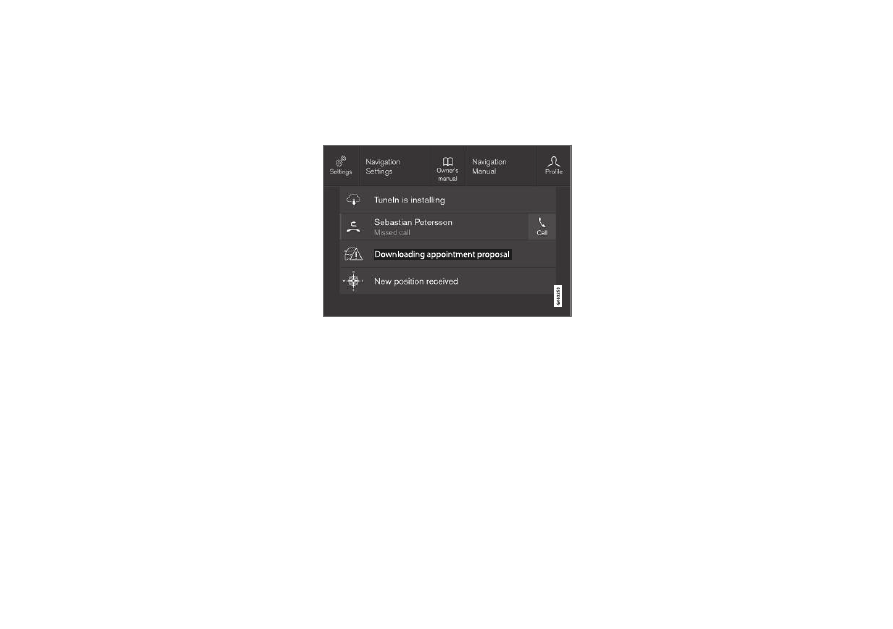
Saved messages and possible selections in Top view.
Messages that have been shown in the center
display and that need to be saved are stored in
the center display's Top view.
Reading saved messages
1. Open Top view in the center display.
> A list of saved messages will be displayed.
Messages with an arrow to the right can
be expanded.
2. Tap a message to expand/minimize it.
> More information about the message will
appear in the list and the image to the left
of the app will display information about
the message in graphic form.
Handling saved messages
Some messages have a button to e.g. activate/
deactivate a function related to the message.
–
Tap the button to perform the action.
Saved messages in Top view are automatically
deleted when the ignition is switched off.
Related information
•
Messages in the center display (p. 142)
•
Handling messages in the center display
(p. 142)
•