Volvo V90 Cross Country (2019 year). Manual - part 22
DRIVER SUPPORT
* Option/accessory.
370
Selecting guidance to a rest area if
the Driver Alert Control warning has
been given
The
Rest Stop Guidance
function can be
switched on or off.
In vehicles equipped with Sensus Navigation*, the
driver can activate a guide that can automatically
suggest a suitable rest stop if the DAC warning
is given.
To select
Rest Stop Guidance
:
1. Tap
Settings
in the center display's Top
view.
2. Select
My Car
IntelliSafe
Driver Alert
Control
.
3. Select/deselect
Rest Stop Guidance
to
activate/deactivate the function.
Related information
•
Driver Alert Control limitations
Driver Alert Control (DAC) functionality may be
reduced in certain situations.
In certain situations, the system may provide a
warning even if it has not detected a change in
driving behavior, e.g.:
•
in strong crosswinds
•
on grooved road surfaces.
WARNING
In certain cases, driving behavior might not be
affected despite the driver's fatigue – when
using the Pilot Assist function – resulting in
the driver not getting a warning from DAC.
It is therefore very important to always stop
and take a break at the slightest sign of fati-
gue, regardless of whether the DAC function
has issued a warning or not.
The function uses the vehicle's camera unit,
which has some general limitations – see the
section "Camera unit limitations".
Related information
•
•
Lane Keeping Aid
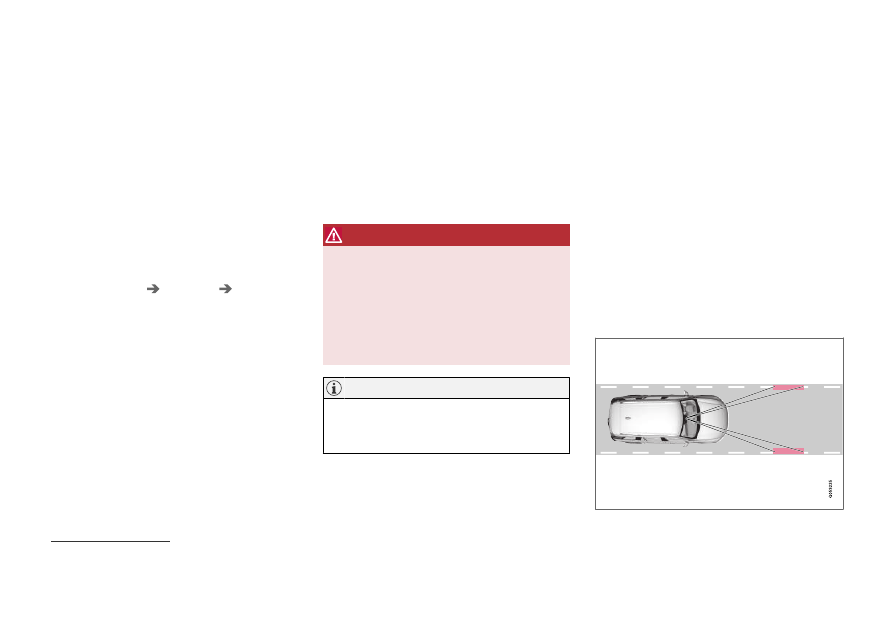
Lane Keeping Aid (LKA
102
) is designed to
actively steer the vehicle on freeways, highways
and other major roads to help the driver reduce
the risk of the vehicle unintentionally veering out
of the lane.
Lake Keeping Assistance steers the vehicle back
into the lane and/or alerts the driver using vibra-
tions in the steering wheel.
Lane Keeping Aid is active at speeds between
65-200 km/h (40-125 mph) on roads with
clearly visible traffic lane marker lines.
On narrow roads, the function may be unavailable
and go into standby mode. The function will
become available again when the road becomes
sufficiently wide.
A camera monitors the road/traffic lane's marker lines.
102
Lane Keeping Aid