Toyota Camry (2019 year). Manual - part 20
 

  Index      Toyota     Toyota Camry - service manual 2019 year in english


Search            


Content   ..  18  19  20  21   ..


Toyota Camry (2019 year). Manual - part 20


305

4-5. Using the driving support systems

4

Drivin

g

CAMRY_U

EPS (Electric Power Steering) 

Employs an electric motor to reduce the amount of effort needed to
turn the steering wheel 

PCS (Pre-Collision System) (if equipped)

P. 250

BSM (Blind Spot Monitor) (if equipped)

P. 310

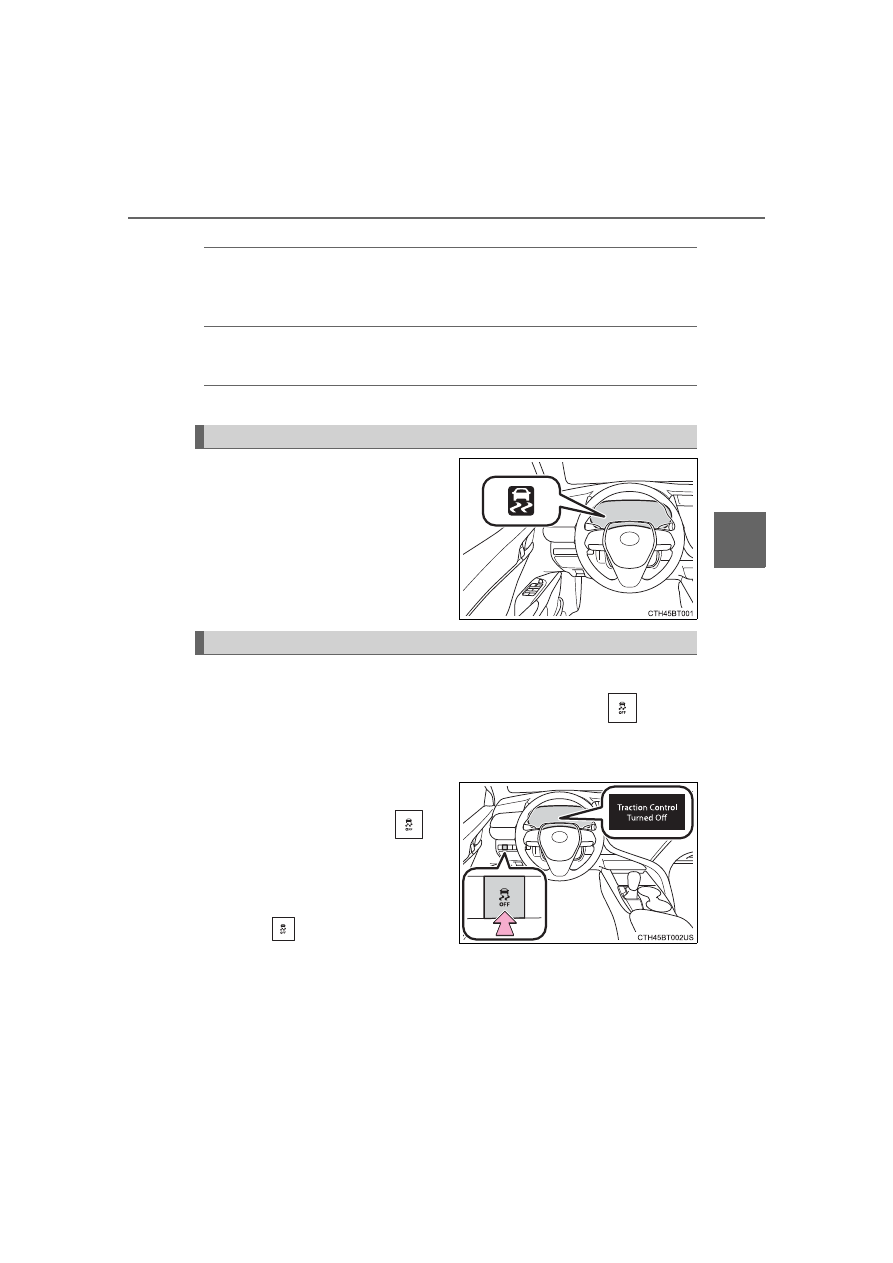
The  slip  indicator  light  will  flash
while the TRAC/VSC systems are
operating.

If the vehicle gets stuck in mud, dirt or snow, the TRAC system may

reduce power from the engine to the wheels. Pressing 

 to turn

the system off may make it easier for you to rock the vehicle in order
to free it.
To  turn  the  TRAC  system  off,

quickly press and release 

.

“Traction  Control  Turned  Off”  will
be  shown  on  the  multi-information
display.

Press 

  again  to  turn  the  sys-

tem back on.

When the TRAC/VSC systems are operating

Disabling the TRAC system

306

4-5. Using the driving support systems

CAMRY_U

Turning off both TRAC and VSC systems

To turn the TRAC and VSC systems off, press and hold 

 for more than 3

seconds while the vehicle is stopped.
The VSC OFF indicator light will come on and the “Traction Control Turned
Off” will be shown on the multi-information display

*

.

Press 

 again to turn the systems back on.

*

: On  vehicles  with  pre-collision  system,  pre-collision  brake  assist  and  pre-

collision  braking  will  also  be  disabled.  The  pre-collision  system  warning
light will come on and the message will be shown on the multi-information
display. (

P. 260)

When the message is displayed on the multi-information display show-

ing that TRAC has been disabled even if 

 has not been pressed

TRAC is temporary deactivated. If the information continues to show, contact
your Toyota dealer.

Operating conditions of hill-start assist control
When  the  following  four  conditions  are  met,  the  hill-start  assist  control  will
operate:

The shift lever is in a position other than P or N (when starting off forward/
backward on an upward incline)

The vehicle is stopped

The accelerator pedal is not depressed

The parking brake is not engaged

Automatic system cancelation of hill-start assist control
The hill-start assist control will turn off in any of the following situations:

The shift lever is shifted to P or N

The accelerator pedal is depressed

The parking brake is engaged

2 seconds at maximum elapsed after the brake pedal is released

307

4-5. Using the driving support systems

4

Drivin

g

CAMRY_U

Sounds and vibrations caused by the ABS, brake assist, VSC, TRAC and
hill-start assist control systems

A sound may be heard from the engine compartment when the brake pedal
is depressed repeatedly, when the engine is started or just after the vehicle
begins  to  move.  This  sound  does  not  indicate  that  a  malfunction  has
occurred in any of these systems.

Any  of  the  following  conditions  may  occur  when  the  above  systems  are
operating. None of these indicates that a malfunction has occurred. 
• Vibrations may be felt through the vehicle body and steering.
• A motor sound may be heard also after the vehicle comes to a stop.
• The brake pedal may pulsate slightly after the ABS is activated.
• The brake pedal may move down slightly after the ABS is activated.

EPS operation sound
When the steering wheel is operated, a motor sound (whirring sound) may be
heard. This does not indicate a malfunction.

Automatic reactivation of TRAC and VSC systems
After turning the TRAC and VSC systems off, the systems will be automati-
cally re-enabled in the following situations:

When the engine switch is turned off

If only the TRAC system is turned off, the TRAC will turn on when vehicle
speed increases
If both the TRAC and VSC systems are turned off, automatic re-enabling will
not occur when vehicle speed increases.

Secondary Collision Brake operating conditions
The vehicle speed is approximately 6 mph (10 km/h) or more and the airbag
sensor  detects  a  collision.  (The  Secondary  Collision  Brake  will  not  operate
when the vehicle speed is below approximately 6 mph [10km/h].)

Secondary Collision Brake automatic cancellation
The Secondary Collision Brake is automatically canceled in the following situ-
ations:

The vehicle speed drops below approximately 6 mph (10 km/h)

A certain amount of time elapses during operation

The accelerator pedal is depressed a large amount

Reduced effectiveness of the EPS system
The effectiveness of the EPS system is reduced to prevent the system from
overheating when there is frequent steering input over an extended period of
time. The steering wheel may feel heavy as a result. 
Should  this  occur,  refrain  from  excessive  steering  input  or  stop  the  vehicle
and turn the engine off. The EPS system should return to normal within 10
minutes.

308

4-5. Using the driving support systems

CAMRY_U

WARNING

The ABS does not operate effectively when

The  limits  of  tire  gripping  performance  have  been  exceeded  (such  as
excessively worn tires on a snow covered road).

The vehicle hydroplanes while driving at high speed on wet or slick roads.

Stopping distance when the ABS is operating may exceed that of nor-
mal conditions
The ABS is not designed to shorten the vehicle’s stopping distance. Always
maintain a safe distance from the vehicle in front of you, especially in the
following situations:

When driving on dirt, gravel or snow-covered roads

When driving with tire chains

When driving over bumps on the road

When driving over roads with potholes or uneven surfaces

TRAC/VSC may not operate effectively when
Directional control and power may not be achievable while driving on slip-
pery road surfaces, even if the TRAC/VSC system is operating. 
Drive the vehicle carefully in conditions where stability and power may be
lost.

Hill- start assist control does not operate effectively when

Do not overly rely on hill-start assist control. Hill-start assist control may
not operate effectively on steep inclines and roads covered with ice.

Unlike the parking brake, hill-start assist control is not intended to hold the
vehicle  stationary for an  extended  period  of time. Do not attempt to  use
hill-start assist control to hold the vehicle on an incline, as doing so may
lead to an accident.

When the TRAC/VSC is activated
The slip indicator light flashes. Always drive carefully. Reckless driving may
cause an accident. Exercise particular care when the indicator light flashes.

When the TRAC/VSC systems are turned off
Be  especially  careful  and  drive  at  a  speed  appropriate  to  the  road  condi-
tions. As these are the systems to help ensure vehicle stability and driving
force, do not turn the TRAC/VSC systems off unless necessary.

Secondary Collision Brake
Do  not  overly  rely  on  the  Secondary  Collision  Brake.  This  system  is
designed to help reduce the possibility of further damage due to a second-
ary collision, however, that effect changes according to various conditions.
Overly relying on the system may result in death or serious injury.

309

4-5. Using the driving support systems

4

Drivin

g

CAMRY_U

WARNING

Replacing tires
Make sure that all tires are of the specified size, brand, tread pattern and
total load capacity. In addition, make sure that the tires are inflated to the
recommended tire inflation pressure level.
The ABS, TRAC and VSC systems will not function correctly if different tires
are installed on the vehicle.
Contact  your Toyota  dealer  for  further  information  when  replacing  tires  or
wheels.

Handling of tires and the suspension
Using tires with any kind of problem or modifying the suspension will affect
the driving assist systems, and may cause a system to malfunction.

310

4-5. Using the driving support systems

CAMRY_U

The Blind Spot Monitor is a system that has 2 functions;
● The BSM (Blind Spot Monitor) function

Assists the driver in making a decision when changing lanes

● The RCTA (Rear Cross Traffic Alert) function

Assists the driver when backing up

These functions use same sensors.

Multi-information display

Turning the BSM function/RCTA function on/off. (

P. 311)

Outside rear view mirror indicators

BSM function:
When a vehicle is detected in the blind spot, the outside rear view mirror
indicator comes on while the turn signal lever is not operated and the out-
side rear view mirror indicator flashes while the turn signal lever is oper-
ated.
RCTA function:
When  a  vehicle  approaching  from  the  right  or  left  rear  of  the  vehicle  is
detected, the outside rear view mirror indicators flash.

“BSM” indicator/“RCTA” indicator

When  the  BSM  function/RCTA  function  is  turned  on,  the  indicator  illumi-
nates.

BSM (Blind Spot Monitor)

: If equipped

Summary of the Blind Spot Monitor

1

2

3

311

4-5. Using the driving support systems

4

Drivin

g

CAMRY_U

Audio system screen (RCTA function only)

If a vehicle approaching from the right or left at the rear of the vehicle is
detected, the RCTA icon (

P. 316) for the detected side will be displayed.

RCTA

 buzzer (

RCTA

 function only)

When  a  vehicle  approaching  from  the  right  or  left  rear  of  the  vehicle  is
detected, a buzzer sounds from behind the rear seat.

Vehicles with 4.2-inch multi-information display
Press 

/

 of the meter control switches, select 

.

Press 

/

 of the meter control switches, select 

 or 

.

Press 

 of the meter control switch.

Each time 

 is pressed, the function changes on/off.

Vehicles with 7-inch multi-information display
Press 

/

 of the meter control switches, select 

.

Press 

/

 of the meter control switches, select 

 or 

.

Press 

 of the meter control switch.

Each time 

 is pressed, the function changes on/off.

The outside rear view mirror indicators visibility
When under strong sunlight, the outside rear view mirror indicator may be dif-
ficult to see.

RCTA buzzer hearing
RCTA function may be difficult to hear over loud noises such as high audio
volume.

When  “Blind  Spot  Monitor  Unavailable”  and  “Rear  Cross  Traffic  Alert
Unavailable” are shown on the multi-information display
Ice, snow, mud, etc., may be attached to the rear bumper around the sensors. 
(

P. 313) 

The system should return to normal operation after removing the ice, snow,
mud, etc. from the rear bumper.
Additionally, the sensors may not operate normally when driving in extremely
hot or cold environments.

Turning the BSM function/RCTA function on/off

4

5

1

2

3

1

2

3

312

4-5. Using the driving support systems

CAMRY_U

When there is a malfunction in the Blind Spot Monitor
If  a  system  malfunction  is  detected  due  to  any  of  the  following  reasons,  a
warning message will be displayed:

There is a malfunction with the sensors

The sensors have become dirty

The outside temperature is extremely high or low

The sensor voltage has become abnormal

Certification for the Blind Spot Monitor

For vehicles sold in the U.S.A.

For vehicles sold in Canada

313

4-5. Using the driving support systems

4

Drivin

g

CAMRY_U

WARNING

Handling the radar sensor
One Blind Spot Monitor sensor is installed inside the left and right side of
the vehicle rear bumper respectively. Observe the following to ensure the
Blind Spot Monitor can function correctly.

If the warning message does not disappear, have the vehicle inspected
by your Toyota dealer

Do not subject a sensor or its surrounding area on the rear bumper to a
strong impact. 
If a sensor is moved even slightly off position, the system may malfunction
and vehicles may not be detected correctly. 
In  the  following  situations,  have  your  vehicle  inspected  by  your  Toyota
dealer.
• A sensor or its surrounding area is subject to a strong impact.
• If  the  surrounding  area  of  a  sensor  is  scratched  or  dented,  or  part  of

them has become disconnected.

Do not disassemble the sensor.

Do not attach accessories or stickers to the sensor or surrounding area on
the bumper.

Do not modify the sensor or surrounding area on the bumper.

Do not paint the rear bumper any color other than an official Toyota color.

Keep  the  sensor  and  its  surrounding
area on the bumper clean at all times. If
a sensor or its surrounding area on the
rear  bumper  is  dirty  or  covered  with
snow,  the  Blind  Spot  Monitor  may  not
operate  and  a  warning  message  (

P.

312) will be displayed. 
In  this  situation,  clear  off  the  dirt  or
snow  and  drive  the  vehicle  with  the
operation  conditions  of  the  BSM  func-
tion  (

P.  314)  satisfied  for  approxi-

mately 10 minutes.

314

4-5. Using the driving support systems

CAMRY_U

The BSM function uses radar sensors to detect vehicles that are trav-
eling in an adjacent lane in the area that is usually not reflected in the
outside rear view mirror (the blind spot), and advises the driver of the
vehicles existence via the outside rear view mirror indicator.

The areas that vehicles can be detected in are outlined below.
The  range  of  the  detection  area
extends to:

Approximately  11.5  ft.  (3.5  m)
from the side of the vehicle

The  first  1.6  ft.  (0.5  m)  from  the
side  of  the  vehicle  is  not  in  the
detection area

Approximately 9.8 ft. (3 m) from
the rear bumper
Approximately 3.3 ft. (1 m) for-
ward of the rear bumper

The BSM function is operational when

The BSM function is turned on

Vehicle speed is greater than approximately 10 mph (16 km/h).

The BSM function will detect a vehicle when

A vehicle in an adjacent lane overtakes your vehicle.

Another vehicle enters the detection area when it changes lanes.

BSM function

BSM function detection areas

1

2

3

WARNING

Cautions regarding the use of the system
The driver is solely responsible for safe driving. Always drive safely, taking
care to observe your surroundings.
The BSM function is a supplementary function which alerts the driver that a
vehicle is present in the blind spot. Do not overly rely on the BSM function.
The function cannot judge if it is safe to change lanes, therefore over reli-
ance could cause an accident resulting in death or serious injury.
According  to  conditions,  the  system  may  not  function  correctly. Therefore
the driver’s own visual confirmation of safety is necessary.

315

4-5. Using the driving support systems

4

Drivin

g

CAMRY_U

Conditions under which the BSM function will not detect a vehicle
The  BSM  function  is  not  designed  to  detect  the  following  types  of  vehicles
and/or objects:

Small motorcycles, bicycles, pedestrians, etc.

*

Vehicles traveling in the opposite direction

Guardrails, walls, signs, parked vehicles and similar stationary objects

*

Following vehicles that are in the same lane

*

Vehicles driving 2 lanes across from your vehicle

*

*

: Depending  on  the  conditions,  detection  of  a  vehicle  and/or  object  may

occur.

Conditions under which the BSM function may not function correctly

The BSM function may not detect vehicles correctly in the following condi-
tions:
• When the sensor is misaligned due to a strong impact to the sensor or its

surrounding area

• During bad weather such as heavy rain, fog, snow, etc.

• When ice or mud, etc., is attached to the rear bumper

• When driving on a road surface that is wet due to rain, standing water,

snow, etc.

• When there is a significant difference in speed between your vehicle and

the vehicle that enters the detection area

• When a vehicle is in the detection area from a stop and remains in the

detection area as your vehicle accelerates

• When driving up or down consecutive steep inclines, such as hills, a dip

on the road, etc.

• When driving on roads with sharp bends, consecutive curves, or uneven

surfaces

• When  multiple  vehicles  approach  with  only  a  small  gap  between  each

vehicle

• When vehicle lanes are wide, and the vehicle in the next lane is too far

away from your vehicle

• When the vehicle that enters the detection area is traveling at about the

same speed as your vehicle

• When there is a significant difference in height between your vehicle and

the vehicle that enters the detection area

• Directly after the BSM function is turned on

Instances  of  the  BSM  function  unnecessarily  detecting  a  vehicle  and/or
object may increase under the following conditions:
• When the sensor is misaligned due to a strong impact to the sensor or its

surrounding area

• When there is only a short distance between your vehicle and a guardrail,

wall, etc.

• When there is only a short distance between your vehicle and a following

vehicle

• When vehicle lanes are narrow and a vehicle driving 2 lanes across from

your vehicle enters the detection area

• When items such as a bicycle carrier are installed on the rear of the vehi-

cle

316

4-5. Using the driving support systems

CAMRY_U

The  RCTA  functions  when  your  vehicle  is  in  reverse.  It  can  detect
other vehicles approaching from the right or left rear of the vehicle. It
uses radar sensors to alert the driver of the other vehicle’s existence
through flashing the outside rear view mirror indicators and sounding
a buzzer.

RCTA icon display (if equipped)
When a vehicle approaching from the right or left at the rear of the
vehicle is detected, the following will be displayed on the audio sys-
tem screen.

: The RCTA function is malfunctioning (

P. 312)

RCTA function

Approaching vehicles

Detection areas

1

2

Toyota parking 

assist monitor

Panoramic view 

monitor

Content

A  vehicle  is  approaching  from  the
left or right at the rear of the vehicle

317

4-5. Using the driving support systems

4

Drivin

g

CAMRY_U

WARNING

Cautions regarding the use of the system
The driver is solely responsible for safe driving. Always drive safely, taking
care to observe your surroundings.
The  RCTA  function  is  only  an  assist  and  is  not  a  replacement  for  careful
driving.  Driver  must  be  careful  when  backing  up,  even  when  using  RCTA
function. The driver’s own visual confirmation of behind you and your vehi-
cle is necessary and be sure there are no pedestrians, other vehicles, etc.,
before backing up. Failure to do so could cause death or serious injury.
According  to  conditions,  the  system  may  not  function  correctly. Therefore
the driver’s own visual confirmation of safety is necessary.

318

4-5. Using the driving support systems

CAMRY_U

The areas that vehicles can be detected in are outlined below.

To give the driver a more consistent time to react, the buzzer can alert
for faster vehicles from farther away.
Example:

The RCTA function is operational when

The RCTA function is turned on.

The shift lever is in R.

Vehicle speed is less than approximately 5 mph (8 km/h).

Approaching vehicle speed is between approximately 5 mph (8 km/h) and
18 mph (28 km/h).

Conditions under which the RCTA function will not detect a vehicle
The RCTA function is not designed to detect the following types of vehicles
and/or objects: 

Small motorcycles, bicycles, pedestrians, etc.

*

Vehicles approaching from directly behind

Guardrails, walls, signs, parked vehicles and similar stationary objects

*

Vehicles moving away from your vehicle

Vehicles approaching from the parking spaces next to your vehicle

*

Vehicles backing up in the parking space next to your vehicle

*

*

: Depending  on  the  conditions,  detection  of  a  vehicle  and/or  object  may

occur.

RCTA function detection areas

Approaching vehicle

Speed

Approximate 
alert distance

Fast

18 mph (28 km/h)

65 ft. (20 m)

Slow

5 mph (8 km/h)

18 ft. (5.5 m)

1

319

4-5. Using the driving support systems

4

Drivin

g

CAMRY_U

Conditions under which the RCTA function may not function correctly

The RCTA function may not detect vehicles correctly in the following condi-
tions:
• When the sensor is misaligned due to a strong impact to the sensor or its

surrounding area

• When ice or mud, etc. is attached to the rear bumper
• During bad weather such as heavy rain, fog, snow, etc.
• When multiple vehicles approach continuously
• Shallow angle parking
• When a vehicle is approaching at high speed
• When parking on a steep incline, such as hills, a dip on the road, etc.
• Directly after the RCTA function is turned on
• Directly after the engine is started with the RCTA function on.

• When items such as a bicycle carrier are installed on the rear of the vehi-

cle

Instances  of  the  RCTA  function  unnecessarily  detecting  a  vehicle  and/or
object may increase in the following situations:
• When a vehicle passes by the side of your vehicle

• When  the  distance  between  your  vehicle  and  metal  objects,  such  as  a

guardrail, wall, sign, or parked vehicle, which may reflect electrical waves
toward the rear of the vehicle, is short

The brightness of the indicators on the outside rear view mirrors and
the volume of the RCTA buzzer can be changed on 

 (4.2-inch dis-

play)  or 

  (7-inch  display)  (

P.  102,  113)  of  the  multi-information

display.

• Vehicles  that  the  sensors  cannot

detect because of obstacles

• When  the  parking  space  faces  a

street  and  vehicles  are  being  driven
on the street

Changing settings of the indicators on the outside rear view mir-
rors and RCTA buzzer

320

4-5. Using the driving support systems

CAMRY_U

Pedestrian detection icon

Displayed automatically when a pedestrian is detected.

Mute switch

Select  to  mute  the  buzzer. The  buzzer  will  be  re-enabled  when  the  shift
lever is shifted to a position other than R.
The buzzer volume of this function changes with the RCTA buzzer volume.
(

P. 102, 114)

Rear Camera Detection Function

: If equipped

When the vehicle is backing up, the rear camera detection func-
tion  can  detect  pedestrians  in  the  detection  area  behind  the
vehicle. If a pedestrian is detected, a buzzer will sound and an
icon on the audio system screen will be displayed to inform the
driver of the pedestrian.

Display

Toyota parking assist monitor

Panoramic view monitor

1

2


Content   ..  18  19  20  21   ..