Toyota Camry Hybrid (2018 year). Manual - part 24
369
5-4. Other interior features
5
Interio
r features
■
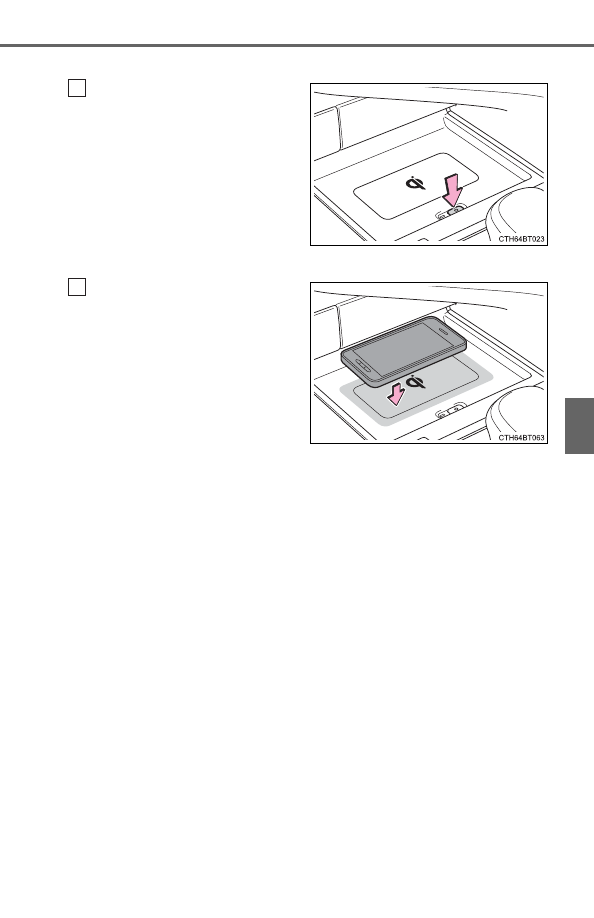
Using the wireless charger
Press the power supply
switch of the wireless char-
ger.
Pressing the switch again turns
the wireless charger off.
When turned on, the operation
indicator light (green) comes on.
When the power switch is turned
off, the on/off state of the wire-
less charger will be memorized.
Place a portable device on
the charging area with its
charging surface facing
down.
While charging, the operation
indicator light (orange) will be
illuminated.
If charging does not begin,
move the portable device as
close to the center of the
charging area as possible.
When charging is complete, the operation indicator light (green) will illu-
minate.
● Recharging function
• If a certain amount of time has elapsed since charging com-
pleted and the portable device has not been moved, the wire-
less charger will restart charging.
• If the portable device is moved within the charging area,
charging will stop temporarily then restart.
1
2