Toyota Camry Hybrid (2018 year). Manual - part 20
305
4-5. Using the driving support systems
4
Dr
ivi
n
g
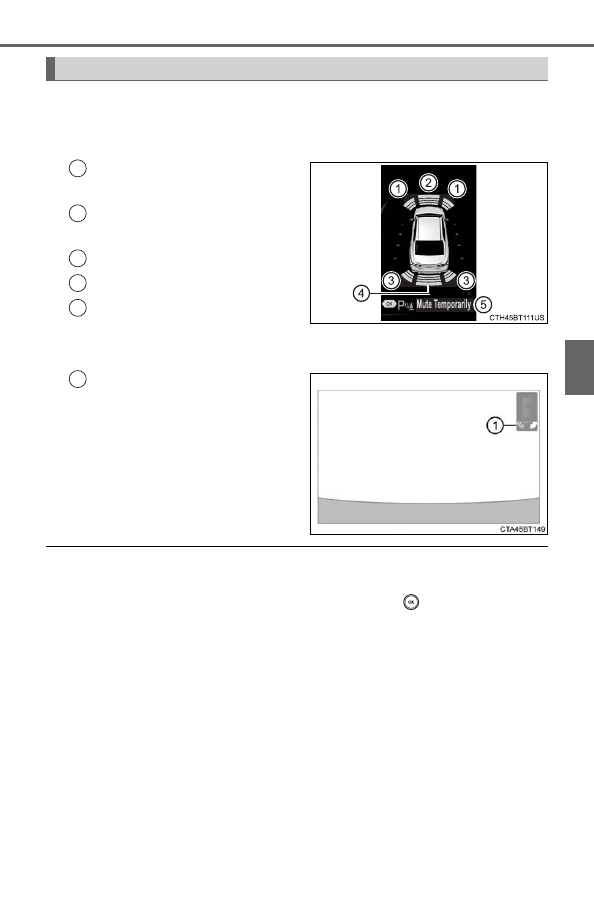
When the sensors detect an obstacle, the following displays inform
the driver of the position and distance to the obstacle.
■
Multi-information display
Front corner sensor opera-
tion
Front center sensor opera-
tion
Rear corner sensor operation
Rear center sensor operation
Select to mute the buzzer
sounds.
■
Audio system screen
Intuitive parking assist
When the vehicle is moving
backward.
A simplified image is displayed
on the upper part of the screen
when an obstacle is detected.
■
Muting the buzzer sound
●
To mute the buzzer sound
The buzzer can be temporarily muted by pressing
of the meter con-
trol switches while an obstacle detection display is shown on the multi-infor-
mation display.
●
To cancel the mute
Mute will be automatically cancelled in the following situations.
• When the shift position is changed
• When the vehicle speed has reached or exceeded approximately 6 mph
(10 km/h) with the shift lever in D
• When the intuitive parking assist is turned off once and turned on again
• When the power switch is turned off once and turned to ON mode again
• When a sensor is malfunctioning
Display
1
2
3
4
5
1