Renault Megane (2018 year). Manual - part 1
 

  Index      Renault     Renault Megane - service manual 2018 year in english


Search            


Content   ..    1  2   ..


Renault Megane (2018 year). Manual - part 1


1.2

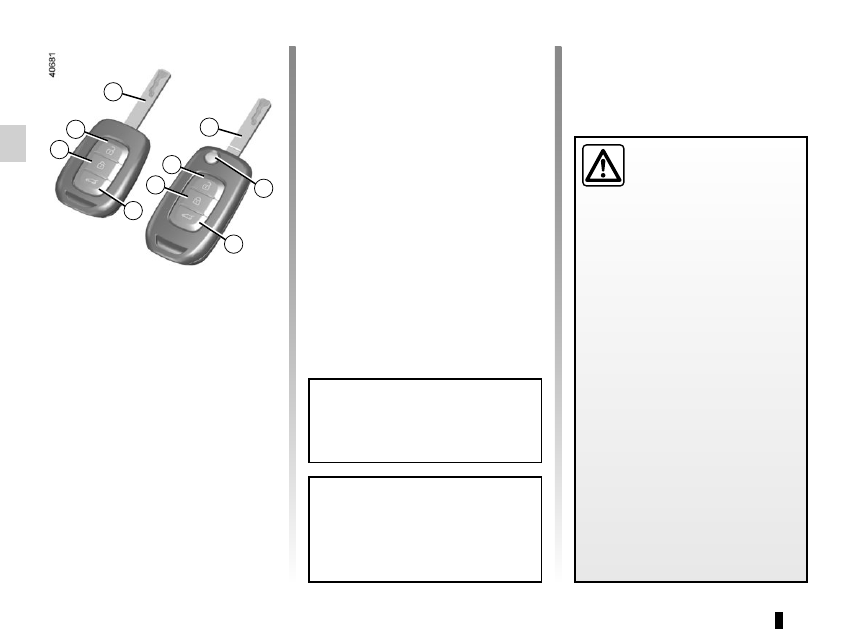
1  Locks all the opening elements.
2  Unlocks all the opening elements.
3  Ignition and front door key.
5  Locking/unlocking of the boot only.
Remote control with switchblade 

key: 

4  Locking/unlocking using the switch-

blade key. To release the insert from 

its housing, press button 4, it comes 

out automatically. Press button 4 and 

guide the insert back into its housing.

KEY, RADIO FREQUENCY REMOTE CONTROL: general information 

(1/2)

The key must not be used for any 

function other than those described 

in the handbook (removing the cap 

from a bottle, etc.).

Advice
Avoid leaving the remote control in 

hot, cold or humid areas.

Driver’s responsibility 

when parking or stopping 

the vehicle
Never leave an animal, 

child or adult who is not self-suffi-

cient alone on your vehicle, even for 

a short time.
They may pose a risk to themselves 

or to others by starting the engine, 

activating equipment such as the 

electric windows or locking the 

doors.
Also, in hot and/or sunny weather, 

please remember that the tempera-

ture inside the passenger compart-

ment increases very quickly.
RISK OF DEATH OR SERIOUS 

INJURY.

4

1

2

3

5

1

2

3

5

1.3

KEY, RADIO FREQUENCY REMOTE CONTROL: general information 

(2/2)

Radio frequency remote 

control operating range

This varies according to the surround-

ings: take care not to lock or unlock the 

doors by inadvertently pressing the but-

tons on the remote control.
Note: If a door or the boot is open or 

not closed properly, the doors and boot 

lock/unlock in quick succession.

Interference

Interference by factors in the immediate 

vicinity (external installations or the use 

of equipment operating on the same 

frequency as the remote control) may 

affect the operation of the remote con-

trol.

Replacement and additional keys 

or remote controls.
You must only contact an approved 

dealer:
–  If you need to replace a key it will 

be necessary to take the vehicle 

and all of its keys to an approved 

Dealer in order to initialise the 

system.

– Depending on the vehicle, you 

have the option of using up to 

four remote controls.

Remote control unit failure
Make sure that the correct battery 

type is being used, and that the 

battery is in good condition and in-

serted correctly. These batteries 

have a service life of approximately 

two years.
Refer to Section 5: “Radio fre-

quency remote control: batteries” 

for the battery changing procedure.

1.4

Locking/unlocking only the 

boot

Press the button 3.

RADIO FREQUENCY REMOTE CONTROL UNIT: use

The remote control A can be used to 

lock or unlock the doors and boot.
It is powered by a battery which must 

be replaced (refer to the information on 

“Radio frequency remote control: bat-

teries” in Section 5).

Locking the doors

Press locking button 1.

The side indicator lights and hazard 

warning lights flash twice to indicate 

that the doors have been locked.
If a door or the boot is open or not prop-

erly shut, they will lock and unlock in 

quick succession and the hazard warn-

ing lights and indicator lights will not 

flash.

Unlocking the doors

Pressing button 2 unlocks the doors 

and tailgate.
The side indicator lights and hazard 

warning lights flash once to indicate 

that the doors have been unlocked.

A

Note:

With the engine running, the ignition 

switched on and in accessories position 

(refer to “Ignition switch: vehicles with a 

key” in Section 2), the remote control 

buttons will be inactive.

Driver’s responsibility when parking or stopping the vehicle

Never leave an animal, child or adult who is not self-sufficient alone on 

your vehicle, even for a short time.

They may pose a risk to themselves or to others by starting the engine, 

activating equipment such as the electric windows or locking the doors.

Also, in hot and/or sunny weather, please remember that the temperature inside 

the passenger compartment increases very quickly.

RISK OF DEATH OR SERIOUS INJURY.

1

2

3

1

2

3

1.5

RADIO FREQUENCY REMOTE CONTROL UNIT: deadlocking

Never use deadlocking if 

someone is still inside the 

vehicle.

If the vehicle is equipped with a dead-

locking function, this allows you to lock 

the opening elements and to prevent 

the doors from being unlocked using 

the interior handles (for example, by 

breaking the window and then trying to 

open the door from the inside).
To do this, press button 1 twice in quick 

succession.
The hazard warning lights and indicator 

lights give two slow flashes and three 

quick flashes to indicate locking.
Special note: deadlocking is not pos-

sible if the hazard warning lights or the 

side lights are lit.

1

1

1.6

RENAULT CARD: general information 

(1/2)

The RENAULT card is used 

for:

–  locking/unlocking the doors and tail-

gate (doors, tailgate) and the fuel 

filler flap (see the following pages);

–  switching on the vehicle lighting re-

motely (refer to the following pages);

–  Automatic closing of electric win-

dows and, depending on the vehi-

cle, of the sunroof; please see the in-

formation on “Electric windows” and 

“Electric sunroof” in Chapter 3;

–  starting the engine; please see the 

information on “Starting, stopping 

the engine” in Chapter 2.

Battery life

Make sure that the correct battery type 

is being used, and that the battery is 

in good condition and inserted cor-

rectly. Its service life is approximately 

two years: replace it when the mes-

sage “Keycard battery low” appears on 

the instrument panel (refer to Section 5 

“RENAULT card: battery").

RENAULT card operating 

range

This varies according to the surround-

ings. It is important to make sure when 

handling the RENAULT card that you 

do not lock or unlock the doors by inad-

vertently pressing the buttons.

When the battery is flat, you can 

still lock/unlock and start your vehi-

cle. Please see the information on 

“Locking and unlocking the doors” 

in Chapter 1 and “Starting, stopping 

the engine” in Chapter 2.

1

2

3

4

1  Unlocking the doors and tailgate.
2  Locking all doors and tailgate.
3  Unlocking/locking the boot.
4  Switching on the lighting remotely.

1.7

RENAULT CARD: general information 

(2/2)

Advice
Avoid leaving the card in hot, cold or 

humid areas.
Do not keep the RENAULT  card in 

a place where it could be bent or 

damaged accidentally, such as in a 

back pocket of a garment.

Replacement: need for an 

additional RENAULT Card
If you lose your RENAULT card or 

require another, you can obtain one 

from an approved dealer.
If a RENAULT card is replaced, it 

will be necessary to take the vehi-

cle and all of its RENAULT cards 

to an approved dealer to initialise 

the system.
You may use up to four RENAULT 

cards per vehicle.

Distance lighting function

Pressing button 4 switches on the 

dipped beam headlights and the inte-

rior lighting for approximately 20 sec-

onds. This can be used, for example, 

to identify the vehicle from a distance 

when parked in a car park.
Note: Pressing button 4 again switches 

off the lighting.

4

Driver’s responsibility 

when parking or stopping 

the vehicle
Never leave an animal, 

child or adult who is not self-suffi-

cient alone in your vehicle, even for 

a short time.
They may pose a risk to themselves 

or to others by starting the engine, 

activating equipment such as the 

electric windows or locking the 

doors, for example.
Also, in hot and/or sunny weather, 

please remember that the tempera-

ture inside the passenger compart-

ment increases very quickly.
RISK OF DEATH OR SERIOUS 

INJURY.

1.8

There are two ways to unlock/lock the 

vehicle: 

–  the RENAULT card in “Hands-free” 

mode;

–  the RENAULT card in remote con-

trol mode.

RENAULT CARD: use 

(1/5)

Do not store the RENAULT card 

anywhere it may come into con-

tact with other electronic equipment 

(computer, phone, etc.) as this could 

hinder its operation.

1

Using the card in “hands-

free” mode

In “hands-free” mode, it is possible to 

lock/unlock the vehicle without using 

any of the RENAULT card’s buttons, 

as long as the card is within the access 

zone 1.
Note: “hands-free” access can be de-

activated from the multimedia screen 

(please see the equipment instruc-

tions).

Driver’s responsibility 

when parking or stopping 

the vehicle
Never leave an animal, 

child or adult who is not self-suffi-

cient alone on your vehicle, even for 

a short time.
They may pose a risk to themselves 

or to others by starting the engine, 

activating equipment such as the 

electric windows or locking the 

doors.
Also, in hot and/or sunny weather, 

please remember that the tempera-

ture inside the passenger compart-

ment increases very quickly.
RISK OF DEATH OR SERIOUS 

INJURY.

2

1.9

RENAULT CARD: use 

(2/5)

Nota: the “hands-free” system may ex-

perience temporary difficulties if one of 

the sensors built into the inside of the 

door handle is obscured (by dirt, mud, 

snow, gritting salt etc.). Clean the sen-

sors. If there is still a problem, contact 

an approved dealer.

3

“Hands-free” unlocking
With the RENAULT card in zone 1

move your hand behind a handle 2: the 

vehicle will unlock. Unlocking is indi-

cated by one flash of the hazard warn-

ing lights and the indicator lights. 
Pressing the button 3 unlocks the entire 

vehicle and releases the boot.

3

3

Remote “Hands-free” locking
With the RENAULT card on you, and 

doors and boot closed, move away 

from the vehicle: it will lock automati-

cally as soon as you leave the access 

zone.
Note: The distance at which the vehicle 

locks depends on the surroundings.
To indicate that the vehicle has been 

locked, the hazard warning lights and 

indicator lights flash once and then light 

up for approximately four seconds, and 

a beep sounds in confirmation.

1.10

RENAULT CARD: use 

(3/5)

“Hands-free” locking using the 

sensor 4
If you wish to lock your vehicle while the 

card is within range, make sure that the 

doors and boot are closed and place 

your finger over the sensor 4 on the 

driver’s door handle. The vehicle will 

lock.
Note: The sensor cannot be used to 

lock the vehicle unless the RENAULT 

card is within the access zone 1.

If the RENAULT card has been within 

range for approximately 15 minutes, 

remote locking is disabled.
The vehicle cannot be locked if the card 

is within the zone 5.
If the vehicle is unlocked by pressing 

the button on the RENAULT card, but 

the doors or boot are not then opened; 

remote “hands-free” locking is disabled.

Special features of the locking 

system
Having locked the vehicle by pressing 

the sensor 4, there is a delay of approx-

imately 3 seconds before it can be un-

locked again. During these 3 seconds, 

the door handles can be tried to make 

sure that the vehicle is locked properly.
If a door is open or not properly closed:

–  when locking using the sensor 4

the vehicle will lock/unlock in quick 

succession, but the hazard warning 

lights will not flash;

–  the vehicle will not lock as you move 

away.

5

4

1

1.11

If, while the engine is running, a door 

is opened and closed, and the card is 

no longer in the zone 5, the message 

Keycard not detected indicates that the 

card is not inside the vehicle. This will, 

for example, prevent you from driving 

away after dropping off a passenger 

who has kept the card on them.
The warning disappears when the card 

is detected again.

Using the card as a remote 

control

Unlocking with the card RENAULT

Press button 6. Unlocking is indicated 

by  one flash of the hazard warning 

lights and the indicator lights.

Locking using the RENAULT card

With the doors and boot closed, press 

button  7: the vehicle locks. The indi-

cator lights and hazard warning lights 

flash twice to indicate that the doors 

have locked.

Note: The maximum distance at which 

the vehicle locks depends on the sur-

roundings.

Special features

If the a door or the boot is open or not 

properly closed, the vehicle cannot be 

locked. The vehicle will lock/unlock in 

quick succession, but the hazard warn-

ing lights will not flash.

The card buttons are deactivated 

when the engine is running.

5

6

7

RENAULT CARD: use 

(4/5)

1.12

Locking/unlocking only the 

boot

Press the button 8 to lock/unlock the 

boot only.

8

RENAULT CARD: use 

(5/5)

Driver’s responsibility when parking or stopping the vehicle
Never leave an animal, child or adult who is not self-sufficient alone in 

your vehicle, even for a short time.

They may pose a risk to themselves or to others by starting the engine, activating 

equipment such as the electric windows or locking the doors, for example.
Also, in hot and/or sunny weather, please remember that the temperature inside 

the passenger compartment increases very quickly.
RISK OF DEATH OR SERIOUS INJURY.

1.13

Never use deadlocking if 

someone is still inside the 

vehicle.

If the vehicle is equipped with a dead-

locking function, this allows you to lock 

the opening elements and to prevent 

the doors from being unlocked using 

the interior handles (for example, by 

breaking the window and then trying to 

open the door from the inside).
To do this, press button 1 twice in quick 

succession.
The hazard warning lights and indicator 

lights give two slow flashes and three 

quick flashes to indicate locking.
Special note: deadlocking is not pos-

sible if the hazard warning lights or the 

side lights are lit.

RENAULT CARD: deadlocking

1

1.14

LOCKING, UNLOCKING THE DOORS 

(1/3)

If the remote control or, 

depending on the vehicle, the 

RENAULT card does not work

In some cases, the radio frequency 

remote control or the RENAULT card 

may not work:

– RENAULT card/radio frequency 

remote control battery worn or run 

flat, vehicle battery flat, etc.

–  use of appliances operating on the 

same frequency as the card (mobile 

phone, etc.);

–  vehicle located in a high electromag-

netic radiation zone.

It is then possible:

–  depending on the vehicle, use the 

radio frequency remote control or 

the emergency key integrated in the 

card to unlock the front left-hand 

door;

–  to lock each of the doors manually;

–  to use the interior door locking/un-

locking control (refer to the following 

pages).

A

1

The card’s built-in key

The built-in key 2 is used to lock or 

unlock the front left-hand door if the 

RENAULT card is not working.

Access with key 2
Slide the rear casing 1 downwards 

while pressing on zone A.

2

1.15

LOCKING, UNLOCKING THE DOORS 

(2/3)

B

Using the key integrated in the 

RENAULT card
–  Insert the tip of the key 2 into the 

notch 3 at the bottom of the cover B 

on the front left-hand door;

– Move it upwards to remove the 

cover B;

–  Insert the key 2 into the lock and lock 

or unlock the front left-hand door.

Once you are inside the vehicle, put the 

key back in its casing in the RENAULT 

card.

6

Locking the doors manually

Turn screw 6 with the door open (using 

the end of the key) and close the door.
This means that the doors are then 

locked from the outside.
The doors may then only be opened 

from the inside or by using the key in 

the front left-hand door.

5

4

Vehicles with key/remote 

control

Using the key
Insert the key 5 into the lock 4 and lock 

or unlock the front left-hand door.

2

3

1.16

LOCKING, UNLOCKING THE DOORS 

(3/3)

Interior locking/unlocking 

door control

Switch  7 controls the doors, the boot 

and the fuel filler flap simultaneously.
If a door or the tailgate is open or not 

closed properly, the doors and tailgate 

lock/unlock quickly.
If transporting an object with the tail-

gate open, you can still lock the doors: 

with the engine stopped, press and 

hold switch 7 for more than five sec-

onds to lock the other doors.

Locking the opening 

elements without the 

RENAULT card or the key

For example, in the event of a dis-

charged battery or the RENAULT card 

or key temporarily not working, etc.
With the engine switched off and a 

door or tailgate open, press and hold 

switch 7 for more than five seconds.
When the door is closed, all the doors 

and the tailgate will be locked.
Unlocking the vehicle from the outside 

is only possible with the RENAULT card 

in the vehicle’s access zone or using 

the key.

Door and tailgate status 

indicator

When the ignition is on, the indicator 

light integrated in switch 7 informs you 

of the status of the doors and tailgate:
–  indicator light on, the doors and tail-

gate are locked;

–  indicator light off, the doors and tail-

gate are unlocked.

When you lock the doors from the out-

side, the indicator light remains lit for a 

moment, and then goes out.

Never leave your vehicle 

with the key or RENAULT 

card inside.

7

Driver’s responsibility
If you decide to keep the 

doors locked when you are 

driving, remember that it 

may be more difficult for those as-

sisting you to gain access to the 

passenger compartment in the 

event of an emergency.

1.17

OPENING AND CLOSING THE DOORS 

(1/3)

Opening the doors from the 

outside

With the doors unlocked or RENAULT 

card on you, hold handle 1 and pull it 

towards you.

Opening from the inside

Pull on the handle 2.

2

As a safety precaution, 

the doors should only be 

opened or closed when the 

vehicle is stationary.

1

Lights-on reminder buzzer

A warning beep sounds when the driv-

er’s door is opened to warn you that the 

lights are still on.


Content   ..    1  2   ..