Renault Alaskan (2017 year). Manual - part 11
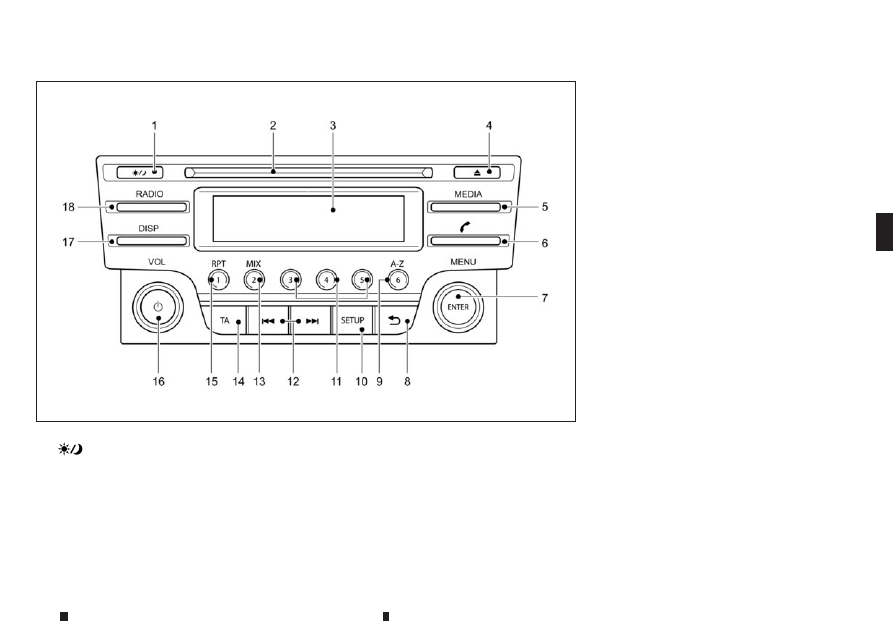
1.
(Day/Night) button
(Display brightness (Day/Night mode) button)
Turn the MENU button to set the display
brightness
The illumination brightness level is linked to the
headlight switch. When the headlights are
switched “ON” the brightness is dimmed
automatically. Press the button to toggle
illumination brightness levels between daytime
setting and nighttime setting independent of
headlamp status.
2. CD slot
3. Display
4. CD eject button
5. MEDIA button
Switch between the audio sources (CD, USB,
AUX, BT Audio) (if connected)
6. Telephone button
7. Radio mode: TUNE dial
Audio unit mode: MENU dial
Confirmation (ENTER) button
8. Back button
9. Radio mode: Preset button
USB/MP3 CD/iPod or Phone mode: Quick
search button
10. SETUP button
11. Radio mode: Preset buttons
12. Fast Forward (Cue)/Forward Track and
Rewind/Previous Track buttons
13. Radio mode: Preset button
CD/iPod/USB/Bluetooth audio mode: MIX
button
14. Traffic Announcement (TA) button
15. Radio mode: Preset button
CD/iPod/USB/Bluetooth audio mode: Repeat
(RPT) button
16. Power ON·OFF button/Volume control (VOL)
knob
17. DISP button (Display)
Provides on screen information when available
(music tags, RDS, etc.)
18. RADIO button
NAA1575
FM AM RADIO WITH COMPACT DISC (CD) PLAYER (Type A)
Display screen, heater and air conditioner, and audio system
4-37