Peugeot 308 (2017 year). Manual - part 3
 

  Index      Peugeot     Peugeot 308 - service manual 2017 year in english


Search            


Content   ..  1  2  3  4   ..


Peugeot 308 (2017 year). Manual - part 3


31

1

Instruments

308_en_Chap01_instruments-de-bord_ed01-2016

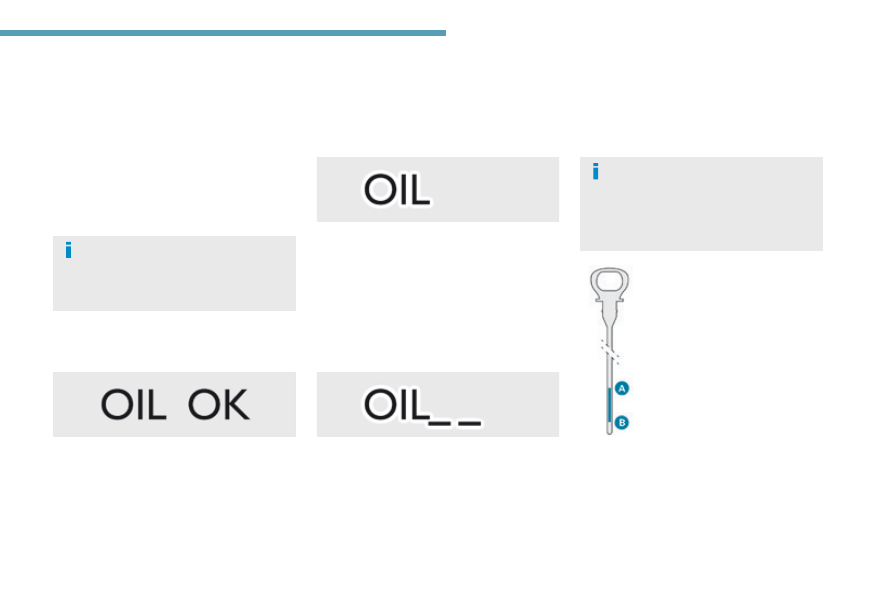
Engine oil level indicator

On versions fitted with an electric oil gauge, 
information on the conformity of the oil level 
is displayed in the instrument panel for a few 
seconds when the ignition is switched on, at 
the same time as the service information.

the level read will only be correct if 
the vehicle is on level ground and the 
engine has been off for more than 
30 minutes.

this is indicated by a message in the 
instrument panel.

this is indicated by a message in the 
instrument panel.
If the low oil level is confirmed by a check using 
the dipstick, the level must be topped-up to 
avoid damage to the engine.

this is indicated by a message in the 
instrument panel. Contact a PeugeOt dealer 
or a qualified workshop.

Dipstick

there are 2 marks on the 
dipstick:

A = max; never exceed this 
level,

B = min; top-up the level via 
the oil filler, using the grade 
of oil suited to your engine.

to locate the dipstick and the oil filler 
cap on a Petrol engine or a Diesel 
engine
, refer to the corresponding 
section.

Oil level correct

Oil level indicator fault

Oil level incorrect

32

Instruments

AdBlue

®

 fluid range indicators

Once the AdBlue

®

 tank is on reserve or after 

detection of a fault with the SCR emissions 
control system, when the ignition is switched 
on an indicator displays an estimate of the 
distance that can be covered, the range, before 
engine starting is prevented.
In the event of simultaneous system fault and 
low AdBlue

®

 level, the shortest range figure is 

the one displayed.

In the event of the risk of non-starting related to a lack of AdBlue

®

the engine start prevention system 
required by regulations is activated 
automatically once the AdBlue

®

 tank is 

empty.

Remaining range greater than 1 500 miles (2 400 km)

Pressing this button will display the remaining 
range.

F  then "Diagnostic".

Above 3 000 miles (5 000 km), the value is not 
specified.

When switching on the ignition, there is no 
automatic display of range in the instrument 
panel.

the range at that moment is then displayed.

You can access this information in the touch 
screen, if your vehicle has one.

F  Select the "Driving assistance

menu.

Remaining range between 350 and 1500 miles (600 and 2 400 km)

When switching on the ignition, the uReA 
warning lamp comes on, accompanied 
by an audible signal and the display of a 
message (e.g. "top-up emissions additive: 
Starting prevented in 900 miles") indicating 
the remaining range expressed in miles or 
kilometres.
When driving, the message is displayed every 
200 miles (300 km) until the AdBlue

®

 fluid has 

been topped-up.
go to a PeugeOt dealer or a qualified 
workshop to have the AdBlue

®

 topped-up.

You can also top-up the tank yourself.

For more information on AdBlue

® 

 and 

the SCR system, and topping-up in 
particular, refer to the corresponding 
section.

33

1

Instruments

308_en_Chap01_instruments-de-bord_ed01-2016

Remaining range between 0 and 350 miles (0 and 600 km)

When switching on the ignition, the SeRVICe 
warning lamp comes on and the uReA warning 
lamp flashes, accompanied by an audible 
signal and the display of a message (e.g. 
"top-up emissions additive: Starting prevented 
in 350 miles") indicating the remaining range 
expressed in miles or kilometres.
When driving, the message is displayed every 
30 seconds until the AdBlue

®

 fluid has been 

topped-up.
go to a PeugeOt dealer or a qualified 
workshop to have the AdBlue

®

 topped-up.

You can also top-up the tank yourself.
Otherwise you will not be able to restart your 
engine.

Breakdown related to a lack of AdBlue

® 

 additive

When switching on the ignition, the SeRVICe 
warning lamp comes on and the uReA warning 
lamp flashes, accompanied by an audible 
signal and the display of the message "top-up 
emissions additive: Starting prevented".
the AdBlue

®

 tank is empty: the system required 

by regulations prevents engine starting.

to be able to start the engine, 
we recommend that you call on a 
PeugeOt dealer or a qualified 
workshop for the top-up required.
If you carry out the top-up yourself, it 
is essential to add at least 3.8 litres of 
AdBlue

®

 to the tank.

For more information on AdBlue

® 

and the SCR system, and topping-up in particular, refer 

to the corresponding section.

34

Instruments

Starting prevented

every time the ignition is switched on, the SeRVICe 
and engine diagnostic warning lamps come on and 
the uReA warning lamp flashes, accompanied by 
an audible signal and the display of the message 
"emissions fault: Starting prevented".

You have exceeded the authorised 
driving limit: the starting prevention 
system inhibits engine starting.

to be able to start the engine, you must call on 
a PeugeOt dealer or a qualified workshop.

In the event of a fault with the SCR emissions control system

A system that prevents engine starting is activated automatically from 650 miles (1 100 km) after confirmation of a fault with the SCR emissions 
control system. Have the system checked by a PeugeOt dealer or a qualified workshop as soon as possible.

If it is a temporary fault, the alert 
disappears during the next journey, 
after self-diagnosis of the SCR system.

In the event of the detection of a fault

the uReA, SeRVICe and diagnostic warning 
lamps comes on, accompanied by an audible 
signal and the display of the message 
"emissions fault".
the alert is triggered when driving when the 
fault is detected for the first time, then when 
switching on the ignition for subsequent 
journeys, while the fault persists.

During an authorised driving phase (between 
650 miles and 0 miles) (1 100 km and 0 km)

If a fault with the SCR system is confirmed (after 
30 miles (50 km) covered with the permanent 
display of the message signalling a fault), the 
SeRVICe and engine diagnostic warning lamps 
come on and the uReA warning lamp flashes, 
accompanied by an audible signal and the 
display of a message (e.g.: "emissions fault: 
Starting prevented in 150 miles") indicating the 
remaining range express in miles or kilometres.
While driving, the message is displayed every 
30 seconds while the fault with the SCR system 
persists.
the alert is repeated when switching on the 
ignition.
You should go to a PeugeOt dealer or a 
qualified workshop as soon as possible.
Otherwise, you will not be able to restart your 
engine.

35

1

Instruments

308_en_Chap01_instruments-de-bord_ed01-2016

Distance recorders

the total and trip distances are displayed for 
thirty seconds when the ignition is switched off, 
when the driver's door is opened and when the 
vehicle is locked or unlocked.

When travelling abroad, you may 
have to change the units of distance: 
the display of road speed must be in 
the official units (miles or km) for the 
country. the change of units is done via 
the screen configuration menu, with the 
vehicle stationary.

It measures the total distance travelled by the 
vehicle since its first registration.

It measures the distance travelled since it was 
reset to zero by the driver.
F  With the ignition on, press the button until 

zeros appear.

Total distance recorder

Trip distance recorder

36

Instruments

Lighting dimmer control

For the manual adjustment of the brightness of 
the instrument panel and the touch screen.

With the exterior lighting on, press this button 
to adjust the brightness of the dashboard 
lighting, the touch screen and the mood 
lighting. As soon as the lighting reaches the 
required level of brightness, release the button.

F  Press on the "Configuration" menu.
F  Adjust the brightness (only on the touch 

screen) by pressing on the "+" or "-" buttons.

Operates only when the vehicle's 
exterior lighting is on.

Instrument panel

Touch screen

37

1

Instruments

308_en_Chap01_instruments-de-bord_ed01-2016

System that gives you information on the current journey (range, fuel consumption…).

trip computer

Instrument panel screen

Information display

F  Press the button on the end of the wiper 

control stalk to display the various tabs in 
succession.

the current information tab with:
●  the range,
●  the current fuel consumption,
●  the Stop & Start time counter.

- trip 

"1" with:

●  the average speed,
●  the average fuel consumption,
●  the distance travelled,
  for the first trip.

- trip 

"2" with:

●  the average speed,
●  the average fuel consumption,
●  the distance travelled,
  for the second trip.

Depending on version

Trip reset

F  When the trip required is displayed, press 

the control for more than two seconds 
or use the left-hand thumbwheel of the 
steering mounted controls.

trips "1" and "2" are independent but their use 
is identical.
For example, trip "1" can be used for daily 
figures, and trip "2" for monthly figures.

38

Instruments

trip computer

System that gives you information on the current journey (range, fuel consumption…).

Information display in the touch screen

Permanent display:
F  Select the "Driving assistance" menu.
the trip computer information is displayed in 
the primary page of the menu.
F  Press one of the buttons to display the 

desired tab.

the current fuel consumption tab 
with:

the range,

the current fuel consumption,

the Stop & Start time counter.

the trip "1" tab with:

the distance travelled,

the average fuel consumption,

the average speed, 


for the first trip.

the trip "2" tab with:

the distance travelled,

the average fuel consumption,

the average speed, 


for the second trip.

Trip reset

F  When the desired trip is displayed, press 

the reset button or on the end of the wiper 
control stalk.

trips "1" and "2" are independent but their use 
is identical.
For example, trip "1" can be used for daily 
figures, and trip "2" for monthly figures.

the information is accessible in the "Driving assistance" menu.

temporary display in a new window:
F  Press the end of the wiper control stalk for 

access to the information and display the 
different tabs.

Touch screen

39

1

Instruments

308_en_Chap01_instruments-de-bord_ed01-2016

Trip computer, a few definitions

Range

(miles or km)
the distance which can still be 
travelled with the fuel remaining in 
the tank (related to the average fuel 
consumption over the last few miles 
(kilometres) travelled).

this value may vary following a change 
in the style of driving or the relief, 
resulting in a significant change in the 
current fuel consumption.

When the range falls below 20 miles (30 km), 
dashes are displayed. After filling with at least 
5 litres of fuel, the range is recalculated and is 
displayed when it exceeds 60 miles (100 km).

If dashes are displayed continuously 
while driving in place of the digits, 
contact a PeugeOt dealer or a 
qualified workshop.

this function is only displayed from 
20 mph (30 km/h).

Current fuel consumption

(mpg or l/100 km or km/l)
Calculated over the last few seconds.

Average fuel consumption

(mpg or l/100 km or km/l)
Calculated since the last trip 
computer reset.

Average speed

(mph or km/h)
Calculated since the last trip 
computer reset.

Distance travelled

(miles or km)
Calculated since the last trip 
computer reset.

Stop & Start time 
counter

(minutes / seconds or hours / 
minutes)

A time counter calculates the time spent in 
StOP mode during a journey.
It resets to zero every time the ignition is 
switched on.

40

Instruments

touch screen

It gives access to:

the heating/air conditioning controls,

menus for adjusting settings for vehicle 
functions and systems,

audio and display configuration menus,

audio system and telephone controls and 
the display of associated information.

For reasons of safety, the driver 
should only carry out operations 
that require close attention, with the 
vehicle stationary.
Some functions are not accessible 
when driving.

General operation

Recommendations

It is necessary to press firmly, particularly for 
"flick" gestures (scrolling through lists, moving 
the map...).
A light wipe is not enough.
the screen does not recognise pressing with 
more than one finger.
this technology allows use at all temperatures 
and when wearing gloves.
Do not use pointed objects on the touch 
screen.
Do not touch the touch screen with wet hands.
uses a soft clean cloth to clean the touch 
screen.

And, depending on equipment, it allows:

the display of alert messages and the 
visual parking sensors information,

access to the controls for the navigation 
system and Internet services, and the 
display of associated information.

State of indicator lamps

Some buttons contain an indicator lamp that 
gives the state of the corresponding function.
green indicator: you have switched on the 
corresponding function.
Orange indicator: you have switched off the 
corresponding function.

41

1

Instruments

308_en_Chap01_instruments-de-bord_ed01-2016

use this button to go to the 
secondary page.

use this button to return to the 
primary page.

use this button for access to 
additional information and to the 
settings for certain functions.

use this button to confirm.

use this button to quit.

Principles

use the buttons on either side of the touch 
screen for access to the menus, then press the 
virtual buttons in the touch screen.
each menu is displayed over one or two pages 
(primary page and secondary page).

After a few moments with no action on 
the secondary page, the primary page 
is displayed automatically.

Air conditioning.
Allows adjustment of the various 
settings for temperature, air flow... 
See the sections on "Heating", 
"Manual air conditioning" and "Digital 
air conditioning".

Touch screen menus

Driving assistance.
Allows certain functions to be switched 
on and off and their settings adjusted.

Telephone.
See the "Audio equipment and telematics" section.

Media.
See the "Audio equipment and telematics" section.

Navigation.
Depending on trim level, navigation can 
be not available, an option or standard.
See the "Audio equipment and 
telematics" section.

Configuration.
Allows configuration of the display 
and the system.

Connected services.
these services can be not available, an option or 
standard.
See the "Audio equipment and telematics" section.

1.  Volume / mute.
See the "Audio equipment and telematics" section.

42

Instruments

"Driving assistance" menu

the systems with settings that can be adjusted are detailed in the table below.

Button

Corresponding function

Comments

Speed settings

Memorisation of speeds for use with the speed limiter or cruise control.

Under-inflation initialisation

Reinitialisation of the under-inflation system.

Blind spot sensors

Activation of the function.

Park Assist

Activation/Deactivation of the function

43

1

Instruments

308_en_Chap01_instruments-de-bord_ed01-2016

Button

Corresponding function

Comments

Vehicle settings

Access to other functions with settings that can be adjusted.
Select or deselect the tabs at the bottom of the screen to display the functions required.
- "Driving assistance"

-  "[Automatic rear wiper in reverse]" (activation of rear wiper coupled to reverse gear).

For more information on the Wiper control stalk, refer to the corresponding section.

-  "[Collision risk alert]" (activation of the collision risk alert system).

For more information on Collision risk alert and emergency automatic braking, refer to the 
corresponding section.
- "Lighting"

-  "[guide-me-home lighting]" (automatic guide-me-home lighting),
-  "[Welcome lighting]" (exterior welcome lighting).

For more information on the Lighting control stalk, refer to the corresponding section.

-  "[Mood lighting]" (interior mood lighting).

For more information on Mood lighting, refer to the corresponding section.
- "Vehicle access"

-  "[Driver plip action]" (selective unlocking of the driver's door).

For more information on the Remote control or Keyless Entry and Starting, refer to the 
corresponding section.

-  "[unlocking boot]" (selective unlocking of the boot).

For more information on the Boot, refer to the corresponding section.

Diagnostic

List of current alerts.

Parking sensors

Activation/Deactivation of the function.

Dynamic cruise control

Choice of the standard cruise control or the dynamic cruise control.
the choice of dynamic cruise control is retained on condition that the steering mounted control 
thumbwheel is at the "CRuISe" position.

44

Instruments

State of adjustable systems

Operating fault
In the event of a fault with one of these 
systems, the indicator lamp in the activation/
deactivation button flashes for a few moments.
An alert symbol is displayed to the right of the 
button symbol, then, in the case of systems that 
are activated by default, the orange indicator 
comes on permanently.
every time the button is pressed, the indicator 
flashes for a few moments.

example:

Some systems have a dedicated button, to 
which is associated an indicator lamp.
Illumination of this lamp indicates whether the 
system is activated or deactivated compared to 
the default (factory) setting.
green indicator: you have switched on the 
corresponding system.
Orange indicator: you have switched off the 
corresponding system.

●  Function not activated.

●  Operating fault alert.

then

45

1

Instruments

308_en_Chap01_instruments-de-bord_ed01-2016

the functions available through this menu are detailed in the table below.

"Configuration" menu

Button

Corresponding function

Comments

Audio settings

Adjustment of volume, balance...

Colour schemes

Choice of colour scheme.

Interactive help

Access to the interactive user guide.

Turn off screen

Brightness

46

Instruments

Button

Corresponding function

Comments

System Settings

Choice of units:

temperature (°Celsius or °Fahrenheit)

distance and fuel consumption (l/100 km, mpg or km/l).

Time/Date

Setting the date and time.

Languages

Choice of language used: French, english, Italian, Spanish, german, Dutch, Portuguese, 
Polish, turkish, Russian, Serbian, Croat, Hungarian, Czech, Brazilian.

Screen settings

Adjustment of the display settings (scrolling of text, animations...)

Calculator

Calendar


Content   ..  1  2  3  4   ..