Peugeot 308 CC Dag (2010.5). Manual - part 3
 

  Index      Peugeot     Peugeot 308 CC Dag 2010.5 - service manual in english


Search            


Content   ..  1  2  3  4   ..


Peugeot 308 CC Dag (2010.5). Manual - part 3


1

36

INSTRUMENTS and CONTROLS

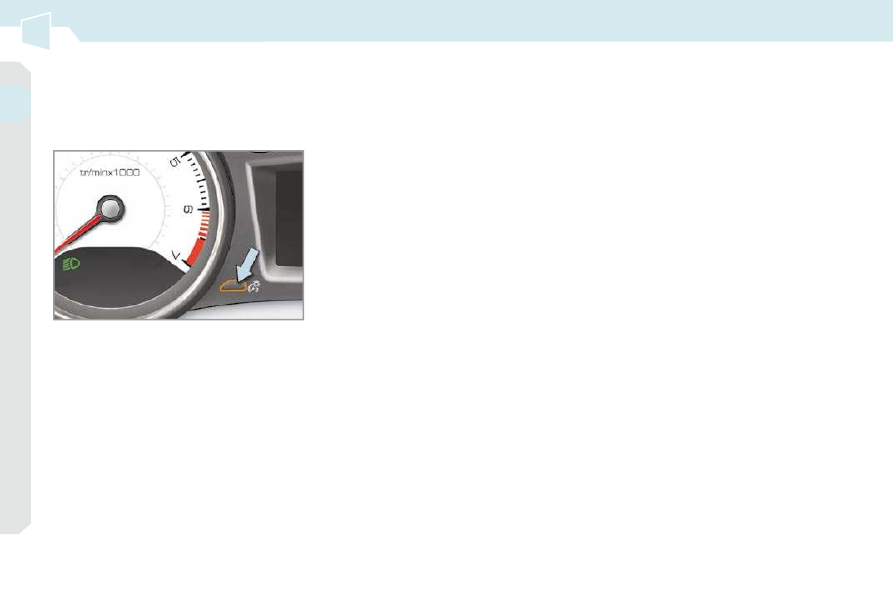
        Lighting dimmer 

 Permits  manual  adjustment  of  the  bright-
ness of the instruments and controls to suit 
the ambient light level. Only operates when 
the vehicle lighting is on, with the exception 
of the daytime running lamps. 

  Activation 

      Press  the  button  to  change  the 

brightness  of  the  instruments  and 
controls. 

     When the lighting reaches the mini-

mum  setting,  release  the  button, 
then press again to increase it.  

 or 
      When the lighting reaches the maxi-

mum  setting,  release  the  button, 
then press again to reduce it. 

     When the lighting reaches the level 

of  brightness  required,  release  the 
button.   

  Deactivation 

 When  the  vehicle  lighting  is  off,  or  in 

day  mode  on  vehicles  fi tted  with  day-

time running lamps, pressing the button 
does not have any effect.   

2

37

MULTIFUNCTION SCREENS

  Main menu 

  "Audio functions" menu 

      Press the  "MENU"  button for access 

to the  main menu : 

   -   audio functions, 
  -   diagnosis vehicle, 
  -   personalisation-confi guration, 
  -   telephone (hands-free kit).  

     Press the "  " or "  " buttons to se-

lect the menu required, then confi rm 

by pressing the  "OK"  button.   

 With  the  Peugeot  Connect  Sound 
switched on, once this menu has been 
selected you can activate or deactivate 
the  functions  linked  with  use  of  the  ra-
dio  (RDS,  REG,  RadioText)  or  the  CD 

(introscan, shuffl e, CD repeat). 
 For more information on the "Audio func-
tions"  application,  refer  to  the  Peugeot 
Connect  Sound  part  of  the  "Audio  and 
Telematics" section.  

MONOCHROME SCREEN C (WITH 
PEUGEOT CONNECT SOUND) 

  Displays on the screen 

 This displays the following information: 
   -  

time, 

  -  

date, 

  -   ambient temperature (this fl ashes if 

there is a risk of ice), 

  -  

status  of  the  openings  (doors, 
boot...), 

  -  

visual parking sensor information, 

  -  

audio sources (radio, CD...), 

  -  

trip computer (refer to the end of the 
section).  

 Warning  messages  (e.g.:  "Emission 
control  system  faulty")  or  information 
messages  (e.g.:  "Automatic  headlamp 
lighting  activated")  may  appear  tempo-
rarily. These can be cleared by pressing 
the  "ESC"  button.  

  Controls 

 From the control panel of your Peugeot 
Connect Sound, you can: 
      press  the   "MENU"   button  to  gain 

access to the  main menu , 

     press the "  " or "  " buttons to scroll 

through the items on the screen, 

     press the  "MODE"  button to change 

the permanent application (trip com-
puter, audio source...), 

     press  the  "  "  or  "  "  buttons  to 

change a setting value, 

     press the  "OK"

  button to confi rm,  

 or 
      press the  "ESC"  button to abandon 

the operation in progress.   

2

MULTIFUNCTION SCREENS

  "Diagnosis vehicle" 
menu 

      Press  the   "MENU"   button  to  gain 

access to the main menu. 

     Press  the  arrows,  then  the   "OK"  

button to select the " Diagnosis ve-
hicle
 " menu. 

     On  the  " Diagnosis  vehicle "  menu, 

select the following application:    

  Alert log 

 This  summarises  the  active  warning 
messages,  displaying  them  in  succes-
sion in the multifunction screen. 

 Once this menu has been selected, you 
can consult the alert log. 

  Defi ne the vehicle parameters 
 Once this menu has been selected, you 
can activate or deactivate the following 
equipment: 
   -  

selective  unlocking  (refer  to  the 
"Access" section), 

  -  

"guide-me-home" and welcome light-
ing (refer to the "Visibility" section), 

  -  

ambiance  lighting  (refer  to  the 
"Visibility" section), 

  -  

daytime running lamps (refer to the 
"Visibility" section), 

  -  

rear parking assistance (refer to the 
"Driving" section).  

  "Personalisation-
Configuration" menu 

 Once this menu has been selected, you 
have access to the following functions: 
   -   defi ne the vehicle parameters, 

  -   display confi guration, 
  -  

choice of language.  

2

!

39

MULTIFUNCTION SCREENS

 For  safety  reasons,  confi guration 

of  the  multifunction  screen  by  the 
driver must be done only when sta-
tionary.  

  "Telephone" menu 

  Display confi guration 
 Once this menu has been selected, you 
have access to the following settings: 
   -  

brightness-video setting, 

  -  

date and time setting, 

  -  

choice of units.   

  Choice of language 

 Once  this  menu  has  been  selected, 
you  can  change  the  language  used  by 
the display (Deutsch, English, Espanol, 
Français, 

Italiano, 

Nederlands, 

Portugues, Portugues-Brasil, Türkçe * ).   

 Example:  setting  of  the  duration  of  the 
"guide-me-home" lighting 

      Press the "  " or "  " buttons, then 

the  "OK"  button to select the menu 
required. 

     Press  the  "  "  or  "  "  buttons, 

then  the   "OK"   button  to  select  the 
"Guide-me-home headlamps" line. 

     Press the "  " or "  " buttons to set 

the value required (15, 30 or 60 sec-
onds),  then  press  the   "OK"   button 

to confi rm. 

     Press the "  " or "  " buttons, then 

the  "OK"  button to select the  "OK"  

box and confi rm or press the  "ESC"  

button to cancel.   

 With  the  Peugeot  Connect  Sound 
switched  on,  once  this  menu  has 

been  selected  you  can  confi gure  your 

Bluetooth  hands-free  kit  (pairing),  con-
sult  the  various  telephone  directories 
(calls log, services...) and manage your 
communications (pick up, hang up, call 
waiting, secret mode...). 

 For more information on the "Telephone" 
application, 

refer 

to 

the 

Peugeot 

Connect  Sound  part  of  the  "Audio  and 
Telematics" section. 

  *   According to country.  

2

i

40

MULTIFUNCTION SCREENS

  Displays on the screen 

 Once unfolded, it displays the following 
information automatically and directly: 
   -  

time, 

  -  

date, 

  -  

altitude, 

  -  

ambient temperature (the value dis-

played  fl ashes  if  there  is  a  risk  of 

ice), 

  -  

openings check, 

  -  

visual parking sensor information 

  -  

the sequences of opening and clos-
ing the roof, 

  -  

audio functions, 

  -  

satellite  navigation  system  informa-
tion.   

SCREEN (WITH PEUGEOT 
CONNECT NAVIGATION) 

  Controls 

 From  the  Peugeot  Connect  Navigation 
control  panel,  to  select  one  of  the  ap-
plications: 
      press 

the 

dedicated 

 "RADIO" , 

 "MUSIC" , 

 "NAV" , 

 "TRAFFIC" , 

 "SETUP"  or  "PHONE"  button to gain 
access to the corresponding menu, 

     turn  the  navigator  to  move  the  se-

lection, 

  

   press  the  navigator  to  confi rm  the 

selection,  


or 

     press the  "ESC"  button to abandon 

the  current  operation  and  return  to 
the previous display.  

 For  operation  of  the  retractable 
screen  (opening,  closing,  adjust-
ment of the position, etc.), refer to 
the  paragraph  "Access  to  the  re-
tractable screen".  

 For  more  information  on  these  appli-
cations,  refer  to  the  Peugeot  Connect 
Navigation  part  of  the  "Audio  and 
Telematics" section. 

2

!

41

MULTIFUNCTION SCREENS

  "SETUP" menu 

       Press  the   "SETUP"   button  to  gain 

access to the  "SETUP"  menu. This 
allows you to select from the follow-
ing functions: 

   -   "Languages", 
  -   "Date and time", 
  -   "Display", 
  -   "Vehicle", 
  -   "Units", 
  -   "System".    

  Language 

 This menu allows you to select the lan-
guage  used  by  the  display:  Deutsch, 
English,  Espanol,  Français,  Italiano, 
Nederlands, Polski, Portugues, Türkçe * .  

  Date and time 

 This  menu  allows  you  to  set  the  date 
and time, the format of the date and the 
format of the time (refer to the Peugeot 
Connect  Navigation  part  of  the  "Audio 
and Telematics" section).  

  Display 

 This menu allows you to set the bright-
ness  of  the  screen,  the  screen  colour 
scheme and the colour of the map (day/
night or auto mode).  

  Vehicle 

 This  menu  allows  you  to  activate  or 
deactivate  certain  driving  and  comfort 
equipment: 
   -  

selective  unlocking  (refer  to  the 
"Access" section), 

  -  

guide-me-home  and  welcome  light-
ing (refer to the "Visibility" section), 

  -  

interior  mood  lighting  (refer  to  the 
"Visibility" section), 

  -  

daytime running lamps (refer to the 
"Visibility" section), 

  -  

directional  headlamps  (refer  to  the 
"Visibility" section), 

  -  

rear  parking  sensors  (refer  to  the 
"Driving" section).   

  Units 

 This  menu  allows  you  to  select  the 
units:  temperature  (°C  or  °F)  and  fuel 
consumption (mpg, km/l or l/100).  

  System 

 This menu allows you to restore the fac-

tory confi guration, display the software 

version and activate scrolling text.  

 For  safety  reasons,  confi guration 

of  the  multifunction  screen  by  the 
driver must be done only when sta-
tionary.  

  *   According to country.  

2

i

42

MULTIFUNCTION SCREENS

16/9 HIGH DEFINITION 
RETRACTABLE COLOUR SCREEN 
(WITH PEUGEOT CONNECT MEDIA) 

  Displays on the screen 

 Once unfolded, it displays the following 
information automatically and directly: 
   -  

time, 

  -  

date, 

  -  

altitude, 

  -  

ambient temperature (the value dis-

played  fl ashes  if  there  is  a  risk  of 

ice), 

  -  

audio functions, 

  -  

visual parking sensor information, 

  -  

the sequences of opening and clos-
ing the roof, 

  -  

telephone  and  address  book  infor-
mation, 

  -  

satellite  navigation  system  informa-
tion.   

  Controls 

 From the Peugeot Connect Media control 
panel, to select one of the applications: 
      press 

the 

dedicated 

 "RADIO" , 

 "MEDIA" , 

 "NAV" , 

 "TRAFFIC" , 

 "ADDR  BOOK"   or   "SETUP"   button 
for access to the corresponding menu, 


   turn  the  navigator  to  move  the  se-

lection, 

  

   press  the  navigator  to  confi rm  the 

selection,  


or 

     press the  "ESC"  button to abandon 

the  current  operation  and  return  to 
the previous display.  

 For  operation  of  the  retractable 
screen  (opening,  closing,  adjust-
ment of the position, etc.), refer to 
the  paragraph  "Access  to  the  re-
tractable screen".  

 For  more  information  on  these  appli-
cations,  refer  to  the  Peugeot  Connect 
Media part of the "Audio and Telematics" 
section. 

2

!

43

MULTIFUNCTION SCREENS

  "SETUP" menu 

      Press  the   "SETUP"   button  to  gain 

access to the  "SETUP"  menu. This 
allows you to select from the follow-
ing functions: 

   -   "Language and speech", 
  -   "Date and time", 
  -   "Display", 
  -   "Units", 
  -   "System".   

  Language and speech 

 This menu allows you to: 
   -  

select  the  language  used  by  the 
display (Deutsch, English, Espanol, 
Français, 

Italiano, 

Nederlands, 

Polski, Portugues, Portugues-Brasil, 
Türkçe * ), 

  -  

select the voice recognition parame-
ters  (activation/deactivation,  advice 
on  use,  personal  voice  program-
ming, etc.), 

  -  

set the volume of the voice synthe-
siser.   

  Date and time 

 This  menu  allows  you  to  set  the  date 
and time, the format of the date and the 
format of the time (refer to the Peugeot 
Connect  Media  part  of  the  "Audio  and 
Telematics" section.  

  Units 

 This  menu  allows  you  to  select  the 
units:  temperature  (°C  or  °F)  and  dis-
tance (miles or km).  

  System 

 This menu allows you to restore the fac-

tory confi guration, display the software 

version and activate scrolling text.   

 For  safety  reasons,  confi guration 

of  the  multifunction  screen  by  the 
driver must only be done when sta-
tionary. 

  Display 

 This menu allows you to set the bright-
ness  of  the  screen,  the  screen  colour 
scheme and the colour of the map (day/
night or auto mode).  

  *   According to country.  

2

i

i

44

MULTIFUNCTION SCREENS

                      Access to the retractable screen 

  Opening the screen 

      With  the  screen  stored,  press  con-

trol  A  to open it.  

 The  screen  opens  automatically  when 
the ignition is switched on, when the au-
dio  and  telematics  system  is  switched 
on,  when  an  outgoing  telephone  call  is 
made, when a voice command is given 
and when a warning message linked with 
the STOP warning lamp is received. 

 This screen is opened and stored auto-
matically. 
 However, you can also open it, store it 
and  adjust  it  using  the  various  manual 
controls: 
   -  

opening or storing by means of con-
trol  A , 

  -  

angle adjustments by means of con-
trol  B .  

 It is also fi tted with safety auto-reverse 

protection. 

  Closing the screen 

      With the screen open, press control  A  

to store it.  

 The  screen  is  stored  automatically 
when  the  ignition  is  switched  off,  after 
approximately three seconds, if the au-
dio and telematics system is off.  

 If  you  wish  the  screen  to  open  or 
close automatically when the audio 
and  telematics  system  is  switched 
on  or  off,  the  screen  must  not  be 
closed  when  the  audio  and  tele-
matics system is operating.  

 When  the  screen  is  open,  you  can  ad-
just it precisely in different ways: 
      press the corresponding part of con-

trol   B   to  move  the  screen  towards 
you or towards the windscreen,  

 or 
      push  or  pull  the  screen  gently  by 

hand.   

  Adjusting the position of the screen 

  Safety auto-reverse 

 If  the  screen  meets  an  obstacle  as  it 
opens  or  closes,  the  movement  stops 
immediately  and  is  reversed  by  a  few 
millimetres. 
 After  clearing  the  obstacle,  issue  the 
command required again. 

  Storing the position of the screen 

 The  system  has  four  pre-set  positions 
in its memory. 
 Each  time  the  screen  is  closed,  the 
system  stores  the  last  position  of  the 
screen. 
 Each time the screen is re-opened, the 
system returns the screen to the pre-set 
position closest to that stored.   

 If  you  close  the  screen  during  op-
eration of the audio and telematics 
system, it will re-open automatical-
ly when an outgoing telephone call 
is made, when a voice command is 
given or when a warning message 
linked with the STOP warning lamp 
is received.  

2

i

45

MULTIFUNCTION SCREENS

  Monochrome screen C  

  With  the  monochrome  screen  C  or 
the instrument panel small screen
  

  Information displays 

TRIP COMPUTER 

 System  which  provides  current  infor-
mation  concerning  the  route  travelled 
(range, fuel consumption…). 

  Instrument panel small central 
screen  

  Instrument panel large central 
screen 

 Depending on your vehicle's equip-
ment,  the  trip  computer  informa-
tion  appears  on  the  multifunction 
screen  or  on  the  central  screen  in 
the instrument panel. 

  With the instrument panel   large cen-
tral screen
  

      Press  the  up  and  down  arrows  on 

the  instrument  panel   navigator , 
associated  with  Peugeot  Connect 
Media,  to  display  the  various  trip 
computer tabs in succession.  

      Press the button, located at the end 

of  the   wiper  stalk ,  to  display  the 
various  trip  computer  tabs  in  suc-
cession.  

2

46

MULTIFUNCTION SCREENS

      When the trip required is displayed, 

press  the  button  on  the  end  of  the 
 wiper stalk  for more than two sec-
onds.  

  Trip zero reset 

  With the instrument panel   large cen-
tral screen
  

      When the required trip is displayed, 

press the  "OK"  button on the instru-
ment  panel   navigator ,  associated 
with  Peugeot  Connect  Media,  for 
more than two seconds.  

 Trips   "1"   and   "2"   are  independent  but 
their use is identical. 
 For  example,  trip   "1"   can  be  used  for 

daily  fi gures,  and  trip   "2"   for  monthly 

fi gures.   

  With  the  monochrome  screen  C  or 
the instrument panel small screen
  

   -  

The  current  information 
tab with: 

       the range, 

      the  current  fuel  con-

sumption, 

      the  distance  remain-

ing to be travelled.   

   -  

The trip  "1"  tab with: 

       the distance travelled, 

      the  average  fuel  con-

sumption, 

      the average speed,   for 

the fi rst trip.   

   -  

The trip  "2"  tab with: 

       the distance travelled, 

      the  average  fuel  con-

sumption, 

      the average speed,   for 

the second trip.   

      Pressing the button again takes you 

to a black screen.  


A  further  press  returns  you  to  the 
normal display.   

2

!

i

i

47

MULTIFUNCTION SCREENS

       A few definitions… 

 When  the  range  falls  below  20  miles 

(30 km), dashes are displayed. After fi ll-

ing with at least 5 litres of fuel, the range 
is recalculated and is displayed when it 
exceeds 60 miles (100 km). 

 If  dashes  are  displayed  continu-
ously  while  driving  in  place  of  the 
digits, contact a PEUGEOT dealer.  

 This function is only displayed from 
20 mph (30 km/h).  

 This  value  may  vary  following  a 
change  in  the  style  of  driving  or 

the  relief,  resulting  in  a  signifi cant 

change  in  the  current  fuel  con-
sumption. 

  Range 

 (miles or km) 
 This  indicates  the  distance 
which  can  still  be  travelled 

with  the  fuel  remaining  in  the  tank  in 
relation  to  the  average  fuel  consump-
tion over the last few miles (kilometres) 
travelled. 

  Current fuel consumption 

 (mpg or l/100 km or km/l) 
 This  is  the  average  fuel  con-
sumption  during  the  last  few 
seconds. 

  Average fuel 
consumption 

 (mpg or l/100 km or km/l) 
 This is the average fuel con-
sumption  since  the  last  trip 
computer zero reset.  

  Distance travelled 

 (miles or km) 
 This  indicates  the  distance 
travelled  since  the  last  trip 
computer zero reset.   

  Average speed 

 (mph or km/h) 
 This  is  the  average  speed  cal-
culated since the last trip com-
puter zero reset (ignition on).  

   Distance remaining to 
destination 

 (miles or km) 

 This  is  the  distance  remaining  to  be 

travelled  to  the  fi nal  destination.  It  is 

calculated  instantly  by  the  navigation 
system, if guidance is activated. 
 If  the  distance  is  not  entered,  dashes 
are displayed in place of the digits.   

3

48 

COMFORT

VENTILATION 

  Air treatment 

 The incoming air follows various routes 
depending  on  the  controls  selected  by 
the driver: 
   -  

direct arrival in the passenger com-
partment (air intake), 

  -  

passage  through  a  heating  circuit 
(heating), 

  -  

passage  through  a  cooling  circuit 
(air conditioning).  

 The temperature control enables you to 
obtain  the  level  of  comfort  required  by 
mixing the air of the various circuits. 
 The air distribution control enables you 
to diffuse the air in the passenger com-
partment combining several air vents. 
 The  air  fl ow  control  enables  you  to  in-

crease or reduce the speed of the ven-
tilation blower.  

  Air intake 

 The air circulating in the passenger com-

partment is fi ltered and originates either 

from the outside via the grille located at 
the base of the windscreen or from the 
inside in air recirculation mode.  

  Control panel 

 The controls of this system are grouped 
together on control panel  A  on the centre 
console.  Depending  on  the  model,  the 
functions offered are: 
   -  

the level of comfort required, 

  -   air fl ow, 
  -  

air distribution, 

  -  

demisting-defrosting, 

  -  

manual  or  digital  air  conditioning 
controls.   

  Air distribution 

   1.   Windscreen demisting-defrosting vents. 
  2.   Front side window demisting-defrosting 

vents. 

  3.   Side adjustable air vents. 
  4.   Central adjustable air vents. 
  5.   Air outlets to the front footwells. 
  6.   Air outlets to the rear footwells.   

3

i

i

49

COMFORT

  The  condensation  created  by  the 
air  conditioning  results  in  a  dis-
charge  of  water  under  the  vehicle 
which is perfectly normal.   

 RECOMMENDATIONS FOR VENTILATION AND AIR 
CONDITIONING 

 In order for these systems to be fully effective, follow the guidelines on operation 
and maintenance below: 
      To obtain an even air distribution, take care not to obstruct the exterior air 

intake grilles located at the base of the windscreen, the nozzles, the vents 
and the air outlets, as well as the air extractor located in the boot. 

     Do not cover the sunshine sensor, located on the dashboard; this is used 

for regulation of the air conditioning system. 

     Operate the air conditioning system for 5 to 10 minutes, once or twice a 

month to keep it in perfect working order. 

  

   Ensure  that  the  passenger  compartment  fi lter  is  in  good  condition  and 

have the fi lter elements replaced regularly (refer to the "Checks" section). 

  

   We  recommend  the  use  of  a  combined  passenger  compartment  fi lter. 

Thanks to its second special active fi lter, it contributes to the purifi cation 

of the air breathed by the occupants and the cleanness of the passenger 
compartment (reduction of allergic symptoms, bad odours and greasy de-
posits). 

     To guarantee correct operation of the air conditioning system, you are also 

advised to have it checked regularly. 

     If  the  system  does  not  produce  cold  air,  do  not  use  it  and  contact  a 

PEUGEOT dealer.  

 In the "cabriolet" confi guration, installing the windstop and using the "AIRWAVE" 

systems improves comfort. 
 When  towing  the  maximum  load  on  a  steep  gradient  in  high  temperatures, 
switching  off  the  air  conditioning  permits  the  recovery  of  engine  power  and 
therefore improvement of the towing capacity.  

  If  the  interior  temperature  remains 
very high after the vehicle has been 
parked in the sun for a considerable 

time,  fi rst  ventilate  the  passenger 

compartment for a few minutes.  
Place the air fl ow control at a suf-

fi cient level to provide an adequate 

renewal  of  air  in  the  passenger 
compartment. 
 The  air  conditioning  system  does 
not  contain  chlorine  and  does  not 
present  any  danger  to  the  ozone 
layer.    

3

i

50 

COMFORT

  2. Air fl ow adjustment 

     Turn  the  dial  from  posi-

tion  1  to position  5  to obtain 

a comfortable air fl ow. 

 Windscreen, side windows and 
footwells. 

 Footwells. 
 (vents closed) 

 Central and side vents. 

     Turn  the  dial  from  blue 

(cold) to red (hot) to adjust 
the temperature to your re-
quirements.   

 Windscreen and side windows. 

  1. Temperature adjustment 

 The  air  distribution  can  be 
adapted by placing the dial in 
an intermediate position.  

            The  air  conditioning  can  only  operate 
with the engine running.  

  4. Air intake/Air recirculation 

 The  intake  of  exterior  air  prevents  the 
formation of condensation on the wind-
screen and side windows. 
 The recirculation of interior air insulates 
the passenger compartment from exte-
rior odours and smoke. 
 Return  to  exterior  air  intake  as  soon  as 

possible to prevent deterioration of the air 
quality and the formation of condensation. 

  

   If you place the air fl ow control 

in position  0  (deactivation of the 
system),  the  temperature  is  no 
longer maintained at a comfort-
able  level.  However,  a  slight 

fl ow of air, due to the movement 

of the vehicle, can still be felt.   

  3. Air distribution adjustment 

     Press  the  button  to  recir-

culate  the  interior  air.  The 
indicator lamp comes on to 

confi rm this. 

     Press the button again to permit the 

intake  of  exterior  air.  The  indicator 

lamp switches off to confi rm this.    

 MANUAL AIR CONDITIONING 

3

i

i

51

COMFORT

 The  control  button  is  located 
on the heating or air condition-
ing system control panel. 

REAR SCREEN DEMIST/
DEFROST 

      Switch off the demist/defrost of 

the  rear  screen  and  door  mir-
rors  as  soon  as  it  is  no  longer 
needed  as  lower  current  con-
sumption  results  in  reduced 
fuel consumption.   

 If the engine is switched off before the 
demist/defrost  is  switched  off  auto-
matically, demist/defrost will resume 
next time the engine is switched on. 
 The  demist/defrost  is  deactivated 
when the retractable roof is stored in 
the boot. 

  Switching on 

 The rear screen demist/defrost can only 
operate when the engine is running. 

  Switching off 

 The demist/defrost switches off automati-
cally to prevent an excessive consumption 
of current. 

   5. Air conditioning On/Off 

 The  air  conditioning  is  de-
signed to operate effectively in 
all seasons, with the windows 
closed. 

 It enables you to: 
   -  

lower the temperature, in summer, 

  -  

increase  the  effectiveness  of  the 
demisting in winter, above 3 °C.   

  Switching off 
      Press  the   "A/C"   button  again,  the 

button's indicator lamp goes off.  

 Switching  off  may  affect  comfort  levels 
(humidity, condensation).   

      Press  this  button  to  demist/defrost 

the rear screen and the exterior mir-
rors. The  indicator  lamp  associated 
with the button comes on.   

      It  is  possible  to  stop  the  demist/de-

frost operation before it is switched off 
automatically  by  pressing  the  button 
again. The indicator lamp associated 
with the button switches off.  

  Switching on 
      Press the  "A/C"  button, the button's 

indicator lamp comes on.  

  These markings on the control 
panel  indicate  the  control  po-
sitions  for  rapid  demisting  or 
defrosting  of  the  windscreen 
and side windows.  

  With manual air conditioning 

   

   Put  the  temperature,  air  fl ow  and 

distribution controls to the dedicated 
marked position. 

     Put  the  air  intake  control  to  the 

"Exterior air intake" position   


(indicator lamp on the control off). 

     Switch  on  the  air  conditioning  by 

pressing the  "A/C"  button; the warn-
ing lamp in the button comes on.   

 The  air  conditioning  does  not  op-

erate when the air fl ow adjustment 

control  2

  is in position " 0 ".  


Content   ..  1  2  3  4   ..