Nissan Qashqai (2007-2010). Manual - part 258
ASCD BRAKE SWITCH
EC-551
< COMPONENT DIAGNOSIS >
[HR16DE (WITHOUT EURO-OBD)]
C
D
E
F
G
H
I
J
K
L
M
A
EC
N
P
O
ASCD BRAKE SWITCH
Description
INFOID:0000000001096955
When the brake pedal is depressed, ASCD brake switch is turned OFF and stop lamp switch is turned ON.
ECM detects the state of the brake pedal by this input of two kinds (ON/OFF signal).
Refer to
Component Function Check
INFOID:0000000001096956
1.
CHECK FOR ASCD BRAKE SWITCH FUNCTION
With CONSULT-III
1.
Turn ignition switch ON.
2.
Select “BRAKE SW1” in “DATA MONITOR” mode with CONSULT-III.
3.
Check “BRAKE SW1” indication under the following conditions.
Without CONSULT-III
1.
Turn ignition switch ON.
2.
Check the voltage between ECM harness connector and ground.
Is the inspection result normal?
YES
>> INSPECTION END.
NO
>> Go to
Diagnosis Procedure
INFOID:0000000001096957
1.
CHECK ASCD BRAKE SWITCH CIRCUIT - I
1.
Turn ignition switch OFF.
2.
Disconnect ASCD brake switch harness connector.
3.
Turn ignition switch ON.
4.
Check the voltage between ASCD brake switch harness connector and ground.
5.
Also check harness for short to ground and short to power.
Is the inspection result normal?
YES
>> GO TO 6.
NO
>> GO TO 2.
2.
CHECK ASCD BRAKE SWITCH POWER SUPPLY CIRCUIT - II
1.
Turn ignition switch OFF.
2.
Disconnect ASCD clutch switch harness connector.
3.
Turn ignition switch ON.
4.
Check the voltage between ASCD clutch switch harness connector and ground.
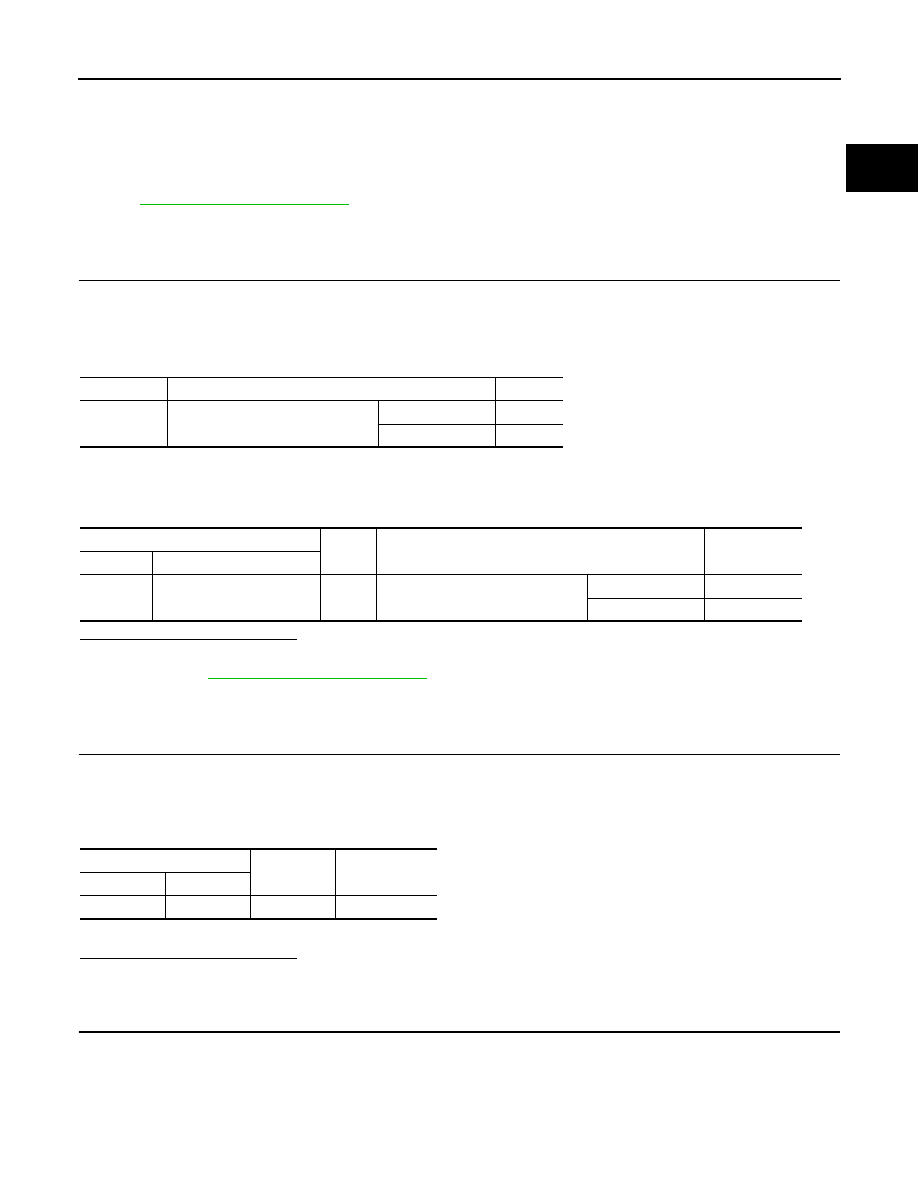
Monitor item
Condition
Indication
BRAKE SW1
Brake pedal and clutch pedal
Slightly depressed
OFF
Fully released
ON
ECM
Ground
Condition
Voltage
Connector
Terminal
E16
100
(ASCD brake switch signal)
Ground
Brake pedal and clutch pedal
Slightly depressed
Approx. 0V
Fully released
Battery voltage
ASCD clutch switch
Ground
Voltage (V)
Connector
Terminal
E112
1
Ground
Battery voltage