Nissan Qashqai (2007-2010). Manual - part 1247


  Index      Nissan     Nissan Qashqai - service and repair manual 2007 - 2010 year


Search            copyright infringement  


Content   ..  1245  1246  1247  1248   ..


Nissan Qashqai (2007-2010). Manual - part 1247


SEC-188

< COMPONENT DIAGNOSIS >

[WITHOUT INTELLIGENT KEY SYSTEM]

STOP LAMP

Is the inspection result normal?

YES

>> GO TO 4.

NO

>> Repair or replace harness.

4.

CHECK STOP LAMP SWITCH

Check stop lamp switch function. 
Refer to 

SEC-49, "Component Inspection"

.

Is the inspection result normal?

YES

>> Check intermittent incident. Refer to 

GI-39, "Intermittent Incident"

.

NO

>> Replace stop lamp switch.

Component Inspection

INFOID:0000000001157667

1.

CHECK STOP LAMP SWITCH

1.

Turn ignition switch OFF.

2.

Disconnect stop lamp switch harness connector.

3.

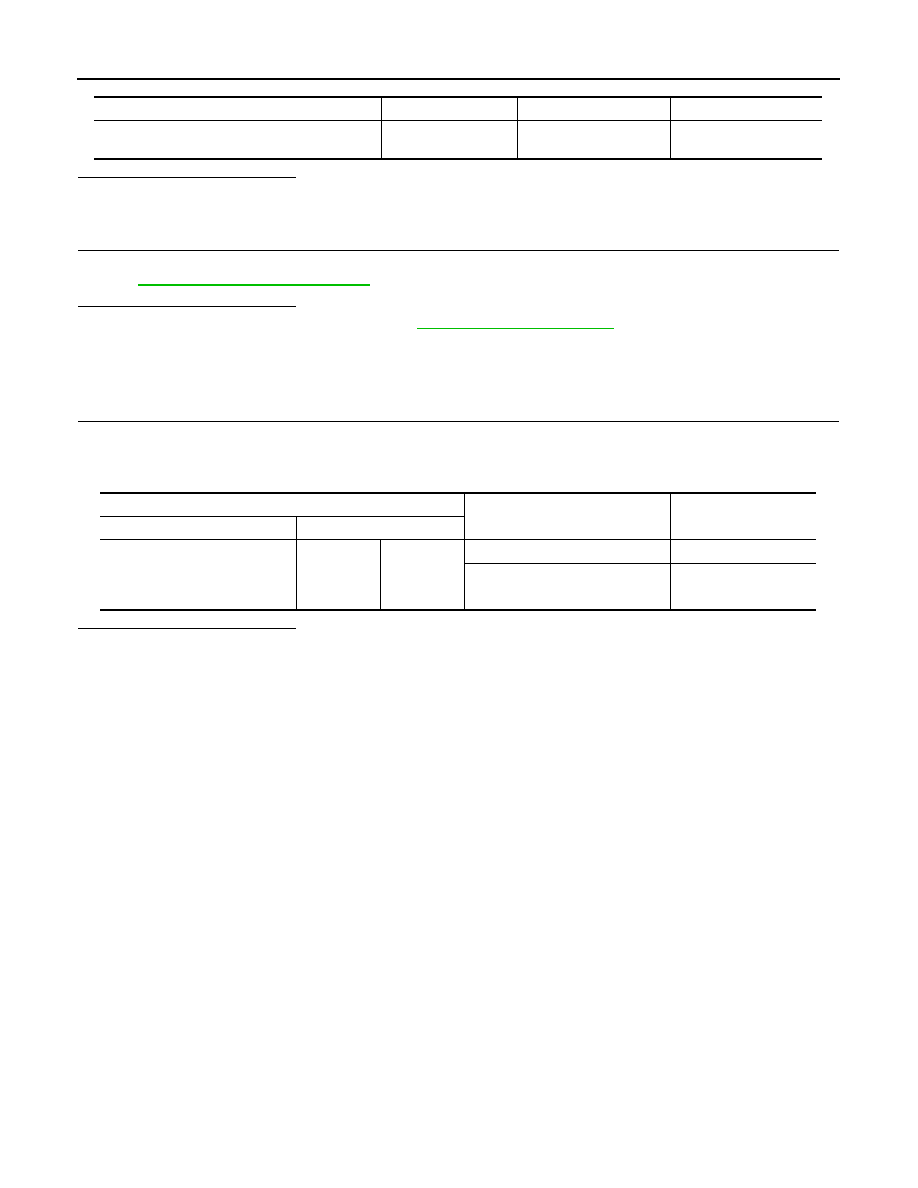
Check continuity between stop lamp switch terminals under the following conditions.

Is the inspection result normal?

YES

>> INSPECTION END.

NO

>> Replace stop lamp switch.

Stop lamp switch connector

Terminal

Ground

Continuity 

E114 (with gasoline engine and M/T models)
E115 (except gasoline engine and M/T models)

2

Ground

Not existed

Stop lamp switch

Condition

Continuity

Connector

Terminal

E114 (with gasoline engine and 
M/T models)
E115 (except gasoline engine 
and M/T models)

1

2

Brake pedal is depressed

Existed

Brake pedal is released

Not existed

HOOD SWITCH

SEC-189

< COMPONENT DIAGNOSIS >

[WITHOUT INTELLIGENT KEY SYSTEM]

C

D

E

F

G

H

I

J

L

M

A

B

SEC

N

O

P

HOOD SWITCH

Description

INFOID:0000000001097846

Hood switch detects that hood is in open/close condition, and then transmits the signal to IPDM E/R.

Component Function Check

INFOID:0000000001097847

1.

CHECK FUNCTION

1.

Select “HOOD SW” in “Data Monitor” mode with CONSULT-III. 

2.

Check the hood switch signal under the following condition.

Is the indication normal?

YES

>> INSPECTION END.

NO

>> Refer to 

SEC-189, "Diagnosis Procedure"

.

Diagnosis Procedure

INFOID:0000000001097848

1.

CHECK HOOD SWITCH SIGNAL

1.

Turn ignition switch OFF.

2.

Check voltage between IPDM E/R harness connector and ground.

Is the inspection result normal?

YES

>> GO TO 6.

NO

>> GO TO 2.

2.

CHECK HOOD SWITCH SIGNAL CIRCUIT

1.

Disconnect IPDM E/R and hood switch connector.

2.

Check continuity between IPDM E/R harness connector and hood switch harness connector.

3.

Check continuity between IPDM E/R harness connector and ground.

Is the inspection result normal?

YES

>> GO TO 3.

NO

>> Repair or replace harness.

3.

CHECK HOOD SWITCH GROUND CIRCUIT

Check continuity between hood switch harness connector and ground.

Test item

Condition

Status

HOOD SW

Hood

Open

ON

Close

OFF

IPDM E/R

Ground

Condition

Voltage (V)

(Approx.)

Connector

Terminal

E12

21

Ground

Hood

Open

0

Close

Battery voltage

IPDM E/R

Hood switch

Continuity

Connector

Terminal

Connector

Terminal

E12

21

E113

2

Existed

IPDM E/R

Ground

Continuity 

Connector

Terminal

E12

21

Ground

Not existed

SEC-190

< COMPONENT DIAGNOSIS >

[WITHOUT INTELLIGENT KEY SYSTEM]

HOOD SWITCH

Is the inspection result normal?

YES

>> GO TO 4.

NO

>> Repair or replace harness.

4.

CHECK IPDM E/R OUTPUT

1.

Connect the IPDM E/R connector.

2.

Check voltage between IPDM E/R harness connector and ground.

Is the inspection result normal?

YES

>> GO TO 5.

NO

>> Replace IPDM E/R. Refer to 

PCS-32, "Removal and Installation"

.

5.

CHECK HOOD SWITCH

Refer to 

SEC-190, "Component Inspection"

.

Is the inspection result normal?

YES

>> GO TO 6.

NO

>> Replace hood switch.

6.

CHECK INTERMITTENT INCIDENT

Refer to 

GI-39, "Intermittent Incident"

.

Is the inspection result normal?

YES

>> Replace IPDM E/R. Refer to 

PCS-32, "Removal and Installation"

.

NO

>> Repair or replace malfunctioning parts.

Component Inspection

INFOID:0000000001097849

1.

CHECK HOOD SWITCH

1.

Turn ignition switch OFF.

2.

Disconnect hood switch connector.

3.

Check continuity between hood switch terminals.

Is the inspection result normal?

YES

>> INSPECTION END

NO

>> Replace hood switch.

Hood switch

Ground

Continuity

Connector

Terminal

E113

1

Ground

Existed

IPDM E/R

Ground

Voltage (V)

(Approx.)

Connector

Terminal

E12

21

Ground

Battery voltage

Hood switch

Condition

Continuity

Terminal

1

2

Hood switch

Push

Not existed

Release

Existed

HORN

SEC-191

< COMPONENT DIAGNOSIS >

[WITHOUT INTELLIGENT KEY SYSTEM]

C

D

E

F

G

H

I

J

L

M

A

B

SEC

N

O

P

HORN

Description

INFOID:0000000001097850

Horn is located inside of front bumper and operates when theft warning system is in alarm phase.

Component Function Check

INFOID:0000000001097851

1.

CHECK FUNCTION

1.

Select “HORN” in “ACTIVE TEST” mode with CONSULT-III.

2.

Check the horn operation.

Is the operation normal?

YES

>> INSPECTION END.

NO

>> Refer to 

SEC-191, "Diagnosis Procedure"

.

Diagnosis Procedure

INFOID:0000000001097852

1.

CHECK HORN FUNCTION

Check horn function with horn switch.
Does the horn sound?

YES

>> GO TO 2.

NO

>> Refer to 

HRN-2, "Wiring Diagram - HORN -"

.

2.

CHECK HORN RELAY POWER SUPPLY

1.

Turn ignition switch ON.

2.

Perform “ACTIVE TEST” (“HORN”) with CONSULT-Ill.

3.

Check voltage between horn relay harness connector and ground.

Is the inspection result normal?

YES

>> GO TO 4.

NO

>> GO TO 3.

3.

CHECK HORN RELAY CIRCUIT

1.

Turn ignition switch OFF.

2.

Disconnect IPDM E/R and horn relay 1and 2 connector.

3.

Check continuity between IPDM E/R harness connector and horn relay 1and 2 harness connector.

4.

Check continuity between IPDM E/R harness connector and ground.

Is the inspection result normal?

YES

>> GO TO 4.

NO

>> Repair or replace harness.

4.

CHECK INTERMITTENT INCIDENT

Horn relay

Ground

Test item

Voltage (V)

(Applox.)

Connector

Terminal

E5

2

Ground

HORN

ON

Battery voltage 

Battery voltage

Other than above

0

IPDM E/R

Horn relay 1 and 2

Continuity

Connector

Terminal

Connector

Terminal

E12

30

E5

1

Existed

IPDM E/R

Ground

Continuity 

Connector

Terminal

E12

30

Ground

Not existed


Content   ..  1245  1246  1247  1248   ..