Nissan Qashqai (2007-2010). Manual - part 1009


  Index      Nissan     Nissan Qashqai - service and repair manual 2007 - 2010 year


Search            copyright infringement  


Content   ..  1007  1008  1009  1010   ..


Nissan Qashqai (2007-2010). Manual - part 1009


OUTSIDE KEY ANTENNA

DLK-115

< COMPONENT DIAGNOSIS >

[WITH I-KEY, WITHOUT SUPER LOCK]

C

D

E

F

G

H

I

J

L

M

A

B

DLK

N

O

P

Is the inspection result normal?

YES

>> GO TO 3.

NO

>> Repair or replace harness between Intelligent Key unit and outside key antenna.

3.

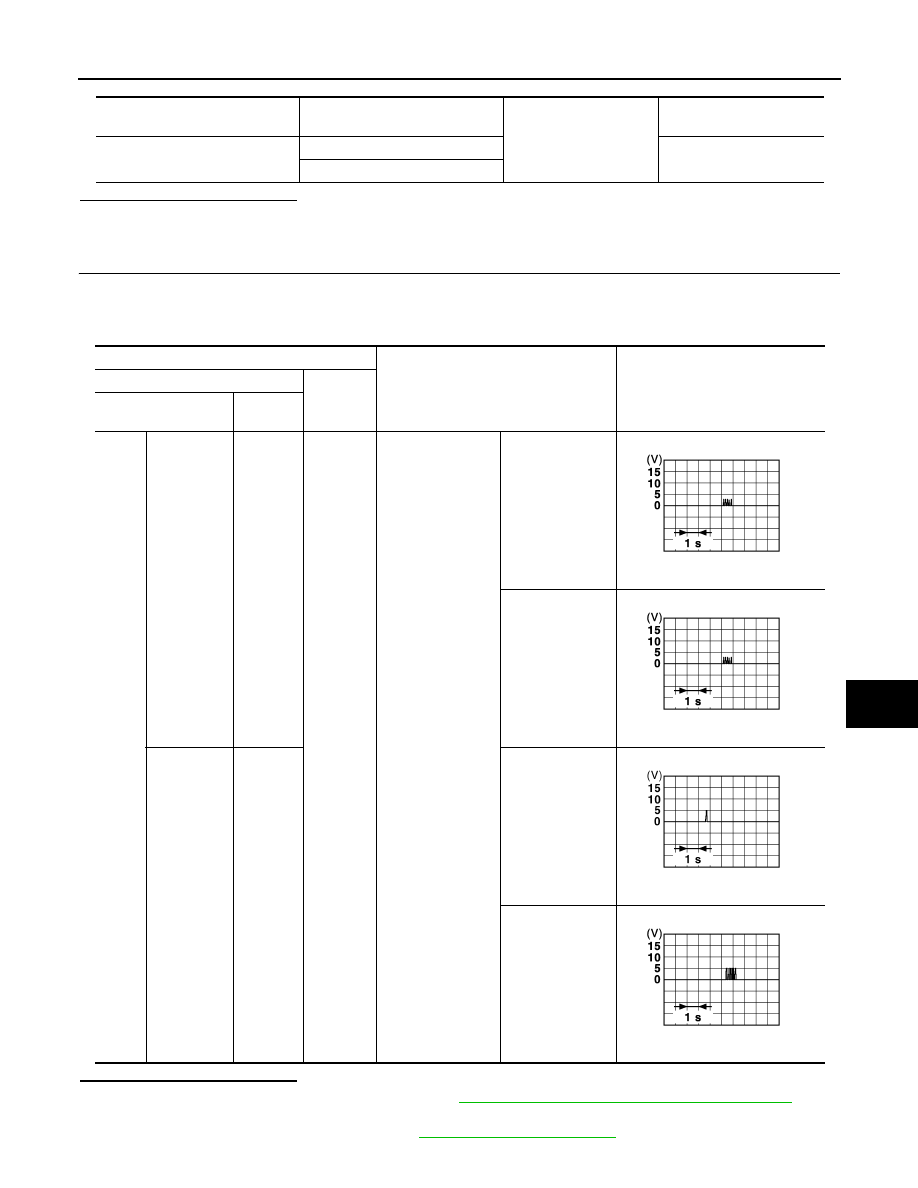
CHECK OUTSIDE KEY ANTENNA INPUT SIGNAL 2

1.

Replace outside key antenna. (New antenna or other antenna)

2.

Connect Intelligent Key unit connector and outside key antenna connector.

3.

Check signal between Intelligent Key unit connector and ground with oscilloscope.

Is the inspection result normal?

YES

>> Replace outside key antenna. Refer to 

DLK-276, "REAR BUMPER : Exploded View"

 (Rear

bumper).

NO

>> Check intermittent incident. Refer to 

GI-39, "Intermittent Incident"

.

Intelligent Key unit 

connector

Terminal

Ground

Continuity 

M40

17

Does not exist

18

Terminal

Condition

Signal

(Reference value)

(+)

(–)

Intelligent Key unit 

connector

Terminal

M40

Rear bumper

(+)

17

Ground

Door request switch 

is pressed

When Intelligent 
Key is in the an-
tenna detection 
area.

When Intelligent 
Key is not in the 
antenna detection 
area.

Rear bumper

(-)

18

When Intelligent 
Key is in the an-
tenna detection 
area.

When Intelligent 
Key is not in the 
antenna detection 
area.

JMKIA0514ZZ

JMKIA0514ZZ

JMKIA0395ZZ

JMKIA0515ZZ

DLK-116

< COMPONENT DIAGNOSIS >

[WITH I-KEY, WITHOUT SUPER LOCK]

INSIDE KEY ANTENNA

INSIDE KEY ANTENNA

INSTRUMENT CENTER

INSTRUMENT CENTER : Description

INFOID:0000000001109338

Detects whether Intelligent Key is inside the vehicle.

INSTRUMENT CENTER : Component Function Check

INFOID:0000000001109339

1.

CHECK INSIDE KEY ANTENNA INPUT SIGNAL

With CONSULT-III

1.

Check “ANTENNA” in Active test mode with CONSULT-III.

2.

Touch “ROOM ANT 2”. 

3.

When Intelligent Key is in inside key antenna (instrument center) detection area, hazard lamp flashes.

Is the inspection result normal?

YES

>> Inside key antenna is OK.

NO

>> Refer to 

DLK-116, "INSTRUMENT CENTER : Diagnosis Procedure"

.

INSTRUMENT CENTER : Diagnosis Procedure

INFOID:0000000001109340

1.

CHECK INSIDE KEY ANTENNA INPUT SIGNAL 1

1.

Turn ignition switch OFF.

2.

Check signal between Intelligent Key unit connector and ground with oscilloscope.

Test Item

Inside Antenna

ANTENNA

:ROOM ANT 2

Inside key antenna (instrument center)

INSIDE KEY ANTENNA

DLK-117

< COMPONENT DIAGNOSIS >

[WITH I-KEY, WITHOUT SUPER LOCK]

C

D

E

F

G

H

I

J

L

M

A

B

DLK

N

O

P

Is the inspection result normal? 

YES

>> Check intermittent incident. Refer to 

GI-39, "Intermittent Incident"

.

NO

>> GO TO 2.

2.

CHECK INSIDE KEY ANTENNA CIRCUIT

1.

Disconnect Intelligent Key unit connector and inside key antenna connector.

2.

Check continuity between Intelligent Key unit connector and inside key antenna connector.

3.

Check continuity between Intelligent Key unit connector and ground.

Terminals

Condition

Signal

(Reference value)

(+)

(–)

Intelligent Key unit 

connector

Terminal

M40

Instrument 

center

(+) 

33

Ground

• All doors are 

closed

• Ignition knob 

switch is pressed

When Intelligent Key 
is in the antenna de-
tection area.

When Intelligent Key 
is not in the antenna 
detection area.

Instrument 

center

(-) 

34

When Intelligent Key 
is in the antenna de-
tection area.

When Intelligent Key 
is not in the antenna 
detection area.

JMKIA0393ZZ

JMKIA0391ZZ

JMKIA0392ZZ

JMKIA0390ZZ

Intelligent Key unit 

connector

Terminal

 Inside key antenna 

connector

Terminal

Continuity 

M40

33

M70 (instrument center)

1

Exists

34

2

DLK-118

< COMPONENT DIAGNOSIS >

[WITH I-KEY, WITHOUT SUPER LOCK]

INSIDE KEY ANTENNA

Is the inspection result normal?

YES

>> GO TO 3.

NO

>> Repair or replace harness between Intelligent Key unit and inside key antenna.

3.

CHECK INSIDE KEY ANTENNA INPUT SIGNAL 2

1.

Replace inside key antenna. (New antenna or other antenna)

2.

Connect Intelligent Key unit connector and inside key antenna connector.

3.

Check signal between Intelligent Key connector and ground with oscilloscope.

Is the inspection result normal?

YES

>> Replace inside key antenna. Refer to 

DLK-273, "INSTRUMENT CENTER : Exploded View"

(instrument center).

NO

>> Check intermittent incident. Refer to 

GI-39, "Intermittent Incident"

.

Intelligent Key unit 

connector

Terminal

Ground

Continuity 

M40

33

Does not exist

34

Terminals

Condition

Signal

(Reference value)

(+)

(–)

Intelligent Key unit 

connector

Terminal

M40

Instrument 

center

(+)

33

Ground

• All doors are 

closed

• Ignition knob 

switch is pressed

When Intelligent Key is 
in the antenna detec-
tion area.

When Intelligent Key is 
not in the antenna de-
tection area.

Instrument 

center

(-)

34

When Intelligent Key is 
in the antenna detec-
tion area.

When Intelligent Key is 
not in the antenna de-
tection area.

JMKIA0393ZZ

JMKIA0391ZZ

JMKIA0392ZZ

JMKIA0390ZZ


Content   ..  1007  1008  1009  1010   ..