Mazda Mazdaspeed 3 (2013 year). Manual - part 26
Shuffle playback (only AVRCP Ver. 1.4)
Folder shuffle
Touch the
on-screen button during
playback to play the songs in the folder
shuffle.
“
” is displayed during
playback.
Touch the
on-screen button two
times while
“
” is displayed to cancel.
Device shuffle
Touch the
on-screen button two
times during playback to play the songs in
the device shuffle.
“
” is displayed
during playback.
Touch the
on-screen button while
“
” is displayed to cancel.
Display scroll
If a whole title cannot be displayed at one
time, touch the
on-screen button on
the right side of the title. When the last
character is displayed, touch the
on-
screen button to display the first character
of the title.
qBluetooth® audio device
information display
If a Bluetooth
®
audio device is connected,
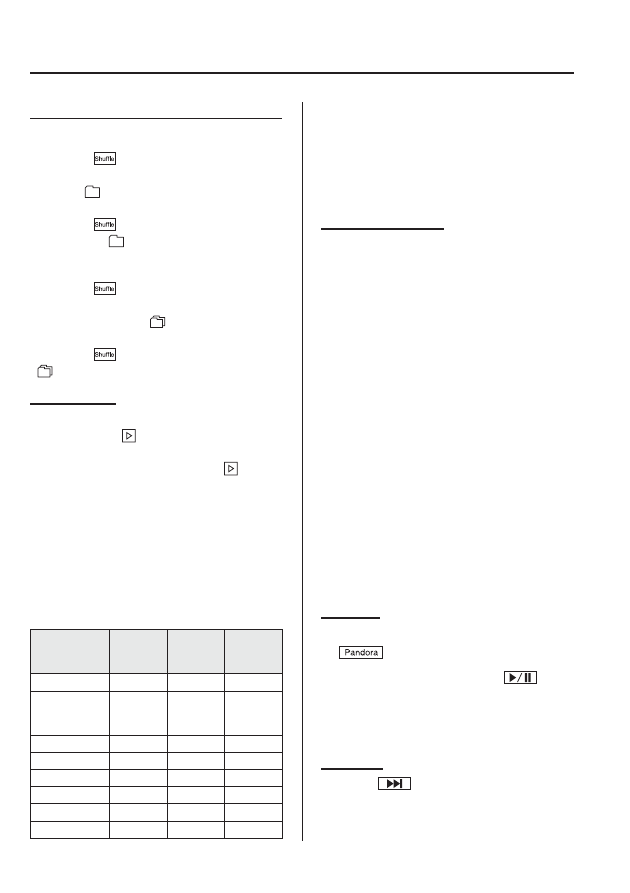
the following information is displayed in
the display.
AVRCP
Ver. lower
than 1.3
AVRCP
Ver. 1.3
AVRCP
Ver. 1.4 or
higher
Device name
X
X
X
Remaining
battery charge
of device
―
X
X
Title
―
X
X
Artist name
―
X
X
Album name
―
X
X
File number
―
X
X
Playback time
―
X
X
Folder number
―
―
X
NOTE
Some information may not display depending
on the device, and if the information cannot be
displayed,
“No Song Name” is indicated.
qHow to Use Pandora®
What is Pandora
®
?
Pandora
®
is free personalized internet
radio. Simply enter a favorite artist, track,
genre, and Pandora
®
will create a
personalized station that plays their music
and more like it. Rate songs by giving
thumbs-up and thumbs-down feedback to
further refine your station, discover new
music and help Pandora
®
play only music
you love.
* Pandora
®
, the Pandora
®
logo, and the
Pandora
®
trade dress are trademarks or
registered trademarks of Pandora
Media, Inc., used with permission.
NOTE
To operate Pandora
®
from your Bluetooth
®
device, perform the following in advance:
l
Create Pandora
®
account on the web.
l
Create Pandora
®
station using Pandora
®
application.
l
Install Pandora
®
application on your
device.
Playback
1. To listen to Pandora
®
, touch the
on-screen tab.
2. To stop playback, press the
on-
screen button.
3. Press the button again to resume
playback.
Skip song
Press the
on-screen button.
6-168
Interior Comfort
Bluetooth® (Type B)