Lexus ES (2023 year). Manual in english - page 22
 

  Index      Manuals     Lexus ES (2023 year). Manual in english


Search            copyright infringement  


Content      ..     20      21      22      23     ..


Lexus ES (2023 year). Manual in english - page 22


342

5-5. Using the other interior features

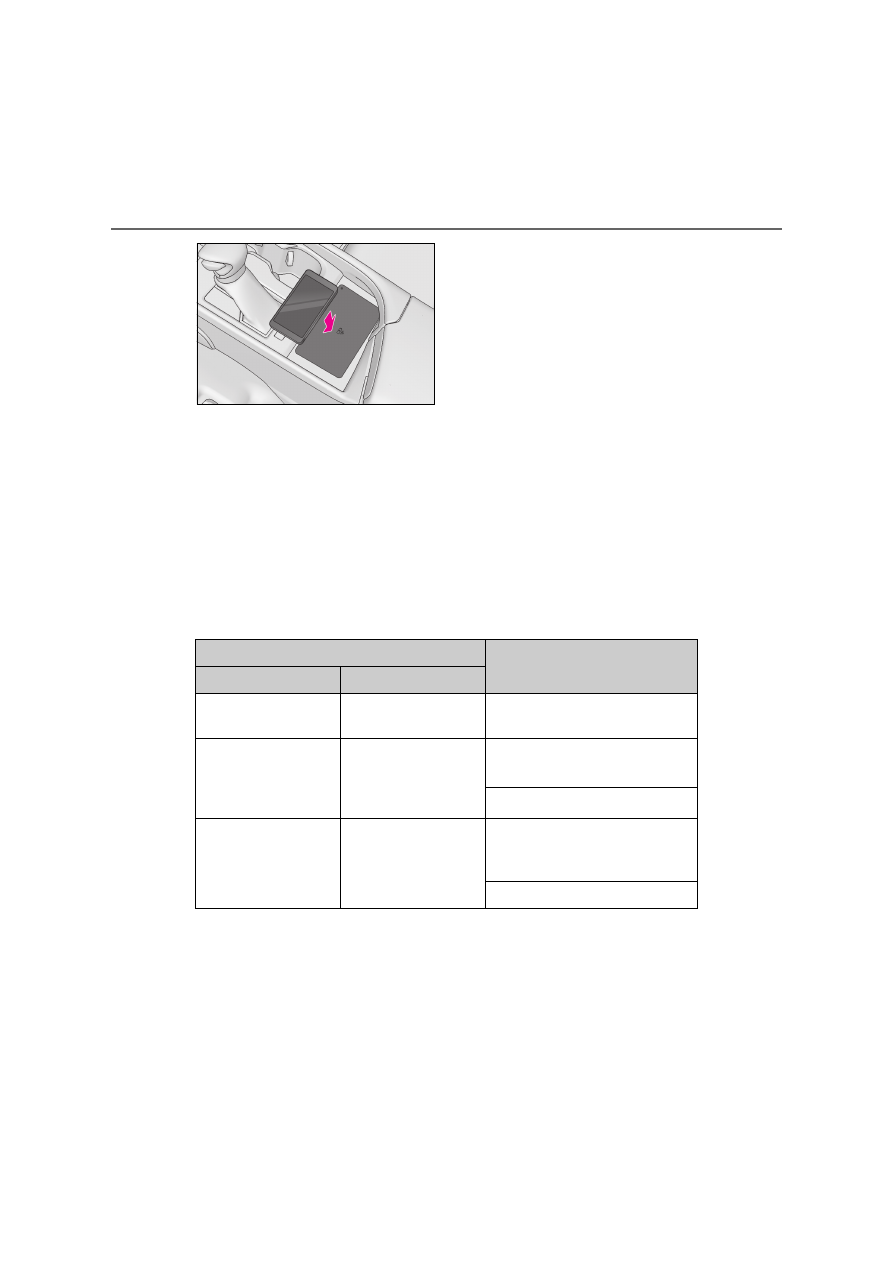
Recharging function

When charging is complete and 
after a fixed time in the charge sus-
pension state, charging restarts.

When a portable device is moved 
significantly in the charge area, the 
charging coil is disconnected and 
charging is stopped momentarily. 
However, if there is a charging coil 

in the charge area, the charging coil 
inside the wireless charger will 
move toward it and then charging 
restarts.

Rapid charging function

The following portable devices sup-
port rapid charging.

• Portable devices compliant with WPC 

Ver1.2.4 and compatible with rapid 
charging

• iPhone’s with an iOS version that sup-

ports 7.5 W charging (iPhone 8 and 
later models)

When a portable device that sup-
ports rapid charging is charged, 
charging automatically switches to 
the rapid charging function.

Lighting conditions of operation indicator light

*1

: Charging power will not be output during standby. A metallic object will not be heated, 

if it is placed on the charging tray in this state.

*2

: Depending on the portable device, there are cases where the operation indicator light 

will continue being lit up orange even after the charging is complete.

Operation indicator light

Conditions

Charging tray side

Center display side

Turning off

Disappear

When the Wireless charger power 
supply is off

Green (comes on)

Gray

On Standby (charging possible 
state)

*1

When charging is complete

*2

Orange (comes on)

Blue

When placing the portable device on 
the charging area (detecting the por-
table device)

Charging

343

5

5-5. Using the other interior features

In

te

rior f
eat
ur

es

When the wireless charger does not operate properly

When the wireless charger does not operate properly, handle the probable cause 
based on the following tables.

Operation indicator light

Suspected causes/Handling method

Charging tray side

Center Display side

Orange (flashing repeat-

edly once every second)

Gray

Vehicle to wireless charger commu-
nication failure

If the hybrid system is operating, 
stop and then restart the hybrid 
system.

If the power switch is in ACCES-
SORY, start the hybrid system. 
(

P.186)

Green (flashing repeat-

edly once every second)

Disappear

Wireless charger and multimedia 
system communication failure

If the hybrid system is operating, 
stop and then restart the hybrid 
system.

If the power switch is in ACCES-
SORY, start the hybrid system. 
(

P.186)

Green (comes on)

Blue

The smart entry & start system is 
detecting the key.

Wait until key detection has com-
pleted.

Orange (repeatedly 

flashes 3 times continu-

ously)

Gray

A metallic foreign substance is in the 
charge area and charging has 
stopped momentarily.

Remove the foreign substance 
from the charge area.

344

5-5. Using the other interior features

The wireless charger can be operated 

when

The power switch is in ACCESSORY or 

ON mode.

Usable portable devices

Qi standard wireless charge standard 

can be used on compatible devices.

However, not all Qi standard devices and 

compatibility are guaranteed.

Starting with mobile phones and 

smartphones, it is aimed for low power 

electrically supplied portable devices of 

no more than 5W.

However, charging exceeding 5 W is 

supported by the following portable 

devices.

• Charging at 7.5 W or less is supported 

by iPhone’s that support 7.5 W charging.

• Charging at 10 W or less is supported by 

portable devices compliant with EPP out-

put as defined by WPC standard 

Ver1.2.4.

When covers and accessories are 

attached to portable devices

Do not charge in situations where cover 

and accessories not able to handle Qi are 

attached to the portable device. Depending 

on the type of cover (including for certain 

genuine manufacturer parts) and acces-

sory, it may not be possible to charge. 

When charging is not performed even with 

the portable device placed on the charge 

area, remove the cover and accessories.

Important points of the wireless charger

If the electronic key cannot be detected 

within the vehicle interior, charging can-

not be done. When the door is opened 

and closed, charging may be temporarily 

suspended.

Orange (repeatedly 

flashes 3 times continu-

ously) or flashing 

between green and 

orange

Gray

The charging coil in the portable 
device moved outside of the charge 
area and charging has stopped 
momentarily.

Remove the portable device 
from the charging tray, check 
that the operation indicator light 
changes back to green, and then 
place the portable device so that 
it is near the center of the 
charging tray. Also, if a case or 
cover is installed to the portable 
device, remove it.

Orange (repeatedly 

flashes 4 times continu-

ously)

Gray

Safety shutdown resulting when the 
temperature within the wireless 
charger exceeded the set value

Stop charging, remove the porta-
ble device from the charging 
tray, wait for the temperature to 
drop, and then start charging 
again.

Operation indicator light

Suspected causes/Handling method

Charging tray side

Center Display side

345

5

5-5. Using the other interior features

In

te

rior f
eat
ur

es

When charging, the wireless charging 

device and portable device will get 

warmer, however this is not a malfunc-

tion.

When a portable device gets warm while 

charging, charging may stop due to the 

protection function on the portable 

device side. In this case, when the tem-

perature of the portable device drops 

significantly, charge again.

The fan may start operating to lower the 
temperature inside the wireless charger, 
however this is not a malfunction.

Operation sounds

A buzzing noise may be heard when press-

ing the power switch to turn to ACCES-

SORY or ON mode or when detecting a 

portable device. However, this is not a mal-

function.

WARNING

Caution while driving

When charging a portable device, for 

safety reasons, the driver should not 

operate the main part of the portable 

device while driving.

Caution while in motion

Do not charge lightweight devices such 

as wireless headphones while in motion. 

These devices are very light and may be 

ejected from the charging tray, which 

may lead to unforeseen accidents.

Caution regarding interference with 

electronic devices

People with implantable cardiac pace-

makers, cardiac resynchronization ther-

apy-pacemakers or implantable 

cardioverters, as well as any other elec-

trical medical device, should consult their 

physician about the usage of the wireless 

charger.

To prevent malfunctions or burns

Observe the following precautions. Fail-

ure to do so may result in a equipment 

failure and damage, catch fire, burns due 

to overheat or electric shock.

Do not insert any metallic objects 

between the charge area and the por-

table device while charging

Do not attach an aluminum sticker or 

other metallic object to the charge 

area

Do not attach an aluminum sticker or 

other metallic object to the side of the 

portable device (or to its case or 

cover) that touches the charge area

Do not use the charging tray as a small 

storage space

Do not subject to a strong force or 

impact

Do not disassemble, modify or remove

Do not charge devices other than 

specified portable devices

Keep away from magnetic items

Do not charge devices if the charge 

area is covered in dust

Do not cover with a cloth or similar 

material

NOTICE

Situations in which the function may 

not operate normally

Devices may not be charged normally in 

the following situations.

The portable device is fully charged

The portable device is being charged 

with a cable connected

There is foreign matter between the 

charge area and portable device

346

5-5. Using the other interior features

NOTICE

Charging has caused the portable 

device to heat up

The temperature around the charging 

tray is 35°C (95°F) or higher, such as 

in extreme heat

The portable device is placed with its 

charging side facing up

The portable device is placed in an 

area misaligned from the charge area

The portable device is larger than the 

charging tray

A foldable and portable device is 

placed outside the charge area

The vehicle is in an area where strong 

electrical waves or noise are emitted, 

such as near a television tower, power 

plant, gasoline station, broadcasting 

station, large display, airport, etc.

When the camera of the portable 

device largely protrudes

Any of the following objects that is 2 

mm (0.08 in) or thicker is stuck or 

installed between the charging side of 

the portable device and the charge 

area.

• Thick cases or covers

• A case or cover attached with an 

uneven or tilted surface, so that the 

charging side is not flat

• Thick  decorations

• A case that uses a magnet on the 

charging side of the portable device

• Accessories, such as finger rings, 

straps, etc.

When the portable device is in contact 

with, or is covered by any of the follow-

ing metallic objects:

• A card that has metal on it, such as alu-

minum foil, etc.

• A pack of cigarettes that includes alu-

minum foil

• A wallet or bag that is made of metal

• Coins

• A heating pad

• CDs, DVDs or other media

• A metal accessory

• A case or cover made of metal

Electric wave type wireless remote 

controls are being used nearby

When the electronic key is taken out-

side the vehicle

2 or more portable devices are placed 

on the charging tray at the same time

If charging is abnormal or the operation 

indicator light continues to flash for any 

other reason, the wireless charger may 

be malfunctioning. Contact any autho-

rized Lexus retailer or Lexus authorized 

repairer, or any reliable repairer.

To prevent malfunctions and data 

corruptions

When charging, bringing a credit, or 

other magnetic card, or magnetic stor-

age media close to the charge area 

may clear any stored data due to mag-

netic influence. Also, do not bring a 

wristwatch or other precision instru-

ment close to the charge area since 

doing so may cause it to malfunction.

347

5

5-5. Using the other interior features

In

te

rior f
eat
ur

es

Fold down the armrest for use.

An assist grip installed on the ceiling 
can be used to support your body 
while sitting on the seat.

Rear sunshade

The rear sunshade can be raised and 
lowered by operating the switch shown 
below.

NOTICE

Do not charge with a non-contact IC 

card such as a transportation system 

IC card inserted between the charging 

side of a portable device and the 

charge area. The IC chip may become 

extremely hot and damage the porta-

ble device or IC card. Be especially 

careful not to charge a portable device 

inside a case or cover with a non-con-

tact IC card attached.

Do not leave portable devices inside 

the vehicle. The inside of the vehicle 

can become hot in extreme heat, 

which could cause a malfunction.

If the smartphone OS has been 

updated

If the smartphone OS has been updated 

to a newer version, its charging specifi-

cations may have changed significantly. 

For details, check the information on the 

manufacturer’s website.

To prevent 12-volt battery discharge

Do not use the wireless charger for a 

long period of time when the hybrid sys-

tem is stopped.

Armrest

NOTICE

To prevent damage to the armrest

Do not apply too much load on the arm-

rest.

Assist grips

WARNING

Assist grips

Do not use the assist grip when getting in 

or out of the vehicle or rising from your 

seat.

NOTICE

To prevent damage to the assist grip

Do not hang any heavy object or put a 

heavy load on the assist grip.

Rear sunshade (if 
equipped)/rear door sunshades 
(if equipped)

348

5-5. Using the other interior features

From the front seats

Press the switch. (Raise/lower)

From the rear seats (if equipped)

Press the switch. (Raise/lower)

Rear door sunshades

Pull the tab of the rear door sunshade 
and hook the sunshade on the anchors.

To retract the rear door sunshade, unhook 
the sunshade and retract it slowly.

The rear sunshade can be used when

The power switch is in ON mode.

The rear sunshade can be operated for 

approximately 1 minute even after the 

power switch is turned to ACCESSORY 

mode or turned off.

Reverse operation feature

To ensure adequate rear visibility, the rear 

sunshade automatically lowers when the 

shift lever is shifted to R.
However, the rear sunshade is raised again 
if any of the following occurs:

The button is pressed again.

*

Shift the shift lever to P.

The shift lever is shifted out of R, and the 

vehicle reaches a speed of 15 km/h (9 

mph).

If the hybrid system is turned off after the 

rear sunshade was lowered due to the 

reverse operation feature, it will not be 

raised even when the hybrid system is 

turned on again and the vehicle reaches a 

speed of 15 km/h (9 mph). To raise the 

sunshade again, press the button.

*

: Occasionally, the reverse function may 

not be carried out after the switch has 
been pressed. Repeat the above opera-
tion to operate the function.

349

5

5-5. Using the other interior features

In

te

rior f
eat
ur

es

Long objects can be loaded into the 
vehicle by utilizing the trunk space and 
rear seat area.

1

Fold down the armrest.

2

Fold down the handle and open the 
armrest door.

The armrest door can be locked and 
unlocked using the mechanical key.

Unlock

Lock

WARNING

When the rear sunshade is being 

raised or lowered

When the rear sunshade is being oper-

ated, do not place fingers or other 

objects in the fastener section or in the 

opening. They may get caught, causing 

injury.

NOTICE

To prevent 12-volt battery discharge

Do not operate the rear sunshade when 

the hybrid system is not operating.

To ensure normal operation of the 

sunshades

Do not operate the rear sunshade 

when any objects are on top of its 

opening/closing part.

The rear sunshade may not operate 

properly.

To ensure normal operation of the rear 

sunshade and rear door sunshades, 

observe the following precautions:

• Do not place excessive load on the 

motor or other components of the rear 

sunshade.

• Do not attach items to the rear sun-

shade and rear door sunshades.

• Keep the opening clean and clear of 

obstructions.

• Do not operate the rear sunshade 

continuously for long periods of time.

Trunk storage extension

WARNING

When not in use

Ensure that the armrest door is closed. In 

the event of sudden braking, items stored 

in the trunk may be thrown forward into 

the cabin, resulting in injury.

A
B

350

5-5. Using the other interior features

The coat hooks are provided with the 
rear assist grips.

Coat hooks

WARNING

Items that should not be hanged

Do not hang coat hangers or other hard 

or sharp objects on the hook. If the SRS 

curtain shield airbags deploy, these items 

may become projectiles, causing death 

or serious injury.

6

351

6

M

ain

ten

an

ce a
nd

 ca

re

Maintenance and care

6-1. Maintenance and care

Cleaning and protecting the vehi-

cle exterior................................

352

Cleaning and protecting the vehi-

cle interior .................................

355

6-2. Maintenance

Maintenance requirements..

358

6-3. Do-it-yourself maintenance

Do-it-yourself service precau-

tions..............................................

360

Hood ..............................................

362

Positioning a floor jack............

362

Engine compartment...............

364

12-volt battery.............................

369

Tires .................................................

371

Tire inflation pressure..............

379

Wheels ..........................................

380

Air conditioning filter................

381

Cleaning the hybrid battery (trac-

tion battery) air intake vent and 
filter ..............................................

383

Electronic key battery.............

387

Checking and replacing fuses

........................................................

389

Light bulbs.....................................

391

352

6-1. Maintenance and care

6-1.Maintenance and care

Working from top to bottom, liber-
ally apply water to the vehicle body, 
wheel wells and underside of the 
vehicle to remove any dirt and dust.

Wash the vehicle body using a 
sponge or soft cloth, such as a 
chamois.

For hard-to-remove marks, use car 
wash soap and rinse thoroughly with 
water.

Wipe away any water.

Wax the vehicle when the water-
proof coating deteriorates.

If water does not bead on a clean surface, 
apply wax when the vehicle body is cool.

Self-restoring coat

The vehicle body has a self-restoring coat-

ing that is resistant to small surface 

scratches caused in a car wash etc.

The coating lasts for 5 to 8 years from 

when the vehicle is delivered from the 

plant.

The restoration time differs depending on 

the depth of the scratch and outside tem-

perature.

The restoration time may become 

shorter when the coating is warmed by 

applying warm water.

Deep scratches caused by keys, coins, 

etc. cannot be restored.

Do not use wax that contains abrasives.

Automatic car washes

Before washing the vehicle:

• Fold the mirrors (if equipped) or Digital 

Side-view Monitor cameras (if equipped)

• Turn off the power trunk lid (if equipped)
Start washing from the front of the vehicle. 
Make sure to extend the mirrors (if 
equipped) or Digital Side-view Monitor 
cameras (if equipped) before driving.

Brushes used in automatic car washes 

may scratch the vehicle surface, parts 

(wheel, etc.) and harm your vehicle’s 

paint.

Rear spoiler may not be washable in 

some automatic car washes. There may 

also be an increased risk of damage to 

vehicle.

High pressure car washes

As water may enter the cabin, do not bring 

the nozzle tip near the gaps around the 

doors or perimeter of the windows, or spray 

these areas continuously.

Notes for a smart entry & start system

If the door handle becomes wet while the 

electronic key is within the effective range, 

the door may lock and unlock repeatedly. In 

that case, follow the following correction 

procedures to wash the vehicle:

Place the key in a position 2 m (6 ft.) or 

more separate from the vehicle while the 

vehicle is being washed. (Take care to 

ensure that the key is not stolen.)

Set the electronic key to battery-saving 

mode to disable the smart entry & start 

system. (

P.141)

Wheels and wheel ornaments

Remove any dirt immediately by using a 

neutral detergent.

Wash detergent off with water immedi-

ately after use.

To protect the paint from damage, make 

sure to observe the following precau-

tions.

• Do not use acidic, alkaline or abrasive 

Cleaning and protecting the 
vehicle exterior

Perform cleaning in a manner 
appropriate to each component 
and its material.

Cleaning instructions

353

6

6-1. Maintenance and care

M

ain

ten

an

ce a
nd

 ca

re

detergent

• Do not use hard brushes

• Do not use detergent on the wheels 

when they are hot, such as after driving or 

parking in hot weather

Brake pads and calipers

Rust may form if the vehicle is parked with 

wet brake pads or disc rotors, causing them 

to stick. Before parking the vehicle after it is 

washed, drive slowly and apply the brakes 

several times to dry the parts.

Bumpers

Do not scrub with abrasive cleaners.

Front side windows water-repellent 

coating

The following precautions can extend the 

effectiveness of the water-repellent coat-

ing.

Remove any dirt, etc. from the front side 

windows regularly.

Do not allow dirt and dust to accumulate 

on the windows for a long period.

Clean the windows with a soft, damp 

cloth as soon as possible.

Do not use wax or glass cleaners that 

contain abrasives when cleaning the win-

dows.

Do not use any metallic objects to 

remove condensation build up.

Plated portions

If dirt cannot be removed, clean the parts as 

follows:

Use a soft cloth dampened with an 

approximately 5% solution of neutral 

detergent and water to clean the dirt off.

Wipe the surface with a dry, soft cloth to 

remove any remaining moisture.

To remove oily deposits, use alcohol wet 

wipes or a similar product.

WARNING

When washing the vehicle

Do not apply water to the inside of the 

engine compartment. Doing so may 

cause the electrical components etc. to 

catch fire.

When cleaning the windshield

Set the wiper switch to off. 

If the wiper switch is in AUTO, the wipers 

may operate unexpectedly in the follow-

ing situations, and may result in hands 

being caught or other serious injuries 

and cause damage to the wiper blades.

Off

AUTO

When the upper part of the windshield 

where the raindrop sensor is located is 

touched by hand

When a wet rag or similar is held close 

to the raindrop sensor

If something bumps against the wind-

shield

If you directly touch the raindrop sen-

sor body or if something bumps into 

the raindrop sensor

A

B

354

6-1. Maintenance and care

WARNING

Precautions regarding the exhaust 

pipes

As exhaust gases cause the exhaust 

pipes to become quite hot, do not touch 

the exhaust pipes while the hybrid system 

is operating or immediately after the 

hybrid system is turned off.
When washing the vehicle, be careful not 

to touch the exhaust pipes until they have 

cooled sufficiently, as touching hot 

exhaust pipes can cause burns.

Precaution regarding the rear 

bumper with Blind Spot Monitor

If the paint of the rear bumper is chipped 

or scratched, the system may malfunc-

tion. If this occurs, consult any authorized 

Lexus retailer or Lexus authorized 

repairer, or any reliable repairer.

NOTICE

To prevent paint deterioration and 

corrosion on the body and compo-

nents (aluminum wheels etc.)

Wash the vehicle immediately in the 

following cases:

• After driving near the sea coast
• After driving on salted roads
• If coal tar, pollen or tree sap is present 

on the paint surface

• If dead insects, insect droppings or 

bird droppings are present on the 

paint surface

• After driving in an area contaminated 

with soot, oily smoke, mine dust, iron 

powder or chemical substances

• If the vehicle becomes heavily soiled 

with dust or mud

• If liquids such as benzene and gasoline 

are spilled on the paint surface

If the paint is chipped or scratched, 

have it repaired immediately.

To prevent the wheels from corroding, 

remove any dirt and store in a place 

with low humidity when storing the 

wheels.

Cleaning the exterior lights

Wash carefully. Do not use organic 

substances or scrub with a hard brush. 

This may damage the surfaces of the 

lights.

Do not apply wax to the surfaces of the 

lights.

Wax may cause damage to the lenses.

When using an automatic car wash

Set the wiper switch to the off position.

If the wiper switch is in “AUTO”, the wip-

ers may operate and the wiper blades 

may be damaged.

When using a high pressure car wash

When washing the vehicle, do not 

spray the camera or its surrounding 

area directly with a high pressure 

washer. Shock applied from high pres-

sure water may cause the device to not 

operate normally.

Do not spray water directly on the 

radar which is equipped behind the 

emblem. Otherwise it may cause the 

device to be damaged.

Do not bring the nozzle tip close to 

boots (rubber or resin manufactured 

cover), connectors or the following 

parts. The parts may be damaged if 

they come into contact with high-pres-

sure water.

• Traction related parts
• Steering parts
• Suspension  parts
• Brake parts

355

6

6-1. Maintenance and care

M

ain

ten

an

ce a
nd

 ca

re

Remove dirt and dust using a vac-
uum cleaner. Wipe dirty surfaces 
with a cloth dampened with luke-
warm water.

If dirt cannot be removed, wipe it off 
with a soft cloth dampened with 
neutral detergent diluted to approx-
imately 1%.
Wring out any excess water from 
the cloth and thoroughly wipe off 
remaining traces of detergent and 
water.

Shampooing the carpets

There are several commercial foaming-

type cleaners available. Use a sponge or 

brush to apply the foam. Rub in overlapping 

circles. Do not use water. Wipe dirty sur-

faces and let them dry. Excellent results are 

obtained by keeping the carpet as dry as 

possible.

Handling the seat belts

Clean with mild soap and lukewarm water 

using a cloth or sponge. Also check the 

belts periodically for excessive wear, fray-

ing or cuts.

When cleaning the carpeted portions of 

the glove box, console box, etc.

If a strong adhesive tape is used, there is a 

possibility that the surface of the carpet 

could be damaged.

NOTICE

Keep the cleaning nozzle at least 30 

cm (11.9 in.) away from the vehicle 

body. Otherwise resin section, such as 

moldings and bumpers, may be 

deformed and damaged. Also, do not 

continuously hold the nozzle in the 

same place.

Do not spray the lower part of the 

windshield continuously. If water 

enters the air conditioning system 

intake located near the lower part of 

the windshield, the air conditioning 

system may not operate correctly.

Do not wash the underside of the vehi-

cle using a high pressure car washer.

Cleaning and protecting the 
vehicle interior

Perform cleaning in a manner 
appropriate to each component 
and its material.

Protecting the vehicle interior

356

6-1. Maintenance and care

WARNING

Water in the vehicle

Do not splash or spill liquid in the vehi-

cle, such as on the floor, on the rear 

seats, in the hybrid battery (traction 

battery) air vent or in the trunk. 

(

P.84) 

Doing so may cause the hybrid bat-

tery, electrical components, etc. to 

malfunction or catch fire.

Do not get any of the SRS components 

or wiring in the vehicle interior wet. 

(

P.40)

An electrical malfunction may cause 

the airbags to deploy or not function 

properly, resulting in death or serious 

injury.

Vehicles with wireless charger: Do not 

let the wireless charger (

P.340) get 

wet. Failure to do so may cause the 

charger to become hot and cause 

burns or could cause electric shock 

resulting in death or serious injury.

Cleaning the interior (especially 

instrument panel)

Do not use polish wax or polish cleaner. 

The instrument panel may reflect off the 

windshield, obstructing the driver’s view 

and leading to an accident, resulting in 

death or serious injury.

NOTICE

Cleaning detergents

Do not use the following types of 

detergent, as they may discolor the 

vehicle interior or cause streaks or 

damage to painted surfaces:

• Non-seat portions: Organic sub-

stances such as benzene or gasoline, 

alkaline or acidic solutions, dye, and 

bleach

• Seats: Alkaline or acidic solutions, 

such as thinner, benzene, and alcohol

Do not use polish wax or polish 

cleaner. The instrument panel’s or 

other interior part’s painted surface 

may be damaged.

Preventing damage to leather sur-

faces

Observe the following precautions to 

avoid damage to and deterioration of 

leather surfaces:

Remove any dust or dirt from leather 

surfaces immediately.

Do not expose the vehicle to direct 

sunlight for extended periods of time. 

Park the vehicle in the shade, espe-

cially during summer.

Do not place items made of vinyl, plas-

tic, or containing wax on the uphol-

stery, as they may stick to the leather 

surface if the vehicle interior heats up 

significantly.

Water on the floor

Do not wash the vehicle floor with water.

Vehicle systems such as the audio sys-

tem may be damaged if water comes into 

contact with electrical components such 

as the audio system above or under the 

floor of the vehicle. Water may also 

cause the body to rust.

When cleaning the inside of the wind-

shield (vehicles with Lexus Safety 

System +)

Do not allow glass cleaner to contact the 

lens. Also, do not touch the lens. 

(

P.220)

Cleaning the inside of the rear win-

dow

Do not use glass cleaner to clean the 

rear window, as this may cause dam-

age to the rear window defogger 

heater wires or antenna. Use a cloth 

dampened with lukewarm water to 

gently wipe the window clean. Wipe 

the window in strokes running parallel 

to the heater wires or antenna.

357

6

6-1. Maintenance and care

M

ain

ten

an

ce a
nd

 ca

re

Remove dirt using a water-damp-
ened soft cloth or synthetic chamois.

Wipe the surface with a dry soft 
cloth to remove any remaining 
moisture.

Cleaning the areas with satin-finish 

metal accents

The metal areas use a layer of real metal for 

the surface. It is necessary to clean them 

regularly. If dirty areas are left uncleaned 

for long periods of time, they may be diffi-

cult to clean.

Remove dirt and dust using a vac-
uum cleaner.

Wipe off any excess dirt and dust 
with a soft cloth dampened with 
diluted detergent.

Use a diluted water solution of approxi-
mately 5% neutral wool detergent.

Wring out any excess water from 
the cloth and thoroughly wipe off all 
remaining traces of detergent.

Wipe the surface with a dry soft 
cloth to remove any remaining 
moisture. Allow the leather to dry in 
a shaded and ventilated area.

Caring for leather areas

Lexus recommends cleaning the interior of 

the vehicle at least twice a year to maintain 

the quality of the vehicle’s interior.

Remove dirt and dust using a vac-
uum cleaner.

Wipe it off with a soft cloth damp-
ened with neutral detergent diluted 
to approximately 1%.

Wring out any excess water from 
the cloth and thoroughly wipe off 
remaining traces of detergent and 
water.

NOTICE

Be careful not to scratch or damage 

the heater wires or antenna.

Cleaning the areas with satin-
finish metal accents

Cleaning the leather areas

Cleaning the synthetic leather 
areas


Content      ..     20      21      22      23     ..