Lexus ES (2023 year). Manual in english - page 19
 

  Index      Manuals     Lexus ES (2023 year). Manual in english


Search            copyright infringement  


Content      ..     17      18      19      20     ..


Lexus ES (2023 year). Manual in english - page 19


294

4-5. Using the driving support systems

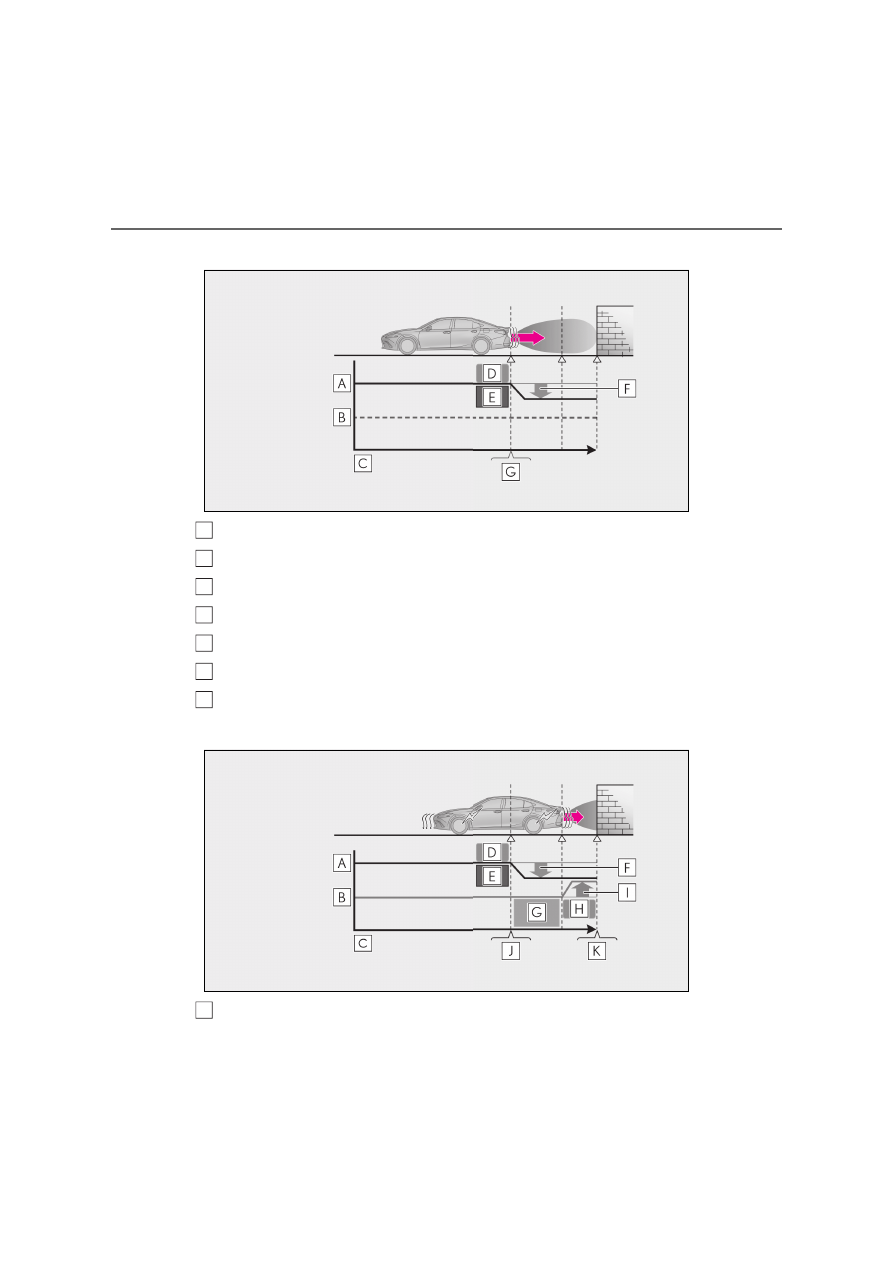
Figure 2 When hybrid system output restriction control operates

Hybrid system output

Braking force

Time

Hybrid system output restriction control begins operating

System determines that possibility of collision with detected object is high

Hybrid system output reduced

Example: Multi-information display: “BRAKE!”

Figure 3 When brake control operates

Hybrid system output

A
B
C
D

E
F

G

A

295

4

4-5. Using the driving support systems

Dr

ivin
g

Braking force

Time

Hybrid system output restriction control begins operating

System determines that possibility of collision with detected object is high

Hybrid system output reduced

System determines that possibility of collision with detected object is extremely 
high

Brake control begins operating

Brake control strength increased

Example: Multi-information display: “BRAKE!”

Example: Multi-information display: “Switch to Brake”

If the Parking Support Brake has oper-

ated

If the vehicle is stopped due to operation of 

the Parking Support Brake, the Parking 

Support Brake will be disabled and the 

PKSB OFF indicator will illuminate. If the 

Parking Support Brake operates unneces-

sarily, brake control can be canceled by 

depressing the brake pedal or waiting for 

approximately 2 seconds for it to automati-

cally be canceled. Then, the vehicle can be 

operated by depressing the accelerator 

pedal.

Re-enabling the Parking Support Brake

To re-enable the Parking Support Brake 

when it has been disabled due to system 

operation, perform any of the following 

operations. At this time, the PKSB OFF 

indicator will turn off. (

P.96)

Turn the PKSB system on (

P.292)

Turn the power switch off, and then back 

to ON mode

Shift the shift lever to P

Drive with no operation targets in the 

traveling direction of the vehicle

Change the traveling direction of the 
vehicle

*

*

: Except the Parking Support Brake func-

tion (rear pedestrian)

If “Parking Support Brake Unavailable” 

is displayed on the multi-information 

display and the PKSB OFF indicator is 

flashing

If this message is displayed only when the 

shift lever is in R, the rear camera lens may 

be dirty. Clean the camera lens. If this mes-

sage is displayed when the shift lever is in 

any position other than R, a sensor on the 

front or rear bumper may be dirty. Clean 

the sensors and their surrounding area on 

the bumpers.

If “Parking Support Brake Unavailable” 

and “Parking Assist Unavailable Clean 

Parking Assist Sensor” are displayed on 

the multi-information display and the 

PKSB OFF indicator is flashing

A sensor may be covered with ice, snow, 

dirt, etc. In this case, remove the ice, 

snow, dirt, etc., from the sensor to return 

the system to normal. If this message is 

shown even after removing dirt from the 

sensor, or shown when the sensor was 

not dirty to begin with, have the vehicle 

inspected by any authorized Lexus 

retailer or Lexus authorized repairer, or 

any reliable repairer.

B
C
D

E
F

G

H

I

J

K

296

4-5. Using the driving support systems

A sensor may be frozen. Once the ice 

melts, the system will return to normal.

Water may be continuously flowing over 

the sensor surface, such as in a heavy 

rain. When the system determines that it 

is normal, the system will return to nor-

mal.

If a 12-volt battery terminal has been 

disconnected and reconnected

The system needs to be initialized. To initial-

ize the system, drive the vehicle straight 

ahead for 5 seconds or more at a speed of 

approximately 35 km/h (22 mph) or more.

297

4

4-5. Using the driving support systems

Dr

ivin
g

This function will operate in situations such as the following if an object is detected 
in the traveling direction of the vehicle.

When traveling at a low speed and the brake pedal is not depressed, or is 
depressed late

Parking Support Brake function (static objects)

If the sensors detect a static object, such as a wall, in the traveling direction of 
the vehicle and the system determines that a collision may occur due to the 
vehicle suddenly moving forward due to an accidental accelerator pedal 
operation, the vehicle moving the unintended direction due to the wrong shift 
position being selected, or while parking or traveling at low speeds, the system 
will operate to lessen the impact with the detected static object and reduce 
the resulting damage.

Examples of function operation

298

4-5. Using the driving support systems

When the accelerator pedal is depressed excessively

When the vehicle moves in the unintended direction due to the wrong shift 
position being selected

P.273

Types of sensors

WARNING

To ensure the system can operate 

properly

P.275

If the Parking Support Brake function 

(static objects) operates unnecessar-

ily, such as at a railroad crossing

P.295

Notes when washing the vehicle

P.275

299

4

4-5. Using the driving support systems

Dr

ivin
g

The Parking Support Brake function 

(static object) will operate when

The function will operate when the PKSB 

OFF indicator is not illuminated or flashing 

(

P.95, 96) and all of the following condi-

tions are met:

Hybrid system output restriction control

• The Parking Support Brake is enabled.

• The vehicle speed is approximately 15 

km/h (9 mph) or less.

• There is a static object in the traveling 

direction of the vehicle and approxi-

mately 2 to 4 m (6 to 13 ft.) away.

• The Parking Support Brake determines 

that a stronger-than-normal brake oper-

ation is necessary to avoid a collision.

Brake control

• Hybrid system output restriction control 

is operating.

• The Parking Support Brake determines 

that an immediate brake operation is 

necessary to avoid a collision.

The Parking Support Brake function 

(static objects) will stop operating when

The function will stop operating if any of the 

following conditions are met:

Hybrid system output restriction control

• The Parking Support Brake is disabled.

• The system determines that the collision 

has become avoidable with normal brake 

operation.

• The static object is no longer approxi-

mately 2 to 4 m (6 to 13 ft.) away from the 

vehicle or in the traveling direction of the 

vehicle.

Brake control

• The Parking Support Brake is disabled.

• Approximately 2 seconds have elapsed 

since the vehicle was stopped by brake 

control.

• The brake pedal is depressed after the 

vehicle is stopped by brake control.

• The static object is no longer approxi-

mately 2 to 4 m (6 to 13 ft.) away from the 

vehicle or in the traveling direction of the 

vehicle.

Detection range of the Parking Support 

Brake function (static objects)

The detection range of the Parking Support 

Brake function (static objects) differs from 

the detection range of the Lexus parking 

assist-sensor. (

P.278) Therefore, even if 

the Lexus parking assist-sensor detects an 

object and provides a warning, the Parking 

Support Brake function (static objects) may 

not start operating.

Situations in which the Parking Support 

Brake function (static objects) may not 

operate

When the shift lever is in N.

Situations in which the system may not 

operate properly

P.276

Situations in which the system may 

operate even if there is no possibility of a 

collision

P.277

300

4-5. Using the driving support systems

This function will operate in situations such as the following if a vehicle is detected 
in the traveling direction of the vehicle.

When reversing, a vehicle is approaching and the brake pedal is not 
depressed, or is depressed late

P.266

The Parking Support Brake function 

(rear-crossing vehicles) will operate 

when

The function will operate when the PKSB 

OFF indicator is not illuminated or flashing 

(

P.95, 96) and all of the following condi-

tions are met:

Hybrid system output restriction control

• The Parking Support Brake is enabled.

• The vehicle speed is approximately 15 

km/h (9 mph) or less.

• Vehicles are approaching from the right 

or left at the rear of the vehicle at a travel-

ing speed of approximately 8 km/h (5 

Parking Support Brake function (rear-crossing vehicles)

If a rear radar sensor detects a vehicle approaching from the right or left at 
the rear of the vehicle and the system determines that the possibility of a colli-
sion is high, this function will perform brake control to reduce the likelihood of 
an impact with the approaching vehicle.

Examples of function operation

Types of sensors

WARNING

To ensure the system can operate 

properly

P.266

301

4

4-5. Using the driving support systems

Dr

ivin
g

mph) or more.

• The shift lever is in R.

• The Parking Support Brake determines 

that a stronger than normal brake opera-

tion is necessary to avoid a collision with 

an approaching vehicle.

Brake control

• Hybrid system output restriction control 

is operating.

• The Parking Support Brake determines 

that an emergency brake operation is 

necessary to avoid a collision with an 

approaching vehicle.

The Parking Support Brake function 

(rear-crossing vehicles) will stop oper-

ating when

The function will stop operating if any of the 

following conditions are met:

Hybrid system output restriction control

• The Parking Support Brake is disabled.

• The collision becomes avoidable with 

normal brake operation.

• A vehicle is no longer approaching from 

the right or left at the rear of the vehicle.

Brake control

• The Parking Support Brake is disabled.

• Approximately 2 seconds have elapsed 

since the vehicle was stopped by brake 

control.

• The brake pedal is depressed after the 

vehicle is stopped by brake control.

• A vehicle is no longer approaching from 

the right or left at the rear of the vehicle.

Detection area of the Parking Support 

Brake function (rear-crossing vehicles)

The detection area of the Parking Support 

Brake function (rear-crossing vehicles) dif-

fers from the detection area of the RCTA 

function (

P.283). Therefore, even if the 

RCTA function detects a vehicle and pro-

vides an alert, the Parking Support Brake 

function (rear-crossing vehicles) may not 

start operating.

RCTA buzzer

Regardless of whether the RCTA function 

is enabled or not (

P.282), if the Parking 

Support Brake function is enabled 

(

P.292) and brake control is performed, 

a buzzer will sound to notify the driver.

Situations in which the system may not 

operate properly

P.284

Situations in which the system may 

operate even if there is no possibility of a 

collision

P.285

302

4-5. Using the driving support systems

*

: If equipped

When a pedestrian is detected behind the vehicle while backing up, the brake 
pedal is not depressed or is depressed late.

A message to urge the driver to take 
evasive action is automatically dis-
played on the Center Display when a 
pedestrian is detected in the detection 
area behind the vehicle.

Pedestrian detection icon

“BRAKE!”

Parking Support Brake function (rear pedestrians)

*

If the rear camera sensor detects a pedestrian behind the vehicle while back-
ing up and the system determines that the possibility of colliding with the 
detected pedestrian is high, a buzzer will sound. If the system determines that 
the possibility of colliding with the detected pedestrian is extremely high, the 
brakes will be applied automatically to help reduce the impact of the collision.

Examples of system operation

Display of rear pedestrians

A
B

303

4

4-5. Using the driving support systems

Dr

ivin
g

Parking Support Brake function (rear 

pedestrians) will operate when

The function will operate when the PKSB 

OFF indicator is not illuminated or flashing 

(

P.95, 96) and all of the following condi-

tions are met:

Hybrid system output restriction control

• The Parking Support Brake is enabled.

• The vehicle speed is 15 km/h (9 mph) or 

less.

• The shift lever is in R.

• A pedestrian is at the rear of the vehicle.

• The PKSB (Parking Support Brake) 

determines that a stronger-than-normal 

brake operation is necessary to avoid a 

collision.

Brake control

• Hybrid system output restriction control 

is operating.

• The Parking Support Brake determines 

that an emergency brake operation is 

necessary to avoid a collision with a 

pedestrian.

The Parking Support Brake function 

(rear pedestrians) will stop operating 

when

The function will stop operating if any of the 

following conditions are met:

Hybrid system output restriction control

• The Parking Support Brake is disabled.

• The collision becomes avoidable with 

normal brake operation.

• The pedestrian is no longer detected 

behind your vehicle.

Brake control

• The Parking Support Brake is disabled.

• Approximately 2 seconds have elapsed 

since the vehicle was stopped by brake 

control.

• The brake pedal is depressed after the 

vehicle is stopped by brake control.

Re-enabling the Parking Support Brake 

function (rear pedestrians)

P.295

Detection area of the Parking Support 

Brake function (rear pedestrians)

The detection area of the Parking Support 

Brake function (rear pedestrians) differs 

from the detection area of the RCD func-

tion (

P.288). Therefore, even if the RCD 

function detects a pedestrian and provides 

an alert, the Parking Support Brake func-

tion (rear pedestrians) may not start operat-

ing.

Situations in which the system may not 

operate properly

P.289

Situations in which the system may 

operate unexpectedly

P.289

WARNING

If the Parking Support Brake function 

(rear pedestrians) operates unneces-

sarily

Depress the brake pedal immediately 

after the Parking Support Brake function 

(rear pedestrians) operates. (Operation 

of the function is canceled by depressing 

the brake pedal.)

Correct use of the Parking Support 

Brake function (rear pedestrians)

P.287

304

4-5. Using the driving support systems

*

: If equipped

If “Exhaust Filter Full See Owner’s Man-

ual” is shown on the multi-information 

display

The message may be displayed while 

high load driving with particulate matter 

accumulating.

Hybrid system output (engine speed) is 

restricted when a certain amount of par-

ticulate matter accumulates, however, it 

is possible to drive the vehicle unless the 

malfunction indicator lamp comes on.

Particulate matter can accumulate more 

quickly if the vehicle is frequently driven 

short trips or at low speeds, or if the 

hybrid system is regularly started in an 

extremely cold environment. Excessive 

accumulation of particulate matter can 

be prevented by periodically driving long 

distances continuously with intermittent 

releasing of the accelerator pedal, such 

as when driving on highways and free-

ways.

If the malfunction indicator lamp comes 

on or “Exhaust Filter Full Visit Your 

Dealer” is shown on the multi-informa-

tion display

The amount of accumulated particulate 

matter has exceeded a certain level. Have 

the vehicle inspected by any authorized 

Lexus retailer or Lexus authorized repairer, 

or any reliable repairer immediately.

GPF (Gasoline Particulate 
Filter) system

*

The GPF system collects particu-
late matter in the exhaust gas by 
using an exhaust gas filter.
The system will operate to regener-
ate the filter automatically, 
depending on the vehicle condi-
tions.

NOTICE

To prevent the GPF system from not 

operating properly

Do not use fuel other than the speci-

fied type

Do not modify the exhaust pipes

305

4

4-5. Using the driving support systems

Dr

ivin
g

ECB (Electronically Controlled 
Brake System)

The electronically controlled system 
generates braking force correspond-
ing to the brake operation

ABS (Anti-lock Brake System)

Helps to prevent wheel lock when the 
brakes are applied suddenly, or if the 
brakes are applied while driving on a 
slippery road surface

Brake assist

Generates an increased level of brak-
ing force after the brake pedal is 
depressed when the system detects a 
panic stop situation

VSC (Vehicle Stability Control)

Helps the driver to control skidding 
when swerving suddenly or turning on 
slippery road surfaces

VSC+ (Vehicle Stability Control+)

Provides cooperative control of the 
ABS, TRC, VSC and EPS. Helps to 

maintain directional stability when 
swerving on slippery road surfaces by 
controlling steering performance.

Secondary Collision Brake (if 
equipped)

When the SRS airbag sensor detects a 
collision and the system operates, the 
brakes and brake lights are automati-
cally controlled to reduce the vehicle 
speed and help reduce the possibility 
of further damage due to a secondary 
collision.

TRC (Traction Control)

Helps to maintain drive power and 
prevent the drive wheels from spinning 
when starting the vehicle or accelerat-
ing on slippery roads

Active Cornering Assist (ACA)

Helps to prevent the vehicle from drift-
ing to the outer side by performing 
inner wheel brake control when 
attempting to accelerate while turning

Hill-start assist control

Helps to reduce the backward move-
ment of the vehicle when starting on an 
uphill

EPS (Electric Power Steering)

Employs an electric motor to reduce 
the amount of effort needed to turn the 
steering wheel

AVS (Adaptive Variable Suspen-
sion system) (if equipped)

By independently controlling the 
damping force of the shock absorbers 
for each of the 4 wheels according to 

Driving assist systems

To keep driving safety and perfor-
mance, the following systems oper-
ate automatically in response to 
various driving situations. Be 
aware, however, that these systems 
are supplementary and should not 
be relied upon too heavily when 
operating the vehicle.

Summary of the driving assist 
systems

306

4-5. Using the driving support systems

the road and driving conditions, this 
system helps riding comfort with supe-
rior vehicle stability, and helps good 
vehicle posture
Also, the damping force changes 
depending on the selected driving 
mode. (

P.269)

Emergency brake signal

When the brakes are applied suddenly, 
the stop lights automatically flash to 
alert the vehicle behind.

When the TRC/VSC/ABS systems are 

operating

The slip indicator light will flash while the 

TRC/VSC/ABS systems are operating.

Disabling the TRC system

If the vehicle gets stuck in mud, dirt or snow, 
the TRC system may reduce power from 
the hybrid system to the wheels. Pressing 

the 

 switch to turn the system off may 

make it easier for you to rock the vehicle in 
order to free it.
To turn the TRC system off, quickly press 

and release the 

 switch.

The “Traction Control Turned Off” will be 
shown on the multi-information display.

Press the 

 switch again to turn the 

system back on.

Turning off both TRC and VSC systems

To turn the TRC and VSC systems off, 

press and hold the 

 switch for more 

than 3 seconds while the vehicle is stopped.
The VSC OFF indicator light will come on 

and the “Traction Control Turned Off” will 
be shown on the multi-information display.

*

Press the 

 switch again to turn the 

system back on.

*

: On vehicles with PCS (Pre-Collision 

System), PCS will also be disabled (only 
Pre-Collision warning is available). The 
PCS warning light will come on and a 
message will be displayed on the multi-
information display. (

P.236)

When the message is displayed on the 
multi-information display showing that 

TRC has been disabled even if the 


switch has not been pressed

TRC is temporary deactivated. If the infor-

mation continues to show, contact any 

authorized Lexus retailer or Lexus autho-

rized repairer, or any reliable repairer.

Operating conditions of hill-start assist 

control

When all of the following conditions are 

met, the hill-start assist control will operate:

The shift lever is in a position other than P 

or N (when starting off forward/back-

ward on an upward incline).

The vehicle is stopped.

The accelerator pedal is not depressed.

307

4

4-5. Using the driving support systems

Dr

ivin
g

The parking brake is not engaged.

Automatic system cancelation of hill-

start assist control

The hill-start assist control will turn off in any 

of the following situations:

The shift lever is shifted to P or N.

The accelerator pedal is depressed.

The parking brake is engaged.

2 seconds at maximum elapsed after the 

brake pedal is released

Sounds and vibrations caused by the 

ABS, brake assist, VSC, TRC and hill-

start assist control systems

A sound may be heard from the engine 

compartment when the brake pedal is 

depressed repeatedly, when the hybrid 

system is started or just after the vehicle 

begins to move. This sound does not indi-

cate that a malfunction has occurred in 

any of these systems.

Any of the following conditions may 

occur when the above systems are oper-

ating. None of these indicates that a mal-

function has occurred.

• Vibrations may be felt through the vehi-

cle body and steering.

• A motor sound may be heard also after 

the vehicle comes to a stop.

ECB operating sound

ECB operating sound may be heard in the 

following cases, but it does not indicate that 

a malfunction has occurred.

Operating sound heard from the engine 

compartment when the brake pedal is 

operated.

Motor sound of the brake system heard 

from the front part of the vehicle when 

the driver’s door is opened.

Operating sound heard from the engine 

compartment when one or two minutes 

passed after the stop of the hybrid sys-

tem.

Active Cornering Assist operation 

sounds and vibrations

When the Active Cornering Assist is oper-

ated, operation sounds and vibrations may 

be generated from the brake system, but 

this is not a malfunction.

Automatic reactivation of TRC and 

VSC systems

After turning the TRC and VSC systems off, 

the systems will be automatically re-

enabled in the following situations:

When the power switch is turned off

If only the TRC system is turned off, the 

TRC will turn on when vehicle speed 

increases

If both the TRC and VSC systems are 

turned off, automatic re-enabling will not 

occur when vehicle speed increases.

Secondary Collision Brake operating 

conditions

The system operates when the SRS airbag 

sensor detects a collision while the vehicle 

is in motion.
However, the system does not operate 

when the components are damaged.

Secondary Collision Brake automatic 

cancellation

The system is automatically canceled in any 

of the following situations.

The vehicle speed drops to approxi-

mately 10 km/h (6 mph)

A certain amount of time elapses during 

operation

The accelerator pedal is depressed a 

large amount

Operating conditions of Active Corner-

ing Assist

The system operates when the following 

occurs.

TRC/VSC can operate

The driver is attempting to accelerate 

while turning

The system detects that the vehicle is 

drifting to the outer side

The brake pedal is released

Reduced effectiveness of the EPS sys-

tem

The effectiveness of the EPS system is 

308

4-5. Using the driving support systems

reduced to prevent the system from over-

heating when there is frequent steering 

input over an extended period of time. The 

steering wheel may feel heavy as a result. 

Should this occur, refrain from excessive 

steering input or stop the vehicle and turn 

the hybrid system off. The EPS system 

should return to normal within 10 minutes.

Operating conditions of emergency 

brake signal

When the following conditions are met, the 

emergency brake signal will operate:

The emergency flashers are off.

Actual vehicle speed is over 55 km/h 

(35 mph).

The system judges from the vehicle 

deceleration that it is a sudden braking 

operation.

Automatic system cancelation of emer-

gency brake signal

The emergency brake signal will be can-

celed in any of the following situations:

The emergency flashers are turned on.

The system judges from the vehicle 

deceleration that is not a sudden braking 

operation.

WARNING

The ABS does not operate effectively 

when

The limits of tire gripping performance 

have been exceeded (such as exces-

sively worn tires on a snow covered 

road).

The vehicle hydroplanes while driving 

at high speed on wet or slick roads.

Stopping distance when the ABS is 

operating may exceed that of normal 

conditions

The ABS is not designed to shorten the 

vehicle’s stopping distance. Always 

maintain a safe distance from the vehicle 

in front of you, especially in the following 

situations:

When driving on dirt, gravel or snow-

covered roads

When driving with tire chains

When driving over bumps in the road

When driving over roads with pot-

holes or uneven surfaces

TRC/VSC may not operate effec-

tively when

Directional control and power may not 

be achievable while driving on slippery 

road surfaces, even if the TRC/VSC sys-

tem is operating.
Drive the vehicle carefully in conditions 

where stability and power may be lost.

Active Cornering Assist does not 

operate effectively when

Do not overly rely on Active Corner-

ing Assist. Active Cornering Assist 

may not operate effectively when 

accelerating down slopes or driving on 

slippery road surfaces.

When Active Cornering Assist fre-

quently operates, Active Cornering 

Assist may temporarily stop operating 

to ensure proper operation of the 

brakes, TRC and VSC.

Hill-start assist control does not oper-

ate effectively when

Do not overly rely on hill-start assist 

control. Hill-start assist control may 

not operate effectively on steep 

inclines and roads covered with ice.

Unlike the parking brake, hill-start 

assist control is not intended to hold 

the vehicle stationary for an extended 

period of time. Do not attempt to use 

hill-start assist control to hold the vehi-

cle on an incline, as doing so may lead 

to an accident.

309

4

4-5. Using the driving support systems

Dr

ivin
g

WARNING

When the TRC/ABS/ VSC is acti-

vated

The slip indicator light flashes. Always 

drive carefully. Reckless driving may 

cause an accident. Exercise particular 

care when the indicator light flashes.

When the TRC/VSC systems are 

turned off

Be especially careful and drive at a 

speed appropriate to the road condi-

tions. As these are the systems to help 

ensure vehicle stability and driving force, 

do not turn the TRC/VSC systems off 

unless necessary.

Secondary Collision Brake

Do not rely solely upon the Secondary 

Collision Brake. This system is designed 

to help reduce the possibility of further 

damage due to a secondary collision, 

however, that effect changes according 

to various conditions. Overly relying on 

the system may result in death or serious 

injury.

Replacing tires

Make sure that all tires are of the speci-

fied size, brand, tread pattern and total 

load capacity. In addition, make sure that 

the tires are inflated to the recom-

mended tire inflation pressure level.
The ABS, TRC and VSC systems will not 

function correctly if different tires are 

installed on the vehicle.
Contact any authorized Lexus retailer or 

Lexus authorized repairer, or any reli-

able repairer for further information 

when replacing tires or wheels.

Handling of tires and the suspension

Using tires with any kind of problem or 

modifying the suspension will affect the 

driving assist systems, and may cause a 

system to malfunction.


Content      ..     17      18      19      20     ..