Jaguar XK. Service manual - part 29
119
Information displays
R
Information displays
GENERAL INFORMATION
The driver information centre display
panel is situated within the instrument
cluster between the tachometer and
speedometer gauges.
The information centre is active as soon
as a door is opened for access.
The primary function of the message
centre is to inform the driver of the
following:
• warning messages
• temporary alert messages
• information messages.
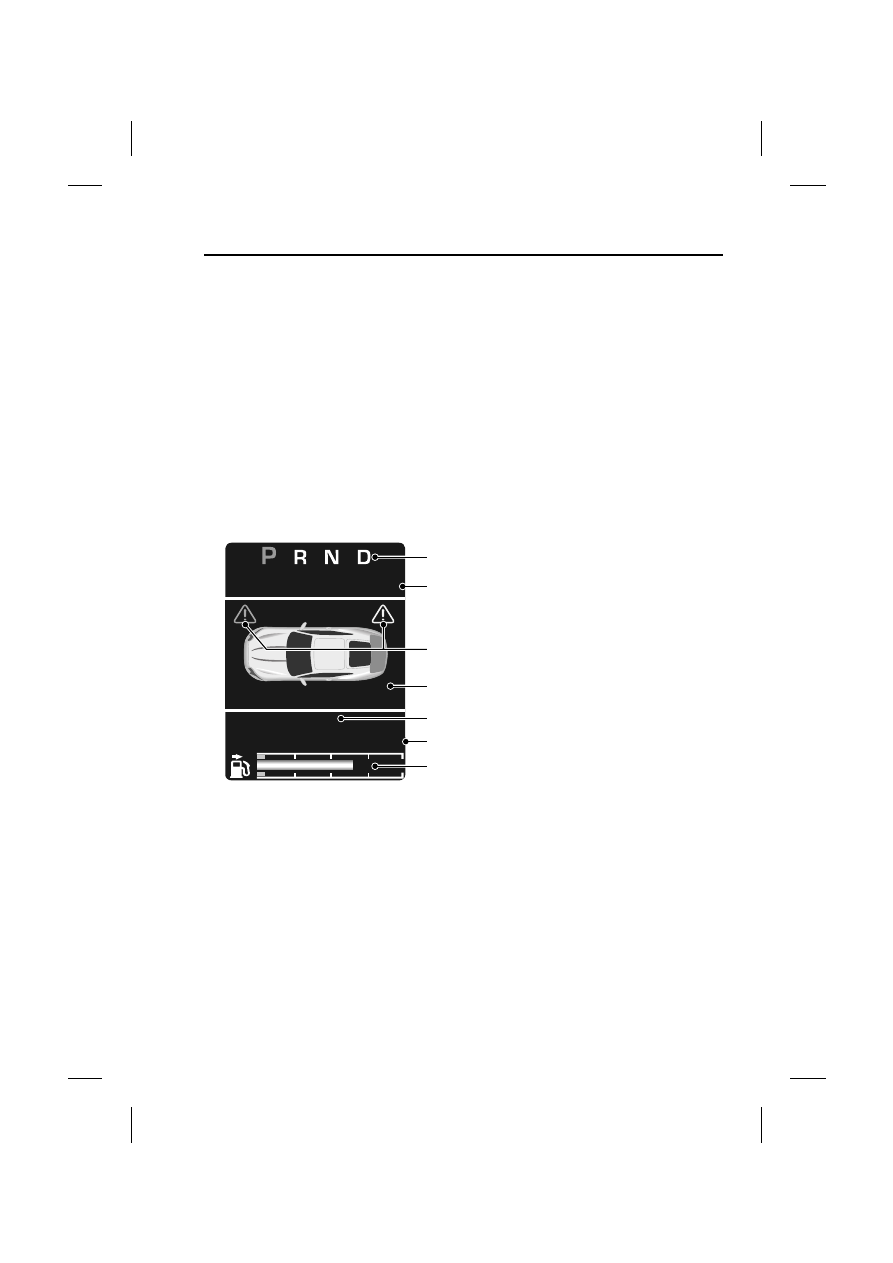
The message centre screen is divided
into various zones displaying the
following:
1. Gear selection, automatic or manual.
2. Speed control related information.
3. Priority warning indicators
4. Warning messages, red or amber, if
system faults are detected. Status
messages are displayed to indicate
changes in state of certain vehicle
functions, e.g. navigation, telephone.
The clock can be shown when no
other information is required to be
displayed. See CLOCK (page 152).
5. Trip computer information, including
total distance covered by the vehicle.
See TRIP COMPUTER (page 131).
6. Set trip computer information display
relating A, B or Auto trip computer.
See TRIP COMPUTER (page 131).
7. The fuel level gauge, which changes
colour from blue to red when the fuel
level drops to the reserve fuel level
indicator. The small arrow on the top
of the fuel pump symbol denotes
which side of the vehicle the fuel filler
cap is located.
MILES
10849
A :
238.7
SETSPEED
MPH
55
E93838
1
2
4
5
6
7
3