Isuzu Trooper (2000 year). Service manual - part 35
HEATING, VENTILATION AND AIR CONDITIONING (HVAC) 1A–109
As shown above, display of result along nine items is
repeated with 3-second interval in between.
Note 1: When checking the sun sensor, apply sufficient
light using a 60W bulb. Otherwise, it can be diagnosed as
failed.
Note 2: If the temperature setting lever is set on both ends
(one set to 64.4
°
F, blue scale = Full cool and the other to
87.8
°
F, red scale = Full hot), they can be diagnosed as
failed.
Note 3: Likewise, the fan switch can be diagnosed as
failed if set on both ends.
*
2
Displaying the Past Trouble Diagnosing
Table
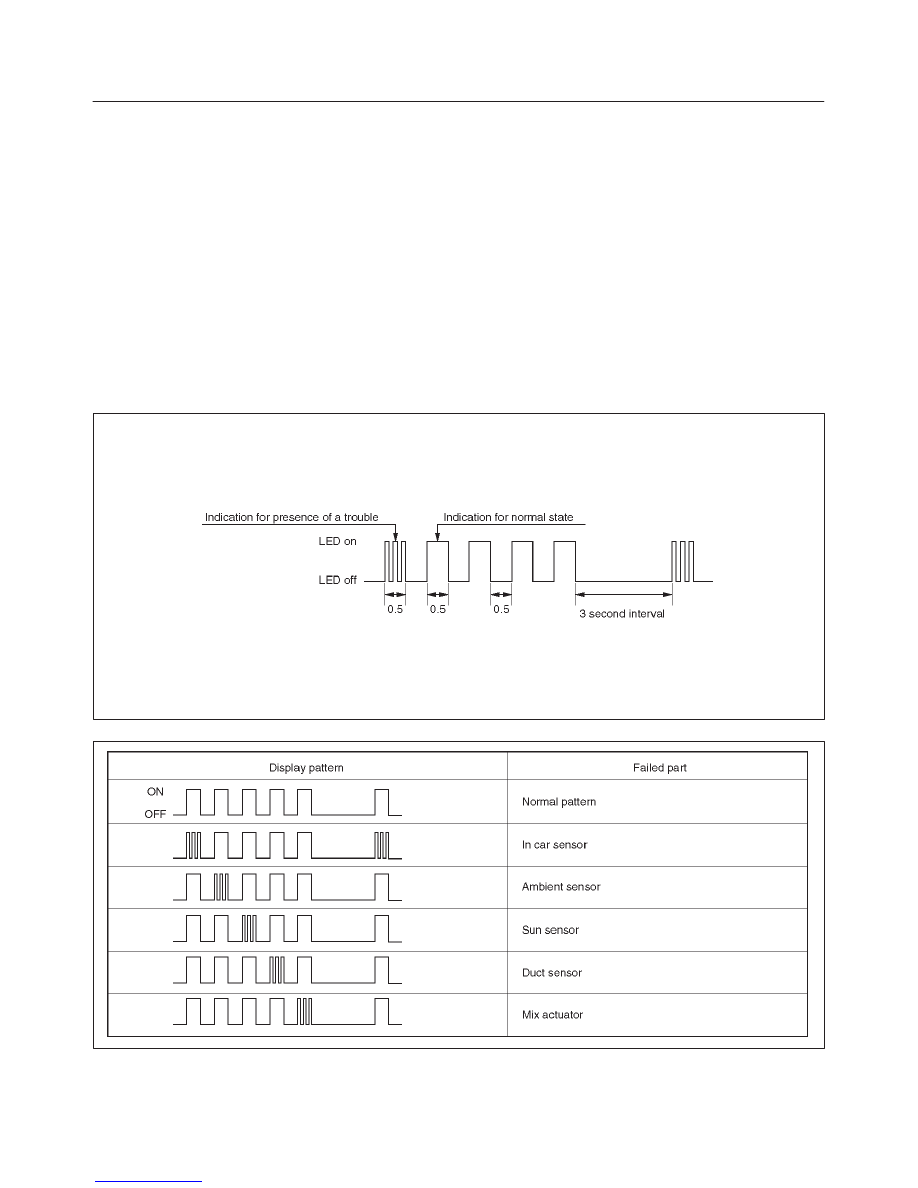
The past trouble diagnosis displays only the items on
which trouble has recurred 16 times in the past.
If you press the air conditioning switch once while the
current trouble diagnosis is taking place, display of the
past trouble diagnosis will appear on the indicator lamp
(LED) of the air conditioning switch.
Results of the diagnosis along the following five items are
displayed one by one in 0.5 second interval irrespective of
presence or absence of a trouble. A failed item is
indicated by flashing of the LED that is repeated 3 times
within 0.5 seconds. You can locate the failed section by
counting in what sequence it has been displayed.
Past trouble code can be cleared by disconnecting one of
the following sources for at least thirty (30) seconds.
NOTE: To prevent system damage, the ignition key must
be “OFF” when disconnecting or reconnecting battery
power.
D
The No.16 fuse (Room lamp, Clock)
D
The negative battery cable. (Disconnecting the
negative battery cable will result in the loss of other
on-board memory data, such as preset radio tuning).
F01RX011
F01RY00007