Hyundai Santa Fe (2019 year). Manual - part 24
Driving your vehicle
FORWARD COLLISION-AVOIDANCE ASSIST (FCA) SYSTEM - CAMERA TYPE (IF EQUIPPED)
The Forward Collision-Avoidance
System setting and activation
WARNING
Assist (FCA) system is designed to
System setting
help detect and monitor the vehicle
Take the following precautions
•
The driver can activate the FCA by
ahead in the roadway through cam-
when using the Forward
placing the ignition switch to the
era recognition to warn the driver
Collision-Avoidance
Assist
ON position and by selecting:
that a collision is imminent, and if
(FCA) system:
necessary, apply emergency brak-
"User Settings → Driver assistance
ing.
•
This system is only a supple-
→ Forward safety"
mental system and it is not
The camera type FCA system
- If you select "Active assist", the
intended to, nor does it
detects the vehicle ahead in the
FCA system activates. The FCA
replace the need for extreme
roadway through camera.
produces warning messages and
care and attention of the driv-
warning alarms in accordance
er. The sensing range and
with the collision risk levels. Also,
objects detectable by the sen-
it controls the brakes in accor-
sors are limited. Pay attention
dance with the collision risk lev-
to the road conditions at all
els.
times.
- If you select "Warning only", the
•
NEVER drive too fast in accor-
FCA system activates and pro-
dance with the road condi-
duces only warning alarms in
tions or whilst cornering.
accordance with the collision risk
•
Always drive cautiously to
levels. You should control the
prevent unexpected and sud-
brake directly because the FCA
den situations from occur-
system do not control the brake.
ring. FCA does not stop the
- If you select "Off", the FCA sys-
vehicle completely and is not
tem deactivates.
a collision avoidance system.
5-76

The warning light illumi-
The options for the initial Forward
Prerequisite for activation
nates on the LCD display,
Collision Warning includes the fol-
The FCA gets ready to be activated,
when you cancel the FCA
lowing:
when the FCA is selected on the
system. The driver can
-
Normal:
LCD display, and when the following
monitor the FCA ON/OFF status on
prerequisites are satisfied.
When this condition is selected,
the LCD display. Also, the warning
the initial Forward Collision
-
The ESC
(Electronic Stability
light illuminates when the ESC
Warning is activated sensitively. If
Control) is on.
(Electronic Stability Control) is
you feel the warning activates too
turned off. If the warning light
-
Vehicle speed is over 5 mph (8
early, set the Forward Collision
remains ON when the FCA is acti-
km/h). (The FCA is only activated
Warning to 'Later'.
vated, we recommend that you have
within a certain speed range.)
the system checked by a HYUNDAI
Even though, 'Normal' is selected if
(However the FCA brake control is
authorised repairer.
the front vehicle suddenly stops
only activated when vehicle speed
the initial warning activation time
is below 40 mph (65 km/h)).
may not seem fast.
5
•
The driver can select the initial warn-
-
The system detects a vehicle in
-
Later:
ing activation time on the LCD dis-
front, which may collide with your
play.
When this condition is selected,
vehicle (The FCA may not be acti-
the initial Forward Collision
vated or may sound a warning
Go to the "User Settings → Driver
Warning is activated later than nor-
alarm in accordance with the driv-
assistance
→ Warning timing →
mal. This setting reduces the
ing situation or vehicle condition. If
Normal/Later".
amount of distance between the
you select "Warning only", the FCA
vehicle ahead before the initial
system activates and produces
warning occurs.
only warning alarms in accordance
Select 'Later' when traffic is light
with the collision risk levels.).
and when driving speed is slow.
❈ If you change the warning timing,
the warning timing of other sys-
tems may change.
Always be aware of warning tim-
ing before changing the warning
timing.
5-77
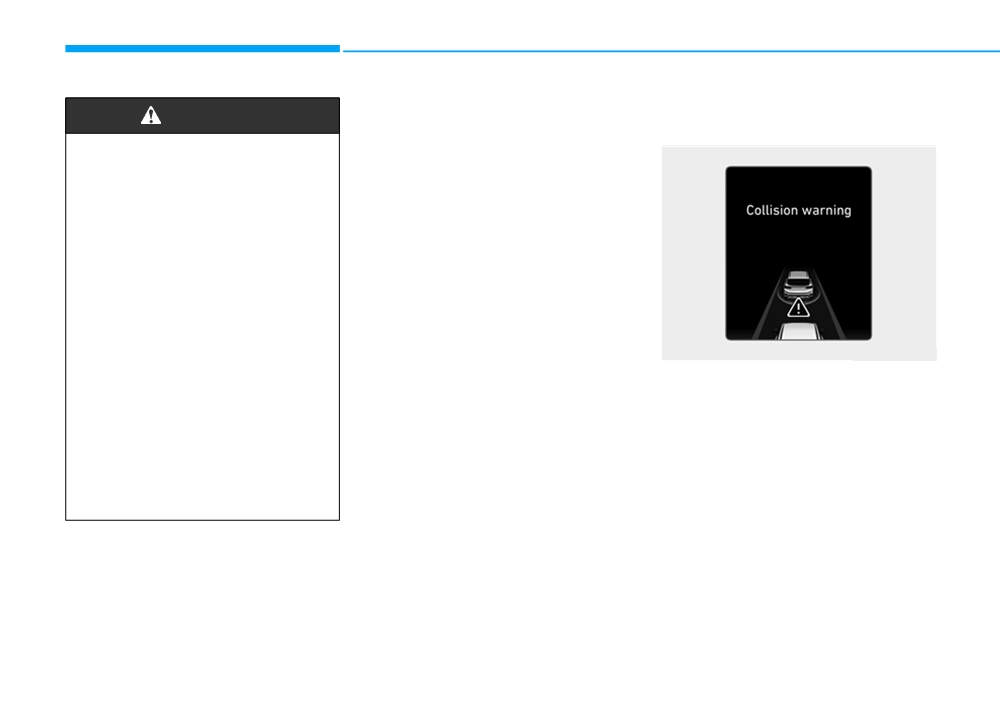
Driving your vehicle
FCA warning message and
Collision Warning
WARNING
system control
(First warning)
•
Completely stop the vehicle
The FCA produces warning mes-
sages and warning alarms in accor-
on a safe location before
operating the switch on the
dance with the collision risk levels,
such as abrupt stopping of the vehi-
steering wheel to activate/
deactivate the FCA system.
cle in front, insufficient braking dis-
tance detection. Also, it controls the
•
The FCA automatically acti-
brakes in accordance with the colli-
vates upon placing the Engine
sion risk levels.
Start/Stop button to the ON
The driver can select the initial warn-
position. The driver can deac-
tivate the FCA by canceling
ing activation time in the User
Settings in the LCD display. The
the system setting on the LCD
display.
options for the initial Forward
OTM058047R
Collision Warning include Normal or
•
The FCA automatically deacti-
This warning message appears on
Late initial warning time.
vates upon canceling the ESC
the LCD display with a warning
If you select "Warning only", the FCA
(Electronic Stability Control).
chime.
When the ESC is cancelled,
system activates and produces only
- If you select "Warning only", the
warning alarms in accordance with
the FCA cannot be activated
FCA system activates and pro-
on the LCD display. The FCA
the collision risk levels. You should
duces only warning alarms in
control the brake directly because
warning light will illuminate
accordance with the collision risk
which is normal.
the FCA system do not control the
levels. You should control the
brake.
brake directly because the FCA
system do not control the brake.
5-78
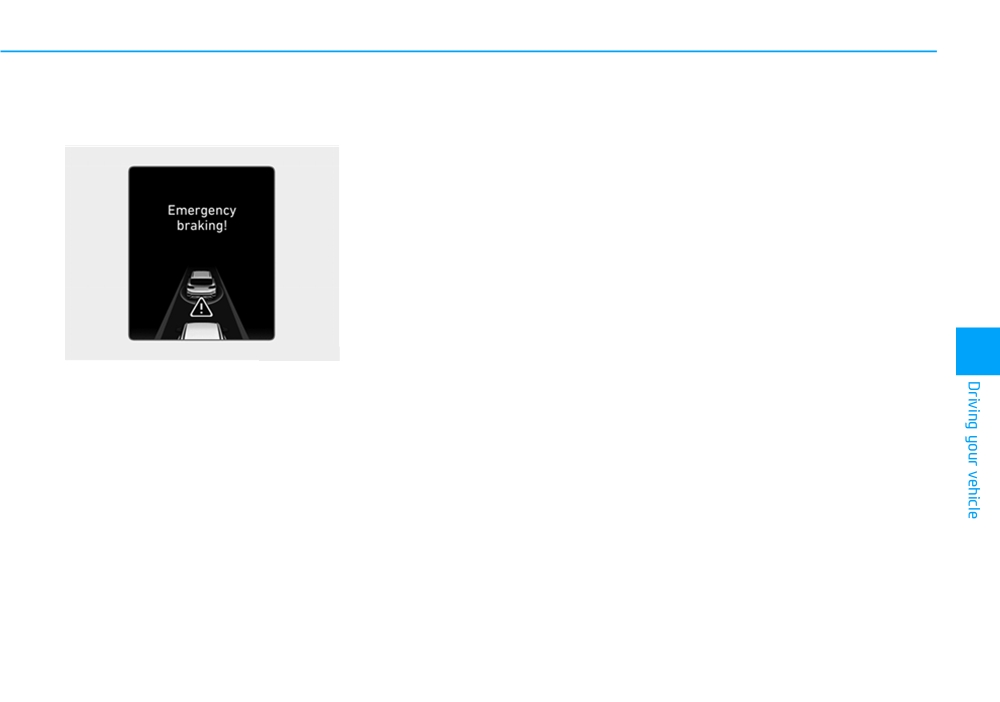
Emergency braking
- If you select "Warning only", the
Brake operation
(Second warning)
FCA system activates and pro-
•
In an urgent situation, the braking
duces only warning alarms in
system enters into the ready status
accordance with the collision risk
for prompt reaction against the dri-
levels. You should control the
ver's depressing the brake pedal.
brake directly because the FCA
•
The FCA provides additional brak-
system do not control the brake.
ing power for optimum braking per-
formance, when the driver
depresses the brake pedal.
•
The braking control is automatical-
ly deactivated, when the driver
sharply depresses the accelerator
pedal, or when the driver abruptly
OTM058048R
operates the steering wheel.
5
This warning message appears on
•
The FCA brake control is automat-
ically cancelled, when risk factors
the LCD display with a warning
chime.
disappear.
Additionally, some vehicle system
intervention occurs by the engine
management system to help decel-
erate the vehicle.
- The FCA system limitedly con-
trols the brakes to preemptively
mitigate impact in a collision. The
brake control is maximised just
before a collision.
5-79
Driving your vehicle
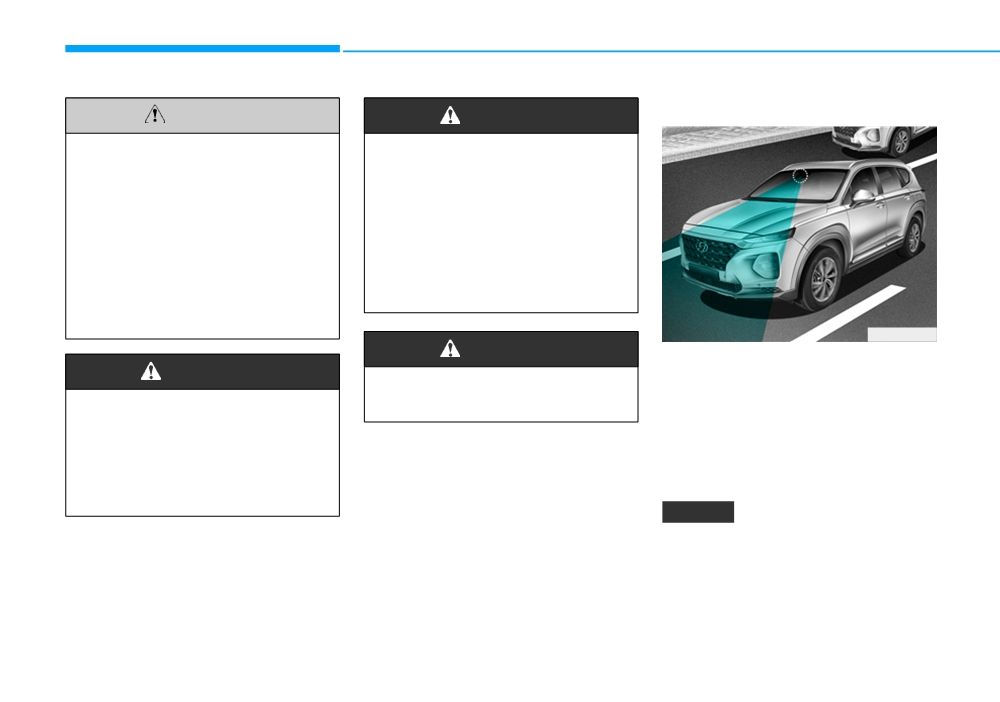
FCA sensor
CAUTION
WARNING
•
The driver should always use
The FCA system logic operates
extreme caution whilst oper-
within certain parameters, such
ating the vehicle, whether or
as the distance from the vehicle
not there is a warning mes-
ahead, the speed of the vehicle
sage or alarm from the FCA
ahead, and the driver's vehicle
system.
speed. Certain conditions such
as inclement weather and road
•
The warning of the FCA sys-
conditions may affect the oper-
tem may not sound whilst
ation of the FCA system.
other system's warning
sounds.
OTM058029
WARNING
In order for the FCA system to oper-
WARNING
ate properly, always make sure the
Never deliberately drive danger-
sensor is clean and free of dirt, snow,
ously to activate the system.
The braking control cannot
and debris.
completely stop the vehicle nor
Dirt, snow, or foreign substances on
avoid all collisions. The driver
the lens may adversely affect the
should hold the responsibility
sensing performance of the sensor.
to safely drive and control the
vehicle.
NOTICE
• NEVER install any accessories
or stickers on the front wind-
screen, nor tint the front wind-
screen.
5-80
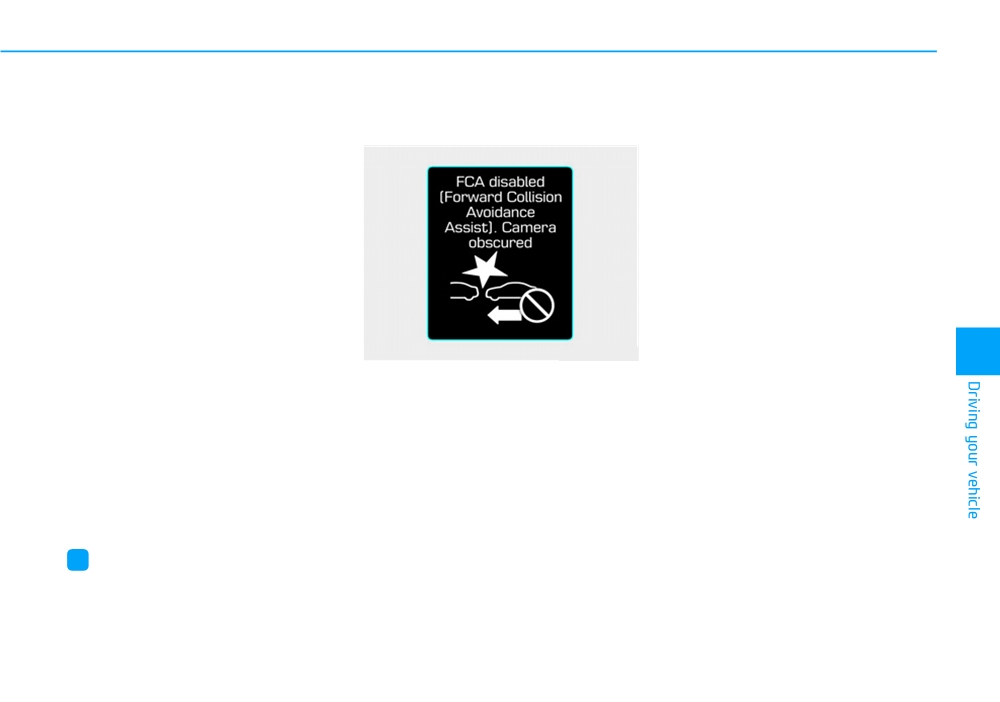
•
NEVER locate any reflective
Warning message and warning
However the FCA may not properly
objects (i.e. white paper, mirror)
light
operate in an area (e.g. open ter-
over the dashboard. Any light
rain), where any substances are not
reflection may cause a malfunc-
detected or the camera is blocked
tion of the system.
with dirt, snow or debris after turning
•
Pay extreme caution to keep the
ON the engine. Although a warning
message will not appear on the LCD
camera out of water.
display, the FCA may not properly
•
NEVER disassemble the camera
operate.
assembly, nor apply any impact
on the camera assembly.
•
Playing the vehicle audio sys-
tem at high volume may offset
the system warning sounds.
•
Always keep the sensors clean.
OTM058142R
5
•
Be careful not to apply unneces-
FCA disabled (Forward Collision
sary force on the sensor. If the
Avoidance Assist). Camera obscured
sensor is forcibly moved out of
When the camera is blocked with
proper alignment, the system
dirt, snow, or debris, the FCA system
may not operate correctly. In this
operation may stop temporarily.
case, a warning message may not
If this occurs, a warning message will
be displayed. We recommend that
appear on the LCD display.
you have the vehicle inspected by
a HYUNDAI authorised repairer.
Remove any dirt, snow, or debris and
clean the front camera before oper-
ating the FCA system.
i
Information
The system will operate normally
We recommend that you have the sys-
when such dirt, snow or debris is
tem checked by a HYUNDAI autho-
removed.
rised repairer when:
• The windscreen glass is replaced.
5-81
Driving your vehicle
System malfunction
WARNING
•
Even if there is any problem
with the brake control function
•
The FCA is only a supplemen-
of the FCA system, the vehi-
tal system for the driver's con-
cle's basic braking perform-
venience. The driver should
ance will operate normally.
hold the responsibility to con-
However, brake control func-
trol the vehicle operation. Do
tion for avoiding collision will
not solely depend on the FCA
not activate.
system. Rather, maintain a
•
If the vehicle in front stops
safe braking distance, and, if
suddenly, you may have less
necessary, depress the brake
control of the brake system.
pedal to reduce the driving
Therefore, always keep a safe
OIK058091R
speed.
distance between your vehicle
•
In certain instances and
and the vehicle in front of you.
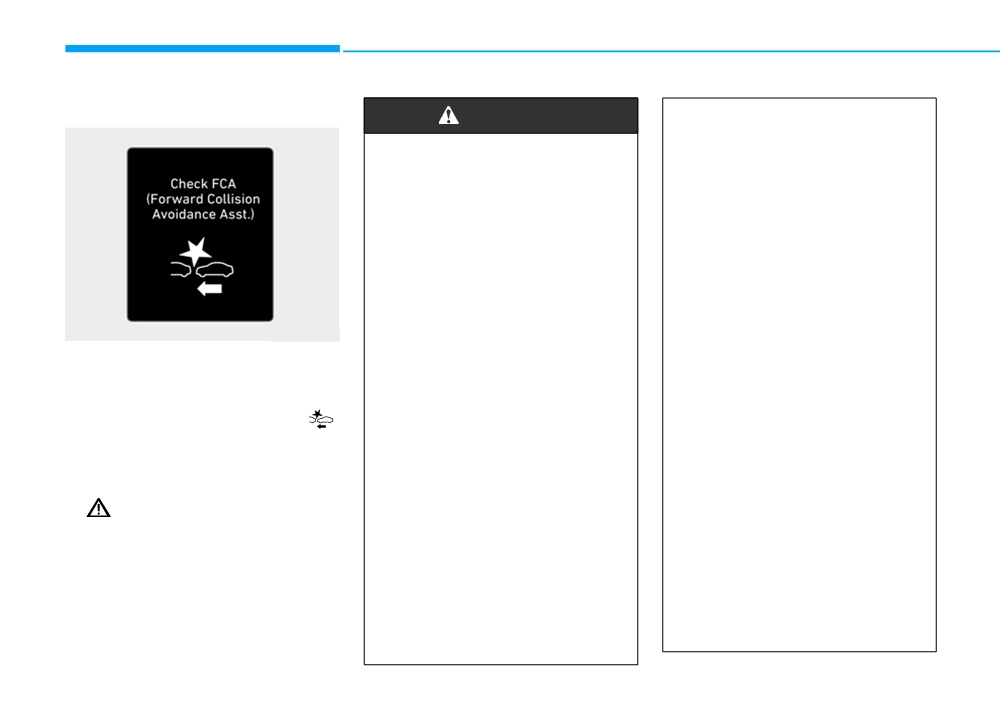
Check FCA
under certain driving condi-
•
The FCA system may activate
(Forward Collision Avoidance Asst.)
tions, the FCA system may
during braking and the vehi-
• When the FCA is not working prop-
produce a warning alarm and
cle may stop suddenly shift-
erly, the FCA warning light (
)
control the brake system
ing loose objects toward the
will illuminate and the warning
unnecessarily. And, the FCA
passengers. Always keep
message will appear for a few sec-
system may not produce a
loose objects secured.
onds. After the message disap-
warning alarm and control the
•
The FCA system may not acti-
pears, the master warning light
brake system due to detecting
vate if the driver applies the
(
) will illuminate. In this case, we
limitation of sensor.
brake pedal to avoid a colli-
recommend that you have the vehi-
Also, in certain instances the
sion.
cle inspected by a HYUNDAI
front camera recognition sys-
authorised repairer.
•
The brake control may be
tem may not detect the vehi-
insufficient, possibly causing
• The FCA warning message may
cle ahead. The FCA system
a collision, if a vehicle in front
appear along with the illumination
may not activate and the
abruptly stops. Always pay
of the ESC
(Electronic Stability
warning message will not be
extreme caution.
Control) warning light.
displayed.
5-82

Limitations of the system
•
The FCA system may not acti-
WARNING
vate according to the road
The Forward Collision-Avoidance
conditions, inclement weath-
Assist (FCA) system is designed to
•
The FCA system does not
er, driving conditions or traffic
monitor the vehicle ahead in the
operate when the vehicle is in
conditions.
roadway through camera recognition
reverse.
to warn the driver that a collision is
•
Occupants may get injured, if
•
The FCA system is not
imminent, and if necessary, apply
the vehicle abruptly stops by
designed to detect other
emergency braking.
the activated FCA system. Pay
objects on the road such as
extreme caution.
In certain situations, the camera may
animals.
not be able to detect the vehicle
•
The FCA system operates
•
The FCA system does not
ahead. In these cases, the FCA sys-
only to detect vehicles in front
detect pedestrians in front of
tem may not operate normally. The
of the vehicle.
the vehicle.
driver must pay careful attention in
•
The FCA system does not
the following situations where the
5
detect vehicles in the oppo-
FCA operation may be limited.
site lane.
•
The FCA system does not
Detecting vehicles
detect cross traffic vehicles
The sensor may be limited when:
that are approaching.
•
The FCA system cannot detect
• The camera is blocked with a for-
eign object or debris
the driver approaching the
side view of a parked vehicle
• The camera lens is contaminated
(for example on a dead end
due to tinted, filmed or coated
street.)
windscreen, damaged glass, or
stuck of foreign matter
(sticker,
In these cases, you must main-
tain a safe braking distance,
bug, etc.) on the glass
and if necessary, depress the
• Inclement weather such as heavy
brake pedal to reduce the driv-
rain or snow obscures the field of
ing speed in order to maintain a
view of the camera
safe distance.
5-83
Driving your vehicle
•
There is interference by electro-
•
The field of view in front is obstruct-
•
The windscreen glass is fogged
magnetic waves
ed by sun glare or head light of
up; a clear view of the road is
oncoming vehicle.
obstructed.
•
The camera recognition is limited
•
The windscreen glass is fogged up;
•
The rear part of the vehicle in front
•
The vehicle in front is too small to
a clear view of the road is obstruct-
is not normally visible. (the vehicle
be detected (for example a motor
ed
turns in other direction or the vehi-
cycle or bicycle etc.)
cle is overturned.)
•
The vehicle in front is driving errati-
•
The vehicle in front is an oversize
cally
•
The adverse road conditions cause
vehicle or trailer that is too big to
excessive vehicle vibrations whilst
be detected by the camera recog-
•
The vehicle is on unpaved or
driving
nition system (for example a tractor
uneven rough surfaces, or road
trailer, etc.)
with sudden gradient changes.
•
The sensor recognition changes
suddenly when passing over a
•
The camera's field of view is not
•
The vehicle is driven near areas
well illuminated (either too dark or
containing metal substances as a
speed bump
too much reflection or too much
construction zone, railroad, etc.
•
The vehicle in front is moving verti-
backlight that obscures the field of
cally to the driving direction
•
The vehicle drives inside a building,
view)
such as a basement parking lot
•
The vehicle in front is stopped ver-
•
The vehicle in front does not have
tically
•
The camera does not recognise
their rear lights or their rear lights
the entire vehicle in front.
•
The vehicle in front is driving
does not turned ON or their rear
towards your vehicle or reversing
•
The camera is damaged.
lights are located unusually.
•
You are on a roundabout and the
•
The brightness outside is too low
•
The outside brightness changes
vehicle in front circles
such as when the headlamps are
suddenly, for example when enter-
not on at night or the vehicle is
ing or exiting a tunnel
going through a tunnel.
•
When light coming from a street
•
The shadow is on the road by a
light or an oncoming vehicle is
median strip, trees, etc.
reflected on a wet road surface
such as a puddle in the road
•
The vehicle drives through a toll-
gate.
5-84
In these cases, the driver must main-
tain a safe braking distance, and if
necessary, depress the brake pedal
to reduce your driving speed in order
to maintain a safe distance.
OTM058117R
OTM058073R
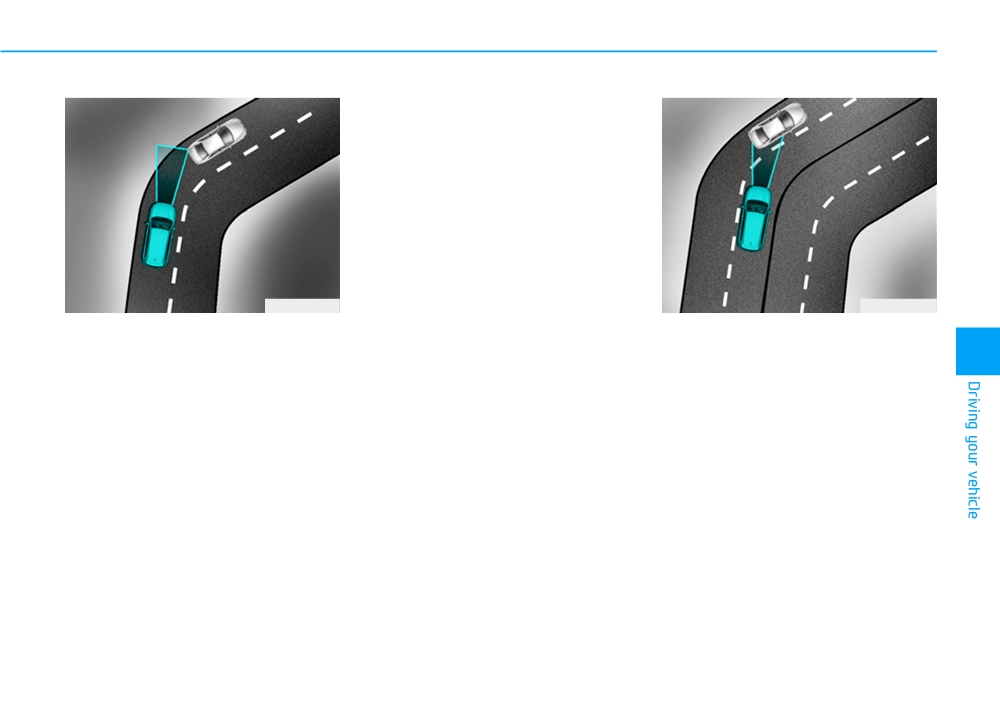
- Driving on a curve
The FCA system may recognise a
vehicle in the next lane when driving
The performance of the FCA system
5
on a curved road.
may be limited when driving on a
curved road.
In this case, the system may unnec-
On curved roads, the other vehicle
essarily alarm the driver and apply
the brake.
on the same lane is not recognised
and the FCA system's performance
Always pay attention to road and
may be degraded. This may result in
driving conditions, whilst driving. If
unnecessary alarm or braking or no
necessary, depress the brake pedal
alarm or braking when necessary.
to reduce your driving speed in order
to maintain a safe distance.
Also, in certain instances the front
camera recognition system may not
Also, when necessary depress the
detect the vehicle travelling on a
accelerator pedal to prevent the sys-
curved road.
tem from unnecessarily decelerating
your vehicle.
Check to be sure that the road con-
ditions permit safe operation of FCA.
5-85
Driving your vehicle
OTM058002R
OTM058074R
OTM058119R
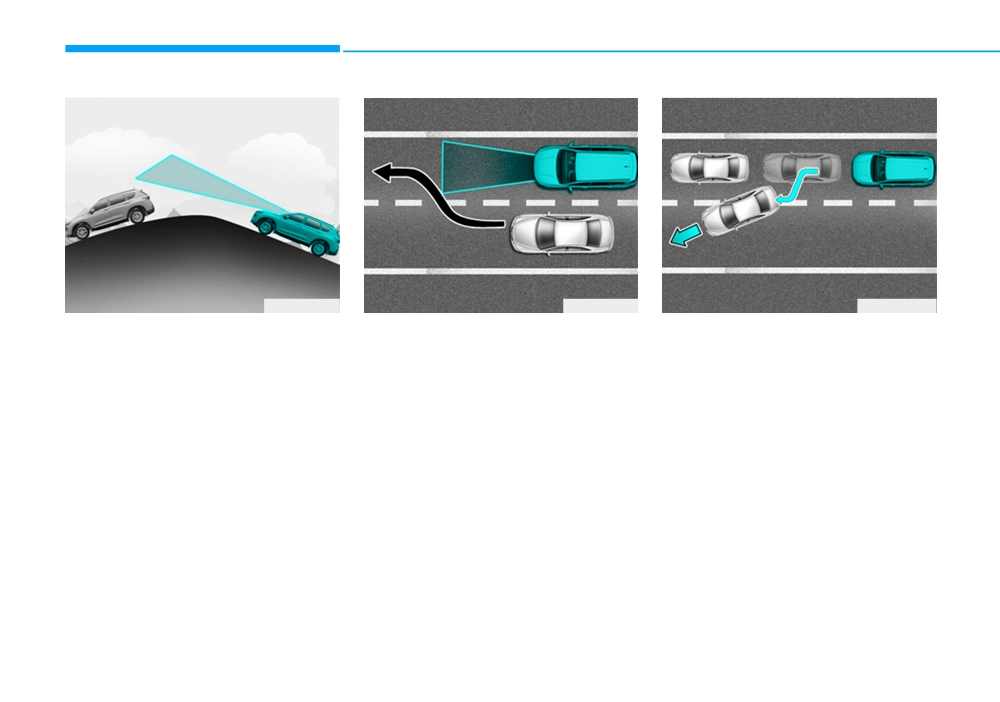
- Driving on a slope
- Changing lanes
When driving in stop-and-go traffic,
and a stopped vehicle in front of you
The performance of the FCA decreas-
When a vehicle changes lanes in
merges out of the lane, the FCA sys-
es whilst driving upward or downward
front of you, the FCA system may not
tem may not immediately detect the
on a slope, not recognising the vehi-
immediately detect the vehicle, espe-
new vehicle that is now in front of
cle in front in the same lane. It may
cially if the vehicle changes lanes
you. In this case, you must maintain
unnecessarily produce the warning
abruptly. In this case, you must main-
a safe braking distance, and if nec-
message and the warning alarm, or it
tain a safe braking distance, and if
essary, depress the brake pedal to
may not produce the warning mes-
necessary, depress the brake pedal
reduce your driving speed in order to
sage and the warning alarm at all.
to reduce your driving speed in order
maintain a safe distance.
to maintain a safe distance.
When the FCA suddenly recognises
the vehicle in front whilst passing
over a slope, you may experience
sharp deceleration.
Always keep your eyes forward whilst
driving upward or downward on a
slope, and, if necessary, depress the
brake pedal to reduce your driving
speed in order to maintain distance.
5-86
WARNING
• Never try to test the operation
of the FCA system. Doing so
•
Do not use the Forward
may cause severe injury or
Collision avoidance Assist
death.
(FCA) system when towing a
• If the front glass or camera
vehicle. Application of the
have been replaced or
FCA system whilst towing
repaired, we recommend that
may adversely affect the safe-
you have your vehicle
ty of your vehicle or the tow-
inspected by a HYUNDAI
ing vehicle.
authorised repairer.
•
Use extreme caution when the
OTM058001
vehicle in front of you has
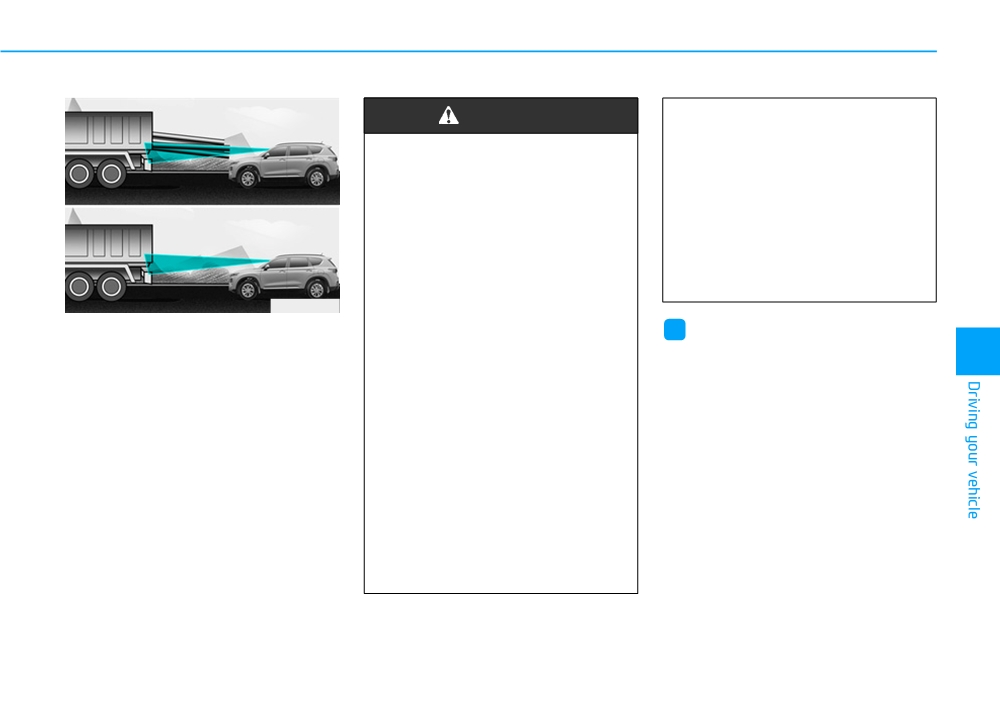
- Detecting the vehicle in front of you
i
Information
cargo that extends rearward
If the vehicle in front of you has cargo
from the cab, or when the
5
In some instances, the FCA system
that extends rearward from the cab,
vehicle in front of you has
may be cancelled when subjected to
or when the vehicle in front of you
higher ground clearance.
electromagnetic interference.
has higher ground clearance, addi-
•
The FCA system is designed
tional special attention is required.
to detect and monitor the
The FCA system may not be able to
vehicle ahead in the roadway
detect the cargo extending from the
through camera recognition. It
vehicle. In these instances, you must
is not designed to detect
maintain a safe braking distance
pedestrians, bicycles, motor-
from the rearmost object, and if nec-
cycles, or smaller wheeled
essary, depress the brake pedal to
objects such as luggage
reduce your driving speed in order to
bags, shopping carts, or
maintain distance.
strollers.
5-87

Driving your vehicle
FORWARD COLLISION-AVOIDANCE ASSIST (FCA) SYSTEM
- SENSOR FUSION TYPE (FRONT RADAR + FRONT CAMERA) (IF EQUIPPED)
The Forward Collision-Avoidance
System setting and activation
WARNING
Assist (FCA) system is designed to
System setting
help detect and monitor the vehicle
Take the following precautions
•
The driver can activate the FCA by
ahead or detect a pedestrian or
when using the Forward
placing the ignition switch to the
cyclists (if equipped) in the roadway
Collision-Avoidance
Assist
ON position and by selecting:
through radar signals and camera
(FCA) system:
recognition to warn the driver that a
"User Settings → Driver assistance
collision is imminent, and if neces-
•
This system is only a supple-
→ Forward safety"
sary, apply emergency braking.
mental system and it is not
- If you select "Active assist", the
intended to, nor does it
FCA system activates. The FCA
replace the need for extreme
produces warning messages and
care and attention of the driv-
warning alarms in accordance
er. The sensing range and
with the collision risk levels. Also,
objects detectable by the sen-
it controls the brakes in accor-
sors are limited. Pay attention
dance with the collision risk lev-
to the road conditions at all
els.
times.
- If you select "Warning only", the
•
NEVER drive too fast in accor-
FCA system activates and pro-
dance with the road condi-
duces only warning alarms in
tions or whilst cornering.
accordance with the collision risk
•
Always drive cautiously to
levels. You should control the
prevent unexpected and sud-
brake directly because the FCA
den situations from occur-
system do not control the brake.
ring. FCA does not stop the
- If you select "Off", the FCA sys-
vehicle completely and is not
tem deactivates,
a collision avoidance system.
5-88

The warning light illumi-
The options for the initial Forward
Prerequisite for activation
nates on the LCD display,
Collision Warning includes the fol-
The FCA gets ready to be activated,
when you cancel the FCA
lowing:
when the FCA is selected on the
system. The driver can
-
Normal:
LCD display, and when the following
monitor the FCA ON/OFF status on
prerequisites are satisfied.
When this condition is selected,
the LCD display. Also, the warning
the initial Forward Collision
-
The ESC
(Electronic Stability
light illuminates when the ESC
Warning is activated sensitively. If
Control) is on.
(Electronic Stability Control) is
you feel the warning activates too
turned off. If the warning light
-
Vehicle speed is over 5 mph (8
early, set the Forward Collision
remains ON when the FCA is acti-
km/h) (The FCA is only activated
Warning to 'Later'.
vated, we recommend that you have
within a certain speed range.).
the system checked by a HYUNDAI
Even though, 'Normal' is selected if
-
The system detects a pedestrian,
authorised repairer.
the front vehicle suddenly stops
cyclist (if equipped) or a vehicle in
the initial warning activation time
front, which may collide with your
may not seem fast.
vehicle (The FCA may not be acti-
5
•
The driver can select the initial warn-
-
Later:
vated or may sound a warning
ing activation time on the LCD dis-
alarm in accordance with the driv-
play.
When this condition is selected, the
initial Forward Collision Warning is
ing situation or vehicle condition. If
Go to the "User Settings → Driver
you select "Warning only", the FCA
activated later than normal. This
assistance
→ Warning timing →
setting reduces the amount of dis-
system activates and produces
Normal/Later".
only warning alarms in accordance
tance between the vehicle, pedes-
trian or cyclist (if equipped) ahead
with the collision risk levels.).
before the initial warning occurs.
Select 'Later' when traffic is light
❈ The FCA may not operate proper-
and when driving speed is slow.
ly according to the frontal situa-
tion, the direction of pedestrian or
❈ If you change the warning timing,
the warning timing of other sys-
cyclist (if equipped) and speed.
tems may change.
Always be aware of warning tim-
ing before changing the warning
timing.
5-89
Driving your vehicle
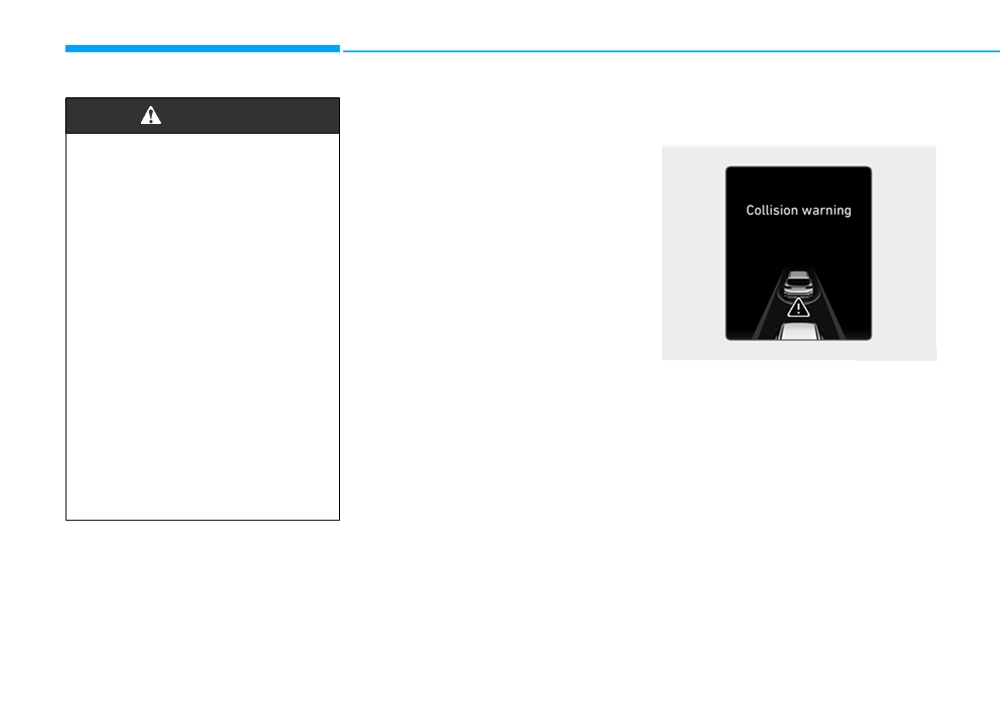
FCA warning message and
Collision Warning
WARNING
system control
(First warning)
•
Completely stop the vehicle
The FCA produces warning mes-
sages and warning alarms in accor-
on a safe location before
operating the switch on the
dance with the collision risk levels,
such as abrupt stopping of the vehi-
steering wheel to activate/
deactivate the FCA system.
cle in front, insufficient braking dis-
tance, pedestrian or cyclist
(if
•
The FCA automatically acti-
equipped) detection. Also, it controls
vates upon placing the Engine
the brakes in accordance with the
Start/Stop button to the ON
collision risk levels.
position. The driver can deac-
tivate the FCA by canceling
The driver can select the initial warn-
ing activation time in the User
the system setting on the LCD
display.
Settings in the LCD display. The
OTM058047R
options for the initial Forward
•
The FCA automatically deacti-
This warning message appears on
Collision Warning include Normal or
vates upon canceling the ESC
the LCD display with a warning
Late initial warning time.
(Electronic Stability Control).
chime. Additionally, some vehicle
When the ESC is cancelled,
If you select "Warning only", the FCA
system intervention occurs by the
system activates and produces only
the FCA cannot be activated
engine management system to help
on the LCD display. The FCA
warning alarms in accordance with
decelerate the vehicle.
the collision risk levels. You should
warning light will illuminate
- Your vehicle speed may decelerate
which is normal.
control the brake directly because
moderately.
the FCA system do not control the
brake.
- The FCA system limitedly controls
the brakes to preemptively mitigate
impact in a collision.
5-90
- If you select "Warning only", the
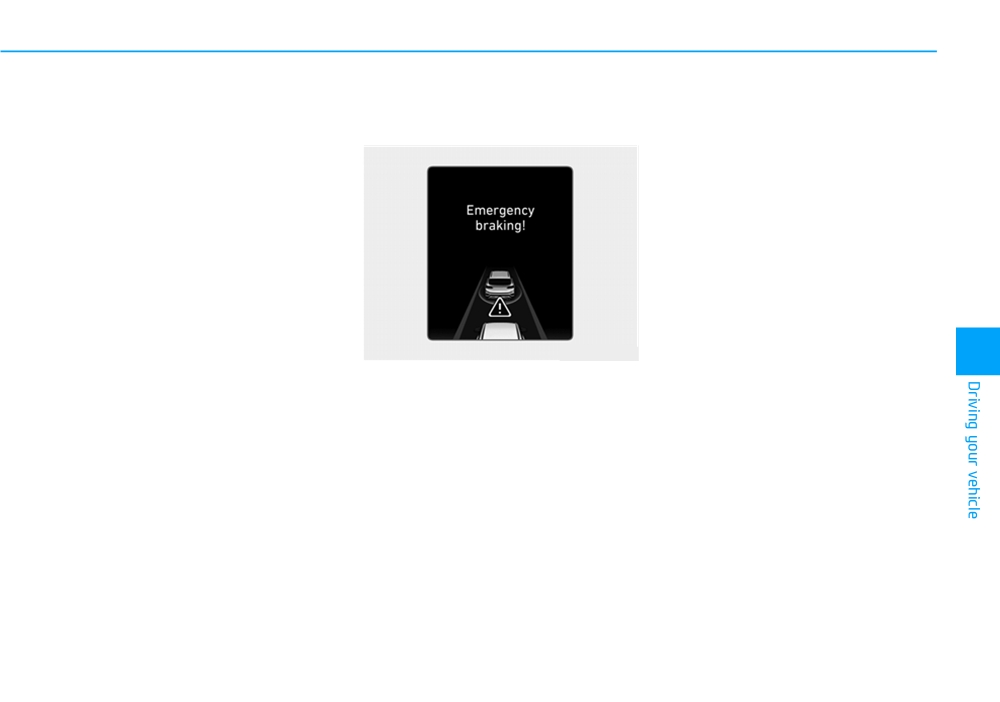
Emergency braking
- If you select "Warning only", the
FCA system activates and pro-
(Second warning)
FCA system activates and pro-
duces only warning alarms in
duces only warning alarms in
accordance with the collision risk
accordance with the collision risk
levels. You should control the brake
levels. You should control the brake
directly because the FCA system
directly because the FCA system
do not control the brake.
do not control the brake.
Brake operation
•
In an urgent situation, the braking
system enters into the ready status
for prompt reaction against the dri-
ver's depressing the brake pedal.
OTM058048R
•
The FCA provides additional brak-
5
This warning message appears on
ing power for optimum braking per-
formance, when the driver
the LCD display with a warning
chime.
depresses the brake pedal.
•
The braking control is automatical-
Additionally, some vehicle system
intervention occurs by the engine
ly deactivated, when the driver
sharply depresses the accelerator
management system to help decel-
erate the vehicle.
pedal, or when the driver abruptly
operates the steering wheel.
- The FCA system limitedly controls
the brakes to preemptively mitigate
•
The FCA brake control is automat-
impact in a collision. The brake
ically cancelled, when risk factors
control is maximised just before a
disappear.
collision.
5-91
Driving your vehicle
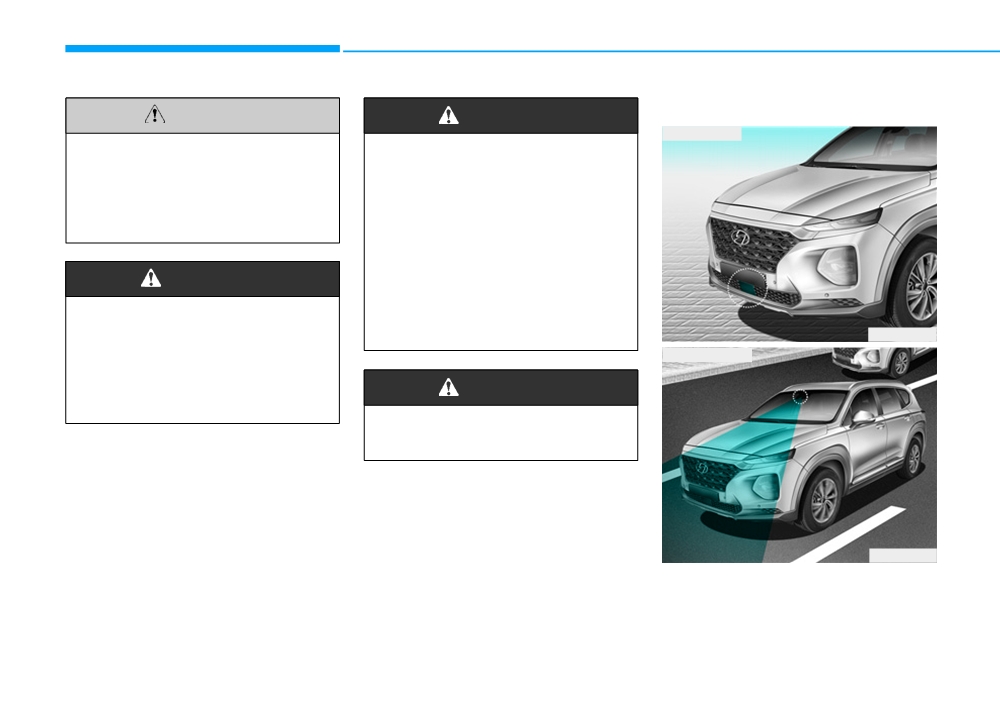
FCA sensor
CAUTION
WARNING
■ Front radar
The driver should always use
The FCA system logic operates
extreme caution whilst operat-
within certain parameters, such
ing the vehicle, whether or not
as the distance from the vehi-
there is a warning message or
cle, pedestrian or cyclist
(if
alarm from the FCA system.
equipped) ahead, the speed of
the vehicle ahead, and the dri-
ver's vehicle speed. Certain
WARNING
conditions such as inclement
weather and road conditions
The braking control cannot
may affect the operation of the
FCA system.
completely stop the vehicle nor
OTM058028
avoid all collisions. The driver
■ Front camera
should hold the responsibility
to safely drive and control the
WARNING
vehicle.
Never deliberately drive danger-
ously to activate the system.
OTM058029
In order for the FCA system to oper-
ate properly, always make sure the
sensor cover or sensor is clean and
free of dirt, snow, and debris.
5-92