Honda Insight (2019 year). Manual - part 28
Continued
431
uu
Bluetooth® HandsFreeLink®
u
HFL Menus
Features
HFL can display newly received text messages as well as the last 20 messages
received on a linked cell phone. Each received message can be read aloud and
replied to using a fixed common phrase.
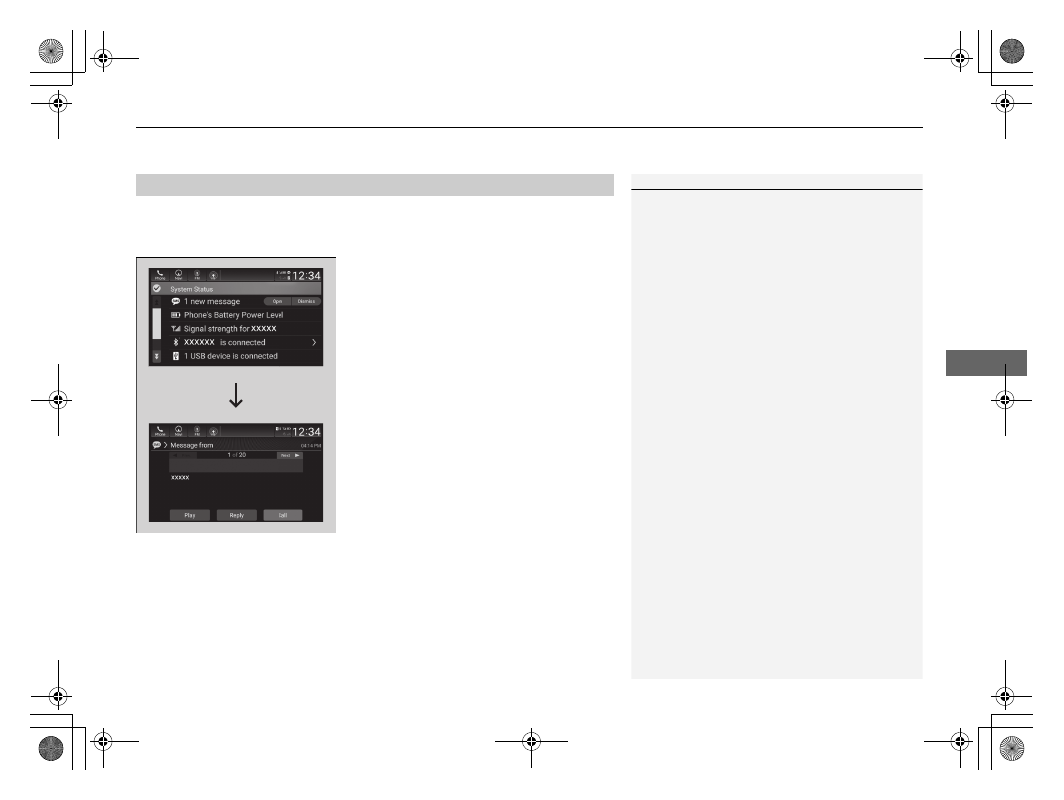
1. Select the system status icon.
u
The status area appears.
2. A pop-up appears and notifies you of a new
text message.
3. Select Open to display the message.
u
The text message is displayed.
4. Select Play to listen to the message. To
discontinue the message read-out, select
Stop.
■
Receiving a Text Message
1
Some cell phones might not be able to read the
transmission log of data sent and data received.
The system does not display any received messages
while you are driving. You can only hear them read
aloud.
The system can only receive messages that are sent a
text (SMS) messages. The message sent using the
data services will not be displayed in the list.
With some phones, you may be able to display up to
20 of the last text messages received.
State or local laws may limit your use of the HFL text
message feature. Only use the text message feature
when conditions allow you to do so safely.