Honda Accord (2019 year). Manual - part 25
 

  Index      Honda     Honda Accord - service manual 2019 year in english


Search            


Content   ..  23  24  25  26   ..


Honda Accord (2019 year). Manual - part 25


384

uu

Customized Features

u

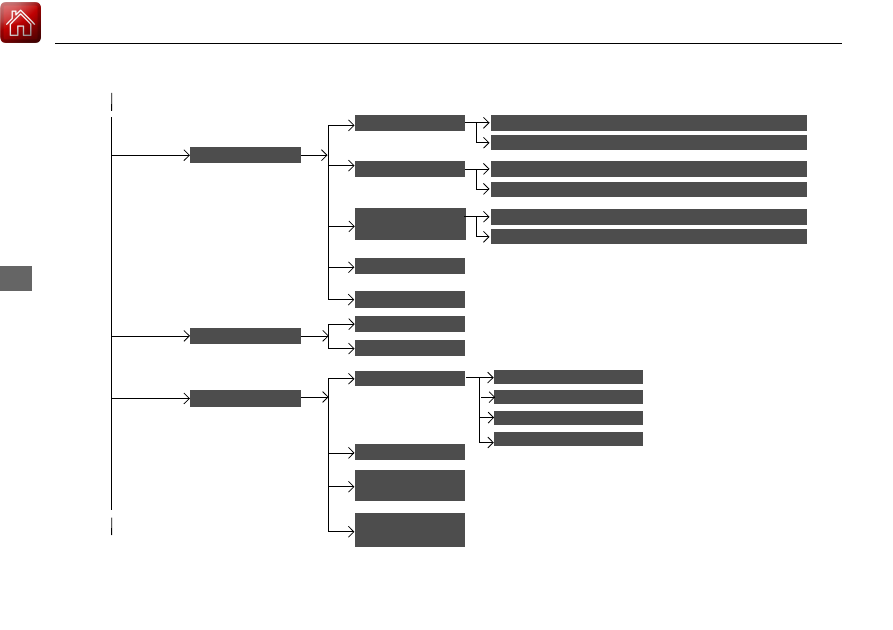
Features

Connections

+ Connect New Device

(Saved Devices)

Change Mode

Smartphone 

Connection

Bluetooth

Wi-Fi

NFC

*

(Available Networks/Connected Devices)

Android Beam

*

Apple CarPlay

Android Auto

Display

Sound

Day Mode

Night Mode

Treble

Subwoofer

*

Bass / Treble

Speed Volume 
Compensation

Balance / Fader

DTS Neural 

Surround

*

Midrange

Bass

* Not available on all models

385

uu

Customized Features

u

Continued

Features

Vehicle

Meter Setup

Adjust Outside Temp. Display

“Trip A” Reset Timing

“Trip B” Reset Timing

Reverse Alert Tone

*

Config. of Instrument Panel

Adjust Alarm Volume

Turn By Turn Auto Display

Fuel Efficiency Backlight

TPMS Calibration

Driver Assist 

System Setup

Blind Spot Info

*

Head-up Warning

*

Traffic Sign Recognition System

Forward Collision Warning Distance

ACC Forward Vehicle Detect Beep

Lane Keeping Assist Suspend Beep

Road Departure Mitigation Setting

Driver Attention Monitor

Speed/Distance Units

Tachometer

Language Selection

* Not available on all models

386

uu

Customized Features

u

Features

Lighting Setup

Interior Light Dimming Time

Headlight Auto OFF Timer

Auto Light Sensitivity

Door/Window 

Setup

Auto Door Lock

Auto Door Unlock

Key and Remote Unlock Mode

Keyless Lock Answer Back

Security Relock Timer

Maintenance Info.

Select Reset Items

Walk Away Auto Lock

*

Driving Position 

Setup

*

Seat Position Movement at Entry/Exit

Memory Position Link

Keyless Access 

Setup

Door Unlock Mode

Smart Entry Light Flash

*

Smart Entry Beep

*

Remote Start System ON/OFF

*

Auto Headlight On with Wiper On

Auto Interior Illumination Sensitivity

* Not available on all models

387

uu

Customized Features

u

Continued

Features

Camera

Show with turn signal

LaneWatch

*

Show Reference Line

Rear Camera

Fixed Guideline

Dynamic Guideline

Cross Traffic 

Monitor

*

Display Time after Turn Signal Off

* Not available on all models

388

uu

Customized Features

u

Features

List of customizable options

*1:Default Setting

Setup 

Group

Customizable Features

Description

Selectable Settings

System

Day & Time

Set 
Date & 
Time

Automatic 
Date & 
Time

Selects ON to have the GPS automatically adjust 
the clock. Select OFF to cancel this function.

ON

*1

/OFF

Set Date

Adjusts date.

Adjusting the Clock P. 164

Set Time

Adjusts clock.

Adjusting the Clock P. 164

Time 
Zone

Automatic 
Time Zone

*

Sets the navigation system to automatically adjust 
the clock when driving through different time 
zones.

ON

*1

/OFF

(Select time 
zone)

Changes the time zone manually.

Auto Daylight Saving 
Time

Select ON to have the GPS automatically adjust the 
clock to daylight savings time. Select OFF to cancel 
this function.

ON

*1

/OFF

Date Format

Sets the date format.

MM/DD/YYYY

*1

/

DD/MM/YYYY/
YYYY/MM/DD

Time Format

Selects the digital clock display from 12H to 24H.

12H

*1

/24H

* Not available on all models

389

uu

Customized Features

u

Continued

Features

*1:Default Setting

Setup 

Group

Customizable Features

Description

Selectable Settings

System

Language

Changes the display language.

English (United 
States)

*1

/Spanish/

French/

Touch Panel 
Sensitivity

Sets the sensitivity of the touch panel screen.

High/Normal

*1

System 
Volumes

System Volumes

Changes the system sounds volume.

Reading/
Warning

Verbal 
Reminder

Turns the verbal reminders on and off.

ON

*1

/OFF

Config. of 
Instrument 
Panel

Select configuration

Selects whether the apps display comes on or not 
on the driver information interface.

Config.1

*1

/Config.2/

Config.3

Security

Password

Set the value of password display.

ON

*1

/OFF

Unknown sources

ON/OFF

*1

* Not available on all models

390

uu

Customized Features

u

Features

*1:Default Setting

Setup 

Group

Customizable Features

Description

Selectable Settings

System

Accessibility

Caption

Caption

Turns the subtitles on and off.

ON/OFF

*1

Language

Change the subtitle language.

Default

*1

/English 

(United States)/
Spanish/French

Text Size

Change the subtitle Text Size.

Very small/Small/
Normal

*1

/Large

Caption 
style

Change the subtitle Caption style.

Use app defaults

*1

/

White on black/
Black on white/
Yellow on black/
Yellow on blue/
Custom

Text-to-
speech 
output

Current 
TTS 
engine 
TtsService

TtsService

Refuel 
recommend

*

Turns the refuel recommend function on and off.

Refuel Recommend P. 452

ON

*1

/OFF

About

Status

Displays the Android setting items.

Legal Information

* Not available on all models

391

uu

Customized Features

u

Continued

Features

*1:Default Setting

Setup 

Group

Customizable Features

Description

Selectable Settings

System

Factory Data 
Reset

Resets all the settings to their factory default.

Defaulting All the Settings P. 399

Continue/Cancel

Detail 
Information

App Manager

Displays the Android system memory and apps 
information.

Recent Location 
Requests Apps

Displays the recent location requests from apps.

Connec-
tions

Wi-Fi

Change Mode

Changes the Wi-Fi mode.

Network

*1

/Hotspot/

OFF

(Available Networks/
Connected Devices)

Displays the available network(s) or current 
connected device(s).

Bluetooth

+ Connect New 
Device

Pairs a new phone to HFL.

Phone Setup P. 432

(Saved Devices)

Connects, disconnects, or deletes a paired phone.

Phone Setup P. 432

Smartphone 
Connection

Apple CarPlay

Sets up the Apple CarPlay connection.

Android Auto

Sets up the Android Auto connection.

NFC

*

Turns the NFC function on and off.

ON

*1

/OFF

Android Beam

*

Turns the NFC connection on and off.

ON

*1

/OFF

* Not available on all models

392

uu

Customized Features

u

Features

*1:Default Setting

Setup 

Group

Customizable Features

Description

Selectable Settings

Display

Day Mode

Adjusts the settings of the audio/information 
screen.

Display Setup P. 258

Night Mode

Sound

Bass / Treble

Treble

Adjusts the settings of the audio speakers’ sound.

Adjusting the Sound P. 292

Midrange

Bass

Subwoofer

*

Balance / Fader

DTS Neural Surround

*

Speed Volume Compensation

Vehicle

TPMS Calibration

Cancels/Calibrates the tire pressure monitoring 
system (TPMS).

Calibrate/Cancel

Driver Assist 
System Setup

Blind Spot Info

*

Changes the setting for the blind spot information.

Audible And Visual 
Alert

*1

/Visual Alert

Head-up Warning

*

Turns the head-up warning on and off.

ON

*1

/OFF

Traffic Sign 
Recognition System

Select On/Off to indicate small displaying traffic 
sign icon on the driver information interface and 
the head-up display

*

.

Small Icons ON

*1

/

Small Icons OFF

* Not available on all models

393

uu

Customized Features

u

Continued

Features

*1:Default Setting

Setup 

Group

Customizable Features

Description

Selectable Settings

Vehicle

Driver Assist 
System Setup

Forward Collision 
Warning Distance

Changes Collision Mitigation Braking System 
(CMBS

TM

) alert distance.

Normal

*1

/Short/

Long

ACC Forward Vehicle 
Detect Beep

Causes the system to beep when the system 
detects a vehicle, or when the vehicle goes out of 
the ACC with LSF

*

/ACC

*

 range.

ON/OFF

*1

Lane Keeping Assist 
Suspend Beep

Causes the system to beep when Lane Keeping 
Assist System (LKAS) is suspended.

ON/OFF

*1

Road Departure 
Mitigation Setting

Changes the setting for the road departure 
mitigation system.

Normal

*1

/Wide/

Warning Only/
Narrow

Driver Attention 
Monitor

Changes the setting for the driver attention 
monitor.

OFF/Tactile Alert/
Tactile And Audible 
Alert

*1

Meter Setup

Language Selection

Changes the display language.

English

*1

/Français/

Español

Adjust Outside 
Temp. Display

Adjusts the temperature reading by a few degrees.

-5°F ~ ±0°F

*1

 ~ +5°F

(U.S.)
-3°C ~ ±0°C

*1

 ~ +3°C

(Canada)

Adjust Alarm Volume

Changes the alarm volume, such as the buzzers, 
warnings, turn signal sound, and so on.

High/Mid

*1

/Low

Reverse Alert Tone

*

Turns the reverse alert tone on and off.

ON

*1

/OFF

* Not available on all models

394

uu

Customized Features

u

Features

*1:Default Setting

Setup 

Group

Customizable Features

Description

Selectable Settings

Vehicle

Meter Setup

Config. of 
Instrument Panel

Selects whether the apps display comes on or not 
on the driver information interface.

Config.1

*1

/Config.2/

Config.3

Fuel Efficiency 
Backlight

Turns the ambient meter feature on and off.

ON

*1

/OFF

“Trip A” Reset Timing

Changes the setting of how to reset trip meter A 
and average fuel economy A.

When Fully 
Refueled
/Manually 
Reset

*1

/IGN OFF

“Trip B” Reset Timing

Changes the setting of how to reset trip meter B 
and average fuel economy B.

When Fully 
Refueled
/Manually 
Reset

*1

/IGN OFF

Tachometer

Selects whether the tachometer come on the driver 
information interface.

ON/OFF

*1

Speed/Distance Units

Selects the trip computer units.

km/h · km/mph · 
miles

*1

 (U.S.)

km/h · km

*1

/mph · 

miles (Canada)

Turn By Turn Auto 
Display

Selects whether the turn-by-turn display comes on 
during the route guidance.

ON

*1

/OFF

395

uu

Customized Features

u

Continued

Features

*1:Default Setting

Setup 

Group

Customizable Features

Description

Selectable Settings

Vehicle

Driving 
Position 
Setup

*

Memory Position 
Link

Turns the driving position memory system on and 
off.

ON

*1

/OFF

Seat Position 
Movement at Entry/
Exit

Moves the seat rearward when you get in/get out 
of the vehicle. Changes the setting for this feature.

ON

*1

/OFF

Keyless Access 
Setup

Door Unlock Mode

Changes which doors unlock when you grab the 
driver’s door handle.

Driver Door Only

*1

/

All Doors

Smart Entry Light 
Flash

*

Causes some exterior lights to flash when you 
unlock/lock the doors.

ON

*1

/OFF

Smart Entry Beep

*

Causes the beeper to sound when you unlock/lock 
the doors.

ON

*1

/OFF

Remote Start System 
ON/OFF

*

Turns the remote engine start feature on and off.

ON

*1

/OFF

* Not available on all models

396

uu

Customized Features

u

Features

*1:Default Setting

Setup 

Group

Customizable Features

Description

Selectable Settings

Vehicle

Lighting 
Setup

Headlight Auto OFF 
Timer

Changes the length of time the exterior lights stay 
on after you close the driver’s door.

0 sec/15 sec

*1

/30 sec/

60 sec

Interior Light 
Dimming Time

Changes the length of time the interior lights stay 
on after you close the doors.

15 sec/30 sec

*1

/60 

sec

Auto Light 
Sensitivity

Changes the timing for the headlights to come on.

Min/Low/Mid

*1

/

High/Max

Auto Interior 
Illumination 
Sensitivity

Changes the sensitivity of the brightness of the 
instrument panel when the headlight switch is in 
AUTO.

Min/Low/Mid

*1

/

High/Max

Auto Headlight On 
with Wiper On

Used to automatically come on the headlights 
when the wipers are used several times within a 
certain number of intervals with the headlight 
switch is in AUTO.

ON

*1

/OFF

397

uu

Customized Features

u

Continued

Features

*1:Default Setting
*2:Except Manual transmission models

Setup 

Group

Customizable Features

Description

Selectable Settings

Vehicle

Door/Window 
Setup

Auto Door Lock

Changes the setting for the automatic locking 
feature.

OFF/With Vehicle 
Speed

*1

/Shift From P

Key and Remote 
Unlock Mode

Sets up either the driver’s door or all doors to 
unlock on the first push of the remote or built-in 
key.

Driver Door Only

*1

/

All Doors

Keyless Lock Answer 
Back

LOCK/UNLOCK- The exterior lights flash.
LOCK (2nd push)- The beeper sounds.

ON

*1

/OFF

Security Relock Timer

Changes the time it takes for the doors to relock 
and the security system to set after you unlock the 
vehicle without opening any door.

30sec

*1

/60sec/90sec

Auto Door Unlock

Changes the setting for when the doors unlock 
automatically.

OFF/All Doors When 
Driver’s Door 
Opens

*1

/All Doors 

When Shifted to 
Park

*2

/All Doors 

With IGN OFF

Walk Away Auto 
Lock

*

Changes the settings for the auto lock function 
when you walk away from the vehicle.

ON/OFF

*1

Maintenance 
Info.

Select Reset Items

Resets the engine oil life display when you have 
performed the maintenance service.

* Not available on all models

398

uu

Customized Features

u

Features

*1:Default Setting

Setup 

Group

Customizable Features

Description

Selectable Settings

Camera

Rear Camera

Fixed Guideline

Selects whether the guidelines come on the rear 
camera monitor.

Multi-View Rear Camera P. 594

ON

*1

/OFF

Dynamic Guideline

Selects whether the guidelines come on the rear 
camera monitor.

Multi-View Rear Camera P. 594

ON

*1

/OFF

Cross Traffic Monitor

*

Turns the cross traffic monitor on and off.

ON

*1

/OFF

LaneWatch

*

Show with turn 
signal

Selects whether the LaneWatch display comes on 
when you move the turn signal lever to indicate a 
right turn.

ON

*1

/OFF

Display Time after 
Turn Signal Off

Changes the length of time the LaneWatch display 
stays on after the turn signal lever returns to the 
center.

0 second

*1

/

seconds

Show Reference Line

Selects whether the reference lines come on the 
LaneWatch monitor.

ON

*1

/OFF

* Not available on all models

399

uu

Customized Features

u

Defaulting All the Settings

Features

Defaulting All the Settings

Reset all the menu and customized settings as the factory defaults.

1. Press the 

 button.

2. Select Settings.
3. Select System.
4. Select Factory Data Reset.

u

A confirmation message appears on the 
screen.

5. Select Continue to reset the settings.
6. Select Continue again to reset the settings.

u

The system will reboot.

1. Press the 

 button.

2. Select Settings.
3. Select Vehicle.
4. Select Default.
5. Select Yes.

Defaulting System Settings

Models with Display Audio

1

Defaulting All the Settings

When you transfer the vehicle to a third party, reset 
all settings to default and delete all personal data.

If you perform Factory Data Reset, it will reset the 
preinstalled apps to their factory default.

If you perform Factory Data Reset, you cannot use 
the HondaLink® because it becomes off line.

HondaLink® P. 321

Defaulting Vehicle Settings


Content   ..  23  24  25  26   ..