Ford E-150 (2011 year). Manual - part 4
 

  Index      Ford     Ford E-150 - service manual 2011 year in english


Search            


Content   ..  1  2  3  4  5  ..


Ford E-150 (2011 year). Manual - part 4


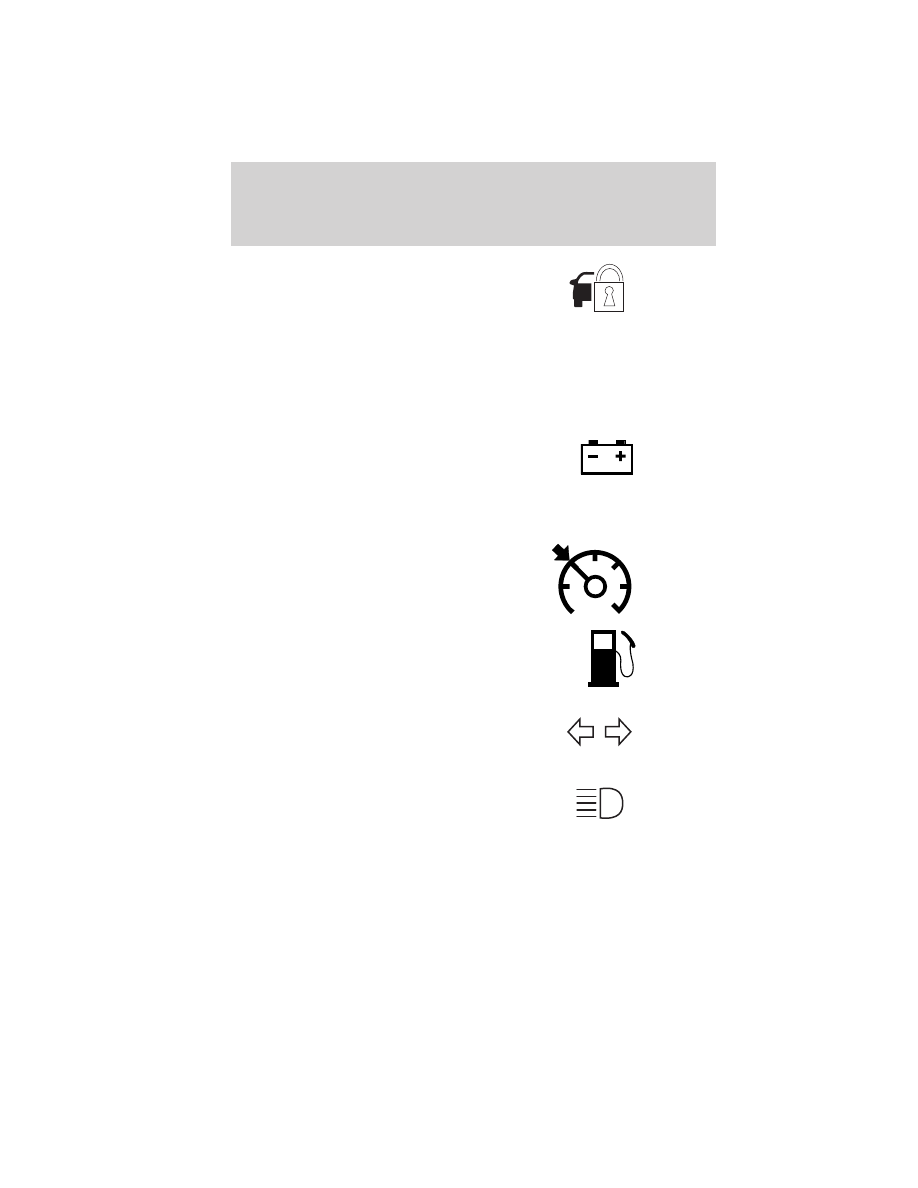
Anti-theft system: Flashes when
the SecuriLock

威 Passive Anti-theft

System has been activated.

Overdrive off (if equipped):
Illuminates when the overdrive
function of the transmission has
been turned off; refer to the
Driving chapter. If the light does not illuminate, have the transmission
serviced soon, or damage may occur.

Charging system (RTT):
Illuminates when the battery is not
charging properly. If it stays on
while the engine is running, there
may be a malfunction with the charging system. Contact your authorized
dealer as soon as possible. This indicates a problem with the electrical
system or a related component.

Speed control: Illuminates when
the speed control is activated. Turns
off when the speed control system
is deactivated.

Low fuel (RTT): Displays when
the fuel level in the fuel tank is at
or near empty (refer to Fuel gauge
in this chapter).

Turn signal: Illuminates when the
left or right turn signal or the
hazard lights are turned on. If the
indicators stay on or flash faster, check for a burned out bulb.

High beams: Illuminates when the
high beam headlamps are turned on.

Key-in-ignition warning chime: Sounds when the key is left in the
ignition in the off or accessory position and the driver’s door is opened.

Headlamps on warning chime: Sounds when the headlamps or parking
lamps are on, the ignition is off (the key is not in the ignition) and the
driver’s door is opened.

O/D

OFF

Instrument Cluster

18

Parking brake on warning chime: Sounds when the parking brake is
set, the engine is running and the vehicle is driven more than 3 mph
(5 km/h).

GAUGES

Speedometer: Indicates the
current vehicle speed.

Engine coolant temperature
gauge: 
Indicates engine coolant
temperature. At normal operating
temperature, the needle will be in
the normal range (between “H” and
“C”). If it enters the red section,
the engine is overheating. Stop
the vehicle as soon as safely
possible, switch off the engine and let the engine cool.

Instrument Cluster

19

WARNING: Never remove the coolant reservoir cap while the
engine is running or hot.

Odometer: Registers the total miles
(kilometers) of the vehicle.

Refer to Message center in this
chapter on how to switch the
display from metric to English.

Trip odometer: Registers the miles (kilometers) of individual journeys.

Refer to Message center in this chapter to learn how to use the trip
odometer.

Tachometer: Indicates the engine
speed in revolutions per minute.
Driving with your tachometer
pointer continuously at the top of
the scale may damage the engine.

Battery voltage gauge: Indicates
the battery voltage when the
ignition is in the on position. If the
pointer moves and stays outside the
normal operating range, have the
vehicle’s electrical system checked
by your authorized dealer as soon as
possible.

Engine oil pressure gauge:
Indicates engine oil pressure. The
needle should stay in the normal
operating range (between “L” and
“H”). If the needle falls below the
normal range, stop the vehicle, turn
off the engine and check the engine
oil level. Add oil if needed. If the oil
level is correct, have your vehicle checked by your authorized dealer.

Instrument Cluster

20

Fuel gauge: Indicates
approximately how much fuel is left
in the fuel tank (when the ignition
is in the on position). The fuel
gauge may vary slightly when the
vehicle is in motion or on a grade.

The FUEL icon and arrow indicates
which side of the vehicle the fuel
filler door is located.

Refer to Filling the tank in the Maintenance and Specifications
chapter for more information.

MESSAGE CENTER (IF EQUIPPED)

Your vehicle’s message center is capable of monitoring many vehicle
systems and will alert you to potential vehicle problems and various
conditions with an informational message followed by a long indicator
chime.

The message center display is located in the instrument cluster.

Selectable features (information menu)

Press and release the SELECT/RESET stem, located in the speedometer,
to scroll and reset the following functions. Select or reset the function by
holding the SELECT/RESET stem for more than two seconds.

TRIP A/B

Registers the distance of individual journeys. To reset, press and hold for
less than two seconds.

MILES (km) TO E

This displays an estimate of approximately how far you can drive with
the fuel remaining in your tank under normal driving conditions.
Remember to turn the ignition off when refueling to allow this feature to
correctly detect the added fuel.

The DTE function will display LOW FUEL LEVEL when you have
approximately 50 miles (80 km), to empty. Press the SELECT/RESET
stem to clear this warning message. It will return at approximately
25 miles (40 km), 10 miles (16 km) and 0 miles (0 km) to empty.

DTE is calculated using a running average fuel economy, which is based
on your recent driving history of 500 miles (800 km). This value is not
the same as the average fuel economy display. The running average fuel
economy is re-initialized to a factory default value if the battery is
disconnected.

Instrument Cluster

21


Content   ..  1  2  3  4  5  ..