Ford Crown Victoria (2010 year). Manual - part 16
 

  Index      Ford     Ford Crown Victoria - service manual 2010 year in english


Search            


Content   ..  14  15  16  17   ..


Ford Crown Victoria (2010 year). Manual - part 16


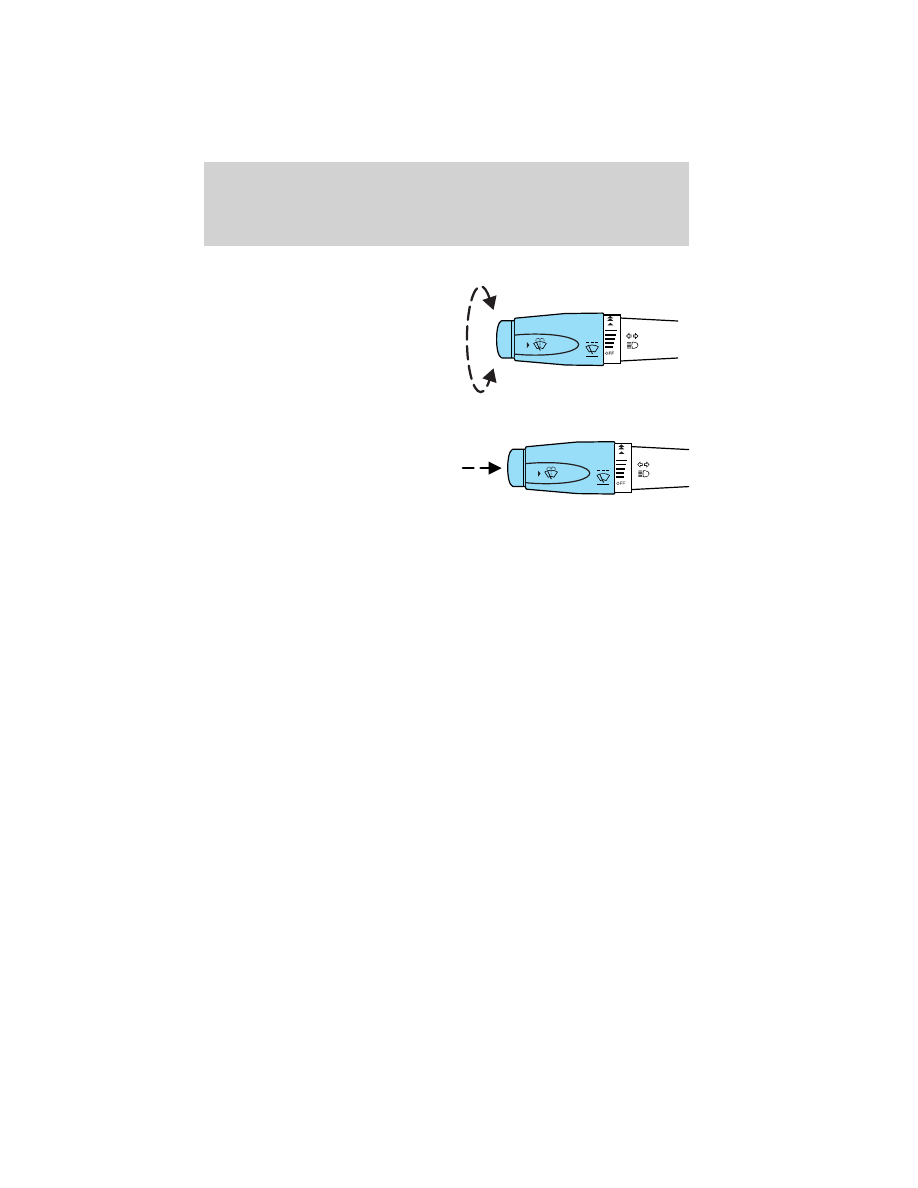
MULTI-FUNCTION LEVER

Windshield wiper: Rotate the end
of the control away from you to
increase the speed of the wipers;
rotate towards you to decrease the
speed of the wipers.

Windshield washer: Press the end
of the stalk:
• briefly: causes a single swipe of

the wipers without washer fluid.

• a quick press and hold: the

wipers will swipe three times with
washer fluid.

• a long press and hold: the wipers and washer fluid will be activated for

up to five seconds.

Courtesy wipe feature: One extra wipe will happen a few seconds
after washing the front window to clear any water that is dripping down
from the top of the windshield caused by the washing.

Note: Do not operate the washer when the washer reservoir is empty.
This may cause the washer pump to overheat. Check the washer fluid
level frequently. Do not operate the wipers when the windshield is dry.
This may scratch the glass, damage the wiper blades and cause the wiper
motor to burn out. Before operating the wiper on a dry windshield,
always use the windshield washer. In freezing weather, be sure the wiper
blades are not frozen to the windshield before operating the wipers.

Windshield wiper/washer features

When the windshield wipers are turned on during daylight, and the
headlamp control is in the autolamp position, the exterior lamps will turn
on after a brief delay and will remain on until the wipers are turned off.

Driver Controls

65

2010 Crown Victoria (cro)
Owners Guide, 2nd Printing
USA 
(fus)

TILT STEERING WHEEL

To adjust the steering wheel:

1. Pull and hold the steering wheel
release control toward you.

2. Move the steering wheel up or
down until you find the desired
location.

3. Release the steering wheel
release control. This will lock the
steering wheel in position.

WARNING: Never adjust the steering wheel when the vehicle is
moving.

ILLUMINATED VISOR MIRROR (IF EQUIPPED)

Lift the mirror cover to turn on the
visor mirror lamps.

Slide-on-rod feature (if
equipped)

Rotate the visor towards the side
window and extend it rearward for
additional sunlight coverage.

Note: To stow the visor back into
the headliner, visor must be
retracted before moving it back
towards the windshield.

Driver Controls

66

2010 Crown Victoria (cro)
Owners Guide, 2nd Printing
USA 
(fus)

CENTER CONSOLE (IF EQUIPPED)

Your vehicle may be equipped with a variety of console features. These
include:
• Utility compartment
• Power point (inside storage bin)
• Cupholders
• Air vents to the rear seating positions (heat only)

WARNING: Use only soft cups in the cupholder. Hard objects
can injure you in a collision.

AUXILIARY POWER POINT (12VDC)

Power outlets are designed for accessory plugs only. Do not insert
any other object in the power outlet as this will damage the
outlet and blow the fuse. Do not hang any type of accessory or
accessory bracket from the plug. Improper use of the power
outlet can cause damage not covered by your warranty.

The auxiliary power point is located under the cup holder and ashtray
drawer in the center stack. The auxiliary power point for five passenger
vehicles is located in the floor console storage bin.

Do not use the power point for operating the cigarette lighter element (if
equipped).

To prevent the fuse from being blown, do not use the power point(s)
over the vehicle capacity of 12 VDC/180W. If the power point or cigar
lighter socket is not working, a fuse may have blown. Refer to Fuses and
relays 
in the Roadside Emergencies chapter for information on
checking and replacing fuses.

To have full capacity usage of your power point, the engine is required to
be running to avoid unintentional discharge of the battery. To prevent
the battery from being discharged:
• do not use the power point longer than necessary when the engine is

not running,

• do not leave battery chargers, video game adapters, computers and

other devices plugged in overnight or when the vehicle is parked for
extended periods.

Always keep the power point caps closed when not being used.

Driver Controls

67

2010 Crown Victoria (cro)
Owners Guide, 2nd Printing
USA 
(fus)

POWER WINDOWS

WARNING: Do not leave children unattended in the vehicle and
do not let children play with the power windows. They may

seriously injure themselves.

WARNING: When closing the power windows, you should verify
they are free of obstructions and ensure that children and/or

pets are not in the proximity of the window openings.

Press and pull the window switches
to open and close windows.
• Press down (to the first detent)

and hold the switch to open.

• Pull up (to the first detent) and

hold the switch to close.

One-touch down

Allows the driver’s window to open
fully without holding the control
down. Press the switch completely
down to the second detent and
release quickly. The window will
open fully. Momentarily press the
switch to any position to stop the
window operation.

Window lock

The window lock feature allows only
the driver to operate the power
windows.

To lock out all the window controls
(except for the driver’s) press the
right side of the control. Press the
left side to restore the window
controls.

Driver Controls

68

2010 Crown Victoria (cro)
Owners Guide, 2nd Printing
USA 
(fus)


Content   ..  14  15  16  17   ..