Ford Crown Victoria (2010 year). Manual - part 7
 

  Index      Ford     Ford Crown Victoria - service manual 2010 year in english


Search            


Content   ..  5  6  7  8   ..


Ford Crown Victoria (2010 year). Manual - part 7


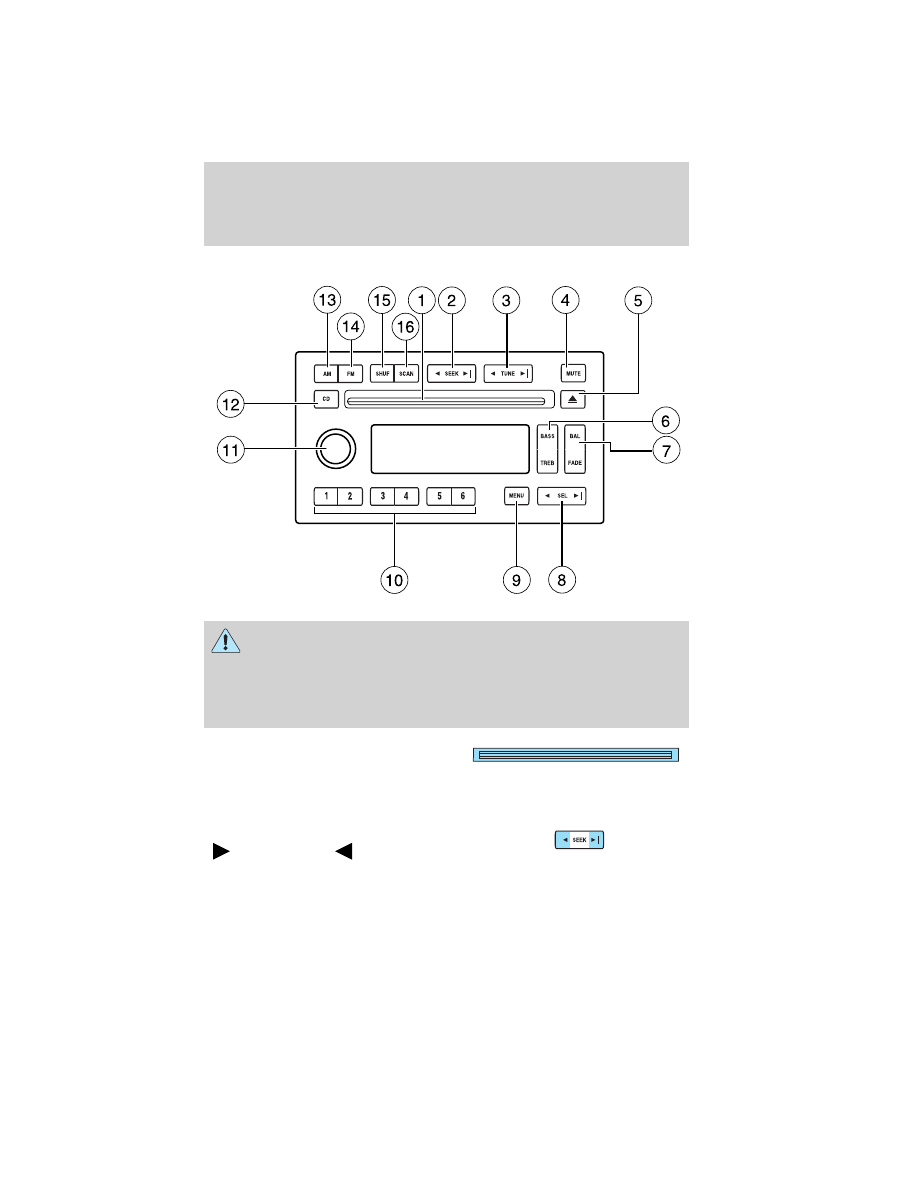
AM/FM Stereo Single CD Premium audio system (if equipped)

WARNING: Driving while distracted can result in loss of vehicle
control, accident and injury. Ford strongly recommends that

drivers use extreme caution when using any device that may take their
focus off the road. The driver’s primary responsibility is the safe
operation of their vehicle. Only use cell phones and other devices not
essential to the driving task when it is safe to do so.

1. CD slot: Insert a CD, label side
up. With the ignition on, the radio
will begin play when a CD is
inserted. If the ignition is off, press CD prior to inserting a disc. Do not
force a disc into the system as damage could result.

2. SEEK: Press to access the next
(

) or previous (

) radio

station or CD track. Press and hold
to advance/reverse in the current CD track.

Entertainment Systems

29

2010 Crown Victoria (cro)
Owners Guide, 2nd Printing
USA 
(fus)

3. TUNE: Press to manually go up
(

) or down (

) the radio

frequency.

4. MUTE: Press to mute the playing
media. Press again to return to the
playing media or turn the volume
control to adjust the volume.

5. Eject: Press to eject the CD. If
the disc is not removed within the
allotted time, the system will
automatically reload the CD and begin play. Note: The eject function will
work when the ignition is turned off.

6. BASS: Press BASS; then
press

SEL

to

decrease/increase the level of bass
output.

TREB (Treble): Press TREB; then
press

SEL

to

decrease/increase the level of treble
output.

7. BAL (Balance): Press BAL; then
press

SEL

to shift sound to

the left/right speakers.

FADE: Press FADE; then press

SEL

to shift sound to the

rear/front speakers.

8. SEL: Use with Bass, Treble,
Balance, Fade and other menu
functions.

9. MENU: Press MENU to access
the following functions:

Autoset: Allows you to set the strongest local radio stations without
losing your original manually set preset stations for AM/FM1/FM2. Press
MENU until AUTOSET appears in the display. Press

SEL

to turn

ON or OFF. When the six strongest stations are filled, the station stored
in preset 1 will begin playing. If there are less than six strong stations,

TREB

BASS

SEL

+

FADE

BAL

SEL

+

Entertainment Systems

30

2010 Crown Victoria (cro)
Owners Guide, 2nd Printing
USA 
(fus)

the system will store the last one in the remaining presets. When
activated, AUTOSET will momentarily appear in the display when any of
the preset controls are pressed.

Compression: Brings soft and loud CD passages together for a more
consistent listening level when in CD mode. Press MENU until

compression status is displayed. Press

SEL

to enable the

compression feature when COMPRESS OFF is displayed. Press SEL
again to disable the feature when COMPRESS ON is displayed. When
activated, the compression icon will appear in the display.

Speed sensitive volume: Radio volume changes automatically and
slightly with vehicle speed to compensate for road and wind noise.
Recommended level is 1–3. Level 0 turns the feature off and level 7 is
the maximum setting.

Press MENU to access and use

SEL

to adjust the volume

setting. The level will appear in the display.

Setting the clock: Press MENU until SET HOURS or SET MINUTES is

displayed. Press

SEL

to manually decrease/increase the

hours/minutes. Press MENU again to disengage clock mode.

Note: The menu selections will remain in the display for approximately
10 seconds, at which time the display will return to the previous mode.
You may also exit the menu options by pressing any other audio control.

10. Memory presets: To set a
station: Select frequency band, tune
to a station, press and hold a preset
button until sound returns.

11. On/Off/Volume: Press to turn
on/off; turn to adjust the volume
levels.
Note: With the ignition turned off,
you may press the volume control to
momentarily view the clock.

12. CD: Press to enter CD mode if a CD is already present in the system.
In radio mode, the CD icon will appear in the display if a CD is loaded
into the system.

13. AM: Press to select the AM
frequency.

Entertainment Systems

31

2010 Crown Victoria (cro)
Owners Guide, 2nd Printing
USA 
(fus)

14. FM: Press to select the FM
frequency. Press repeatedly to
switch between FM1 and FM2.

15. SHUF (Shuffle): Press to play
all tracks on the current CD in
random order. Press again to stop.

16. SCAN: Press SCAN to hear a
brief sampling of radio stations or
CD tracks. Press again to stop.

Premium/Premium sound satellite compatible AM/FM stereo Single
CD/Cassette system (if equipped)

WARNING: Driving while distracted can result in loss of vehicle
control, accident and injury. Ford strongly recommends that

drivers use extreme caution when using any device that may take their
focus off the road. The driver’s primary responsibility is the safe
operation of their vehicle. Only use cell phones and other devices not
essential to the driving task when it is safe to do so.

Entertainment Systems

32

2010 Crown Victoria (cro)
Owners Guide, 2nd Printing
USA 
(fus)


Content   ..  5  6  7  8   ..