Citroen C-Elysee (2017 year). Manual - part 2
 

  Index      Citroen     Citroen C-Elysee - service manual 2017 year in english


Search            


Content   ..   1  2  3   ..


Citroen C-Elysee (2017 year). Manual - part 2


1

15

Monitoring

C-elysee_en_Chap01_controle-de-marche_ed01-2016

C-elysee_en_Chap01_controle-de-marche_ed01-2016

Deactivation indicator lamps

If one of the following indicator lamps comes on, this confirms that the corresponding system has been switched off intentionally.
This is may be accompanied by an audible signal and a message in the screen.

Warning / indicator lamp State

Cause

Action / Observations

Passenger's 
airbag system

fixed.

The control, located in the glove box, 
is set to the OFF

 position.

The passenger's front airbag is 
deactivated.
You can install a rearward facing 
child seat, unless there is a fault with 
the operation of the airbags (Airbag 
warning lamp on).

Set the control to the ON position to activate the 
passenger's front airbag.
In this case, do not fit a child seat in the rearward 
facing position.

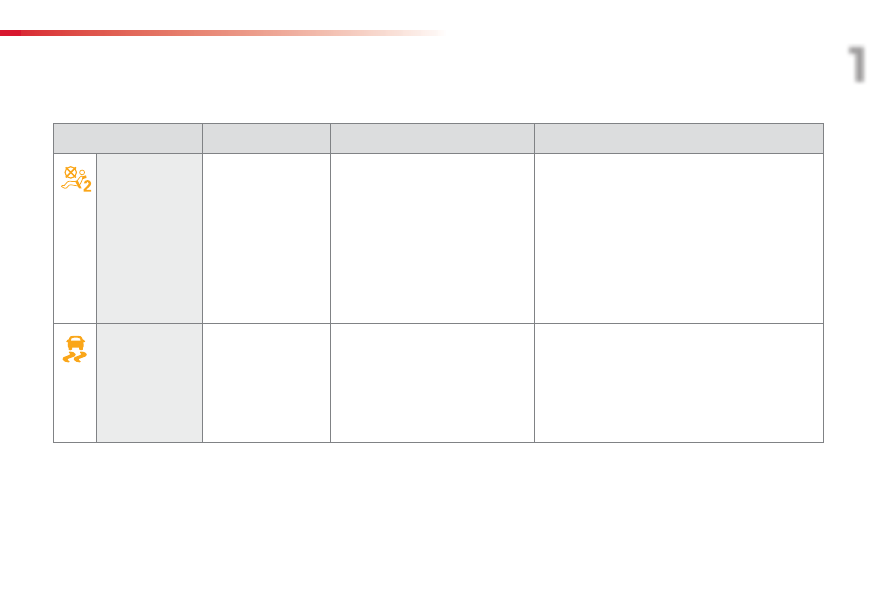
ESP/ASR

fixed.

The button, located at the bottom 
left of the dashboard, is pressed. Its 
indicator lamp is on.
The ESP/ASR is deactivated.
ESP: electronic stability programme.
ASR: anti-slip regulation.

Press the button to activate the ESP/ASR. Its indicator 
lamp goes off.
The ESP/ASR system is activated automatically when 
the vehicle is started.
If deactivated, the system is reactivated automatically 
from around 30 mph (50 km/h).

16

Monitoring

Warning lamps

When the engine is running or the vehicle is being driven, illumination of one of the following warning lamps indicates a fault which requires action on 
the part of the driver.
Any fault resulting in the illumination of a warning lamp must be investigated further by reading the associated message in the screen.
If you encounter any problems, contact a CITROËN dealer or a qualified workshop.

Warning / indicator lamp State

Cause

Action / Observations

STOP

fixed, associated with 
another warning lamp.

It is associated with the engine 
oil pressure or the engine coolant 
temperature.

Stop as soon as it is safe to do so.
Park, switch off the ignition and call a CITROËN 
dealer or qualified workshop.

Service

on temporarily.

Minor faults have occurred for which 
there is no specific warning lamp.

Identify the fault by reading the message shown in 
the screen, such as, for example:
-  saturation of the particle emissions filter (Diesel).
-  the power steering,
-  a minor electrical fault.
-  ...
For any other faults, contact a CITROËN dealer or a 
qualified workshop.

fixed.

Major faults have occurred for which 
there is no specific warning lamp.

Identify the fault by reading the message shown in 
the screen and then contact a CITROËN dealer or 
qualified workshop.

1

17

Monitoring

C-elysee_en_Chap01_controle-de-marche_ed01-2016

C-elysee_en_Chap01_controle-de-marche_ed01-2016

Warning / indicator lamp State

Cause

Action / Observations

Braking

fixed.

The brake fluid level has dropped 
significantly.

You must stop as soon as it is safe to do so.
Top up with brake fluid listed by CITROËN.
If the problem persists, have the system checked by a 
CITROËN dealer or a qualified workshop.

+

fixed, associated 
with the ABS warning 
lamp.

The electronic brake force distribution 
(EBFD) system has a fault.

You must stop as soon as it is safe to do so.
Have it checked by a CITROËN dealer or a qualified 
workshop.

Maximum 

coolant 

temperature

fixed red.

The temperature of the cooling 
system is too high.

Stop as soon as it is safe to do so.
Wait until the engine has cooled down before topping 
up the level, if necessary.
If the problem persists, contact a CITROËN dealer or 
qualified workshop.

Under-inflation

fixed, accompanied by 
an audible signal and 
a message.

The pressure in one or more tyres is 
too low.

Check the tyre pressures as soon as possible.
This check should preferably be carried out when the 
tyres are cold.
You must reinitialise the system after the adjustment 
of one or more tyre pressures and after changing one 
or more wheels.
For more information on under-inflation detection, 
refer to the corresponding section.

+

flashing then fixed, 
accompanied by the 
Service warning lamp.

The system has fault: the tyre 
pressures are no longer monitored.

Check the tyre pressures as soon as possible.
Have the system checked by a CITROËN dealer or a 
qualified workshop.

18

Monitoring

Warning / indicator lamp State

Cause

Action / Observations

Dynamic 

stability control 

(ESP/ASR)

flashing.

The ESP/ASR regulation is active.

The system optimises traction and improves the 
directional stability of the vehicle.

fixed.

Unless it has been deactivated 
(button pressed and its indicator lamp 
on) the ESP/ASR system has a fault.

Have it checked by a CITROËN dealer or a qualified 
workshop.

Engine 
autodiagnosis 

system

fixed.

The emission control system has a 
fault.

The warning lamp should go off when the engine is started.
If it does not go off, contact a CITROËN dealer or qualified 
workshop without delay.

flashing.

The engine management system has 
a fault.

Risk of destruction of the catalytic converter.
Have it checked by a CITROËN dealer or a qualified 
workshop.

Anti-lock 

Braking System 

(ABS)

fixed.

The anti-lock braking system has a 
fault.

The vehicle retains conventional braking.
Drive carefully at reduced speed and contact a 
CITROËN dealer or a qualified workshop without 
delay.

Engine fault

fixed, orange.

The engine has a minor fault.

Contact a CITROËN dealer or a qualified workshop as 
soon as possible.

fixed, red.

The engine has a major fault causing 
a breakdown.

You must stop as soon as it is safe to do so.
Park, switch off the ignition and contact a CITROËN 
dealer or qualified workshop.

1

19

Monitoring

C-elysee_en_Chap01_controle-de-marche_ed01-2016

C-elysee_en_Chap01_controle-de-marche_ed01-2016

Warning / indicator lamp State

Cause

Action / Observations

Engine oil 
pressure

fixed.

There is a fault with the engine 
lubrication system.

You must stop as soon it is safe to do so.
Park, switch off the ignition and contact a CITROËN 
dealer or a qualified workshop.

Battery charge

fixed.

The battery charging circuit has a 
fault (dirty or loose terminals, slack or 
cut alternator belt, ...).

The warning lamp should go off when the engine is 
started.
If it does not go off, contact a CITROËN dealer or a 
qualified workshop.

Door(s) open / 

Electric opening 

boot lid open

fixed if the speed is 
below 6 mph (10 km/h).

A door or the electric opening boot is 
still open.

Close the door or boot.

fixed and accompanied 
by an audible signal 
if the speed is above 
6 mph (10 km/h).

Low fuel level

fixed.

When it first comes on there remains 

approximately 5 litres of fuel in the 

tank.

You must refuel as soon as possible to avoid running 
out of fuel.
This warning lamp will come on every time the ignition 
is switched on, until a sufficient addition of fuel is 
made.
Fuel tank capacity: approximately 50 litres.
Never continue to drive until you run out of fuel as 
this could damage the emission control and injection 
systems.

20

Monitoring

Warning / indicator lamp State

Cause

Action / Observations

Airbags

on temporarily.

This lamp comes on for a few 
seconds when you turn on the 
ignition, then goes off.

This lamp should go off when the engine is started.
If it does not go off, contact a CITROËN dealer or a 
qualified workshop.

fixed.

One of the airbag or seat belt 
pretensioner systems has a fault.

Have it checked by a CITROËN dealer or a qualified 
workshop.

Power steering

fixed.

The power steering has a fault.

Drive carefully at reduced speed.
Have it checked by a CITROËN dealer or a qualified 
workshop.

Driver's seat 

belt not fastened 

or unfastened / 

Front 

passenger's seat 

belt unfastened

fixed or flashing 
accompanied by an 
increasing audible 
signal.

The driver has not fastened or has 
unfastened their seat belt.
The front passenger has unfastened 
their seat belt.

Pull the strap then insert the tongue in the buckle.

1

21

Monitoring

C-elysee_en_Chap01_controle-de-marche_ed01-2016

C-elysee_en_Chap01_controle-de-marche_ed01-2016

Warning / indicator lamp State

Cause

Action / Observations

AdBlue

®

 additive 

(BlueHDi Diesel)

fixed, on switching 
on the ignition, 
accompanied by an 
audible signal and a 
message indicating the 
remaining driving range.

The remaining driving range is 
between 350 miles (600 km) and 
1500 miles (2400 km).

Have the AdBlue

®

 additive tank topped up as soon 

as possible: go to a CITROËN dealer or a qualified 
workshop, or carry out this operation yourself.

+

flashing associated with 
the SERVICE warning 
lamp, accompanied by 
an audible signal and a 
message indicating the 
remaining driving range.

The remaining driving range is 
between 0 and 350 miles (600 km).

You must 

top-up the AdBlue

®

 additive tank to avoid 

a breakdown: go to a CITROËN dealer or a qualified 

workshop, or carry out this operation yourself.

flashing, associated 
with the SERVICE 
warning lamp, 
accompanied by an 
audible signal and a 
message indicating that 
starting is prevented.

The AdBlue

®

 tank is empty: the 

starting inhibition system required 
by legislation prevents starting of the 
engine.

To be able to start the engine, you must 

top-up the 

AdBlue

®

 additive tank: go to a CITROËN dealer or 

a qualified workshop, or carry out this operation 
yourself.
It is 

essential to add at least 3.8 litres of AdBlue

®

 to 

the additive tank.

For topping-up or for more information on the AdBlue

®

 additive, refer to the corresponding section.

22

Monitoring

Warning / indicator lamp State

Cause

Action / Observations

+

+

SCR emissions 

control system 

(BlueHDi Diesel)

fixed, on switching 
on the ignition, 
associated with the 
SERVICE and engine 
diagnostic warning 
lamps, accompanied 
by an audible signal 
and a message.

A fault with the SCR emissions 
control system has been detected.

This alert disappears once the exhaust emissions 
return to normal levels.

flashing, on switching 
on the ignition, 
associated with the 
SERVICE and engine 
diagnostic warning 
lamps, accompanied by 
an audible signal and 
a message indicating 
the remaining driving 
range.

After confirmation of the fault with the 
emissions control system, you can 
drive for up to 650 miles (1 100 km) 
before the engine starting inhibition 
system is triggered.

Contact a CITROËN dealer or a qualified workshop 

without delayto avoid a breakdown.

flashing, on switching 
on the ignition, 
associated with the 
SERVICE and engine 
diagnostic warning 
lamps, accompanied 
by an audible signal 
and a message.

You have exceeded the authorised 
driving limit following confirmation 
of a fault with the emissions control 
system: the engine starting inhibition 
system prevents starting of the 
engine.

To be able to start the engine, you 

must call on a 

CITROËN dealer or a qualified workshop.

1

23

Monitoring

C-elysee_en_Chap01_controle-de-marche_ed01-2016

C-elysee_en_Chap01_controle-de-marche_ed01-2016

Service indicator

More than 1 800 miles (3 000 km) 

remain before the next service is due

When the ignition is switched on, no service 
information appears in the screen.

System which informs the driver when the 
next service is due, in accordance with the 
manufacturer's servicing schedule.

Between 600 miles (1 000 km) and 1 800 miles  

(3 000 km) remain before the next service is due

For 5 seconds after the ignition is switched on, 
the spanner symbolising the service operations 
comes on. The distance recorder display line 
indicates the distance remaining before the 
next service is due.

Example: 1 739 miles (2 800 km) remain 

before the next service is due.
For 5 seconds after the ignition is switched on, 
the screen indicates:

5 seconds after the ignition is switched on, 

the spanner goes off; the distance recorder 

resumes its normal operation. The screen then 
indicates the total distance.

Less than 600 miles (1 000 km) 

remain before the next service is due

Example: 400 miles (900 km) remain before 

the next service is due.
For 5 seconds after the ignition is switched on, 
the screen indicates:

5 seconds after the ignition is switched on, 
the distance recorder resumes its normal 
operation. The spanner remains on to 
indicate that a service must be carried out 
soon.

For BlueHDi Diesel versions, the 
degree of deterioration of the engine oil 
is also taken into account (depending 
on the country of sale).

The point at which the next service is due is 
calculated from the last indicator zero reset, 
depending on the distance travelled and the 
time elapsed since the last service.

24

Monitoring

Service overdue

For 5 seconds after the ignition is switched on, 

the spanner flashes to indicate that the service 

must be carried out as soon as possible.

Example: the service is overdue by 186 miles 

(300 km).
For 5 seconds after the ignition is switched on, 
the screen indicates:

For BlueHDi Diesel versions, this alert 
may also be accompanied by the fixed 
illumination of the service warning lamp 
when the ignition is on.

Following this operation, if you wish to 
disconnect the battery, lock the vehicle 
and wait at least five minutes for the 
zero reset to be taken into account.

Service indicator 

zero reset

After each service, the service indicator must 
be reset to zero.
The procedure for resetting to zero is as 
follows:
F

  switch off the ignition,

F

  press and hold the trip distance recorder 

zero reset button,

F

  switch on the ignition; the distance recorder 

display begins a countdown,

F

  when the display indicates "=0", release 

the button; the spanner disappears.

5 seconds after the ignition is switched on, 
the distance recorder resumes its normal 
operation. The spanner remains on.

The distance remaining may be 
weighted by the time factor, depending 
on the driving conditions.
Therefore, the spanner may also come 
on if you have exceeded the period 
since the last service, indicated in the 
manufacturer's service schedule.
For BlueHDi Diesel versions, the 
spanner may also be brought on earlier 
than expected, depending on the 
degree of deterioration of the engine oil 
(depending on the country of sale).
The rate of deterioration of the engine 
oil depends on the driving conditions in 
which the vehicle is used.

1

25

Monitoring

C-elysee_en_Chap01_controle-de-marche_ed01-2016

C-elysee_en_Chap01_controle-de-marche_ed01-2016

Retrieving the service 

information

You can access the service information at 
any time.
F

  Press the trip distance recorder zero reset 

button.


The service information is displayed for a 
few seconds, then disappears.

System which measures the total distance 
travelled by the vehicle during its life.
The total and trip distances are displayed for 
thirty seconds when the ignition is switched off, 
when the driver's door is opened and when the 
vehicle is locked or unlocked.

Total distance recorder

System which measures a distance travelled 
during a day or other period since it was reset 
to zero by the driver.
F

  With the ignition on, press the button until 

zeros appear.

Trip distance recorder

Distance recorders

26

Monitoring

Setting the date and time

Instrument panel

Use the left-hand button on the instrument 
panel to carry out the operations in the 
following order:
F

  press the button for more than 

two seconds: the minutes flash,

F

  press the button to increase the minutes,

F

  press the button for more than 

two seconds: the hours flash,

F  press the button to increase the hours,
F

  press the button for more than 

two seconds: 24H or 12H is displayed,

F

  press the button to select 24H or 12H,

F

  press the button for more than two seconds 

to complete the adjustments.

After approximately 30 seconds without any 
action, the screen returns to the normal display.

Audio system / Bluetooth

Use the audio system buttons to carry out the 
operations in the following order:

F  press the "MENU" button,

F

  using the arrows, select the 

"Personalisation - Configuration" menu 

then confirm by pressing the control knob,

F

  using the arrows, select the 

"Screen 

configuration" menu then confirm,

F

  using the arrows, select the 

"Set date and 

time" menu then confirm,

F

  select the setting then confirm,

F

  modify the setting then confirm again to 

register the modification,

F

  adjust the settings one by one, confirming 

each time,

F  select the "OK" tab in the screen then 

confirm to exit the 

"Set date and time" 

menu.

1

27

Monitoring

C-elysee_en_Chap01_controle-de-marche_ed01-2016

C-elysee_en_Chap01_controle-de-marche_ed01-2016

Zero reset

F

  Press the control for more than 

two seconds to reset to zero the distance 
travelled, the average fuel consumption 
and the average speed.

System that gives you information on the current journey (range, fuel consumption…).

Trip computer

Screen in instrument panel

Monochrome screen C

Information displays

F

  Press the button, located at the end of the 

wiper stalk, to display the various items of 

trip computer information in succession.


The trip computer provides the following 
information:
-  range,
-  current fuel consumption,
-  distance travelled,
-  average fuel consumption,
-  average speed.

F

  The next press then returns you to the 

normal display.

28

Monitoring

If dashes are displayed continuously 
while driving in place of the digits, 
contact a CITROËN dealer or a 
qualified workshop.

This function is only displayed from 
30 km/h.

This value may vary following a change 
in the style of driving or the relief, 
resulting in a significant change in the 
current fuel consumption.

Trip computer, a few definitions

Range

(km)
The number of kilometres which 
can be covered with the fuel 
remaining in the tank. Related 
to the average fuel consumption 
over the last few kilometres 
travelled.

When the range falls below 30 km, dashes are 
displayed. After filling with at least 5 litres of 
fuel, the range is recalculated and is displayed 
when it exceeds 100 km.

Current fuel consumption

(l/100 km or km/l)
Calculated during the last 
few seconds.

Average fuel consumption

(l/100 km or km/l)
Calculated since the last trip reset.

Average speed

(km/h)
Calculated since the last trip reset.

Distance travelled

(km)
Calculated since the last trip 
reset.

1

29

Monitoring

C-elysee_en_Chap01_controle-de-marche_ed01-2016

C-elysee_en_Chap01_controle-de-marche_ed01-2016

Monochrome screen C (Audio system / Bluetooth)

This displays the following information:
-  time,
-  date,
-  ambient temperature (this flashes if there is 

a risk of ice),

-  status of doors and boot,
-  parking sensors,
-  audio sources (radio, CD, USB port, 

jack socket...),

-  trip computer (refer to the "Instruments and 

controls" section).

Warning or information messages may appear 
temporarily. These can be cleared by pressing 
the "

BACK" button.

From your Audio system / Bluetooth control 
panel, you can press:
F the 

"MENU"

 button to gain access to the 

main menu,

F the 

"MODE"

 button to select the display 

of information in "Full screen" or "New 
window" mode,

F  the "7" or "8

" buttons to navigate in a list,

F

  press the central button to confirm,

 or
F  the "

BACK" button to abandon the 

operation in progress or go back up one 
level in the menu.

Displays in the screen

Controls

F  Press the "MENU"

 button to gain access 

to the main menu

:

-  "Multimedia",
-  "Telephone",
-  "Trip computer",
-  "Bluetooth connection",
-  "Personalisation-configuration",

F  Press the "7" or "8" buttons to select the 

menu required, then confirm by pressing 
the centre button.

Main menu

30

Monitoring

With the Audio system / Bluetooth switched 
on, once this menu has been selected you can 
make a call and refer to the different telephone 
contacts lists.
For more information on the "Telephone" 
application, refer to the Audio system / 
Bluetooth part of the "Audio and Telematics" 
section.

"Telephone" menu

Once this menu has been selected, you can 
consult information concerning the status of the 
vehicle.

Alert log

This summarises the status and alert 
messages of the functions, displaying them in 
succession in the multifunction screen.

F  Press the "MENU"

 button to gain access 

to the general menu

.

F

  Press the double arrows, then the centre 

button to select the "

Trip computer" 

menu.

F  In the "

Trip computer" menu, select the 

"Alert log" line and confirm.

With the Audio system / Bluetooth switched 
on, once this menu has been selected you can 
activate or deactivate the functions linked with 
use of the radio, CD or the MP3 player (USB 
port / jack socket).
For more information on the "Multimedia" 
application, refer to the Audio system / 
Bluetooth part of the "Audio and Telematics" 
section.

"Multimedia" menu

"Trip computer" menu


Content   ..   1  2  3   ..