Citroen C4 Cactus (2016 year). Manual - part 3
 

  Index      Citroen     Citroen C4 Cactus - service manual 2016 year in english


Search            


Content   ..  1  2  3  4   ..


Citroen C4 Cactus (2016 year). Manual - part 3


31

1

Instruments

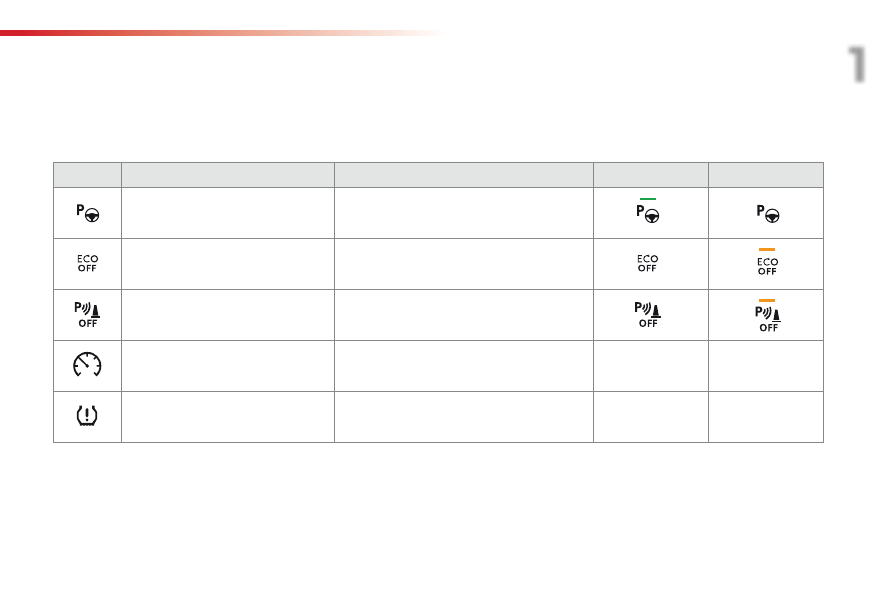
The functions with settings that can be adjusted are detailed in the following table.

Button

Corresponding function

Comments

Activated

Deactivated

Park Assist

Activation / Deactivation of the function.

Stop & Start

Activation / Deactivation of the function.

Parking sensors

Activation / Deactivation of the function.

Speed settings

Memorisation of speeds for use with the speed 
limiter or cruise control.

Under-inflation initialisation

Reinitialisation of the under-inflation detection 
system.

32

Instruments

Button

Corresponding function

Comments

Diagnostic

List of current alerts, servicing information.

Vehicle settings

Access to other functions with settings that can be adjusted. The functions are grouped 
together under three tabs:
-  "Driving assistance"

●  "Automatic rear wiper in reverse" (activation/deactivation of rear wiper linked to reverse 

gear).

For more information on the wiper control stalk, refer to the corresponding section.
-  "Lighting"

●  "Guide-me-home lighting" (activation/deactivation and duration of the automatic guide-

me-home lighting).

For more information on the lighting control stalk, refer to the corresponding section.
-  "Vehicle access"

●  "Unlock boot only" (activation/deactivation of selective boot unlocking).

For more information on the boot, refer to the corresponding section.

33

1

Instruments

The functions available through this menu are detailed in the table below.

"Configuration" menu

Button

Corresponding function

Comments

Audio settings

Adjustment of volume, balance...

Turn off screen

Turns off the screen display in the touch screen tablet (black screen). Pressing the black 
screen restores the display.

Interactive help

Access to the interactive handbook.

Brightness

Adjustment of the brightness of the instruments and controls.

34

Instruments

Button

Corresponding function

Comments

Configuration

Choice of units:
-  temperature (°Celsius or °Fahrenheit)
-  distance and fuel consumption (l/100 km, mpg or km/l).

Time/Date

Setting the time and date.

Languages

Choice of language used by the touch screen tablet: French, English, Italian, Spanish, 
German, Dutch, Portuguese, Polish, Turkish, Russian, Serb, Croat, Hungarian, Czech, 
Brazilian.

Screen settings

Adjustment of the display settings (scrolling of text, animations...).

Calculator

Display the calculator.

Calendar

Display the calendar.

35

1

Instruments

Trip computer

System that gives you information on the journey in progress (range, fuel consumption…).

Information display in the touch screen tablet

F  Select the "Driving assistance

menu.

-  The current fuel consumption tab 

with:
●  the range,
●  the current fuel consumption,
●  the Stop & Start time counter.

-  The trip "1" tab with:

●  the average fuel consumption,
●  the distance travelled,
●  the average speed, 
  for the first trip.

-  The trip "2" tab with:

●  the average fuel consumption,
●  the distance travelled,
●  the average speed, 
  for the second trip.

Trip reset

F

  When the desired trip is displayed, press 

the "Reset" button or on the end of the 
wiper control stalk until zeros appear.

Trips "1"

 and "2" are independent.

For example, trip "1" can be used for daily 
figures, and trip "2" for monthly figures.

The information is accessible in the touch screen tablet.

For a temporary display in a new 
window, press the end of the wiper stalk 
for access to the information and cycle 
through the different tabs.

The trip computer information is displayed in 
the primary page of the menu.
F

  Press one of the buttons to display the 

desired tab.

36

Instruments

Trip computer, a few definitions

Range

(miles or km)
The distance which can still be 
travelled with the fuel remaining in 
the tank (related to the average fuel 
consumption over the last few miles 
(kilometres) travelled).

This value may vary following a change 
in the style of driving or the relief, 
resulting in a significant change in the 
current fuel consumption.

When the range falls below 20 miles (30 km), 
dashes are displayed. After filling with at least 
5 litres of fuel, the range is recalculated and is 
displayed when it exceeds 60 miles (100 km).

If dashes are displayed continuously 
while driving in place of the digits, 
contact a CITROËN dealer or a 
qualified workshop.

This function is only displayed from  
20 mph (30 km/h).

Current fuel  
consumption

(mpg or l/100 km or km/l)
Calculated over the last few seconds.

Average fuel consumption

(mpg or l/100 km or km/l)
Calculated since the last trip 
computer reset.

Distance travelled

(miles or km)
Calculated since the last trip 
computer reset.

Average speed

(mph or km/h)
Calculated since the last trip 
computer reset.

Stop & Start time  
counter

(minutes / seconds or hours / 
minutes)

If your vehicle is fitted with Stop & Start, 
a time counter calculates the time spent in 
STOP mode during a journey.
It resets to zero every time the ignition is 
switched on.

37

1

Instruments

Total distance recorder

System which measures the total distance 
travelled by the vehicle during its life.
The total distance recorder is displayed 
continuously in the instrument panel, as soon 
as the driver's door is opened, as well as when 
the vehicle is locked or unlocked.

To conform to legislation in the 
country you are crossing, change the 
units of distance (miles or km) in the 
"Configuration

" menu of the touch 

screen tablet.
This operation must be carried out with 
the vehicle stationary.

System which measures a distance travelled 
(daily, for example) since it was reset to zero by 
the driver.
This function is accessible from the trip 
computer in the touch screen tablet

.

Trip distance recorder

F  Select the "Driving assistance

menu.

F  Select the tab for trip "1" or 

trip "2

".

F

  To reset the trip recorder to zero, press 

the "Reset

" button or the end of the wiper 

control stalk until zeros appear.

Distance recorders

38

Instruments

Setting the date and time

F  Select "Adjust time" or "Adjust date

and modify the settings using the numeric 
keypad, then confirm.

F

  In the secondary page, press on 

"Time/Date

".

F  Select the "Configuration

menu.

F  Press "Confirm

" to quit.

This function is accessible in the touch screen 
tablet.

39

1

Instruments

Brightness of instruments and controls

Lighting dimmer

Allows the manual adjustment of the brightness 
of the instrument and controls, to suit the 
ambient light level.

F  Select the "Configuration

menu.

F

  Adjust the brightness by pressing on 

the "+" or "-

" buttons or by moving the 

cursor.

Operates only when the sidelamps are on.

Black screen
(Touch screen tablet)

This function is accessible in the touch screen 
tablet.

F  Select the "Configuration

menu.

F  Press "Turn off screen

".

This function is accessible in the touch screen 
tablet.

The screen in the touch screen tablet goes off.
Press the screen again (anywhere on its surface) 
to switch it on again.

40

Access

System which permits central unlocking or locking of the vehicle using the door lock or from a distance.
It is also used to locate and start the vehicle, as well as providing protection against theft.

Remote control key

Unfolding / folding the key

Unlocking the vehicle

Unlocking using the key

F

  Turn the key in the driver's door lock 

towards the front of the vehicle to unlock.

Unlocking using the remote 
control

F

  Press this button to unlock the 

vehicle.

Unlocking is confirmed by rapid 
flashing of the direction indicators for 
approximately two seconds.

F

  Press this button to unfold or fold the key.

Selective unlocking of the boot

F

  Make a long press on this button 

until the boot unlocks. The doors 
remain locked.

If selective unlocking of the boot is 
deactivated, pressing this button also 
unlocks the doors.

Don't forget to lock the boot again by 
pressing the closed padlock button.

The activation or deactivation of selective boot 
unlocking is set in the touch screen tablet.

F  Select "Vehicle settings" in the 

"Driving assistance

" menu of 

the touch screen tablet.

Selective unlocking of the boot is 
activated by default.

If you do not press the button, you risk 
damaging the remote control.

41

2

Access

If one of the doors or the boot is still 
open, the central locking does not 
take place; the vehicle locks then 
immediately unlocks, identifiable by the 
sound of the locks rebounding.
When the vehicle is locked, if it is 
unlocked inadvertently, it will lock 
again automatically after thirty seconds 
unless a door or the boot is open.

Locking using the remote  
control

F

  Press this button to lock the 

vehicle.

Locking the vehicle

Locking is confirmed by the fixed illumination  
of the direction indicators for approximately  
two seconds.

Locking using the key

F

  Turn the key in the driver's door lock, 

towards the rear of the vehicle to lock it.

This function allows you to identify your vehicle 
from a distance, especially when the light is 
poor. Your vehicle must be locked.

Locating your vehicle

Anti-theft protection

Electronic engine immobiliser

The key contains an electronic chip which has 
a special code. When the ignition is switched 
on, this code must be recognised in order for 
starting to be possible.
This electronic engine immobiliser locks the 
engine management system a few moments 
after the ignition is switched off and prevents 
starting of the engine by anyone who does not 
have the key.

In the event of a fault, you are 
informed by illumination of this 
warning lamp, an audible signal 
and a message in the screen.

F

  Press the closed padlock on the 

remote control.

This will bring on the courtesy lamps and 
flashing of the direction indicators for a 
few seconds.

Keep safely, away from your vehicle, the label 
attached to the keys given to you on acquisition 
of the vehicle.

In this case, your vehicle will not start; contact 
a CITROËN dealer as soon as possible.

Check that the doors and boot are fully 
closed.

42

Access

Deadlocking

Using the key

F

  Turn the key to the rear in the driver's door 

lock to lock the vehicle completely.

F

  Turn the key to the rear again within five 

seconds to deadlock the vehicle.

Using the remote control

Deadlocking renders the exterior and 
interior door controls inoperative.
It also deactivates the manual central 
control button.
Therefore, never leave anyone inside 
the vehicle when it is deadlocked.

Deadlocking is confirmed by fixed 
lighting of the direction indicators for 
approximately two seconds.
Depending on version, the door mirrors 
fold at the same time.

F

  Press the closed padlock to lock 

the vehicle completely.

F

  Press the closed padlock again within 

five seconds to deadlock the vehicle.

43

2

Access

If the problem persists, contact a 
CITROËN dealer as soon as possible.

If the battery is flat, you are 
informed by illumination of this 

Changing the battery

In the event of a fault with the remote control, 
you can no longer unlock, lock or locate 
your vehicle.
F

  First of all, use the key in the lock to unlock 

or lock your vehicle.

F

  Then, reinitialise the remote control.

Fault with the remote 
control

Reinitialisation

F

  Switch off the ignition and remove the 

ignition key.

F

  Press the closed padlock immediately for a 

few seconds.

F

  Turn the key to position 2 (Ignition on).

F

  Switch off the ignition and remove the key 

from the ignition switch.

The remote control is fully operational again.

Battery ref.: CR2032 / 3 volts.

F

  Unclip the cover using a small screwdriver 

at the cutout.

F

  Lift off the cover.

F

  Remove the flat battery from its location.

F  Fit the new battery into its location 

observing the original direction of fitment.

F

  Clip the cover onto the casing.

Do not throw the remote control 
batteries away, they contain metals 
which are harmful to the environment.
Take them to an approved collection 
point.

warning lamp, an audible signal and a message 
in the screen.

44

Access

Lost keys

Go to a CITROËN dealer with the vehicle's registration document, your personal 
identification documents and if possible the key code label.
The CITROËN dealer will be able to look up the key code and the transponder code 
required to order a new key.

Remote control

The high frequency remote control is a sensitive system; do not operate it while it is in your 
pocket as there is a possibility that it may unlock the vehicle, without you being aware of it.
Do not repeatedly press the buttons of your remote control out of range and out of sight of 
your vehicle. You run the risk of stopping it from working and the remote control would have 
to be reinitialised.
No remote control can operate when the key is in the ignition switch, even when the ignition 
is switched off, except for reinitialisation.

Locking the vehicle

Driving with the doors locked may make access to the passenger compartment by the 
emergency services more difficult in an emergency.
As a safety precaution, never leave children alone in the vehicle, except for a very short period.
In all cases, it is essential to remove the key from the ignition switch when leaving the 
vehicle.

Anti-theft protection

Do not make any modifications to the electronic engine immobiliser system; this could 
cause malfunctions.

When purchasing a second-hand vehicle

Have the pairing of all of the keys in your possession checked by a CITROËN dealer, 
to ensure that only your keys can be used to open and start the vehicle.

45

2

Access

Manual central locking

Central locking

Press this button to operate the central locking 
of the vehicle (doors and boot) from inside the 
vehicle, the indicator lamp in the button comes on.

F

  Pressing the button again unlocks the vehicle 

completely, the indicator lamp in the button goes 
off.

Automatic central  
locking
(anti-intrusion security)

The doors and boot can lock automatically 
while driving (speed above 6 mph (10 km/h)).
To activate or deactivate this function (activated 
by default):
F

  Press this button until an audible signal 

is heard and a message appears in the 
screen.

If one of the doors is open, central 
locking from the inside does not take 
place.

Transporting long or voluminous 
objects
If you want to drive with the boot open, 
press the central locking control button 
to lock the doors.

If the vehicle is deadlocked or locked 
from the outside, the button is not 
active. If the vehicle is not deadlocked, 
use the remote control to unlock the 
vehicle or pull an interior door handle to 
open a door.

46

Access

Doors

From outside

F

  After unlocking the vehicle using the 

remote control or the key, pull the door 
handle.

Opening

From inside

F

  Pull the interior control lever of a front door; 

this unlocks the vehicle completely.

The interior opening control on a rear 
door does not work if the child lock is on.
For more information on the child lock, 
refer to the corresponding section.

When a door is not fully closed:
-  engine running, a message appears in 

the screen,

-  vehicle moving, a message appears in 

the screen, accompanied by an audible 
signal.

Closing


Content   ..  1  2  3  4   ..