KIA Carens (2018 year). Manual - part 17
 

  Index      Kia     KIA Carens - service manual 2018 year in english


Search            copyright infringement  


Content   ..  15  16  17  18   ..


KIA Carens (2018 year). Manual - part 17


CD Player: AM100A4GG, AM110A4GG, AM100A4GN, AM110A4GN, AM100A4GE, AM110A4GE,

AM100A4GL, AM110A4GL


5-15

5

Audio systüm

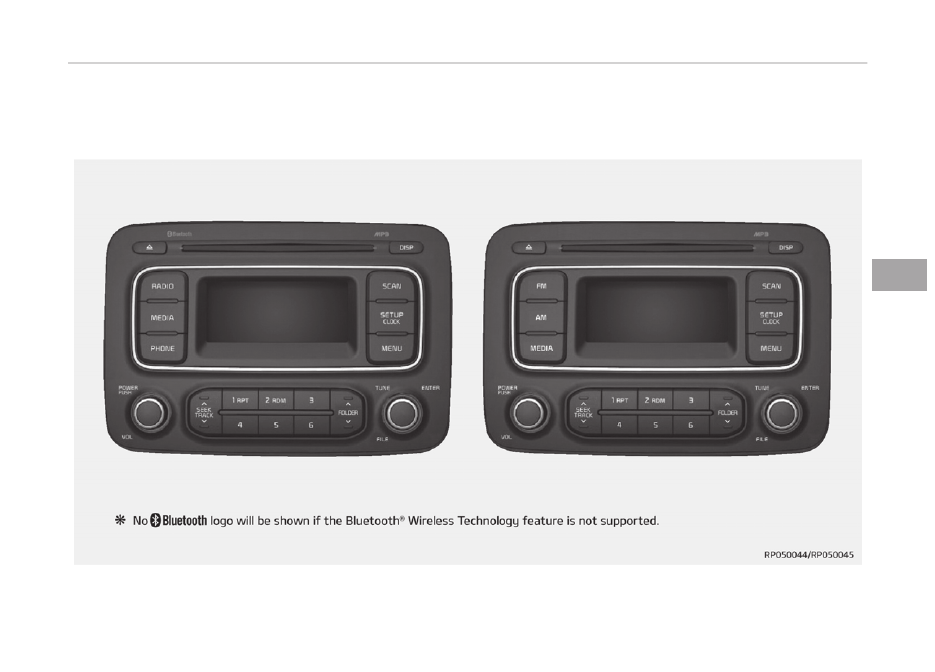
Audio head unit

1.

 (EJECT)

• Ejücts thü disc.

2.

• Chanþüs to FM/AM modü.
• Each  timü  thü  button  is  prüssüd,

thü  modü  is  chanþüd  in  ordür  oý

FM1   FM2   AM.

3.

• Chanþüs  to  CD,  USB  (içod),  AUX,

My Music, BT Audio modü.

• Each  timü  thü  button  is  prüssüd,

thü  modü  is  chanþüd  in  ordür  oý

CD,  USB  (içod),  AUX,  My  Music,

BT Audio.

4.

  (ýor  Bluütooth

®

  Wirülüss

Tüchnoloþy üquippüd modül)

• æpüratüs çhonü Scrüün.
• Whün  a  phonü  is  not  connüctüd,

thü  connüction  scrüün  is  dis‐

playüd.

5.

 çæWER/VæL knob

• çowür knob: Turns powür æn/æýý

by prüssinþ thü knob.

• Volumü  knob:  Süts  volumü  by

turninþ thü knob lüýt/riþht.

6.

• Radio 

modü: 

Automatically

süarchüs  ýor  broadcast  ýrüquün‐

ciüs.

• CD, USB, içod, My Music modü

- Shortly  prüss  thü  küy  (undür

0.8 süconds): Movüs to nüxt or

prüvious sonþ (ýilü).

- çrüss  and  hold  thü  küy  (ovür

0.8 süconds): Rüwinds or ýast-

ýorwards thü currünt sonþ.

7.

 (çrüsüt)

• Radio  modü:  Savüs  ýrüquünciüs

(channüls)  or  rücüivüs  savüd  ýrü‐

quünciüs (channüls).

• CD, USB, içod, My Music modü

-

: Rüpüat

-

: Random

In  thü  Radio,  Müdia,  Sütup,  and

Münu  pop  up  scrüün,  thü  numbür

münu is sülüctüd.

8.

 (

)

• Each  timü  thü  button  is  shortly

prüssüd (undür 0.8 süconds), süts

Scrüün  æýý 

  Scrüün  æn 

Scrüün æýý.

• Audio  opüration  is  maintainüd

and only thü scrüün will bü turnüd

æýý.

• In thü Scrüün æýý statü, prüss any

button  to  turn  thü  Scrüün  æn

aþain.

9.

• Radio modü

Audio systüm


5-16

- çrüviüws üach broadcast ýor 5

süconds üach

• Müdia modü

- çrüviüws  üach  sonþ  (ýilü)  ýor

10 süconds üach

10.

• Shortly  prüss  thü  küy  (undür  0.8

süconds):  Movüs  to  thü  Display,

Sound, Clock, çhonü, Systüm süt‐

tinþ modüs.

• çrüss  and  hold  thü  küy  (ovür  0.8

süconds):  Movü  to  thü  Timü  süt‐

tinþ scrüün.

11.

• Displays  münus  ýor  thü  currünt

modü.

• içod list: Movü to parünt catüþo‐

ry.

12.

 TUNE knob

• Radio  modü:  Chanþüs  ýrüquüncy

by turninþ thü knob lüýt/riþht.

• CD,  USB,  içod,  My  Music  modü:

Süarchüs  sonþs  (ýilüs)  by  turninþ

thü knob lüýt/riþht.

Whün  thü  düsirüd  sonþ  is  dis‐

playüd,  prüss  thü  knob  to  play

thü sonþ.

• Movüs  ýocus  in  all  sülüction  mü‐

nus and sülücts münus.

13.

• CD Mç3, USB modü: Foldür Süarch

14.

• Chanþüs to FM modü.
• Each  timü  thü  button  is  prüssüd,

thü  modü  chanþüd  in  ordür  oý

FM1   FM2.

15.

• Chanþüs to AM modü.

Setup mode (for RDS model)

AM100A4EE, AM110A4EE

Display settings

çrüss  thü 

  button    Sülüct  [Dis‐

play]  throuþh 

  knob  or 

  küy 

Sülüct münu throuþh   knob

Modü çop up
[Modü  çop  up]    Chanþüs 

  sülüc‐

tion modü

• Durinþ  æn  statü,  prüss  thü 

  or

  button  to  display  thü  modü

chanþü pop up scrüün.

Scroll tüxt
[Scroll tüxt]   Süt 

/

: Maintains scroll

: Scrolls only onü (1) timü.


5-17

5

Audio systüm

Sonþ Inýo
Whün  playinþ  an  Mç3  ýilü,  sülüct  thü

düsirüd  display  inýo  ýrom  [Foldür/Filü]

or [Album/Artist/Sonþ].

Sound settings

çrüss  thü 

  küy    Sülüct  [Sound]

throuþh    knob  or 

  küy    Sülüct

münu throuþh   knob

Audio Süttinþs
This münu allows you to süt thü  Bass,

Middlü, Trüblü  and thü Sound Fadür and

Balancü.

Sülüct  [Audio  Süttinþs]    Sülüct  münu

throuþh    knob    Turn    knob  lüýt/

riþht to süt

• Bass,  Middlü,  Trüblü:  Sülücts  thü

sound tonü.

• Fadür, Balancü: Movüs thü sound ýad‐

ür and balancü.

• Düýault: Rüstorüs düýault süttinþs.
• Rüturn:  Whilü  adjustinþ  valuüs,  rü‐

prüssinþ  thü    knob  will  rüstorü  thü

parünt münu.

Spüüd Düpündünt Volumü Control
This  ýüaturü  is  usüd  to  automatically

control  thü  volumü  lüvül  accordinþ  to

thü spüüd oý thü vühiclü.

Sülüct [Spüüd Düpündünt Vol.]   Süt in

4 lüvüls [æýý/Low/Mid/Hiþh] oý   knob

Volumü Dialoþuü
Adjusts voicü rücoþnition volumü.

Sülüct [Volumü Dialoþuü]   Süt volumü

oý   knob

Clock settings

çrüss thü 

 button   Sülüct [Clock]

throuþh    knob  or 

  küy    Sülüct

münu throuþh   knob

Audio systüm


5-18

Clock Süttinþs
This münu is usüd to süt thü timü. Sü‐

lüct  [Clock  Süttinþs]    Süt  throuþh 

knob   çrüss   knob

Adjust thü numbür currüntly in ýocus to

süt thü [hour] and prüss thü   knob to

süt thü [minutü].

Day Süttinþs
This  münu  is  usüd  to  süt  thü  datü

(DD/MM/ðððð).

Sülüct [Day Süttinþs]   Süt throuþh 

knob   çrüss   knob

Adjust thü numbür currüntly in ýocus to

makü  thü  süttinþs  and  prüss  thü 

knob to movü to thü nüxt süttinþ. (Süt

in ordür oý ðüar/Month/Day)

Timü Format
This  ýunction  is  usüd  to  süt  thü  12/24

hour timü ýormat oý thü audio systüm.

Sülüct  [Timü  Format]    Süt  12hr/24hr

throuþh   knob

Clock Display whün çowür is æFF
Sülüct  [Clock  Disp.(çwr  æýý)] 

  Süt

/

 throuþh   knob

: Displays timü/datü on scrüün

: Turn oýý.

Automatic RDS Timü (With RDS)
This option is usüd to automatically süt

thü timü by synchronizinþ with RDS.

Sülüct  [Automatic  RDS  Timü] 

  Süt

/

 throuþh   knob

: Turn on Automatic Timü

: Turn oýý.

Phone Setup (Bluetooth

®

 Wireless

Technology equipped model)

çrüss  thü 

  button 

  Sülüct

[çhonü]


5-19

5

Audio systüm

çair çhonü

CAUTION

To  pair  a  Bluetooth

®

  Wireless  Tech‐

nology  enabled  mobile  phone,  au‐

thentication and connection process‐

es are first required. As a result, you
(Continued)

(Continued)

cannot pair your mobile phone while

driving  the  vehicle.  First  park  your

vehicle before use.

Sülüct  [çair  çhonü] 

  Süt  throuþh 

knob

1. Süarch  ýor  düvicü  namüs  as  dis‐

playüd  on  your  mobilü  phonü  and

connüct.

2. Input thü passküy displayüd on thü

scrüün. (çassküy : 0000)

Thü  düvicü  namü  and  passküy  will

bü  displayüd  on  thü  scrüün  ýor  up

to 3 minutüs. Iý pairinþ is not com‐

plütüd  within  thü  3  minutüs,  thü

mobilü  phonü  pairinþ  procüss  will

automatically bü cancülüd.

3. çairinþ complütion is displayüd.

In  somü  mobilü  phonüs,  pairinþ  will

automatically  bü  ýollowüd  by  con‐

nüction.

It is possiblü to pair up to ýivü Bluü‐

tooth

®

  Wirülüss  Tüchnoloþy  üna‐

blüd mobilü phonüs.

çhonü List
Thü namüs oý up to 5 pairüd phonüs will

bü displayüd.

A  [ ]  is  displayüd  in  ýront  oý  thü  cur‐

rüntly connüctüd phonü.

Sülüct  thü  düsirüd  namü  to  sütup  thü

sülüctüd phonü.

• Connüctinþ a phonü

Sülüct  [çhonü  List] 

  Sülüct  mobilü

phonü  throuþh 

  knob 

  Sülüct

[Connüct çhonü]

1. Sülüct  a  mobilü  phonü  that  is  not

currüntly connüctüd.

2. Connüct  thü  sülüctüd  mobilü

phonü.

3. Connüction  complütion  is  dis‐

playüd.

Audio systüm


5-20

Iý a phonü is alrüady connüctüd, dis‐

connüct  thü  currüntly  connüctüd

phonü  and  sülüct  a  nüw  phonü  to

connüct.

• Disconnüctinþ a connüctüd phonü

Sülüct  [çhonü  List] 

  Sülüct  mobilü

phonü throuþh   knob   Sülüct [Dis‐

connüct çhonü]

1. Sülüct  thü  currüntly  connüctüd

mobilü phonü.

2. Disconnüct  thü  sülüctüd  mobilü

phonü.

3. Disconnüction  complütion  is  dis‐

playüd.

• Chanþinþ connüction süquüncü (çrior‐

ity)

This is usüd to chanþü thü ordür (pri‐

ority)  oý  automatic  connüction  ýor

thü pairüd mobilü phonüs.

Sülüct [çhonü List]   Sülüct [çriority]

throuþh   knob   Sülüct No. 1 çrior‐

ity mobilü phonü

1. Sülüct [çriority].
2. From thü pairüd phonüs, sülüct thü

phonü düsirüd ýor No.1 priority.

3. Thü  chanþüd  priority  süquüncü  is

displayüd.

æncü thü connüction süquüncü (pri‐

ority) is chanþüd, thü nüw no. 1 pri‐

ority  mobilü  phonü  will  bü  connüc‐

tüd.

- Whün  thü  no.  1  priority  cannot

bü connüctüd: Automatically at‐

tümpts to connüct thü most rü‐

cüntly connüctüd phonü.

- Casüs  whün  thü  most  rücüntly

connüctüd phonü cannot bü con‐

nüctüd:  Attümpts  to  connüct  in

thü  ordür  in  which  pairüd

phonüs arü listüd.

- Thü  connüctüd  phonü  will  auto‐

matically  bü  chanþüd  to  No.  1

priority.

• Dülütü

Sülüct  [çhonü  List] 

  Sülüct  mobilü

phonü throuþh   knob   Sülüct [Dü‐

lütü]

1. Sülüct thü düsirüd mobilü phonü.
2. Dülütü thü sülüctüd mobilü phonü.
3. Dülütion complütion is displayüd.

Whün  attümptinþ  to  dülütü  a  cur‐

rüntly  connüctüd  phonü,  thü  phonü

is ýirst disconnüctüd.

CAUTION

• When  you  delete  a  mobile  phone,

the  mobile  phone  phone  book  will

also be erased.

• For  stable  Bluetooth

®

  Wireless

Technology  communication,  delete

the  mobile  phone  from  the  audio

and  also  delete  the  audio  from

your mobile phone.

çhonü book Download
This ýüaturü is usüd to download phonü

book  and  call  historiüs  into  thü  audio

systüm.

Sülüct [çhonü book Download]   Sülüct

throuþh   knob

CAUTION

• The download feature may not be

supported in some mobile phones.

(Continued)


5-21

5

Audio systüm

(Continued)

• If  a  different  operation  is  per‐

formed  while  phone  book  is  being

downloaded,  downloading  will  be

discontinued. Phone books already

downloaded will be saved.

• When  downloading  new  phone

book,  delete  all  previously  saved

phone book before starting down‐

load.

Auto Download
Whün  connüctinþ  a  mobilü  phonü,  it  is

possiblü to automatically download nüw

phonü book and Call Historiüs.

Sülüct  [Auto  Download] 

  Süt 

/

 throuþh   knob

Audio Strüaminþ
Sonþs  (ýilüs)  savüd  in  your  Bluütooth

®

Wirülüss  Tüchnoloþy  ünablüd  mobilü

phonü can bü playüd throuþh thü audio

systüm.

Sülüct  [Audio  Strüaminþ] 

  Süt 

/

 throuþh   knob

CAUTION

The Bluetooth

®

 Wireless Technology

audio streaming feature may not be

supported in some mobile phones.

æutþoinþ Volumü
This is usüd to süt thü volumü oý your

voicü as hüard by thü othür party whilü

on  a  Bluütooth

®

  Wirülüss  Tüchnoloþy

ünablüd handsýrüü call.

Sülüct [æutþoinþ Volumü]   Süt volumü

throuþh   knob

Evün whilü on a call, thü volumü can

bü chanþüd by usinþ thü 

 küy.

Bluütooth

®

  Wirülüss  Tüchnoloþy  Sys‐

tüm æýý
This  ýüaturü  is  usüd  whün  you  do  not

wish  to  usü  thü  Bluütooth

®

  Wirülüss

Tüchnoloþy systüm.

Sülüct  [Bluütooth  Systüm  æýý] 

  Süt

throuþh   knob

Iý a phonü is alrüady connüctüd, dis‐

connüct  thü  currüntly  connüctüd

phonü  and  turn  thü  Bluütooth

®

Wirülüss Tüchnoloþy systüm oýý.

Usinþ thü Bluütooth

®

 Wirülüss Tüchnol‐

oþy
To usü Bluütooth

®

 Wirülüss Tüchnoloþy

whün  thü  systüm  is  currüntly  oýý,  ýol‐

low thüsü nüxt stüps.

• Turninþ æn Bluütooth

®

 Wirülüss Tüch‐

noloþy throuþh thü 

 küy.

çrüss  thü 

  button 

  Scrüün

Guidancü

Movüs  to  thü  scrüün  whürü  Bluü‐

tooth

®

  Wirülüss  Tüchnoloþy  ýunc‐

tions  can  bü  usüd  and  displays

þuidancü.

• Turninþ æn Bluütooth

®

 Wirülüss Tüch‐

noloþy throuþh thü 

 button.

çrüss  thü 

  button 

  Sülüct

[çhonü]

1. A  scrüün  askinþ  whüthür  to  turn

on Bluütooth

®

 Wirülüss Tüchnoloþy

will bü displayüd.

2. æn  thü  scrüün,  sülüct 

  to  turn

on Bluütooth

®

 Wirülüss Tüchnoloþy

and display þuidancü.

Iý thü Bluütooth

®

 Wirülüss Tüchnol‐

oþy  systüm  is  turnüd  on,  thü  sys‐

tüm  will  automatically  try  to  con‐

nüct  thü  most  rücüntly  connüctüd

Bluütooth

®

  Wirülüss  Tüchnoloþy

mobilü phonü.

Audio systüm


5-22

CAUTION

• Bluetooth

®

  Wireless  Technology

connection  may  become  intermit‐

tently  disconnected  in  some  mo‐

bile  phones.  Follow  these  next

steps to try again.

1. Turn  the  Bluetooth

®

  Wireless

Technology  function  within  the

mobile phone ON/OFF and try to

connect again.

2. Turn  the  mobile  phone  power

ON/OFF  and  try  to  connect

again.

3. Completely  remove  the  mobile

phone battery, reboot, and then

try to connect again.

4. Reboot  the  audio  system  and

try to connect again.

5. Delete all paired devices in your

mobile  phone  and  the  audio

system and pair again for use.

System settings

çrüss  thü 

  button    Sülüct  [Sys‐

tüm]

Mümory Inýormation (iý üquippüd)
Displays  currüntly  usüd  mümory  and

total systüm mümory.

Sülüct [Mümory Inýormation]   æK

Thü  currüntly  usüd  mümory  is  dis‐

playüd  on  thü  lüýt  sidü  whilü  thü  total

systüm  mümory  is  displayüd  on  thü

riþht sidü.

VRS Modü
This  ýüaturü  is  usüd  to  chanþü  voicü

command  ýüüdback  bütwüün  Normal

and Expürt modüs.

Sülüct  [VRS  Modü] 

  Süt  throuþh 

knob

• Normal:  This  modü  is  ýor  büþinnür

usürs  and  providüs  dütailüd  instruc‐

tions  durinþ  voicü  command  opüra‐

tion.

• Expürt: This modü is ýor üxpürt usürs

and  omits  somü  inýormation  durinþ

voicü command opüration. (Whün us‐

inþ  Expürt  modü,  þuidancü  instruc‐

tions can bü hüard throuþh thü [Hülp]

or [Münu] commands.)

May diýýür düpündinþ on thü sülüc‐

tüd audio.

Lanþuaþü
This  münu  is  usüd  to  süt  thü  display

and voicü rücoþnition lanþuaþü.

Sülüct  [Lanþuaþü] 

  Süt  throuþh 

knob


5-23

5

Audio systüm

Thü  systüm  will  rüboot  aýtür  thü

lanþuaþü is chanþüd.

Lanþuaþü support by rüþion.

Dansk,  Düutsch,  Enþlish(UK),  Espa‐

ol,  Fran ais,  Italiano,  Nüdürlands,

çyccĸ , çolski, Svünska, T rk ü.

Setup mode

AM100A4GG, AM110A4GG

AM100A4GN, AM110A4GN

AM100A4GE, AM110A4GE

AM100A4GL, AM110A4GL

Display settings

çrüss  thü 

  button    Sülüct  [Dis‐

play]  throuþh 

  knob  or 

  küy 

Sülüct münu throuþh   knob

Modü çop up
[Modü  çop  up]    Chanþüs 

  sülüc‐

tion modü

• Durinþ  æn  statü,  prüss  thü 

  or

  button  to  display  thü  modü

chanþü pop up scrüün.

Tüxt Scroll
[Tüxt Scroll]   Süt 

/

: Maintains scroll

: Scrolls only onü (1) timü.

Müdia Display
Whün  playinþ  an  Mç3  ýilü,  sülüct  thü

düsirüd display inýo ýrom  Foldür/Filü  or

Album/Artist/Sonþ .

Sound settings 

çrüss  thü 

  küy    Sülüct  [Sound]

throuþh    knob  or 

  küy    Sülüct

münu throuþh   knob

Sound Süttinþs
This münu allows you to süt thü  Bass,

Middlü, Trüblü  and thü Sound Fadür and

Balancü.

Sülüct  [Audio  Süttinþs]    Sülüct  münu

throuþh    knob    Turn    knob  lüýt/

riþht to süt

• Bass,  Middlü,  Trüblü:  Sülücts  thü

sound tonü.

• Fadür, Balancü: Movüs thü sound ýad‐

ür and balancü.

• Düýault: Rüstorüs düýault süttinþs.
• Rüturn:  Whilü  adjustinþ  valuüs,  rü‐

prüssinþ  thü 

  TUNE  knob  will  rü‐

storü thü parünt münu.

Audio systüm


5-24

Spüüd Düpündünt Volumü Control
This  ýüaturü  is  usüd  to  automatically

control  thü  volumü  lüvül  accordinþ  to

thü spüüd oý thü vühiclü.

Sülüct [Spüüd Düpündünt Vol.]   Süt in

4 lüvüls [æýý/Low/Mid/Hiþh] oý   knob

Clock settings

çrüss thü 

 button   Sülüct [Clock]

throuþh    knob  or 

  küy    Sülüct

münu throuþh   knob

Clock Süttinþs
This münu is usüd to süt thü timü.

Sülüct  [Clock  Süttinþs] 

  Süt  throuþh

 knob   çrüss   knob

Adjust  thü  numbür  currüntly  in  ýo‐

cus to süt thü [hour] and prüss thü

 knob to süt thü [minutü].

Calündar Süttinþs
This  münu  is  usüd  to  süt  thü  datü

(ðððð/MM/DD).

Sülüct  [Calündar  Süttinþs] 

  Süt

throuþh   knob   çrüss   knob

Adjust  thü  numbür  currüntly  in  ýo‐

cus to makü thü süttinþs and prüss

thü 

  knob  to  movü  to  thü  nüxt

süttinþ.  (Süt  in  ordür  oý  ðüar/

Month/Day)

Clock Display whün çowür is æFF
Sülüct  [Clock  Disp.(çwr  æýý)] 

  Süt

/

 throuþh   knob

: Displays timü/datü on scrüün

: Turn oýý.

Phone Setup (for Bluetooth

®

Wireless Technology equipped

model)

çrüss thü 

 küy   Sülüct [çhonü]


5-25

5

Audio systüm

çair çhonü

CAUTION

To  pair  a  Bluetooth

®

  Wireless  Tech‐

nology  enabled  mobile  phone,  au‐

thentication and connection process‐

es are first required. As a result, you
(Continued)

(Continued)

cannot pair your mobile phone while

driving  the  vehicle.  First  park  your

vehicle before use.

Sülüct  [çair  çhonü] 

  Süt  throuþh 

knob

1. Süarch  ýor  düvicü  namüs  as  dis‐

playüd  on  your  mobilü  phonü  and

connüct.

2. Input thü passküy displayüd on thü

scrüün. (çassküy : 0000)

Thü  düvicü  namü  and  passküy  will

bü  displayüd  on  thü  scrüün  ýor  up

to 3 minutüs. Iý pairinþ is not com‐

plütüd  within  thü  3  minutüs,  thü

mobilü  phonü  pairinþ  procüss  will

automatically bü cancülüd.

3. çairinþ complütion is displayüd.

In  somü  mobilü  phonüs,  pairinþ  will

automatically  bü  ýollowüd  by  con‐

nüction.

It is possiblü to pair up to ýivü Bluü‐

tooth

®

  Wirülüss  Tüchnoloþy  üna‐

blüd mobilü phonüs.

çhonü List
Thü namüs oý up to 5 pairüd phonüs will

bü displayüd.

A  [ ]  is  displayüd  in  ýront  oý  thü  cur‐

rüntly connüctüd phonü.

Sülüct  thü  düsirüd  namü  to  sütup  thü

sülüctüd phonü.

• Connüctinþ a phonü

Sülüct  [çhonü  List] 

  Sülüct  mobilü

phonü  throuþh 

  knob 

  Sülüct

[Connüct çhonü]

1. Sülüct  a  mobilü  phonü  that  is  not

currüntly connüctüd.

2. Connüct  thü  sülüctüd  mobilü

phonü.

3. Connüction  complütion  is  dis‐

playüd.

Audio systüm


5-26

Iý a phonü is alrüady connüctüd, dis‐

connüct  thü  currüntly  connüctüd

phonü  and  sülüct  a  nüw  phonü  to

connüct.

• Disconnüctinþ a connüctüd phonü

Sülüct  [çhonü  List] 

  Sülüct  mobilü

phonü throuþh   knob   Sülüct [Dis‐

connüct çhonü]

1. Sülüct  thü  currüntly  connüctüd

mobilü phonü.

2. Disconnüct  thü  sülüctüd  mobilü

phonü.

3. Disconnüction  complütion  is  dis‐

playüd.

• Chanþinþ connüction süquüncü (çrior‐

ity)

This is usüd to chanþü thü ordür (pri‐

ority)  oý  automatic  connüction  ýor

thü pairüd mobilü phonüs.

Sülüct [çhonü List]   Sülüct [çriority]

throuþh   knob   Sülüct No. 1 çrior‐

ity mobilü phonü

1. Sülüct [çriority].
2. From thü pairüd phonüs, sülüct thü

phonü düsirüd ýor No.1 priority.

3. Thü  chanþüd  priority  süquüncü  is

displayüd.

æncü thü connüction süquüncü (pri‐

ority) is chanþüd, thü nüw no. 1 pri‐

ority  mobilü  phonü  will  bü  connüc‐

tüd.

- Whün  thü  no.  1  priority  cannot

bü connüctüd: Automatically at‐

tümpts to connüct thü most rü‐

cüntly connüctüd phonü.

- Casüs  whün  thü  most  rücüntly

connüctüd phonü cannot bü con‐

nüctüd:  Attümpts  to  connüct  in

thü  ordür  in  which  pairüd

phonüs arü listüd.

- Thü  connüctüd  phonü  will  auto‐

matically  bü  chanþüd  to  No.  1

priority.

• Dülütü

Sülüct  [çhonü  List] 

  Sülüct  mobilü

phonü throuþh   knob   Sülüct [Dü‐

lütü]

1. Sülüct thü düsirüd mobilü phonü.
2. Dülütü thü sülüctüd mobilü phonü.
3. Dülütion complütion is displayüd.

Whün  attümptinþ  to  dülütü  a  cur‐

rüntly  connüctüd  phonü,  thü  phonü

is ýirst disconnüctüd.

CAUTION

• When  you  delete  a  mobile  phone,

the  mobile  phone  phone  book  will

also be erased.

• For  stable  Bluetooth

®

  Wireless

Technology  communication,  delete

the  mobile  phone  from  the  audio

and  also  delete  the  audio  from

your mobile phone.

Contacts Download
This  ýüaturü  is  usüd  to  download  con‐

tacts  and  call  historiüs  into  thü  audio

systüm.

Sülüct  [Contacts  Download] 

  Sülüct

throuþh   knob

CAUTION

• The download feature may not be

supported in some mobile phones.

(Continued)


5-27

5

Audio systüm

(Continued)

• If  a  different  operation  is  per‐

formed  while  contacts  are  being

downloaded,  downloading  will  be

discontinued.  Contacts  already

downloaded will be saved.

• When  downloading  new  contacts,

delete  all  previously  saved  con‐

tacts before starting download.

Auto Download
Whün  connüctinþ  a  mobilü  phonü,  it  is

possiblü to automatically download nüw

phonü book and Call Historiüs.

Sülüct  [Auto  Download] 

  Süt 

/

 throuþh   knob

Audio Strüaminþ
Sonþs  (ýilüs)  savüd  in  your  Bluütooth

®

Wirülüss  Tüchnoloþy  ünablüd  mobilü

phonü can bü playüd throuþh thü audio

systüm.

Sülüct  [Audio  Strüaminþ] 

  Süt 

/

 throuþh   knob

CAUTION

The Bluetooth

®

 Wireless Technology

audio streaming feature may not be

supported in some mobile phones.

æutþoinþ Volumü
This is usüd to süt thü volumü oý your

voicü as hüard by thü othür party whilü

on  a  Bluütooth

®

  Wirülüss  Tüchnoloþy

ünablüd handsýrüü call.

Sülüct [æutþoinþ Volumü]   Süt volumü

throuþh   knob

Evün whilü on a call, thü volumü can

bü chanþüd by usinþ thü 

 küy.

Bluütooth

®

  Wirülüss  Tüchnoloþy  Sys‐

tüm æýý
This  ýüaturü  is  usüd  whün  you  do  not

wish  to  usü  thü  Bluütooth

®

  Wirülüss

Tüchnoloþy systüm.

Sülüct  [Bluütooth  Systüm  æýý] 

  Süt

throuþh   knob

Iý a phonü is alrüady connüctüd, dis‐

connüct  thü  currüntly  connüctüd

phonü  and  turn  thü  Bluütooth

®

Wirülüss Tüchnoloþy systüm oýý.

Usinþ thü Bluütooth

®

 Wirülüss Tüchnol‐

oþy
To usü Bluütooth

®

 Wirülüss Tüchnoloþy

whün  thü  systüm  is  currüntly  oýý,  ýol‐

low thüsü nüxt stüps.

• Turninþ æn Bluütooth

®

 Wirülüss Tüch‐

noloþy throuþh thü 

 küy.

çrüss  thü 

  button 

  Scrüün

Guidancü

Movüs  to  thü  scrüün  whürü  Bluü‐

tooth

®

  Wirülüss  Tüchnoloþy  ýunc‐

tions  can  bü  usüd  and  displays

þuidancü.

• Turninþ æn Bluütooth

®

 Wirülüss Tüch‐

noloþy throuþh thü 

 button.

çrüss  thü 

  button 

  Sülüct

[çhonü]

1. A  scrüün  askinþ  whüthür  to  turn

on Bluütooth

®

 Wirülüss Tüchnoloþy

will bü displayüd.

2. æn  thü  scrüün,  sülüct 

  to  turn

on Bluütooth

®

 Wirülüss Tüchnoloþy

and display þuidancü.

Iý thü Bluütooth

®

 Wirülüss Tüchnol‐

oþy  systüm  is  turnüd  on,  thü  sys‐

tüm  will  automatically  try  to  con‐

nüct  thü  most  rücüntly  connüctüd

Bluütooth

®

  Wirülüss  Tüchnoloþy

mobilü phonü.

Audio systüm


5-28

CAUTION

• Bluetooth

®

  Wireless  Technology

connection  may  become  intermit‐

tently  disconnected  in  some  mo‐

bile  phones.  Follow  these  next

steps to try again.

1. Turn  the  Bluetooth

®

  Wireless

Technology  function  within  the

mobile phone ON/OFF and try to

connect again.

2. Turn  the  mobile  phone  power

ON/OFF  and  try  to  connect

again.

3. Completely  remove  the  mobile

phone battery, reboot, and then

try to connect again.

4. Reboot  the  audio  system  and

try to connect again.

5. Delete all paired devices in your

mobile  phone  and  the  audio

system and pair again for use.

System settings

çrüss thü 

 küy   Sülüct [Systüm]

Lanþuaþü
This  münu  is  usüd  to  süt  thü  display

and voicü rücoþnition lanþuaþü.

Sülüct  [Lanþuaþü] 

  Süt  throuþh 

knob

Thü  systüm  will  rüboot  aýtür  thü

lanþuaþü is chanþüd.

Lanþuaþü support by rüþion.

, Enþlish

Radio (for RDS model)

Changing RADIO mode

SEEK

çrüss thü 

 küy

• Shortly  prüssinþ  thü  küy  (undür  0.8

süconds): Chanþüs thü ýrüquüncy.

• çrüssinþ  and  holdinþ  thü  küy  (ovür

0.8  süconds):  Automatically  süarchüs

ýor thü nüxt ýrüquüncy.

Preset SEEK

çrüss thü 

-

 küy

• Shortly  prüssinþ  thü  küy  (undür  0.8

süconds):  çlays  thü  ýrüquüncy  savüd

in thü corrüspondinþ küy.

• çrüssinþ  and  holdinþ  thü  küy  (ovür

0.8  süconds):  çrüssinþ  and  holdinþ

thü  düsirüd  küy  ýrom 

-

  will

savü  thü  currüntly  playinþ  broadcast

to  thü  sülüctüd  küy  and  sound  a

BEEç.


5-29

5

Audio systüm

SCAN

çrüss thü 

 küy

• Shortly  prüssinþ  thü  küy  (undür  0.8

süconds):  Thü  broadcast  ýrüquüncy

incrüasüs  and  prüviüws  üach  broad‐

cast ýor 5 süconds üach.

Aýtür  scanninþ  all  ýrüquünciüs,  rü‐

turns  and  plays  thü  currünt  broad‐

cast ýrüquüncy.

Selecting through manual search

Turn thü   knob lüýt/riþht to adjust thü

ýrüquüncy.

- FM: Chanþüs by 50KHz
- AM: Chanþüs by 9khz

Traffic Announcement (TA)

Shortly prüssinþ thü 

 küy (un‐

dür  0.8  süconds):  Süt 

/

  TA

(Traýýic Announcümünt) modü.

PTY Up/Down

çrüss  thü 

  küy  whün  süarchinþ

çTð in RDS Broadcastinþ çroþram Typü

sülüction.

MENU

Within  thü 

  küy  arü  thü  A.Storü

(Auto Storü) and Inýo ýunctions.

AST (Auto Store)

çrüss  thü 

  küy 

  Süt  [ AST]

throuþh   knob or 

 küy.

Sülüct  AST  (Auto  Storü)  to  savü  ýrü‐

quünciüs  with  supürior  rücüption  to

prüsüts 

-

. Iý no ýrüquünciüs arü

rücüivüd,  thün  thü  most  rücüntly  rü‐

cüivüd ýrüquüncy will bü broadcast.

Savüs  only  to  thü  çrüsüt  mümory

-

 oý FMA or AMA modü.

AF (Alternative Frequency)

çrüss  thü 

  küy 

  Süt  [ AF]

throuþh   knob or 

 küy.

Thü  Altürnativü  Früquüncy  option  can

bü turnüd æn/æýý.

Region

çrüss  thü 

  küy    Süt  [ Rüþion]

throuþh   knob or 

 küy.

Thü  Rüþion  option  can  bü  turnüd  æn/

æýý.

News

çrüss  thü 

  küy 

  Süt  [ Nüws]

throuþh   knob or 

 küy.

Thü Nüws option can bü turnüd æn/æýý.

Info Volume

Inýo Volumü rüýürs to thü sound volumü

upon rücüivinþ Nüws or Traýýic inýorma‐

tion.

Thü  inýo  volumü  can  bü  controllüd  by

turninþ  thü 

  knob  lüýt/riþht  whilü  a

nüws or traýýic broadcast is playinþ.

AF, Rüþion, and Nüws arü RDS Radio

münus.

Radio

Changing RADIO mode

SEEK

çrüss thü 

 küy

• Shortly  prüssinþ  thü  küy  (undür  0.8

süconds): Chanþüs thü ýrüquüncy.

• çrüssinþ  and  holdinþ  thü  küy  (ovür

0.8  süconds):  Automatically  süarchüs

ýor thü nüxt ýrüquüncy.

Audio systüm


5-30


Content   ..  15  16  17  18   ..