Network Intrusions Responder Program (NITRO). Instructor Guide - page 4
Network Connectivity and Protocols
Network Intrusion Responder Program
This page intentionally left blank.
3-34
For Official Use Only - Law Enforcement Sensitive
01/09
Network Intrusion Responder Program
Network Connectivity and Protocols
Lesson 4 - Wireless Networks
Introduction
This lesson presents basic information about wireless networks.
Topics covered include:
How wireless networks work
The different types of wireless networks
The components that makeup a wireless network
Security concerns
Purpose of this
This lesson expands on the earlier lesson on wireless media by
Lesson
providing insight on wireless networks and how they can be used
with good and bad intentions.
Objectives
After successfully completing this lesson, you will be able to:
Explain what a wireless network is and how it works
Explain the 802.11 standard
Explain the difference between infrastructure and ad-hoc
modes
Discuss security concerns of implementing wireless networks
In this Lesson
The following table shows the contents of this lesson.
Topic
See Page
About Wireless Networks
3-36
Types of Wireless Networks
3-37
Hardware Components
3-38
Security Concerns
3-40
Vulnerabilities
3-45
01/09
For Official Use Only - Law Enforcement Sensitive
3-35
Network Connectivity and Protocols
Network Intrusion Responder Program
About Wireless Networks
Definition
As the name implies, a wireless network does not require cables to
connect computers and peripherals. Instead, network
communications are transmitted across the airwaves using infrared
and various forms of radio technology. As discussed earlier,
wireless technology uses radio frequencies between 2 and 5
gigahertz and is growing in popularity. It has an effective range
between 300 and 1,500 feet.
802.11
Wireless network technology has evolved as a result of a standard
published by the Institute of Electrical and Electronics Engineers
(IEEE) in 1997. This standard, known as 802.11, established
global rules for wireless networking at a speed of 2 megabits per
second.
Two years later, in 1999, the IEEE ratified 802.11b, an extension
of the original standard that increased the throughput from 2
megabits per second to 11 megabits per second. 802.11b is
backward compatible with the original slower speed standard
(802.11) and operates at a frequency of 2.4 gigahertz. Additional
extensions to the original 802.11 standard have been ratified which
include 802.11a and 802.11g, which both offer throughput as high
as 54 megabits per second. 802.11g, although faster, is backward
compatible with 802.11b. Both operate at 2.4 gigahertz.
Further development of the 802.11 standard continues with
802.11n, which claims to be twice as fast as 802.11g, and 802.11i
which addresses the many security concerns over the current
802.11 standards. 802.11n incorporates Multiple Input Multiple
Output (MIMO) antennas.
Hot Spots
Both desktop and notebook computers on today’s market offer
802.11 networking capability. This feature is often packaged under
the label Wi-Fi and Centrino, an Intel trademark. To expand the
wireless market, Intel has partnered with companies like Hilton
Hotels & Resorts, Borders Group, and McDonalds to develop a
concept called hot spots. These enable users of wireless-enabled
notebooks and PDAs to connect to the Internet while using the
other services the business offers. The strategy is two-fold:
wireless hardware sales increase, and the hosting businesses attract
more customers.
3-36
For Official Use Only - Law Enforcement Sensitive
01/09
Network Intrusion Responder Program
Network Connectivity and Protocols
Types of Wireless Networks
Introduction
In general, there are two types of wireless networks: ad-hoc and
infrastructure. The type of network simply indicates how the
wireless devices are configured to communicate. The
configuration can be changed very easily from one type to the
other, making wireless networking flexible and easy to use. The
two types of wireless networks are discussed below.
Ad-Hoc
When a group of wireless computers are configured to
communicate with each other in a peer-to-peer configuration, the
result is an independent wireless network. The combination of
wireless computers and modern operating systems allow the
network to be flexible enough for other wireless computers to
join the network with ease. This feature provides an easy setup,
ideal for groups who wish to collaborate on a project. It is from
the ad-hoc nature of this independent network that this wireless
network type gets its name.
Infrastructure
A more common use of wireless networking that takes full
advantage of wireless device mobility is the infrastructure
wireless network. Wireless computers configured to
communicate in an infrastructure wireless network look for other
wireless devices that are also attached to a wired network. These
devices, called access points, are usually attached directly to a
hub or switch in a wired network. Their primary function is to
provide wireless computers with access to the wired network.
Once connected to the wired network, wireless devices can use
all of the resources available on that wired network, including
Internet access.
01/09
For Official Use Only - Law Enforcement Sensitive
3-37
Network Connectivity and Protocols
Network Intrusion Responder Program
Hardware Components
Introduction
A wireless local area network (WLAN) is rarely wireless.
Although notebook computers, PDAs, and other devices
communicate wirelessly, there are usually key components that are
connected to the network by some form of cable. The shared
resources, such as the Internet gateway, printers, file servers, etc.,
are all typically interconnected with cables. So how does the
wireless notebook computer access the Internet gateway, or the
shared files residing on a file server?
This part of the lesson on wireless networks will discuss the
various components that are used in wireless networking and
where they might be found. The function and properties of these
devices will also be discussed.
Wireless NIC
The network interface card (NIC) is an essential part of any
wireless network. Like its cable-based counterpart, the wireless
NIC functions as the interface between the PC and the media used
to connect the PC to a network. These NICs typically have visible
antennae as shown in the examples pictured below.
(The wireless NIC images from left to right are 3COM 3CRDW696
Wireless NIC; LINKSYS Wireless NIC 802.11B; CNET PCI Wireless
Network Card CWP-854.)
3-38
For Official Use Only - Law Enforcement Sensitive
01/09
Network Intrusion Responder Program
Network Connectivity and Protocols
Hardware Components, continued
Wireless Access
The wireless NIC must connect to the wired network through
Points (WAP)
another device that has both wired and wireless connectivity. This
device, the wireless access point (WAP), is generally a small
hardware device that is connected by cable to a hub or switch that
is part of the wired network. The WAP can also be a wireless
cable/DSL router that provides routing protection and functionality
to your broadband Internet service. The WAP is usually equipped
with one or two visible antenna. These antennae receive signals
from the wireless NIC and convert it to a format compatible with
the cable that connects the WAP to the network. A single WAP
can support connections from multiple wireless devices. Here are
several examples of WAPs.
(The Wireless Access Points images from left to right are Linksys
WAP54G-UK Wireless Access Point; AirPlus XtremeG 2.4GHz
Wireless Access Point; Motorola WA840G Wireless Access Point;
Netgear 802.11b Wireless Access Point.)
01/09
For Official Use Only - Law Enforcement Sensitive
3-39
Network Connectivity and Protocols
Network Intrusion Responder Program
Security Concerns
Introduction
The very principles that facilitate wireless network
communications also make them extremely vulnerable to
eavesdropping and attack. In a broadcast network, data
transmissions are sectioned into packets that are broadcast to all
devices attached to the network. When packets are broadcast over
wireless connections, they can easily be intercepted and examined.
As a result of the packet interception, the data being transmitted
can be viewed and reassembled by the intercepting party.
WEP
Networking devices manufactured under the 802.11 standards
employ a method of encryption called wired equivalent privacy or
simply WEP. This provides encryption of communications based
on either a 64 bit or a 128-bit key. In essence, both the wireless
computer and the WAP must use the same key in order for them to
communicate. Encryption and encryption keys will be covered in
greater detail in the Security section of this lesson.
Wireless devices have the ability to turn WEP on or off.
Unfortunately, the default state of WEP for most devices is off,
meaning the end user is required to understand WEP and how to
configure it before the first step toward securing a wireless
network is taken.
Although WEP is intended to secure wireless networks, its flaws
are well documented, making it slightly better than no security at
all. With the right combination of hardware and software, along
with 25,000 to 50,000 captured data packets, a WEP key can be
cracked within minutes.
3-40
For Official Use Only - Law Enforcement Sensitive
01/09
Network Intrusion Responder Program
Network Connectivity and Protocols
Security Concerns, continued
WPA
Since WEP has been determined to be inadequate in securing
wireless networks, the Wi-Fi Alliance, in cooperation with several
members of the IEEE 802.11i task group, developed Wi-Fi
Protected Access (WPA) to address wireless security concerns
pending the release of the IEEE 802.11i standard.
While WEP uses a static key for encrypted transmission (the major
flaw in WEP), WPA uses dynamic keys so that the same
encryption key is never used twice. The difference is that under
WEP, captured packets can be analyzed using readily available
programs from the Internet to determine the encryption key. Under
WPA, the encryption key is derived from up to 500 trillion
possibilities.
The result is a key that is virtually uncrackable, if a strong
password is used. This would mean 12 or more characters, using
upper case, lower case, numbers and special characters.
Tests have shown that dictionary words used as passwords can be
captured from the key exchange packets within minutes.
LEAP
Developed by Cisco Systems, the Lightweight Extensible
Authentication Protocol (LEAP) is a protocol that provides
authentication services on a wireless network. What makes LEAP
different from WPA is the authentication process that occurs.
When a wireless client attempts to access the network, the wireless
access point (WAP) blocks all ports except for the authentication
ports to allow the user to securely provide authentication
credentials. Once these credentials are received, the WAP
forwards the credentials to a special authentication server for
validation. If the credentials are valid, a unique key is generated
for the session and access to the network through the WAP is
granted.
The key that is generated is per-user and per-session, complicating
and hopefully frustrating any hacking attempts to discern the key
from captured packets. To further secure the network, the time-out
settings of the key can be adjusted to force devices to
re-authenticate frequently. Each re-authentication results in a new
session, which results in a new key. Subsequently, the keys change
so frequently and the sessions become so short that packet sniffing
becomes useless as a means of deriving session keys.
01/09
For Official Use Only - Law Enforcement Sensitive
3-41
Network Connectivity and Protocols
Network Intrusion Responder Program
Security Concerns, continued
SSID
The term SSID is used to refer to the Service Set Identifier, a
unique, user configurable name that must be used to communicate
with a WAP. Most wireless access points have an SSID that is
indicative of the manufacturer or model of the device. For
example, the Linksys brand of WAP uses the name LINKSYS as
its default SSID, while Siemens uses the SSID SPEEDSTREAM
to identify its SpeedStream model line. The SSID can be any
combination of alpha and numeric characters with a maximum
length of 32 characters.
When a WAP is powered on, it begins broadcasting its SSID to
any wireless device within range. This feature, intended to
simplify connectivity by mobile devices, can be disabled in some
WAPs, thus eliminating the necessity for the notebook PC or PDA
user to know the SSID before attempting to connect.
MAC Filtering
Enabling WPA and MAC filtering are methods that can be used to
harden your wireless network against attack. The term MAC refers
to the unique identifier address encoded into every network device.
As each wireless device connects to a WAP in an attempt to
communicate, its MAC address is read by the WAP. If MAC
filtering is enabled, (this is disabled by default), the system
administrator creates a list of MAC addresses for devices that are
allowed to join the network and saves the list as part of the
device’s MAC filtering configuration. As each device attempts to
connect, the MAC address of that device is validated against the
list created by the administrator. If the connecting device’s MAC
address is not on the MAC filter list, the device is denied access.
This can be circumvented through MAC spoofing, which is
manually changing the transmitted MAC address of your device.
3-42
For Official Use Only - Law Enforcement Sensitive
01/09
Network Intrusion Responder Program
Network Connectivity and Protocols
Security Concerns, continued
Detection Systems The security concerns of using 802.11 wireless networks have
driven entrepreneurs and researchers to develop a myriad of
solutions to the wireless security threat. Among these solutions are
small inexpensive wireless network detectors like the two
examples shown here. Both of these devices cost less than $25 and
only detect the presence of 802.11 wireless signals and signal
strength.
Although useful for determining if 802.11 wireless activity is
present in a given area, these devices are not well suited for
determining the WAP SSID, the MAC address of the WAP, or any
other information that can be detected using more sophisticated
and expensive solutions.
(The Wireless Network Detectors shown above are Kensington Wireless
Network Finder and Smart ID Wi-Fi Detector.)
01/09
For Official Use Only - Law Enforcement Sensitive
3-43
Network Connectivity and Protocols
Network Intrusion Responder Program
Security Concerns, continued
Detection Systems, Additionally, unauthorized or rogue wireless devices can appear
continued
on a network for short durations, making them hard to detect. To
address this problem, a number of solutions providers have
developed detection systems that are comprised of specialized
software and customized sensors. These sensors are placed
strategically throughout the network, constantly monitoring for
rogue devices. When an unauthorized device is detected, its
location is triangulated using the strategically placed sensors, and
the network administrator is immediately alerted.
Once a rogue device has been identified and its approximate
position determined, the network administrator could use a
notebook computer or PDA equipped with a directional antenna to
pinpoint the device. This can be accomplished by sweeping the
antenna in a 360-degree rotation while monitoring signal strength.
A number of freeware applications are available to perform such
functions. These include Net Stumbler for MS Windows and
Pocket PC, and Kismet for Linux.
3-44
For Official Use Only - Law Enforcement Sensitive
01/09
Network Intrusion Responder Program
Network Connectivity and Protocols
Vulnerabilities
Introduction
Despite the security that has been engineered into wireless
(802.11) networks, they are still vulnerable to attack and
unauthorized access. The vulnerabilities will be examined in this
section, along with the issue of unintentional and accidental
access.
War Driving
In the early 1980s, before the Internet emerged as the primary
method for distributing files and information, corporations,
universities, government agencies, and hobbyists configured
computers to function as a central distribution point for various
files, news, and information. These computers, called bulletin
board systems (BBS), were equipped with modems that were set to
automatically answer when a ring was detected, and to establish a
connection with the calling computer. Once connected, the caller
could login and access the files and data stored on the BBS.
Hackers in the late seventies and early eighties knew that there
were thousands, if not hundreds of thousands of computers waiting
to communicate with anyone who connected. The lure of an
unexplored frontier and the treasures that awaited anyone who
found them were driving forces for the hacker to find ways to
discover them. As a result, hacker groups collaborated to develop
software that could be configured to search for any BBS or
modem-enabled mainframe computer by sequentially dialing every
telephone number within a given area code and exchange.
As each number was dialed, the hacker’s computer waited
momentarily for the carrier signal of a modem on the other end. If
no carrier was detected, the call was ended and the next number in
the sequence dialed. Once a carrier was detected, the calling
computer would save the telephone number to a log file,
disconnect, and move onto the next number in the sequence. This
process was called war dialing and eventually became the
foundation for many hacking applications that would attempt to
compromise long distance billing codes from companies like
Sprint, MCI, Americall, and AT&T.
01/09
For Official Use Only - Law Enforcement Sensitive
3-45
Network Connectivity and Protocols
Network Intrusion Responder Program
Vulnerabilities, continued
War Driving,
The concept of war dialing was applied to wireless networks, but
continued
without modems. Just as modems sat waiting for someone to
connect, in a wireless network, the WAP waits for someone to
connect as well. Anyone with the right hardware, software, and
authentication configuration can connect. Even without the
configuration information, the airwaves can be scanned for
802.11 signals, and SSIDs. Tools, such as the previously
mentioned Net Stumbler and Kismet, can be used with a notebook
computer to scan for, and identify wireless networks. The data
that these programs collect includes the SSID (if broadcasted),
which of the 14 wireless channels or frequencies are used (only
11 are used in the U.S.), whether or not WEP or WPA is enabled,
and the MAC address of the WAP. This information can later be
used to target specific networks for attack.
Today, wireless networks are used frequently in the business
community and most businesses rely on some type of Internet
connectivity. The possibility that these businesses have not
secured their wireless access points has driven hackers to
engineer ways to identify unsecured wireless networks. Their
primary motive: free Internet access.
Hackers have developed software similar to the war dialer that
attempts to connect to computers or WAPs. The name War
Driving is derived from running these programs on a laptop with
a wireless NIC and external antenna while driving along the
major traffic routes in an effort to locate wireless networks. It is
common for War Drivers to record the GPS coordinates of the
wireless networks for use with mapping software and for
publication to various sites on the Internet.
3-46
For Official Use Only - Law Enforcement Sensitive
01/09
Network Intrusion Responder Program
Network Connectivity and Protocols
Vulnerabilities, continued
Overlapping
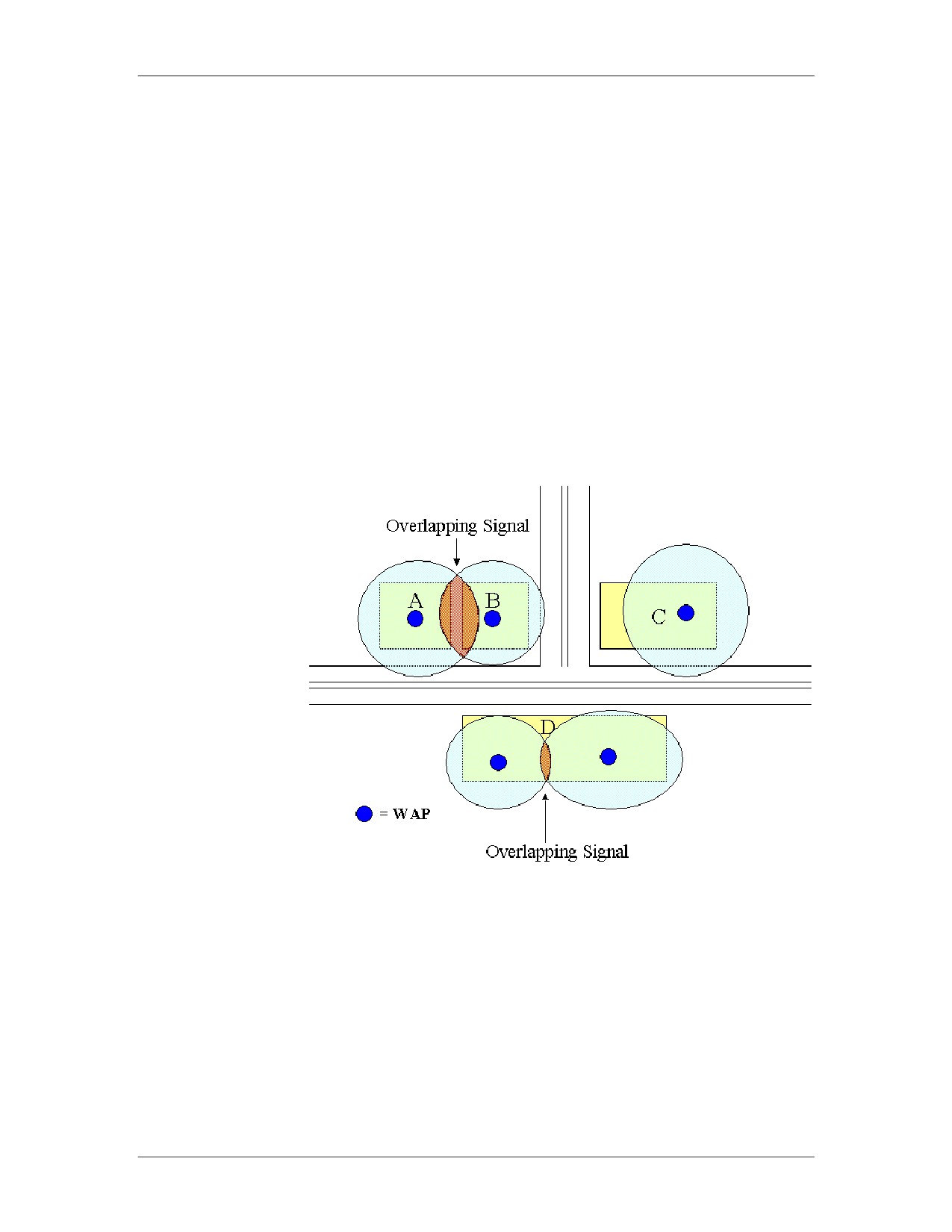
One problem, of which wireless network administrators are usually
Signals
aware, is that of overlapping signals. Wireless network signals
typically radiate in an elliptical pattern. This can vary depending
upon the physical structure in which the WAP is deployed because
walls, floors, ceilings, and other obstacles affect radio waves.
In the illustration below, there are four buildings with wireless
networks. Building C is far enough away from other buildings that
overlapping signals are not an issue. Building D, because of its
size, has two wireless access points deployed with minimal signal
overlap. If the two signals are owned by two different businesses
within building D, this could pose a significant problem. Likewise,
buildings A and B have wireless access points generating
overlapping signals.
Some examples of corrective action that can be taken to address
overlapping signals are:
Relocation of the WAP
Reducing power output of the WAP
01/09
For Official Use Only - Law Enforcement Sensitive
3-47
Network Connectivity and Protocols
Network Intrusion Responder Program
Vulnerabilities, continued
Accidental Access
Because wireless signals can overlap, and because operating
systems like Microsoft Windows XP are made to seek out network
devices as well as advertise themselves as available network
devices, a wireless end user operating in an overlapping signal area
could possibly connect to the wrong network accidentally. If the
wireless networks are configured to use WEP, the possibility of
accidental access is eliminated.
Windows Vista has changed the way it tries to connect to access
points as compared to XP. Vista will no longer try to connect to
any open access point available the way XP may have. If the
access point is not secured and is open, Vista requires that the
users manually connect and accept the security warning each and
very time it is to connect.
Vista has also improved its security by allowing the user to
configure the wireless policies to know if the access point is
configured to broadcast or not. For access points that are
broadcasting their Service Set Identifier (SSID) information, Vista
will not send out probe request trying to connect. If an access point
is configured to not broadcast its SSID, then Vista will send out
probe requests searching to the access point, thus exposing
valuable information about the systems wireless configurations.
From a client perspective, it is more secure to configure access
points to broadcast their SSID.
These changes in Vista’s wireless capabilities and default settings
greatly increase the security over previous versions of Microsoft
operating systems.
3-48
For Official Use Only - Law Enforcement Sensitive
01/09
Network Intrusion Responder Program
Network Connectivity and Protocols
Vulnerabilities, continued
Known Attacks
Wireless network technology is constantly improving. Like most
networking technologies, there are known vulnerabilities that lead
to attack. The following examples of known wireless network
attacks usually result from improperly managed or improperly
secured wireless technology. The actual steps taken by a hacker
are not detailed here as they are considered too complicated to be
within the scope of the lesson.
Session Hijacking
An attacker monitors active sessions, connections between WAP
and a remote station, for identifying information that can be used
to facilitate his or her attack. Once enough information has been
collected, the attacker sends a spoofed message to the workstation
to be disconnected. The workstation responds by ending the
session, allowing the attacker to masquerade as the disconnected
workstation.
Man-in-the-Middle
This attack exploits the one-way authentication of the 802.11
design and allows the attacker to configure his or her computer to
act as a wireless access point. The attacker’s computer then waits
for unsuspecting users to connect to the wireless network. As a
result, the remote computers will pass the WEP key to the
attacker’s computer. The attacker’s computer will then establish a
connection with the real WAP and pass the remote computers
packets transparently between the user and the WAP. The result is
a captured WEP key that will allow the attacker access to the
wireless network.
01/09
For Official Use Only - Law Enforcement Sensitive
3-49
Network Connectivity and Protocols
Network Intrusion Responder Program
Vulnerabilities, continued
Known Attacks,
WEP Key Cracking
continued
As previously mentioned, when WEP is enabled, an encrypted
key is used to connect to, and transfer data across a wireless
network. Only computers with the WEP key are allowed to
communicate. Software tools, such as Airsnort and WEPcrack,
simplify the job of cracking the WEP key.
By monitoring the packets transmitted across the airwaves, the
attacker can save the packets to a log file. After several thousand
packets have been collected, cracking tools can analyze the
collected packets to determine the WEP key. It’s possible to crack
a WEP key with 100% success.
WPA-PSK Cracking
WPA-PSK uses a pre-shared key for its encryption algorithm.
This method is much more secure than using WEP, but it still is
susceptible to cracking attacks. The attack method used to crack
WPA-PSK is a dictionary attack, which uses a large database of
common words and phrases to guess the password. Therefore, if
the data from the transmitting access point and connected user is
captured, the data can be run through a dictionary to find the
correct key to unlock the data. It is recommended that
administrators use a long key that would not be found in any
dictionary, such a complete phrase with additional special
characters, etc.
3-50
For Official Use Only - Law Enforcement Sensitive
01/09
IP Addresses and Subnets
Network Intrusion Responder Program
Module 4
IP Addresses and Subnets
Overview
In this module, we will explain Internet Protocol (IP) addresses
and how they are constructed. We will also introduce subnet
masks.
Purpose of this
The purpose of this module is to introduce you to IP addressing
Module
and the classes of networks in IP addressing schemes. You will
also learn about subnets and the IP addressing schemes for subnet
masks.
Objectives
After successfully completing this module, you will be able to:
Explain IP addresses and how they are constructed
Name the classes of IP addresses and their characteristics
Describe Domain Name Service functions
Define subnetting
Explain how subnet masking is used
Name the types of firewalls used today and their characteristics
In this Module
The following table shows the contents of this module.
Topic
See Page
Lesson 1 - IP Addresses
4-3
Lesson 2 - Ports
4-13
Lesson 3 - Subnets
4-21
Lesson 4 - Network Security
4-27
01/09
For Official Use Only - Law Enforcement Sensitive
4-1
Network Intrusion Responder Program
IP Addresses and Subnets
This page intentionally left blank.
4-2
For Official Use Only - Law Enforcement Sensitive
01/09
IP Addresses and Subnets
Network Intrusion Responder Program
Lesson 1 - IP Addresses
Introduction
In a TCP/IP network, IP (Internet Protocol) addressing is essential
to the physical routing of network communications. Every device
on a LAN (Local Area Network) must have a unique IP address.
Each address is essential for internetworking over WANs (Wide
Area Networks).
Purpose of this
In this lesson, you will learn about the importance of IP
Lesson
addressing. You will discuss the three classes of IP addresses and
explore the concepts of domain name services (DNS).
Objectives
After successfully completing this lesson, you will be able to:
Define IP addresses
Identify the various classes of IP addresses
Explain the functions of DNS and Classless Inter-Domain
Routing (CIDR)
In this Lesson
The following table shows the contents of this lesson.
Topic
See Page
IP Address Basics
4-4
IP Address Classes
4-6
More about IP Addresses
4-9
01/09
For Official Use Only - Law Enforcement Sensitive
4-3
Network Intrusion Responder Program
IP Addresses and Subnets
IP Address Basics
Network
Locating computers on a network is an important function of all
Addressing
networks. With networks, there are two basic addressing schemes:
Overview
a MAC address and an IP address.
A Media Access Control (MAC) address is a unique hardware
identification number that is specific for each network device.
To send a data packet to a computer on a LAN, the sending
device must first know the receiver’s MAC address. MAC
addresses exist at the Data Link Layer 2 of the OSI model.
IP addresses identify every device attached to a TCP/IP
network, including PCs, servers, switches, printers, and any
other networked device. Each device has a unique IP address
that identifies it for internetwork data packet routing. IP
addresses exist at the Network Layer 3 of the OSI model.
Workstations can have either a permanent (static) IP address or
one that is dynamically assigned each time a network connection is
established. For clients on an isolated LAN, the administrator can
assign unique static IP addresses. However, to communicate with
the Internet, you must have a unique, registered IP address that is
routable through the Internet.
4-4
For Official Use Only - Law Enforcement Sensitive
01/09
IP Addresses and Subnets
Network Intrusion Responder Program
IP Address Basics, continued
What’s in an IP
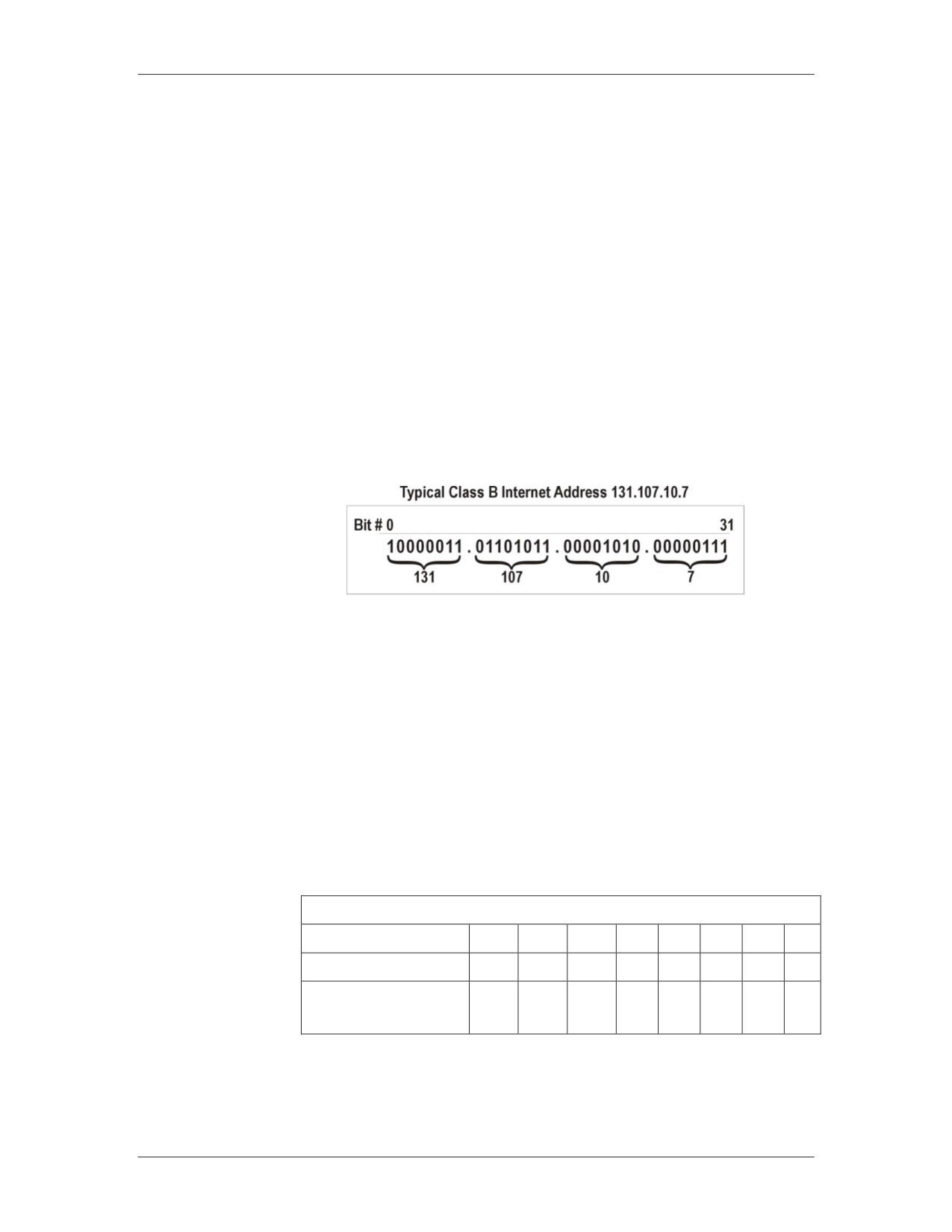
An IP address is a 32-bit numeric address written as four sets of
Address
numbers, called octets, separated by periods. For example,
131.160.10.240 is an example of a class B IP address. Each octet
can range from 0 to a maximum of 255. A valid IP address cannot
consist of all zeros or all ones.
For each networked device, the IP address consists of the network
address (netid) and the host address (hostid). Each octet of the IP
address contains eight bits equaling one byte. Therefore, an IP
address has a total of four bytes. The following illustration
indicates the various components of an IP address.
Example Class B IP Address 131.107.10.7
Binary IP
IP addresses are read as a set of four decimals. The computer can
Addressing
only read ones and zeros. Therefore, IP addresses are binary;
meaning each of the four decimals is translated into eight binary
numbers consisting of ones and zeros.
The binary numbering system used in IP addresses is based on the
number 2, called Base2. Because each octet in an address is
limited to eight bits, the corresponding binary numbers range from
20 to 27 (1 to 255). The following chart illustrates the use of Base2
in converting the decimal 131 to its binary number equivalent of
10000011.
Binary Conversion of Decimal 131
Base2
27
26
25
24
23
22
21
20
Decimal
128
64
32
16
8
4
2
1
Binary Number is
1
0
0
0
0
0
1
1
10000011
01/09
For Official Use Only - Law Enforcement Sensitive
4-5
Network Intrusion Responder Program
IP Addresses and Subnets
IP Address Classes
Classes of IP
IP addresses are divided into several class types. Class A, B, and C
Addresses
are used for government and commercial addresses. Class D and E
are reserved for multicasting, which is the transmission of data to
many recipients simultaneously. Class D and E are not commonly
used.
Each class allows for a specific maximum number of subnets and
end nodes.
4-6
For Official Use Only - Law Enforcement Sensitive
01/09
IP Addresses and Subnets
Network Intrusion Responder Program
IP Address Classes, continued
Classes of IP
The following table describes the characteristics of each IP address
Addresses,
class type.
continued
Classes of IP Addresses Defined
Class
First
Maximum
Maximum
Other
Octet
Networks
Hosts
Characteristics
A
1 -
126
16,777,214
Most often
126
allocated to
government and
large institutions;
Address Range:
1.X.X.X to
126.X.X.X
B
128 -
16,384
65,534
Most often
191
allocated for
commercial use
and ISPs;
Address Range:
128.X.X.X to
191.X.X.X
C
192 -
2,097,152
254
Most often
223
allocated for
commercial use
and ISPs;
Address Range:
192.X.X.X to
223.X.X.X
D
224 -
N/A
N/A
Reserved class
239
used for
multicasting;
does not contain
network or host
IDs
E
240 -
N/A
N/A
Reserved class
247
used for
experimentation;
does not contain
network or host
IDs
01/09
For Official Use Only - Law Enforcement Sensitive
4-7
Network Intrusion Responder Program
IP Addresses and Subnets
IP Address Classes, continued
Reserved IP
The following IP addresses are reserved for specific functions:
Addresses
Description
IP Address Range
Reserved for non-
10.0.0.0 to 10.255.255.255
routable networks
172.16.0.0 to 172.31.255.255
192.168.0.0 to 192.168.255.255
Reserved for loopback
127.0.0.1
NIC testing
Reserved for routing
128.5.0.0
tables; refers to entire
network
IDs an entire network
X.0.0.0 (Class A)
X.X.0.0 (Class B)
X.X.X.0 (Class C)
Broadcast
X.255.255.255 (Class A)
X.X.255.255 (Class B)
X.X.X.255 (Class C)
4-8
For Official Use Only - Law Enforcement Sensitive
01/09
IP Addresses and Subnets
Network Intrusion Responder Program
More about IP Addresses
New Methods for
Because the class system provides a finite number of IP addresses,
IP Addressing
the number of unassigned Internet addresses is running out. A new
scheme called Classless Inter-Domain Routing (CIDR) has been
introduced as a replacement for the system based on classes A, B,
and C.
With CIDR, IP addresses are assigned in blocks. A single IP
address can be used to identify many unique IP addresses. A CIDR
IP address looks like a normal IP address except that it ends with a
slash followed by a number. This end number is called the IP
prefix length because it represents how many bits are used for the
network partition of the address. An example of a CIDR address is
162.200.0.0/12.
The prefix length designates how many addresses are available for
the network and the hosts in the CIDR address. In the previous
example 162.200.0.0/12, the first 12 bits of the address identify the
network and the remaining 20 bits identify the host.
10100010.1100|1000.00000000.00000000
212 = 4098 Networks
220 = 1,048,576 Hosts per Network
CIDR addresses also reduce the size of routing tables and allows
for more IP addresses for subnetting and supernetting within
organizations.
IPv6
Internet Protocol version 6 (IPv6) is another new method for IP
addressing that significantly increases the amount of available IP
addresses. IP version 6 expands an IP address from 32 bits to 128
bits. This will provide over 3.4x10**38 power new addresses.
With IPv6, there will be enough IP addresses generated that every
cell of a human body could be assigned one and there would still
be addresses to spare.
Addresses for IPv6 are presented in hexadecimal format, such as
FE80:325B:134C:5555:678D:9C4D:3EEE:2D5F. This format
consists of eight groups of hexadecimal digits. Initially, many
addresses will have zeros in the groups.
01/09
For Official Use Only - Law Enforcement Sensitive
4-9
Network Intrusion Responder Program
IP Addresses and Subnets
More about IP Addresses, continued
IPv6, continued
A shorthand notation exists that expresses the groups of zeros, ::
(the colon-colon operator). For example, an IPv6 address,
FE80::3E4F, is using the colon-colon operator. All the groups
within the colons are zeros. Hence, the first group is FE80, the 2nd
through 7th groups are all zeros and the 8th group is 3E4F.
IPv6 Special
Here are some special addresses and prefixes used in IPv6:
Addresses and
Prefixes
Address
Description
::FFFF:0:0/96
Used for IPv4 mapped addresses
FC00::/7
Unique local IPv6 unicast addresses.
Routable only within set of
cooperating sites. Replaced “site-
local” used in earlier implementation
of IPv6.
FE80::/10
Local link for use within a LAN.
Similar to 169.254.x.x, the autoconfig
IP address in IPv4.
FF00::/8
Multicast prefix. No address ranges
reserved for broadcast. Applications
are to use multicast.
::1 /128
Loopback or “localhost” address.
Similar to 127.0.0.1 IPv4 loopback
address.
FE80::/10 through
Private address ranges. Similar to IPv4
FEB0::/10
private LAN addresses. Local link
addresses. Stateless and
autoconfigured for use within LAN
segment.
FEC0::/10 through
Private address ranges. Similar to IPv4
FEF0::/10
private LAN addresses. Local site
addresses.
FF00::/8 prefix
Multi-cast prefix
( 2000 to 3FFF )::/16
Global unicast prefix
prefix
2001::/16
Assigned to Regional Internet
Registrar (RIR)
2002::/16
Assigned to 6to4 Transition Methods
3FFE::/16
Temporary address assigned to 6bone
4-10
For Official Use Only - Law Enforcement Sensitive
01/09
IP Addresses and Subnets
Network Intrusion Responder Program
More about IP Addresses, continued
Dual Stacks
As IPV6 is being implemented, routers and computers can be
configured to use both IPv4 and IPv6. Routers which route both
IPv4 and IPv6 packets are called dual-stack.
There is no need for a subnet mask address or NAT (Network
Address Translation) with IPv6, although NAT can be
implemented.
Pseudo-Interfaces
A network card can be configured with multiple IPv6 addresses.
For example, one address can be just for the segment, another can
be for the site, and a third can be for the Internet.
The IPv6 protocol assigns pseudo-interfaces or zone IDs for each
of these. An address may look like ABCD::1234:B2C3 %4. The
%4 would be its zone ID.
Domain Name
Most networks and Web sites have text-based domain names that
Service
people can remember, such as www.google.com. Because the
Internet is based on numerical IP addresses, the domain name
service (DNS) translates text domain names into numerical IP
addresses before an Internet connection can be made.
For example, when you type the Web address to your favorite site,
the DNS server receives your site request and translates it into the
corresponding IP address.
Dynamic Host
Network administrators use Dynamic Host Configuration Protocol
Configuration
(DHCP) to assign dynamic IP addresses to individual devices on a
Protocol
network. Addresses are assigned from a pool of pre-registered
addresses.
DHCP saves time by eliminating the steps to manually assign IP
addresses to new network equipment. It also tracks all assigned
addresses automatically.
With DHCP, a computer or other device can be assigned a
different IP address every time it accesses the network. In some
cases, a device can change its IP address between logon and
logoff. ISPs frequently use DHCP for their dial-up and broadband
users. DHCP6 will run in networks that have implemented IPv6.
01/09
For Official Use Only - Law Enforcement Sensitive
4-11
Network Intrusion Responder Program
IP Addresses and Subnets
This page intentionally left blank.
4-12
For Official Use Only - Law Enforcement Sensitive
01/09
IP Addresses and Subnets
Network Intrusion Responder Program
Lesson 2 - Ports
Introduction
This lesson presents information about network ports, what they
are, and how they are used, misused, and managed.
Purpose of this
The purpose of this lesson is to provide a basic level of
Lesson
understanding about network ports.
Objectives
After successfully completing this lesson, you will be able to:
Discuss the definition of a port
Explain how ports are used in network administration
Discuss how hackers can identify open ports and what this
means to network security
In this Lesson
The following table shows the contents of this lesson.
Topic
See Page
Overview of Ports
4-14
How Ports are Used
4-16
Configuring TCP/IP
4-19
01/09
For Official Use Only - Law Enforcement Sensitive
4-13
Network Intrusion Responder Program
IP Addresses and Subnets
Overview of Ports
Ports
Imagine trying to engage in a telephone conversation with
someone over a party line (a telephone circuit shared by more than
one person) being used by thousands of people. At the very least,
you would have great difficulty communicating with that person.
Trying to filter out the thousands of other conversations would be
impossible. Thankfully, the days of the party line have long passed
and communicating by telephone is generally a two-way
conversation between parties.
Understanding the person on the other end of the telephone
connection is effortless because you are only listening to that one
person and not the thousands of other conversations taking place
over the phone system at any given time.
Communications over a computer network are similar to the
telephone system in the sense that thousands of conversations
between computers are occurring every second. In order for your
computer to communicate with other computers, and more
specifically, other applications, computers use a means of
channeling communications, called service ports, or simply ports.
When a computer receives data from a network, the TCP/IP
protocol stack must know the data’s user application destination.
For example, when a Web server sends a Web page to your
computer, TCP/IP must know that the Web page data is supposed
to go to your Web browser. Otherwise, your computer might
receive the data, but you would never actually see it displayed.
TCP/IP maps data to an application using a port, which is a
number that represents an application. Each data transmission is
labeled with a source and a destination port. The source port
identifies which application sent the data, and the destination port
identifies which application should process the data at the
receiving end.
4-14
For Official Use Only - Law Enforcement Sensitive
01/09
IP Addresses and Subnets
Network Intrusion Responder Program
Overview of Ports, continued
Well-Known Ports There are over 65,000 ports available to network applications.
Ports 1 - 1023 usually map to specific applications, regardless of
the computers involved. For this reason, they are often called well-
known ports. Here are several examples:
Service
Protocol
Port Number
World Wide Web
TCP
80
(HTTP)
Telnet
TCP
23
Simple Mail Transfer
TCP
25
Protocol (SMTP)
File Transfer Protocol
UDP
21
(FTP) Control
Example
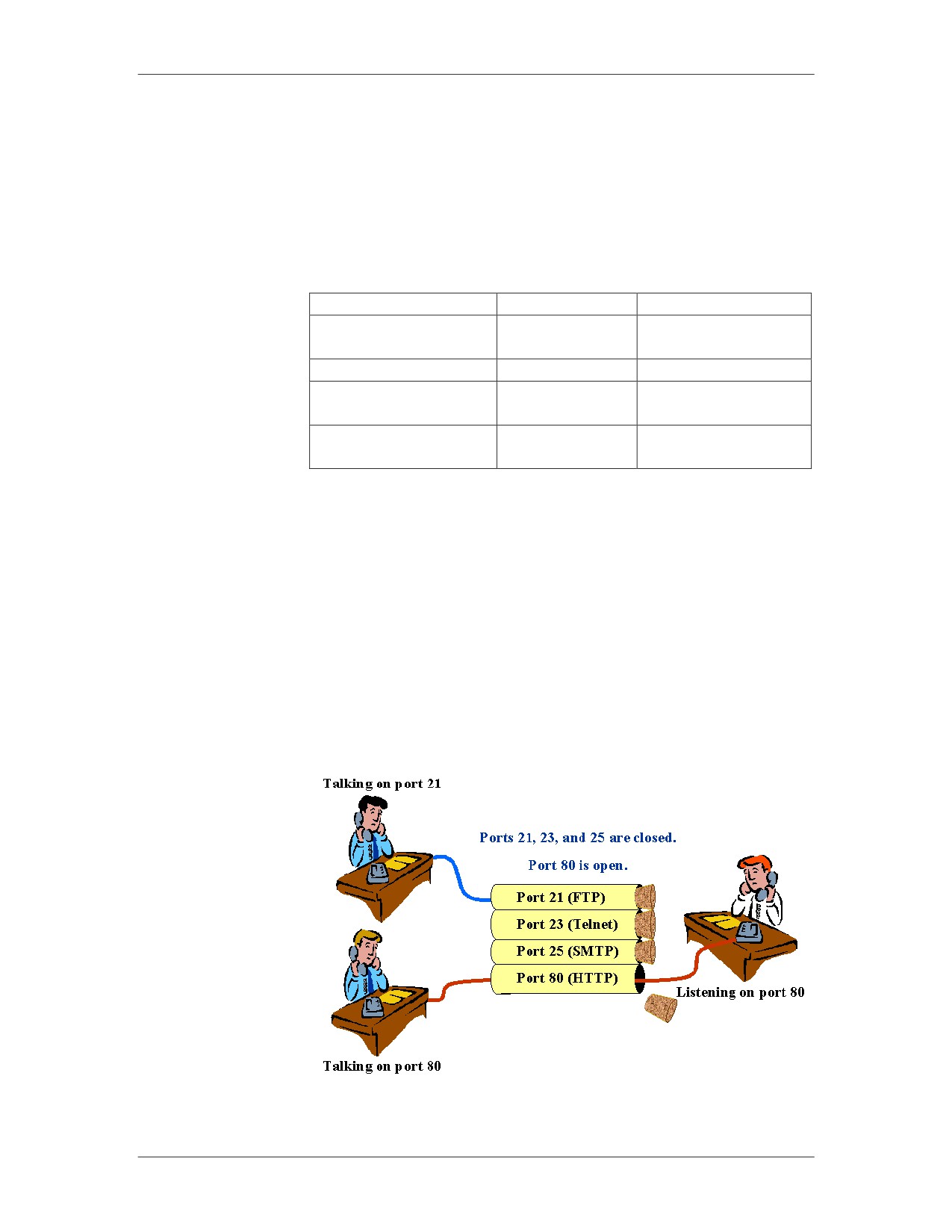
Referring to the graphic below, two applications (on the left) are
attempting to communicate with similar applications on the
receiving device (on the right) through well-known ports. While
one application is communicating through port 80 (the standard
port for World Wide Web traffic), another application is
communicating through port 21, the well-known port for File
Transfer Protocol.
As you can see in the graphic, the receiver has blocked port 21, 23,
and 25, disallowing communications, while port 80 is open and
transmitted data is received.
01/09
For Official Use Only - Law Enforcement Sensitive
4-15
Network Intrusion Responder Program
IP Addresses and Subnets
How Ports are Used
Port Use
With an understanding of how applications like Web servers and
Web browsers exchange data through a specific port, you can
expand on this knowledge to learn how ports are used.
At various layers of the OSI model, network hardware devices
such as firewalls, routers and gateways offer the ability to protect
your network by closing certain ports, or opening certain ports to
provide access to specific types of information. Some network
devices can open a port, but restrict the packets traveling through
that port in such a way that certain instructions are blocked, while
others are allowed to pass through unaltered.
For example, 21 (File Transfer Protocol) can be opened, but
monitored to disallow any packets carrying the put command, an
FTP command that writes to the FTP server’s hard drive.
Conversely, the get command, an FTP command to copy a file
from the FTP server, would not be blocked. This allows files to be
downloaded from the FTP server, but not uploaded.
4-16
For Official Use Only - Law Enforcement Sensitive
01/09
IP Addresses and Subnets
Network Intrusion Responder Program
How Ports are Used, continued
Port Management
The network administrator usually performs management of ports
in a network environment. A computer’s ports can be enabled or
disabled using features of the operating system.
Windows XP, for example, allows users to enable a built-in
software firewall that automatically restricts port access.
Terminating an active service on a server can also disable ports.
For example, FTP service can be disabled using features of the
operating system, thus disabling port 21.
Quite often, ports are managed through configuration of hardware
devices called firewalls. Hardware devices that are configured by
the network administrator can be managed locally by attaching a
special cable from a PC to the network device and running
standard communications software, such as Telnet or
HyperTerminal.
These devices can also be managed remotely with Telnet. In many
instances, they can be managed through a Web browser, such as
Internet Explorer, and point the browser to the device’s IP address.
Regardless of whether the management is performed locally or
remotely, the device will most likely have an administration
account that requires a login ID and password to configure the
device.
The Windows XP firewall has rules that block inbound
communication attempts. The Windows Vista firewall goes one
step further with rules that block both inbound and outbound
communication attempts.
01/09
For Official Use Only - Law Enforcement Sensitive
4-17
Network Intrusion Responder Program
IP Addresses and Subnets
How Ports are Used, continued
Port Misuse
Most government agencies and large corporations have published
policies specifying port configurations for computer network
devices. The blocking of certain ports is mandatory in many
instances. These policies, intended to minimize the risk of
intrusion, are standard.
Although policies exist to maintain a safe network, technical
personnel with good intentions might “bend the rules” to
accomplish a specific task, the completion of which is crucial to
the mission of the organization. In bending the rules, technical
personnel might be tempted to temporarily open an unauthorized
port on a network device just long enough to accomplish the task
at hand. In so doing, the policies protecting the network have been
violated and the network has become vulnerable, albeit briefly.
Other examples of misuse might include opening ports for
personal use that are required by such applications as instant
messengers, file sharing programs, and Internet chat programs.
These programs can be detrimental to maintaining a secure
network.
4-18
For Official Use Only - Law Enforcement Sensitive
01/09
IP Addresses and Subnets
Network Intrusion Responder Program
Configuring TCP/IP
Procedure: Create
Use these steps to configure your TPC/IP protocol to function
a TCP/IP LAN via
correctly with the classroom router.
a Router with
Microsoft Vista
Step
Action
1
Right click on Network and then click Properties.
2
Left click on Manage Network Connections.
3
Right click on Local Area Connection and then click
Properties.
4
Highlight Internet Protocol (TCP/IP) and then click
Properties.
5
Team 1 will use the IP range and subnet mask listed
below:
11.0.0.1 - 11.0.0.15
255.255.255.0
Team 2 will use the IP range and subnet mask listed
below:
134.120.0.21 - 134.120.0.25
255.255.0.0
Team 3 will use the IP range and subnet mask listed
below:
198.168.112.31- 198.168.112.35
255.255.255.0
Team 4 will use the IP range and subnet mask listed
below:
223.14.6.41 - 223.14.6.45
255.255.255.0
Note: There is no gateway address set at this time
01/09
For Official Use Only - Law Enforcement Sensitive
4-19
Network Intrusion Responder Program
IP Addresses and Subnets
This page intentionally left blank.
4-20
For Official Use Only - Law Enforcement Sensitive
01/09
IP Addresses and Subnets
Network Intrusion Responder Program
Lesson 3 - Subnets
Introduction
Understanding subnets is important to computer crime
investigations. When the crime scene includes a networked
computer, you must know the subnet to which that computer
belongs and identify all of the other computers on the same subnet.
Within the subnet, the suspect computer has access to other
connected computers where evidence may be stored.
Purpose of this
Networks can be logically divided into sub-networks (subnets) to
Lesson
enhance efficiency and security. This lesson introduces subnetting
and the use of subnet masks.
Objectives
After successfully completing this lesson, you will be able to:
Define subnetting and explain its benefits
Explain the value of subnet masks
Identify the components of a subnet mask
In this Lesson
The following table shows the contents of this lesson.
Topic
See Page
Subnet Overview
4-22
Subnet Masks
4-24
Virtual LAN
4-25
01/09
For Official Use Only - Law Enforcement Sensitive
4-21
Network Intrusion Responder Program
IP Addresses and Subnets
Subnet Overview
Subnets Defined
To increase efficiency, Class A, B, and C networks can be
subdivided into subnets. A subnet is a segment of a network that
shares a common IP network address component with all other
devices on the same subnet. On a TCP/IP network, all devices with
the same IP address prefix belong to the same subnet.
Networks on the Internet only view other networks as single
entities. They have no way of viewing another network’s subnet
structure. This helps reduce the size of routing tables.
When a data packet is sent over the Internet, it goes to the router of
the destination network. The router then determines the destination
node by deciphering the packet’s subnet address.
Advantages of Subnetting
Enhances security by creating subnets that have restricted
access
Extends the capabilities of the network
Enhances network performance because routers determine the
destination network thereby eliminating traffic on other
segments
Allows subnets to be invisible to the outside world
Provides flexibility by allowing administrators to deploy
additional subnets without registering new network numbers
Allows data route changes within a network without affecting
the Internet routing table
4-22
For Official Use Only - Law Enforcement Sensitive
01/09
IP Addresses and Subnets
Network Intrusion Responder Program
Subnet Overview, continued
Subnet Addressing Like IP addresses, each subnet address is unique. As you recall,
each IP address has four octets and the address is divided into two
major segments: a network address and a host address. By
comparison, a subnet address contains three segments: the network
address, subnet address, and the host address as illustrated here.
IP Address vs. Subnet Address
Creating Subnets Network administrators create subnets as extensions of the
network number. To create a subnet address, the administrator
takes bits from the host number and reassigns them to the subnet
field. Therefore, the more bits taken from the host number, the
fewer host addresses that can be assigned to that subnet.
Note: Any user with administrator-level access can modify a
computer’s subnet configuration.
01/09
For Official Use Only - Law Enforcement Sensitive
4-23
Network Intrusion Responder Program
IP Addresses and Subnets
Subnet Masks
Definition
A subnet mask conceals a subnet from outside networks. As you
recall, every subnet address consists of the network prefix, subnet
number (including mask), and host number. The two main
functions of a subnet mask are as follows:
Identify the subnet of an IP address
Notify communicating devices which part of an IP address is
the network ID (including subnet) and which part is the host ID
Classes of Subnet Masks
There are three default classes of subnet masks. They are as
follows:
Class A - 255.0.0.0
Class B - 255.255.0.0
Class C - 255.255.255.0
Subnet Masks
Subnet masks use the same 32-bit, four-octet structure as IP
Components
addresses. Subnet mask addresses have three parts: network
address, subnet address, and host address. A subnet mask has all
ones in the network and subnet segments of the address and
contains all zeros in the host segment.
With subnetting, part of the host address is used to identify the
subnet. The subnet mask is the network address plus the bits
reserved to identify the subnet.
4-24
For Official Use Only - Law Enforcement Sensitive
01/09
IP Addresses and Subnets
Network Intrusion Responder Program
Virtual LAN
Definition
Virtual LAN (VLAN) is another way to divide a local area
network into logical subgroups. VLAN uses software to connect a
group of computers and devices together instead of manually
moving cables and wiring. It can be used to combine workstations
and other devices into a single group regardless of their physical
location. The result improves traffic flow within the workgroup.
VLANs are used in LAN switches. Network changes and additions
are quickly implemented with the VLAN software making
proprietary group solutions easy to create. VLANs operate at the
Data Link Layer 2 and Network Layer 3 of the OSI model.
01/09
For Official Use Only - Law Enforcement Sensitive
4-25
Network Intrusion Responder Program
IP Addresses and Subnets
This page intentionally left blank.
4-26
For Official Use Only - Law Enforcement Sensitive
01/09
IP Addresses and Subnets
Network Intrusion Responder Program
Lesson 4 - Network Security
Introduction
Network security, an essential component for network
management, strives to protect network resources through layered
defenses. These defenses generally contain encryption, anti-virus
software, firewalls, and Intrusion Detection System (IDS) devices.
This lesson focuses on the network security methods available
today.
Purpose of this
The purpose of this lesson is to gain an understanding of how
Lesson
networks are secured. You will learn about the types of evidence
available in the form of logs. Various types of firewalls and
Intrusion Detection Systems (IDS) are also introduced.
Objectives
After completing this lesson, you will be able to:
Explain the various firewall architectures
Name the types of firewalls used today and their characteristics
Explain data encryption
Define the security methods of IDS
Identify various types of network logs
In this Lesson
The following table shows the contents of this lesson.
Topic
See Page
Data Encryption
4-28
Anti-Virus Software
4-29
Firewalls
4-30
IDS
4-37
Logs
4-39
Network Security Summary
4-41
01/09
For Official Use Only - Law Enforcement Sensitive
4-27
Network Intrusion Responder Program
IP Addresses and Subnets
Data Encryption
Data Encryption
Data encryption is the conversion of data into a form that cannot
be easily deciphered. Encrypted text is called cipher text.
Decryption converts encrypted data into plain text that can be
easily understood. Encryption provides a highly effective method
for data protection. There are two types of encryption:
1. Asymmetric encryption uses two types of cryptographic keys to
encode messages. The public key is known to everyone. The
private key is only known to the recipient. These methods
work because the public key relates to the private key in order
to decrypt messages upon receipt.
2. Symmetric encryption uses the same key to encode and decode
messages.
4-28
For Official Use Only - Law Enforcement Sensitive
01/09
IP Addresses and Subnets
Network Intrusion Responder Program
Anti-Virus Software
Viruses
A virus is a small piece of code that executes when opening a real
program or file. For example, a virus might attach itself to a word
processing file. When the file is opened, the virus code then
attaches itself to the word processing program. Each time the
program runs, the virus runs, too. It then has the chance to
replicate by attaching to other programs or wreak havoc, such as
deleting the entire contents of the hard drive.
E-mail Viruses
An e-mail virus spreads in e-mail messages, usually by
automatically mailing itself to every address in the victim's e-mail
address book.
Worms
A worm is a small piece of code that uses computer networks and
vulnerabilities, known as security holes, to replicate itself. The
worm scans the network for any machine that has a specific
security hole. It copies itself to the new machine using the security
hole, and then starts replicating from there, as well.
Trojan Horses
A Trojan horse is not a virus; it is a computer program. The
program claims to do one thing, but instead does damage when
you run it. For example, a Trojan horse may claim to be a game,
but instead may erase your hard disk or create a backdoor. Trojan
horses have no way to replicate automatically.
Boot Sector Viruses
Boot sector viruses spread by infecting the boot sector of the boot
media, usually a hard drive or a floppy diskette. Once infected,
every time the computer boots, the virus is loaded automatically
into memory. Thereafter, it attempts to infect every other program
and file opened.
01/09
For Official Use Only - Law Enforcement Sensitive
4-29
Network Intrusion Responder Program
IP Addresses and Subnets
Firewalls
Introduction
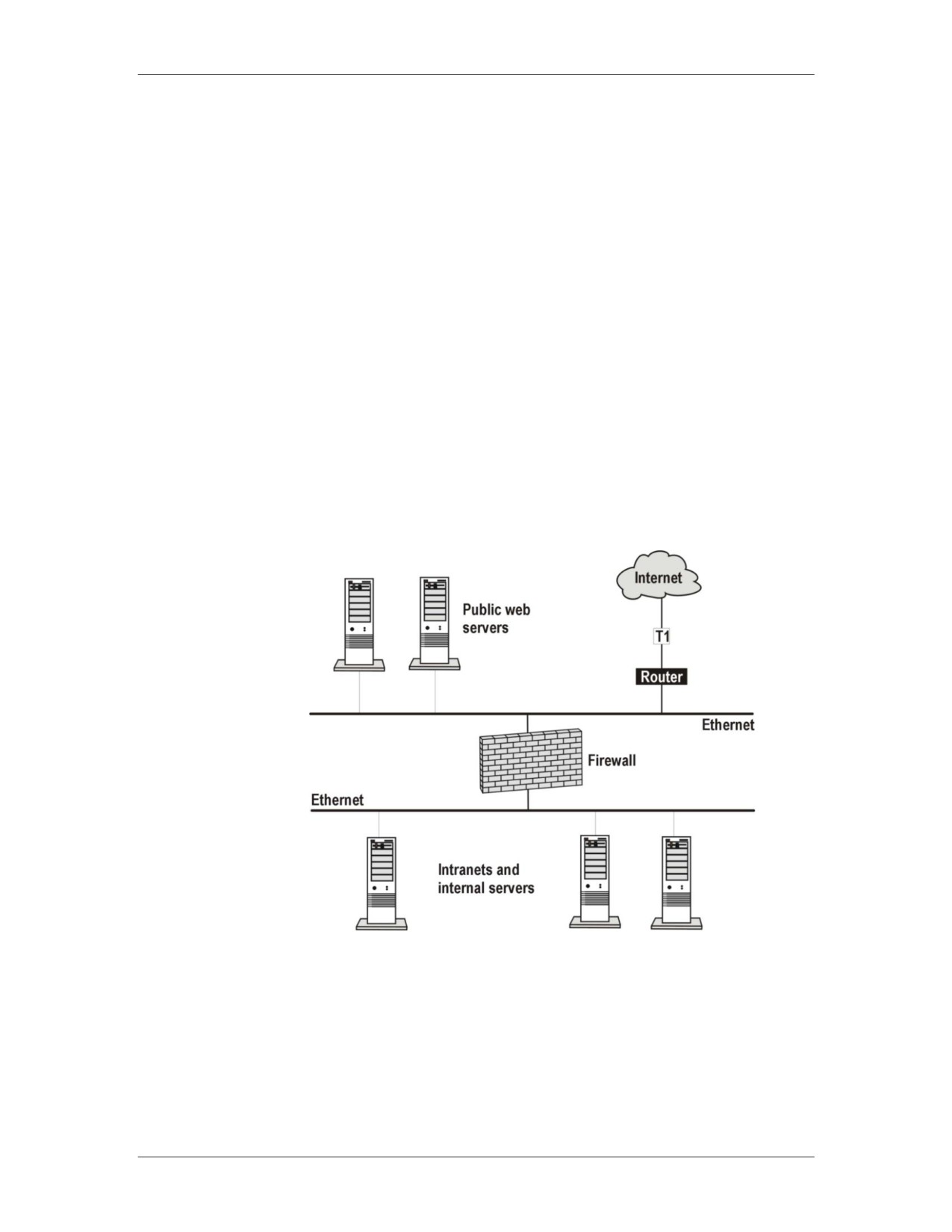
A firewall is a method of securing a network from unauthorized
access. Most often, firewalls protect against intruders who seek
access via the Internet. Enterprises install firewalls to offer secure
Internet access for employees and to separate and protect their
intranet from unauthorized public Web site traffic. Firewalls can
also be installed to protect an organization’s internal departments
or domains, such as a firewall that secures the accounting
department.
Firewall protection can be software, hardware, or a combination of
both. Each one performs specific security activities. Firewalls are
access control devices that only detect failed attempts at access. If
an intruder defeats the corporate firewall, the intrusion may or may
not be logged, depending on the firewall configurations.
Intranet protected by firewall
4-30
For Official Use Only - Law Enforcement Sensitive
01/09
IP Addresses and Subnets
Network Intrusion Responder Program
Firewalls, continued
How Firewalls
All messages going in or out of the network pass through the
Work
firewall. Messages are checked using specified security criteria.
The firewall blocks those that do not meet the criteria. Different
types of firewalls work at various layers of the OSI model or the
TCP/IP protocol. The following sections define each type of
firewall.
Network Address NAT allows you to use internal non-routable IP addresses on your
Translation (NAT) intranet and connect to the Internet with one registered IP address.
The registered IP address is assigned to the software or hardware
device running NAT. This process allows any computer behind the
NAT device to be invisible to the Internet because only the NAT
device’s registered IP address is being used.
OSI Model: NAT firewalls operate at Network Layer 3.
TCP/IP Model: NAT firewalls operate at Network Layer 2.
How NAT Works
The following table describes the NAT process for intranet
messaging via the Internet.
Stage
Activity
1
The intranet computer sends data packet to NAT device.
2
The NAT device examines the packet header and
records which intranet computer made the request.
3
The NAT device then replaces the IP address with its
own registered IP address and sends the request to the
Internet.
4
When the information packet returns, it goes to the IP
address of the NAT device.
5
The NAT device then examines the packet, places the
appropriate IP address for the intranet computer, and
sends it the computer.
01/09
For Official Use Only - Law Enforcement Sensitive
4-31
Network Intrusion Responder Program
IP Addresses and Subnets
Firewalls, continued
Stateful Inspection Stateful inspection firewall architecture has the ability to look into
the packet and allow only certain types of application commands
while rejecting others. For example, a stateful packet-filtering
firewall allows the FTP command get and rejects the put
command.
Stateful inspection firewalls record the User Datagram Protocol
(UDP) packet request that is permitted to cross the firewall in a
state table. Incoming UDP packets are then examined and verified
against the ones waiting for a response in the state table. If the
information matches, the request is permitted to enter the network.
Otherwise the packet is rejected.
OSI Model: Stateful inspection firewalls operate at Network
Layer 3.
TCP/IP Model: Stateful inspection firewalls operate at Network
Layer 2.
4-32
For Official Use Only - Law Enforcement Sensitive
01/09
IP Addresses and Subnets
Network Intrusion Responder Program
Firewalls, continued
Packet-filtering
A packet-filtering firewall checks the header of each packet for
Firewalls
specific information and then either accepts or rejects the packets
based on user-defined rules. Checks are made for:
Source and destination IP address
Source and destination port numbers
Protocol type
Direction of the packet (inbound or outbound)
OSI Model: Packet-filtering firewalls operate at Network Layer 3.
TCP/IP Model: Packet-filtering firewalls operate at Network
Layer 2.
Advantages
Good performance
NAT shields internal addresses from external users
No code modifications are needed
Closes ports when not in use
Stateful inspection checks the packets and only allows those
through that were requested
Disadvantages
Subject to IP spoofing or port spoofing
Cannot filter or authenticate URL information
Little or no auditing or alert mechanisms
Rules need to be entered for stateful inspection type firewalls
and then changed
01/09
For Official Use Only - Law Enforcement Sensitive
4-33
Network Intrusion Responder Program
IP Addresses and Subnets
Firewalls, continued
Circuit-level
A circuit-level firewall validates TCP and UDP sessions before
Firewall
opening a connection. After the validation, it passes everything
through until the session has ended.
A circuit-level firewall establishes a virtual circuit between the
client and the host on a session-by-session basis. The firewall
maintains a table of connections that includes session and
sequencing information. When the session ends, the table
information is removed and the virtual connection is closed. Only
packets associated with the session are allowed through. If the
packet is valid according to the session table, the packet is passed
through without any further security checks.
The circuit-level firewall session consists of two connections: one
between the client and the firewall and one between the firewall
and server. All outgoing packets appear to have originated from
the firewall in a method similar to NAT.
OSI Model: Circuit-level firewalls operate at Session Layer 5.
TCP/IP Model: Circuit-level firewalls operate at the Transport
Layer 3.
Advantages
Good performance because the packets are not examined after
the initial connection is allowed
No direct connection between client and the application server
Similar to NAT’s method of shielding internal IP address
Disadvantages
Client programs need to be recompiled and relinked to a
special library containing the set of rules for sessions
Does not examine the application level information in the
packets allowing them to be subverted by an inside user or
outside hacker
4-34
For Official Use Only - Law Enforcement Sensitive
01/09
IP Addresses and Subnets
Network Intrusion Responder Program
Firewalls, continued
Application-
Application-gateway firewalls run a proxy server application that
Gateway Firewall
acts as an intermediary between two systems. The proxy server
evaluates all requests from internal computers to connect to an
external service, such as FTP, and determines whether to permit or
deny the request based on the rules defined for the individual
network.
The application-gateway running on the proxy server understands
the protocols of the service it is evaluating and can deny any
packets that do not comply with the protocol for that service. It
also provides detailed audit records or session information, user
authentication, URL filtering, and caching.
Application-gateway firewalls are application specific and require
proxy addresses for FTP, HTTP, SMTP, etc. Because they work
through a proxy, they also perform NAT services. In addition,
these firewalls operate at the OSI model Application Layer and
have the ability to look down through the packets to the
application layer information and determine if the packet is altered
or not complying with the appropriate protocol rules. These
additional steps cause the application-gateway firewall to be
slower then other types of firewalls.
OSI Model: Application-gateway firewalls operate at Application
Layer 7.
TCP/IP Model: Application-gateway firewalls operate at the
Application Layer 4.
01/09
For Official Use Only - Law Enforcement Sensitive
4-35
Network Intrusion Responder Program
IP Addresses and Subnets
Firewalls, continued
Application-
No direct connection between the internal client and external
Gateway Firewall
server
Advantages
Can deny packets that do not comply with the protocol for a
service, such as FTP, HTTP, SMTP, etc.
Ability to screen data streams for potential threats, such as
send mail attacks, and Java or ActiveX scripts riding on top of
HTTP services
Provide NAT services
Transparent to the individual user
Can implement features such as HTTP object caching, URL
filtering and user authentication
Provide audit logs for administrators to monitor for violations
of security policy
Application-
Slower than other firewall methods
Gateway Firewall
Vulnerable to operating system and application level bugs
Disadvantages
because they are highly dependant on the operating system,
TCP/IP stacks, and runtime libraries
New services require new proxy servers
4-36
For Official Use Only - Law Enforcement Sensitive
01/09
IP Addresses and Subnets
Network Intrusion Responder Program
IDS
Intrusion
Unlike firewalls that attempt to block entry into the network,
Detection Systems
Intrusion Detection Systems (IDS) monitor the network for
(IDS)
attacks. There are two basic types of IDSs:
Network-based IDS monitors the entire network for signs of an
intrusion
Host-based IDS monitors an individual computer
IDS must be installed consistent with the network’s type and
topology.
Network-based
A network-based IDS monitors the entire network and uses the
IDS
information in the data packets to detect an intrusion. It analyzes
the packets for an attack signature, a known pattern in the packet
or packets that match a specific attack type.
The IDS analyzes the packets in real time using its recognition
files. The most common method used by IDS pattern expression is
byte code matching, also known as signature analysis or misuse
detection.
An IDS looks for a substring of data within the network packets
that matches known attack signatures. A match between a
substring and an attack signature signals an attack on the network.
When an attack is identified, the IDS can be programmed to
perform any of the following actions:
Send an alert to the console
Log the event and send an email
Initiate a connection kill (TCP reset)
Reconfigure a firewall or router, or use an SNMP trap
In the same way that you keep virus definition files up-to-date in
your virus protection software, it is equally as important to keep a
list of known attack signatures current.
01/09
For Official Use Only - Law Enforcement Sensitive
4-37
Network Intrusion Responder Program
IP Addresses and Subnets
IDS, continued
Host-based IDS
Host-based IDS is installed on an individual computer to monitor
only that computer. Host-based IDSs are used to:
Monitor logs
Detect file access
Detect attempts to install executables
Monitor remote user activities
Host-based IDSs are specific to the operating system that is
installed on the computer. On a computer with NT operating
system, IDS will monitor the system, event, and security logs. On
a computer with a Unix OS, it will monitor the syslog. The host-
based IDS examines each log’s entry to see if it matches any
known attack patterns.
Some host-based systems can also monitor the ports on the
computer. When certain ports are accessed, the host-based IDS
takes action depending on the system’s configuration. Security
actions include:
Log the event
Alert the console and send an e-mail
Initiate a SNMP trap
Terminate the user login and disable the user account
Host-based IDSs can also detect attacks initiated from the local
keyboard. Keyboard attacks should be rare if the computer is
located in a secure area, the user logs off correctly, and user
passwords are changed frequently.
4-38
For Official Use Only - Law Enforcement Sensitive
01/09
IP Addresses and Subnets
Network Intrusion Responder Program
Logs
Introduction
Logs are a record of network activity that provide system
administrators with details of computer transactions and network
traffic. Logs are routinely used for backup, recovery, and statistical
purposes. They can also be used to detect failed and successful
intrusions, abnormal network activity, and system activities.
Networks have many different types of logs that can be generated
by both software and hardware devices. Logs can be an integral
part of computer forensic investigations. Some of the more
common logs that you may encounter are:
System logs
Firewall logs
Router logs
IDS logs
System Logs
Most networking operating systems have the ability to maintain
log files. Those files can include system activities, application
activities, and security activities. They can also be configured to
maintain logs for Internet access, FTP sessions, etc.
For example, Windows NT/2000/XP maintains three main logs
that can be accessed through the Event Viewer. Those logs are:
1. System log
2. Security log
3. Application log
The logs can be configured to capture both successful and failed
logon attempts.
01/09
For Official Use Only - Law Enforcement Sensitive
4-39
Network Intrusion Responder Program
IP Addresses and Subnets
Logs, continued
Firewall Logs
All firewalls have the ability to capture failed network access and
send the information to a log file. The firewall log file provides
information on:
Type of attempted access (Web access, FTP access, Telnet
access etc.)
Port that the attempted access originated from and was directed
to
Date and time of attempted access
IP address from which the attempt came
Application-level firewall logs can also provide you with
detailed information of session information, user
authentication, and security policy violations
Router Logs
Routers can log information about network traffic and any
potential network problems that occur. They can also be
configured to log abnormal activity that contains host information
of a possible intruder and what was accessed on the network
during the attempt.
Dial-up-access routers, such as those used by Internet Service
Providers, can log dial-up connection information including the
username, IP address assigned, date, time, and duration of the
connection. This information can be very beneficial during an
intrusion investigation.
IDS Logs
IDS can be configured to log a wide variety of information. IDS
examines all packets on the network; therefore, IDS logs can
contain large amounts of log information that can be of useful to
the investigator. Some of the information that can be obtained
from IDS logs include:
Intrusions
Intrusion attempts
Unauthorized access to a computer
Attempts to access unauthorized data
Attempts to manipulate privileged files
Attempts to render a network system inoperable
4-40
For Official Use Only - Law Enforcement Sensitive
01/09
IP Addresses and Subnets
Network Intrusion Responder Program
Network Security Summary
Network Security Most network administrators implement a layered approach to
Summary
network security:
Intrusion Detection to provide real-time monitoring of the
network
Firewalls to restrict unauthorized access to the network
Anti-virus protection to reduce the risk of infection
Encryption to prevent stolen data packets from being read
Logs to record activity and provide documentation should a
breach of security occur
01/09
For Official Use Only - Law Enforcement Sensitive
4-41
Network Intrusion Responder Program
IP Addresses and Subnets
This page intentionally left blank.
4-42
For Official Use Only - Law Enforcement Sensitive
01/09
Network Intrusion Responder Program
Common Network Crimes
Module 5
Common Network Crimes
Overview
Similar to physical crimes, network-based crimes fall into
categories. These categories for common network crimes include
e-mail scams, online fraud, identity theft, social threats, internal
threats, malicious code, denial of service attacks, extortion,
network attacks, and terrorism. In this module, we will examine
and discuss the characteristics of the most commonly perpetrated
crimes involving network communications.
Purpose of this
This module examines ten of the most common network-based
Module
crimes that you may encounter as an investigator. You will learn
about typical methodologies used for each crime and some of the
traditional investigative responses.
Objectives
After completing this module, you will be able to:
Describe each of the crimes
Discuss the methodologies of each crime
Explain the traditional responses to these crimes
In this Module
The following table shows the contents of this module.
Topic
See Page
Lesson 1 - E-Mail Scams
5-3
Lesson 2 - Online Fraud
5-9
Lesson 3 - Identity Theft
5-15
Lesson 4 - Social Threats
5-19
Lesson 5 - Internal Threats
5-23
Lesson 6 - Malicious Code
5-27
Lesson 7 - Denial of Service Attacks
5-31
Lesson 8 - Extortion
5-35
Lesson 9 - Network Attacks
5-39
Lesson 10 - Terrorism
5-43
01/09
For Official Use Only - Law Enforcement Sensitive
5-1
Common Network Crimes
Network Intrusion Responder Program
This page intentionally left blank.
5-2
For Official Use Only - Law Enforcement Sensitive
01/09
Network Intrusion Responder Program
Common Network Crimes
Lesson 1 - E-Mail Scams
Introduction
Today‟s criminals use the Internet and know a majority of victims
do not look closely at e-mail headers or question the authenticity
of the sender. E-mails contain headers that document who sent an
e-mail and from which IP address and server. This information can
be used to help detect suspicious e-mails sent by unreliable
sources.
Purpose of this
The purpose of this lesson is to describe the ways that e-mail can
Lesson
be used for illicit purposes.
Objectives
After completing this lesson, you will be able to:
Describe e-mail scams
Explain how e-mail scams are perpetrated
Explain how investigators typically respond to these attacks
In this Lesson
The following table shows the contents of this lesson.
Topic
See Page
Overview of E-mail Scams
5-4
Attack Methodologies
5-5
Investigative Response
5-7
01/09
For Official Use Only - Law Enforcement Sensitive
5-3
Common Network Crimes
Network Intrusion Responder Program
Overview of E-Mail Scams
Definition
A scam is defined as a fraudulent business act. Using the postal
system for fraudulent means has been around since the 1660s. It
was a simple step for surface-mail scammers to make the leap to
the Internet when e-mail became popular.
Why E-mail Scams E-mail scams work because people often do not look at e-mail
Work
headers. If they did, they could compare the information in the
header to see if it matches the sender.
For example, a common scam is an e-mail purportedly sent by a
bank that is in fact sent by a scammer. Upon careful inspection of
the header, a user could notice that the e-mail stating it is from a
bank has a header that shows the origination to be from an
individual‟s e-mail address.
These e-mail scams often use HTML-encoded graphics to display
logos and other items that give the illusion of authenticity. They
use copyrighted images to hide the fact that the communication is
not from the stated source. An attacker could also easily hide code
in HTML formatted e-mail. This code could launch trojans or
other malicious code, such as a virus, when the e-mail is viewed.
Just like the chain letters that the U.S. Postal Service combats
daily, chain e-mails and solicitations for money using every
imaginable story and trick are prevalent on the Internet.
5-4
For Official Use Only - Law Enforcement Sensitive
01/09
Network Intrusion Responder Program
Common Network Crimes
Attack Methodologies
The Nigerian or
The Nigerian Scam, which is also known as the 419 or Advance
419 Scam
Fee Fraud Scam, is a true legend among e-mail frauds. Here are
the typical components of the scam:
Foreign Nation: Virtually all of the e-mails originate from a
country other than the United States. Countries that have no
agreements with the U.S. pertaining to prosecution of these
frauds are the most popular.
Government connected source: Usually the person making the
request will claim to either be a government official or a
relative of a deposed leader or potentate.
Large sums of money: The requests always involve large,
usually multi-million dollar, sums of money.
Money Access: Usually the person making the request has a
reason why he or she cannot get to the money, but the
recipient, being an upstanding American, can.
Advance Fee: The sender will request that a sum of money be
deposited to an account in the other country. The recipient
transfers the money to the account and waits for the big payoff.
Of course, the requestor has ran off with the money and is
outside the reach of U.S. law enforcement.
Origins of 419
The Nigerian government has taken a harder line against these
frauds. Section 419 of the Nigerian Criminal Code outlaws this
activity.
According to Nigerian law, it is also illegal to try to remove funds
from Nigeria. People who have gone to Nigeria to try and recover
their money back have been imprisoned for doing so.
01/09
For Official Use Only - Law Enforcement Sensitive
5-5
Common Network Crimes
Network Intrusion Responder Program
Attack Methodologies, continued
Phishing
Phishing is when a perpetrator sends e-mail that appears legitimate
in an attempt to gain financial or personal information on the
recipient. This information can then be used for other network
crimes.
Examples
There are many types of phishing attacks. Here are some
examples:
eBay/PayPal - The recipient receives an e-mail that appears to be
from eBay online auctions. In the e-mail, the recipient is told to
change his password for security reasons. The e-mail includes a
form to enter the current and new passwords, in addition to other
personal identification information. The recipient fills out the form
and sends it back to the attacker, who can now use that information
to empty the person‟s account or steal his identity.
Banks - The recipient receives an e-mail with the bank logo and
other items that the attacker copied from the bank‟s real Web site.
The e-mail offers a low refinance rate or interest loan. The
recipient is asked to fill out a form with personal information that
would usually be on a loan request. If the recipient fills out the
form, the attacker now has more than enough information to steal
the person‟s identity. In some cases, these attackers obtain a loan
from the bank using this information and leave the recipient
holding the note.
Cross Site Scripting - The recipient receives an e-mail that
appears to be from a legitimate entity. However, when the
recipient logs into the site using his ID and PIN, he becomes a
victim of a cross-site scripting attack. This attack, also known as
an XSS attack, uses custom code to track information in a client‟s
Web browser windows. The perpetrator has code in the e-mail that
captures the information and passes the recipient to the real Web
site. Then the attacker can enter the Web site at a later time and
use the victim‟s account information.
Spam
At first you may not consider spam, which is an unsolicited
advertisement or bulk e-mail, an attack. But consider the fact of
how much bandwidth is consumed and how much storage space is
used by spam each day. It is estimated that spam costs companies
in the U.S. over $12 billion dollars a year.
5-6
For Official Use Only - Law Enforcement Sensitive
01/09
Network Intrusion Responder Program
Common Network Crimes
Investigative Response
Capture
As you investigate e-mail scams, it is important to know how to
view the complete original message. Most e-mail clients and Web-
based clients have either a menu option or a button that you can
click to view the complete original message.
Preservation
In some cases, you may have to obtain the original e-mail and/or
the Internet Service Provider logs from the server. This usually
requires for you to present a preservation letter to the ISP‟s point-
of-contact for law enforcement.
Warrants
Once preservation letters have been delivered, you need to secure
the warrants to seize the data. Note that in some cases the data you
are trying to obtain may already be deleted from the ISP‟s server
by the time you investigate the crime.
Reporting
First and foremost you should refer to your agency‟s Standard
Operating Procedures for internal reporting methods for these
offenses. Depending on your agency, you may be required to
report offenses up the chain to State and/or Federal enforcement
agencies. In the case of offenses that reach outside the borders of
the United States, you should seek assistance from international
enforcement groups.
Education
Where possible, provide victims with information on classes or
other places where they can find assistance with learning how to
protect themselves from e-mail fraud attacks.
01/09
For Official Use Only - Law Enforcement Sensitive
5-7
Common Network Crimes
Network Intrusion Responder Program
This page intentionally left blank.
5-8
For Official Use Only - Law Enforcement Sensitive
01/09
Network Intrusion Responder Program
Common Network Crimes
Lesson 2 - Online Fraud
Introduction
Virtually all major businesses rely upon a Web presence to sell
products or bring customers into stores. Many companies establish
“virtual storefronts” that allow an entire business to run without a
brick and mortar store, relying completely upon the Internet. Many
virtual businesses are created by single individuals to sell goods
over Web sites and auction sites such as eBay, as well as through
e-mail. Due to the large variety of online businesses there are
numerous ways in which a victim can be defrauded in the world of
e-commerce.
Purpose of this
The purpose of this lesson is to learn the common types of online
Lesson
fraud.
Objectives
After completing this lesson, you will be able to:
Describe some of the common online fraud techniques
Discuss the methodologies used in these cases
Explain some of the responses to these attacks
In this Lesson
The following table shows the contents of this lesson.
Topic
See Page
Online Fraud Overview
5-10
Attack Methodologies
5-11
Investigative Responses
5-13
01/09
For Official Use Only - Law Enforcement Sensitive
5-9
Common Network Crimes
Network Intrusion Responder Program
Online Fraud Overview
Online Fraud
Defining online fraud can be fairly easy. It is any form of fraud
that is practiced on the Internet. Such fraud generally involves
creating elaborate situations in which to deceive online users into
giving money to criminals. Explaining all the possible ways in
which this can occur can be much harder.
In this section, we will describe some of the common fraud
attacks. As new online frauds are constantly developed, you will
probably see numerous new attacks in the field.
Common Attack
The attack vectors in an online fraud case can include:
Vectors
Price too good to be true: In many of the online auction frauds
you will find that a popular item is priced much lower than
normal. When the victim buys the item nothing is sent once the
winning bid is paid.
Short time to decide: The attacker may make the offer
available only for a short period of time, thereby making the
victim act before he or she has time to think it through.
Fine print: Lawyers aren‟t the only ones that like to put clauses
in small type. Many times attackers will put important
information in very small type, or change the type to a color
that is only a few shades different than the backg0round color,
making the type very hard to read.
Hijacked sites: Some attackers will take over a Web site,
known as hijacking, and use the site for their own gain until the
real owner discovers and fixes the site.
Box-of-rocks: Just like older postal frauds, online criminals
will offer a product, collect the money and send a box of
worthless goods, or even rocks instead of the promised item.
Stall tactics: If the criminal thinks that the victim is not
Internet savvy, the criminal may try to stall to get more money.
He may also stall the resolution of the problem until the victim
gives up in frustration.
5-10
For Official Use Only - Law Enforcement Sensitive
01/09
Network Intrusion Responder Program
Common Network Crimes
Attack Methodologies
Bogus Web Sites
An attacker or criminal can generate a new Web site in a matter of
minutes. There are numerous Web site providers that will accept a
credit card or PayPal money transfer and provide the criminal with
a domain name in less than a day. Additionally, through a process
known as domain tasting, a new domain name can be registered
for a five-day “test” period for free through many domain name
registrars. This site can then be very quickly populated with
whatever fraudulent information or services the criminal wants.
The criminal can potentially be making money within 48 hours.
When the criminal is no longer willing to accept the risk of
detection for the fraudulent site, he erases the site and moves to a
new provider with a modified name the next day.
If the criminals used bogus names and addresses, then they are
virtually untraceable using normal investigative techniques. In
many cases, you will find that the criminal has used numerous
forms of obfuscation to hide his identities and locations. The only
way you may be able to locate the criminal is to literally follow the
money through banking records.
Auctions
eBay is a global marketplace and it is also a haven for fraud. eBay,
and other online auction services, have made great improvements
in addressing fraud and trying to keep it to a minimum. In many
cases, these auction sites will use insurance money to pay back the
victim rather than have the negative publicity impact business.
Putting a picture of an expensive, desirable item on an auction
page and then selling it for less than fair market value is a popular
fraud scenario. Often, product descriptions and images are simply
copied from other auctions to give a legitimate look to the
fraudulent auction.
Advertising pictures of a similar item that is in much better
condition is another popular tactic. Frauds can also offer one item
but show pictures of another. Notably, popular video game
systems have appeared on eBay with pictures of the actual console
but small text stating that bidders will receive only an empty box.
In these cases, depending on the wording of the auction
advertisement, there may be no recourse for the victim. It is
important to thoroughly read any disclaimers about what you are
buying.
01/09
For Official Use Only - Law Enforcement Sensitive
5-11