DB2 Server for VSE. Operations Guide / Handbooks (2004-2007) - page 38
ddname, CMS FILEDEF command information for DATALOAD
command processing must be identical to the information in the
FILEDEF command used when DATAUNLOAD command processing
created the file. See Appendix B, “FILEDEF Command Syntax and
Notes,” on page 249 for more information about undefined (U) record
format usage.
The length of the output record supplied by the FILEDEF must be long enough
to contain column data selected for unload (including intervening data field
blanks if the default format is used). If it is not, a Database Services Utility
processing error occurs. If the length of the output record is greater than the
length required to unload the data, the remaining positions of the output
record are set to blanks (hex 40).
If variable length output records are used, the data fields referenced by DFI
subcommands appear in the same positions on each output data record.
Do not specify SYSIN or SYSPRINT as the ddname.
in DB2 Server for VSE: this is the TLBL or DLBL job control statement file name
for the sequential (SAM) output file. This parameter must be the first parameter
specified; you cannot specify BLKSZ before the ddname. The other keyword
parameters can be specified in any order.
BLKSZ (size)
is an optional parameter that specifies the block size of the sequential output
file.
If a tape output file is used, performance can be improved by using a large
block size value (greater than 8244).
The default block size values depend upon the output file record format:
v If RECFM = F or FB, the default block size is equal to the highest data field
end-position value
v If RECFM = V or VB, the default block size is equal to the highest data field
end-position value plus four
v If RECFM = S or SB, the default block size is 2048 bytes.
PDEV (TAPE or DASD)
is an optional parameter that specifies the device type (DASD or TAPE) of the
sequential (SAM) output file. If PDEV(DASD) is specified, the file resides on
any device supported by the VSE DTFSD macro. An exception to this is
VSAM-managed SAM files. VSAM-managed SAM does not support spanned
records. If PDEV(TAPE) is specified, the file resides on any device supported
by the VSE DTFMT macro. The default is PDEV(TAPE).
NOREWIND or REWIND
controls tape file rewind processing performed during CLOSE processing.
This parameter is valid only if you specify TAPE for PDEV. The default is
NOREWIND.
NOREWIND
specifies that the tape file will not be rewound by CLOSE processing.
REWIND
specifies that the tape file is rewound by CLOSE processing.
RECFM (format)
is an optional parameter that specifies the format of the records in the output
data file. For format, substitute one of the following values:
178
Database Services Utility
Value
Meaning
F
fixed, unblocked
FB
fixed, blocked
V
variable length, unblocked
VB
variable length, blocked
S
variable spanned, unblocked
SB
variable spanned, blocked
If the length of the logical record (RECSZ) is equal to or less than 32760, the
default is RECFM(F). Otherwise, the default is RECFM(SB). The output record
format is identified in a Database Services Utility informational message.
Note: If variable-length output records are used, the data fields referenced by
the DFI subcommands will be in the same position for each occurrence
of a data record. Positions 1-4 of each variable-length record contain
record length control information.
RECSZ (size)
is an optional parameter that specifies the length of a logical record for the
output data file. The length of the output record must be long enough to
contain column data selected for DATAUNLOAD processing (including
intervening data field blanks if the default format is used). If it is not, a
Database Services Utility processing error occurs.
The default record size values depend upon the output file record format:
v If RECFM = F or FB, the default record size is the block size.
v If RECFM = V or VB, the default record size is the block size minus four.
v If RECFM = S or SB, the default record size is equal to the highest data field
end-position value.
DATAUNLOAD Output Data Field Defaults
If no DFI commands are supplied, the output data fields appear in the output
record in the same order as the associated columns in the select-list. The output
data field associated with the first select-list column starts in position 1 of the fixed
length output records or position 5 of variable length (or variable length spanned)
output records. Positions 1-4 of variable length or variable length spanned records
are reserved for the record length control field. In DB2 Server for VSE, if the record
format (RECFM) is not supplied by the OUTFILE subcommand, DATAUNLOAD
processing writes either fixed length or variable length spanned output records.
Fixed length records are written if the required logical record length is less than
32760 positions; otherwise, variable length spanned records (RECFM=S) are
written.
In DB2 Server for VM, the DFI subcommand will refer to the first data position as
startpos 5. The FILEDEF command that defines the output file always supplies the
record format information.
One blank (hex 40) position separates each output record data field. The output
data field associated with the next select-list column starts two positions after the
trailing (low-order) position of the data field derived from the preceding select-list
column.
Chapter 8. Command Reference
179

data from
blank
data from
blank
data from
select-list
select-list
select-list
column 1
column 2
column n
Position 1
Figure 91. Default Fixed-Length Output Logical Record Content
record
data from
blank
data from
blank
blank
data from
length
select-list
select-list
select-list
control
column 1
column 2
column n
field
Position 5
Position 1
Figure 92. Default Variable-Length Spanned Logical Output Record Content
Default Output Data Field Formats: Table 10 on page 181 summarizes the default
output field formats generated by the DATAUNLOAD processing if no DFI
subcommands are supplied. The default data type of the output data field is
CHAR (or GRAPHIC if the source column contains DBCS data). The format of the
data in the output data field depends on the data type, length, or maximum length
of the select-list column from which the data is derived.
180
Database Services Utility

Table 10. Default Output Formats
Default Database Services Utility DATAUNLOAD Output Data Fields
Source Column Data Type
Default Data Type = CHAR
CHAR
Length: Defined length of source column.
VARCHAR length <= 254
Length: Defined maximum length of column.
Note: If the actual length of an occurrence of the column data is less than
the defined maximum length of the column, the data is left-justified in the
output data field and padded with trailing (low-order) blanks.
VARCHAR length > 254 or LONG
Length: 512 positions (bytes).
VARCHAR
Notes: If the actual length of an occurrence of the column data is greater
than 512, the column data is truncated.
If the actual length of an occurrence of the column data is less than 512, the
column data is left-justified and padded with trailing (low-order) blanks.
SMALLINT
Length: 6 Format: snnnnn
INTEGER
Length: 11 Format: snnnnnnnnnn
DECIMAL
Length: Precision of source column + 2.
Format: Examples:
Column Precision=7, Scale=2: snnnnn.nn
Column Precision=5, Scale=5: s.nnnnn
Note: NUMERIC is a synonym for DECIMAL.
REAL or FLOAT (N) 1 <= N <= 21
Length: 12 (single precision float).
Format: sn.nEsnbbbbb (minimum value) sn.nnnnnEsnn (maximum value)
Note: The value is left-justified and, if necessary, padded with trailing
(low-order) blanks in the output data field.
FLOAT or DOUBLE PRECISION or
Length: 20 (double precision float).
FLOAT (N) 22 <= N <= 53
Format: sn.nEsnbbbbbbbbbbbbb (minimum value) sn.nnnnnnnnnnnnnEsnn
(maximum value)
Note: The value is left-justified and, if necessary, padded with trailing
(low-order) blanks in the output data field.
Legend For FLOAT:
s
= EBCDIC SIGN: Plus (+) sign (hex 4E)
Minus (-) sign (hex 60)
Blank (hex 40) if null value.
n = EBCDIC numeric character (hex F0-F9)
= EBCDIC decimal point (hex 4B)
b = Blank (hex 40)
Chapter 8. Command Reference
181

Default Database Services Utility DATAUNLOAD Output Data
Source Column Data Type
Fields Default Data Type = CHAR
DATE
Default
DATE
length
format
ISO
10
yyyy-mm-dd
JIS
10
yyyy-mm-dd
EUR
10
dd.mm.yyyy
USA
10
mm/dd/yyyy
LOCAL
installation defined
yyyy
is the year
mm
is the month
dd
is the day
Note: The length and format of the output data field depends on
the default DATE for the database. You can query the
SYSTEM.SYSOPTIONS catalog to determine the output format for
DATE.
TIME
Default
TIME
length
format
ISO
8
hh.mm.ss
JIS
8
hh:mm:ss
EUR
8
hh.mm.ss
USA
8
hh.mm AM
(or hh.mm PM)
LOCAL
Installation defined
hh
is the hour
0 <= hh <= 24 for ISO, JIS, EUR formats
0 <= hh <= 12 for USA format
mm is the minute
ss
is the second
Note: The length and format of the output data field depends on
the default TIME for the database. You can query the
SYSTEM.SYSOPTIONS catalog to determine the output format for
TIME.
TIMESTAMP
Length: 26 Format: yyyy-mm-dd-hh.mm.ss.nnnnnn
yyyy-mm-dd
is the date (ISO format)
hh.mm.ss
is the time (ISO format)
nnnnnn
is the microsecond
GRAPHIC
Length: (Defined length of column * 2) + 2.
Note: The first position of the output record DBCS data field
contains an SO delimiter and the last position contains an SI
delimiter.
182
Database Services Utility

Default Database Services Utility DATAUNLOAD
Source Column Data Type
Output Data Fields Default Data Type = CHAR
VARGRAPHIC with defined length <= 127
Length: (Defined maximum length of column * 2) + 2.
Notes: The first position of the output record DBCS data
field contains an SO delimiter and the last position
contains an SI delimiter.
If the actual length of an occurrence of the DBCS column
data is less than the defined maximum length of the
column, the data is left-justified and padded with trailing
blanks in the second through n-1 positions of the output
record field.
VARGRAPHIC with defined length >127 or LONG
Length: 512 positions.
VARGRAPHIC
Notes: The first position of the output record DBCS field
contains an SO delimiter and the last position contains
an SI delimiter.
If the actual length of an occurrence of the DBCS column
data is greater than 510 (255 DBCS characters), the
column data is truncated.
If the actual length of an occurrence of the DBCS column
data is less than 510 (255 DBCS characters), the data is
left-justified and padded with trailing blanks in the
second through n-1 positions of the output record field.
DATAUNLOAD Default Output Record Format Example: This example unloads
data for the columns EMPNO, PROJNO, and EMPTIME in the tables EMP_ACT
and EMPLOYEE, based on the selection criteria specified in the WHERE clause.
The output records are generated in EMPNO value ascending sequence. Because
no DFI subcommands are present, the default DATAUNLOAD output record data
field format is used.
The DATAUNLOAD command sequence is:
DATAUNLOAD
SELECT EMP_ACT.EMPNO,PROJNO,EMPTIME
FROM EMP_ACT,EMPLOYEE
WHERE EMP_ACT.EMPNO=EMPLOYEE.EMPNO
ORDER BY EMP_ACT.EMPNO;
OUTFILE(OUTPUT1)
Figure 93. DATAUNLOAD Command without DFI Subcommands
The Database Services Utility message file output that results is shown in the
following examples.
Chapter 8. Command Reference
183
ARI0801I DBS Utility started: 11/13/89 16:48:16.
AUTOCOMMIT = OFF ERRORMODE = OFF
ISOLATION LEVEL = REPEATABLE READ
——————>
——————> DATAUNLOAD
——————> SELECT EMP_ACT.EMPNO,PROJNO,EMPTIME
——————> FROM EMP_ACT,EMPLOYEE
——————> WHERE EMP_ACT.EMPNO=EMPLOYEE.EMPNO
——————> ORDER BY EMP_ACT.EMPNO;
——————> OUTFILE(OUTPUT1)
ARI0852I DATAUNLOAD processing started.
┌────────┐
ARI0868I DNAME=OUTPUT1 RECFM=F RECSZ=80 BLKSIZE=80
◄──────┤See Note│
ARI0836I Default output record data field positions:
└────────┘
ARI0837I EMPNO 1-6
ARI0837I PROJNO 8-13
ARI0837I EMPTIME 15-21
ARI0835I 74 record(s) written to the output data file.
ARI0855I DATAUNLOAD processing successful.
ARI0802I End of command file input.
ARI8997I ...Begin COMMIT processing.
ARI0811I ...COMMIT of any database changes sucessful.
ARI0809I ...No error(s) occurred during command processing.
ARI0808I DBS processing completed: 11/13/89 16:48:20.
Figure 94. DB2 Server for VM Database Services Utility Message File Output
Note: The RECFM, RECSZ, and BLKSIZE information displayed in the message
ARI0868I depends on the CMS FILEDEF command specifications for the
output file with ddname=OUTPUT1.
ARI0801I DBS Utility started: 11/13/89 16:48:16.
AUTOCOMMIT = OFF ERRORMODE = OFF
ISOLATION LEVEL = REPEATABLE READ
-----—> CONNECT "SQLDBA " IDENTIFIED BY ********;
ARI8004I User SQLDBA connected to database SQLDBA.
ARI0500I SQL processing was successful.
ARI0505I SQLCODE = 0 SQLSTATE = 00000 ROWCOUNT = 0
-----—>
-----—> DATAUNLOAD
-----—> SELECT EMP_ACT.EMPNO,PROJNO,EMPTIME
-----—> FROM EMP_ACT,EMPLOYEE
-----—> WHERE EMP_ACT.EMPNO=EMPLOYEE.EMPNO
-----—> ORDER BY EMP_ACT.EMPNO;
-----—> OUTFILE(OUTPUT1)
ARI0852I DATAUNLOAD processing started.
ARI0868I DNAME=OUTPUT1 RECFM=F RECSZ=80 BLKSIZE=80
ARI0836I Default output record data field positions:
ARI0837I EMPNO 1-6
ARI0837I PROJNO 8-13
ARI0837I EMPTIME 15-21
ARI0835I 74 record(s) written to the output data file.
ARI0855I DATAUNLOAD processing successful.
ARI0802I End of command file input.
ARI8997I ...Begin COMMIT processing.
ARI0811I ...COMMIT of any database changes sucessful.
ARI0809I ...No error(s) occurred during command processing.
ARI0808I DBS processing completed: 11/13/89 16:48:20.
Figure 95. DB2 Server for VSE Database Services Utility Report Output
184
Database Services Utility
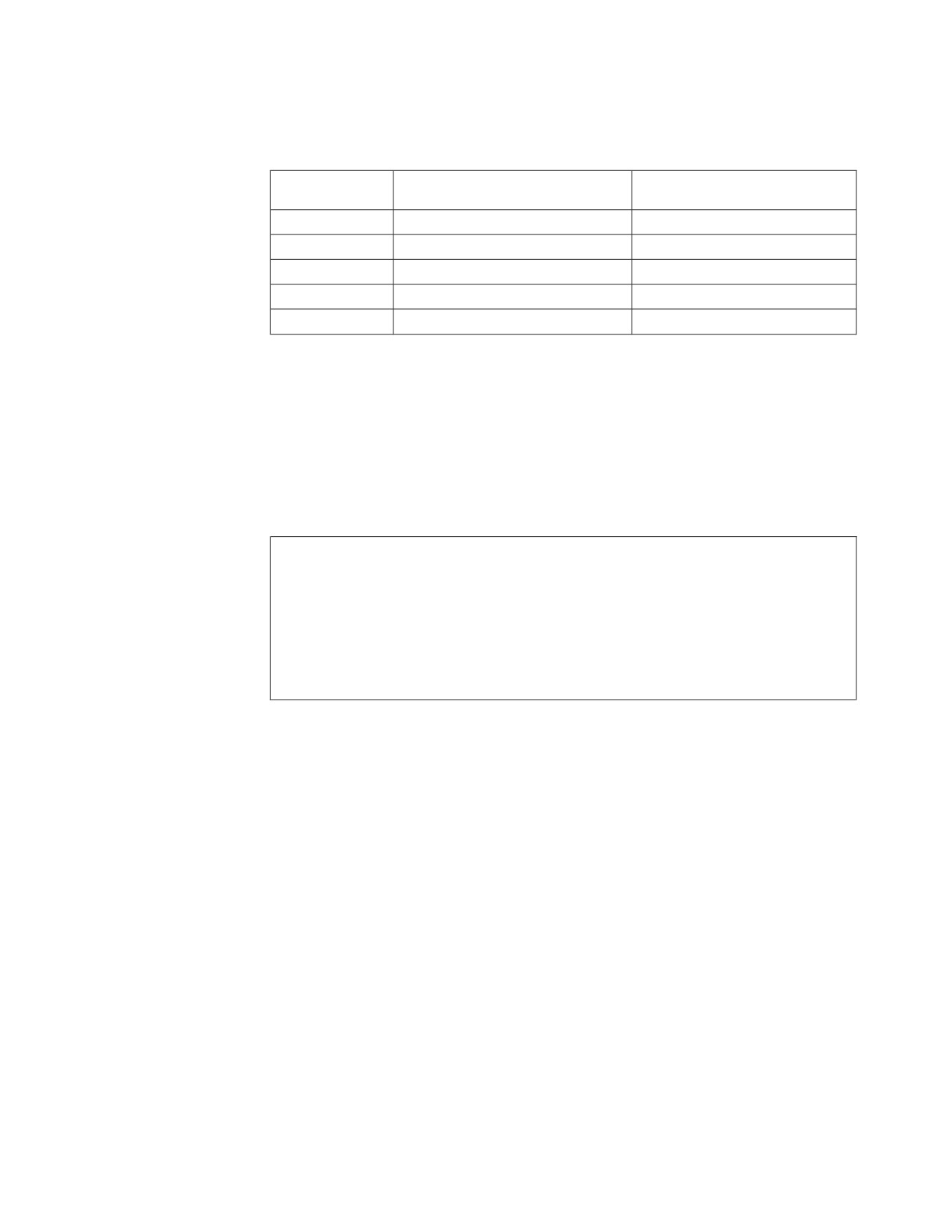
The format of the records in the output file identified by the ddname OUTPUT1 is
shown in Table 11:
Table 11. Default Output Record Format
Data Value Source (Column or
Record Position
Other)
Output Record Field Data Type
1-6
EMPNO
CHAR
7
blank
CHAR
8-13
PROJNO
CHAR
14
blank
CHAR
15-21
EMPTIME
CHAR
DATAUNLOAD User-Specified Output Record Format Example: Figure 96
selects data for the columns EMPNO, PROJNO, and EMPTIME in the table
EMP_ACT, and data for the column JOB in the EMPLOYEE table based on the
selection criteria specified in the WHERE clause. Only data for the columns
EMPNO, PROJNO, and EMPTIME is unloaded because JOB does not have a DFI
subcommand. The output records are generated in EMPNO sequence.
The Database Services Utility DATAUNLOAD command sequence is:
DATAUNLOAD
SELECT EMP_ACT.EMPNO,PROJNO,EMPTIME,JOB
FROM EMP_ACT,EMPLOYEE
WHERE EMP_ACT.EMPNO=EMPLOYEE.EMPNO
ORDER BY EMP_ACT.EMPNO;
EMPNO
1-6
PROJNO
8-13
EMPTIME
15-21
DECIMAL
IF NULL SET POS(22) = ’?’
OUTFILE(OUTPUT1)
Figure 96. DATAUNLOAD Command with DFI Subcommands
The Database Services Utility report or message file output generated as a result of
these commands is shown in the following:
Chapter 8. Command Reference
185
ARI0801I DBS Utility started: 10/05/89 14:54:41.
AUTOCOMMIT = OFF ERRORMODE = OFF
ISOLATION LEVEL = REPEATABLE READ
-----—> CONNECT "SQLDBA " IDENTIFIED BY ********;
ARI8004I User SQLDBA connected to database SQLDBA.
ARI0500I SQL processing was successful.
ARI0505I SQLCODE = 0 SQLSTATE = 00000 ROWCOUNT = 0
-----—>
ARI8003I ...Extended DBCS (DBCS=YES) processing was in effect.
-----—> DATAUNLOAD
-----—> SELECT EMP_ACT.EMPNO,PROJNO,EMPTIME
-----—> FROM EMP_ACT,EMPLOYEE
-----—> WHERE EMP_ACT.EMPNO=EMPLOYEE.EMPNO
-----—> ORDER BY EMP_ACT.EMPNO;
-----—> EMPNO 1-6
-----—> PROJNO 8-13
-----—> EMPTIME 15-21
DECIMAL
IF NULL SET POS(22) = ’?’
-----—> OUTFILE(OUTPUT1)
ARI0831I Column JOB data will not be unloaded.
ARI0868I DNAME=OUTPUT1 RECFM=F RECSZ=80 BLKSIZE=80
ARI0835I 74 record(s) written to the output data file.
ARI0855I DATAUNLOAD processing successful.
ARI0802I End of command file input.
ARI8997I ...Begin COMMIT processing.
ARI0811I ...COMMIT of any database changes sucessful.
ARI0809I ...No error(s) occurred during command processing.
ARI0808I DBS processing completed: 10/05/89 14:54:44.
Figure 97. DB2 Server for VSE Database Services Utility Report Output
1ARI0801I DBS Utility started: 10/05/89 14:54:41.
AUTOCOMMIT = OFF ERRORMODE = OFF
ISOLATION LEVEL = REPEATABLE READ
ARI8003I ...Extended DBCS (DBCS=YES) processing was in effect.
0——————> DATAUNLOAD
——————> SELECT EMP_ACT.EMPNO,PROJNO,EMPTIME,JOB
——————> FROM EMP_ACT,EMPLOYEE
——————> WHERE EMP_ACT.EMPNO=EMPLOYEE.EMPNO
——————> ORDER BY EMP_ACT.EMPNO;
——————> EMPNO 1-6
——————> PROJNO 8-13
——————> EMPTIME 15-21
DECIMAL IF NULL SET POS(22) = ’?’
——————> OUTFILE(OUTPUT1)
ARI0852I DATAUNLOAD processing started.
ARI0831I Column JOB data will not be unloaded.
┌───────────┐
ARI0868I DNAME=OUTPUT1 RECFM=F RECSZ=80 BLKSIZE=80
◄────┤ See Note │
ARI0835I 74 record(s) written to the output data file.
└───────────┘
ARI0855I DATAUNLOAD processing successful.
ARI0802I End of command file input.
ARI8997I ...Begin COMMIT processing.
ARI0811I ...COMMIT of any database changes sucessful.
ARI0809I ...No error(s) occurred during command processing.
ARI0808I DBS processing completed: 10/05/89 14:54:44.
Figure 98. DB2 Server for VM Database Services Utility Message File Output
Note: The RECFM, RECSZ, and BLKSIZE information displayed in the message
ARI0868I depends on the CMS FILEDEF command specifications for the
output file with ddname=OUTPUT1.
186
Database Services Utility
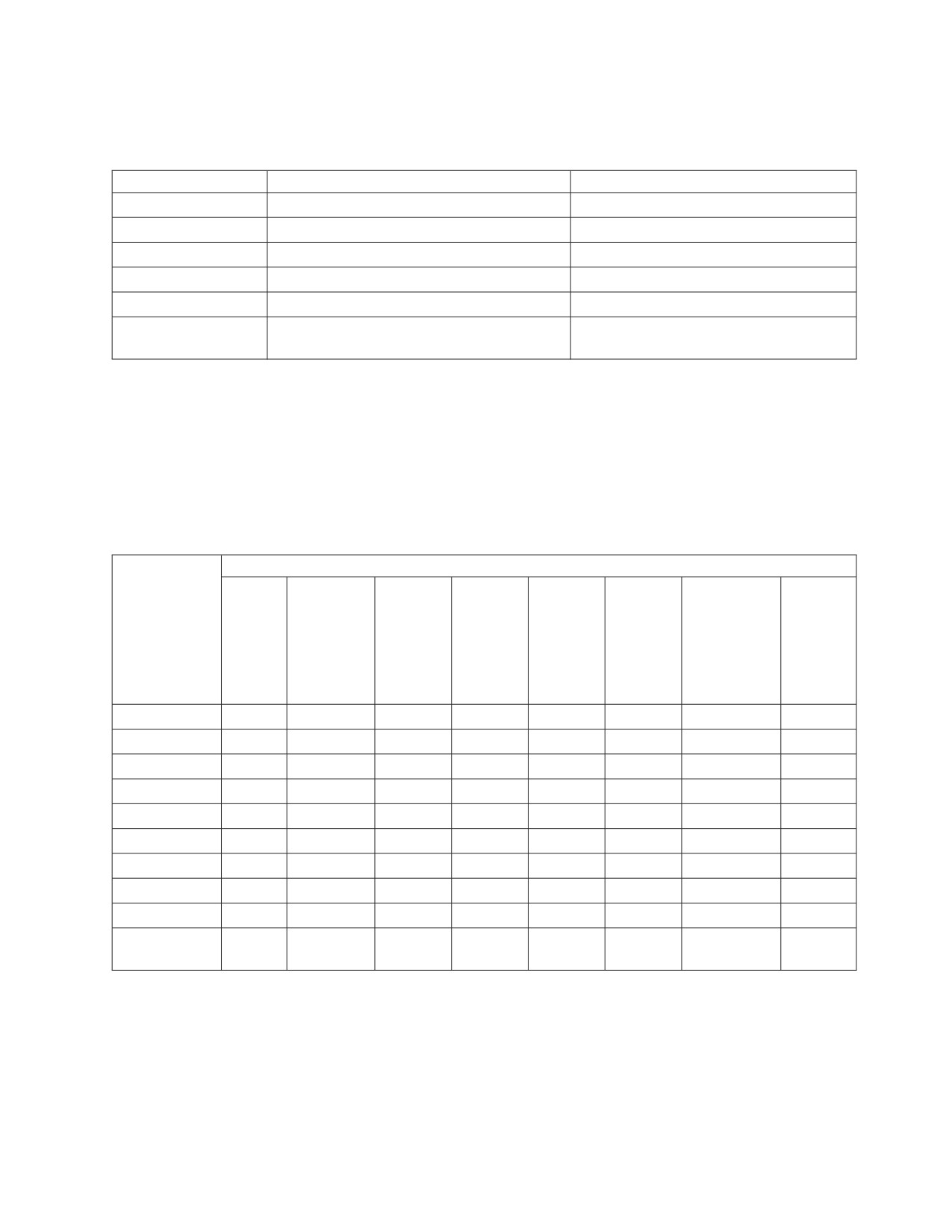
The format of the records in the output file identified by the ddname OUTPUT1 is
shown in Table 12.
Table 12. User-Defined Output Record Format
Record Position
Data Value Source (Column or Other)
Output Record Field Data Type
1-6
EMPNO
CHAR
7
blank
CHAR
8-13
PROJNO
CHAR
14
blank
CHAR
15-21
EMPTIME
DECIMAL
22
EMPTIME
CHAR
null indicator
DATAUNLOAD Data Conversion Summary
Table 13 summarizes the data conversion performed by Database Services Utility
DATAUNLOAD processing. Yes means that the utility performs the conversion. No
means that the utility cannot convert the source column data type into the data
type specified for the output record data field and that any attempt to do so results
in a Database Services Utility processing error. The numbers in the chart refer to
the notes below the figure.
Table 13. DATAUNLOAD Data Conversion Table
Source Column Data Type
CHAR,
DBCS,
VAR-
GRAPHIC,
CHAR,
VAR-
or
GRAPHIC,
LONG
DATE, TIME,
or LONG
Output Field
VAR-
SMALL-
Double
or
VAR-
Data Type
CHAR
DECIMAL8
INT
INTEGER
REAL12
Precision13
TIMESTAMP
GRAPHIC
CHAR
Yes1
Yes2,3
Yes2,4
Yes2,4
Yes2,5
Yes2,5
Yes1
Yes
GRAPHIC (G)
No
No
No
No
No
No
No
Yes9
1-Byte FIXED
No
No
Yes6
Yes6
No
No
No
No
2-Byte FIXED
No
No
Yes6
Yes6
No
No
No
No
4-Byte FIXED
No
No
Yes6
Yes6
No
No
No
No
4-Byte FLOAT
No
No
No
No
Yes
Yes7
No
No
8-Byte FLOAT
No
No
No
No
Yes11
Yes
No
No
DECIMAL
No
Yes14
No
No
No
No
No
No
ZONED
No
Yes
Yes6
Yes6
No
No
No
No
DATE, TIME,
No
No
No
No
No
No
Yes10
No
or TIMESTAMP
Notes for Table 13:
1. The CHAR, VARCHAR, and long field column data may be truncated if the
length of the source data is greater than the length of an output CHAR data
field. For TIME and DATE, an error occurs if the length of the source data is
greater than the length of an output CHAR data field. For TIMESTAMP, if the
output data field length is less than 19 bytes, an error occurs; if the output
data field length is less than 26 bytes but greater than or equal to 19 bytes,
Chapter 8. Command Reference
187
trailing digits of the microseconds part of the timestamp is truncated. If the
length of the output record data field is greater than the length of the source
column data, all trailing (low-order) positions of the data field are padded
with a blank (hex 40) value. Occurrences of null character column data result
in an all blank output record data field.
2.
If a CHAR output record data field is potentially too small to contain all
significant digits, the sign, and the decimal point for a value derived from a
column defined with a numeric (SMALLINT, INTEGER, DECIMAL, or
FLOAT) data type, then:
v An error message is written to the Database Services Utility message file
identifying the column name.
v The output record CHAR data field associated with a numeric column
contains asterisks (*) if a data overflow condition actually occurs.
3.
A CHAR output data field derived from a column with a DECIMAL data type
contains an EBCDIC plus sign (hex 4E) or minus sign (hex 60) in the leading
(high-order) position. The data value is right-justified in the low-order
positions of the output data field and represented using the values hex F0
through hex F9 in each position except for the decimal point position. A
decimal point (hex 4B) precedes the low-order scale value positions in the
output data field. The leading (high-order) positions of the output data field
(except for the first position) contain zeros (hex F0) if the number of
significant positions of the data value is less than the length of the output
data field minus 2.
Occurrences of null column data result in an unsigned output data field value
of 0. The leading position of the field contains a blank (hex 40) and the
remainder of the data field contains the value hex F0 (except for the decimal
point position).
For example, the hexadecimal values in each position of an eight-position
CHAR output record data field derived from a DECIMAL (5,2) column
containing the value +11.11 are:
Hexadecimal Value
4E
F0
F0
F1
F1
4B
F1
F1
EBCDIC Character
+
0
0
1
1
1
1
Field Position
1
2
3
4
5
6
7
8
Note: The minimum length of a CHAR output data field derived from a
DECIMAL select-list column is the column scale length plus 2.
4. A CHAR output data field derived from a column with a SMALLINT or
INTEGER data type contains a minus sign (hex 60) in the leading (high-order)
position for negative column values. If the column value is positive, the
leading (high-order) position of the data field contains a blank (hex 40). The
data value is right-justified in the low-order positions of the output data field
and represented using the values hex F0 through hex F9 in each position. The
leading (high-order) positions of the output data field (except for the first
position) contain zeros (hex F0) if the number of significant positions of the
data value is less than the length of the output data field minus 1.
Occurrences of null column data result in an unsigned output data field value
of 0. The leading position of the field contains a blank (hex 40) and the
remainder of the data field positions contains the value hex F0.
For example, the hexadecimal values contained in each position of an
eight-position CHAR output record data field derived from a SMALLINT
column containing the value +32767 are:
188
Database Services Utility

Hexadecimal Value
40
F0
F0
F3
F2
F7
F6
F7
EBCDIC Character
0
0
3
2
7
6
7
Field Position
1
2
3
4
5
6
7
8
Note: The minimum length of a CHAR output data field derived from a
SMALLINT or INTEGER column is 2.
5. A CHAR output data field derived from a column with a FLOAT data type is
left-justified in the leading (high-order) positions of the output data field. The
format of the output data field value ranges from:
sn.nEsn to sn.nnnnnnnnnnnnnEsnn (for 8-byte float)
or
sn.nEsn to sn.nnnnnEsnn (for 4-byte float)
where:
s = EBCDIC sign: Plus (+) sign (hex 4E)
Minus (-) sign (hex 60)
n = EBCDIC numeric character (hex F0-F9)
. = EBCDIC decimal point (hex 4B)
E = EBCDIC character E (hex C5)
The trailing (low-order) positions of the output data field contain blanks
(hex 40) if the length of the field is greater than the EBCDIC representation of
the column value.
Occurrences of null column data result in an unsigned output data field value
(0.0E+0). The leading position of the data field contains a blank (hex 40).
For example, the hexadecimal values contained in each position of a
10-position CHAR output record data field derived from an 8-byte FLOAT
column containing the value +1.11E+02 are:
Hexadecimal Value
4E
F1
4B
F1
F1
C5
4E
F0
F2
40
EBCDIC Character
+
1
1
1
E
+
0
2
Field Position
1
2
3
4
5
6
7
8
9
10
Note: The minimum length of a CHAR output data field derived from a
column with FLOAT data type is 7.
6. Leading (high-order) zero-value positions of column data are truncated if the
length of a numeric (FIXED, DECIMAL, or ZONED) output data field is less
than the length of the numeric (SMALLINT, INTEGER, or DECIMAL) column
value. A null column value results in a numeric output record data field value
of 0.
If a numeric output record data field is too small to contain all significant
digits of the data value from a numeric column:
v The message ARI0833E is written to the Database Services Utility message
file identifying the column name and the SQL SELECT row count.
v No data for the row is written to the output data file.
7. A null column value results in a numeric output record data field value of 0.
An 8-byte float column unloaded into a 4-byte output record FLOAT data
field results in the loss of a number of digits of precision. The fraction
(mantissa) is reduced from 14 to 6 digits of precision. During the conversion
process, if the exponent value exceeds a value of +63, the message ARI0833E
is generated and no data for the row is unloaded.
Chapter 8. Command Reference
189
8.
The minimum length of an output data field derived from a DECIMAL
column is the (scale value/2+1). The scale of output data derived from a
DECIMAL column is the same as that for the source column.
If the length of the output data field is greater than the value of (column
precision/2)+1, the column value is extended with high-order zeros in the
output data field.
If the length of the output data field is less than the value of (column
precision/2)+1, nonsignificant high-order zeros to the left of the implied
decimal point are not reflected in the data field value.
9.
Only fixed-length DBCS (data type of GRAPHIC) output data fields are
produced by DATAUNLOAD processing. The startpos of the output data field
contains a shift-out delimiter (hex 0E). The endpos of the output data field
contains a shift-in delimiter (hex 0F).
DBCS column data is truncated if the length of the column data plus 2 is
greater than the length of the output GRAPHIC data field. The length of the
column data is the number of DBCS characters times 2.
If the length of the output data field minus 2 is greater than the column data
length, the output data field is padded with trailing (low-order) DBCS blank
(hex 4040) characters in the unused low-order data field positions. The last
position of the data field always contains a shift-in delimiter (hex 0F).
If the column data value is all blanks or null, startpos+1 to endpos−1 of the
output DBCS data field contains DBCS blank characters (hex 4040).
10.
The datetime data type input and target type must match; for example, the
input data type of TIME is valid only for the target column data type of
TIME.
11.
A 4-byte float column unloaded into an 8-byte float data field is padded with
hex 0000 0000.
12.
REAL represents single precision floating point data and is synonymous with
FLOAT(n) where 1 is less than or equal to n is less than or equal to 21.
13.
DOUBLE PRECISION represents double precision floating point data and is
synonymous with FLOAT or FLOAT(n) where 22 is less than or equal to n is
less than or equal to 53.
14.
If the length of the output record data field is greater than the length of the
source column data, all leading (high-order) positions of the data field are
padded with hex zeros.
190
Database Services Utility
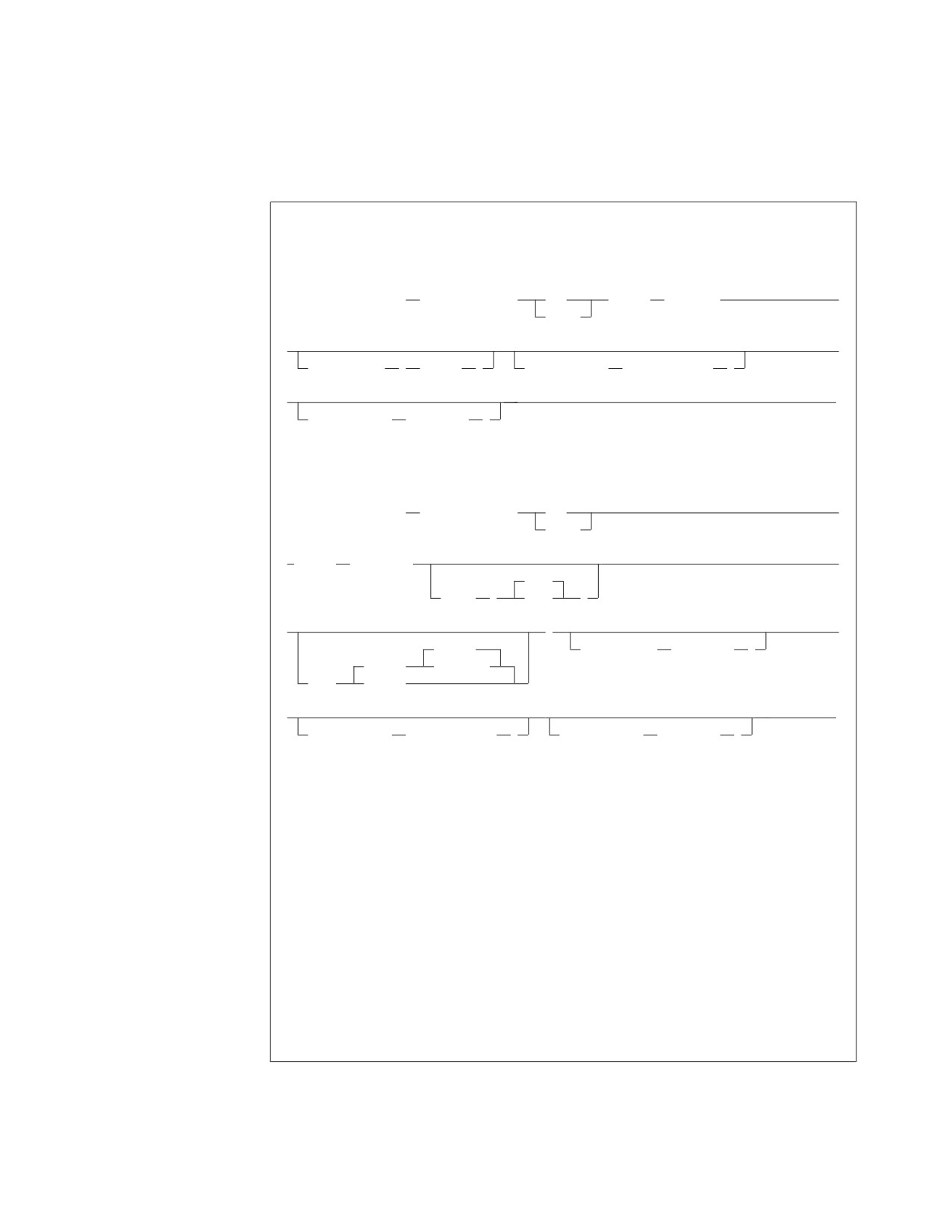
RELOAD DBSPACE
RELOAD DBSPACE Format
VM Format:
►► RELOAD DBSPACE
(dbspace_name)
NEW
INFILE
(ddname)
►
PURGE
►
►
COMMITCOUNT
(
ccount
)
RESTARTTABLE
( table_name
)
►
►◄
RESTARTCOUNT
( rcount
)
VSE Format:
►► RELOAD DBSPACE
(dbspace_name)
NEW
►
PURGE
► INFILE
( ddname
►
2048
BLKSZ
(
size
)
►
)
►
REWIND
COMMITCOUNT
( ccount
)
(TAPE)
NOREWIND
PDEV
(DASD)
►
►◄
RESTARTTABLE
( table_name
)
RESTARTCOUNT
( rcount
)
Examples:
RELOAD DBSPACE(JOHNS.SPACE1) PURGE INFILE(TEMP)
RELOAD DBSPACE(PUBLIC.SPACE2) NEW INFILE(TEMP)
RELOAD DBSPACE(DBS1) PURGE INFILE(IFILE) COMMITCOUNT(300)
RESTARTTABLE(EMPLOYEE) RESTARTCOUNT(600)
Authorization:
You must have the INSERT privilege on the tables affected by the command. Additional
authority is required depending on the keywords specified:
RESOURCE-if NEW is specified.
SELECT, DELETE, and INSERT- if PURGE is specified.
DBA-if PURGE is specified, and if any indexes defined on an affected table are
owned by someone else. DBA authority is also required if NEW is specified, and any
tables are to be created for another user.
Before you reload tables into a dbspace, it must already exist.
Chapter 8. Command Reference
191
Note: The RELOAD DBSPACE command is not supported if you are using DRDA
flow.
DBSPACE (dbspace-name)
identifies a RELOAD DBSPACE request and identifies the dbspace to be
loaded. The Database Services Utility loads the tables into the dbspace in the
order that they occur in the input data. If you do not own a private dbspace
with the dbspace-name identified, the data is loaded into a public dbspace (if
one having that name exists). The owner of a public dbspace is PUBLIC.
NEW
instructs the Database Services Utility to create each table contained in the
input file before loading the data. Tables represented in the input data file that
already exist in the database are not processed. The tables are created for the
current Database Services Utility user. You must have RESOURCE
authorization to use this keyword.
If either the RESTARTCOUNT or RESTARTTABLE parameters appear on the
RELOAD DBSPACE command, the NEW parameter will not cause the restart
table to be created. The RESTARTCOUNT and RESTARTTABLE parameters
indicate that the RELOAD DBSPACE operation is being restarted, therefore,
NEW processing must have already occurred, so it is not required to create the
restart table again. Note that NEW processing is performed on all tables to be
reloaded before any rows are reloaded to any table. This means that NEW
processing will have already occurred for all tables to be reloaded.
PURGE
instructs the Database Services Utility that existing tables within the dbspace
are to be loaded. The rows for all dbspace tables to be processed are deleted
before the first table is loaded. The tables that are processed are those that are
in the input file; that is, if table JONES.PROJECT exists in the dbspace, but the
input file contains only JONES.EMPLOYEE and JONES.DEPARTMENT, then
JONES.PROJECT is unaffected by RELOAD processing. Even if the input file
contains SMITH.PROJECT, JONES.PROJECT is unaffected. The Database
Services Utility uses fully qualified table names when determining the tables to
reload. You must have the DELETE privilege to use this keyword if you do not
own the affected tables. You must also have DBA authority if any indexes
defined on an affected table are owned by someone else.
If either the RESTARTCOUNT or RESTARTTABLE parameters appear on the
RELOAD DBSPACE command, the PURGE parameter will not cause all rows
of the restart table to be deleted. The RESTARTCOUNT and RESTARTTABLE
parameters indicate that the RELOAD DBSPACE operation is being restarted,
therefore, PURGE processing must have already occurred, so it is not required
to delete all rows from the restart table again. Note that PURGE processing is
performed on all tables to be reloaded before any rows are reloaded to any
table. This means that PURGE processing will have already occurred for all
tables to be reloaded.
Note: You must specify either NEW or PURGE in the RELOAD DBSPACE
statement. Because existing tables might be greatly affected by the choice
of these parameters, there is no default specification.
INFILE (ddname)
in DB2 Server for VSE, this identifies and describes the sequential (SAM) file
containing the input dbspace data. The default record format in a DB2 Server
for VSE system is variable-length blocked, spanned (SB), with
LRECL=(BLKSIZE−4) for variable and spanned records or LRECL=BLKSIZE
for fixed and undefined records.
192
Database Services Utility
The default record format in a DB2 Server for VM system is variable-length
blocked, spanned (VBS). Block size and record format information is specified
using a CMS FILEDEF command; the LRECL parameter is not applicable.
Note: The RECFM, RECSZ, and BLKSIZE information displayed in the
message ARI0868I depends on the CMS FILEDEF command
specifications for the RELOAD input file. However, RELOAD processing
in a DB2 Server for VM environment always opens the input data file as
a VB file. The RECFM, RECSZ, and BLKSIZE information displayed in
the message ARI0868I indicates this change.
ddname
In DB2 Server for VSE: this is the TLBL or DLBL job control statement file
name for the sequential input file.
In DB2 Server for VM: this is the name of the sequential input file defined
with a CMS FILEDEF command. Except for the ddname, use the same CMS
FILEDEF command information for RELOAD command processing that
you used when UNLOAD command processing created the file. Define the
CMS file used for RELOAD command input with the file-mode number 4.
Do not specify SYSIN or SYSPRINT as the ddname.
COMMITCOUNT (ccount)
identifies the frequency of COMMIT action during RELOAD processing.
ccount is a number from 1 to 2,147,483,647 indicating that a COMMIT
statement should be executed after the number of input table rows equal to
ccount are processed by RELOAD for each table. A COMMIT statement will
also be executed after the last row of each table has been reloaded.
Note: Database Services Utility AUTOCOMMIT ON processing must be in
effect when you use RELOAD COMMITCOUNT processing. If
AUTOCOMMIT is OFF and the COMMITCOUNT parameter is
used, an error message is written and RELOAD command
processing is not performed.
RESTARTTABLE (table_name)
identifies at which table the RELOAD DBSPACE processing will be
restarted. If a RELOAD DBSPACE operation ended normally, and the
RELOAD DBSPACE statement included the COMMITCOUNT parameter,
the RELOAD DBSPACE operation can be restarted by using the
RESTARTTABLE and RESTARTCOUNT parameters. table_name identifies
the table where RELOAD processing should begin. If RESTARTTABLE is
omitted, RELOAD DBSPACE processing will begin reloading the first table,
and the RESTARTCOUNT parameter, if specified, will apply to the first
table.
Note: If the table does not exist in the database when RELOAD DBSPACE
with RESTARTCOUNT or RESTARTTABLE is issued, an error
message is displayed.
RESTARTCOUNT (rcount)
identifies the restart point for RELOAD processing. rcount is a number
from 1 to 2,147,483,647 that identifies the number of input table rows in the
restart table to be skipped before RELOAD command processing begins. If
RESTARTCOUNT is omitted, no table rows are skipped and RELOAD
processing begins with the first table row of the restart table.
Chapter 8. Command Reference
193
Note: If an end-of-table condition occurs before rcount rows of the restart
table are read, an error message is written before RELOAD
processing ends.
BLKSZ (size) (DB2 Server for VSE Only)
is an optional parameter that specifies the block size of the sequential
output file. The default block size is 2048 bytes per block.
PDEV (TAPE or DASD)
is an optional parameter that specifies the device type (DASD or TAPE) of
the sequential (SAM) input file. Specify PDEV(DASD) if the input file
resides on any device supported by the VSE DTFSD macro. An exception
to this is VSAM-managed SAM files. VSAM-managed SAM does not
support spanned records. Specify PDEV(TAPE) if the input file resides on a
device supported by the VSE DTFMT macro. The default is PDEV(TAPE).
BLKSZ and PDEV can be specified in any order but must occur after the
ddname parameter.
REWIND or NOREWIND
controls tape file rewind processing performed during OPEN
processing. This parameter is valid only if you specify TAPE for PDEV.
The default processing is REWIND.
REWIND
specifies that the tape file is rewound by OPEN processing.
NOREWIND
specifies that the tape file is not rewound by OPEN processing. If
NOREWIND is specified for input tape files referenced by a series
of RELOAD commands, you must ensure that the tape files being
referenced are in ascending sequence. For example, if NOREWIND
is specified in a sequence of two RELOAD commands and the first
command reads tape file 2, then the second command must
reference tape file 3 or higher number. If it references tape file 1, an
OPEN error occurs.
Selective dbspace file reloads may be performed by specifying the file sequence
number in the TLBL statement. The following JCL is an example of how this can
be accomplished:
// JOB RELOAD DBSPACE
// ASSGN SYS005,181
// MTC REW,SYS005
* RELOAD 1 DBSPACE FROM TAPE FILE SEQ# 1
// TLBL DBSP,’PUBLIC.CRP01’,,,1
// EXEC ARIDBS,SIZE=AUTO
RELOAD DBSPACE (PUBLIC.CRP01)
INFILE (DBSP BLKSZ(24720) PDEV(TAPE) );
/*
* RELOAD 2 DBSPACES FROM TAPE FILE SEQ# 2
// TLBL DBSP,’PUBLIC.CRPXX’,,,2
// EXEC ARIDBS,SIZE=AUTO
RELOAD DBSPACE (PUBLIC.CRP02)
INFILE (DBSP BLKSZ(24720) PDEV(TAPE) );
RELOAD DBSPACE (PUBLIC.CRP03)
INFILE (DBSP BLKSZ(24720) PDEV(TAPE) );
/*
/&
194
Database Services Utility
Release Coexistence Considerations for DB2 Server for VM
Changes were required in Version 7 Release 1 to handle file I/O correctly when
using CMS 15 and later. These changes affect the format of data that is unloaded
and reloaded by the UNLOAD and RELOAD commands of the DBS Utility. If you
use the DBS Utility’s UNLOAD and RELOAD commands with databases at
different release levels, you must ensure that the code changes have been applied
at all release levels. For releases prior to Version 7 Release 1, you must apply the
following APARs:
Release
APAR
3.5
PQ28584
5.1
PQ28583
6.1
PQ27957
Chapter 8. Command Reference
195
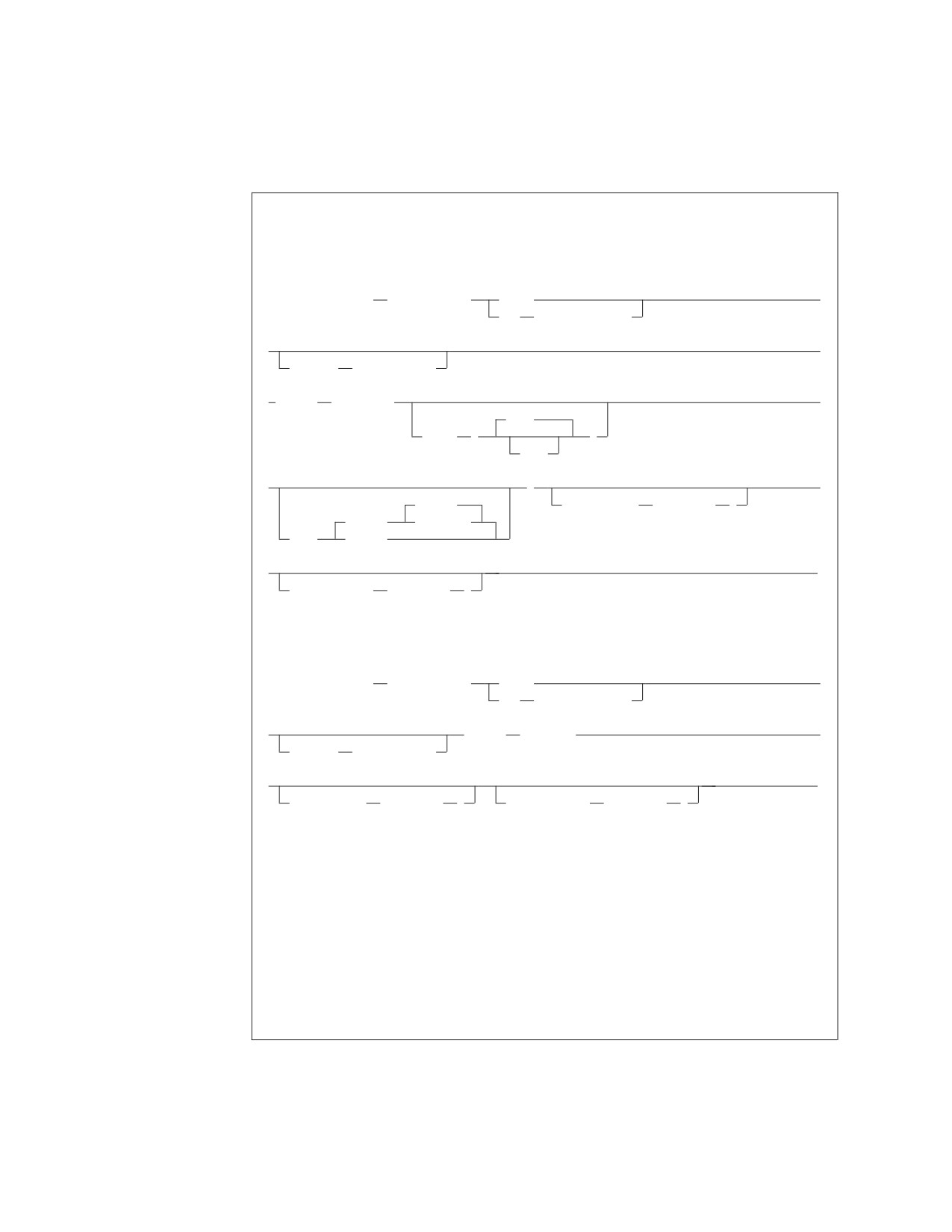
RELOAD TABLE
RELOAD TABLE Format
VSE Format:
►► RELOAD TABLE
(table_name)
PURGE
►
NEW
(dbspace_name)
►
►
INTABLE
(table_name)
► INFILE
( ddname
►
2048
BLKSZ
(
)
size
►
)
►
REWIND
COMMITCOUNT
( ccount
)
(TAPE)
NOREWIND
PDEV
(DASD)
►
►◄
RESTARTCOUNT
( rcount
)
VM Format:
►► RELOAD TABLE
(table_name)
PURGE
►
NEW
(dbspace_name)
►
INFILE
(ddname)
►
INTABLE
(table_name)
►
►◄
COMMITCOUNT
( ccount
)
RESTARTCOUNT
( rcount
)
VSE Examples:
RELOAD TABLE(SALARY)
NEW(DBSPACE1)
INTABLE(SMITH.SALARY)
INFILE(CIPHER3 PDEV(TAPE))
RELOAD TABLE(SALARY)
NEW(DBSPACE1)
INTABLE(SMITH.SALARY)
INFILE(CIPHER3)
COMMITCOUNT(300)
RESTARTCOUNT(600)
196
Database Services Utility
VM Example:
RELOAD TABLE(SALARY)
NEW(DBSPACE1)
INTABLE(SMITH.SALARY)
INFILE(CIPHER3)
COMMITCOUNT(300)
RESTARTCOUNT(600)
Authorization:
You must have the INSERT privilege on the "target" table.
Additional authority is required depending on the keywords specified.
RESOURCE-if NEW is specified.
DELETE and INSERT-if PURGE is specified and the table is owned by another
user.
DBA-if PURGE is specified, and if any indexes defined on an affected table
are owned by someone else.
Note: The RELOAD TABLE command is not supported if you are using DRDA
flow.
TABLE (table_name)
identifies a RELOAD TABLE request and the table to be loaded. You can
further identify the table by specifying the owner of the table (see “Qualifying
Object Names” on page 110 for details). You cannot use a synonym for a
table_name. If you specify the NEW option, a table called table_name is created
for that user. If you specify the PURGE option, you can specify a view name
instead of a table name if the view meets the following requirements:
v The view is defined on a single table.
v The view definition includes all the NOT NULL columns in the table. That
is, all columns outside of the view definition must permit the insertion of
nulls.
v The view has no column definitions based on functions (virtual data
columns).
When reloading data into a view that was created using the WITH CHECK
OPTION clause, the database manager checks all inserts and updates to the
view against the view definition and rejects them if the row to be inserted or
updated does not conform to the view definition.
NEW (dbspace_name)
instructs the Database Services Utility that the table to be loaded does not exist
and must first be created. You can identify the dbspace by the owner. If you do
not specify the owner of the dbspace (see “Qualifying Object Names” on page
110 for information about owner), a private dbspace that you own with
dbspace_name specified is loaded. If no such private dbspace exists, a public
dbspace with dbspace_name is loaded. The owner of a public dbspace is
PUBLIC, for example, NEW (PUBLIC.PRODUCTION). If owner is specified for
the table name and owner is not specified for the dbspace name, the Database
Services Utility does not use the owner specified for the table name to identify
the private dbspace.
If the RESTARTCOUNT parameter appears on the RELOAD TABLE command,
the NEW parameter will not cause the table to be created. The
RESTARTCOUNT parameter indicates that the RELOAD TABLE operation is
being restarted, therefore, NEW processing must have already occurred, so it is
not required to create the table again.
Chapter 8. Command Reference
197
PURGE
identifies that the output table (table to be loaded) exists and that all existing
table rows should be deleted by RELOAD TABLE processing before loading.
You must have the DELETE privilege on the output table. If you are not the
owner of the output table, you require DELETE and INSERT authority for the
table. If any indexes for the table are owned by another user, you require DBA
authority.
If the RESTARTCOUNT parameter appears on the RELOAD TABLE command, the
PURGE parameter will not cause all row to be deleted. The RESTARTCOUNT
parameter indicates that the RELOAD TABLE operation is being restarted,
therefore, PURGE processing must have already occurred, so it is not required to
delete all rows from the table again.
Note: You must specify either NEW or PURGE in the RELOAD TABLE statement.
Because existing tables might be greatly affected by the choice of these
parameters, there is no default specification.
INTABLE (table_name)
is optional. If omitted, the Database Services Utility loads data from the first
table it finds in the input file. INTABLE identifies data in the input file to be
used for RELOAD TABLE processing. Because the input file must be created
by UNLOAD processing, the data is organized by the tables from which it was
unloaded. Thus, the table_name that you specify here is the name of a table that
was unloaded at an earlier time. This parameter is useful if your input file was
created by an UNLOAD DBSPACE command. The UNLOAD DBSPACE
command can unload many tables into a sequential file. The INTABLE
parameter merely identifies which of those tables you now want to reload.
You can use owner to specify the user ID of the person who created the table in
the input file. If you omit the owner (see “Qualifying Object Names” on page
110 for more information about owner), the utility uses the data of the first
table encountered in the input file with the table_name specified. In this
instance, owner does not default to the user ID of the current Database Services
Utility user.
INFILE (ddname)
identifies and describes the sequential (SAM) input file containing the data to
be loaded into the table. The file must be created with UNLOAD processing.
The default record format in a DB2 Server for VSE system is variable-length
blocked, spanned (SB), with LRECL=(BLKSIZE−4) for variable and spanned
records or LRECL=BLKSIZE for fixed and undefined records.
The default record format in a DB2 Server for VM system is variable-length
blocked, spanned (VBS), with block size and record format information
specified by a CMS FILEDEF command; the LRECL parameter is not
applicable.
Note: The RECFM, RECSZ and BLKSIZE information displayed in the message
ARI0868I depends on the CMS FILEDEF command specifications for the
RELOAD input file. However, RELOAD processing in a DB2 Server for
VM environment always opens the input data file as a VB file. The
RECFM, RECSZ and BLKSIZE information displayed in the message
ARI0868I indicates this change.
COMMITCOUNT (ccount)
identifies the frequency of COMMIT action during RELOAD processing. ccount
198
Database Services Utility
is a number from 1 to 2,147,483,647 indicating that a COMMIT statement
should be executed after the number of input table rows equal to ccount are
processed by RELOAD TABLE.
Note: Database Services Utility AUTOCOMMIT ON processing must be in
effect when you use RELOAD COMMITCOUNT processing. If
AUTOCOMMIT is OFF and the COMMITCOUNT parameter is used, an
error message is written and RELOAD command processing is not
performed.
RESTARTCOUNT (rcount)
identifies the restart point for RELOAD processing. rcount is a number from 1
to 2,147,483,647 that identifies the number of input table rows to be skipped
before RELOAD command processing begins. Row rcount + 1 will be the first
row to be reloaded. If RESTARTCOUNT is omitted, no rows are skipped and
RELOAD processing begins with the first input row.
Note: If an end-of-table condition occurs before rcount rows are read from the
input UNLOAD file, an error message is written before RELOAD
processing ends.
ddname
in DB2 Server for VSE: this is the TLBL or DLBL job control statement file
name for the sequential input file.
In DB2 Server for VM: this is the name of the sequential input file defined
with a CMS FILEDEF command. Except for the ddname, CMS FILEDEF
command information for RELOAD command processing should be
identical to the information in the FILEDEF command used when the file
was created by UNLOAD command processing. You must define a CMS
file used for RELOAD command input with the file-mode number 4. Do
not specify SYSIN or SYSPRINT as the ddname.
BLKSZ (size)
is an optional parameter that specifies the block size of the sequential
output file. The default block size is 2048 bytes per block.
PDEV (TAPE or DASD)
is an optional parameter that specifies the device type (DASD or TAPE) of
the sequential (SAM) input file. Specify PDEV(DASD) if the input file
resides on any device supported by the VSE DTFSD macro. An exception
to this is VSAM-managed SAM files. VSAM-managed SAM does not
support spanned records. Specify PDEV(TAPE) if the input file resides on a
device supported by the VSE DTFMT macro. The default is PDEV(TAPE).
BLKSZ and PDEV can be specified in any order but must occur after the
ddname parameter.
REWIND or NOREWIND
controls tape file rewind processing performed during OPEN processing.
This parameter is valid only if you specify TAPE for PDEV. The default
processing is REWIND.
REWIND
specifies that the tape file is rewound by OPEN processing.
NOREWIND
specifies that the tape file is not rewound by OPEN processing. If
NOREWIND is specified for input tape files referenced by a series of
RELOAD commands, you must ensure that the tape files being
Chapter 8. Command Reference
199
referenced are in ascending sequence. For example, if NOREWIND is
specified in a sequence of two RELOAD commands and the first
command reads tape file 2, then the second command must reference
tape file 3 or higher. If it references tape file 1, an OPEN error occurs.
Release Coexistence Considerations for DB2 Server for VM
Changes were required in Version 7 Release 1 to handle file I/O correctly when
using CMS 15 and later. These changes affect the format of data that is unloaded
and reloaded by the UNLOAD and RELOAD commands of the DBS Utility. If you
use the DBS Utility’s UNLOAD and RELOAD commands with databases at
different release levels, you must ensure that the code changes have been applied
at all release levels. For releases prior to Version 7 Release 1, you must apply the
following APARs:
Release
APAR
3.5
PQ28584
5.1
PQ28583
6.1
PQ27957
200
Database Services Utility
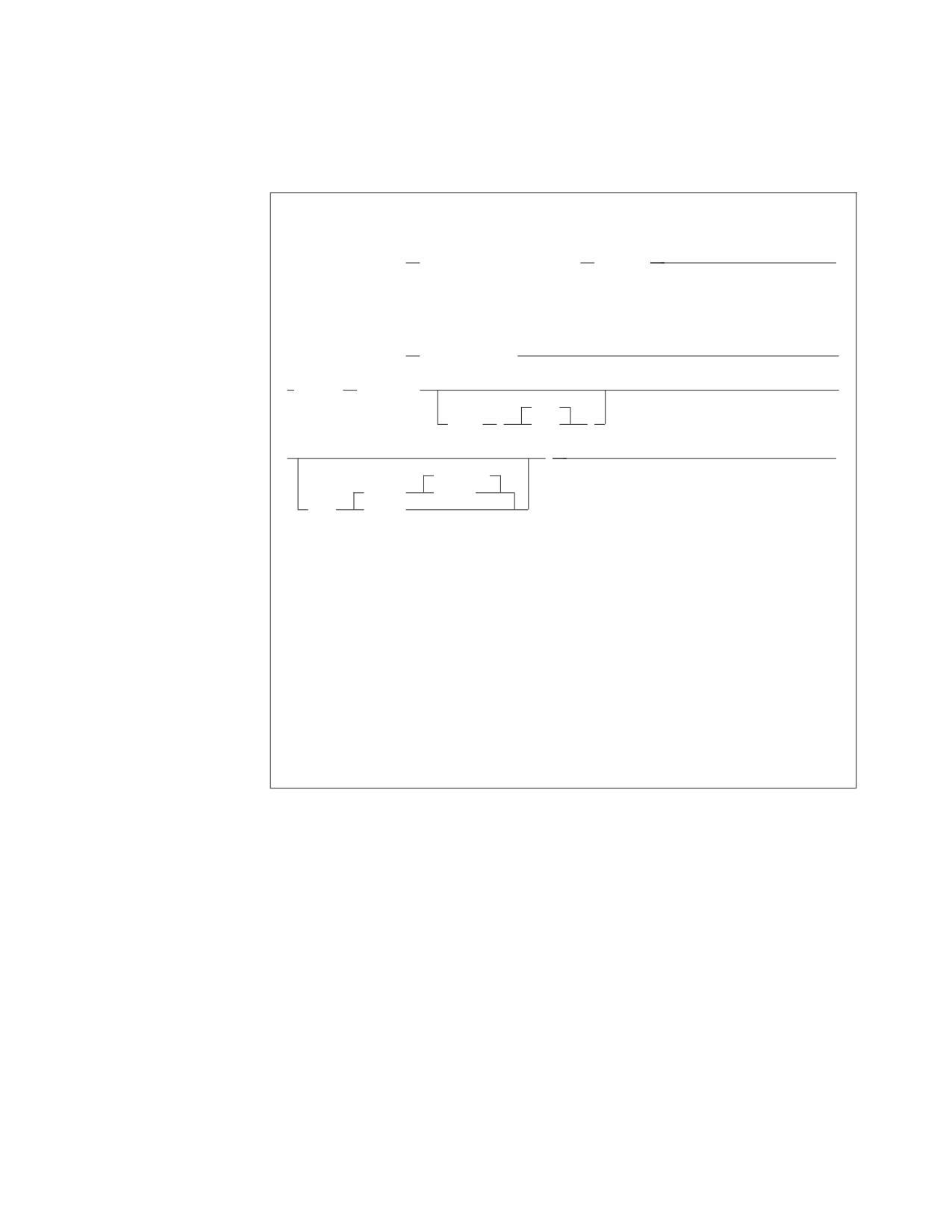
UNLOAD DBSPACE
UNLOAD DBSPACE Format
VM Format:
►► UNLOAD DBSPACE
(dbspace_name) OUTFILE
(ddname)
►◄
VSE Format:
►► UNLOAD DBSPACE
(dbspace_name)
►
► OUTFILE
( ddname
►
2048
BLKSZ
(
size
)
►
)
►◄
NOREWIND
(TAPE)
REWIND
PDEV
(DASD)
VM Example:
UNLOAD DBSPACE(THOMPSON.SPACE1) OUTFILE(HISTORY)
VSE Example:
UNLOAD DBSPACE(MIKE.SP2) OUTFILE(SAVE BLKSZ(2048))
Authorization:
You must have the SELECT privilege on the table(s) being unloaded.
UNLOAD DBSPACE unloads all tables of the specified dbspace to a sequential output
file.
Note: The UNLOAD DBSPACE command is not supported if you are using DRDA
flow.
Following are the descriptions for each portion of the command:
DBSPACE (dbspace_name)
identifies an UNLOAD DBSPACE request and the dbspace to be unloaded. The
utility unloads the tables of the dbspace in an unpredictable order. The
dbspace_name is the name of the dbspace to be unloaded. If you do not specify
owner, the utility unloads one of your dbspaces. See “Names and Identifiers”
on page 110 for more information about naming conventions for data objects. If
you do not own a dbspace called dbspace_name, the utility unloads a public
dbspace having that name. If there is no public dbspace having that name,
UNLOAD processing is unsuccessful, and an error message is written to the
Database Services Utility message file.
For example, suppose your user ID is GENE and you specify:
UNLOAD DBSPACE(SPACE1) ...
Chapter 8. Command Reference
201
The Database Services Utility unloads the private dbspace named
GENE.SPACE1. If there is no such dbspace, the utility unloads the public
dbspace named PUBLIC.SPACE1. If there is no PUBLIC.SPACE1, no dbspace is
unloaded, and you receive an error message in the message file.
If you own a private dbspace with the same name as a public dbspace, and
you want to unload the public dbspace, you must specify
PUBLIC.dbspace_name. If owner is omitted, the private dbspace is unloaded.
OUTFILE|OUTFILE (ddname)
identifies and describes the sequential (SAM) output file that is to contain the
data unloaded from the dbspace. The default record format is variable-length
blocked, spanned (VBS). A minimum logical record length (LRECL) of 8240
bytes is the default in DB2 Server for VSE. A block size greater than 8244 is
recommended for tape output files to improve performance.
ddname
DB2 Server for VSE
This is the TLBL or DLBL job control statement file name for the sequential
output file.
Note: If the message ARI0868I generated during Database Services Utility
UNLOAD command processing identifies RECFM=VS for an output
file defined with RECFM VBS, the file can be read by Database
Services Utility RELOAD command processing using RECFM VBS.
DB2 Server for VM
This is the name of the sequential output file defined with a CMS FILEDEF
command. The FILEDEF command should contain the record format
specification RECFM VBS or a block size (BLOCK or BLKSIZE) value or
both. You must define a CMS file used for UNLOAD command output
with the file mode number 4.
If the row length (sum of defined column lengths) for any table in the
dbspace being unloaded exceeds 8 240 bytes, the largest row length value
is used as the minimum logical record length.
Notes:
1. Always specify a record format (RECFM) of VBS for UNLOAD
processing. UNLOAD processing changes the record format to U if the
system-required logical record length is greater than the specified block
size (BLOCK) value minus 4. Otherwise, UNLOAD processing changes
the record format to VB. This change will be indicated in the ARI0868I
message, generated by the UNLOAD processing. See Appendix B,
“FILEDEF Command Syntax and Notes,” on page 249 for more
information about undefined (U) record format usage.
2. If the message ARI0868I, generated using DBS UNLOAD processing,
identifies RECFM=U or RECFM=VB for an output file defined with
RECFM=VBS, the CMS FILEDEF command that defines the RELOAD
input data files must still specify RECFM=VBS. Except for the ddname,
CMS FILEDEF information for RELOAD command processing must be
identical to the information in the FILEDEF command used when
UNLOAD command processing created the file. See Appendix B,
“FILEDEF Command Syntax and Notes,” on page 249 for more
information about undefined (U) record format usage.
3. If the message ARI0868I indicates RECFM=U for a tape output file,
significant performance improvements can be obtained by increasing
202
Database Services Utility
the block size (BLOCK) value for the file. A block size greater than 8244
bytes is recommended for tape output files created by UNLOAD
processing.
Do not specify SYSIN or SYSPRINT as the ddname.
BLKSZ (size) (DB2 Server for VSE Only)
is an optional parameter that specifies the block size of the sequential output
file. The default block size is 2048 bytes per block.
PDEV (TAPE or DASD) (DB2 Server for VSE Only)
is an optional parameter that specifies the device type (DASD or TAPE) for the
sequential output file. Specify PDEV(DASD) for files that reside on any device
supported by the VSE DTFSD macro. An exception to this is VSAM-managed
SAM files. VSAM-managed SAM does not support spanned records. Specify
PDEV(TAPE) for files that reside on any device supported by the VSE DTFMT
macro. The default is PDEV(TAPE).
BLKSZ and PDEV can be specified in any order but must occur after the
ddname parameter.
NOREWIND or REWIND (DB2 Server for VSE Only)
controls tape file rewind processing performed during CLOSE processing. This
parameter is valid only if you specified TAPE for PDEV. The default is
NOREWIND.
NOREWIND
specifies that the tape file will not be rewound by CLOSE processing.
REWIND
specifies that the tape file is rewound by CLOSE processing.
Selective dbspace file unloads may be performed by specifying the file sequence
number in the TLBL statement. The following JCL is an example of how this can
be accomplished:
// JOB UNLOAD DBSPACE
* UNLOAD 1 DBSPACE INTO TAPE FILE SEQ# 1
// TLBL DBSP,’PUBLIC.CRP01’,,,,1
// ASSGN SYS005,181
// MTC REW,SYS005
// EXEC ARIDBS,SIZE=AUTO
UNLOAD DBSPACE (PUBLIC.CRP01)
OUTFILE (DBSP BLKSZ(24720) PDEV(TAPE) );
/*
* UNLOAD 2 DBSPACES INTO TAPE FILE SEQ# 2
// TLBL DBSP,’PUBLIC.CRPXX’,,,,2
// EXEC ARIDBS,SIZE=AUTO
UNLOAD DBSPACE (PUBLIC.CRP02)
OUTFILE (DBSP BLKSZ(24720) PDEV(TAPE) );
UNLOAD DBSPACE (PUBLIC.CRP03)
OUTFILE (DBSP BLKSZ(24720) PDEV(TAPE) );
/*
/&
Release Coexistence Considerations for DB2 Server for VM
Changes were required in Version 7 Release 1 to handle file I/O correctly when
using CMS 15 and later. These changes affect the format of data that is unloaded
and reloaded by the UNLOAD and RELOAD commands of the DBS Utility. If you
use the DBS Utility’s UNLOAD and RELOAD commands with databases at
different release levels, you must ensure that the code changes have been applied
at all release levels. For releases prior to Version 7 Release 1, you must apply the
Chapter 8. Command Reference
203
following APARs:
Release
APAR
3.5
PQ28584
5.1
PQ28583
6.1
PQ27957
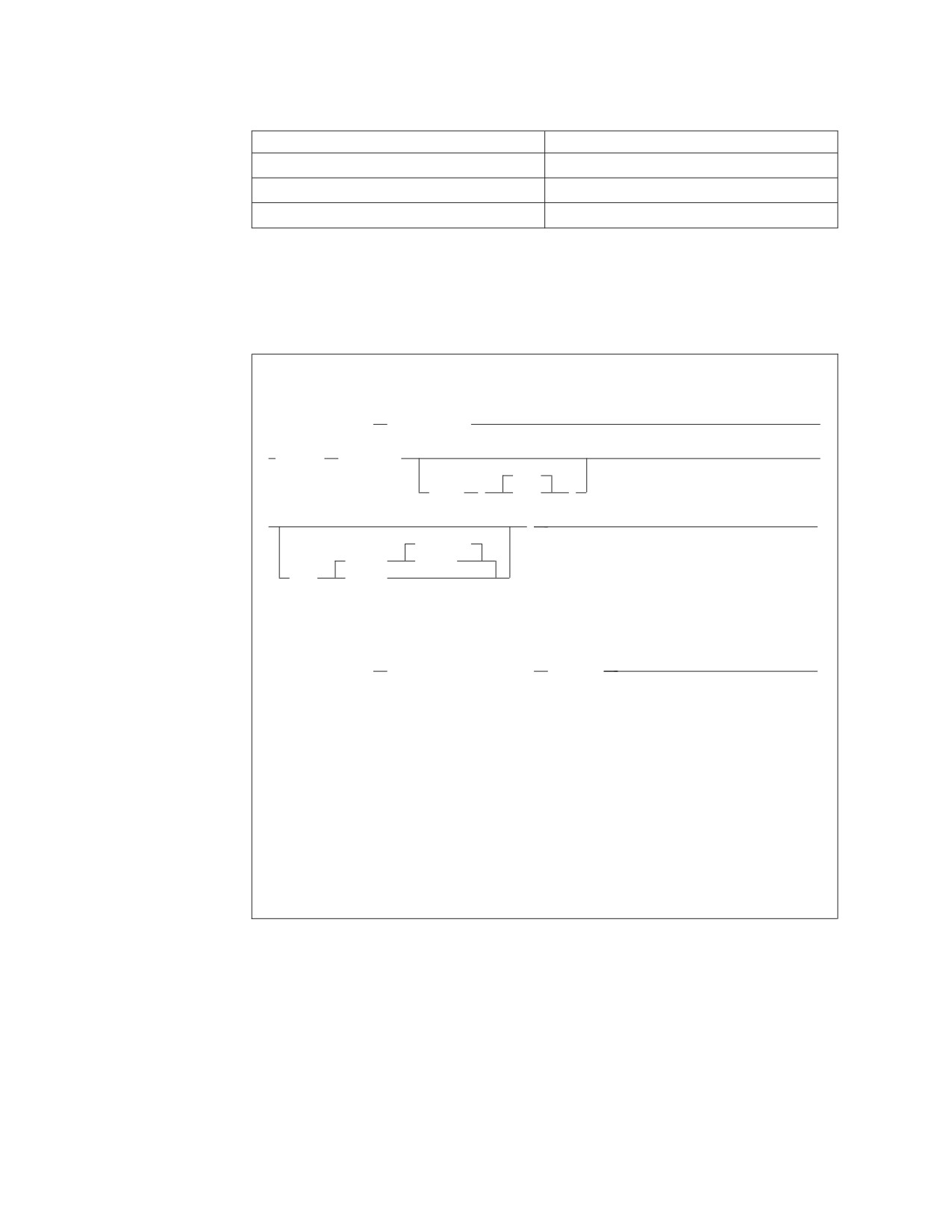
UNLOAD TABLE
UNLOAD TABLE Format
VSE Format:
►► UNLOAD TABLE
(table_name)
►
► OUTFILE
( ddname
►
2048
BLKSZ
(
size
)
►
)
►◄
NOREWIND
(TAPE)
REWIND
PDEV
(DASD)
VM Format:
►► UNLOAD TABLE
(table_name) OUTFILE
(ddname)
►◄
VSE Example:
UNLOAD TABLE (EMPLOYEE) OUTFILE(SAVE13 PDEV(DASD))
VM Example:
UNLOAD TABLE (EMPLOYEE) OUTFILE(SAVE13)
Authorization:
You must have the SELECT privilege on the table being unloaded.
The UNLOAD TABLE command unloads a specific table or view to an output file.
Note: The UNLOAD TABLE command is not supported if you are using DRDA
flow.
Following are descriptions of each portion of the command:
TABLE (table_name)
identifies an UNLOAD TABLE request and the table to be processed. You can
UNLOAD a view merely by specifying a view name instead of a table name.
You can further identify the table or view by specifying the owner of the table
or view (see “Qualifying Object Names” on page 110 for details). A synonym
cannot be used for table_name.
204
Database Services Utility
OUTFILE|OUTFILE (ddname)
identifies and describes the sequential (SAM) output file that is to contain the
data unloaded from the table. The default record format is variable-length
blocked, spanned (VBS). A minimum logical record length (LRECL) of 8 240
bytes is the default in a VSE system. To improve performance, a block size
greater than 8 244 bytes is recommended for tape output files.
ddname
in DB2 Server for VSE: this is the TLBL or DLBL job control statement file
name for the sequential output file.
Note: If the message ARI0868I generated during Database Services Utility
UNLOAD command processing identifies RECFM=VB for an output file
defined with RECFM VBS, the file can be read by Database Services
Utility RELOAD command processing using RECFM VBS.
In DB2 Server for VM: this is the name of the sequential output file defined
with a CMS FILEDEF command. The FILEDEF command should contain the
record format specification RECFM VBS or a block size (BLOCK or BLKSIZE)
value or both. You must define a CMS file used for UNLOAD command
output with the file mode number 4. UNLOAD processing writes
variable-length spanned records with a minimum logical record length
(LRECL) of 8 240 bytes.
Notes:
1. Always specify a record format (RECFM) of VBS for UNLOAD processing.
UNLOAD processing changes the record format to U if the system-required
logical record length is greater than the specified block size (BLOCK) value
minus 4. Otherwise, UNLOAD processing changes the record format to VB.
This change will be indicated in the ARI0868I message generated by the
UNLOAD processing. See Appendix B, “FILEDEF Command Syntax and
Notes,” on page 249 for more information about undefined (U) record
format usage.
2. If the message ARI0868I, generated using DBS UNLOAD processing,
identifies RECFM=U or RECFM=VB for an output file defined with
RECFM=VBS, the CMS FILEDEF command that defines the RELOAD input
data files must still specify RECFM=VBS. Except for the ddname, CMS
FILEDEF information for RELOAD command processing must be identical
to the information in the FILEDEF command used when UNLOAD
command processing created the file. See Appendix B, “FILEDEF Command
Syntax and Notes,” on page 249 for more information about undefined (U)
record format usage.
3. If the message ARI0868I indicates RECFM=U for a tape output file,
significant performance improvements can be obtained by increasing the
block size (BLOCK) value for the file. A block size greater than 8244 is
recommended for tape output files created by UNLOAD processing.
Do not specify SYSIN or SYSPRINT as the ddname.
BLKSZ (size)
is an optional parameter that specifies the block size of the sequential output
file. The default block size is 2048 bytes per block.
PDEV (TAPE or DASD)
is an optional parameter that specifies the device type (DASD or TAPE) for the
sequential output file. Specify PDEV(DASD) for files that reside on any device
supported by the VSE DTFSD macro. An exception to this is VSAM-managed
Chapter 8. Command Reference
205
SAM files. VSAM-managed SAM does not support spanned records. Specify
PDEV(TAPE) for files that reside on any device supported by the VSE DTFMT
macro. The default is PDEV(TAPE).
BLKSZ and PDEV can be specified in any order but must occur after the
ddname parameter.
NOREWIND or REWIND
controls tape file rewind processing performed during CLOSE processing.
This parameter is valid only if you specify TAPE for PDEV. The default is
NOREWIND.
NOREWIND
specifies that the tape file is not rewound by CLOSE processing.
REWIND
specifies that the tape file is rewound by CLOSE processing.
Release Coexistence Considerations for DB2 Server for VM
Changes were required in Version 7 Release 1 to handle file I/O correctly when
using CMS 15 and later. These changes affect the format of data that is unloaded
and reloaded by the UNLOAD and RELOAD commands of the DBS Utility. If you
use the DBS Utility’s UNLOAD and RELOAD commands with databases at
different release levels, you must ensure that the code changes have been applied
at all release levels. For releases prior to Version 7 Release 1, you must apply the
following APARs:
Release
APAR
3.5
PQ28584
5.1
PQ28583
6.1
PQ27957
206
Database Services Utility
Load-Package Commands
Processing for the Load-Package Commands
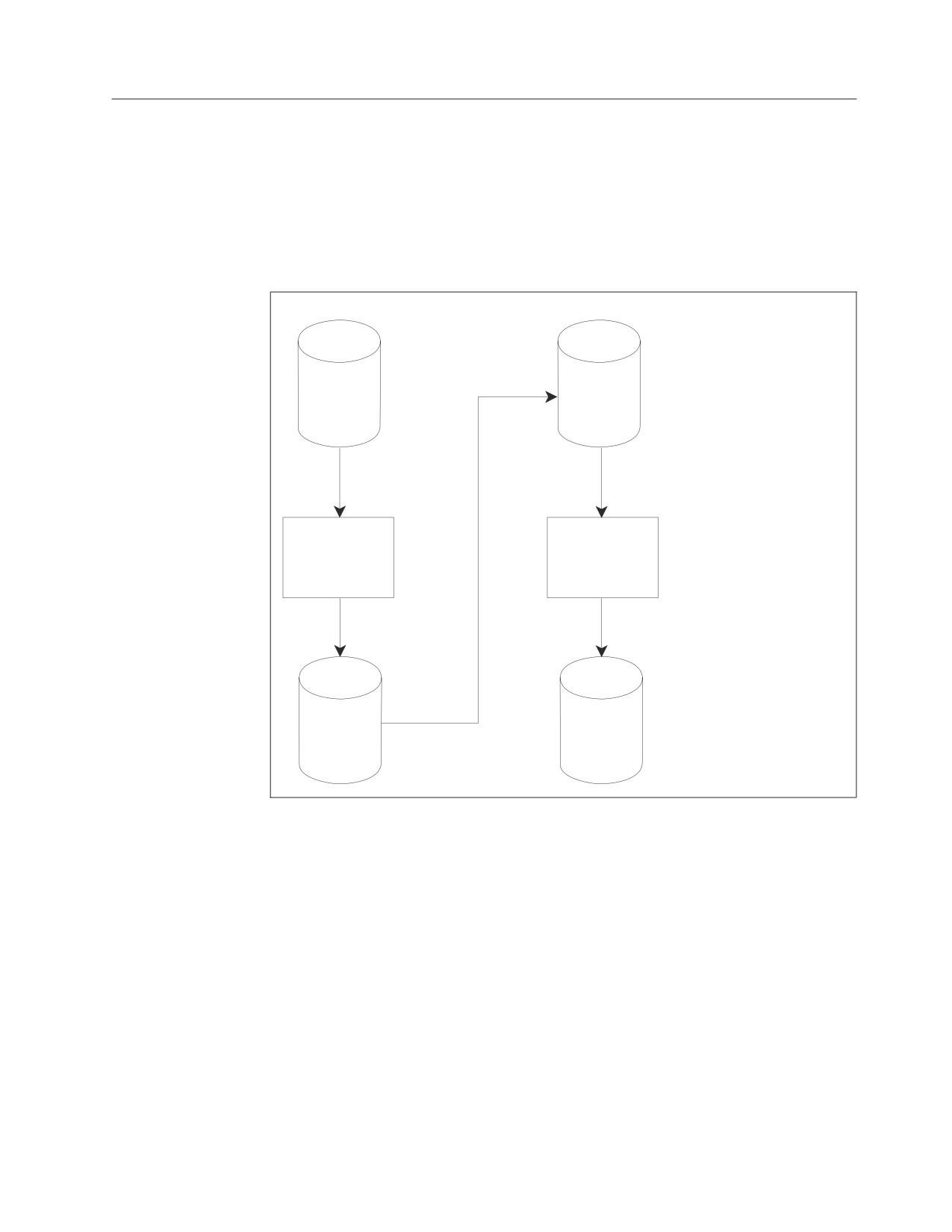
Figure 99 indicates the data flow for the UNLOAD PACKAGE and RELOAD
PACKAGE commands.
Note: PROGRAM is a synonym for PACKAGE. Therefore, UNLOAD and
RELOAD PROGRAM are equivalent to UNLOAD and RELOAD PACKAGE.
Package
File
#1
UNLOAD
RELOAD
PACKAGE
PACKAGE
File
Package
#2
Figure 99. Database Services Utility Processing Diagram for UNLOAD and RELOAD
PACKAGE
Chapter 8. Command Reference
207
RELOAD PACKAGE
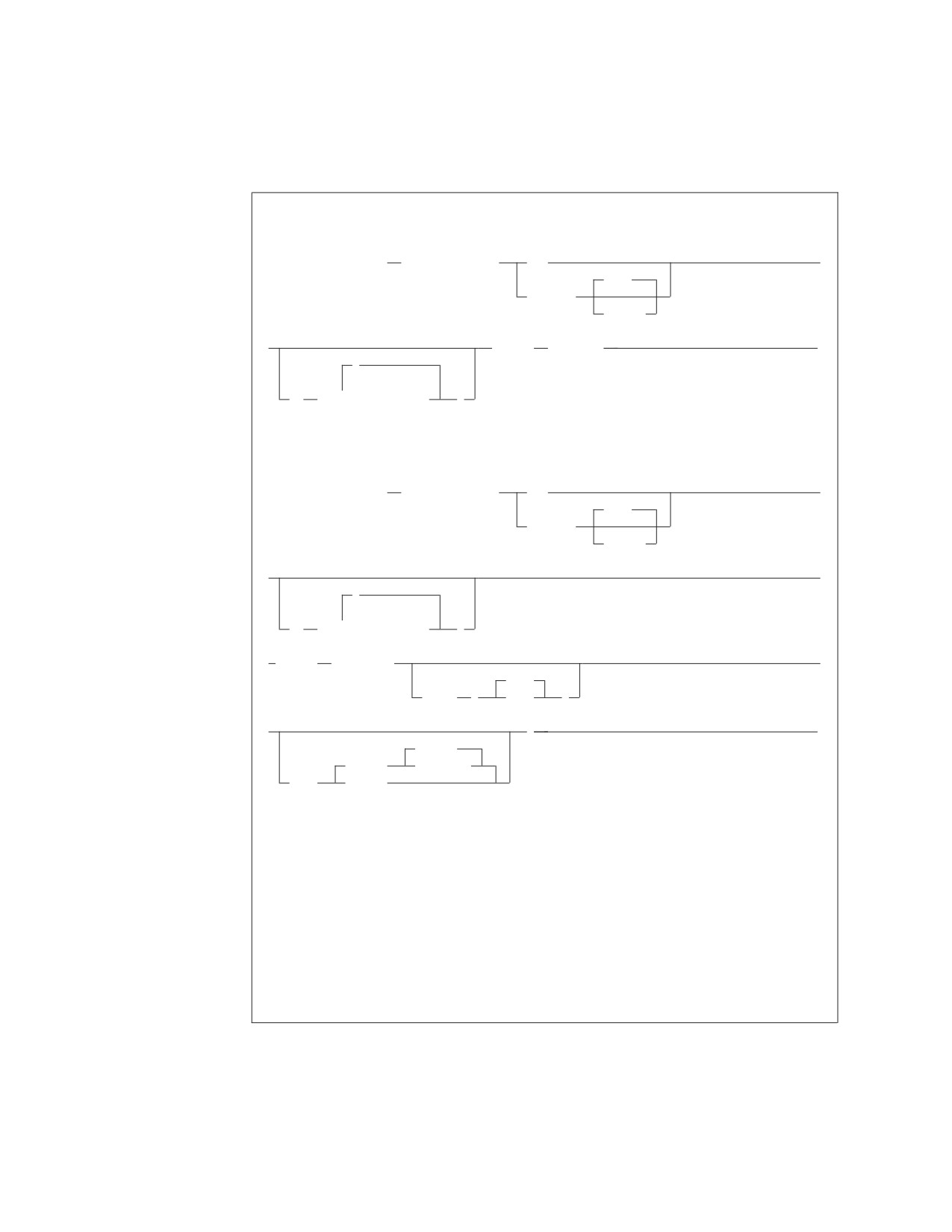
RELOAD PACKAGE Format
VM Format:
►► RELOAD PACKAGE
(package_name)
NEW
►
KEEP
REPLACE
REVOKE
►
INFILE
(ddname)
►◄
,
▼
TO
(
server_name
)
VSE Format:
►► RELOAD PACKAGE
(package_name)
NEW
►
KEEP
REPLACE
REVOKE
►
►
,
TO
(
▼
server_name
)
► INFILE
( ddname
►
2000
BLKSZ
(
size
)
►
)
►◄
REWIND
(TAPE)
NOREWIND
PDEV
(DASD)
VM Example:
RELOAD PACKAGE(JONES.PROG4) REPLACE KEEP TO(RDB2,RDB3)
INFILE(IN1)
VSE Example:
RELOAD PACKAGE(JONES.PROG4) REPLACE KEEP INFILE(IN1)
Authorization: You must be the owner of the package that you want to reload. To
reload another user’s package, you must have DBA authority. In VM, you must also have
CONNECT authority to all named databases.
PACKAGE (package_name)
identifies a RELOAD PACKAGE request and the package to be loaded.
You can further qualify the package_name with the owner, separating the two
names with a period. The name of the package is package_name. If you do not
specify the owner, owner defaults to the connected authorization ID. (See
208
Database Services Utility
“Qualifying Object Names” on page 110 for details on accessing data objects
that are owned by other users.) The authorization ID is either:
v The authorization ID specified in a previous explicit connect (when TO is
not used)
v The VM user ID (when TO is used) because it is the user ID used to connect
to server_name.
REPLACE
is specified if an existing package is to be replaced by the reload. If the
package does not exist, a new package is created without an error or warning
message.
NEW
instructs the Database Services Utility that the package to be loaded does not
exist and is to be created. If a package with the same name and owner already
exists in the database, the reload fails.
KEEP
causes the grants of RUN privilege to remain in effect when the package is
reloaded. The KEEP and REVOKE parameters apply if the package has
previously been created and the owner of the package has granted the RUN
privilege on the resulting package to other users. The KEEP and REVOKE
parameters are allowed only with REPLACE; KEEP is the default.
REVOKE
if the REVOKE parameter is specified, or if the owner of the package is not
entitled to grant all privileges embodied in the package, all existing grants of
the RUN privilege are revoked. The KEEP and REVOKE parameters are
allowed only with REPLACE; KEEP is the default.
TO (server-name)
in DB2 Server for VSE, this identifies the application server or servers onto
which the package is to be reloaded. The Database Services Utility connects to
each application server in turn, and if the connection is successful, the package
is reloaded. If an LUW is active when the RELOAD command begins,
processing is unsuccessful and an error occurs.
In DB2 Server for VM, this can be specified when you must load the package
onto more than one database. To reload the package, the Database Services
Utility connects to each specified server-name in turn (using database switching,
which requires APPC/VM in multiple user mode). If an LUW is active when
the RELOAD command begins, processing is unsuccessful and an error occurs.
When the TO clause is specified, the CONNECT statement is processed with
no user ID or password. The attempted connection fails if implicit connections
are not allowed on server-name. After the RELOAD is performed on each
database, a COMMIT RELEASE (or ROLLBACK RELEASE) is done, releasing
the connection to that server-name. The default user ID (the VM user ID) and
the default database (as specified to SQLINIT) are reestablished for a new
LUW. Any explicit connections done before the RELOAD are therefore lost and
must be reissued if required.
If owner was not specified, the VM user ID is assumed, because it is the ID
used to connect to each server-name.
When you use TO, the Database Services Utility ignores preceding CONNECT
statements and uses the VM user ID as a default. If you do not want to use
your VM user ID, issue the explicit CONNECT statements as required, and use
Chapter 8. Command Reference
209
the RELOAD command without a TO clause. If you do not specify the TO
clause, the Database Services Utility reloads the package onto only the
currently connected database.
There is no specific limit on the number of database names typed; however,
there is an implied limit in that the maximum length of a Database Services
Utility command is 8192 characters.
INFILE (ddname)
identifies and describes the sequential (SAM) tape or disk input file containing
the package to be loaded into the database. The file must be created by
UNLOAD PACKAGE processing, and its contents must not be changed in
any way. RELOAD package processing uses a record format of fixed-length
blocked (FB) and a record length of 80. The block size should be identical to
that used for UNLOAD processing; that is, it must be a multiple of 80.
ddname
in DB2 Server for VSE: this is the TLBL or DLBL job control statement file
name for the sequential input file.
Alternatively, RELOAD PACKAGE can read its input from SYSIPT by using a
READ MEMBER. You use the READ MEMBER NOCONT option to properly
close the SYSIPT file. An example of using READ MEMBER with NOCONT is:
RELOAD PACKAGE (package_name) REPLACE INFILE(SYSIPT);
READ MEMBER package_member (NOCONT
In DB2 Server for VM: this is the name of the sequential input file defined
with a CMS FILEDEF command. Do not specify SYSIN or SYSPRINT as the
ddname.
BLKSZ (size) (DB2 Server for VSE Only)
is an optional parameter that specifies the block size of the sequential output
file. It should be identical to that used for UNLOAD processing; that is, it must
be a multiple of 80. The default block size is 2000 bytes per block.
PDEV (TAPE or DASD)
is an optional parameter that specifies the device type (DASD or TAPE) of the
sequential (SAM) input file. Specify PDEV(DASD) if the input file resides on
any device supported by the VSE DTFSD macro. Specify PDEV(TAPE) if the
input file resides on a device supported by the VSE DTFMT macro. The default
is PDEV(TAPE).
REWIND or NOREWIND
controls tape file rewind processing performed during OPEN processing. This
parameter is valid only if you specify TAPE for PDEV. The default processing
is REWIND.
REWIND
specifies that the tape file is rewound by OPEN processing.
NOREWIND
specifies that the tape file is not rewound by OPEN processing. If NOREWIND
is specified for input tape files referenced by a series of RELOAD commands,
you must ensure that the tape files being referenced are in ascending sequence.
For example, if NOREWIND is specified in a sequence of two RELOAD
commands and the first command reads tape file 2, then the second command
must reference tape file 3 or higher. If it references tape file 1, an OPEN error
occurs.
210
Database Services Utility
UNLOAD PACKAGE
UNLOAD PACKAGE Format
Format:
►► UNLOAD PACKAGE
(package_name)
►
FROM
(server_name)
► OUTFILE
( ddname
►
2000
BLKSZ
(
size
)
►
)
►◄
NOREWIND
(TAPE)
REWIND
PDEV
(DASD)
VM Example:
UNLOAD PACKAGE(PROG1) FROM(DB1) OUTFILE(OUT1)
VSE Example:
UNLOAD PACKAGE(PROG1) OUTFILE(OUT1)
Authorization:
You must be the owner of the package you want to unload. To unload another user’s
package, you must have DBA authority.
In VM, you must also have CONNECT authority to a specified database.
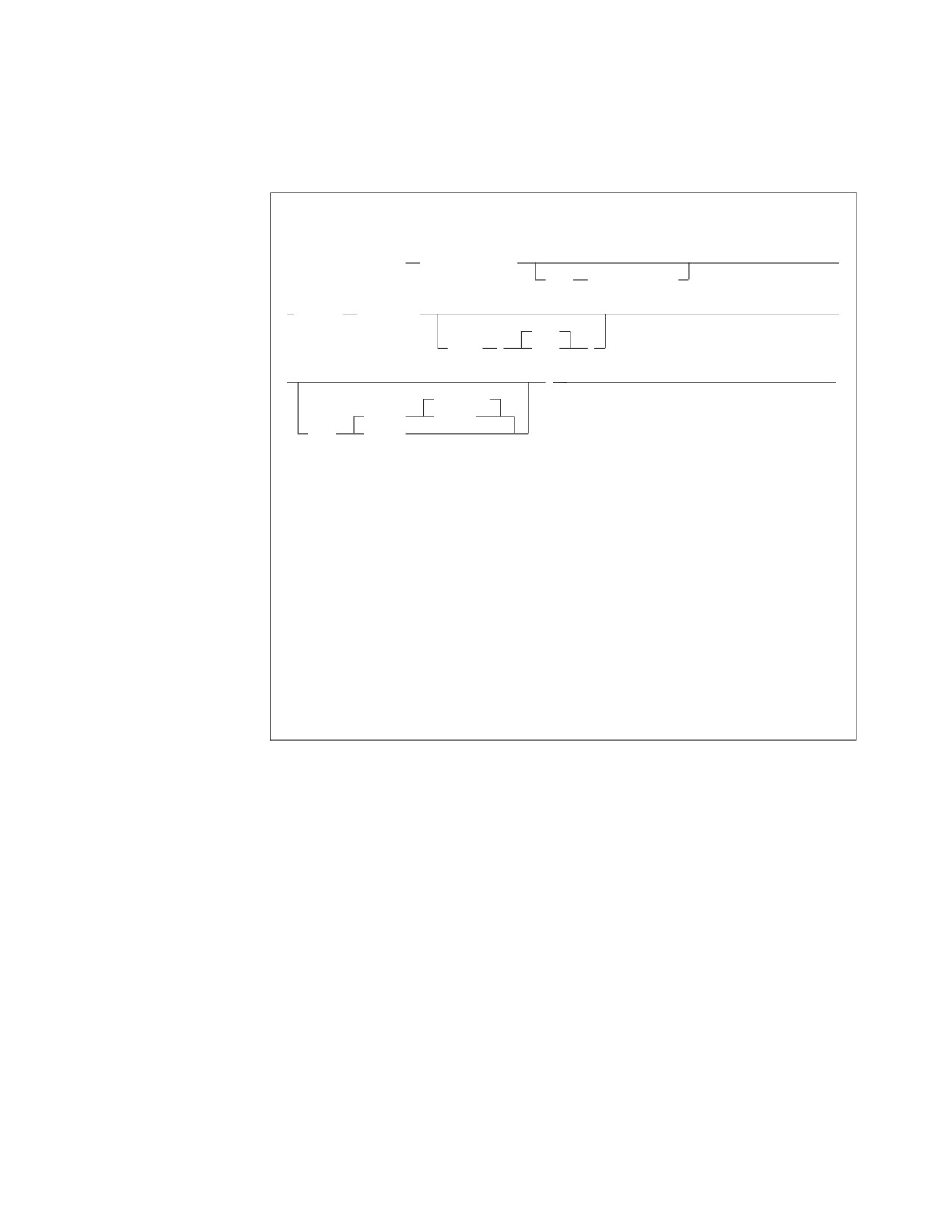
The UNLOAD PACKAGE command unloads a specific package to a file. You can
unload packages flagged as invalid in the database because RELOAD command
processing automatically preprocesses the package again, thus revalidating it. Any
unresolved dependencies in the package are then flagged when the RELOAD
command preprocesses it again.
Note: The UNLOAD PACKAGE command is not supported if you are using
DRDA flow.
Following are descriptions of each part of the command:
PACKAGE (package_name)
identifies an UNLOAD PACKAGE request and the package to be processed.
In DB2 Server for VSE, you can further qualify the package_name with the
owner, separating the two names with a period.
The name of the package is package_name. If you do not specify the owner (see
“Qualifying Object Names” on page 110 for details), owner defaults to the
currently connected authorization ID.
The DB2 Server for VM authorization ID is either:
Chapter 8. Command Reference
211
v The authorization ID specified in a previous explicit CONNECT (when
FROM is not used)
v The VM user ID (when FROM is used) because it is the user ID used to
connect to server_name.
FROM (server-name)
in DB2 Server for VSE, this identifies the application server against which the
UNLOAD PACKAGE command should be issued. If an LUW is active, the
UNLOAD command is unsuccessful and an error occurs.
In DB2 Server for VM, this identifies the application server containing the
package. To unload the package, the Database Services Utility connects to the
specified server_name (using application server switching, which requires
APPC/VM in multiple user mode). If an LUW is active, the UNLOAD
command fails with an error. When FROM is specified, the CONNECT is
attempted with no user ID or password. The attempted connection fails if
implicit connects are not allowed on server_name.
After the package is unloaded, a COMMIT (or ROLLBACK) RELEASE is done,
releasing the connection to server_name. The default user ID (the VM user ID),
and the default database (as specified to SQLINIT) are reestablished for a new
LUW. Any explicit CONNECT statements that you issued before the UNLOAD
command are therefore lost and must be reissued, if required. When you use
FROM, the Database Services Utility ignores any preceding CONNECT
statements and uses the VM user ID as a default. If you do not want to use
your VM user ID, issue the explicit CONNECT statements as needed, and use
the UNLOAD command without a FROM clause.
OUTFILE (ddname)
identifies and describes the sequential (SAM) tape or disk output file that is to
contain the unloaded package. UNLOAD program processing uses a record
format of fixed-length blocked (FB) and a record length of 80. The block size,
in a VM environment, must be a multiple of 80 and defaults to 80 if not
specified. This file contains only one unloaded package. If the file already
exists, its contents are replaced; otherwise, the file is created.
ddname
in DB2 Server for VM, this is the name of the sequential output file defined
with a CMS FILEDEF command. Do not specify SYSIN or SYSPRINT as
the ddname.
In DB2 Server for VSE, this is the TLBL or DLBL job control statement file
name for the sequential output file.
BLKSZ (size) (DB2 Server for VSE only)
is an optional parameter that specifies the block size of the sequential output
file. It must be a multiple of 80. The default block size is 2000 bytes per block.
PDEV (TAPE or DASD)
is an optional parameter that specifies the device type (DASD or TAPE) for the
sequential output file. Specify PDEV(DASD) for files that reside on any device
supported by the VSE DTFSD macro. Specify PDEV(TAPE) for files that reside
on any device supported by the VSE DTFMT macro. The default is
PDEV(TAPE).
BLKSZ and PDEV can be specified in any order but must occur after the
ddname parameter.
212
Database Services Utility
NOREWIND or REWIND
controls tape file rewind processing performed during CLOSE processing. This
parameter is valid only if you specify TAPE for PDEV. The default is
NOREWIND.
NOREWIND
specifies that the tape file is not rewound by CLOSE processing.
REWIND
specifies that the tape file is rewound by CLOSE processing.
REBIND PACKAGE
REBIND PACKAGE Format
Format:
|
EXPLAIN (NO)
►► REBIND PACKAGE
(package_name)
EXPLAIN (YES)
►◄
Example:
REBIND PACKAGE(SMITH.PROG)
Authorization:
You must be the owner of the package you want to rebind. To rebind another user’s
package, you must have DBA authority.
The REBIND PACKAGE command allows you to repreprocess an existing package
immediately without unloading and reloading the package. You can use the
REBIND PACKAGE command with single or multiple user mode.
Note: The REBIND PACKAGE command is not supported if you are using the
DRDA protocol.
Following is the description of the command:
PACKAGE (package_name)
identifies the package that you want to rebind.
You can qualify the name of the package by specifying the owner of the
package; you must, however, have DBA authority to repreprocess a package
belonging to another user. If you do not specify the owner, owner defaults to
the connected authorization ID. See “Qualifying Object Names” on page 110
for details on accessing data objects that are owned by other users.
|
EXPLAIN(YES or NO)
|
determines if explain processing should be performed.
|
If EXPLAIN(YES) is specified, then EXPLAIN ALL processing will be done and
|
the explain tables will be updated. See EXPLAIN in the DB2 Server for VSE &
|
VM SQL Reference for details on EXPLAIN processing.
|
If EXPLAIN is not specified, the default is NO.
Chapter 8. Command Reference
213
Set-Item Commands
SET AUTOCOMMIT
SET AUTOCOMMIT Format
Format:
(
OFF
)
►►
SET AUTOCOMMIT
ON
►◄
The SET AUTOCOMMIT command allows you to activate or suppress the
execution of SQL COMMIT statements by the Database Services Utility. This
command cannot span input records.
OFF
identifies that you do not want the utility to commit database changes after
control commands are successfully processed. You must supply SQL COMMIT
statements in the Database Services Utility input stream at the points at which
you commit the changes.
In this mode of operation, the only execution of an SQL COMMIT by the
utility is at the end-of-program after all control commands have been
successfully processed.
ON or OFF must be specified in this command. If you do not supply a SET
AUTOCOMMIT command in the input records, the utility operates as if you
had issued SET AUTOCOMMIT OFF.
ON
identifies that you want the utility to run an SQL COMMIT command after the
successful processing of any control command (that is, Database Services
Utility commands or SQL statements) except those noted below. The utility
ensures that any database changes made before the receipt of the
AUTOCOMMIT ON command are committed before processing continues.
In AUTOCOMMIT ON mode, the Database Services Utility does not run an
SQL COMMIT command after the successful processing of these commands:
SQL Statements
Database Services Utility Commands
COMMIT
COMMENT
CONNECT
SET AUTOCOMMIT OFF
LOCK
SET ERRORMODE
ROLLBACK
SET FORMAT
SET ISOLATION
SET LINECOUNT
SET LINEWIDTH
SET UPDATE STATISTICS
214
Database Services Utility
SET ERRORMODE
SET ERRORMODE Format
Format:
(
OFF
)
►►
SET ERRORmode
ON
►◄
CONTINUE
The SET ERRORMODE command allows you to:
v Suspend the normal Database Services Utility actions taken after a command
processing error is detected and cause the utility to continue processing
commands after an error has occurred.
v Force the Database Services Utility to enter error mode processing.
v Resume normal Database Services Utility command processing.
This command cannot span input records. If you do not supply a SET
ERRORMODE command in the input records, the utility operates as if you had
issued SET ERRORMODE OFF.
OFF
causes the utility to resume execution of Database Services Utility commands
and SQL statements after a command processing error has occurred or to
terminate error mode CONTINUE processing.
Any subsequent command processing errors cause the utility to execute an
SQL ROLLBACK statement and enter Database Services Utility error mode
processing.
Notes:
1. The SET ERRORMODE OFF command also terminates the processing mode
established by the Database Services Utility SET AUTOCOMMIT ON
command.
2. A SET ERRORMODE OFF command is not used:
a. If the error mode is already off.
b. If a serious database error has previously occurred. A serious error, by
definition, causes all subsequent SQL statements to terminate. Thus, a
SET ERRORMODE OFF command in this case has no effect.
ON
causes the utility to suspend execution of following Database Services Utility
commands and SQL statements. A SET ERRORMODE ON command
terminates:
v The normal command processing mode that was established by default
when the utility was run or by a previous SET ERRORMODE OFF command
v The processing mode established by a SET ERRORMODE CONTINUE
command.
When a SET ERRORMODE ON command is processed, the utility initiates
error mode processing. While in error mode, the Database Services Utility
displays commands in the report or message file listing and performs syntax
Chapter 8. Command Reference
215
checking on Database Services Utility commands. No SQL statements or
Database Services Utility commands (except SET ERRORMODE OFF or SET
ERRORMODE CONTINUE) are executed during error mode processing.
Therefore, any errors that result from command execution (for example, SQL
syntax errors and data file errors) are not detected.
Database Services Utility error mode processing is also entered when the utility
detects a command processing error, and the utility is operating in normal
command processing mode. If the processing mode established by a SET
ERRORMODE CONTINUE command is in effect, and a command processing
error is detected, Database Services Utility error mode processing is entered
only when the error is a serious database error.
Notes:
1. A SET ERRORMODE ON command also terminates the processing mode
established by the SET AUTOCOMMIT ON command.
2. A SET ERRORMODE ON command is not used if Database Services Utility
error mode processing is already in effect.
CONTINUE
suppresses the normal Database Services Utility error processing after an error
is detected; that is, Database Services Utility error mode processing is not
performed. An SQL ROLLBACK statement is not executed, and the utility
continues to process Database Services Utility commands and SQL statements
after a command processing error occurs. If any errors occur, and they occur
only while SET ERRORMODE CONTINUE is in effect, the Database Services
Utility issues error message ARI8007I when the Database Services Utility
command processing ends.
Notes:
1.
If a serious database error occurs while the processing mode established by
a SET ERRORMODE CONTINUE command is in effect, an SQL
ROLLBACK is executed, and the utility enters error mode processing. A
serious database error, by definition, causes all subsequent SQL statements
to terminate.
2.
After a SET ERRORMODE CONTINUE command is processed, because the
Database Services Utility does not execute an SQL ROLLBACK command
does not mean that the logical unit of work is always in progress. Certain
SQL statement errors cause the logical unit of work to be terminated by the
database manager. If one of these errors occurs, all database changes made
during the logical unit of work or since the last SQL COMMIT statement
are lost.
To control the logical unit of work after a SET ERRORMODE CONTINUE
command is processed, you can use SQL COMMIT statements or the
Database Services Utility SET AUTOCOMMIT ON command.
3.
The SET ERRORMODE CONTINUE command is not used:
a. If the processing mode established by a previous SET ERRORMODE
CONTINUE command is still in effect
b. If a serious database error has previously occurred.
4.
If the Database Services Utility is not in error mode when a SET
ERRORMODE CONTINUE command is encountered, the Database Services
Utility AUTOCOMMIT processing status is not changed.
If the Database Services Utility is in error mode when a SET ERRORMODE
CONTINUE command is encountered, the Database Services Utility
AUTOCOMMIT processing status is set to off.
216
Database Services Utility
5. Database Services Utility end-of-program COMMIT processing is based on
the current status of the command processing. That is, if Database Services
Utility error mode processing and the SET AUTOCOMMIT ON command
processing mode are not in effect, Database Services Utility end-of-program
COMMIT processing is performed.
6. All SQL statements are treated as one LUW when running the database
with LOGMODE=N and Database Services Utility with
AUTOCOMMIT=OFF and ERRORMODE=CONTINUE. If an error occurs,
ALL statements are rolled back.
Note: The ERRORMODE setting has an effect on the final Database Services Utility
return code. For more information, see Chapter 9, “Error Handling and
Debugging,” on page 223.
SET FORMAT
SET FORMAT Format
Format:
(
CB
)
►►
SET FORMAT
CL
►◄
LO
This command allows you to identify whether the Database Services Utility should
use column or block format, column or list format, or only list format for SQL
SELECT statement results. If the format is not specified, Database Services Utility
processing uses column or block format for SQL SELECT statement output. This
command cannot span input records.
The SET FORMAT command overrides the formats specified by either a parameter
list format control parameter or the default column or block format. This command
specification remains in effect until another SET FORMAT command is
encountered and successfully processed, or when Database Services Utility
processing ends.
CB
identifies that either column or block format should be used. The column
format is used when a report or message file record can contain all column
names or column data for a selected row. The block format is used when a
report or message file record cannot contain all column names or column data
for a selected row. Column or block format is the default if you do not
override it by supplying either a format control parameter—FORMAT(CL) or
FORMAT(LO)—or a SET FORMAT command.
CL
identifies that either column or list format should be used. The column format
is used when a report or message file record can contain all column names or
column data for a selected row. The list format is used when a report or
message file record cannot contain all column names or column data for a
selected row.
Chapter 8. Command Reference
217