DB2 Server for VSE System Administration (Version 7 Release 5) - page 8
v LU6.2 resynchronization3 occurs between the CICS/VSE syncpoint manager and
the application requester syncpoint manager. This is initiated at the application
requester site.
If there is a failure of the APPC session with the source system during the
in-doubt period, the CICS/VSE syncpoint manager makes a heuristic decision
based on the INDOUBT4 option of the AXE transaction definition.
v Task-related user exit resynchronization5 occurs between the CICS/VSE
syncpoint manager and the CICS external resource manager (DB2 Server for
VSE). It is driven by the EXEC CICS RESYNC request that is issued by the AXE
transaction after it has successfully enabled and started the DRDA TRUE. This
causes the CICS/VSE syncpoint manager to pass the appropriate operation code
(for example, commit or rollback) to the DRDA task-related user exit (TRUE)
program for each in-doubt LUW that needs to be resynchronized. Depending on
the nature of the operation code, the DRDA TRUE issues an SQL request to the
DB2 Server for VSE database manager to resolve the in-doubt LUW.
The details of what the task-related user exit does when it receives the operation
code from the CICS/VSE Syncpoint Manager during task-related user exit
resynchronization are shown in Table 35.
Table 35. Actions by the DRDA task-related user exit during task-related user exit resynchronization
CICS/VSE Syncpoint Manager operation
DRDA task-related user exit actions
code received by TRUE
Backout (UERTBACK)
Issues EXEC SQL ROLLBACK to resource manager
Committed (UERTCOMM)
Issues EXEC SQL COMMIT to resource manager
Lost due to CICS cold start (UERTDGCS)
Generates a message indicating that the LUW is lost due to CICS
cold start:
ARI0193E The CICS log does not contain information for an in-doubt
logical unit of work belonging to server server_name.
Instructs the operator to FORCE the LUW if the LUW has an agent
assigned to it (for example, the LUW has not been FORCED):
ARI4018A Use the database manager SHOW and FORCE commands
to commit or rollback the following units of work:
ARI4019I SERVER_NAME = server_name.
USER ID = user id.
AGENT IDENTIFIER = N.
Instructs the operator to RESET INDOUBT if the LUW does not
have an agent assigned to it (for example, the LUW has been
FORCED):
ARI0195A Use the database manager SHOW INDOUBT operator
command to find the following units of work:
ARI0196I SERVER_NAME = server_name.
RECOVERY TOKEN = rectok.
3. For general information on how CICS handles this, see the section “Syncpoint and Recovery” in the “VTAM LU6.2” chapter of
the CICS/VSE Diagnosis Reference manual
4. For more information on the INDOUBT option, see the section ″The INDOUBT Option of the Transaction Definition″ in the
″Recovery and Restart in Interconnected Systems″ chapter of the CICS/VSE Intercommunication Guide.
5. For general information on how CICS handles user exit resynchronization, see the chapter ″Task-related User Exit Recovery″ in
the CICS/VSE Diagnosis Reference manual
Chapter 14. Using a DRDA Environment
331

Table 35. Actions by the DRDA task-related user exit during task-related user exit resynchronization (continued)
CICS/VSE Syncpoint Manager operation
DRDA task-related user exit actions
code received by TRUE
LUW should not be in doubt (UERTDGNK)
Generates a message indicating that the LUW should not be in
doubt:
ARI0194E A logical unit of work that the database manager
for server server_name indicated needed to be
resolved was not identified by the CICS/VSE log as needing
resolution.
Instructs the operator to FORCE the LUW if the LUW has an agent
assigned to it (for example, the LUW has not been FORCED):
ARI4018A Use the database manager SHOW and FORCE commands
to commit or rollback the following units of work:
ARI4019I SERVER_NAME = server_name.
USER ID = user id.
AGENT IDENTIFIER = N.
Instructs the operator to RESET INDOUBT if the LUW does not
have an agent assigned to it (for example, the LUW has been
FORCED):
ARI0195A Use the database manager SHOW INDOUBT operator
command to find the following units of work:
ARI0196I SERVER_NAME = server_name.
RECOVERY TOKEN = rectok.
Note:
1. When the SHOW and FORCE operator commands are used to commit or rollback an LUW, the RESET
INDOUBT operator command must be issued to cause DB2 Server for VSE to forget about the LUW.
2. When message ARI0195A is issued, the RESET INDOUBT operator command must be issued to cause DB2
Server for VSE to forget about the LUW.
3. In both cases, before RESET INDOUBT is issued, any user-defined action to resynchronize the local and remote
databases must be done.
4. VSE messages come up in the CICS partition, not in the partition you are working on.
The DB2 Server for VSE resource manager processes the SQL request it received
from the task-related user exit. The action it takes is determined by the SQL
request and the LUW state which it remembers. These actions are shown in
Table 36.
Table 36. Actions by the DB2 Server for VSE resource manager during task-related user exit resynchronization
LUW state at
SQL request passed by task-related user exit
DB2 Server
Rollback
Commit
for VSE
LUWID Not
Send normal completion reply indicating Backout
Send normal completion reply indicating
Found
state. DB2 Server for VSE notifies operator with
Committed state. DB2 Server for VSE notifies
message:
operator with message:
ARI0183E The Sync Point Manager has asked to ROLLBACK
ARI0183E The Sync Point Manager has asked to COMMIT
this LUW but the database manager has no
this LUW but the database manager has no
memory of it.
memory of it.
ARI0196I SERVER_NAME = server_name.
ARI0196I SERVER_NAME = server_name.
RECOVERY TOKEN = rectok.
RECOVERY TOKEN = rectok.
Indoubt
Drive backout of resource and send normal
Drive commit of resource and send normal
(Prepared)
completion reply indicating Backout state.
completion reply indicating Committed state.
332
System Administration

Table 36. Actions by the DB2 Server for VSE resource manager during task-related user exit
resynchronization (continued)
LUW state at
SQL request passed by task-related user exit
DB2 Server
Rollback
Commit
for VSE
Heuristic
Send normal completion reply indicating Backout
Send normal completion reply indicating
Backout
state.
Committed state. DB2 Server for VSE notifies
operator with message:
ARI0184A The Sync Point Manager has asked to COMMIT
this LUW but the FORCE command was
previously used to ROLLBACK it.
ARI0196I SERVER_NAME = server_name.
RECOVERY TOKEN = rectok.
In this case, the LUW will still appear when the
SHOW INDOUBT command is executed. The
LUW must be cleared using the RESET
INDOUBT command. In addition, manual
intervention is necessary to ensure that the LUW
is in a consistent state at all sites where the LUW
has been distributed. This may require
intervention at this database manager, or possibly
at another database manager. Manual
intervention could mean manually fixing the data
or possibly restoring an archive.
Heuristic
Send normal completion reply indicating Backout
Send normal completion reply indicating
Committed
state. DB2 Server for VSE notifies operator with
Committed state.
message:
ARI0184A The Sync Point Manager has asked to ROLLBACK
this LUW but the FORCE command was
previously used to COMMIT it.
ARI0196I SERVER_NAME = server_name.
RECOVERY TOKEN = rectok.
In this case, the LUW will still appear when the
SHOW INDOUBT command is executed. The
LUW must be cleared using the RESET
INDOUBT command. In addition, manual
intervention is necessary to ensure that the LUW
is in a consistent state at all sites where the LUW
has been distributed. This may require
intervention at this database manager, or possibly
at another database manager. Manual
intervention could mean manually fixing the data
or possibly restoring an archive.
Chapter 14. Using a DRDA Environment
333

Table 36. Actions by the DB2 Server for VSE resource manager during task-related user exit
resynchronization (continued)
LUW state at
SQL request passed by task-related user exit
DB2 Server
Rollback
Commit
for VSE
Note:
1.
The state Syncpoint Pending is not possible at DB2 Server for VSE servers. The server completes any sync point
actions such as prepare to commit, commit, or rollback before the CICS/VSE Syncpoint Manager performs any
sync point logging.
2.
The state Backout (Reset) is not possible at DB2 Server for VSE servers. The servers complete rollback
processing before the CICS/VSE Syncpoint Manager performs any sync point logging for backout.
3.
The state committed is not possible at DB2 Server for VSE servers. The servers complete commit processing
before the CICS/VSE Syncpoint Manager performs any sync point logging for committed.
4.
It is very remote that “LUWID Not Found” would occur. It can only happen if the following occurs:
a. TRUE enablement support obtains from the DB2 Server for VSE resource manager a list of LUWIDs that
require resynchronization.
b. The FORCE and RESET INDOUBT operator commands are issued for an LUWID that was in the list of
LUWIDs above.
c. TRUE enablement support commits or backs out LUWID according to the disposition of the CICS URD.
5.
The task-related user exit resynchronization process is all one way, from CICS to the external resource manager
(such as, DB2 for VSE). After the task-related user exit has obtained a list of in-doubt LUWs from the DB2 for
VSE resource manager and has passed this list to CICS via the RESYNC command, CICS looks at its URDs to
determine whether to commit or backout each LUW. There is no provision for a DB2 for VSE resource manager,
through its task-related user exit, to inform CICS that a heuristic decision was made for an LUW.
The only sensible thing for the DB2 Server for VSE resource manager to do, in the case of a heuristic damage, is
to send a normal completion reply, as opposed to sending an abnormal reply. This way, the task-related user exit
can vote UERFDONE (Forget) to the CICS/VSE Syncpoint Manager and the CICS/VSE Syncpoint Manager can
throw away the unit of recovery descriptor (URD) associated with this LUW. If the DB2 Server for VSE resource
manager sends an abnormal reply, the task-related user exit will vote UERFHOLD and CICS will hold the URD
for this LUW until the next RESYNC. If the resource manager had ″forgotten″ the LUW, (for example, RESET
INDOUBT was done), CICS will assume that the resource manager is not interested in this LUW and will throw
away the corresponding URD. Therefore, both normal and abnormal replies eventually produce the same results,
but it is more efficient to send a normal reply in the case where a heuristic damage has occurred.
334
System Administration
Chapter 15. Using TCP/IP with DB2 Server for VSE
TCP/IP communications can be used with DB2 Server for VSE using DRDA
protocol. DB2 Server for VSE application requesters can use DRDA remote unit of
work over TCP/IP to access remote DRDA-capable servers (including remote DB2
Server for VSE and DB2 Server for VM servers.) Non-DB2 Server for VSE
requesters can use DRDA remote unit of work over TCP/IP to access remote DB2
Server for VSE servers (including remote DB2 Server for VSE and DB2 Server for
VM requesters).
Preparing the Application Server to use TCP/IP
The following must be done to allow the application server to use TCP/IP.
1.
TCP/IP for VSE must be installed and configured.
2.
The LE/VSE runtime libraries must be available. For the Batch Application
Requester, this is the PRD2.SCEEBASE library. For the Online Application
Requester on VSE/ESA Version 2 Release 3 and 4, these are the
PRD2.SCEECICS and the PRD2.SCEEBASE libraries. For the Online Application
Requestor on VSE/ESA Version 2 Release 5 and later, it is the PRD2.SCEEBASE
library. Minimum support level of LE/VSE is Version 1 Release 4.
3.
The TCP/IP for VSE library must be available on both Online and Batch
application requesters, this is the PRD1.BASE library. If your TCP/IP product is
ordered directly from CSI (Connectivity Systems) or from a distributor, the
product library is PRD2.TCPIP.
4.
To ensure proper TCP/IP functionality, the C runtime library and the TCP/IP
library must follow a certain search sequence. The following are sample
LIBDEF statements for the possible combinations:
v TCP/IP product installation from IBM:
Batch partition:
//LIBDEF*,SEARCH=(PRD1.BASE,PRD2.SCEEBASE,...)
Online partition:
- For VSE/ESA Version 2 Release 3 and 4:
//LIBDEF*,SEARCH=(PRD1.BASE,PRD2.SCEECICS,PRD2.SCEEBASE,...)
- For VSE/ESA Version 2 Release 5 and later:
//LIBDEF*,SEARCH=(PRD1.BASE,PRD2.SCEEBASE,...)
v TCP/IP product installation from CSI:
Batch partition:
//LIBDEF*,SEARCH=(PRD2.TCPIP,PRD1.BASE,PRD2.SCEEBASE...)
Online partition:
- For VSE/ESA Version 2 Release 3 and 4:
//LIBDEF*,SEARCH=(PRD2.TCPIP,PRD1.BASE,PRD2.SCEECICS,PRD2.SCEEBASE,...
- For VSE/ESA Version 2 Release 5 and later:
//LIBDEF*,SEARCH=(PRD2.TCPIP,PRD1.BASE,PRD2.SCEEBASE,...
5.
One JCL statement //OPTION SYSPARM=’xx’ should be added to the CICS
startup JCL or the batch JCL, where xx is to match the xx specified in the ID=xx
parameter for starting up a specific TCP/IP server. This is how the application
requesters can route the TCP/IP function request to the correct TCP/IP server
335
in case there are more than one TCP/IP server running in the same VSE/ESA
system. If //OPTION SYSPARM is not specified, the default is 00.
6. The VSE partition running the TCP/IP for VSE server should always have a
higher priority than the partition running the DB2 for VSE database server.
TCP/IP support is invoked at system initialization time. If TCP/IP for VSE is
available, the server will make use of it. The application server must be able to
determine what port number to listen on for connections. This can be
accomplished in a number of ways.
1. The DBNAME Directory of the database has a port number specified for the
TCPPORT parameter in the application server’s DBNAME Local entry. See
“Setting Up the DBNAME Directory” on page 23.
2. The new initialization parameter, TCPPORT, can be used to specify the port
number to listen on. Refer to the DB2 Server for VSE & VM Operation manual
for a detailed description of the TCPPORT parameter.
3. The well-known port number 446 is used, if available.
Each method has advantages and disadvantages.
The first method of using the DBNAME Directory is the preferred method. This
directory is maintained by the database administrator and resides in a VSE library.
Since more than one DB2 Server for VSE can run on the same VSE system, it must
be ensured that they do not use the same TCP/IP port or users will be connected
to the wrong database. Identifying the port numbers in the directory makes it
easier to ensure that different servers are using different ports.
The second method of port identification is the new initialization parameter,
TCPPORT. This is helpful when initially testing TCP/IP support or when TCP/IP
support needs to be enabled, but the DBNAME Directory cannot be updated. The
disadvantage is that it is possible that another application may be using the same
port. If this occurs, an error message is received during initialization showing a
BIND failure with return code 1115 indicating that the port was already in use by
another application.
The third method is the least desirable. If there is no port number specified in the
DBNAME Directory for the application server or a TCPPORT initialization
parameter was not specified, there is a well known port assignment for relational
databases. It is called ddm-rdb and the port number is 446. This has the advantage
of doing no extra configuration to TCP/IP for VSE and to the application server.
The disadvantage is that only one application server on the VSE system can use
the definition.
We will take advantage of all of the methods. The actions can be broken down into
the following scenarios.
1. If the TCPPORT initialization parameter is not specified when the application
server is started, the application server will search the DBNAME Directory for
its corresponding Local entry to see if the TCPPORT parameter is specified. If it
is specified and the value is not zero, it will be used as the port number of the
listener socket to be created. If the value is zero, no TCP/IP initialization will
be performed. If the TCPPORT parameter is not specified, it will use the well
known port number 446 to create the listener socket.
2. If the TCPPORT is specified when the application server is started, the
application server will use this parameter while performing TCP/IP support
initialization. If the port cannot be used, no attempt is made to find another
336
System Administration
port. If any error is returned from a TCP/IP function used, it will be assumed
that TCP/IP is not available and TCP/IP support on the application server will
not be used.
After the TCP/IP support for the application server is initiated, a TCP/IP agent is
created to handle all TCP/IP related functions. If any TCP/IP function failure is
detected by the TCP/IP agent, the TCP/IP support for the application server will
be disabled. It is possible to restart the TCP/IP support for the application server
without recycling the application server. This can be done by using the START
TCPIP operator command. Refer to the DB2 Server for VSE & VM Operation manual
for a detailed description of this command. The restart will also be done
automatically by the database manager if the TCPRETRY parameter is set to Y.
To have the database manager re-enable TCP/IP support automatically, the
database manager must have the TCPRETRY initialization parameter set to Y. This
can be done by specifying the initialization parameter TCPRETRY=Y when the
database manager is initialized or by using the operator command SET TCPRETRY
Y. The default value for this parameter is Y. The current setting of the parameters
can be checked with the SHOW INITPARM operator command.
If TCP/IP support fails and automatic restart is enabled, the database manager will
use the following strategy to restart TCP/IP support.
1. The database manager will try to re-enable TCP/IP support every 30 seconds
up to 10 times. The maximum recovery time is 5 minutes.
2. If TCP/IP is still disabled, the database manager will try to re-enable TCP/IP
support every 60 seconds up to 5 times. The maximum recovery time is now
up to 10 minutes.
3. If TCP/IP is still disabled, the database manager will try to re-enable TCP/IP
support every 10 minutes. It will do this until the number of attempts is greater
than the TCPMAXRT value or until TCP/IP support is re-enabled or the
operator disables the retry attempts.
To disable automatic retry, issue the operator command SET TCPRETRY N. If
automatic retry is not desired at all, specify the initialization parameter
TCPRETRY=N when the database manager is initialized. If TCPRETRY is set back
to Y after being set to N, the number of attempts and the retry interval are reset to
their original values. The number of attempts is set to 0 and the first retry interval
is set to 30 seconds. If TCP/IP support is disabled when this occurs, then
automatic retry will begin in 30 seconds.
If the maximum number of retry attempts is reached and TCP/IP support has not
been successfully re-enabled, the database manager will disable the automatic
restart support by setting the value of TCPRETRY to N. The maximum number of
retry attempts is controlled by the TCPMAXRT parameter. This parameter can be
specified at database initialization and it can be modified online by the SET
command. The default value is set to 158. This results in 24 hours of retry
attempts. The maximum value is 9,999 which results in 69 days of retry attempts.
The following formulas are useful for determining a suitable value for
TCPMAXRT. These formulas are only valid for values of TCPMAXRT that are
greater than or equal to 15 or time values greater than or equal to 10 minutes.
Given a value for TCPMAXRT, how long will retry be attempted?
minutes − 10 + (( TCPMAXRT − 15 ) * 10 )
Chapter 15. Using TCP/IP with DB2 Server for VSE
337
Given a time limit in minutes, what should TCPMAXRT be set to?
TCPMAXRT = 15 + (( minutes − 10 ) / 10 )
Using the first formula, we can see that a value of 158 for TCPMAXRT would take
10 + (158−15)*10 or 1440 minutes. 1440 minutes is equivalent to 24 hours. To
enable the retry for 2 days we use the second formula. 2 day is 2 * 24 * 60 or 2880
minutes. 15 + ((2880-10)/10) = 15 + (2870/10) = 15 + 287 = 302. Setting
TCPMAXRT to 302 will result in retry being attempted for 2 days.
Preparing the Application Requester to use TCP/IP
The following must be done to allow an application requester to use TCP/IP.
1. TCP/IP for VSE must be installed and configured.
To indicate that TCP/IP is to be used to establish a connection from the online
application requester, the SQLGLOB file is used. If T is specified as the
communication protocol for the referencing application, TCP/IP communication
protocol will be used. In this case, the DBNAME Directory remote entry of the
database that is the target of the SQL CONNECT statement of the application must
be set up with the necessary TCP/IP related information to be used to establish a
TCP/IP connection. Refer to “Setting Up the DBNAME Directory” on page 23 for
details. For more information about the SQLGLOB file, refer to the DB2 Server for
VSE & VM Database Administration manual.
Note that batch applications accessing remote servers will always use TCP/IP
protocol and the SQLGLOB file communications protocol parameter is ignored.
338
System Administration
Appendix A. Processor Storage Requirements
(The information in this Appendix has been moved to the DB2 Server for VSE
Program Directory.)
339
Appendix B. Estimating Database Storage
This appendix describes procedures for estimating the size of the directory, the
SYS0001 dbspace and ISQL dbspace.
For information on estimating the size of user dbspaces, see the DB2 Server for VSE
& VM Database Administration manual.
Storage Capacities of IBM DASD Devices
The effective storage capacities of IBM DASD devices vary, depending on how the
devices are being used. The database manager uses VSE/VSAM for managing
DASD space for the directory data set, the log, and the dbextents. The directory
data set uses 512-byte control intervals while the log and dbextent data sets are
managed with 4-kilobyte control intervals.
Table 37 and Table 38 show the capacities of IBM devices for storing log and
dbspace pages (dbextent space). Table 39 and Table 40 show the capacities for
storing directory information.
Table 37. Log and Dbextent Storage Capacities of IBM Count-Key-Data DASDs
Number of
Tracks for Each
Megabytes for
Megabytes for
DASD Type
Cylinders
Cylinder
Each Cylinder
Each Volume
3375
959
12
0.3749
359
3380 J
885
15
0.5858
518
3380 E
1,770
15
0.5858
1,036
3380 K
2,655
15
0.5858
1,555
3390-1
1,113
15
0.7031
782
3390-2
2,226
15
0.7031
1,565
3390-3
3,339
15
0.7031
2,347
3390-9
10,017
15
0.7031
7,041
9345-1
1,440
15
0.5858
843
9345-2
2,156
15
0.5858
1,262
Table 38. Log and Dbextent Storage Capacities of IBM FBA DASDs
4 Kilobyte Pages for Each
DASD Type
Megabytes for Each Volume
Volume
3370-1
272.4
69,750
3370-2
348.0
89,094
9332-400
175.7
45,004
9332-600
270.8
69,350
9335
392.9
100,589
9336-010
449.2
115,014
9336-020
816.8
209,110
9336-025
816.8
209,110
341
Table 38. Log and Dbextent Storage Capacities of IBM FBA DASDs (continued)
4 Kilobyte Pages for Each
DASD Type
Megabytes for Each Volume
Volume
0671
280.5
71,820
Table 39. Directory Storage Capacities of IBM Count-Key-Data DASDs
Number of
Cylinders per
Tracks for Each
Megabytes for
Megabytes for Each
DASD Type
Volume
Cylinder
Each Cylinder
Volume
3375
959
12
0.2343
224
3380 J
885
15
0.3295
291
3380 E
1,770
15
0.3295
583
3380 K
2,665
15
0.3295
874
3390-1
1,113
15
0.3645
405
3390-2
2,226
15
0.3645
811
3390-3
3,339
15
0.3645
1,217
3390-9
10,017
15
0.3645
3,651
9345-1
1,140
15
0.3002
432.28
9345-2
2,156
15
0.3002
647.23
Table 40. Directory Storage Capacities of IBM FBA DASDs
DASD Type
Megabytes for Each Volume
512-Byte Blocks for Each Volume
3370-1
272.4
558,000
3370-2
348.8
712,752
9332-400
175.7
360,036
9332-600
270.8
554,800
9335
392.9
804,714
9336-010
449.1
920,115
9336-020
816.8
1,672,881
9336-025
816.8
1,672,881
0671
280.5
574,560
These capacity charts are referenced in later calculations for determining data set
allocations of the directory, log, and dbextent data sets.
Table 41 shows the minimum space allocations for a log or dbextent data set.
Table 41. Minimum Space Allocations for Log and Dbextent Data Sets
DASD Type
Minimum Space Allocation
3375
1 cylinder
3380
1 cylinder
3390
1 cylinder
9345
1 cylinder
FBA
528 Blocks
342
System Administration

Relationship of Megabytes to 4-Kilobyte Pages
In the database generation process, all dbspace and dbextent DASD space
definitions are expressed in terms of 4-kilobyte pages: that is, each page represents
4096 bytes of storage space. Storage space is used not only for data, but also for
indexes and free space initially reserved to facilitate the insertion of new data after
the database is in operation.
Space needs are often expressed in terms of megabytes (1,048,576 bytes). Table 42
shows the number of 4-kilobyte pages needed to support a range of megabytes.
The dbspace definitions are made in multiples of 128 pages. An alternative to
using Table 42 is to use the formula:
Number of 4-kilobyte pages
=
256 x number of megabytes
Table 42. Megabytes of Data on
4-Kilobyte Pages
Megabytes
4-Kilobyte Pages
0.0
-
0.5
128
0.5
-
1.0
256
1.0
-
1.5
384
1.5
-
2.0
512
2.0
-
2.5
640
2.5
-
3.0
768
3.0
-
3.5
896
3.5
-
4.0
1,024
4.0
-
4.5
1,152
4.5
-
5.0
1,280
5.0
-
5.5
1,408
5.5
-
6.0
1,536
6.0
-
6.5
1,664
6.5
-
7.0
1,792
7.0
-
7.5
1,920
7.5
-
8.0
2,048
8.0
-
8.5
2,176
8.5
-
9.0
2,304
9.0
-
9.5
2,432
9.5
-
10.0
2,560
50.0
12,800
100.0
25,600
500.0
128,000
Estimating Directory Space Requirements
The required size of the database directory depends on the maximums you
established on the MAXPOOLS, MAXEXTNT, and MAXDBSPC parameters during
database generation. The directory must be large enough to hold page table entries
for the maximum size of the database. Figure 123 shows a formula for calculating
Appendix B. Estimating Database Storage
343
the recommended size of a directory data set.
Directory size = 7 558 + 16
x MAXDBSPC value
(in bytes)
+ 16
x MAXEXTNT value
+
4
x MAXPOOLS value
+
0.0021 x Maximum database size
Figure 123. Formula for Calculating Directory Size (in Bytes)
To estimate the value for the maximum database size, determine how many
dbspaces (public, private, and internal) your database will need, and the number
of pages needed by each dbspace; then multiply the total number of pages by 4096
to get the number of bytes. (You may want to overestimate this value to allow for
creating unplanned dbspaces, and for increasing the number and size of internal
dbspaces.) Finally, multiply this number by 0.0021, to determine how many bytes
are needed in the directory to support these dbspaces. The result of this calculation
includes the space needed for shadow paging.
Once you have the directory size, you can use the charts shown in the section
“Storage Capacities of IBM DASD Devices” on page 341 to determine the data set
size specifications, in cylinders or blocks, of the device to be used.
Note: Although you do not have to specify the maximum database size during
database generation, the size specified for the directory data set effectively
establishes the limit.
Estimating Storage Pool Requirements
For estimating storage pool sizes, you need to estimate:
v The size of used portions of dbspaces. This includes tables, indexes, and free
space on used dbspace pages.
v Shadow paging requirements. This is an estimate of the number of dbspace
pages that can change between checkpoints.
To estimate the number of pages required for a storage pool use the following
formula:
Pool pages = 8 x Number of dbspaces
+ 1.5 x Data pages for all dbspaces in the pool
+ Data pages for the largest table in the pool
This calculation covers header pages and pages required for table rows and
indexes on those tables. If you have increased your dbspace data pages value to
accommodate future growth of tables, you can decrease the pool pages
correspondingly.
The addition of the factor of data pages for the largest table in the pool should
accommodate storage pool demands for shadow paging. This allows for UNLOAD
and RELOAD of the largest table in the storage pool.
Estimating SYS0001 Dbspace Requirements
The PUBLIC.SYS0001 dbspace is reserved for the catalog tables during database
generation, and cannot be redefined. You establish its size (and storage pool) when
you generate the database. The size should be large enough to hold all of your
database catalog information for the life of the database.
344
System Administration
Note: Physical space is not actually consumed until it is required. Consequently,
you can define the SYS0001 dbspace to be very large without penalty. Be
generous. The penalty for defining the SYS0001 dbspace too small is that,
when it has no more usable space, you must completely regenerate the
database. This can be a considerable task for a production database. For
more information, see “Preparing for Database Regeneration” on page 34.
The formula shown in Figure 7 on page 20 should provide ample storage space for
most uses of the database manager. The formula was derived based on a set of
assumptions that may not be valid for your database. Review the assumptions and
modify the general formula if the assumptions do not accurately represent your
planned usage of the database manager.
The following sections describe:
v SYS0001 storage estimating general formula assumptions
You should review these assumptions to determine whether they apply for your
planned usage of the database manager. If they do not, you should modify the
assumptions (and the resulting formula) to more accurately represent your
planned usage.
v Derivation of the general formula for SYS0001 storage estimating
v Formula for SYS0001 storage estimating
This formula is described in “Formula for SYS0001 Storage Estimating” on page
349.
v Examples of using the SYS0001 storage estimating formula
These examples show how to use the SYS0001 storage estimating formula based
on three example situations.
v Modifying the SYS0001 storage estimating general formula
This section provides the formulas used to derive the general formula. You can
modify the general formula if you want to change some of the assumptions
made in deriving the general formula.
SYS0001 Storage Estimating General Formula Assumptions
The general formula for SYS0001 storage estimating was derived based on:
v Average row lengths for catalog rows
v The number of rows required for each object type in the formula.
Average Row Lengths for Catalog Table Rows
Table 43 on page 346 shows the length of the fixed portions of catalog rows, the
maximum stored row length for each catalog table, and an average row length for
each of the catalog tables. The average row length is the length assumed in
developing the general formula for estimating catalog storage space requirements.
Appendix B. Estimating Database Storage
345
Table 43. Stored Lengths of Catalog Rows
Estimated
Minimum
Maximum
Average
Catalog Table
Length
Length
Length
SYSACCESS
46
90
52
SYSCATALOG
64
385
170
SYSCCSIDS
39
39
39
SYSCHARSETS
393
411
400
SYSCOLAUTH
46
82
72
SYSCOLSTATS
27
123
59
SYSCOLUMNS
54
398
156
SYSDBSPACES
40
58
46
SYSDROP
13
13
13
SYSINDEXES
62
232
131
SYSKEYCOLS
55
91
67
SYSKEYS
77
113
89
SYSOPTIONS
11
301
100
SYSPARMS
82
82
82
SYSPROGAUTH
46
54
49
SYSPSERVERS
11
281
60
SYSROUTINES
58
581
170
SYSSTRINGS
286
286
286
SYSSYNONYMS
26
62
36
SYSTABAUTH
57
101
84
SYSUSAGE
36
72
51
SYSUSERAUTH
35
35
35
SYSVIEWS
20
293
200
In Table 43, the minimum and maximum row lengths for each catalog table are
determined using the description of the catalog tables in the DB2 Server for VSE &
VM Database Administration manual. The length of a row depends on the data type
of each column in the catalog table. The minimum length for each column is found
using these values for each data type.
Table 44. Minimum Column Length
Data Type
Value
DBAINT
4
DBAHW
2
INTEGER
4
SMALLINT
2
CHAR(n)
n
TIMESTAMP
10
VARCHAR(n)
1
346
System Administration
Note: The data types DBAINT and DBAHW are used internally by the database
manager. Externally, they look like the data types INTEGER and
SMALLINT.
For CHAR columns, the length is the column length (n). The column lengths are
added. For each column that can contain nulls, 1 is added to this figure. The value
8 is then added to this total for catalog table overhead. The resulting number is the
minimum row length for the catalog table.
The maximum length for each column is found using these values:
Table 45. Maximum Column
Length
Data Type
Value
DBAINT
4
DBAHW
2
INTEGER
4
SMALLINT
2
CHAR(n)
n
TIMESTAMP
10
VARCHAR(n)
n+1
For CHAR columns, the length is the column length (n). For VARCHAR columns,
the length is the maximum column length plus one (n + 1). For each column that
can contain nulls, 1 is added to this figure. The value 8 is then added to this total
for catalog table overhead. The resulting number is the maximum row length for
the catalog table.
The average length for each column is calculated this way for most catalog tables:
(maximum length - minimum length)
3
+ minimum length
This produces a number one third of the way between the minimum and
maximum lengths. In some situations, higher values are used because those
columns are typically longer. An example is the SYSTEM.SYSVIEWS catalog table,
where the VIEWTEXT column contains the command used to create the view.
Because these commands are usually over 100 bytes long, a number one third of
the way between the minimum and maximum lengths of the column would be too
low. In this situation, the number 200 is chosen arbitrarily.
If you make your own estimates of catalog table row lengths (using the chart
provided in Table 50 on page 352), you should choose values for the average row
lengths that are accurate for your database. Otherwise, you could underestimate
the size of the SYS0001 dbspace. In particular, you should not underestimate the
average length of rows in the SYSTEM.SYSCOLUMNS catalog table. If you use the
REMARKS or CLABEL columns of this catalog table, your average row length
could be far greater than the number (156) given in Table 43 on page 346. Because
the SYSTEM.SYSCOLUMNS table can become quite large (it has a row for every
column in every table in the database), its size is a major factor in the size of the
SYS0001 dbspace.
Appendix B. Estimating Database Storage
347

Assumptions on the Number of Catalog Table Rows
The average number of rows for each catalog table was determined based on the
assumptions in Table 46. These assumptions were used in generating the general
formula for SYS0001.
Table 46. Assumptions of Catalog Bytes/Pages for Each Object
Bytes for Each
Pages for Each
Object
Catalog Entries
Bytes
Object
Object
Table
1 SYSCATALOG
169
515
0.13
1 SYSTABAUTH
84
2 SYSINDEXES
262
View
1 SYSCATALOG
169
639
0.16
1 SYSVIEWS
200
2 SYSTABAUTH
168
2 SYSUSAGE
102
Column
1 SYSCOLUMNS
156
156
0.04
Package
1 SYSPROGAUTH
49
814
0.20
15 SYSUSAGE
765
Dbspace
1 SYSDBSPACES
46
46
0.01
(including
package
dbspaces)
User
1 SYSUSERAUTH
35
16,835
4.11
50 SYSTABAUTH
4,200
50 SYSSYNONYMS
1,800
150 SYSCOLAUTH
10,800
Package
255 SYSACCESS
13,260
13,260
3.24
dbspaces
Character Set
1 SYSCHARSETS
400
400
0.10
Keys
1 SYSKEYS
89
223
0.05
2 SYSKEYCOLS
134
Other
15 SYSOPTIONS
1200
1200
0.30
When a table is created, one entry is made in the SYSTEM.SYSCATALOG table and
one in the SYSTEM.SYSTABAUTH table. This formula assumes an average of two
indexes for each table. For each index created, one entry is made in
SYSTEM.SYSINDEXES.
When a view is created, one entry is made in SYSTEM.SYSCATALOG. In addition,
as many as 32 entries are made in SYSTEM.SYSVIEWS. With the assumption that
the average view definition is less than 254 bytes, only one row is required. One
entry is also made in the SYSTEM.SYSTABAUTH and SYSTEM.SYSUSAGE tables
for each table on which the view is defined. The general formula assumes that, on
average, a view is defined on two tables.
One entry is made in SYSTEM.SYSCOLUMNS for every table and view column.
When a package is created, one entry is made in SYSTEM.SYSPROGAUTH. In
addition, entries are made in SYSTEM.SYSUSAGE for every table, view, index, and
dbspace used by the package. (A package uses a dbspace if it uses a table in the
dbspace.)
The general formula assumes 15 such entries in SYSTEM.SYSUSAGE.
348
System Administration
One entry is made in SYSTEM.SYSDBSPACES for each dbspace added to the
database, including package dbspaces.
One entry is placed in SYSTEM.SYSUSERAUTH for each user of the database.
Each user is assumed to have access to an average of 50 tables (and views)
belonging to other users. This explains the 50 entries in SYSTEM.SYSTABAUTH
and SYSTEM.SYSSYNONYMS. Specific column update authorization is assumed to
average about 3 columns for each table (or view) that is shared (3 for each of the
50 tables or views). This yields an estimate of 150 entries in
SYSTEM.SYSCOLAUTH for each user.
For each package dbspace added, one entry is made in SYSTEM.SYSDBSPACES,
which was accounted for earlier, and 255 entries are made in SYSTEM.SYSACCESS.
The 255 entries are made because all 255 packages are preallocated in the dbspace,
even though they can all be empty.
For each character set you define, you must load one row into
SYSTEM.SYSCHARSETS.
For each key, one row is added to SYSTEM.SYSKEYS, and two rows are added to
SYSTEM.SYSKEYCOLS (assuming that each key is made up of two columns).
Finally, three rows exist in SYSTEM.SYSOPTIONS for every database.
Derivation of the General Formula for SYS0001 Storage
Estimating
The assumptions in the preceding section provide a means of estimating the data
pages required in SYS0001. Assuming the PCTFREE value for the SYS0001 dbspace
is 0, the SYS0001 data pages are:
SYS0001 data pages =
.13 x the number of tables
+
.16 x the number of views
+
.04 x the number of columns
+
.20 x the number of packages
+
.01 x the number of dbspaces
(including package dbspaces)
+ 4.11 x the number of users
+ 3.24 x the number of package dbspaces
+
.10 x the number of character sets
+
.05 x the number of keys
+
.30
(for the SYSTEM.SYSOPTIONS table)
To get the total number of SYS0001 dbspace pages, you must add the header pages
and the index pages. SYS0001 has eight header pages. The initial set of catalog
entries generated by the database generation process fills 4 pages. The PCTINDX
value for SYS0001 is 60. Thus, to get the total number of pages you must add 12
and divide by 0.4:
SYS0001 pages = ( 12 + SYS0001 data pages ) / 0.40
The SYS0001 data pages is your estimate for the number of data pages for your
catalog entries.
Formula for SYS0001 Storage Estimating
When the adjustments described in “Derivation of the General Formula for
SYS0001 Storage Estimating” are made, the formula for the total number of
SYS0001 dbspace pages becomes:
Appendix B. Estimating Database Storage
349

SYS0001 pages =
30 +
.33 x the number of tables
+
.40 x the number of views
+
.10 x the number of columns
+
.50 x the number of packages
+
.03 x the number of dbspaces
(including package dbspaces)
+ 10.28 x the number of users
+
8.10 x the number of package dbspaces
+
.25 x the number of character sets
+
.13 x the number of keys
( +
.74
(for the SYSTEM.SYSOPTIONS table)
)
This number should be rounded up to the next higher multiple of 128. Because the
number of pages needed for the SYSTEM.SYSOPTIONS catalog table is so small,
the number is omitted from the general formula and any further calculations.
Examples of Using the SYS0001 Storage Estimating Formula
The following examples illustrate the use of the general formula for estimating the
required dbspace size for SYS0001.
For a Test Database
Table 47 illustrates the estimate for a small set of catalog tables that can be used in
generating a test database.
Table 47. Example of Estimating the Catalog Dbspace for a Test Database
Number of
Example Number of Objects
Number of Pages Calculation
Pages
Reserved
30
30
50 tables
.33 X 50
17
100 views
.40 X 100
40
1500 columns
.10 X 1 500
150
25 packages
.50 X 25
13
50 dbspaces
.03 X 50
2
15 users
10.28 X 15
154
1 package dbspace
8.10 X 1
8
2 character sets
.25 X 2
1
20 keys
.13 X 20
3
Total number of SYS0001 pages = 418
Rounded to the next higher multiple of 128 is: 512
For an Application Development Database
Table 48 on page 351 illustrates the estimate for a medium sized set of catalog
tables that might be used in generating a test database to support development of
multiple application systems. The number of package dbspaces needed was
determined by adding the number of views to the number of packages and
dividing the sum by 255. The maximum number of packages that can be defined
in a package dbspace is 255. This number could be reduced if the packages are
large. The maximum 255 packages may not fit in the allocated pages for the
dbspace.
350
System Administration

Table 48. Example of Estimating the Catalog Dbspace for an Application Development
Database
Number of Pages
Example Number of Objects
Calculation
Number of Pages
Reserved
30
30
500 tables
.33 X 500
165
1000 views
.40 X 1000
400
15,000 columns
.10 X 15,000
1,500
50 packages
.50 X 50
25
500 dbspaces
.03 X 500
15
25 users
10.28 X 25
257
5 package dbspaces
8.10 X 5
40
6 character sets
.25 X 6
2
200 keys
.13 X 200
26
Total number of SYS0001 pages = 2461
Rounded to the next higher multiple of 128 is: 2560
For a Production Database
Table 49 illustrates the estimate for a large sized set of catalog tables that could be
used to support a production database.
Table 49. Example of Estimating the Catalog Dbspace for a Production Database
Number of Pages
Example Number of Objects
Calculation
Number of Pages
Reserved
30
30
3000 tables
.33 X 3000
990
5000 views
.40 X 5000
2000
75,000 columns
.10 X 75,000
7500
250 packages
.50 X 250
125
500 dbspaces
.03 X 500
15
50 users
10.28 X 50
514
21 package dbspaces
8.10 X 21
170
6 character sets
.25 X 6
2
1,200 keys
.13 X 1 200
156
Total number of SYS0001 pages = 11,502
Rounded to the next higher multiple of 128 is: 11,520
Modifying the SYS0001 Storage Estimating General Formula
Table 50 on page 352 and Table 51 on page 352 assist you if you want to modify
any of the assumptions used in deriving the general formula. If you have
generated the starter database, you should compare the data in the catalog tables
against the assumptions made here. You can do so by issuing UPDATE
STATISTICS for each of the catalog tables after you have used the starter database.
Queries against SYSTEM.SYSCATALOG give you the statistics for comparison.
Appendix B. Estimating Database Storage
351
Table 50. Your Estimated Stored Lengths of Catalog Rows
Estimated
Minimum
Maximum
Average
Catalog Table
Length
Length
Length
SYSACCESS
46
64
SYSCATALOG
64
384
SYSCCSIDS
39
39
39
SYSCHARSETS
393
411
SYSCOLAUTH
46
82
SYSCOLSTATS
27
123
SYSCOLUMNS
56
400
SYSDBSPACES
40
58
SYSDROP
13
13
13
SYSINDEXES
62
232
SYSKEYCOLS
55
91
SYSKEYS
77
113
SYSOPTIONS
13
303
SYSPARMS
82
82
SYSPROGAUTH
46
54
SYSPSERVERS
11
281
SYSROUTINES
58
581
SYSSTRINGS
286
286
286
SYSSYNONYMS
26
62
SYSTABAUTH
57
101
SYSUSAGE
36
72
SYSUSERAUTH
35
35
35
SYSVIEWS
20
292
Table 51. Your Assumptions of Catalog Bytes or Pages for Each Object
Bytes for Each
Pages for Each
Object
Catalog Entries
Bytes
Object
Object
Table
1 SYSCATALOG
___
1 SYSTABAUTH
___
__ SYSINDEXES
___
View
1 SYSCATALOG
___
1 SYSVIEWS
___
__ SYSTABAUTH
___
__ SYSUSAGE
___
Column
1 SYSCOLUMNS
___
Package
1 SYSPROGAUTH
___
___ SYSUSAGE
___
Dbspace
1 SYSDBSPACES
___
(including
package
dbspaces)
352
System Administration
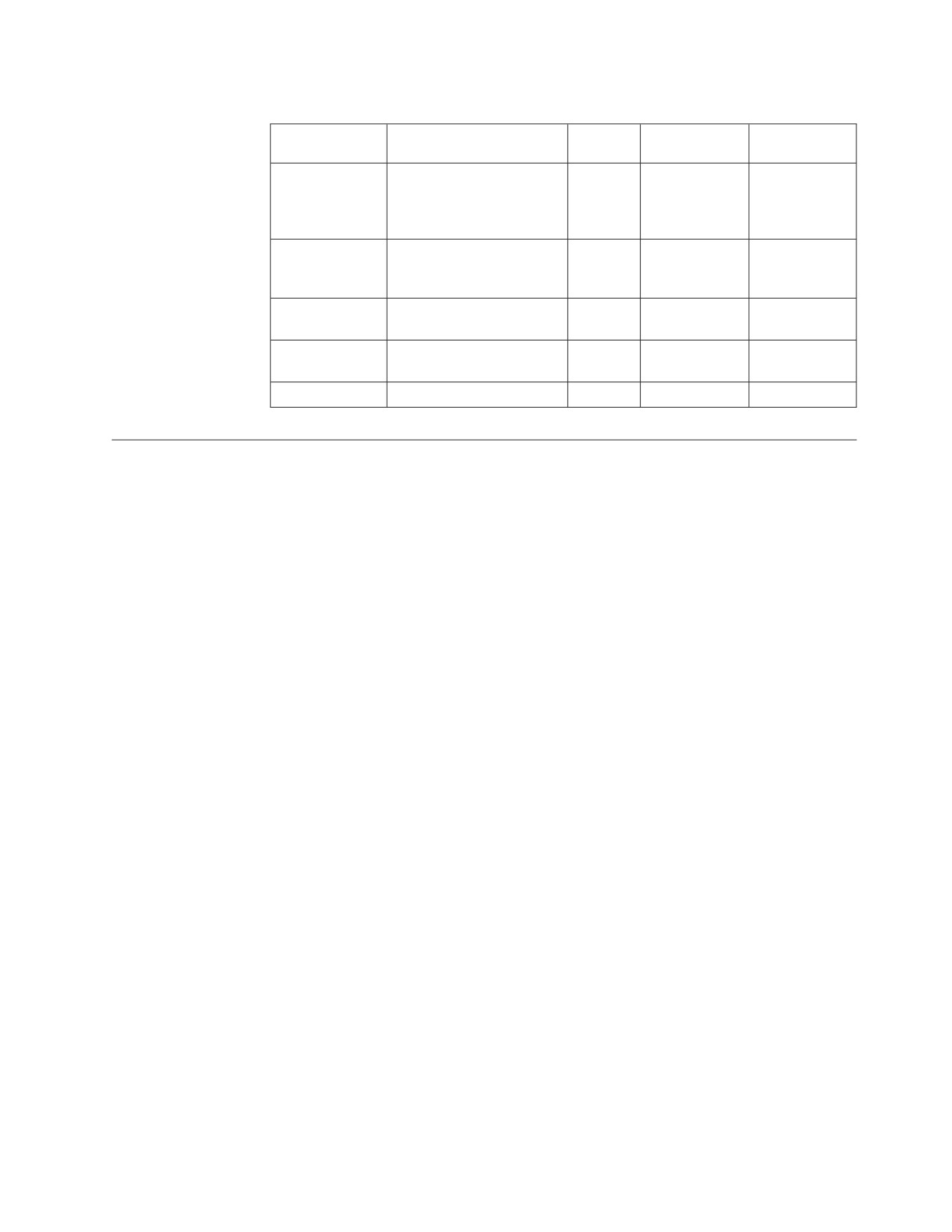
Table 51. Your Assumptions of Catalog Bytes or Pages for Each Object (continued)
Bytes for Each
Pages for Each
Object
Catalog
Entries
Bytes
Object
Object
User
1 SYSUSERAUTH
35
___ SYSTABAUTH
___
___ SYSSYNONYMS
___
____ SYSCOLAUTH
___
Package
255 SYSACCESS
___
dbspaces
Character
1 SYSCHARSETS
___
Set
Keys
1 SYSKEYS
___
___
SYSKEYCOLS
___
Other
3 SYSOPTIONS
___
Estimating ISQL Dbspace Requirements
An allocation of 1 024 pages should be sufficient for most ISQL users. If you have
many users or expect to make extensive use of the ISQL stored queries facility,
consider increasing this allocation.
The recommended size (in pages) for the PUBLIC.ISQL dbspace is 1024 or .88 x the
number of stored queries, whichever is larger.
Estimating Dbspace Sizes for Routines
The size of ROUTINE tables can vary greatly from user to user and from
installation to installation. You can place the ROUTINE tables for all users in the
same public dbspace, or you can place the ROUTINE table for each user in that
user’s private dbspace.
The following formulas are condensed versions of size estimation formulas in the
DB2 Server for VSE & VM Database Administration manual. They simplify the work
required to estimate the size of the dbspace needed to hold routines. The following
assumptions have been used in the formulas:
v The PCTFREE value is 15.
v The PCTINDEX value is 33.
v ALLOWANCE was not included in the formula.
The following formula can be used to calculate the average row length for the
routines:
AVGROWLEN = 23 + average command line length
+ average remark length
Note: The average command line length is not the same as the average command
length. A command can be entered on multiple command lines. A command
line in a routine has a maximum length of 254 characters. A command has a
maximum length of 2048 characters. Be sure to use the command line length
in your estimate.
The following formula can be used to calculate the number of dbspace pages
required for your ROUTINE tables:
Appendix B. Estimating Database Storage
353
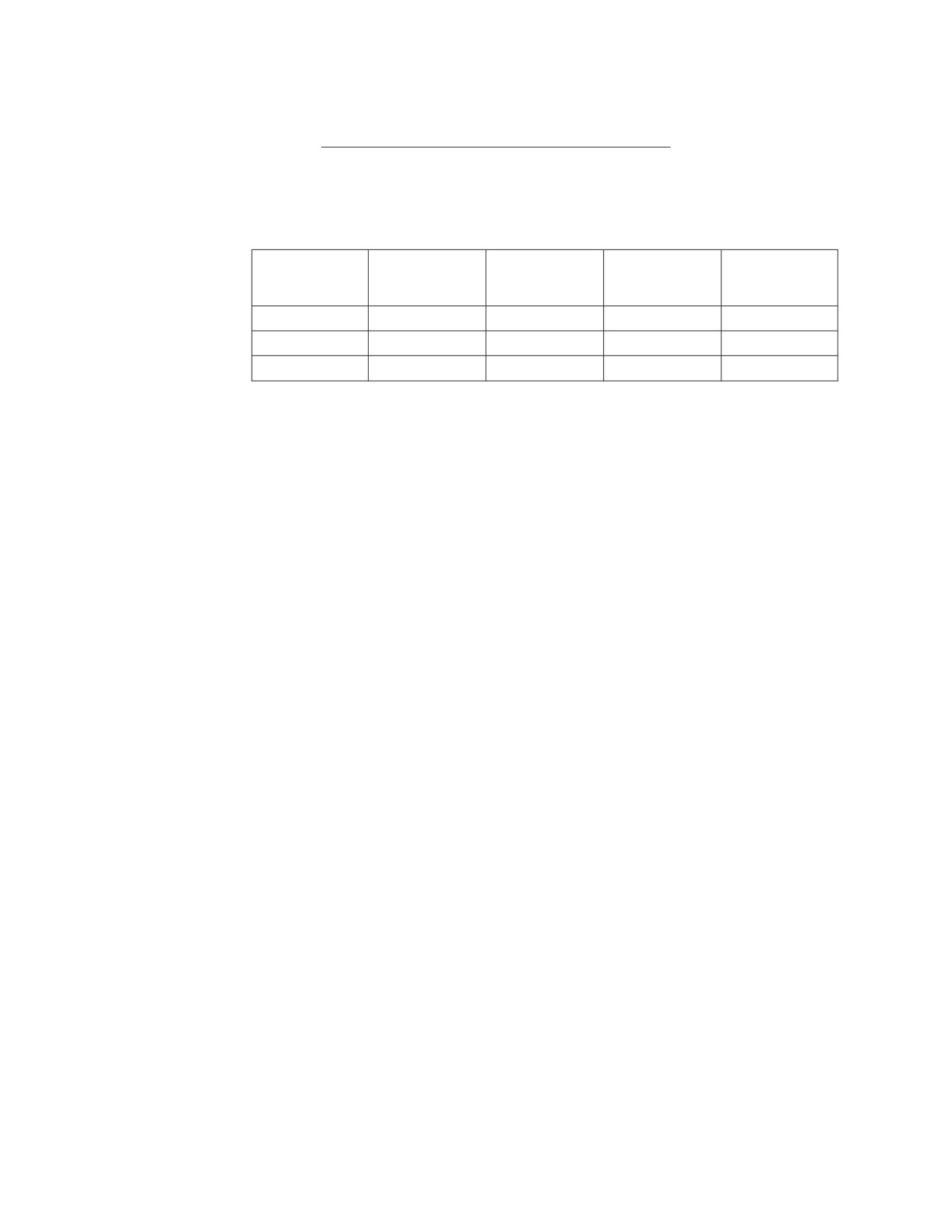
number
average
average
of
x
number of x
number
users
routines
of lines
Dbspace pages =
(2074 / AVGROWLEN) (from previous formula)
Examples:
Table 52. Example of Estimating the Number of Dbspace Pages for a Routine
Number of
Number of
Number of
Routines For
Lines For Each
Users
Each User
Routine
Row Length
Dbspace Pages
1
20
20
80
16
20
20
20
80
309
50
60
35
75
3797
Estimating Dbspace Size for Stored SQL Statements (Stored
Queries)
The following assumptions are used in the formula for calculating the size of the
dbspace required for stored SQL statements:
v The PCTFREE value is 15.
v The PCTINDEX value is 33.
v ALLOWANCE is not included in the formula.
v One page was included for one routine named PROFILE. It can contain up to 25
lines with an average row length of 80.
The following formula can be used to calculate the number of dbspace pages
needed for stored SQL statements:
Dbspace pages = 1 + (.037 x number of statements) +
((Truncate [(avglen + 250) / 250 x 250)] x number of statements
---------------------------------------------------------------
2667
When calculating the average length of your stored queries, you must include the
FORMAT information for all SELECT statements. The length of the FORMAT
information can be calculated by the following formula:
Format length = 504 + (number of columns x 44)
or
2048, whichever is smaller
The following examples show the number of dbspace pages required for each user
for the two types of stored SQL statements. The two types are:
v SQL SELECT statements (true stored queries)
v Other SQL statements.
The examples in Table 53 on page 355 and Table 54 on page 355 show the number
of dbspace pages required for one user for 10 stored SQL statements. If a user has
some of each type of stored SQL statement, you must add the values from each
table as needed.
354
System Administration
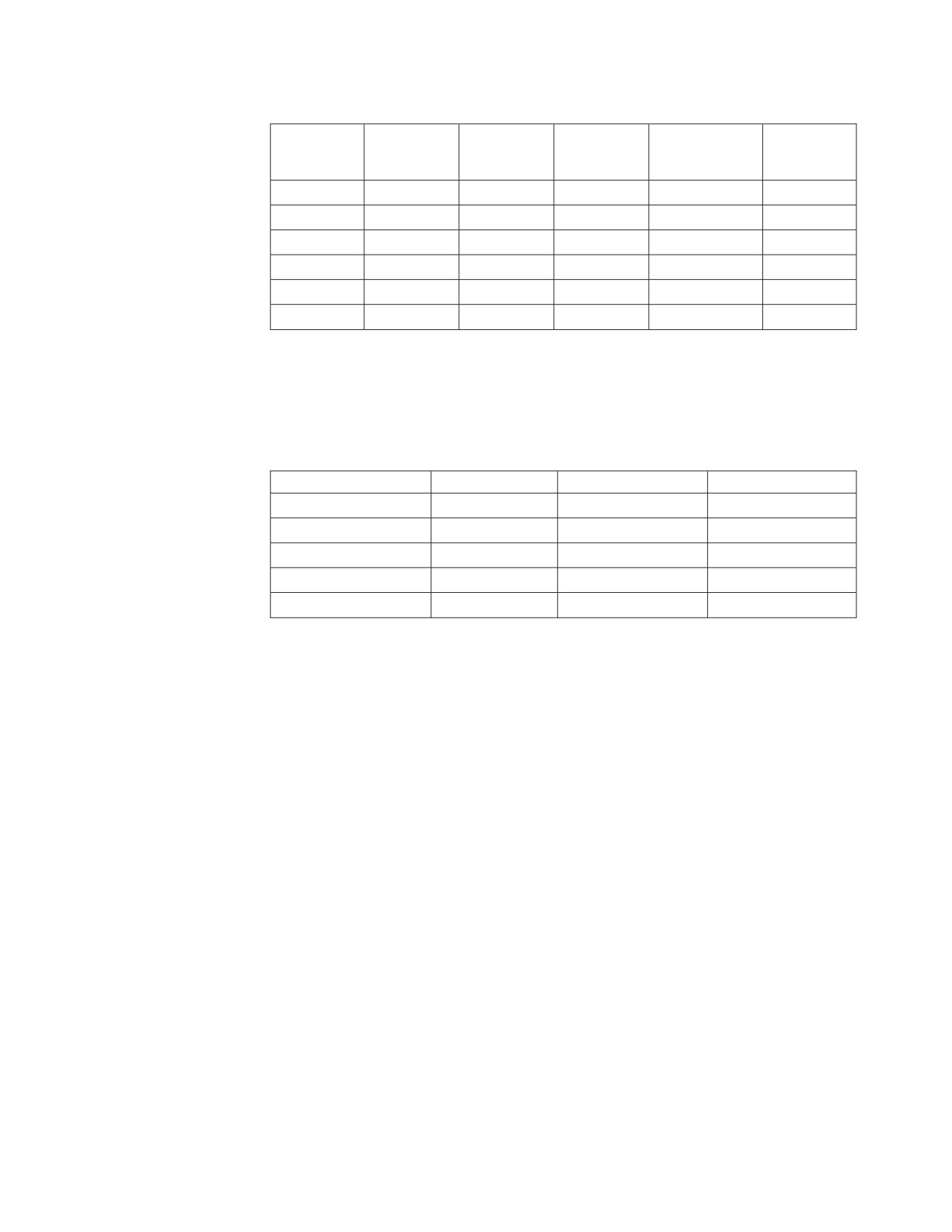
Table 53. Examples — Dbspace Pages for Each User for Stored SELECT Statements
Dbspace
Number of
Number of
Length of
Format
Adjusted
Pages for
Selects
Columns
Select
Length
Length1
Each User
10
10
70
944
1250
5.88
10
20
70
1384
1500
5.99
10
10
400
944
1500
5.99
10
20
400
1384
2000
7.87
10
40
400
2048
2500
9.38
10
46
2048
2048
4250
16.30
1 The adjusted length is the stored data length of the stored SQL statements. For
more information on adjusted lengths columns, see the DB2 Server for VSE & VM
Database Administration manual.
Table 54. Examples — Dbspace Pages for Each User for Stored SQL Statements Other
than SELECTs
Number of Commands
Average Length
Adjusted Length1
Pages for Each User
10
70
250
1.31
10
400
500
2.25
10
999
1 000
4.12
10
1 499
1500
6.00
10
2 048
2 250
8.81
1The adjusted length is the stored data length of the stored SQL statements. For
more information on adjusted lengths columns, see the DB2 Server for VSE & VM
Database Administration manual.
Appendix B. Estimating Database Storage
355
356
System Administration

Appendix C. Maximum Values
Database Manager Maximum Values
Table 55. Database Manager Maximum Values
Restricted Parameter
Maximum
Databases for each system1
unlimited
Number of CICS/VSE shareable links
64
Initialization parameters:
RMTUSERS2
65535
DISPBIAS
10
NCUSERS2
252
NPACKAGE2
32766
NPACKPCT
100
NPAGBUF23
400000
NDIRBUF24
400000
NLRBU2
583333
NLRBS2
583333
NCSCANS2
655
CHKINTVL2
99999999
SLOGCUSH
90
ARCHPCT
99
SOSLEVEL
100
Notes for Table 55:
1. Only one database at a time can be operated in multiple user mode.
2. This is the absolute maximum value. The practical maximum value is less,
depending on the values specified for other parameters and system resources
(such as the amount of storage available). The maximum number of NCUSERS
is limited because the program stack storage for each real agent is obtained
below 16 megabytes.
3. These are 4 K pages.
4. These are 512-byte pages.
357
Database Maximum Values
Table 56. Database Maximum Values
Restricted Parameter
Maximum
Number of storage pools
999
Number of dbextents
999
Number of dbspaces
32000
Number of bytes per database1
64 gigabytes3
Number of pages per database1
16,777,088
Number of bytes per dbspace2
32 gigabytes3
Number of pages per dbspace2
8,388,480
Size of the directory
1,048,575 4KB pages
Size of a log4
524,287 4KB pages
Size of a dbextent
1,048,575 4KB pages
Size of a storage pool1
64 gigabytes3
Notes for Table 56:
1. This is the absolute maximum size of the database. The practical maximum is
lower.
2. This is the absolute maximum size of a dbspace. The practical maximum is
lower.
3. A gigabyte is 230 bytes (1,073,741,824).
4. This is the absolute maximum size allowed, but it is much larger than the
database can use. See Table 3 on page 15 for more appropriate estimates.
358
System Administration
Appendix D. Updating SYSTEM.SYSSTRINGS
The SYSTEM.SYSSTRINGS catalog table contains information on all the CCSID
conversions that this product supports. For each CCSID conversion performed,
there must be a corresponding row in this table.
To insert a row, follow these steps:
1.
Determine the source and target CCSIDs
2.
Determine the conversion type
The conversion type is based on the encoding scheme (EBCDIC or ASCII) of
the CCSIDs and whether they are for tagging SBCS, mixed, or graphic data.
Note that in any conversion that this product supports, the target CCSID is
always EBCDIC. The following are conversion types recognized:
v "SS" (EBCDIC/ASCII SBCS to EBCDIC SBCS)
v "SM" (EBCDIC/ASCII SBCS to EBCDIC mixed)
v "MS" (EBCDIC mixed to EBCDIC SBCS)
v "MM" (EBCDIC mixed to EBCDIC mixed)
v "PS" (ASCII mixed to EBCDIC SBCS)
v "PM" (ASCII mixed to EBCDIC mixed)
v "GG" (EBCDIC/ASCII graphic to EBCDIC graphic)
3.
Determine the error byte
The error byte is only used for SBCS conversions, and therefore applies to all
conversion types except for "GG". Be careful what you set it to: if a character in
the source gets converted to the error byte, the conversion is terminated and an
error occurs. CCSID conversions either have a NULL error byte, or are set as
follows for the detection of DBCS characters in the source when they are not
allowed:
v X'0E' used for
- "SM" conversions where the source CCSID is EBCDIC
- "MS" conversions
v X'3E' used for
- "SS" conversions where the source CCSID is ASCII
- "SM" conversions where the source CCSID is ASCII
- "PS" conversions
CDRA SBCS conversion tables are modified for use in this type of conversion,
so that all DBCS first bytes get mapped to X'3E' instead of the original X'3F'.
For more information, see step 7, “Customize the SBCS Conversion Table”.
4.
Determine the substitution byte
As with the error byte, the substitution byte is not applicable in "GG" type
conversions. Whenever a character in the source gets converted to the
substitution byte, warning flags are set in the SQLCA. This byte is set based on
whether a given conversion table is created using the enforced subset match
criterion. (For more on this subject, refer to the Character Data Representation
Architecture Level 1, Registry manual.) If it is, then this byte is set to X'3F', which
is the CDRA-defined SUB character for conversions with EBCDIC target
CCSIDs.
5.
Determine the TRANSPROC
This field only applies in the cases of "MM", "PM", and "GG" type conversions.
It contains the name of the DBCS conversion table that is shipped with this
product for use in the conversion. If it contains a value other than any of the
359
DBCS conversion table names that the database manager recognizes, then the
value is treated as the name of a user-defined DBCS conversion exit. (For
information on creating a user-defined TRANSPROC exit, see “Coding Your
Own TRANSPROC Exit” on page 284.)
6.
Create the SBCS conversion table
An SBCS conversion table may be required except in the case of the "GG"
conversion type, where it is not applicable. For a conversion type where SBCS
conversion applies, it is possible to specify a NULL SBCS conversion table. For
example, you can have a mixed-to-mixed conversion where the SBCS CCSIDs
of the source and target mixed CCSIDs are the same, in which case you do not
need to perform conversion on the SBCS portion(s) of the mixed source data.
If you require a non-NULL SBCS conversion table, check the catalog table
SYSTEM.SYSSTRINGS to see whether it is already supported. If it is not
currently supported, then you have to create the conversion table based on the
conversion mapping that you define.
A user-created SBCS conversion table should be in the same format as those
supplied by CDRA: that is, a 256-byte string where the byte at offset n (starting
at offset 0) corresponds to what codepoint n in the source CCSID is converted
to. You also have to customize the conversion table for use if its source CCSID
is ASCII SBCS or ASCII mixed.
7.
Customize the SBCS conversion table
If your SBCS conversion table is to be used for a conversion with an ASCII
SBCS or ASCII mixed source CCSID, you will have to modify it for the proper
detection of DBCS first bytes. This requires that you determine the ranges of
valid DBCS first byte codepoints for the ASCII SBCS source CCSID; then set the
contents of the SBCS conversion table at the offsets that correspond to the
DBCS first byte codepoints to:
a.
Error byte
This is required for the following conversions, where DBCS characters are
not allowed in the ASCII source:
1) "SS" conversions where the source CCSID is ASCII
2) "SM" conversions where the source CCSID is ASCII
3) "PS" conversions
In the case of the CDRA-supplied SBCS conversion tables that are shipped
for use in the types of conversion mentioned above, the values contained at
the DBCS first byte offsets in the conversion tables have been changed from
the original X'3F' to X'3E'. This is also the error byte for these conversions.
X'3F' remains the substitution byte for these conversions.
You should also set the DBCS first byte offsets in your conversion table to a
unique character, which will also be your error byte.
b.
X'00'
This is required for "PM" conversions, where DBCS characters in the ASCII
source are allowed and are converted. The database manager considers a
byte a DBCS first byte if it gets converted to X'00' using the
ASCII-to-EBCDIC SBCS conversion table, and if it is not X'00' itself to begin
with.
In the case of the CDRA-supplied SBCS conversion tables that are shipped
for use in "PM" conversions, the values contained at the DBCS first byte
offsets in the conversion tables used to be X'3F', and have been changed to
X'00'. You must therefore also set the characters at the DBCS first byte
offsets in the conversion table to X'00', in order for DBCS characters to be
recognized in the mixed source.
360
System Administration
8. Insert the row into SYSTEM.SYSSTRINGS
You can create a DBSU job to insert the row into SYSTEM.SYSSTRINGS. For
examples, review the ARITPOP MACRO which is supplied with the DB2 Server
for VSE code. This macro inserts a row into SYSTEM.SYSSTRINGS for every
supported conversion between CCSIDs that are supplied with the database
manager.
Appendix D. Updating SYSTEM.SYSSTRINGS
361
362
System Administration
Appendix E. Defining Your Own Character Set
If you cannot use one of the IBM-supplied sample character sets, you can create
your own. (You may be able to use one of the character sets in the Character Data
Representation Architecture Level 1, Registry manual. The CCSIDs in this manual are
registered, and already defined.) To create a character set:
1.
Identify all characters in your set and their hexadecimal values. For more
information, see “Step 1: Identify All Characters in Your Character Set” on page
364.
2.
Classify each character.
The database manager has 12 character classifications that it uses to identify
how the character can be used in SQL statements. You must classify those
characters in your set that differ from the ENGLISH character set table. For
more information, see “Step 2: Classify the Characters” on page 366.
3.
Determine the hexadecimal values to which lowercase characters are to be
translated. For example, suppose X'6A' is used for lowercase n-tilde, and X'7B'
is used for uppercase N-tilde. The database manager does not automatically
know that X'6A' should be converted to X'7B'. You must define that
relationship. For more information, see “Step 3: Determine Translation
Characters” on page 374.
4.
Update the SYSTEM.SYSCHARSETS catalog table.
Having defined character classifications and translations, you must implement
them on the database manager. You can code an INSERT command for the DBS
utility to process. During this process, you must also choose a name for the
character set (for example, PORTUGUESE). For more information, see “Step 4:
Update the SYSTEM.SYSCHARSETS Catalog Table” on page 376.
5.
Update the SYSTEM.SYSCCSIDS catalog table.
When the new character set is implemented, you must add a row to the
SYSTEM.SYSCCSIDS catalog table to identify the CCSID values to be associated
with the new character set. For more information, see “Step 5: Update the
SYSTEM.SYSCCSIDS Catalog Table” on page 376.
6.
Update the SYSTEM.SYSSTRINGS catalog table.
After you specify the CCSID values, you must indicate the conversion table
information to allow conversions to and from the new CCSID.
7.
Update the CCSID-Related Phases
Before using the new character set you must run the job control program
ARISCNVD. This job copies the information in SYSTEM.SYSCHARSETS,
SYSTEM.SYSCCSIDS, and SYSTEM.SYSSTRINGS to three phases, which are
used by the VSE application server and application requester. See the DB2
Server for VSE Program Directory for more information.
When your character set is loaded into the SYSTEM.SYSCHARSETS catalog table,
and the SYSTEM.SYSCCSIDS and SYSTEM.SYSSTRINGS catalog tables have been
updated, you can specify the character set by using the CHARNAME initialization
parameter.
Each step in defining a character set is discussed below. As an example, a character
set (PORTUGUESE) for Brazilian Portuguese is defined.
363
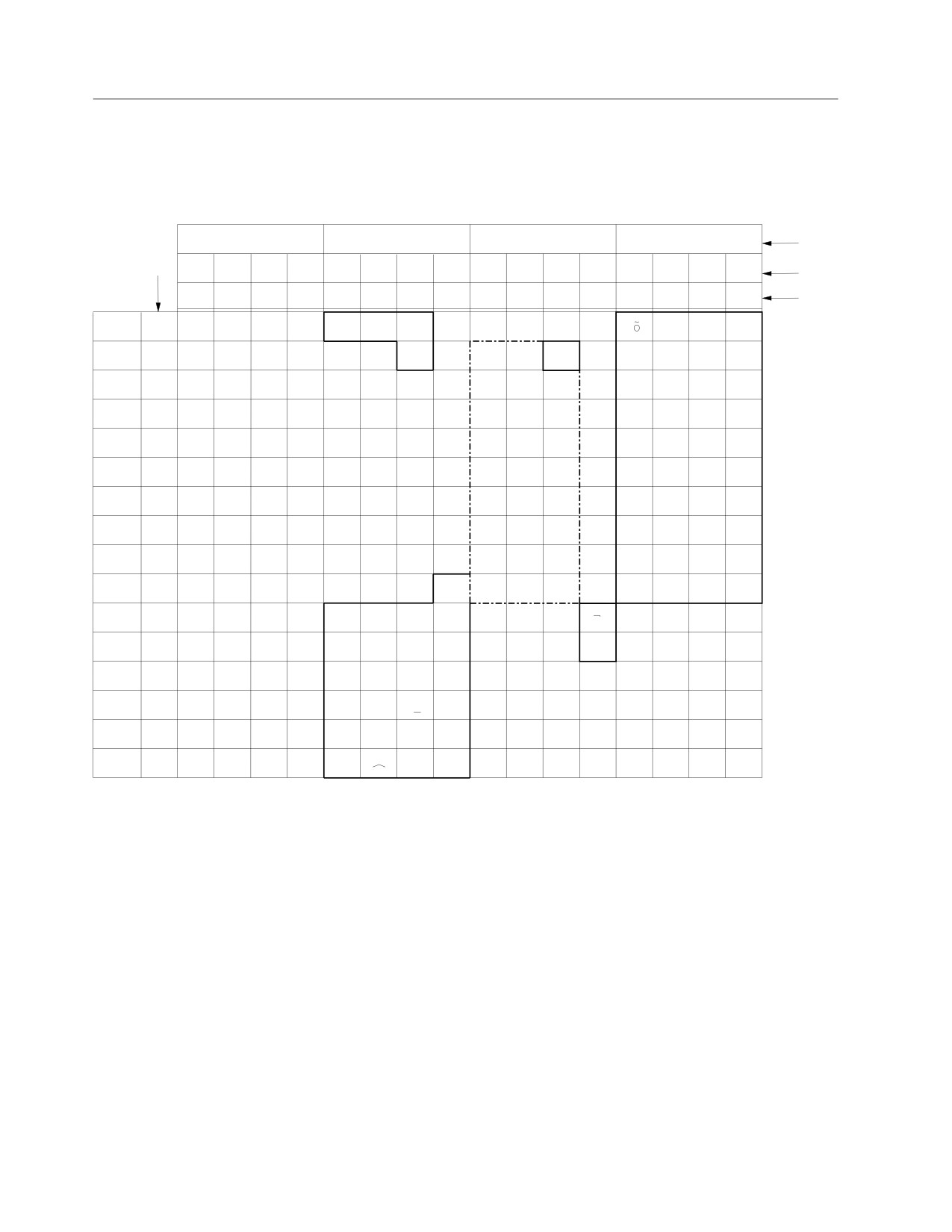
Step 1: Identify All Characters in Your Character Set
Identify all characters in your character set, and write a matrix like the one shown
in the previous figures. For example, Figure 124 shows an example of a character
set that might be used to represent Brazilian Portuguese.
00
01
10
11
Bits
0,1
Hex 1
00
01
10
11
00
01
10
11
00
01
10
11
00
01
10
11
2,3
Bits
4567
0
1
2
3
4
5
6
7
8
9
A
B
C
D
E
F
Hex 0
0000
0
SP
&
-
é
0
0001
1
/
a
j
A
J
1
0010
2
b
k
s
B
K
S
2
0011
3
c
l
t
C
L
T
3
0100
4
d
m
u
D
M
U
4
0101
5
e
n
v
E
N
V
5
0110
6
f
o
w
F
O
W
6
0111
7
g
p
x
G
P
X
7
1000
8
h
q
y
H
Q
Y
8
1001
9
ã
i
r
z
I
R
Z
9
1010
A
É
$
ç
:
1011
B
Ç
,
Õ
|
1100
C
<
%
Ã
1101
D
(
)
’
1110
E
+
;
>
=
1111
F
!
?
”
Figure 124. PORTUGUESE Character Set
Figure 125 on page
365 is provided for you to record your own character set.
364
System Administration
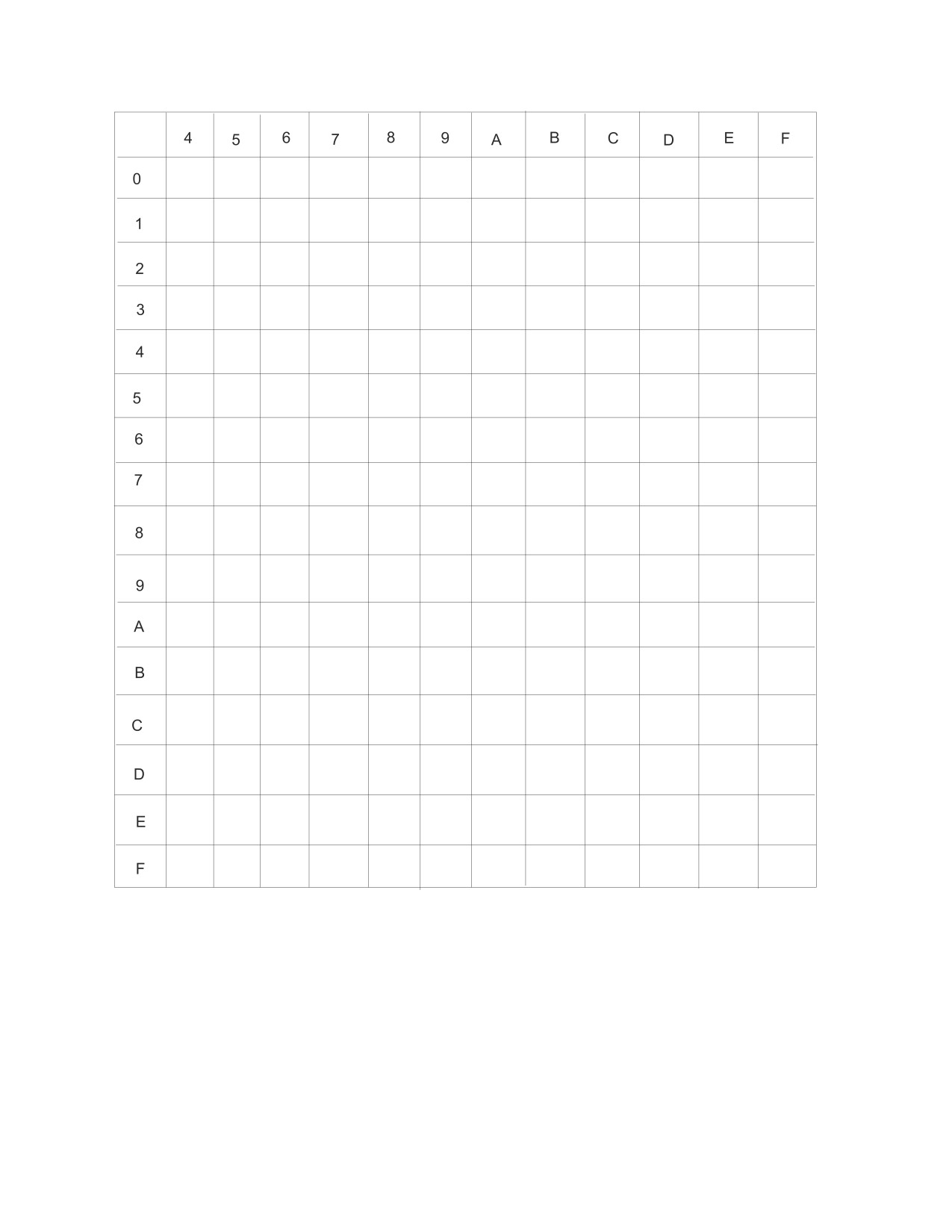
Figure 125. Your SBCS Character Set
At this time, you should note the hexadecimal values in your character set that
have representations different from those in the ENGLISH character set in
Figure 95 on page 236. Recording the differences makes character classification
easier. These are the hexadecimal values that have different representations in the
PORTUGUESE example:
X'4A'
X'5F'
X'7C'
X'4F'
X'6A'
X'C0'
X'5A'
X'79'
X'D0'
X'5B'
X'7B'
Appendix E. Defining Your Own Character Set
365
Step
2: Classify the Characters
When interpreting commands, the database manager must identify which
characters are valid, and which are not. To do this, the database manager uses an
internal character classification table.
In the table, each of the 256 possible SBCS hexadecimal values are assigned a
classification. The database manager uses these classifications to tell whether a
character is, for example, a delimiter or a numeric. There are 12 classes. Each
hexadecimal value is assigned one of these classes. The only hexadecimal values
that you are able to reclassify are those that, in the ENGLISH character set, are
classified as 3 or 0. Values classified as 0 can be reclassified as 3, and values
classified as 3 can be reclassified as 0. No other reclassifications are allowed. The
only exception to this rule occurs with certain class 6 characters. See the class 6
description below for details. See Table 57 on page 370 for the ENGLISH character
set class. Other character classes are shown only for reference:
Class
Meaning
0
Unusable for keywords or unquoted identifiers
Any hexadecimal value assigned to this class cannot be used in keywords
or unquoted identifiers.
1
Blank
The hexadecimal value assigned to this class is a blank. A blank, in the
SQL language, is a delimiter between keywords. The database manager
uses X'40' for blanks.
2
Apostrophe
The hexadecimal value assigned to this class is an apostrophe ('). An
apostrophe, in the SQL language, is the delimiter for character constants.
The database manager uses X'7D' for an apostrophe.
3
Characters other than numerics, uppercase English alphabetics, and
underscores that are usable for unquoted identifiers
Numeric, uppercase English alphabetics, and underscores all belong to
other classes. In the default ENGLISH character set, the lowercase
alphabetics along with $, #, and .* are assigned to this class. In the sample
character sets, characters such as n-tilde and o-umlaut are assigned this
class.
4
Numerics
Any hexadecimal value assigned to this class is a numeric. The SQL
language defines the X'F0' to X'F9' to represent the numbers 0, 1, 2, 3, 4, 5,
6, 7, 8, and 9. You must not assign class 4 to any other hexadecimal values,
nor can you reassign hexadecimal values X'F0' to X'F9' to some other class.
5
Period
Any hexadecimal value assigned to this class is a period. A period, in the
SQL language, is the delimiter between a qualifier (such as an owner) and
a data object (such as a table). The database manager uses X'4B' for a
period.
6
Special characters
Hexadecimal values assigned to this class have special meanings in the
SQL language, just as numerics do. You must not assign class 6 to any
366
System Administration
hexadecimal values other than those listed below. Nor can you reassign the
hexadecimal values shown to some other class. The only exceptions are the
ones which have a different hexadecimal value depending on the
application server default CCSID used. For those hexadecimal values listed
which map to a character used in the SQL language for your application
server default CCSID, do not reassign these values. For those hexadecimal
values listed which do not map to a character used in the SQL language
for your application server default CCSID, you can assign them to class 0
or class 3.
For example, X'5A' maps to the exclamation mark (!) for CCSID 37. For
CCSID 500, X'5A' maps to the right square bracket (]). For CCSID 37, the
hexadecimal value should be class 6. For CCSID 500, the hexadecimal
value could be either class 0 or class 3. In the SQL language the following
hex values have these meanings:
X'4C'
<
X'4D'
(
X'4E'
+
X'4F'
| (for CCSIDs 37, 284, 285, 290, 420, 424, 833, 836, 838, 1027, 28709)
X'4F'
! (for CCSIDs 273, 277, 278, 280, 297, 500, 870, 871, 875)
X'50'
&
X'5A'
! (for CCSIDs 37, 285, 290, 420, 424, 833, 836, 838, 1027, 28709)
X'5C'
X'5D'
)
X'5E'
;
X'5F'
¬ (for CCSIDs 37, 284, 285, 290, 420, 424, 833, 836, 838,
1027,
28709)
X'5F'
^ (for CCSIDs 273, 277, 278, 280, 297, 500, 870, 875)
X'60'
-
X'61'
/
X'69'
^ (for CCSID 838)
X'6A'
| (for CCSIDs 870, 878)
X'6B'
,
X'6C'
%
X'6E'
>
X'6F'
?
X'7A'
:
X'7E'
=
X'B0'
^ (for CCSIDs 37, 290, 424, 833, 836, 1027, 28709)
X'BA'
¬ (for CCSIDs 273, 277, 278, 280, 297, 50 0, 871)
X'BA'
^ (for CCSIDs 284, 285)
X'BB'
| (for CCSIDs 273, 277, 278, 280, 297, 500, 871)
X'BB'
! (for CCSID 284)
Appendix E. Defining Your Own Character Set
367
X'EC'
^ (for CCSID 871)
X'EF'
¬ (for CCSID 875)
7
Quotation Mark
Any hexadecimal value assigned to this class is a double quotation mark
("). A double quotation mark, in the SQL language, is the delimiter for
quoted identifiers. The database manager uses X'7F' for a double quotation
mark.
8
Shift-out character
You should not assign any hexadecimal value to this class. When the DBCS
option is YES, the database manager assigns this class to X'0E'.
9
Shift-in character
You should not assign any hexadecimal value to this class. When the DBCS
option is YES, the database manager assigns this class to X'0F'.
A
English Uppercase Alphabetics
This class is restricted to all English uppercase alphabetics (hexadecimal
values X'C1' to X'C9', X'D1' to X'D9', and X'E2' to X'E9'). English uppercase
alphabetics can be used in unquoted identifiers and keywords. (This is true
no matter what SBCS character set is specified.)
B
Underscore
Any hexadecimal value assigned to this class is an underscore. An
underscore, in the SQL language, can be used in an unquoted identifier
except as a starting character. The database manager uses X'6D' for an
underscore.
When you have defined a character set, you must classify each hexadecimal value
that has a different representation in your character set than it does in the
ENGLISH character set.
The database manager always sets the first 64 hexadecimal values (X'00' to X'3F') to
class 0. You can set only the remaining 192 hexadecimal values. Therefore, if any
character in your set has a hexadecimal value within X'00' to X'3F', you can use
that hexadecimal value only in quoted identifiers.
The only hexadecimal values that the database manager reclassifies in the first 64
are X'0E' and X'0F'. Those hexadecimal values are permanently defined to the
database manager as the DBCS shift-out and shift-in characters. When the DBCS
option is YES, the database manager reclassifies X'0E' to class 8 and X'0F' to class 9.
For more information, see “Using Double-Byte Character Set (DBCS)” on page 243.
Not all SBCS character sets can be classified for use with the database manager,
because it reserves certain hexadecimal values. For example, all hexadecimal values
that (in the ENGLISH character set) represent uppercase English letters are
reserved. The database manager reserves hexadecimal values so it can correctly
interpret SQL statements.
Use Table 57 on page 370 to classify your character set. The first column gives the
hexadecimal value. The next two columns identify the ENGLISH classification and
conversion values for each of those hexadecimal values. (Translation values are
368
System Administration
discussed in the next step.) The fourth and fifth columns show the classification
and conversion values for the PORTUGUESE example. The remaining two columns
are for your own character set.
Note: All hexadecimal values are reserved except those that are classified as 0 or 3
in the ENGLISH character set.
Any hexadecimal value that is classified in the ENGLISH character set as 0 or 3
can be reclassified as 3 or 0. Keep in mind that all hexadecimal values that are
classified as 0 cannot be used in keywords and unquoted identifiers. Therefore,
you would not want to classify as 0 any letter that is within your language’s
alphabet. You would not be able to use those letters in unquoted identifiers.
The English alphabet consists of the following letters: A, B, C, D, E, F, G, H, I, J, K,
L, M, N, O, P, Q, R, S, T, U, V, W, X, Y, and Z. Most likely, the hexadecimal values
for letters in your language that are not in the English alphabet are classified as 0
in the ENGLISH character set. You would typically change the classification to 3.
If you must reclassify a hexadecimal value, but the hexadecimal value is reserved,
then it is not possible to completely classify the character set. In that situation, it
may not be to your advantage to specify an alternative character set. For example,
if a character in your alphabet has a hexadecimal value that is assigned class 6 in
the ENGLISH character set, you cannot reclassify that hexadecimal value (the only
exceptions are the hexadecimal values associated with the characters |, !, ¬ and ^).
The rationale used in classifying the PORTUGUESE character set hexadecimal
values that are different from the ENGLISH character set is as follows:
X'4A'
Because the character represented by this hexadecimal value is in the
Portuguese alphabet, the hexadecimal value was reclassified from 0 to 3.
X'4F'
The character represented by this hexadecimal value in the PORTUGUESE
character set is the exclamation mark. Since this is also a special character
in the ENGLISH character set and is already classified as 6, there is no
need to reclassify it.
X'5A'
This hexadecimal value, which represents a dollar sign ($) in the
PORTUGUESE character set, was reclassified from 6 to 0. This was done
because the dollar sign is not a special character in the SQL language. If
you want to use the dollar sign in unquoted identifiers and keywords,
however, you can reclassify it to 3.
X'5B'
Because the character represented by this hexadecimal value is in the
Portuguese alphabet, the hexadecimal value should be classified as 3. It is
already classified as a 3 in the ENGLISH classifications, so there is no need
to reclassify it.
X'5F'
This is another character that is reserved in the SQL language. In the
example PORTUGUESE character set, X'5F' represents a caret. Since this is
also a special character in the ENGLISH character set and is already
classified as 6, there is no need to reclassify it.
X'6A'
Because the character represented by this hexadecimal value is in the
Portuguese alphabet, the hexadecimal value was reclassified from 0 to 3.
X'79'
Because the character represented by this hexadecimal value is in the
Portuguese alphabet, the hexadecimal value was reclassified from 0 to 3.
X'7B'
Because the character represented by this hexadecimal value is in the
Appendix E. Defining Your Own Character Set
369

Portuguese alphabet, the hexadecimal value should be classified as 3. It is
already classified as a 3 in the ENGLISH classifications, so there is no need
to reclassify it.
X'7C' Because the character represented by this hexadecimal value is in the
Portuguese alphabet, the hexadecimal value should be classified as 3. It is
already classified as a 3 in the ENGLISH classifications, so there is no need
to reclassify it.
X'B0' This hexadecimal value, which represents a cent sign (¢) in the
PORTUGUESE character set, was reclassified from 6 to 0. This was done
because the cent sign is not a special character in the SQL language.
X'BA' The character represented by this hexadecimal value in the PORTUGUESE
character set is the NOT sign. Since this is a special character in the SQL
language, the value was reclassified from 0 to 6.
X'BB' The character represented by this hexadecimal value in the PORTUGUESE
character set is the vertical bar. Since this is a special character in the SQL
language, the value was reclassified from 0 to 6.
X'C0' Because the character represented by this hexadecimal value is in the
Portuguese alphabet, the hexadecimal value was reclassified from 0 to 3.
X'D0' Because the character represented by this hexadecimal value is in the
Portuguese alphabet, the hexadecimal value was reclassified from 0 to 3.
Having reclassified the characters, you next need to consider the translation values
of those characters.
Table 57. Character Classification and Translation Table
English
English
Brazilian
Brazilian
Hex Value
Class.
Trans.
Class.
Trans.
Your Class.
Your Trans.
40
1
40
41
0
41
42
0
42
43
0
43
44
0
44
45
0
45
46
0
46
47
0
47
48
0
48
49
0
49
4A
0
4A
3
4B
5
4B
4C
6
4C
4D
6
4D
4E
6
4E
4F
6
4F
370
System Administration

Table 57. Character Classification and Translation Table (continued)
English
English
Brazilian
Brazilian
Hex Value
Class.
Trans.
Class.
Trans.
Your Class.
Your Trans.
50
6
50
51
0
51
52
0
52
53
0
53
54
0
54
55
0
55
56
0
56
57
0
57
58
0
58
59
0
59
5A
6
5A
0
5B
3
5B
5C
6
5C
5D
6
5D
5E
6
5E
5F
6
5F
60
6
60
61
6
61
62
0
62
63
0
63
64
0
64
65
0
65
66
0
66
67
0
67
68
0
68
69
0
69
6A
0
6A
3
X'5B'
6B
6
6B
6C
6
6C
6D
B
6D
6E
6
6E
6F
6
6F
70
0
70
71
0
71
72
0
72
73
0
73
74
0
74
75
0
75
76
0
76
77
0
77
78
0
78
79
0
79
3
X'7C'
7A
6
7A
7B
3
7B
7C
3
7C
7D
2
7D
7E
6
7E
7F
7
7F
Appendix E. Defining Your Own Character Set
371

Table 57. Character Classification and Translation Table (continued)
English
English
Brazilian
Brazilian
Hex Value
Class.
Trans.
Class.
Trans.
Your Class.
Your Trans.
80
0
80
81
3
C1
82
3
C2
83
3
C3
84
3
C4
85
3
C5
86
3
C6
87
3
C7
88
3
C8
89
3
C9
8A
0
8A
8B
0
8B
8C
0
8C
8D
0
8D
8E
0
8E
8F
0
8F
90
0
90
91
3
D1
92
3
D2
93
3
D3
94
3
D4
95
3
D5
96
3
D6
97
3
D7
98
3
D8
99
3
D9
9A
0
9A
9B
0
9B
9C
0
9C
9D
0
9D
9E
0
9E
9F
0
9F
A0
0
A0
A1
0
A1
A2
3
E2
A3
3
E3
A4
3
E4
A5
3
E5
A6
3
E6
A7
3
E7
A8
3
E8
A9
3
E9
AA
0
AA
AB
0
AB
AC
0
AC
AD
0
AD
AE
0
AE
AF
0
AF
372
System Administration

Table 57. Character Classification and Translation Table (continued)
English
English
Brazilian
Brazilian
Hex Value
Class.
Trans.
Class.
Trans.
Your Class.
Your Trans.
B0
6
B0
0
B1
0
B1
B2
0
B2
B3
0
B3
B4
0
B4
B5
0
B5
B6
0
B6
B7
0
B7
B8
0
B8
B9
0
B9
BA
0
BA
6
BB
0
BB
6
BC
0
BC
BD
0
BD
BE
0
BE
BF
0
BF
C0
0
C0
3
X'7B'
C1
A
C1
C2
A
C2
C3
A
C3
C4
A
C4
C5
A
C5
C6
A
C6
C7
A
C7
C8
A
C8
C9
A
C9
CA
0
CA
CB
0
CB
CC
0
CC
CD
0
CD
CE
0
CE
CF
0
CF
D0
0
D0
3
X'4A'
D1
A
D1
D2
A
D2
D3
A
D3
D4
A
D4
D5
A
D5
D6
A
D6
D7
A
D7
D8
A
D8
D9
A
D9
DA
0
DA
DB
0
DB
DC
0
DC
DD
0
DD
DE
0
DE
DF
0
DF
Appendix E. Defining Your Own Character Set
373

Table 57. Character Classification and Translation Table (continued)
English
English
Brazilian
Brazilian
Hex Value
Class.
Trans.
Class.
Trans.
Your Class.
Your Trans.
E0
0
E0
E1
0
E1
E2
A
E2
E3
A
E3
E4
A
E4
E5
A
E5
E6
A
E6
E7
A
E7
E8
A
E8
E9
A
E9
EA
0
EA
EB
0
EB
EC
0
EC
ED
0
ED
EE
0
EE
EF
0
EF
F0
4
F0
F1
4
F1
F2
4
F2
F3
4
F3
F4
4
F4
F5
4
F5
F6
4
F6
F7
4
F7
F8
4
F8
F9
4
F9
FA
0
FA
FB
0
FB
FC
0
FC
FD
0
FD
FE
0
FE
FF
0
FF
Step 3: Determine Translation Characters
When the database manager translates a character string from lowercase to
uppercase, it checks the classification of each character in the string. If the
character is in class 3, it is translated. If not, the character is not changed.
To translate the character, the database manager consults a translation table. The
translation table contains the hexadecimal value to which a particular hexadecimal
value is to be translated.
For every hexadecimal value in your set that has a different character
representation than in English, you must define a translation value. Refer again to
Table 57 on page 370. The following rationale was used to choose the
PORTUGUESE translation values:
X'4A' Because the character represented by this hexadecimal value is an
uppercase E with an accent, there is no need to translate the hexadecimal
value to some other value when the database manager is folding to
uppercase. The translation value remains X'4A' (the same as the ENGLISH
value).
X'4F' The character represented by this hexadecimal value in Portuguese is the
374
System Administration
exclamation mark. Because the hexadecimal value should not be changed
when the database manager is doing a lowercase to uppercase translation,
the translation value should remain X'4F'.
X'5A'
This hexadecimal value, which represents a dollar sign ($) in the
PORTUGUESE character set, should not change during a translation. The
translation value should remain X'5A'.
X'5B'
Because this hexadecimal value represents an uppercase C with a cedilla, it
does not need to be changed during a translation. The translation value
should remain X'5B'.
X'5F'
This is another hexadecimal value that does not represent a letter of the
alphabet. The hexadecimal value should not change during a translation.
The translation value should remain X'5F'.
X'6A'
This hexadecimal value represents a lowercase c with a cedilla. During a
translation, it should be translated to an uppercase C with a cedilla. To
have the database manager do the correct translation, the translation value
should be X'5B' (the hexadecimal value for uppercase C with a cedilla).
X'79'
This hexadecimal value represents a lowercase a with a tilde. During a
translation, it should be translated to an uppercase A with a tilde. The
translation value should be X'7C'.
X'7B'
Because this hexadecimal value represents an uppercase O with a tilde, it
does not need to be changed during a translation. The translation value
should remain X'7B'.
X'7C'
Because this hexadecimal value represents an uppercase A with a tilde, it
does not need to be changed during a translation. The translation value
should remain X'7C'.
X'C0'
This hexadecimal value represents a lowercase o with a tilde. During a
translation, it should be translated to an uppercase O with a tilde. To have
the database manager do the correct translation, the translation value
should be X'7B' (the hexadecimal value for uppercase O with a tilde).
X'D0'
This hexadecimal value represents a lowercase e with an accent. During a
translation, it should be translated to an uppercase E with an accent. To
have the database manager do the correct translation, the translation value
should be X'4A' (the hexadecimal value for uppercase E with an accent).
After determining what the translation values are, verify the following:
1. Hexadecimal values that you have reclassified to class 0 must be translated into
identical hexadecimal values. If you reclassify X'A2' from 3 to 0, you must
ensure that the translation value is set to X'A2', not X'E2' (as it is in ENGLISH).
In the PORTUGUESE example, this situation did not occur. No hexadecimal
values were reclassified from 3 to 0.
2. Hexadecimal values that you have reclassified to class 3 can be translated into
any hexadecimal value having a class of 3 or A. A quick check of the
PORTUGUESE-unique translation values show that the hexadecimal values
either translate to themselves or to hexadecimal values having class 3. The
PORTUGUESE example is still valid.
If your character set fails either of these tests, there is probably an error either in
reclassifications or in the translation values chosen.
Appendix E. Defining Your Own Character Set
375
Step
4: Update the SYSTEM.SYSCHARSETS Catalog Table
After you define translation values for the characters that require them, load the
character set into the SYSTEM.SYSCHARSETS catalog table. The easiest way to
load a character set is by modifying a copy of the DBS utility control commands
that load the sample ENGLISH character set. The A-type member ARISCHAR
contains these control commands.
Change your copy of ARISCHAR to reflect the classification and translation values
for your character set.
The first value in the INSERT statement is the name of the character set. For
'ENGLISH' substitute the name of your character set. You can specify up to
eighteen characters. The value 'PORTUGUESE' was chosen as the name of the
example Brazilian Portuguese SBCS character set.
The second value in the INSERT statement contains data for the character
classification table. There are 192 character classifications that you can set. You
should change only those character classifications in your character set that differ
from the ENGLISH classifications. Use the values you have recorded in Table 57 on
page 370.
The third value in the INSERT statement contains data for the character translation
table. There are 192 character translation values you can set. You should change
only those translation values in your character set that differ from the ENGLISH
translation values. Use the values you have recorded in Table 57 on page 370. Note
that the single quote (X'7D') must be entered twice. A single quote normally
delimits the end of a value in an INSERT statement. To use a single quote as part
of the data, the single quote must be entered twice.
Step
5: Update the SYSTEM.SYSCCSIDS Catalog Table
You must add a row to the SYSTEM.SYSCCSIDS catalog table to identify the
CCSID values to be associated with your new character set. You could issue the
following statement to update SYSTEM.SYSCCSIDS for the character set defined
for this example:
INSERT INTO SYSTEM.SYSCCSIDS (CCSID,SUBTYPE,DBCSID,SBCSID,CHARNAME)
VALUES (57344,
’S’,
0,
0,
’PORTUGUESE’)
If you are defining your own CCSID (that is, one that is not obtained from the
Character Data Representation Architecture (CDRA)) registry, you must use a value
that is within the range of 57 344 to 61 439 (X'E000' to X'EFFF'). Values within this
range are reserved for user-defined CCSIDs. Ensure that the value you specify does
not already exist: the CCSID column cannot contain duplicate information. Also
keep the following in mind:
v If the character set that you are defining uses conversion tables that are
provided by the CDRA registry, use the CCSIDs that they indicate.
v The SUBTYPE column identifies the subtype of the CCSID. In this example, the
value is 'S' for SBCS.
v The SBCSID column and the DBCSID column specify the SBCS and the DBCS
components for a mixed CCSID. Because the CCSID in this example is SBCS, the
value for both of these columns is 0.
376
System Administration
v The value that you specify for the CHARNAME column must be the same as
the value that you specified in the NAME column of the
SYSTEM.SYSCHARSETS catalog table.
For examples of statements that insert rows into the SYSTEM.SYSCCSIDS catalog
table, review the ARITPOP MACRO that is supplied with the database manager.
Step
6: Update the SYSTEM.SYSSTRINGS Catalog Table
The SYSTEM.SYSSTRINGS catalog table identifies the tables that will be used for
conversion between specific pairs of CCSIDs. Conversion tables for
CDRA-supplied CCSIDs are provided by the CDRA registry. For more information
on CDRA conversion tables, see the Character Data Representation Architecture Level
1, Registry manual. After you create your CCSID, you must determine the
conversion table information for SYSTEM.SYSSTRINGS. You must add a row to
SYSTEM.SYSSTRINGS for each conversion that you want to support both to and
from the new CCSID. For a detailed description to update SYSTEM.SYSSTRINGS,
see Appendix D, “Updating SYSTEM.SYSSTRINGS,” on page 359.
Suppose you added CCSID 57344 and you want to support the following
conversions:
v CCSID 37 to CCSID 57344
v CCSID 57344 to CCSID 37
v CCSID 57344 to CCSID 28709.
You must add three rows to the SYSTEM.SYSSTRINGS catalog table. To specify
any of these conversions in SYSTEM.SYSSTRINGS, you would use an INSERT
statement to insert the necessary information into the following columns of the
catalog table:
v INCCSID, which specifies the CCSID of the input character.
v OUTCCSID, which specifies the CCSID to which the conversion is done.
v TRANSTYPE, which identifies the type of conversion to be done (for example,
'SS' for SBCS to SBCS).
v ERRORBYTE, which identifies characters that have no representation in the
target code page. If a character to be converted maps to a code point containing
this byte an error occurs.
v SUBBYTE, which identifies characters that have no representation in the target
code page. If a character to be converted maps to a code point identified by this
byte, a warning is issued.
v TRANSPROC, which identifies the conversion procedures that are used for
conversion between CCSIDs. The procedures are used either for converting
between DBCS CCSIDs, or for converting the DBCS components of mixed
CCSIDs. The TRANSPROC value is blank if a DBCS conversion procedure is not
applied. For more information, see “Coding Your Own TRANSPROC Exit” on
page 284.
v TRANSTAB1, which represents the first 64 bytes of the conversion table.
v TRANSTAB2, which represents the last 192 bytes of the conversion table.
The conversion table maps the hexadecimal representation of each character in the
source CCSID to the hexadecimal representation of each character in the target
CCSID. For example, in CCSID 37 an exclamation mark (!) is represented by X'5A'.
The hexadecimal representation for the exclamation mark in CCSID 281 is X'4F'.
The hexadecimal value of the character at offset 90 in the conversion table where
Appendix E. Defining Your Own Character Set
377
INCCSID=37 and OUTCCSID=281 would be X'4F'. Remember, when counting
offsets, the first offset is zero. Therefore, the byte at offset 90 is actually the 91st.
For a detailed description to update SYSTEM.SYSSTRINGS, see Appendix D,
“Updating SYSTEM.SYSSTRINGS,” on page 359.
When you have completed steps 1 through 6, you can start the application server
using the newly defined character set. If the database manager detects an error in
the character set, it uses the value of CHARNAME that was used the last time the
application server was started.
Step
7: Update the CCSID-Related Phases
After you have updated the SYSTEM.SYSCHARSETS, SYSTEM.SYSCCSIDS and
SYSTEM.SYSSTRINGS catalog tables, run the job control program ARISCNVD to
load the CCSID information from the catalog tables into three phase files
(ARISCCSD, ARISSTRD, and ARISSCRD). The application server and the
application requester use these files to enable the use of the new character set. For
more information on the control program ARISCNVD, refer to the DB2 Server for
VSE Program Directory.
When you have completed steps 1 through 7, you can start the application server
using the newly defined character set. If the database manager detects an error in
the character set, it uses the value of CHARNAME that was used the last time the
application server was started.
378
System Administration
Appendix F. Macro List
The macros identified in this appendix are provided as programming interfaces for
customers by the DB2 Server for VSE database management system.
Attention: Do not use as programming interfaces any DB2 Server for VSE macros
other than those identified in this chapter.
Macro list
The database manager provides the following General-use programming interface
macros:
v ARIRCAN
v ARIBFPPB.
379
380
System Administration
Appendix G. Service and Maintenance Utilities
This appendix describes the following utilities:
v
“SQLDBDEF EXEC,” below
SQLDBDEF EXEC
The SQLDBDEF utility extracts the definition of database objects from a DB2
Server for VSE & VM database, and generates a DBSU job that can be used to
create the same objects on another DB2 database. The SQL statements in the DBSU
job can be grouped in one of two ways:
v By dbspace
v By object type
Note that the SQLDBDEF utility does not generate SQL statements to recreate
system tables and dbspaces. However, it does generate SQL statements to recreate
user-created views, synonyms, and indexes on system tables.
When the objects have been created on the target platform, the load utilities of the
target database can be used to load the data. Packages can be unloaded from the
source database and reloaded to the target database so that existing client
applications can continue to be used.
Before running the SQLDBDEF utility, you must load the associated packages and
link-edit the utility. The job ARISRLDF is provided to load the packages. The
linkbook ARISLKRF is provided to link-edit the SQLDBDEF utility.
Authorization
To run the SQLDBDEF EXEC, you must have DBA authority.
381