DB2 Server for VSE & VM SQL Reference (Version 7 Release 5) - page 11

SYSROUTINES
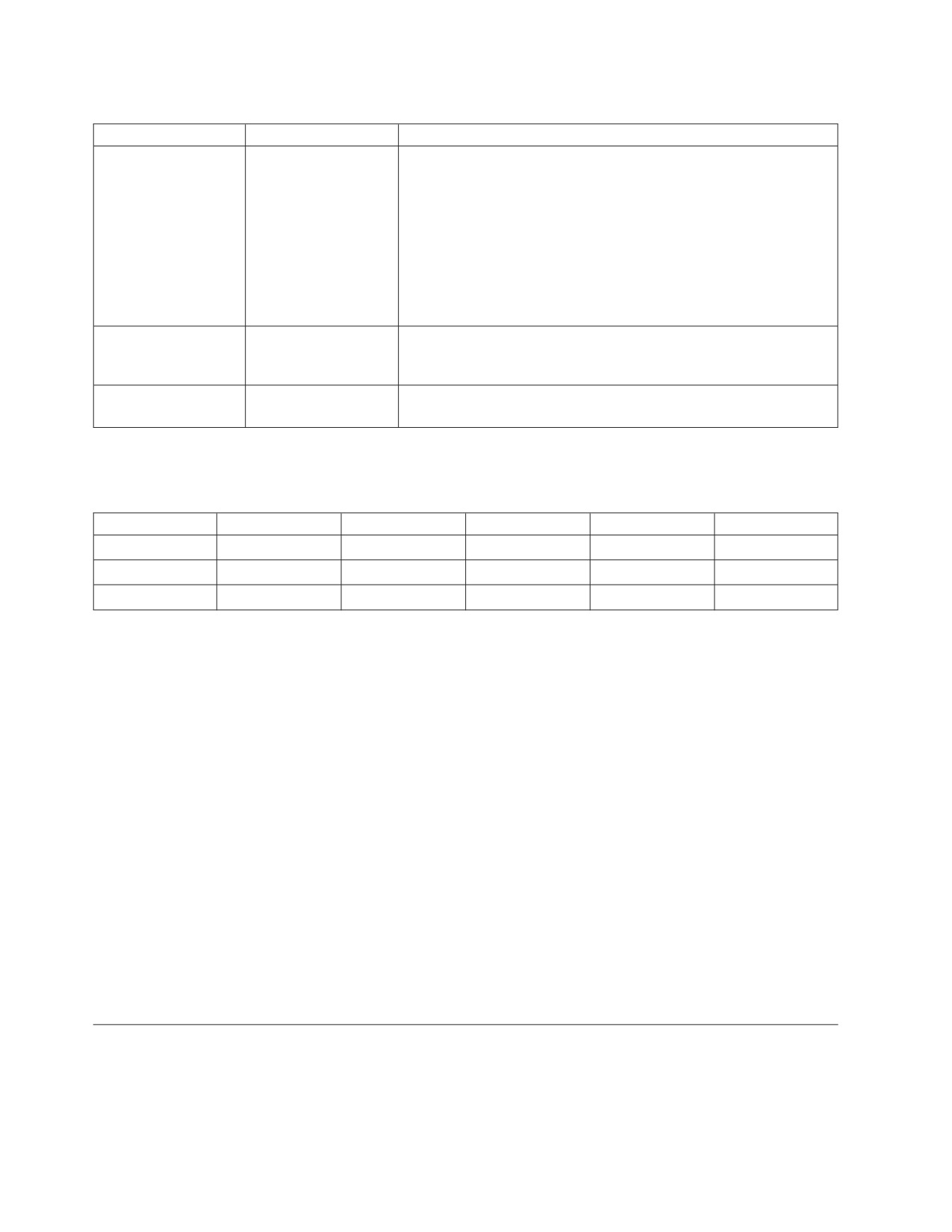
Table 27. Definition of SYSTEM.SYSROUTINES
(continued)
Column Name
Data Type
Description
LOADMOD
CHAR(8) NOT NULL
The name of the load module or phase associated with the stored
procedure.
ROUTINEID
INTEGER NOT NULL
Internal identifier of the routine.
PARMCOUNT
SMALLINT NOT
The number of parameters for the routine.
NULL
LANGUAGE
CHAR(8) NOT NULL
Specifies the programming language used to create the stored
procedure. Possible values are ASSEMBLE, PLI, COBOL, and C.
PARAMETERSTYLE
CHAR(1) NOT NULL
Specifies which parameter linkage convention should be used for
this stored procedure. There are two possibilities:
blank The GENERAL linkage convention is used. When a stored
procedure is called, input parameters cannot be null. Also,
the stored procedure cannot nullify output parameters.
N
The GENERAL WITH NULLS linkage convention is used.
The input parameters can be null, and an array of
indicator variables is passed to the stored procedure by
DB2 Server for VSE & VM This is the default.
STAYRESIDENT
CHAR(1) NOT NULL
Determines whether the stored procedure load module or phase is
removed from memory when the stored procedure ends. Possible
values are
Y
The load module or phase remains in memory after the
stored procedure ends.
blank The load module or phase is removed from memory after
the stored procedure ends.
PROGRAMTYPE
CHAR(1) NOT NULL
Indicates whether the stored procedure runs as a main routine or as
a subroutine. The possible values are:
M The routine runs as a LE main routine.
S
The routine runs as a LE subroutine.
COMMITON
CHAR(1) NOT NULL
If ’Y’, a COMMIT WORK will be issued on return from the stored
RETURN
procedure. The default is ’N’. Note that since DB2 Server for VSE &
VM does not have CURSOR WITH HOLD support, any cursors
that are open on return will be closed if COMMITONRETURN is
’N’. This means that stored procedures that are to return result sets
must have a value of ’N’ in this column.
RESULTSETS
SMALLINT NOT
Specifies the maximum number of result sets that the stored
NULL
procedure can return to a DRDA client. A value of 0 indicates that
no result sets will be returned.
SERVGROUP
CHAR(18)
Contains the name of the group of stored procedure servers that is
used to run this stored procedure. The servers are defined in the
SYSTEM.SYSPSERVERS catalog table, in the SERVGROUP column.
If this column is blank or NULL, the stored procedure must run in
the default server group. This implies that the column DEFSERV
cannot contain the value ’N’ in a row in which the column
SERVGROUP is blank or NULL.
Appendix C. DB2 Server for VSE & VM Catalog
399
SYSROUTINES
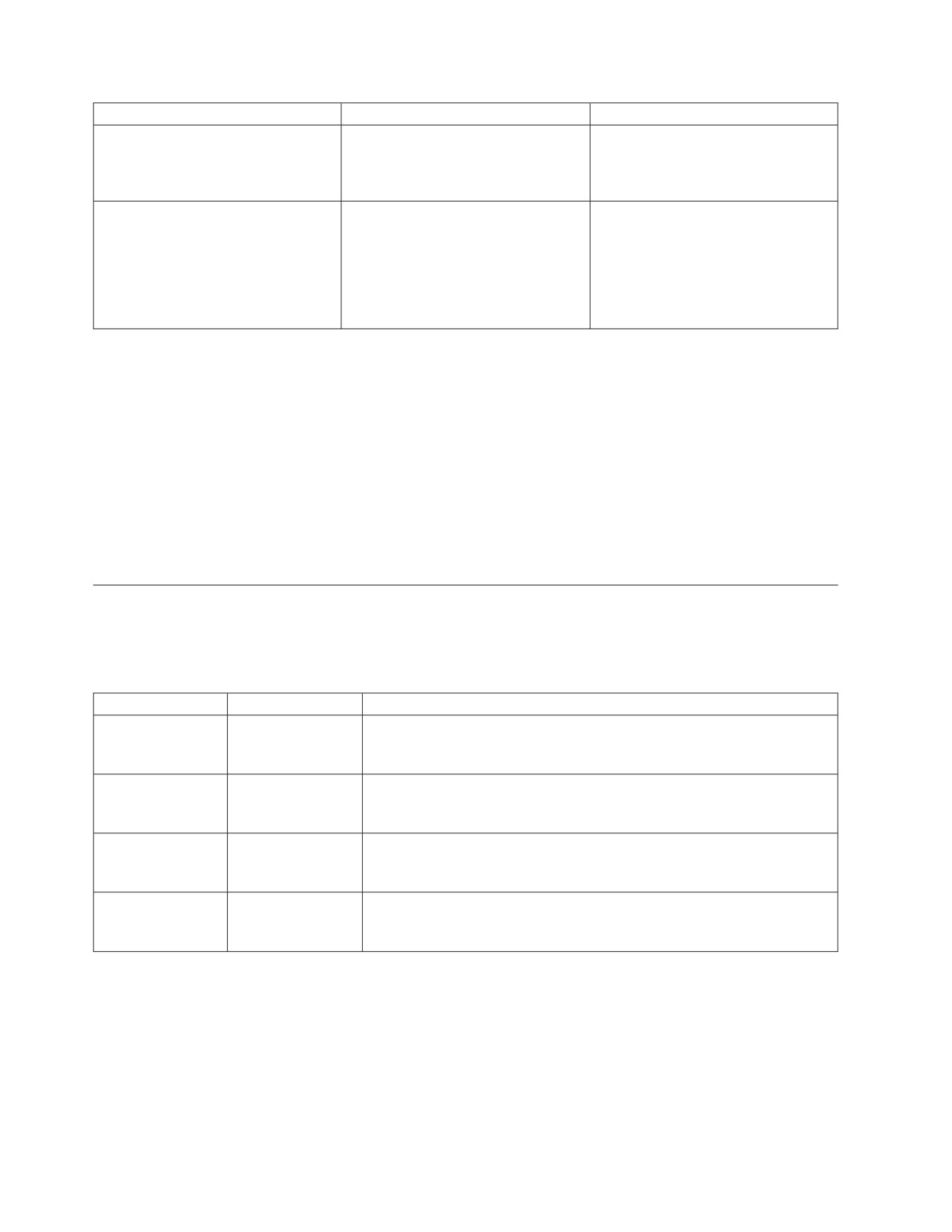
Table 27. Definition of SYSTEM.SYSROUTINES (continued)
Column Name
Data Type
Description
DEFSERV
CHAR(1)
Determines whether the stored procedure can run in the default
stored procedure server group.
’Y’ or NULL
Indicates that the procedure can run in the default server
group.
’N’
Indicates that the procedure cannot run in the default
server group.
If this column contains ’N’ then the SERVGROUP column must
contain the name of a stored procedure server group.
RUNOPTS
VARCHAR(254) NOT
The IBM Language Environment run-time options to use for this
NULL
stored procedure. If RUNOPTS is blank, the installation default IBM
Language Environment run-time options are used.
REMARKS
VARCHAR(254) NOT
A character string provided by the user with the COMMENT ON
NULL
statement.
Table 28 shows an example of a SYSTEM.SYSROUTINES table.
Table 28. Sample SYSTEM.SYSROUTINES Table
PROCEDURE
AUTHID
SPECIFICNAME
SERVGROUP
DEFSERV
1
PROC1
PROG1
GROUP1
Y
2
PROC1
USER1
PROG2
GROUP1
N
3
PROC2
USER2
PROG3
Y
Note that in Table 28 rows 1 and 2 refer to the PROC1 stored procedure. By
creating multiple rows in the SYSTEM.SYSROUTINES table with the same value
for the NAME column, you can indicate that specified users have access to
different versions of the stored procedure. In this case, in row 1 the AUTHID
column is blank. Any user without a specific entry can use row 1. Row 2 applies
only to SQL CALL requests coming from AUTHID USER1. When this user invokes
the PROC1 stored procedure, a different load module or phase (PROG2) is loaded.
The load module or phase can be a test version of the stored procedure or a
version that is specific for that user.
Row 3 applies to stored procedure PROC2 and AUTHID USER2. Because there is
no other row for stored procedure PROC2, user USER2 is the only one who can
call this stored procedure.
As shown in Table 28, it is possible to have more than one row in
SYSTEM.SYSROUTINES for a given stored procedure. The search precedence used
to determine which row is selected for a specific client is as follows:
1. A row with AUTHID matching the caller’s AUTHID
2. A row with AUTHID blank
SYSSTRINGS
The SYSSTRINGS table contains a list of the valid conversion combinations of
source and target CCSIDs. More information on CCSIDs can be found in the DB2
Server for VM System Administration or the DB2 Server for VSE System Administration
manual.
400
SQL Reference
SYSSTRINGS
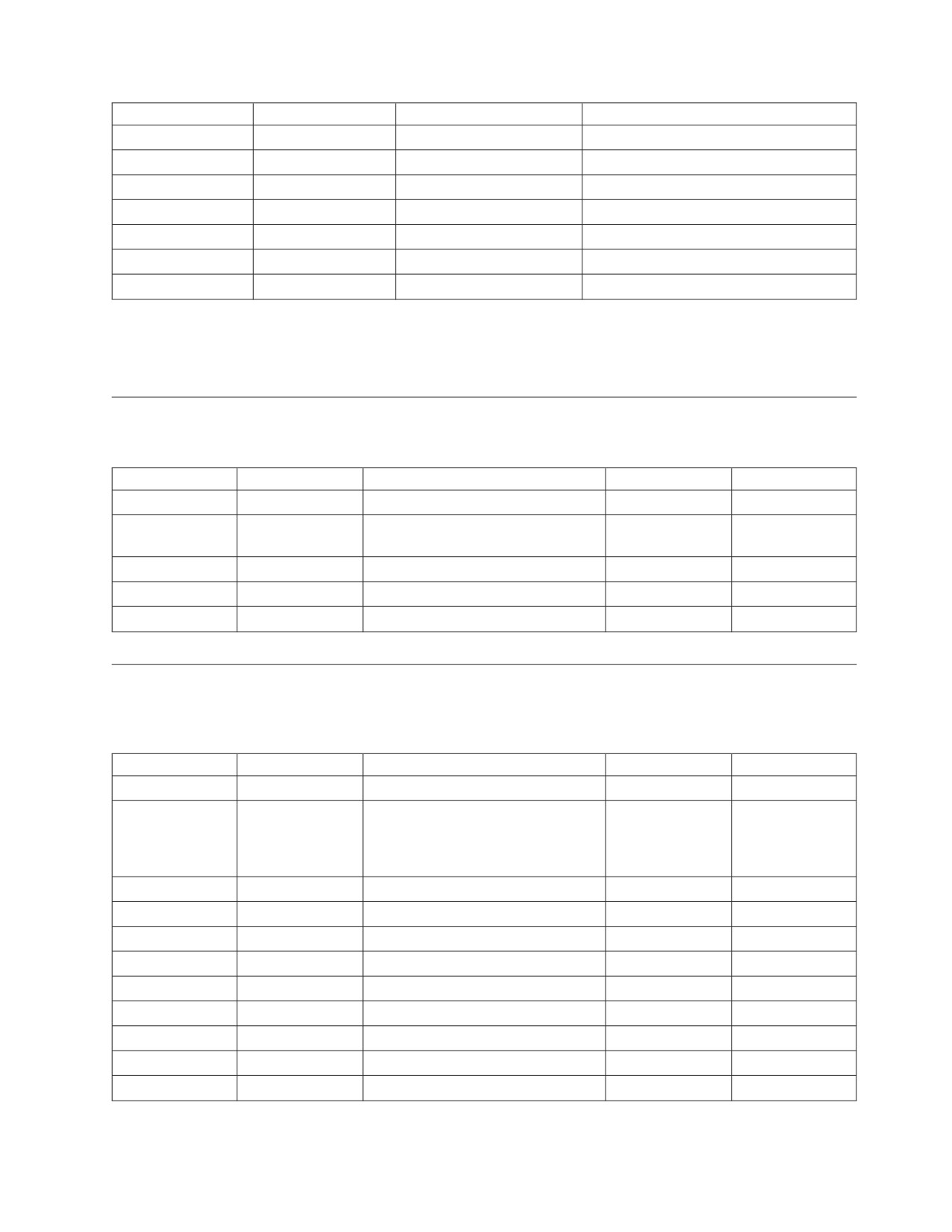
Column Name
Data Type
Description and Comments
INCCSID
INTEGER
The CCSID of the string that is a
NOT NULL
candidate for conversion.
OUTCCSID
INTEGER
The CCSID to which the string is to
NOT NULL
be converted.
TRANSTYPE
CHAR(2)
Classifies the CCSIDs as follows:
NOT NULL
SS
for EBCDIC and ASCII SBCS
to EBCDIC SBCS data
conversion
SM
for EBCDIC and ASCII SBCS
to EBCDIC mixed data
conversion
MS
for EBCDIC mixed to
EBCDIC SBCS data
conversion
MM
for EBCDIC mixed to
EBCDIC mixed data
conversion
PS
for ASCII mixed to EBCDIC
SBCS data conversion
PM
for ASCII mixed to EBCDIC
mixed data conversion
GG
for ASCII graphic to
EBCDIC graphic data
conversion
US
for UCS-2 to EBCDIC SBCS
data conversion
UI
for UCS-2 to a single byte
component of an EBCDIC
mixed data conversion
UM
for UCS-2 to EBCDIC mixed
data conversion
UG
for UCS-2 to EBCDIC
graphic data conversion
ERRORBYTE
CHAR(1)
Specifies the byte that is used in the
FOR BIT DATA
conversion table as an error indicator.
An error occurs whenever a code
point maps to the byte specified in
this field.1 Null indicates the absence
of an error indicator.
SUBBYTE
CHAR(1)
Specifies the byte that is used in the
FOR BIT DATA
conversion table as a substitution
character.2 Null indicates the absence
of a substitution character.
TRANSPROC
CHAR(8)
Name of the conversion procedure
NOT NULL
for MM, PM and GG TRANSTYPE.
This procedure only applies to the
DBCS portion of mixed data for the
MM and PM TRANSTYPE.
Appendix C. DB2 Server for VSE & VM Catalog
401
SYSSTRINGS
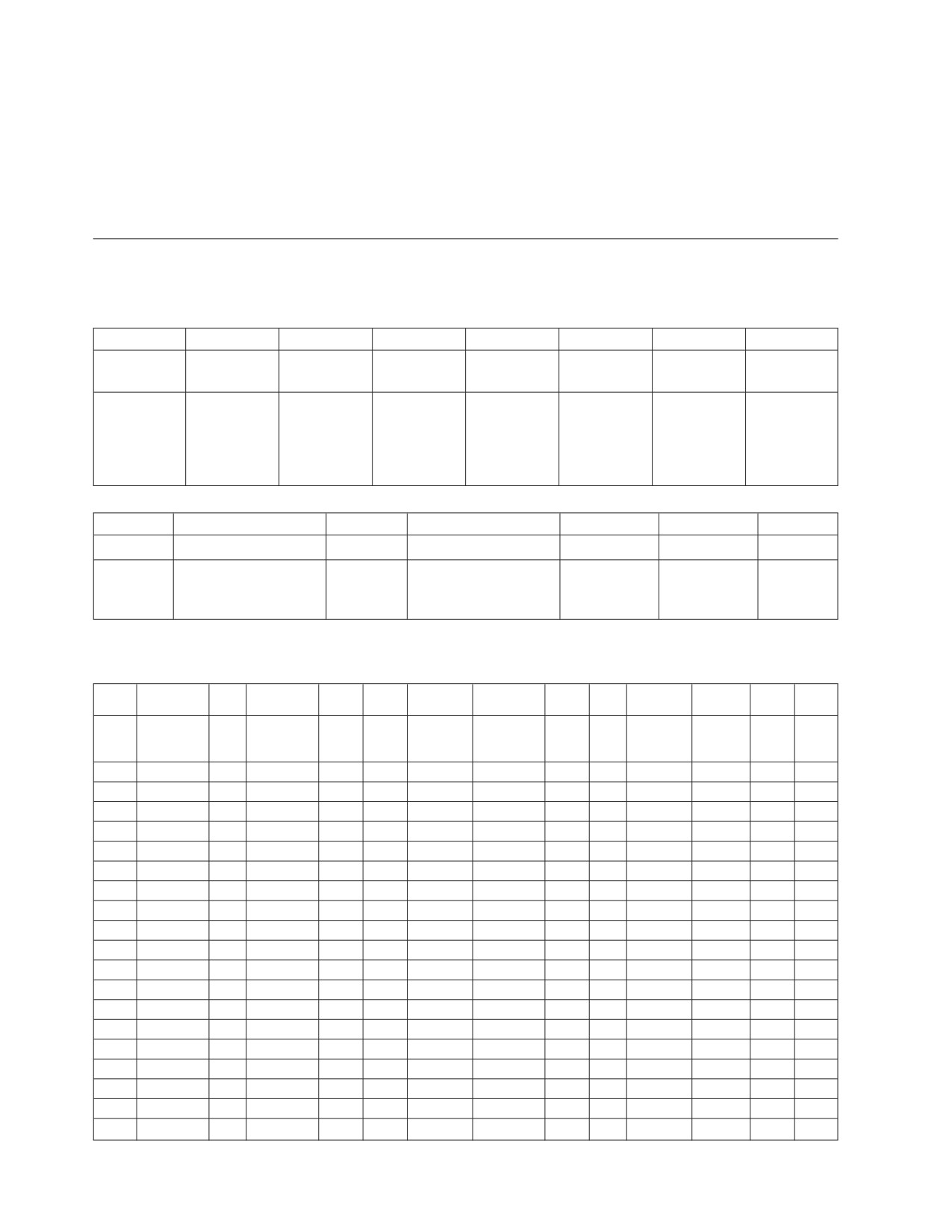
Column Name
Data Type
Description and Comments
TRANSTAB1
CHAR(64)
The first 64 bytes of the 256-byte
conversion table or a blank. Used for
SS, SM, MM, MS, PS and PM
TRANSTYPEs.
TRANSTAB2
CHAR(192)
The last 192 bytes of the 256-byte
conversion table or a blank. If either
TRANSTAB1 or TRANSTAB2
contains an empty string, then both
are considered an empty string. Used
for SS, SM, MM, MS, PS and PM
TRANSTYPEs.
Note
1:
If ERRORBYTE is X'3E', for example, that error byte indicates that no
conversion is defined for the code points that map to X'3E'. An error (-330
or -331 assigned to SQLCODE and 22021 assigned to SQLSTATE) or
warning (+331 assigned to SQLCODE and 01520 assigned to SQLSTATE)
occurs whenever a code point maps to it.
Note
2:
If SUBBYTE is X'3F', for example, that byte is substituted for the code
points that map to X'3F'. A warning (Z assigned to SQLWARN8, W
assigned to SQLWARN0, and 01517 assigned to SQLSTATE) occurs
whenever a code point maps to it.
SYSSYNONYMS
The SYSSYNONYMS table contains a row for every synonym currently in effect. (A
synonym is effective only for the user who defined it.) The columns in
SYSSYNONYMS are:
Column Name
Data Type
Description and Comments
USERID
CHAR(8)
The owner who defined the synonym. The synonym is effective for this
NOT NULL
user only.
ALTNAME
VARCHAR(18)
The user’s synonym for a table or view. USERID.ALTNAME uniquely
NOT NULL
identifies the synonym.
CREATOR
CHAR(8)
The owner of the table or view for which user USERID defined a
NOT NULL
synonym.
TNAME
VARCHAR(18)
CREATOR.TNAME is the real name of the table or view for which user
NOT NULL
USERID defined a synonym.
Note: SYSSYNONYMS helps resolve unqualified table references in SQL
statements. If a user does not qualify the name of the table (by preceding it
with “creator.”), the preprocessor first looks to see if the user has a table by
that name. If the user does not, the name is assumed to be a synonym for
another user’s table, and the preprocessor consults SYSSYNONYMS to
determine the real table. The object of the synonym must be a table or a
view; it cannot be another synonym.
402
SQL Reference

SYSTABAUTH
SYSTABAUTH
SYSTABAUTH records:
v Privileges owned by users to access tables and views. For each privilege, it also
records the source of the privilege (for example, a grant from another user).
v Privileges on tables and views exercised by packages. Each such privilege
appears in SYSTABAUTH as if it were granted to the program by the user who
preprocessed the program. The database manager uses SYSTABAUTH to find
and invalidate packages when the necessary privileges are revoked from the
creator of a program.
The columns in SYSTABAUTH are:
Column Name
Data Type
Description and Comments
GRANTOR
CHAR(8)
The owner who granted the privileges. If this row records the privileges
NOT NULL
exercised by a package, then GRANTOR is the creator of the
corresponding program.
GRANTEE
VARCHAR(8)
The owner who holds the privileges or the name of the package that
NOT NULL
exercises the privileges. If the value of GRANTEE is ‘PUBLIC’, the
privileges are held by all users.
GRANTEETYPE
CHAR(1)
The possible values are:
NOT NULL
blank if the grantee is a user.
P
if the grantee is a package.
SCREATOR
CHAR(8)
The owner who created the source table or source view on which
NOT NULL
privileges have been granted.
STNAME
VARCHAR(18)
The name of the source table or source view on which privileges have
NOT NULL
been granted. SCREATOR.STNAME uniquely identifies the source table
or view.
TCREATOR
CHAR(8)
The owner who created the target table or view on which the grantee
NOT NULL
possesses some privileges.
TTNAME
VARCHAR(18)
The name of the target table or view on which the grantee possesses
NOT NULL
some privileges. TCREATOR.TTNAME uniquely identifies the target table
or view.
Usually, TCREATOR.TTNAME is the same as SCREATOR.STNAME. An
exception occurs when a view is defined: an entry is made in
SYSTABAUTH, showing the underlying table(s) in SCREATOR.STNAME
and the view in TCREATOR.TTNAME.
TIMESTAMP
CHAR(12)
The value of the System/390 time of day clock when the grant was
NOT NULL
made. This value is used internally when privileges are revoked; it is
stored as a string of numbers and letters.
UPDATECOLS
CHAR(1)
The possible values are:
NOT NULL
blank if the grant did not involve the UPDATE privilege, or if the
UPDATE privilege was granted on all of the columns.
*
if the UPDATE privilege was granted on some of the columns.
In this case, the SYSCOLAUTH table gives the names of the
columns on which the UPDATE privilege was granted.
Appendix C. DB2 Server for VSE & VM Catalog
403
SYSTABAUTH
Column Name
Data Type
Description and Comments
SELECTAUTH
CHAR(1)
The possible values are:
NOT NULL
Y
if the user is allowed to select rows from this table.
G
if the user is allowed to grant this SELECT privilege.
blank otherwise.
The SELECT privilege is not automatically granted because a user might
be authorized to insert into a table, but not to read it.
INSERTAUTH
CHAR(1)
The possible values are:
NOT NULL
Y
if the user is allowed to insert into this object.
G
if the user is allowed to grant this INSERT privilege.
blank otherwise.
UPDATEAUTH
CHAR(1)
The possible values are:
NOT NULL
Y
if the user is allowed to update this object.
G
if the user is allowed to grant this UPDATE privilege.
blank otherwise.
The field UPDATECOLS, possibly together with several rows of the
SYSCOLAUTH table, identifies the columns on which the UPDATE
privilege was granted.
DELETEAUTH
CHAR(1)
The possible values are:
NOT NULL
Y
if the user is allowed to delete rows.
G
if the user is allowed to grant this DELETE privilege.
blank otherwise.
ALTERAUTH
CHAR(1)
The possible values are:
NOT NULL
Y
if the object is a base table and the user is allowed to alter it.
G
if the user is allowed to grant this ALTER privilege.
blank otherwise.
INDEXAUTH
CHAR(1)
The possible values are:
NOT NULL
Y
if the object is a table and the user is allowed to create an index
on it.
G
if the user is allowed to grant this INDEX privilege.
blank otherwise.
REFAUTH
CHAR(1)
The possible values are:
Y
if the user is allowed to form, drop, activate, or deactivate a
relationship where the object table is the parent table.
G
if the user is allowed to grant this REFERENCES privilege.
NULL if the table or view was created prior to SQL/DS Version 2
Release 2.
blank otherwise.
Note: For information on updating columns see “Updateable Columns” on page
371.
404
SQL Reference

SYSUSAGE
SYSUSAGE
SYSUSAGE records dependencies of one object on another. For example, a package
is dependent on the tables and indexes that it uses, or a view is dependent on the
tables on which it is defined. Each entry in SYSUSAGE describes one dependent
object and one base object. (The base object is the object that is depended upon.)
The columns in SYSUSAGE are:
Column Name
Data Type
Description and Comments
BNAME
VARCHAR(18)
The name of the base object (table, view, index, or DBSPACE).
NOT NULL
BCREATOR
CHAR(8)
The owner of the creator of the table or index, or the owner of the
NOT NULL
DBSPACE. BCREATOR.BNAME uniquely identifies the base object.
BTYPE
CHAR(1)
A code indicating what the base object is:
NOT NULL
R
real table.
V
view.
I
index.
S
DBSPACE.
DNAME
VARCHAR(18)
The name of the dependent view or package that is derived from or that
NOT NULL
uses the object BNAME.
DCREATOR
CHAR(8)
The owner who defined the dependent view or package DNAME.
NOT NULL
DCREATOR.DNAME uniquely identifies the dependent object.
DTYPE
CHAR(1)
The possible values are:
NOT NULL
V
if the dependent object is a view.
X
if the dependent object is a package.
Views can depend on tables and other views; packages can depend on
any object.
TIMESTAMP
CHAR(8)
For packages, it is the value of the System/390 time of day clock when
NOT NULL
the package was created; the value is used internally and is represented
as a string of numbers and letters.
For views, it is the date when the view was created, in the format
MM/DD/YY.
For each view or package defined, at least one entry is normally made in
SYSUSAGE.
Note: If you preprocess an application program that SELECTs an undefined table,
a package will be defined, but no entry will be made in the SYSUSAGE
table. In this case, the preprocessor will issue a warning.
If the view or package involves only one base object (for example, CREATE VIEW V
AS SELECT * FROM EMP), then one entry is made, with BNAME being the name of
that base object. If the view or package involves more than one base object, then an
entry is made for each such base object involved. SYSUSAGE enables the database
manager to find the packages and views that are affected if a given base object is
dropped.
Appendix C. DB2 Server for VSE & VM Catalog
405

SYSUSERAUTH and SYSUSERLIST
SYSUSERAUTH and SYSUSERLIST
The database manager uses SYSUSERAUTH to record system authorizations. The
system authorizations are DBA, RESOURCE, SCHEDULE, and CONNECT
authority. As in SYSTABAUTH, an entry in SYSUSERAUTH indicates either a
system authorization held by a user or a special privilege exercised by a program.
Only users with DBA authority can access SYSUSERAUTH; other users must
access the view SYSUSERLIST. The creator of the view is SQLDBA; thus, you must
refer to the view as SQLDBA.SYSUSERLIST. The SYSUSERLIST view contains all
columns of SYSUSERAUTH except PASSWORD. The columns in SYSUSERAUTH
(and SYSUSERLIST) are:
Column Name
Data Type
Description and Comments
NAME
CHAR(8)
Either the user ID of a user, or the name of a program. The two
NOT NULL
possibilities are distinguished by the contents of the AUTHOR field: if
AUTHOR is blank, this field contains a user ID; if not, it contains the
name of a program, and AUTHOR contains the user ID of the creator of
the program.
AUTHOR
CHAR(8)
This is blank (ignored) if NAME is the name of a DB2 Server for VSE &
NOT NULL
VM user; if NAME is the name of a program, then this field contains the
user ID of the person who preprocessed the program.
RESOURCEAUTH
CHAR(1)
The possible values are:
NOT NULL
Y
if this user is authorized to create new tables and authorized to
acquire a private dbspace by issuing the ACQUIRE DBSPACE
statement.
blank otherwise.
DBAAUTH
CHAR(1)
The possible values are:
NOT NULL
Y
if this user has DBA authority.
blank otherwise.
A user with DBA authority is entitled to see everything in the database,
including the catalog tables, and may issue any SQL statement. A user
with DBA authority may also acquire and drop PUBLIC DBSPACEs.
Changes to the SYSUSERAUTH table may be made only by SQL
statements issued by a user with DBA authority (there is at least one
DBA at catalog generation time).
PASSWORD
CHAR(8)
This verifies the identity of a user on a CONNECT statement to a DB2
NOT NULL
Server for VSE & VM system. It is updated using a GRANT CONNECT
or GRANT DBA statement.
SCHEDULEAUTH
CHAR(1)
The possible values are:
NOT NULL
Y
if this user is authorized to CONNECT another user without
specifying a password. (Used for CICS support by the DB2
Server for VSE database manager.)
blank otherwise.
SYSVIEWS
The SYSVIEWS table contains the definitions of all views. The views are stored in
the form of the original SQL statements that defined the views. The columns in
SYSVIEWS are:
406
SQL Reference

SYSVIEWS
Column Name
Data Type
Description and Comments
VIEWNAME
VARCHAR(18)
The name of the view.
NOT NULL
VCREATOR
CHAR(8)
The owner who defined the view. VCREATOR.VIEWNAME uniquely
NOT NULL
identifies the view.
SEQNO
SMALLINT
Because a view definition may consist of more than 254 characters, it
NOT NULL
may have to be divided among several rows of SYSVIEWS. The row that
contains the first portion of a view definition has SEQNO = 1; successive
rows have increasing values of SEQNO. You can use SEQNO to order the
view definitions properly when you query this table.
VIEWTEXT
VARCHAR(254)
This contains the SQL statement that defined the view.
NOT NULL
VIEWMAT
CHAR(1)
Indicates whether this view references another view resulting in view
materialization. Possible values are:
Y
if a view materialization is involved.
N
if a view materialization is not involved.
NULL if the view was created on an SQL/DS database prior to
SQL/DS Version 3 Release 1 and subsequently migrated to a
later version of the database manager.
VIEWCHECK
CHAR(1)
Indicates whether the view was created with the WITH CHECK OPTION
clause. Possible values are:
Y
if a view was created with the clause
N
if a view was created without the clause
NULL if a view was created prior to SQL/DS Version 3 Release 2.
Appendix C. DB2 Server for VSE & VM Catalog
407
SYSVIEWS
408
SQL Reference
Appendix D. Sample Tables
The sample tables illustrated in this appendix are used in examples throughout the
DB2 Server for VSE & VM library. These tables simulate a database created for use
in organization or project management applications. As a group, the tables include
information that describes employees, departments, projects, and activities. This
appendix contains the following sample tables:
v
“ACTIVITY Table” on page 410
v
“CL_SCHED Table” on page 411
v
“DEPARTMENT Table” on page 411
v
“EMPLOYEE Table” on page 412
v
“EMP_ACT Table” on page 413
v
“IN_TRAY Table” on page 415
v
“PROJECT Table” on page 415
v
“PROJ_ACT Table” on page 416
Relationships Among the Tables
Figure 9 on page 410 shows the relationships among many of the tables. These
relationships are established by referential constraints, where a foreign key in the
dependent table references a primary key in the parent table. In the figure, the
referential constraint is symbolized by lines joining the keys; the arrowheads point
from the primary key to the foreign key. Only those columns named as foreign or
primary keys are listed in the figure. All tables have additional columns. You can
easily review the contents of any table by executing an SQL statement, such as
SELECT * FROM SQLDBA.DEPARTMENT.
409
ACTIVITY Table
DEPARTMENT
PROJECT
┌──────────────┐
┌───────────────┐
┌──────┼───DEPTNO─────┼───────┐
│ PROJNO──────┼─────────┐
│
┌──┼──►MGRNO
│ RESTRICT────┼──►DEPTNO
│
│
│
│
│
│
┌──────┼──►RESPEMP
│
│
│
│
│
│
│
│
│
│
│
│
└──────────────┘
│
│
│
│
│
│
│
└───────────────┘
RESTRICT
SET
│
│
│
NULL
│
┌────SET NULL────┘
│
│
│
│
│
│ SET
│
│
│ NULL
│
│
│
│
EMPLOYEE
ACTIVITY
│
│
│
┌──────┼───────┐
┌─────────────┐
│
│
└──┼───EMPNO──────┼──┐
│ ACTNO─────┼┐
│
└──────┼──►WORKDEPT
│
│
│
││
│
│
│
│
│
││
│
│
│
│
└─────────────┘│
│
└──────────────┘
│
│
│
CASCADE
│
│
│
│
│
│
RESTRICT │
┌──────────────────┘
│
│
│
│
│
│
EMP_ACT
PROJ_ACT
│
│
│
┌───────────────────┐
┌──────────────────┐
│
│
└──┼─►EMPNO
│
┌┼──PROJNO ◄────────┼───┼──┘
│ PROJNO ◄─────┐
|RESTRICT┼──ACTNO ◄─────────┼───┘
│ ACTNO <──────┼───┼───┘
└┼──ACTSTDATE
|
│ EMSTDATE ◄───┘
|
| ...
|
│
│
│
│
│
│
└──────────────────┘
└───────────────────┘
Figure 9. Relationships among Tables in the Sample Application
ACTIVITY Table
The ACTIVITY tables describes the activities that can be performed during a
project. The table acts as a master list of possible activities, identifying the activity
number, and providing a description of the activity.
Name:
ACTNO
ACTKWD
ACTDESC
Type:
smallint not null
char(6) not null
varchar(20) not null
Desc:
Activity number
Activity keyword
Activity description
Values:
10
MANAGE
Manage/advise
20
ECOST
Estimate cost
30
DEFINE
Define specs
40
LEADPR
Lead program/design
50
SPECS
Write specs
60
LOGIC
Describe logic
70
CODE
Code programs
80
TEST
Test programs
90
ADMQS
Adm query system
100
TEACH
Teach classes
110
COURSE
Develop courses
410
SQL Reference
ACTIVITY Table
Name:
ACTNO
ACTKWD
ACTDESC
120
STAFF
Pers and staffing
130
OPERAT
Oper computer sys
140
MAINT
Maint software sys
150
ADMSYS
Adm operating sys
160
ADMDB
Adm databases
170
ADMDC
Adm data comm
180
DOC
Document
Relationship of ACTIVITY to Other Tables
ACTIVITY is a parent of the PROJ_ACT table.
CL_SCHED Table
The CL_SCHED table describes a classroom schedule.
Name:
CLASS_CODE
DAY
STARTING
ENDING
Type:
char(7) not null
smallint not null
time not null
time not null
Desc:
Class code
Day number of 4 day schedule
Class start time
Class end time
(room:teacher)
Values:
101:KAR
2
14.10.00
16.10.00
202:LMM
3
14.40.00
16.40.00
303:RAR
4
09.00.00
09.40.00
DEPARTMENT Table
The DEPARTMENT table describes each department in the business and identifies
its manager and the department to which it reports.
Name:
DEPTNO
DEPTNAME
MGRNO
ADMRDEPT
Type:
char(3) not null
varchar(29) not null
char(6)
char(3) not null
Desc:
Department
Name describing general activities
Employee number
Department
number
of department
(EMPNO) of
(DEPTNO) that
department
this department
manager
reports to
Values:
A00
SPIFFY COMPUTER SERVICE DIV.
000010
A00
B01
PLANNING
000020
A00
C01
INFORMATION CENTER
000030
A00
D01
DEVELOPMENT CENTER
?
A00
D11
MANUFACTURING SYSTEMS
000060
D01
D21
ADMINISTRATION SYSTEMS
000070
D01
E01
SUPPORT SERVICES
000050
A00
E11
OPERATIONS
000090
E01
E21
SOFTWARE SUPPORT
000100
E01
Appendix D. Sample Tables
411
DEPARTMENT Table
Relationship of DEPARTMENT to Other Tables
DEPARTMENT is a parent of the EMPLOYEE and PROJECT tables.
The DEPARTMENT table is a dependent of the EMPLOYEE table; the MGRNO
column is the foreign key in the DEPARTMENT table and references EMPNO, the
primary key in the EMPLOYEE table.
EMPLOYEE Table
The EMPLOYEE table identifies all employees by an employee number and lists
basic personnel information.
Names:
EMPNO
FIRSTNME
MIDINIT
LASTNAME
WORKDEPT
PHONENO
HIREDATE
Type:
char(6) not
varchar(12)
char(1) not
varchar(15)
char(3)
char(4)
date
null
not null
null
not null
Desc:
Employee
First name
Middle
Last name
Department
Phone
Date of hire
number
initial
(DEPTNO)
number
in which the
employee
works
JOB
EDLEVEL
SEX
BIRTHDATE
SALARY
BONUS
COMM
char(8)
smallint not null
char(1)
date
dec(9,2)
dec(9,2)
dec(9,2)
Job
Number of years of
Sex (M
Date of birth
Yearly salary
Yearly bonus
Yearly
formal education
male, F
commission
female)
The following table lists the values in the EMPLOYEE table:
MID
WORK
PHONE
EDUC
EMPNO FIRSTNAME
INIT
LASTNAME
DEPT
NO
HIREDATE
JOB
LEVEL
SEX
BIRTHDATESALARY
BONUS COMM
char(6)
varchar(12)
char(1)
varchar(15)
char(3)
char(4)
date
char(8)
smallint
char(1) date
dec(9,2)
dec(9,2)
dec(9,2)
not
not null
not
not null
not
null
null
null
000010
CHRISTINE
I
HAAS
A00
3978
1965-01-01
PRES
18
F
1933-08-24
52750
1000
4220
000020
MICHAEL
L
THOMPSON
B01
3476
1973-10-10
MANAGER
18
M
1948-02-02
41250
800
3300
000030
SALLY
A
KWAN
C01
4738
1975-04-05
MANAGER
20
F
1941-05-11
38250
800
3060
000050
JOHN
B
GEYER
E01
6789
1949-08-17
MANAGER
16
M
1925-09-15
40175
800
3214
000060
IRVING
F
STERN
D11
6423
1973-09-14
MANAGER
16
M
1945-07-07
32250
500
2580
000070
EVA
D
PULASKI
D21
7831
1980-09-30
MANAGER
16
F
1953-05-26
36170
700
2893
000090
EILEEN
W
HENDERSON E11
5498
1970-08-15
MANAGER
16
F
1941-05-15
29750
600
2380
000100
THEODORE
Q
SPENSER
E21
0972
1980-06-19
MANAGER
14
M
1956-12-18
26150
500
2092
000110
VINCENZO
G
LUCCHESSI
A00
3490
1958-05-16
SALESREP
19
M
1929-11-05
46500
900
3720
000120
SEAN
O’CONNELL
A00
2167
1963-12-05
CLERK
14
M
1942-10-18
29250
600
2340
000130
DOLORES
M
QUINTANA
C01
4578
1971-07-28
ANALYST
16
F
1925-09-15
23800
500
1904
000140
HEATHER
A
NICHOLLS
C01
1793
1976-12-15
ANALYST
18
F
1946-01-19
28420
600
2274
000150
BRUCE
ADAMSON
D11
4510
1972-02-12
DESIGNER
16
M
1947-05-17
25280
500
2022
000160
ELIZABETH
R
PIANKA
D11
3782
1977-10-11
DESIGNER
17
F
1955-04-12
22250
400
1780
000170
MASATOSHI
J
YOSHIMURA D11
2890
1978-09-15
DESIGNER
16
M
1951-01-05
24680
500
1974
000180
MARILYN
S
SCOUTTEN
D11
1682
1973-07-07
DESIGNER
17
F
1949-02-21
21340
500
1707
000190
JAMES
H
WALKER
D11
2986
1974-07-26
DESIGNER
16
M
1952-06-25
20450
400
1636
000200
DAVID
BROWN
D11
4501
1966-03-03
DESIGNER
16
M
1941-05-29
27740
600
2217
000210
WILLIAM
T
JONES
D11
0942
1979-04-11
DESIGNER
17
M
1953-02-23
18270
400
1462
412
SQL Reference
EMPLOYEE Table
MID
WORK
PHONE
EDUC
EMPNO FIRSTNAME
INIT
LASTNAME
DEPT
NO
HIREDATE
JOB
LEVEL
SEX
BIRTHDATESALARY
BONUS COMM
000220
JENNIFER
K
LUTZ
D11
0672
1968-08-29
DESIGNER
18
F
1948-03-19
29840
600
2387
000230
JAMES
J
JEFFERSON
D21
2094
1966-11-21
CLERK
14
M
1935-05-30
22180
400
1774
000240
SALVATORE
M
MARINO
D21
3780
1979-12-05
CLERK
17
M
1954-03-31
28760
600
2301
000250
DANIEL
S
SMITH
D21
0961
1969-10-30
CLERK
15
M
1939-11-12
19180
400
1534
000260
SYBIL
P
JOHNSON
D21
8953
1975-09-11
CLERK
16
F
1936-10-05
17250
300
1380
000270
MARIA
L
PEREZ
D21
9001
1980-09-30
CLERK
15
F
1953-05-26
27380
500
2190
000280
ETHEL
R
SCHNEIDER
E11
8997
1967-03-24
OPERATOR
17
F
1936-03-28
26250
500
2100
000290
JOHN
R
PARKER
E11
4502
1980-05-30
OPERATOR
12
M
1946-07-09
15340
300
1227
000300
PHILIP
X
SMITH
E11
2095
1972-06-19
OPERATOR
14
M
1936-10-27
17750
400
1420
000310
MAUDE
F
SETRIGHT
E11
3332
1964-09-12
OPERATOR
12
F
1931-04-21
15900
300
1272
000320
RAMLAL
V
MEHTA
E21
9990
1965-07-07
FIELDREP
16
M
1932-08-11
19950
400
1596
000330
WING
LEE
E21
2103
1976-02-23
FIELDREP
14
M
1941-07-18
25370
500
2030
000340
JASON
R
GOUNOT
E21
5698
1947-05-05
FIELDREP
16
M
1926-05-17
23840
500
1907
Relationship of EMPLOYEE to Other Tables
The EMPLOYEE table is a parent of the DEPARTMENT table, the PROJECT table,
and the EMP_ACT table.
The EMPLOYEE table is a dependent of the DEPARTMENT table; the foreign key
on the WORKDEPT column in the EMPLOYEE table references the primary key on
the DEPTNO column in the DEPARTMENT table.
EMP_ACT Table
The EMP_ACT table identifies the employee performing each activity listed for
each project.
Name:
EMPNO
PROJNO
ACTNO
EMPTIME
EMSTDATE
EMENDATE
Type:
char(6) not null
char(6) not null
smallint not null
dec(5,2)
date
date
Desc:
Employee number
Project number
Activity number
Proportion of
Date activity starts
Date activity ends
employee’s full
time to be spent on
one project
Values:
000010
AD3100
10
.50
1982-01-01
1982-07-01
000070
AD3110
10
1.00
1982-01-01
1983-02-01
000230
AD3111
60
1.00
1982-01-01
1982-03-15
000230
AD3111
60
.50
1982-03-15
1982-04-15
000230
AD3111
70
.50
1982-03-15
1982-10-15
000230
AD3111
80
.50
1982-04-15
1982-10-15
000230
AD3111
180
1.00
1982-10-15
1983-01-01
000240
AD3111
70
1.00
1982-02-15
1982-09-15
000240
AD3111
80
1.00
1982-09-15
1983-01-01
000250
AD3112
60
1.00
1982-01-01
1982-02-01
000250
AD3112
60
.50
1982-02-01
1982-03-15
000250
AD3112
60
.50
1982-12-01
1983-01-01
000250
AD3112
60
1.00
1983-01-01
1983-02-01
000250
AD3112
70
.50
1982-02-01
1982-03-15
000250
AD3112
70
1.00
1982-03-15
1982-08-15
000250
AD3112
70
.25
1982-08-15
1982-10-15
000250
AD3112
80
.25
1982-08-15
1982-10-15
000250
AD3112
80
.50
1982-10-15
1982-12-01
Appendix D. Sample Tables
413
EMP_ACT Table
Name:
EMPNO
PROJNO
ACTNO
EMPTIME
EMSTDATE
EMENDATE
000250
AD3112
180
.50
1982-08-15
1983-01-01
000260
AD3113
70
.50
1982-06-15
1982-07-01
000260
AD3113
70
1.00
1982-07-01
1983-02-01
000260
AD3113
80
1.00
1982-01-01
1982-03-01
000260
AD3113
80
.50
1982-03-01
1982-04-15
000260
AD3113
180
.50
1982-03-01
1982-04-15
000260
AD3113
180
1.00
1982-04-15
1982-06-01
000260
AD3113
180
.50
1982-06-01
1982-07-01
000270
AD3113
60
.50
1982-03-01
1982-04-01
000270
AD3113
60
1.00
1982-04-01
1982-09-01
000270
AD3113
60
.25
1982-09-01
1982-10-15
000270
AD3113
70
.75
1982-09-01
1982-10-15
000270
AD3113
70
1.00
1982-10-15
1983-02-01
000270
AD3113
80
1.00
1982-01-01
1982-03-01
000270
AD3113
80
.50
1982-03-01
1982-04-01
000030
IF1000
10
.50
1982-06-01
1983-01-01
000130
IF1000
90
1.00
1982-01-01
1982-10-01
000130
IF1000
100
.50
1982-10-01
1983-01-01
000140
IF1000
90
.50
1982-10-01
1983-01-01
000030
IF2000
10
.50
1982-01-01
1983-01-01
000140
IF2000
100
1.00
1982-01-01
1982-03-01
000140
IF2000
100
.50
1982-03-01
1982-07-01
000140
IF2000
110
.50
1982-03-01
1982-07-01
000140
IF2000
110
.50
1982-10-01
1983-01-01
000010
MA2100
10
.50
1982-01-01
1982-11-01
000110
MA2100
20
1.00
1982-01-01
1982-03-01
000010
MA2110
10
1.00
1982-01-01
1983-02-01
000200
MA2111
50
1.00
1982-01-01
1982-06-15
000200
MA2111
60
1.00
1982-06-15
1983-02-01
000220
MA2111
40
1.00
1982-01-01
1983-02-01
000150
MA2112
60
1.00
1982-01-01
1982-07-15
000150
MA2112
180
1.00
1982-07-15
1983-02-01
000170
MA2112
60
1.00
1982-01-01
1983-06-01
000170
MA2112
70
1.00
1982-06-01
1983-02-01
000190
MA2112
70
1.00
1982-02-01
1982-10-01
000190
MA2112
80
1.00
1982-10-01
1983-10-01
000160
MA2113
60
1.00
1982-07-15
1983-02-01
000170
MA2113
80
1.00
1982-01-01
1983-02-01
000180
MA2113
70
1.00
1982-04-01
1982-06-15
000210
MA2113
80
.50
1982-10-01
1983-02-01
000210
MA2113
180
.50
1982-10-01
1983-02-01
000050
OP1000
10
.25
1982-01-01
1983-02-01
000090
OP1010
10
1.00
1982-01-01
1983-02-01
000280
OP1010
130
1.00
1982-01-01
1983-02-01
000290
OP1010
130
1.00
1982-01-01
1983-02-01
000300
OP1010
130
1.00
1982-01-01
1983-02-01
000310
OP1010
130
1.00
1982-01-01
1983-02-01
000050
OP2010
10
.75
1982-01-01
1983-02-01
000100
OP2010
10
1.00
1982-01-01
1983-02-01
000320
OP2011
140
.75
1982-01-01
1983-02-01
000320
OP2011
150
.25
1982-01-01
1983-02-01
414
SQL Reference
EMP_ACT Table
Name:
EMPNO
PROJNO
ACTNO
EMPTIME
EMSTDATE
EMENDATE
000330
OP2012
140
.25
1982-01-01
1983-02-01
000330
OP2012
160
.75
1982-01-01
1983-02-01
000340
OP2013
140
.50
1982-01-01
1983-02-01
000340
OP2013
170
.50
1982-01-01
1983-02-01
000020
PL2100
30
1.00
1982-01-01
1982-09-15
Relationship of EMP_ACT to Other Tables
The EMP_ACT table is a dependent of:
v The EMPLOYEE table; the foreign key on EMPNO in the EMP_ACT table
references the primary key, EMPNO, in the EMPLOYEE table.
v The PROJ_ACT table; the foreign key on the set of PROJNO, ACTNO,
EMSTDATE in the EMP_ACT table references the primary key, PROJNO,
ACTNO, ACSTDATE, in the PROJ_ACT table.
IN_TRAY Table
The IN_TRAY table contains a person’s note log.
Name:
RECEIVED
SOURCE
SUBJECT
NOTE_TEXT
Type:
timestamp not null
char(8) not null
char(64)
varchar(4000)
Desc:
Date and time note
User id of person
Brief description
The text of the note
was received
who sent note
Values:
1965-01-01-07.00.00
SQLDBA
English
Here is a note from
your DBA.
PROJECT Table
The PROJECT table describes each project that the business is currently
undertaking. Data contained in each row includes the project number, name,
person responsible, and schedule dates as shown below.
Name:
PROJNO PROJNAME
DEPTNO
RESPEMP
PRSTAFF
PRSTDATE
PRENDATE
MAJPROJ
Type:
char(6)
varchar(24) not null
char(3) not
char(6) not
dec(5,2)
date
date
char(6)
not null
null
null
Desc:
Project
Project name
Department
Employee
Estimated
Estimated
Estimated
Major
number
responsible
responsible
mean
start date
end date
project, for
staffing
a
subproject
Values:
AD3100
ADMIN SERVICES
D01
000010
6.5
1982-01-01
1983-02-01
?
AD3110
GENERAL ADMIN
D21
000070
6
1982-01-01
1983-02-01
AD3100
SYSTEMS
AD3111
PAYROLL
D21
000230
2
1982-01-01
1983-02-01
AD3110
PROGRAMMING
AD3112
PERSONNEL
D21
000250
1
1982-01-01
1983-02-01
AD3110
PROGRAMMING
AD3113
ACCOUNT
D21
000270
2
1982-01-01
1983-02-01
AD3110
PROGRAMMING
IF1000
QUERY SERVICES
C01
000030
2
1982-01-01
1983-02-01
?
IF2000
USER EDUCATION
C01
000030
1
1982-01-01
1983-02-01
?
Appendix D. Sample Tables
415

PROJECT Table
Name:
PROJNO PROJNAME
DEPTNO
RESPEMP
PRSTAFF
PRSTDATE
PRENDATE
MAJPROJ
MA2100
WELD LINE
D01
000010
12
1982-01-01
1983-02-01
?
AUTOMATION
MA2110
WL
D11
000060
9
1982-01-01
1983-02-01
MA2100
PROGRAMMING
MA2111
W L PROGRAM
D11
000220
2
1982-01-01
1982-12-01
MA2110
DESIGN
MA2112
W L ROBOT
D11
000150
3
1982-01-01
1982-12-01
MA2110
DESIGN
MA2113
W L PROD CONT
D11
000160
3
1982-02-15
1982-12-01
MA2110
PROGS
OP1000
OPERATION
E01
000050
6
1982-01-01
1983-02-01
?
SUPPORT
OP1010
OPERATION
E11
000090
5
1982-01-01
1983-02-01
OP1000
OP2000
GEN SYSTEMS
E01
000050
5
1982-01-01
1983-02-01
?
SERVICES
OP2010
SYSTEMS
E21
000100
4
1982-01-01
1983-02-01
OP2000
SUPPORT
OP2011
SCP SYSTEMS
E21
000320
1
1982-01-01
1983-02-01
OP2010
SUPPORT
OP2012
APPLICATIONS
E21
000330
1
1982-01-01
1983-02-01
OP2010
SUPPORT
OP2013
DB/DC SUPPORT
E21
000340
1
1982-01-01
1983-02-01
OP2010
PL2100
WELD LINE
B01
000020
1
1982-01-01
1982-09-15
MA2100
PLANNING
Relationship of PROJECT to Other Tables
PROJECT is a parent of the PROJ_ACT table.
PROJECT is a dependent of:
v The DEPARTMENT table; the foreign key on the DEPTNO column in PROJECT
references the primary key in the DEPARTMENT table.
v The EMPLOYEE table; the foreign key on the RESPEMP column in PROJECT
references the primary key in the EMPLOYEE table.
PROJ_ACT Table
The PROJ_ACT table lists the activities performed for each project. The table
contains information on the start and completion dates of the project activity as
well as staffing requirements as shown below.
Name:
PROJNO
ACTNO
ACSTAFF
ACSTDATE
ACENDATE
Type:
char(6) not null
smallint not null
decimal(5,2)
date not null
date
Desc:
Project number
Activity number
Estimated mean
Estimated start date
Estimated end date
staffing for
for activity
for activity
activity
Values:
AD3100
10
0.50
1982-01-01
1982-07-01
AD3110
10
1.00
1982-01-01
1983-01-01
AD3111
60
0.50
1982-03-15
1982-04-15
416
SQL Reference
PROJ_ACT Table
Name:
PROJNO
ACTNO
ACSTAFF
ACSTDATE
ACENDATE
AD3111
60
0.80
1982-01-01
1982-04-15
AD3111
70
0.50
1982-03-15
1982-10-15
AD3111
70
1.50
1982-02-15
1982-10-15
AD3111
80
1.00
1982-09-15
1983-01-01
AD3111
80
1.25
1982-04-15
1983-01-15
AD3111
180
1.00
1982-10-15
1983-01-15
AD3112
60
0.50
1982-02-01
1982-03-15
AD3112
60
0.75
1982-01-01
1982-05-15
AD3112
60
0.75
1982-12-01
1983-01-01
AD3112
60
1.00
1983-01-01
1983-02-01
AD3112
70
0.25
1982-08-15
1982-10-15
AD3112
70
0.50
1982-02-01
1982-03-15
AD3112
70
0.75
1982-01-01
1982-10-15
AD3112
70
1.00
1982-03-15
1982-08-15
AD3112
80
0.35
1982-08-15
1982-12-01
AD3112
80
0.50
1982-10-15
1982-12-01
AD3112
180
0.50
1982-08-15
1983-01-01
AD3113
60
0.25
1982-09-01
1982-10-15
AD3113
60
0.75
1982-03-01
1982-10-15
AD3113
60
1.00
1982-04-01
1982-09-01
AD3113
70
0.50
1982-06-15
1982-07-01
AD3113
70
0.75
1982-09-01
1982-10-15
AD3113
70
1.00
1982-07-01
1983-02-01
AD3113
70
1.00
1982-10-15
1983-02-01
AD3113
70
1.25
1982-06-01
1982-12-15
AD3113
80
0.50
1982-03-01
1982-04-15
AD3113
80
1.75
1982-01-01
1982-04-15
AD3113
180
0.50
1982-06-01
1982-07-01
AD3113
180
0.75
1982-03-01
1982-07-01
AD3113
180
1.00
1982-04-15
1982-06-01
IF1000
10
0.50
1982-01-01
1983-01-01
IF1000
10
0.50
1982-06-01
1983-01-01
IF1000
90
0.50
1982-10-01
1983-01-01
IF1000
90
1.00
1982-01-01
1983-01-01
IF1000
100
0.50
1982-01-01
1983-01-01
IF2000
10
0.50
1982-01-01
1983-01-01
IF2000
100
0.50
1982-03-01
1982-07-01
IF2000
100
0.75
1982-01-01
1982-07-01
IF2000
110
0.50
1982-03-01
1982-07-01
IF2000
110
0.50
1982-10-01
1983-01-01
MA2100
10
0.50
1982-01-01
1982-11-01
Appendix D. Sample Tables
417
PROJ_ACT Table
Name:
PROJNO
ACTNO
ACSTAFF
ACSTDATE
ACENDATE
MA2100
20
1.00
1982-01-01
1982-03-01
MA2110
10
1.00
1982-01-01
1983-02-01
MA2111
40
1.00
1982-01-01
1983-02-01
MA2111
50
1.00
1982-01-01
1092-06-01
MA2111
60
1.00
1982-06-01
1983-02-01
MA2111
60
1.00
1982-06-15
1983-02-01
MA2112
60
2.00
1982-01-01
1982-07-01
MA2112
70
1.00
1982-02-01
1982-10-01
MA2112
70
1.00
1982-06-01
1983-02-01
MA2112
70
1.50
1982-02-15
1983-02-01
MA2112
80
1.00
1982-10-01
1983-10-01
MA2112
180
1.00
1982-07-01
1983-02-01
MA2112
180
1.00
1982-07-15
1983-02-01
MA2113
60
1.00
1982-02-15
1982-09-01
MA2113
60
1.00
1982-07-15
1983-02-01
MA2113
70
2.00
1982-04-01
1983-12-15
MA2113
80
1.00
1982-01-01
1983-02-01
MA2113
80
1.50
1982-09-01
1983-02-01
MA2113
80
0.50
1982-10-01
1983-02-01
MA2113
180
0.50
1982-10-01
1983-01-01
OP1000
10
0.25
1982-01-01
1983-02-01
OP1010
10
1.00
1982-01-01
1983-02-01
OP1010
130
4.00
1982-01-01
1983-02-01
OP2000
50
0.75
1982-01-01
1983-02-01
OP2010
10
1.00
1982-01-01
1983-02-01
OP2011
140
0.75
1982-01-01
1983-02-01
OP2011
150
0.25
1982-01-01
1983-02-01
OP2012
140
0.25
1982-01-01
1983-02-01
OP2012
160
0.75
1982-01-01
1983-02-01
OP2013
140
0.50
1982-01-01
1983-02-01
OP2013
170
0.50
1982-01-01
1983-02-01
PL2100
30
1.00
1982-01-01
1982-09-15
PL2100
30
1.00
1982-02-01
1982-09-01
Relationship of PROJ_ACT to Other Tables
PROJ_ACT is a parent of the EMP_ACT table.
It is a dependent of:
v The ACTIVITY table; the foreign key on ACTNO in the PROJ_ACT table
references the primary key, ACTNO, in the ACTIVITY table.
v The PROJECT table; the foreign key on PROJNO in the PROJ_ACT table
references the primary key, PROJNO, in the PROJECT table.
418
SQL Reference

Appendix E. Data Conversion Chart
Target Data Type
FLOAT-
FLOAT-
Source Data Type
CHAR
DATE
DECIMAL
DOUBLE
SINGLE
GRAPHIC
INTEGER
CHAR
YES3
YES6
NO
NO
NO
NO
NO
DATE
YES7
YES
NO
NO
NO
NO
NO
DECIMAL
NO
NO
YES1,4
YES13
YES12,13
NO
YES1,2
FLOAT-DOUBLE
NO
NO
YES1,4,5
YES
YES11
NO
YES1,2
FLOAT-SINGLE
NO
NO
YES1,4,5
YES10
YES
NO
YES1,2
GRAPHIC
NO
NO
NO
NO
NO
YES3
NO
INTEGER
NO
NO
YES1
YES
YES12
NO
YES
LONG VARCHAR
YES3
NO
NO
NO
NO
NO
NO
LONG VARGRAPHIC
NO
NO
NO
NO
NO
YES3
NO
SMALLINT
NO
NO
YES1
YES
YES12
NO
YES
TIME
YES7
NO
NO
NO
NO
NO
NO
TIMESTAMP
YES7
NO
NO
NO
NO
NO
NO
VARCHAR8
YES3
YES6
NO
NO
NO
NO
NO
VARGRAPHIC9
NO
NO
NO
NO
NO
YES3
NO
Figure 10. Data Conversion Chart (Part 1 of 2)
419

Data Conversion
Target Data Type
LONG
LONG
VAR-
SMALL-
TIME-
VAR-
VAR-
Source Data Type
VARCHAR
GRAPHIC
INT
TIME
STAMP
CHAR8
GRAPHIC9
CHAR
YES
NO
NO
YES6
YES6
YES3
NO
DATE
NO
NO
NO
NO
NO
YES
NO
DECIMAL
NO
NO
YES1,2
NO
NO
NO
NO
FLOAT-DOUBLE
NO
NO
YES1,2
NO
NO
NO
NO
FLOAT-SINGLE
NO
NO
YES1,2
NO
NO
NO
NO
GRAPHIC
NO
YES
NO
NO
NO
NO
YES3
INTEGER
NO
NO
YES1
NO
NO
NO
NO
LONG VARCHAR
YES
NO
NO
NO
NO
YES3
NO
LONG VARGRAPHIC
NO
YES
NO
NO
NO
NO
YES3
SMALLINT
NO
NO
YES
NO
NO
NO
NO
TIME
NO
NO
NO
YES
NO
YES7
NO
TIMESTAMP
NO
NO
NO
NO
YES
YES7
NO
VARCHAR8
YES
NO
NO
YES6
YES6
YES3
NO
VARGRAPHIC9
NO
YES
NO
NO
NO
NO
YES3
Figure 10. Data Conversion Chart (Part 2 of 2)
Notes to Figure 10:
1.
An overflow error may result.
2.
The fractional part of the value is dropped.
3.
On output, if the length of the target is smaller than the length of the source,
truncation occurs. On input, an error occurs.
4.
The database manager automatically aligns the decimal point. Overflow of the
integer part may result. The fractional part may be truncated.
5.
The database manager attempts to create the best possible result in converting
from System/390 floating point to scaled fixed point decimal.
6.
The character string must contain a valid representation of a date, time, or
timestamp value. However, you cannot transfer data from a CHAR or
VARCHAR column into a host variable defined as a date, time, or timestamp
type.
7.
On output, when the source is a datetime data type and the corresponding
target is a character data type, certain truncation occurs for time and
timestamp. On input, an error occurs.
8.
This applies to VARCHAR fields less than or equal to 254. VARCHAR fields
greater than 254 are treated like LONG VARCHAR in data conversion.
9.
This applies to VARGRAPHIC fields less than or equal to 127. VARGRAPHIC
fields greater than 127 are treated like LONG VARGRAPHIC in data
conversion.
10.
The single-precision data is padded with eight hex zeros.
11.
The double-precision data is converted and rounded up on the seventh hex
digit.
12.
Conversion is first done in double precision and then rounded to single
precision.
420
SQL Reference
Data Conversion
13. Some accuracy may be lost when converting DECIMAL data type numbers to
single- or double-precision floating point numbers.
Appendix E. Data Conversion Chart
421
Data Conversion
422
SQL Reference
Appendix F. Terminology Differences
Some terminology used in this manual may be different from the terminology used
in other SQL products. The terminology used in the DB2 Server for VSE & VM
manuals may change in their future.
Terminology Cross-Reference
The following tables cross-reference ISO-ANS SQL(89) terms to DB2 Server for VSE
& VM terms.
Table 29. ISO-ANS SQL(89) Term to DB2
Server for VSE & VM Term Cross-Reference
ISO-ANS SQL(89) Term
DB2 Server for VSE & VM Term
comparison predicate
basic predicate
comparison predicate subquery
subquery in a basic predicate
degree of table/cursor
number of items in a select list
grouped table
result table created by a group-by or having
clause
grouped view
result view created by a group-by or having
clause
grouping column
column in a group-by clause
outer reference
correlated reference
query expression
fullselect
query specification
subselect
query term
subselect or fullselect in parentheses
result specification
result
set function
column function
sort specification
order-by clause specification
table expression
►► from_clause
►◄
where_clause
►►
►◄
group_by_clause
having_clause
target specification
host variable followed by an indicator variable
transaction
logical unit of work or unit of work
value expression
arithmetic expression
Table 30. DB2 Server for VSE & VM Term to ISO-ANS SQL(89) Term Cross-Reference
DB2 Server for VSE & VM Term
ISO-ANS SQL(89) Term
arithmetic expression
value expression
basic predicate
comparison predicate
column function
set function
column in a group-by clause
grouping column
correlated reference
outer reference
423
Terminology Differences
Table 30. DB2 Server for VSE & VM Term to ISO-ANS SQL(89) Term Cross-Reference (continued)
DB2 Server for VSE & VM Term
ISO-ANS SQL(89) Term
table expression
►► from_clause
►◄
where_clause
►►
►◄
group_by_clause
having_clause
fullselect
query expression
host variable followed by an indicator variable
target specification
logical unit of work or unit of work
transaction
number of items in a select list
degree of table/cursor
order-by clause specification
sort specification
result
result specification
result table created by a group-by or having clause
grouped table
result view created by a group-by or having clause
grouped view
subquery in a basic predicate
comparison predicate subquery
subselect
query specification
subselect or fullselect in parentheses
query term
424
SQL Reference

Appendix G. DRDA Considerations
Users who are planning to design applications that:
v run on non-VM platforms and use the Distributed Relation Database
Architecture (DRDA) protocol to connect to DB2 Server for VSE & VM servers,
or
v run on VM/ESA and use the Distributed Relation Database Architecture (DRDA)
protocol to connect to servers other than DB2 Server for VSE & VM
need to be aware that DB2 Server for VSE & VM’s support of SQL does not exactly
match the IBM SQL standard4 or the SQL Entry Level standard.5 This appendix
attempts to provide some guidance in discrepancies to these standards.
Omissions from the Standards
For a list of where DB2 Server for VSE & VM does not support the IBM SQL or
SQL92 entry level standard, please consult the DB2 Server for VSE & VM SQL
Reference manual.
Extensions to the Standards
1. Packages that were created in SQLDS protocol by using extended dynamic
statements6 cannot be processed in DRDA protocol, or the other way around.
2. There is no support for modifiable packages created by using extended
dynamic statements. If you request such support by specifying the MODIFY
option on the CREATE PACKAGE statement, the system will override this
option with NOMODIFY.
3. Nonmodifiable packages created by using extended dynamic statements are
supported with the following restrictions:
a. There is no support for the positioned UPDATE and positioned DELETE
statements.
b. If the Basic Extended PREPARE form of the extended PREPARE statement
prepares a statement that contains parameter markers, the USING
DESCRIPTOR clause must be used to identify an input SQLDA structure.
c. There is no support for the Single Row Extended PREPARE form of the
extended PREPARE statement.
d. There is no support for the NODESCRIBE option of the CREATE PACKAGE
statement. If specified, it will be ignored.
e. There is no support for “USER” in the ISOLATION option of the CREATE
PACKAGE statement. The system will override USER with CS.
f. There is no support for “LOCAL” in the DATE or TIME option of the
CREATE PACKAGE statement. If specified, SQLCODE -168 (SQLSTATE
42615) will be generated, indicating an incorrect parameter.
4. IBM SQL is a superset of the SQL99 Entry Level standard
5. Entry Level of the International Organization for Standardization (ISO) 9075-1992 Database Language SQL specification
6. Since DB2 RXSQL uses extended dynamic statements, any restrictions on the use of extended dynamics apply to DB2 RXSQL as
well.
425
g. DB2 Server for VSE & VM servers do not support cursors declared with the
“WITH HOLD” clause. However, applications may use the “WITH HOLD”
clause against other DRDA servers if they support it, except when extended
dynamic statements are involved.
4. There is no support for the semantics checking of the Flagger, but the syntax
checking of static SQL against the SAA and SQL-89 standards will still be
carried out.
DB2
Server for VSE & VM Facility Restrictions
1.
There is no support for the USERID option of the SQLPREP EXEC.
2.
There is no support for “USER” in the preprocessing parameter ISOLATION.
The system will override USER with CS.
3.
There is no support for “LOCAL” in the preprocessor parameters DATE and
TIME. If specified, SQLCODE -168 (SQLSTATE 42615) will be generated,
indicating an incorrect parameter.
4.
There is no support for the blocking of PUTs. However, the PUT operation will
still be supported one row at a time as unblocked inserts.
5.
The following ISQL commands are not supported when using the DRDA
protocol, because they request functions specific to DB2 Server for VM:
v SET ISOLATION
v COUNTER
v SHOW
6.
The following DBSU commands are not supported when using the DRDA
protocol, because they request functions specific to DB2 Server for VM:
v UNLOAD DBSPACE
v UNLOAD TABLE
v UNLOAD PACKAGE
v RELOAD DBSPACE
v RELOAD TABLE
v SET ISOLATION
v SET UPDATE STATISTICS
v REBIND PACKAGE
v REORGANIZE INDEX
7.
Fortran packages and any other packages created by using extended dynamic
statements that were created in SQLDS protocol cannot be RELOADed by the
DBS Utility in DRDA protocol, or the other way around.
8.
Portable packages created under SQL/DS Version 2 Release 2 cannot be
RELOADed by the DBS Utility in DRDA protocol.
9.
If accounting data is sent from a DRDA application requester to a DB2 for VSE
& VM server, only the first 16 bytes of user-defined data 7 is captured by the
server and put into accounting records.
7. For example, from DDCS for OS/2 user-defined data can be set by the DFT_ACCOUNT_STR configuration parameter.
426
SQL Reference
Appendix H. Incompatibilities Between Releases
This appendix identifies the incompatibilities that exist between each release of the
product and the previous release, going back to Version 1 Release 3.5. There is a
separate section in the appendix for each release.
Note on Skipping Releases: If your migration plans call for skipping one or more
releases (for example, migrating directly from V2R2
to V3R4), you will still be affected by the
incompatibilities introduced by the releases that you
are skipping.
Within each section, the incompatibility items are grouped into the following
categories:
v SQL and Data
v Application Programming
v System Environment
Definition of an Incompatibility
For the purpose of this appendix, an “incompatibility” is defined to be a part of
the product that works differently than it did in the previous release, in such a
way that if used in an existing application, it will produce a different result,
necessitate a change to the application, or reduce performance. In this definition,
“application” can apply to a broad range of things (singly or in combination), such
as:
v Application program code
v Specifications for preprocessing application programs
v Interactive SQL queries
v ISQL functions
v DBS Utility functions
v Miscellaneous tools in your operating environment.
This appendix does not describe incompatibilities where certain operations in the
current release are less likely to generate an error condition than they did in the
previous release, as those changes will only have a positive impact on your
applications. (For example, the SUM and AVG column functions no longer
overflow as easily because they now use a larger accumulator, and a change to the
use of the equal (=) compare predicate with a negative indicator variable now
evaluates to UNKNOWN rather than generating an error condition.)
Impact on Existing Applications
Read the appropriate section of this appendix carefully to determine what changes
you will need to make to your applications when migrating from one release to the
next. You may also want to review the chapter in the manual on migration
considerations which discusses some of these incompatibilities in more detail, plus
other considerations for each release-to-release migration.
This appendix excludes the numerous changes and enhancements for which no
impact on existing applications is anticipated. These are listed in the Summary of
Changes section (included with each manual) of the appropriate release of the
427
library. Review that section to see where you could make changes to your existing
applications in order to take advantage of some of these enhancements.
V2R1
and V1R3.5 Incompatibilities
SQL and Data
1.
Evaluation of HAVING and SELECT Clauses
Prior to V2R1, the HAVING clause was evaluated after the SELECT clause. This
caused a statement such as the following to fail on a zero divide and generate
SQLCODE -802, if a zero part number was encountered:
SELECT 200/PARTNO FROM T1
GROUP BY PARTNO HAVING PARTNO > 0
In V2R1, the HAVING clause is evaluated before the SELECT clause. This
means your applications now have the potential of producing different results.
In the above example, if a zero part number is encountered, the query does not
fail and SQLCODE -802 is not generated.
2.
Null Values as a Grouping Criterion
Prior to V2R1, if any row had a null value in one of the columns referenced in
a GROUP BY clause, each such row was treated as a separate group.
In V2R1, null values are considered identical for purposes of grouping.
This means that your existing applications may generate fewer rows in the
result table than they did in previous releases, since multiple null-value-groups
are now consolidated into one group. Any derived column function values will
reflect this consolidation (for example, SUM(BONUS)).
3.
Negative Decimal Zero Support
Prior to V2R1, the system recognized negative decimal zero as a valid value.
However, it did not evaluate positive and negative decimal zero values as
equivalent.
In V2R2, any negative decimal zeros found in SQL statements are converted to
positive decimal zeros before execution. This means that inserting, updating, or
deriving negative decimal zeros, or using them in a comparison, is no longer
possible. A utility called SQLZERO is provided which converts all negative
decimal zeros in the database to positive decimal zeros.
For a detailed discussion of this topic, see “Elimination of Negative Decimal
Zero” in the chapter which discusses migrating from V1R3.5 in the System
Planning and Administration manual, V2R1 or later.
4.
Insertion of Invalid Decimal Values
Prior to V2R1, it was possible to insert invalid decimal data into the database
during DATALOAD by specifying string values that were invalid for
DECIMAL columns. For example, X'0000' has no sign value.
In V2R1, this is no longer allowed. Doing so will generate SQLCODE -424.
Application Programming
5. Use of ORDER BY Clause with SELECT INTO
Prior to V2R1, the SELECT INTO statement was allowed to contain an ORDER
BY clause.
In V2R1, this is no longer allowed. Doing so will generate SQLCODE -524.
6. Scope of Prepared Statements
Prior to V2R1, a prepared statement could sometimes, but not always, be
referenced in subsequent logical units of work (LUWs).
428
SQL Reference

In V2R1, this inconsistency is removed. A prepared statement may now only be
referenced within the same LUW in which it was prepared.
If your applications contain code that references prepared statements across
LUWs, they will have to be restructured accordingly.
7. SQLCODE Returned After a Format 2 INSERT
Prior to V2R1, when a format 2 INSERT (known as “INSERT via subselect” in
V2R2 and later releases) returned an empty answer set for insertion, SQLCODE
+0 was generated.
In V2R1, SQLCODE +100 is generated instead.
8. Preprocessor Errors Converted to Warnings
Prior to V2R1, a certain set of conditions generated errors during preprocessing.
In V2R1, these conditions now generate warnings, although the associated
SQLCODEs are still negative (starting with V3R1, the codes are presented as
positive numbers). These conditions and their corresponding SQLCODEs are
shown in the table below.
SQLCODE
DESCRIPTION
-134
IMPROPER USE OF THE LONG FIELD COLUMN column.
-135
THE INPUT FOR A LONG FIELD COLUMN IN AN INSERT OR UPDATE
MUST BE FROM A HOST VARIABLE OR THE KEYWORD NULL.
-150
THE VIEW CANNOT BE USED TO MODIFY DATA SINCE IT IS BASED
ON MORE THAN ONE TABLE.
-151
A COLUMN OF A VIEW CANNOT BE UPDATED SINCE IT IS DERIVED
FROM AN EXPRESSION.
-152
A COLUMN OF A VIEW CANNOT BE USED IN A WHERE-CLAUSE
SINCE IT IS DERIVED FROM A COLUMN FUNCTION.
-154
VIEW LIMITATIONS DO NOT ALLOW THE USE OF THE FOLLOWING
OPERATION: operation
-155
YOU CANNOT PERFORM A JOIN ON A VIEW CONTAINING A
GROUP-BY CLAUSE OR A DISTINCT KEYWORD.
-156
RESTRICTIONS APPLY WHEN SELECTING FROM A VIEW CREATED
WITH THE DISTINCT OR GROUP BY KEYWORD.
-202
COLUMN column WAS NOT FOUND IN ANY TABLE REFERENCED BY
THE COMMAND.
-205
COLUMN column WAS NOT FOUND IN TABLE creator.table.
-401
INCOMPATIBLE DATA TYPES FOUND IN AN EXPRESSION OR
COMPARE OPERATION.
-404
A CHARACTER STRING SPECIFIED IN AN INSERT OR UPDATE IS
TOO LARGE FOR THE TARGET COLUMN.
-405
THE NUMERIC VALUE, value, IS NOT WITHIN THE RANGE OF THE
DATA TYPE.
-407
AN UPDATE OR INSERT OF A NULL VALUE FOR A COLUMN
DEFINED AS NOT NULL IS NOT ALLOWED.
-408
AN UPDATE OR INSERT OF A DATA VALUE IS INCOMPATIBLE WITH
THE DATA TYPE OF THE ASSOCIATED TARGET COLUMN.
-414
LIKE WAS USED FOR A NUMERIC OR DATE/TIME COLUMN TYPE. IT
MUST ONLY BE USED WITH CHAR OR VARCHAR TYPE COLUMNS.
-415
THE DATA TYPES OF CORRESPONDING ITEMS IN THE
SELECT-CLAUSES CONNECTED BY A UNION ARE NOT IDENTICAL.
Appendix H. Incompatibilities Between Releases
429

SQLCODE
DESCRIPTION
-416
YOU CANNOT SPECIFY A LONG FIELD COLUMN IN THE
SELECT-CLAUSE OF A UNION.
-419
THE PRECISION OF THE NUMERATOR AND/OR THE SCALE OF THE
DENOMINATOR ARE TOO LARGE FOR DECIMAL DIVISION.
-421
A HEXADECIMAL LITERAL WITH AN ODD LENGTH MAY NOT BE
USED WITH A DBCS COLUMN IN A PREDICATE.
V2R2
and V2R1 Incompatibilities
SQL and Data
1.
Leading and Trailing zeros in Decimal Constants
Prior to V2R2, leading and trailing zeros of decimal constants were removed by
the system when calculating their scale and precision.
In V2R2, if the precision of a decimal constant is greater than 15, leading zeros
are removed to bring the precision down to 15. Trailing zeros are not removed.
If your current applications provide output from the result table without any
intervening formatting, this change has the potential of altering that output. If
formatting is involved, you may have to change the formatting logic to obtain
the same output.
Similarly, input to the database by means of INSERT or UPDATE may be
affected, if a decimal constant is involved.
2.
Use of Host Variables with UNION
Prior to V2R2, two select-lists could be successfully UNION’ed even when they
contained corresponding items that were host variables of different data types
and different lengths. The statement below is an example of this, where host
variables :hw and :fw are halfword fixed binary (15) and fullword fixed binary
(31), respectively.
SELECT :hw FROM T1
UNION
SELECT :fw FROM T1
In V2R2, the above statement is no longer allowed. Issuing it will generate
SQLCODE -415.
Note: In V3R1, some restrictions on the use of data types within a UNION are
removed, including the above incompatibility.
Application Programming
3.
Atomic Operations Against the Database
Prior to V2R2, many types of operational errors (that is, SQL statement errors)
against the database caused the system to roll back the entire current logical
unit of work (LUW), leaving the application with no control over the status of
the LUW.
In V2R2, all operations against the database are now atomic. That is, within an
LUW, each operation can succeed or fail separately, with no effect on other
operations, provided they do not depend on it. If an operation fails, the
application is free to either continue working on the same LUW, or commit the
changes made so far, or roll back the LUW. Some system errors, such as
deadlocks, still require the entire LUW to be rolled back by the system. Also,
atomic operation is not supported for:
v Operations on data located in nonrecoverable storage pools
430
SQL Reference
v Operations on data when running without a log (LOGMODE=N).
As a result of this change, you may want to extend the logic of your LUW
processing in your applications.
Note: The next incompatibility item contains a special case of atomic operation.
4.
Multiple Row Changes Within an Atomic Operation
Prior to V2R2, if an error occurred during a single operation involving multiple
row changes to the database, the database was potentially left in an
inconsistent state. (This was one of those operational errors that was not rolled
back by the system.) Some of the rows were processed; the rest were not. The
only practical way to avoid this inconsistency was to have the application roll
back the entire current LUW.
There was one exception to this: in the case of a data definition statement, such
as CREATE TABLE, the system itself rolled back the LUW to avoid a partial
definition of a table in the catalog. The application had no control over the
status of the LUW.
In V2R2, with atomic operation in place, the system automatically undoes that
portion of the multiple row operation that was processed prior to the error.
This eliminates the potential of an inconsistent database resulting from such an
operation, and leaves the application free to control the current LUW as it sees
fit.
See “Detailed Notes on V2R2-V2R1 Incompatibilities” on page 432 for an
example.
5.
Four-Byte Floating-point Data
Prior to V2R2, all floating-point data had to be eight bytes.
In V2R2, it can be four bytes.
This leads to a potential problem in V2R2 for programs that allocate eight bytes
when using DESCRIBE on a FLOAT column. When using DESCRIBE,
applications should allocate storage based on the SQLLEN of a column (as
given in the SQLDA), not the SQLTYPE.
6.
Arithmetic and Conversion Errors
Prior to V2R2, an arithmetic or conversion error terminated processing of the
statement and generated SQLCODE -802.
In V2R2, these types of errors are tolerated when they involve a host variable
that has an indicator variable. In such cases, processing of the SQL statement
continues; SQLCODE +802 is generated; a -2 is placed in the indicator variable;
and the associated database variable remains unchanged.
If your application is checking for these errors, this could impact its logic. The
types of errors that can now be tolerated are:
v Fixed point overflow
v Decimal overflow
v Exponent overflow
v Exponent underflow
v Divide exception.
For more detail, see the Messages and Codes manual, V2R2 or later, for
SQLCODEs +802 and -802.
7.
GRANT Authority for PUBLIC
Prior to V2R2, “WITH GRANT OPTION” in a GRANT statement passed
GRANT authority to the user receiving the privilege in question, even when
the user was PUBLIC.
Appendix H. Incompatibilities Between Releases
431
In V2R2, when “PUBLIC” and “WITH GRANT OPTION” are used together, the
privilege is granted to PUBLIC, but without GRANT authority. In such cases, a
warning is given to that effect.
This can impact your current authorization of views or programs, since these
objects, which previously could have been grantable (for example, a value of 'G'
recorded for a program in catalog table SYSPROGAUTH), will no longer be so
(a value of 'Y' now in SYSPROGAUTH) if they depend on PUBLIC access to an
object.
For example, if a program contains a static SELECT statement involving table
T1, and the owner of the program is dependent on PUBLIC access to T1, then
'Y' is the highest authorization value attainable for that statement — and
therefore for the program. This means that the owner is still able to run the
program, but not to grant the RUN privilege on it to others. This, in turn,
means that when this program is preprocessed under V2R2, users who
previously may have had authority to run it (by virtue of receiving RUN
authority from the owner) will no longer have that authority.
System Environment
8.
Change to Message Numbers
Prior to V2R2, the ARI message numbers were three digits long and were
followed by an action indicator. This identification formed a header for each
line of the message text, as illustrated below:
ARI297A RESPONSE TO ARCHIVE PROMPT
ARI297A IS NOT VALID.
In V2R2, these message numbers are expanded to four digits to accommodate
future expansion of the system. Message numbers existing in the earlier
releases now contain a high-order zero. Also, the message header is now only
used on the first line of the message. The above example becomes:
ARI0297A RESPONSE TO ARCHIVE PROMPT
IS NOT VALID.
This could impact any automated operating system facility that you may be
using (for example, the VM Programmable Operator) to scan the message
number and text.
Detailed Notes on V2R2-V2R1 Incompatibilities
1.
Multiple Row Changes Within an Atomic Operation
In the following example, the operations are contained in one LUW. The second
operation involves multiple row changes to the database.
DELETE FROM SUPPLIER WHERE SUPPNO = 64
UPDATE INVENTORY SET PARTNO = PARTNO + 1
INSERT INTO QUOTATIONS VALUES (64, 221, .25, 5, 100)
The DELETE statement removes a supplier from the SUPPLIER table. The
UPDATE statement changes the first two rows of the INVENTORY table, but
fails on the third row because the operation would create a duplicate primary
key value.8
Prior to V2R2, the system would have left the new values in the first two rows
of INVENTORY, with the rest of the table unchanged. To avoid this undesirable
inconsistency, the application would have had to contain logic to recognize this
error and roll back the entire LUW, thus undoing the DELETE.
8. In V3R2 this error will not occur, because the enforcement of uniqueness is done after all the rows are updated.
432
SQL Reference
In V2R2, when this error occurs, the system undoes the UPDATE statement by
reversing the changes made to the first two rows. Because neither the DELETE
nor the INSERT depends on the success of the UPDATE (these operations are
atomic), the application has the following options open to it:
v Proceed and perform the INSERT, or
v Commit the successful DELETE, or
v Roll back the LUW to undo the DELETE.
V3R1
and V2R2 Incompatibilities
SQL and Data
1.
Table Designation Rules
Prior to V3R1, the following set of ANS/ISO SQL rules for table designation
in FROM clauses were not fully enforced:
v Duplicate table or view names in a FROM clause must all have a correlation
name assigned to them.
v Correlation names in a FROM clause must be distinct from each other.
v Correlation names in a FROM clause must be distinct from the table or
view names in the same clause.
When the application contained ambiguities, such as
SELECT A.COL1
FROM A B, B A
where COL1 appeared in both table A and table B, the system accepted the
statement, employing its own set of rules to resolve the ambiguity. This
example represents only one type of ambiguity that could occur.
In V3R1, the ANS/ISO rules are fully enforced. Any violations generate
SQLCODE -211 (SQLSTATE 52012).
2.
New Reserved Words
Prior to V3R1, the following were not reserved words in SQL and could
therefore be used as ordinary identifiers:
v CHAR
v CHARACTER
v DOUBLE
v EXECUTE
v FIELDPROC
v GRAPHIC
v LONG
v PACKAGE.
Similarly, the following were not reserved words for the DBS Utility:
v REORGANIZE
v SCHEMA.
In V3R1, these are reserved words, so an existing application that uses any
words in the SQL group above as an ordinary identifier will have to be
changed before it is preprocessed, or SQLCODE -105 (SQLSTATE 37501) will
be generated. Similarly, the words in the DBS Utility group above can no
longer be used in DBS Utility commands as ordinary identifiers.
You can address this incompatibility by changing these ordinary identifiers to
use nonreserved words, or you can retain the original names by redefining
them as delimited identifiers.
3.
Significance of Trailing Blanks
Appendix H. Incompatibilities Between Releases
433
Prior to V3R1, trailing blanks were treated as significant in both object names
and VARCHAR and VARGRAPHIC column values.
In V3R1, such trailing blanks are not considered significant.
If your applications must continue to treat trailing blanks as significant, you
may have to undertake some redesign. See “Detailed Notes on V3R1-V2R2
Incompatibilities” on page 437 for further discussion and examples.
4. Timestamp at the 24th Hour
Prior to V3R1, a timestamp value in which the hour portion was 24 and the
minute, second, or microsecond portion was not zero, was accepted as valid
data for insertion or updating.
In V3R1, an attempt to insert or update a column with such a value generates
SQLCODE -181 (SQLSTATE 22007). When the hour portion is 24, the other
time portions must now be zero.
If you have any of these invalid values in your tables after migrating to V3R1,
they will prevent you from doing a DBS Utility unload/reload operation or an
INSERT using a subselect. You will have to first correct these values to
conform to the rule mentioned above.
Application Programming
5.
Invalid Pointers in SQLDA and RDIIN
Prior to V3R1, the system checked for invalid pointers in the SQLDA and
RDIIN structures. This checking was extensive, often resulting in poor
performance.
In V3R1, in the interest of better performance, this checking has been
eliminated. It is up to the application programmer to follow the rules on
setting pointers in the SQLDA, as outlined in the chapter “Using Dynamic
Statements” in the V3R1 Application Programming manual. Pointers in the
RDIIN must not be changed by the application. If your application does not
satisfy these rules, the results will be unpredictable.
6.
Continuation Characters in Fortran
Prior to V3R1, the Fortran preprocessor ignored any continuation character
located in front of an EXEC SQL on the same line, provided it was not part of
an IF or ELSE statement — even though such coding was incorrect.
In V3R1, the continuation character is acknowledged and the EXEC SQL is
ignored.
7.
Missing Comma in COBOL Continuation Lines
Prior to V3R1, if you left out an intended comma from a list of parameters in
an SQL statement embedded in a COBOL program (as illustrated below) and
did not code a continuation character in the next line, the system would
assume a continuation character and misinterpret the parameter list, giving
potentially wrong results.
SELECT *
FROM T1
WHERE COL1 IN (’AB’
<--- missing comma
’CD’,
<--- no continuation character
’EF’)
In V3R1, this error is detected and reported at preprocessor time.
8.
DROP PROGRAM Statement Containing Host Variables
Prior to V3R1, the processing of a DROP PROGRAM statement that contained
host variables required a specific section in the access module. (In this form of
434
SQL Reference
the statement, the name of the owner of the program or the name of the
program or both are expressed as host variables.)
Note on New Terminology: As of V3R1, PACKAGE becomes the new
reserved word for PROGRAM, the latter
remaining as a synonym. Access modules are
now referred to as packages. This new
terminology is used below.
In V3R1, the host variable form of the DROP PACKAGE statement no longer
requires a section in the package. All the information required to execute the
statement is sent with the execution-time request. You will be affected if you
have this form of the DROP PACKAGE coded in your application programs.
If the programs that use these packages are explicitly repreprocessed, they will
have to be recompiled (or reassembled) and relinked in order to execute
successfully. Otherwise, errors will result, since there will be fewer sections in
the new package and this will cause a mismatch between section numbers in
the RDIIN structure and the new package.
9.
Data Type of String Constants
Prior to V3R1, application programs that assumed that string constants have a
data type of VARGRAPHIC because they are used in the context of GRAPHIC
and VARGRAPHIC data, were accepted.
In V3R1, such constants are considered to be VARCHAR, and if used in
conjunction with GRAPHIC or VARGRAPHIC data will result in an error,
such as SQLCODE -171 (SQLSTATE 53015) or SQLCODE -408 (SQLSTATE
53021).
If the host language is COBOL, PL/I, or C, you should use explicitly coded
graphic constants. See the section of the V3R1 SQL Reference manual that
discusses graphic string constants.
10.
New Options in CREATE PROGRAM Statement
Prior to V3R1, when the following three options:
ISOL({RR|CS|USER})
DATE({ISO|USA|EUR|JIS|LOCAL})
TIME({ISO|USA|EUR|JIS|LOCAL})
were used in conjunction with an extended dynamic access module, the
values for these options were determined when statements referencing the
extended dynamic access module were executed. The values were set based
on the corresponding preprocessing options of the program containing the
extended dynamic statements.
Note on New Terminology: As of V3R1, PACKAGE becomes the new
reserved word for PROGRAM, the latter
remaining as a synonym of the former. Access
modules are now referred to as packages. This
new terminology is used below.
In V3R1, these options are added to the CREATE PACKAGE statement, so that
they become preprocessing options. This means that their values are stored
with the package itself, and are enforced when the sections of the package are
executed. Consequently, your programs may now run at a different isolation
level than they did in V2R2.
Appendix H. Incompatibilities Between Releases
435
See “Detailed Notes on V3R1-V2R2 Incompatibilities” on page 437 for
examples that illustrate how incompatibilities may arise as a result of this
change.
11.
Views Created from SELECT *
Prior to V3R1, views created as SELECT * FROM T1 required no special
attention when being migrated from release to release, even when columns
had been added to table T1 after the creation of the view.
In V3R1, a necessary change to the system now requires special attention in
the above situation. The first time the system encounters such a view in an
application, it attempts to rebuild the view, and fails with SQLCODE -835
(SQLSTATE 56049).
To avoid this failure, drop and recreate the view before running the
application on V3R1. Depending on how your application logic is coded, you
may have to change that logic in order to handle the extra columns that were
added to table T1. The best practice is to avoid the use of SELECT * for view
creation, and specify the explicit columns that the application requires.
12.
Semicolon Delimiter in SYSVIEW Table
Prior to V3R1, when a view was created through the DBS Utility or by
running a preprocessed program, the CREATE VIEW statement was inserted
into column VIEWTEXT of catalog table SYSVIEWS with a semicolon
delimiter.
In V3R1, this delimiter is no longer included.
If your application has a dependency on the existence of this delimiter in the
SYSVIEWS table, you will need to change it accordingly.
13.
Replacement of Error Message ARI0565E
Prior to V3R1, error message ARI0565E was issued during preprocessing of
Fortran programs whenever the input source contained no SQL statements
that required creation of a package.
In V3R1, this message is replaced by information message ARI0565I. In
addition, related message, ARI0598I, dealing with the status of the package, is
modified.
This could impact any automated operating system facility that you may be
using (for example, the VM Programmable Operator) to scan the message
number and text.
14.
Replacement of SQLCODE -150
Prior to V3R1, an attempt to modify data through a view based on more than
one table generated SQLCODE -150.
In V3R1, this is replaced with SQLCODE +149 at preprocessor time, and
SQLCODE -149 (SQLSTATE 53007) at run time.
15.
New Positive SQLCODEs
Prior to V3R1, a number of negative SQLCODEs and associated positive
RDSCODEs were returned during preprocessing to indicate a warning
situation.
In V3R1, new positive SQLCODEs are returned instead, which correspond
identically to the above negative SQLCODEs in code number and (in most
cases) message text and explanation. If the error is not removed, the
corresponding negative SQLCODEs will be issued at run time.
See “Detailed Notes on V3R1-V2R2 Incompatibilities” on page 437 for a list of
these new positive SQLCODEs.
System Environment
436
SQL Reference
16.
Uppercase and Mixed Case in Message Text
Prior to V3R1, all message text was in uppercase for all the languages
available in the product except German, which was available only in mixed
case.
Note: The uppercase applied to both English language offerings, AMENG and
UCENG. It also applied to the English text embedded in the DBCS
languages Japanese and Korean (for example, “FORCE”, “SQLEND”).
In V3R1, the message text of three more languages is now changed to mixed
case only. These languages are AMENG (the default language setting), Italian,
and Spanish. If you are using any of these three languages and you have
existing case-sensitive applications that scan for specific message text in
uppercase only, you will have to modify them to detect lowercase as well.
This could impact any automated operating system facility that you may be
using for this purpose (for example, the VM Programmable Operator).
An alternative approach (for English users only) to modifying your
applications would be to specify UCENG instead of AMENG, through the SET
LANGUAGE command.
17.
Authorization for Changing System Catalog Tables
Prior to V3R1, certain portions of the catalog could be updated, deleted, or
inserted into, by any user with DBA authority.
In V3R1, the number of columns in the catalog tables for which these changes
are allowed is reduced.
This change may affect the authorization of some of your applications. See
Appendix E of the V3R1 SQL Reference manual for a list of the columns that
can now be updated, deleted, or inserted.
18.
Modification of Sample Tables and Applications
Prior to V3R1, the sample tables shipped with the product consisted of five
Manufacturing tables and four Organizational-project tables. The sample
applications shipped with the product used the Manufacturing tables.
In V3R1, the Manufacturing tables are not included, but can be installed
optionally. The Organization-project tables are enhanced to provide more
guidance on referential integrity and also consistency across the IBM relational
database products. The enhancements include:
v Two new tables
v A new column in an existing table
v Renaming of a table
v Modification of a foreign key definition.
The sample applications are now modified to use the enhanced
Organization-project tables. They now issue a ROLLBACK instead of a
COMMIT, so that they can be rerun without having to first restore the sample
database.
If you have any applications that use these tables, such as an online tutorial or
a test package for new releases, you will need to upgrade them accordingly.
Detailed Notes on V3R1-V2R2 Incompatibilities
1.
Significance of Trailing Blanks
Prior to V3R1, delimited identifiers "TABLE1" and "TABLE1" would be
considered two different tables, and VARCHAR values 'ABC' and 'ABC' two
different values, where '' represents a blank character.
In V3R1, in the case of the table names, the system would not accept the two
tables because they now have identical names. In the case of the VARCHAR
Appendix H. Incompatibilities Between Releases
437

values, they are considered equal, except in a LIKE comparison. However, if
specified at INSERT or UPDATE time, trailing blanks are included in the
varying length string data stored in the database.
If your applications must continue to treat trailing blanks as significant, you
may have to undertake some redesign. For example, prior to V3R1, if your
table had a VARCHAR column, COLX, containing 'AAA' and you wanted to
select all values from COLX that were not equal to 'AAA', the following search
condition would satisfy this requirement, because it would return value
'AAA' along with any other values not equal to 'AAA':
WHERE COLX <> 'AAA'
In V3R1, value 'AAA' does not get returned in the above example. This
search condition must be redesigned in order to get the same results as in prior
releases. One solution is:
WHERE COLX NOT LIKE 'AAA'
For more discussion on migration considerations for this item, see
“Considerations for VARCHAR and VARGRAPHIC Compare” in the chapter
which discusses migrating from V2R2, in the System Administration manual,
V3R1 or later.
2.
New Options in CREATE PROGRAM Statement
The following examples illustrate the incompatibilities that may arise when you
migrate to V3R1.
2.2
3.1
Load Module
Package
Execution
Figure 11. Legend
438
SQL Reference
PROG1 (ISOL=RR)
PROG4 (ISOL=USER)
PACKA
PACKB
CREATE PROGRAM PACKA
CREATE PROGRAM PACKB
PREPARE FROM :STMTSTR
PREPARE FROM :STMTSTR
SETTING :SECTION IN PACKA
section n
section n
SETTING :SECTION IN PACKB
PROG2 (ISOL=CS)
EXECUTE :SECTION IN PACK A
(run at CS)
PROG3 (ISOL=USER)
SQLISL = C
EXECUTE :SECTION IN PACKA
(run at CS)
EXECUTE :SECTION IN PACKB
(run at CS)
SQLISL = R
EXECUTE :SECTION IN PACKB
(run at RR)
Figure 12. Version 2 Release 2
Figure 12 illustrates how isolation levels are determined for packages created
using extended dynamic SQL in V2R2. For example, program PROG1 contains
the CREATE PROGRAM statement for package PACKA, and prepares a section
in the package. Program PROG2 subsequently executes the section in PACKA.
Since program PROG2 was preprocessed with isolation level cursor stability
(CS), the section executes using CS.
Appendix H. Incompatibilities Between Releases
439