Kia Niro Hybrid / Plug-in Hybrid (2022 year). Manual in english - page 1
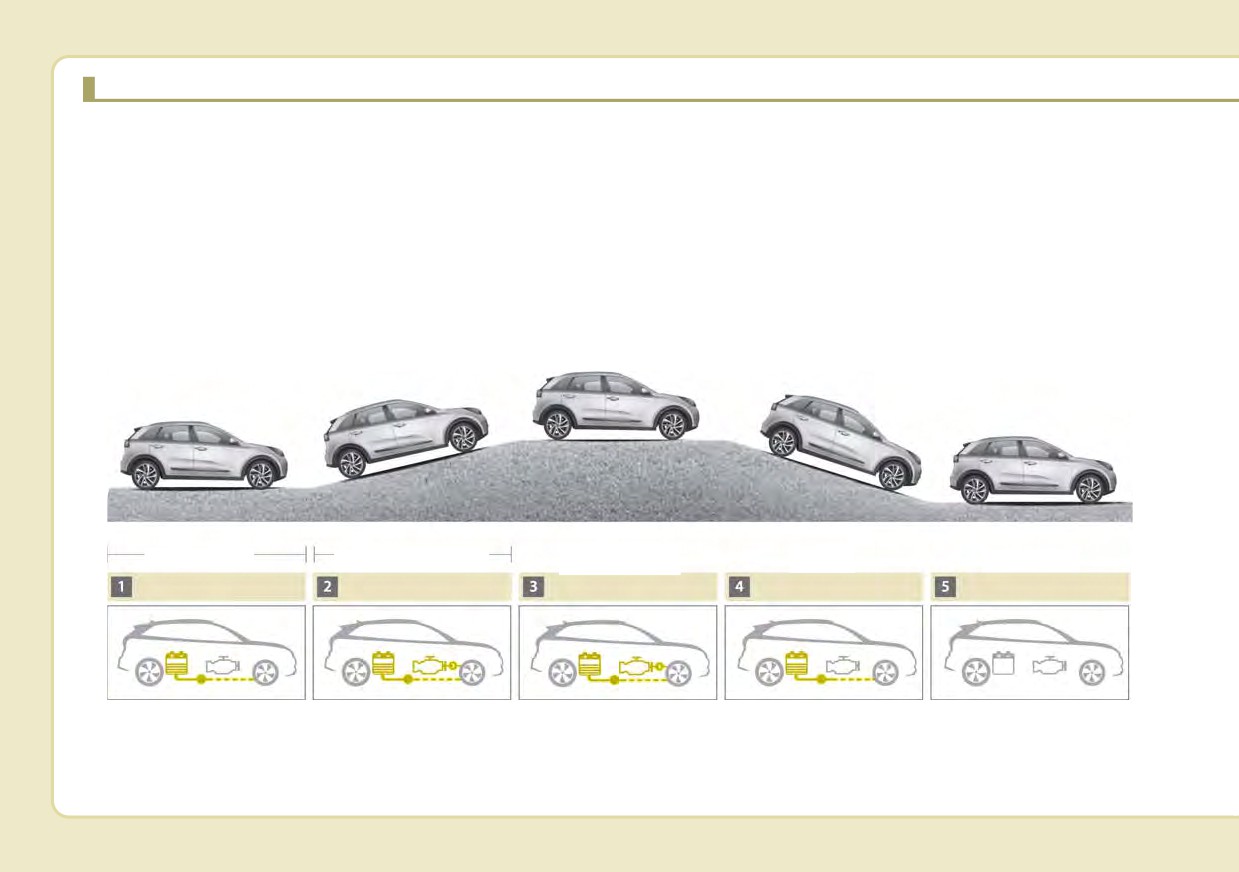
HEV (HYBRID ELECTRIC VEHICLE) SYSTEM
The Kia Hybrid Electric Vehicle (HEV) uses both the gasoline engine and the electric motor for power. The electric
motor is run by a 240V high-voltage HEV battery.
Depending on the driving conditions, the HEV computer selectively operates between the engine and the electric
motor or even both at the same time.
Fuel efficiency increases when the engine is at idle, or when the vehicle is driven by the electric motor with the HEV
battery.
The HEV battery charge must be maintained because, at times, the engine may come on even at idle to act as a gen-
erator. Charging also occurs when decelerating or by regenerative braking.
Engine+
Electric motor
Electric motor+Engine
Charging
Engine OFF
Motor or Motor
Startup/Low speed cruise
Acceleration
High speed cruise
Deceleration
Stop
ODEP051001
H2
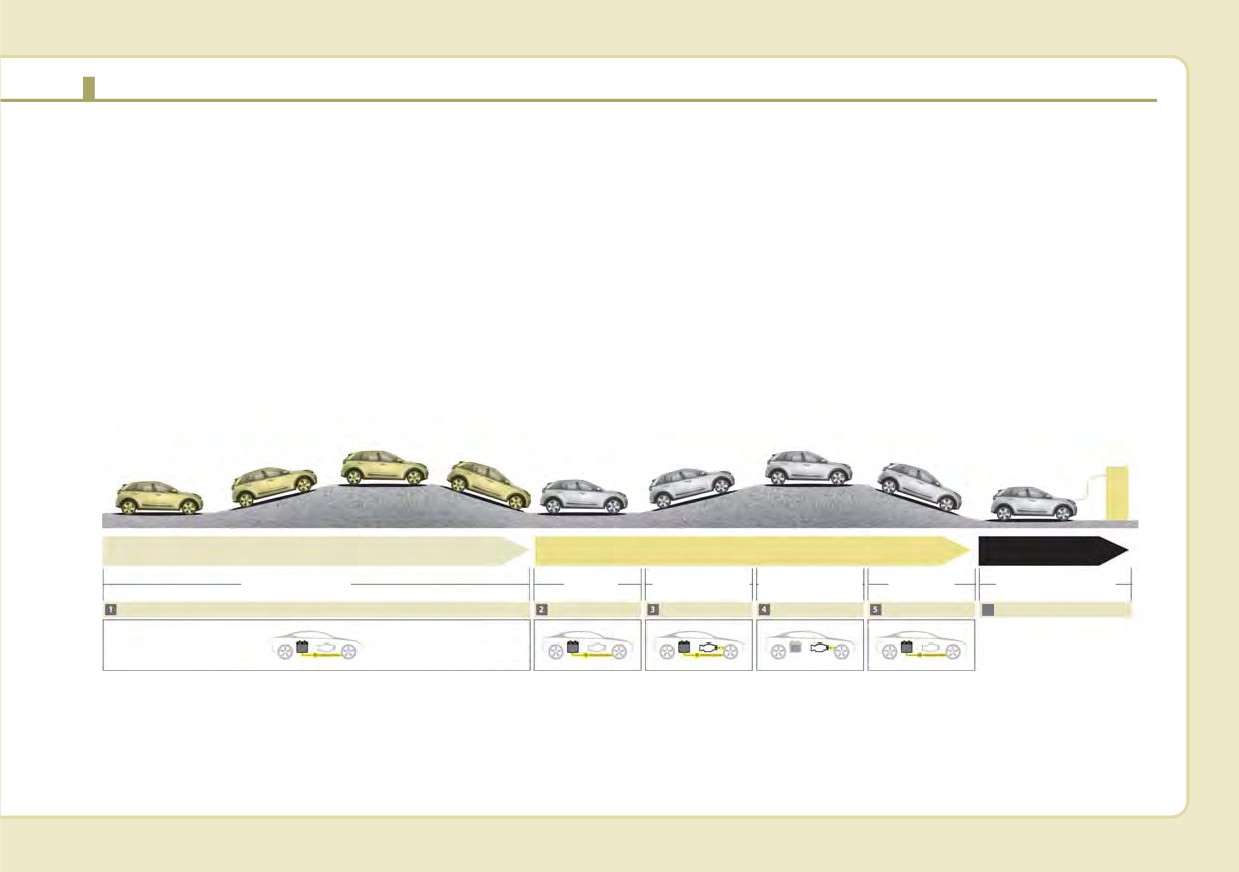
PHEV (PLUG-IN ELECTRIC VEHICLE) SYSTEM
The Kia Plug-in Hybrid Electric Vehicle (PHEV) shares the characteristics of both a conventional hybrid electric vehi-
cle and an all-electric vehicle.
When used as a conventional hybrid electric vehicle, the HEV computer selectively operates between the engine and
the electric motor or even both at the same time.
When it is operating in the electric vehicle mode, the vehicle is driven only using the electric motor over a certain dis-
tance until the hybrid battery becomes low. The driving distance in EV mode depends on customer driving style and road
conditions. Aggressive driving maneuvers may at times temporarily enable the engine to operate for maximum power.
The hybrid battery can be fully charged by connecting a plug to an external electric power source.
The engine can be turned on based on a number of factors such as heater usage and a frequent operation of the
accelerator pedal by a driver in Charge Depleting mode.
CD (Charge Depleting) Mode
CS (Charge Sustaining) Mode
Charging
Engine+Motor
Electric motor
Motor
Engine+Motor
Charging
Battery charging
or Motor
Electric Vehicle Mode
Start up/Low speed
Acceleration
High speed
Deceleration
6
External charging
ODEP051111
H3
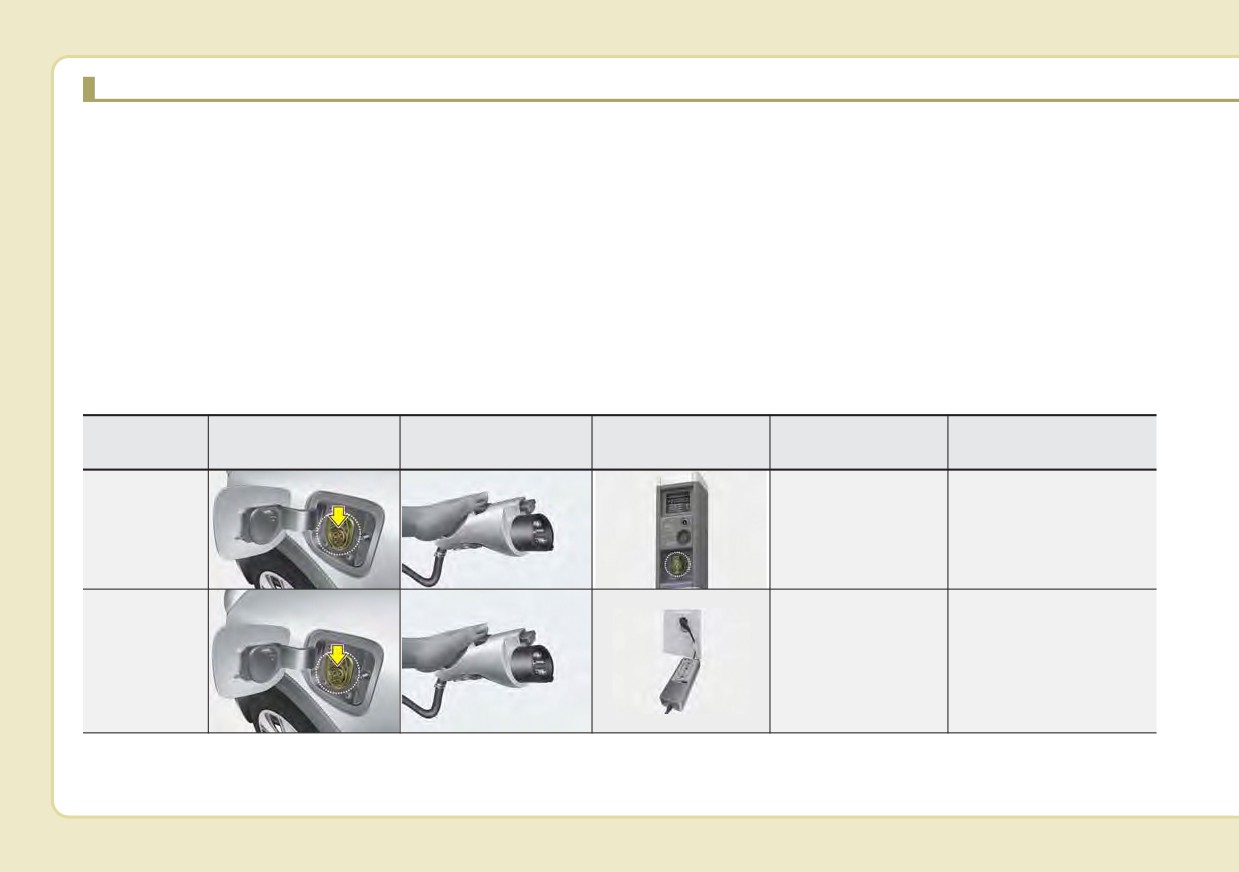
CHARGING THE PLUG-IN HYBRID VEHICLE
Charging Information
The electrical outlet in your home
Depending on the condition and
must comply with regulations and
durability of the high-voltage bat-
• AC Charger: The plug-in hybrid
can safely accommodate the
tery, charger specifications, and
vehicle is charged by plugging into
Voltage / Current (Amps) / Power
ambient temperature, the time
a AC Charger installed in your
(Watts) ratings specified on the
required for charging the high-volt-
home or a public charging station.
trickle charge. Use only as a back-
age battery may vary.
(For further details, refer to the 'AC
up charger.
Charge'.)
•
Trickle Charger: For charging at
home. Please note that the Trickle
• Trickle Charger: The plug-in hybrid
Charger is
slower than the AC
vehicle can be charged by using
Charging Time
Charger.
household electricity.
• AC Charger: Takes about 2 hours
15 minutes at room temperature
Charging Types
(Can be charged to 100%.).
Charging Inlet
Category
Charging Connector
Charging Outlet
Charging Method
Charging Time
(Vehicle)
AC Charger
Approximately 2 hours
installed in homes
15 minutes (to fully
AC Charger
or public charging
charge the plug-in
stations
hybrid,100%)
ODEPQ017018
ODEPQ017019
OJFHPQ016021L
For charging at home.
The included Trickle
Trickle
charger takes about 9
Household current
Charger
hours at room tempera-
ture (Can be charged to
ODEPQ017018
ODEPQ017019
OAEEQ016024
100%.).
• Depending on the condition and durability of the high voltage battery, charger specifications, and ambient temper-
ature, the time required for charging the high voltage battery may vary.
• Actual charger image and charging method may vary in accordance with the charger manufacturer.
H4
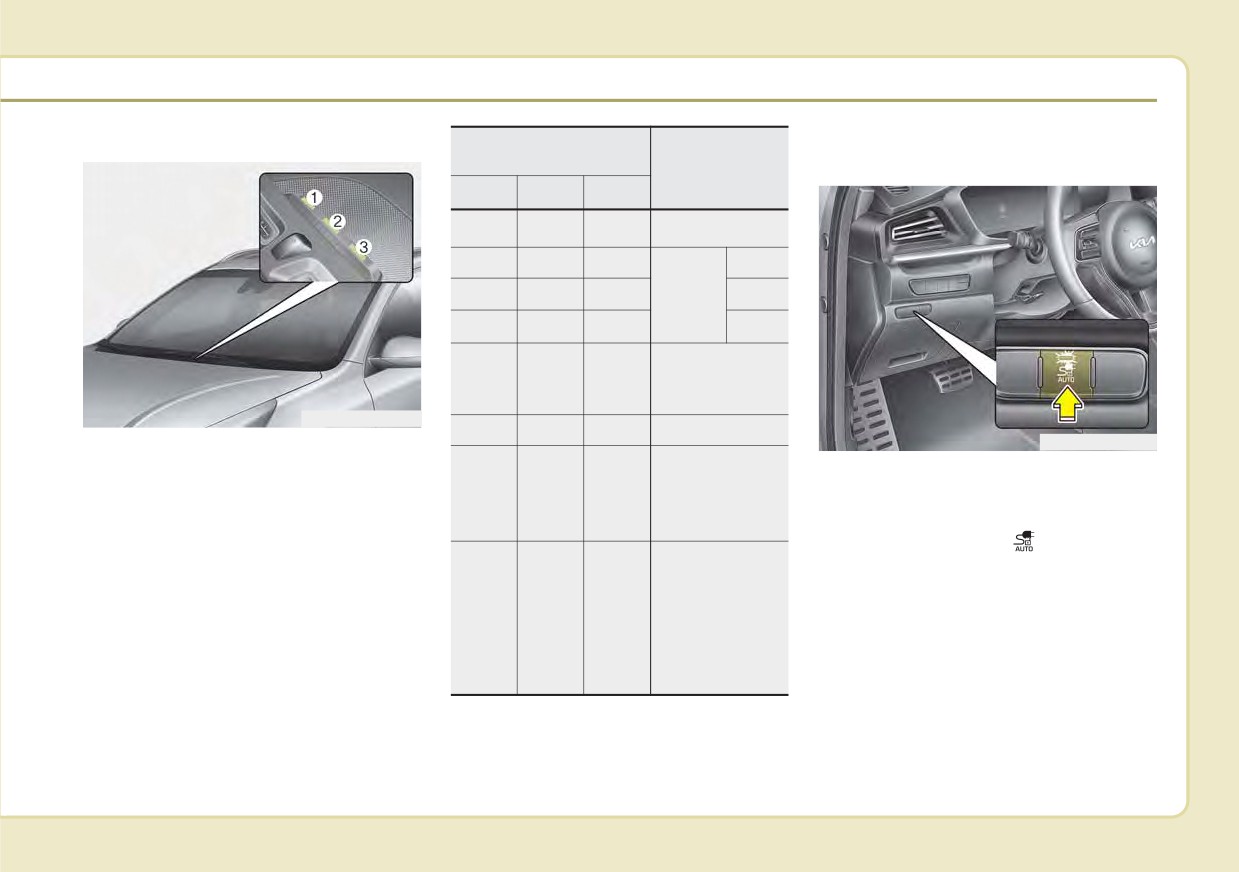
Charging Status Information
Operation of Charging
Charging Connector
Indicator Lamp
AUTO/LOCK Mode
Details
(1)
(2)
(3)
{
(OFF)
{
(OFF)
{
(OFF)
Not Charged
Blinking
{
(OFF)
{
(OFF)
0~33%
z
(ON)
Blinking
{
(OFF)
Charging
34~66%
z
(ON)
z
(ON)
Blinking
67~99%
Charging complete
z
(ON)
z
(ON)
z
(ON)
(100%)(turns OFF
in 5 seconds)
ODEPQ010020L
Blinking
Blinking
Blinking
Error while charging
ODEPQ011021N
When charging the high voltage bat-
Charging 12 V aux-
tery, the charge level can be checked
You may select when the charging
iliary battery or
from outside the vehicle.
{
(OFF)
{
(OFF)
Blinking
connector can be locked and
reserved air condi-
unlocked in the charging inlet.
tioner is operating
Press the button
to change
Reserved charging
between AUTO mode and LOCK
is operating (turns
mode.
OFF after 3 min-
{
(OFF)
Blinking
{
(OFF)
utes) or interrup-
tions that temporar-
ily prevent charging
(e.g. power failure)
H5
CHARGING THE PLUG-IN HYBRID VEHICLE (CONT.)
When the Charging Connector
•
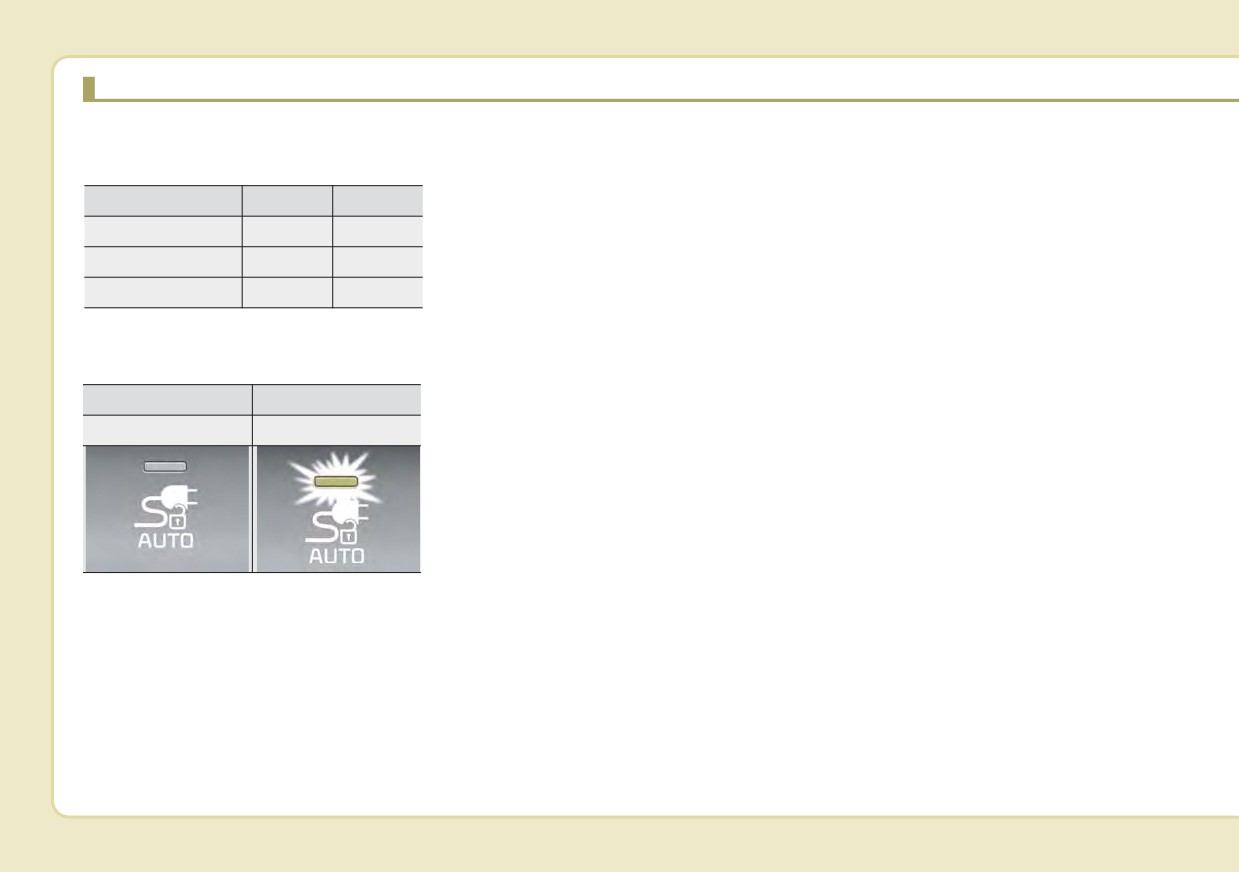
LOCK mode (button indicator off) :
❈ Charging connector
is Locked
AUTO/LOCK mode
The connector locks when the
charging connector is plugged into
When the charging connector is
LOCK
AUTO
the charging inlet. The connector is
plugged into the charging inlet, the
Before charging
O
X
locked until all doors are unlocked
connector lock timing varies with the
by the driver. This mode can be used
modes selected by pressing the but-
While charging
O
O
to prevent charging cable theft.
ton.
Finished charging
O
X
- If the charging connector is
• LOCK mode : The connector locks
unlocked when all doors are
automatically when the charging
AUTO/LOCK mode button indica-
unlocked, but the charging cable
connector is connected normally.
tor
is not disconnected within 15 sec-
• AUTO mode : The connector locks
onds, the connector will be auto-
when charging and automatically
LAMP OFF
LAMP ON
matically locked again.
unlocks when charging is complet-
LOCK mode
AUTO mode
- If the charging connector is
ed.
unlocked when all doors are
❈For more details, refer to the
unlocked, but all doors are locked
“Charging connector AUTO/LOCK
again, immediately, the connector
mode”.
will be automatically locked again.
❈ Locking/unlocking the charging
•
AUTO mode (button indicator on) :
door
The connector locks when charg-
ing starts. The connector unlocks
when charging is complete. This
mode can be used when charging
in a public charging station.
If the connector does not unlock
automatically after the charging is
completed in AUTO mode, the con-
nector will unlock when all the
doors are unlocked.
H6
The charging door lock/unlock func-
1. Conditions for lock :
2. Conditions for unlock :
tion works only when the following
➀ : When locking doors from out-
➀ : When unlocking doors from
conditions are satisfied with the
side the vehicle with the
outside the vehicle with the
charging door closed.
charging door closed.
charging door closed.
If the unlock function does not work,
➁ : When locking the driver’s door
➁ : When unlocking the driver’s
use the emergency charging door
using a mechanical key
door using a mechanical key
unlock method to unlock the charg-
➂ : When locking doors using a
➂ : When unlocking doors using a
ing door. (For more details, refer to
smart key
smart key
the “Unlock charging door in emer-
gency”)
➃:When pressing the door
➃:When pressing the door
lock/unlock button on the front
lock/unlock button on the front
door outside handle while the
door outside handle while the
smart key is detected and
smart key is detected and
doors are unlocked
doors are locked
➄ : When locking all vehicle doors
➄ : When unlocking all vehicle
with the charging door closed.
doors with the charging door
(When locking doors with
closed. (When unlocking doors
functions such as spare key,
with functions such as spare
smart key, door lock button on
key, smart key, door lock but-
the outside door handle, cen-
ton on the outside door han-
tral door lock switch, auto door
dle, central door lock switch,
lock.)
auto door lock.)
H7
CHARGING THE PLUG-IN HYBRID VEHICLE (CONT.)
Scheduled Charging
•
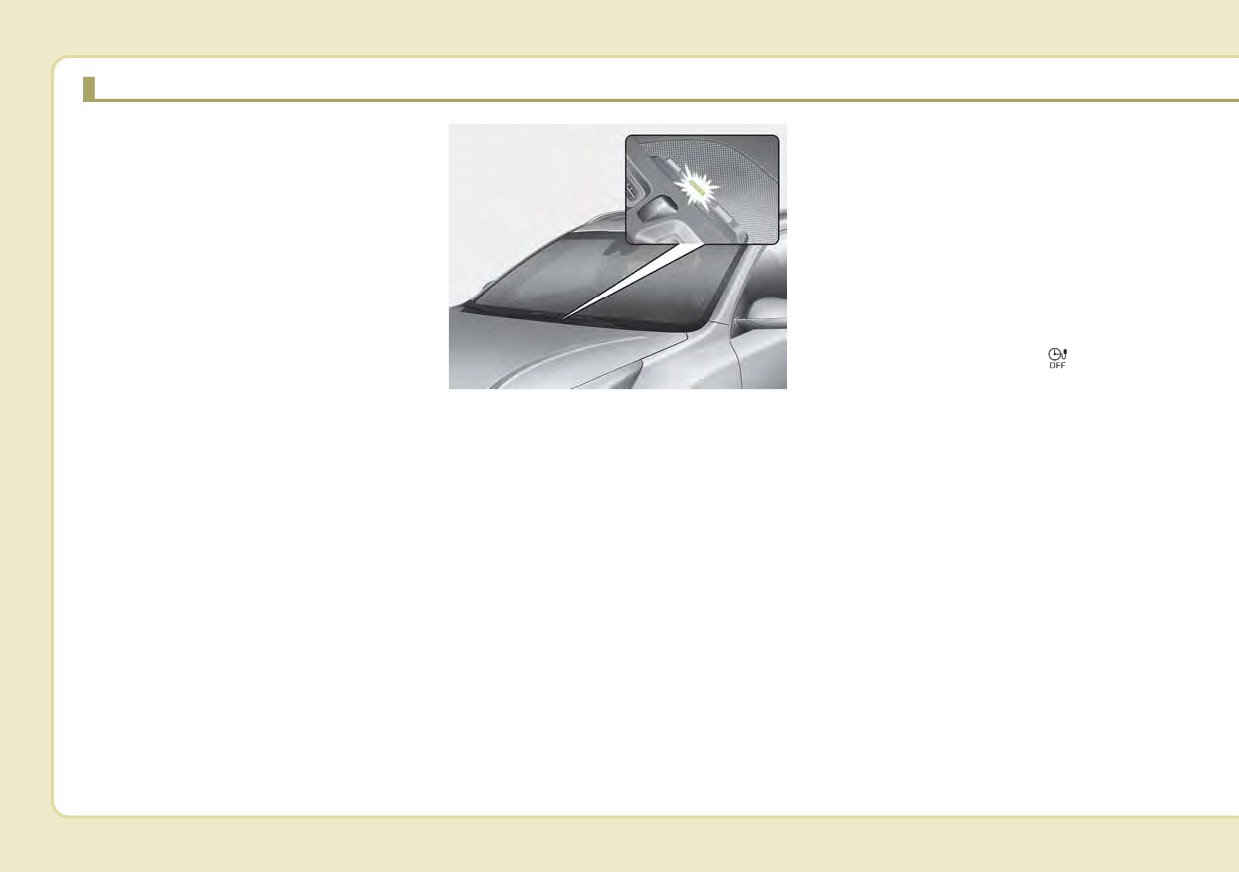
When scheduled charging is set,
(if equipped)
charging is not initiated immediate-
ly when the AC Charger or
•
You can set reserved charging
portable charging cable (ICCB: In-
using the Infotainment System.
Cable Control Box) is connected.
Refer to the Infotainment System
•
If charging is required immediately,
for detailed information about set-
turn off the scheduled charge
ting reserved charging.
using the Infotainment System or
•
Scheduled charging can only be
UVO eco smartphone application
done when using a AC Charger or
or press the vehicle's scheduled
the portable charging cable (ICCB:
charge release button(
).
In-Cable Control Box).
ODEPQ010023L
•
When the scheduled charge is set,
•
When scheduled charging is set
the charge start time is calculated
and the AC Charger or the portable
by itself. In some cases, charging
charging cable
(ICCB: In-Cable
may start immediately after con-
Control Box) is connected for
necting the charger.
charging, the indicator lamp blinks
(for
3 minutes) to indicate that
scheduled charging is set.
H8
Refer to "AC Charge or Trickle
Charging Precautions
Charge" for details about connect-
■ AC Charger
ing the AC Charger and the
portable charger (ICCB: In-Cable
Control Box).
ODEPQ011022N
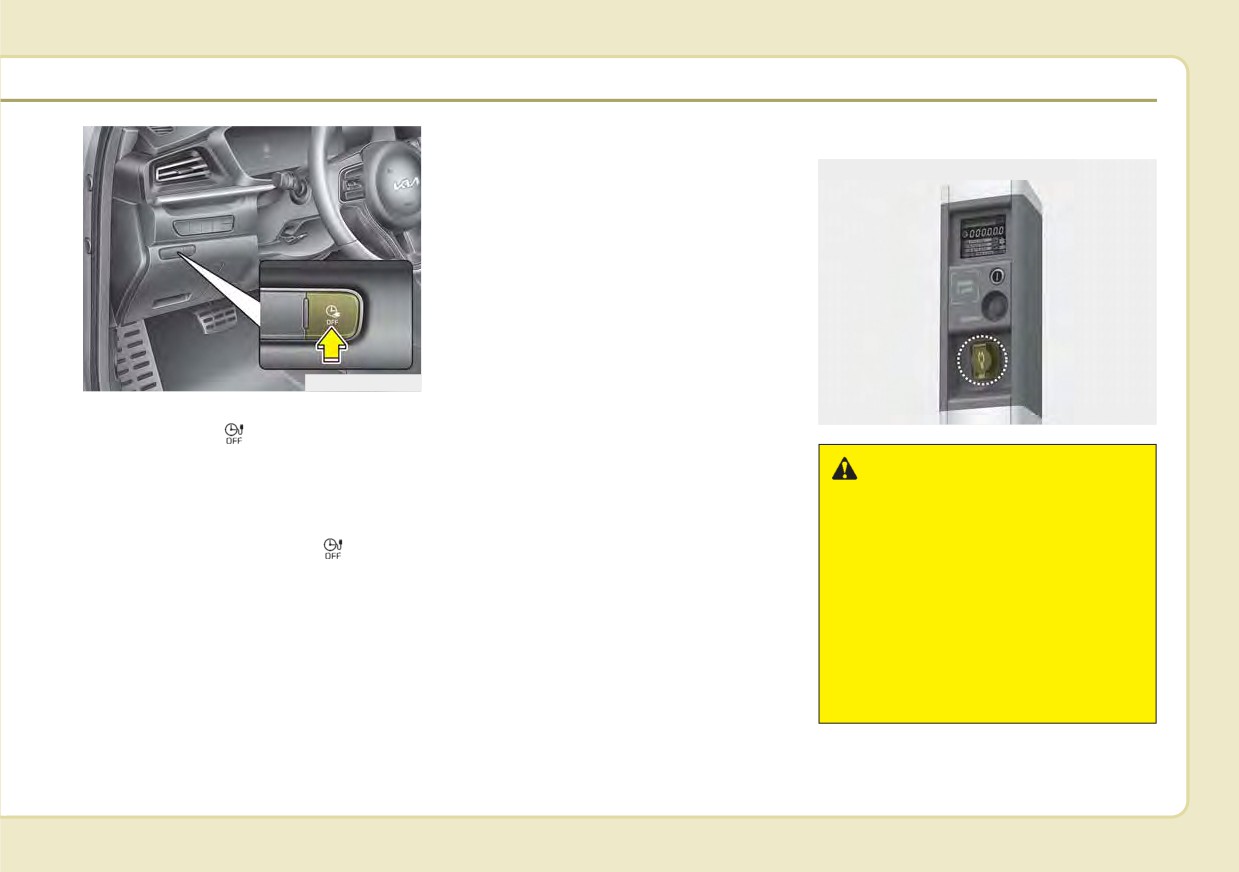
• If you press the scheduled charging
OJFHPQ016021L
deactivation (
) button to immedi-
ately charge the battery, charging
must be initiated 3 minutes after the
WARNING
charging cable has been connected.
- Fires caused by dust or
water
When you press the scheduled
charging deactivation (
) button
Do not connect the charging
for immediate charging, the sched-
cable connector plug to the vehi-
uled charge setting is not com-
cle if there is water or dust on the
pletely deactivated. If you need to
charging inlet. Connecting while
completely deactivate the sched-
there is water or dust on the
uled charge setting, use the
charging cable connector and
Infotainment System to finalize the
plug may cause a fire or electric
deactivation.
shock.
H9
CHARGING THE PLUG-IN HYBRID VEHICLE (CONT.)
•
Comply with the following in order
WARNING
WARNING
to prevent electrical shock when
- Interference with electron-
- Touching the charging
charging:
ic medical devices
connector
- Use a waterproof charger
When using medical electric
Do not to touch the charging
- Make sure to not touch the charg-
devices such as an implantable
connector, charging plug, or the
ing connector and charging plug
cardiac pacemaker, make sure to
charging inlet when connecting
when your hand is wet
ask the medical team and manu-
the charger connecting cable to
- Do not charge when there is light-
facturer whether charging your
the charging outlet and the
ning
electric vehicle will impact the
charging inlet on the vehicle.
- Do not charge when the charging
operation of the medical
Doing so may result in electro-
connector and plug is wet
devices. In some instances, elec-
cution.
tromagnetic waves that are gen-
erated from the charger can seri-
WARNING - Charging
ously impact medical electric
cable
devices such as an implantable
•
Immediately stop charging
cardiac pacemaker.
when you discover abnormal
symptoms (smell, smoke).
•
Replace the charging cable if
WARNING
the cable coating is damaged
- Old or Worn out Electric
to prevent electrical shock.
Outlets
•
When connecting or removing
Do not use old or worn out elec-
the charging cable, make sure
tric outlets to charge your vehi-
to hold the charging connec-
cle. There may be a risk of fire
tor handle.
and injury when using old worn
(Continued)
out public electrical outlets.
H10
•
Always keep the charging connec-
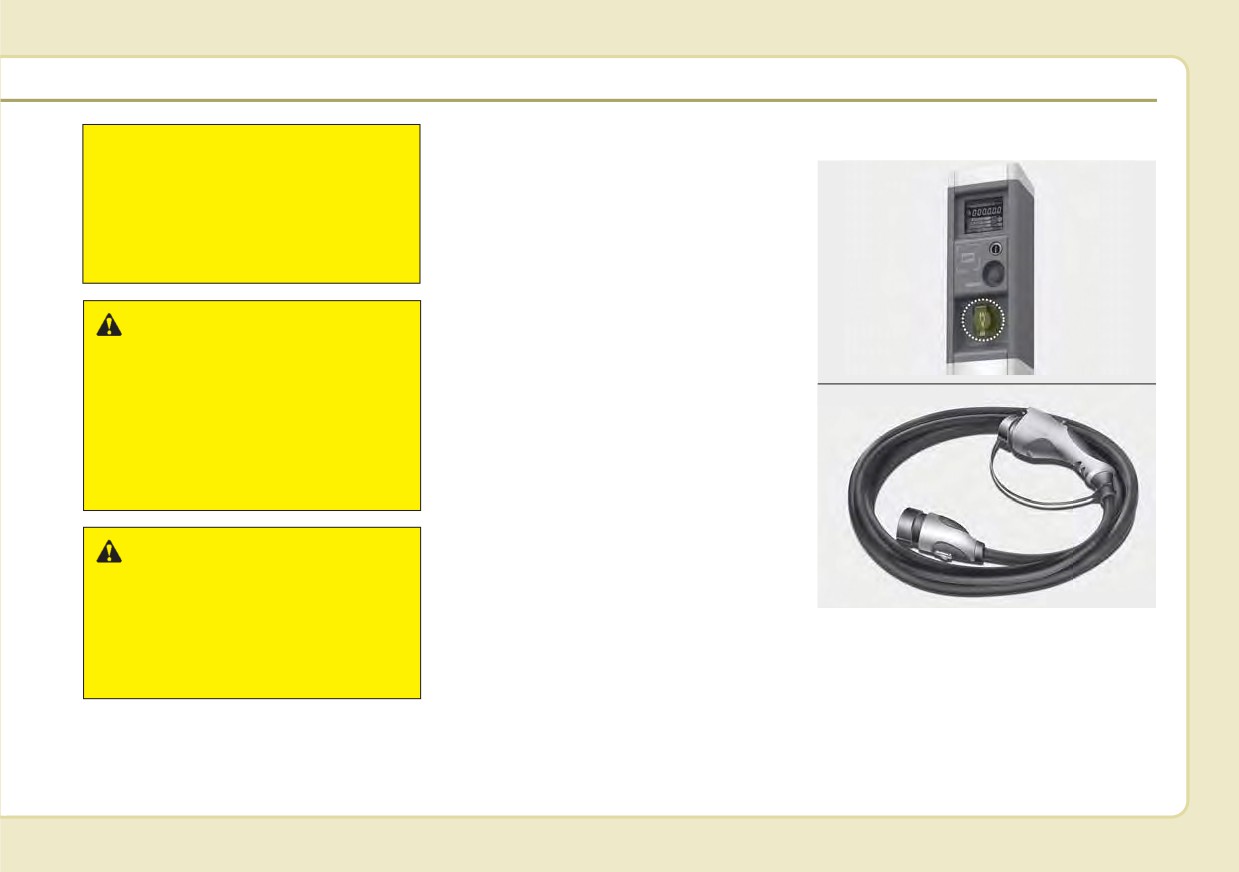
AC Charge
(Continued)
tor and charging plug clean and
If you pull the cable itself
■ AC Charger
dry. Be sure to keep the charging
(without using the handle), the
cable in a condition where there is
internal wires may disconnect
no water or moisture.
or get damaged. This may lead
•
Before charging the battery, turn
to electric shock or fire.
the vehicle OFF.
•
Be careful not to drop the charging
connector. The charging connector
WARNING - Cooling fan
can be damaged.
Do not touch the cooling fan
•
Always inspect the charging con-
OJFHPQ016021L
while vehicle is charging. When
nector terminals for damage or
■ AC Charger cable
the vehicle is switched OFF
overheating. Do not use if dam-
while charging, the cooling fan
aged, as this may damage the
inside the engine compartment
vehicle side charge connector and
or interior rear seat may auto-
is not a warrantable repair.
matically operate.
WARNING
Make sure to use the designat-
OAEEQ016028
ed charger for charging the
vehicle.Using any other charger
You can charge your vehicle by plug-
may cause failure or lead to
ging into a public charger at a charg-
electric shock or fire.
ing station.
H11
CHARGING THE PLUG-IN HYBRID VEHICLE (CONT.)
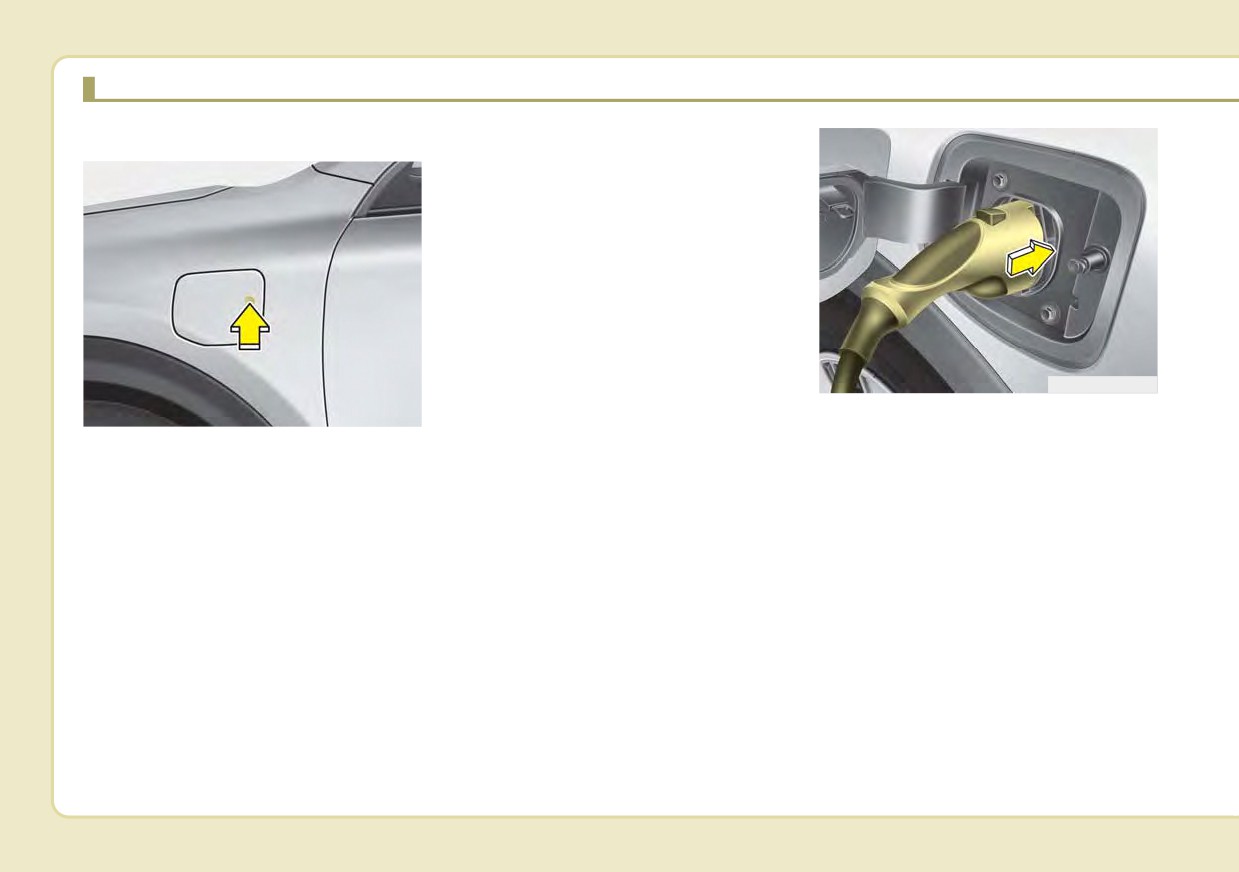
How to Connect to an AC charger
✽ NOTICE
The charging door does not open if
the door are locked/theft alarm sys-
tem is armed.
ODEPQ017026
ODEPQ019025
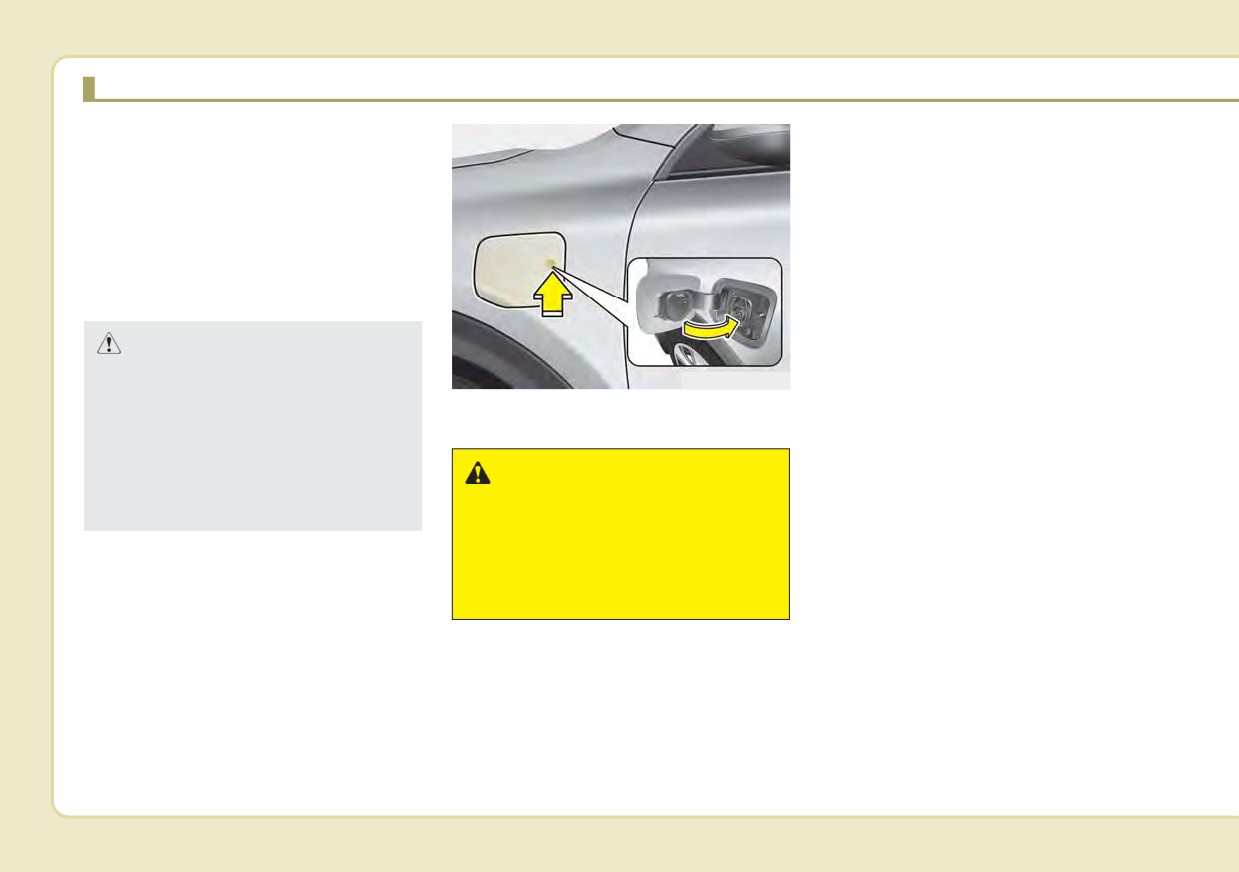
5. Remove any dust on the charging
connector and charging inlet.
1. Depress the brake pedal and
6. Hold the charging connector han-
apply the parking brake.
dle. Then, insert it into the charg-
2. Turn OFF all switches, move the
ing inlet, until you hear a click
shift lever to P
(Park), and turn
sound. If it is not fully connected, a
OFF the vehicle.
bad connection between the
3. After unlocking doors, open the
charging connector and the charg-
charging door by pressing it.
ing terminals may cause a fire.
4. Open the charging door by press-
ing circle mark
(o) area on the
right edge of the charging door.
If the vehicle doors are locked, the
charging door will not open.
H12
■ Type A
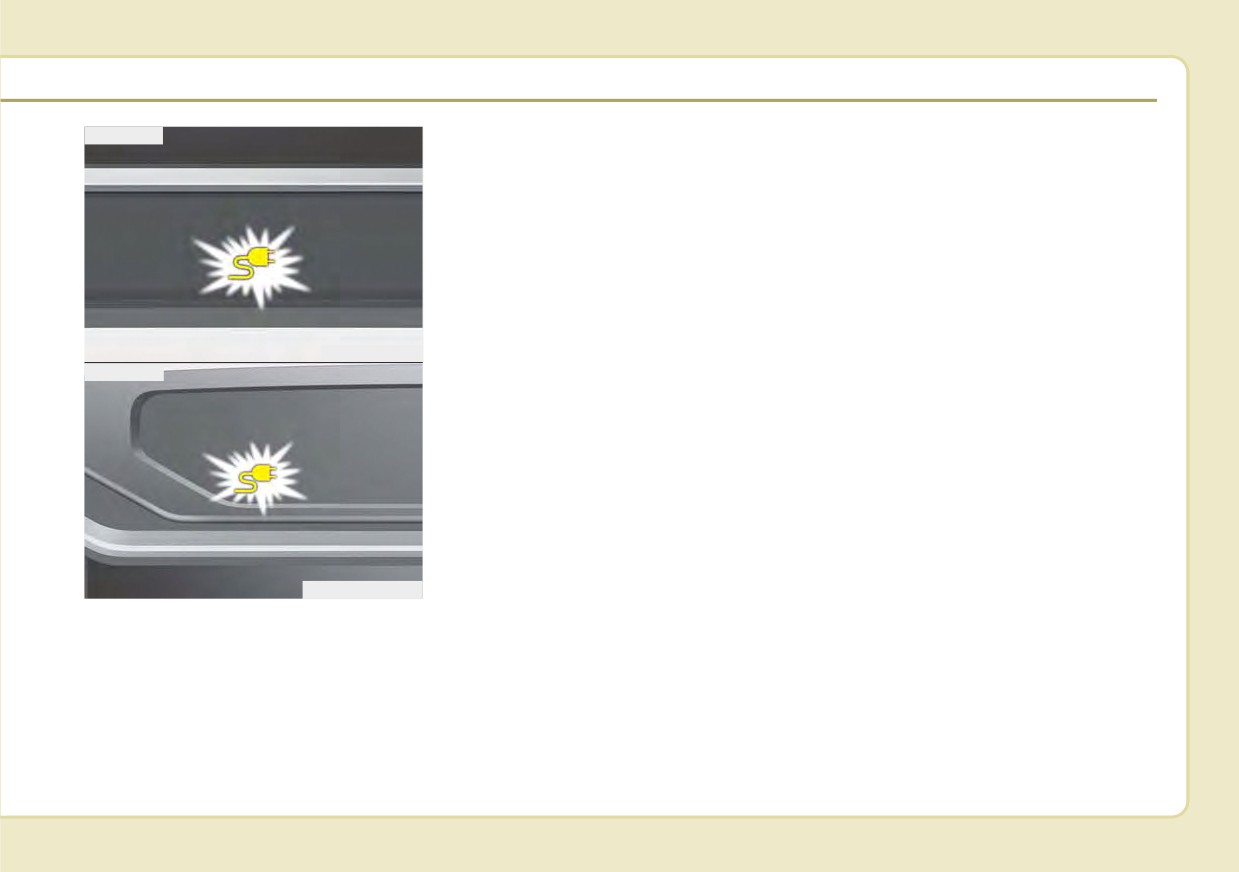
7. Check if the charging cable con-
✽ NOTICE
nection indicator of the high volt-
•
Charging is in progress only when
age battery in the instrument clus-
the shift lever is in P
(Park).
ter is turned ON.
Charging the battery with the
Charging does not occur when the
Engine Start/Stop button in the
indicator is OFF. When the charg-
ACC position is possible. However,
ing connector is not connected
it may discharge the 12-V battery.
properly, reconnect the charging
Thus, if possible, charge the bat-
cable to charge.
tery with the Engine Start/Stop
button in the OFF position.
ODEPQ019027
•
The charging process is interrupt-
■ Type B
ed temporarily when the shift lever
is moved from P (Park) to Not P(R
(Reverse)/N
(Neutral)/D
(Drive))
during charging. To resume(restart)
charging, move the shift lever to the
P (park) position. Then, the charging
process is resumed(restarted).
ODEPQ019125
H13
CHARGING THE PLUG-IN HYBRID VEHICLE (CONT.)
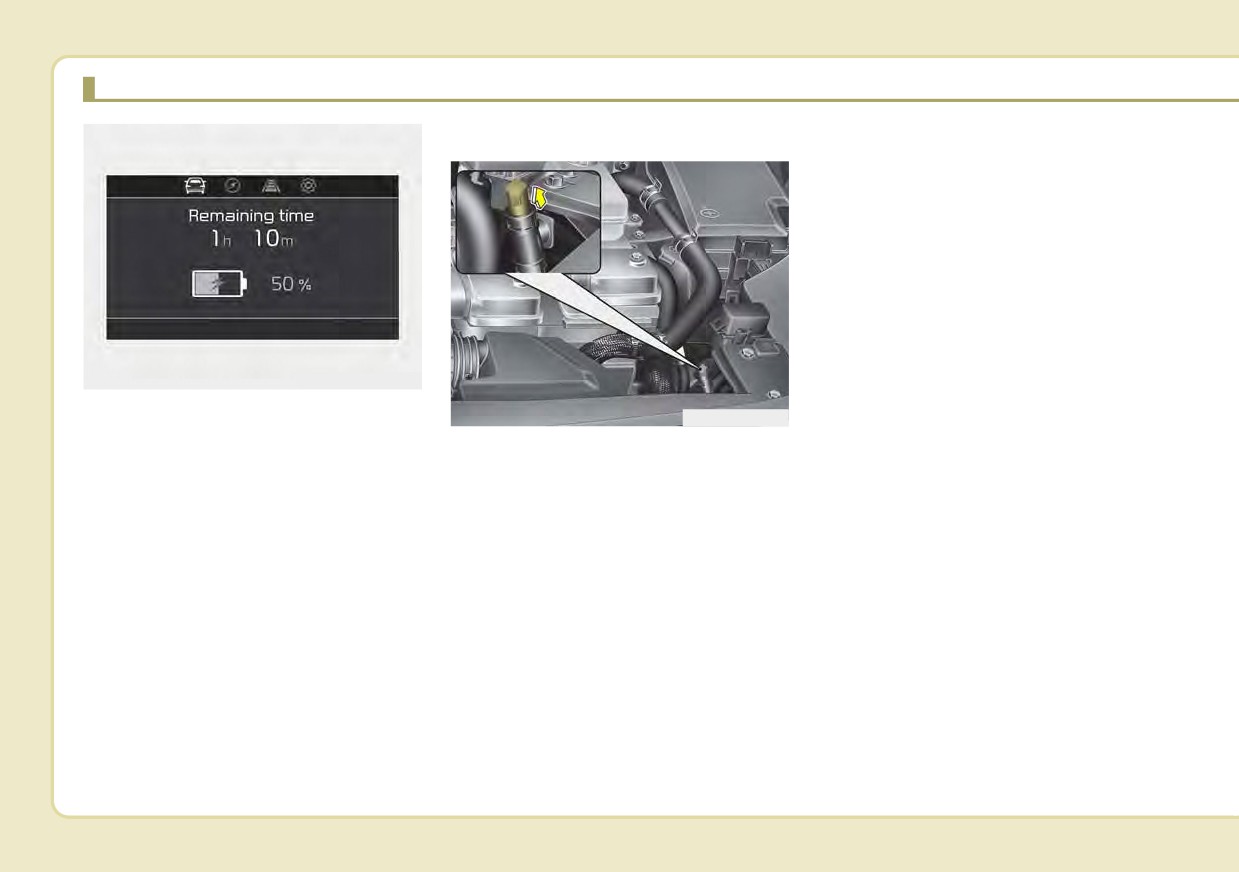
Unlock Connector in Emergency
In that case, the charging cable may
not be disconnected or locked, or the
vehicle may not be charged. If this
happens, open the hood and pull the
emergency cable lightly 2 to 3 times
and then try to disconnect the charg-
ing cable or start recharging.
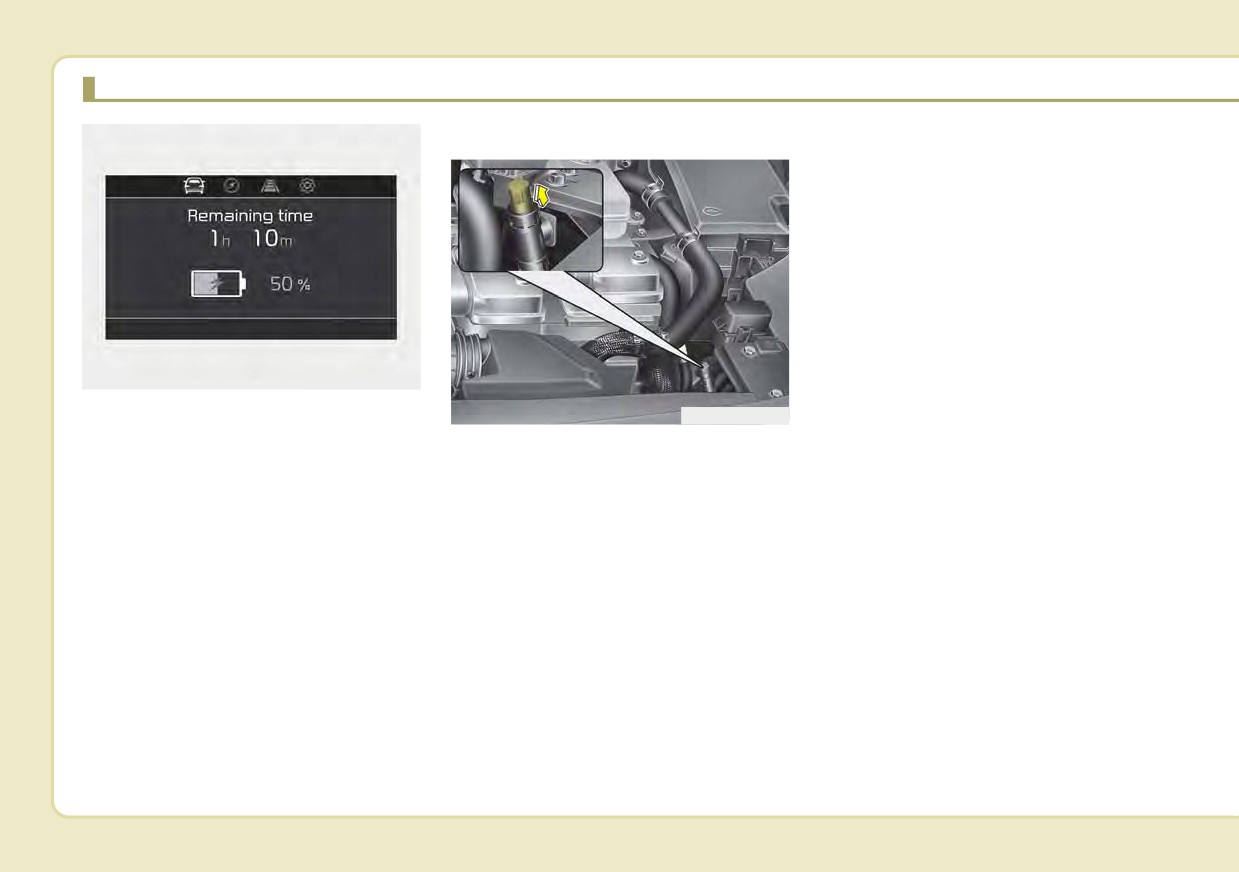
ODEPQ017028L
8. After charging has started, the
ODEPQ017029
estimated charging time is dis-
played on the instrument cluster
If the charging connector does not
for about 1 minute. It is also dis-
unlock for some reason, open the
played, when the driver’s door is
hood and slightly pull the emergency
opened with charging in progress.
cable as shown above. The charging
When scheduled charging is set,
door will then open.
the estimated charging time is dis-
If the charging door does not opened
played as “--” .
immediately after pulling the emer-
gency cable in, press the charging
door lightly and pull the emergency
cable again.
The charging cable lock may not
work properly when foreign materials
such as dust enter the cable or the
cable is encrusted with ice.
H14
How to Disconnect an AC charger
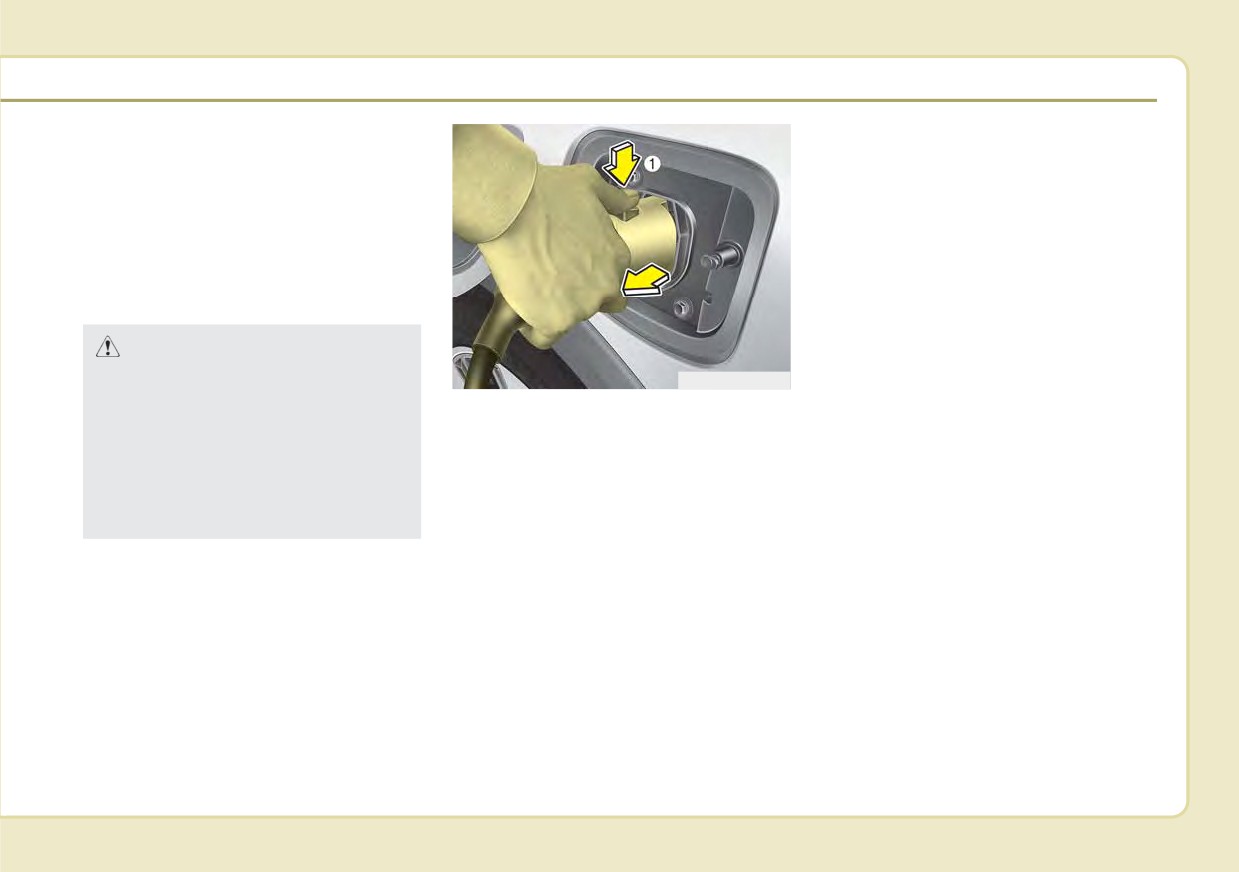
To prevent charging cable theft, the
1.The vehicle must be in the AUTO
charging connector cannot be dis-
connected from the inlet when the
mode or the doors must be
unlocked in order to be able to dis-
doors are locked. Unlock all doors
to disconnect the charging connec-
connect the charging connector. A
lock system prevents charger
tor from the inlet.
cable disconnection when the vehi-
However, if the vehicle is in the
cle's doors are locked.
charging connector AUTO mode,
the charging connector automati-
cally unlocks from the inlet when
CAUTION
charging is completed.
In order to disconnect the
ODEPQ017031
charging connector, unlock the
2.While holding the charging con-
doors to unlatch the charging
nector, pressing the locking
connector lock system. If not,
release button (1) and then pull it
the charging connector and the
out.
vehicle's charging inlet may be
damaged.
H15
CHARGING THE PLUG-IN HYBRID VEHICLE (CONT.)
If the connector does not unlock
✽ NOTICE
automatically after the charging is
• Keep the charging connector and
completed in AUTO mode, the con-
the charging plug clean and dry.
nector will unlock when all the
The charging cable should also be
doors are unlocked.
kept dry.
For more details, refer to “Charging
• Use an air gun to blow any foreign
Connector AUTO/ LOCK Mode” in
substances from the charging con-
this chapter.
nector and the charging plug.
CAUTION
When disconnecting the charg-
ODEPQ019032
ing connector, do not try to dis-
3. Make sure to securely close the
connect it by force while not
charging door.
pressing the release button.
This may damage the charging
WARNING
connector and vehicle charging
inlet.
Do not modify or disassemble
the charging cable compo-
nents. Doing so may cause a
fire or electric shock resulting
in personal injuries.
H16
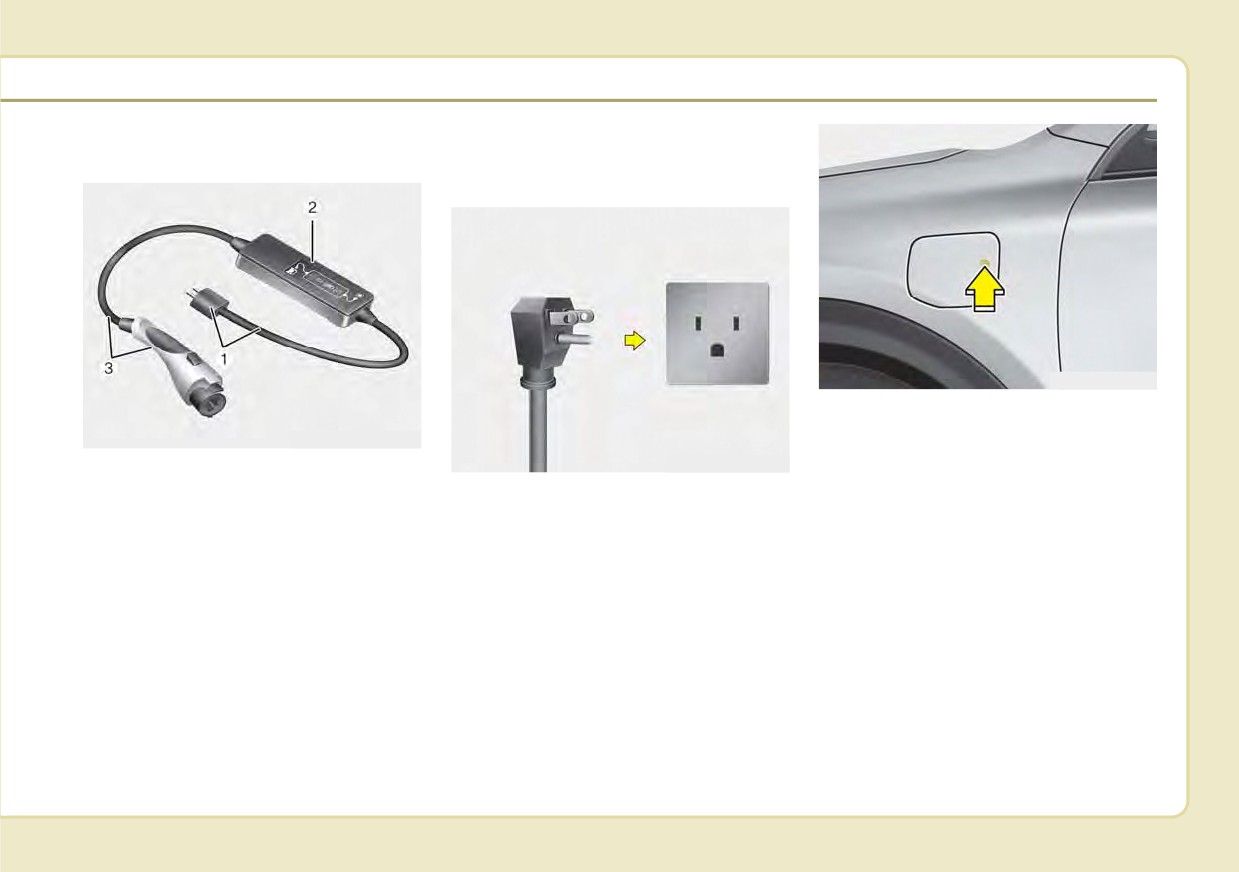
Trickle Charger
How to Connect Portable
(Portable Charging Cable)
Charging Cable
(ICCB: In-Cable Control Box)
ODEPQ019025
3. After unlocking doors, open the
charging door by pressing it.
OAEEQ016042
OJFHPQ016015N
4. Open the charging door by press-
Trickle charger can be used if AC
ing circle mark
(o) area on the
Charger is unavailable.
1. Turn OFF all switches, move the
right edge of the charging door.
shift lever to P
(Park), and turn
If the vehicle doors are locked, the
❈ ➀ : Plug and cable
OFF the vehicle.
charging door will not open.
➁ : Control box (ICCB)
2. Depress the brake pedal and
apply the parking brake.
➂ : Charging connector/cable
H17
CHARGING THE PLUG-IN HYBRID VEHICLE (CONT.)
■ Charge
ODEPQ017049
■ Vehicle connection
ODEPQ011188N
ODEPQ011189N
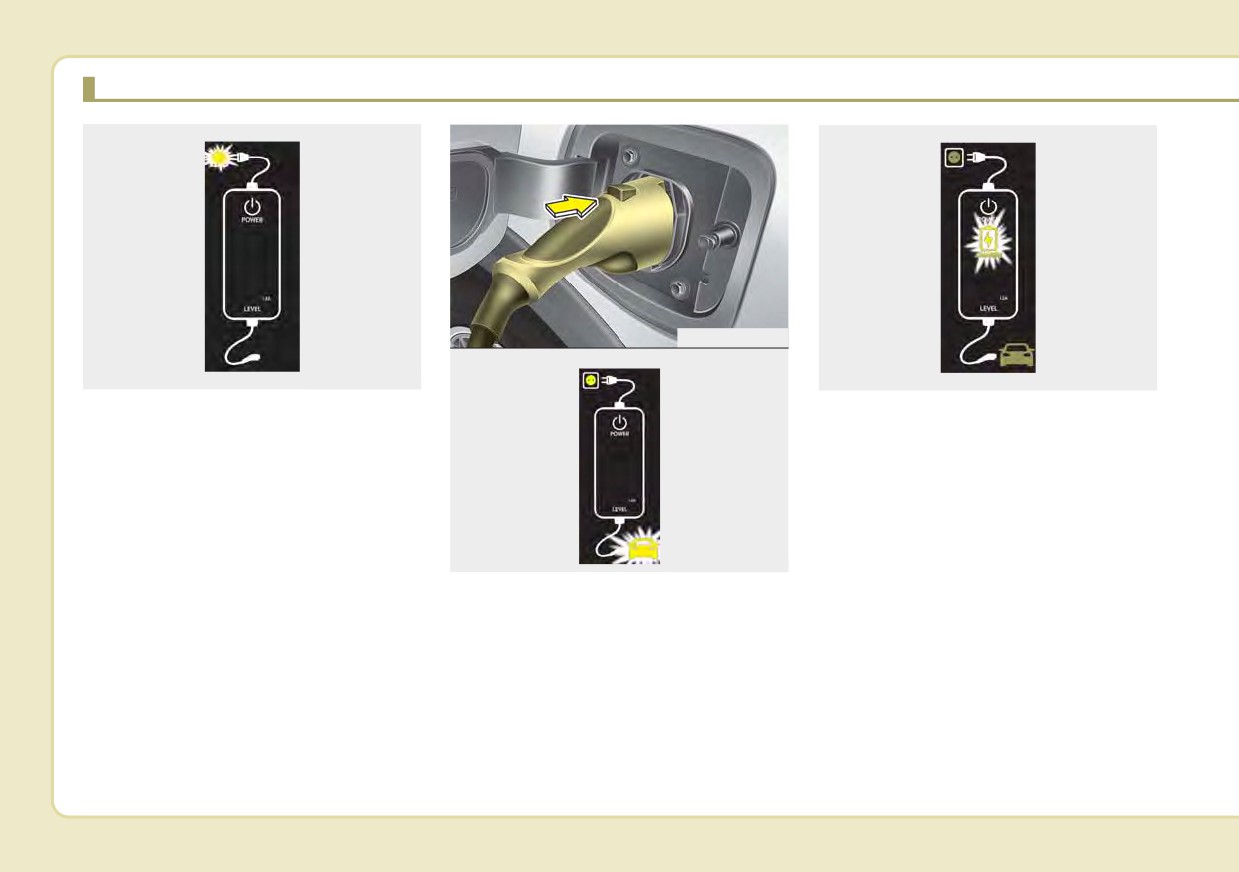
5. Connect the plug to a household
9. Charging starts automatically and
electric outlet.
the charging light blinks.
6. Make sure that the power connec-
tion indicator (green) lights in the
control box.
✽ NOTICE
ODEPQ011192N
The charging door does not open
7. Remove any dust on the charging
when the theft alarm system is
connector and charging inlet.
armed.
8. Hold the charging connector han-
dle. Then, insert it into the charging
inlet, until you hear a click sound. If
it is not fully connected, improper
connection between the charging
connector and the charging termi-
nals are a potential fire hazard.
H18
■ Type A
Charging does not occur when the
✽ NOTICE
indicator is OFF. When the charg-
•
The charging is in progress only
ing connector is not connected
with the shift lever is in P (Park).
properly, reconnect
the charging
Charging the battery with the
cable to charge.
Engine Start/Stop button in the
ACC position is possible. However,
it may discharge the 12-V battery.
Thus, if possible, charge the bat-
tery with the Engine Start/Stop
button in the OFF position.
ODEPQ019027
•
Moving the shift lever from P
■ Type B
(Park) to R (Reverse)/N(Neutral)/D
(Drive) stops the charging process.
To restart the charging process,
move the shift lever to P (Park),
press the Engine Start/Stop button
to the OFF position, and discon-
nect the charging cable. Then,
connect the charging cable and
restart the vehicle again.
ODEPQ019125
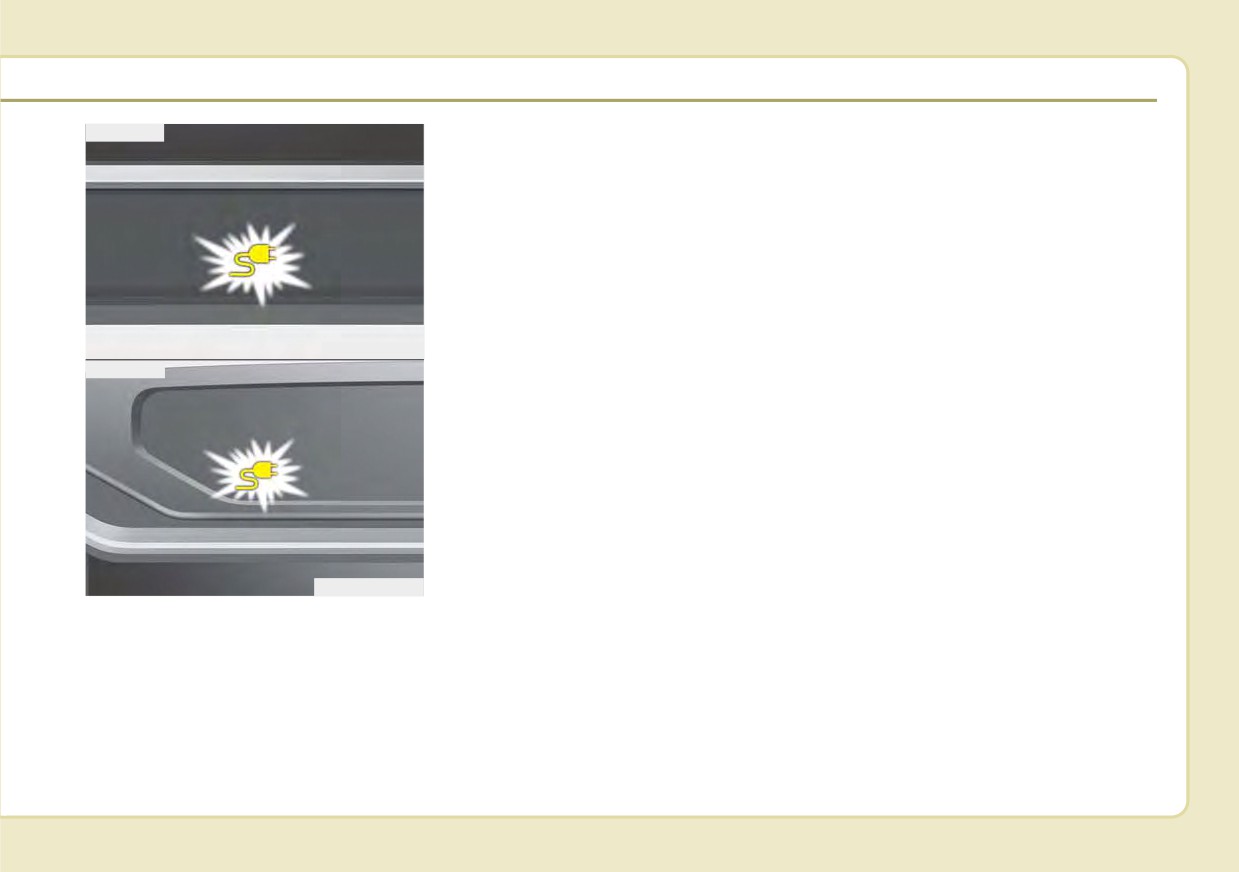
10. Check if the charging cable con-
nection indicator of the high volt-
age battery in the instrument
cluster is turned ON.
H19
CHARGING THE PLUG-IN HYBRID VEHICLE (CONT.)
Unlock Connector in Emergency
In that case, the charging cable may
not be disconnected or locked, or the
vehicle may not be charged. If this
happens, open the hood and pull the
emergency cable lightly 2 to 3 times
and then try to disconnect the charg-
ing cable or start recharging.
ODEPQ017028L
11. After charging has started, the
ODEPQ017029
estimated charging time is dis-
played on the instrument cluster
If the charging connector does not
for about 1 minute. It is also dis-
unlock for some reason, open the
played, when the driver’s door is
hood and slightly pull the emergency
opened with charging in progress.
cable as shown above. The charging
When scheduled charging is set,
door will then open.
the estimated charging time is dis-
If the charging door does not opened
played as "--".
immediately after pulling the emer-
gency cable, press the charging door
lightly and pull the emergency cable
again.
The charging cable lock may not
work properly when foreign materials
such as dust enter the cable or the
cable is encrusted with ice.
H20
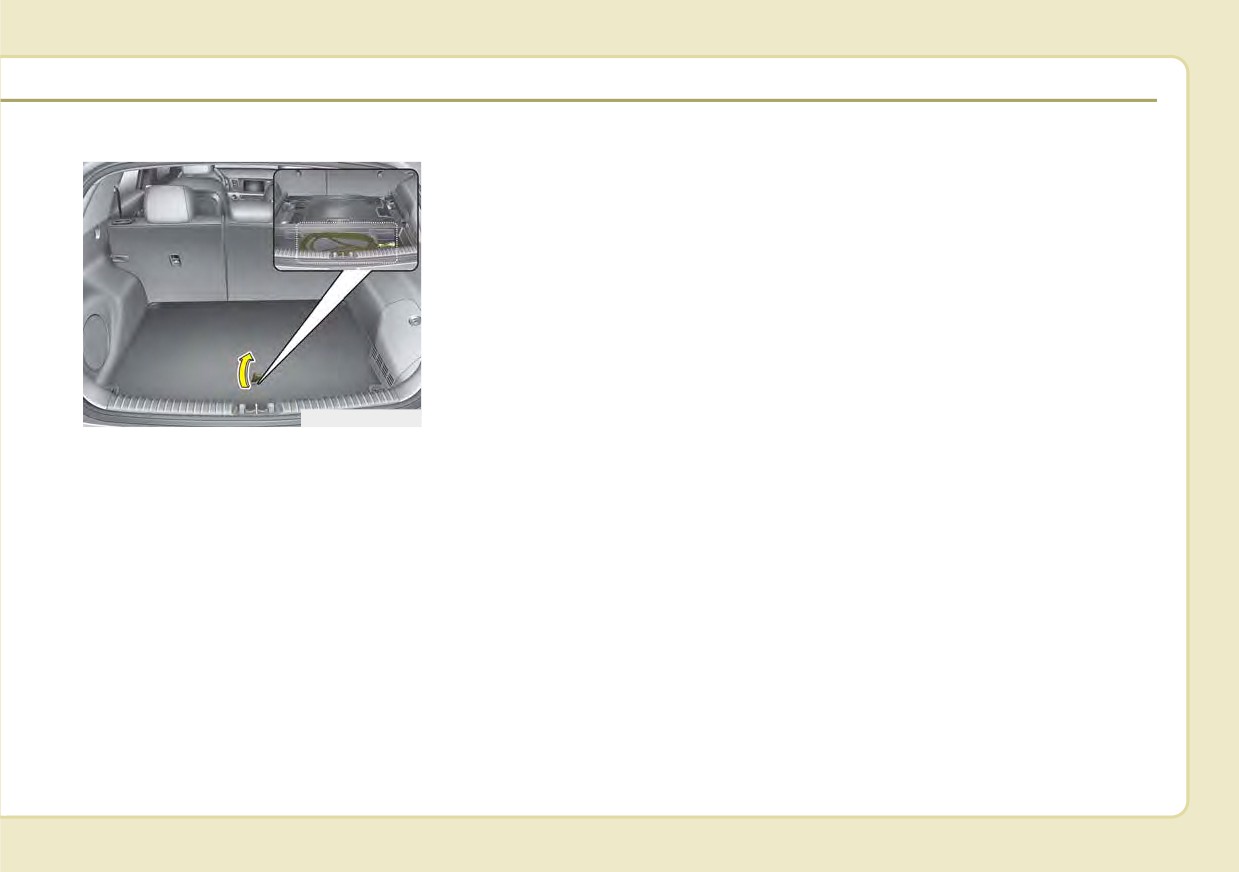
Charge cable storage
ODEPQ017033
We recommend that the trickle
charger cable be put in a storage box
after use.
H21
CHARGING THE PLUG-IN HYBRID VEHICLE (CONT.)
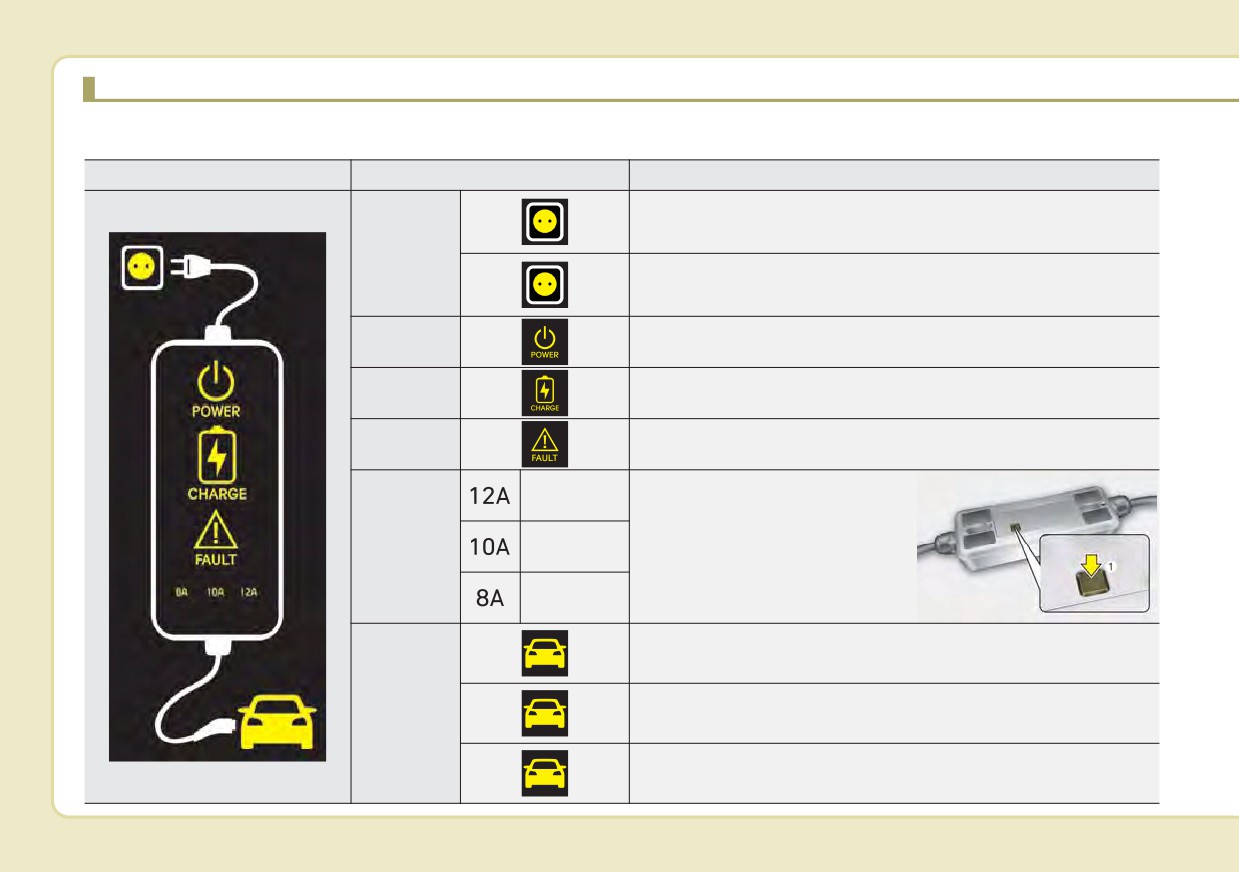
Charging Status Indicator Lamp for Portable Charging Cable
Control Box
Indicator
Details
On : Power on
Blink : Plug temperature sensor failure
PLUG
(Green)
On : Plug high temperature protection
Blink : Plug high temperature warning
(Red)
POWER
On : Power on
Blink : Charging In power saving mode, only the CHARGE
CHARGE
indicator is illuminated.
FAULT
Blink : Charging interrupted
Charging
current 12 A
The charging current changes (3
level) whenever the button (1) is
CHARGE
Charging
pressed for 1 sec with the charg-
LEVEL
current 10 A
er plugged into an electrical out-
Charging
let but not the vehicle.
current 8 A
Charging connector plugged
(Green)
VEHICLE
Charging
(Blue)
Blink : Not charging
(Red)
H22
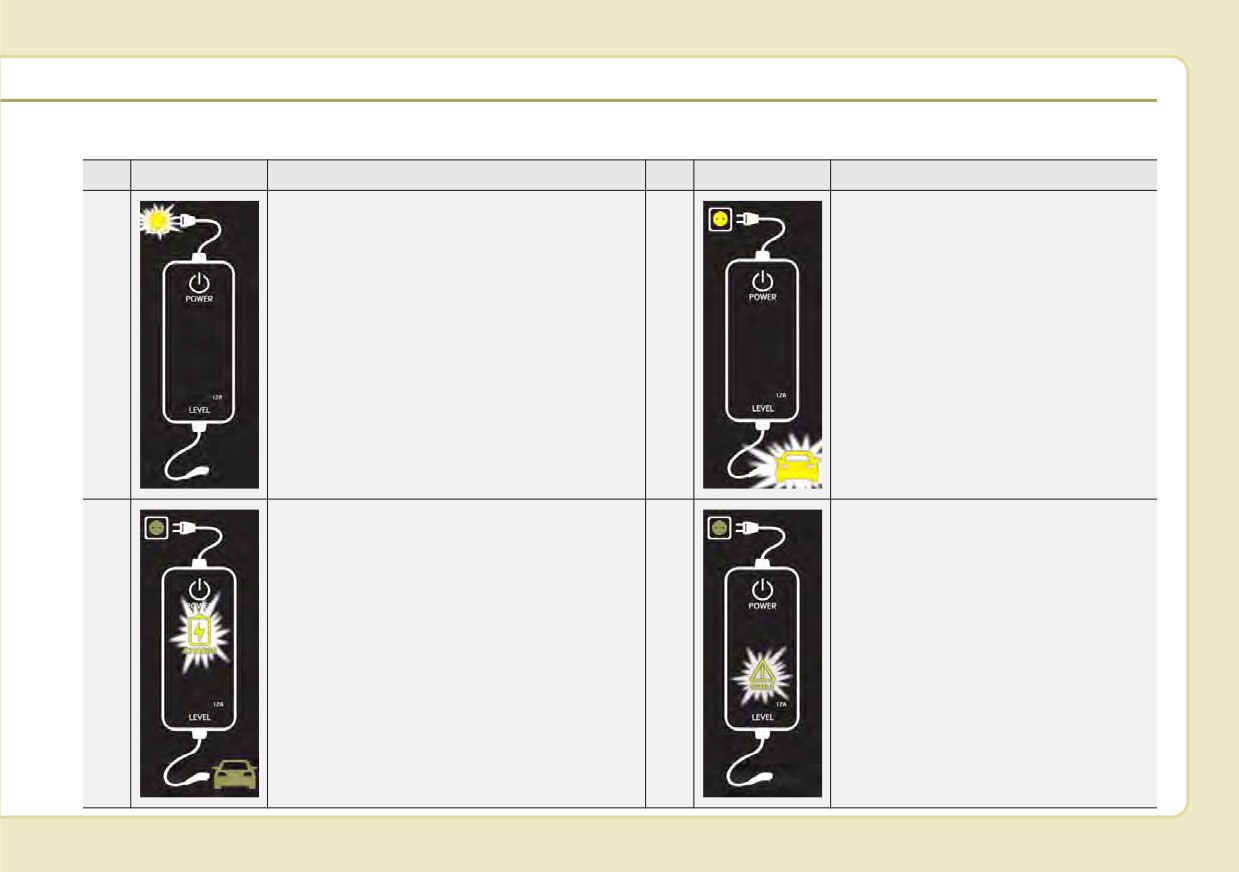
Charging Status Indicator Lamp for Portable Charging Cable
NO
Control Box
Status / Diagnosis / Countermeasure
NO
Control Box
Status / Diagnosis / Countermeasure
Have your vehicle inspected by an authorized
Kia dealer if any of the following occur:
• Charging connector plugged into vehicle
(Green ON)
- Charging connector plugged into the
1
• Plug temperature sensor failure
2
vehicle (Green ON)
(Green blink)
• Plug high temperature protection
(Red blink)
• Plug high temperature warning (Red ON)
Have your vehicle inspected by an
authorized Kia dealer if any of the fol-
- While charging
lowing occur:
3
• Charge indicator (Green blink)
4
- Before plugging charging connector
into the vehicle (Red blink)
• Vehicle indicator (Blue ON)
• Abnormal temperature
• ICCB (In-Cable Control Box) failure
H23
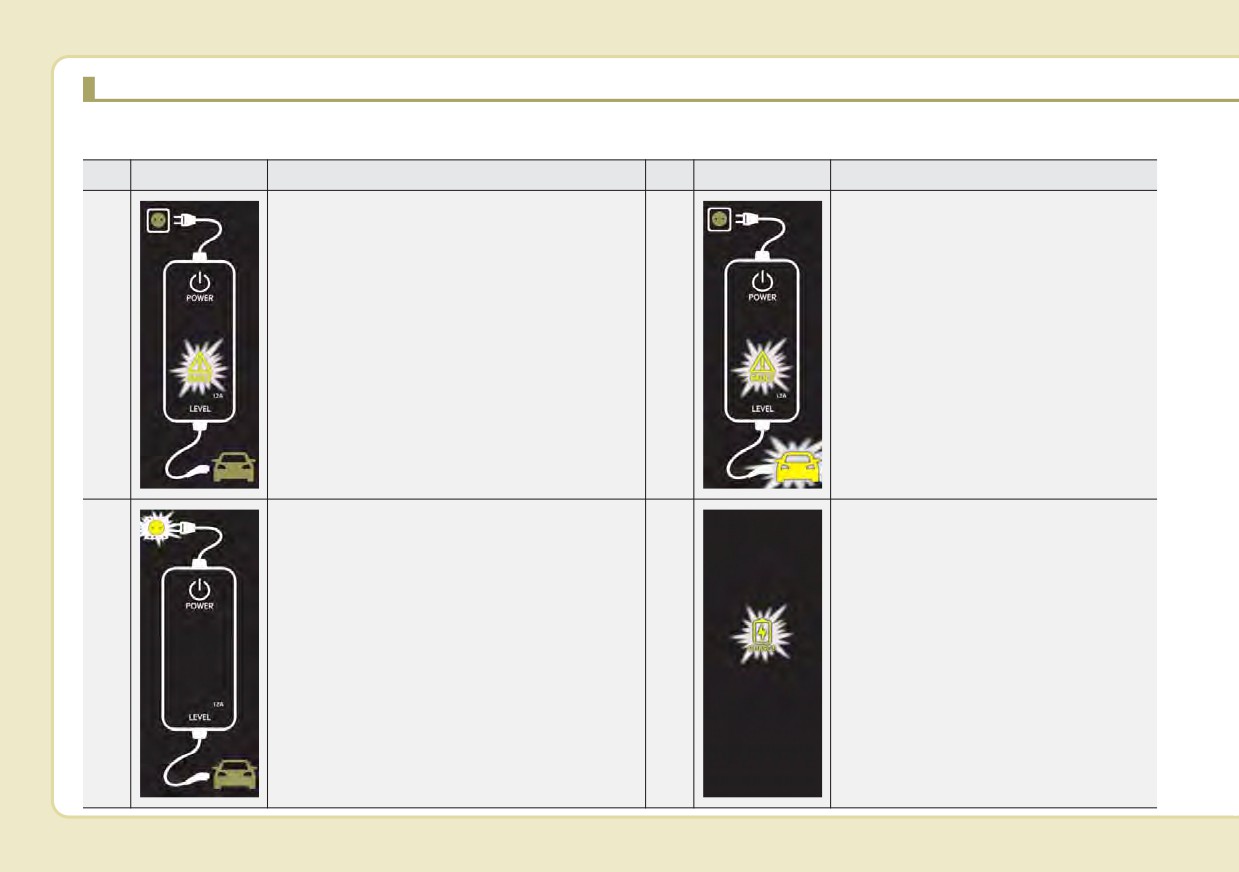
CHARGING THE PLUG-IN HYBRID VEHICLE (CONT.)
NO
Control Box
Status / Diagnosis / Countermeasure
NO
Control Box
Status / Diagnosis / Countermeasure
Have your vehicle inspected by an authorized
- After plugging charging connector
Kia dealer if any of the following occur:
into vehicle (Red blink)
- Plugged into the vehicle (Red blink)
• Communication failure
5
6
• Diagnostic device failure
• Current leakage
Have your vehicle inspected by an
• Abnormal temperature
authorized Kia dealer.
Have your vehicle inspected by an authorized
Kia dealer if any of the following occur:
• Plug temperature sensor failure
- Power saving mode
7
(Green blink)
8
• 3 minutes after charging starts
• Plug high temperature protection
(Green blink)
(Red blink)
• Plug high temperature warning (Red ON)
H24
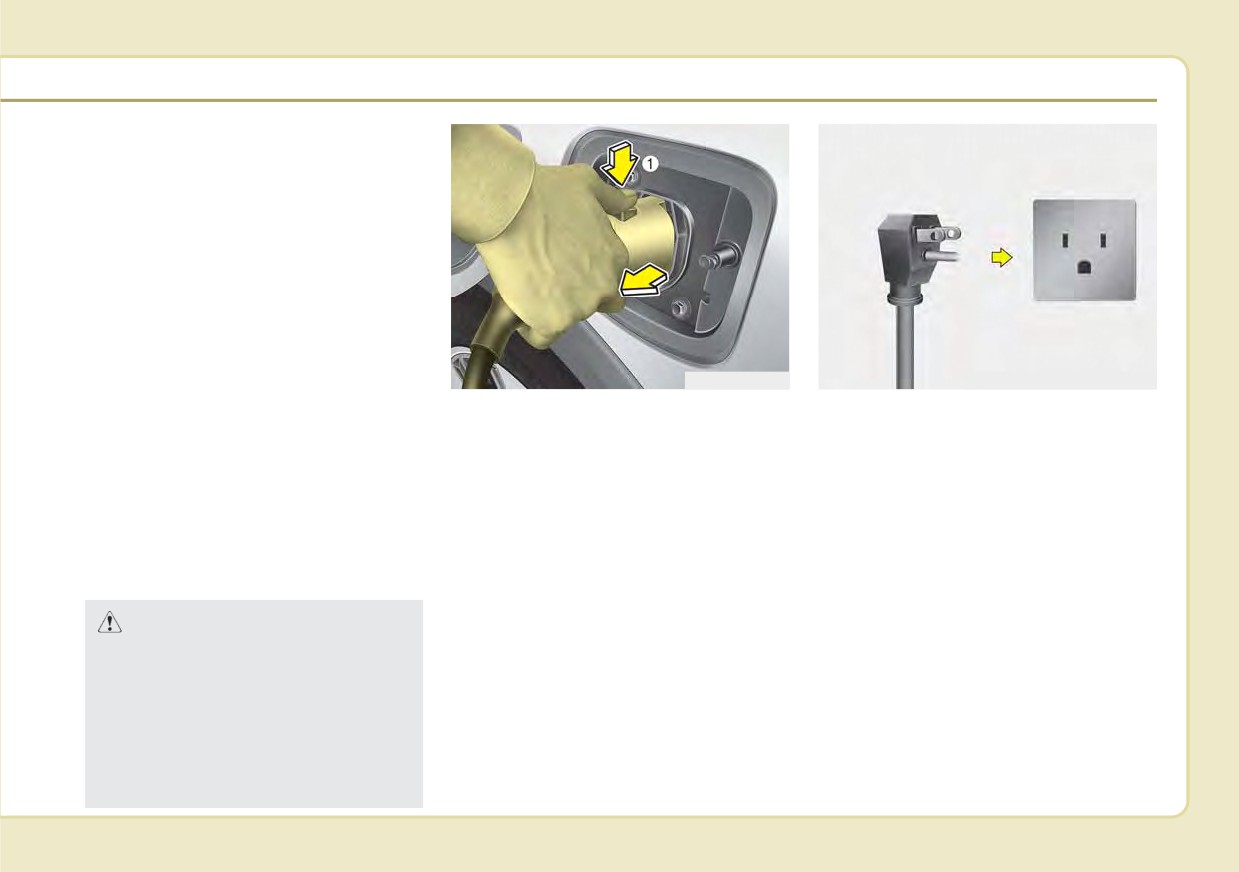
How to Disconnect the Portable
Charging Cable (ICCB: In-Cable
Control Box)
1. Before disconnecting the charging
connector, make sure the doors are
unlocked. When the door is locked,
the charging connector lock system
will not allow disconnection. To pre-
vent charging cable theft, the
charging connector cannot be dis-
connected from the inlet when the
doors are locked. Unlock all doors
ODEPQ017031
OJFHPQ016015N
to disconnect the charging connec-
2. While holding the charging con-
4. Disconnect the plug from the
tor from the inlet. However, if the
nector, pressing the locking
household electric outlet. Do not
vehicle is in the charging connector
release button(1) and then pull it
pull the cable when disconnecting
AUTO mode, the charging connec-
out.
the plug.
tor automatically unlocks from the
3. Make sure to securely close the
5. Close the protective cover for the
inlet when charging is completed.
charging door.
charging connector so that foreign
For more details, refer to “Charging
material cannot get into the terminal.
Connector AUTO/LOCK Mode” in
this chapter.
6. Put the charging cable inside the
storage bag to protect it.
CAUTION
In order to disconnect the
charging connector, unlock the
doors to release the charging
connector lock system. If not,
the charging connector and the
vehicle's charging inlet may be
damaged.
H25
CHARGING THE PLUG-IN HYBRID VEHICLE (CONT.)
Precautions for Portable
•
If the ICCB case and AC Charging
•
Charging with a worn out or dam-
Charging Cable
connector is damaged, cracked, or
aged household electric outlet can
(ICCB: In-Cable Control Box)
the wires are exposed in any way,
result in a risk of electric shock. If
do not use the portable charging
you are unsure about the condition
•
Use a portable charging cable that
cable.
of a household electric outlet, have
is certified by Kia.
it checked by a licensed electri-
•
Do not let children operate or touch
•
Do not try to repair, disassemble, or
cian.
the portable charging cable.
adjust the portable charging cable.
•
Stop using the portable charging
•
Keep the control box free of water.
•
Do not use an extension cord or
cable immediately if the household
adapter.
•
Keep the AC Charging connector or
electric outlet or any components
plug terminal free of foreign sub-
•
Stop using immediately if failure
are overheating or you smell burn-
stances.
warning light occurs.
ing.
•
Do not step on the cable or cord.
•
Do not touch the plug and charging
Do not pull the cable or cord and
connector with wet hands.
do not twist or bend it.
•
Do not touch the terminal part of the
•
Do not charge when there is light-
AC Charging connector and the AC
ning.
Charging inlet on the vehicle.
•
Do not drop the control box, charg-
•
Do not connect the charging con-
ing connector, or place a heavy
nector to voltage that does not
object on the control box.
comply with regulations.
•
Do not place an object that can
•
Do not use the portable charging
generate high temperatures near
cable if it is worn out, exposed, or
the charger when charging.
there exists any type of damage on
the portable charging cable.
H26
Action to be taken when
4. If the vehicle is properly charged
charging stops abruptly
when charged with another nor-
mally working charger, contact the
When the high voltage battery does
charger manufacturer.
not charge, check the followings:
5. If the vehicle does not charge
1. Check the charging setting for the
when charged with another nor-
vehicle.
mally working charger, we recom-
(e.g. When scheduled charging is
mend that you contact an author-
set, charging is not initiated imme-
ized Kia dealer.
diately when the AC charger or
portable charger (ICCB: In-Cable
Control Box) is connected.)
2. Check the operation status of AC
charger, portable charger.
(Charging Status Indicator Lamp
for Portable Charger, refer to
“Checking Charging Status” for
trickle charge in this chapter.)
❈ Actual method for indicating the
charging status may vary in accor-
dance with the charger manufac-
turer.
3. When the vehicle does not charge
and a warning message appears
on the cluster, check the corre-
sponding message. Refer to “LCD
Display Messages”, in this chap-
ter.
H27
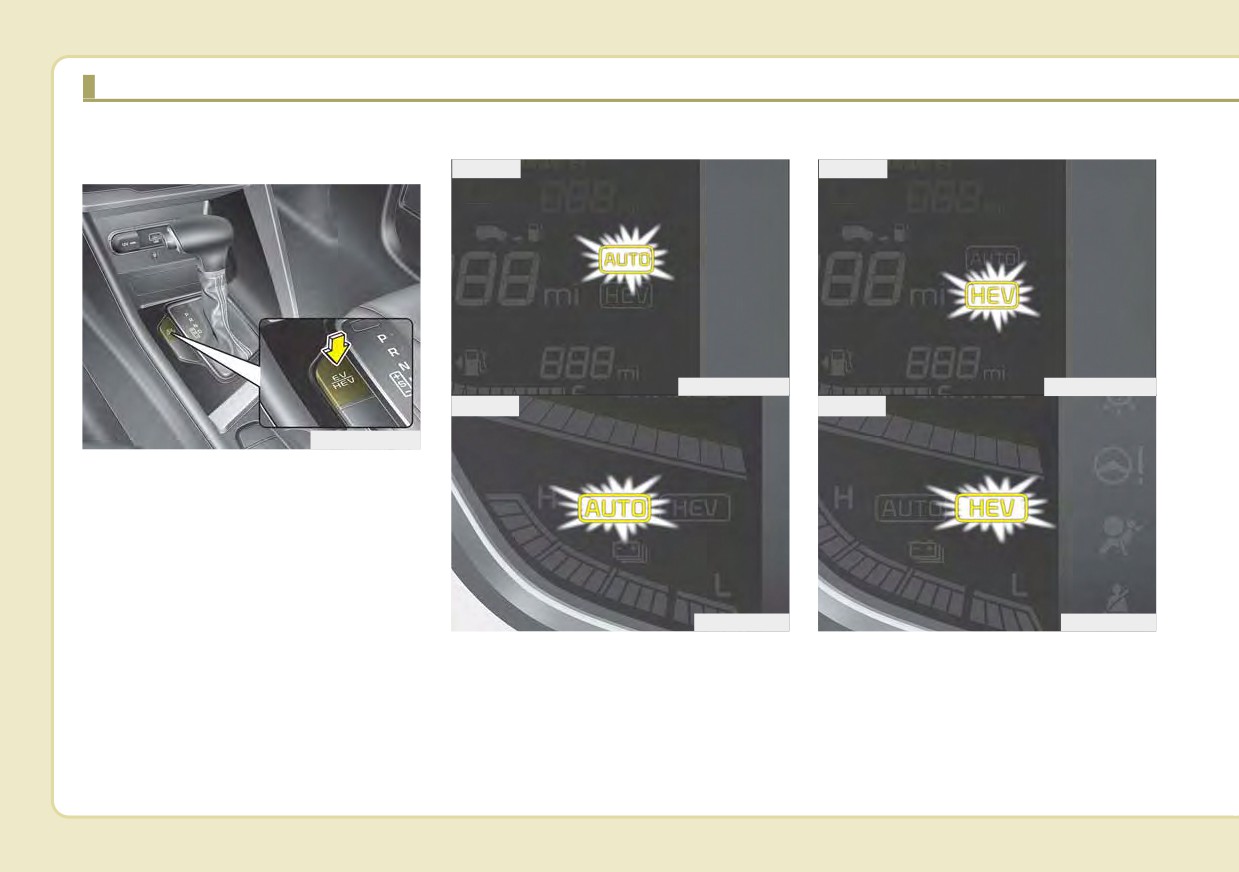
DRIVING THE HYBRID/PLUG-IN HYBRID VEHICLE
Changing plug-in hybrid mode
Automatic (AUTO) mode
Hybrid (CS) mode
(Plug-in hybrid vehicle)
■ Type A
■ Type A
ODEP059301N
ODEP059303N
■ Type B
■ Type B
ODEP059110N
■ EV/HEV Button
Whenever you press the [EV/HEV]
button, Plug-in hybrid system drive
mode will be changed as follows:
Electric
(CD) mode
- Automatic
(AUTO) mode - Hybrid (CS) mode.
Each time the mode is changed a
ODEP059302
ODEP059304
corresponding LED is displayed on
the instrument cluster as follows;
H28
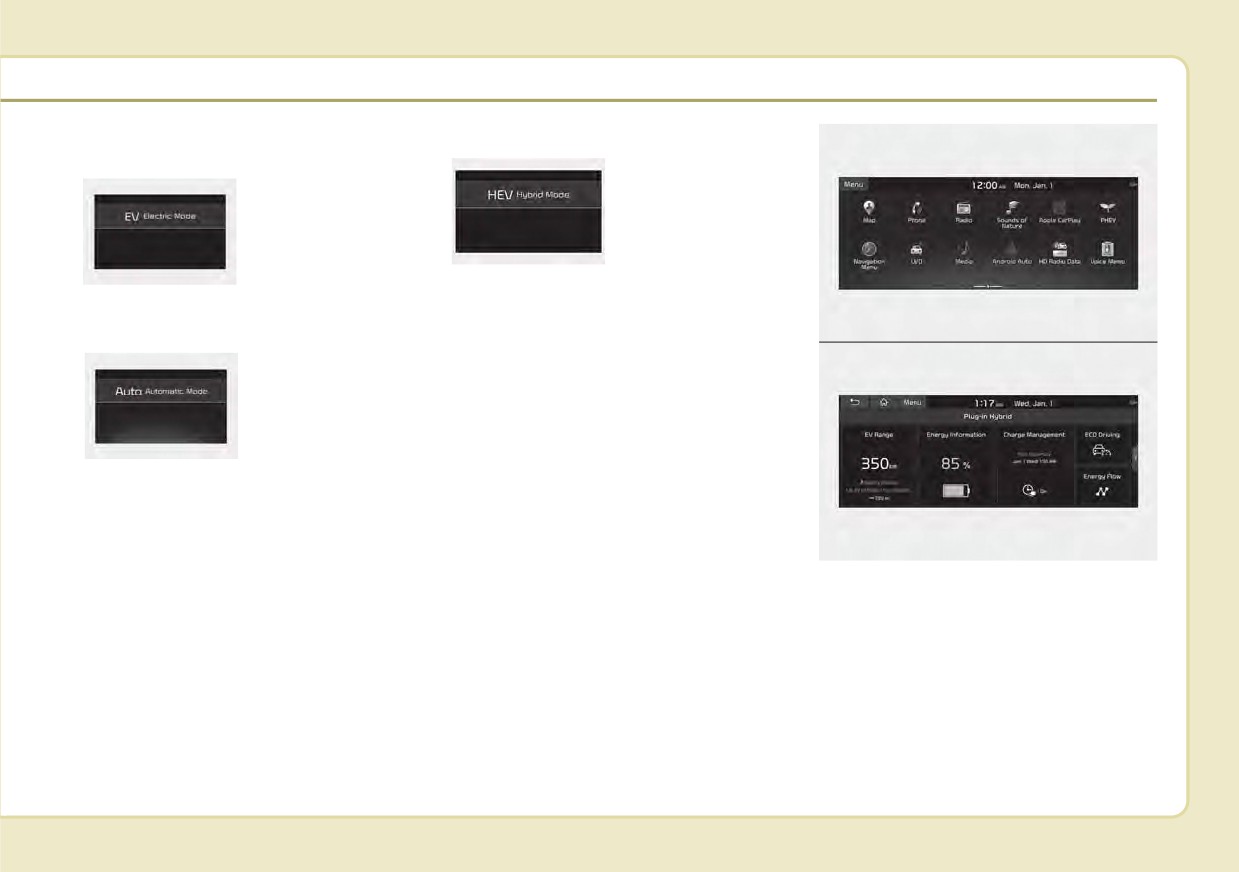
Plug-in hybrid mode message
• CS (Charge Sustaining, Hybrid) mode
• CD (Charge Depleting, Electric) mode
: The high-voltage
(hybrid) battery
: The high-voltage
and
gasoline
(hybrid) battery is
engine are used to
used to drive the
drive the vehicle.
vehicle.
ODEP049190L
ODEP049189L
A corresponding message is dis-
played to indicate the selected mode.
ODEPQ019129C
• AUTO (Automatic) mode
: The drive mode
will be automati-
cally
selected
from either Electric
(CD) mode or
ODEP049541L
Hybrid (CS) mode
by the system
according to the
driving condition.
ODEPQ019128C
■ ‘Infotainment System’ screen
Press [PHEV] on the [Home screen].
The Plug-in Hybrid menu consists of
five sections:
[EV range],
[Energy
information], [Charge management],
[ECO driving], [Energy flow].
For more information, please refer to
the Multimedia System Manual that
was separately supplied with your
vehicle.
H29
DRIVING THE HYBRID/PLUG-IN HYBRID VEHICLE (CONT.)
Warning and indicator lights
Hybrid system warning
EV Mode Indicator
light
EV
Ready Indicator
This warning light illuminates:
This indicator illuminates when the
When there is a malfunction with the
vehicle is driven by the electric motor.
hybrid system.
This indicator illuminates :
In this case, have your vehicle
Charging Cable
When the vehicle is ready to be driven.
inspected by an authorized Kia deal-
Connection Indicator
- ON : Normal driving is possible.
er.
(Plug-in hybrid vehicle)
- OFF : Normal driving is not possible,
or a problem has occurred.
When the warning light illuminates
This indicator illuminates in red when
- Blinking : Emergency driving.
while driving, or does not go OFF
the charging cable is connected.
after starting the vehicle, have the
system inspected by an authorized
When the ready indicator goes OFF
Kia dealer.
or blinks, there is a problem with the
system. In this case, have your vehi-
cle inspected by an authorized Kia
dealer.
H30
Coasting guide (if equipped)
• User settings
✽ NOTICE
A chime will sound and the coasting
Press the Engine Start/Stop button
Coasting guide is only a supplemen-
guide indicator will blink four times to
and put the shift lever in P(Park). In
tal system to assist with fuel-efficient
inform the driver when to take the foot
the User Settings Mode, select
driving. Thus, the operating condi-
off from the accelerator by anticipat-
Driving Assist, Coasting Guide, and
tions may be different in accordance
ing a decelerating event* based on
then On to turn on the system.
with traffic/road conditions
(i.e.
the analysis of driving routes and
Cancel the selection of coasting
driving in a traffic jam, driving on a
road conditions according to the nav-
guide to turn off the system. For the
slope, driving on a curve). Thus,
igation system. It encourages the
explanation of the system, press and
take the actual driving conditions
driver to remove foot from accelerator
hold the [OK] button.
into consideration, such as distances
pedal and allow coasting down the
from the vehicles ahead/ behind,
road with EV motor only. This helps
while referring to the coasting guide
• Operation conditions
prevent unnecessary fuel consump-
system as guidance.
tion and increases fuel efficiency.
To activate the system, take the fol-
lowing procedures. Enter your desti-
nation information on the navigation
❈ Examples of a deceleration events
and select the driving route. Then,
is going down an extended hill,
satisfy the following.
slowing down while approaching a
- The driving speed should be
toll
booth, and approaching
between 37 mph (60 km/h) and 99
reduced speed zones.
mph (160 km/h).
❈ The operating speed may vary due
to difference between instrument
cluster and navigation effected by
tire inflation level.
H31

DRIVING THE HYBRID/PLUG-IN HYBRID VEHICLE (CONT.)
LCD Display Messages
Check Hybrid system.
Refill inverter coolant
Do not start engine.
Check Hybrid system
This message is displayed when the
This message is displayed when the
inverter coolant is nearly empty.
This message is displayed when
hybrid battery power (SOC) level is
there is a problem with the hybrid
You should refill the inverter coolant.
low. A warning chime will sound until
control system.
In this case, have your vehicle inspect-
the problem is solved.
ed by an authorized Kia dealer.
Refrain from driving when the warn-
In this case, park the vehicle in a safe
ing message is displayed.
location and have your vehicle
In this case, have your vehicle inspect-
Stop vehicle and check brakes
inspected by an authorized Kia dealer.
ed by an authorized Kia dealer.
This message is displayed when a
failure occurs in the brake system.
Stop vehicle and check power
Check Hybrid system.
In this case, park the vehicle in a safe
Supply
Turn off engine
location and have your vehicle
This message is displayed when a
inspected by an authorized Kia dealer.
This message is displayed when
failure occurs in the power supply
there is a problem with the hybrid
system.
system. The "
" indicator will blink
In this case, park the vehicle in a safe
Check brakes
and a warning chime will sound until
location and have your vehicle
This message is displayed when the
the problem is solved.
inspected by an authorized Kia dealer.
brake performance is low or the
In this case, have your vehicle inspect-
regenerative brake does not work
ed by an authorized Kia dealer.
properly due to a failure in the brake
system.
In this case, it may take longer for the
brake pedal to operate and the brak-
ing distance may become longer.
H32
///////////////////////////////////////